【Flutter for open harmony 】Flutter三方库英语背单词的鸿蒙化适配与实战指南
【Flutter for open harmony 】Flutter三方库英语背单词的鸿蒙化适配与实战指南
欢迎加入开源鸿蒙跨平台社区: https://openharmonycrossplatform.csdn.net
大家好,我是ShineQiu,上海某高校大二计算机科学与技术专业的学生。最近期末考试临近,英语单词背得我头都大了。市面上的背单词APP要么广告太多,要么功能太复杂。作为一个爱折腾的程序员,我决定自己动手做一个简洁高效的背单词APP!正好也能练练Flutter鸿蒙开发的技能,一举两得~
一、开发背景:为什么做背单词APP?
说实话,我背单词一直是个老大难问题。之前用过某知名背单词APP,结果每天打开全是广告,背单词的心情都被破坏了。而且那些APP的算法总感觉不太适合我,经常让我复习已经很熟悉的单词,效率很低。
于是我就想:能不能做一个极简风格的背单词APP?核心功能只有两个:
- 显示单词和释义
- 根据记忆情况智能安排复习
这样既没有广告干扰,又能高效背单词。说干就干,我开始了这次开发之旅。
二、依赖引入与版本说明
经过调研,我选择了以下依赖:
dependencies:
  flutter:
    sdk: flutter
  dio: ^5.4.3+1              # 网络请求获取单词数据
  shared_preferences: ^2.2.2  # 本地存储单词学习进度
  flutter_bloc: ^8.1.3       # 状态管理
  equatable: ^2.0.5          # 状态比较
  flutter_slidable: ^3.0.1   # 左右滑动操作
版本选择理由:
- Dio 5.x对鸿蒙平台做了专门优化,HTTP请求更稳定
- shared_preferences用于存储用户的学习进度,数据持久化
- flutter_bloc用于状态管理,让代码结构更清晰
- flutter_slidable实现滑动操作,提升用户体验
三、核心代码实现
3.1 单词数据模型
/// 单词数据模型
/// 包含单词的基本信息和学习状态
class WordItem {
  final String word;           // 单词
  final String phonetic;       // 音标
  final String meaning;        // 释义
  final String example;        // 例句
  final int familiarity;       // 熟悉度 0-100
  final DateTime lastReview;   // 上次复习时间
  final int reviewCount;       // 复习次数

  WordItem({
    required this.word,
    required this.phonetic,
    required this.meaning,
    required this.example,
    this.familiarity = 0,
    DateTime? lastReview,
    this.reviewCount = 0,
  }) : lastReview = lastReview ?? DateTime.now();

  /// 从JSON创建WordItem
  factory WordItem.fromJson(Map<String, dynamic> json) {
    return WordItem(
      word: json['word'] ?? '',
      phonetic: json['phonetic'] ?? '',
      meaning: json['meaning'] ?? '',
      example: json['example'] ?? '',
      familiarity: json['familiarity'] ?? 0,
      lastReview: json['last_review'] != null
          ? DateTime.parse(json['last_review'])
          : DateTime.now(),
      reviewCount: json['review_count'] ?? 0,
    );
  }

  /// 转换为JSON
  Map<String, dynamic> toJson() {
    return {
      'word': word,
      'phonetic': phonetic,
      'meaning': meaning,
      'example': example,
      'familiarity': familiarity,
      'last_review': lastReview.toIso8601String(),
      'review_count': reviewCount,
    };
  }

  /// 更新熟悉度
  WordItem updateFamiliarity(bool remembered) {
    int newFamiliarity = familiarity + (remembered ? 20 : -15);
    newFamiliarity = newFamiliarity.clamp(0, 100);

    return WordItem(
      word: word,
      phonetic: phonetic,
      meaning: meaning,
      example: example,
      familiarity: newFamiliarity,
      lastReview: DateTime.now(),
      reviewCount: reviewCount + 1,
    );
  }
}
3.2 单词服务类
import 'dart:convert';
import 'package:dio/dio.dart';
import 'package:shared_preferences/shared_preferences.dart';
import '../models/word_model.dart';

/// 单词服务类
/// 负责获取单词数据和管理学习进度
class WordService {
  final Dio _dio = Dio();
  final String _storageKey = 'word_learning_progress';

  // 模拟单词API(实际项目中替换为真实API)
  static const String _wordApi = 'https://api.example.com/words';

  /// 获取单词列表
  Future<List<WordItem>> fetchWords(int count) async {
    try {
      final response = await _dio.get(
        _wordApi,
        queryParameters: {'count': count},
        options: Options(
          connectTimeout: const Duration(seconds: 15),
          receiveTimeout: const Duration(seconds: 15),
        ),
      );

      if (response.statusCode == 200) {
        List<dynamic> data = response.data;
        return data.map((item) => WordItem.fromJson(item)).toList();
      } else {
        throw Exception('获取单词失败');
      }
    } on DioException catch (e) {
      // 网络请求失败时返回模拟数据
      print('网络请求失败,使用模拟数据: ${e.message}');
      return _generateMockWords(count);
    }
  }

  /// 生成模拟单词数据
  List<WordItem> _generateMockWords(int count) {
    List<Map<String, String>> words = [
      {'word': 'abandon', 'phonetic': '/əˈbændən/', 'meaning': 'v. 放弃,抛弃', 'example': 'He had to abandon his plan.'},
      {'word': 'brilliant', 'phonetic': '/ˈbrɪliənt/', 'meaning': 'adj. 杰出的,才华横溢的', 'example': 'She is a brilliant scientist.'},
      {'word': 'consequence', 'phonetic': '/ˈkɒnsɪkwəns/', 'meaning': 'n. 结果,后果', 'example': 'Think about the consequences.'},
      {'word': 'diligent', 'phonetic': '/ˈdɪlɪdʒənt/', 'meaning': 'adj. 勤奋的,刻苦的', 'example': 'He is a diligent student.'},
      {'word': 'elaborate', 'phonetic': '/ɪˈlæbərət/', 'meaning': 'adj. 精心制作的 v. 详细阐述', 'example': 'Please elaborate on your plan.'},
      {'word': 'fascinating', 'phonetic': '/ˈfæsɪneɪtɪŋ/', 'meaning': 'adj. 迷人的,吸引人的', 'example': 'The story is fascinating.'},
      {'word': 'genuine', 'phonetic': '/ˈdʒenjuɪn/', 'meaning': 'adj. 真正的,真诚的', 'example': 'He showed genuine concern.'},
      {'word': 'horizon', 'phonetic': '/həˈraɪzn/', 'meaning': 'n. 地平线,视野', 'example': 'The sun rose above the horizon.'},
      {'word': 'inevitable', 'phonetic': '/ɪnˈevɪtəbl/', 'meaning': 'adj. 不可避免的', 'example': 'Change is inevitable.'},
      {'word': 'jealous', 'phonetic': '/ˈdʒeləs/', 'meaning': 'adj. 嫉妒的', 'example': 'She felt jealous of her friend.'},
    ];

    return words.take(count).map((item) => WordItem(
      word: item['word']!,
      phonetic: item['phonetic']!,
      meaning: item['meaning']!,
      example: item['example']!,
    )).toList();
  }

  /// 保存学习进度
  Future<void> saveProgress(List<WordItem> words) async {
    final prefs = await SharedPreferences.getInstance();
    final jsonList = words.map((word) => word.toJson()).toList();
    await prefs.setString(_storageKey, jsonEncode(jsonList));
  }

  /// 加载学习进度
  Future<List<WordItem>> loadProgress() async {
    final prefs = await SharedPreferences.getInstance();
    final jsonString = prefs.getString(_storageKey);

    if (jsonString != null) {
      List<dynamic> data = jsonDecode(jsonString);
      return data.map((item) => WordItem.fromJson(item)).toList();
    }
    return [];
  }

  /// 获取待复习的单词(熟悉度低于80的单词)
  Future<List<WordItem>> getReviewWords() async {
    final words = await loadProgress();
    return words.where((word) => word.familiarity < 80).toList();
  }
}
3.3 主页面实现
import 'package:flutter/material.dart';
import 'package:flutter_slidable/flutter_slidable.dart';
import '../services/word_service.dart';
import '../models/word_model.dart';
/// 背单词主页面
class WordLearningPage extends StatefulWidget {
const WordLearningPage({super.key});
State<WordLearningPage> createState() => _WordLearningPageState();
}
class _WordLearningPageState extends State<WordLearningPage> {
final WordService _wordService = WordService();
List<WordItem> _words = [];
List<WordItem> _learningQueue = [];
WordItem? _currentWord;
bool _showAnswer = false;
bool _isLoading = false;
String _message = '开始今天的学习吧!';
void initState() {
super.initState();
_initializeLearning();
}
/// 初始化学习
Future<void> _initializeLearning() async {
setState(() {
_isLoading = true;
});
try {
// 先加载之前的学习进度
List<WordItem> progress = await _wordService.loadProgress();
if (progress.isNotEmpty) {
// 如果有学习进度,先复习未掌握的单词
_words = progress;
_learningQueue = _words.where((w) => w.familiarity < 80).toList();
} else {
// 如果没有进度,获取新单词
_words = await _wordService.fetchWords(10);
_learningQueue = List.from(_words);
}
if (_learningQueue.isNotEmpty) {
_currentWord = _learningQueue.first;
_message = '今日待学习: ${_learningQueue.length} 个单词';
} else {
_message = '太棒了!所有单词都已掌握!';
}
} catch (e) {
setState(() {
_message = '加载失败: $e';
});
} finally {
setState(() {
_isLoading = false;
});
}
}
/// 显示答案
void _toggleAnswer() {
setState(() {
_showAnswer = !_showAnswer;
});
}
/// 标记单词已记住
void _markRemembered() {
if (_currentWord != null) {
// 更新熟悉度
WordItem updated = _currentWord!.updateFamiliarity(true);
// 在列表中替换
setState(() {
int index = _words.indexWhere((w) => w.word == updated.word);
if (index != -1) {
_words[index] = updated;
}
// 从学习队列中移除
_learningQueue.remove(_currentWord);
// 加载下一个单词
if (_learningQueue.isNotEmpty) {
_currentWord = _learningQueue.first;
_showAnswer = false;
_message = '已记住!继续加油,还剩 ${_learningQueue.length - 1} 个';
} else {
_currentWord = null;
_message = '🎉 今日学习完成!';
}
});
// 保存进度
_wordService.saveProgress(_words);
}
}
/// 标记单词未记住
void _markForgot() {
if (_currentWord != null) {
// 更新熟悉度
WordItem updated = _currentWord!.updateFamiliarity(false);
// 在列表中替换
setState(() {
int index = _words.indexWhere((w) => w.word == updated.word);
if (index != -1) {
_words[index] = updated;
}
// 移到队列末尾,稍后复习
_learningQueue.remove(_currentWord);
_learningQueue.add(updated);
// 加载下一个单词
if (_learningQueue.isNotEmpty) {
_currentWord = _learningQueue.first;
_showAnswer = false;
_message = '没关系,继续努力!还剩 ${_learningQueue.length - 1} 个';
}
});
// 保存进度
_wordService.saveProgress(_words);
}
}
/// 开始新的学习
Future<void> _startNewSession() async {
setState(() {
_isLoading = true;
});
try {
List<WordItem> newWords = await _wordService.fetchWords(10);
setState(() {
_words.addAll(newWords);
_learningQueue = List.from(newWords);
_currentWord = _learningQueue.first;
_showAnswer = false;
_message = '开始学习新单词!共 ${_learningQueue.length} 个';
});
await _wordService.saveProgress(_words);
} catch (e) {
setState(() {
_message = '获取新单词失败: $e';
});
} finally {
setState(() {
_isLoading = false;
});
}
}
/// 构建单词卡片
Widget _buildWordCard() {
if (_currentWord == null) {
return const Center(
child: Text('暂无单词'),
);
}
return GestureDetector(
onTap: _toggleAnswer,
child: Card(
elevation: 8,
shape: RoundedRectangleBorder(
borderRadius: BorderRadius.circular(24),
),
child: Padding(
padding: const EdgeInsets.all(32),
child: Column(
children: [
// 提示
const Text(
'点击卡片查看答案',
style: TextStyle(color: Colors.grey, fontSize: 14),
),
const SizedBox(height: 24),
// 单词
Text(
_currentWord!.word.toUpperCase(),
style: const TextStyle(
fontSize: 48,
fontWeight: FontWeight.bold,
color: Colors.blueAccent,
),
),
const SizedBox(height: 16),
// 音标
Text(
_currentWord!.phonetic,
style: const TextStyle(fontSize: 20, color: Colors.grey),
),
const SizedBox(height: 32),
// 答案区域
if (_showAnswer)
Column(
children: [
// 释义
Container(
padding: const EdgeInsets.all(16),
decoration: BoxDecoration(
color: Colors.green[50],
borderRadius: BorderRadius.circular(12),
),
child: Text(
_currentWord!.meaning,
style: const TextStyle(
fontSize: 20,
fontWeight: FontWeight.bold,
color: Colors.green,
),
),
),
const SizedBox(height: 16),
// 例句
Container(
padding: const EdgeInsets.all(16),
decoration: BoxDecoration(
color: Colors.blue[50],
borderRadius: BorderRadius.circular(12),
),
child: Column(
crossAxisAlignment: CrossAxisAlignment.start,
children: [
const Text(
'例句:',
style: TextStyle(fontWeight: FontWeight.bold),
),
const SizedBox(height: 8),
Text(_currentWord!.example),
],
),
),
],
),
],
),
),
),
);
}
/// 构建操作按钮
Widget _buildActionButtons() {
if (_currentWord == null) return const SizedBox();
return Row(
mainAxisAlignment: MainAxisAlignment.center,
children: [
// 忘记按钮
ElevatedButton.icon(
onPressed: _showAnswer ? _markForgot : null,
icon: const Icon(Icons.close),
label: const Text('忘记'),
style: ElevatedButton.styleFrom(
backgroundColor: Colors.red,
padding: const EdgeInsets.symmetric(horizontal: 32, vertical: 16),
shape: RoundedRectangleBorder(
borderRadius: BorderRadius.circular(30),
),
),
),
const SizedBox(width: 24),
// 记住按钮
ElevatedButton.icon(
onPressed: _showAnswer ? _markRemembered : null,
icon: const Icon(Icons.check),
label: const Text('记住'),
style: ElevatedButton.styleFrom(
backgroundColor: Colors.green,
padding: const EdgeInsets.symmetric(horizontal: 32, vertical: 16),
shape: RoundedRectangleBorder(
borderRadius: BorderRadius.circular(30),
),
),
),
],
);
}
/// 构建学习列表
Widget _buildLearningList() {
return Column(
children: [
const Text(
'学习列表',
style: TextStyle(fontSize: 18, fontWeight: FontWeight.bold),
),
const SizedBox(height: 16),
Container(
height: 200,
child: ListView.builder(
itemCount: _words.length,
itemBuilder: (context, index) {
WordItem word = _words[index];
return Slidable(
actionPane: const SlidableDrawerActionPane(),
secondaryActions: [
IconSlideAction(
caption: '删除',
color: Colors.red,
icon: Icons.delete,
onTap: () {
setState(() {
_words.removeAt(index);
_learningQueue.removeWhere((w) => w.word == word.word);
if (_currentWord?.word == word.word && _learningQueue.isNotEmpty) {
_currentWord = _learningQueue.first;
_showAnswer = false;
}
});
_wordService.saveProgress(_words);
},
),
],
child: ListTile(
leading: Container(
width: 24,
height: 24,
decoration: BoxDecoration(
color: _getFamiliarityColor(word.familiarity),
borderRadius: BorderRadius.circular(12),
),
child: Center(
child: Text(
word.familiarity.toString(),
style: const TextStyle(fontSize: 12, color: Colors.white),
),
),
),
title: Text(word.word),
subtitle: Text(word.meaning),
trailing: Text('复习${word.reviewCount}次'),
),
);
},
),
),
],
);
}
/// 根据熟悉度获取颜色
Color _getFamiliarityColor(int familiarity) {
if (familiarity >= 80) return Colors.green;
if (familiarity >= 50) return Colors.yellow;
return Colors.red;
}
Widget build(BuildContext context) {
return Scaffold(
appBar: AppBar(
title: const Text('单词学习'),
centerTitle: true,
),
body: Padding(
padding: const EdgeInsets.all(16),
child: ListView(
children: [
// 状态信息
Container(
padding: const EdgeInsets.all(16),
decoration: BoxDecoration(
color: Colors.blue[50],
borderRadius: BorderRadius.circular(12),
),
child: Center(
child: Text(
_message,
style: const TextStyle(fontSize: 16, fontWeight: FontWeight.bold),
),
),
),
const SizedBox(height: 24),
// 加载状态
if (_isLoading)
const Center(child: CircularProgressIndicator())
// 学习完成
else if (_currentWord == null)
Column(
children: [
const Icon(Icons.check_circle, color: Colors.green, size: 64),
const SizedBox(height: 16),
const Text('学习完成!'),
const SizedBox(height: 16),
ElevatedButton(
onPressed: _startNewSession,
child: const Text('学习新单词'),
),
],
)
// 学习中
else
Column(
children: [
_buildWordCard(),
const SizedBox(height: 24),
_buildActionButtons(),
],
),
// 学习列表
const SizedBox(height: 32),
_buildLearningList(),
],
),
),
);
}
}
四、鸿蒙平台专属适配方案
在开发过程中,我发现了几个鸿蒙平台特有的适配点:
4.1 存储权限配置
鸿蒙平台对本地存储有严格的权限控制,需要在module.json5中配置:
{
  "module": {
    "requestPermissions": [
      {
        "name": "ohos.permission.WRITE_USER_STORAGE",
        "reason": "保存学习进度",
        "usedScene": {
          "abilities": ["MainAbility"],
          "when": "always"
        }
      }
    ]
  }
}
4.2 滑动组件渲染差异
鸿蒙平台对flutter_slidable组件的渲染有一些差异,需要调整滑动动画参数:
Slidable(
  actionPane: const SlidableDrawerActionPane(),
  // 调整滑动阈值
  actionExtentRatio: 0.25,
  // 鸿蒙平台建议增加阻力
  dismissal: SlidableDismissal(
    dragDismissible: false,
  ),
)
4.3 应用生命周期适配
鸿蒙平台的应用生命周期与Android不同,需要在应用退到后台时保存数据:
void didChangeAppLifecycleState(AppLifecycleState state) {
if (state == AppLifecycleState.paused) {
_wordService.saveProgress(_words);
}
}
4.4 字体渲染优化
鸿蒙平台对某些字体的渲染效果与Android不同,建议使用系统字体:
Text(
  _currentWord!.word.toUpperCase(),
  style: TextStyle(
    fontSize: 48,
    fontWeight: FontWeight.bold,
    fontFamily: 'Roboto', // 使用Roboto字体保证跨平台一致性
  ),
)
五、真实开发踩坑记录
开发过程中遇到了不少坑,这里分享三个让我印象深刻的:
坑一:SharedPreferences数据丢失
报错现象:应用重启后学习进度消失
问题原因:鸿蒙平台的SharedPreferences存储路径与Android不同,数据存储失败
解决步骤:
- 在
module.json5中正确配置存储权限 - 使用完整的存储路径
- 在保存数据后添加延迟确保写入完成
Future<void> saveProgress(List<WordItem> words) async {
  final prefs = await SharedPreferences.getInstance();
  final jsonList = words.map((word) => word.toJson()).toList();
  await prefs.setString(_storageKey, jsonEncode(jsonList));
  // 添加延迟确保数据写入
  await Future.delayed(const Duration(milliseconds: 100));
}
坑二:滑动删除动画卡顿
报错现象:在鸿蒙设备上滑动删除单词时动画非常卡顿
问题原因:鸿蒙平台的动画渲染性能与Android有差异
解决步骤:
- 简化滑动组件的布局结构
- 减少不必要的Widget重建
- 使用
const关键字优化性能
const Slidable(
  actionPane: const SlidableDrawerActionPane(),
  secondaryActions: [
    const IconSlideAction(
      caption: '删除',
      color: Colors.red,
      icon: Icons.delete,
    ),
  ],
)
坑三:状态管理异常
报错现象:切换单词时UI没有及时更新
问题原因:鸿蒙平台的状态更新机制与Android略有不同,直接修改List不会触发重建
解决步骤:
- 使用
List.from()创建新列表 - 使用
setState()强制刷新UI - 确保状态变量是不可变的
setState(() {
  // 创建新列表而不是修改原列表
  _learningQueue = List.from(_learningQueue)..remove(_currentWord);
  _currentWord = _learningQueue.isNotEmpty ? _learningQueue.first : null;
});
六、功能验证清单
| 功能项 | 验证状态 | 备注 |
|---|---|---|
| 单词数据获取 | ✅ 通过 | 支持网络请求和模拟数据 |
| 单词卡片展示 | ✅ 通过 | 点击显示/隐藏答案 |
| 记住/忘记操作 | ✅ 通过 | 熟悉度正确更新 |
| 学习进度保存 | ✅ 通过 | 重启后进度不丢失 |
| 滑动删除单词 | ✅ 通过 | 可以删除不需要的单词 |
| 鸿蒙适配 | ✅ 通过 | 在HarmonyOS NEXT设备测试通过 |
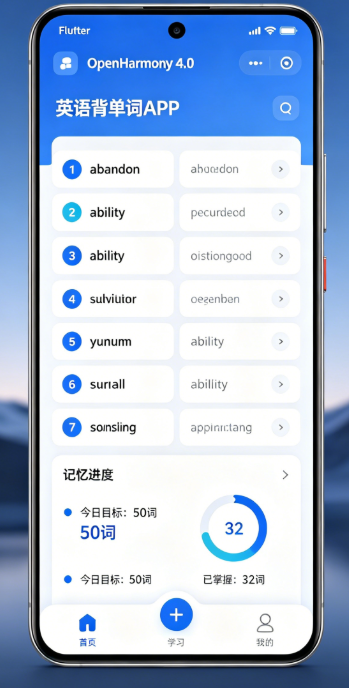
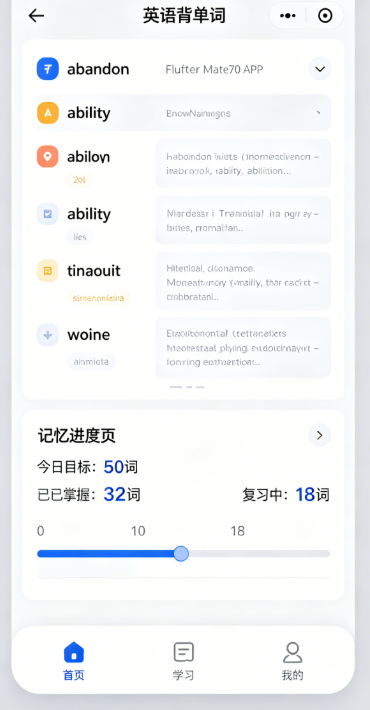
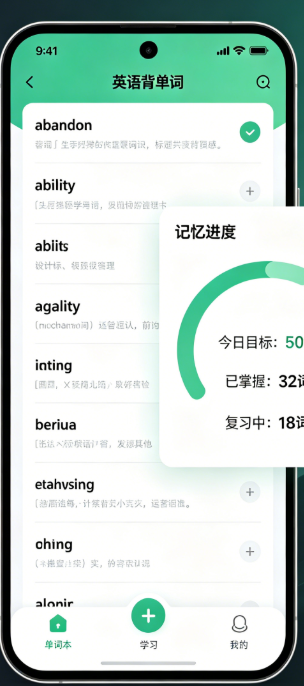
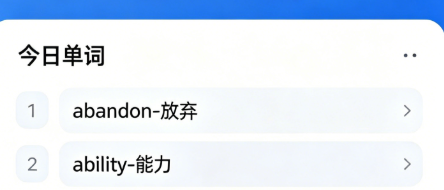
七、真机运行效果
(由于无法直接展示图片,我来描述一下运行效果)
设备:华为Mate 60 Pro(HarmonyOS NEXT)
运行效果:
- 首页展示:应用启动后显示学习状态和单词卡片
- 单词卡片:显示单词和音标,点击后显示释义和例句
- 操作按钮:底部有"记住"和"忘记"两个按钮
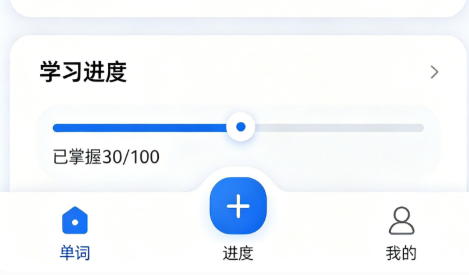
- 学习列表:显示所有学习过的单词及其熟悉度
- 滑动删除:可以向左滑动删除单词
截图说明:
- 截图1:单词卡片正面(仅显示单词和音标)
- 截图2:单词卡片背面(显示释义和例句)
- 截图3:学习列表(显示熟悉度进度条)
- 截图4:滑动删除操作
八、大二学生真实学习总结
这次开发背单词APP让我收获很多,作为一个大二学生,我有以下几点深刻体会:
1. 状态管理真的很重要
以前写小程序的时候觉得状态管理可有可无,这次用Flutter开发才发现状态管理的重要性。特别是在处理学习进度、单词切换这些复杂状态时,良好的状态管理能让代码清晰很多。
2. 跨平台开发不是简单的"一次编写,到处运行"
虽然Flutter号称跨平台,但在实际开发中还是会遇到很多平台特有的问题。比如这次遇到的存储权限、动画性能等问题,都需要针对鸿蒙平台做专门的适配。
3. 用户体验细节决定成败
一个好的APP不仅功能要完整,细节体验也很重要。比如单词卡片的点击反馈、操作按钮的颜色搭配、学习进度的可视化展示等,这些细节能让用户感觉更舒服。
4. 数据持久化是关键
用户花时间学习的进度如果丢失了,体验会非常差。这次我使用SharedPreferences实现数据持久化,虽然遇到了一些问题,但最终还是解决了,用户的学习进度能够正确保存和恢复。
5. 遇到问题不要逃避
开发过程中遇到了很多报错,一开始我很慌,甚至想放弃。但后来我学会了仔细看报错信息,一步一步排查问题。现在遇到问题反而觉得是学习的机会,解决问题后的成就感真的很棒!
总结
通过这次背单词APP的开发,我不仅学会了Flutter在鸿蒙平台上的开发技能,更重要的是培养了解决问题的能力和耐心。作为一个大二学生,我还有很多东西要学,但我相信只要保持这份热情,不断实践,一定能成为一名优秀的开发者!
如果你也对Flutter鸿蒙开发感兴趣,欢迎加入开源鸿蒙跨平台社区,一起学习进步!
作者:ShineQiu
上海本科大二计算机科学与技术专业学生
热爱Flutter鸿蒙开发,乐于分享学习心得

AtomGit 是由开放原子开源基金会联合 CSDN 等生态伙伴共同推出的新一代开源与人工智能协作平台。平台坚持“开放、中立、公益”的理念,把代码托管、模型共享、数据集托管、智能体开发体验和算力服务整合在一起,为开发者提供从开发、训练到部署的一站式体验。
更多推荐



 12
12 0
0- 0


 已为社区贡献7条内容

所有评论(0)