深入解析epoll ET模式与守护进程
引言
在前面的文章中,我们学习了 epoll 的基础用法和 LT 模式。本文将深入讲解两个重要主题:
-
epoll 的 ET 模式:边缘触发模式的编程要点与完整实现
-
守护进程:Linux 后台服务进程的原理与编写规范
ET 模式是 epoll 高性能的关键,而守护进程是服务器程序的最终运行形态。两者都是 Linux 服务端开发的核心技能。
第一部分:ET 模式深入
一、LT 与 ET 的本质区别
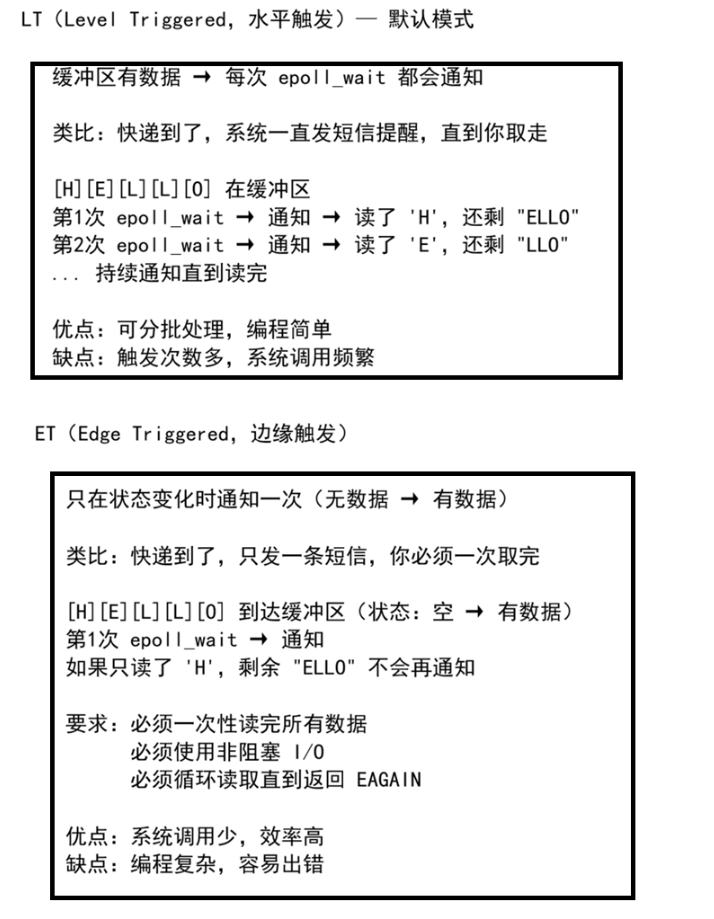
二、ET 模式编程三要素
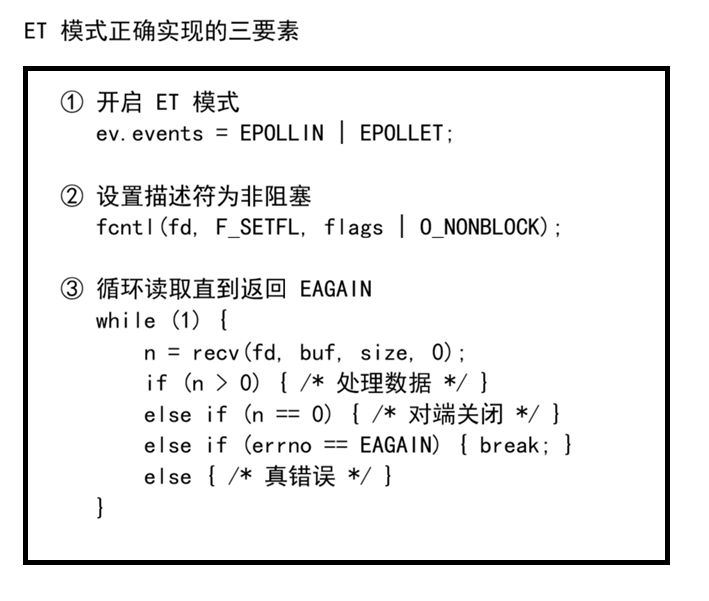
三、fcntl 设置非阻塞
#include <fcntl.h>
#include <errno.h>

/**
 * 将文件描述符设置为非阻塞模式
 * 原理:
 *   1. 用 F_GETFL 获取描述符现有的标志位
 *   2. 用按位或 (|) 加上 O_NONBLOCK 标志
 *   3. 用 F_SETFL 将新标志设置回去
 */
int set_nonblock(int fd) {
    int flags = fcntl(fd, F_GETFL, 0);
    if (flags == -1) {
        perror("fcntl F_GETFL error");
        return -1;
    }

    if (fcntl(fd, F_SETFL, flags | O_NONBLOCK) == -1) {
        perror("fcntl F_SETFL error");
        return -1;
    }

    return 0;
}关键理解:必须先用 F_GETFL 获取原有标志,不能直接设置。因为原有标志中可能包含 O_RDONLY、O_WRONLY 等访问模式标志,直接覆盖会导致描述符无法正常工作。
四、ET 模式下的错误码判断
#include <errno.h>

// 非阻塞模式下,recv 返回 -1 不一定是错误
// 需要检查 errno 来区分"无数据可读"和"真正的错误"

n = recv(fd, buf, size, 0);
if (n == -1) {
    if (errno == EAGAIN || errno == EWOULDBLOCK) {
        // 非阻塞模式下数据已读完,正常情况
        // EAGAIN 和 EWOULDBLOCK 在 Linux 下值相同
        break;
    } else {
        // 真正的错误
        perror("recv error");
        close(fd);
        break;
    }
}重要:EAGAIN 和 EWOULDBLOCK 在 Linux 下是同一个值,但为了可移植性,通常两个都检查。
五、完整 ET 模式服务器
#include <stdio.h>
#include <stdlib.h>
#include <string.h>
#include <unistd.h>
#include <fcntl.h>
#include <errno.h>
#include <sys/socket.h>
#include <netinet/in.h>
#include <arpa/inet.h>
#include <sys/epoll.h>

#define PORT 6000
#define MAX_EVENTS 10
#define BUFFER_SIZE 128

/* 设置非阻塞 */
int set_nonblock(int fd) {
    int flags = fcntl(fd, F_GETFL, 0);
    if (flags == -1) return -1;
    return fcntl(fd, F_SETFL, flags | O_NONBLOCK);
}

/* 创建监听套接字 */
int create_listen_socket() {
    int fd = socket(AF_INET, SOCK_STREAM, 0);
    if (fd == -1) { perror("socket"); return -1; }

    int opt = 1;
    setsockopt(fd, SOL_SOCKET, SO_REUSEADDR, &opt, sizeof(opt));

    struct sockaddr_in addr = {0};
    addr.sin_family = AF_INET;
    addr.sin_port = htons(PORT);
    addr.sin_addr.s_addr = htonl(INADDR_ANY);

    if (bind(fd, (struct sockaddr*)&addr, sizeof(addr)) == -1)
        { perror("bind"); close(fd); return -1; }
    if (listen(fd, 5) == -1)
        { perror("listen"); close(fd); return -1; }

    printf("ET 模式服务器启动,端口: %d\n", PORT);
    return fd;
}

/* 向 epoll 添加描述符(ET模式 + 非阻塞) */
void epoll_add_et(int epfd, int fd) {
    set_nonblock(fd);  // ② 必须设置为非阻塞

    struct epoll_event ev;
    ev.events = EPOLLIN | EPOLLET;  // ① 开启 ET 模式
    ev.data.fd = fd;

    if (epoll_ctl(epfd, EPOLL_CTL_ADD, fd, &ev) == -1)
        perror("epoll_ctl add");
}

/* ET 模式下的数据读取(循环读到 EAGAIN) */
void handle_et_read(int epfd, int fd) {
    char buffer[BUFFER_SIZE];

    while (1) {  // ③ 循环读取直到读完
        int n = recv(fd, buffer, BUFFER_SIZE - 1, 0);

        if (n > 0) {
            buffer[n] = '\0';
            printf("收到 fd=%d: %s\n", fd, buffer);
            send(fd, "OK", 2, 0);
        } else if (n == 0) {
            // 对端关闭连接
            printf("客户端关闭 fd=%d\n", fd);
            epoll_ctl(epfd, EPOLL_CTL_DEL, fd, NULL);
            close(fd);
            break;
        } else {
            // n == -1,需要判断 errno
            if (errno == EAGAIN || errno == EWOULDBLOCK) {
                // 数据已读完(非阻塞正常返回)
                break;
            } else {
                // 真正的错误
                perror("recv error");
                epoll_ctl(epfd, EPOLL_CTL_DEL, fd, NULL);
                close(fd);
                break;
            }
        }
    }
}

int main() {
    int listen_fd = create_listen_socket();
    if (listen_fd == -1) exit(1);

    int epfd = epoll_create(1);
    if (epfd == -1) { perror("epoll_create"); exit(1); }

    epoll_add_et(epfd, listen_fd);

    struct epoll_event evs[MAX_EVENTS];

    while (1) {
        int n = epoll_wait(epfd, evs, MAX_EVENTS, -1);
        if (n == -1) { perror("epoll_wait"); break; }

        for (int i = 0; i < n; i++) {
            int fd = evs[i].data.fd;

            if (fd == listen_fd) {
                // 监听套接字就绪
                while (1) {  // accept 也需要循环(ET 模式)
                    int client_fd = accept(listen_fd, NULL, NULL);
                    if (client_fd == -1) {
                        if (errno == EAGAIN) break;
                        perror("accept"); break;
                    }
                    printf("新连接: fd=%d\n", client_fd);
                    epoll_add_et(epfd, client_fd);
                }
            } else {
                // 客户端数据就绪
                handle_et_read(epfd, fd);
            }
        }
    }

    close(listen_fd);
    close(epfd);
    return 0;
}注意:ET 模式下,accept 也需要循环调用直到返回 EAGAIN,因为多个连接可能同时到达,但 epoll 只通知一次。
第二部分:守护进程
一、什么是守护进程
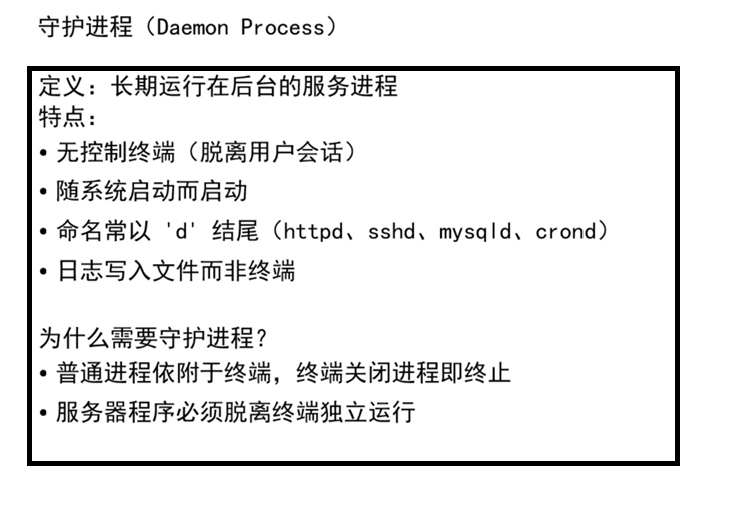
二、核心概念:会话、进程组、终端
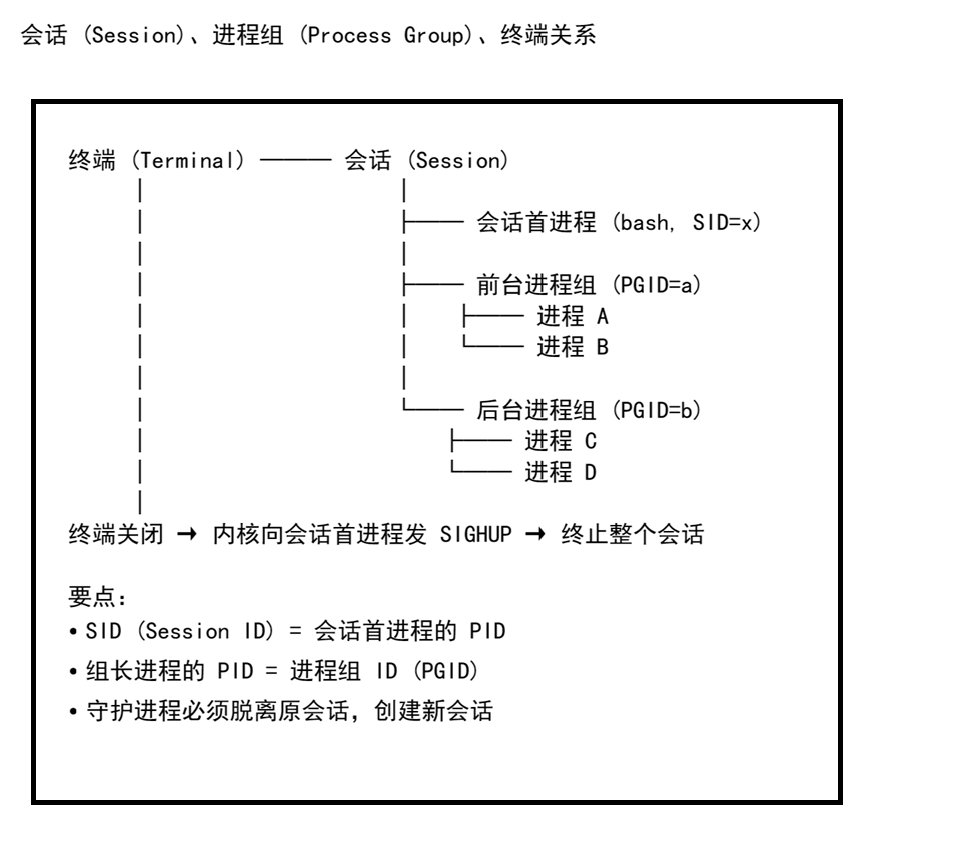
| 概念 | 说明 |
|---|---|
| 会话 (Session) | 一个终端对应一个会话,包含多个进程组 |
| 会话首进程 | 终端中的第一个进程(通常是 bash),其 PID 即 SID |
| 进程组 | 一组相关进程的集合,组长 PID 即 PGID |
| 组长进程 | 进程组中第一个创建的进程 |
三、守护进程创建步骤
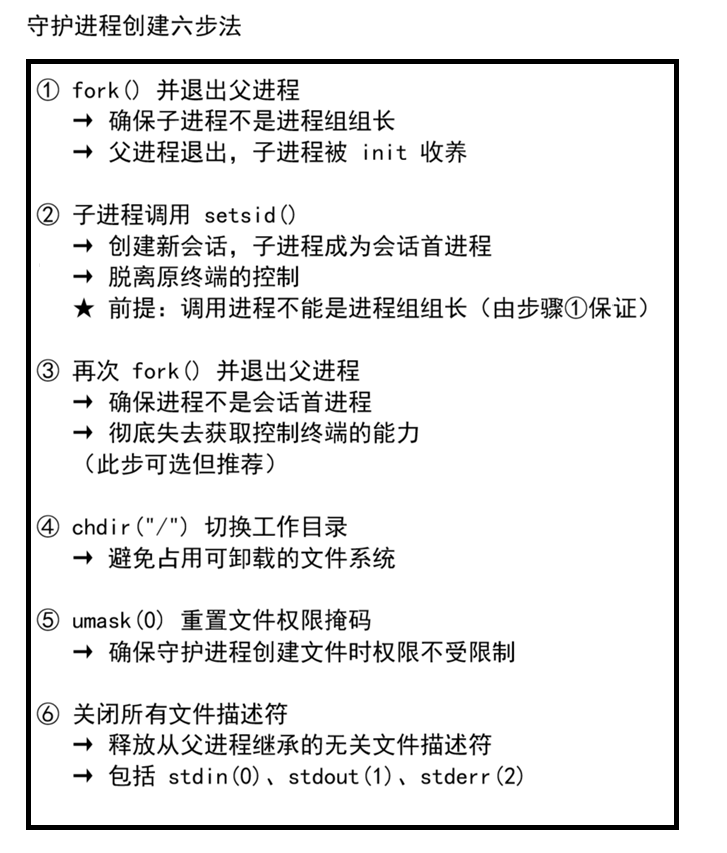
四、完整守护进程实现
#include <stdio.h>
#include <stdlib.h>
#include <unistd.h>
#include <fcntl.h>
#include <sys/stat.h>
#include <time.h>
#include <string.h>

/**
 * 创建守护进程
 * 成功返回 0,失败返回 -1
 */
int daemonize() {
    // ① 第一次 fork,退出父进程
    pid_t pid = fork();
    if (pid < 0) {
        return -1;
    } else if (pid > 0) {
        exit(0);  // 父进程退出
    }
    // 现在子进程运行,且不是进程组组长

    // ② 创建新会话
    if (setsid() == -1) {
        return -1;
    }
    // 现在子进程是:新会话的首进程 + 新进程组的组长
    // 已经脱离原终端控制

    // ③ 第二次 fork,退出父进程(确保不是会话首进程)
    pid = fork();
    if (pid < 0) {
        return -1;
    } else if (pid > 0) {
        exit(0);  // 一级子进程退出
    }
    // 现在二级子进程运行,不是会话首进程,无法获取控制终端

    // ④ 切换工作目录到根目录
    chdir("/");

    // ⑤ 清除文件权限掩码
    umask(0);

    // ⑥ 关闭所有文件描述符
    int maxfd = getdtablesize();  // 获取描述符表大小
    for (int i = 0; i < maxfd; i++) {
        close(i);
    }
    // stdin(0)、stdout(1)、stderr(2) 都已被关闭

    return 0;
}
五、守护进程日志写入
守护进程没有终端,调试信息必须写入日志文件:
/**
 * 守护进程主逻辑:周期性写入时间到日志文件
 */
int main() {
    // 创建守护进程
    if (daemonize() == -1) {
        exit(1);
    }

    // 守护进程主循环
    while (1) {
        // 获取当前时间
        time_t now = time(NULL);
        struct tm* tm_info = localtime(&now);

        // 打开日志文件(追加模式,/tmp 对所有用户可写)
        FILE* fp = fopen("/tmp/daemon.log", "a");
        if (fp != NULL) {
            // 写入格式化时间
            fprintf(fp, "守护进程运行中: %s", asctime(tm_info));
            fclose(fp);
        }

        // 休眠 5 秒
        sleep(5);
    }

    return 0;
}日志相关要点:
| 要点 | 说明 |
|---|---|
| 日志路径 | 通常放在 /var/log/ 或 /tmp/ |
| 打开模式 | "a" 追加模式,不覆盖历史记录 |
| 时间格式 | asctime(localtime(&now)) 获取可读时间 |
| 实时查看 | tail -f /tmp/daemon.log 动态监控 |
六、面试常见问题
| 问题 | 答案要点 |
|---|---|
| 为什么先 fork 再 setsid? | setsid 要求调用进程不能是进程组组长。fork 后子进程不是组长,满足条件 |
| 为什么需要二次 fork? | 第一次 fork+setsid 后子进程成为会话首进程,可能重新获取控制终端。二次 fork 后不再是会话首进程,彻底杜绝 |
| 为什么要 chdir("/")? | 守护进程可能从 U 盘等目录启动,切换到根目录避免占用可卸载的文件系统 |
| 为什么要 umask(0)? | 继承的 umask 可能限制文件权限,清零确保守护进程创建文件时权限完全由 open 参数控制 |
| 为什么要关闭所有 fd? | 释放从父进程继承的无关描述符,节省系统资源 |
七、守护进程的查看与终止
# 查看守护进程
ps -ef | grep daemon_name# 查看进程的会话 ID
ps -eo pid,sid,comm | grep daemon_name# 终止守护进程(只能通过 kill)
kill <PID>
kill -9 <PID> # 强制终止# 实时查看日志
tail -f /tmp/daemon.log
总结
一、ET 模式要点速查
| 要素 | 操作 |
|---|---|
| 开启 ET | ev.events = EPOLLIN | EPOLLET |
| 设置非阻塞 | fcntl(fd, F_SETFL, fcntl(fd, F_GETFL) | O_NONBLOCK) |
| 循环读取 | while(1) { recv() ... if(errno==EAGAIN) break; } |
| accept 处理 | ET 下 accept 也需循环到 EAGAIN |
二、守护进程要点速查
守护进程 = 两次 fork + setsid + chdir("/") + umask(0) + close(fd)
第一次 fork → 子进程不是组长,为 setsid 准备
setsid() → 创建新会话,脱离终端
第二次 fork → 确保不是会话首进程
chdir("/") → 切换工作目录
umask(0) → 清除权限掩码
close(fd) → 关闭所有文件描述符
三、LT vs ET 选择
| 场景 | 推荐模式 |
|---|---|
| 简单服务器、学习目的 | LT(默认模式) |
| 高并发、追求极致性能 | ET 模式 |
| 大数据量传输 | ET(减少系统调用) |
| 快速原型开发 | LT(编程简单) |

AtomGit 是由开放原子开源基金会联合 CSDN 等生态伙伴共同推出的新一代开源与人工智能协作平台。平台坚持“开放、中立、公益”的理念,把代码托管、模型共享、数据集托管、智能体开发体验和算力服务整合在一起,为开发者提供从开发、训练到部署的一站式体验。
更多推荐



 17
17 0
0- 0


 已为社区贡献18条内容

所有评论(0)