How to Create Magical AI-Generated Storybooks for Your Kids — Free with FlipFlow
How to Create Magical AI-Generated Storybooks for Your Kids — Free with FlipFlow
Turn bedtime stories into beautiful, illustrated flipbooks in minutes — no design skills needed.
Every parent knows the feeling: it’s 8 PM, your child is tucked in, eyes wide open, and they’re asking for “just one more story.” You’ve already told the one about the brave little bear three times this week. What if you could turn that story — your story, the one you made up — into a beautifully illustrated, page-turning storybook that your child could flip through on screen?
That’s exactly what FlipFlow makes possible. And the best part? You can try it for free, right now, at flippingbooks.org.
What Is FlipFlow?
FlipFlow is an online flipbook maker that converts PDF, Word, PowerPoint, and image files into stunning, interactive page-turning flipbooks. But beyond that core conversion capability, FlipFlow has built something truly special for parents and families: an AI storybook generator that creates fully illustrated, ready-to-read flipbooks from nothing more than a text description.
If you’d like a deeper introduction to the platform, check out our earlier post: What Is FlipFlow?
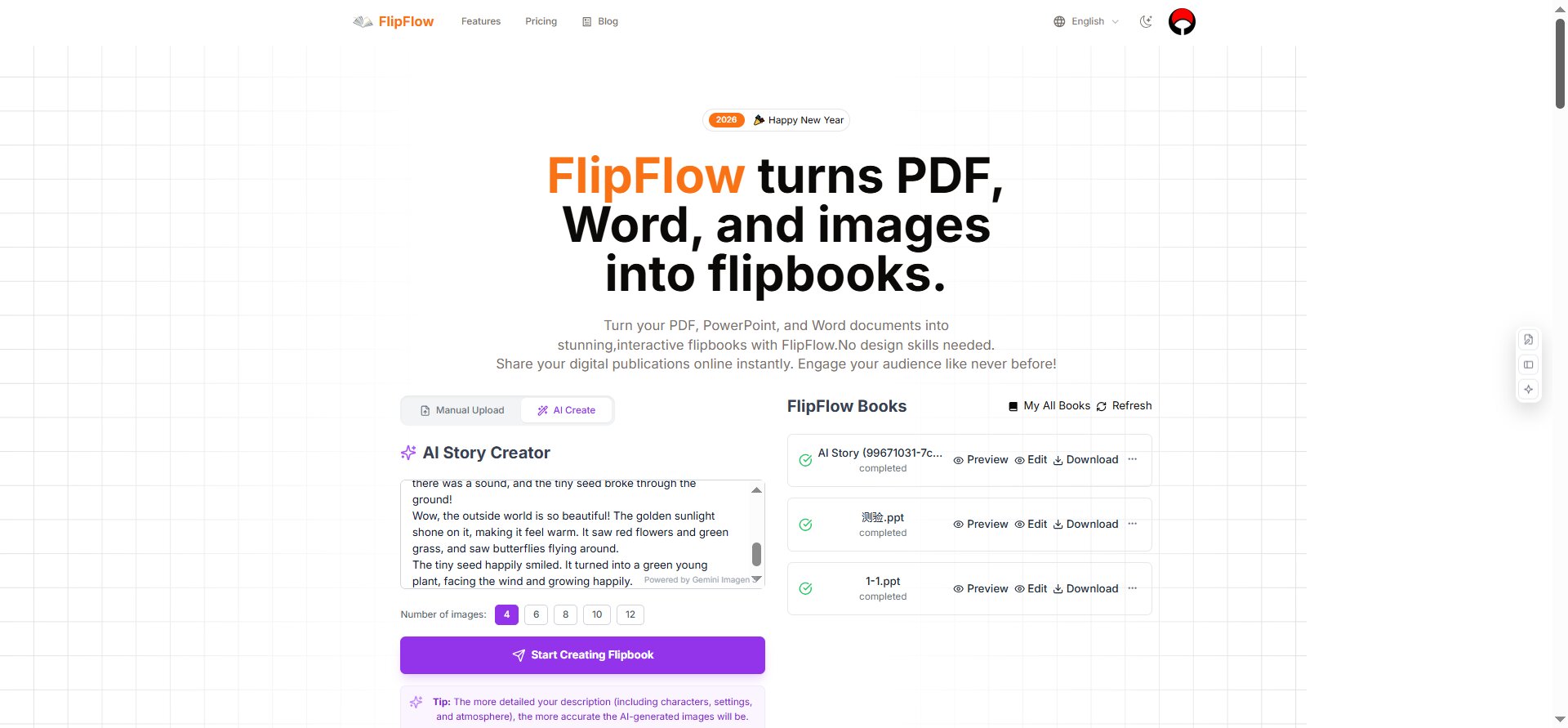
The FlipFlow AI Story Creator: type your story idea, choose your image count, and hit Create.
The Magic Behind AI-Generated Storybooks
From Text Prompt to Illustrated Flipbook in Minutes
Here’s how the AI storybook creation works:
- Open FlipFlow and click “AI Create” on the homepage.
- Type your story idea into the AI Story Creator box. The more detail you give — characters, setting, mood, theme — the richer the illustrations will be.
- Choose the number of images (4, 6, 8, 10, or 12 pages).
- Hit “Start Creating Flipbook” and watch FlipFlow’s AI bring your story to life.
Under the hood, FlipFlow uses Google’s Gemini 2.5 Flash image generation model — one of the most advanced text-to-image systems available today. The result is a series of warm, vivid, storybook-quality illustrations perfectly matched to your narrative.
The AI doesn’t just generate random images. It reads your story, understands the characters and arc, and produces a cohesive, illustrated sequence — the kind of thing that used to require a professional illustrator and weeks of work.
Perfect for Bedtime Stories
Imagine telling the AI: “A little fox named Amber discovers a hidden door in the forest. She opens it and finds a world made entirely of clouds and candy. She makes a new friend — a tiny dragon who can’t fly — and together they learn that real magic comes from believing in yourself.”
Minutes later, you have a 10-page illustrated flipbook, complete with page-turning animations, that your child can read on any device. You can save it, share it, and come back to it night after night.
Parents have used FlipFlow’s AI storybook feature for:
- Classic fairy tale retellings with a personal twist
- Educational stories about science, animals, or history
- Personalized stories where the main character shares your child’s name
- Multilingual stories for bilingual families
- Cultural stories that reflect your family’s heritage
How Many Free AI Storybooks Can You Create?
New users get 3 free AI storybook creations to try the feature without any payment or commitment. This is enough to get a real feel for what’s possible — create one story per child, or experiment with different styles and themes.
After your 3 free creations, FlipFlow will guide you toward a paid subscription. Given how much time and creative energy this tool saves, most parents find the subscription an easy decision — but the free trial lets you experience the magic first.
Not Just for AI — A Full Flipbook Platform
The AI storybook generator is the headline feature for parents, but FlipFlow is a complete flipbook creation platform. Here’s a quick look at what the platform offers:
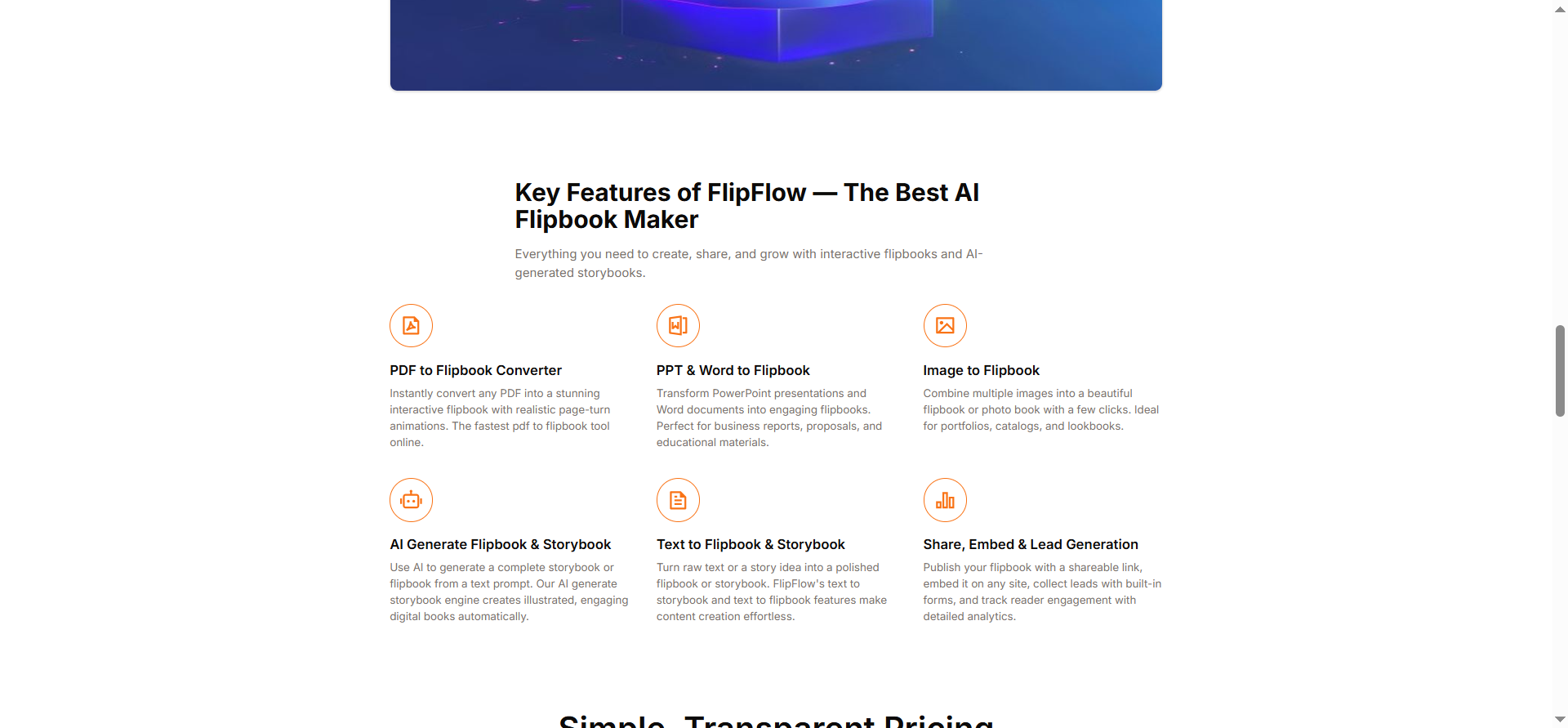
FlipFlow’s full feature set: PDF converter, PPT converter, image flipbook, AI generator, and more.
Convert Existing Files to Flipbooks
Already have a bedtime story as a Word document or illustrated PDF? Upload it to FlipFlow and it converts instantly into an interactive flipbook with realistic page-turning animations. This works with:
- PDF files — the most popular format
- PowerPoint (PPT/PPTX) — great for educators and parents who build slide-based stories
- Word documents (DOC/DOCX)
- Images — combine photos or illustrations into a flipbook or photo book
Rich Style Customization
Once your flipbook is created — whether by AI or file upload — you have an extensive set of style options to make it feel just right:
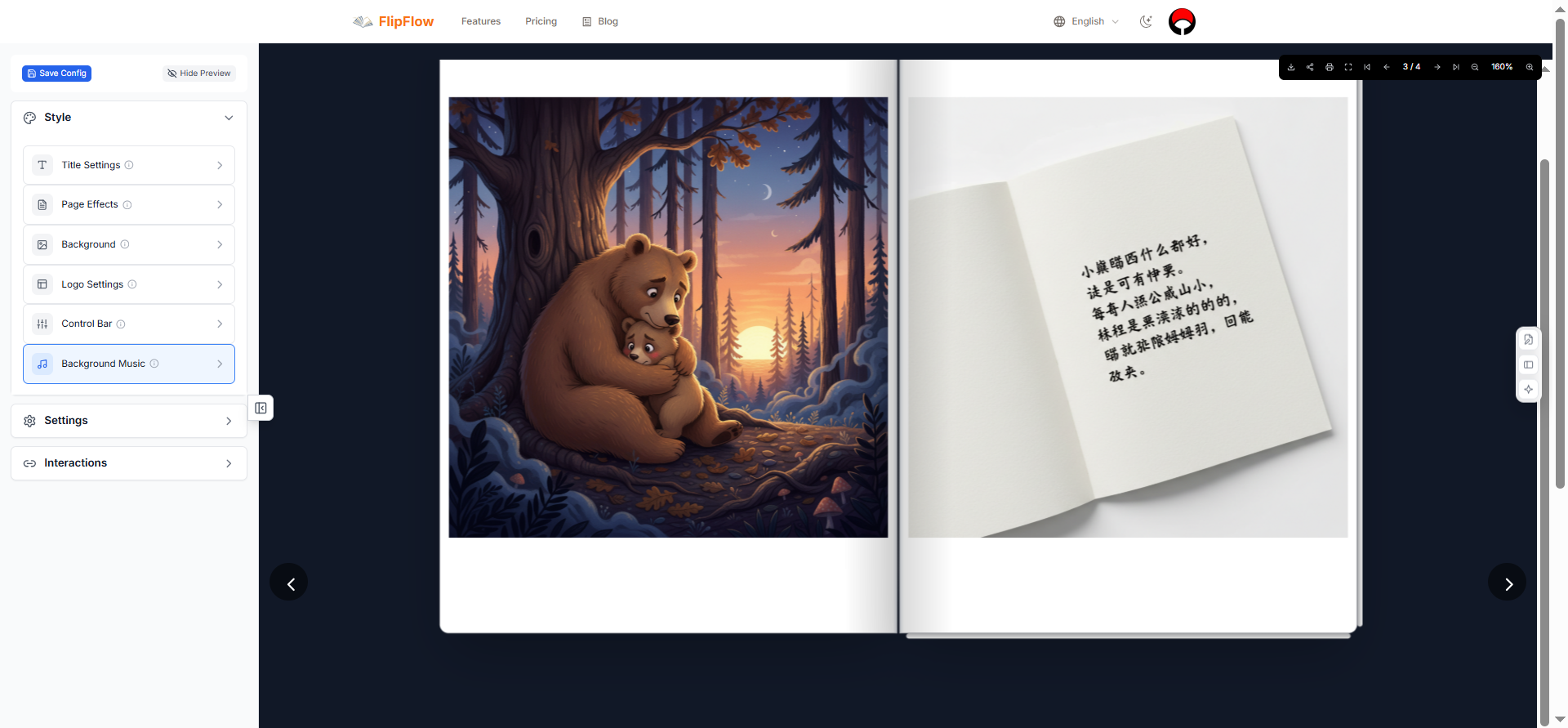
Style options include 8 page effects, background settings, logo upload, control bar themes, and more.
Choose from 8 page-turning effects: Magazine, Book, Photo Album, Notebook, Slide, Card, Cover Flow, and Single Page. Each can be configured with:
- Page-turn sound effects (a lovely touch for kids)
- Page depth, edge style, and shadow settings
- Reading direction (left-to-right or right-to-left)
- Rounded paper corners
- Custom backgrounds — images, colors, gradients, with transparency and blur controls
- Your own logo — upload it, position it, resize it
The control bar (the navigation toolbar your readers see) can also be themed: choose from Simple, Round, Colorful, Cartoon, Spring, Summer, Autumn, or Winter styles. The Cartoon theme is especially popular for children’s storybooks.
Interactive Hotspots and Embedded Media
One of FlipFlow’s most powerful features — and completely free — is the Interactions system. You can draw a region on any page of your flipbook and configure it to:
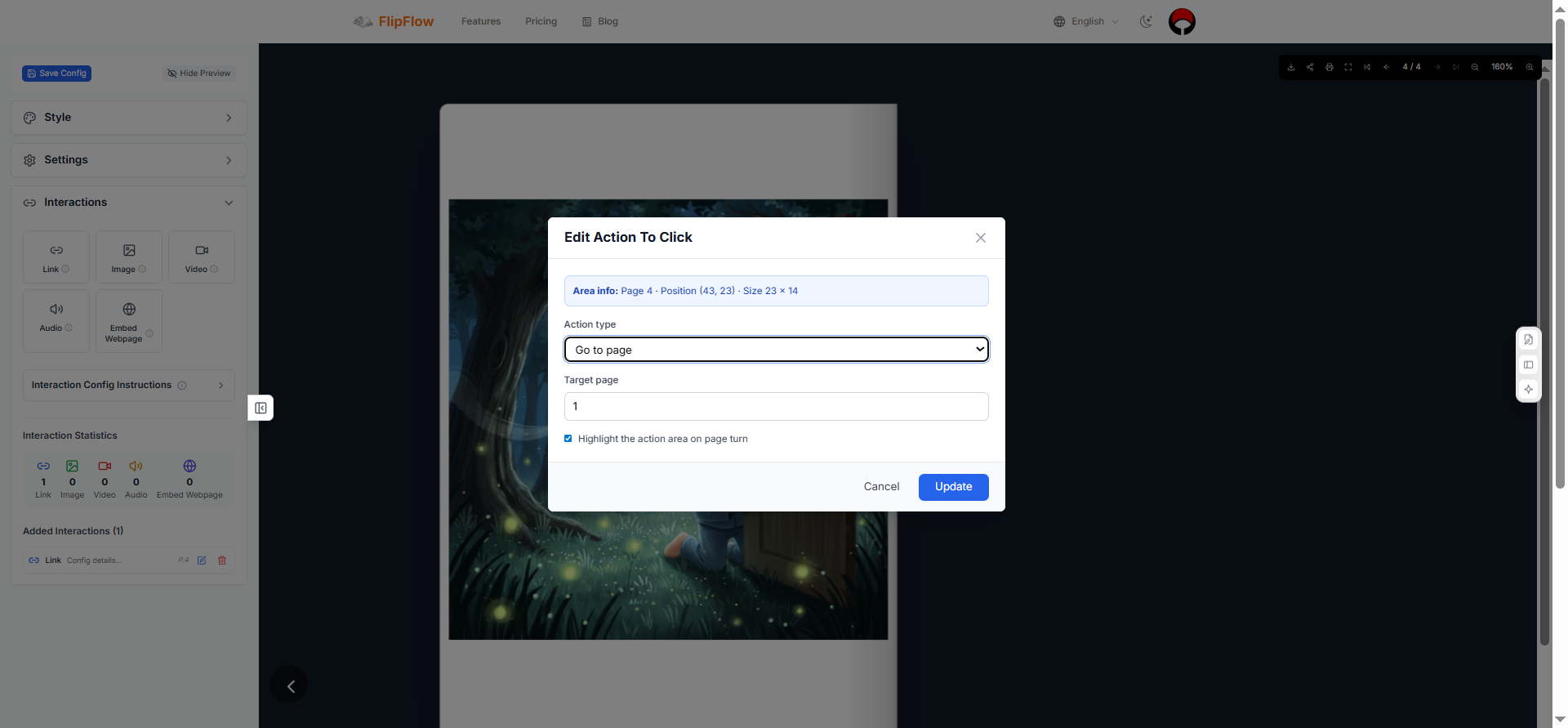
Draw regions on any page to add links, embedded images, videos, pop-up content, and more.
- Link to another page, an external website, an email, a phone number, or messaging apps like WhatsApp or Telegram
- Display an image in the selected region
- Play a video — from a direct link, YouTube, or Vimeo — with autoplay, loop, and custom player controls
- Pop up content — display a full-screen or floating image, video, or webpage overlay
For children’s storybooks, this means you could embed a YouTube read-aloud video on the cover page, or link each character’s name to a fun fact page. It transforms a static storybook into an interactive experience.
Settings, Navigation, and Reader Experience
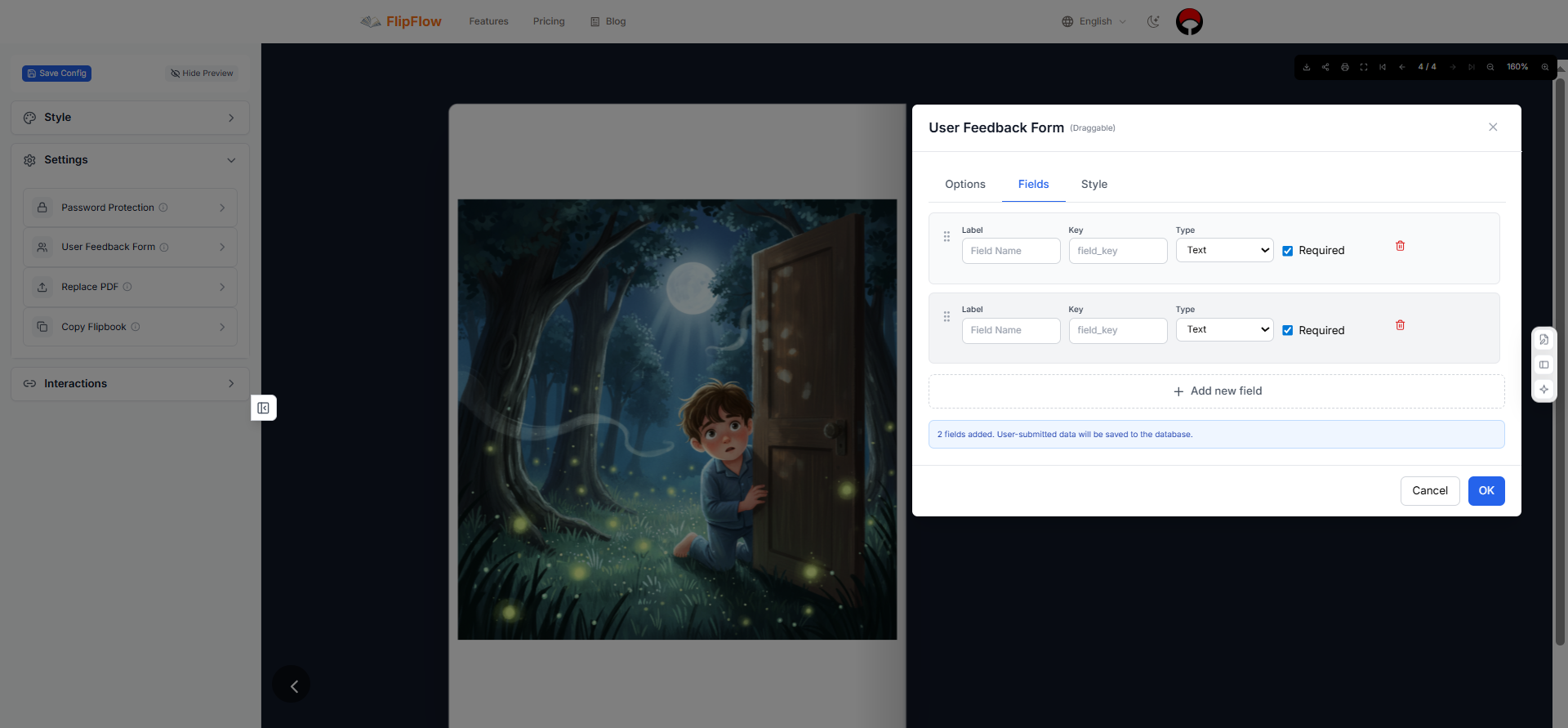
Settings panel: password protection, user feedback forms, PDF replacement, flipbook duplication, and navigation controls.
FlipFlow gives you fine-grained control over the reader experience:
- Navigation bar position (top or bottom) with thumbnail previews, page numbers, or both
- “Remember last page” — so your child can pick up exactly where they left off
- Initial page setting — open the book directly to a specific page
- Mouse scroll behavior — set scroll to flip pages or zoom
- Background music — upload an audio file to play during reading (perfect for a dreamy bedtime atmosphere!)
- Control bar position — choose from 8 positions on the page
Analytics for Educators and Creators
If you’re a teacher or content creator using FlipFlow for educational flipbooks, the built-in Analytics dashboard (powered by Google Analytics) gives you real insight into how readers are engaging with your content:
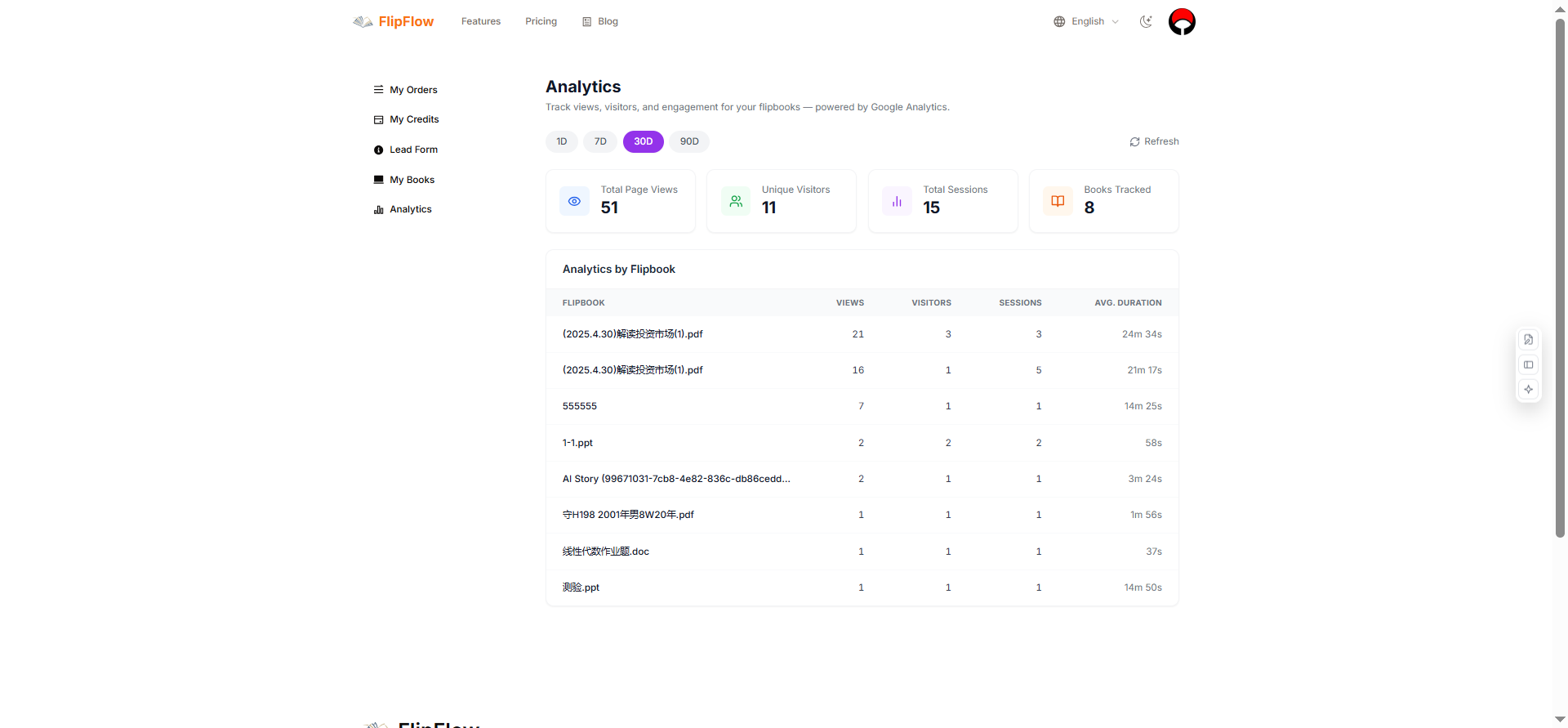
Track page views, unique visitors, sessions, average read duration, and per-book breakdowns.
You can track total page views, unique visitors, total sessions, average reading duration, and see breakdowns by individual flipbook. This is invaluable for understanding which stories or educational materials resonate most.
Premium Features Worth Knowing
While the core platform and AI storybook generator are free (up to 3 AI creations), FlipFlow also offers several premium features for power users:
Password Protection — Share a flipbook privately with a password. Useful for exclusive content, premium storybook collections, or sharing with family members only.
User Feedback Form — Embed a customizable form at any page in your flipbook to collect responses, ratings, or contact details. Supports text, email, number, paragraph, and star-rating fields.
Replace PDF — Already shared your flipbook link with hundreds of readers? Update the content without changing the URL — perfect for correcting errors or releasing updated editions.
Copy Flipbook — Duplicate an entire flipbook — content and all configurations — with one click. Great for creating seasonal variants of a storybook or templates for a series.
A Step-by-Step Guide: Creating Your First AI Storybook
Here’s exactly how to create your child’s first AI storybook tonight:
Step 1: Go to flippingbooks.org and sign up for a free account.
Step 2: Click “AI Create” on the homepage. You’ll see the AI Story Creator panel on the left.
Step 3: Write your story prompt. Be specific — name your characters, describe the setting, and hint at the emotional journey. A good prompt might be:
“A shy rabbit named Luna is afraid of the dark. One evening she discovers that fireflies are tiny stars that fell from the sky. The fireflies become her friends and guide her safely home through the dark forest.”
Step 4: Choose the number of images. For a first try, 6 or 8 images is a great balance of story depth and generation time.
Step 5: Hit “Start Creating Flipbook.” The AI will generate your illustrated pages — this usually takes 1–3 minutes depending on complexity.
Step 6: Preview your flipbook. Once complete, click Preview to see your story with page-turning animations. Use the navigation bar at the bottom to flip through pages.
Step 7: Customize the style. Click Edit, then go to the Style tab. Try the “Book” or “Photo Album” page effect, enable page-turn sound effects, and choose the Cartoon control bar theme for a child-friendly look.
Step 8: Share it. Copy the share link and send it to your child’s tablet, put it on the family TV browser, or share it with grandparents. You can also download the flipbook for offline use.
Why FlipFlow Stands Out for Families
There are other flipbook tools online, and there are other AI image generators. But FlipFlow is the only platform that combines both into a seamless, family-friendly workflow — with no design skills required, no software to install, and results in minutes rather than hours or days.
The reading experience it produces is genuinely delightful. The page-turning animations feel tactile and real. The sound of pages turning, the smoothness of flipping, the thumbnail navigation at the bottom — it all adds up to something that feels like a real book, not a slideshow.
And for parents, the joy of telling your child “I made this story for you” — and handing them a beautifully illustrated flipbook — is something no pre-packaged app can replicate.
Frequently Asked Questions
Is FlipFlow free to use?
Yes. The core platform is free, and new users get 3 free AI storybook creations. Paid plans unlock unlimited AI generations and premium features.
What age is AI storybook creation suitable for?
The tool is designed for parents, educators, and creators — adults who write the story prompts. The resulting storybooks are suitable for children of all ages depending on the story content.
Can I download my flipbook to read offline?
Yes — FlipFlow lets you download your flipbook directly from the preview interface.
Can I share the flipbook link publicly?
Yes. By default, your flipbook gets a shareable link. You can optionally password-protect it (a premium feature) if you want to keep it private.
What language can I write my story prompts in?
The Gemini model that powers FlipFlow’s AI supports many languages. You can write your prompt in English, Chinese, Spanish, French, and more.
How detailed should my story prompt be?
The more detail the better. Describe characters (name, appearance, personality), the setting (time of day, location, mood), and the story arc. The AI uses all of this to generate more accurate, consistent illustrations.
Start Creating Tonight
The next time your child asks for a story, don’t just tell it — build it. With FlipFlow’s AI storybook generator, you can turn any story idea into a beautifully illustrated, interactive flipbook in the time it takes to make a cup of tea.
Your first 3 AI storybooks are free. No credit card required. No design experience needed.
👉 Create your first AI storybook at flippingbooks.org
Want to learn more about how FlipFlow works? Read our full introduction: What Is FlipFlow?

AtomGit 是由开放原子开源基金会联合 CSDN 等生态伙伴共同推出的新一代开源与人工智能协作平台。平台坚持“开放、中立、公益”的理念,把代码托管、模型共享、数据集托管、智能体开发体验和算力服务整合在一起,为开发者提供从开发、训练到部署的一站式体验。
更多推荐

 9
9 0
0- 0


 已为社区贡献7条内容

所有评论(0)