项目实训第四周
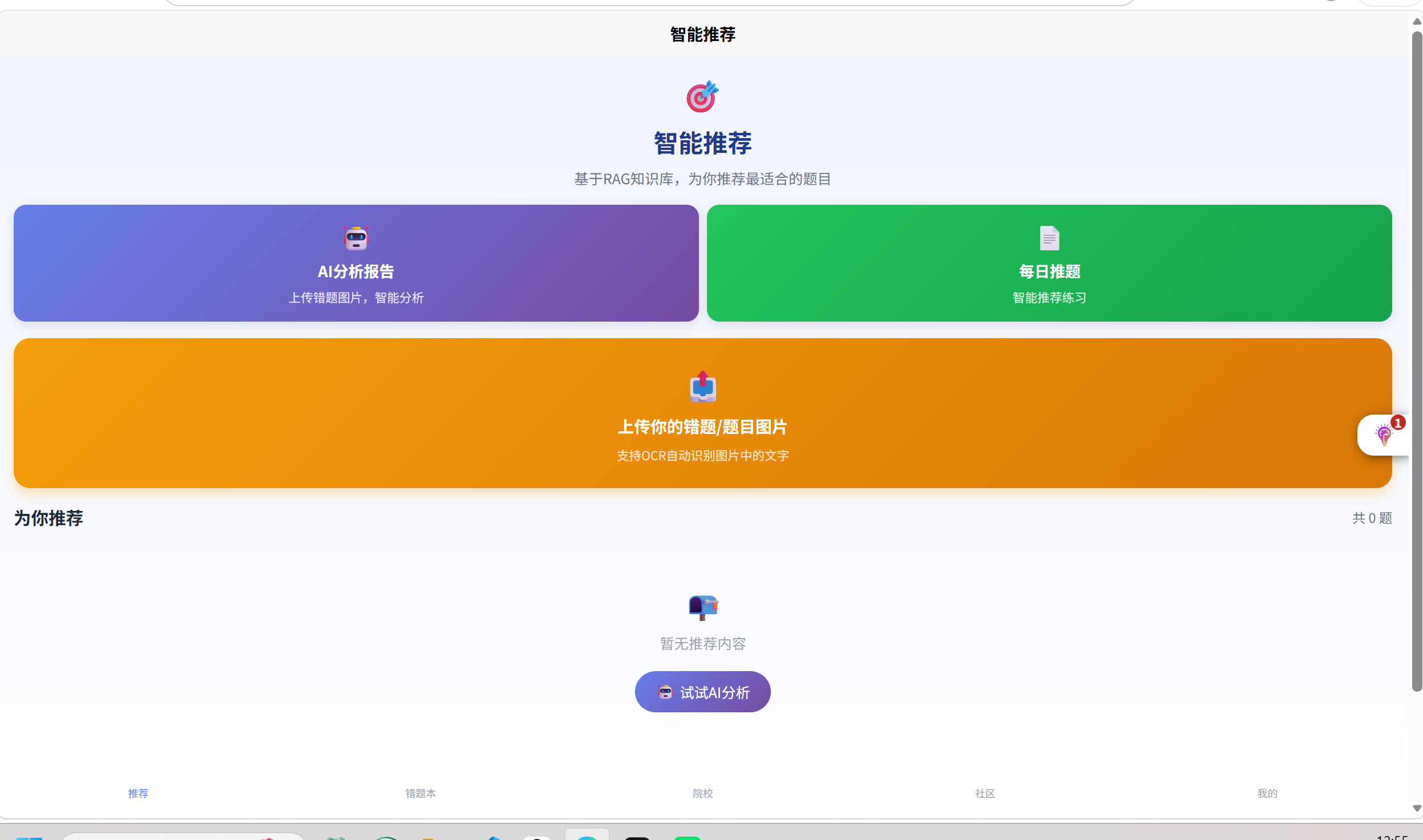
本周主要把ai分析报告改到用户端的首页,而不是每日推题页面
修改代码文件index.vue
<template>
<view class="container">
<!-- 顶部标题区 -->
<view class="header">
<AppIcon name="recommend" size="xl" color="#1e3a8a" />
<text class="title">智能推荐</text>
<text class="subtitle">基于RAG知识库,为你推荐最适合的题目</text>
</view>
<!-- 快捷功能区 -->
<view class="quick-actions">
<!-- AI分析报告入口 -->
<view class="action-card ai-analysis-card" @tap="goToAIAnalysis">
<AppIcon name="ai" size="lg" color="#fff" />
<text class="action-title">AI分析报告</text>
<text class="action-desc">上传错题图片,智能分析</text>
</view>
<!-- 每日推题入口 -->
<view class="action-card daily-push-card" @tap="goToDailyPush">
<AppIcon name="calendar-check" size="lg" color="#fff" />
<text class="action-title">每日推题</text>
<text class="action-desc">智能推荐练习</text>
</view>
</view>
<!-- 上传错题区域 -->
<view class="upload-section" @tap="uploadQuestion">
<AppIcon name="upload" size="xl" color="#fff" />
<text class="upload-text">上传你的错题/题目图片</text>
<text class="upload-hint">支持OCR自动识别图片中的文字</text>
</view>
<!-- 推荐列表 -->
<scroll-view class="recommend-list" scroll-y>
<view class="section-header">
<text class="header-title">为你推荐</text>
<text class="header-count">共 {{ recommendList.length }} 题</text>
</view>
<view v-for="item in recommendList" :key="item.id" class="recommend-card" @tap="goToDetail(item)">
<view class="card-header">
<text :class="['difficulty', getDifficultyClass(item.difficulty)]">
{{ item.difficulty }}
</text>
<text class="subject">{{ item.subject }}</text>
</view>
<text class="card-title">{{ item.title }}</text>
<text class="card-desc">{{ item.description }}</text>
<view class="card-footer">
<view class="footer-left">
<AppIcon name="stats" size="sm" color="#10b981" />
<text class="accuracy">准确率: {{ item.accuracy }}%</text>
</view>
<view class="footer-right">
<AppIcon name="ai" size="sm" color="#8b5cf6" />
<text class="reason">推荐理由: {{ item.reason }}</text>
</view>
</view>
</view>
<view v-if="loading" class="loading-tip">
<AppIcon name="loading" size="md" color="#9ca3af" />
<text>加载中...</text>
</view>
<view v-else-if="recommendList.length === 0" class="empty-tip">
<AppIcon name="empty" size="xl" color="#9ca3af" />
<text>暂无推荐内容</text>
<button class="empty-action-btn" @tap="goToAIAnalysis">
<AppIcon name="ai" size="sm" color="#fff" />
<text>试试AI分析</text>
</button>
</view>
</scroll-view>
</view>
</template>
<script>
import { authenticatedRequest } from '@/services/api'
import AppIcon from '@/components/common/AppIcon.vue'
export default {
components: { AppIcon },
data() {
return {
recommendList: [],
loading: false
}
},
onLoad() {
this.loadRecommendations()
},
methods: {
async loadRecommendations() {
this.loading = true
try {
const res = await authenticatedRequest({
url: '/recommend/list',
method: 'POST'
})
this.recommendList = res?.data || []
} catch (error) {
console.error('加载推荐失败:', error)
} finally {
this.loading = false
}
},
goToAIAnalysis() {
uni.navigateTo({
url: '/pages/notebooks/ai-analysis'
})
},
goToDailyPush() {
uni.navigateTo({
url: '/pages/notebooks/daily-push'
})
},
uploadQuestion() {
uni.chooseImage({
count: 1,
success: async (res) => {
uni.showLoading({ title: '识别中...' })
try {
const result = await authenticatedRequest({
url: '/ocr/recognize',
method: 'POST',
data: { image: res.tempFilePaths[0] }
})
uni.hideLoading()
uni.navigateTo({
url: `/pages/notebooks/add-question?autoFill=${encodeURIComponent(JSON.stringify(result.data))}`
})
} catch (error) {
uni.hideLoading()
uni.showToast({ title: '识别失败', icon: 'none' })
}
}
})
},
getDifficultyClass(level) {
return {
'easy': 'difficulty-easy',
'medium': 'difficulty-medium',
'hard': 'difficulty-hard'
}[level] || ''
},
goToDetail(item) {
uni.navigateTo({
url: `/pages/notebooks/topic-detail?id=${item.id}`
})
}
}
}
</script>
<style scoped>
.container {
min-height: 100vh;
background: linear-gradient(180deg, #f0f4ff 0%, #ffffff 100%);
padding: 32rpx;
}
.header {
text-align: center;
margin-bottom: 32rpx;
}
.title {
font-size: 48rpx;
font-weight: 700;
color: #1e3a8a;
display: block;
margin-top: 16rpx;
}
.subtitle {
font-size: 28rpx;
color: #6b7280;
margin-top: 16rpx;
display: block;
}
.quick-actions {
display: flex;
gap: 16rpx;
margin-bottom: 32rpx;
}
.action-card {
flex: 1;
height: 180rpx;
border-radius: 24rpx;
padding: 24rpx 20rpx;
display: flex;
flex-direction: column;
align-items: center;
justify-content: center;
gap: 12rpx;
box-shadow: 0 8rpx 20rpx rgba(0, 0, 0, 0.1);
}
.ai-analysis-card {
background: linear-gradient(135deg, #667eea 0%, #764ba2 100%);
}
.daily-push-card {
background: linear-gradient(135deg, #22c55e 0%, #16a34a 100%);
}
.action-title {
font-size: 30rpx;
font-weight: 600;
color: #fff;
}
.action-desc {
font-size: 24rpx;
color: rgba(255, 255, 255, 0.85);
}
.upload-section {
background: linear-gradient(135deg, #f59e0b 0%, #d97706 100%);
border-radius: 32rpx;
padding: 48rpx 32rpx;
text-align: center;
margin-bottom: 32rpx;
box-shadow: 0 12rpx 24rpx rgba(245, 158, 11, 0.3);
}
.upload-text {
font-size: 32rpx;
font-weight: 600;
color: #ffffff;
display: block;
margin-top: 16rpx;
}
.upload-hint {
font-size: 24rpx;
color: rgba(255,255,255,0.8);
margin-top: 16rpx;
display: block;
}
.section-header {
display: flex;
justify-content: space-between;
align-items: center;
margin-bottom: 20rpx;
}
.header-title {
font-size: 34rpx;
font-weight: 700;
color: #1f2937;
}
.header-count {
font-size: 26rpx;
color: #6b7280;
}
.recommend-list {
max-height: calc(100vh - 520rpx);
}
.recommend-card {
background: #ffffff;
border-radius: 24rpx;
padding: 32rpx;
margin-bottom: 24rpx;
box-shadow: 0 8rpx 20rpx rgba(0,0,0,0.08);
}
.card-header {
display: flex;
justify-content: space-between;
margin-bottom: 16rpx;
}
.difficulty {
font-size: 24rpx;
padding: 4rpx 16rpx;
border-radius: 24rpx;
}
.difficulty-easy { background: #d1fae5; color: #065f46; }
.difficulty-medium { background: #fed7aa; color: #9a3412; }
.difficulty-hard { background: #fee2e2; color: #991b1b; }
.subject {
font-size: 24rpx;
color: #6b7280;
}
.card-title {
font-size: 32rpx;
font-weight: 600;
color: #1f2937;
display: block;
margin-bottom: 12rpx;
}
.card-desc {
font-size: 28rpx;
color: #4b5563;
line-height: 1.5;
margin-bottom: 16rpx;
}
.card-footer {
display: flex;
justify-content: space-between;
border-top: 1rpx solid #e5e7eb;
padding-top: 16rpx;
}
.footer-left, .footer-right {
display: flex;
align-items: center;
gap: 8rpx;
}
.accuracy {
font-size: 24rpx;
color: #10b981;
}
.reason {
font-size: 24rpx;
color: #8b5cf6;
}
.loading-tip, .empty-tip {
display: flex;
flex-direction: column;
align-items: center;
justify-content: center;
gap: 16rpx;
padding: 80rpx;
font-size: 28rpx;
color: #9ca3af;
}
.empty-action-btn {
margin-top: 20rpx;
height: 80rpx;
padding: 0 40rpx;
border-radius: 40rpx;
font-size: 28rpx;
color: #ffffff;
background: linear-gradient(135deg, #667eea 0%, #764ba2 100%);
display: flex;
align-items: center;
gap: 8rpx;
}
</style>
效果:

AtomGit 是由开放原子开源基金会联合 CSDN 等生态伙伴共同推出的新一代开源与人工智能协作平台。平台坚持“开放、中立、公益”的理念,把代码托管、模型共享、数据集托管、智能体开发体验和算力服务整合在一起,为开发者提供从开发、训练到部署的一站式体验。
更多推荐



 3
3 0
0- 0


 已为社区贡献3条内容

所有评论(0)