基础IO(系统文件I/O---文件)
目录
1.C++?Java?Python? PHP? Go?....
打开文件的方式不仅仅是fopen,ifstream等流式,语言层的方案,其实系统才是打开文件最底层的方案。不过,在学习系统文件IO之前,先要了解下如何给函数传递标志位,该方法在系统文件IO接口中会使用到:
⼀种传递标志位的方法
Open
NAME 创建一个文件或设备
open, openat, creat - open and possibly create a fileSYNOPSIS
#include <sys/types.h>
#include <sys/stat.h>
#include <fcntl.h>
打开文件的模式,这个整数是一个标记位 位图
int open(const char *pathname, int flags);
权限位
int open(const char *pathname, int flags, mode_t mode);
int creat(const char *pathname, mode_t mode);
把这三行充当为宏
flags表示打开文件的格式,这个整数是一个标记位
open 其实只有一个,但参数是可变的
底层是open的参数然后带...,这三行充当宏
返回值
RETURN VALUE
open(), openat(), and creat() return the new file descriptor, or -1 if an error occurred (in which case, errno is set appropriately).
flags
linux内核中进行用户和系统调用传递我们的标记位采用位图的方式(位图:按照比特位进行操作)
以比特位的方式进行传参传标记位,一个比特位传一个标记位。所以一个整数最多能传32个标记位
O_RDONLY, O_WRONLY, O_RDWR, O_CREAT,O_APPEND,O_TRUNC 宏
理解位标志位
演示如何使用位标志(bit flags)来判断多种选项的组合,并通过 Print 函数输出当前设置了哪些标志位。
[user1@iZ5waahoxw3q2bZ 26-5-6]$ cat Flags.c
#include<stdio.h>

//自定义标志位
#define ONE_FLAG (1<<0) // 0000 0000 0000...0000 0001
#define TWO_FLAG (1<<1) // 0000 0000 0000...0000 0010
#define THREE_FLAG (1<<2) // 0000 0000 0000...0000 0100
#define FOUR_FLAG (1<<3) // 0000 0000 0000...0000 1000

void Print(int flags)
{
    if(flags & ONE_FLAG)
    {
        printf("ONE!\n");
    }

    if(flags & TWO_FLAG)
    {
        printf("TWO!\n");
    }

    if(flags & THREE_FLAG)
    {
        printf("THREE!\n");
    }

    if(flags & FOUR_FLAG)
    {
        printf("FOUR!\n");
    }

}

int main()
{
    Print(ONE_FLAG);
    printf("\n");
    Print(ONE_FLAG | TWO_FLAG);
    printf("\n");
    Print(ONE_FLAG | TWO_FLAG | THREE_FLAG);
    printf("\n");
    Print(ONE_FLAG | TWO_FLAG | THREE_FLAG | FOUR_FLAG);
    printf("\n");
    Print(ONE_FLAG | FOUR_FLAG);
    printf("\n");
    return 0;
}
[user1@iZ5waahoxw3q2bZ 26-5-6]$ ./a.out
ONE!

ONE!
TWO!

ONE!
TWO!
THREE!

ONE!
TWO!
THREE!
FOUR!

ONE!
FOUR!
SYNOPSIS
#include <sys/types.h>
#include <sys/stat.h>
#include <fcntl.h>int open(const char *pathname, int flags);
int open(const char *pathname, int flags, mode_t mode);int creat(const char *pathname, mode_t mode);
宏定义清单(含典型数值)
| 宏 | 含义 | 典型二进制(32位) |
|---|---|---|
O_RDONLY |
只读 | 0 |
O_WRONLY |
只写 | 1 |
O_RDWR |
读写 | 2 |
O_CREAT |
若文件不存在则创建 | 0100(八进制 64) |
O_APPEND |
追加写(每次写入定位到末尾) | 02000(八进制 1024) |
O_TRUNC |
若文件存在,截断为空 | 01000(八进制 512) |
perror 是最方便的错误报告函数,它会直接帮你把错误信息打印到标准错误输出(stderr)。
int open(const char *pathname, int flags, mode_t mode);
open提供第三个参数主要是为新建文件时指定权限
[user1@iZ5waahoxw3q2bZ openfile]$ cat myfile.c
#include<stdio.h>
#include<sys/types.h>
#include<sys/stat.h>
#include<fcntl.h>


int main()
{
    int fd = open("log.txt",O_CREAT | O_WRONLY,0666);
    if(fd<0)
    {
        perror("open");
        return 1;
    }

    return 0;
}
[user1@iZ5waahoxw3q2bZ openfile]$ make
gcc -o myfile myfile.c
[user1@iZ5waahoxw3q2bZ openfile]$ ./myfile
[user1@iZ5waahoxw3q2bZ openfile]$ ll
total 20
-rw-rw-r-- 1 user1 user1    0 May  5 13:57 log.txt
-rw-rw-r-- 1 user1 user1   65 May  5 13:39 Makefile
-rwxrwxr-x 1 user1 user1 8496 May  5 13:57 myfile
-rw-rw-r-- 1 user1 user1  232 May  5 13:55 myfile.c
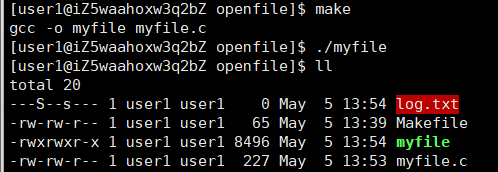
但为什么好像这样就是0664了,是因为之前将的权限掩码
[user1@iZ5waahoxw3q2bZ openfile]$ umask
0002
否则权限就可能出问题
umask
NAME
umask - set file mode creation maskSYNOPSIS
#include <sys/types.h>
#include <sys/stat.h>mode_t umask(mode_t mask);
当然了,也可以直接在用umask
[user1@iZ5waahoxw3q2bZ openfile]$ cat myfile.c
#include<stdio.h>
#include<sys/types.h>
#include<sys/stat.h>
#include<fcntl.h>


int main()
{
    umask(0);
    int fd = open("log.txt",O_CREAT | O_WRONLY,0666);
    if(fd<0)
    {
        perror("open");
        return 1;
    }

    return 0;
}
[user1@iZ5waahoxw3q2bZ openfile]$ rm log.txt
[user1@iZ5waahoxw3q2bZ openfile]$ make clean
rm -f myfile
[user1@iZ5waahoxw3q2bZ openfile]$ make
gcc -o myfile myfile.c
[user1@iZ5waahoxw3q2bZ openfile]$ ./myfile
[user1@iZ5waahoxw3q2bZ openfile]$ ll
total 20
-rw-rw-rw- 1 user1 user1    0 May  5 14:12 log.txt
-rw-rw-r-- 1 user1 user1   65 May  5 13:39 Makefile
-rwxrwxr-x 1 user1 user1 8544 May  5 14:12 myfile
-rw-rw-r-- 1 user1 user1  246 May  5 14:11 myfile.c
可以看到这样权限就是0666
我们打开文件不是为了我们打开文件,是进程的去打开文件。研究用户和人的关系,本质是研究
进程和文件的关系。文件=内容+属性
关闭close
SYNOPSIS
#include <unistd.h>
int close(int fd);
写入write
SYNOPSIS
#include <unistd.h>
ssize_t write(int fd, const void *buf, size_t count);第一个参数就是open的返回值---文件描述符,第二个参数是要写入的buf,第三个参数是要写入数据的长度
返回值是实际写入的
[user1@iZ5waahoxw3q2bZ openfile]$ make
gcc -o myfile myfile.c
[user1@iZ5waahoxw3q2bZ openfile]$ ./myfile
fd:3
[user1@iZ5waahoxw3q2bZ openfile]$ cat log.txt
hello world!
hello world!
hello world!
hello world!
hello world!
[user1@iZ5waahoxw3q2bZ openfile]$ cat myfile.c
#include<stdio.h>
#include<string.h>
#include<unistd.h>
#include<sys/types.h>
#include<sys/stat.h>
#include<fcntl.h>

int main()
{
    umask(0);
    int fd = open("log.txt",O_CREAT | O_WRONLY,0666);
    if(fd<0)
    {
        perror("open");
        return 1;
    }
    printf("fd:%d\n",fd);

    const char *msg = "hello world!\n";
    int cnt = 5;
    while(cnt)
    {
        write(fd,msg,strlen(msg));
        cnt--;
    }

    close(fd);
    return 0;
}

[user1@iZ5waahoxw3q2bZ openfile]$ vim myfile.c
[user1@iZ5waahoxw3q2bZ openfile]$ make
gcc -o myfile myfile.c
[user1@iZ5waahoxw3q2bZ openfile]$ ./myfile
fd:3
[user1@iZ5waahoxw3q2bZ openfile]$ cat log.txt
abcdo world!
hello world!
hello world!
hello world!
hello world!
[user1@iZ5waahoxw3q2bZ openfile]$ cat myfile.c
#include<stdio.h>
#include<string.h>
#include<unistd.h>
#include<sys/types.h>
#include<sys/stat.h>
#include<fcntl.h>


int main()
{
    umask(0);
    int fd = open("log.txt",O_CREAT | O_WRONLY,0666);
    if(fd<0)
    {
        perror("open");
        return 1;
    }
    printf("fd:%d\n",fd);

    const char *msg = "abcd";
    int cnt = 1;
    while(cnt)
    {
        write(fd,msg,strlen(msg));
        cnt--;
    }

    close(fd);
    return 0;
}
在这个里面,
为什么不会清空呢?
因为之前默认清空是C语言的认识,我们现在没有告诉系统要清空
C 库 fopen 和系统调用 open 的“清空”行为不一样。
为什么
fopen("w")会清空文件?
fopen是 C 标准库函数,它的"w"模式在内部调用open时,会自动加上O_TRUNC标志:c
// fopen 内部大致等价于:
open(path, O_WRONLY | O_CREAT | O_TRUNC, 0666);
所以用
fopen以写模式打开文件,无论文件是否已存在,都会先清空再写入。为什么现在用的
open不清空?代码是:
c
int fd = open("log.txt", O_CREAT | O_WRONLY, 0666);这里面没有
O_TRUNC,所以:
文件不存在时:
O_CREAT创建一个新文件,新文件本来就是空的,看起来像是清空了,但其实只是新建。文件已存在时:
O_WRONLY只是以只写方式打开,文件偏移在开头,写入时从开头覆盖,但不会截断文件。所以写入"abcd"只覆盖了第一行的前 4 个字节,原来第一行的"hell"被替换成"abcd",剩下的"o world!\n"还在,就变成了"abcdo world!"。
所以加上就可以了
int fd = open("log.txt",O_CREAT | O_WRONLY | O_TRUNC,0666);[user1@iZ5waahoxw3q2bZ openfile]$ make
gcc -o myfile myfile.c
[user1@iZ5waahoxw3q2bZ openfile]$ ./myfile
fd:3
[user1@iZ5waahoxw3q2bZ openfile]$ cat log.txt
abcd追加
int fd=open("log.txt",O_CREAT | O_WRONLY | O_APPEND,0666);[user1@iZ5waahoxw3q2bZ openfile]$ vim myfile.c
[user1@iZ5waahoxw3q2bZ openfile]$ make
gcc -o myfile myfile.c
[user1@iZ5waahoxw3q2bZ openfile]$ ./myfile
fd:3
[user1@iZ5waahoxw3q2bZ openfile]$ ./myfile
fd:3
[user1@iZ5waahoxw3q2bZ openfile]$ ./myfile
fd:3
[user1@iZ5waahoxw3q2bZ openfile]$ cat log.txt
abcdabcdabcdabcd[user1@iZ5waahoxw3q2bZ openfile]$
如果要打开文件并把文件清空,如果要用系统级函数要用以下几个标记位
w
int fd=open("log.txt",O_CREAT | O_WRONLY | O_TRUNC,0666);
创建 只写 清空a
int fd=open("log.txt",O_CREAT | O_WRONLY | O_APPEND,0666);
追加
文本写入 vs 二进制写入
---语言提供的概念!
write
       #include <unistd.h>
       ssize_t write(int fd, const void *buf, size_t count);
void *类型说明既可以是文本写入也可以是二进制写入
整数二进制写入(二进制)
int a = 1234567;
write(fd, &a, sizeof(a));格式化字符串写入(文本)
char buffer[16];
snprintf(buffer, sizeof(buffer), "%d", a); // "1234567"
write(fd, buffer, strlen(buffer));
整数二进制写入(二进制)
[user1@iZ5waahoxw3q2bZ openfile]$ cat myfile.c
#include<stdio.h>
#include<string.h>
#include<unistd.h>
#include<sys/types.h>
#include<sys/stat.h>
#include<fcntl.h>


int main()
{
    umask(0);
    int fd = open("log.txt",O_CREAT | O_WRONLY | O_TRUNC,0666);
    //int fd = open("log.txt",O_CREAT | O_WRONLY | O_APPEND,0666);

    if(fd<0)
    {
        perror("open");
        return 1;
    }
    printf("fd:%d\n",fd);

    //const char *msg = "abcd";
    int cnt = 1;
    int a = 1234567;
    while(cnt)
    {
        //当作字符来写
        //write(fd,msg,strlen(msg));
        write(fd,&a,sizeof(a));
        cnt--;
    }

    close(fd);
    return 0;
}
[user1@iZ5waahoxw3q2bZ openfile]$ make
gcc -o myfile myfile.c
[user1@iZ5waahoxw3q2bZ openfile]$ ./myfile
fd:3
[user1@iZ5waahoxw3q2bZ openfile]$ clear
[user1@iZ5waahoxw3q2bZ openfile]$ ll
total 24
-rw-rw-rw- 1 user1 user1    4 May  5 14:50 log.txt
-rw-rw-r-- 1 user1 user1   65 May  5 13:39 Makefile
-rwxrwxr-x 1 user1 user1 8696 May  5 14:50 myfile
-rw-rw-r-- 1 user1 user1  618 May  5 14:50 myfile.c
[user1@iZ5waahoxw3q2bZ openfile]$ cat log.txt
Ԓ
格式化字符串写入(文本)
snprintf 是 C 标准库中最安全、最常用的格式化字符串函数之一。它的核心作用是:按照指定格式,将一系列变量组合成一个字符串,同时严格限制写入长度,防止缓冲区溢出。
[user1@iZ5waahoxw3q2bZ openfile]$ cat myfile.c
#include<stdio.h>
#include<string.h>
#include<unistd.h>
#include<sys/types.h>
#include<sys/stat.h>
#include<fcntl.h>


int main()
{
    umask(0);
    int fd = open("log.txt",O_CREAT | O_WRONLY | O_TRUNC,0666);
    //int fd = open("log.txt",O_CREAT | O_WRONLY | O_APPEND,0666);

    if(fd<0)
    {
        perror("open");
        return 1;
    }
    printf("fd:%d\n",fd);

    //const char *msg = "abcd";
    int cnt = 1;
    int a = 1234567;
    while(cnt)
    {
        //当作字符来写
        //write(fd,msg,strlen(msg));
        char buffer[16];
        snprintf(buffer,sizeof(buffer),"%d",a);
        write(fd,buffer,strlen(buffer));
        //write(fd,&a,sizeof(a));
        cnt--;
    }

    close(fd);
    return 0;
}
[user1@iZ5waahoxw3q2bZ openfile]$ make
gcc -o myfile myfile.c
[user1@iZ5waahoxw3q2bZ openfile]$ ./myfile
fd:3
[user1@iZ5waahoxw3q2bZ openfile]$ ll
total 24
-rw-rw-rw- 1 user1 user1    7 May  5 14:55 log.txt
-rw-rw-r-- 1 user1 user1   65 May  5 13:39 Makefile
-rwxrwxr-x 1 user1 user1 8784 May  5 14:55 myfile
-rw-rw-r-- 1 user1 user1  734 May  5 14:55 myfile.c
[user1@iZ5waahoxw3q2bZ openfile]$ cat log.txt
1234567[user1@iZ5waahoxw3q2bZ openfile]$
在系统层面上,有没有二进制写入或者文本写入?
或者说系统关心你的写入方式类型吗?不关心!---随便写
文本写入或者二进制写入是语言层提供的概念
文本写入
NAME
       fputc, fputs, putc, putchar, puts - output of characters and strings

SYNOPSIS
       #include <stdio.h>

       int fputc(int c, FILE *stream);

       int fputs(const char *s, FILE *stream);

       int putc(int c, FILE *stream);

       int putchar(int c);

       int puts(const char *s);
二进制写入
NAME
       fread, fwrite - binary stream input/output

SYNOPSIS
       #include <stdio.h>

       size_t fread(void *ptr, size_t size, size_t nmemb, FILE *stream);

       size_t fwrite(const void *ptr, size_t size, size_t nmemb,
                     FILE *stream);
printf格式化输出
SYNOPSIS
       #include <stdio.h>

       int printf(const char *format, ...);
       int fprintf(FILE *stream, const char *format, ...);
       int sprintf(char *str, const char *format, ...);
       int snprintf(char *str, size_t size, const char *format, ...);
这些全是语言层的概念
read读
从指定描述符中去读
NAME
     read - read from a file descriptor
SYNOPSIS
       #include <unistd.h>    缓冲区
       ssize_t read(int fd, void *buf, size_t count);
                  文件描述符            缓冲区大小

int fd=open("log.txt",O_RDONLY);
                         只读
RETURN VALUE
       On success, the number of bytes read is returned (zero indicates end of file), and the  file
       position  is advanced by this number.  It is not an error if this number is smaller than the
       number of bytes requested; this may happen for example  because  fewer  bytes  are  actually
       available  right  now (maybe because we were close to end-of-file, or because we are reading
       from a pipe, or from a terminal), or because read() was interrupted by a signal.  On  error,
       -1 is returned, and errno is set appropriately.  In this case it is left unspecified whether
       the file position (if any) changes.
成功了,返回实际读到的字节数。读到了0,表明读到了文件的结尾。小于0,就失败了。
先来看看文件描述符
[user1@iZ5waahoxw3q2bZ openfile]$ cat myfile.c
#include<stdio.h>
#include<stdlib.h>
#include<string.h>
#include<unistd.h>
#include<sys/types.h>
#include<sys/stat.h>
#include<fcntl.h>

int main()
{
    umask(0);
    int fd1 = open("log1.txt", O_CREAT | O_WRONLY | O_TRUNC, 0666);
    int fd2 = open("log2.txt", O_CREAT | O_WRONLY | O_TRUNC, 0666);
    int fd3 = open("log3.txt", O_CREAT | O_WRONLY | O_TRUNC, 0666);
    int fd4 = open("log4.txt", O_CREAT | O_WRONLY | O_TRUNC, 0666);
    if(fd1 < 0)exit(1);
    if(fd2 < 0)exit(1);
    if(fd3 < 0)exit(1);
    if(fd4 < 0)exit(1);

    printf("fd1:%d\n",fd1);
    printf("fd2:%d\n",fd2);
    printf("fd3:%d\n",fd3);
    printf("fd4:%d\n",fd4);

    close(fd1);
    close(fd2);
    close(fd3);
    close(fd4);
}
[user1@iZ5waahoxw3q2bZ openfile]$ make
gcc -o myfile myfile.c
[user1@iZ5waahoxw3q2bZ openfile]$ ./myfile
fd1:3
fd2:4
fd3:5
fd4:6
我们发现文件描述符fd都是从3开始,那么0、1、2在哪里呢?
0、1、2叫做:标准输入,标准输出,标准错误!
extern FILE *stdin; cin
extern FILE *stdout; cout
extern FILE *stderr; cerr
FILE *fopen(const char *pathname, const char *mode);
FILE是C语言提供的一个结构体 typedef XXX ... FILE
一定封装了文件fd!
在OS接口层面,只认fd,即文件描述符!
[user1@iZ5waahoxw3q2bZ openfile]$ cat myfile.c
#include<stdio.h>
#include<stdlib.h>
#include<string.h>
#include<unistd.h>
#include<sys/types.h>
#include<sys/stat.h>
#include<fcntl.h>

int main()
{
    printf("stdin:%d\n",stdin->_fileno);
    printf("stdout:%d\n",stdout->_fileno);
    printf("stderr:%d\n",stderr->_fileno);

    umask(0);
    int fd1 = open("log1.txt", O_CREAT | O_WRONLY | O_TRUNC, 0666);
    int fd2 = open("log2.txt", O_CREAT | O_WRONLY | O_TRUNC, 0666);
    int fd3 = open("log3.txt", O_CREAT | O_WRONLY | O_TRUNC, 0666);
    int fd4 = open("log4.txt", O_CREAT | O_WRONLY | O_TRUNC, 0666);
    if(fd1 < 0)exit(1);
    if(fd2 < 0)exit(1);
    if(fd3 < 0)exit(1);
    if(fd4 < 0)exit(1);

    printf("fd1:%d\n",fd1);
    printf("fd2:%d\n",fd2);
    printf("fd3:%d\n",fd3);
    printf("fd4:%d\n",fd4);

    close(fd1);
    close(fd2);
    close(fd3);
    close(fd4);
}
[user1@iZ5waahoxw3q2bZ openfile]$ ./myfile
stdin:0
stdout:1
stderr:2
fd1:3
fd2:4
fd3:5
fd4:6
stdin、stdout、stderr是 C 标准库的FILE*流。在 Linux/glibc 中,
FILE结构体有一个_fileno成员,就是该流底层的文件描述符。按照 POSIX 约定:
stdin→ 文件描述符0
stdout→ 文件描述符1
stderr→ 文件描述符2
它们是每个进程启动时由 shell 自动打开的。
谈谈:
1.C++?Java?Python? PHP? Go?....
任何语言底层都只认文件描述符
2.语言层为什么做封装
为什么要做库语言级别的封装
增加语言的可移植性,平台间的差异封装到库里面
语言为什么要增加自己的可移植性
让更多人使用,增加市场占有率,防止淘汰
还有fseek,ftell,rewind的函数
感谢你的观看,期待我们下次再见!

AtomGit 是由开放原子开源基金会联合 CSDN 等生态伙伴共同推出的新一代开源与人工智能协作平台。平台坚持“开放、中立、公益”的理念,把代码托管、模型共享、数据集托管、智能体开发体验和算力服务整合在一起,为开发者提供从开发、训练到部署的一站式体验。
更多推荐
 11
11 0
0- 0


 已为社区贡献5条内容

所有评论(0)