2026 一文吃透 Spring AI 图像生成:多款文生图、图生图模型落地实战
作者:架构源启-12年OTA公司资深程序员
技术栈:Spring Boot 3.5.9 + Spring AI 1.1.4 + GPT-IMAGE-2 + CogView
前置知识:可查看前面的文章
- 系列文章:
- 第①篇:2026 Java 程序员新标配:Spring AI 最新版本1.1.4 从零搭建 + 避坑指南(收藏版)
- 第②篇:2026 进阶篇:Spring Boot响应式编程 + Spring AI 1.1.4 流式实战 + Vue前端完整实现(避坑指南)
- 第③篇:2026 进阶篇:深入理解Spring Reactor响应式编程的核心引擎(源码级解析+实战避坑)
- 第④篇:2026 Spring AI 核心概念详解:ChatClient、Prompt、Model 三剑客深度解析

📖 前言
在上一篇文章中,我们深入学习了 Spring AI 的核心概念。今天,我们将进入一个更 exciting 的领域——AI 图片生成!
想象一下:
- 🎨 输入一段文字,AI 自动生成精美的图片
- 🖼️ 上传一张照片,AI 帮你修改风格、去除背景
- 🏨 酒店营销人员可以快速生成宣传海报
- 📱 内容创作者可以批量生产配图
这些不再是梦想,而是可以通过 Spring AI 轻松实现的功能!
本文你将学到
✅ ImageModel 接口详解与使用
✅ 文生图(Text-to-Image)和图生图(Image-to-Image)实现
✅ Base64 vs URL 返回格式处理
✅ 实战:AI 头像生成器
为什么需要图片生成?
应用场景:
- 💼 企业营销:快速生成广告素材、产品海报
- 📝 内容创作:文章配图、社交媒体图片
- 🎮 游戏开发:角色设计、场景概念图
- 🏨 酒店行业:房间效果图、活动宣传图
- 👤 个人使用:头像生成、壁纸制作
准备好了吗?让我们开始吧!🚀
🎯 一、图片生成模型对比
1.1 主流模型概览(2026年最新版)
| 模型 | 开源 | 中文支持 | 艺术感 | 可控性 | 速度 | 成本(参考) | 最佳场景 |
|---|---|---|---|---|---|---|---|
| Midjourney V8 | ❌ | 弱 | ⭐⭐⭐⭐⭐ | 中 | 中 | $10–30 / 月 | 艺术创作 / 海报设计 / 高质感图像 |
| GPT-Image 2 | ❌ | 中 | ⭐⭐⭐⭐ | 高 | 中 | $0.02 / 张 | 复杂设计 / 文字图 / 多模态理解 |
| SD 3 / SDXL | ✅ | 中 | ⭐⭐⭐ | 极高 | 慢 | 免费(本地) | 定制化需求 / 私有化部署 / 批量生成 |
| FLUX | ✅ | 中 | ⭐⭐⭐⭐ | 高 | 极快 | 免费(本地) | 高速批量生成 / 创意快速迭代 |
| Seedream 5.0 | ❌ | ⭐⭐⭐⭐⭐ | ⭐⭐⭐⭐ | 中 | 极快 | ¥0.5–1 / 张 | 中文商业应用 / 营销素材生成 |
| WAN 2.7 | ❌ | ⭐⭐⭐⭐⭐ | ⭐⭐⭐ | 中 | 快 | ¥0.2 / 张 | 低成本批量生成 / 中文配图 |
| GLM-Image | ✅ | 中-强 | ⭐⭐⭐ | 中 | 中 | 免费(本地)/ ¥0.1(API) | 中文汉字生成 / 科普插图 / 私有化部署 |
| Gemini Flash Image | ❌ | 弱-中 | ⭐⭐⭐ | 强 | 极快 | $0.067 / 张(免费额度高) | 高速写实 / 多模态编辑 / 英文场景 |
| CogView-4 | ❌ | ⭐⭐⭐⭐⭐ | ⭐⭐⭐ | 中 | 快 | ¥0.02 / 张 | 国内应用 / 快速原型 |
说明:
- ⭐ 数量代表能力强度(5星为最强)
- 开源模型需要自备GPU资源
- 成本仅供参考,实际以官方定价为准
- GLM-Image 在中文汉字渲染方面表现优异
1.2 选择建议(2026年更新)
推荐使用策略:
中文商业应用 → Seedream 5.0(中文最优、速度快)
    ↓
低成本批量 → WAN 2.7(¥0.2/张、性价比高)
    ↓
艺术创作 → Midjourney V8(顶级艺术感)
    ↓
复杂设计/文字图 → GPT-Image 2(理解力强)
    ↓
中文汉字/科普 → GLM-Image(汉字渲染优秀)
    ↓
高速写实/多模态 → Gemini Flash Image(极快、编辑能力强)
    ↓
私有化部署 → SD 3/SDXL、FLUX 或 GLM-Image(开源免费)
    ↓
国内快速原型 → CogView-4(便宜快速)
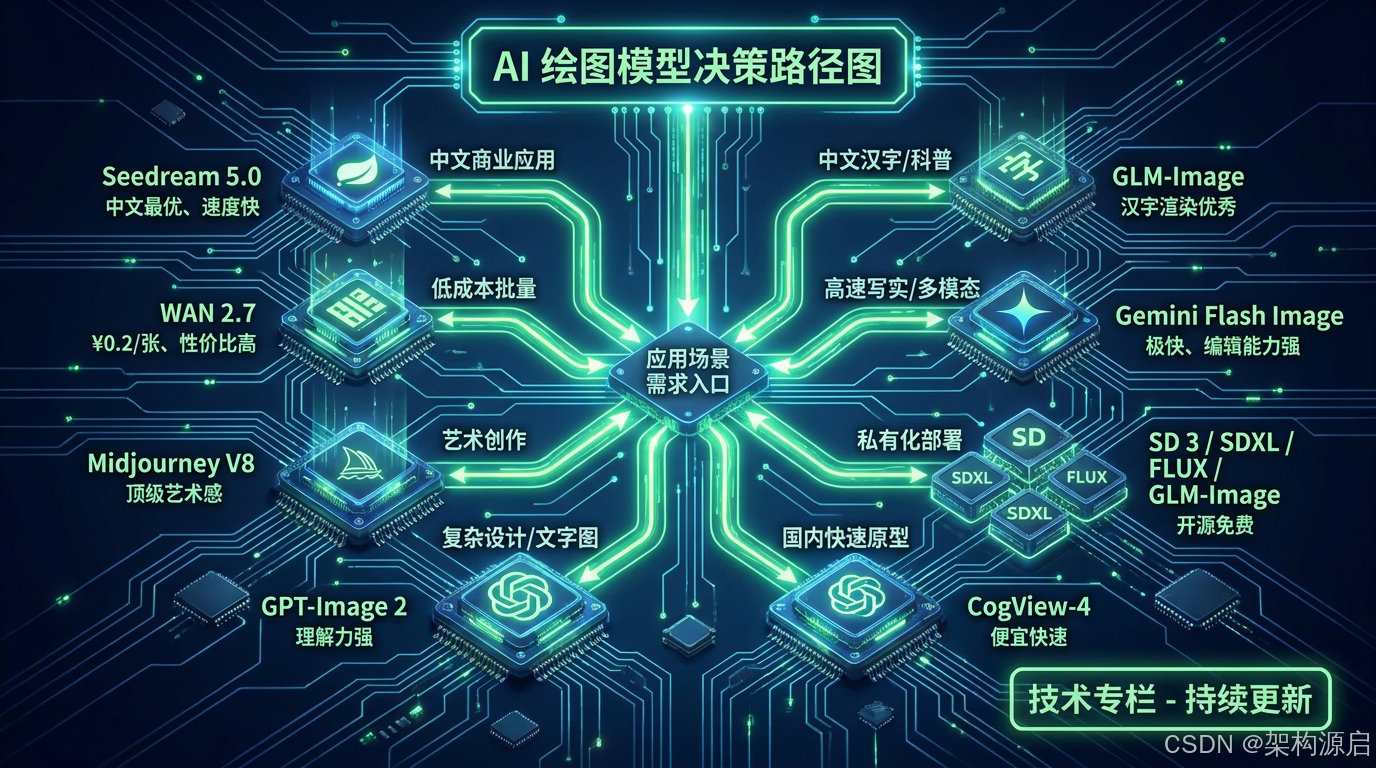
选型决策树(Java实现):
package com.shun.springai.service;

import lombok.Data;
import lombok.extern.slf4j.Slf4j;
import org.springframework.stereotype.Service;

/**
 * AI图像生成模型路由服务
 * 根据需求自动选择最优模型
 */
@Slf4j
@Service
public class ImageModelRouter {

    /**
     * 支持的模型枚举
     */
    public enum ImageModel {
        MIDJOURNEY_V8("Midjourney V8", "艺术创作"),
        GPT_IMAGE_2("GPT-Image 2", "复杂设计"),
        SD_3("SD 3/SDXL", "开源定制"),
        FLUX("FLUX", "高速批量"),
        SEEDREAM_5("Seedream 5.0", "中文商业"),
        WAN_2_7("WAN 2.7", "低成本批量"),
        GLM_IMAGE("GLM-Image", "中文汉字"),
        GEMINI_FLASH("Gemini Flash Image", "高速写实"),
        COGVIEW_4("CogView-4", "国内通用");

        private final String name;
        private final String description;

        ImageModel(String name, String description) {
            this.name = name;
            this.description = description;
        }

        public String getName() {
            return name;
        }

        public String getDescription() {
            return description;
        }
    }

    /**
     * 图像生成需求
     */
    @Data
    public static class ImageGenerationRequest {
        private boolean hasChineseText;      // 是否包含中文文字
        private String category;             // 类别(educational/commercial/artistic等)
        private String language;             // 语言(chinese/english)
        private String quality;              // 质量要求(commercial/high/standard)
        private String budget;               // 预算(low/medium/high)
        private String volume;               // 批量(high/medium/low)
        private String style;                // 风格(artistic/realistic/cartoon等)
        private boolean needText;            // 是否需要文字
        private String complexity;           // 复杂度(high/medium/low)
        private String speed;                // 速度要求(ultra_fast/fast/normal)
        private String task;                 // 任务类型(editing/generation/enhancement)
        private boolean privacy;             // 是否要求私有化部署
    }

    /**
     * 根据需求选择最优模型
     *
     * @param requirements 生成需求
     * @return 推荐的模型
     */
    public ImageModel selectModel(ImageGenerationRequest requirements) {

        // 1. 中文汉字或科普内容 - 优先GLM-Image
        if (requirements.isHasChineseText() || "educational".equals(requirements.getCategory())) {
            log.info("选择GLM-Image:中文汉字渲染最佳");
            return ImageModel.GLM_IMAGE;
        }

        // 2. 中文商业应用 - Seedream 5.0
        if ("chinese".equals(requirements.getLanguage()) &&
            "commercial".equals(requirements.getQuality())) {
            log.info("选择Seedream 5.0:中文商业首选");
            return ImageModel.SEEDREAM_5;
        }

        // 3. 低成本批量生成 - WAN 2.7
        if ("low".equals(requirements.getBudget()) &&
            "high".equals(requirements.getVolume())) {
            log.info("选择WAN 2.7:低成本批量");
            return ImageModel.WAN_2_7;
        }

        // 4. 艺术创作 - Midjourney V8
        if ("artistic".equals(requirements.getStyle())) {
            log.info("选择Midjourney V8:艺术创作");
            return ImageModel.MIDJOURNEY_V8;
        }

        // 5. 复杂设计或需要文字 - GPT-Image 2
        if (requirements.isNeedText() || "high".equals(requirements.getComplexity())) {
            log.info("选择GPT-Image 2:复杂设计");
            return ImageModel.GPT_IMAGE_2;
        }

        // 6. 高速写实或多模态编辑 - Gemini Flash Image
        if ("ultra_fast".equals(requirements.getSpeed()) ||
            "editing".equals(requirements.getTask())) {
            log.info("选择Gemini Flash Image:极速+编辑");
            return ImageModel.GEMINI_FLASH;
        }

        // 7. 私有化部署 - 根据具体需求选择
        if (requirements.isPrivacy()) {
            if ("fast".equals(requirements.getSpeed())) {
                log.info("选择FLUX:快速开源方案");
                return ImageModel.FLUX;
            } else if (requirements.isHasChineseText()) {
                log.info("选择GLM-Image:中文开源方案");
                return ImageModel.GLM_IMAGE;
            } else {
                log.info("选择SD 3:标准开源方案");
                return ImageModel.SD_3;
            }
        }

        // 8. 默认国内方案 - CogView-4
        log.info("选择CogView-4:通用国内方案");
        return ImageModel.COGVIEW_4;
    }

    /**
     * 获取模型的配置信息
     */
    public String getModelConfig(ImageModel model) {
        return switch (model) {
            case MIDJOURNEY_V8 -> "model=midjourney-v8, cost=$10-30/month";
            case GPT_IMAGE_2 -> "model=gpt-image-2, cost=$0.02/image";
            case SD_3 -> "model=sd-3, local=true, cost=free";
            case FLUX -> "model=flux, local=true, cost=free, speed=ultra-fast";
            case SEEDREAM_5 -> "model=seedream-5.0, cost=¥0.5-1/image";
            case WAN_2_7 -> "model=wan-2.7, cost=¥0.2/image";
            case GLM_IMAGE -> "model=glm-image, local=true, cost=free or ¥0.1/image";
            case GEMINI_FLASH -> "model=gemini-flash-image, cost=$0.067/image";
            case COGVIEW_4 -> "model=cogview-4, cost=¥0.02/image";
        };
    }
}
使用示例:
@RestController
@RequestMapping("/image")
public class ImageGenerationController {

    @Autowired
    private ImageModelRouter modelRouter;

    @PostMapping("/generate-smart")
    public Map<String, Object> generateSmart(@RequestBody ImageGenerationRequest request) {

        // 1. 自动选择模型
        ImageModelRouter.ImageModel selectedModel = modelRouter.selectModel(request);

        // 2. 获取模型配置
        String config = modelRouter.getModelConfig(selectedModel);

        log.info("为用户选择的模型: {} - {}", selectedModel.getName(), config);

        // 3. 根据选择的模型调用相应的服务
        String imageUrl = generateWithSelectedModel(selectedModel, request);

        Map<String, Object> result = new HashMap<>();
        result.put("success", true);
        result.put("selectedModel", selectedModel.getName());
        result.put("modelDescription", selectedModel.getDescription());
        result.put("config", config);
        result.put("imageUrl", imageUrl);

        return result;
    }

    private String generateWithSelectedModel(ImageModelRouter.ImageModel model,
                                            ImageGenerationRequest request) {
        // 根据模型调用不同的生成服务
        return switch (model) {
            case GLM_IMAGE -> glmImageService.generate(request);
            case SEEDREAM_5 -> seedreamService.generate(request);
            case WAN_2_7 -> wanService.generate(request);
            case GEMINI_FLASH -> geminiService.generate(request);
            case COGVIEW_4 -> cogviewService.generate(request);
            // ... 其他模型
            default -> throw new IllegalArgumentException("不支持的模型: " + model);
        };
    }
}
测试示例:
// 测试1:中文汉字海报
ImageGenerationRequest req1 = new ImageGenerationRequest();
req1.setHasChineseText(true);
req1.setCategory("commercial");
ImageModel model1 = router.selectModel(req1);
// 输出: GLM-Image(中文汉字渲染最佳)

// 测试2:艺术创作
ImageGenerationRequest req2 = new ImageGenerationRequest();
req2.setStyle("artistic");
ImageModel model2 = router.selectModel(req2);
// 输出: Midjourney V8(艺术创作)

// 测试3:低成本批量
ImageGenerationRequest req3 = new ImageGenerationRequest();
req3.setBudget("low");
req3.setVolume("high");
ImageModel model3 = router.selectModel(req3);
// 输出: WAN 2.7(低成本批量)

// 测试4:私有化部署+中文
ImageGenerationRequest req4 = new ImageGenerationRequest();
req4.setPrivacy(true);
req4.setHasChineseText(true);
ImageModel model4 = router.selectModel(req4);
// 输出: GLM-Image(中文开源方案)
🔧 二、环境准备
2.1 添加依赖
在 pom.xml 中添加:
<dependencies>
    <!-- Spring AI OpenAI Starter(包含图片生成功能) -->
    <dependency>
        <groupId>org.springframework.ai</groupId>
        <artifactId>spring-ai-starter-model-openai</artifactId>
    </dependency>

    <!-- 七牛云 SDK(可选,用于云存储) -->
    <dependency>
        <groupId>com.qiniu</groupId>
        <artifactId>qiniu-java-sdk</artifactId>
        <version>7.15.0</version>
    </dependency>
</dependencies>
2.2 配置文件
OpenAI 配置
spring:
  ai:
    openai:
      api-key: ${OPENAI_API_KEY}
      base-url: https://api.openai.com

      # 图片生成配置
      image:
        options:
          model: dall-e-3          # 或 gpt-image
          size: 1024x1024          # 图片尺寸
          quality: standard        # standard 或 hd
          style: vivid             # vivid 或 natural
          response-format: url     # url 或 b64_json
        generations-path: /v1/images/generations
智谱 AI 配置
spring:
  ai:
    zhipuai:
      api-key: ${ZHIPU_API_KEY}
      image:
        options:
          model: cogview-3
          size: 1024x1024
Gemini 配置
spring:
  ai:
    gemini:
      api-key: ${GEMINI_API_KEY}
      image:
        options:
          model: gemini-2.5-flash-image
2.3 获取 API Key
智谱 AI API Key
- 访问 智谱开放平台
- 注册并完成实名认证
- 进入控制台 -> API Keys
- 创建 API Key
费用:CogView-3 约 ¥0.02/张
Gemini API Key
- 访问 Google AI Studio
- 使用 Google 账号登录(需要科学上网)
- 创建 API Key
费用:免费额度(无需信用卡):
Gemini 1.5 Flash:每天 1500 次请求
Gemini 1.5 Pro:每分钟 5 次请求
足够开发 / 测试用,含 Gemini Flash Image 图像生成
💻 三、基础图片生成
3.1 最简单的图片生成
@RestController
@RequestMapping("/image")
public class ImageGenerationController {

    private final ImageModel imageModel;

    public ImageGenerationController(ImageModel imageModel) {
        this.imageModel = imageModel;
    }

    @PostMapping("/generate")
    public Map<String, Object> generateImage(@RequestParam String prompt) {
        // 创建图片提示词
        ImagePrompt imagePrompt = new ImagePrompt(prompt);

        // 调用模型生成图片
        ImageResponse response = imageModel.call(imagePrompt);

        // 提取结果
        Map<String, Object> result = new HashMap<>();
        if (response != null && response.getResults() != null) {
            var output = response.getResult().getOutput();

            // 判断返回格式
            if (output.getUrl() != null && !output.getUrl().isEmpty()) {
                result.put("imageUrl", output.getUrl());
                result.put("imageType", "url");
            } else if (output.getB64Json() != null && !output.getB64Json().isEmpty()) {
                result.put("imageBase64", output.getB64Json());
                result.put("imageType", "base64");
            }
        }

        result.put("success", true);
        result.put("prompt", prompt);

        return result;
    }
}
测试:
curl -X POST "http://localhost:8080/image/generate" \
  -d "prompt=烟雨江南古镇,白墙黛瓦流水,融合中国水墨晕染 + 赛博朋克霓虹光轨,水面反射蓝紫荧光,雾气氤氲,写意留白,电影级光影,16:9宽屏,超高清"
响应:
{
  "success": true,
  "imageUrl": "xxxx",
  "imageType": "url",
  "prompt": "一烟雨江南古镇,白墙黛瓦流水,融合中国水墨晕染 + 赛博朋克霓虹光轨,水面反射蓝紫荧光,雾气氤氲,写意留白,电影级光影,16:9宽屏,超高清"
}
GTP-IMAGE-2的效果图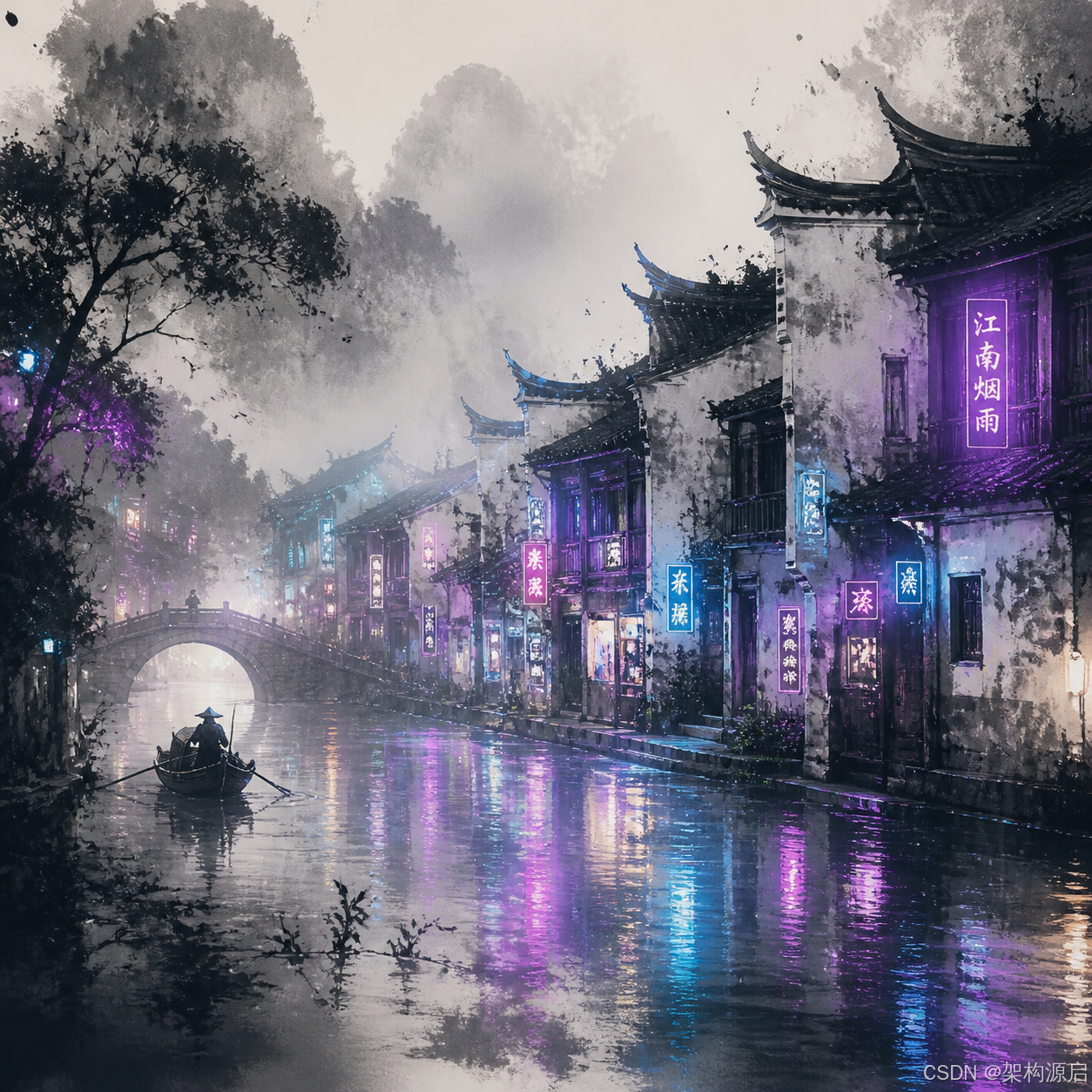
CogView-3-Flash的效果图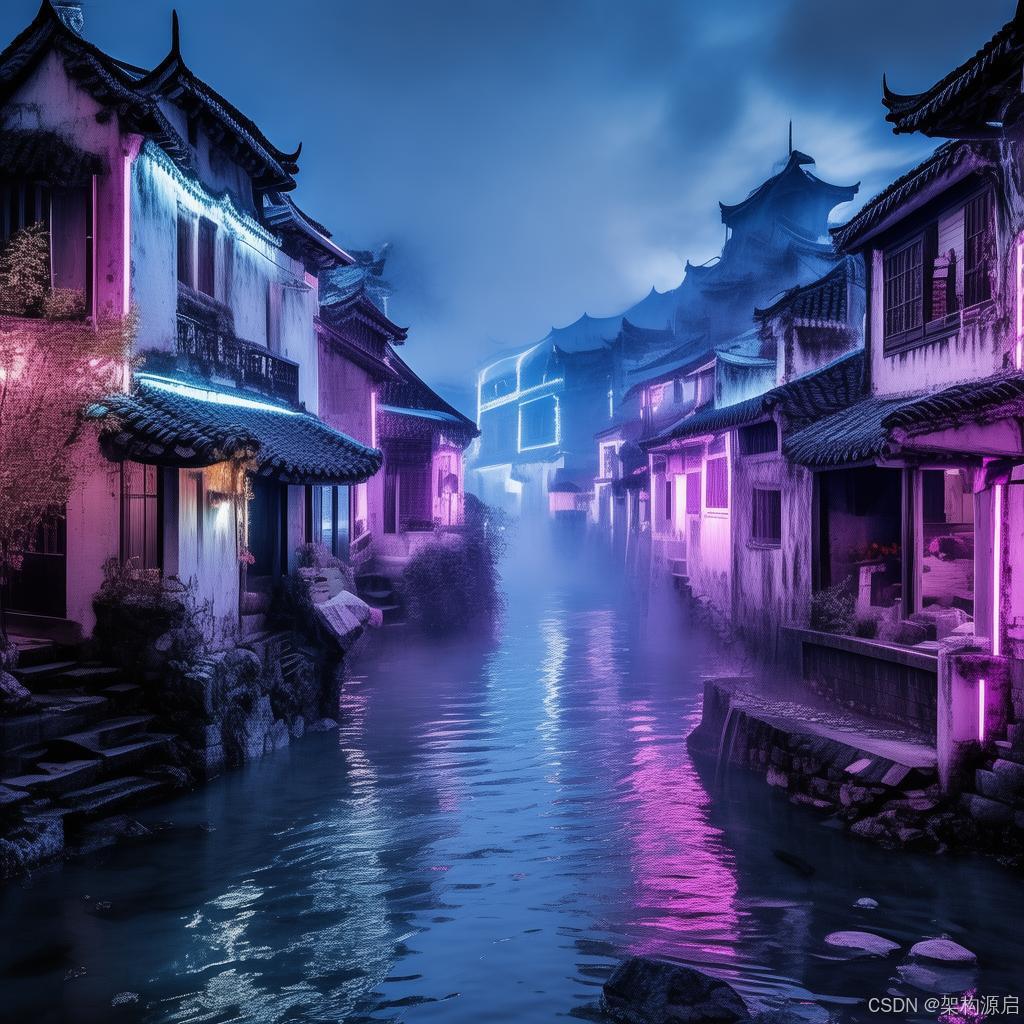
3.2 带选项的图片生成
@PostMapping("/generate-with-options")
public Map<String, Object> generateWithOptions(
        @RequestParam String prompt,
        @RequestParam(required = false, defaultValue = "1024x1024") String size,
        @RequestParam(required = false, defaultValue = "1") Integer n,
        @RequestParam(required = false, defaultValue = "standard") String quality) {

    // 解析尺寸
    String[] dimensions = size.split("x");
    int width = Integer.parseInt(dimensions[0]);
    int height = dimensions.length > 1 ? Integer.parseInt(dimensions[1]) : width;

    // 构建选项
    OpenAiImageOptions options = OpenAiImageOptions.builder()
            .model("dall-e-3")
            .width(width)
            .height(height)
            .N(n)
            .quality(quality)  // standard 或 hd
            .style("vivid")    // vivid 或 natural
            .responseFormat("url")  // url 或 b64_json
            .build();

    // 创建提示词
    ImagePrompt imagePrompt = new ImagePrompt(prompt, options);

    // 生成图片
    ImageResponse response = imageModel.call(imagePrompt);

    // 处理结果
    List<String> imageUrls = new ArrayList<>();
    if (response != null && response.getResults() != null) {
        for (var result : response.getResults()) {
            var output = result.getOutput();
            if (output.getUrl() != null) {
                imageUrls.add(output.getUrl());
            }
        }
    }

    Map<String, Object> result = new HashMap<>();
    result.put("success", true);
    result.put("imageUrls", imageUrls);
    result.put("count", imageUrls.size());
    result.put("prompt", prompt);

    return result;
}
测试:
curl -X POST "http://localhost:8080/image/generate-with-options" \
  -d "prompt=古风汉服女子背影,多重曝光融合远山云雾、水墨山水、孤舟飞鸟,画面层叠交融,国风写意留白,浅灰青色调,柔光朦胧,中式美学,正方形构图" \
  -d "size=1792x1024" \
  -d "n=2" \
  -d "quality=hd"
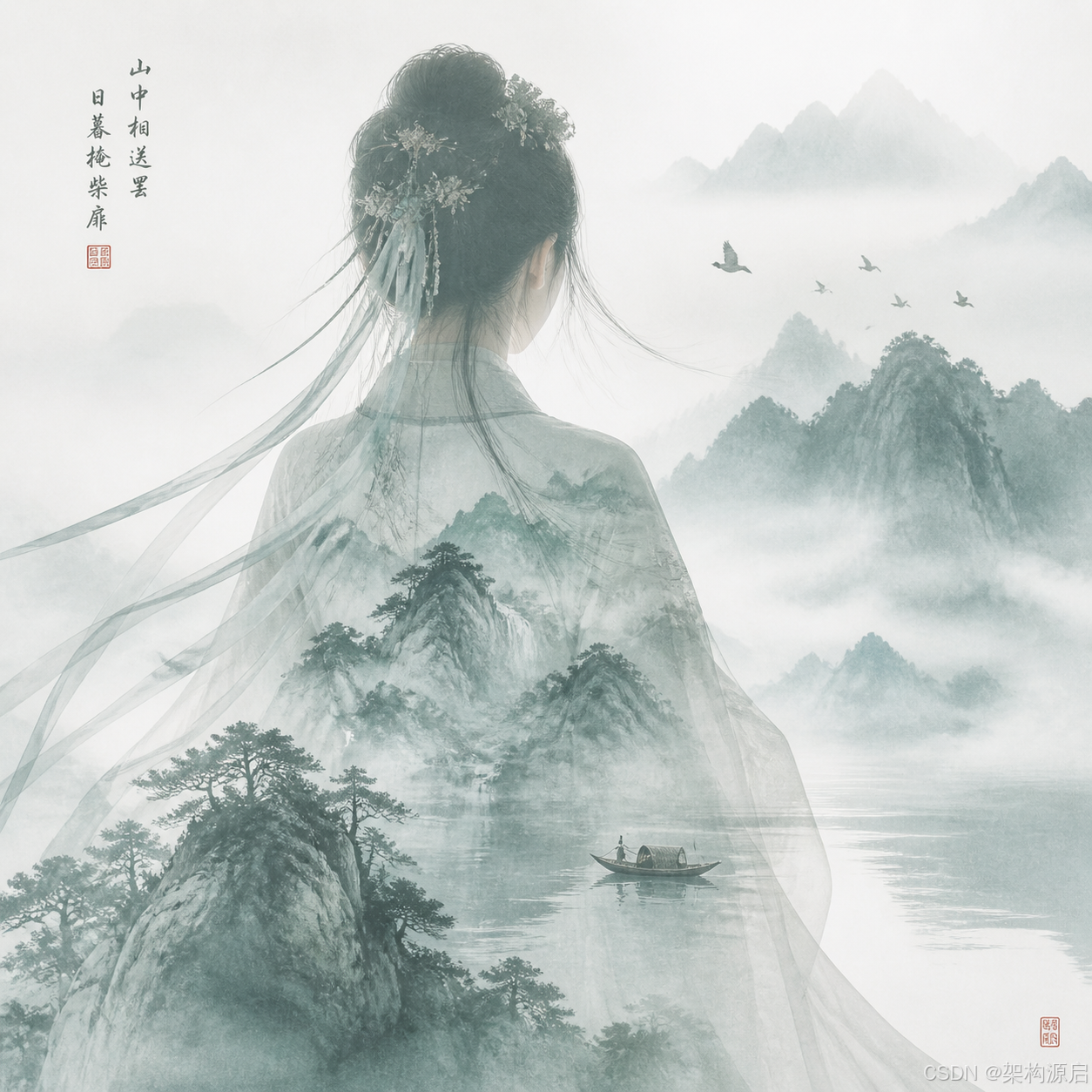
🎨 四、高级功能实现
4.1 图片本地存储
生成的图片 URL 通常有时效性(如 24 小时后过期),我们需要将图片保存到本地。
创建存储服务
@Service
@Slf4j
public class ImageStorageService {

    private final String uploadDir = "uploaded-images";

    @PostConstruct
    public void init() {
        // 创建上传目录
        File dir = new File(uploadDir);
        if (!dir.exists()) {
            dir.mkdirs();
            log.info("创建图片存储目录: {}", dir.getAbsolutePath());
        }
    }

    /**
     * 从 URL 下载图片并保存到本地
     */
    public String saveImageFromUrl(String imageUrl) throws IOException {
        // 生成唯一文件名
        String timestamp = LocalDateTime.now().format(DateTimeFormatter.ofPattern("yyyyMMdd_HHmmss"));
        String uuid = UUID.randomUUID().toString().substring(0, 8);
        String fileName = String.format("image_%s_%s.png", timestamp, uuid);
        String filePath = uploadDir + "/" + fileName;

        // 下载图片
        URL url = new URL(imageUrl);
        try (InputStream in = url.openStream();
             FileOutputStream out = new FileOutputStream(filePath)) {

            byte[] buffer = new byte[4096];
            int bytesRead;
            while ((bytesRead = in.read(buffer)) != -1) {
                out.write(buffer, 0, bytesRead);
            }
        }

        log.info("图片已保存: {}", filePath);
        return "/" + filePath;
    }

    /**
     * 从 Base64 保存图片
     */
    public String saveImageFromBase64(String base64Data) throws IOException {
        // 生成唯一文件名
        String timestamp = LocalDateTime.now().format(DateTimeFormatter.ofPattern("yyyyMMdd_HHmmss"));
        String uuid = UUID.randomUUID().toString().substring(0, 8);
        String fileName = String.format("image_%s_%s.png", timestamp, uuid);
        String filePath = uploadDir + "/" + fileName;

        // 解码 Base64
        byte[] imageBytes = Base64.getDecoder().decode(base64Data);

        // 保存文件
        try (FileOutputStream out = new FileOutputStream(filePath)) {
            out.write(imageBytes);
        }

        log.info("图片已保存: {}", filePath);
        return "/" + filePath;
    }
}
配置静态资源访问
@Configuration
public class ResourceConfig implements WebMvcConfigurer {

    @Override
    public void addResourceHandlers(ResourceHandlerRegistry registry) {
        // 映射 /uploaded-images/** 到本地目录
        registry.addResourceHandler("/uploaded-images/**")
                .addResourceLocations("file:uploaded-images/");
    }
}
集成到控制器
@PostMapping("/generate-and-save")
public Map<String, Object> generateAndSave(@RequestParam String prompt) {
    try {
        // 1. 生成图片
        ImagePrompt imagePrompt = new ImagePrompt(prompt);
        ImageResponse response = imageModel.call(imagePrompt);

        var output = response.getResult().getOutput();
        String localPath;

        // 2. 根据返回格式保存
        if (output.getUrl() != null && !output.getUrl().isEmpty()) {
            // 从 URL 下载并保存
            localPath = storageService.saveImageFromUrl(output.getUrl());
        } else if (output.getB64Json() != null && !output.getB64Json().isEmpty()) {
            // 从 Base64 保存
            localPath = storageService.saveImageFromBase64(output.getB64Json());
        } else {
            throw new RuntimeException("无法获取图片数据");
        }

        // 3. 返回结果
        Map<String, Object> result = new HashMap<>();
        result.put("success", true);
        result.put("imageUrl", localPath);
        result.put("savedImagePath", localPath);
        result.put("message", "图片已生成并保存到本地");
        result.put("prompt", prompt);

        return result;

    } catch (Exception e) {
        log.error("图片生成失败", e);
        Map<String, Object> error = new HashMap<>();
        error.put("success", false);
        error.put("message", "图片生成失败: " + e.getMessage());
        return error;
    }
}
测试:
curl -X POST "http://localhost:8080/image/generate-and-save" \
  -d "prompt=一只可爱的柯基犬在草地上奔跑"
响应:
{
  "success": true,
  "imageUrl": "/uploaded-images/image_20260504_143022_a1b2c3d4.png",
  "savedImagePath": "/uploaded-images/image_20260504_143022_a1b2c3d4.png",
  "message": "图片已生成并保存到本地",
  "prompt": "一只可爱的柯基犬在草地上奔跑"
}
访问图片:
http://localhost:8080/uploaded-images/image_20260504_143022_a1b2c3d4.png
4.2 七牛云 OSS 集成
对于生产环境,建议使用云存储服务。
添加配置
qiniu:
  access-key: ${QINIU_ACCESS_KEY}
  secret-key: ${QINIU_SECRET_KEY}
  bucket: your-bucket-name
  domain: https://your-domain.com
  region: z0  # 华东
创建七牛云服务
@Service
@Slf4j
public class QiniuStorageService {

    @Value("${qiniu.access-key}")
    private String accessKey;

    @Value("${qiniu.secret-key}")
    private String secretKey;

    @Value("${qiniu.bucket}")
    private String bucket;

    @Value("${qiniu.domain}")
    private String domain;

    @Value("${qiniu.region}")
    private String region;

    /**
     * 上传 Base64 图片到七牛云
     */
    public String uploadBase64ToQiniu(String base64Data) {
        try {
            // 解码 Base64
            byte[] imageBytes = Base64.getDecoder().decode(base64Data);

            // 生成文件名
            String fileName = generateFileName();

            // 配置
            Configuration cfg = new Configuration(Region.autoRegion());
            UploadManager uploadManager = new UploadManager(cfg);

            // 生成上传凭证
            Auth auth = Auth.create(accessKey, secretKey);
            String upToken = auth.uploadToken(bucket);

            // 上传
            Response response = uploadManager.put(imageBytes, fileName, upToken);

            // 解析结果
            DefaultPutRet putRet = new Gson().fromJson(
                response.bodyString(),
                DefaultPutRet.class
            );

            String fileUrl = domain + "/" + putRet.key;
            log.info("图片已上传到七牛云: {}", fileUrl);

            return fileUrl;

        } catch (Exception e) {
            log.error("七牛云上传失败", e);
            throw new RuntimeException("图片上传失败", e);
        }
    }

    /**
     * 从 URL 下载并上传到七牛云
     */
    public String uploadUrlToQiniu(String imageUrl) {
        try {
            // 下载图片
            URL url = new URL(imageUrl);
            byte[] imageBytes;
            try (InputStream in = url.openStream()) {
                imageBytes = in.readAllBytes();
            }

            // 生成文件名
            String fileName = generateFileName();

            // 配置
            Configuration cfg = new Configuration(Region.autoRegion());
            UploadManager uploadManager = new UploadManager(cfg);

            // 生成上传凭证
            Auth auth = Auth.create(accessKey, secretKey);
            String upToken = auth.uploadToken(bucket);

            // 上传
            Response response = uploadManager.put(imageBytes, fileName, upToken);

            // 解析结果
            DefaultPutRet putRet = new Gson().fromJson(
                response.bodyString(),
                DefaultPutRet.class
            );

            String fileUrl = domain + "/" + putRet.key;
            log.info("图片已上传到七牛云: {}", fileUrl);

            return fileUrl;

        } catch (Exception e) {
            log.error("七牛云上传失败", e);
            throw new RuntimeException("图片上传失败", e);
        }
    }

    private String generateFileName() {
        String timestamp = LocalDateTime.now()
            .format(DateTimeFormatter.ofPattern("yyyyMMdd_HHmmss"));
        String uuid = UUID.randomUUID().toString().substring(0, 8);
        return String.format("images/%s_%s.png", timestamp, uuid);
    }
}
集成到控制器
@PostMapping("/generate-and-upload-qiniu")
public Map<String, Object> generateAndUploadQiniu(@RequestParam String prompt) {
    try {
        // 1. 生成图片
        ImagePrompt imagePrompt = new ImagePrompt(prompt);
        ImageResponse response = imageModel.call(imagePrompt);

        var output = response.getResult().getOutput();
        String cloudUrl;

        // 2. 上传到七牛云
        if (output.getUrl() != null && !output.getUrl().isEmpty()) {
            cloudUrl = qiniuService.uploadUrlToQiniu(output.getUrl());
        } else if (output.getB64Json() != null && !output.getB64Json().isEmpty()) {
            cloudUrl = qiniuService.uploadBase64ToQiniu(output.getB64Json());
        } else {
            throw new RuntimeException("无法获取图片数据");
        }

        // 3. 返回结果
        Map<String, Object> result = new HashMap<>();
        result.put("success", true);
        result.put("imageUrl", cloudUrl);
        result.put("cloudStorage", "qiniu");
        result.put("message", "图片已生成并上传到七牛云");
        result.put("prompt", prompt);

        return result;

    } catch (Exception e) {
        log.error("图片生成或上传失败", e);
        Map<String, Object> error = new HashMap<>();
        error.put("success", false);
        error.put("message", "操作失败: " + e.getMessage());
        return error;
    }
}
4.3 智谱 CogView 集成
智谱 CogView 对中文支持更好,速度更快,成本更低。
CogView-3-Flash免费体验,可用来测试
创建智谱图像服务
@Service
@Slf4j
public class ZhipuImageService {

    private final ZhipuAiImageModel imageModel;
    private final ImageStorageService storageService;

    public ZhipuImageService(
            ZhipuAiImageModel imageModel,
            ImageStorageService storageService) {
        this.imageModel = imageModel;
        this.storageService = storageService;
    }

    /**
     * 生成图片并保存
     */
    public String generateAndSave(String prompt, String size) {
        try {
            // 解析尺寸
            String[] dimensions = size.split("x");
            int width = Integer.parseInt(dimensions[0]);
            int height = dimensions.length > 1 ? Integer.parseInt(dimensions[1]) : width;

            // 构建选项
            ZhipuAiImageOptions options = ZhipuAiImageOptions.builder()
                    .model("CogView-3-Flash")
                    .width(width)
                    .height(height)
                    .build();

            // 生成图片
            ImagePrompt imagePrompt = new ImagePrompt(prompt, options);
            ImageResponse response = imageModel.call(imagePrompt);

            // 提取 Base64 数据
            var output = response.getResult().getOutput();
            String base64Data = output.getB64Json();

            if (base64Data == null || base64Data.isEmpty()) {
                throw new RuntimeException("未获取到图片数据");
            }

            // 保存到本地
            String localPath = storageService.saveImageFromBase64(base64Data);

            log.info("智谱图片生成成功: {}", localPath);
            return localPath;

        } catch (Exception e) {
            log.error("智谱图片生成失败", e);
            throw new RuntimeException("图片生成失败", e);
        }
    }
}
控制器
@PostMapping("/zhipu/generate")
public Map<String, Object> generateWithZhipu(
        @RequestParam String prompt,
        @RequestParam(required = false, defaultValue = "1024x1024") String size) {

    try {
        String localPath = zhipuImageService.generateAndSave(prompt, size);

        Map<String, Object> result = new HashMap<>();
        result.put("success", true);
        result.put("imageUrl", localPath);
        result.put("model", "cogview-3");
        result.put("provider", "zhipu");
        result.put("message", "图片已生成并保存");

        return result;

    } catch (Exception e) {
        log.error("智谱图片生成失败", e);
        Map<String, Object> error = new HashMap<>();
        error.put("success", false);
        error.put("message", "生成失败: " + e.getMessage());
        return error;
    }
}
测试:
curl -X POST "http://localhost:8080/image/zhipu/generate" \
  -d "prompt=未来机械少女,多重曝光叠加赛博都市霓虹、电路板纹路、光影线条,双重影像交织,高对比冷色调,科技感梦幻,潮流艺术风,2K" \
  -d "size=1024x1024"
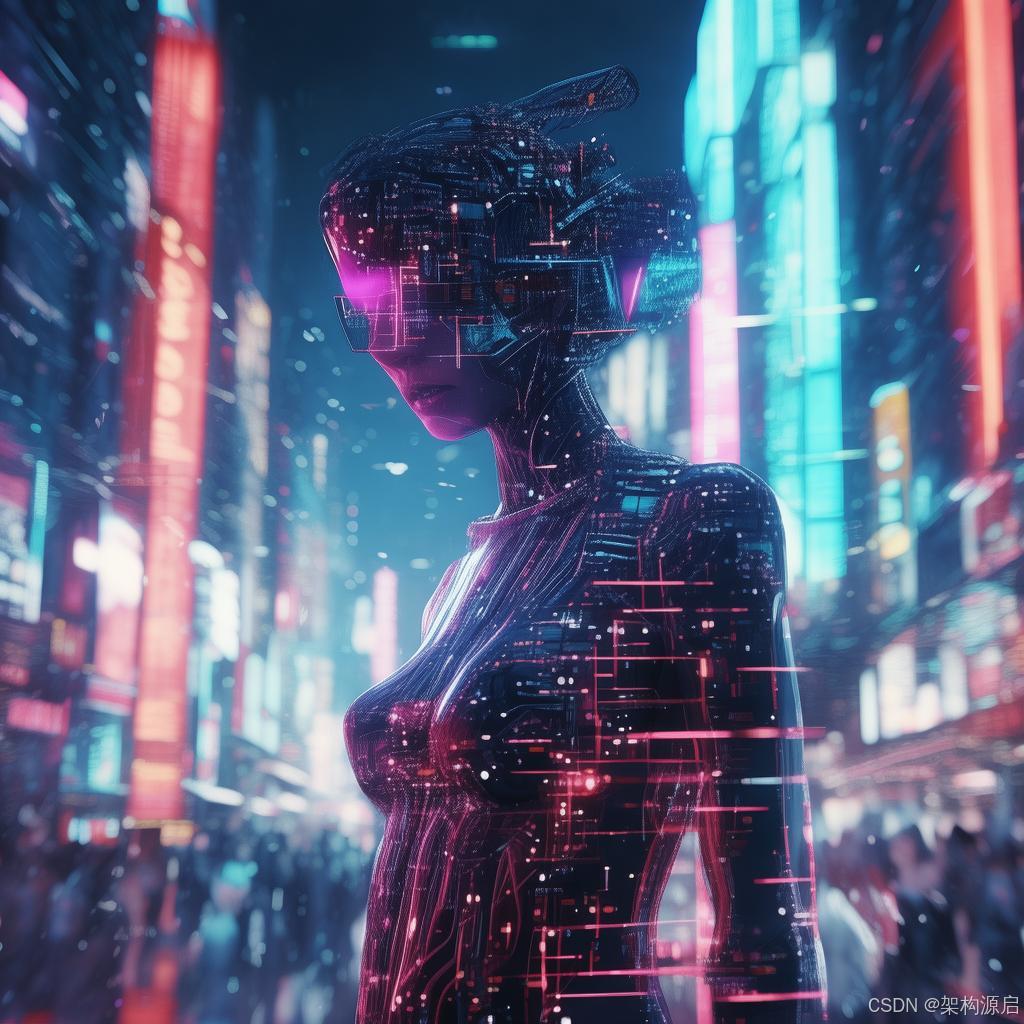
优势:
- ✅ 中文理解更好
- ✅ 生成速度更快(3-5秒)
- ✅ 成本更低(免费)
- ✅ 适合国内应用
4.4 硅基流动 Kwai-Kolors 图生图
硅基流动提供了高性能的 Kwai-Kolors/Kolors 模型,支持高质量的图生图功能,且对中文提示词理解极佳。
1. 环境配置
在 application.yml 中添加硅基流动的 API Key:
siliconflow:
  api:
    key: ${SILICONFLOW_API_KEY} # 从 https://cloud.siliconflow.cn/ 获取
2. 创建硅基流动服务类
package com.shun.springai.service;

import lombok.Data;
import lombok.extern.slf4j.Slf4j;
import org.springframework.beans.factory.annotation.Value;
import org.springframework.http.*;
import org.springframework.stereotype.Service;
import org.springframework.web.client.RestTemplate;

import java.util.*;

@Slf4j
@Service
public class SiliconFlowService {

    @Value("${siliconflow.api.key}")
    private String apiKey;

    private static final String BASE_URL = "https://api.siliconflow.cn/v1/images/generations";
    private final RestTemplate restTemplate = new RestTemplate();

    @Data
    public static class SiliconFlowRequest {
        private String model;
        private String prompt;
        private String negative_prompt;
        private String image_size;
        private Integer batch_size;
        private Long seed;
        private Integer num_inference_steps;
        private Double guidance_scale;
        private String image; // base64 or url for img2img
    }

    @Data
    public static class SiliconFlowResponse {
        private List<ImageData> images;

        @Data
        public static class ImageData {
            private String url;
        }
    }

    /**
     * 图生图:基于参考图生成新图
     */
    public String imageToImage(String imageBase64, String prompt) {
        try {
            HttpHeaders headers = new HttpHeaders();
            headers.setContentType(MediaType.APPLICATION_JSON);
            headers.setBearerAuth(apiKey);

            SiliconFlowRequest request = new SiliconFlowRequest();
            request.setModel("Kwai-Kolors/Kolors");
            request.setPrompt(prompt);
            request.setImage(imageBase64); // 传入参考图的 Base64
            request.setImage_size("1024x1024"); // Kolors 推荐尺寸
            request.setBatch_size(1);
            request.setNum_inference_steps(20);
            request.setGuidance_scale(7.5);
            if (request.getNegative_prompt() == null) request.setNegative_prompt("");

            HttpEntity<SiliconFlowRequest> entity = new HttpEntity<>(request, headers);

            log.info("Calling SiliconFlow Kolors for image-to-image");
            SiliconFlowResponse response = restTemplate.postForObject(BASE_URL, entity, SiliconFlowResponse.class);

            if (response != null && response.getImages() != null && !response.getImages().isEmpty()) {
                return response.getImages().get(0).getUrl();
            }
            throw new RuntimeException("SiliconFlow returned no images");

        } catch (Exception e) {
            log.error("SiliconFlow image-to-image failed", e);
            throw new RuntimeException("图生图失败: " + e.getMessage(), e);
        }
    }
}
3. 控制器集成
在 ImageGenerationController 中增加接口:
@PostMapping(value = "/kolors/image-to-image", consumes = MediaType.MULTIPART_FORM_DATA_VALUE)
public Map<String, Object> kolorsImageToImage(
        @RequestPart("image") MultipartFile image,
        @RequestParam("prompt") String prompt) {

    try {
        // 1. 将上传的图片转为 Base64
        byte[] imageBytes = image.getBytes();
        String base64Image = "data:" + image.getContentType() + ";base64," +
                             Base64.getEncoder().encodeToString(imageBytes);

        // 2. 调用硅基流动服务
        String resultUrl = siliconFlowService.imageToImage(base64Image, prompt);

        // 3. (可选) 下载并保存到本地,因为 URL 有效期仅 1 小时
        String localPath = storageService.saveImageFromUrl(resultUrl);

        Map<String, Object> result = new HashMap<>();
        result.put("success", true);
        result.put("imageUrl", localPath);
        result.put("model", "Kwai-Kolors/Kolors");
        result.put("provider", "siliconflow");

        return result;

    } catch (Exception e) {
        log.error("Kolors 图生图失败", e);
        Map<String, Object> error = new HashMap<>();
        error.put("success", false);
        error.put("message", "失败: " + e.getMessage());
        return error;
    }
}
测试场景:
curl -X POST "http://localhost:8080/image/kolors/image-to-image" \
  -F "image=@/path/to/your/photo.jpg" \
  -F "prompt=赛博朋克风格,霓虹灯光,未来城市背景,高细节"
原图
效果图
优势:
- ✅ 速度快:生成通常在 5-10 秒内完成
- ✅ 中文强:对中文提示词的语义理解非常精准
- ✅ 成本低:相比 Midjourney 或 DALL-E 3 更具性价比
- ✅ 可控性:支持
guidance_scale等参数微调生成效果
🏨 五、实战:AI 头像生成器
5.1 需求分析
我们要构建一个 AI 头像生成器,用户可以:
- 选择风格(商务、卡通、艺术等)
- 输入描述(性别、年龄、特征等)
- 生成多个候选头像
- 下载喜欢的头像
5.2 实现代码
DTO 类
@Data
public class AvatarGenerationRequest {

    @NotBlank(message = "风格不能为空")
    private String style;  // business, cartoon, artistic, anime

    @NotBlank(message = "描述不能为空")
    private String description;  // 男性,30岁,戴眼镜

    @Min(1)
    @Max(4)
    private Integer count = 1;  // 生成数量

    private String size = "512x512";
}

@Data
public class AvatarGenerationResponse {
    private boolean success;
    private List<String> imageUrls;
    private String message;
    private String model;
}
服务层
@Service
@Slf4j
public class AvatarGeneratorService {

    private final ImageModel imageModel;
    private final ImageStorageService storageService;

    public AvatarGenerationResponse generateAvatar(AvatarGenerationRequest request) {
        try {
            // 1. 构建提示词
            String prompt = buildAvatarPrompt(request);

            // 2. 配置选项
            OpenAiImageOptions options = OpenAiImageOptions.builder()
                    .model("dall-e-3")
                    .width(512)
                    .height(512)
                    .N(request.getCount())
                    .quality("standard")
                    .style("vivid")
                    .build();

            // 3. 生成图片
            ImagePrompt imagePrompt = new ImagePrompt(prompt, options);
            ImageResponse response = imageModel.call(imagePrompt);

            // 4. 保存图片
            List<String> imageUrls = new ArrayList<>();
            for (var result : response.getResults()) {
                var output = result.getOutput();

                String localPath;
                if (output.getUrl() != null) {
                    localPath = storageService.saveImageFromUrl(output.getUrl());
                } else {
                    localPath = storageService.saveImageFromBase64(output.getB64Json());
                }

                imageUrls.add(localPath);
            }

            // 5. 返回结果
            AvatarGenerationResponse avatarResponse = new AvatarGenerationResponse();
            avatarResponse.setSuccess(true);
            avatarResponse.setImageUrls(imageUrls);
            avatarResponse.setMessage("头像生成成功");
            avatarResponse.setModel("dall-e-3");

            return avatarResponse;

        } catch (Exception e) {
            log.error("头像生成失败", e);
            AvatarGenerationResponse errorResponse = new AvatarGenerationResponse();
            errorResponse.setSuccess(false);
            errorResponse.setMessage("生成失败: " + e.getMessage());
            return errorResponse;
        }
    }

    private String buildAvatarPrompt(AvatarGenerationRequest request) {
        StringBuilder prompt = new StringBuilder();

        // 基础描述
        prompt.append("Professional avatar portrait, ");
        prompt.append(request.getDescription()).append(", ");

        // 风格
        switch (request.getStyle().toLowerCase()) {
            case "business":
                prompt.append("business professional style, clean background, corporate headshot");
                break;
            case "cartoon":
                prompt.append("cartoon style, colorful, friendly expression, simple background");
                break;
            case "artistic":
                prompt.append("artistic painting style, creative, unique lighting");
                break;
            case "anime":
                prompt.append("anime style, Japanese animation, vibrant colors");
                break;
            default:
                prompt.append("professional style");
        }

        // 质量要求
        prompt.append(", high quality, detailed, centered composition");

        return prompt.toString();
    }
}
控制器
@RestController
@RequestMapping("/avatar")
@Validated
public class AvatarController {

    private final AvatarGeneratorService avatarService;

    @PostMapping("/generate")
    public AvatarGenerationResponse generateAvatar(
            @Valid @RequestBody AvatarGenerationRequest request) {
        return avatarService.generateAvatar(request);
    }
}
5.3 测试示例
商务头像
curl -X POST "http://localhost:8080/avatar/generate" \
  -H "Content-Type: application/json" \
  -d '{
    "style": "business",
    "description": "male, 35 years old, wearing glasses, short black hair",
    "count": 2,
    "size": "512x512"
  }'
卡通头像
curl -X POST "http://localhost:8080/avatar/generate" \
  -H "Content-Type: application/json" \
  -d '{
    "style": "cartoon",
    "description": "female, 25 years old, long brown hair, smiling",
    "count": 1
  }'
⚠️ 六、常见问题与解决方案
问题1:图片 URL 过期
现象:保存的 URL 过一段时间后无法访问
原因:OpenAI 生成的 URL 有效期通常为 24 小时
解决方案:
- ✅ 立即下载到本地存储
- ✅ 或上传到云存储(七牛云、阿里云 OSS)
- ✅ 不要直接返回临时 URL 给前端
问题2:Base64 数据过大
现象:内存溢出或响应超时
原因:高清图片的 Base64 编码可能超过 10MB
解决方案:
// 1. 使用 URL 格式而非 Base64
.responseFormat("url")  // 而不是 "b64_json"

// 2. 降低图片尺寸
.size("512x512")  // 而不是 "1024x1024"

// 3. 异步处理
@Async
public CompletableFuture<String> generateAsync(String prompt) {
    // 异步生成
}
问题3:生成内容不符合预期
现象:图片质量差或与描述不符
解决方案:
// 1. 优化提示词
String prompt = """
    Professional photography,
    a cute cat sitting on windowsill,
    sunlight streaming through window,
    warm tones, high detail, 4k quality
    """;

// 2. 调整参数
.quality("hd")        // 使用高质量模式
.style("natural")     // 尝试不同风格

// 3. 多次生成,选择最佳
for (int i = 0; i < 3; i++) {
    // 生成并评估
}
问题4:速率限制
现象:报错 rate limit exceeded
原因:超过了 API 的调用频率限制
解决方案:
@Component
public class RateLimiter {

    private final Semaphore semaphore = new Semaphore(5); // 最多5个并发

    public ImageResponse callWithLimit(ImageModel model, ImagePrompt prompt)
            throws InterruptedException {
        semaphore.acquire();
        try {
            return model.call(prompt);
        } finally {
            semaphore.release();
        }
    }
}
问题5:中文提示词效果差
现象:使用中文描述生成的图片不准确
原因:部分模型对中文理解不如英文
解决方案:
// 方案1:使用智谱 CogView(中文优化)
ZhipuAiImageOptions options = ZhipuAiImageOptions.builder()
    .model("cogview-3")
    .build();

// 方案2:翻译成英文
String englishPrompt = translateToEnglish(chinesePrompt);
ImagePrompt prompt = new ImagePrompt(englishPrompt);

// 方案3:中英文混合
String prompt = "一只可爱的猫咪, cute cat, professional photography";
📊 七、性能优化建议
7.1 缓存策略
@Service
public class CachedImageService {

    @Cacheable(value = "generated-images", key = "#prompt")
    public String generateCached(String prompt) {
        // 相同的提示词直接返回缓存
        return imageService.generate(prompt);
    }
}
7.2 异步处理
@Async
public CompletableFuture<String> generateAsync(String prompt) {
    String path = imageService.generateAndSave(prompt);
    return CompletableFuture.completedFuture(path);
}

// 使用
CompletableFuture<String> future = service.generateAsync(prompt);
future.thenAccept(path -> {
    // 处理完成后的逻辑
});
7.3 批量生成
public List<String> batchGenerate(List<String> prompts) {
    return prompts.parallelStream()
        .map(prompt -> imageService.generateAndSave(prompt))
        .collect(Collectors.toList());
}
7.4 成本控制
@Component
public class CostTracker {

    private final AtomicLong dailyCount = new AtomicLong(0);
    private final long dailyLimit = 100; // 每天最多100张

    public boolean canGenerate() {
        return dailyCount.get() < dailyLimit;
    }

    public void recordGeneration() {
        dailyCount.incrementAndGet();
    }

    @Scheduled(cron = "0 0 0 * * *") // 每天零点重置
    public void resetDailyCount() {
        dailyCount.set(0);
    }
}
📝 八、总结与最佳实践
8.1 核心要点回顾
ImageModel 使用
- ✅ 支持同步调用
call() - ✅ 自动处理 URL 和 Base64 格式
- ✅ 通过 Options 配置参数
提示词优化
- ✅ 使用英文或中英文混合
- ✅ 详细描述风格、光线、构图
- ✅ 添加质量关键词(high quality, 4k)
8.2 安全注意事项
- 🔒 API Key 存储在环境变量
- 🔒 验证用户输入,防止注入攻击
- 🔒 实施速率限制,防止滥用
- 🔒 记录审计日志
- 🔒 定期清理无用图片
8.3 生产环境建议
- 使用云存储:七牛云、阿里云 OSS、AWS S3
- CDN 加速:提升图片加载速度
- 图片压缩:减少存储空间和带宽
- 监控告警:监控用量和错误率
- 降级策略:主模型失败时切换到备用模型
🔮 九、下一步学习路径
恭喜你已经掌握了 Spring AI 图片生成的核心技能!接下来可以学习:
关注账号,后续持续更新内容
- [第6篇] Spring AI 响应式编程与流式输出 - Reactor + SSE 实时聊天
- [第7篇] Spring AI 函数调用实战 - Function Calling 集成业务系统
- [第8篇] Spring AI RAG 实战 - 基于知识库的智能问答
实践项目
- 🎨 完善 AI 头像生成器,添加更多风格
- 🖼️ 开发图片编辑工具(背景移除、风格转换)
- 📱 构建社交媒体配图生成器
- 🏨 实现酒店宣传海报自动生成系统
进阶主题-后续持续更新,敬请期待
- 图片识别:结合 Vision 模型分析图片内容
- 视频生成:探索 AI 视频生成技术
- 3D 建模:AI 辅助 3D 模型生成
💬 互动环节
觉得有用?
- ⭐ 点赞支持
- 💾 收藏备用
- 🔄 分享给朋友

下一篇预告:《Spring AI 函数调用实战:让 AI 调用你的业务代码》

AtomGit 是由开放原子开源基金会联合 CSDN 等生态伙伴共同推出的新一代开源与人工智能协作平台。平台坚持“开放、中立、公益”的理念,把代码托管、模型共享、数据集托管、智能体开发体验和算力服务整合在一起,为开发者提供从开发、训练到部署的一站式体验。
更多推荐

 17
17 0
0- 0


 已为社区贡献23条内容

所有评论(0)