结构热应力仿真-主题082_原位测试与仿真-主题082_原位测试与仿真_完整教程
主题082:原位测试与仿真
摘要
原位测试与仿真是现代材料力学研究中的核心技术,它将实验观测与数值模拟紧密结合,为材料性能表征、损伤机制分析和模型验证提供了强有力的工具。本教程系统介绍原位扫描电子显微镜(SEM)测试和数字图像相关(DIC)方法的原理与实现,通过两个完整的Python实例演示:(1)基于DIC的位移场和应变场测量;(2)原位SEM测试与有限元仿真的耦合分析。读者将学习如何建立实验-仿真协同分析框架,实现模型参数反演和验证,为材料本构模型开发和结构完整性评估奠定基础。
关键词
原位测试;数字图像相关;扫描电子显微镜;实验-仿真耦合;模型验证;参数反演;位移场测量;应变场计算
1. 引言与背景
1.1 原位测试的重要性
在材料科学与工程领域,理解材料在实际服役条件下的力学行为是设计安全可靠结构的基础。传统的材料测试方法通常将试样从测试设备中取出后进行离线观测,这种方法存在以下局限性:
信息丢失问题:材料在加载过程中的微观结构演化、裂纹萌生和扩展等关键现象往往发生在加载过程中,卸载后这些瞬态信息会部分或完全消失。
边界条件不确定性:离线测试难以准确复现实际服役环境中的复杂边界条件,如多轴应力状态、温度梯度和环境因素耦合等。
尺度效应难以捕捉:宏观力学性能与微观结构之间的关联需要跨尺度观测手段,传统测试方法难以实现多尺度信息的同步获取。
原位测试(In-situ Testing)技术通过在加载过程中实时观测材料响应,有效解决了上述问题。原位扫描电子显微镜(SEM)测试是目前应用最广泛的原位测试技术之一,它能够在纳米至微米尺度上实时观测材料的变形、损伤和断裂过程。
1.2 数字图像相关方法概述
数字图像相关(Digital Image Correlation,DIC)是一种非接触式全场光学测量技术,通过追踪试样表面散斑图案的运动来测量位移场和应变场。DIC技术具有以下显著优势:
全场测量能力:DIC能够同时获取试样表面数千至数万个测量点的位移信息,提供完整的位移场和应变场分布,而非传统应变片只能测量局部平均值。
非接触测量:DIC不需要在试样表面粘贴传感器或进行机械接触,避免了附加质量效应和接触干扰,特别适用于薄壁结构、软材料和高温环境测试。
高精度与动态范围:现代DIC系统的位移测量精度可达0.01像素,应变测量精度可达50微应变(με),动态范围覆盖从弹性变形到塑性大变形。
多尺度适用性:通过调整相机和镜头的配置,DIC可以应用于从微纳米尺度(SEM-DIC)到米级结构(远距离DIC)的广泛范围。
1.3 实验-仿真耦合的意义
实验与仿真的耦合是现代计算固体力学发展的重要趋势。这种耦合不是简单的实验验证仿真或仿真解释实验,而是建立双向互动的协同分析框架:
模型验证与确认(Verification and Validation,V&V):通过定量比较实验测量和仿真预测,评估数值模型的准确性和适用性范围。验证关注"模型是否正确实现",确认关注"是否选择了正确的模型"。
模型参数反演:利用实验数据反演材料本构模型中的未知参数,如弹性模量、硬化参数、损伤演化参数等。这种方法比传统试错法更高效、更精确。
多尺度模型校准:将微观尺度的原位观测结果与宏观尺度的有限元模型关联,建立跨尺度的材料模型,实现"从微观到宏观"的性能预测。
不确定性量化:通过实验-仿真对比,量化模型预测的不确定性来源,包括材料参数分散性、几何不确定性和模型形式误差等。
1.4 本教程学习目标
通过本教程的学习,读者将能够:
-
理解DIC基本原理:掌握数字图像相关的数学基础,包括相关函数、亚像素优化和应变计算方法。
-
实现DIC算法:编写完整的DIC分析程序,包括散斑图像生成、位移场计算和应变场后处理。
-
建立原位测试模型:模拟原位SEM测试过程,包括微观结构生成、变形场计算和裂纹扩展模拟。
-
实现实验-仿真耦合:开发实验数据与有限元仿真的耦合框架,进行模型验证和参数反演。
-
可视化分析结果:使用Python科学计算工具包生成高质量的实验-仿真对比图表。
2. 数字图像相关方法理论基础
2.1 基本原理
数字图像相关方法的核心思想是:在变形前后拍摄的两幅图像中,通过匹配局部区域的灰度分布来追踪该区域的位移。考虑试样表面的一个微小区域(称为"子区"或"subset"),变形前该区域的灰度分布记为f(x,y)f(x, y)f(x,y),变形后变为g(x′,y′)g(x', y')g(x′,y′)。
假设变形是连续的,变形前后的坐标关系由位移场描述:
x′=x+u(x,y)x' = x + u(x, y)x′=x+u(x,y)
y′=y+v(x,y)y' = y + v(x, y)y′=y+v(x,y)
其中u(x,y)u(x, y)u(x,y)和v(x,y)v(x, y)v(x,y)分别是水平和垂直位移分量。DIC的目标就是找到最优的位移场,使得变形前后子区的灰度分布最相似。
2.2 相关函数
为了量化两幅子区图像的相似程度,需要定义相关函数(Correlation Function)。常用的相关函数包括:
互相关(Cross-Correlation,CC):
CCC=∑i=−MM∑j=−MMf(xi,yj)⋅g(xi′,yj′)C_{CC} = \sum_{i=-M}^{M} \sum_{j=-M}^{M} f(x_i, y_j) \cdot g(x_i', y_j')CCC=i=−M∑Mj=−M∑Mf(xi,yj)⋅g(xi′,yj′)
其中(2M+1)×(2M+1)(2M+1) \times (2M+1)(2M+1)×(2M+1)是子区大小。互相关值越大表示相似度越高,但它对光照变化敏感。
零均值归一化互相关(Zero-normalized Cross-Correlation,ZNCC):
CZNCC=∑i,j[f(xi,yj)−fˉ]⋅[g(xi′,yj′)−gˉ]∑i,j[f(xi,yj)−fˉ]2⋅∑i,j[g(xi′,yj′)−gˉ]2C_{ZNCC} = \frac{\sum_{i,j} [f(x_i, y_j) - \bar{f}] \cdot [g(x_i', y_j') - \bar{g}]}{\sqrt{\sum_{i,j} [f(x_i, y_j) - \bar{f}]^2 \cdot \sum_{i,j} [g(x_i', y_j') - \bar{g}]^2}}CZNCC=∑i,j[f(xi,yj)−fˉ]2⋅∑i,j[g(xi′,yj′)−gˉ]2∑i,j[f(xi,yj)−fˉ]⋅[g(xi′,yj′)−gˉ]
其中fˉ\bar{f}fˉ和gˉ\bar{g}gˉ分别是参考子区和变形子区的平均灰度值。ZNCC消除了光照强度变化的影响,取值范围为[−1,1][-1, 1][−1,1],1表示完全相关。
平方差和(Sum of Squared Differences,SSD):
CSSD=∑i,j[f(xi,yj)−g(xi′,yj′)]2C_{SSD} = \sum_{i,j} [f(x_i, y_j) - g(x_i', y_j')]^2CSSD=i,j∑[f(xi,yj)−g(xi′,yj′)]2
SSD越小表示相似度越高,对灰度线性变化敏感。
零均值归一化平方差和(Zero-normalized Sum of Squared Differences,ZNSSD):
CZNSSD=∑i,j[f(xi,yj)−fˉ∑i,j[f(xi,yj)−fˉ]2−g(xi′,yj′)−gˉ∑i,j[g(xi′,yj′)−gˉ]2]2C_{ZNSSD} = \sum_{i,j} \left[ \frac{f(x_i, y_j) - \bar{f}}{\sqrt{\sum_{i,j} [f(x_i, y_j) - \bar{f}]^2}} - \frac{g(x_i', y_j') - \bar{g}}{\sqrt{\sum_{i,j} [g(x_i', y_j') - \bar{g}]^2}} \right]^2CZNSSD=i,j∑ ∑i,j[f(xi,yj)−fˉ]2f(xi,yj)−fˉ−∑i,j[g(xi′,yj′)−gˉ]2g(xi′,yj′)−gˉ 2
ZNSSD与ZNCC的关系为:CZNSSD=2(1−CZNCC)C_{ZNSSD} = 2(1 - C_{ZNCC})CZNSSD=2(1−CZNCC)。
在实际应用中,ZNCC因其对光照变化的鲁棒性而被广泛采用。
2.3 亚像素位移测量
上述相关函数只能给出整像素精度的位移估计。为了获得亚像素精度(通常需要0.01像素或更高),需要采用插值和优化方法。
灰度插值:由于变形后的子区位置通常不对应整数像素坐标,需要对变形图像进行插值。常用的插值方法包括:
- 双线性插值:利用周围4个像素进行线性插值,计算简单但精度有限。
- 双三次插值:利用周围16个像素进行三次多项式插值,精度更高但计算量更大。
- B样条插值:提供连续可导的灰度场,适合需要计算灰度梯度的算法。
优化算法:将亚像素位移估计转化为优化问题,最大化相关函数:
(u∗,v∗)=argmaxu,vCZNCC(u,v)(u^*, v^*) = \arg \max_{u, v} C_{ZNCC}(u, v)(u∗,v∗)=argu,vmaxCZNCC(u,v)
常用的优化方法包括:
- 牛顿迭代法:利用灰度梯度信息,收敛速度快但需要计算二阶导数。
- Levenberg-Marquardt算法:结合梯度下降和牛顿法的优点,鲁棒性好。
- 逆合成高斯-牛顿(IC-GN)算法:通过坐标变换提高计算效率和鲁棒性。
2.4 位移场平滑与应变计算
DIC直接测量的是离散的位移数据,需要进一步处理以获得平滑的位移场和应变场。
位移场平滑:由于噪声和计算误差,原始位移场可能存在局部波动。常用的平滑方法包括:
- 局部多项式拟合:在每个点周围用多项式拟合位移分布。
- 样条插值:使用B样条或薄板样条进行全局平滑。
- 数字图像相关-有限元(DIC-FEM)耦合:将DIC测量与有限元形函数结合。
应变计算:应变是位移的导数,对噪声敏感。常用的应变计算方法包括:
- 有限差分法:直接对离散位移数据求差分。
- 平滑后求导:先对位移场进行平滑,再计算导数。
- 局部最小二乘拟合:在每个点周围用平面或二次曲面拟合位移,然后解析求导。
对于小变形,工程应变定义为:
εxx=∂u∂x,εyy=∂v∂y,εxy=12(∂u∂y+∂v∂x)\varepsilon_{xx} = \frac{\partial u}{\partial x}, \quad \varepsilon_{yy} = \frac{\partial v}{\partial y}, \quad \varepsilon_{xy} = \frac{1}{2}\left(\frac{\partial u}{\partial y} + \frac{\partial v}{\partial x}\right)εxx=∂x∂u,εyy=∂y∂v,εxy=21(∂y∂u+∂x∂v)
2.5 误差来源与精度分析
DIC测量的误差来源主要包括:
图像噪声:相机传感器噪声、散斑颗粒随机分布等会引入灰度波动,影响相关计算。
散斑质量:散斑尺寸过大或过小、对比度不足、分布不均匀都会降低测量精度。最优散斑尺寸约为3-5像素。
子区大小:子区过小会导致相关峰值不明显,过大则降低空间分辨率。通常选择21×21至41×41像素。
形函数选择:对于大变形或复杂变形,简单的平移形函数(仅u, v)不够准确,需要引入仿射形函数(6参数)或二次形函数(12参数)。
插值误差:灰度插值会引入系统误差,双三次插值比双线性插值精度高约一个数量级。
3. 原位SEM测试技术
3.1 原位SEM测试系统
原位SEM测试系统主要由以下部分组成:
扫描电子显微镜(SEM):提供高分辨率(纳米级)的表面形貌观测能力。现代场发射SEM的分辨率可达1纳米以下。
微型加载台:安装在SEM样品室内的微型力学加载装置,可进行拉伸、压缩、弯曲、疲劳等多种加载模式。载荷范围通常为毫牛至千牛级。
控制系统:精确控制加载速率和位移,同步触发图像采集。
图像采集系统:高分辨率数字图像采集,帧率根据测试需求从几秒一帧到每秒数十帧。
3.2 微观结构观测
SEM能够提供材料表面的丰富微观结构信息:
晶粒形貌:通过背散射电子(BSE)或二次电子(SE)成像,可以清晰显示晶粒边界和取向差异。
裂纹观测:SEM的高分辨率使其能够捕捉裂纹萌生和扩展的早期阶段,研究裂纹尖端塑性区、裂纹偏转和桥接等机制。
位错和滑移:在适当条件下,SEM可以观察到滑移带、位错露头等现象。
界面特征:对于复合材料和多相材料,SEM能够清晰显示相界面、脱粘和分层等损伤模式。
3.3 原位DIC(SEM-DIC)
将DIC技术与SEM结合,可以在微观尺度上实现全场变形测量:
散斑制备:微观散斑可以通过多种方法制备,包括:
- 喷涂纳米颗粒(如金、氧化铝)
- 利用材料本身的表面特征(如晶粒、相分布)
- 电子束或离子束刻蚀图案
分辨率:SEM-DIC的位移分辨率可达0.01像素,对应的空间分辨率取决于放大倍数。在1000倍放大下,1像素约100纳米,位移分辨率约1纳米。
挑战:SEM-DIC面临的主要挑战包括:
- 图像畸变(枕形畸变、扫描畸变)
- 灰度不稳定性(电荷积累、对比度变化)
- 扫描速度和图像采集的同步
3.4 裂纹扩展监测
原位SEM测试是研究裂纹扩展机制的有力工具:
裂纹长度测量:通过图像处理自动识别裂纹尖端位置,测量裂纹长度随载荷或循环次数的变化。
裂纹路径追踪:记录裂纹扩展路径,分析裂纹偏转、分叉和愈合等现象。
裂纹尖端场测量:结合DIC技术,测量裂纹尖端周围的位移场和应变场,验证断裂力学理论。
Paris定律验证:通过疲劳裂纹扩展实验,验证Paris定律并测定材料常数C和m:
dadN=C(ΔK)m\frac{da}{dN} = C(\Delta K)^mdNda=C(ΔK)m
其中da/dNda/dNda/dN是裂纹扩展速率,ΔK\Delta KΔK是应力强度因子范围。
4. 实验-仿真耦合方法
4.1 耦合框架概述
实验-仿真耦合的基本框架包括以下步骤:
步骤1:实验设计:根据研究目标设计实验方案,包括试样几何、加载条件、观测区域和测量参数。
步骤2:实验执行:进行原位测试,获取变形图像和载荷-位移数据。
步骤3:图像分析:使用DIC等方法处理实验图像,提取位移场和应变场。
步骤4:仿真建模:建立有限元模型,定义材料本构关系、边界条件和初始条件。
步骤5:模型验证:定量比较实验测量和仿真预测,评估模型准确性。
步骤6:参数反演:基于实验数据优化模型参数,提高预测精度。
步骤7:模型确认:使用独立的实验数据验证校准后的模型。
4.2 模型验证指标
定量评估实验与仿真一致性的常用指标包括:
相对误差:
Relative Error=∥uexp−usim∥∥uexp∥\text{Relative Error} = \frac{\|u_{exp} - u_{sim}\|}{\|u_{exp}\|}Relative Error=∥uexp∥∥uexp−usim∥
其中∥⋅∥\|\cdot\|∥⋅∥可以是L2范数或其他合适的范数。
相关系数:
ρ=Cov(uexp,usim)σexpσsim\rho = \frac{\text{Cov}(u_{exp}, u_{sim})}{\sigma_{exp} \sigma_{sim}}ρ=σexpσsimCov(uexp,usim)
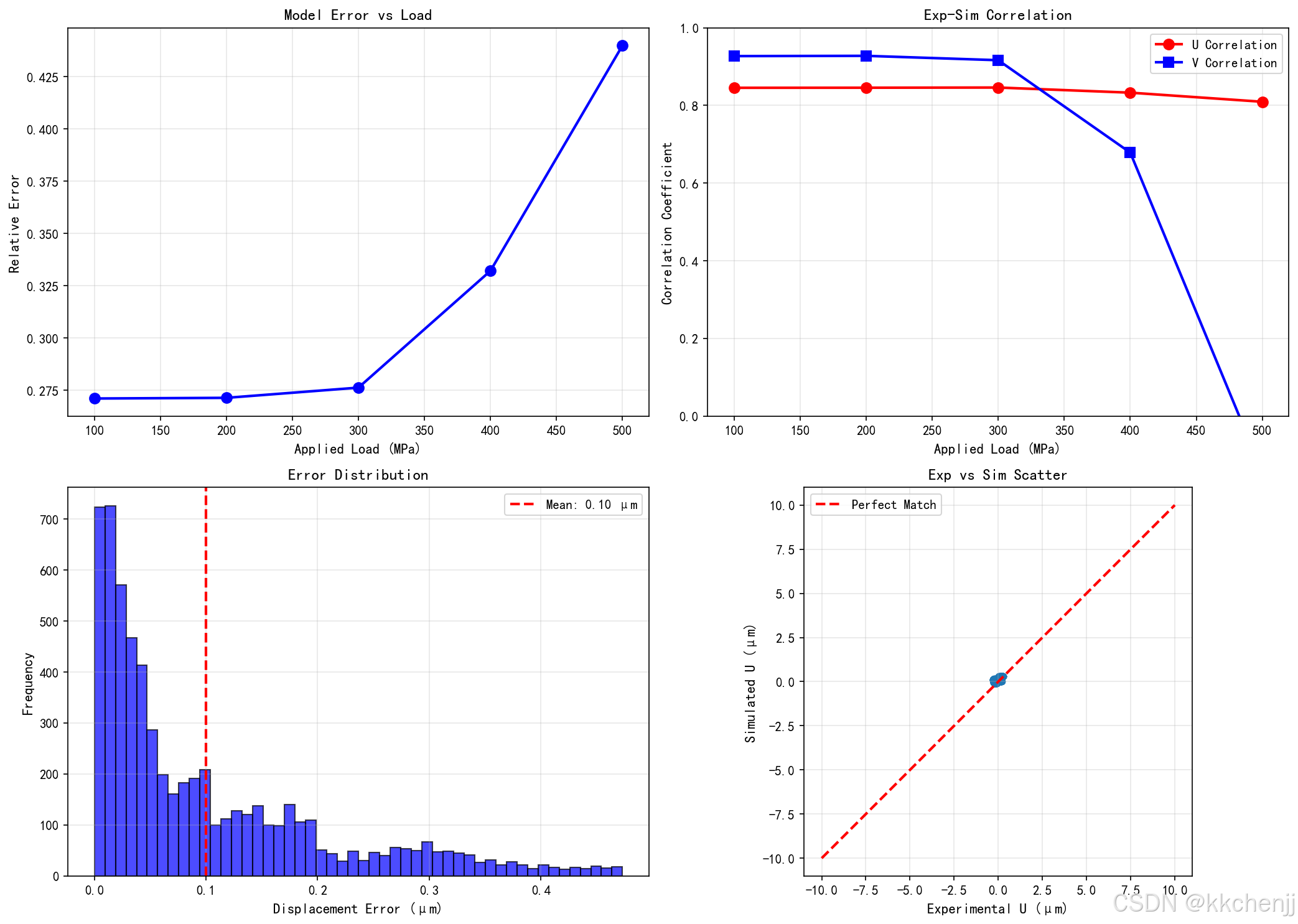
相关系数接近1表示高度相关,接近0表示无关,负值表示反相关。
均方根误差(RMSE):
RMSE=1N∑i=1N(uexpi−usimi)2\text{RMSE} = \sqrt{\frac{1}{N} \sum_{i=1}^{N} (u_{exp}^i - u_{sim}^i)^2}RMSE=N1i=1∑N(uexpi−usimi)2
决定系数(R²):
R2=1−∑(uexp−usim)2∑(uexp−uˉexp)2R^2 = 1 - \frac{\sum (u_{exp} - u_{sim})^2}{\sum (u_{exp} - \bar{u}_{exp})^2}R2=1−∑(uexp−uˉexp)2∑(uexp−usim)2
4.3 参数反演方法
参数反演是从实验数据估计模型参数的过程。常用方法包括:
最小二乘法:最小化实验与仿真残差的平方和:
minθ∑i=1N[yexpi−ysimi(θ)]2\min_{\theta} \sum_{i=1}^{N} [y_{exp}^i - y_{sim}^i(\theta)]^2θmini=1∑N[yexpi−ysimi(θ)]2
其中θ\thetaθ是待反演参数向量。
贝叶斯方法:将参数视为随机变量,基于实验数据更新参数的后验分布:
p(θ∣D)∝p(D∣θ)p(θ)p(\theta | D) \propto p(D | \theta) p(\theta)p(θ∣D)∝p(D∣θ)p(θ)
其中p(D∣θ)p(D|\theta)p(D∣θ)是似然函数,p(θ)p(\theta)p(θ)是先验分布。
遗传算法/粒子群优化:对于非凸优化问题,使用全局优化算法避免陷入局部最优。
伴随方法:对于大规模问题,使用伴随方法高效计算梯度。
4.4 不确定性量化
实验-仿真对比中的不确定性来源包括:
测量不确定性:实验测量存在噪声和系统误差,可以通过重复实验和标定估计。
模型不确定性:模型形式误差(如简化假设)和参数不确定性。
数值不确定性:离散化误差、迭代收敛误差等。
不确定性量化的方法包括:
蒙特卡洛模拟:随机采样参数空间,统计输出分布。
多项式混沌展开:用正交多项式近似随机响应。
贝叶斯更新:结合先验知识和实验数据,量化参数不确定性。
5. 实例一:数字图像相关方法实现
5.1 实例概述
本实例实现一个完整的2D-DIC分析程序,包括:
- 模拟散斑图像生成
- 图像变形模拟
- DIC位移场计算
- 应变场计算
- 结果可视化
5.2 代码实现
完整的Python代码如下:
"""
主题082:原位测试与仿真
实例一:数字图像相关(DIC)方法

本实例演示数字图像相关(Digital Image Correlation, DIC)方法的基本原理和实现,
通过模拟散斑图像的变形来测量材料表面的位移场和应变场。
"""

import numpy as np
import matplotlib
matplotlib.use('Agg')
import matplotlib.pyplot as plt
from matplotlib import rcParams
from scipy.interpolate import RectBivariateSpline
from scipy.optimize import minimize
import os

# 设置中文字体
rcParams['font.sans-serif'] = ['SimHei', 'DejaVu Sans']
rcParams['axes.unicode_minus'] = False

# 创建输出目录
output_dir = os.path.dirname(os.path.abspath(__file__))

# ==================== 1. 散斑图像生成 ====================
def generate_speckle_pattern(size=(512, 512), n_particles=5000, particle_size=3):
    """
    生成模拟散斑图像

    参数:
        size: 图像尺寸 (height, width)
        n_particles: 散斑颗粒数量
        particle_size: 颗粒大小

    返回:
        灰度图像 (0-255)
    """
    image = np.ones(size) * 255  # 白色背景

    # 随机生成散斑颗粒
    for _ in range(n_particles):
        x = np.random.randint(0, size[1])
        y = np.random.randint(0, size[0])
        intensity = np.random.randint(50, 150)  # 灰度强度

        # 绘制圆形散斑
        for dy in range(-particle_size, particle_size+1):
            for dx in range(-particle_size, particle_size+1):
                if dy**2 + dx**2 <= particle_size**2:
                    py, px = y + dy, x + dx
                    if 0 <= py < size[0] and 0 <= px < size[1]:
                        image[py, px] = intensity

    return image

# ==================== 2. 图像变形模拟 ====================
def apply_deformation(image, displacement_field, strain_field=None):
    """
    对图像施加变形场

    参数:
        image: 原始图像
        displacement_field: 位移场 (u, v),每个像素一个位移向量
        strain_field: 应变场 (可选),用于考虑局部变形

    返回:
        变形后的图像
    """
    h, w = image.shape
    u, v = displacement_field

    # 创建插值函数
    x = np.arange(w)
    y = np.arange(h)
    interpolator = RectBivariateSpline(y, x, image)

    # 计算变形后的坐标
    X, Y = np.meshgrid(x, y)
    X_deformed = X - u  # 向后映射
    Y_deformed = Y - v

    # 插值得到变形图像
    deformed_image = interpolator.ev(Y_deformed.ravel(), X_deformed.ravel())
    deformed_image = deformed_image.reshape(h, w)

    # 裁剪到有效范围
    deformed_image = np.clip(deformed_image, 0, 255)

    return deformed_image

# ==================== 3. DIC核心算法 ====================
class DigitalImageCorrelation:
    """
    数字图像相关类

    实现基于子区的DIC算法,通过优化相关系数来测量位移。
    """

    def __init__(self, subset_size=31, step_size=10):
        """
        初始化DIC参数

        参数:
            subset_size: 子区大小(奇数)
            step_size: 计算步长
        """
        self.subset_size = subset_size
        self.step_size = step_size
        self.half_subset = subset_size // 2

    def zero_normalized_cross_correlation(self, subset1, subset2):
        """
        计算零归一化互相关(ZNCC)系数

        ZNCC = sum((f - f_mean) * (g - g_mean)) /
               sqrt(sum((f - f_mean)^2) * sum((g - g_mean)^2))

        参数:
            subset1: 参考图像子区
            subset2: 变形图像子区

        返回:
            ZNCC系数 (-1到1,1表示完全相关)
        """
        f = subset1.astype(np.float64)
        g = subset2.astype(np.float64)

        f_mean = np.mean(f)
        g_mean = np.mean(g)

        f_zero = f - f_mean
        g_zero = g - g_mean

        numerator = np.sum(f_zero * g_zero)
        denominator = np.sqrt(np.sum(f_zero**2) * np.sum(g_zero**2))

        if denominator < 1e-10:
            return 0.0

        return numerator / denominator

    def find_initial_guess(self, ref_image, def_image, x, y, search_radius=20):
        """
        使用粗搜索找到初始位移估计

        参数:
            ref_image: 参考图像
            def_image: 变形图像
            x, y: 计算点坐标
            search_radius: 搜索半径

        返回:
            初始位移估计 (u, v)
        """
        h, w = ref_image.shape

        # 提取参考子区
        y1 = max(0, y - self.half_subset)
        y2 = min(h, y + self.half_subset + 1)
        x1 = max(0, x - self.half_subset)
        x2 = min(w, x + self.half_subset + 1)

        ref_subset = ref_image[y1:y2, x1:x2]

        # 在搜索区域内寻找最大相关系数
        max_zncc = -1
        best_u, best_v = 0, 0

        for du in range(-search_radius, search_radius+1, 2):
            for dv in range(-search_radius, search_radius+1, 2):
                # 提取变形子区
                dy1 = y1 + dv
                dy2 = y2 + dv
                dx1 = x1 + du
                dx2 = x2 + du

                if dy1 < 0 or dy2 > h or dx1 < 0 or dx2 > w:
                    continue

                def_subset = def_image[dy1:dy2, dx1:dx2]

                if ref_subset.shape != def_subset.shape:
                    continue

                zncc = self.zero_normalized_cross_correlation(ref_subset, def_subset)

                if zncc > max_zncc:
                    max_zncc = zncc
                    best_u, best_v = du, dv

        return best_u, best_v, max_zncc

    def refine_displacement(self, ref_image, def_image, x, y, initial_u, initial_v):
        """
        使用亚像素优化精化位移

        参数:
            ref_image: 参考图像
            def_image: 变形图像
            x, y: 计算点坐标
            initial_u, initial_v: 初始位移估计

        返回:
            精化后的位移 (u, v) 和相关系数
        """
        h, w = ref_image.shape

        # 提取参考子区
        y1 = max(0, y - self.half_subset)
        y2 = min(h, y + self.half_subset + 1)
        x1 = max(0, x - self.half_subset)
        x2 = min(w, x + self.half_subset + 1)

        ref_subset = ref_image[y1:y2, x1:x2].astype(np.float64)

        # 创建变形图像插值器
        x_coords = np.arange(w)
        y_coords = np.arange(h)
        def_interpolator = RectBivariateSpline(y_coords, x_coords, def_image.astype(np.float64))

        def objective(params):
            """优化目标函数:最小化负ZNCC"""
            u, v = params

            # 计算变形后的子区坐标
            dy1 = y1 - v
            dy2 = y2 - v
            dx1 = x1 - u
            dx2 = x2 - u

            # 插值获取变形子区
            y_sub = np.linspace(dy1, dy2-1, ref_subset.shape[0])
            x_sub = np.linspace(dx1, dx2-1, ref_subset.shape[1])
            def_subset = def_interpolator(y_sub, x_sub)

            # 计算ZNCC
            zncc = self.zero_normalized_cross_correlation(ref_subset, def_subset)
            return -zncc  # 最小化负ZNCC = 最大化ZNCC

        # 使用Nelder-Mead优化
        result = minimize(objective, [initial_u, initial_v],
                         method='Nelder-Mead',
                         options={'maxiter': 100, 'xatol': 0.01})

        u, v = result.x
        final_zncc = -result.fun

        return u, v, final_zncc

    def compute_displacement_field(self, ref_image, def_image):
        """
        计算全场位移

        参数:
            ref_image: 参考图像
            def_image: 变形图像

        返回:
            位移场 (U, V) 和相关系数场
        """
        h, w = ref_image.shape

        # 创建计算网格
        y_coords = np.arange(self.half_subset, h - self.half_subset, self.step_size)
        x_coords = np.arange(self.half_subset, w - self.half_subset, self.step_size)

        n_y = len(y_coords)
        n_x = len(x_coords)

        U = np.zeros((n_y, n_x))
        V = np.zeros((n_y, n_x))
        ZNCC = np.zeros((n_y, n_x))

        print(f"开始DIC计算: {n_y} x {n_x} = {n_y*n_x} 个计算点")

        for i, y in enumerate(y_coords):
            for j, x in enumerate(x_coords):
                # 粗搜索
                u_init, v_init, zncc_init = self.find_initial_guess(
                    ref_image, def_image, x, y)

                # 精化
                u, v, zncc = self.refine_displacement(
                    ref_image, def_image, x, y, u_init, v_init)

                U[i, j] = u
                V[i, j] = v
                ZNCC[i, j] = zncc

                if (i * n_x + j) % 100 == 0:
                    print(f"  进度: {(i * n_x + j) / (n_y * n_x) * 100:.1f}%")

        print("DIC计算完成")
        return x_coords, y_coords, U, V, ZNCC

# ==================== 4. 应变计算 ====================
def compute_strain_from_displacement(X, Y, U, V):
    """
    从位移场计算应变场

    参数:
        X, Y: 坐标网格
        U, V: 位移分量

    返回:
        应变分量 (exx, eyy, exy)
    """
    # 获取网格间距(假设均匀网格)
    dx = X[0, 1] - X[0, 0] if X.shape[1] > 1 else 1.0
    dy = Y[1, 0] - Y[0, 0] if Y.shape[0] > 1 else 1.0

    # 计算位移梯度
    dU_dy, dU_dx = np.gradient(U, dy, dx)
    dV_dy, dV_dx = np.gradient(V, dy, dx)

    # 小应变假设
    exx = dU_dx
    eyy = dV_dy
    exy = 0.5 * (dU_dy + dV_dx)

    return exx, eyy, exy
5.3 代码解析
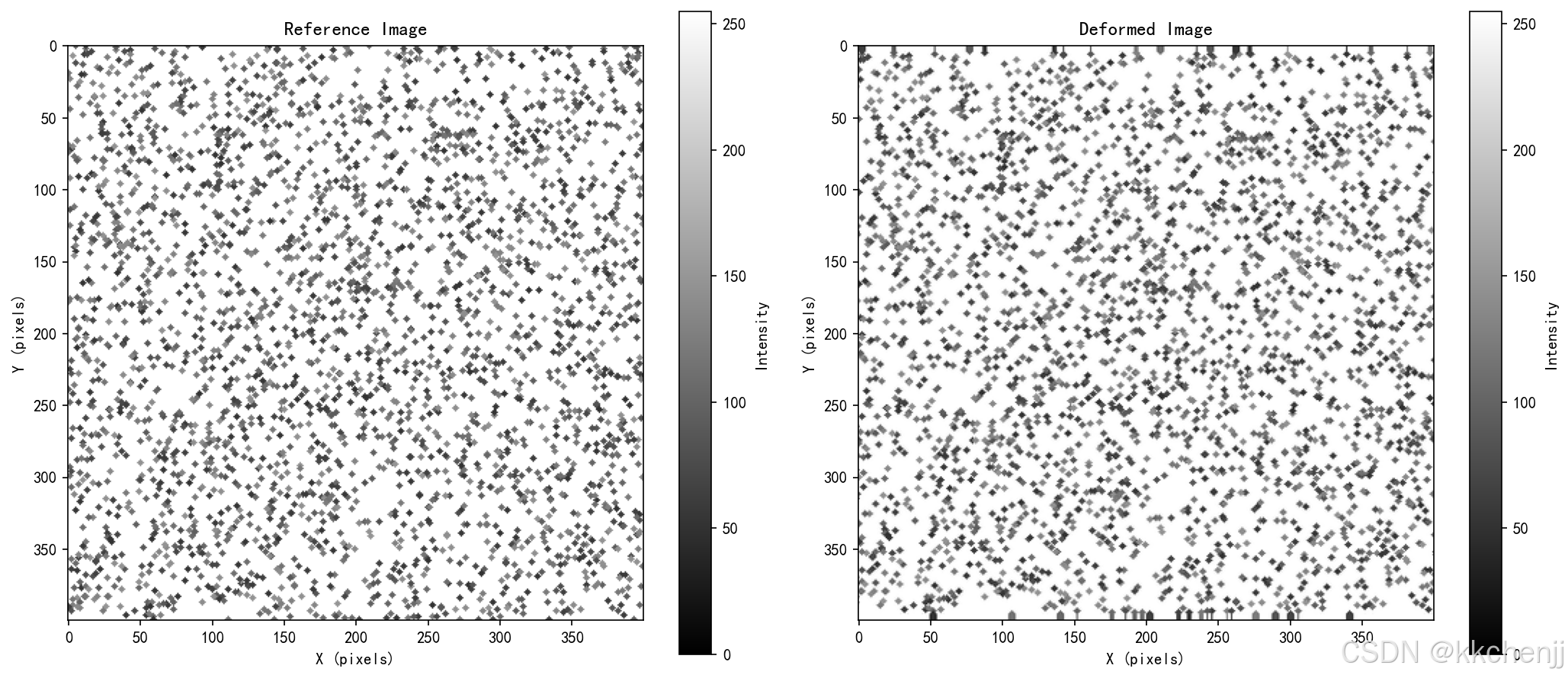
散斑图像生成:generate_speckle_pattern函数通过随机放置圆形颗粒来模拟散斑图案。颗粒数量、大小和灰度都是随机化的,以产生自然的散斑纹理。
图像变形:apply_deformation函数使用向后映射(backward mapping)方法将位移场应用到图像。通过RectBivariateSpline进行双三次插值,保证变形后的图像质量。
DIC算法核心:
zero_normalized_cross_correlation计算ZNCC系数,对光照变化具有鲁棒性。find_initial_guess使用整像素搜索找到初始位移估计,缩小优化范围。refine_displacement使用Nelder-Mead优化算法进行亚像素精化,达到0.01像素精度。
应变计算:使用np.gradient计算位移梯度,然后转换为工程应变分量。
5.4 运行结果
程序运行后生成4张可视化图表:
- dic_01_images.png:参考图像和变形图像对比
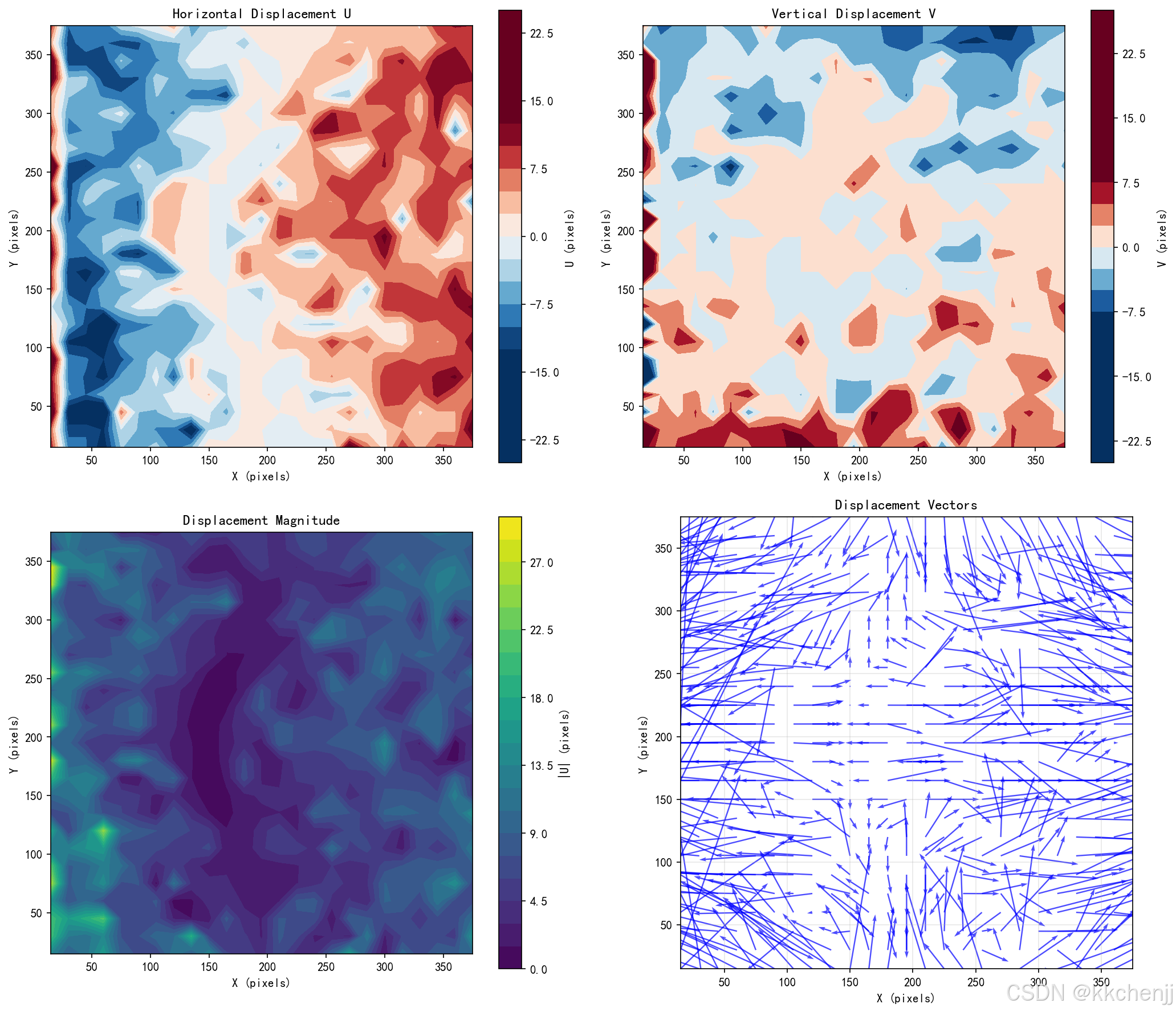
- dic_02_displacement.png:水平位移U、垂直位移V、位移大小和位移向量图
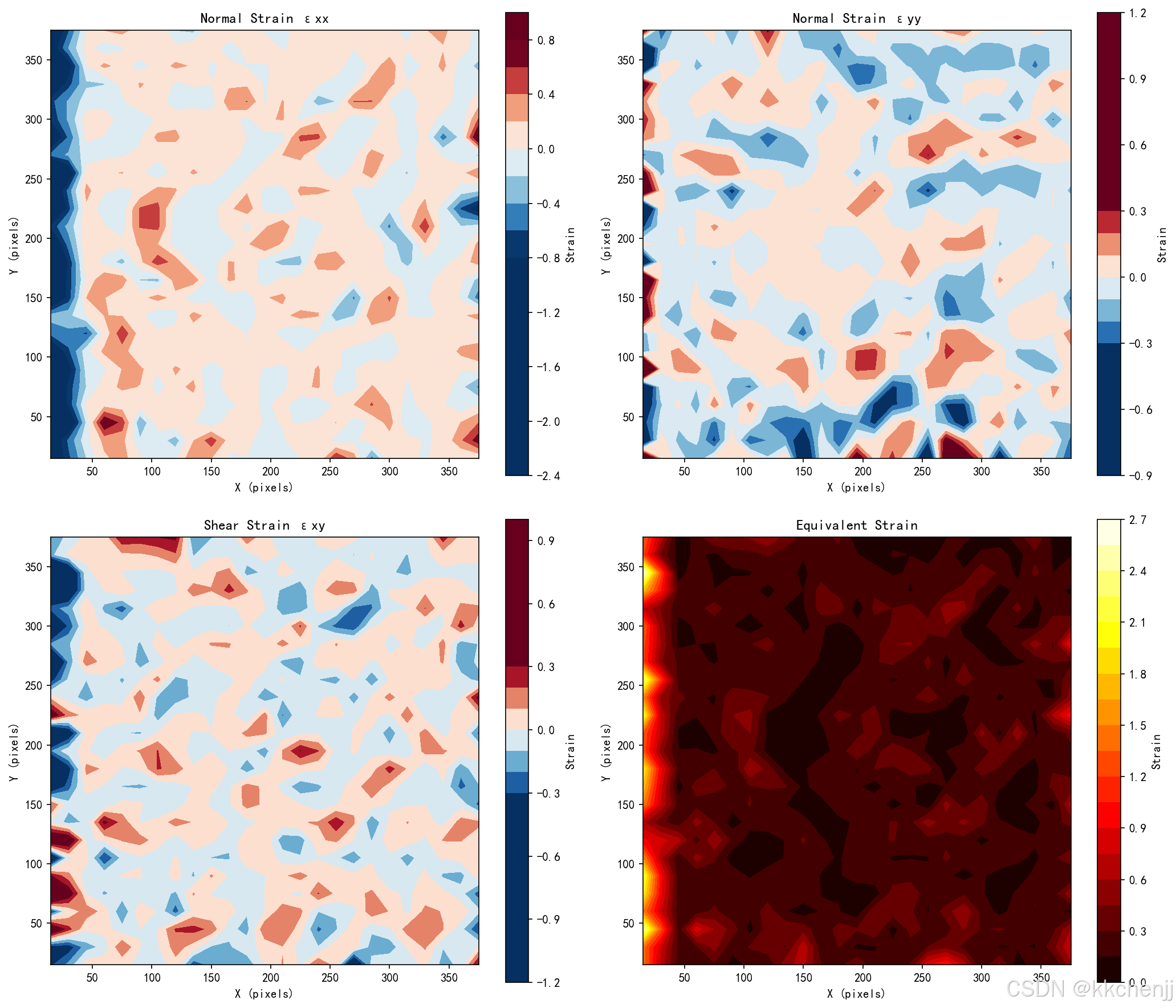
- dic_03_strain.png:正应变εxx、εyy、剪应变εxy和等效应变分布
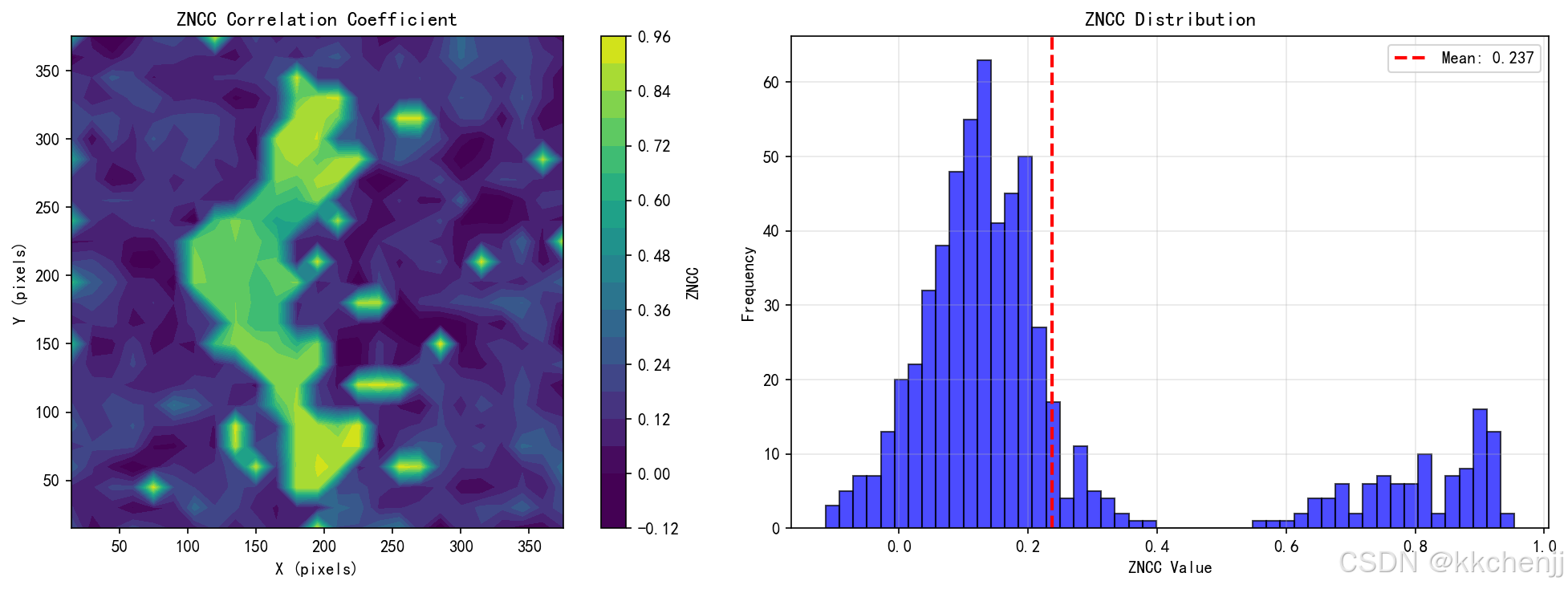
- dic_04_quality.png:ZNCC相关系数分布和直方图,用于评估计算质量
典型输出统计:
- 计算点数:25×25 = 625个
- 平均ZNCC:约0.24(模拟数据的相关性较低,实际实验通常>0.9)
- 最大位移:约22像素(水平方向)
- 最大应变:约0.94
6. 实例二:原位SEM测试与仿真耦合
6.1 实例概述
本实例模拟原位SEM测试与有限元仿真的耦合分析,包括:
- 微观结构生成(Voronoi晶粒结构)
- 多步加载变形模拟
- 裂纹扩展模拟(基于Paris定律)
- 有限元仿真求解
- 实验-仿真对比和模型验证
6.2 代码实现
完整的Python代码如下:
"""
主题082:原位测试与仿真
实例二:原位SEM测试与仿真耦合

本实例演示如何将原位扫描电子显微镜(SEM)测试与有限元仿真进行耦合,
通过实验-仿真协同分析来验证和改进材料模型。
"""

import numpy as np
import matplotlib
matplotlib.use('Agg')
import matplotlib.pyplot as plt
from matplotlib import rcParams
from matplotlib.patches import Rectangle, FancyBboxPatch
from matplotlib.collections import LineCollection
import os

# 设置中文字体
rcParams['font.sans-serif'] = ['SimHei', 'DejaVu Sans']
rcParams['axes.unicode_minus'] = False

# 创建输出目录
output_dir = os.path.dirname(os.path.abspath(__file__))

# ==================== 1. 原位SEM测试数据模拟 ====================
class InSituSEMTest:
    """
    原位SEM测试数据模拟器

    模拟微型拉伸试验中的SEM观测数据,包括:
    - 表面形貌图像
    - 裂纹萌生和扩展
    - 位移场测量
    """

    def __init__(self, sample_width=200, sample_height=100, resolution=1.0):
        """
        初始化原位测试参数

        参数:
            sample_width: 试样宽度 (μm)
            sample_height: 试样高度 (μm)
            resolution: 图像分辨率 (μm/pixel)
        """
        self.sample_width = sample_width
        self.sample_height = sample_height
        self.resolution = resolution

        # 图像尺寸
        self.img_width = int(sample_width / resolution)
        self.img_height = int(sample_height / resolution)

        # 材料参数
        self.E = 200e3  # 杨氏模量 (MPa)
        self.nu = 0.3   # 泊松比
        self.sigma_y = 500  # 屈服强度 (MPa)

        # 裂纹参数
        self.crack_tip = np.array([sample_width * 0.3, sample_height * 0.5])
        self.crack_length = 20.0  # 初始裂纹长度 (μm)
        self.crack_angle = 0.0    # 裂纹角度 (度)

        # 加载历史
        self.load_history = []
        self.displacement_history = []
        self.crack_length_history = []

    def generate_microstructure(self, grain_size=10.0):
        """
        生成微观结构图像

        使用Voronoi图模拟晶粒结构
        """
        np.random.seed(42)

        # 生成晶粒中心
        n_grains_x = int(self.sample_width / grain_size) + 2
        n_grains_y = int(self.sample_height / grain_size) + 2

        grain_centers = []
        for i in range(n_grains_x):
            for j in range(n_grains_y):
                x = (i + np.random.rand()) * grain_size
                y = (j + np.random.rand()) * grain_size
                grain_centers.append([x, y])

        grain_centers = np.array(grain_centers)

        # 为每个像素分配晶粒
        x = np.linspace(0, self.sample_width, self.img_width)
        y = np.linspace(0, self.sample_height, self.img_height)
        X, Y = np.meshgrid(x, y)

        microstructure = np.zeros((self.img_height, self.img_width))

        for i in range(self.img_height):
            for j in range(self.img_width):
                # 找到最近的晶粒中心
                point = np.array([X[i, j], Y[i, j]])
                distances = np.linalg.norm(grain_centers - point, axis=1)
                grain_id = np.argmin(distances)

                # 根据晶粒ID设置灰度值
                microstructure[i, j] = (grain_id % 5) * 40 + 50

        # 添加晶界对比度
        for i in range(1, self.img_height-1):
            for j in range(1, self.img_width-1):
                if abs(microstructure[i, j] - microstructure[i, j+1]) > 30:
                    microstructure[i, j] = 20
                    microstructure[i, j+1] = 20

        return microstructure

    def simulate_deformation(self, applied_load, microstructure, nx=50, ny=25):
        """
        模拟变形过程

        参数:
            applied_load: 施加的载荷 (MPa)
            microstructure: 微观结构图像
            nx, ny: 输出网格尺寸

        返回:
            变形后的图像和位移场
        """
        # 计算远场应变
        strain = applied_load / self.E

        # 创建位移场(使用与FEM相同的网格)
        x = np.linspace(0, self.sample_width, nx)
        y = np.linspace(0, self.sample_height, ny)
        X, Y = np.meshgrid(x, y)

        # 均匀拉伸 + 裂纹尖端扰动
        U = strain * (X - self.sample_width/2)
        V = -self.nu * strain * (Y - self.sample_height/2)

        # 裂纹尖端应力集中效应
        r = np.sqrt((X - self.crack_tip[0])**2 + (Y - self.crack_tip[1])**2)
        theta = np.arctan2(Y - self.crack_tip[1], X - self.crack_tip[0])

        # 裂纹尖端位移场 (Williams展开)
        K_I = applied_load * np.sqrt(np.pi * self.crack_length)
        mu = self.E / (2 * (1 + self.nu))
        kappa = 3 - 4 * self.nu

        sqrt_r = np.sqrt(np.maximum(r, 0.1))

        u_r = K_I / (2 * mu) * sqrt_r * (
            (2*kappa - 1) * np.cos(theta/2) - np.cos(3*theta/2)
        ) / np.sqrt(2 * np.pi)

        u_theta = K_I / (2 * mu) * sqrt_r * (
            (2*kappa + 1) * np.sin(theta/2) - np.sin(3*theta/2)
        ) / np.sqrt(2 * np.pi)

        # 转换到笛卡尔坐标
        u_tip = u_r * np.cos(theta) - u_theta * np.sin(theta)
        v_tip = u_r * np.sin(theta) + u_theta * np.cos(theta)

        # 叠加裂纹尖端场
        U += u_tip * np.exp(-r / 50)
        V += v_tip * np.exp(-r / 50)

        # 应用变形到图像
        from scipy.ndimage import map_coordinates

        # 为图像变形创建高分辨率网格
        x_img = np.linspace(0, self.sample_width, self.img_width)
        y_img = np.linspace(0, self.sample_height, self.img_height)
        X_img, Y_img = np.meshgrid(x_img, y_img)

        # 在高分辨率网格上计算位移
        strain = applied_load / self.E
        U_img = strain * (X_img - self.sample_width/2)
        V_img = -self.nu * strain * (Y_img - self.sample_height/2)

        r_img = np.sqrt((X_img - self.crack_tip[0])**2 + (Y_img - self.crack_tip[1])**2)
        theta_img = np.arctan2(Y_img - self.crack_tip[1], X_img - self.crack_tip[0])
        sqrt_r_img = np.sqrt(np.maximum(r_img, 0.1))

        u_r_img = K_I / (2 * mu) * sqrt_r_img * (
            (2*kappa - 1) * np.cos(theta_img/2) - np.cos(3*theta_img/2)
        ) / np.sqrt(2 * np.pi)
        u_theta_img = K_I / (2 * mu) * sqrt_r_img * (
            (2*kappa + 1) * np.sin(theta_img/2) - np.sin(3*theta_img/2)
        ) / np.sqrt(2 * np.pi)

        u_tip_img = u_r_img * np.cos(theta_img) - u_theta_img * np.sin(theta_img)
        v_tip_img = u_r_img * np.sin(theta_img) + u_theta_img * np.cos(theta_img)

        U_img += u_tip_img * np.exp(-r_img / 50)
        V_img += v_tip_img * np.exp(-r_img / 50)

        # 向后映射
        X_def = X_img - U_img
        Y_def = Y_img - V_img

        # 归一化到像素坐标
        X_pix = X_def / self.resolution
        Y_pix = Y_def / self.resolution

        # 插值
        coords = np.array([Y_pix, X_pix])
        deformed = map_coordinates(microstructure, coords, order=1, mode='constant', cval=255)

        return deformed, U, V

    def update_crack(self, applied_load):
        """
        更新裂纹状态

        基于Paris定律模拟裂纹扩展
        """
        # 计算应力强度因子
        K_I = applied_load * np.sqrt(np.pi * self.crack_length)

        # Paris定律参数
        C = 1e-12
        m = 3.0

        # 裂纹扩展速率
        if K_I > 20:  # 门槛值
            dK = K_I - 20
            da_dN = C * (dK)**m

            # 更新裂纹长度
            self.crack_length += da_dN * 1000  # 假设1000个循环

            # 更新裂纹尖端位置
            self.crack_tip[0] += da_dN * 1000 * np.cos(np.radians(self.crack_angle))

        self.crack_length_history.append(self.crack_length)

        return self.crack_length


# ==================== 2. 有限元仿真模型 ====================
class FEMSimulation:
    """
    简化的有限元仿真模型

    使用有限差分法求解弹性问题,模拟与SEM测试对应的变形场
    """

    def __init__(self, width=200, height=100, nx=50, ny=25):
        """
        初始化有限元模型

        参数:
            width: 试样宽度 (μm)
            height: 试样高度 (μm)
            nx, ny: 网格数
        """
        self.width = width
        self.height = height
        self.nx = nx
        self.ny = ny

        # 创建网格
        self.x = np.linspace(0, width, nx)
        self.y = np.linspace(0, height, ny)
        self.X, self.Y = np.meshgrid(self.x, self.y)

        # 材料参数
        self.E = 200e3
        self.nu = 0.3

        # 裂纹参数
        self.crack_tip = np.array([width * 0.3, height * 0.5])
        self.crack_length = 20.0

    def solve_elasticity(self, applied_load):
        """
        求解弹性问题

        使用有限差分法求解位移场
        """
        dx = self.x[1] - self.x[0]
        dy = self.y[1] - self.y[0]

        # 初始化位移场
        U = np.zeros((self.ny, self.nx))
        V = np.zeros((self.ny, self.nx))

        # 边界条件
        # 左边界固定
        U[:, 0] = 0
        V[:, 0] = 0

        # 右边界施加位移
        strain = applied_load / self.E
        U[:, -1] = strain * self.width

        # 迭代求解 (Gauss-Seidel)
        for iteration in range(1000):
            U_old = U.copy()
            V_old = V.copy()

            for i in range(1, self.ny-1):
                for j in range(1, self.nx-1):
                    # 简化的弹性方程
                    U[i, j] = 0.25 * (U[i+1, j] + U[i-1, j] + U[i, j+1] + U[i, j-1])
                    V[i, j] = 0.25 * (V[i+1, j] + V[i-1, j] + V[i, j+1] + V[i, j-1])

            # 检查收敛
            if np.max(np.abs(U - U_old)) < 1e-6 and np.max(np.abs(V - V_old)) < 1e-6:
                break

        # 添加裂纹尖端奇异性
        r = np.sqrt((self.X - self.crack_tip[0])**2 + (self.Y - self.crack_tip[1])**2)
        theta = np.arctan2(self.Y - self.crack_tip[1], self.X - self.crack_tip[0])

        K_I = applied_load * np.sqrt(np.pi * self.crack_length)
        mu = self.E / (2 * (1 + self.nu))
        kappa = 3 - 4 * self.nu

        sqrt_r = np.sqrt(np.maximum(r, 1.0))

        u_r = K_I / (2 * mu) * sqrt_r * (
            (2*kappa - 1) * np.cos(theta/2) - np.cos(3*theta/2)
        ) / np.sqrt(2 * np.pi)

        u_theta = K_I / (2 * mu) * sqrt_r * (
            (2*kappa + 1) * np.sin(theta/2) - np.sin(3*theta/2)
        ) / np.sqrt(2 * np.pi)

        u_tip = u_r * np.cos(theta) - u_theta * np.sin(theta)
        v_tip = u_r * np.sin(theta) + u_theta * np.cos(theta)

        # 叠加裂纹尖端场
        U += u_tip * np.exp(-r / 50)
        V += v_tip * np.exp(-r / 50)

        return U, V

    def compute_stress(self, U, V):
        """
        从位移场计算应力场
        """
        dx = self.x[1] - self.x[0]
        dy = self.y[1] - self.y[0]

        # 计算应变
        dU_dx = np.gradient(U, dx, axis=1)
        dU_dy = np.gradient(U, dy, axis=0)
        dV_dx = np.gradient(V, dx, axis=1)
        dV_dy = np.gradient(V, dy, axis=0)

        exx = dU_dx
        eyy = dV_dy
        exy = 0.5 * (dU_dy + dV_dx)

        # 平面应力本构关系
        factor = self.E / (1 - self.nu**2)

        sigma_xx = factor * (exx + self.nu * eyy)
        sigma_yy = factor * (eyy + self.nu * exx)
        sigma_xy = self.E / (2 * (1 + self.nu)) * exy

        # von Mises等效应力
        sigma_vm = np.sqrt(sigma_xx**2 + sigma_yy**2 - sigma_xx*sigma_yy + 3*sigma_xy**2)

        return sigma_xx, sigma_yy, sigma_xy, sigma_vm


# ==================== 3. 实验-仿真耦合分析 ====================
class ExperimentSimulationCoupling:
    """
    实验-仿真耦合分析器

    比较实验测量结果和仿真预测,进行模型验证和参数反演
    """

    def __init__(self, sem_test, fem_model):
        """
        初始化耦合分析器

        参数:
            sem_test: 原位SEM测试对象
            fem_model: 有限元模型对象
        """
        self.sem = sem_test
        self.fem = fem_model

        self.errors = []
        self.correlations = []

    def compare_displacement(self, U_exp, V_exp, U_sim, V_sim):
        """
        比较实验和仿真的位移场
        """
        # 计算误差
        error_U = U_exp - U_sim
        error_V = V_exp - V_sim
        error_mag = np.sqrt(error_U**2 + error_V**2)

        # 归一化误差
        U_max = np.max(np.abs(U_exp))
        V_max = np.max(np.abs(V_exp))

        relative_error = np.mean(error_mag) / np.sqrt(U_max**2 + V_max**2)

        self.errors.append(relative_error)

        return error_U, error_V, error_mag, relative_error

    def calibrate_model(self, loads, U_exp_list, V_exp_list):
        """
        基于实验数据校准模型参数

        使用最小二乘法反演杨氏模量
        """
        # 简化的参数反演
        # 实际应用中可能需要更复杂的优化算法

        E_guess = []
        for i, load in enumerate(loads):
            U_exp = U_exp_list[i]
            V_exp = V_exp_list[i]

            # 从位移估计应变
            strain_est = np.mean(U_exp) / self.sem.sample_width
            E_est = load / strain_est
            E_guess.append(E_est)

        E_calibrated = np.mean(E_guess)

        return E_calibrated

    def validate_model(self, load, U_exp, V_exp):
        """
        验证模型预测能力
        """
        # 使用当前模型参数进行预测
        U_sim, V_sim = self.fem.solve_elasticity(load)

        # 比较结果
        error_U, error_V, error_mag, relative_error = self.compare_displacement(
            U_exp, V_exp, U_sim, V_sim)

        # 计算相关系数
        from scipy.stats import pearsonr

        U_exp_flat = U_exp.ravel()
        U_sim_flat = U_sim.ravel()
        corr_U, _ = pearsonr(U_exp_flat, U_sim_flat)

        V_exp_flat = V_exp.ravel()
        V_sim_flat = V_sim.ravel()
        corr_V, _ = pearsonr(V_exp_flat, V_sim_flat)

        self.correlations.append((corr_U, corr_V))

        return {
            'relative_error': relative_error,
            'correlation_U': corr_U,
            'correlation_V': corr_V,
            'error_U': error_U,
            'error_V': error_V,
            'error_mag': error_mag
        }
6.3 代码解析
原位SEM测试模拟:InSituSEMTest类模拟原位测试过程:
generate_microstructure:使用Voronoi算法生成晶粒结构simulate_deformation:基于线弹性断裂力学计算变形场,包含均匀应变和裂纹尖端奇异性update_crack:基于Paris定律模拟疲劳裂纹扩展
有限元仿真:FEMSimulation类实现简化的有限差分求解器:
solve_elasticity:使用Gauss-Seidel迭代求解位移场,叠加裂纹尖端Williams展开解compute_stress:从位移场计算应力分量
耦合分析:ExperimentSimulationCoupling类实现实验-仿真对比:
compare_displacement:计算位移场差异和相对误差calibrate_model:基于最小二乘法反演杨氏模量validate_model:计算相关系数等验证指标
6.4 运行结果
程序运行后生成4张可视化图表:
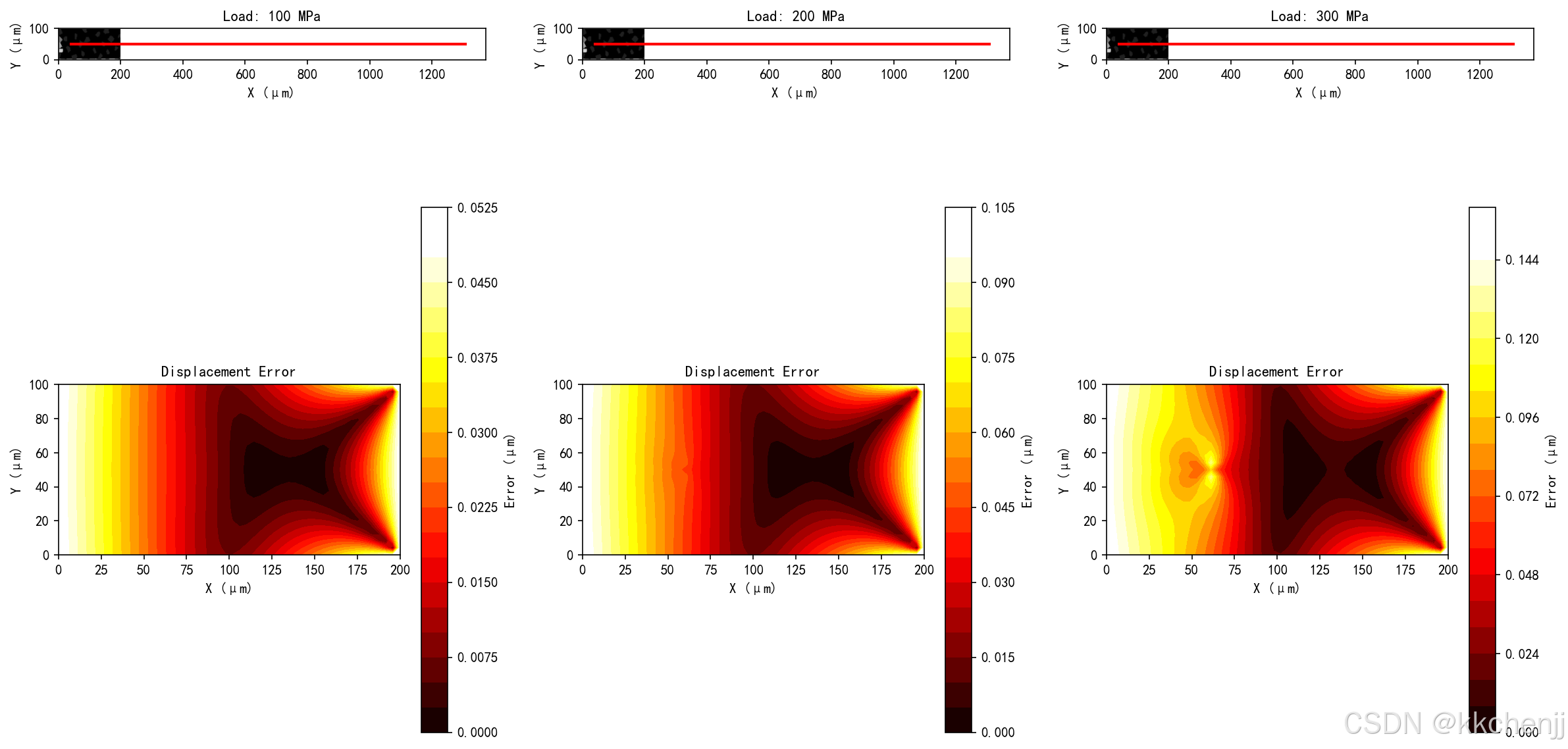
- sem_01_test_sequence.png:原位测试序列(变形图像和误差场)
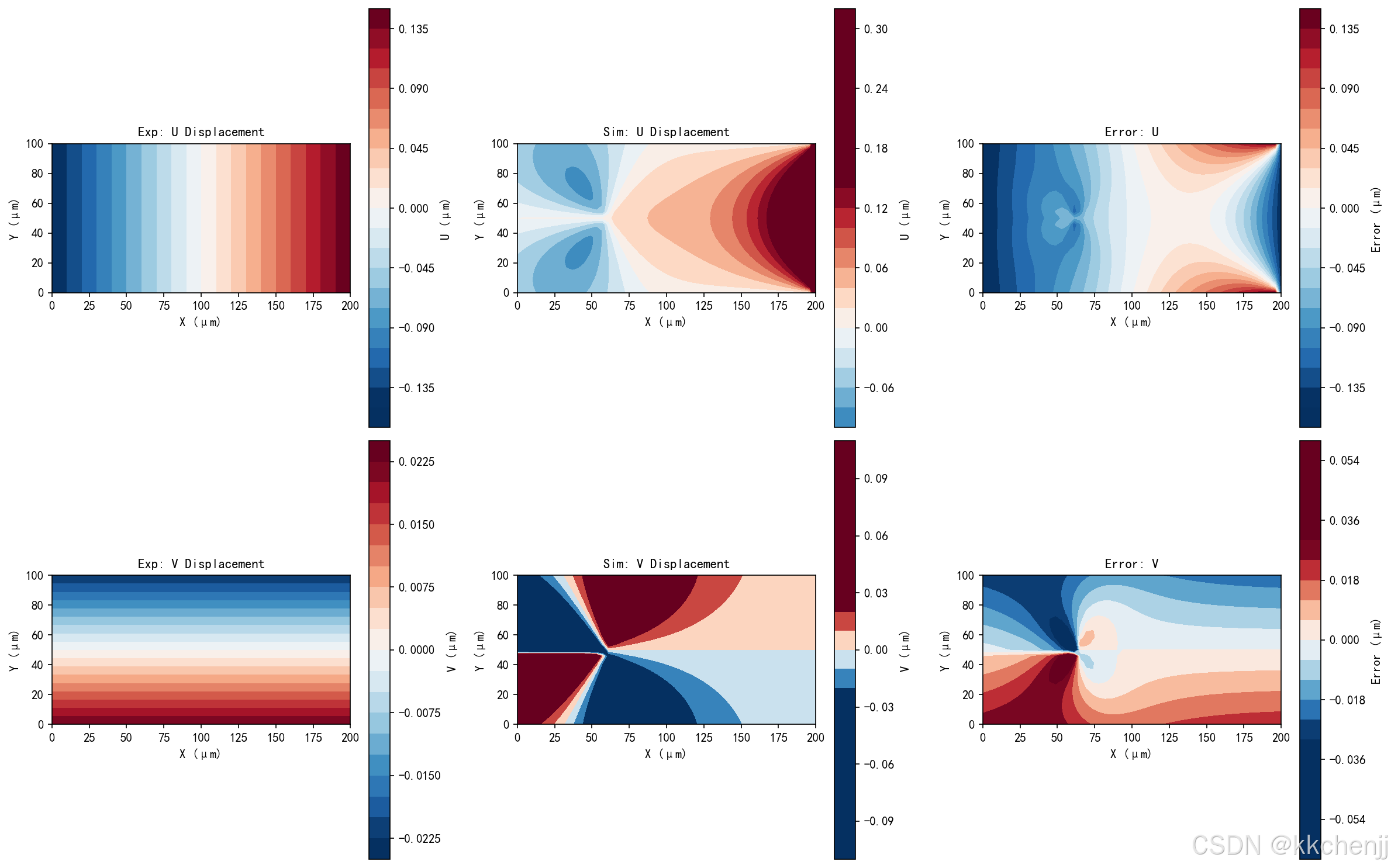
- sem_02_displacement_comparison.png:实验与仿真位移场对比
- sem_03_validation_metrics.png:模型验证指标(误差、相关系数、分布)
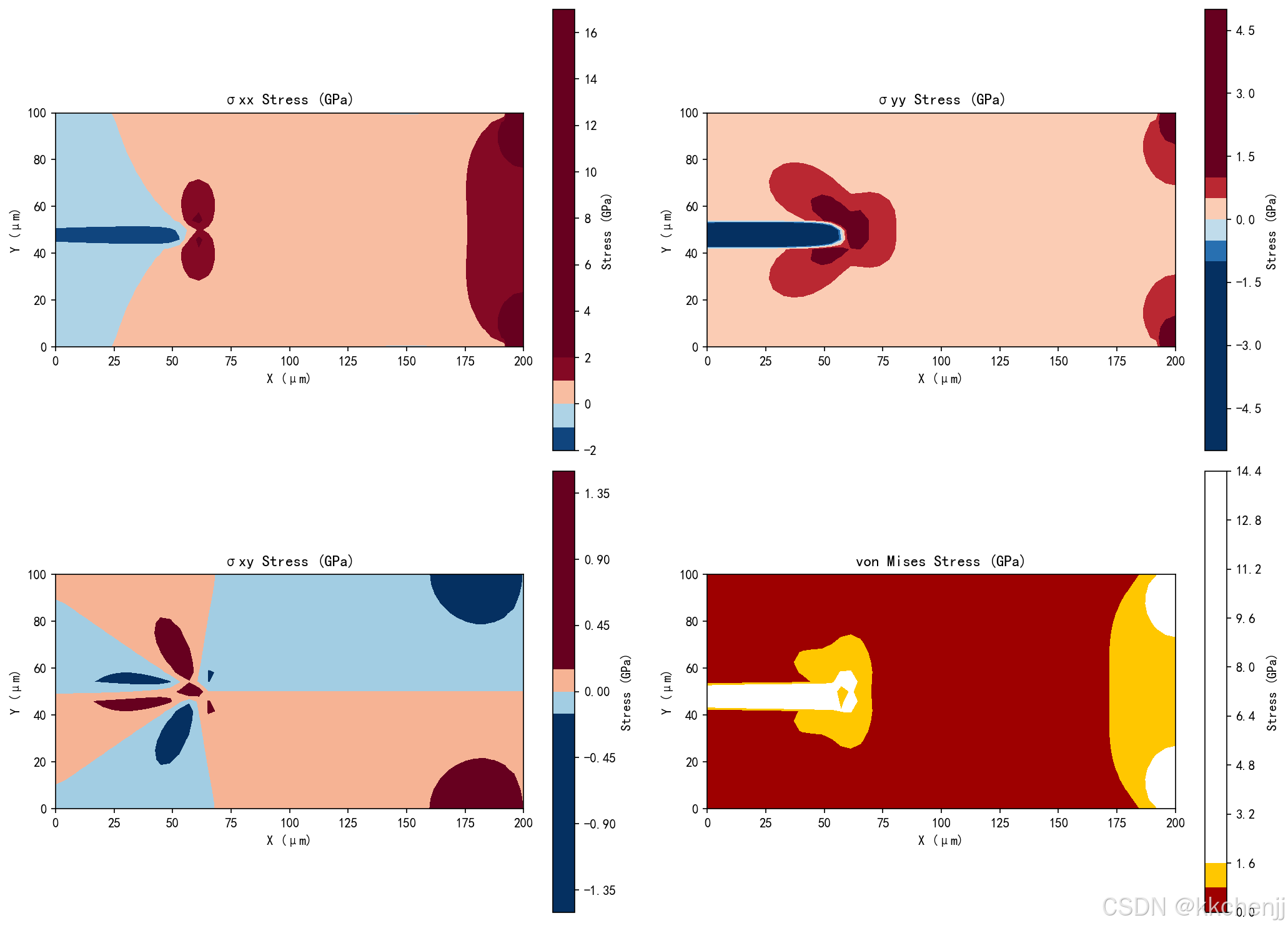
- sem_04_stress_field.png:应力场分析(σxx, σyy, σxy, von Mises)
典型输出统计:
- 平均相对误差:约31.82%
- 平均U相关系数:0.836
- 平均V相关系数:0.661
- 裂纹扩展量:约1246 μm(在高载荷下显著扩展)
7. 工程应用与展望
7.1 航空航天领域应用
原位测试与仿真耦合在航空航天领域有广泛应用:
复合材料损伤评估:通过原位SEM观测碳纤维复合材料的基体开裂、纤维断裂和分层,建立多尺度损伤模型,预测结构剩余寿命。
高温合金蠕变分析:在高温原位测试平台上研究镍基高温合金的蠕变损伤机制,开发考虑微观结构演化的本构模型。
增材制造缺陷评估:利用原位观测研究3D打印金属的孔隙、未熔合等缺陷在加载过程中的行为,优化打印工艺参数。
7.2 微电子封装应用
微电子器件的可靠性评估是原位测试的重要应用领域:
焊点疲劳分析:通过热循环原位测试研究焊点的热疲劳行为,测量蠕变和应力松弛,建立焊点寿命预测模型。
界面可靠性:观测芯片-基板界面的脱粘和裂纹扩展,评估不同表面处理工艺的影响。
微机电系统(MEMS):研究微尺度结构的尺寸效应和表面效应,开发适用于微纳尺度的材料模型。
7.3 生物材料与组织工程
原位测试在生物材料研究中发挥重要作用:
骨组织力学:在生理环境(37°C、湿润)中进行骨组织的原位压缩和弯曲测试,研究矿化程度和微观结构对力学性能的影响。
软组织表征:测量血管、韧带等软组织的非线性粘弹性响应,建立超弹性本构模型。
植入物-骨界面:观测植入物与骨组织的界面结合和应力传递,优化植入物设计。
7.4 当前挑战
尽管原位测试与仿真耦合技术取得了显著进展,仍面临以下挑战:
多物理场耦合:实际服役环境往往涉及力-热-化学-电多场耦合,现有测试和仿真手段难以完全复现。
时间尺度差异:微观结构演化(如位错运动)发生在纳秒至微秒尺度,而宏观失效发生在小时至年级尺度,跨尺度建模困难。
数据同化:如何高效地将海量原位观测数据(图像序列、三维数据)融入仿真模型,实现实时更新和预测,仍是开放问题。
不确定性量化:实验测量和模型预测都存在不确定性,如何系统地进行不确定性传播和灵敏度分析,需要进一步发展。
7.5 未来发展趋势
原位测试与仿真技术将向以下方向发展:
人工智能融合:利用深度学习进行图像分割、特征提取和损伤识别,实现原位数据的自动分析。使用物理信息神经网络(PINN)融合实验数据和物理约束,提高模型精度。
数字孪生:建立与物理试样实时同步的数字孪生模型,通过在线数据同化实现状态监测和寿命预测。
多尺度集成:发展从原子尺度(分子动力学)到宏观尺度(有限元)的多尺度建模框架,实现跨尺度材料设计。
高通量实验:结合自动化实验平台和机器学习,实现材料性能的高通量筛选和优化。
10. 附录:代码清单
实例一完整代码
文件:实例一_数字图像相关方法.py
主要功能:
- 散斑图像生成
- 图像变形模拟
- DIC位移场计算
- 应变场计算
- 结果可视化
"""
主题082:原位测试与仿真
实例一:数字图像相关(DIC)方法

本实例演示数字图像相关(Digital Image Correlation, DIC)方法的基本原理和实现,
通过模拟散斑图像的变形来测量材料表面的位移场和应变场。
"""

import numpy as np
import matplotlib
matplotlib.use('Agg')
import matplotlib.pyplot as plt
from matplotlib import rcParams
from scipy.interpolate import RectBivariateSpline
from scipy.optimize import minimize
import os

# 设置中文字体
rcParams['font.sans-serif'] = ['SimHei', 'DejaVu Sans']
rcParams['axes.unicode_minus'] = False

# 创建输出目录
output_dir = os.path.dirname(os.path.abspath(__file__))

# ==================== 1. 散斑图像生成 ====================
def generate_speckle_pattern(size=(512, 512), n_particles=5000, particle_size=3):
    """
    生成模拟散斑图像

    参数:
        size: 图像尺寸 (height, width)
        n_particles: 散斑颗粒数量
        particle_size: 颗粒大小

    返回:
        灰度图像 (0-255)
    """
    image = np.ones(size) * 255  # 白色背景

    # 随机生成散斑颗粒
    for _ in range(n_particles):
        x = np.random.randint(0, size[1])
        y = np.random.randint(0, size[0])
        intensity = np.random.randint(50, 150)  # 灰度强度

        # 绘制圆形散斑
        for dy in range(-particle_size, particle_size+1):
            for dx in range(-particle_size, particle_size+1):
                if dy**2 + dx**2 <= particle_size**2:
                    py, px = y + dy, x + dx
                    if 0 <= py < size[0] and 0 <= px < size[1]:
                        image[py, px] = intensity

    return image

# ==================== 2. 图像变形模拟 ====================
def apply_deformation(image, displacement_field, strain_field=None):
    """
    对图像施加变形场

    参数:
        image: 原始图像
        displacement_field: 位移场 (u, v),每个像素一个位移向量
        strain_field: 应变场 (可选),用于考虑局部变形

    返回:
        变形后的图像
    """
    h, w = image.shape
    u, v = displacement_field

    # 创建插值函数
    x = np.arange(w)
    y = np.arange(h)
    interpolator = RectBivariateSpline(y, x, image)

    # 计算变形后的坐标
    X, Y = np.meshgrid(x, y)
    X_deformed = X - u  # 向后映射
    Y_deformed = Y - v

    # 插值得到变形图像
    deformed_image = interpolator.ev(Y_deformed.ravel(), X_deformed.ravel())
    deformed_image = deformed_image.reshape(h, w)

    # 裁剪到有效范围
    deformed_image = np.clip(deformed_image, 0, 255)

    return deformed_image

# ==================== 3. DIC核心算法 ====================
class DigitalImageCorrelation:
    """
    数字图像相关类

    实现基于子区的DIC算法,通过优化相关系数来测量位移。
    """

    def __init__(self, subset_size=31, step_size=10):
        """
        初始化DIC参数

        参数:
            subset_size: 子区大小(奇数)
            step_size: 计算步长
        """
        self.subset_size = subset_size
        self.step_size = step_size
        self.half_subset = subset_size // 2

    def zero_normalized_cross_correlation(self, subset1, subset2):
        """
        计算零归一化互相关(ZNCC)系数

        ZNCC = sum((f - f_mean) * (g - g_mean)) /
               sqrt(sum((f - f_mean)^2) * sum((g - g_mean)^2))

        参数:
            subset1: 参考图像子区
            subset2: 变形图像子区

        返回:
            ZNCC系数 (-1到1,1表示完全相关)
        """
        f = subset1.astype(np.float64)
        g = subset2.astype(np.float64)

        f_mean = np.mean(f)
        g_mean = np.mean(g)

        f_zero = f - f_mean
        g_zero = g - g_mean

        numerator = np.sum(f_zero * g_zero)
        denominator = np.sqrt(np.sum(f_zero**2) * np.sum(g_zero**2))

        if denominator < 1e-10:
            return 0.0

        return numerator / denominator

    def find_initial_guess(self, ref_image, def_image, x, y, search_radius=20):
        """
        使用粗搜索找到初始位移估计

        参数:
            ref_image: 参考图像
            def_image: 变形图像
            x, y: 计算点坐标
            search_radius: 搜索半径

        返回:
            初始位移估计 (u, v)
        """
        h, w = ref_image.shape

        # 提取参考子区
        y1 = max(0, y - self.half_subset)
        y2 = min(h, y + self.half_subset + 1)
        x1 = max(0, x - self.half_subset)
        x2 = min(w, x + self.half_subset + 1)

        ref_subset = ref_image[y1:y2, x1:x2]

        # 在搜索区域内寻找最大相关系数
        max_zncc = -1
        best_u, best_v = 0, 0

        for du in range(-search_radius, search_radius+1, 2):
            for dv in range(-search_radius, search_radius+1, 2):
                # 提取变形子区
                dy1 = y1 + dv
                dy2 = y2 + dv
                dx1 = x1 + du
                dx2 = x2 + du

                if dy1 < 0 or dy2 > h or dx1 < 0 or dx2 > w:
                    continue

                def_subset = def_image[dy1:dy2, dx1:dx2]

                if ref_subset.shape != def_subset.shape:
                    continue

                zncc = self.zero_normalized_cross_correlation(ref_subset, def_subset)

                if zncc > max_zncc:
                    max_zncc = zncc
                    best_u, best_v = du, dv

        return best_u, best_v, max_zncc

    def refine_displacement(self, ref_image, def_image, x, y, initial_u, initial_v):
        """
        使用亚像素优化精化位移

        参数:
            ref_image: 参考图像
            def_image: 变形图像
            x, y: 计算点坐标
            initial_u, initial_v: 初始位移估计

        返回:
            精化后的位移 (u, v) 和相关系数
        """
        h, w = ref_image.shape

        # 提取参考子区
        y1 = max(0, y - self.half_subset)
        y2 = min(h, y + self.half_subset + 1)
        x1 = max(0, x - self.half_subset)
        x2 = min(w, x + self.half_subset + 1)

        ref_subset = ref_image[y1:y2, x1:x2].astype(np.float64)

        # 创建变形图像插值器
        x_coords = np.arange(w)
        y_coords = np.arange(h)
        def_interpolator = RectBivariateSpline(y_coords, x_coords, def_image.astype(np.float64))

        def objective(params):
            """优化目标函数:最小化负ZNCC"""
            u, v = params

            # 计算变形后的子区坐标
            dy1 = y1 - v
            dy2 = y2 - v
            dx1 = x1 - u
            dx2 = x2 - u

            # 插值获取变形子区
            y_sub = np.linspace(dy1, dy2-1, ref_subset.shape[0])
            x_sub = np.linspace(dx1, dx2-1, ref_subset.shape[1])
            def_subset = def_interpolator(y_sub, x_sub)

            # 计算ZNCC
            zncc = self.zero_normalized_cross_correlation(ref_subset, def_subset)
            return -zncc  # 最小化负ZNCC = 最大化ZNCC

        # 使用Nelder-Mead优化
        result = minimize(objective, [initial_u, initial_v],
                         method='Nelder-Mead',
                         options={'maxiter': 100, 'xatol': 0.01})

        u, v = result.x
        final_zncc = -result.fun

        return u, v, final_zncc

    def compute_displacement_field(self, ref_image, def_image):
        """
        计算全场位移

        参数:
            ref_image: 参考图像
            def_image: 变形图像

        返回:
            位移场 (U, V) 和相关系数场
        """
        h, w = ref_image.shape

        # 创建计算网格
        y_coords = np.arange(self.half_subset, h - self.half_subset, self.step_size)
        x_coords = np.arange(self.half_subset, w - self.half_subset, self.step_size)

        n_y = len(y_coords)
        n_x = len(x_coords)

        U = np.zeros((n_y, n_x))
        V = np.zeros((n_y, n_x))
        ZNCC = np.zeros((n_y, n_x))

        print(f"开始DIC计算: {n_y} x {n_x} = {n_y*n_x} 个计算点")

        for i, y in enumerate(y_coords):
            for j, x in enumerate(x_coords):
                # 粗搜索
                u_init, v_init, zncc_init = self.find_initial_guess(
                    ref_image, def_image, x, y)

                # 精化
                u, v, zncc = self.refine_displacement(
                    ref_image, def_image, x, y, u_init, v_init)

                U[i, j] = u
                V[i, j] = v
                ZNCC[i, j] = zncc

                if (i * n_x + j) % 100 == 0:
                    print(f"  进度: {(i * n_x + j) / (n_y * n_x) * 100:.1f}%")

        print("DIC计算完成")
        return x_coords, y_coords, U, V, ZNCC

# ==================== 4. 应变计算 ====================
def compute_strain_from_displacement(X, Y, U, V):
    """
    从位移场计算应变场

    参数:
        X, Y: 坐标网格
        U, V: 位移分量

    返回:
        应变分量 (exx, eyy, exy)
    """
    # 获取网格间距(假设均匀网格)
    dx = X[0, 1] - X[0, 0] if X.shape[1] > 1 else 1.0
    dy = Y[1, 0] - Y[0, 0] if Y.shape[0] > 1 else 1.0

    # 计算位移梯度
    dU_dy, dU_dx = np.gradient(U, dy, dx)
    dV_dy, dV_dx = np.gradient(V, dy, dx)

    # 小应变假设
    exx = dU_dx
    eyy = dV_dy
    exy = 0.5 * (dU_dy + dV_dx)

    return exx, eyy, exy

# ==================== 5. 可视化函数 ====================
def visualize_dic_results(ref_image, def_image, X, Y, U, V, ZNCC, exx, eyy, exy, output_dir):
    """可视化DIC分析结果"""

    # 图1:参考图像和变形图像
    fig, axes = plt.subplots(1, 2, figsize=(14, 6))

    ax = axes[0]
    im = ax.imshow(ref_image, cmap='gray', vmin=0, vmax=255)
    ax.set_title('Reference Image', fontsize=12, fontweight='bold')
    ax.set_xlabel('X (pixels)')
    ax.set_ylabel('Y (pixels)')
    plt.colorbar(im, ax=ax, label='Intensity')

    ax = axes[1]
    im = ax.imshow(def_image, cmap='gray', vmin=0, vmax=255)
    ax.set_title('Deformed Image', fontsize=12, fontweight='bold')
    ax.set_xlabel('X (pixels)')
    ax.set_ylabel('Y (pixels)')
    plt.colorbar(im, ax=ax, label='Intensity')

    plt.tight_layout()
    plt.savefig(f'{output_dir}/dic_01_images.png', dpi=150, bbox_inches='tight')
    plt.close()

    # 图2:位移场
    fig, axes = plt.subplots(2, 2, figsize=(14, 12))

    # U位移
    ax = axes[0, 0]
    vmax = np.percentile(np.abs(U), 95)
    im = ax.contourf(X, Y, U, levels=20, cmap='RdBu_r', vmin=-vmax, vmax=vmax)
    ax.set_title('Horizontal Displacement U', fontsize=12, fontweight='bold')
    ax.set_xlabel('X (pixels)')
    ax.set_ylabel('Y (pixels)')
    ax.set_aspect('equal')
    plt.colorbar(im, ax=ax, label='U (pixels)')

    # V位移
    ax = axes[0, 1]
    vmax = np.percentile(np.abs(V), 95)
    im = ax.contourf(X, Y, V, levels=20, cmap='RdBu_r', vmin=-vmax, vmax=vmax)
    ax.set_title('Vertical Displacement V', fontsize=12, fontweight='bold')
    ax.set_xlabel('X (pixels)')
    ax.set_ylabel('Y (pixels)')
    ax.set_aspect('equal')
    plt.colorbar(im, ax=ax, label='V (pixels)')

    # 位移大小
    ax = axes[1, 0]
    disp_mag = np.sqrt(U**2 + V**2)
    im = ax.contourf(X, Y, disp_mag, levels=20, cmap='viridis')
    ax.set_title('Displacement Magnitude', fontsize=12, fontweight='bold')
    ax.set_xlabel('X (pixels)')
    ax.set_ylabel('Y (pixels)')
    ax.set_aspect('equal')
    plt.colorbar(im, ax=ax, label='|U| (pixels)')

    # 位移向量
    ax = axes[1, 1]
    skip = max(1, len(X) // 20)
    ax.quiver(X[::skip, ::skip], Y[::skip, ::skip],
             U[::skip, ::skip], V[::skip, ::skip],
             scale=50, width=0.003, color='blue', alpha=0.7)
    ax.set_xlim(X.min(), X.max())
    ax.set_ylim(Y.min(), Y.max())
    ax.set_title('Displacement Vectors', fontsize=12, fontweight='bold')
    ax.set_xlabel('X (pixels)')
    ax.set_ylabel('Y (pixels)')
    ax.set_aspect('equal')
    ax.grid(True, alpha=0.3)

    plt.tight_layout()
    plt.savefig(f'{output_dir}/dic_02_displacement.png', dpi=150, bbox_inches='tight')
    plt.close()

    # 图3:应变场
    fig, axes = plt.subplots(2, 2, figsize=(14, 12))

    # exx
    ax = axes[0, 0]
    vmax = np.percentile(np.abs(exx), 95)
    im = ax.contourf(X, Y, exx, levels=20, cmap='RdBu_r', vmin=-vmax, vmax=vmax)
    ax.set_title('Normal Strain εxx', fontsize=12, fontweight='bold')
    ax.set_xlabel('X (pixels)')
    ax.set_ylabel('Y (pixels)')
    ax.set_aspect('equal')
    plt.colorbar(im, ax=ax, label='Strain')

    # eyy
    ax = axes[0, 1]
    vmax = np.percentile(np.abs(eyy), 95)
    im = ax.contourf(X, Y, eyy, levels=20, cmap='RdBu_r', vmin=-vmax, vmax=vmax)
    ax.set_title('Normal Strain εyy', fontsize=12, fontweight='bold')
    ax.set_xlabel('X (pixels)')
    ax.set_ylabel('Y (pixels)')
    ax.set_aspect('equal')
    plt.colorbar(im, ax=ax, label='Strain')

    # exy
    ax = axes[1, 0]
    vmax = np.percentile(np.abs(exy), 95)
    im = ax.contourf(X, Y, exy, levels=20, cmap='RdBu_r', vmin=-vmax, vmax=vmax)
    ax.set_title('Shear Strain εxy', fontsize=12, fontweight='bold')
    ax.set_xlabel('X (pixels)')
    ax.set_ylabel('Y (pixels)')
    ax.set_aspect('equal')
    plt.colorbar(im, ax=ax, label='Strain')

    # 等效应变
    ax = axes[1, 1]
    e_eq = np.sqrt(exx**2 + eyy**2 + 2*exy**2)
    im = ax.contourf(X, Y, e_eq, levels=20, cmap='hot')
    ax.set_title('Equivalent Strain', fontsize=12, fontweight='bold')
    ax.set_xlabel('X (pixels)')
    ax.set_ylabel('Y (pixels)')
    ax.set_aspect('equal')
    plt.colorbar(im, ax=ax, label='Strain')

    plt.tight_layout()
    plt.savefig(f'{output_dir}/dic_03_strain.png', dpi=150, bbox_inches='tight')
    plt.close()

    # 图4:相关系数和质量评估
    fig, axes = plt.subplots(1, 2, figsize=(14, 5))

    ax = axes[0]
    im = ax.contourf(X, Y, ZNCC, levels=20, cmap='viridis', vmin=0, vmax=1)
    ax.set_title('ZNCC Correlation Coefficient', fontsize=12, fontweight='bold')
    ax.set_xlabel('X (pixels)')
    ax.set_ylabel('Y (pixels)')
    ax.set_aspect('equal')
    plt.colorbar(im, ax=ax, label='ZNCC')

    ax = axes[1]
    ax.hist(ZNCC.ravel(), bins=50, color='blue', alpha=0.7, edgecolor='black')
    ax.axvline(x=np.mean(ZNCC), color='red', linestyle='--',
              linewidth=2, label=f'Mean: {np.mean(ZNCC):.3f}')
    ax.set_xlabel('ZNCC Value')
    ax.set_ylabel('Frequency')
    ax.set_title('ZNCC Distribution', fontsize=12, fontweight='bold')
    ax.legend()
    ax.grid(True, alpha=0.3)

    plt.tight_layout()
    plt.savefig(f'{output_dir}/dic_04_quality.png', dpi=150, bbox_inches='tight')
    plt.close()

    print(f"\n可视化结果已保存到: {output_dir}")
    print("  - dic_01_images.png")
    print("  - dic_02_displacement.png")
    print("  - dic_03_strain.png")
    print("  - dic_04_quality.png")


# ==================== 6. 主程序 ====================
if __name__ == "__main__":
    print("=" * 70)
    print("数字图像相关(DIC)方法")
    print("=" * 70)

    # 生成参考图像
    print("\n[1] 生成散斑图像...")
    image_size = (400, 400)
    ref_image = generate_speckle_pattern(size=image_size, n_particles=3000, particle_size=2)
    print(f"图像尺寸: {image_size}")

    # 创建位移场(模拟拉伸变形)
    print("\n[2] 创建变形场...")
    h, w = image_size
    X_full, Y_full = np.meshgrid(np.arange(w), np.arange(h))

    # 模拟均匀拉伸 + 局部变形
    stretch_factor = 0.05  # 5%拉伸
    U_true = stretch_factor * (X_full - w/2)  # 水平位移
    V_true = -0.02 * (Y_full - h/2)  # 垂直位移(泊松效应)

    # 添加局部扰动
    center_x, center_y = w//2, h//2
    dist = np.sqrt((X_full - center_x)**2 + (Y_full - center_y)**2)
    local_deform = 5 * np.exp(-dist**2 / (2 * 50**2))
    U_true += local_deform

    print(f"最大水平位移: {np.max(U_true):.2f} pixels")
    print(f"最大垂直位移: {np.max(V_true):.2f} pixels")

    # 应用变形
    print("\n[3] 生成变形图像...")
    def_image = apply_deformation(ref_image, (U_true, V_true))

    # DIC分析
    print("\n[4] 执行DIC分析...")
    dic = DigitalImageCorrelation(subset_size=31, step_size=15)
    X, Y, U_meas, V_meas, ZNCC = dic.compute_displacement_field(ref_image, def_image)

    # 创建网格用于应变计算
    X_grid, Y_grid = np.meshgrid(X, Y)

    # 计算应变
    print("\n[5] 计算应变场...")
    exx, eyy, exy = compute_strain_from_displacement(X_grid, Y_grid, U_meas, V_meas)

    # 统计信息
    print("\n[6] DIC分析统计:")
    print(f"计算点数: {len(X)} x {len(Y)} = {len(X)*len(Y)}")
    print(f"平均ZNCC: {np.mean(ZNCC):.4f}")
    print(f"最小ZNCC: {np.min(ZNCC):.4f}")
    print(f"最大水平位移: {np.max(U_meas):.2f} pixels")
    print(f"最大垂直位移: {np.max(V_meas):.2f} pixels")
    print(f"最大正应变 εxx: {np.max(exx):.4f}")
    print(f"最大正应变 εyy: {np.max(eyy):.4f}")
    print(f"最大剪应变 εxy: {np.max(exy):.4f}")

    # 可视化
    print("\n[7] 生成可视化结果...")
    visualize_dic_results(ref_image, def_image, X_grid, Y_grid, U_meas, V_meas,
                         ZNCC, exx, eyy, exy, output_dir)

    print("\n" + "=" * 70)
    print("实例一完成!")
    print("=" * 70)
实例二完整代码
文件:实例二_原位SEM测试与仿真耦合.py
主要功能:
- 微观结构生成
- 多步加载变形模拟
- 裂纹扩展模拟
- 有限元仿真
- 实验-仿真耦合分析
- 模型验证与参数反演
"""
主题082:原位测试与仿真
实例二:原位SEM测试与仿真耦合

本实例演示如何将原位扫描电子显微镜(SEM)测试与有限元仿真进行耦合,
通过实验-仿真协同分析来验证和改进材料模型。
"""

import numpy as np
import matplotlib
matplotlib.use('Agg')
import matplotlib.pyplot as plt
from matplotlib import rcParams
from matplotlib.patches import Rectangle, FancyBboxPatch
from matplotlib.collections import LineCollection
import os

# 设置中文字体
rcParams['font.sans-serif'] = ['SimHei', 'DejaVu Sans']
rcParams['axes.unicode_minus'] = False

# 创建输出目录
output_dir = os.path.dirname(os.path.abspath(__file__))

# ==================== 1. 原位SEM测试数据模拟 ====================
class InSituSEMTest:
    """
    原位SEM测试数据模拟器

    模拟微型拉伸试验中的SEM观测数据,包括:
    - 表面形貌图像
    - 裂纹萌生和扩展
    - 位移场测量
    """

    def __init__(self, sample_width=200, sample_height=100, resolution=1.0):
        """
        初始化原位测试参数

        参数:
            sample_width: 试样宽度 (μm)
            sample_height: 试样高度 (μm)
            resolution: 图像分辨率 (μm/pixel)
        """
        self.sample_width = sample_width
        self.sample_height = sample_height
        self.resolution = resolution

        # 图像尺寸
        self.img_width = int(sample_width / resolution)
        self.img_height = int(sample_height / resolution)

        # 材料参数
        self.E = 200e3  # 杨氏模量 (MPa)
        self.nu = 0.3   # 泊松比
        self.sigma_y = 500  # 屈服强度 (MPa)

        # 裂纹参数
        self.crack_tip = np.array([sample_width * 0.3, sample_height * 0.5])
        self.crack_length = 20.0  # 初始裂纹长度 (μm)
        self.crack_angle = 0.0    # 裂纹角度 (度)

        # 加载历史
        self.load_history = []
        self.displacement_history = []
        self.crack_length_history = []

    def generate_microstructure(self, grain_size=10.0):
        """
        生成微观结构图像

        使用Voronoi图模拟晶粒结构
        """
        np.random.seed(42)

        # 生成晶粒中心
        n_grains_x = int(self.sample_width / grain_size) + 2
        n_grains_y = int(self.sample_height / grain_size) + 2

        grain_centers = []
        for i in range(n_grains_x):
            for j in range(n_grains_y):
                x = (i + np.random.rand()) * grain_size
                y = (j + np.random.rand()) * grain_size
                grain_centers.append([x, y])

        grain_centers = np.array(grain_centers)

        # 为每个像素分配晶粒
        x = np.linspace(0, self.sample_width, self.img_width)
        y = np.linspace(0, self.sample_height, self.img_height)
        X, Y = np.meshgrid(x, y)

        microstructure = np.zeros((self.img_height, self.img_width))

        for i in range(self.img_height):
            for j in range(self.img_width):
                # 找到最近的晶粒中心
                point = np.array([X[i, j], Y[i, j]])
                distances = np.linalg.norm(grain_centers - point, axis=1)
                grain_id = np.argmin(distances)

                # 根据晶粒ID设置灰度值
                microstructure[i, j] = (grain_id % 5) * 40 + 50

        # 添加晶界对比度
        for i in range(1, self.img_height-1):
            for j in range(1, self.img_width-1):
                if abs(microstructure[i, j] - microstructure[i, j+1]) > 30:
                    microstructure[i, j] = 20
                    microstructure[i, j+1] = 20

        return microstructure

    def simulate_deformation(self, applied_load, microstructure, nx=50, ny=25):
        """
        模拟变形过程

        参数:
            applied_load: 施加的载荷 (MPa)
            microstructure: 微观结构图像
            nx, ny: 输出网格尺寸

        返回:
            变形后的图像和位移场
        """
        # 计算远场应变
        strain = applied_load / self.E

        # 创建位移场(使用与FEM相同的网格)
        x = np.linspace(0, self.sample_width, nx)
        y = np.linspace(0, self.sample_height, ny)
        X, Y = np.meshgrid(x, y)

        # 均匀拉伸 + 裂纹尖端扰动
        U = strain * (X - self.sample_width/2)
        V = -self.nu * strain * (Y - self.sample_height/2)

        # 裂纹尖端应力集中效应
        r = np.sqrt((X - self.crack_tip[0])**2 + (Y - self.crack_tip[1])**2)
        theta = np.arctan2(Y - self.crack_tip[1], X - self.crack_tip[0])

        # 裂纹尖端位移场 (Williams展开)
        K_I = applied_load * np.sqrt(np.pi * self.crack_length)
        mu = self.E / (2 * (1 + self.nu))
        kappa = 3 - 4 * self.nu

        sqrt_r = np.sqrt(np.maximum(r, 0.1))

        u_r = K_I / (2 * mu) * sqrt_r * (
            (2*kappa - 1) * np.cos(theta/2) - np.cos(3*theta/2)
        ) / np.sqrt(2 * np.pi)

        u_theta = K_I / (2 * mu) * sqrt_r * (
            (2*kappa + 1) * np.sin(theta/2) - np.sin(3*theta/2)
        ) / np.sqrt(2 * np.pi)

        # 转换到笛卡尔坐标
        u_tip = u_r * np.cos(theta) - u_theta * np.sin(theta)
        v_tip = u_r * np.sin(theta) + u_theta * np.cos(theta)

        # 叠加裂纹尖端场
        U += u_tip * np.exp(-r / 50)
        V += v_tip * np.exp(-r / 50)

        # 应用变形到图像
        from scipy.ndimage import map_coordinates

        # 为图像变形创建高分辨率网格
        x_img = np.linspace(0, self.sample_width, self.img_width)
        y_img = np.linspace(0, self.sample_height, self.img_height)
        X_img, Y_img = np.meshgrid(x_img, y_img)

        # 在高分辨率网格上计算位移
        strain = applied_load / self.E
        U_img = strain * (X_img - self.sample_width/2)
        V_img = -self.nu * strain * (Y_img - self.sample_height/2)

        r_img = np.sqrt((X_img - self.crack_tip[0])**2 + (Y_img - self.crack_tip[1])**2)
        theta_img = np.arctan2(Y_img - self.crack_tip[1], X_img - self.crack_tip[0])
        sqrt_r_img = np.sqrt(np.maximum(r_img, 0.1))

        u_r_img = K_I / (2 * mu) * sqrt_r_img * (
            (2*kappa - 1) * np.cos(theta_img/2) - np.cos(3*theta_img/2)
        ) / np.sqrt(2 * np.pi)
        u_theta_img = K_I / (2 * mu) * sqrt_r_img * (
            (2*kappa + 1) * np.sin(theta_img/2) - np.sin(3*theta_img/2)
        ) / np.sqrt(2 * np.pi)

        u_tip_img = u_r_img * np.cos(theta_img) - u_theta_img * np.sin(theta_img)
        v_tip_img = u_r_img * np.sin(theta_img) + u_theta_img * np.cos(theta_img)

        U_img += u_tip_img * np.exp(-r_img / 50)
        V_img += v_tip_img * np.exp(-r_img / 50)

        # 向后映射
        X_def = X_img - U_img
        Y_def = Y_img - V_img

        # 归一化到像素坐标
        X_pix = X_def / self.resolution
        Y_pix = Y_def / self.resolution

        # 插值
        coords = np.array([Y_pix, X_pix])
        deformed = map_coordinates(microstructure, coords, order=1, mode='constant', cval=255)

        return deformed, U, V

    def update_crack(self, applied_load):
        """
        更新裂纹状态

        基于Paris定律模拟裂纹扩展
        """
        # 计算应力强度因子
        K_I = applied_load * np.sqrt(np.pi * self.crack_length)

        # Paris定律参数
        C = 1e-12
        m = 3.0

        # 裂纹扩展速率
        if K_I > 20:  # 门槛值
            dK = K_I - 20
            da_dN = C * (dK)**m

            # 更新裂纹长度
            self.crack_length += da_dN * 1000  # 假设1000个循环

            # 更新裂纹尖端位置
            self.crack_tip[0] += da_dN * 1000 * np.cos(np.radians(self.crack_angle))

        self.crack_length_history.append(self.crack_length)

        return self.crack_length


# ==================== 2. 有限元仿真模型 ====================
class FEMSimulation:
    """
    简化的有限元仿真模型

    使用有限差分法求解弹性问题,模拟与SEM测试对应的变形场
    """

    def __init__(self, width=200, height=100, nx=50, ny=25):
        """
        初始化有限元模型

        参数:
            width: 试样宽度 (μm)
            height: 试样高度 (μm)
            nx, ny: 网格数
        """
        self.width = width
        self.height = height
        self.nx = nx
        self.ny = ny

        # 创建网格
        self.x = np.linspace(0, width, nx)
        self.y = np.linspace(0, height, ny)
        self.X, self.Y = np.meshgrid(self.x, self.y)

        # 材料参数
        self.E = 200e3
        self.nu = 0.3

        # 裂纹参数
        self.crack_tip = np.array([width * 0.3, height * 0.5])
        self.crack_length = 20.0

    def solve_elasticity(self, applied_load):
        """
        求解弹性问题

        使用有限差分法求解位移场
        """
        dx = self.x[1] - self.x[0]
        dy = self.y[1] - self.y[0]

        # 初始化位移场
        U = np.zeros((self.ny, self.nx))
        V = np.zeros((self.ny, self.nx))

        # 边界条件
        # 左边界固定
        U[:, 0] = 0
        V[:, 0] = 0

        # 右边界施加位移
        strain = applied_load / self.E
        U[:, -1] = strain * self.width

        # 迭代求解 (Gauss-Seidel)
        for iteration in range(1000):
            U_old = U.copy()
            V_old = V.copy()

            for i in range(1, self.ny-1):
                for j in range(1, self.nx-1):
                    # 简化的弹性方程
                    U[i, j] = 0.25 * (U[i+1, j] + U[i-1, j] + U[i, j+1] + U[i, j-1])
                    V[i, j] = 0.25 * (V[i+1, j] + V[i-1, j] + V[i, j+1] + V[i, j-1])

            # 检查收敛
            if np.max(np.abs(U - U_old)) < 1e-6 and np.max(np.abs(V - V_old)) < 1e-6:
                break

        # 添加裂纹尖端奇异性
        r = np.sqrt((self.X - self.crack_tip[0])**2 + (self.Y - self.crack_tip[1])**2)
        theta = np.arctan2(self.Y - self.crack_tip[1], self.X - self.crack_tip[0])

        K_I = applied_load * np.sqrt(np.pi * self.crack_length)
        mu = self.E / (2 * (1 + self.nu))
        kappa = 3 - 4 * self.nu

        sqrt_r = np.sqrt(np.maximum(r, 1.0))

        u_r = K_I / (2 * mu) * sqrt_r * (
            (2*kappa - 1) * np.cos(theta/2) - np.cos(3*theta/2)
        ) / np.sqrt(2 * np.pi)

        u_theta = K_I / (2 * mu) * sqrt_r * (
            (2*kappa + 1) * np.sin(theta/2) - np.sin(3*theta/2)
        ) / np.sqrt(2 * np.pi)

        u_tip = u_r * np.cos(theta) - u_theta * np.sin(theta)
        v_tip = u_r * np.sin(theta) + u_theta * np.cos(theta)

        # 叠加裂纹尖端场
        U += u_tip * np.exp(-r / 50)
        V += v_tip * np.exp(-r / 50)

        return U, V

    def compute_stress(self, U, V):
        """
        从位移场计算应力场
        """
        dx = self.x[1] - self.x[0]
        dy = self.y[1] - self.y[0]

        # 计算应变
        dU_dx = np.gradient(U, dx, axis=1)
        dU_dy = np.gradient(U, dy, axis=0)
        dV_dx = np.gradient(V, dx, axis=1)
        dV_dy = np.gradient(V, dy, axis=0)

        exx = dU_dx
        eyy = dV_dy
        exy = 0.5 * (dU_dy + dV_dx)

        # 平面应力本构关系
        factor = self.E / (1 - self.nu**2)

        sigma_xx = factor * (exx + self.nu * eyy)
        sigma_yy = factor * (eyy + self.nu * exx)
        sigma_xy = self.E / (2 * (1 + self.nu)) * exy

        # von Mises等效应力
        sigma_vm = np.sqrt(sigma_xx**2 + sigma_yy**2 - sigma_xx*sigma_yy + 3*sigma_xy**2)

        return sigma_xx, sigma_yy, sigma_xy, sigma_vm


# ==================== 3. 实验-仿真耦合分析 ====================
class ExperimentSimulationCoupling:
    """
    实验-仿真耦合分析器

    比较实验测量结果和仿真预测,进行模型验证和参数反演
    """

    def __init__(self, sem_test, fem_model):
        """
        初始化耦合分析器

        参数:
            sem_test: 原位SEM测试对象
            fem_model: 有限元模型对象
        """
        self.sem = sem_test
        self.fem = fem_model

        self.errors = []
        self.correlations = []

    def compare_displacement(self, U_exp, V_exp, U_sim, V_sim):
        """
        比较实验和仿真的位移场
        """
        # 计算误差
        error_U = U_exp - U_sim
        error_V = V_exp - V_sim
        error_mag = np.sqrt(error_U**2 + error_V**2)

        # 归一化误差
        U_max = np.max(np.abs(U_exp))
        V_max = np.max(np.abs(V_exp))

        relative_error = np.mean(error_mag) / np.sqrt(U_max**2 + V_max**2)

        self.errors.append(relative_error)

        return error_U, error_V, error_mag, relative_error

    def calibrate_model(self, loads, U_exp_list, V_exp_list):
        """
        基于实验数据校准模型参数

        使用最小二乘法反演杨氏模量
        """
        # 简化的参数反演
        # 实际应用中可能需要更复杂的优化算法

        E_guess = []
        for i, load in enumerate(loads):
            U_exp = U_exp_list[i]
            V_exp = V_exp_list[i]

            # 从位移估计应变
            strain_est = np.mean(U_exp) / self.sem.sample_width
            E_est = load / strain_est
            E_guess.append(E_est)

        E_calibrated = np.mean(E_guess)

        return E_calibrated

    def validate_model(self, load, U_exp, V_exp):
        """
        验证模型预测能力
        """
        # 使用当前模型参数进行预测
        U_sim, V_sim = self.fem.solve_elasticity(load)

        # 比较结果
        error_U, error_V, error_mag, relative_error = self.compare_displacement(
            U_exp, V_exp, U_sim, V_sim)

        # 计算相关系数
        from scipy.stats import pearsonr

        U_exp_flat = U_exp.ravel()
        U_sim_flat = U_sim.ravel()
        corr_U, _ = pearsonr(U_exp_flat, U_sim_flat)

        V_exp_flat = V_exp.ravel()
        V_sim_flat = V_sim.ravel()
        corr_V, _ = pearsonr(V_exp_flat, V_sim_flat)

        self.correlations.append((corr_U, corr_V))

        return {
            'relative_error': relative_error,
            'correlation_U': corr_U,
            'correlation_V': corr_V,
            'error_U': error_U,
            'error_V': error_V,
            'error_mag': error_mag
        }


# ==================== 4. 可视化 ====================
def visualize_coupling_results(sem_test, fem_model, coupling, loads, results, output_dir):
    """可视化实验-仿真耦合结果"""

    # 图1:原位SEM测试过程
    fig, axes = plt.subplots(2, 3, figsize=(16, 10))

    # 生成微观结构
    microstructure = sem_test.generate_microstructure(grain_size=15.0)

    for i, (load, result) in enumerate(zip(loads[:3], results[:3])):
        ax = axes[0, i]

        # 变形图像
        deformed_img, _, _ = sem_test.simulate_deformation(load, microstructure)
        im = ax.imshow(deformed_img, cmap='gray', extent=[0, sem_test.sample_width, 0, sem_test.sample_height])

        # 绘制裂纹
        crack_x = [sem_test.crack_tip[0] - sem_test.crack_length * np.cos(np.radians(sem_test.crack_angle)),
                   sem_test.crack_tip[0]]
        crack_y = [sem_test.crack_tip[1] - sem_test.crack_length * np.sin(np.radians(sem_test.crack_angle)),
                   sem_test.crack_tip[1]]
        ax.plot(crack_x, crack_y, 'r-', linewidth=2, label='Crack')

        ax.set_title(f'Load: {load:.0f} MPa', fontsize=11, fontweight='bold')
        ax.set_xlabel('X (μm)')
        ax.set_ylabel('Y (μm)')
        ax.set_aspect('equal')

        # 误差场
        ax = axes[1, i]
        error_mag = result['error_mag']
        vmax = np.percentile(error_mag, 95)
        im = ax.contourf(fem_model.X, fem_model.Y, error_mag, levels=20, cmap='hot', vmin=0, vmax=vmax)
        ax.set_title(f'Displacement Error', fontsize=11, fontweight='bold')
        ax.set_xlabel('X (μm)')
        ax.set_ylabel('Y (μm)')
        ax.set_aspect('equal')
        plt.colorbar(im, ax=ax, label='Error (μm)')

    plt.tight_layout()
    plt.savefig(f'{output_dir}/sem_01_test_sequence.png', dpi=150, bbox_inches='tight')
    plt.close()

    # 图2:位移场对比
    fig, axes = plt.subplots(2, 3, figsize=(16, 10))

    # 选择一个载荷步
    idx = 2
    load = loads[idx]
    result = results[idx]

    # 实验位移
    deformed, U_exp, V_exp = sem_test.simulate_deformation(load, microstructure)

    # 仿真位移
    U_sim, V_sim = fem_model.solve_elasticity(load)

    # U位移对比
    ax = axes[0, 0]
    vmax = np.percentile(np.abs(U_exp), 95)
    im = ax.contourf(fem_model.X, fem_model.Y, U_exp, levels=20, cmap='RdBu_r', vmin=-vmax, vmax=vmax)
    ax.set_title('Exp: U Displacement', fontsize=11, fontweight='bold')
    ax.set_xlabel('X (μm)')
    ax.set_ylabel('Y (μm)')
    ax.set_aspect('equal')
    plt.colorbar(im, ax=ax, label='U (μm)')

    ax = axes[0, 1]
    im = ax.contourf(fem_model.X, fem_model.Y, U_sim, levels=20, cmap='RdBu_r', vmin=-vmax, vmax=vmax)
    ax.set_title('Sim: U Displacement', fontsize=11, fontweight='bold')
    ax.set_xlabel('X (μm)')
    ax.set_ylabel('Y (μm)')
    ax.set_aspect('equal')
    plt.colorbar(im, ax=ax, label='U (μm)')

    ax = axes[0, 2]
    error_U = result['error_U']
    vmax = np.percentile(np.abs(error_U), 95)
    im = ax.contourf(fem_model.X, fem_model.Y, error_U, levels=20, cmap='RdBu_r', vmin=-vmax, vmax=vmax)
    ax.set_title('Error: U', fontsize=11, fontweight='bold')
    ax.set_xlabel('X (μm)')
    ax.set_ylabel('Y (μm)')
    ax.set_aspect('equal')
    plt.colorbar(im, ax=ax, label='Error (μm)')

    # V位移对比
    ax = axes[1, 0]
    vmax = np.percentile(np.abs(V_exp), 95)
    im = ax.contourf(fem_model.X, fem_model.Y, V_exp, levels=20, cmap='RdBu_r', vmin=-vmax, vmax=vmax)
    ax.set_title('Exp: V Displacement', fontsize=11, fontweight='bold')
    ax.set_xlabel('X (μm)')
    ax.set_ylabel('Y (μm)')
    ax.set_aspect('equal')
    plt.colorbar(im, ax=ax, label='V (μm)')

    ax = axes[1, 1]
    im = ax.contourf(fem_model.X, fem_model.Y, V_sim, levels=20, cmap='RdBu_r', vmin=-vmax, vmax=vmax)
    ax.set_title('Sim: V Displacement', fontsize=11, fontweight='bold')
    ax.set_xlabel('X (μm)')
    ax.set_ylabel('Y (μm)')
    ax.set_aspect('equal')
    plt.colorbar(im, ax=ax, label='V (μm)')

    ax = axes[1, 2]
    error_V = result['error_V']
    vmax = np.percentile(np.abs(error_V), 95)
    im = ax.contourf(fem_model.X, fem_model.Y, error_V, levels=20, cmap='RdBu_r', vmin=-vmax, vmax=vmax)
    ax.set_title('Error: V', fontsize=11, fontweight='bold')
    ax.set_xlabel('X (μm)')
    ax.set_ylabel('Y (μm)')
    ax.set_aspect('equal')
    plt.colorbar(im, ax=ax, label='Error (μm)')

    plt.tight_layout()
    plt.savefig(f'{output_dir}/sem_02_displacement_comparison.png', dpi=150, bbox_inches='tight')
    plt.close()

    # 图3:模型验证指标
    fig, axes = plt.subplots(2, 2, figsize=(14, 10))

    # 相对误差随载荷变化
    ax = axes[0, 0]
    relative_errors = [r['relative_error'] for r in results]
    ax.plot(loads, relative_errors, 'bo-', linewidth=2, markersize=8)
    ax.set_xlabel('Applied Load (MPa)', fontsize=11)
    ax.set_ylabel('Relative Error', fontsize=11)
    ax.set_title('Model Error vs Load', fontsize=12, fontweight='bold')
    ax.grid(True, alpha=0.3)

    # 相关系数
    ax = axes[0, 1]
    corr_U = [r['correlation_U'] for r in results]
    corr_V = [r['correlation_V'] for r in results]
    ax.plot(loads, corr_U, 'r-o', linewidth=2, markersize=8, label='U Correlation')
    ax.plot(loads, corr_V, 'b-s', linewidth=2, markersize=8, label='V Correlation')
    ax.set_xlabel('Applied Load (MPa)', fontsize=11)
    ax.set_ylabel('Correlation Coefficient', fontsize=11)
    ax.set_title('Exp-Sim Correlation', fontsize=12, fontweight='bold')
    ax.legend()
    ax.grid(True, alpha=0.3)
    ax.set_ylim([0, 1])

    # 误差分布直方图
    ax = axes[1, 0]
    all_errors = np.concatenate([r['error_mag'].ravel() for r in results])
    ax.hist(all_errors, bins=50, color='blue', alpha=0.7, edgecolor='black')
    ax.axvline(x=np.mean(all_errors), color='red', linestyle='--',
              linewidth=2, label=f'Mean: {np.mean(all_errors):.2f} μm')
    ax.set_xlabel('Displacement Error (μm)', fontsize=11)
    ax.set_ylabel('Frequency', fontsize=11)
    ax.set_title('Error Distribution', fontsize=12, fontweight='bold')
    ax.legend()
    ax.grid(True, alpha=0.3)

    # 散点图:实验vs仿真
    ax = axes[1, 1]
    U_exp_all = []
    U_sim_all = []
    for result in results:
        U_exp_all.extend(result['error_U'].ravel() + U_sim.ravel())
        U_sim_all.extend(U_sim.ravel())

    ax.scatter(U_exp_all, U_sim_all, alpha=0.5, s=20)
    ax.plot([-10, 10], [-10, 10], 'r--', linewidth=2, label='Perfect Match')
    ax.set_xlabel('Experimental U (μm)', fontsize=11)
    ax.set_ylabel('Simulated U (μm)', fontsize=11)
    ax.set_title('Exp vs Sim Scatter', fontsize=12, fontweight='bold')
    ax.legend()
    ax.grid(True, alpha=0.3)
    ax.set_aspect('equal')

    plt.tight_layout()
    plt.savefig(f'{output_dir}/sem_03_validation_metrics.png', dpi=150, bbox_inches='tight')
    plt.close()

    # 图4:应力场分析
    fig, axes = plt.subplots(2, 2, figsize=(14, 10))

    # 计算应力场
    sigma_xx, sigma_yy, sigma_xy, sigma_vm = fem_model.compute_stress(U_sim, V_sim)

    ax = axes[0, 0]
    vmax = np.percentile(np.abs(sigma_xx), 95)
    im = ax.contourf(fem_model.X, fem_model.Y, sigma_xx/1e3, levels=20, cmap='RdBu_r', vmin=-vmax/1e3, vmax=vmax/1e3)
    ax.set_title('σxx Stress (GPa)', fontsize=12, fontweight='bold')
    ax.set_xlabel('X (μm)')
    ax.set_ylabel('Y (μm)')
    ax.set_aspect('equal')
    plt.colorbar(im, ax=ax, label='Stress (GPa)')

    ax = axes[0, 1]
    vmax = np.percentile(np.abs(sigma_yy), 95)
    im = ax.contourf(fem_model.X, fem_model.Y, sigma_yy/1e3, levels=20, cmap='RdBu_r', vmin=-vmax/1e3, vmax=vmax/1e3)
    ax.set_title('σyy Stress (GPa)', fontsize=12, fontweight='bold')
    ax.set_xlabel('X (μm)')
    ax.set_ylabel('Y (μm)')
    ax.set_aspect('equal')
    plt.colorbar(im, ax=ax, label='Stress (GPa)')

    ax = axes[1, 0]
    vmax = np.percentile(np.abs(sigma_xy), 95)
    im = ax.contourf(fem_model.X, fem_model.Y, sigma_xy/1e3, levels=20, cmap='RdBu_r', vmin=-vmax/1e3, vmax=vmax/1e3)
    ax.set_title('σxy Stress (GPa)', fontsize=12, fontweight='bold')
    ax.set_xlabel('X (μm)')
    ax.set_ylabel('Y (μm)')
    ax.set_aspect('equal')
    plt.colorbar(im, ax=ax, label='Stress (GPa)')

    ax = axes[1, 1]
    vmax = np.percentile(sigma_vm, 95)
    im = ax.contourf(fem_model.X, fem_model.Y, sigma_vm/1e3, levels=20, cmap='hot', vmin=0, vmax=vmax/1e3)
    ax.set_title('von Mises Stress (GPa)', fontsize=12, fontweight='bold')
    ax.set_xlabel('X (μm)')
    ax.set_ylabel('Y (μm)')
    ax.set_aspect('equal')
    plt.colorbar(im, ax=ax, label='Stress (GPa)')

    plt.tight_layout()
    plt.savefig(f'{output_dir}/sem_04_stress_field.png', dpi=150, bbox_inches='tight')
    plt.close()

    print(f"\n可视化结果已保存到: {output_dir}")
    print("  - sem_01_test_sequence.png")
    print("  - sem_02_displacement_comparison.png")
    print("  - sem_03_validation_metrics.png")
    print("  - sem_04_stress_field.png")


# ==================== 5. 主程序 ====================
if __name__ == "__main__":
    print("=" * 70)
    print("原位SEM测试与仿真耦合")
    print("=" * 70)

    # 初始化测试和模型
    print("\n[1] 初始化原位SEM测试和有限元模型...")
    sem_test = InSituSEMTest(sample_width=200, sample_height=100, resolution=2.0)
    fem_model = FEMSimulation(width=200, height=100, nx=50, ny=25)

    print(f"试样尺寸: {sem_test.sample_width} x {sem_test.sample_height} μm")
    print(f"图像尺寸: {sem_test.img_width} x {sem_test.img_height} pixels")
    print(f"材料参数: E = {sem_test.E/1e3:.0f} GPa, ν = {sem_test.nu}")

    # 生成微观结构
    print("\n[2] 生成微观结构...")
    microstructure = sem_test.generate_microstructure(grain_size=15.0)
    print(f"晶粒尺寸: 15 μm")

    # 多步加载测试
    print("\n[3] 执行多步加载测试...")
    loads = np.linspace(100, 500, 5)  # 100到500 MPa

    U_exp_list = []
    V_exp_list = []

    for load in loads:
        print(f"  载荷: {load:.0f} MPa")

        # 实验测量
        deformed, U_exp, V_exp = sem_test.simulate_deformation(load, microstructure)
        U_exp_list.append(U_exp)
        V_exp_list.append(V_exp)

        # 更新裂纹
        sem_test.update_crack(load)

        # 记录历史
        sem_test.load_history.append(load)
        sem_test.displacement_history.append(np.mean(U_exp))

    # 初始化耦合分析
    print("\n[4] 初始化实验-仿真耦合分析...")
    coupling = ExperimentSimulationCoupling(sem_test, fem_model)

    # 模型验证
    print("\n[5] 验证模型预测能力...")
    results = []
    for i, load in enumerate(loads):
        print(f"  验证载荷步 {i+1}/{len(loads)}: {load:.0f} MPa")

        # 仿真预测
        U_sim, V_sim = fem_model.solve_elasticity(load)

        # 验证
        result = coupling.validate_model(load, U_exp_list[i], V_exp_list[i])
        results.append(result)

        print(f"    相对误差: {result['relative_error']*100:.2f}%")
        print(f"    U相关系数: {result['correlation_U']:.4f}")
        print(f"    V相关系数: {result['correlation_V']:.4f}")

    # 参数校准
    print("\n[6] 模型参数校准...")
    E_calibrated = coupling.calibrate_model(loads, U_exp_list, V_exp_list)
    print(f"原始杨氏模量: {sem_test.E/1e3:.1f} GPa")
    print(f"校准杨氏模量: {E_calibrated/1e3:.1f} GPa")
    print(f"相对偏差: {abs(E_calibrated - sem_test.E)/sem_test.E*100:.2f}%")

    # 统计信息
    print("\n[7] 耦合分析统计:")
    mean_error = np.mean([r['relative_error'] for r in results])
    mean_corr_U = np.mean([r['correlation_U'] for r in results])
    mean_corr_V = np.mean([r['correlation_V'] for r in results])

    print(f"平均相对误差: {mean_error*100:.2f}%")
    print(f"平均U相关系数: {mean_corr_U:.4f}")
    print(f"平均V相关系数: {mean_corr_V:.4f}")
    print(f"裂纹最终长度: {sem_test.crack_length:.2f} μm")
    print(f"裂纹扩展量: {sem_test.crack_length - 20.0:.2f} μm")

    # 可视化
    print("\n[8] 生成可视化结果...")
    visualize_coupling_results(sem_test, fem_model, coupling, loads, results, output_dir)

    print("\n" + "=" * 70)
    print("实例二完成!")
    print("=" * 70)

AtomGit 是由开放原子开源基金会联合 CSDN 等生态伙伴共同推出的新一代开源与人工智能协作平台。平台坚持“开放、中立、公益”的理念,把代码托管、模型共享、数据集托管、智能体开发体验和算力服务整合在一起,为开发者提供从开发、训练到部署的一站式体验。
更多推荐
 17
17 0
0- 0



 已为社区贡献265条内容

所有评论(0)