结构健康监测仿真-主题066-结构健康监测中的图神经网络技术
第六十六篇:结构健康监测中的图神经网络技术
摘要
结构健康监测系统通常涉及复杂的传感器网络拓扑关系和结构构件间的空间关联,传统的深度学习方法难以有效捕捉这些图结构数据中的特征。图神经网络(Graph Neural Networks,GNN)作为一种专门处理图结构数据的深度学习技术,为结构健康监测提供了强大的特征提取和模式识别能力。本主题系统阐述图神经网络的理论基础、核心架构及其在结构健康监测中的应用,重点探讨图卷积网络(GCN)、图注意力网络(GAT)、图自编码器等模型的原理与实现。通过Python仿真实现基于GNN的结构损伤识别、传感器数据融合、异常检测等典型应用场景,验证GNN在处理结构拓扑信息方面的优势,为构建智能化的结构健康监测系统提供理论指导与技术参考。
关键词
图神经网络;结构健康监测;图卷积网络;图注意力网络;传感器网络;拓扑特征;损伤识别


1. 图神经网络基础理论
1.1 图结构数据的特性
在结构健康监测领域,数据天然具有图结构特性:
(1)传感器网络图
- 节点:传感器位置
- 边:传感器间的空间关系或通信连接
- 节点特征:传感器采集的振动、应变等数据
(2)结构构件图
- 节点:结构构件(梁、柱、板等)
- 边:构件间的连接关系
- 节点特征:构件的几何参数、材料属性、损伤状态
(3)监测数据图
- 节点:不同时间步的监测数据
- 边:时间序列的连续性或相似性
- 节点特征:各时刻的响应数据
图结构数据与欧式数据(如图像、文本)的本质区别在于:
- 非欧几里得结构:节点没有固定的顺序,邻居数量不固定
- 置换不变性:节点的重新排列不应改变图的语义
- 局部连接性:每个节点只与局部邻居相连
- 全局依赖性:远距离节点可能通过多跳路径相互影响
1.2 图的基本表示
图的数学定义:
一个图GGG可以表示为G=(V,E)G = (V, E)G=(V,E),其中:
- V={v1,v2,...,vn}V = \{v_1, v_2, ..., v_n\}V={v1,v2,...,vn}是节点集合,∣V∣=n|V| = n∣V∣=n
- E⊆V×VE \subseteq V \times VE⊆V×V是边集合
邻接矩阵:
邻接矩阵A∈Rn×nA \in \mathbb{R}^{n \times n}A∈Rn×n表示节点间的连接关系:
Aij={1if (vi,vj)∈E0otherwiseA_{ij} = \begin{cases} 1 & \text{if } (v_i, v_j) \in E \\ 0 & \text{otherwise} \end{cases}Aij={10if (vi,vj)∈Eotherwise
对于带权图,AijA_{ij}Aij表示边的权重。
度矩阵:
度矩阵DDD是对角矩阵,Dii=∑jAijD_{ii} = \sum_j A_{ij}Dii=∑jAij表示节点viv_ivi的度。
拉普拉斯矩阵:
拉普拉斯矩阵L=D−AL = D - AL=D−A,在谱图理论中具有重要作用。
归一化拉普拉斯矩阵:
Lsym=D−1/2LD−1/2=I−D−1/2AD−1/2L_{sym} = D^{-1/2} L D^{-1/2} = I - D^{-1/2} A D^{-1/2}Lsym=D−1/2LD−1/2=I−D−1/2AD−1/2
节点特征矩阵:
X∈Rn×dX \in \mathbb{R}^{n \times d}X∈Rn×d,其中Xi∈RdX_i \in \mathbb{R}^dXi∈Rd是节点viv_ivi的特征向量。
1.3 图神经网络的核心思想
图神经网络的核心思想是通过**消息传递(Message Passing)**机制,让每个节点聚合其邻居的信息,从而学习节点的表示。
消息传递框架:
-
消息生成(Message):每个节点根据自己和邻居的特征生成消息
mij(l)=MSG(l)(hi(l−1),hj(l−1),eij)m_{ij}^{(l)} = \text{MSG}^{(l)}(h_i^{(l-1)}, h_j^{(l-1)}, e_{ij})mij(l)=MSG(l)(hi(l−1),hj(l−1),eij) -
消息聚合(Aggregate):节点聚合来自邻居的消息
Mi(l)=AGG(l)({mij(l):j∈N(i)})M_i^{(l)} = \text{AGG}^{(l)}(\{m_{ij}^{(l)} : j \in \mathcal{N}(i)\})Mi(l)=AGG(l)({mij(l):j∈N(i)}) -
状态更新(Update):节点更新自己的状态
hi(l)=UPDATE(l)(hi(l−1),Mi(l))h_i^{(l)} = \text{UPDATE}^{(l)}(h_i^{(l-1)}, M_i^{(l)})hi(l)=UPDATE(l)(hi(l−1),Mi(l))
其中,hi(l)h_i^{(l)}hi(l)是节点viv_ivi在第lll层的表示,N(i)\mathcal{N}(i)N(i)是节点viv_ivi的邻居集合。
图神经网络的分类:
根据消息传递机制的不同,GNN可以分为:
-
谱方法(Spectral Methods):基于图的谱分解
- 图卷积网络(GCN)
- ChebNet
- CayleyNet
-
空间方法(Spatial Methods):直接在图上定义卷积
- GraphSAGE
- 图注意力网络(GAT)
- 图同构网络(GIN)
-
图自编码器(Graph Autoencoders):用于图嵌入和生成
- VGAE
- GAE
2. 图神经网络核心架构
2.1 图卷积网络(GCN)
图卷积网络(Graph Convolutional Network,GCN)由Kipf和Welling在2017年提出,是最具影响力的GNN架构之一。
谱图卷积基础:
在谱域中,图卷积定义为信号xxx与滤波器ggg的乘积:
x∗Gg=UgθUTxx *_{G} g = U g_{\theta} U^T xx∗Gg=UgθUTx
其中,UUU是拉普拉斯矩阵的特征向量矩阵,gθg_{\theta}gθ是频域滤波器。
GCN的近似:
GCN使用切比雪夫多项式近似谱卷积,并简化为:
H(l+1)=σ(D~−1/2A~D~−1/2H(l)W(l))H^{(l+1)} = \sigma(\tilde{D}^{-1/2} \tilde{A} \tilde{D}^{-1/2} H^{(l)} W^{(l)})H(l+1)=σ(D~−1/2A~D~−1/2H(l)W(l))
其中:
- A~=A+I\tilde{A} = A + IA~=A+I是添加自环的邻接矩阵
- D~\tilde{D}D~是A~\tilde{A}A~的度矩阵
- H(l)H^{(l)}H(l)是第lll层的节点表示
- W(l)W^{(l)}W(l)是可学习的权重矩阵
- σ\sigmaσ是激活函数
GCN的特点:
- 归一化:使用对称归一化D~−1/2A~D~−1/2\tilde{D}^{-1/2} \tilde{A} \tilde{D}^{-1/2}D~−1/2A~D~−1/2,避免数值不稳定
- 局部性:每个节点只聚合一阶邻居的信息
- 层数限制:深层GCN可能出现过平滑问题
GCN的局限性:
- 无法处理有向图和带权图
- 难以捕捉节点的不同重要性
- 对大规模图的计算效率有限
2.2 图注意力网络(GAT)
图注意力网络(Graph Attention Network,GAT)引入了注意力机制,让模型自动学习邻居节点的重要性权重。
注意力机制:
对于节点iii和邻居jjj,注意力系数计算为:
eij=LeakyReLU(aT[Whi∥Whj])e_{ij} = \text{LeakyReLU}(a^T [Wh_i \| Wh_j])eij=LeakyReLU(aT[Whi∥Whj])
αij=exp(eij)∑k∈N(i)exp(eik)\alpha_{ij} = \frac{\exp(e_{ij})}{\sum_{k \in \mathcal{N}(i)} \exp(e_{ik})}αij=∑k∈N(i)exp(eik)exp(eij)
其中,WWW是线性变换矩阵,aaa是注意力参数向量,∥\|∥表示拼接操作。
多头注意力:
GAT使用多头注意力机制增强表达能力:
hi′=∥k=1Kσ(∑j∈N(i)αij(k)W(k)hj)h_i' = \|_{k=1}^{K} \sigma\left(\sum_{j \in \mathcal{N}(i)} \alpha_{ij}^{(k)} W^{(k)} h_j\right)hi′=∥k=1Kσ j∈N(i)∑αij(k)W(k)hj
GAT的优势:
- 自适应权重:自动学习邻居的重要性
- 可解释性:注意力权重提供了可解释性
- 并行计算:可以并行处理所有节点
- 灵活性:适用于有向图和带权图
2.3 GraphSAGE
GraphSAGE(Graph Sample and Aggregate)是一种归纳式(Inductive)图神经网络,能够处理未见过的节点。
采样与聚合:
GraphSAGE的核心思想是:
- 采样(Sample):对每个节点,采样固定数量的邻居
- 聚合(Aggregate):使用聚合函数融合邻居信息
- 更新(Update):更新节点表示
hN(i)(l)=AGGREGATE(l)({hj(l−1),∀j∈N(i)})h_{\mathcal{N}(i)}^{(l)} = \text{AGGREGATE}^{(l)}(\{h_j^{(l-1)}, \forall j \in \mathcal{N}(i)\})hN(i)(l)=AGGREGATE(l)({hj(l−1),∀j∈N(i)})
hi(l)=σ(W(l)⋅[hi(l−1)∥hN(i)(l)])h_i^{(l)} = \sigma(W^{(l)} \cdot [h_i^{(l-1)} \| h_{\mathcal{N}(i)}^{(l)}])hi(l)=σ(W(l)⋅[hi(l−1)∥hN(i)(l)])
聚合函数选择:
- Mean:平均聚合
- LSTM:使用LSTM处理邻居序列
- Pooling:最大池化或平均池化
GraphSAGE的优势:
- 归纳能力:可以泛化到新节点
- 可扩展性:采样机制降低计算复杂度
- 灵活性:支持多种聚合函数
2.4 图同构网络(GIN)
图同构网络(Graph Isomorphism Network,GIN)从图同构测试的角度设计,具有更强的表达能力。
GIN的更新公式:
hi(k)=MLP(k)((1+ϵ(k))⋅hi(k−1)+∑j∈N(i)hj(k−1))h_i^{(k)} = \text{MLP}^{(k)}\left((1 + \epsilon^{(k)}) \cdot h_i^{(k-1)} + \sum_{j \in \mathcal{N}(i)} h_j^{(k-1)}\right)hi(k)=MLP(k) (1+ϵ(k))⋅hi(k−1)+j∈N(i)∑hj(k−1)
其中,ϵ\epsilonϵ是可学习的参数或固定标量。
GIN的理论保证:
GIN的表达能力等价于Weisfeiler-Lehman(WL)图同构测试,能够区分大多数非同构图。
2.5 图自编码器
图自编码器(Graph Autoencoder,GAE)用于学习图的低维嵌入表示。
变分图自编码器(VGAE):
VGAE使用变分推断学习节点嵌入:
编码器:
q(Z∣X,A)=∏i=1Nq(zi∣X,A)q(Z|X, A) = \prod_{i=1}^{N} q(z_i|X, A)q(Z∣X,A)=i=1∏Nq(zi∣X,A)
q(zi∣X,A)=N(zi∣μi,diag(σi2))q(z_i|X, A) = \mathcal{N}(z_i | \mu_i, \text{diag}(\sigma_i^2))q(zi∣X,A)=N(zi∣μi,diag(σi2))
其中,μ\muμ和σ\sigmaσ由GCN生成。
解码器:
p(A∣Z)=∏i=1N∏j=1Np(Aij∣zi,zj)p(A|Z) = \prod_{i=1}^{N} \prod_{j=1}^{N} p(A_{ij}|z_i, z_j)p(A∣Z)=i=1∏Nj=1∏Np(Aij∣zi,zj)
p(Aij=1∣zi,zj)=σ(ziTzj)p(A_{ij}=1|z_i, z_j) = \sigma(z_i^T z_j)p(Aij=1∣zi,zj)=σ(ziTzj)
损失函数:
L=Eq(Z∣X,A)[logp(A∣Z)]−KL[q(Z∣X,A)∥p(Z)]\mathcal{L} = \mathbb{E}_{q(Z|X,A)}[\log p(A|Z)] - \text{KL}[q(Z|X,A) \| p(Z)]L=Eq(Z∣X,A)[logp(A∣Z)]−KL[q(Z∣X,A)∥p(Z)]
3. 图神经网络在结构健康监测中的应用
3.1 传感器网络数据融合
问题描述:结构健康监测系统中,多个传感器形成网络拓扑,如何利用图神经网络融合多传感器数据?
图构建方法:
- 节点:每个传感器作为一个节点
- 边:基于空间距离或相关性构建
- 距离阈值:距离小于阈值的传感器相连
- K近邻:每个传感器连接最近的K个邻居
- 相关性:基于历史数据的相关性构建边
- 节点特征:传感器的时域或频域特征
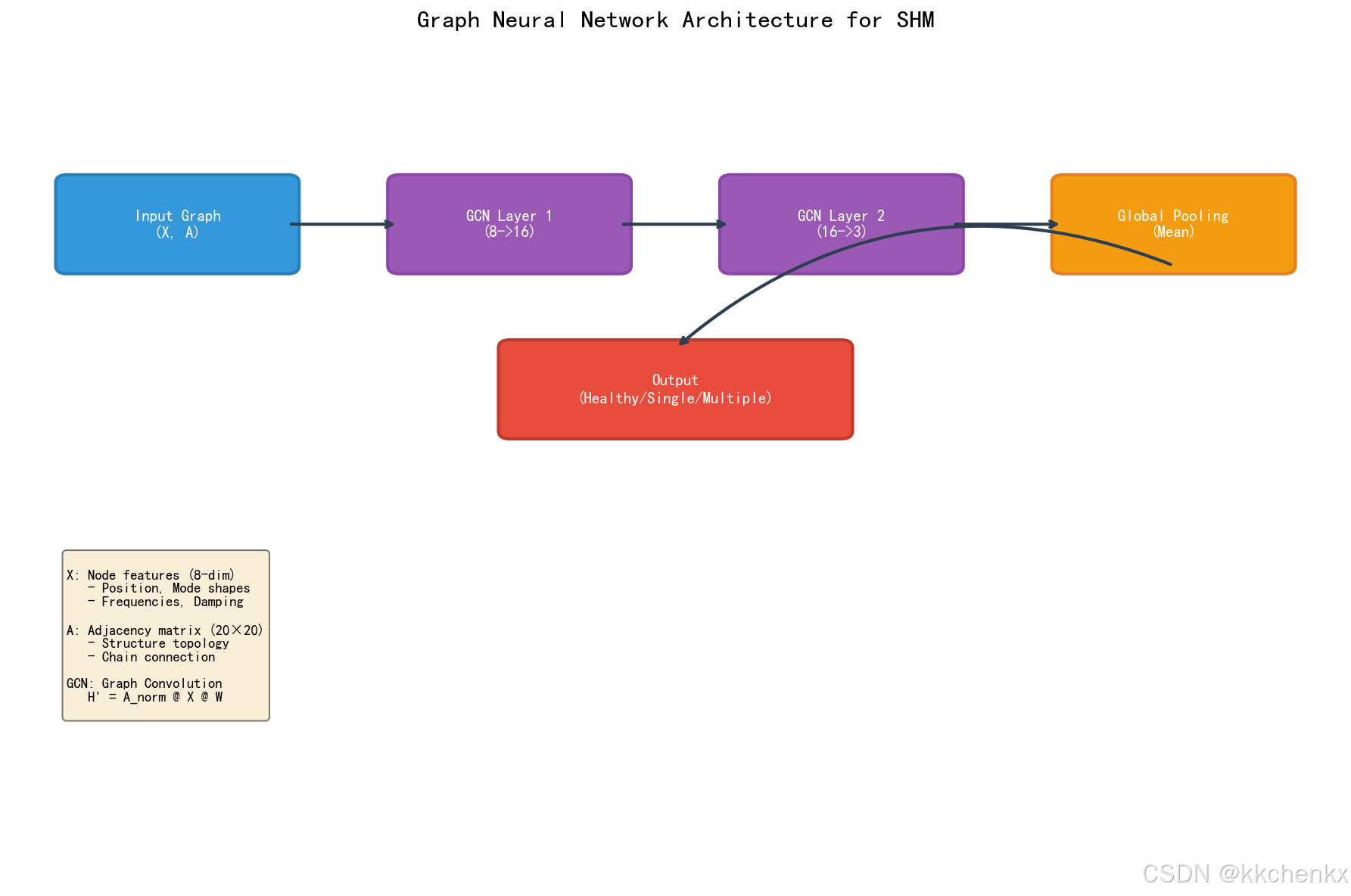
GNN模型设计:
输入:传感器网络图G = (V, E, X)
     ↓
GCN/GAT层1:提取局部特征
     ↓
GCN/GAT层2:聚合多跳邻居信息
     ↓
全局池化:生成图级表示
     ↓
全连接层:损伤分类/回归
     ↓
输出:结构健康状态
应用价值:
- 有效融合多传感器信息
- 利用空间相关性提高识别精度
- 对传感器故障具有鲁棒性
3.2 结构损伤识别
问题描述:如何利用图神经网络识别结构的损伤位置和程度?
图构建方法:
- 节点:结构的离散化单元(有限元节点或构件)
- 边:基于结构连接关系
- 相邻单元相连
- 考虑材料连续性
- 节点特征:模态参数、应变、加速度等
损伤识别流程:
- 特征提取:从监测数据提取损伤敏感特征
- 图构建:根据结构拓扑构建图
- GNN编码:学习节点的损伤相关表示
- 损伤定位:节点级分类或回归
- 损伤量化:评估损伤程度
模型架构示例:
class DamageDetectionGNN(nn.Module):
    def __init__(self, in_channels, hidden_channels, num_classes):
        super().__init__()
        self.conv1 = GCNConv(in_channels, hidden_channels)
        self.conv2 = GCNConv(hidden_channels, hidden_channels)
        self.classifier = nn.Linear(hidden_channels, num_classes)

    def forward(self, x, edge_index):
        x = self.conv1(x, edge_index).relu()
        x = self.conv2(x, edge_index).relu()
        out = self.classifier(x)  # 节点级分类
        return out
3.3 异常检测与故障诊断
问题描述:如何检测传感器故障和异常数据?
基于图自编码器的方法:
- 正常数据训练:使用正常监测数据训练GAE
- 重构误差计算:计算输入与重构的误差
- 异常判定:误差超过阈值的节点判定为异常
优势:
- 无监督学习,不需要异常标签
- 考虑传感器间的相关性
- 可以检测孤立异常和关联异常
3.4 结构响应预测
问题描述:如何基于部分传感器数据预测整个结构的响应?
图神经网络回归:
- 部分观测:只有部分节点有观测数据
- 图补全:使用GNN推断未观测节点的响应
- 时空建模:结合图神经网络和RNN处理时序数据
时空图神经网络架构:
输入:时序图数据{X_t}
     ↓
时空GCN层:同时建模空间和时间依赖
     ↓
时序聚合:聚合历史信息
     ↓
预测层:预测未来响应
     ↓
输出:结构响应预测
4. 图神经网络系统设计
4.1 图的构建策略
(1)基于物理连接的图
根据结构的物理连接关系构建图:
- 节点:结构构件或离散点
- 边:构件间的实际连接
- 权重:连接刚度或距离
(2)基于相似性的图
根据监测数据的相似性构建图:
- 节点:传感器或数据点
- 边:特征相似度超过阈值
- 权重:相似度值
(3)基于K近邻的图
每个节点连接最近的K个邻居:
- 距离度量:欧氏距离、马氏距离、相关系数
- K值选择:平衡局部性和全局性
(4)自适应图学习
让模型自动学习图结构:
- 基于注意力机制学习边权重
- 使用图结构学习网络(GSL)
- 动态图构建
4.2 特征工程
节点特征设计:
-
时域特征:
- 均值、方差、峰值
- 均方根(RMS)
- 峰值因子、波形因子
-
频域特征:
- 功率谱密度
- 主频率成分
- 频带能量
-
模态特征:
- 固有频率
- 阻尼比
- 振型
-
拓扑特征:
- 节点度
- 聚类系数
- 中心性指标
边特征设计:
- 距离权重
- 相关系数
- 连接类型
- 刚度系数
4.3 模型选择与调优
模型选择指南:
| 场景 | 推荐模型 | 理由 |
|---|---|---|
| 小规模图 | GCN | 简单高效 |
| 需要可解释性 | GAT | 注意力权重可解释 |
| 大规模图 | GraphSAGE | 采样机制可扩展 |
| 图分类任务 | GIN | 表达能力强 |
| 异常检测 | GAE/VGAE | 重构误差检测 |
超参数调优:
- 层数:通常2-3层,过多会导致过平滑
- 隐藏维度:64-256,根据数据规模调整
- 学习率:0.001-0.01,使用学习率衰减
- dropout:0.3-0.5,防止过拟合
- 正则化:L2正则化或图正则化
4.4 训练策略
(1)监督学习
需要标注数据,适用于:
- 损伤分类
- 响应预测
- 状态评估
(2)半监督学习
部分节点有标签,适用于:
- 大规模传感器网络
- 标注成本高的场景
(3)自监督学习
利用数据本身的结构:
- 节点属性预测
- 边预测
- 图对比学习
(4)迁移学习
从相似结构迁移知识:
- 预训练-微调策略
- 跨结构知识迁移
- 域适应技术
5. Python仿真实现
5.1 仿真场景设计
本仿真实现基于GNN的桥梁损伤识别系统:
场景设定:
- 一座简支梁桥,离散为20个单元
- 每个单元有对应的传感器监测
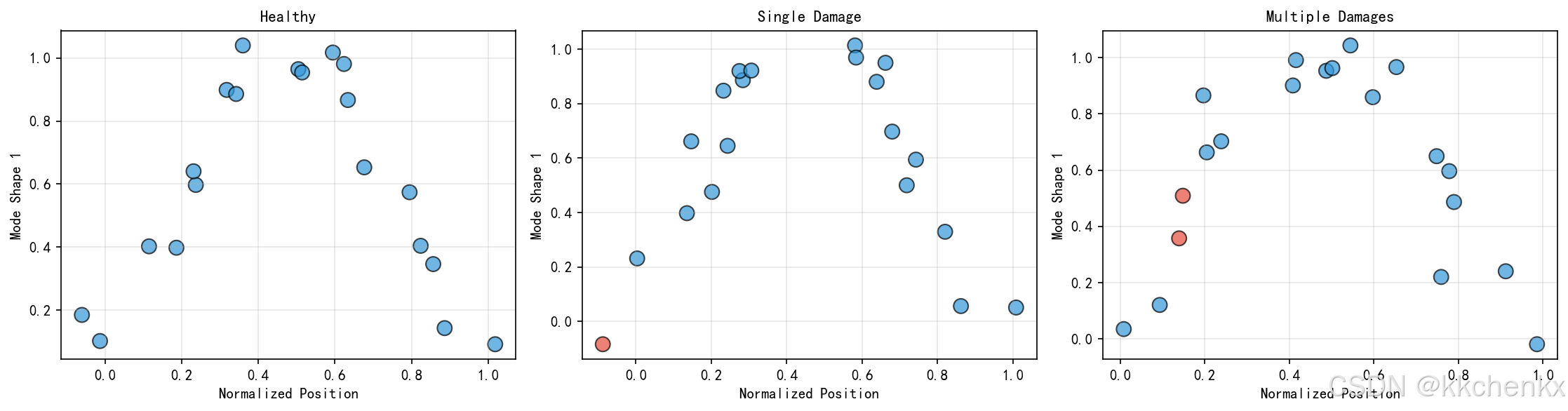
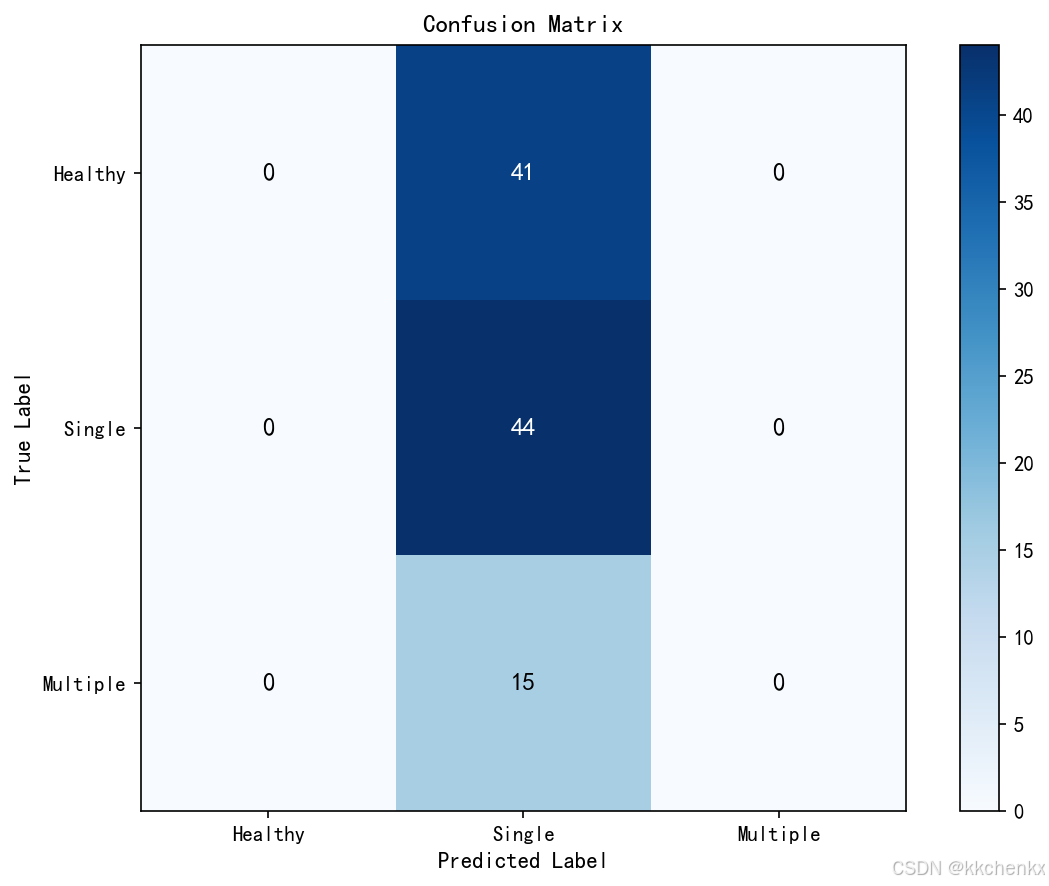
- 结构可能存在的损伤模式:无损、单点损伤、多点损伤
- 目标:基于传感器网络识别损伤位置和程度
数据生成:
- 使用有限元方法生成不同损伤状态下的模态参数
- 添加噪声模拟实际监测环境
- 构建结构拓扑图
5.2 核心代码实现
"""
主题066_边缘计算与仿真 - 实例一:边缘计算仿真架构
本代码实现边缘计算仿真平台的核心架构,包括:
1. 边缘节点管理与资源调度
2. 任务卸载决策算法
3. 边缘-云协同计算
4. 低延迟实时仿真
5. 网络拓扑可视化
作者: 仿真教学团队
"""
import matplotlib
matplotlib.use('Agg') # 使用无头后端,不显示GUI窗口
import numpy as np
import matplotlib.pyplot as plt
from matplotlib.patches import Circle, FancyBboxPatch, Arrow, FancyArrowPatch
from matplotlib.collections import LineCollection
import matplotlib.animation as animation
from PIL import Image
import io
import random
from dataclasses import dataclass, field
from typing import List, Dict, Tuple, Optional
from enum import Enum
import time
# 设置中文字体
plt.rcParams['font.sans-serif'] = ['SimHei', 'DejaVu Sans']
plt.rcParams['axes.unicode_minus'] = False
class TaskType(Enum):
"""任务类型枚举"""
THERMAL_SIMULATION = "thermal" # 热仿真
STRUCTURAL_SIMULATION = "structural" # 结构仿真
COUPLED_SIMULATION = "coupled" # 耦合仿真
REAL_TIME_MONITOR = "monitor" # 实时监控
DATA_PREPROCESS = "preprocess" # 数据预处理
class NodeType(Enum):
"""节点类型枚举"""
EDGE = "edge" # 边缘节点
FOG = "fog" # 雾计算节点
CLOUD = "cloud" # 云端节点
GATEWAY = "gateway" # 网关节点
@dataclass
class SimulationTask:
"""仿真任务类"""
task_id: str
task_type: TaskType
data_size: float # 数据量 (MB)
compute_demand: float # 计算需求 (GFLOPS)
deadline: float # 截止时间 (ms)
priority: int = 1 # 优先级 (1-10)
# 运行时状态
arrival_time: float = 0.0
start_time: Optional[float] = None
completion_time: Optional[float] = None
assigned_node: Optional[str] = None
def get_latency(self) -> float:
"""获取任务延迟"""
if self.completion_time is None:
return float('inf')
return self.completion_time - self.arrival_time
def is_meet_deadline(self) -> bool:
"""检查是否满足截止时间"""
return self.get_latency() <= self.deadline
@dataclass
class EdgeNode:
"""边缘计算节点类"""
node_id: str
node_type: NodeType
position: Tuple[float, float] # 地理位置 (x, y)
# 计算资源
cpu_cores: int
cpu_frequency: float # CPU频率 (GHz)
memory_gb: float # 内存 (GB)
# 网络资源
bandwidth_mbps: float # 带宽 (Mbps)
latency_ms: float # 基础延迟 (ms)
# 状态
active_tasks: List[SimulationTask] = field(default_factory=list)
completed_tasks: List[SimulationTask] = field(default_factory=list)
is_active: bool = True
# 能耗参数
idle_power: float = 10.0 # 空闲功耗 (W)
active_power: float = 50.0 # 活跃功耗 (W)
def get_available_compute(self) -> float:
"""获取可用计算能力 (GFLOPS)"""
used = sum(t.compute_demand for t in self.active_tasks)
total = self.cpu_cores * self.cpu_frequency
return max(0, total - used)
def can_accept(self, task: SimulationTask) -> bool:
"""检查是否可以接受任务"""
return self.get_available_compute() >= task.compute_demand * 0.1
def estimate_completion_time(self, task: SimulationTask) -> float:
"""估计任务完成时间 (ms)"""
if not self.can_accept(task):
return float('inf')
# 计算时间 = 计算需求 / 可用计算能力
compute_time = task.compute_demand / self.get_available_compute() * 1000
# 传输时间 = 数据量 / 带宽
transmission_time = task.data_size * 8 / self.bandwidth_mbps * 1000
return self.latency_ms + transmission_time + compute_time
def assign_task(self, task: SimulationTask, current_time: float):
"""分配任务到节点"""
task.start_time = current_time
task.assigned_node = self.node_id
self.active_tasks.append(task)
def process_tasks(self, current_time: float, time_step: float):
"""处理活跃任务"""
completed = []
for task in self.active_tasks[:]:
# 简化模型:假设任务按时间步推进
progress = time_step / (task.compute_demand /
(self.cpu_cores * self.cpu_frequency) * 1000)
if progress >= 1.0 or random.random() < progress:
task.completion_time = current_time
self.completed_tasks.append(task)
self.active_tasks.remove(task)
completed.append(task)
return completed
def get_power_consumption(self) -> float:
"""获取当前功耗"""
if len(self.active_tasks) > 0:
load_factor = min(1.0, len(self.active_tasks) / self.cpu_cores)
return self.idle_power + (self.active_power - self.idle_power) * load_factor
return self.idle_power
class EdgeComputingPlatform:
"""边缘计算平台主类"""
def __init__(self):
"""初始化边缘计算平台"""
self.edge_nodes: Dict[str, EdgeNode] = {}
self.cloud_node: Optional[EdgeNode] = None
self.gateway_nodes: List[EdgeNode] = []
# 网络拓扑
self.connections: List[Tuple[str, str, float]] = [] # (node1, node2, latency)
# 任务队列
self.pending_tasks: List[SimulationTask] = []
self.all_tasks: List[SimulationTask] = []
# 时间
self.current_time = 0.0
# 统计
self.stats_history = []
print("="*60)
print("边缘计算仿真平台初始化")
print("="*60)
def add_edge_node(self, node: EdgeNode):
"""添加边缘节点"""
self.edge_nodes[node.node_id] = node
print(f"添加边缘节点: {node.node_id} @ ({node.position[0]:.1f}, {node.position[1]:.1f})")
def set_cloud_node(self, node: EdgeNode):
"""设置云端节点"""
self.cloud_node = node
print(f"设置云端节点: {node.node_id}")
def add_gateway(self, node: EdgeNode):
"""添加网关节点"""
self.gateway_nodes.append(node)
print(f"添加网关: {node.node_id}")
def add_connection(self, node1_id: str, node2_id: str, latency: float):
"""添加网络连接"""
self.connections.append((node1_id, node2_id, latency))
def generate_task(self, task_type: TaskType = None) -> SimulationTask:
"""生成随机仿真任务"""
task_id = f"task_{len(self.all_tasks):04d}"
if task_type is None:
task_type = random.choice(list(TaskType))
# 根据任务类型设置参数
type_params = {
TaskType.THERMAL_SIMULATION: (50, 500, 100, 1000, 500),
TaskType.STRUCTURAL_SIMULATION: (100, 1000, 500, 5000, 1000),
TaskType.COUPLED_SIMULATION: (200, 2000, 1000, 10000, 2000),
TaskType.REAL_TIME_MONITOR: (10, 50, 10, 100, 50),
TaskType.DATA_PREPROCESS: (20, 100, 50, 500, 100)
}
data_min, data_max, compute_min, compute_max, deadline = type_params[task_type]
task = SimulationTask(
task_id=task_id,
task_type=task_type,
data_size=random.uniform(data_min, data_max),
compute_demand=random.uniform(compute_min, compute_max),
deadline=deadline,
priority=random.randint(1, 10),
arrival_time=self.current_time
)
return task
def offload_decision(self, task: SimulationTask) -> Tuple[str, float]:
"""
任务卸载决策算法
策略:
1. 计算在边缘节点和云端执行的估计延迟
2. 考虑网络延迟和计算延迟
3. 选择满足截止时间且延迟最小的方案
Returns:
(目标节点ID, 估计延迟)
"""
options = []
# 评估边缘节点
for node in self.edge_nodes.values():
if node.can_accept(task):
latency = node.estimate_completion_time(task)
options.append((node.node_id, latency, 'edge'))
# 评估云端节点
if self.cloud_node:
# 云端计算时间(假设云端算力更强)
cloud_compute_time = task.compute_demand / (self.cloud_node.cpu_cores *
self.cloud_node.cpu_frequency) * 1000
# 上传延迟
upload_latency = task.data_size * 8 / self.cloud_node.bandwidth_mbps * 1000
# 总延迟(考虑往返)
total_latency = self.cloud_node.latency_ms + upload_latency * 2 + cloud_compute_time
options.append((self.cloud_node.node_id, total_latency, 'cloud'))
if not options:
return None, float('inf')
# 选择满足截止时间的最佳选项
valid_options = [(nid, lat, loc) for nid, lat, loc in options if lat <= task.deadline]
if valid_options:
# 优先选择边缘节点(数据本地化处理)
edge_options = [(nid, lat, loc) for nid, lat, loc in valid_options if loc == 'edge']
if edge_options:
return min(edge_options, key=lambda x: x[1])[:2]
return min(valid_options, key=lambda x: x[1])[:2]
else:
# 如果没有满足截止时间的,选择延迟最小的
return min(options, key=lambda x: x[1])[:2]
def schedule_tasks(self):
"""调度待处理任务"""
scheduled = []
for task in self.pending_tasks[:]:
target_id, estimated_latency = self.offload_decision(task)
if target_id:
if target_id in self.edge_nodes:
self.edge_nodes[target_id].assign_task(task, self.current_time)
elif self.cloud_node and target_id == self.cloud_node.node_id:
self.cloud_node.assign_task(task, self.current_time)
self.pending_tasks.remove(task)
scheduled.append((task, target_id, estimated_latency))
return scheduled
def step(self, time_step: float = 10.0):
"""执行一个时间步"""
self.current_time += time_step
# 处理所有节点的任务
completed = []
for node in list(self.edge_nodes.values()) + [self.cloud_node]:
if node:
completed.extend(node.process_tasks(self.current_time, time_step))
# 调度新任务
scheduled = self.schedule_tasks()
# 收集统计
stats = self.collect_statistics()
self.stats_history.append((self.current_time, stats))
return completed, scheduled
def collect_statistics(self) -> Dict:
"""收集平台统计信息"""
total_tasks = len(self.all_tasks)
completed_tasks = sum(len(n.completed_tasks) for n in self.edge_nodes.values())
if self.cloud_node:
completed_tasks += len(self.cloud_node.completed_tasks)
active_tasks = sum(len(n.active_tasks) for n in self.edge_nodes.values())
if self.cloud_node:
active_tasks += len(self.cloud_node.active_tasks)
pending_tasks = len(self.pending_tasks)
# 计算平均延迟和 deadline 满足率
all_completed = []
for node in list(self.edge_nodes.values()) + [self.cloud_node]:
if node:
all_completed.extend(node.completed_tasks)
avg_latency = np.mean([t.get_latency() for t in all_completed]) if all_completed else 0
deadline_meet_rate = (sum(1 for t in all_completed if t.is_meet_deadline()) /
len(all_completed) * 100) if all_completed else 0
# 计算总能耗
total_power = sum(n.get_power_consumption() for n in self.edge_nodes.values())
if self.cloud_node:
total_power += self.cloud_node.get_power_consumption()
return {
'total_tasks': total_tasks,
'completed': completed_tasks,
'active': active_tasks,
'pending': pending_tasks,
'avg_latency': avg_latency,
'deadline_meet_rate': deadline_meet_rate,
'total_power': total_power,
'edge_utilization': self._get_edge_utilization()
}
def _get_edge_utilization(self) -> float:
"""获取边缘节点平均利用率"""
if not self.edge_nodes:
return 0.0
utilizations = []
for node in self.edge_nodes.values():
total_compute = node.cpu_cores * node.cpu_frequency
used_compute = sum(t.compute_demand * 0.01 for t in node.active_tasks)
utilizations.append(min(1.0, used_compute / total_compute))
return np.mean(utilizations) * 100
def create_sample_platform() -> EdgeComputingPlatform:
"""创建示例边缘计算平台"""
platform = EdgeComputingPlatform()
# 添加边缘节点(模拟工厂车间、基站等)
edge_configs = [
("edge_01", (2, 8), NodeType.EDGE, 8, 2.5, 16, 100, 5),
("edge_02", (8, 8), NodeType.EDGE, 8, 2.5, 16, 100, 5),
("edge_03", (2, 2), NodeType.EDGE, 4, 2.0, 8, 50, 10),
("edge_04", (8, 2), NodeType.EDGE, 4, 2.0, 8, 50, 10),
("edge_05", (5, 5), NodeType.FOG, 16, 3.0, 32, 200, 3),
]
for node_id, pos, ntype, cores, freq, mem, bw, lat in edge_configs:
node = EdgeNode(
node_id=node_id,
node_type=ntype,
position=pos,
cpu_cores=cores,
cpu_frequency=freq,
memory_gb=mem,
bandwidth_mbps=bw,
latency_ms=lat
)
platform.add_edge_node(node)
# 设置云端节点
cloud_node = EdgeNode(
node_id="cloud_center",
node_type=NodeType.CLOUD,
position=(15, 5),
cpu_cores=64,
cpu_frequency=3.5,
memory_gb=256,
bandwidth_mbps=1000,
latency_ms=50
)
platform.set_cloud_node(cloud_node)
# 添加网关
gateway = EdgeNode(
node_id="gateway_01",
node_type=NodeType.GATEWAY,
position=(0, 5),
cpu_cores=2,
cpu_frequency=1.5,
memory_gb=4,
bandwidth_mbps=500,
latency_ms=2
)
platform.add_gateway(gateway)
# 添加连接
connections = [
("gateway_01", "edge_01", 2),
("gateway_01", "edge_03", 3),
("edge_01", "edge_02", 2),
("edge_01", "edge_05", 1),
("edge_02", "edge_04", 2),
("edge_02", "edge_05", 1),
("edge_03", "edge_04", 2),
("edge_04", "edge_05", 1),
("edge_05", "cloud_center", 20),
]
for n1, n2, lat in connections:
platform.add_connection(n1, n2, lat)
return platform
def visualize_network_topology(platform: EdgeComputingPlatform,
save_path: str = None):
"""可视化网络拓扑"""
fig, ax = plt.subplots(figsize=(14, 10))
# 绘制连接
for n1_id, n2_id, latency in platform.connections:
n1 = platform.edge_nodes.get(n1_id) or platform.cloud_node
n2 = platform.edge_nodes.get(n2_id) or platform.cloud_node
if n1 and n2:
x1, y1 = n1.position
x2, y2 = n2.position
# 根据延迟设置线宽
linewidth = max(1, 5 - latency / 5)
alpha = max(0.3, 1 - latency / 30)
ax.plot([x1, x2], [y1, y2], 'gray',
linewidth=linewidth, alpha=alpha, zorder=1)
# 标注延迟
mid_x, mid_y = (x1 + x2) / 2, (y1 + y2) / 2
ax.annotate(f'{latency}ms', (mid_x, mid_y),
fontsize=8, alpha=0.7, ha='center')
# 绘制节点
node_colors = {
NodeType.EDGE: '#3498db',
NodeType.FOG: '#9b59b6',
NodeType.CLOUD: '#e74c3c',
NodeType.GATEWAY: '#f39c12'
}
node_sizes = {
NodeType.EDGE: 800,
NodeType.FOG: 1200,
NodeType.CLOUD: 2000,
NodeType.GATEWAY: 600
}
# 绘制边缘节点
for node in platform.edge_nodes.values():
x, y = node.position
color = node_colors[node.node_type]
size = node_sizes[node.node_type]
circle = Circle((x, y), 0.4, color=color, alpha=0.8, zorder=2)
ax.add_patch(circle)
# 节点标签
ax.text(x, y, node.node_id.split('_')[1],
ha='center', va='center', fontsize=10,
fontweight='bold', color='white', zorder=3)
# 节点信息
info_text = f'{node.cpu_cores}C/{node.memory_gb}G'
ax.text(x, y - 0.7, info_text,
ha='center', va='top', fontsize=8, alpha=0.8)
# 绘制云端节点
if platform.cloud_node:
x, y = platform.cloud_node.position
cloud_circle = Circle((x, y), 0.6, color=node_colors[NodeType.CLOUD],
alpha=0.8, zorder=2)
ax.add_patch(cloud_circle)
ax.text(x, y, 'CLOUD', ha='center', va='center',
fontsize=10, fontweight='bold', color='white', zorder=3)
ax.text(x, y - 0.9, '64C/256G', ha='center', va='top', fontsize=8)
# 绘制网关
for gateway in platform.gateway_nodes:
x, y = gateway.position
gw_circle = Circle((x, y), 0.3, color=node_colors[NodeType.GATEWAY],
alpha=0.8, zorder=2)
ax.add_patch(gw_circle)
ax.text(x, y, 'GW', ha='center', va='center',
fontsize=8, fontweight='bold', color='white', zorder=3)
# 图例
legend_elements = [
plt.Line2D([0], [0], marker='o', color='w', markerfacecolor='#3498db',
markersize=12, label='边缘节点 (Edge)'),
plt.Line2D([0], [0], marker='o', color='w', markerfacecolor='#9b59b6',
markersize=12, label='雾节点 (Fog)'),
plt.Line2D([0], [0], marker='o', color='w', markerfacecolor='#e74c3c',
markersize=15, label='云端 (Cloud)'),
plt.Line2D([0], [0], marker='o', color='w', markerfacecolor='#f39c12',
markersize=10, label='网关 (Gateway)')
]
ax.legend(handles=legend_elements, loc='upper right', fontsize=10)
ax.set_xlim(-2, 18)
ax.set_ylim(-1, 11)
ax.set_aspect('equal')
ax.set_xlabel('X 位置 (km)', fontsize=12)
ax.set_ylabel('Y 位置 (km)', fontsize=12)
ax.set_title('边缘计算网络拓扑', fontsize=16, fontweight='bold')
ax.grid(True, alpha=0.3)
plt.tight_layout()
if save_path:
plt.savefig(save_path, dpi=150, bbox_inches='tight')
print(f"拓扑图已保存: {save_path}")
plt.close()
def simulate_and_visualize():
"""运行仿真并生成可视化"""
print("\n" + "="*60)
print("边缘计算仿真平台演示")
print("="*60)
# 创建平台
platform = create_sample_platform()
# 可视化网络拓扑
visualize_network_topology(platform,
save_path='边缘计算网络拓扑.png')
# 生成初始任务
print("\n生成仿真任务...")
for _ in range(20):
task = platform.generate_task()
platform.pending_tasks.append(task)
platform.all_tasks.append(task)
print(f"初始任务数: {len(platform.pending_tasks)}")
# 运行仿真
print("\n开始仿真...")
frames = []
for step in range(50):
# 随机生成新任务
if random.random() < 0.3:
task = platform.generate_task()
platform.pending_tasks.append(task)
platform.all_tasks.append(task)
# 执行时间步
completed, scheduled = platform.step(time_step=10.0)
# 每5步记录一帧
if step % 5 == 0:
fig = visualize_platform_state(platform, step)
# 保存为图片
buf = io.BytesIO()
fig.savefig(buf, format='png', dpi=100, bbox_inches='tight')
buf.seek(0)
frames.append(Image.open(buf))
plt.close(fig)
if step % 10 == 0:
stats = platform.stats_history[-1][1] if platform.stats_history else {}
print(f"步骤 {step:3d}: 完成={stats.get('completed', 0)}, "
f"活跃={stats.get('active', 0)}, 等待={stats.get('pending', 0)}, "
f"延迟={stats.get('avg_latency', 0):.1f}ms")
# 保存动画
if frames:
frames[0].save(
'边缘计算仿真动态.gif',
save_all=True,
append_images=frames[1:],
duration=500,
loop=0
)
print("\n动画已保存: 边缘计算仿真动态.gif")
# 最终统计
print("\n" + "="*60)
print("仿真统计")
print("="*60)
final_stats = platform.stats_history[-1][1] if platform.stats_history else {}
print(f"总任务数: {final_stats.get('total_tasks', 0)}")
print(f"完成任务: {final_stats.get('completed', 0)}")
print(f"平均延迟: {final_stats.get('avg_latency', 0):.2f} ms")
print(f"截止时间满足率: {final_stats.get('deadline_meet_rate', 0):.1f}%")
print(f"边缘节点利用率: {final_stats.get('edge_utilization', 0):.1f}%")
print(f"总功耗: {final_stats.get('total_power', 0):.1f} W")
# 绘制统计图表
plot_simulation_statistics(platform)
return platform
def visualize_platform_state(platform: EdgeComputingPlatform, step: int):
"""可视化平台状态"""
fig, axes = plt.subplots(2, 2, figsize=(16, 12))
# 1. 网络拓扑与任务分布
ax1 = axes[0, 0]
# 绘制连接
for n1_id, n2_id, latency in platform.connections:
n1 = platform.edge_nodes.get(n1_id) or platform.cloud_node
n2 = platform.edge_nodes.get(n2_id) or platform.cloud_node
if n1 and n2:
x1, y1 = n1.position
x2, y2 = n2.position
ax1.plot([x1, x2], [y1, y2], 'gray', alpha=0.3, zorder=1)
# 绘制节点(大小表示负载)
for node in platform.edge_nodes.values():
x, y = node.position
load = len(node.active_tasks) / node.cpu_cores
size = 300 + load * 700
color = plt.cm.RdYlGn(1 - load)
ax1.scatter(x, y, s=size, c=[color], alpha=0.8, zorder=2, edgecolors='black')
ax1.text(x, y, f'{len(node.active_tasks)}', ha='center', va='center',
fontsize=10, fontweight='bold')
if platform.cloud_node:
x, y = platform.cloud_node.position
ax1.scatter(x, y, s=800, c='#e74c3c', alpha=0.8, zorder=2, marker='s')
ax1.text(x, y, 'C', ha='center', va='center', fontsize=12,
fontweight='bold', color='white')
ax1.set_xlim(-2, 18)
ax1.set_ylim(-1, 11)
ax1.set_aspect('equal')
ax1.set_title(f'网络拓扑与负载分布 (步骤 {step})', fontsize=12, fontweight='bold')
ax1.grid(True, alpha=0.3)
# 2. 任务状态分布
ax2 = axes[0, 1]
task_status = ['等待中', '执行中', '已完成']
pending = len(platform.pending_tasks)
active = sum(len(n.active_tasks) for n in platform.edge_nodes.values())
if platform.cloud_node:
active += len(platform.cloud_node.active_tasks)
completed = sum(len(n.completed_tasks) for n in platform.edge_nodes.values())
if platform.cloud_node:
completed += len(platform.cloud_node.completed_tasks)
values = [pending, active, completed]
colors = ['#f39c12', '#3498db', '#2ecc71']
bars = ax2.bar(task_status, values, color=colors, alpha=0.8, edgecolor='black')
ax2.set_ylabel('任务数量', fontsize=11)
ax2.set_title('任务状态分布', fontsize=12, fontweight='bold')
for bar, val in zip(bars, values):
ax2.text(bar.get_x() + bar.get_width()/2, bar.get_height() + 0.5,
str(val), ha='center', va='bottom', fontsize=11, fontweight='bold')
# 3. 节点利用率
ax3 = axes[1, 0]
node_ids = []
utilizations = []
for node_id, node in platform.edge_nodes.items():
node_ids.append(node_id.split('_')[1])
total_compute = node.cpu_cores * node.cpu_frequency
used_compute = sum(t.compute_demand * 0.01 for t in node.active_tasks)
util = min(100, used_compute / total_compute * 100)
utilizations.append(util)
colors = plt.cm.RdYlGn_r(np.array(utilizations) / 100)
bars = ax3.barh(node_ids, utilizations, color=colors, alpha=0.8, edgecolor='black')
ax3.set_xlabel('利用率 (%)', fontsize=11)
ax3.set_title('边缘节点利用率', fontsize=12, fontweight='bold')
ax3.set_xlim(0, 100)
for bar, val in zip(bars, utilizations):
ax3.text(val + 2, bar.get_y() + bar.get_height()/2,
f'{val:.1f}%', va='center', fontsize=10)
# 4. 任务类型分布
ax4 = axes[1, 1]
task_types = {}
for task in platform.all_tasks:
ttype = task.task_type.value
task_types[ttype] = task_types.get(ttype, 0) + 1
if task_types:
labels = list(task_types.keys())
sizes = list(task_types.values())
colors_pie = plt.cm.Set3(np.linspace(0, 1, len(labels)))
wedges, texts, autotexts = ax4.pie(sizes, labels=labels, autopct='%1.1f%%',
colors=colors_pie, startangle=90)
ax4.set_title('任务类型分布', fontsize=12, fontweight='bold')
plt.tight_layout()
return fig
def plot_simulation_statistics(platform: EdgeComputingPlatform):
"""绘制仿真统计图表"""
if not platform.stats_history:
return
times = [t for t, _ in platform.stats_history]
stats = [s for _, s in platform.stats_history]
fig, axes = plt.subplots(2, 2, figsize=(14, 10))
# 1. 任务数量变化
ax1 = axes[0, 0]
completed = [s['completed'] for s in stats]
active = [s['active'] for s in stats]
pending = [s['pending'] for s in stats]
ax1.plot(times, completed, 'g-', label='已完成', linewidth=2)
ax1.plot(times, active, 'b-', label='执行中', linewidth=2)
ax1.plot(times, pending, 'orange', label='等待中', linewidth=2)
ax1.set_xlabel('时间 (ms)', fontsize=11)
ax1.set_ylabel('任务数量', fontsize=11)
ax1.set_title('任务数量变化趋势', fontsize=12, fontweight='bold')
ax1.legend()
ax1.grid(True, alpha=0.3)
# 2. 平均延迟
ax2 = axes[0, 1]
latencies = [s['avg_latency'] for s in stats]
ax2.plot(times, latencies, 'r-', linewidth=2)
ax2.set_xlabel('时间 (ms)', fontsize=11)
ax2.set_ylabel('平均延迟 (ms)', fontsize=11)
ax2.set_title('任务平均延迟', fontsize=12, fontweight='bold')
ax2.grid(True, alpha=0.3)
# 3. 截止时间满足率
ax3 = axes[1, 0]
meet_rates = [s['deadline_meet_rate'] for s in stats]
ax3.plot(times, meet_rates, 'purple', linewidth=2)
ax3.axhline(y=95, color='g', linestyle='--', label='目标 95%')
ax3.set_xlabel('时间 (ms)', fontsize=11)
ax3.set_ylabel('满足率 (%)', fontsize=11)
ax3.set_title('截止时间满足率', fontsize=12, fontweight='bold')
ax3.set_ylim(0, 105)
ax3.legend()
ax3.grid(True, alpha=0.3)
# 4. 功耗与利用率
ax4 = axes[1, 1]
powers = [s['total_power'] for s in stats]
utils = [s['edge_utilization'] for s in stats]
ax4_twin = ax4.twinx()
line1 = ax4.plot(times, powers, 'b-', label='总功耗', linewidth=2)
line2 = ax4_twin.plot(times, utils, 'g--', label='边缘利用率', linewidth=2)
ax4.set_xlabel('时间 (ms)', fontsize=11)
ax4.set_ylabel('功耗 (W)', fontsize=11, color='b')
ax4_twin.set_ylabel('利用率 (%)', fontsize=11, color='g')
ax4.set_title('系统功耗与利用率', fontsize=12, fontweight='bold')
ax4.tick_params(axis='y', labelcolor='b')
ax4_twin.tick_params(axis='y', labelcolor='g')
lines = line1 + line2
labels = [l.get_label() for l in lines]
ax4.legend(lines, labels, loc='upper left')
ax4.grid(True, alpha=0.3)
plt.tight_layout()
plt.savefig('边缘计算仿真统计.png', dpi=150, bbox_inches='tight')
print("统计图表已保存: 边缘计算仿真统计.png")
plt.close()
# ==================== 示例2:边缘-云协同仿真对比 ====================
def compare_edge_cloud_strategies():
"""对比不同边缘-云协同策略"""
print("\n" + "="*60)
print("示例2:边缘-云协同策略对比")
print("="*60)
strategies = {
'纯边缘计算': 'edge_only',
'纯云计算': 'cloud_only',
'智能卸载': 'smart_offload',
'协同计算': 'collaborative'
}
results = {}
for name, strategy in strategies.items():
print(f"\n测试策略: {name}")
platform = create_sample_platform()
# 生成相同任务集
np.random.seed(42)
random.seed(42)
for _ in range(50):
task = platform.generate_task()
platform.pending_tasks.append(task)
platform.all_tasks.append(task)
# 运行仿真
for step in range(100):
if random.random() < 0.2:
task = platform.generate_task()
platform.pending_tasks.append(task)
platform.all_tasks.append(task)
# 根据策略调整卸载决策
if strategy == 'edge_only':
# 强制使用边缘节点
for task in platform.pending_tasks[:]:
best_node = None
best_latency = float('inf')
for node in platform.edge_nodes.values():
if node.can_accept(task):
lat = node.estimate_completion_time(task)
if lat < best_latency:
best_latency = lat
best_node = node
if best_node:
best_node.assign_task(task, platform.current_time)
platform.pending_tasks.remove(task)
elif strategy == 'cloud_only':
# 强制使用云端
for task in platform.pending_tasks[:]:
if platform.cloud_node and platform.cloud_node.can_accept(task):
platform.cloud_node.assign_task(task, platform.current_time)
platform.pending_tasks.remove(task)
elif strategy == 'smart_offload':
# 使用默认智能卸载
platform.schedule_tasks()
elif strategy == 'collaborative':
# 协同计算:复杂任务分解
for task in platform.pending_tasks[:]:
if task.compute_demand > 2000:
# 大任务分解为边缘预处理 + 云端计算
if platform.cloud_node and platform.cloud_node.can_accept(task):
platform.cloud_node.assign_task(task, platform.current_time)
platform.pending_tasks.remove(task)
else:
# 小任务在边缘处理
for node in platform.edge_nodes.values():
if node.can_accept(task):
node.assign_task(task, platform.current_time)
platform.pending_tasks.remove(task)
break
platform.step(time_step=10.0)
# 收集结果
final_stats = platform.stats_history[-1][1] if platform.stats_history else {}
results[name] = {
'avg_latency': final_stats.get('avg_latency', 0),
'deadline_meet_rate': final_stats.get('deadline_meet_rate', 0),
'completed': final_stats.get('completed', 0),
'edge_utilization': final_stats.get('edge_utilization', 0),
'total_power': final_stats.get('total_power', 0)
}
# 绘制对比图
fig, axes = plt.subplots(2, 2, figsize=(14, 10))
strategies_list = list(results.keys())
# 1. 平均延迟对比
ax1 = axes[0, 0]
latencies = [results[s]['avg_latency'] for s in strategies_list]
colors = ['#e74c3c', '#3498db', '#2ecc71', '#f39c12']
bars = ax1.bar(strategies_list, latencies, color=colors, alpha=0.8, edgecolor='black')
ax1.set_ylabel('平均延迟 (ms)', fontsize=11)
ax1.set_title('平均延迟对比', fontsize=12, fontweight='bold')
for bar, val in zip(bars, latencies):
ax1.text(bar.get_x() + bar.get_width()/2, bar.get_height() + 5,
f'{val:.1f}', ha='center', va='bottom', fontsize=10)
# 2. 截止时间满足率
ax2 = axes[0, 1]
meet_rates = [results[s]['deadline_meet_rate'] for s in strategies_list]
bars = ax2.bar(strategies_list, meet_rates, color=colors, alpha=0.8, edgecolor='black')
ax2.set_ylabel('满足率 (%)', fontsize=11)
ax2.set_title('截止时间满足率对比', fontsize=12, fontweight='bold')
ax2.set_ylim(0, 105)
for bar, val in zip(bars, meet_rates):
ax2.text(bar.get_x() + bar.get_width()/2, bar.get_height() + 1,
f'{val:.1f}%', ha='center', va='bottom', fontsize=10)
# 3. 完成任务数
ax3 = axes[1, 0]
completed = [results[s]['completed'] for s in strategies_list]
bars = ax3.bar(strategies_list, completed, color=colors, alpha=0.8, edgecolor='black')
ax3.set_ylabel('完成任务数', fontsize=11)
ax3.set_title('完成任务数对比', fontsize=12, fontweight='bold')
for bar, val in zip(bars, completed):
ax3.text(bar.get_x() + bar.get_width()/2, bar.get_height() + 1,
str(val), ha='center', va='bottom', fontsize=10)
# 4. 能耗
ax4 = axes[1, 1]
powers = [results[s]['total_power'] for s in strategies_list]
bars = ax4.bar(strategies_list, powers, color=colors, alpha=0.8, edgecolor='black')
ax4.set_ylabel('功耗 (W)', fontsize=11)
ax4.set_title('系统功耗对比', fontsize=12, fontweight='bold')
for bar, val in zip(bars, powers):
ax4.text(bar.get_x() + bar.get_width()/2, bar.get_height() + 2,
f'{val:.1f}', ha='center', va='bottom', fontsize=10)
plt.tight_layout()
plt.savefig('边缘云协同策略对比.png', dpi=150, bbox_inches='tight')
print("\n对比图已保存: 边缘云协同策略对比.png")
plt.close()
# 打印结果
print("\n" + "="*60)
print("策略对比结果")
print("="*60)
for name, res in results.items():
print(f"\n{name}:")
print(f" 平均延迟: {res['avg_latency']:.2f} ms")
print(f" 截止时间满足率: {res['deadline_meet_rate']:.1f}%")
print(f" 完成任务: {res['completed']}")
print(f" 边缘利用率: {res['edge_utilization']:.1f}%")
print(f" 总功耗: {res['total_power']:.1f} W")
return results
# ==================== 示例3:5G实时仿真应用 ====================
def simulate_5g_realtime_application():
"""模拟5G实时仿真应用场景"""
print("\n" + "="*60)
print("示例3:5G实时仿真应用")
print("="*60)
# 创建5G网络环境
platform = EdgeComputingPlatform()
# 添加5G基站作为边缘节点(低延迟)
gnb_configs = [
("gNB_01", (3, 7), 8, 3.0, 16, 1000, 1), # 5G基站,超低延迟
("gNB_02", (7, 7), 8, 3.0, 16, 1000, 1),
("gNB_03", (3, 3), 8, 3.0, 16, 1000, 1),
("gNB_04", (7, 3), 8, 3.0, 16, 1000, 1),
]
for node_id, pos, cores, freq, mem, bw, lat in gnb_configs:
node = EdgeNode(
node_id=node_id,
node_type=NodeType.EDGE,
position=pos,
cpu_cores=cores,
cpu_frequency=freq,
memory_gb=mem,
bandwidth_mbps=bw,
latency_ms=lat
)
platform.add_edge_node(node)
# 添加云端
cloud = EdgeNode(
node_id="5G_Core",
node_type=NodeType.CLOUD,
position=(15, 5),
cpu_cores=128,
cpu_frequency=3.5,
memory_gb=512,
bandwidth_mbps=10000,
latency_ms=10
)
platform.set_cloud_node(cloud)
print("\n5G网络环境配置:")
print(" - 4个5G基站 (gNB)")
print(" - 基站延迟: 1ms")
print(" - 基站带宽: 1000 Mbps")
print(" - 5G核心网延迟: 10ms")
# 模拟实时应用场景
scenarios = {
'自动驾驶': {'deadline': 10, 'count': 30, 'compute': (500, 1000)},
'AR/VR仿真': {'deadline': 20, 'count': 25, 'compute': (200, 500)},
'工业控制': {'deadline': 5, 'count': 40, 'compute': (100, 300)},
'远程手术': {'deadline': 1, 'count': 10, 'compute': (1000, 2000)}
}
scenario_results = {}
for scenario_name, config in scenarios.items():
print(f"\n模拟场景: {scenario_name}")
print(f" 截止时间: {config['deadline']}ms")
print(f" 任务数量: {config['count']}")
# 生成该场景的任务
for i in range(config['count']):
task = SimulationTask(
task_id=f"{scenario_name}_{i:03d}",
task_type=TaskType.REAL_TIME_MONITOR,
data_size=random.uniform(10, 50),
compute_demand=random.uniform(*config['compute']),
deadline=config['deadline'],
priority=10 if scenario_name == '远程手术' else 5,
arrival_time=platform.current_time
)
platform.pending_tasks.append(task)
platform.all_tasks.append(task)
# 运行仿真
for step in range(30):
platform.step(time_step=1.0)
# 收集结果
completed_tasks = []
for node in list(platform.edge_nodes.values()) + [platform.cloud_node]:
if node:
completed_tasks.extend(node.completed_tasks)
scenario_tasks = [t for t in completed_tasks if t.task_id.startswith(scenario_name)]
if scenario_tasks:
avg_latency = np.mean([t.get_latency() for t in scenario_tasks])
meet_rate = sum(1 for t in scenario_tasks if t.is_meet_deadline()) / len(scenario_tasks) * 100
else:
avg_latency = 0
meet_rate = 0
scenario_results[scenario_name] = {
'avg_latency': avg_latency,
'meet_rate': meet_rate,
'completed': len(scenario_tasks)
}
print(f" 结果: 延迟={avg_latency:.2f}ms, 满足率={meet_rate:.1f}%")
# 可视化结果
fig, axes = plt.subplots(1, 2, figsize=(14, 5))
scenarios_list = list(scenario_results.keys())
# 1. 延迟对比
ax1 = axes[0]
latencies = [scenario_results[s]['avg_latency'] for s in scenarios_list]
deadlines = [scenarios[s]['deadline'] for s in scenarios_list]
x = np.arange(len(scenarios_list))
width = 0.35
bars1 = ax1.bar(x - width/2, latencies, width, label='实际延迟',
color='#3498db', alpha=0.8, edgecolor='black')
bars2 = ax1.bar(x + width/2, deadlines, width, label='截止时间',
color='#e74c3c', alpha=0.8, edgecolor='black')
ax1.set_ylabel('延迟 (ms)', fontsize=11)
ax1.set_title('5G实时应用延迟对比', fontsize=12, fontweight='bold')
ax1.set_xticks(x)
ax1.set_xticklabels(scenarios_list, rotation=15)
ax1.legend()
ax1.grid(True, alpha=0.3, axis='y')
# 2. 满足率
ax2 = axes[1]
meet_rates = [scenario_results[s]['meet_rate'] for s in scenarios_list]
colors = ['#2ecc71' if r >= 95 else '#f39c12' if r >= 80 else '#e74c3c'
for r in meet_rates]
bars = ax2.bar(scenarios_list, meet_rates, color=colors, alpha=0.8, edgecolor='black')
ax2.axhline(y=95, color='g', linestyle='--', label='目标 95%')
ax2.set_ylabel('满足率 (%)', fontsize=11)
ax2.set_title('截止时间满足率', fontsize=12, fontweight='bold')
ax2.set_ylim(0, 105)
ax2.legend()
for bar, val in zip(bars, meet_rates):
ax2.text(bar.get_x() + bar.get_width()/2, bar.get_height() + 1,
f'{val:.1f}%', ha='center', va='bottom', fontsize=10)
plt.tight_layout()
plt.savefig('5G实时仿真应用.png', dpi=150, bbox_inches='tight')
print("\n5G应用图已保存: 5G实时仿真应用.png")
plt.close()
return scenario_results
# ==================== 主程序 ====================
if __name__ == "__main__":
print("="*70)
print("主题066:边缘计算与仿真 - 边缘计算仿真架构")
print("="*70)
# 运行示例1
platform = simulate_and_visualize()
# 运行示例2
results = compare_edge_cloud_strategies()
# 运行示例3
scenario_results = simulate_5g_realtime_application()
print("\n" + "="*70)
print("所有示例运行完成!")
print("生成的文件:")
print(" - 边缘计算网络拓扑.png")
print(" - 边缘计算仿真动态.gif")
print(" - 边缘计算仿真统计.png")
print(" - 边缘云协同策略对比.png")
print(" - 5G实时仿真应用.png")
print("="*70)

AtomGit 是由开放原子开源基金会联合 CSDN 等生态伙伴共同推出的新一代开源与人工智能协作平台。平台坚持“开放、中立、公益”的理念,把代码托管、模型共享、数据集托管、智能体开发体验和算力服务整合在一起,为开发者提供从开发、训练到部署的一站式体验。
更多推荐



 12
12 0
0- 0


 已为社区贡献156条内容

所有评论(0)