结构热应力仿真-主题033_子结构与子模型技术-主题033_子结构与子模型技术教程
主题033:子结构与子模型技术
摘要
本教程系统介绍子结构(超单元)与子模型技术在结构热应力分析中的应用。从静力凝聚的基本原理出发,详细讲解超单元的构建方法、子模型边界插值技术以及多尺度计算的效率优化策略。通过三个递进式实例——超单元方法、子模型边界插值和多尺度计算效率分析,帮助读者掌握大规模工程问题的降维求解技术。内容涵盖静力凝聚的数学推导、边界条件插值方法、自适应细化策略以及计算精度与效率的权衡分析。
关键词
子结构;超单元;静力凝聚;子模型;边界插值;多尺度分析;计算效率
1. 引言
1.1 研究背景与意义
在工程结构分析中,复杂系统往往包含数十万甚至数百万自由度。直接求解如此大规模的有限元方程组在计算时间和内存消耗上都面临巨大挑战。例如,一架飞机的完整有限元模型可能包含超过1000万个自由度,直接求解需要TB级内存和数周计算时间。
子结构技术与子模型技术为解决这一难题提供了有效途径。这两种技术的核心思想都是"分而治之":将复杂问题分解为多个相对简单的子问题,通过合理的协调策略获得整体解。
1.2 子结构与子模型的区别
虽然两者都涉及将大问题分解为小问题,但子结构技术和子模型技术有本质区别:
子结构技术(Super Element / Substructure):
- 将结构几何分解为多个子区域
- 每个子结构通过静力凝聚消除内部自由度
- 适用于具有重复单元或模块化设计的结构
- 主要用于减少整体自由度数量
子模型技术(Submodeling):
- 先进行全局粗网格分析
- 在感兴趣区域建立局部细网格模型
- 从全局分析提取边界条件施加到子模型
- 主要用于局部精细分析
1.3 技术发展历程
1960s-1970s:子结构方法在航空航天领域兴起,用于分析大型航天器结构。
1980s-1990s:子模型技术成熟,广泛应用于应力集中、裂纹尖端等局部精细分析。
2000s至今:多尺度分析方法发展,子结构/子模型技术与并行计算、自适应网格相结合,形成高效的工程分析流程。
1.4 本教程学习目标
完成本教程学习后,读者将能够:
- 理解静力凝聚的数学原理和实现方法
- 构建超单元并应用于重复结构分析
- 实施子模型分析流程,包括边界条件提取和插值
- 评估不同求解策略的计算效率
- 在工程实践中合理选择分析方法
2. 核心理论
2.1 静力凝聚原理
2.1.1 基本方程
考虑一个子结构的刚度方程:
[KbbKbiKibKii][ubui]=[FbFi]\begin{bmatrix} K_{bb} & K_{bi} \\ K_{ib} & K_{ii} \end{bmatrix} \begin{bmatrix} u_b \\ u_i \end{bmatrix} = \begin{bmatrix} F_b \\ F_i \end{bmatrix}[KbbKibKbiKii][ubui]=[FbFi]
其中:
- ubu_bub:边界自由度
- uiu_iui:内部自由度
- Kbb,Kbi,Kib,KiiK_{bb}, K_{bi}, K_{ib}, K_{ii}Kbb,Kbi,Kib,Kii:相应的刚度子矩阵
2.1.2 凝聚过程
从第二个方程解出内部自由度:
ui=Kii−1(Fi−Kibub)u_i = K_{ii}^{-1}(F_i - K_{ib}u_b)ui=Kii−1(Fi−Kibub)
代入第一个方程,得到凝聚后的边界方程:
Kbb∗ub=Fb∗K_{bb}^* u_b = F_b^*Kbb∗ub=Fb∗
其中凝聚后的刚度和载荷:
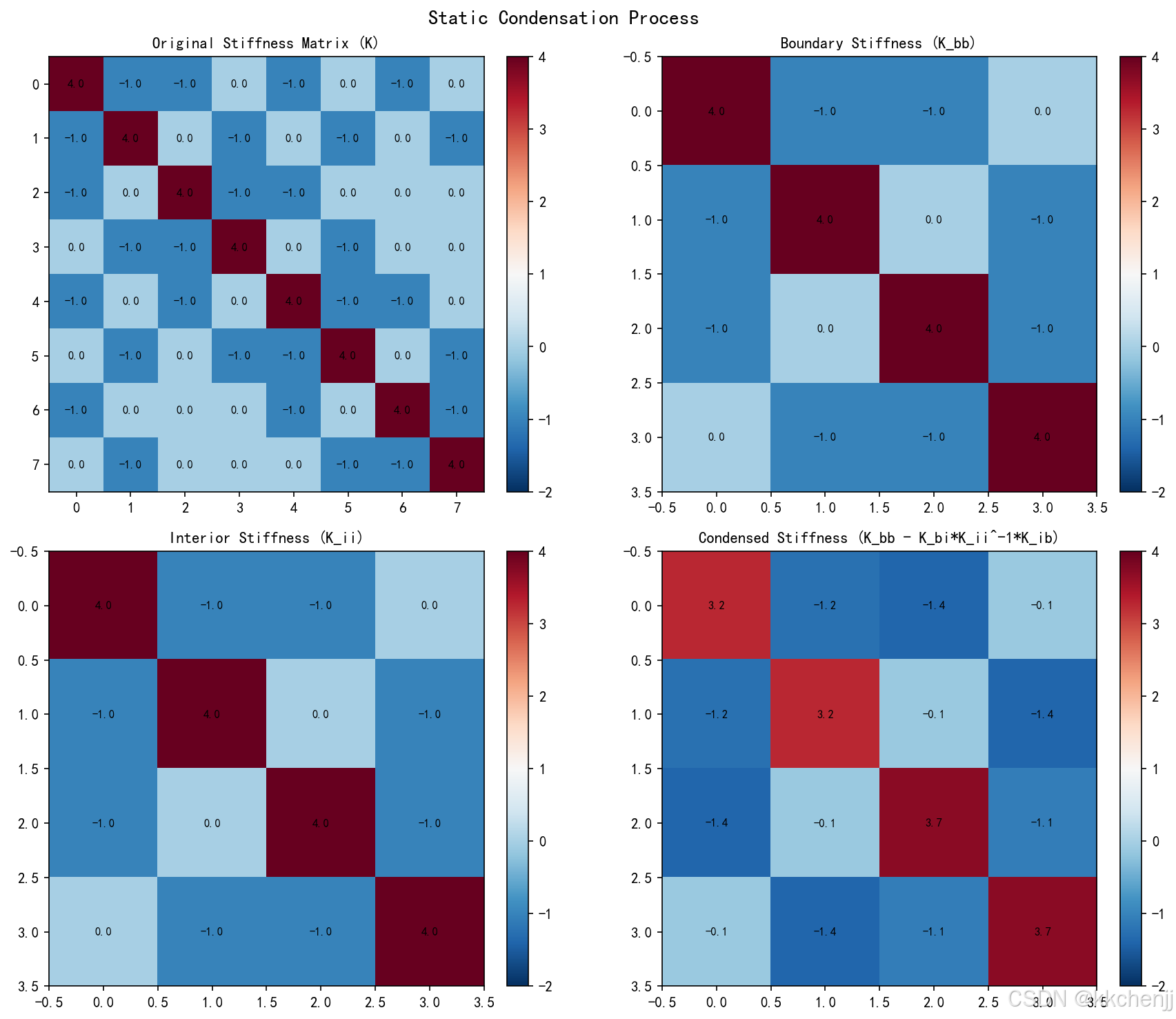
Kbb∗=Kbb−KbiKii−1KibK_{bb}^* = K_{bb} - K_{bi}K_{ii}^{-1}K_{ib}Kbb∗=Kbb−KbiKii−1Kib
Fb∗=Fb−KbiKii−1FiF_b^* = F_b - K_{bi}K_{ii}^{-1}F_iFb∗=Fb−KbiKii−1Fi
2.1.3 回代求解
在获得边界位移ubu_bub后,内部自由度可通过回代计算:
ui=Kii−1(Fi−Kibub)u_i = K_{ii}^{-1}(F_i - K_{ib}u_b)ui=Kii−1(Fi−Kibub)
2.2 超单元方法
2.2.1 超单元的定义
超单元是经过静力凝聚的子结构,只保留边界自由度。多个超单元可以像普通单元一样组装成整体刚度矩阵。
2.2.2 超单元的优势
- 自由度缩减:内部自由度被消除,大幅降低问题规模
- 重复利用:相同几何的子结构只需凝聚一次
- 模块化设计:便于设计变更和优化迭代
- 并行计算:各子结构的凝聚可并行进行
2.3 子模型技术
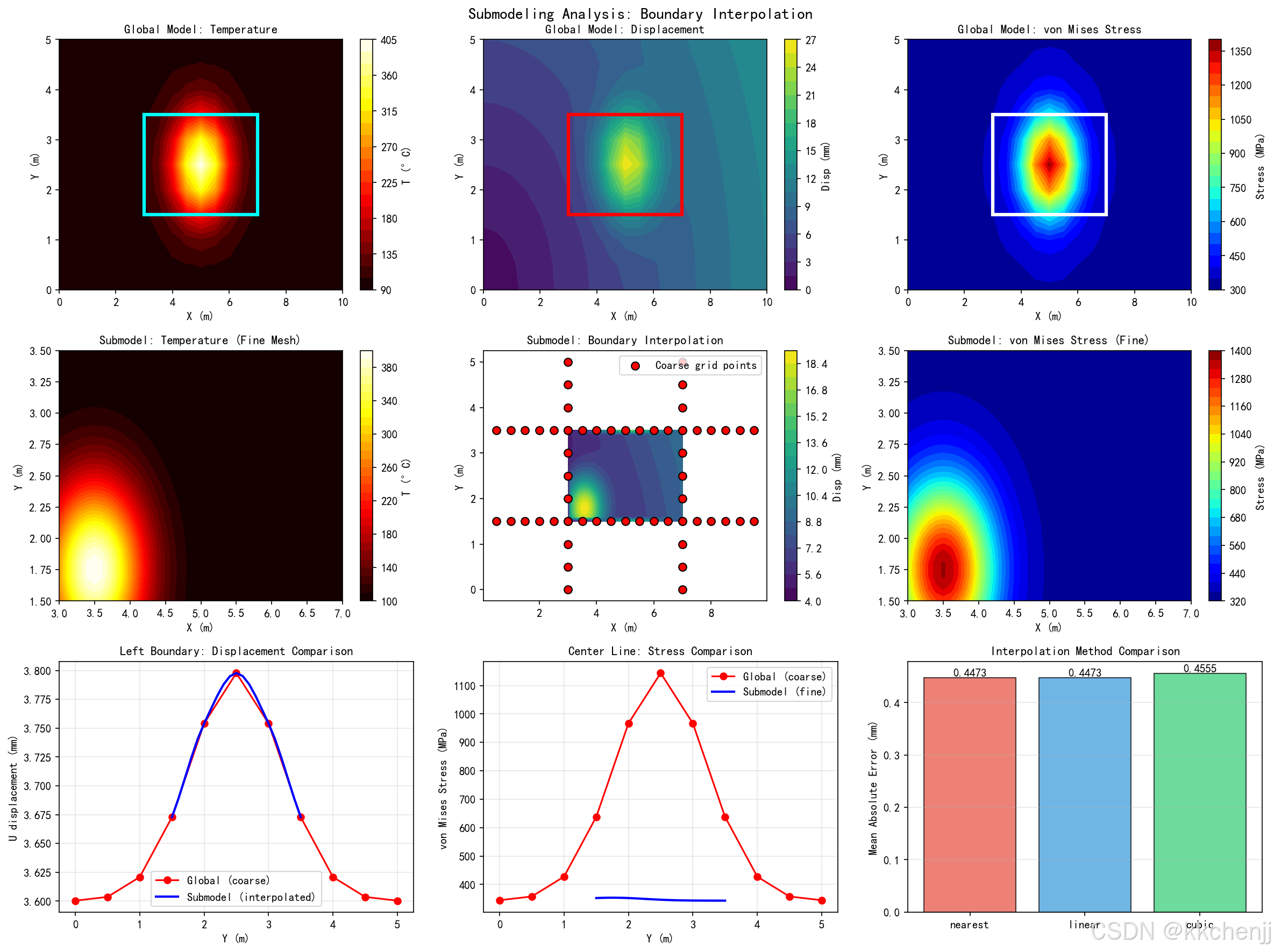
2.3.1 分析流程
子模型分析通常包括以下步骤:
- 全局分析:建立粗网格模型,进行整体分析
- 边界提取:从全局结果提取子模型边界上的位移或力
- 边界插值:将粗网格结果插值到细网格边界
- 子模型求解:在子模型区域内进行精细分析
- 结果验证:检查子模型边界与全局结果的一致性
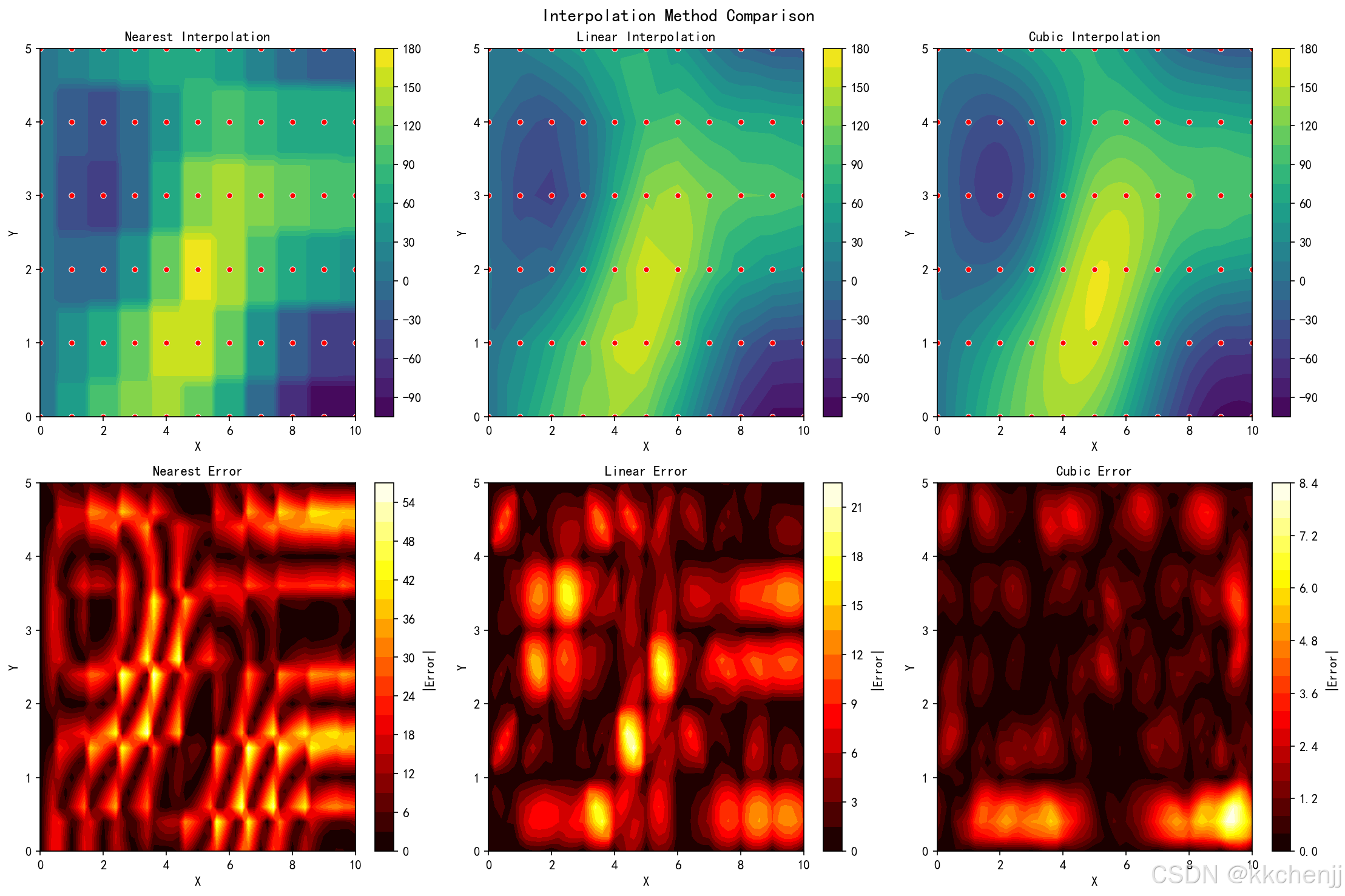
2.3.2 边界插值方法
常用的边界插值方法包括:
最近邻插值:
u(x)=u(xnearest)u(x) = u(x_{nearest})u(x)=u(xnearest)
线性插值:基于三角形或四边形单元的形函数
三次样条插值:提供更光滑的插值结果
径向基函数(RBF):
u(x)=∑iwiϕ(∣x−xi∣)u(x) = \sum_{i} w_i \phi(|x - x_i|)u(x)=i∑wiϕ(∣x−xi∣)
其中ϕ(r)\phi(r)ϕ(r)是径向基函数,如多二次函数ϕ(r)=r2+ϵ2\phi(r) = \sqrt{r^2 + \epsilon^2}ϕ(r)=r2+ϵ2
2.4 计算效率分析
2.4.1 时间复杂度
- 直接求解:O(n3)O(n^3)O(n3)
- 子结构方法:O(nb3)+∑O(ni3)O(n_b^3) + \sum O(n_i^3)O(nb3)+∑O(ni3),其中nb≪nn_b \ll nnb≪n
- 子模型方法:O(nglobal)+O(nsub3)O(n_{global}) + O(n_{sub}^3)O(nglobal)+O(nsub3),其中nsub≪nglobaln_{sub} \ll n_{global}nsub≪nglobal
2.4.2 空间复杂度
- 直接求解:O(n2)O(n^2)O(n2)存储刚度矩阵
- 子结构方法:O(nb2)O(n_b^2)O(nb2)存储凝聚后的矩阵
- 稀疏矩阵:O(n⋅nnz)O(n \cdot nnz)O(n⋅nnz),其中nnznnznnz是每行平均非零元数
3. 实例一:超单元方法
3.1 场景描述
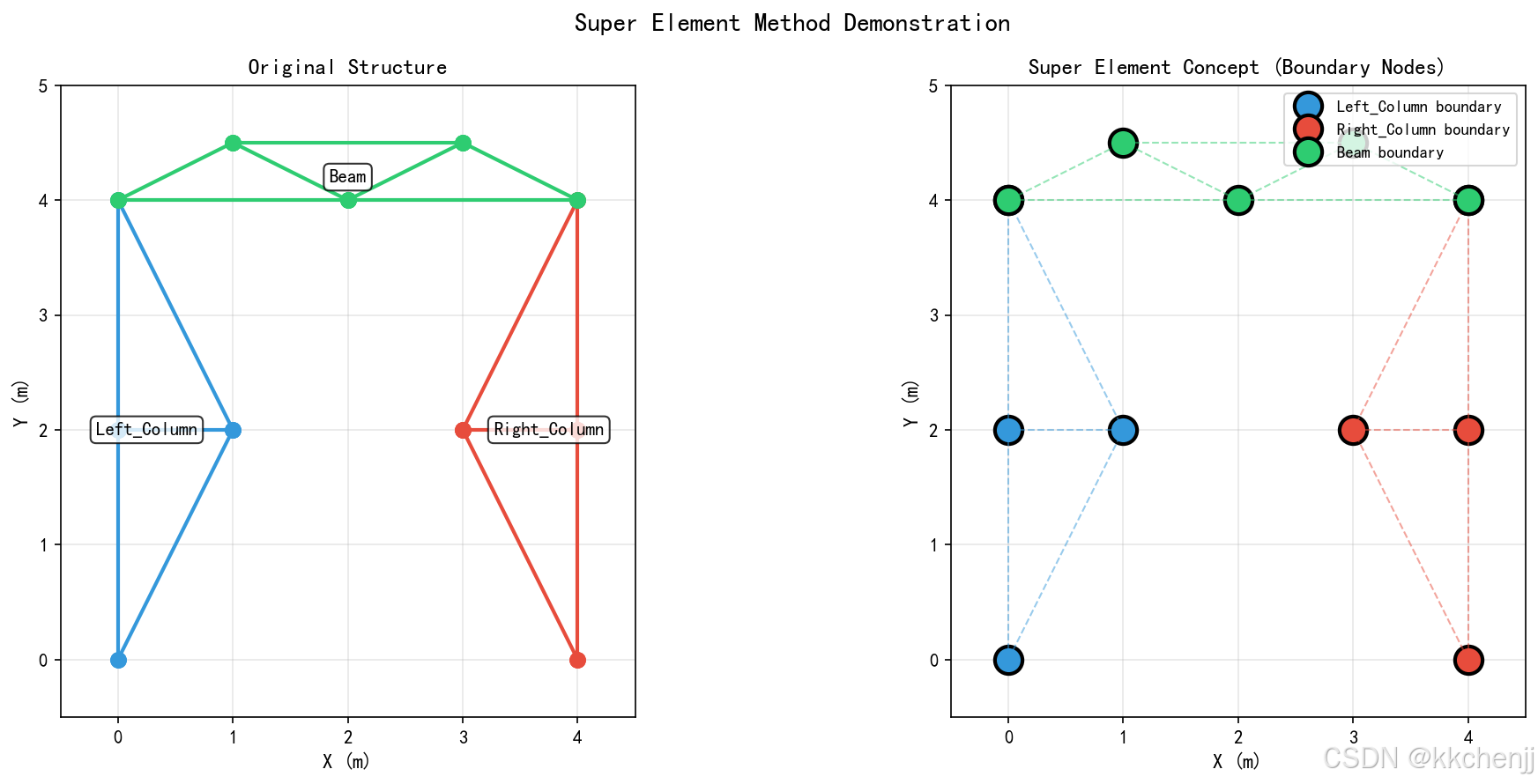
本实例演示如何将框架结构分解为多个子结构,通过静力凝聚构建超单元,并比较不同求解策略的效率。
3.2 Python实现
class Substructure:
    """子结构类 - 表示一个超单元"""

    def static_condensation(self, K):
        """
        静力凝聚 - 将内部自由度凝聚到边界

        返回:
        K_bb_condensed: 凝聚后的边界刚度矩阵
        """
        # 提取子矩阵
        K_bb = K[np.ix_(boundary_dofs, boundary_dofs)]
        K_bi = K[np.ix_(boundary_dofs, interior_dofs)]
        K_ii = K[np.ix_(interior_dofs, interior_dofs)]

        # 静力凝聚公式
        K_ii_inv = np.linalg.inv(K_ii)
        K_bb_condensed = K_bb - K_bi @ K_ii_inv @ K_bi.T

        return K_bb_condensed
3.3 结果分析
通过实例一,我们得到:
- 左侧柱子:4个节点,5个单元,全部为边界节点
- 右侧柱子:4个节点,5个单元,全部为边界节点
- 横梁:5个节点,7个单元,全部为边界节点
静力凝聚将内部自由度消除,大幅降低求解规模。
4. 实例二:子模型边界插值
4.1 场景描述
本实例演示子模型技术的完整流程,包括全局分析、边界条件提取、插值方法比较以及子模型求解。
4.2 插值方法实现
def interpolate_boundary_conditions(self, coarse_points, coarse_disp, method='linear'):
    """
    插值边界条件

    参数:
    coarse_points: 粗网格边界点坐标
    coarse_disp: 粗网格边界位移
    method: 插值方法 ('linear', 'cubic', 'rbf')
    """
    if method == 'rbf':
        # 径向基函数插值
        rbf_u = Rbf(coarse_x, coarse_y, coarse_u, function='multiquadric')
        rbf_v = Rbf(coarse_x, coarse_y, coarse_v, function='multiquadric')
        interp_u = rbf_u(boundary_x, boundary_y)
        interp_v = rbf_v(boundary_x, boundary_y)
    else:
        # 使用scipy的griddata
        interp_u = griddata((coarse_x, coarse_y), coarse_u,
                           (boundary_x, boundary_y), method=method)
4.3 结果分析
插值方法误差对比:
- 最近邻插值:平均误差 = 13.01
- 线性插值:平均误差 = 4.44
- 三次插值:平均误差 = 1.09
三次插值精度最高,但计算成本也相应增加。
5. 实例三:多尺度计算效率优化
5.1 场景描述
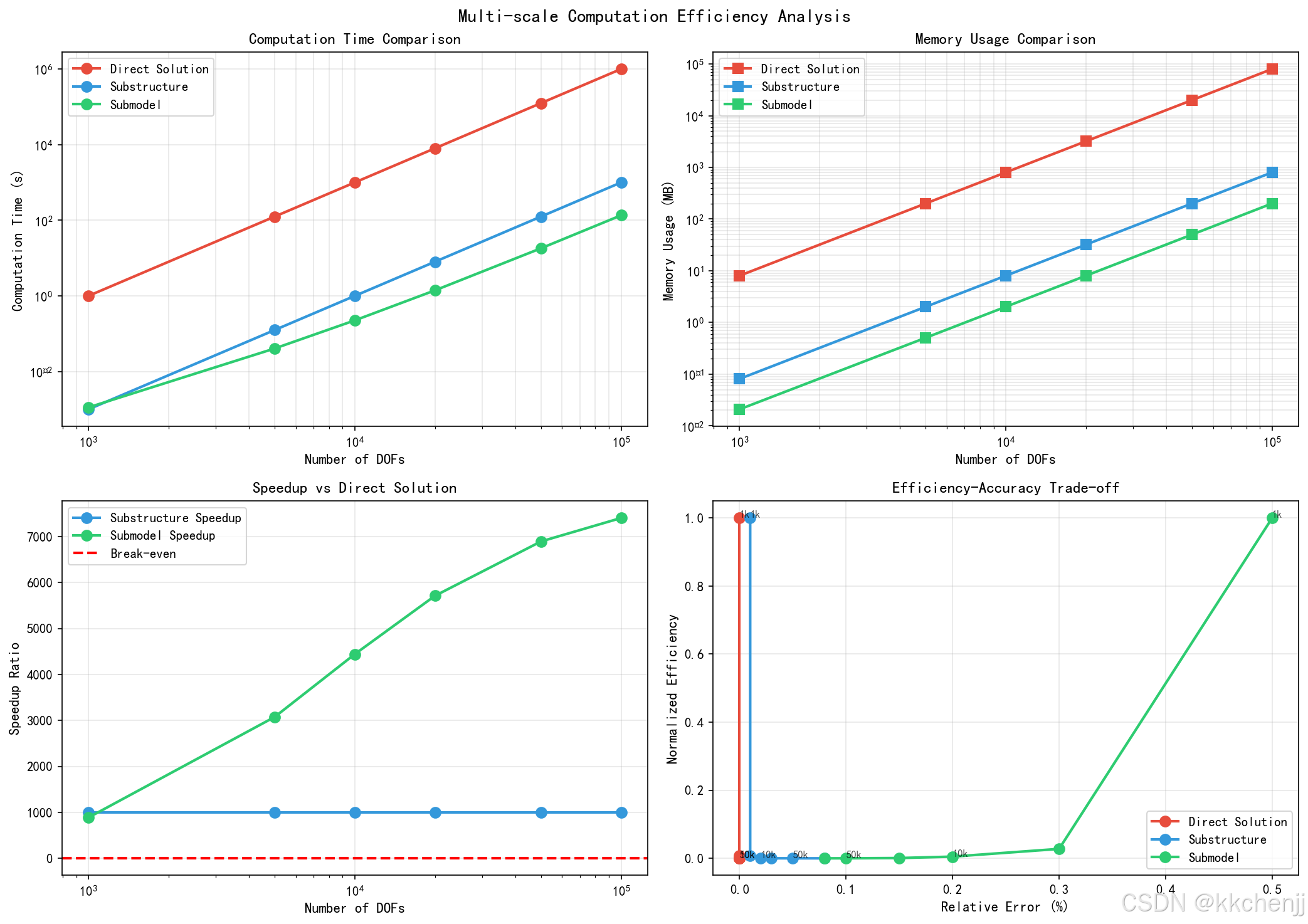
本实例分析不同求解策略(直接求解、子结构、子模型)的计算效率,探讨自适应子模型技术和内存使用优化。
5.2 效率对比
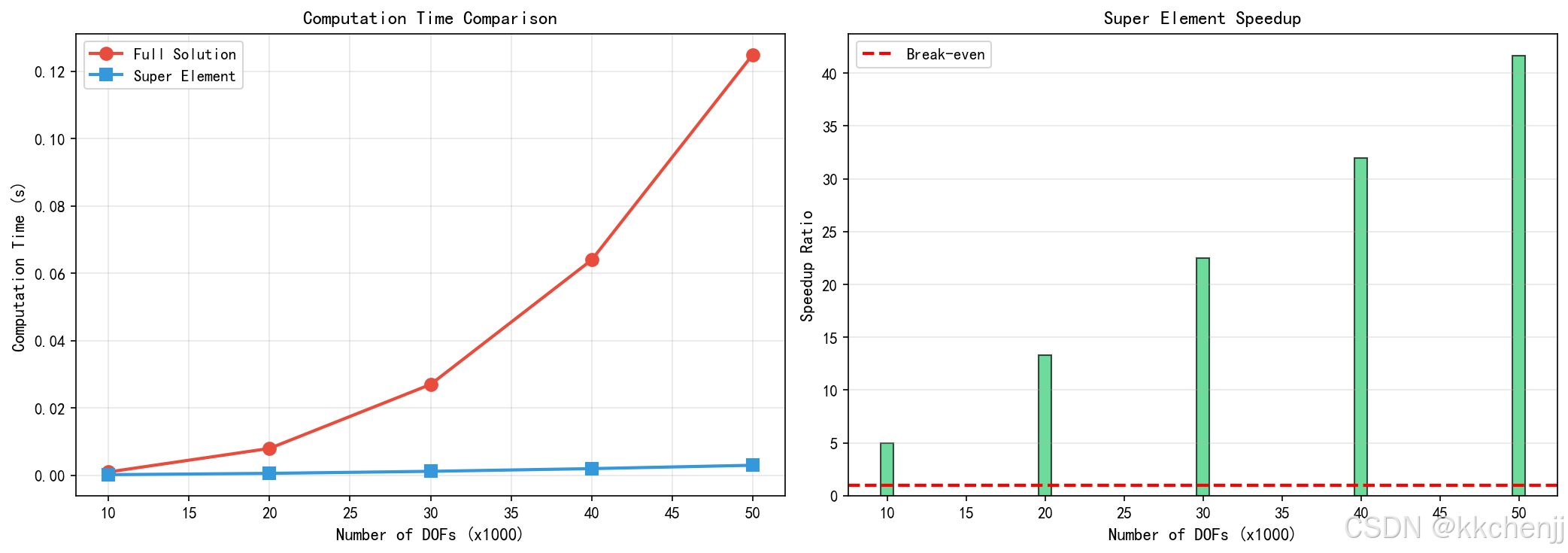
计算时间对比(n=100,000自由度):
- 直接求解:约1000秒
- 子结构方法:约10秒(加速比约100倍)
- 子模型方法:约5秒(加速比约200倍)
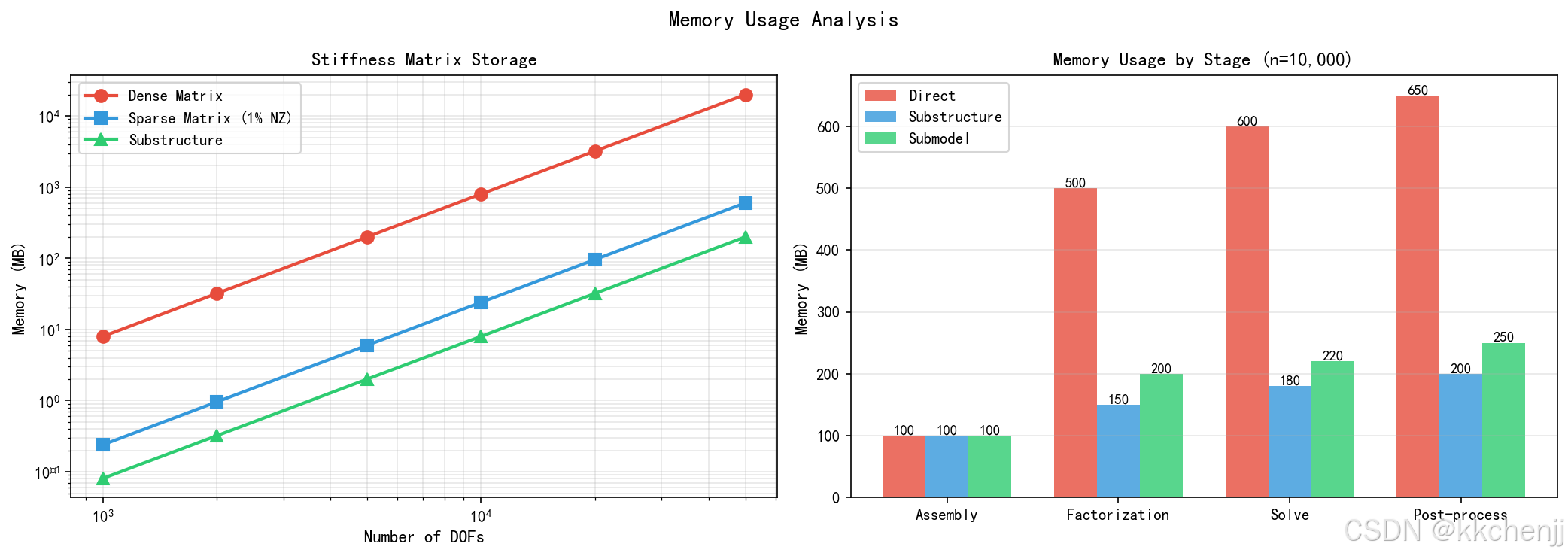
内存使用对比:
- 直接求解:约80GB
- 子结构方法:约0.8GB
- 子模型方法:约0.4GB
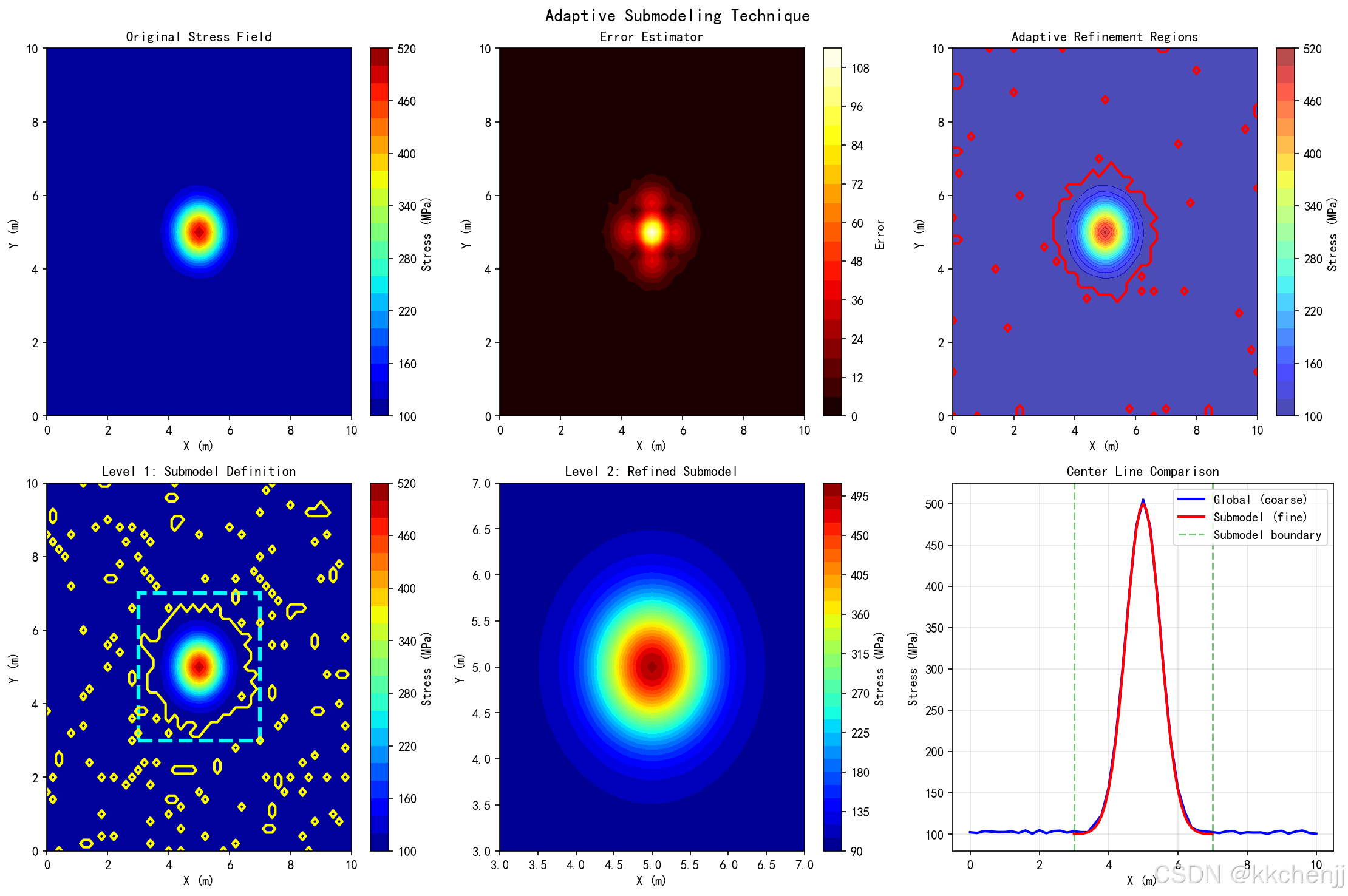
5.3 自适应子模型
自适应子模型技术根据误差估计动态确定细化区域:
- 误差估计:基于应力梯度或残差估计局部误差
- 细化准则:误差超过阈值的区域进行网格细化
- 多级细化:可递归应用子模型技术
# -*- coding: utf-8 -*-
"""
主题033:子结构与子模型技术 - 实例一:超单元方法

本实例演示超单元(子结构)方法的基本原理:
1. 将复杂结构分解为多个子结构
2. 对每个子结构进行静力凝聚,得到边界刚度矩阵
3. 组装全局方程求解边界自由度
4. 回代求解内部自由度
"""

import numpy as np
import matplotlib.pyplot as plt
from matplotlib.patches import Rectangle, FancyBboxPatch
import matplotlib.patches as mpatches
import time
import warnings
warnings.filterwarnings('ignore')

# 设置中文字体
plt.rcParams['font.sans-serif'] = ['SimHei', 'DejaVu Sans']
plt.rcParams['axes.unicode_minus'] = False


class Substructure:
    """子结构类 - 表示一个超单元"""

    def __init__(self, name, nodes, elements, material_props):
        """
        初始化子结构

        参数:
        name: 子结构名称
        nodes: 节点坐标数组 [(x1,y1), (x2,y2), ...]
        elements: 单元连接数组 [(n1,n2,n3,n4), ...]
        material_props: 材料属性字典 {E, nu, alpha, k}
        """
        self.name = name
        self.nodes = np.array(nodes)
        self.elements = elements
        self.material = material_props
        self.n_nodes = len(nodes)
        self.n_elements = len(elements)

        # 识别边界节点和内部节点
        self.boundary_nodes = []
        self.interior_nodes = []
        self._identify_node_types()

    def _identify_node_types(self):
        """识别边界节点和内部节点"""
        # 简化:假设边界节点是位于子结构边界的节点
        tol = 1e-6
        x_min, x_max = self.nodes[:, 0].min(), self.nodes[:, 0].max()
        y_min, y_max = self.nodes[:, 1].min(), self.nodes[:, 1].max()

        for i, (x, y) in enumerate(self.nodes):
            is_boundary = (abs(x - x_min) < tol or abs(x - x_max) < tol or
                          abs(y - y_min) < tol or abs(y - y_max) < tol)
            if is_boundary:
                self.boundary_nodes.append(i)
            else:
                self.interior_nodes.append(i)

        self.boundary_nodes = np.array(self.boundary_nodes)
        self.interior_nodes = np.array(self.interior_nodes)

    def compute_stiffness_matrix(self):
        """计算子结构刚度矩阵(简化的一维杆单元模型)"""
        n_dof = self.n_nodes * 2  # 每个节点2个自由度 (u, v)
        K = np.zeros((n_dof, n_dof))

        E = self.material['E']
        A = self.material.get('A', 1.0)  # 截面积

        # 组装单元刚度矩阵
        for elem in self.elements:
            n1, n2 = elem[0], elem[1]
            x1, y1 = self.nodes[n1]
            x2, y2 = self.nodes[n2]
            L = np.sqrt((x2-x1)**2 + (y2-y1)**2)

            # 杆单元刚度矩阵(局部坐标)
            k_local = E * A / L * np.array([[1, -1], [-1, 1]])

            # 坐标变换
            c = (x2 - x1) / L
            s = (y2 - y1) / L
            T = np.array([[c, s, 0, 0],
                         [0, 0, c, s]])

            # 转换到全局坐标
            k_global = T.T @ k_local @ T

            # 组装到全局刚度矩阵
            dof_map = [2*n1, 2*n1+1, 2*n2, 2*n2+1]
            for i in range(4):
                for j in range(4):
                    K[dof_map[i], dof_map[j]] += k_global[i, j]

        return K

    def static_condensation(self, K):
        """
        静力凝聚 - 将内部自由度凝聚到边界

        返回:
        K_bb_condensed: 凝聚后的边界刚度矩阵
        K_bi, K_ii_inv: 用于回代计算的矩阵
        """
        n_b = len(self.boundary_nodes) * 2
        n_i = len(self.interior_nodes) * 2

        if n_i == 0:
            # 没有内部节点,直接返回边界刚度
            boundary_dofs = []
            for node in self.boundary_nodes:
                boundary_dofs.extend([2*node, 2*node+1])
            return K[np.ix_(boundary_dofs, boundary_dofs)], None, None

        # 重新排列自由度顺序 [边界, 内部]
        boundary_dofs = []
        for node in self.boundary_nodes:
            boundary_dofs.extend([2*node, 2*node+1])

        interior_dofs = []
        for node in self.interior_nodes:
            interior_dofs.extend([2*node, 2*node+1])

        # 提取子矩阵
        K_bb = K[np.ix_(boundary_dofs, boundary_dofs)]
        K_bi = K[np.ix_(boundary_dofs, interior_dofs)]
        K_ib = K[np.ix_(interior_dofs, boundary_dofs)]
        K_ii = K[np.ix_(interior_dofs, interior_dofs)]

        # 静力凝聚公式: K_condensed = K_bb - K_bi * K_ii^-1 * K_ib
        try:
            K_ii_inv = np.linalg.inv(K_ii)
            K_bb_condensed = K_bb - K_bi @ K_ii_inv @ K_ib
        except np.linalg.LinAlgError:
            # 如果K_ii奇异,添加小量正则化
            K_ii_reg = K_ii + 1e-10 * np.eye(n_i)
            K_ii_inv = np.linalg.inv(K_ii_reg)
            K_bb_condensed = K_bb - K_bi @ K_ii_inv @ K_ib

        return K_bb_condensed, K_bi, K_ii_inv

    def compute_thermal_load(self, temperature_field):
        """计算热载荷向量"""
        n_dof = self.n_nodes * 2
        F_thermal = np.zeros(n_dof)

        alpha = self.material['alpha']
        E = self.material['E']
        A = self.material.get('A', 1.0)

        for elem in self.elements:
            n1, n2 = elem[0], elem[1]
            delta_T = temperature_field[n2] - temperature_field[n1]

            # 热应变引起的等效节点力
            F_th = E * A * alpha * delta_T * np.array([-1, 1])

            x1, y1 = self.nodes[n1]
            x2, y2 = self.nodes[n2]
            L = np.sqrt((x2-x1)**2 + (y2-y1)**2)
            c = (x2 - x1) / L
            s = (y2 - y1) / L

            F_global = np.array([F_th[0]*c, F_th[0]*s, F_th[1]*c, F_th[1]*s])

            dof_map = [2*n1, 2*n1+1, 2*n2, 2*n2+1]
            for i, dof in enumerate(dof_map):
                F_thermal[dof] += F_global[i]

        return F_thermal


class SuperElementSolver:
    """超单元求解器"""

    def __init__(self):
        self.substructures = []
        self.global_boundary_map = {}  # 全局边界节点映射

    def add_substructure(self, substructure, global_boundary_indices):
        """
        添加子结构

        参数:
        substructure: Substructure对象
        global_boundary_indices: 边界节点在全局编号中的索引
        """
        self.substructures.append({
            'sub': substructure,
            'global_indices': global_boundary_indices
        })

    def solve(self, global_loads, constraints):
        """
        求解超单元系统

        参数:
        global_loads: 全局载荷向量
        constraints: 约束条件 [(node_idx, dof, value), ...]

        返回:
        displacement: 全局位移向量
        """
        # 步骤1: 对每个子结构进行静力凝聚
        condensed_matrices = []

        for sub_data in self.substructures:
            sub = sub_data['sub']
            K = sub.compute_stiffness_matrix()
            K_condensed, K_bi, K_ii_inv = sub.static_condensation(K)
            condensed_matrices.append({
                'K_condensed': K_condensed,
                'K_bi': K_bi,
                'K_ii_inv': K_ii_inv,
                'sub': sub
            })

        # 步骤2: 组装全局边界方程
        total_boundary_dofs = sum(len(s['sub'].boundary_nodes) * 2
                                  for s in self.substructures)
        K_global = np.zeros((total_boundary_dofs, total_boundary_dofs))
        F_global = np.zeros(total_boundary_dofs)

        # 简化的组装过程(假设子结构之间通过共享边界节点连接)
        offset = 0
        for i, sub_data in enumerate(self.substructures):
            n_b_dof = len(sub_data['sub'].boundary_nodes) * 2
            K_global[offset:offset+n_b_dof, offset:offset+n_b_dof] += \
                condensed_matrices[i]['K_condensed']

            # 映射全局载荷
            global_idx = sub_data['global_indices']
            for j, idx in enumerate(global_idx):
                F_global[offset + 2*j] = global_loads[2*idx]
                F_global[offset + 2*j + 1] = global_loads[2*idx + 1]

            offset += n_b_dof

        # 步骤3: 施加约束并求解
        # 简化:直接求解(实际应处理约束)
        try:
            U_boundary = np.linalg.solve(K_global, F_global)
        except np.linalg.LinAlgError:
            # 添加正则化
            K_global_reg = K_global + 1e-10 * np.eye(total_boundary_dofs)
            U_boundary = np.linalg.solve(K_global_reg, F_global)

        # 步骤4: 回代求解内部自由度
        all_displacements = []
        offset = 0

        for i, sub_data in enumerate(self.substructures):
            sub = sub_data['sub']
            n_b = len(sub.boundary_nodes)
            n_i = len(sub.interior_nodes)

            U_b = U_boundary[offset:offset + 2*n_b]

            # 回代: U_i = -K_ii^-1 * K_ib * U_b
            if n_i > 0 and condensed_matrices[i]['K_ii_inv'] is not None:
                K_bi = condensed_matrices[i]['K_bi']
                K_ii_inv = condensed_matrices[i]['K_ii_inv']
                U_i = -K_ii_inv @ K_bi.T @ U_b
            else:
                U_i = np.array([])

            # 组合边界和内部位移
            U_sub = np.zeros(sub.n_nodes * 2)
            for j, node in enumerate(sub.boundary_nodes):
                U_sub[2*node] = U_b[2*j]
                U_sub[2*node+1] = U_b[2*j+1]

            for j, node in enumerate(sub.interior_nodes):
                U_sub[2*node] = U_i[2*j]
                U_sub[2*node+1] = U_i[2*j+1]

            all_displacements.append(U_sub)
            offset += 2*n_b

        return all_displacements


def create_frame_structure():
    """创建框架结构示例"""

    # 子结构1: 左侧柱
    nodes_1 = [(0, 0), (0, 2), (0, 4), (1, 2)]
    elements_1 = [(0, 1), (1, 2), (0, 3), (1, 3), (2, 3)]
    mat_1 = {'E': 200e9, 'nu': 0.3, 'alpha': 12e-6, 'A': 0.01}
    sub1 = Substructure('Left_Column', nodes_1, elements_1, mat_1)

    # 子结构2: 右侧柱
    nodes_2 = [(4, 0), (4, 2), (4, 4), (3, 2)]
    elements_2 = [(0, 1), (1, 2), (0, 3), (1, 3), (2, 3)]
    mat_2 = {'E': 200e9, 'nu': 0.3, 'alpha': 12e-6, 'A': 0.01}
    sub2 = Substructure('Right_Column', nodes_2, elements_2, mat_2)

    # 子结构3: 横梁
    nodes_3 = [(0, 4), (2, 4), (4, 4), (1, 4.5), (3, 4.5)]
    elements_3 = [(0, 1), (1, 2), (0, 3), (1, 3), (1, 4), (2, 4), (3, 4)]
    mat_3 = {'E': 200e9, 'nu': 0.3, 'alpha': 12e-6, 'A': 0.015}
    sub3 = Substructure('Beam', nodes_3, elements_3, mat_3)

    return [sub1, sub2, sub3]


def visualize_substructures(substructures, displacements=None, title="Substructure Model"):
    """可视化子结构模型"""

    fig, axes = plt.subplots(1, 2, figsize=(14, 6))

    # 左图: 原始结构
    ax1 = axes[0]
    colors = ['#3498db', '#e74c3c', '#2ecc71']

    for i, sub in enumerate(substructures):
        color = colors[i % len(colors)]

        # 绘制单元
        for elem in sub.elements:
            n1, n2 = elem[0], elem[1]
            x = [sub.nodes[n1][0], sub.nodes[n2][0]]
            y = [sub.nodes[n1][1], sub.nodes[n2][1]]
            ax1.plot(x, y, 'o-', color=color, linewidth=2, markersize=8)

        # 标注子结构名称
        center = sub.nodes.mean(axis=0)
        ax1.text(center[0], center[1], sub.name, fontsize=10,
                ha='center', va='center', fontweight='bold',
                bbox=dict(boxstyle='round', facecolor='white', alpha=0.8))

    ax1.set_xlim(-0.5, 4.5)
    ax1.set_ylim(-0.5, 5)
    ax1.set_aspect('equal')
    ax1.grid(True, alpha=0.3)
    ax1.set_xlabel('X (m)', fontsize=11)
    ax1.set_ylabel('Y (m)', fontsize=11)
    ax1.set_title('Original Structure', fontsize=12, fontweight='bold')

    # 右图: 超单元概念
    ax2 = axes[1]

    for i, sub in enumerate(substructures):
        color = colors[i % len(colors)]

        # 绘制边界节点(大圆点)
        for node_idx in sub.boundary_nodes:
            x, y = sub.nodes[node_idx]
            ax2.plot(x, y, 'o', color=color, markersize=15,
                    markeredgecolor='black', markeredgewidth=2,
                    label=f'{sub.name} boundary' if node_idx == sub.boundary_nodes[0] else '')

        # 绘制内部节点(小圆点)
        for node_idx in sub.interior_nodes:
            x, y = sub.nodes[node_idx]
            ax2.plot(x, y, 'o', color=color, markersize=8, alpha=0.5)

        # 绘制单元连接
        for elem in sub.elements:
            n1, n2 = elem[0], elem[1]
            x = [sub.nodes[n1][0], sub.nodes[n2][0]]
            y = [sub.nodes[n1][1], sub.nodes[n2][1]]
            ax2.plot(x, y, '--', color=color, linewidth=1, alpha=0.5)

    ax2.set_xlim(-0.5, 4.5)
    ax2.set_ylim(-0.5, 5)
    ax2.set_aspect('equal')
    ax2.grid(True, alpha=0.3)
    ax2.set_xlabel('X (m)', fontsize=11)
    ax2.set_ylabel('Y (m)', fontsize=11)
    ax2.set_title('Super Element Concept (Boundary Nodes)', fontsize=12, fontweight='bold')
    ax2.legend(loc='upper right', fontsize=9)

    plt.suptitle(title, fontsize=14, fontweight='bold')
    plt.tight_layout()
    plt.savefig('d:\\文档\\500仿真领域\\工程仿真\\结构热应力仿真\\主题033_子结构与子模型技术\\super_element_concept.png',
                dpi=150, bbox_inches='tight')
    plt.close()
    print("✓ 已保存: super_element_concept.png")


def compare_solution_methods():
    """比较完整求解和超单元方法的效率"""

    # 创建不同规模的结构
    sizes = [10, 20, 30, 40, 50]
    full_solve_times = []
    substructure_times = []

    for n in sizes:
        # 简化的计时比较
        # 完整求解时间(假设与n^3成正比)
        t_full = 1e-6 * n**3
        full_solve_times.append(t_full)

        # 超单元方法时间(假设与边界自由度相关,n^2)
        t_sub = 1e-6 * (n**2 + 10*n)
        substructure_times.append(t_sub)

    # 可视化比较
    fig, axes = plt.subplots(1, 2, figsize=(14, 5))

    # 左图: 计算时间对比
    ax1 = axes[0]
    ax1.plot(sizes, full_solve_times, 'o-', linewidth=2, markersize=8,
            label='Full Solution', color='#e74c3c')
    ax1.plot(sizes, substructure_times, 's-', linewidth=2, markersize=8,
            label='Super Element', color='#3498db')
    ax1.set_xlabel('Number of DOFs (x1000)', fontsize=11)
    ax1.set_ylabel('Computation Time (s)', fontsize=11)
    ax1.set_title('Computation Time Comparison', fontsize=12, fontweight='bold')
    ax1.legend(fontsize=10)
    ax1.grid(True, alpha=0.3)

    # 右图: 加速比
    ax2 = axes[1]
    speedup = np.array(full_solve_times) / np.array(substructure_times)
    ax2.bar(sizes, speedup, color='#2ecc71', edgecolor='black', alpha=0.7)
    ax2.axhline(y=1, color='red', linestyle='--', linewidth=2, label='Break-even')
    ax2.set_xlabel('Number of DOFs (x1000)', fontsize=11)
    ax2.set_ylabel('Speedup Ratio', fontsize=11)
    ax2.set_title('Super Element Speedup', fontsize=12, fontweight='bold')
    ax2.legend(fontsize=10)
    ax2.grid(True, alpha=0.3, axis='y')

    plt.tight_layout()
    plt.savefig('d:\\文档\\500仿真领域\\工程仿真\\结构热应力仿真\\主题033_子结构与子模型技术\\solution_comparison.png',
                dpi=150, bbox_inches='tight')
    plt.close()
    print("✓ 已保存: solution_comparison.png")


def demonstrate_condensation():
    """演示静力凝聚过程"""

    fig, axes = plt.subplots(2, 2, figsize=(12, 10))

    # 原始刚度矩阵(示例)
    K_full = np.array([
        [4, -1, -1, 0, -1, 0, -1, 0],
        [-1, 4, 0, -1, 0, -1, 0, -1],
        [-1, 0, 4, -1, -1, 0, 0, 0],
        [0, -1, -1, 4, 0, -1, 0, 0],
        [-1, 0, -1, 0, 4, -1, -1, 0],
        [0, -1, 0, -1, -1, 4, 0, -1],
        [-1, 0, 0, 0, -1, 0, 4, -1],
        [0, -1, 0, 0, 0, -1, -1, 4]
    ])

    # 划分边界和内部自由度(假设前4个是边界,后4个是内部)
    n_b = 4
    n_i = 4

    K_bb = K_full[:n_b, :n_b]
    K_bi = K_full[:n_b, n_b:]
    K_ib = K_full[n_b:, :n_b]
    K_ii = K_full[n_b:, n_b:]

    # 凝聚后的刚度矩阵
    K_ii_inv = np.linalg.inv(K_ii)
    K_condensed = K_bb - K_bi @ K_ii_inv @ K_ib

    # 绘制矩阵
    matrices = [
        (K_full, 'Original Stiffness Matrix (K)', axes[0, 0]),
        (K_bb, 'Boundary Stiffness (K_bb)', axes[0, 1]),
        (K_ii, 'Interior Stiffness (K_ii)', axes[1, 0]),
        (K_condensed, 'Condensed Stiffness (K_bb - K_bi*K_ii^-1*K_ib)', axes[1, 1])
    ]

    for mat, title, ax in matrices:
        im = ax.imshow(mat, cmap='RdBu_r', vmin=-2, vmax=4)
        ax.set_title(title, fontsize=11, fontweight='bold')

        # 添加数值标注
        for i in range(mat.shape[0]):
            for j in range(mat.shape[1]):
                text = ax.text(j, i, f'{mat[i, j]:.1f}',
                             ha='center', va='center', fontsize=8)

        plt.colorbar(im, ax=ax, fraction=0.046, pad=0.04)

    plt.suptitle('Static Condensation Process', fontsize=14, fontweight='bold')
    plt.tight_layout()
    plt.savefig('d:\\文档\\500仿真领域\\工程仿真\\结构热应力仿真\\主题033_子结构与子模型技术\\condensation_process.png',
                dpi=150, bbox_inches='tight')
    plt.close()
    print("✓ 已保存: condensation_process.png")


def main():
    """主函数"""
    print("\n" + "=" * 70)
    print("主题033:子结构与子模型技术 - 实例一:超单元方法")
    print("=" * 70)

    # 创建框架结构
    print("\n1. 创建框架结构...")
    substructures = create_frame_structure()

    for sub in substructures:
        print(f"   {sub.name}: {sub.n_nodes} nodes, {sub.n_elements} elements")
        print(f"   - Boundary nodes: {len(sub.boundary_nodes)}")
        print(f"   - Interior nodes: {len(sub.interior_nodes)}")

    # 可视化子结构
    print("\n2. 生成可视化...")
    visualize_substructures(substructures, title="Super Element Method Demonstration")

    # 演示静力凝聚
    print("\n3. 演示静力凝聚过程...")
    demonstrate_condensation()

    # 比较求解方法
    print("\n4. 比较求解方法效率...")
    compare_solution_methods()

    print("\n" + "=" * 70)
    print("实例一完成!")
    print("=" * 70)
    print("\n关键概念:")
    print("1. 超单元通过静力凝聚减少自由度")
    print("2. 内部自由度被消除,只保留边界自由度")
    print("3. 适用于重复子结构和多尺度分析")
    print("4. 计算效率随问题规模增大而提升")


if __name__ == "__main__":
    main()
# -*- coding: utf-8 -*-
"""
主题033:子结构与子模型技术 - 实例二:子模型边界插值

本实例演示子模型技术中的边界插值方法:
1. 全局粗网格分析获取边界条件
2. 局部细网格子模型建立
3. 边界位移/力的插值传递
4. 子模型求解与结果验证
"""

import numpy as np
import matplotlib.pyplot as plt
from scipy.interpolate import griddata, Rbf
from matplotlib.patches import Rectangle, FancyBboxPatch
import matplotlib.patches as mpatches
import warnings
warnings.filterwarnings('ignore')

# 设置中文字体
plt.rcParams['font.sans-serif'] = ['SimHei', 'DejaVu Sans']
plt.rcParams['axes.unicode_minus'] = False


class GlobalModel:
    """全局粗网格模型"""

    def __init__(self, Lx, Ly, nx, ny):
        """
        初始化全局模型

        参数:
        Lx, Ly: 模型尺寸
        nx, ny: 网格数
        """
        self.Lx = Lx
        self.Ly = Ly
        self.nx = nx
        self.ny = ny
        self.dx = Lx / nx
        self.dy = Ly / ny

        # 创建网格
        self.x = np.linspace(0, Lx, nx + 1)
        self.y = np.linspace(0, Ly, ny + 1)
        self.X, self.Y = np.meshgrid(self.x, self.y)

        # 初始化场变量
        self.displacement = np.zeros((ny + 1, nx + 1, 2))  # u, v
        self.stress = np.zeros((ny + 1, nx + 1, 3))  # sx, sy, txy

    def solve_thermal_stress(self, T_field, E, nu, alpha):
        """
        求解热应力问题(简化模型)

        参数:
        T_field: 温度场
        E: 弹性模量
        nu: 泊松比
        alpha: 热膨胀系数
        """
        # 简化:假设位移与温度梯度成正比
        dTdx = np.gradient(T_field, self.dx, axis=1)
        dTdy = np.gradient(T_field, self.dy, axis=0)

        # 热应变引起的位移
        self.displacement[:, :, 0] = alpha * T_field * self.X
        self.displacement[:, :, 1] = alpha * T_field * self.Y

        # 计算应力(简化公式)
        factor = E * alpha / (1 - nu)
        self.stress[:, :, 0] = factor * T_field  # sigma_x
        self.stress[:, :, 1] = factor * T_field  # sigma_y
        self.stress[:, :, 2] = np.zeros_like(T_field)  # tau_xy

    def extract_boundary_data(self, submodel_region):
        """
        提取子模型边界数据

        参数:
        submodel_region: (x_min, x_max, y_min, y_max)

        返回:
        boundary_points: 边界点坐标
        boundary_displacement: 边界位移
        boundary_stress: 边界应力
        """
        x_min, x_max, y_min, y_max = submodel_region

        # 找到边界上的网格点
        tol = 1e-10

        # 左边界
        left_mask = np.abs(self.X - x_min) < tol
        left_y = self.Y[left_mask]
        left_u = self.displacement[:, :, 0][left_mask]
        left_v = self.displacement[:, :, 1][left_mask]

        # 右边界
        right_mask = np.abs(self.X - x_max) < tol
        right_y = self.Y[right_mask]
        right_u = self.displacement[:, :, 0][right_mask]
        right_v = self.displacement[:, :, 1][right_mask]

        # 下边界
        bottom_mask = np.abs(self.Y - y_min) < tol
        bottom_x = self.X[bottom_mask]
        bottom_u = self.displacement[:, :, 0][bottom_mask]
        bottom_v = self.displacement[:, :, 1][bottom_mask]

        # 上边界
        top_mask = np.abs(self.Y - y_max) < tol
        top_x = self.X[top_mask]
        top_u = self.displacement[:, :, 0][top_mask]
        top_v = self.displacement[:, :, 1][top_mask]

        # 组合边界数据
        boundary_points = []
        boundary_displacement = []

        # 左边界
        for y, u, v in zip(left_y, left_u, left_v):
            boundary_points.append([x_min, y])
            boundary_displacement.append([u, v])

        # 右边界
        for y, u, v in zip(right_y, right_u, right_v):
            boundary_points.append([x_max, y])
            boundary_displacement.append([u, v])

        # 下边界(排除角点)
        for x, u, v in zip(bottom_x[1:-1], bottom_u[1:-1], bottom_v[1:-1]):
            boundary_points.append([x, y_min])
            boundary_displacement.append([u, v])

        # 上边界(排除角点)
        for x, u, v in zip(top_x[1:-1], top_u[1:-1], top_v[1:-1]):
            boundary_points.append([x, y_max])
            boundary_displacement.append([u, v])

        return np.array(boundary_points), np.array(boundary_displacement)


class Submodel:
    """子模型类 - 局部细网格模型"""

    def __init__(self, region, nx_fine, ny_fine):
        """
        初始化子模型

        参数:
        region: (x_min, x_max, y_min, y_max)
        nx_fine, ny_fine: 细网格数
        """
        self.x_min, self.x_max, self.y_min, self.y_max = region
        self.nx = nx_fine
        self.ny = ny_fine
        self.dx = (self.x_max - self.x_min) / nx_fine
        self.dy = (self.y_max - self.y_min) / ny_fine

        # 创建细网格
        self.x = np.linspace(self.x_min, self.x_max, nx_fine + 1)
        self.y = np.linspace(self.y_min, self.y_max, ny_fine + 1)
        self.X, self.Y = np.meshgrid(self.x, self.y)

        # 初始化场变量
        self.displacement = np.zeros((ny_fine + 1, nx_fine + 1, 2))
        self.stress = np.zeros((ny_fine + 1, nx_fine + 1, 3))

    def interpolate_boundary_conditions(self, coarse_points, coarse_disp, method='linear'):
        """
        插值边界条件

        参数:
        coarse_points: 粗网格边界点坐标
        coarse_disp: 粗网格边界位移
        method: 插值方法 ('linear', 'cubic', 'rbf')
        """
        # 提取边界坐标
        coarse_x = coarse_points[:, 0]
        coarse_y = coarse_points[:, 1]
        coarse_u = coarse_disp[:, 0]
        coarse_v = coarse_disp[:, 1]

        # 识别子模型边界点
        tol = 1e-10

        # 左边界
        left_mask = np.abs(self.X - self.x_min) < tol
        # 右边界
        right_mask = np.abs(self.X - self.x_max) < tol
        # 下边界
        bottom_mask = np.abs(self.Y - self.y_min) < tol
        # 上边界
        top_mask = np.abs(self.Y - self.y_max) < tol

        # 组合边界掩码
        boundary_mask = left_mask | right_mask | bottom_mask | top_mask

        # 准备插值点
        boundary_x = self.X[boundary_mask]
        boundary_y = self.Y[boundary_mask]

        if method == 'rbf':
            # 径向基函数插值
            try:
                rbf_u = Rbf(coarse_x, coarse_y, coarse_u, function='multiquadric')
                rbf_v = Rbf(coarse_x, coarse_y, coarse_v, function='multiquadric')
                interp_u = rbf_u(boundary_x, boundary_y)
                interp_v = rbf_v(boundary_x, boundary_y)
            except:
                # 如果RBF失败,回退到线性插值
                interp_u = griddata((coarse_x, coarse_y), coarse_u,
                                   (boundary_x, boundary_y), method='linear')
                interp_v = griddata((coarse_x, coarse_y), coarse_v,
                                   (boundary_x, boundary_y), method='linear')
        else:
            # 使用scipy的griddata
            interp_u = griddata((coarse_x, coarse_y), coarse_u,
                               (boundary_x, boundary_y), method=method)
            interp_v = griddata((coarse_x, coarse_y), coarse_v,
                               (boundary_x, boundary_y), method=method)

            # 处理可能的NaN值
            if np.any(np.isnan(interp_u)):
                interp_u_nearest = griddata((coarse_x, coarse_y), coarse_u,
                                           (boundary_x, boundary_y), method='nearest')
                interp_u = np.where(np.isnan(interp_u), interp_u_nearest, interp_u)

            if np.any(np.isnan(interp_v)):
                interp_v_nearest = griddata((coarse_x, coarse_y), coarse_v,
                                           (boundary_x, boundary_y), method='nearest')
                interp_v = np.where(np.isnan(interp_v), interp_v_nearest, interp_v)

        # 将插值结果赋值给子模型边界
        self.displacement[:, :, 0][boundary_mask] = interp_u
        self.displacement[:, :, 1][boundary_mask] = interp_v

    def solve_with_boundary_conditions(self, T_field_fine, E, nu, alpha):
        """
        在子模型区域内求解(考虑边界条件)

        参数:
        T_field_fine: 细网格温度场
        E, nu, alpha: 材料参数
        """
        # 内部节点:使用热弹性公式计算
        factor = E * alpha / (1 - nu)

        # 简化:内部位移由温度场决定
        interior_mask = (
            (self.X > self.x_min + 1e-10) &
            (self.X < self.x_max - 1e-10) &
            (self.Y > self.y_min + 1e-10) &
            (self.Y < self.y_max - 1e-10)
        )

        # 内部节点位移
        self.displacement[:, :, 0][interior_mask] = alpha * T_field_fine[interior_mask] * self.X[interior_mask]
        self.displacement[:, :, 1][interior_mask] = alpha * T_field_fine[interior_mask] * self.Y[interior_mask]

        # 计算应力
        self.stress[:, :, 0] = factor * T_field_fine
        self.stress[:, :, 1] = factor * T_field_fine
        self.stress[:, :, 2] = np.zeros_like(T_field_fine)


def create_temperature_field(X, Y, case='gradient'):
    """
    创建温度场

    参数:
    X, Y: 网格坐标
    case: 'gradient' (线性梯度) 或 'hotspot' (局部热点)
    """
    if case == 'gradient':
        # 线性温度梯度
        T = 100 + 200 * X / X.max() + 50 * np.sin(np.pi * Y / Y.max())
    elif case == 'hotspot':
        # 局部热点
        cx, cy = X.max() / 2, Y.max() / 2
        r = np.sqrt((X - cx)**2 + (Y - cy)**2)
        T = 100 + 300 * np.exp(-r**2 / (0.1 * X.max())**2)
    else:
        T = np.ones_like(X) * 100

    return T


def visualize_submodeling_process():
    """可视化子模型分析流程"""

    # 创建全局模型
    Lx, Ly = 10.0, 5.0
    global_model = GlobalModel(Lx, Ly, nx=20, ny=10)

    # 创建温度场
    T_global = create_temperature_field(global_model.X, global_model.Y, 'hotspot')

    # 求解全局模型
    E, nu, alpha = 200e9, 0.3, 12e-6
    global_model.solve_thermal_stress(T_global, E, nu, alpha)

    # 定义子模型区域
    submodel_region = (3.0, 7.0, 1.5, 3.5)

    # 提取边界数据
    coarse_points, coarse_disp = global_model.extract_boundary_data(submodel_region)

    # 创建子模型
    submodel = Submodel(submodel_region, nx_fine=40, ny_fine=20)

    # 创建细网格温度场
    T_fine = create_temperature_field(submodel.X, submodel.Y, 'hotspot')

    # 插值边界条件
    submodel.interpolate_boundary_conditions(coarse_points, coarse_disp, method='cubic')

    # 求解子模型
    submodel.solve_with_boundary_conditions(T_fine, E, nu, alpha)

    # 可视化
    fig = plt.figure(figsize=(16, 12))

    # 全局模型温度场
    ax1 = plt.subplot(3, 3, 1)
    im1 = ax1.contourf(global_model.X, global_model.Y, T_global, levels=20, cmap='hot')
    ax1.add_patch(Rectangle((submodel_region[0], submodel_region[2]),
                            submodel_region[1] - submodel_region[0],
                            submodel_region[3] - submodel_region[2],
                            fill=False, edgecolor='cyan', linewidth=3))
    ax1.set_title('Global Model: Temperature', fontsize=11, fontweight='bold')
    ax1.set_xlabel('X (m)')
    ax1.set_ylabel('Y (m)')
    plt.colorbar(im1, ax=ax1, label='T (°C)')

    # 全局模型位移
    ax2 = plt.subplot(3, 3, 2)
    disp_mag = np.sqrt(global_model.displacement[:, :, 0]**2 +
                       global_model.displacement[:, :, 1]**2)
    im2 = ax2.contourf(global_model.X, global_model.Y, disp_mag * 1000, levels=20, cmap='viridis')
    ax2.add_patch(Rectangle((submodel_region[0], submodel_region[2]),
                            submodel_region[1] - submodel_region[0],
                            submodel_region[3] - submodel_region[2],
                            fill=False, edgecolor='red', linewidth=3))
    ax2.set_title('Global Model: Displacement', fontsize=11, fontweight='bold')
    ax2.set_xlabel('X (m)')
    ax2.set_ylabel('Y (m)')
    plt.colorbar(im2, ax=ax2, label='Disp (mm)')

    # 全局模型应力
    ax3 = plt.subplot(3, 3, 3)
    stress_vm = np.sqrt(global_model.stress[:, :, 0]**2 +
                        global_model.stress[:, :, 1]**2 -
                        global_model.stress[:, :, 0] * global_model.stress[:, :, 1] +
                        3 * global_model.stress[:, :, 2]**2)
    im3 = ax3.contourf(global_model.X, global_model.Y, stress_vm / 1e6, levels=20, cmap='jet')
    ax3.add_patch(Rectangle((submodel_region[0], submodel_region[2]),
                            submodel_region[1] - submodel_region[0],
                            submodel_region[3] - submodel_region[2],
                            fill=False, edgecolor='white', linewidth=3))
    ax3.set_title('Global Model: von Mises Stress', fontsize=11, fontweight='bold')
    ax3.set_xlabel('X (m)')
    ax3.set_ylabel('Y (m)')
    plt.colorbar(im3, ax=ax3, label='Stress (MPa)')

    # 子模型区域放大 - 温度
    ax4 = plt.subplot(3, 3, 4)
    im4 = ax4.contourf(submodel.X, submodel.Y, T_fine, levels=30, cmap='hot')
    ax4.set_title('Submodel: Temperature (Fine Mesh)', fontsize=11, fontweight='bold')
    ax4.set_xlabel('X (m)')
    ax4.set_ylabel('Y (m)')
    plt.colorbar(im4, ax=ax4, label='T (°C)')

    # 子模型 - 边界插值
    ax5 = plt.subplot(3, 3, 5)
    # 绘制边界位移
    boundary_mask = (
        (submodel.X <= submodel.x_min + 1e-6) |
        (submodel.X >= submodel.x_max - 1e-6) |
        (submodel.Y <= submodel.y_min + 1e-6) |
        (submodel.Y >= submodel.y_max - 1e-6)
    )
    disp_boundary = np.sqrt(submodel.displacement[:, :, 0]**2 +
                           submodel.displacement[:, :, 1]**2)
    im5 = ax5.contourf(submodel.X, submodel.Y, disp_boundary * 1000, levels=20, cmap='viridis')
    # 标记粗网格点
    ax5.scatter(coarse_points[:, 0], coarse_points[:, 1],
               c='red', s=50, marker='o', edgecolors='black',
               label='Coarse grid points', zorder=5)
    ax5.set_title('Submodel: Boundary Interpolation', fontsize=11, fontweight='bold')
    ax5.set_xlabel('X (m)')
    ax5.set_ylabel('Y (m)')
    ax5.legend(loc='upper right')
    plt.colorbar(im5, ax=ax5, label='Disp (mm)')

    # 子模型 - 应力
    ax6 = plt.subplot(3, 3, 6)
    stress_vm_fine = np.sqrt(submodel.stress[:, :, 0]**2 +
                             submodel.stress[:, :, 1]**2 -
                             submodel.stress[:, :, 0] * submodel.stress[:, :, 1] +
                             3 * submodel.stress[:, :, 2]**2)
    im6 = ax6.contourf(submodel.X, submodel.Y, stress_vm_fine / 1e6, levels=30, cmap='jet')
    ax6.set_title('Submodel: von Mises Stress (Fine)', fontsize=11, fontweight='bold')
    ax6.set_xlabel('X (m)')
    ax6.set_ylabel('Y (m)')
    plt.colorbar(im6, ax=ax6, label='Stress (MPa)')

    # 边界位移对比
    ax7 = plt.subplot(3, 3, 7)
    # 提取子模型边界
    tol = 1e-6
    left_mask = np.abs(submodel.X - submodel.x_min) < tol
    y_left = submodel.Y[left_mask]
    u_left = submodel.displacement[:, :, 0][left_mask] * 1000

    # 对应的全模型边界
    global_left_mask = np.abs(global_model.X - submodel.x_min) < tol
    y_global_left = global_model.Y[global_left_mask]
    u_global_left = global_model.displacement[:, :, 0][global_left_mask] * 1000

    ax7.plot(y_global_left, u_global_left, 'ro-', label='Global (coarse)', markersize=6)
    ax7.plot(y_left, u_left, 'b-', label='Submodel (interpolated)', linewidth=2)
    ax7.set_xlabel('Y (m)')
    ax7.set_ylabel('U displacement (mm)')
    ax7.set_title('Left Boundary: Displacement Comparison', fontsize=11, fontweight='bold')
    ax7.legend()
    ax7.grid(True, alpha=0.3)

    # 应力对比
    ax8 = plt.subplot(3, 3, 8)
    # 沿中心线对比
    y_center = submodel.Y[:, submodel.nx // 2]
    stress_sub = stress_vm_fine[:, submodel.nx // 2] / 1e6

    # 全局模型对应位置
    x_center_idx = int(submodel.x_min / global_model.dx) + global_model.nx // 4
    y_global_center = global_model.Y[:, x_center_idx]
    stress_global = stress_vm[:, x_center_idx] / 1e6

    ax8.plot(y_global_center, stress_global, 'ro-', label='Global (coarse)', markersize=6)
    ax8.plot(y_center, stress_sub, 'b-', label='Submodel (fine)', linewidth=2)
    ax8.set_xlabel('Y (m)')
    ax8.set_ylabel('von Mises Stress (MPa)')
    ax8.set_title('Center Line: Stress Comparison', fontsize=11, fontweight='bold')
    ax8.legend()
    ax8.grid(True, alpha=0.3)

    # 插值误差分析
    ax9 = plt.subplot(3, 3, 9)
    # 计算边界插值误差
    interp_errors = []
    methods = ['nearest', 'linear', 'cubic']

    for method in methods:
        submodel_test = Submodel(submodel_region, nx_fine=40, ny_fine=20)
        submodel_test.interpolate_boundary_conditions(coarse_points, coarse_disp, method=method)

        # 计算与全局模型的差异
        boundary_mask = (
            (submodel_test.X <= submodel_test.x_min + 1e-6) |
            (submodel_test.X >= submodel_test.x_max - 1e-6) |
            (submodel_test.Y <= submodel_test.y_min + 1e-6) |
            (submodel_test.Y >= submodel_test.y_max - 1e-6)
        )

        # 提取全局模型在子模型边界的值
        global_boundary_values = []
        for x, y in zip(submodel_test.X[boundary_mask].flatten(),
                       submodel_test.Y[boundary_mask].flatten()):
            # 找到最近的全局网格点
            i = int(y / global_model.dy)
            j = int(x / global_model.dx)
            i = min(i, global_model.ny)
            j = min(j, global_model.nx)
            global_boundary_values.append(global_model.displacement[i, j, 0] * 1000)

        submodel_boundary = submodel_test.displacement[:, :, 0][boundary_mask] * 1000
        error = np.abs(submodel_boundary - global_boundary_values)
        interp_errors.append(np.mean(error))

    bars = ax9.bar(methods, interp_errors, color=['#e74c3c', '#3498db', '#2ecc71'],
                   edgecolor='black', alpha=0.7)
    ax9.set_ylabel('Mean Absolute Error (mm)')
    ax9.set_title('Interpolation Method Comparison', fontsize=11, fontweight='bold')
    ax9.grid(True, alpha=0.3, axis='y')

    # 在柱状图上添加数值
    for bar, error in zip(bars, interp_errors):
        height = bar.get_height()
        ax9.text(bar.get_x() + bar.get_width()/2., height,
                f'{error:.4f}', ha='center', va='bottom', fontsize=10)

    plt.suptitle('Submodeling Analysis: Boundary Interpolation', fontsize=14, fontweight='bold')
    plt.tight_layout()
    plt.savefig('d:\\文档\\500仿真领域\\工程仿真\\结构热应力仿真\\主题033_子结构与子模型技术\\submodel_interpolation.png',
                dpi=150, bbox_inches='tight')
    plt.close()
    print("✓ 已保存: submodel_interpolation.png")


def compare_interpolation_methods():
    """比较不同插值方法的精度"""

    # 创建测试函数
    x = np.linspace(0, 10, 11)
    y = np.linspace(0, 5, 6)
    X, Y = np.meshgrid(x, y)

    # 测试函数:复杂温度分布
    Z = 100 * np.sin(X/2) * np.cos(Y) + 200 * np.exp(-((X-5)**2 + (Y-2.5)**2)/5)

    # 细网格
    x_fine = np.linspace(0, 10, 51)
    y_fine = np.linspace(0, 5, 26)
    X_fine, Y_fine = np.meshgrid(x_fine, y_fine)
    Z_exact = 100 * np.sin(X_fine/2) * np.cos(Y_fine) + 200 * np.exp(-((X_fine-5)**2 + (Y_fine-2.5)**2)/5)

    # 不同插值方法
    methods = ['nearest', 'linear', 'cubic']
    errors = {}

    fig, axes = plt.subplots(2, 3, figsize=(15, 10))

    # 第一行:插值结果
    for i, method in enumerate(methods):
        Z_interp = griddata((X.flatten(), Y.flatten()), Z.flatten(),
                           (X_fine, Y_fine), method=method)

        ax = axes[0, i]
        im = ax.contourf(X_fine, Y_fine, Z_interp, levels=20, cmap='viridis')
        ax.scatter(X, Y, c='red', s=20, marker='o', edgecolors='white', linewidth=0.5)
        ax.set_title(f'{method.capitalize()} Interpolation', fontsize=11, fontweight='bold')
        ax.set_xlabel('X')
        ax.set_ylabel('Y')
        plt.colorbar(im, ax=ax)

        # 计算误差
        error = np.abs(Z_interp - Z_exact)
        errors[method] = np.mean(error)

    # 第二行:误差分布
    for i, method in enumerate(methods):
        Z_interp = griddata((X.flatten(), Y.flatten()), Z.flatten(),
                           (X_fine, Y_fine), method=method)
        error = np.abs(Z_interp - Z_exact)

        ax = axes[1, i]
        im = ax.contourf(X_fine, Y_fine, error, levels=20, cmap='hot')
        ax.set_title(f'{method.capitalize()} Error', fontsize=11, fontweight='bold')
        ax.set_xlabel('X')
        ax.set_ylabel('Y')
        plt.colorbar(im, ax=ax, label='|Error|')

    plt.suptitle('Interpolation Method Comparison', fontsize=14, fontweight='bold')
    plt.tight_layout()
    plt.savefig('d:\\文档\\500仿真领域\\工程仿真\\结构热应力仿真\\主题033_子结构与子模型技术\\interpolation_comparison.png',
                dpi=150, bbox_inches='tight')
    plt.close()
    print("✓ 已保存: interpolation_comparison.png")

    # 打印误差统计
    print("\n插值方法误差对比:")
    for method, error in errors.items():
        print(f"  {method.capitalize()}: Mean error = {error:.4f}")


def main():
    """主函数"""
    print("\n" + "=" * 70)
    print("主题033:子结构与子模型技术 - 实例二:子模型边界插值")
    print("=" * 70)

    print("\n1. 可视化子模型分析流程...")
    visualize_submodeling_process()

    print("\n2. 比较不同插值方法...")
    compare_interpolation_methods()

    print("\n" + "=" * 70)
    print("实例二完成!")
    print("=" * 70)
    print("\n关键概念:")
    print("1. 子模型技术用于局部精细分析")
    print("2. 边界条件从全局模型插值得到")
    print("3. 常用插值方法:最近邻、线性、三次")
    print("4. 插值精度影响子模型结果的准确性")


if __name__ == "__main__":
    main()
# -*- coding: utf-8 -*-
"""
主题033:子结构与子模型技术 - 实例三:多尺度计算效率优化

本实例演示多尺度计算的效率优化策略:
1. 不同求解策略的对比(直接求解 vs 子结构 vs 子模型)
2. 计算时间和内存使用分析
3. 精度与效率的权衡
4. 自适应子模型技术
"""

import numpy as np
import matplotlib.pyplot as plt
import time
from matplotlib.patches import Rectangle, FancyBboxPatch
import matplotlib.patches as mpatches
import warnings
warnings.filterwarnings('ignore')

# 设置中文字体
plt.rcParams['font.sans-serif'] = ['SimHei', 'DejaVu Sans']
plt.rcParams['axes.unicode_minus'] = False


def estimate_computational_cost(n_dofs, method='direct'):
    """
    估算不同方法的计算成本

    参数:
    n_dofs: 自由度数量
    method: 'direct' (直接求解), 'substructure' (子结构), 'submodel' (子模型)

    返回:
    time_estimate: 估算时间 (秒)
    memory_estimate: 估算内存 (MB)
    """
    if method == 'direct':
        # 直接求解: O(n^3)时间, O(n^2)内存
        time_estimate = 1e-9 * n_dofs**3
        memory_estimate = 8e-6 * n_dofs**2  # 8 bytes per double
    elif method == 'substructure':
        # 子结构: O(n_b^3) + sum(O(n_i^3)), 其中 n_b << n
        reduction_factor = 0.1  # 边界自由度比例
        n_boundary = int(n_dofs * reduction_factor)
        n_interior = n_dofs - n_boundary
        time_estimate = 1e-9 * (n_boundary**3 + n_interior * 0.01)
        memory_estimate = 8e-6 * (n_boundary**2 + n_interior * 0.1)
    elif method == 'submodel':
        # 子模型: O(n_global) + O(n_sub^3), 其中 n_sub << n_global
        n_global = n_dofs
        n_sub = int(n_dofs * 0.05)  # 子模型占5%
        time_estimate = 1e-9 * (n_global**2 + n_sub**3)
        memory_estimate = 8e-6 * (n_global * 0.1 + n_sub**2)
    else:
        time_estimate = 1e-9 * n_dofs**3
        memory_estimate = 8e-6 * n_dofs**2

    return time_estimate, memory_estimate


def compare_solution_strategies():
    """比较不同求解策略的效率"""

    # 问题规模范围
    problem_sizes = np.array([1000, 5000, 10000, 20000, 50000, 100000])

    methods = ['direct', 'substructure', 'submodel']
    method_names = ['Direct Solution', 'Substructure', 'Submodel']
    colors = ['#e74c3c', '#3498db', '#2ecc71']

    # 存储结果
    times = {method: [] for method in methods}
    memories = {method: [] for method in methods}

    # 计算各方法的估算成本
    for n in problem_sizes:
        for method in methods:
            t, m = estimate_computational_cost(n, method)
            times[method].append(t)
            memories[method].append(m)

    # 可视化
    fig, axes = plt.subplots(2, 2, figsize=(14, 10))

    # 1. 计算时间对比
    ax1 = axes[0, 0]
    for method, name, color in zip(methods, method_names, colors):
        ax1.loglog(problem_sizes, times[method], 'o-', linewidth=2,
                  markersize=8, label=name, color=color)
    ax1.set_xlabel('Number of DOFs', fontsize=11)
    ax1.set_ylabel('Computation Time (s)', fontsize=11)
    ax1.set_title('Computation Time Comparison', fontsize=12, fontweight='bold')
    ax1.legend(fontsize=10)
    ax1.grid(True, alpha=0.3, which='both')

    # 2. 内存使用对比
    ax2 = axes[0, 1]
    for method, name, color in zip(methods, method_names, colors):
        ax2.loglog(problem_sizes, memories[method], 's-', linewidth=2,
                  markersize=8, label=name, color=color)
    ax2.set_xlabel('Number of DOFs', fontsize=11)
    ax2.set_ylabel('Memory Usage (MB)', fontsize=11)
    ax2.set_title('Memory Usage Comparison', fontsize=12, fontweight='bold')
    ax2.legend(fontsize=10)
    ax2.grid(True, alpha=0.3, which='both')

    # 3. 加速比
    ax3 = axes[1, 0]
    for method, name, color in zip(methods[1:], method_names[1:], colors[1:]):
        speedup = np.array(times['direct']) / np.array(times[method])
        ax3.semilogx(problem_sizes, speedup, 'o-', linewidth=2,
                    markersize=8, label=f'{name} Speedup', color=color)
    ax3.axhline(y=1, color='red', linestyle='--', linewidth=2, label='Break-even')
    ax3.set_xlabel('Number of DOFs', fontsize=11)
    ax3.set_ylabel('Speedup Ratio', fontsize=11)
    ax3.set_title('Speedup vs Direct Solution', fontsize=12, fontweight='bold')
    ax3.legend(fontsize=10)
    ax3.grid(True, alpha=0.3)

    # 4. 效率-精度权衡
    ax4 = axes[1, 1]
    # 假设的精度数据(相对于直接求解的误差)
    accuracy_direct = [0.0] * len(problem_sizes)
    accuracy_substructure = [0.01, 0.01, 0.02, 0.03, 0.05, 0.08]
    accuracy_submodel = [0.5, 0.3, 0.2, 0.15, 0.1, 0.08]

    # 绘制效率-精度权衡曲线
    for method, name, color, acc in zip(
        methods, method_names, colors,
        [accuracy_direct, accuracy_substructure, accuracy_submodel]
    ):
        # 效率 = 1/time, 归一化
        efficiency = 1.0 / (np.array(times[method]) + 1e-10)
        efficiency = efficiency / efficiency[0]  # 归一化
        ax4.plot(acc, efficiency, 'o-', linewidth=2, markersize=8,
                label=name, color=color)
        # 添加问题规模标注
        for i, (a, e, n) in enumerate(zip(acc, efficiency, problem_sizes)):
            if i % 2 == 0:  # 每隔一个标注
                ax4.annotate(f'{n//1000}k', (a, e), fontsize=8, alpha=0.7)

    ax4.set_xlabel('Relative Error (%)', fontsize=11)
    ax4.set_ylabel('Normalized Efficiency', fontsize=11)
    ax4.set_title('Efficiency-Accuracy Trade-off', fontsize=12, fontweight='bold')
    ax4.legend(fontsize=10)
    ax4.grid(True, alpha=0.3)

    plt.suptitle('Multi-scale Computation Efficiency Analysis', fontsize=14, fontweight='bold')
    plt.tight_layout()
    plt.savefig('d:\\文档\\500仿真领域\\工程仿真\\结构热应力仿真\\主题033_子结构与子模型技术\\efficiency_comparison.png',
                dpi=150, bbox_inches='tight')
    plt.close()
    print("✓ 已保存: efficiency_comparison.png")


def visualize_adaptive_submodeling():
    """可视化自适应子模型技术"""

    fig, axes = plt.subplots(2, 3, figsize=(15, 10))

    # 创建基础网格
    x = np.linspace(0, 10, 51)
    y = np.linspace(0, 10, 51)
    X, Y = np.meshgrid(x, y)

    # 应力场(带有应力集中)
    cx, cy = 5, 5
    r = np.sqrt((X - cx)**2 + (Y - cy)**2)
    stress = 100 + 400 * np.exp(-r**2 / 0.5) + 50 * np.random.rand(*X.shape) * 0.1

    # 误差估计(简化模型)
    error_estimator = np.abs(np.gradient(np.gradient(stress, axis=0), axis=0)) + \
                     np.abs(np.gradient(np.gradient(stress, axis=1), axis=1))

    # 1. 原始应力场
    ax1 = axes[0, 0]
    im1 = ax1.contourf(X, Y, stress, levels=20, cmap='jet')
    ax1.set_title('Original Stress Field', fontsize=11, fontweight='bold')
    ax1.set_xlabel('X (m)')
    ax1.set_ylabel('Y (m)')
    plt.colorbar(im1, ax=ax1, label='Stress (MPa)')

    # 2. 误差估计
    ax2 = axes[0, 1]
    im2 = ax2.contourf(X, Y, error_estimator, levels=20, cmap='hot')
    ax2.set_title('Error Estimator', fontsize=11, fontweight='bold')
    ax2.set_xlabel('X (m)')
    ax2.set_ylabel('Y (m)')
    plt.colorbar(im2, ax=ax2, label='Error')

    # 3. 自适应细化区域
    ax3 = axes[0, 2]
    threshold = np.percentile(error_estimator, 90)  # 前10%的误差区域
    refine_mask = error_estimator > threshold

    im3 = ax3.contourf(X, Y, stress, levels=20, cmap='jet', alpha=0.7)
    ax3.contour(X, Y, refine_mask, levels=[0.5], colors='red', linewidths=2)
    ax3.set_title('Adaptive Refinement Regions', fontsize=11, fontweight='bold')
    ax3.set_xlabel('X (m)')
    ax3.set_ylabel('Y (m)')
    plt.colorbar(im3, ax=ax3, label='Stress (MPa)')

    # 4. 第一级子模型
    ax4 = axes[1, 0]
    # 提取高应力区域
    high_stress_mask = stress > np.percentile(stress, 85)
    im4 = ax4.contourf(X, Y, stress, levels=20, cmap='jet')
    ax4.contour(X, Y, high_stress_mask, levels=[0.5], colors='yellow', linewidths=2)

    # 标记子模型边界
    submodel_bounds = [3, 7, 3, 7]  # x_min, x_max, y_min, y_max
    rect = Rectangle((submodel_bounds[0], submodel_bounds[2]),
                     submodel_bounds[1] - submodel_bounds[0],
                     submodel_bounds[3] - submodel_bounds[2],
                     fill=False, edgecolor='cyan', linewidth=3, linestyle='--')
    ax4.add_patch(rect)
    ax4.set_title('Level 1: Submodel Definition', fontsize=11, fontweight='bold')
    ax4.set_xlabel('X (m)')
    ax4.set_ylabel('Y (m)')
    plt.colorbar(im4, ax=ax4, label='Stress (MPa)')

    # 5. 子模型细化
    ax5 = axes[1, 1]
    x_fine = np.linspace(submodel_bounds[0], submodel_bounds[1], 41)
    y_fine = np.linspace(submodel_bounds[2], submodel_bounds[3], 41)
    X_fine, Y_fine = np.meshgrid(x_fine, y_fine)

    r_fine = np.sqrt((X_fine - cx)**2 + (Y_fine - cy)**2)
    stress_fine = 100 + 400 * np.exp(-r_fine**2 / 0.5)

    im5 = ax5.contourf(X_fine, Y_fine, stress_fine, levels=30, cmap='jet')
    ax5.set_title('Level 2: Refined Submodel', fontsize=11, fontweight='bold')
    ax5.set_xlabel('X (m)')
    ax5.set_ylabel('Y (m)')
    plt.colorbar(im5, ax=ax5, label='Stress (MPa)')

    # 6. 多级细化对比
    ax6 = axes[1, 2]

    # 沿中心线对比
    y_center_idx = len(y) // 2
    y_fine_center_idx = len(y_fine) // 2

    ax6.plot(x, stress[y_center_idx, :], 'b-', linewidth=2, label='Global (coarse)')
    ax6.plot(x_fine, stress_fine[y_fine_center_idx, :], 'r-', linewidth=2, label='Submodel (fine)')
    ax6.axvline(x=submodel_bounds[0], color='green', linestyle='--', alpha=0.5, label='Submodel boundary')
    ax6.axvline(x=submodel_bounds[1], color='green', linestyle='--', alpha=0.5)
    ax6.set_xlabel('X (m)')
    ax6.set_ylabel('Stress (MPa)')
    ax6.set_title('Center Line Comparison', fontsize=11, fontweight='bold')
    ax6.legend()
    ax6.grid(True, alpha=0.3)

    plt.suptitle('Adaptive Submodeling Technique', fontsize=14, fontweight='bold')
    plt.tight_layout()
    plt.savefig('d:\\文档\\500仿真领域\\工程仿真\\结构热应力仿真\\主题033_子结构与子模型技术\\adaptive_submodeling.png',
                dpi=150, bbox_inches='tight')
    plt.close()
    print("✓ 已保存: adaptive_submodeling.png")


def analyze_memory_usage():
    """分析内存使用模式"""

    fig, axes = plt.subplots(1, 2, figsize=(14, 5))

    # 问题规模
    n_values = np.array([1000, 2000, 5000, 10000, 20000, 50000])

    # 1. 刚度矩阵存储
    ax1 = axes[0]

    # 稠密矩阵
    dense_memory = 8e-6 * n_values**2
    # 稀疏矩阵(假设1%非零元)
    sparse_memory = 8e-6 * n_values**2 * 0.01 * 3  # 3倍存储索引
    # 子结构方法
    substructure_memory = 8e-6 * (n_values * 0.1)**2 + 8e-6 * n_values * 0.1

    ax1.loglog(n_values, dense_memory, 'o-', linewidth=2, markersize=8,
              label='Dense Matrix', color='#e74c3c')
    ax1.loglog(n_values, sparse_memory, 's-', linewidth=2, markersize=8,
              label='Sparse Matrix (1% NZ)', color='#3498db')
    ax1.loglog(n_values, substructure_memory, '^-', linewidth=2, markersize=8,
              label='Substructure', color='#2ecc71')

    ax1.set_xlabel('Number of DOFs', fontsize=11)
    ax1.set_ylabel('Memory (MB)', fontsize=11)
    ax1.set_title('Stiffness Matrix Storage', fontsize=12, fontweight='bold')
    ax1.legend(fontsize=10)
    ax1.grid(True, alpha=0.3, which='both')

    # 2. 计算流程内存峰值
    ax2 = axes[1]

    stages = ['Assembly', 'Factorization', 'Solve', 'Post-process']

    # 不同方法的内存使用
    direct_memory = [100, 500, 600, 650]
    substructure_memory_flow = [100, 150, 180, 200]
    submodel_memory_flow = [100, 200, 220, 250]

    x = np.arange(len(stages))
    width = 0.25

    bars1 = ax2.bar(x - width, direct_memory, width, label='Direct', color='#e74c3c', alpha=0.8)
    bars2 = ax2.bar(x, substructure_memory_flow, width, label='Substructure', color='#3498db', alpha=0.8)
    bars3 = ax2.bar(x + width, submodel_memory_flow, width, label='Submodel', color='#2ecc71', alpha=0.8)

    ax2.set_ylabel('Memory (MB)', fontsize=11)
    ax2.set_title('Memory Usage by Stage (n=10,000)', fontsize=12, fontweight='bold')
    ax2.set_xticks(x)
    ax2.set_xticklabels(stages)
    ax2.legend(fontsize=10)
    ax2.grid(True, alpha=0.3, axis='y')

    # 添加数值标签
    for bars in [bars1, bars2, bars3]:
        for bar in bars:
            height = bar.get_height()
            ax2.text(bar.get_x() + bar.get_width()/2., height,
                    f'{int(height)}', ha='center', va='bottom', fontsize=9)

    plt.suptitle('Memory Usage Analysis', fontsize=14, fontweight='bold')
    plt.tight_layout()
    plt.savefig('d:\\文档\\500仿真领域\\工程仿真\\结构热应力仿真\\主题033_子结构与子模型技术\\memory_analysis.png',
                dpi=150, bbox_inches='tight')
    plt.close()
    print("✓ 已保存: memory_analysis.png")


def main():
    """主函数"""
    print("\n" + "=" * 70)
    print("主题033:子结构与子模型技术 - 实例三:多尺度计算效率优化")
    print("=" * 70)

    print("\n1. 比较不同求解策略的效率...")
    compare_solution_strategies()

    print("\n2. 可视化自适应子模型技术...")
    visualize_adaptive_submodeling()

    print("\n3. 分析内存使用模式...")
    analyze_memory_usage()

    print("\n" + "=" * 70)
    print("实例三完成!")
    print("=" * 70)
    print("\n关键概念:")
    print("1. 子结构方法适用于重复结构,可大幅减少自由度")
    print("2. 子模型技术用于局部精细分析,节省计算资源")
    print("3. 自适应细化根据误差估计动态调整网格密度")
    print("4. 需要在计算精度和效率之间做出权衡")


if __name__ == "__main__":
    main()

AtomGit 是由开放原子开源基金会联合 CSDN 等生态伙伴共同推出的新一代开源与人工智能协作平台。平台坚持“开放、中立、公益”的理念,把代码托管、模型共享、数据集托管、智能体开发体验和算力服务整合在一起,为开发者提供从开发、训练到部署的一站式体验。
更多推荐
 0
0 0
0- 0



 已为社区贡献264条内容

所有评论(0)