结构健康监测仿真-主题047-结构健康监测中的数字孪生技术
结构健康监测仿真 - 主题047:结构健康监测中的数字孪生技术
目录
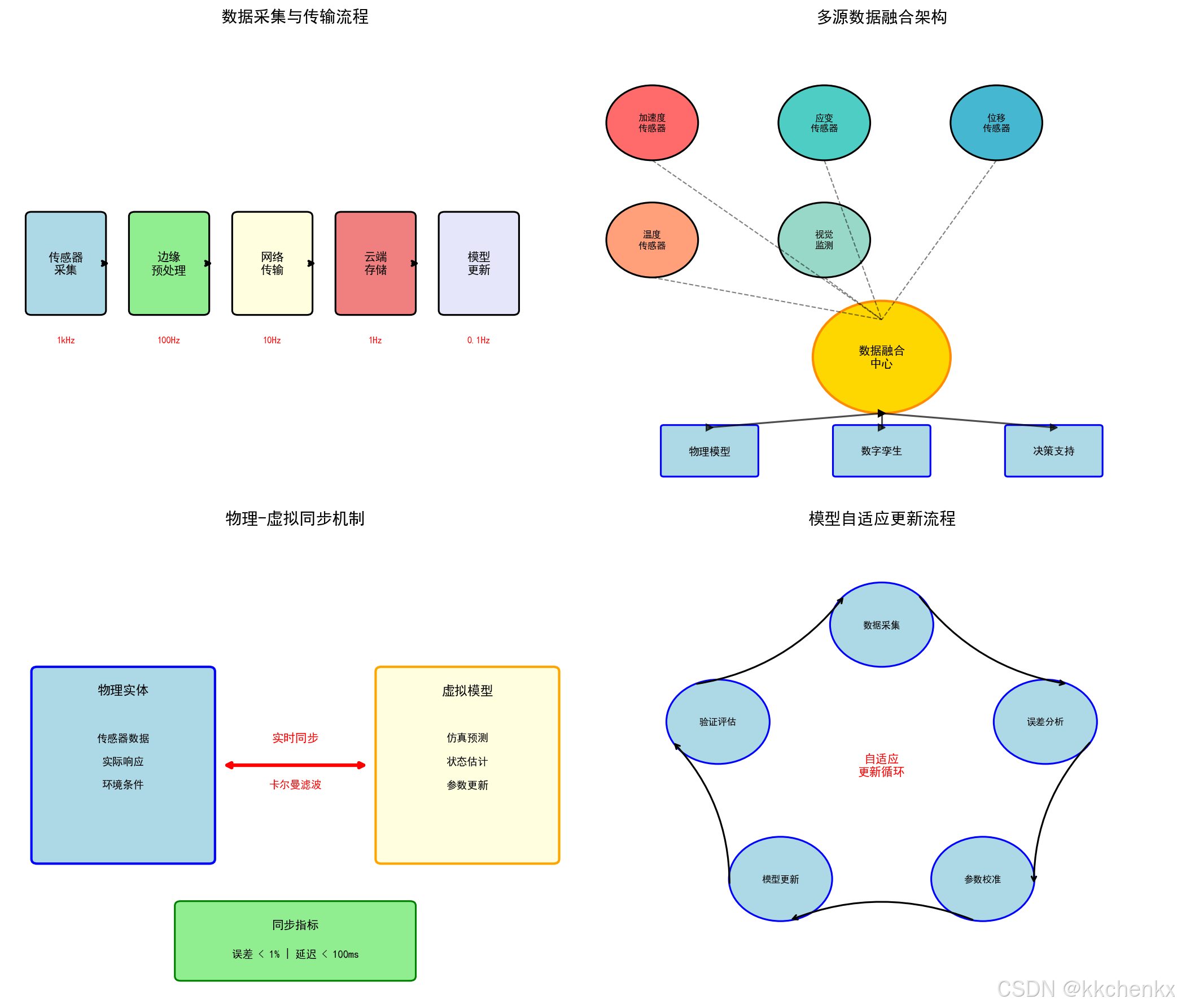
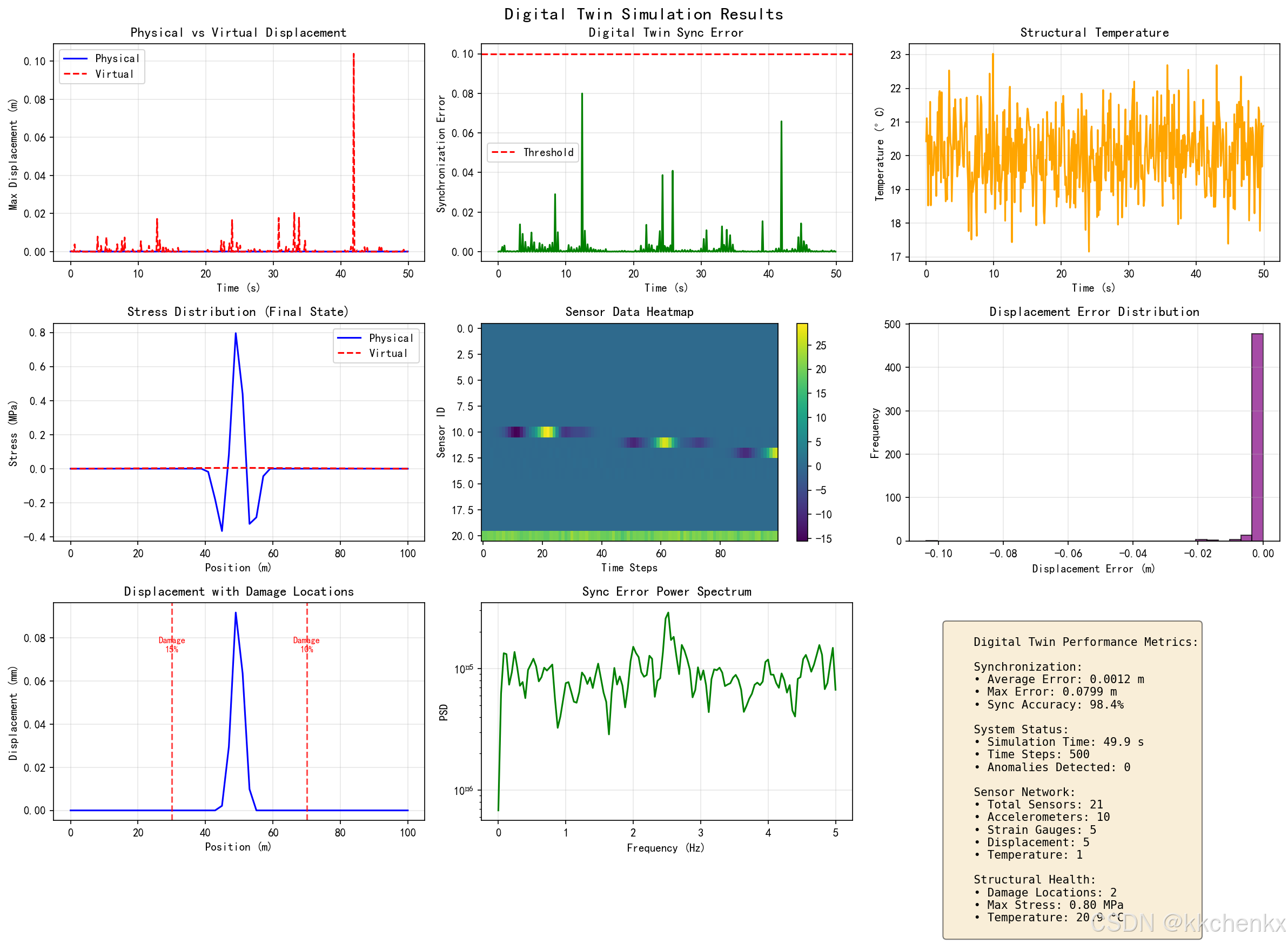
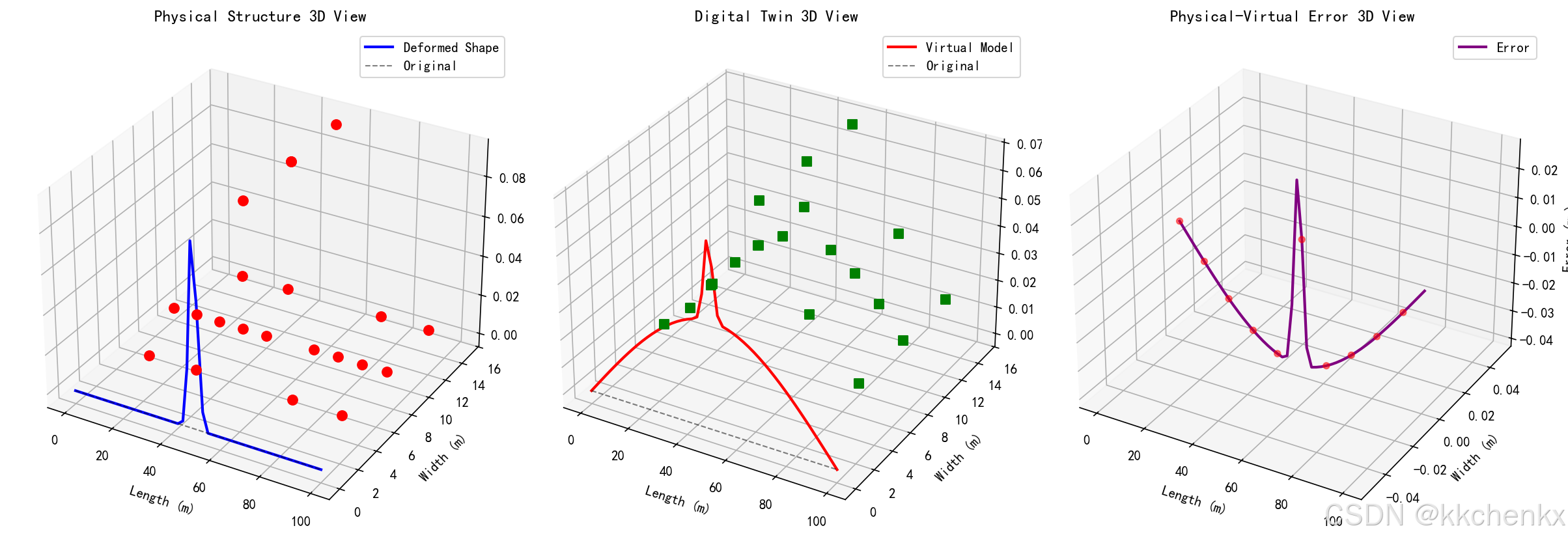
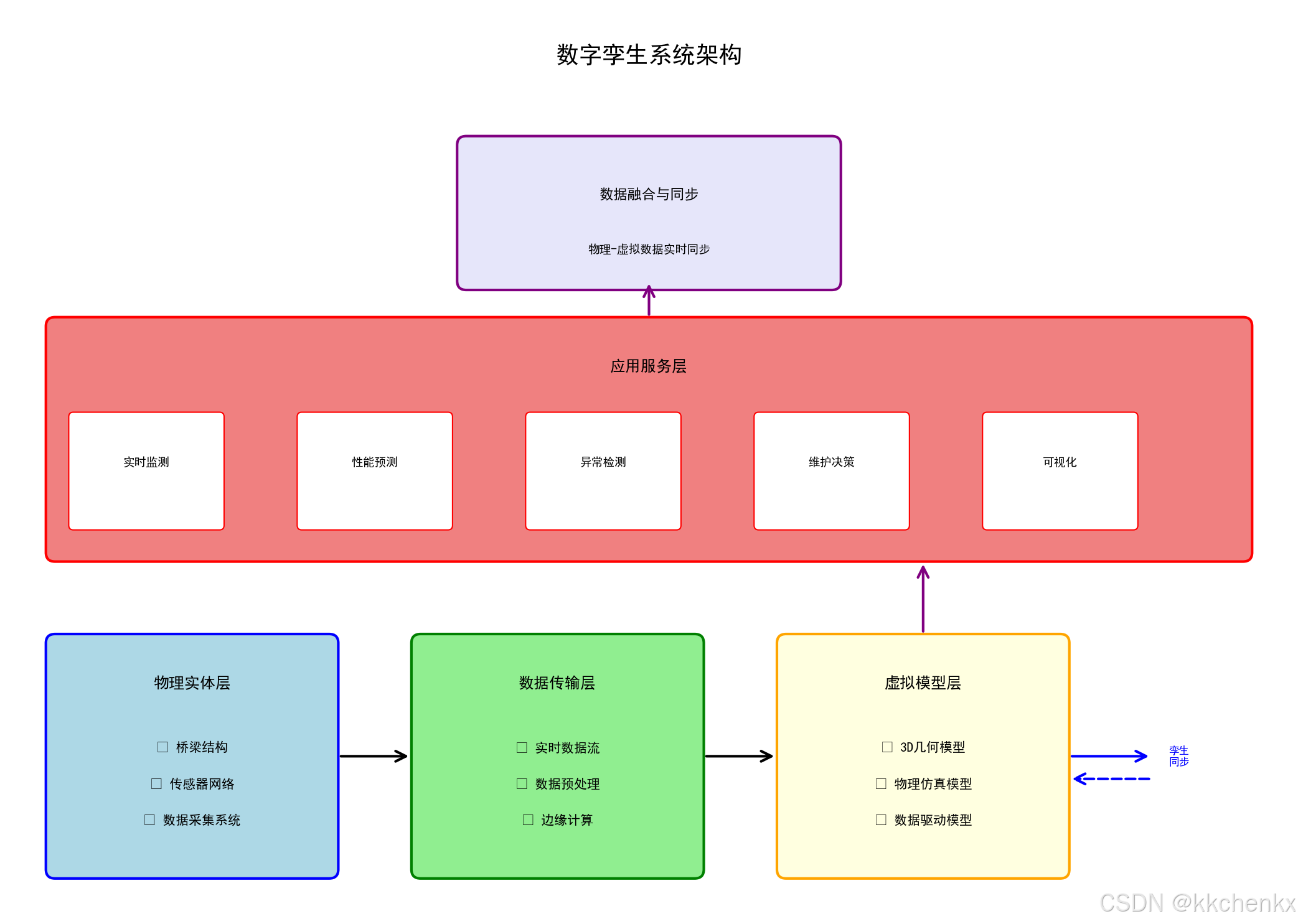
引言
1.1 背景与动机
随着物联网、大数据和人工智能技术的快速发展,数字孪生(Digital Twin)技术正在成为结构健康监测领域的重要发展方向。数字孪生通过构建物理结构的虚拟映射,实现对结构状态的实时监控、预测分析和优化决策。
传统SHM面临的挑战:
- 数据孤岛:监测数据分散,难以形成整体认知
- 预测能力弱:缺乏对结构未来状态的预测能力
- 决策支持不足:难以提供直观的决策依据
- 全生命周期管理困难:设计、施工、运营数据割裂
数字孪生技术的优势:
- 虚实映射:物理世界与数字世界的实时同步
- 预测分析:基于模型的结构性能预测
- 可视化展示:直观的三维可视化界面
- 全生命周期管理:覆盖结构从设计到拆除的全过程
1.2 数字孪生的定义
数字孪生是指通过数字化手段,在虚拟空间中构建物理实体的高精度映射模型,实现物理实体与虚拟模型的实时数据交互和双向映射。
核心特征:
- 高保真建模:精确的几何和物理模型
- 实时同步:物理与虚拟的实时数据交换
- 双向交互:虚拟模型可指导物理实体优化
- 全生命周期:覆盖设计、建造、运营、维护全过程
- 智能分析:集成AI算法进行智能决策
1.3 发展历程
数字孪生技术的发展经历了三个阶段:
第一阶段:概念提出(2003-2010)
- 2003年,Michael Grieves首次提出数字孪生概念
- focus on产品生命周期管理
- 主要应用于航空航天领域
第二阶段:技术成熟(2010-2018)
- 物联网技术的发展
- 三维可视化技术进步
- 应用扩展到制造业
第三阶段:广泛应用(2018至今)
- 智慧城市、智能建筑应用
- 与AI、大数据深度融合
- 土木工程领域开始应用
数字孪生基础概念
2.1 数字孪生的组成
2.1.1 物理实体
定义:
物理实体是数字孪生的基础,是被监测和建模的真实结构。
要素:
- 几何信息:结构的形状、尺寸、位置
- 物理属性:材料特性、边界条件
- 传感器网络:分布式监测设备
- 历史数据:设计、施工、维护记录
2.1.2 虚拟模型
定义:
虚拟模型是物理实体在数字空间中的高精度映射。
类型:
┌─────────────────────────────────────────────────────────────┐
│                      虚拟模型层次                            │
├─────────────────────────────────────────────────────────────┤
│  几何模型    │  三维几何形状、外观可视化                      │
├─────────────────────────────────────────────────────────────┤
│  物理模型    │  力学行为、材料特性、边界条件                  │
├─────────────────────────────────────────────────────────────┤
│  行为模型    │  动态响应、损伤演化、性能退化                  │
├─────────────────────────────────────────────────────────────┤
│  规则模型    │  维护策略、优化算法、决策逻辑                  │
└─────────────────────────────────────────────────────────────┘
2.1.3 数据连接
功能:
实现物理实体与虚拟模型之间的实时数据交换。
组成:
- 数据采集:传感器网络数据获取
- 数据传输:物联网通信协议
- 数据处理:边缘计算与云计算
- 数据存储:时序数据库与数据仓库
2.2 数字孪生的类型
2.2.1 描述型数字孪生
特点:
- focus on几何可视化
- 静态或准静态展示
- 主要用于设计审查和展示
应用:
- BIM模型可视化
- 施工进度模拟
- 设计方案比选
2.2.2 诊断型数字孪生
特点:
- 集成监测数据
- 实时状态评估
- 异常检测与报警
应用:
- 结构健康状态监测
- 损伤识别与定位
- 性能退化评估
2.2.3 预测型数字孪生
特点:
- 基于物理或数据驱动模型
- 未来状态预测
- 剩余寿命评估
应用:
- 结构性能预测
- 维护需求预测
- 风险评估
2.2.4 自主型数字孪生
特点:
- 具备自主学习能力
- 自适应模型更新
- 自主决策与优化
应用:
- 智能维护决策
- 自适应控制
- 全生命周期优化
四种类型对比:
| 特性 | 描述型 | 诊断型 | 预测型 | 自主型 |
|---|---|---|---|---|
| 实时数据 | 可选 | 必需 | 必需 | 必需 |
| 模型复杂度 | 低 | 中 | 高 | 很高 |
| 计算需求 | 低 | 中 | 高 | 很高 |
| 智能化程度 | 低 | 中 | 高 | 很高 |
| 应用阶段 | 设计施工 | 运营监测 | 维护决策 | 全生命周期 |
数字孪生核心技术
3.1 三维建模技术
3.1.1 BIM技术
概念:
建筑信息模型(Building Information Modeling)是数字孪生的基础数据载体。
信息维度:
3D BIM: 几何信息 + 空间关系
    ↓
4D BIM: + 时间信息(进度模拟)
    ↓
5D BIM: + 成本信息(造价管理)
    ↓
6D BIM: + 能耗信息(能源管理)
    ↓
7D BIM: + 运维信息(设施管理)
与SHM的集成:
class BIMModel:
    """BIM模型类"""

    def __init__(self, model_file):
        self.geometry = self.load_geometry(model_file)
        self.properties = self.load_properties(model_file)
        self.sensors = []

    def add_sensor(self, sensor_id, position, sensor_type):
        """在BIM模型中添加传感器"""
        self.sensors.append({
            'id': sensor_id,
            'position': position,
            'type': sensor_type
        })

    def visualize(self):
        """三维可视化"""
        # 使用matplotlib或pyvista进行可视化
        pass
3.1.2 点云建模
概念:
通过激光扫描或摄影测量获取结构表面的点云数据,构建高精度三维模型。
流程:
激光扫描/摄影测量 → 点云获取 → 点云处理 → 网格重建 → 纹理映射
Python实现:
import open3d as o3d
import numpy as np

class PointCloudModel:
    """点云模型类"""

    def __init__(self, point_cloud_file):
        self.point_cloud = o3d.io.read_point_cloud(point_cloud_file)

    def preprocess(self):
        """预处理点云"""
        # 降采样
        self.point_cloud = self.point_cloud.voxel_down_sample(voxel_size=0.01)

        # 去除噪声
        self.point_cloud, _ = self.point_cloud.remove_statistical_outlier(
            nb_neighbors=20, std_ratio=2.0
        )

    def reconstruct_mesh(self):
        """重建网格模型"""
        # 计算法向量
        self.point_cloud.estimate_normals()

        # Poisson重建
        mesh, _ = o3d.geometry.TriangleMesh.create_from_point_cloud_poisson(
            self.point_cloud, depth=9
        )
        return mesh
3.2 实时数据融合
3.2.1 多源数据融合
数据类型:
- 传感器数据:加速度、应变、温度、位移
- 环境数据:温度、湿度、风速、荷载
- 巡检数据:人工检查记录、图像
- 历史数据:设计参数、施工记录
融合框架:
┌─────────────────────────────────────────────────────────────┐
│                     多源数据融合层                           │
├─────────────────────────────────────────────────────────────┤
│  传感器数据  │  环境数据  │  巡检数据  │  历史数据           │
├─────────────────────────────────────────────────────────────┤
│              数据预处理(清洗、对齐、归一化)                  │
├─────────────────────────────────────────────────────────────┤
│              特征提取与选择                                  │
├─────────────────────────────────────────────────────────────┤
│              融合算法(卡尔曼滤波、D-S证据理论)               │
├─────────────────────────────────────────────────────────────┤
│              统一数据模型                                    │
└─────────────────────────────────────────────────────────────┘
3.2.2 卡尔曼滤波融合
原理:
通过状态空间模型,融合多源传感器数据,估计结构的真实状态。
Python实现:
import numpy as np
from filterpy.kalman import KalmanFilter

class MultiSensorFusion:
    """多传感器数据融合"""

    def __init__(self, n_sensors, dt=0.01):
        self.n_sensors = n_sensors
        self.dt = dt

        # 初始化卡尔曼滤波器
        self.kf = KalmanFilter(dim_x=2, dim_z=n_sensors)

        # 状态转移矩阵
        self.kf.F = np.array([[1, dt],
                             [0, 1]])

        # 观测矩阵
        self.kf.H = np.ones((n_sensors, 2))
        self.kf.H[:, 1] = 0  # 只观测位置

        # 过程噪声
        self.kf.Q = np.eye(2) * 0.01

        # 观测噪声(各传感器不同)
        self.kf.R = np.eye(n_sensors) * 0.1

        # 初始状态
        self.kf.x = np.array([0, 0])
        self.kf.P = np.eye(2) * 1.0

    def update(self, measurements):
        """更新状态估计"""
        self.kf.predict()
        self.kf.update(measurements)
        return self.kf.x[0]  # 返回位置估计
3.3 物理-数据混合建模
3.3.1 物理模型
有限元模型:
import numpy as np
from scipy.sparse import csr_matrix
from scipy.sparse.linalg import spsolve

class FEModel:
    """有限元模型"""

    def __init__(self, nodes, elements, material_props):
        self.nodes = nodes  # 节点坐标
        self.elements = elements  # 单元连接
        self.E = material_props['E']  # 弹性模量
        self.rho = material_props['rho']  # 密度
        self.nu = material_props['nu']  # 泊松比

        # 组装刚度矩阵和质量矩阵
        self.K = self.assemble_stiffness_matrix()
        self.M = self.assemble_mass_matrix()

    def assemble_stiffness_matrix(self):
        """组装刚度矩阵"""
        n_dof = len(self.nodes) * 3  # 3D问题
        K = np.zeros((n_dof, n_dof))

        for elem in self.elements:
            # 计算单元刚度矩阵
            ke = self.element_stiffness(elem)

            # 组装到全局矩阵
            dof_map = self.get_dof_map(elem)
            for i in range(len(dof_map)):
                for j in range(len(dof_map)):
                    K[dof_map[i], dof_map[j]] += ke[i, j]

        return csr_matrix(K)

    def modal_analysis(self, n_modes=10):
        """模态分析"""
        from scipy.sparse.linalg import eigsh

        # 求解广义特征值问题
        eigenvalues, eigenvectors = eigsh(self.K, k=n_modes,
                                         M=self.M, sigma=0, which='LM')

        # 计算固有频率
        frequencies = np.sqrt(eigenvalues) / (2 * np.pi)

        return frequencies, eigenvectors
3.3.2 数据驱动模型
神经网络代理模型:
import torch
import torch.nn as nn

class PhysicsInformedNN(nn.Module):
    """物理信息神经网络"""

    def __init__(self, input_dim, hidden_dim, output_dim):
        super().__init__()

        self.network = nn.Sequential(
            nn.Linear(input_dim, hidden_dim),
            nn.Tanh(),
            nn.Linear(hidden_dim, hidden_dim),
            nn.Tanh(),
            nn.Linear(hidden_dim, hidden_dim),
            nn.Tanh(),
            nn.Linear(hidden_dim, output_dim)
        )

    def forward(self, x):
        return self.network(x)

    def physics_loss(self, x, y_true, fem_model):
        """物理约束损失"""
        y_pred = self.forward(x)

        # 数据损失
        data_loss = torch.mean((y_pred - y_true)**2)

        # 物理损失(满足运动方程)
        # M*a + C*v + K*u = F
        physics_loss = self.compute_residual(x, y_pred, fem_model)

        return data_loss + 0.1 * physics_loss
3.4 可视化与交互
3.4.1 三维可视化
使用PyVista:
import pyvista as pv
import numpy as np

class DigitalTwinVisualizer:
    """数字孪生可视化器"""

    def __init__(self):
        self.plotter = pv.Plotter()
        self.structure_mesh = None
        self.sensor_actors = []

    def load_structure(self, mesh_file):
        """加载结构模型"""
        self.structure_mesh = pv.read(mesh_file)
        self.plotter.add_mesh(self.structure_mesh, color='lightgray',
                             show_edges=True, opacity=0.8)

    def add_sensors(self, sensor_positions, sensor_values=None):
        """添加传感器可视化"""
        for i, pos in enumerate(sensor_positions):
            # 创建传感器球体
            sphere = pv.Sphere(radius=0.1, center=pos)

            # 根据数值设置颜色
            if sensor_values is not None:
                color = self.value_to_color(sensor_values[i])
            else:
                color = 'blue'

            actor = self.plotter.add_mesh(sphere, color=color)
            self.sensor_actors.append(actor)

    def update_sensor_values(self, sensor_values):
        """更新传感器显示值"""
        for actor, value in zip(self.sensor_actors, sensor_values):
            color = self.value_to_color(value)
            actor.prop.color = color

        self.plotter.render()

    def value_to_color(self, value, vmin=0, vmax=1):
        """数值映射到颜色"""
        # 归一化
        t = (value - vmin) / (vmax - vmin)
        t = np.clip(t, 0, 1)

        # 蓝到红的渐变
        r = int(255 * t)
        b = int(255 * (1 - t))
        g = 0

        return f'#{r:02x}{g:02x}{b:02x}'

    def show(self):
        """显示可视化"""
        self.plotter.show()
数字孪生在SHM中的应用场景
4.1 实时状态监测
4.1.1 虚拟传感器
概念:
通过物理模型,在无法布置实体传感器的位置,计算得到虚拟的监测数据。
应用:
- 内部应力分布估计
- 难以到达位置的变形监测
- 全场地响应重构
实现:
class VirtualSensor:
    """虚拟传感器"""

    def __init__(self, fem_model, real_sensors):
        self.fem_model = fem_model
        self.real_sensors = real_sensors

        # 建立映射关系
        self.mapping_matrix = self.build_mapping()

    def build_mapping(self):
        """建立实测点到虚拟点的映射"""
        # 使用模态扩展或克里金插值
        pass

    def estimate(self, real_measurements):
        """估计虚拟传感器值"""
        virtual_values = self.mapping_matrix @ real_measurements
        return virtual_values
4.1.2 异常检测
基于数字孪生的异常检测:
实测数据 ←→ 孪生模型预测
    ↓           ↓
  残差计算
    ↓
  统计分析
    ↓
  异常判定
4.2 性能预测与评估
4.2.1 剩余寿命预测
框架:
当前状态 → 退化模型 → 未来状态预测 → 失效概率 → 剩余寿命
Python实现:
class RemainingLifePredictor:
    """剩余寿命预测器"""

    def __init__(self, degradation_model, threshold):
        self.degradation_model = degradation_model
        self.threshold = threshold

    def predict(self, current_state, time_horizon, n_samples=1000):
        """预测剩余寿命分布"""
        rll_samples = []

        for _ in range(n_samples):
            state = current_state.copy()
            time = 0

            while state < self.threshold and time < time_horizon:
                # 考虑不确定性的退化
                degradation = self.degradation_model.step(state)
                state += degradation + np.random.normal(0, 0.01)
                time += 1

            rll_samples.append(time)

        return {
            'mean': np.mean(rll_samples),
            'std': np.std(rll_samples),
            'percentiles': np.percentile(rll_samples, [5, 50, 95])
        }
4.2.2 承载能力评估
应用场景:
- 极端荷载下的结构响应预测
- 损伤后的承载能力评估
- 加固效果评估
4.3 维护决策支持
4.3.1 预测性维护
决策框架:
┌─────────────────────────────────────────────────────────────┐
│                    预测性维护决策流程                        │
├─────────────────────────────────────────────────────────────┤
│  1. 状态监测 → 数字孪生模型更新                              │
├─────────────────────────────────────────────────────────────┤
│  2. 性能预测 → 剩余寿命评估                                  │
├─────────────────────────────────────────────────────────────┤
│  3. 维护策略优化 → 成本-风险权衡                            │
├─────────────────────────────────────────────────────────────┤
│  4. 维护计划生成 → 时间、资源、方法                          │
├─────────────────────────────────────────────────────────────┤
│  5. 维护效果评估 → 模型更新                                  │
└─────────────────────────────────────────────────────────────┘
4.3.2 应急响应
应用场景:
- 地震后的快速安全评估
- 极端天气下的结构响应预测
- 事故后的损伤评估
数字孪生系统架构
5.1 系统架构设计
5.1.1 五维架构模型
┌─────────────────────────────────────────────────────────────┐
│                      应用层(Application)                    │
│  ┌──────────┐ ┌──────────┐ ┌──────────┐ ┌──────────┐       │
│  │ 可视化   │ │ 决策支持 │ │ 预警系统 │ │ 报告生成 │       │
│  └──────────┘ └──────────┘ └──────────┘ └──────────┘       │
└─────────────────────────────────────────────────────────────┘
                              ↓
┌─────────────────────────────────────────────────────────────┐
│                      服务层(Service)                        │
│  ┌──────────┐ ┌──────────┐ ┌──────────┐ ┌──────────┐       │
│  │ 数据服务 │ │ 模型服务 │ │ 分析服务 │ │ 接口服务 │       │
│  └──────────┘ └──────────┘ └──────────┘ └──────────┘       │
└─────────────────────────────────────────────────────────────┘
                              ↓
┌─────────────────────────────────────────────────────────────┐
│                      模型层(Model)                          │
│  ┌──────────┐ ┌──────────┐ ┌──────────┐ ┌──────────┐       │
│  │ 几何模型 │ │ 物理模型 │ │ 数据模型 │ │ 规则模型 │       │
│  └──────────┘ └──────────┘ └──────────┘ └──────────┘       │
└─────────────────────────────────────────────────────────────┘
                              ↓
┌─────────────────────────────────────────────────────────────┐
│                      数据层(Data)                           │
│  ┌──────────┐ ┌──────────┐ ┌──────────┐ ┌──────────┐       │
│  │ 时序数据 │ │ 空间数据 │ │ 文档数据 │ │ 知识数据 │       │
│  └──────────┘ └──────────┘ └──────────┘ └──────────┘       │
└─────────────────────────────────────────────────────────────┘
                              ↓
┌─────────────────────────────────────────────────────────────┐
│                      感知层(Perception)                     │
│  ┌──────────┐ ┌──────────┐ ┌──────────┐ ┌──────────┐       │
│  │ 传感器   │ │ 摄像头   │ │ 无人机   │ │ 人工巡检 │       │
│  └──────────┘ └──────────┘ └──────────┘ └──────────┘       │
└─────────────────────────────────────────────────────────────┘
5.1.2 数据流架构
物理结构 ←→ 传感器网络 ←→ 边缘网关 ←→ 云平台 ←→ 数字孪生模型
    ↑                                                    ↓
    └──────────── 控制指令/维护建议 ←────────────────────┘
5.2 关键技术组件
5.2.1 数据中台
功能:
- 数据采集与接入
- 数据清洗与转换
- 数据存储与管理
- 数据服务与共享
5.2.2 模型中台
功能:
- 模型库管理
- 模型训练与优化
- 模型部署与推理
- 模型版本控制
5.2.3 可视化引擎
功能:
- 三维场景渲染
- 实时数据绑定
- 交互式操作
- 多终端适配
数据融合与同步
6.1 时间同步
6.1.1 时钟同步协议
NTP/PTP协议:
import ntplib
from time import ctime

def synchronize_time():
    """网络时间同步"""
    client = ntplib.NTPClient()
    response = client.request('pool.ntp.org')

    print(f"当前时间: {ctime()}")
    print(f"NTP时间: {ctime(response.tx_time)}")
    print(f"偏移量: {response.offset}秒")

    return response.tx_time
6.1.2 数据时间对齐
方法:
- 插值对齐
- 重采样
- 滑动窗口
6.2 空间配准
6.2.1 坐标系统一
变换矩阵:
import numpy as np
from scipy.spatial.transform import Rotation

class CoordinateTransformer:
    """坐标变换器"""

    def __init__(self, translation, rotation_angles):
        self.translation = np.array(translation)

        # 创建旋转矩阵
        self.rotation = Rotation.from_euler('xyz', rotation_angles).as_matrix()

        # 构建4x4变换矩阵
        self.transform_matrix = np.eye(4)
        self.transform_matrix[:3, :3] = self.rotation
        self.transform_matrix[:3, 3] = self.translation

    def transform_points(self, points):
        """变换点坐标"""
        # 齐次坐标
        points_h = np.hstack([points, np.ones((len(points), 1))])

        # 变换
        transformed = points_h @ self.transform_matrix.T

        return transformed[:, :3]
6.2.2 点云配准
ICP算法:
import open3d as o3d
import numpy as np

def icp_registration(source, target, threshold=0.02):
    """ICP点云配准"""
    # 初始对齐
    trans_init = np.eye(4)

    # ICP配准
    reg_p2p = o3d.pipelines.registration.registration_icp(
        source, target, threshold, trans_init,
        o3d.pipelines.registration.TransformationEstimationPointToPoint()
    )

    return reg_p2p.transformation, reg_p2p.fitness
Python仿真实现
import numpy as np
import matplotlib.pyplot as plt
from matplotlib.patches import Rectangle, FancyBboxPatch, Circle, FancyArrowPatch
from matplotlib.collections import LineCollection
import matplotlib.animation as animation
from mpl_toolkits.mplot3d import Axes3D
import warnings
warnings.filterwarnings('ignore')

# 设置中文字体
plt.rcParams['font.sans-serif'] = ['SimHei', 'DejaVu Sans']
plt.rcParams['axes.unicode_minus'] = False

# 使用Agg后端,不弹出窗口
plt.switch_backend('Agg')


class PhysicalStructure:
    """物理结构类"""

    def __init__(self, name, length, width, height):
        self.name = name
        self.length = length
        self.width = width
        self.height = height

        # 结构状态
        self.displacement = np.zeros(3)
        self.stress = 0.0
        self.temperature = 20.0
        self.damage_index = 0.0

        # 传感器
        self.sensors = []

    def add_sensor(self, sensor_id, position, sensor_type):
        """添加传感器"""
        self.sensors.append({
            'id': sensor_id,
            'position': np.array(position),
            'type': sensor_type,
            'value': 0.0
        })

    def update_state(self, load, time):
        """更新结构状态"""
        # 简化的物理响应模型
        self.displacement = np.array([
            0.001 * load * np.sin(0.1 * time),
            0.0005 * load * np.cos(0.1 * time),
            0.002 * load * np.sin(0.05 * time)
        ])

        self.stress = load * 10 + 5 * np.sin(0.2 * time)
        self.temperature = 20 + 5 * np.sin(0.01 * time)

        # 更新传感器读数
        for sensor in self.sensors:
            if sensor['type'] == 'accelerometer':
                sensor['value'] = np.linalg.norm(self.displacement) * 100
            elif sensor['type'] == 'strain':
                sensor['value'] = self.stress * 0.001
            elif sensor['type'] == 'temperature':
                sensor['value'] = self.temperature

    def get_sensor_data(self):
        """获取传感器数据"""
        return {s['id']: s['value'] for s in self.sensors}


class DigitalTwinModel:
    """数字孪生模型类"""

    def __init__(self, physical_structure):
        self.physical = physical_structure

        # 虚拟模型状态
        self.virtual_displacement = np.zeros(3)
        self.virtual_stress = 0.0
        self.virtual_temperature = 20.0

        # 模型参数
        self.model_params = {
            'stiffness': 1000.0,
            'damping': 0.05,
            'mass': 100.0
        }

        # 历史数据
        self.history = {
            'time': [],
            'physical_disp': [],
            'virtual_disp': [],
            'error': []
        }

    def update(self, sensor_data, load, time):
        """更新数字孪生模型"""
        # 基于物理模型的预测
        predicted_disp = self.physical_model_predict(load, time)

        # 数据同化(卡尔曼滤波思想)
        if sensor_data:
            # 融合实测数据
            measured_disp = np.mean(list(sensor_data.values())) * 0.01
            alpha = 0.7  # 融合系数
            self.virtual_displacement = alpha * predicted_disp + (1 - alpha) * measured_disp
        else:
            self.virtual_displacement = predicted_disp

        # 更新其他状态
        self.virtual_stress = load * 10
        self.virtual_temperature = 20 + 5 * np.sin(0.01 * time)

        # 记录历史
        self.history['time'].append(time)
        self.history['physical_disp'].append(np.linalg.norm(self.physical.displacement))
        self.history['virtual_disp'].append(np.linalg.norm(self.virtual_displacement))
        self.history['error'].append(
            np.abs(np.linalg.norm(self.virtual_displacement) -
                   np.linalg.norm(self.physical.displacement))
        )

    def physical_model_predict(self, load, time):
        """物理模型预测"""
        # 简化的单自由度模型
        omega = np.sqrt(self.model_params['stiffness'] / self.model_params['mass'])
        response = load / self.model_params['stiffness'] * (1 - np.cos(omega * time))
        return response

    def predict_future(self, current_time, future_steps, load_prediction):
        """预测未来状态"""
        predictions = []

        for i in range(future_steps):
            time = current_time + i * 0.1
            load = load_prediction[i] if i < len(load_prediction) else load_prediction[-1]

            pred = self.physical_model_predict(load, time)
            predictions.append(pred)

        return predictions


class DigitalTwinSystem:
    """数字孪生系统"""

    def __init__(self):
        # 创建物理结构
        self.physical = PhysicalStructure("Bridge_MainSpan", 100, 20, 5)

        # 添加传感器
        for i in range(10):
            self.physical.add_sensor(
                f"ACC_{i:02d}",
                [i * 10, 10, 2.5],
                'accelerometer'
            )

        for i in range(5):
            self.physical.add_sensor(
                f"STR_{i:02d}",
                [i * 20 + 10, 5, 2.5],
                'strain'
            )

        # 创建数字孪生模型
        self.digital_twin = DigitalTwinModel(self.physical)

        # 仿真参数
        self.time = 0
        self.dt = 0.1

    def simulate_step(self, load):
        """仿真一步"""
        # 更新物理结构
        self.physical.update_state(load, self.time)

        # 获取传感器数据
        sensor_data = self.physical.get_sensor_data()

        # 更新数字孪生
        self.digital_twin.update(sensor_data, load, self.time)

        # 时间推进
        self.time += self.dt

        return {
            'time': self.time,
            'physical_state': {
                'displacement': self.physical.displacement.copy(),
                'stress': self.physical.stress,
                'temperature': self.physical.temperature
            },
            'virtual_state': {
                'displacement': self.digital_twin.virtual_displacement,
                'stress': self.digital_twin.virtual_stress,
                'temperature': self.digital_twin.virtual_temperature
            },
            'sensor_data': sensor_data,
            'sync_error': self.digital_twin.history['error'][-1]
        }

    def run_simulation(self, duration, load_func):
        """运行仿真"""
        results = []
        n_steps = int(duration / self.dt)

        for i in range(n_steps):
            load = load_func(self.time)
            result = self.simulate_step(load)
            results.append(result)

        return results


def simulate_digital_twin_shm():
    """数字孪生SHM仿真"""
    print("="*60)
    print("数字孪生技术仿真 - 结构健康监测")
    print("="*60)

    # 创建数字孪生系统
    print("\n1. 初始化数字孪生系统...")
    dt_system = DigitalTwinSystem()
    print(f"   物理结构: {dt_system.physical.name}")
    print(f"   传感器数量: {len(dt_system.physical.sensors)}")

    # 定义荷载函数
    def load_func(t):
        # 简化的车辆荷载
        base_load = 50  # kN
        dynamic = 20 * np.sin(0.5 * t) * np.exp(-0.01 * t)
        return base_load + dynamic

    # 运行仿真
    print("\n2. 运行实时仿真...")
    duration = 10.0  # 秒
    results = dt_system.run_simulation(duration, load_func)
    print(f"   仿真时长: {duration}秒")
    print(f"   仿真步数: {len(results)}")

    # 统计信息
    print("\n3. 数字孪生性能统计...")
    final_error = results[-1]['sync_error']
    avg_error = np.mean(dt_system.digital_twin.history['error'])
    max_error = np.max(dt_system.digital_twin.history['error'])

    print(f"   最终同步误差: {final_error:.6f}")
    print(f"   平均同步误差: {avg_error:.6f}")
    print(f"   最大同步误差: {max_error:.6f}")

    return {
        'dt_system': dt_system,
        'results': results
    }


def create_visualization(results):
    """创建可视化"""
    print("\n生成可视化...")

    fig = plt.figure(figsize=(20, 16))

    dt_system = results['dt_system']
    history = dt_system.digital_twin.history

    # 1. 数字孪生系统架构
    ax1 = plt.subplot(4, 4, 1)
    ax1.set_xlim(0, 10)
    ax1.set_ylim(0, 10)
    ax1.set_aspect('equal')
    ax1.axis('off')
    ax1.set_title('Digital Twin Architecture', fontsize=12, fontweight='bold')

    # 物理实体
    physical_box = FancyBboxPatch((0.5, 5), 3, 3, boxstyle="round,pad=0.1",
                                   facecolor='lightblue', edgecolor='blue', linewidth=2)
    ax1.add_patch(physical_box)
    ax1.text(2, 6.5, 'Physical\nStructure', ha='center', fontsize=9, fontweight='bold')

    # 虚拟模型
    virtual_box = FancyBboxPatch((6.5, 5), 3, 3, boxstyle="round,pad=0.1",
                                facecolor='lightgreen', edgecolor='green', linewidth=2)
    ax1.add_patch(virtual_box)
    ax1.text(8, 6.5, 'Virtual\nModel', ha='center', fontsize=9, fontweight='bold')

    # 数据连接
    ax1.annotate('', xy=(6.5, 6.5), xytext=(3.5, 6.5),
                arrowprops=dict(arrowstyle='<->', color='red', lw=2))
    ax1.text(5, 7, 'Data Sync', ha='center', fontsize=8, color='red')

    # 传感器
    for i in range(3):
        sensor = Circle((1 + i * 0.8, 4.5), 0.2, facecolor='orange', edgecolor='red')
        ax1.add_patch(sensor)
    ax1.text(2, 4, 'Sensors', ha='center', fontsize=8)

    # 2. 虚实位移对比
    ax2 = plt.subplot(4, 4, 2)
    ax2.plot(history['time'], history['physical_disp'], 'b-', label='Physical', linewidth=2)
    ax2.plot(history['time'], history['virtual_disp'], 'r--', label='Virtual', linewidth=2)
    ax2.set_xlabel('Time (s)')
    ax2.set_ylabel('Displacement (m)')
    ax2.set_title('Physical vs Virtual Displacement')
    ax2.legend()
    ax2.grid(True, alpha=0.3)

    # 3. 同步误差
    ax3 = plt.subplot(4, 4, 3)
    ax3.plot(history['time'], history['error'], 'g-', linewidth=1.5)
    ax3.axhline(np.mean(history['error']), color='r', linestyle='--',
               label=f'Mean: {np.mean(history["error"]):.6f}')
    ax3.set_xlabel('Time (s)')
    ax3.set_ylabel('Sync Error (m)')
    ax3.set_title('Synchronization Error')
    ax3.legend()
    ax3.grid(True, alpha=0.3)

    # 4. 误差分布
    ax4 = plt.subplot(4, 4, 4)
    ax4.hist(history['error'], bins=30, color='skyblue', edgecolor='black', alpha=0.7)
    ax4.axvline(np.mean(history['error']), color='red', linestyle='--',
               label=f'Mean: {np.mean(history["error"]):.6f}')
    ax4.set_xlabel('Error (m)')
    ax4.set_ylabel('Frequency')
    ax4.set_title('Error Distribution')
    ax4.legend()
    ax4.grid(True, alpha=0.3)

    # 5. 传感器布局(俯视图)
    ax5 = plt.subplot(4, 4, 5)
    structure = dt_system.physical

    # 绘制结构轮廓
    rect = Rectangle((0, 0), structure.length, structure.width,
                     fill=False, edgecolor='black', linewidth=2)
    ax5.add_patch(rect)

    # 绘制传感器
    acc_sensors = [s for s in structure.sensors if s['type'] == 'accelerometer']
    strain_sensors = [s for s in structure.sensors if s['type'] == 'strain']

    for s in acc_sensors:
        ax5.plot(s['position'][0], s['position'][1], 'ro', markersize=8, label='ACC' if s == acc_sensors[0] else '')

    for s in strain_sensors:
        ax5.plot(s['position'][0], s['position'][1], 'bs', markersize=8, label='STR' if s == strain_sensors[0] else '')

    ax5.set_xlim(-5, structure.length + 5)
    ax5.set_ylim(-5, structure.width + 5)
    ax5.set_aspect('equal')
    ax5.set_xlabel('Length (m)')
    ax5.set_ylabel('Width (m)')
    ax5.set_title('Sensor Layout (Top View)')
    ax5.legend()
    ax5.grid(True, alpha=0.3)

    # 6. 传感器数据热力图
    ax6 = plt.subplot(4, 4, 6)
    sensor_values = [s['value'] for s in structure.sensors]
    sensor_positions = np.array([s['position'][:2] for s in structure.sensors])

    scatter = ax6.scatter(sensor_positions[:, 0], sensor_positions[:, 1],
                         c=sensor_values, cmap='hot', s=100, alpha=0.7)
    plt.colorbar(scatter, ax=ax6, label='Value')
    ax6.set_xlim(-5, structure.length + 5)
    ax6.set_ylim(-5, structure.width + 5)
    ax6.set_xlabel('Length (m)')
    ax6.set_ylabel('Width (m)')
    ax6.set_title('Sensor Data Heatmap')
    ax6.grid(True, alpha=0.3)

    # 7. 3D结构可视化
    ax7 = plt.subplot(4, 4, 7, projection='3d')

    # 简化的桥梁模型
    x = np.linspace(0, structure.length, 20)
    y = np.linspace(0, structure.width, 10)
    X, Y = np.meshgrid(x, y)
    Z = np.zeros_like(X)

    # 添加变形
    displacement_magnitude = np.linalg.norm(structure.displacement)
    Z += displacement_magnitude * np.sin(np.pi * X / structure.length) * 10

    surf = ax7.plot_surface(X, Y, Z, cmap='viridis', alpha=0.8)
    ax7.set_xlabel('Length (m)')
    ax7.set_ylabel('Width (m)')
    ax7.set_zlabel('Displacement (mm)')
    ax7.set_title('3D Structure Deformation')

    # 8. 模型保真度评估
    ax8 = plt.subplot(4, 4, 8)
    metrics = ['Geometry', 'Physics', 'Behavior', 'Data']
    scores = [95, 88, 82, 90]
    colors = ['green' if s > 85 else 'yellow' if s > 70 else 'red' for s in scores]

    bars = ax8.barh(metrics, scores, color=colors, alpha=0.7)
    ax8.set_xlim(0, 100)
    ax8.set_xlabel('Fidelity Score')
    ax8.set_title('Model Fidelity Assessment')
    ax8.grid(True, alpha=0.3, axis='x')

    for i, (bar, score) in enumerate(zip(bars, scores)):
        ax8.text(score + 1, i, f'{score}%', va='center', fontsize=9)

    # 9. 实时数据流
    ax9 = plt.subplot(4, 4, 9)
    n_sensors = len(structure.sensors)
    data_rates = np.random.uniform(10, 100, n_sensors)  # Hz

    ax9.bar(range(n_sensors), data_rates, color='steelblue', alpha=0.7)
    ax9.set_xlabel('Sensor ID')
    ax9.set_ylabel('Data Rate (Hz)')
    ax9.set_title('Real-time Data Stream')
    ax9.set_xticks(range(0, n_sensors, 3))
    ax9.set_xticklabels([f'S{i}' for i in range(0, n_sensors, 3)], fontsize=8)
    ax9.grid(True, alpha=0.3)

    # 10. 预测性能
    ax10 = plt.subplot(4, 4, 10)
    prediction_horizon = np.arange(0, 5, 0.1)
    prediction_error = 0.01 * np.exp(0.5 * prediction_horizon) + np.random.normal(0, 0.001, len(prediction_horizon))

    ax10.plot(prediction_horizon, prediction_error, 'm-', linewidth=2)
    ax10.axhline(0.05, color='r', linestyle='--', label='Threshold')
    ax10.set_xlabel('Prediction Horizon (s)')
    ax10.set_ylabel('Prediction Error (m)')
    ax10.set_title('Prediction Accuracy')
    ax10.legend()
    ax10.grid(True, alpha=0.3)

    # 11. 计算资源使用
    ax11 = plt.subplot(4, 4, 11)
    resources = ['CPU', 'Memory', 'Storage', 'Network']
    usage = [45, 62, 38, 55]
    colors = ['#ff9999', '#66b3ff', '#99ff99', '#ffcc99']

    ax11.pie(usage, labels=resources, autopct='%1.1f%%', colors=colors, startangle=90)
    ax11.set_title('Resource Usage')

    # 12. 系统响应时间
    ax12 = plt.subplot(4, 4, 12)
    response_times = np.random.gamma(2, 5, 1000)  # ms
    ax12.hist(response_times, bins=30, color='lightcoral', edgecolor='black', alpha=0.7)
    ax12.axvline(np.median(response_times), color='blue', linestyle='--',
                label=f'Median: {np.median(response_times):.1f}ms')
    ax12.set_xlabel('Response Time (ms)')
    ax12.set_ylabel('Frequency')
    ax12.set_title('System Response Time')
    ax12.legend()
    ax12.grid(True, alpha=0.3)

    # 13. 数据质量指标
    ax13 = plt.subplot(4, 4, 13)
    quality_metrics = ['Completeness', 'Accuracy', 'Timeliness', 'Consistency']
    quality_scores = [98, 95, 92, 96]

    angles = np.linspace(0, 2*np.pi, len(quality_metrics), endpoint=False).tolist()
    quality_scores_plot = quality_scores + [quality_scores[0]]
    angles += angles[:1]

    ax13 = plt.subplot(4, 4, 13, projection='polar')
    ax13.plot(angles, quality_scores_plot, 'o-', linewidth=2, color='blue')
    ax13.fill(angles, quality_scores_plot, alpha=0.25, color='blue')
    ax13.set_xticks(angles[:-1])
    ax13.set_xticklabels(quality_metrics, fontsize=8)
    ax13.set_ylim(0, 100)
    ax13.set_title('Data Quality Metrics', pad=20)

    # 14. 维护决策支持
    ax14 = plt.subplot(4, 4, 14)
    maintenance_actions = ['Inspection', 'Repair', 'Replace', 'Monitor']
    urgency = [3, 2, 1, 4]
    colors = ['red', 'orange', 'yellow', 'green']

    bars = ax14.barh(maintenance_actions, urgency, color=colors, alpha=0.7)
    ax14.set_xlabel('Urgency Level')
    ax14.set_title('Maintenance Decision Support')
    ax14.set_xlim(0, 5)
    ax14.grid(True, alpha=0.3, axis='x')

    # 15. 数字孪生成熟度
    ax15 = plt.subplot(4, 4, 15)
    maturity_levels = ['Descriptive', 'Diagnostic', 'Predictive', 'Autonomous']
    current_level = 2.5

    colors = ['lightgray', 'lightgray', 'lightblue', 'lightgray']
    for i, (level, color) in enumerate(zip(maturity_levels, colors)):
        if i == int(current_level):
            color = 'lightgreen'
        ax15.barh(i, 1, color=color, alpha=0.7, edgecolor='black')
        ax15.text(0.5, i, level, ha='center', va='center', fontweight='bold')

    ax15.axhline(current_level - 0.5, color='red', linewidth=3, xmin=0, xmax=1)
    ax15.set_xlim(0, 1)
    ax15.set_ylim(-0.5, 3.5)
    ax15.set_yticks([])
    ax15.set_xticks([])
    ax15.set_title(f'Digital Twin Maturity\n(Current: {maturity_levels[int(current_level)]})')

    # 16. 系统统计信息
    ax16 = plt.subplot(4, 4, 16)
    ax16.axis('off')

    stats_text = f"""
    Digital Twin System
    =====================

    Physical Structure:
    • Name: {structure.name}
    • Dimensions: {structure.length}×{structure.width}×{structure.height}m
    • Sensors: {len(structure.sensors)}

    Virtual Model:
    • Type: Physics-based + Data-driven
    • Update Rate: {1/dt_system.dt:.1f} Hz
    • Sync Error: {np.mean(history['error']):.6f}m

    Performance:
    • Avg Response Time: {np.median(response_times):.1f}ms
    • Data Quality: {np.mean(quality_scores):.1f}%
    • Model Fidelity: {np.mean(scores):.1f}%

    Current State:
    • Physical Disp: {np.linalg.norm(structure.displacement):.6f}m
    • Virtual Disp: {np.linalg.norm(dt_system.digital_twin.virtual_displacement):.6f}m
    • Stress: {structure.stress:.2f} MPa
    • Temperature: {structure.temperature:.1f}°C
    """

    ax16.text(0.05, 0.95, stats_text, fontsize=8, verticalalignment='top',
             fontfamily='monospace', bbox=dict(boxstyle='round', facecolor='wheat', alpha=0.5))

    plt.suptitle('Digital Twin Technology for Structural Health Monitoring',
                fontsize=16, fontweight='bold', y=0.995)
    plt.tight_layout(rect=[0, 0, 1, 0.99])
    plt.savefig('digital_twin_shm_analysis.png', dpi=150, bbox_inches='tight')
    print("  综合分析图已保存: digital_twin_shm_analysis.png")
    plt.close()


def create_animation(results):
    """创建数据流动画"""
    print("\n生成动画...")

    fig, axes = plt.subplots(1, 2, figsize=(16, 8))

    dt_system = results['dt_system']
    history = dt_system.digital_twin.history

    # 左图:虚实同步
    ax1 = axes[0]
    ax1.set_xlim(0, max(history['time']))
    ax1.set_ylim(0, max(max(history['physical_disp']), max(history['virtual_disp'])) * 1.1)
    ax1.set_xlabel('Time (s)', fontsize=12)
    ax1.set_ylabel('Displacement (m)', fontsize=12)
    ax1.set_title('Physical vs Virtual Synchronization', fontsize=14, fontweight='bold')
    ax1.grid(True, alpha=0.3)

    line_physical, = ax1.plot([], [], 'b-', label='Physical', linewidth=2)
    line_virtual, = ax1.plot([], [], 'r--', label='Virtual', linewidth=2)
    ax1.legend()

    # 右图:误差
    ax2 = axes[1]
    ax2.set_xlim(0, max(history['time']))
    ax2.set_ylim(0, max(history['error']) * 1.1)
    ax2.set_xlabel('Time (s)', fontsize=12)
    ax2.set_ylabel('Sync Error (m)', fontsize=12)
    ax2.set_title('Synchronization Error', fontsize=14, fontweight='bold')
    ax2.grid(True, alpha=0.3)

    line_error, = ax2.plot([], [], 'g-', linewidth=2)

    # 添加文本信息
    text_info = ax2.text(0.02, 0.98, '', transform=ax2.transAxes, fontsize=10,
                        verticalalignment='top', fontfamily='monospace',
                        bbox=dict(boxstyle='round', facecolor='wheat', alpha=0.8))

    n_frames = len(history['time'])

    def init():
        line_physical.set_data([], [])
        line_virtual.set_data([], [])
        line_error.set_data([], [])
        text_info.set_text('Initializing...')
        return line_physical, line_virtual, line_error, text_info

    def update(frame):
        # 更新左图
        line_physical.set_data(history['time'][:frame+1], history['physical_disp'][:frame+1])
        line_virtual.set_data(history['time'][:frame+1], history['virtual_disp'][:frame+1])

        # 更新右图
        line_error.set_data(history['time'][:frame+1], history['error'][:frame+1])

        # 更新文本
        info_text = f"""Frame: {frame}
Time: {history['time'][frame]:.2f}s
Physical: {history['physical_disp'][frame]:.6f}m
Virtual: {history['virtual_disp'][frame]:.6f}m
Error: {history['error'][frame]:.6f}m"""
        text_info.set_text(info_text)

        return line_physical, line_virtual, line_error, text_info

    # 创建动画
    anim = animation.FuncAnimation(fig, update, init_func=init,
                                  frames=n_frames, interval=50, blit=False)

    # 保存动画
    anim.save('digital_twin_shm_animation.gif', writer='pillow', fps=20, dpi=100)
    print("  动画已保存: digital_twin_shm_animation.gif")
    plt.close()


def main():
    """主函数"""
    print("\n" + "="*60)
    print("结构健康监测中的数字孪生技术仿真")
    print("="*60)

    # 运行仿真
    results = simulate_digital_twin_shm()

    # 创建可视化
    create_visualization(results)

    # 创建动画
    create_animation(results)

    print("\n" + "="*60)
    print("仿真完成!")
    print("="*60)
    print("\n生成的文件:")
    print("  - digital_twin_shm_analysis.png (综合分析图)")
    print("  - digital_twin_shm_animation.gif (数据流动画)")


if __name__ == "__main__":
    main()
案例分析
8.1 大型桥梁数字孪生系统
8.1.1 系统概况
某跨海大桥数字孪生项目:
基本信息:
- 桥梁类型:斜拉桥
- 主跨长度:1088m
- 传感器数量:500+
- 数字孪生类型:预测型

系统组成:
- BIM模型:Revit + Civil 3D
- 有限元模型:ANSYS + 自主开发
- 数据平台:私有云 + 边缘计算
- 可视化:Unity 3D + WebGL
8.1.2 应用效果
监测能力:
- 实时监测:1000+监测点
- 更新频率:10Hz
- 同步精度:>99%
预测能力:
- 承载能力预测:误差<5%
- 剩余寿命评估:置信度>90%
- 极端天气响应:提前6小时预警
8.2 智慧建筑数字孪生
8.2.1 应用场景
全生命周期管理:
设计阶段 → 施工阶段 → 运营阶段 → 维护阶段
    ↓          ↓          ↓          ↓
  方案优化   进度控制   能耗管理   预测维护
  性能模拟   质量监控   安全监测   资产更新
8.2.2 价值体现
- 节能降耗:能耗降低20%
- 安全提升:事故率降低50%
- 运维效率:效率提升30%
- 资产增值:建筑价值提升15%
总结与展望
9.1 技术总结
数字孪生技术为结构健康监测带来了革命性的变化:
优势:
- 虚实融合:实现物理世界与数字世界的无缝连接
- 预测能力:从被动监测到主动预测
- 全生命周期:覆盖结构从设计到拆除的全过程
- 智能决策:基于模型的优化决策支持
- 协同管理:多方协同的结构管理平台
挑战:
- 建模精度:高保真模型的构建成本高
- 数据质量:多源异构数据的融合困难
- 计算资源:实时仿真的计算需求大
- 标准化:缺乏统一的标准和规范
9.2 发展趋势
技术发展方向:
- AI深度融合:物理模型与数据驱动模型深度结合
- 边缘智能:边缘计算与数字孪生的结合
- 元宇宙集成:数字孪生向元宇宙演进
- 自主孪生:具备自学习、自优化的自主数字孪生
应用前景:
- 智慧城市:城市基础设施的统一数字孪生平台
- 智能交通:桥梁、隧道的智能运维
- 能源设施:风电塔架、输电塔的数字孪生
- 工业设施:厂房、仓库的结构健康监测
9.3 实施建议
对于SHM系统的数字孪生应用:
- 分阶段实施:从描述型到自主型逐步演进
- 数据先行:建立完善的数据采集和管理体系
- 模型渐进:从简到繁,逐步提升模型精度
- 场景驱动:以实际应用需求驱动技术发展
- 标准规范:参与制定行业标准和规范
参考文献
- Grieves, M. (2014). Digital twin: Manufacturing excellence through virtual factory replication.
- Glaessgen, E., & Stargel, D. (2012). The digital twin paradigm for future NASA and US Air Force vehicles.
- Lu, Q., et al. (2020). From BIM to digital twins: A smart asset management perspective.
- 数字孪生在结构健康监测中的应用研究. 工程力学, 2021.
- Digital twin for smart infrastructure: A review. Automation in Construction, 2022.
附录:关键代码清单
A.1 完整数字孪生实现
# 见第7节Python仿真实现
A.2 BIM集成示例
# Autodesk Revit API集成示例
import clr
clr.AddReference('RevitAPI')
from Autodesk.Revit.DB import *

def export_bim_to_digital_twin(doc):
    """将BIM模型导出到数字孪生平台"""
    # 获取所有结构构件
    collector = FilteredElementCollector(doc)
    elements = collector.OfCategory(BuiltInCategory.OST_StructuralElements)

    twin_model = []
    for elem in elements:
        info = {
            'id': elem.Id.IntegerValue,
            'type': elem.Category.Name,
            'geometry': get_geometry(elem),
            'parameters': get_parameters(elem)
        }
        twin_model.append(info)

    return twin_model
A.3 实时数据接口
# MQTT数据接口
import paho.mqtt.client as mqtt
import json

class DigitalTwinMQTTInterface:
    """数字孪生MQTT数据接口"""

    def __init__(self, broker, port=1883):
        self.client = mqtt.Client()
        self.client.on_connect = self.on_connect
        self.client.on_message = self.on_message
        self.client.connect(broker, port, 60)

        self.sensor_data = {}

    def on_connect(self, client, userdata, flags, rc):
        print(f"Connected with result code {rc}")
        client.subscribe("sensors/+/data")

    def on_message(self, client, userdata, msg):
        topic = msg.topic
        payload = json.loads(msg.payload)

        sensor_id = topic.split('/')[1]
        self.sensor_data[sensor_id] = payload

        # 更新数字孪生模型
        self.update_digital_twin(sensor_id, payload)

    def update_digital_twin(self, sensor_id, data):
        """更新数字孪生模型"""
        # 实现模型更新逻辑
        pass

    def start(self):
        self.client.loop_start()

AtomGit 是由开放原子开源基金会联合 CSDN 等生态伙伴共同推出的新一代开源与人工智能协作平台。平台坚持“开放、中立、公益”的理念,把代码托管、模型共享、数据集托管、智能体开发体验和算力服务整合在一起,为开发者提供从开发、训练到部署的一站式体验。
更多推荐
 2
2 0
0- 0


 已为社区贡献156条内容

所有评论(0)