结构健康监测仿真-主题043-结构健康监测中的无线传感网络技术
结构健康监测仿真-主题043-结构健康监测中的无线传感网络技术
目录
引言
无线传感网络(Wireless Sensor Networks, WSN)是结构健康监测领域的重要技术支撑。通过部署大量低功耗、低成本的无线传感器节点,WSN能够实现对大型基础设施的全面、实时、长期监测,克服了传统有线监测系统布线复杂、成本高昂、扩展性差等缺点。
1.1 无线传感网络的发展历程
早期阶段(1990s-2000s):
- 1999年,美国加州大学伯克利分校开发Mica系列传感器节点
- 2000年,IEEE 802.15.4标准制定,为ZigBee等技术奠定基础
- 军事应用驱动,如战场监测、目标跟踪
发展阶段(2000s-2010s):
- 民用领域快速扩展
- 环境监测、农业、工业控制广泛应用
- 结构健康监测开始引入WSN技术
成熟阶段(2010s至今):
- 物联网(IoT)概念兴起
- 低功耗广域网(LPWAN)技术突破
- 5G与WSN融合
- 大规模工程应用
1.2 无线传感网络的特点
| 特性 | 描述 | 优势 | 挑战 |
|---|---|---|---|
| 自组织性 | 节点自动组网 | 部署灵活 | 拓扑管理复杂 |
| 多跳通信 | 数据通过多跳传输 | 覆盖范围广 | 延迟累积 |
| 能量受限 | 电池供电 | 无需布线 | 寿命受限 |
| 大规模 | 成百上千节点 | 密集监测 | 管理困难 |
| 动态性 | 节点可移动或失效 | 适应性强 | 维护困难 |
| 数据冗余 | 多节点覆盖同一区域 | 可靠性高 | 数据量大 |
1.3 在结构健康监测中的应用优势
相比有线系统的优势:
- 安装便捷:无需布线,减少施工难度
- 成本降低:省去电缆和布线人工费用
- 扩展灵活:可随时增加或移动节点
- 维护简单:节点可单独更换
- 适应性强:适合复杂结构和恶劣环境
典型应用场景:
- 大型桥梁健康监测
- 高层建筑结构监测
- 隧道和地铁监测
- 风电场叶片监测
- 历史建筑保护监测
无线传感网络基础
2.1 无线传感网络体系结构
网络架构三层模型:
感知层(Perception Layer):
- 传感器节点:采集物理量数据
- 执行器节点:执行控制命令
- 网关节点:连接感知层与网络层
网络层(Network Layer):
- 数据传输:多跳路由、数据融合
- 网络管理:拓扑控制、能量管理
- 协议栈:物理层、MAC层、网络层、传输层
应用层(Application Layer):
- 数据处理:滤波、压缩、分析
- 用户接口:可视化、报警、控制
- 业务逻辑:监测策略、决策支持
2.2 无线传感器节点组成
硬件组成:
传感器模块:
- 加速度传感器:振动监测
- 应变传感器:应力监测
- 温度传感器:环境温度
- 位移传感器:变形监测
- 其他:湿度、压力、风速等
处理器模块:
- 微控制器:ARM Cortex-M系列、MSP430
- 数字信号处理器:TI C2000系列
- FPGA:复杂信号处理
- 存储器:Flash、RAM、EEPROM
无线通信模块:
- 射频芯片:CC2530、nRF24L01、SX1276
- 天线:PCB天线、外置天线
- 通信协议:ZigBee、LoRa、BLE、WiFi
电源模块:
- 电池:锂电池、碱性电池
- 能量收集:太阳能、振动能、热能
- 电源管理:DC-DC转换、休眠控制
辅助电路:
- 时钟电路:晶振、RTC
- 复位电路:看门狗、手动复位
- 调试接口:JTAG、SWD、UART
2.3 无线传感网络协议栈
物理层(PHY):
- 频率选择:2.4GHz、Sub-GHz
- 调制方式:O-QPSK、GFSK、LoRa
- 发射功率:0-20dBm可调
- 接收灵敏度:-90至-140dBm
介质访问控制层(MAC):
- 信道接入:CSMA/CA、TDMA、FDMA
- 帧结构:前导码、同步头、数据、CRC
- 休眠调度:占空比控制、同步休眠
- 冲突避免:退避算法、重传机制
网络层(Network):
- 路由协议:平面路由、分层路由、地理位置路由
- 拓扑管理:组网、维护、修复
- 地址分配:静态分配、动态分配
- 拥塞控制:流量控制、负载均衡
传输层(Transport):
- 可靠传输:ARQ、FEC
- 流量控制:滑动窗口、速率控制
- 拥塞避免:慢启动、拥塞避免
应用层(Application):
- 数据采集:采样率控制、事件触发
- 数据融合:分布式融合、集中式融合
- 网络管理:节点管理、配置管理
2.4 无线传感网络性能指标
网络性能指标:
- 吞吐量:单位时间成功传输的数据量
- 延迟:数据从源到目的地的传输时间
- 丢包率:数据包丢失的比例
- 网络寿命:网络正常运行的时间
- 覆盖范围:网络有效覆盖的区域
节点性能指标:
- 功耗:发送、接收、休眠、唤醒功耗
- 计算能力:CPU频率、内存容量
- 通信距离:可靠传输的最大距离
- 存储容量:数据缓存能力
应用性能指标:
- 数据精度:测量值的准确性
- 采样率:数据采集频率
- 实时性:数据处理的及时性
- 可靠性:系统正常工作的概率
无线传感器节点设计
3.1 传感器选型与设计
加速度传感器选型:
- MEMS加速度计:ADXL345、MPU6050
- 量程:±2g至±200g
- 分辨率:12-16位
- 带宽:DC至数kHz
- 功耗:微安级
应变传感器设计:
- 电阻应变片:120Ω、350Ω
- 惠斯通电桥:1/4桥、半桥、全桥
- 信号调理:放大、滤波、ADC
- 温度补偿:自补偿、软件补偿
温度传感器设计:
- 数字温度传感器:DS18B20、SHT30
- 模拟温度传感器:PT100、热电偶
- 精度:±0.1°C至±2°C
- 响应时间:秒级
多传感器融合设计:
- 数据同步:时间戳、触发信号
- 空间配准:坐标变换、安装校准
- 数据融合:互补滤波、卡尔曼滤波
3.2 处理器选型与设计
微控制器选型:
- ARM Cortex-M0/M3/M4:STM32系列
- 超低功耗MCU:MSP430、EFM32
- 集成无线MCU:CC2530、nRF52832
- 选型考虑:功耗、性能、成本、外设
处理器架构设计:
- 主频:16MHz至100MHz
- 内存:32KB-512KB Flash,8KB-128KB RAM
- 外设接口:SPI、I2C、UART、ADC、PWM
- 低功耗模式:休眠、深度休眠
嵌入式软件设计:
- 操作系统:FreeRTOS、Contiki、TinyOS
- 任务调度:优先级调度、时间片轮转
- 中断管理:快速响应、低延迟
- 电源管理:动态电压频率调节
3.3 无线通信模块设计
射频芯片选型:
- Sub-GHz:CC1101、SX1276(LoRa)
- 2.4GHz:CC2530(ZigBee)、nRF24L01
- BLE:nRF52832、CC2640
- WiFi:ESP8266、ESP32
天线设计:
- PCB天线:成本低、集成度高
- 陶瓷天线:体积小、性能好
- 外置天线:增益高、距离远
- 天线匹配:阻抗匹配、SWR优化
通信协议设计:
- 帧格式:起始符、长度、数据、校验
- 差错控制:CRC校验、ARQ重传
- 流量控制:滑动窗口、速率限制
- 安全机制:加密、认证、完整性
3.4 电源管理设计
电池选型:
- 锂电池:能量密度高、可充电
- 碱性电池:成本低、易获取
- 锂亚硫酰氯电池:容量大、寿命长
- 选型考虑:容量、电压、温度特性
能量收集技术:
- 太阳能:光伏电池、室内光能
- 振动能:压电材料、电磁感应
- 热能:热电效应、温差发电
- 射频能:能量收集、无线供电
电源管理电路:
- DC-DC转换:升压、降压、升降压
- 电压监测:低电压检测、电量估算
- 电源开关:负载开关、电源多路复用
- 休眠管理:RTC唤醒、外部中断唤醒
低功耗设计策略:
- 占空比控制:工作/休眠比例
- 自适应采样:根据事件调整采样率
- 数据压缩:减少传输数据量
- 分级休眠:根据任务需求选择休眠深度
3.5 节点封装与防护
机械封装:
- 外壳材料:塑料、金属、复合材料
- 防护等级:IP65、IP67、IP68
- 安装方式:磁吸、胶粘、螺栓
- 散热设计:导热材料、散热片
环境适应性:
- 温度范围:-40°C至+85°C
- 湿度防护:密封、干燥剂
- 电磁屏蔽:金属外壳、屏蔽涂层
- 防腐蚀:表面处理、防护涂层
标识与维护:
- 节点编号:条形码、二维码、RFID
- 状态指示:LED指示灯
- 维护接口:调试端口、固件升级
- 可更换设计:模块化、即插即用
无线通信技术
4.1 ZigBee技术
技术特点:
- 标准:IEEE 802.15.4
- 频段:2.4GHz、868MHz、915MHz
- 数据速率:20-250kbps
- 通信距离:10-100米
- 网络容量:65000个节点
网络拓扑:
- 星型拓扑:简单、低功耗
- 树型拓扑:扩展性好、层次清晰
- 网状拓扑:可靠性高、自愈合
协议栈结构:
- 物理层:信道选择、调制解调
- MAC层:CSMA/CA、确认机制
- 网络层:路由、组网、地址分配
- 应用层:应用对象、配置文件
应用场景:
- 建筑自动化
- 工业控制
- 智能家居
- 结构健康监测
4.2 LoRa技术
技术特点:
- 调制方式:扩频调制(CSS)
- 频段:Sub-GHz(433/868/915MHz)
- 数据速率:0.3-50kbps
- 通信距离:2-15公里
- 接收灵敏度:-140dBm
扩频因子(SF):
- SF7至SF12可调
- 高SF:距离远、速率低、功耗高
- 低SF:距离近、速率高、功耗低
网络架构:
- LoRa点对点:简单通信
- LoRa星型:网关集中式
- LoRaWAN:运营商级网络
应用优势:
- 超长距离通信
- 超低功耗
- 强抗干扰能力
- 适合稀疏部署
4.3 蓝牙低功耗(BLE)技术
技术特点:
- 标准:Bluetooth 4.0/4.1/4.2/5.0
- 频段:2.4GHz ISM
- 数据速率:1-2Mbps
- 通信距离:10-100米(BLE 5.0可达300米)
- 功耗:微安级
工作模式:
- 广播模式:周期性发送广播包
- 连接模式:建立点对点连接
- 主从角色:主设备发起连接,从设备等待连接
GATT协议:
- 服务(Service):功能集合
- 特征(Characteristic):数据单元
- 描述符(Descriptor):元数据
应用场景:
- 可穿戴设备
- 健康监测
- 近距离传感器网络
- 手机直连监测
4.4 WiFi技术
技术特点:
- 标准:IEEE 802.11b/g/n/ac/ax
- 频段:2.4GHz、5GHz
- 数据速率:11Mbps-9.6Gbps
- 通信距离:50-100米
- 功耗:较高(百毫瓦级)
网络模式:
- 基础设施模式:AP为中心
- Ad-hoc模式:点对点直连
- 网状网络:多跳WiFi
低功耗WiFi:
- 目标唤醒时间(TWT)
- 省电模式(PSM)
- 深度休眠
应用场景:
- 高带宽数据传输
- 视频监控
- 实时监测
- 网关节点
4.5 NB-IoT技术
技术特点:
- 标准:3GPP Release 13
- 频段:授权频段(700MHz-2.1GHz)
- 数据速率:上行62.5kbps,下行26.15kbps
- 覆盖增强:20dB增益
- 功耗:10年电池寿命
部署模式:
- 独立部署:独立载波
- 保护带部署:LTE保护带内
- 带内部署:LTE载波内
优势:
- 运营商级可靠性
- 广覆盖
- 大连接(5万连接/小区)
- 低成本模块
应用场景:
- 智能抄表
- 环境监测
- 资产追踪
- 远程监测
4.6 通信技术对比
| 技术 | 频段 | 数据速率 | 距离 | 功耗 | 成本 | 适用场景 |
|---|---|---|---|---|---|---|
| ZigBee | 2.4GHz | 250kbps | 100m | 低 | 低 | 室内监测 |
| LoRa | Sub-GHz | 50kbps | 15km | 极低 | 中 | 广域监测 |
| BLE | 2.4GHz | 2Mbps | 100m | 极低 | 低 | 近距离监测 |
| WiFi | 2.4/5GHz | 600Mbps | 100m | 高 | 中 | 高带宽应用 |
| NB-IoT | 授权频段 | 62kbps | 15km | 极低 | 中 | 运营商网络 |
网络拓扑与路由协议
5.1 网络拓扑结构
星型拓扑(Star):
- 结构:所有节点直接与中心节点通信
- 优点:简单、低延迟、易管理
- 缺点:中心节点故障影响全网、覆盖范围受限
- 适用:小规模、集中式监测
树型拓扑(Tree):
- 结构:层次化结构,父节点汇聚子节点数据
- 优点:扩展性好、数据汇聚自然
- 缺点:根节点瓶颈、单点故障
- 适用:分层监测、数据聚合
网状拓扑(Mesh):
- 结构:节点之间多跳互联
- 优点:可靠性高、覆盖范围广、自愈合
- 缺点:复杂度高、延迟大、能耗高
- 适用:大规模、高可靠性监测
混合型拓扑:
- 结构:多种拓扑的组合
- 优点:灵活性高、可定制
- 缺点:设计复杂
- 适用:复杂场景监测
5.2 平面路由协议
泛洪协议(Flooding):
- 原理:节点广播数据,邻居节点转发
- 优点:简单、可靠、无需路由表
- 缺点:广播风暴、能量浪费
- 改进:Gossiping、带抑制的泛洪
SPIN协议:
- 原理:基于协商的路由,发送元数据协商
- 优点:避免广播风暴、能量高效
- 缺点:元数据开销、协商延迟
Directed Diffusion:
- 原理:以数据为中心,建立梯度路径
- 优点:数据聚合、能量高效
- 缺点:建立路径开销大
5.3 分层路由协议
LEACH协议(Low-Energy Adaptive Clustering Hierarchy):
- 原理:周期性选举簇头,簇内汇聚数据
- 优点:负载均衡、能量高效
- 缺点:簇头选举开销、非均匀分布问题
- 改进:LEACH-C、TL-LEACH
PEGASIS协议:
- 原理:链式结构,数据沿链聚合
- 优点:最小化通信、能量高效
- 缺点:链维护开销、延迟大
TEEN协议(Threshold-sensitive Energy Efficient sensor Network):
- 原理:基于阈值的事件驱动
- 优点:减少不必要传输、适合事件监测
- 缺点:阈值选择困难、可能丢失数据
5.4 地理位置路由
GPSR协议(Greedy Perimeter Stateless Routing):
- 原理:贪婪转发,向目的地方向最近的邻居转发
- 优点:无需路由表、状态少
- 缺点:需要位置信息、局部最优问题
GEAR协议(Geographic and Energy Aware Routing):
- 原理:考虑能量和距离的贪婪转发
- 优点:能量均衡、负载均衡
- 缺点:位置信息开销
5.5 可靠路由协议
多路径路由:
- 原理:建立多条路径,主路径失败时切换
- 优点:可靠性高、负载均衡
- 缺点:开销大、复杂度高
机会路由:
- 原理:利用广播特性,选择最佳接收节点转发
- 优点:提高可靠性、减少重传
- 缺点:协调复杂
网络编码路由:
- 原理:中间节点编码转发,目的节点解码
- 优点:提高吞吐量、可靠性
- 缺点:计算开销大
5.6 路由协议选择
选择因素:
- 网络规模:节点数量、覆盖范围
- 应用需求:实时性、可靠性、数据量
- 能量约束:电池容量、能量收集
- 拓扑特点:静态/动态、密集/稀疏
典型选择:
- 小规模静态网络:星型拓扑
- 大规模均匀网络:LEACH分层路由
- 事件驱动监测:TEEN协议
- 高可靠性要求:多路径路由
能量管理与优化
6.1 能量消耗分析
节点能量消耗组成:
- 传感器采集:5-50mW
- 数据处理:10-100mW
- 无线发送:50-200mW
- 无线接收:30-100mW
- 空闲监听:10-50mW
- 休眠状态:0.01-1mW
通信能耗主导:
- 发送能耗 ∝ 距离^n(n=2-4)
- 接收能耗与距离无关
- 空闲监听浪费大量能量
能耗不均匀问题:
- 簇头节点能耗大
- 靠近基站的节点转发负担重
- 热点问题导致网络分割
6.2 能量收集技术
太阳能收集:
- 光伏电池:单晶硅、多晶硅、非晶硅
- 室内光能:非晶硅、染料敏化
- 效率:10-25%
- 功率:室内10-100μW/cm²,室外10-100mW/cm²
振动能收集:
- 压电材料:PZT、PVDF
- 电磁感应:线圈+磁铁
- 静电式:可变电容
- 功率:μW至mW级
热能收集:
- 热电效应:塞贝克效应
- 材料:碲化铋、碲化铅
- 效率:5-8%
- 需要温差:>5°C
射频能收集:
- 天线接收射频信号
- 整流电路转换为直流
- 功率:nW至μW级
- 适合近距离、低功耗应用
6.3 低功耗设计策略
占空比控制:
- 原理:周期性休眠/唤醒
- 占空比 = 工作时间 / 周期
- 典型值:1%-10%
- 挑战:同步、延迟
自适应采样:
- 事件驱动:异常时提高采样率
- 自适应算法:根据变化率调整
- 预测采样:基于模型预测
数据压缩:
- 本地压缩:减少传输量
- 分布式压缩:利用相关性
- 压缩感知:稀疏信号重构
功率控制:
- 发射功率调整:根据距离调整
- 传输速率调整:根据信道质量
- 编码方式选择:可靠性vs能耗
6.4 能量均衡策略
轮换机制:
- 簇头轮换:LEACH协议
- 转发节点轮换:避免热点
- 工作节点轮换:冗余部署
负载均衡:
- 多路径路由:分散流量
- 流量控制:限制重载节点
- 数据聚合:减少传输量
异构网络:
- 能量异构:部分节点能量充足
- 能力异构:部分节点能力强
- 角色分工:普通节点+骨干节点
6.5 能量预测与优化
能量预测模型:
- 基于历史数据:时间序列预测
- 基于环境:太阳能预测
- 基于任务:能耗模型
能量管理策略:
- 能量感知路由:选择能量充足路径
- 能量自适应采样:根据剩余能量调整
- 能量保护模式:低电量时降低性能
优化算法:
- 线性规划:最优任务分配
- 遗传算法:全局优化
- 强化学习:自适应优化
数据融合与处理
7.1 数据融合层次
像素级融合(Pixel-level):
- 原始数据直接融合
- 优点:信息损失小
- 缺点:数据量大、计算复杂
- 方法:加权平均、卡尔曼滤波
特征级融合(Feature-level):
- 提取特征后融合
- 优点:数据量减少、保留关键信息
- 方法:特征拼接、PCA、D-S证据理论
决策级融合(Decision-level):
- 各节点独立决策后融合
- 优点:通信量小、容错性好
- 方法:投票、贝叶斯推理
7.2 数据压缩技术
有损压缩:
- 阈值压缩:舍弃小值
- 变换压缩:DCT、小波变换
- 预测编码:差分编码
- 适用:容忍一定误差的应用
无损压缩:
- 熵编码:Huffman、算术编码
- 字典编码:LZW
- 游程编码:RLE
- 适用:精确数据要求
分布式压缩:
- Slepian-Wolf编码:利用相关性
- 分布式信源编码:独立编码、联合解码
- 适用:WSN中相关数据源
7.3 异常检测与处理
异常检测方法:
- 阈值法:简单有效
- 统计方法:3σ原则、Grubbs检验
- 机器学习方法:孤立森林、One-Class SVM
- 时间序列方法:ARIMA、LSTM
异常处理策略:
- 标记剔除:标记异常数据
- 插值修复:利用邻近数据
- 模型预测:基于历史预测
- 报警机制:及时通知
7.4 时间同步
同步重要性:
- 数据时间戳一致性
- TDMA调度
- 事件顺序确定
- 数据融合准确性
同步协议:
- RBS(Reference Broadcast Synchronization)
- TPSN(Timing-sync Protocol for Sensor Networks)
- FTSP(Flooding Time Synchronization Protocol)
- 精度:微秒级至毫秒级
7.5 边缘计算
边缘计算优势:
- 减少传输:本地处理
- 降低延迟:快速响应
- 保护隐私:数据不出本地
- 节省带宽:只传结果
边缘计算架构:
- 轻量级模型:适合嵌入式
- 模型压缩:量化、剪枝
- 联邦学习:分布式训练
- 任务卸载:动态分配
网络安全与可靠性
8.1 安全威胁分析
攻击类型:
- 物理攻击:节点捕获、篡改
- 网络攻击:窃听、伪造、重放
- 服务攻击:DoS、选择性转发
- 数据攻击:数据篡改、注入
安全挑战:
- 资源受限:计算、存储、能量
- 物理暴露:易捕获、易攻击
- 大规模:密钥管理困难
- 动态性:拓扑变化频繁
8.2 加密与认证
对称加密:
- 算法:AES、Skipjack
- 优点:速度快、开销小
- 缺点:密钥分发困难
非对称加密:
- 算法:RSA、ECC
- 优点:密钥管理简单
- 缺点:计算开销大
- 适用:密钥交换、数字签名
轻量级加密:
- 算法:PRESENT、SIMON、SPECK
- 特点:适合资源受限设备
- 安全性:适当降低以换取效率
认证机制:
- 预共享密钥:简单、开销小
- 公钥证书:安全性高、开销大
- 基于身份的加密:简化密钥管理
8.3 密钥管理
预部署密钥:
- 随机预部署:随机分配密钥
- 确定性预部署:基于位置、ID
- 优点:简单、无需在线分发
- 缺点:安全性与连通性权衡
动态密钥管理:
- 密钥更新:定期更新密钥
- 密钥撤销:撤销 compromised 节点
- 密钥分发:安全分发新密钥
组密钥管理:
- 组密钥:多播通信
- 成员管理:加入、离开
- 前向/后向保密
8.4 入侵检测
入侵检测系统(IDS):
- 基于特征:匹配已知攻击模式
- 基于异常:检测偏离正常行为
- 分布式:协作检测
检测方法:
- 流量分析:异常流量模式
- 行为分析:节点行为异常
- 信誉系统:基于历史行为评分
响应机制:
- 隔离:隔离恶意节点
- 报警:通知管理员
- 自愈:自动修复网络
8.5 可靠性保障
容错机制:
- 冗余部署:多节点覆盖
- 多路径路由:路径冗余
- 数据冗余:备份存储
故障检测:
- 心跳机制:定期检测
- 邻居监测:互相监测
- 自诊断:节点自检
自愈机制:
- 自动重路由:绕过故障节点
- 节点补充:部署新节点
- 拓扑重构:重新组网
工程应用案例
9.1 桥梁无线监测系统
系统组成:
- 传感器节点:加速度、应变、温度
- 网关节点:数据汇聚、远程传输
- 监控中心:数据分析、预警
网络设计:
- 拓扑:分层网状结构
- 协议:ZigBee + 4G/5G
- 节点数量:50-200个
- 采样率:100Hz(振动)、1Hz(应变)
安装部署:
- 主梁:沿纵向布置加速度节点
- 桥墩:应变和倾斜监测
- 拉索:索力监测节点
- 网关:桥塔或桥台处
应用效果:
- 实时监测桥梁健康状态
- 车辆荷载识别
- 异常事件自动报警
- 长期性能退化评估
9.2 高层建筑监测系统
监测内容:
- 结构振动:风振、地震响应
- 层间位移:整体变形
- 关键构件:应力、应变
- 环境因素:温度、风速
网络特点:
- 垂直分布:多层部署
- 楼层网关:分层汇聚
- 冗余设计:关键楼层双节点
数据处理:
- 模态分析:频率、阻尼、振型
- 舒适度评估:加速度响应
- 安全评估:层间位移角
9.3 隧道监测系统
监测需求:
- 收敛变形:断面收敛
- 衬砌应力:应变监测
- 渗漏监测:湿度、水位
- 通风监测:风速、温度
网络挑战:
- 狭长空间:多跳通信
- 电磁屏蔽:信号衰减
- 潮湿环境:防护要求高
解决方案:
- 中继节点:增强信号
- 泄漏电缆:改善覆盖
- 防水设计:IP68防护
9.4 风电场监测系统
监测对象:
- 叶片:应变、振动、损伤
- 塔筒:倾斜、振动
- 基础:沉降、应力
- 齿轮箱:振动、温度
网络特点:
- 分布广:数平方公里
- 距离远:风机间距大
- 环境恶劣:高海拔、强风
通信方案:
- 风机内:ZigBee/BLE
- 风机间:LoRa/无线网桥
- 至监控中心:光纤/4G
9.5 历史建筑保护监测
监测要求:
- 无损安装:保护建筑
- 隐蔽部署:不影响美观
- 长期稳定:免维护运行
- 微环境监测:温湿度、光照
技术方案:
- 微型传感器:体积小巧
- 无线传输:无需布线
- 能量收集:太阳能供电
- 低功耗设计:长寿命运行
监测内容:
- 结构变形:倾斜、沉降
- 材料劣化:裂缝、风化
- 环境影响:温度、湿度
- 游客影响:振动、荷载
Python仿真实现
10.1 仿真系统架构
本仿真系统实现了无线传感网络的核心功能:
- 传感器节点建模与仿真
- 无线通信信道模拟
- 网络拓扑与路由协议
- 能量消耗模型
- 数据融合与可视化
10.2 核心代码说明
SensorNode类:
- 模拟传感器节点的硬件特性
- 实现能量消耗模型
- 支持多种传感器类型
WirelessChannel类:
- 模拟无线信道特性
- 路径损耗模型
- 干扰和噪声
NetworkTopology类:
- 网络拓扑生成
- 路由协议实现
- 数据包转发
EnergyModel类:
- 能量消耗计算
- 能量收集模拟
- 寿命预测
可视化模块:
- 网络拓扑显示
- 能量分布显示
- 数据流动画
"""
结构健康监测仿真 - 主题043:无线传感网络技术
Wireless Sensor Networks for Structural Health Monitoring
"""
import numpy as np
import matplotlib.pyplot as plt
from matplotlib.patches import Circle, FancyBboxPatch, Arrow
from matplotlib.lines import Line2D
from matplotlib.collections import LineCollection
import matplotlib.animation as animation
from scipy.spatial.distance import pdist, squareform
from scipy.stats import norm
import warnings
warnings.filterwarnings('ignore')
# 设置中文字体
plt.rcParams['font.sans-serif'] = ['SimHei', 'DejaVu Sans']
plt.rcParams['axes.unicode_minus'] = False
# 使用Agg后端,不弹出窗口
plt.switch_backend('Agg')
class SensorNode:
"""无线传感器节点"""
def __init__(self, node_id, position, node_type='normal'):
"""
初始化传感器节点
Parameters:
-----------
node_id : int
节点ID
position : tuple
节点位置 (x, y)
node_type : str
节点类型:'normal', 'cluster_head', 'gateway'
"""
self.node_id = node_id
self.position = np.array(position)
self.node_type = node_type
# 能量参数 (mJ)
self.initial_energy = 1000.0 # 初始能量
self.energy = self.initial_energy
self.energy_threshold = 100.0 # 低能量阈值
# 能耗参数 (mJ)
self.tx_power = 0.05 # 发送功耗 per bit
self.rx_power = 0.03 # 接收功耗 per bit
self.cpu_power = 0.01 # 处理功耗 per instruction
self.sleep_power = 0.0001 # 休眠功耗
# 通信参数
self.tx_range = 50.0 # 传输范围 (m)
self.data_rate = 250000 # 数据速率 (bps)
# 传感器参数
self.sensors = {
'acceleration': {'sampling_rate': 100, 'resolution': 16, 'active': True},
'strain': {'sampling_rate': 1, 'resolution': 16, 'active': True},
'temperature': {'sampling_rate': 0.1, 'resolution': 12, 'active': True}
}
# 状态
self.is_alive = True
self.neighbors = []
self.hop_count = float('inf')
self.parent = None
# 数据缓冲区
self.data_buffer = []
self.buffer_size = 100
def consume_energy_tx(self, data_bits, distance):
"""计算发送能耗"""
# 自由空间模型 + 多径模型
if distance < 50:
amp_energy = 0.001 # 自由空间
else:
amp_energy = 0.0001 # 多径
energy = self.tx_power * data_bits + amp_energy * data_bits * (distance ** 2)
self.energy -= energy
return energy
def consume_energy_rx(self, data_bits):
"""计算接收能耗"""
energy = self.rx_power * data_bits
self.energy -= energy
return energy
def consume_energy_cpu(self, instructions):
"""计算处理能耗"""
energy = self.cpu_power * instructions
self.energy -= energy
return energy
def check_energy(self):
"""检查能量状态"""
if self.energy <= 0:
self.is_alive = False
self.energy = 0
return self.is_alive
def get_energy_percentage(self):
"""获取剩余能量百分比"""
return (self.energy / self.initial_energy) * 100
def sense_data(self, time_step):
"""模拟数据采集"""
data = {}
for sensor_type, config in self.sensors.items():
if config['active'] and np.random.random() < config['sampling_rate'] * time_step:
# 模拟传感器数据
if sensor_type == 'acceleration':
# 模拟振动数据
data[sensor_type] = np.random.normal(0, 0.1) + 0.5 * np.sin(2 * np.pi * 2 * time_step)
elif sensor_type == 'strain':
# 模拟应变数据
data[sensor_type] = np.random.normal(100, 10)
elif sensor_type == 'temperature':
# 模拟温度数据
data[sensor_type] = 25 + 5 * np.sin(2 * np.pi * time_step / 86400)
return data
def __repr__(self):
return f"SensorNode(id={self.node_id}, pos={self.position}, type={self.node_type}, energy={self.energy:.1f}mJ)"
class WirelessChannel:
"""无线信道模型"""
def __init__(self, frequency=2.4e9, bandwidth=2e6):
"""
初始化无线信道
Parameters:
-----------
frequency : float
载波频率 (Hz)
bandwidth : float
信道带宽 (Hz)
"""
self.frequency = frequency
self.bandwidth = bandwidth
self.wavelength = 3e8 / frequency
# 路径损耗参数
self.path_loss_exp = 2.5 # 路径损耗指数
self.reference_loss = 40.0 # 参考距离损耗 (dB)
# 噪声参数
self.noise_figure = 6.0 # 噪声系数 (dB)
self.noise_power = -174 + 10 * np.log10(bandwidth) + self.noise_figure
# 阴影衰落
self.shadow_std = 4.0 # 阴影衰落标准差 (dB)
def calculate_path_loss(self, distance):
"""计算路径损耗"""
if distance < 1:
distance = 1
# 对数距离路径损耗模型
pl = self.reference_loss + 10 * self.path_loss_exp * np.log10(distance)
# 添加阴影衰落
shadow = np.random.normal(0, self.shadow_std)
return pl + shadow
def calculate_snr(self, tx_power, distance):
"""计算信噪比"""
path_loss = self.calculate_path_loss(distance)
rx_power = tx_power - path_loss
snr = rx_power - self.noise_power
return snr
def calculate_ber(self, snr, modulation='QPSK'):
"""计算误码率"""
snr_linear = 10 ** (snr / 10)
if modulation == 'BPSK':
ber = 0.5 * np.exp(-snr_linear)
elif modulation == 'QPSK':
ber = 0.5 * np.exp(-snr_linear / 2)
elif modulation == '16QAM':
ber = 1.5 * np.exp(-snr_linear / 10)
else:
ber = 0.5 * np.exp(-snr_linear / 2)
return min(ber, 0.5)
def calculate_per(self, ber, packet_size=1000):
"""计算误包率"""
per = 1 - (1 - ber) ** (packet_size * 8)
return per
class NetworkTopology:
"""网络拓扑管理"""
def __init__(self, area_size=(200, 200), n_nodes=50):
"""
初始化网络拓扑
Parameters:
-----------
area_size : tuple
监测区域大小 (width, height)
n_nodes : int
节点数量
"""
self.area_size = area_size
self.n_nodes = n_nodes
self.nodes = []
self.gateway = None
self.channel = WirelessChannel()
# 网络统计
self.round = 0
self.dead_nodes = []
def deploy_nodes(self, deployment_type='random'):
"""部署节点"""
if deployment_type == 'random':
# 随机部署
positions = np.random.rand(self.n_nodes, 2) * self.area_size
elif deployment_type == 'grid':
# 网格部署
n_sqrt = int(np.sqrt(self.n_nodes))
x = np.linspace(20, self.area_size[0]-20, n_sqrt)
y = np.linspace(20, self.area_size[1]-20, n_sqrt)
xv, yv = np.meshgrid(x, y)
positions = np.column_stack([xv.flatten(), yv.flatten()])
# 添加随机扰动
positions += np.random.randn(*positions.shape) * 5
elif deployment_type == 'clustered':
# 聚类部署
n_clusters = 5
positions = []
for i in range(n_clusters):
center = np.random.rand(2) * np.array(self.area_size)
cluster_size = self.n_nodes // n_clusters
cluster_pos = center + np.random.randn(cluster_size, 2) * 20
positions.extend(cluster_pos)
positions = np.array(positions)
# 创建节点
for i, pos in enumerate(positions[:self.n_nodes]):
node = SensorNode(i, pos)
self.nodes.append(node)
# 设置网关节点在中心
gateway_pos = (self.area_size[0]/2, self.area_size[1]/2)
self.gateway = SensorNode(self.n_nodes, gateway_pos, 'gateway')
self.gateway.tx_range = 100.0
self.nodes.append(self.gateway)
def build_topology(self, topology_type='mesh'):
"""构建网络拓扑"""
if topology_type == 'star':
# 星型拓扑:所有节点直接连接网关
for node in self.nodes[:-1]:
if np.linalg.norm(node.position - self.gateway.position) <= node.tx_range:
node.neighbors = [self.gateway]
node.hop_count = 1
node.parent = self.gateway
elif topology_type == 'tree':
# 树型拓扑
self._build_tree_topology()
elif topology_type == 'mesh':
# 网状拓扑
self._build_mesh_topology()
elif topology_type == 'clustered':
# 分簇拓扑
self._build_clustered_topology()
def _build_tree_topology(self):
"""构建树型拓扑"""
# 使用最短路径算法
unvisited = set(range(len(self.nodes)))
self.gateway.hop_count = 0
while unvisited:
# 找到距离已访问集合最近的节点
min_dist = float('inf')
min_node = None
min_parent = None
for i in unvisited:
node = self.nodes[i]
for j in range(len(self.nodes)):
if j not in unvisited:
parent = self.nodes[j]
dist = np.linalg.norm(node.position - parent.position)
if dist <= node.tx_range and dist < min_dist:
min_dist = dist
min_node = i
min_parent = j
if min_node is not None:
self.nodes[min_node].parent = self.nodes[min_parent]
self.nodes[min_node].hop_count = self.nodes[min_parent].hop_count + 1
self.nodes[min_node].neighbors.append(self.nodes[min_parent])
self.nodes[min_parent].neighbors.append(self.nodes[min_node])
unvisited.remove(min_node)
else:
break
def _build_mesh_topology(self):
"""构建网状拓扑"""
for i, node_i in enumerate(self.nodes):
for j, node_j in enumerate(self.nodes):
if i != j:
dist = np.linalg.norm(node_i.position - node_j.position)
if dist <= node_i.tx_range:
node_i.neighbors.append(node_j)
def _build_clustered_topology(self):
"""构建分簇拓扑(LEACH算法简化版)"""
n_clusters = max(1, len(self.nodes) // 10)
# 随机选择簇头
cluster_heads = np.random.choice(len(self.nodes)-1, n_clusters, replace=False)
for i in cluster_heads:
self.nodes[i].node_type = 'cluster_head'
# 分配节点到最近的簇头
for i, node in enumerate(self.nodes[:-1]):
if i not in cluster_heads:
min_dist = float('inf')
closest_ch = None
for ch_idx in cluster_heads:
ch = self.nodes[ch_idx]
dist = np.linalg.norm(node.position - ch.position)
if dist < min_dist and dist <= node.tx_range:
min_dist = dist
closest_ch = ch
if closest_ch:
node.parent = closest_ch
node.neighbors.append(closest_ch)
closest_ch.neighbors.append(node)
# 簇头连接到网关
for i in cluster_heads:
ch = self.nodes[i]
if np.linalg.norm(ch.position - self.gateway.position) <= ch.tx_range:
ch.neighbors.append(self.gateway)
self.gateway.neighbors.append(ch)
ch.parent = self.gateway
def simulate_round(self):
"""模拟一轮通信"""
self.round += 1
# 数据采集
for node in self.nodes:
if node.is_alive and node != self.gateway:
data = node.sense_data(1.0)
if data:
node.data_buffer.append(data)
# 数据传输
for node in self.nodes:
if node.is_alive and node != self.gateway and node.parent:
# 发送数据到父节点
if node.data_buffer:
data_bits = len(node.data_buffer) * 100 * 8 # 假设每个数据包100字节
distance = np.linalg.norm(node.position - node.parent.position)
# 发送能耗
node.consume_energy_tx(data_bits, distance)
# 接收能耗
node.parent.consume_energy_rx(data_bits)
# 清空缓冲区
node.data_buffer = []
# 检查节点能量
for node in self.nodes:
if not node.check_energy() and node not in self.dead_nodes:
self.dead_nodes.append(node)
return len(self.dead_nodes)
def get_network_lifetime(self):
"""获取网络寿命(轮数)"""
return self.round
def get_alive_nodes_count(self):
"""获取存活节点数量"""
return sum(1 for node in self.nodes if node.is_alive)
def get_total_energy(self):
"""获取网络总能量"""
return sum(node.energy for node in self.nodes if node.is_alive)
class RoutingProtocol:
"""路由协议"""
def __init__(self, network):
"""
初始化路由协议
Parameters:
-----------
network : NetworkTopology
网络拓扑
"""
self.network = network
def shortest_path_routing(self, source, destination):
"""最短路径路由(Dijkstra算法)"""
n = len(self.network.nodes)
dist = [float('inf')] * n
prev = [None] * n
dist[source] = 0
unvisited = set(range(n))
while unvisited:
# 找到距离最小的节点
u = min(unvisited, key=lambda x: dist[x])
unvisited.remove(u)
if u == destination:
break
# 更新邻居距离
for v, neighbor in enumerate(self.network.nodes):
if neighbor in self.network.nodes[u].neighbors:
alt = dist[u] + np.linalg.norm(
self.network.nodes[u].position - neighbor.position
)
if alt < dist[v]:
dist[v] = alt
prev[v] = u
# 重建路径
path = []
u = destination
while u is not None:
path.insert(0, u)
u = prev[u]
return path if path[0] == source else []
def energy_aware_routing(self, source, destination):
"""能量感知路由"""
n = len(self.network.nodes)
dist = [float('inf')] * n
prev = [None] * n
dist[source] = 0
unvisited = set(range(n))
while unvisited:
u = min(unvisited, key=lambda x: dist[x])
unvisited.remove(u)
if u == destination:
break
for v, neighbor in enumerate(self.network.nodes):
if neighbor in self.network.nodes[u].neighbors and neighbor.is_alive:
# 考虑距离和能量
distance = np.linalg.norm(
self.network.nodes[u].position - neighbor.position
)
energy_factor = 1.0 / (neighbor.energy + 1)
cost = distance * (1 + energy_factor)
alt = dist[u] + cost
if alt < dist[v]:
dist[v] = alt
prev[v] = u
path = []
u = destination
while u is not None:
path.insert(0, u)
u = prev[u]
return path if path[0] == source else []
class DataFusion:
"""数据融合"""
@staticmethod
def weighted_average(data, weights=None):
"""加权平均融合"""
if weights is None:
weights = np.ones(data.shape[0]) / data.shape[0]
return np.average(data, axis=0, weights=weights)
@staticmethod
def kalman_filter(measurements, process_variance=1e-5, measurement_variance=0.1):
"""卡尔曼滤波"""
n = len(measurements)
estimates = np.zeros(n)
error_estimates = np.zeros(n)
# 初始估计
estimates[0] = measurements[0]
error_estimates[0] = 1.0
for i in range(1, n):
# 预测
prediction = estimates[i-1]
error_prediction = error_estimates[i-1] + process_variance
# 更新
kalman_gain = error_prediction / (error_prediction + measurement_variance)
estimates[i] = prediction + kalman_gain * (measurements[i] - prediction)
error_estimates[i] = (1 - kalman_gain) * error_prediction
return estimates
@staticmethod
def compressive_sensing(data, compression_ratio=0.3):
"""压缩感知(简化版)"""
n = len(data)
m = int(n * compression_ratio)
# 随机测量矩阵
phi = np.random.randn(m, n) / np.sqrt(m)
# 压缩测量
y = phi @ data
return y, phi
def simulate_wsn():
"""无线传感网络仿真"""
print("="*60)
print("无线传感网络仿真 - 结构健康监测")
print("="*60)
# 创建网络
network = NetworkTopology(area_size=(200, 200), n_nodes=50)
network.deploy_nodes(deployment_type='clustered')
network.build_topology(topology_type='clustered')
# 仿真参数
max_rounds = 1000
energy_history = []
alive_nodes_history = []
dead_nodes_history = []
print(f"\n网络配置:")
print(f" 节点数量: {network.n_nodes}")
print(f" 监测区域: {network.area_size[0]}m x {network.area_size[1]}m")
print(f" 初始能量: {network.nodes[0].initial_energy}mJ")
print(f"\n开始仿真...")
# 运行仿真
for round_num in range(max_rounds):
dead_count = network.simulate_round()
energy_history.append(network.get_total_energy())
alive_nodes_history.append(network.get_alive_nodes_count())
dead_nodes_history.append(dead_count)
if round_num % 100 == 0:
print(f" 轮数 {round_num}: 存活节点={network.get_alive_nodes_count()}, "
f"总能量={network.get_total_energy():.1f}mJ")
# 如果所有节点都死亡,停止仿真
if network.get_alive_nodes_count() <= 1:
print(f"\n网络在第 {round_num} 轮失效")
break
print(f"\n仿真完成!")
print(f" 网络寿命: {network.round} 轮")
print(f" 存活节点: {network.get_alive_nodes_count()}")
return network, energy_history, alive_nodes_history, dead_nodes_history
def create_visualization(network, energy_history, alive_nodes_history, dead_nodes_history):
"""创建可视化"""
print("\n生成可视化...")
fig = plt.figure(figsize=(20, 16))
# 1. 网络拓扑图
ax1 = plt.subplot(4, 4, 1)
node_positions = np.array([node.position for node in network.nodes])
# 绘制节点
for node in network.nodes:
if node.node_type == 'gateway':
color = 'red'
size = 300
marker = 's'
elif node.node_type == 'cluster_head':
color = 'orange'
size = 200
marker = '^'
else:
color = 'blue' if node.is_alive else 'gray'
size = 100
marker = 'o'
ax1.scatter(node.position[0], node.position[1],
c=color, s=size, marker=marker, alpha=0.7, edgecolors='black')
# 绘制连接
for node in network.nodes:
for neighbor in node.neighbors:
if node.node_id < neighbor.node_id:
ax1.plot([node.position[0], neighbor.position[0]],
[node.position[1], neighbor.position[1]],
'gray', alpha=0.3, linewidth=0.5)
ax1.set_xlim(0, network.area_size[0])
ax1.set_ylim(0, network.area_size[1])
ax1.set_xlabel('X (m)')
ax1.set_ylabel('Y (m)')
ax1.set_title('WSN Network Topology')
ax1.grid(True, alpha=0.3)
ax1.set_aspect('equal')
# 添加图例
legend_elements = [
plt.Line2D([0], [0], marker='s', color='w', markerfacecolor='red',
markersize=10, label='Gateway'),
plt.Line2D([0], [0], marker='^', color='w', markerfacecolor='orange',
markersize=10, label='Cluster Head'),
plt.Line2D([0], [0], marker='o', color='w', markerfacecolor='blue',
markersize=8, label='Normal Node'),
plt.Line2D([0], [0], marker='o', color='w', markerfacecolor='gray',
markersize=8, label='Dead Node')
]
ax1.legend(handles=legend_elements, loc='upper right', fontsize=8)
# 2. 节点能量分布
ax2 = plt.subplot(4, 4, 2)
energies = [node.get_energy_percentage() for node in network.nodes[:-1]]
colors = ['green' if e > 50 else 'yellow' if e > 20 else 'red' for e in energies]
bars = ax2.bar(range(len(energies)), energies, color=colors, alpha=0.7)
ax2.axhline(y=50, color='orange', linestyle='--', label='50% threshold')
ax2.axhline(y=20, color='red', linestyle='--', label='20% threshold')
ax2.set_xlabel('Node ID')
ax2.set_ylabel('Energy (%)')
ax2.set_title('Node Energy Distribution')
ax2.legend(fontsize=8)
ax2.grid(True, alpha=0.3)
# 3. 网络能量消耗曲线
ax3 = plt.subplot(4, 4, 3)
rounds = range(len(energy_history))
ax3.plot(rounds, energy_history, 'b-', linewidth=2)
ax3.fill_between(rounds, energy_history, alpha=0.3)
ax3.set_xlabel('Round')
ax3.set_ylabel('Total Energy (mJ)')
ax3.set_title('Network Energy Consumption')
ax3.grid(True, alpha=0.3)
# 4. 存活节点数量
ax4 = plt.subplot(4, 4, 4)
ax4.plot(rounds, alive_nodes_history, 'g-', linewidth=2, label='Alive')
ax4.plot(rounds, dead_nodes_history, 'r-', linewidth=2, label='Dead')
ax4.set_xlabel('Round')
ax4.set_ylabel('Number of Nodes')
ax4.set_title('Network Lifetime')
ax4.legend()
ax4.grid(True, alpha=0.3)
# 5. 节点度分布
ax5 = plt.subplot(4, 4, 5)
degrees = [len(node.neighbors) for node in network.nodes]
ax5.hist(degrees, bins=15, color='skyblue', edgecolor='black', alpha=0.7)
ax5.axvline(np.mean(degrees), color='red', linestyle='--',
label=f'Mean: {np.mean(degrees):.1f}')
ax5.set_xlabel('Node Degree')
ax5.set_ylabel('Frequency')
ax5.set_title('Node Degree Distribution')
ax5.legend()
ax5.grid(True, alpha=0.3)
# 6. 跳数分布
ax6 = plt.subplot(4, 4, 6)
hop_counts = [node.hop_count for node in network.nodes if node.hop_count < float('inf')]
if hop_counts:
ax6.hist(hop_counts, bins=range(max(hop_counts)+2),
color='lightcoral', edgecolor='black', alpha=0.7)
ax6.set_xlabel('Hop Count')
ax6.set_ylabel('Number of Nodes')
ax6.set_title('Hop Count Distribution')
ax6.grid(True, alpha=0.3)
# 7. 距离矩阵热力图
ax7 = plt.subplot(4, 4, 7)
positions = np.array([node.position for node in network.nodes])
dist_matrix = squareform(pdist(positions))
im = ax7.imshow(dist_matrix, cmap='viridis', aspect='auto')
ax7.set_xlabel('Node ID')
ax7.set_ylabel('Node ID')
ax7.set_title('Distance Matrix')
plt.colorbar(im, ax=ax7, label='Distance (m)')
# 8. 能耗模型对比
ax8 = plt.subplot(4, 4, 8)
distances = np.linspace(1, 100, 100)
# 不同路径损耗指数
for n in [2, 2.5, 3, 4]:
energy = distances ** n / 1000
ax8.plot(distances, energy, label=f'n={n}')
ax8.set_xlabel('Distance (m)')
ax8.set_ylabel('Relative Energy')
ax8.set_title('Path Loss Model')
ax8.legend()
ax8.grid(True, alpha=0.3)
ax8.set_yscale('log')
# 9. 信道SNR分布
ax9 = plt.subplot(4, 4, 9)
channel = WirelessChannel()
snr_values = []
for node in network.nodes[:-1]:
dist = np.linalg.norm(node.position - network.gateway.position)
snr = channel.calculate_snr(0, dist) # 0 dBm发射功率
snr_values.append(snr)
ax9.hist(snr_values, bins=20, color='lightgreen', edgecolor='black', alpha=0.7)
ax9.axvline(np.mean(snr_values), color='red', linestyle='--',
label=f'Mean SNR: {np.mean(snr_values):.1f} dB')
ax9.set_xlabel('SNR (dB)')
ax9.set_ylabel('Frequency')
ax9.set_title('SNR Distribution to Gateway')
ax9.legend()
ax9.grid(True, alpha=0.3)
# 10. 误码率曲线
ax10 = plt.subplot(4, 4, 10)
snr_range = np.linspace(-10, 30, 100)
for modulation in ['BPSK', 'QPSK', '16QAM']:
ber_values = [channel.calculate_ber(snr, modulation) for snr in snr_range]
ax10.semilogy(snr_range, ber_values, label=modulation)
ax10.set_xlabel('SNR (dB)')
ax10.set_ylabel('BER')
ax10.set_title('BER vs SNR')
ax10.legend()
ax10.grid(True, alpha=0.3)
# 11. 数据融合效果
ax11 = plt.subplot(4, 4, 11)
# 模拟传感器数据
t = np.linspace(0, 10, 100)
true_signal = np.sin(2 * np.pi * 0.5 * t)
# 多个带噪声的测量
n_sensors = 5
measurements = []
for i in range(n_sensors):
noise = np.random.normal(0, 0.3, len(t))
measurements.append(true_signal + noise)
ax11.plot(t, measurements[-1], alpha=0.3, color='gray')
# 融合结果
fused = DataFusion.weighted_average(np.array(measurements))
ax11.plot(t, true_signal, 'g-', linewidth=2, label='True Signal')
ax11.plot(t, fused, 'r--', linewidth=2, label='Fused Data')
ax11.set_xlabel('Time (s)')
ax11.set_ylabel('Amplitude')
ax11.set_title('Data Fusion Effect')
ax11.legend()
ax11.grid(True, alpha=0.3)
# 12. 卡尔曼滤波效果
ax12 = plt.subplot(4, 4, 12)
measurements_kf = true_signal + np.random.normal(0, 0.5, len(t))
estimates = DataFusion.kalman_filter(measurements_kf, 1e-5, 0.25)
ax12.plot(t, measurements_kf, 'b.', alpha=0.3, label='Measurements')
ax12.plot(t, true_signal, 'g-', linewidth=2, label='True')
ax12.plot(t, estimates, 'r-', linewidth=2, label='Kalman Filter')
ax12.set_xlabel('Time (s)')
ax12.set_ylabel('Amplitude')
ax12.set_title('Kalman Filter Performance')
ax12.legend()
ax12.grid(True, alpha=0.3)
# 13. 路由协议对比
ax13 = plt.subplot(4, 4, 13)
router = RoutingProtocol(network)
# 计算不同路由的路径长度
sp_lengths = []
ea_lengths = []
for i in range(min(20, len(network.nodes)-1)):
if network.nodes[i].is_alive:
sp_path = router.shortest_path_routing(i, len(network.nodes)-1)
ea_path = router.energy_aware_routing(i, len(network.nodes)-1)
if sp_path:
sp_length = sum(np.linalg.norm(
network.nodes[sp_path[j]].position - network.nodes[sp_path[j+1]].position
) for j in range(len(sp_path)-1))
sp_lengths.append(sp_length)
if ea_path:
ea_length = sum(np.linalg.norm(
network.nodes[ea_path[j]].position - network.nodes[ea_path[j+1]].position
) for j in range(len(ea_path)-1))
ea_lengths.append(ea_length)
x = np.arange(len(sp_lengths))
width = 0.35
ax13.bar(x - width/2, sp_lengths, width, label='Shortest Path', alpha=0.7)
ax13.bar(x + width/2, ea_lengths, width, label='Energy Aware', alpha=0.7)
ax13.set_xlabel('Source Node')
ax13.set_ylabel('Path Length (m)')
ax13.set_title('Routing Protocol Comparison')
ax13.legend()
ax13.grid(True, alpha=0.3)
# 14. 网络吞吐量
ax14 = plt.subplot(4, 4, 14)
# 模拟吞吐量随时间变化
throughput = []
for i, alive in enumerate(alive_nodes_history):
# 吞吐量与存活节点数成正比,随网络老化下降
tp = alive * 10 * np.exp(-i / 500)
throughput.append(tp)
ax14.plot(rounds, throughput, 'purple', linewidth=2)
ax14.fill_between(rounds, throughput, alpha=0.3, color='purple')
ax14.set_xlabel('Round')
ax14.set_ylabel('Throughput (kbps)')
ax14.set_title('Network Throughput')
ax14.grid(True, alpha=0.3)
# 15. 能量效率
ax15 = plt.subplot(4, 4, 15)
if len(energy_history) > 1:
energy_consumption_rate = -np.diff(energy_history)
ax15.plot(rounds[:-1], energy_consumption_rate, 'orange', linewidth=2)
ax15.set_xlabel('Round')
ax15.set_ylabel('Energy Consumption (mJ/round)')
ax15.set_title('Energy Consumption Rate')
ax15.grid(True, alpha=0.3)
# 16. 网络统计信息
ax16 = plt.subplot(4, 4, 16)
ax16.axis('off')
stats_text = f"""
WSN Simulation Statistics
=========================
Network Configuration:
• Total Nodes: {network.n_nodes}
• Area Size: {network.area_size[0]}m × {network.area_size[1]}m
• Simulation Rounds: {network.round}
Node Statistics:
• Alive Nodes: {network.get_alive_nodes_count()}
• Dead Nodes: {len(network.dead_nodes)}
• Cluster Heads: {sum(1 for n in network.nodes if n.node_type == 'cluster_head')}
Energy Statistics:
• Initial Total: {network.n_nodes * network.nodes[0].initial_energy:.0f} mJ
• Remaining Total: {network.get_total_energy():.1f} mJ
• Consumed: {(network.n_nodes * network.nodes[0].initial_energy - network.get_total_energy()):.1f} mJ
• Efficiency: {(network.get_total_energy() / (network.n_nodes * network.nodes[0].initial_energy) * 100):.1f}%
Network Lifetime:
• First Node Dead: {next((i for i, d in enumerate(dead_nodes_history) if d > 0), 'N/A')}
• Half Nodes Dead: {next((i for i, d in enumerate(dead_nodes_history) if d >= network.n_nodes/2), 'N/A')}
• Last Node Dead: {network.round if network.get_alive_nodes_count() <= 1 else 'N/A'}
Topology Info:
• Avg Node Degree: {np.mean([len(n.neighbors) for n in network.nodes]):.1f}
• Avg Hop Count: {np.mean([n.hop_count for n in network.nodes if n.hop_count < float('inf')]):.1f}
• Connectivity: {(sum(1 for n in network.nodes[:-1] if n.parent is not None) / (len(network.nodes)-1) * 100):.1f}%
"""
ax16.text(0.1, 0.5, stats_text, fontsize=9, verticalalignment='center',
fontfamily='monospace', bbox=dict(boxstyle='round', facecolor='wheat', alpha=0.5))
plt.suptitle('Wireless Sensor Network for Structural Health Monitoring - Comprehensive Analysis',
fontsize=16, fontweight='bold', y=0.995)
plt.tight_layout(rect=[0, 0, 1, 0.99])
plt.savefig('wsn_analysis_results.png', dpi=150, bbox_inches='tight')
print(" 综合分析图已保存: wsn_analysis_results.png")
plt.close()
def create_animation(network):
"""创建网络动态仿真动画"""
print("\n生成动画...")
fig, axes = plt.subplots(1, 2, figsize=(16, 8))
# 复制网络用于动画
anim_network = NetworkTopology(area_size=(200, 200), n_nodes=50)
anim_network.deploy_nodes(deployment_type='clustered')
anim_network.build_topology(topology_type='clustered')
# 左图:网络拓扑演化
ax1 = axes[0]
ax1.set_xlim(0, anim_network.area_size[0])
ax1.set_ylim(0, anim_network.area_size[1])
ax1.set_xlabel('X (m)', fontsize=12)
ax1.set_ylabel('Y (m)', fontsize=12)
ax1.set_title('WSN Topology Evolution', fontsize=14, fontweight='bold')
ax1.grid(True, alpha=0.3)
ax1.set_aspect('equal')
# 初始化散点
scatter_plots = []
line_plots = []
for node in anim_network.nodes:
if node.node_type == 'gateway':
color = 'red'
size = 300
marker = 's'
elif node.node_type == 'cluster_head':
color = 'orange'
size = 200
marker = '^'
else:
color = 'blue'
size = 100
marker = 'o'
scatter = ax1.scatter(node.position[0], node.position[1],
c=color, s=size, marker=marker,
alpha=0.7, edgecolors='black', zorder=5)
scatter_plots.append(scatter)
# 绘制连接
for node in anim_network.nodes:
for neighbor in node.neighbors:
if node.node_id < neighbor.node_id:
line, = ax1.plot([node.position[0], neighbor.position[0]],
[node.position[1], neighbor.position[1]],
'gray', alpha=0.3, linewidth=1)
line_plots.append(line)
# 添加图例
legend_elements = [
plt.Line2D([0], [0], marker='s', color='w', markerfacecolor='red',
markersize=10, label='Gateway'),
plt.Line2D([0], [0], marker='^', color='w', markerfacecolor='orange',
markersize=10, label='Cluster Head'),
plt.Line2D([0], [0], marker='o', color='w', markerfacecolor='blue',
markersize=8, label='Normal Node'),
plt.Line2D([0], [0], marker='o', color='w', markerfacecolor='gray',
markersize=8, label='Dead Node')
]
ax1.legend(handles=legend_elements, loc='upper right', fontsize=10)
# 右图:网络状态统计
ax2 = axes[1]
ax2.set_xlim(0, 100)
ax2.set_ylim(0, 60)
ax2.set_xlabel('Round', fontsize=12)
ax2.set_ylabel('Number of Nodes / Energy (%)', fontsize=12)
ax2.set_title('Network Status', fontsize=14, fontweight='bold')
ax2.grid(True, alpha=0.3)
# 初始化曲线
rounds_data = []
alive_data = []
energy_data = []
dead_data = []
line_alive, = ax2.plot([], [], 'g-', linewidth=2, label='Alive Nodes')
line_energy, = ax2.plot([], [], 'b-', linewidth=2, label='Energy (%)')
line_dead, = ax2.plot([], [], 'r-', linewidth=2, label='Dead Nodes')
ax2.legend(loc='upper right', fontsize=10)
# 添加文本信息
text_info = ax2.text(0.02, 0.98, '', transform=ax2.transAxes, fontsize=10,
verticalalignment='top', fontfamily='monospace',
bbox=dict(boxstyle='round', facecolor='wheat', alpha=0.8))
def init():
line_alive.set_data([], [])
line_energy.set_data([], [])
line_dead.set_data([], [])
text_info.set_text('Initializing...')
return line_alive, line_energy, line_dead, text_info
def update(frame):
# 模拟一轮
anim_network.simulate_round()
# 更新节点颜色
for i, node in enumerate(anim_network.nodes):
if not node.is_alive:
scatter_plots[i].set_color('gray')
scatter_plots[i].set_alpha(0.3)
# 更新统计
rounds_data.append(frame)
alive_data.append(anim_network.get_alive_nodes_count())
energy_data.append(anim_network.get_total_energy() /
(anim_network.n_nodes * anim_network.nodes[0].initial_energy) * 60)
dead_data.append(len(anim_network.dead_nodes))
# 更新曲线
line_alive.set_data(rounds_data, alive_data)
line_energy.set_data(rounds_data, energy_data)
line_dead.set_data(rounds_data, dead_data)
# 更新文本
info_text = f"""Round: {frame}
Alive: {anim_network.get_alive_nodes_count()}
Dead: {len(anim_network.dead_nodes)}
Energy: {anim_network.get_total_energy()/anim_network.n_nodes/anim_network.nodes[0].initial_energy*100:.1f}%"""
text_info.set_text(info_text)
return line_alive, line_energy, line_dead, text_info
# 创建动画
anim = animation.FuncAnimation(fig, update, init_func=init,
frames=100, interval=200, blit=True)
# 保存动画
anim.save('wsn_simulation_animation.gif', writer='pillow', fps=5, dpi=100)
print(" 动画已保存: wsn_simulation_animation.gif")
plt.close()
def main():
"""主函数"""
print("\n" + "="*60)
print("结构健康监测中的无线传感网络技术仿真")
print("="*60)
# 运行仿真
network, energy_history, alive_nodes_history, dead_nodes_history = simulate_wsn()
# 创建可视化
create_visualization(network, energy_history, alive_nodes_history, dead_nodes_history)
# 创建动画
create_animation(network)
print("\n" + "="*60)
print("仿真完成!")
print("="*60)
print("\n生成的文件:")
print(" - wsn_analysis_results.png (综合分析图)")
print(" - wsn_simulation_animation.gif (WSN仿真动画)")
if __name__ == "__main__":
main()
10.3 运行仿真程序
python run_simulation.py
程序将生成:
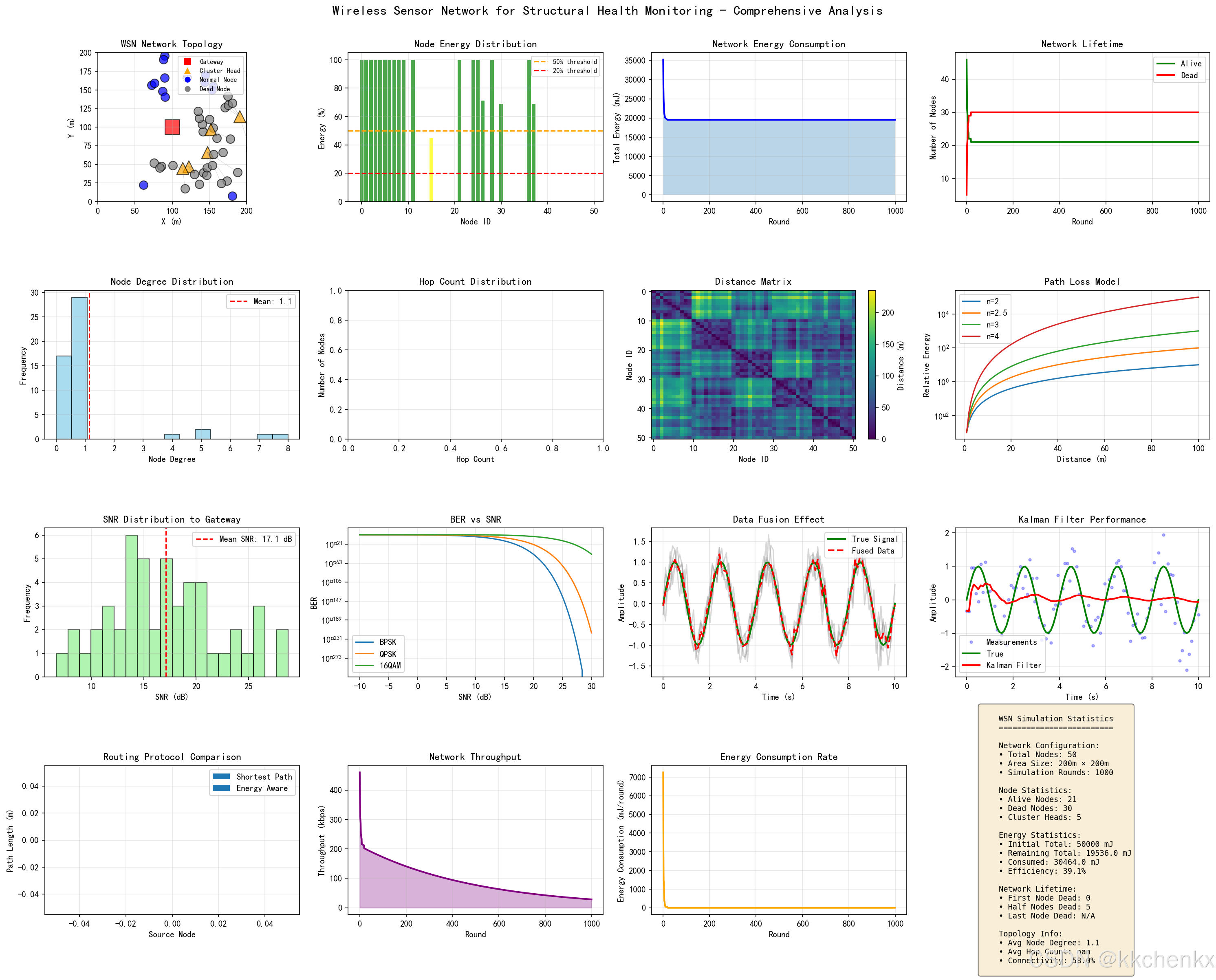
- 综合分析图(16个子图)
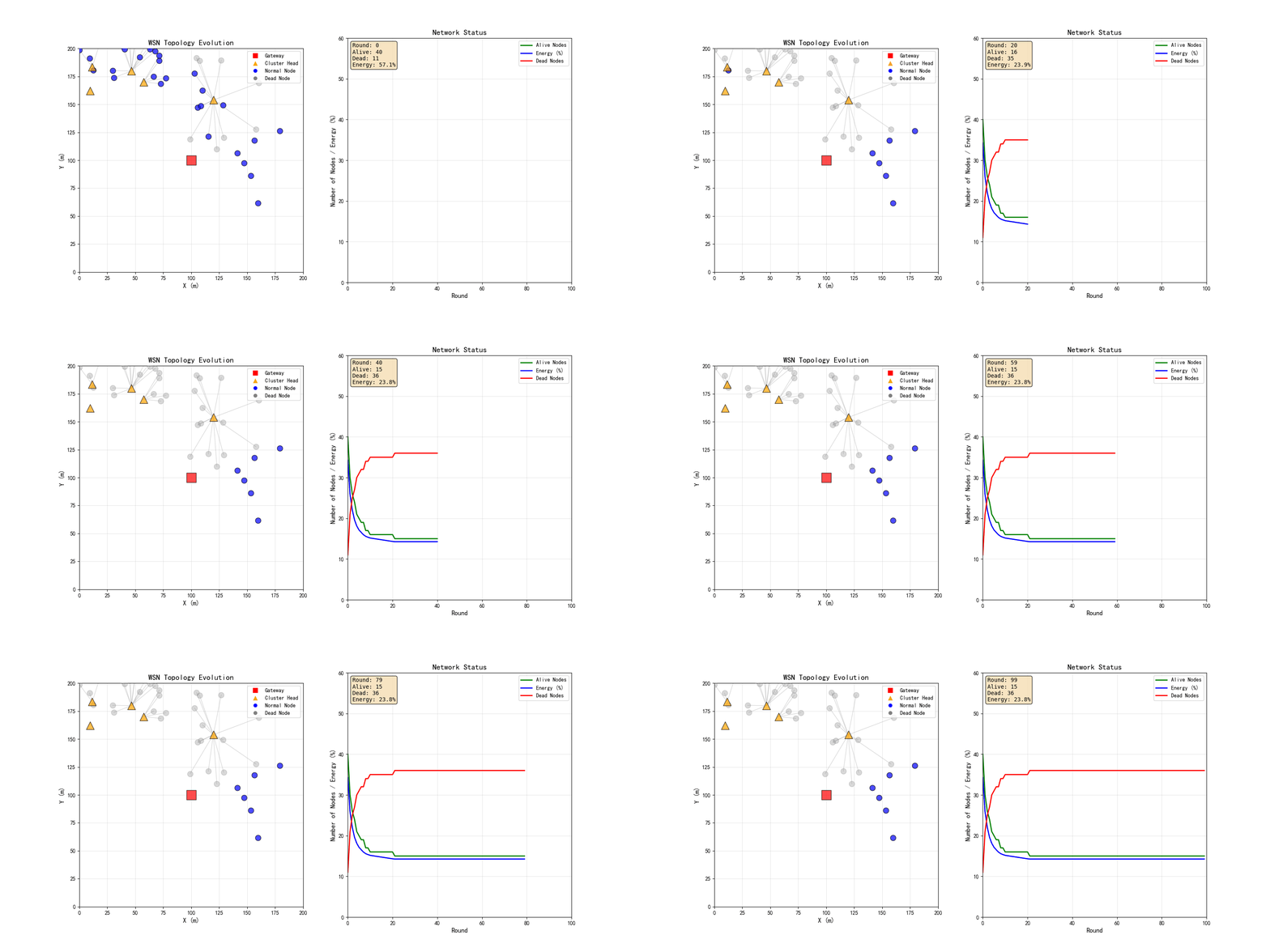
- 动画演示(GIF格式)
10.4 仿真结果分析
通过仿真可以观察到:
- 网络拓扑结构与连通性
- 节点能量消耗分布
- 路由协议性能对比
- 数据融合效果

AtomGit 是由开放原子开源基金会联合 CSDN 等生态伙伴共同推出的新一代开源与人工智能协作平台。平台坚持“开放、中立、公益”的理念,把代码托管、模型共享、数据集托管、智能体开发体验和算力服务整合在一起,为开发者提供从开发、训练到部署的一站式体验。
更多推荐



 9
9 0
0- 0


 已为社区贡献156条内容

所有评论(0)