Agent Skills Overview _ Spring Boot
A standardized way to give AI agents new capabilities and expertise.
https://agentskills.io/home
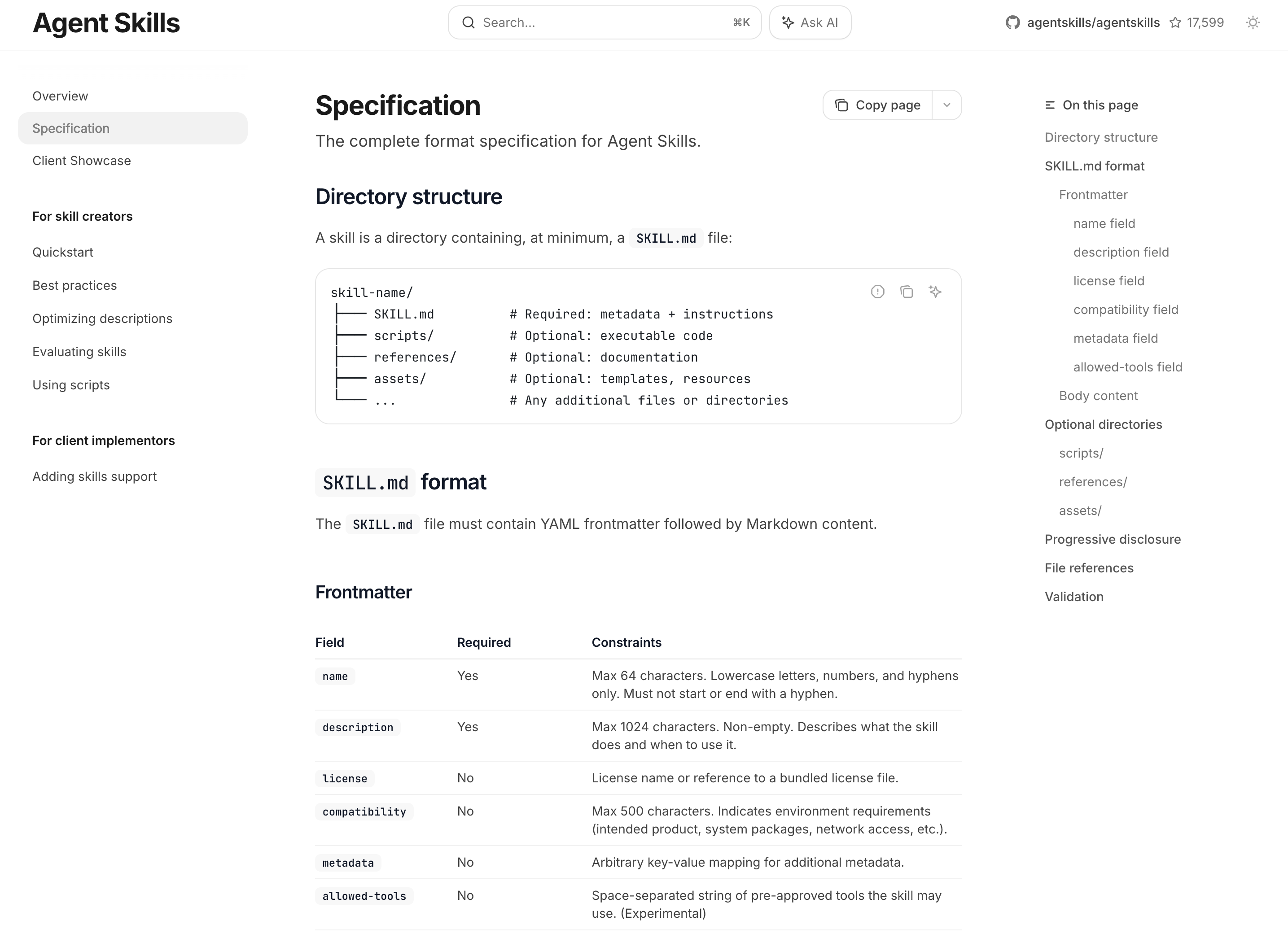
What are Agent Skills?Agent Skills are a lightweight, open format for extending AI agent capabilities with specialized knowledge and workflows.At its core, a skill is a folder containing a SKILL.md file. This file includes metadata (name and description, at minimum) and instructions that tell an agent how to perform a specific task. Skills can also bundle scripts, reference materials, templates, and other resources.
什么是智能体技能?
智能体技能是一种轻量级、开放的格式,用于通过专业知识和工作流程扩展AI智能体的能力。
其核心是一个包含SKILL.md文件的文件夹。该文件至少包含元数据(名称和描述)以及指导智能体执行特定任务的说明。技能还可以捆绑脚本、参考资料、模板和其他资源。
my-skill/
├── SKILL.md          # Required: metadata + instructions
├── scripts/          # Optional: executable code
├── references/       # Optional: documentation
├── assets/           # Optional: templates, resources
└── ...               # Any additional files or directories
Why Agent Skills?Agents are increasingly capable, but often don’t have the context they need to do real work reliably. Skills solve this by packaging procedural knowledge and company-, team-, and user-specific context into portable, version-controlled folders that agents load on demand. This gives agents:
- Domain expertise: Capture specialized knowledge — from legal review processes to data analysis pipelines to presentation formatting — as reusable instructions and resources.
- Repeatable workflows: Turn multi-step tasks into consistent, auditable procedures.
- Cross-product reuse: Build a skill once and use it across any skills-compatible agent.
为什么需要智能体技能?
智能体的能力日益强大,但往往缺乏可靠执行实际工作所需的上下文。技能通过将程序性知识以及公司、团队和用户特定的上下文打包成可移植、版本控制的文件夹来解决这一问题,供智能体按需加载。这为智能体提供了以下优势:
领域专长:将专业知识(从法律审查流程到数据分析管道,再到演示文稿格式化)转化为可重复使用的指令和资源。
可重复的工作流程:将多步骤任务转化为一致且可审计的流程。
跨产品复用:构建一次技能,即可在所有兼容技能的智能体中使用。
How do Agent Skills work?Agents load skills through progressive disclosure, in three stages:
- Discovery: At startup, agents load only the name and description of each available skill, just enough to know when it might be relevant.
- Activation: When a task matches a skill’s description, the agent reads the full
SKILL.mdinstructions into context. - Execution: The agent follows the instructions, optionally executing bundled code or loading referenced files as needed.
Full instructions load only when a task calls for them, so agents can keep many skills on hand with only a small context footprint.
智能代理如何运作技能?
智能代理通过渐进式披露分三个阶段加载技能:
发现阶段:启动时,代理仅加载每个可用技能的名称和描述,仅需了解何时可能适用。
激活阶段:当任务与技能描述匹配时,代理将完整的SKILL.md指令读入上下文。
执行阶段:代理遵循指令,根据需要选择性执行捆绑代码或加载引用文件。
完整指令仅在任务调用时加载,因此代理能以极小的上下文占用掌握大量技能。
Where can I use Agent Skills?Agent Skills are supported by a large number of AI tools and agentic clients — see the Client Showcase to explore some of them!
Quickstart
Copy page
Create your first Agent Skill and see it work in VS Code.
In this tutorial, you’ll create a skill that gives an agent the capability to roll dice using a random number generator.
Prerequisites
- VS Code with GitHub Copilot
This tutorial uses VS Code, but Agent Skills are an open format. The same skill works in any compatible agent, including Claude Code and OpenAI Codex.
Create the skillA skill is a folder containing a SKILL.md file. VS Code looks for skills in .agents/skills/ by default. Create .agents/skills/roll-dice/SKILL.md in your project:
.agents/skills/roll-dice/SKILL.md
---
name: roll-dice
description: Roll dice using a random number generator. Use when asked to roll a die (d6, d20, etc.), roll dice, or generate a random dice roll.
---

To roll a die, use the following command that generates a random number from 1
to the given number of sides:

```bash
echo $((RANDOM % <sides> + 1))
```

```powershell
Get-Random -Minimum 1 -Maximum (<sides> + 1)
```

Replace `<sides>` with the number of sides on the die (e.g., 6 for a standard
die, 20 for a d20).
That’s it — one file, under 20 lines. Here’s what each part does:
name— A short identifier for the skill. Must match the folder name.description— Tells the agent when to use this skill. This is how the agent decides whether to activate it.- The body — Instructions the agent follows when the skill activates. Here, the agent is instructed to generate a random number using a terminal command, substituting the number of sides from the user’s request.
Try it out
- Open your project in VS Code.
- Open the Copilot Chat panel.
- Select Agent mode from the mode dropdown at the bottom of the chat panel.
- Type
/skillsto confirm thatroll-diceappears in the list. If it doesn’t, check that the file is at.agents/skills/roll-dice/SKILL.mdrelative to your project root. - Ask: “Roll a d20”
The agent should activate the roll-dice skill. It may ask for permission to run a terminal command — allow it. It will run the command and return a random number between 1 and 20.
Tool-use reliability varies across models — some follow skill instructions and run commands consistently, while others may attempt to answer on their own. If the agent responds without running a terminal command, try selecting a different model from the model dropdown.
How it worksHere’s what happened behind the scenes:
- Discovery — When the chat session started, the agent scanned default skill directories and found your skill. It read only the
nameanddescription, just enough to know when the skill might be relevant. - Activation — When you asked about rolling dice, the agent matched your question to the skill’s description and loaded the full
SKILL.mdbody into context. - Execution — The agent followed the instructions in the body, adapting the terminal command to the number of sides in your request.
This process uses progressive disclosure to let the agent access many skills without loading all their instructions up front.
Next stepsYou’ve created a working Agent Skill. From here:
- Best practices — How to write skills that are well-scoped and effective.
- Optimizing skill descriptions — Test and improve your skill’s description so it activates on the right prompts.
- Specification — The complete format reference for
SKILL.mdfiles. - Example skills — Browse real-world skills on GitHub.

AtomGit 是由开放原子开源基金会联合 CSDN 等生态伙伴共同推出的新一代开源与人工智能协作平台。平台坚持“开放、中立、公益”的理念,把代码托管、模型共享、数据集托管、智能体开发体验和算力服务整合在一起,为开发者提供从开发、训练到部署的一站式体验。
更多推荐
 2
2 0
0- 0


 已为社区贡献84条内容

所有评论(0)