python fastapi基础——创建项目、参数处理、响应
目录
基于python的高性能的web框架
1、优势
异步性能高
类型提示与验证——pydantic
自动生成可交互式文档,浏览器直接调用和测试API
2、使用FastApi框架内搭建web服务
2.1 创建py项目
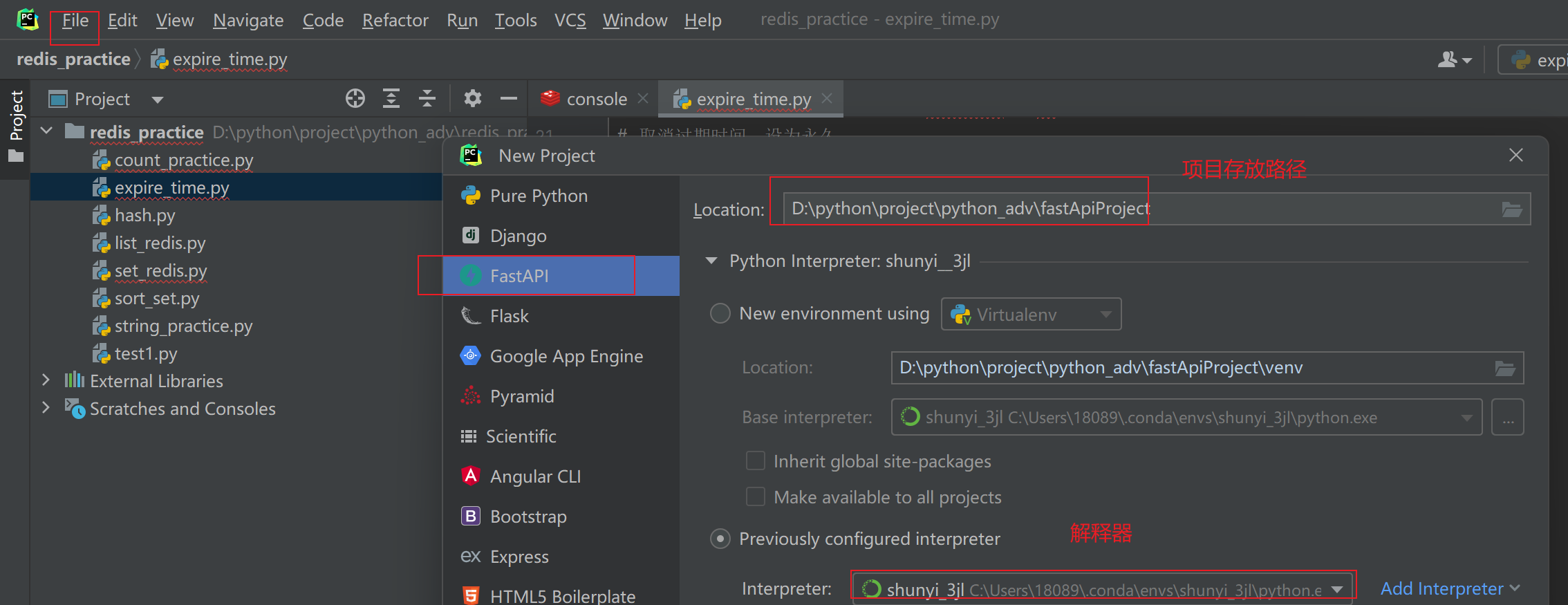
2.2 启动项目
2.2.1 命令行启动
在pycharm Terminal 项目路径下(默认是)中运行
uvicorn main:app --reload reload作用:修改代码之后自动重启
2.2.2 图形模式启动
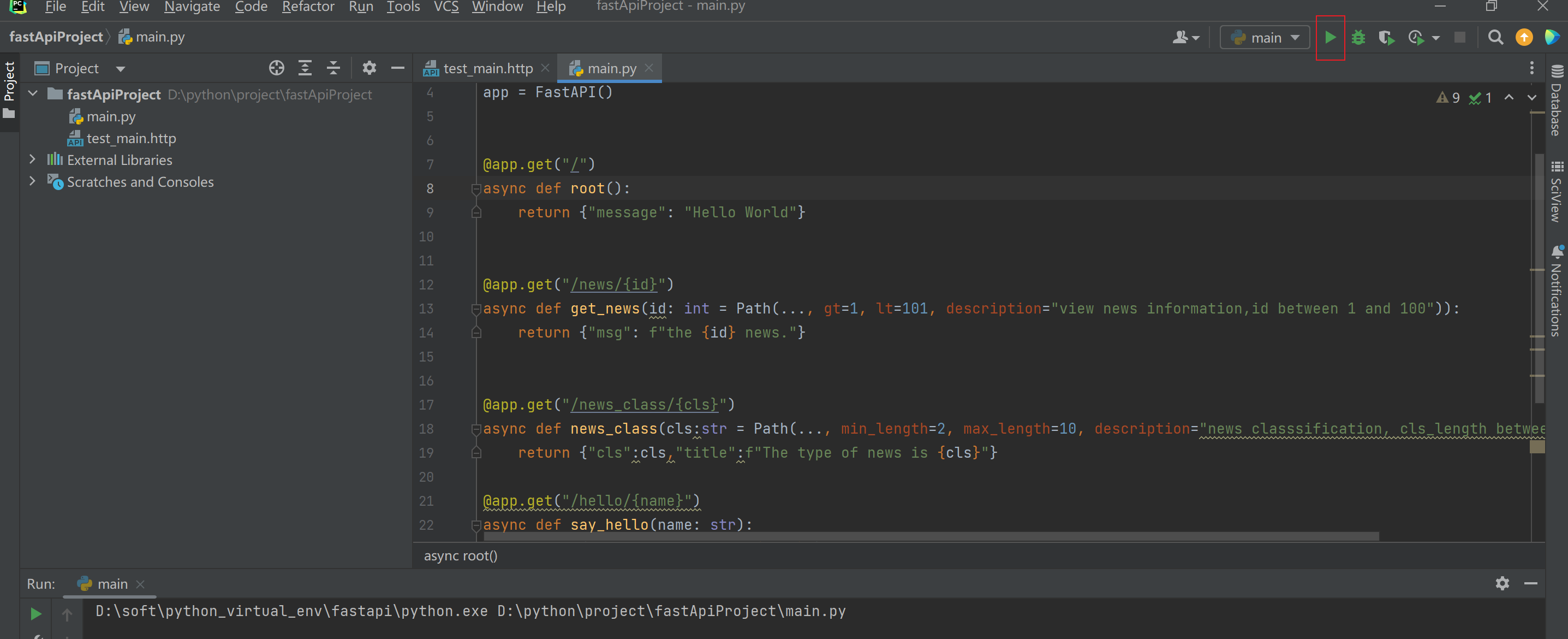
2.3 访问项目
2.3.1 通过链接浏览器直接访问

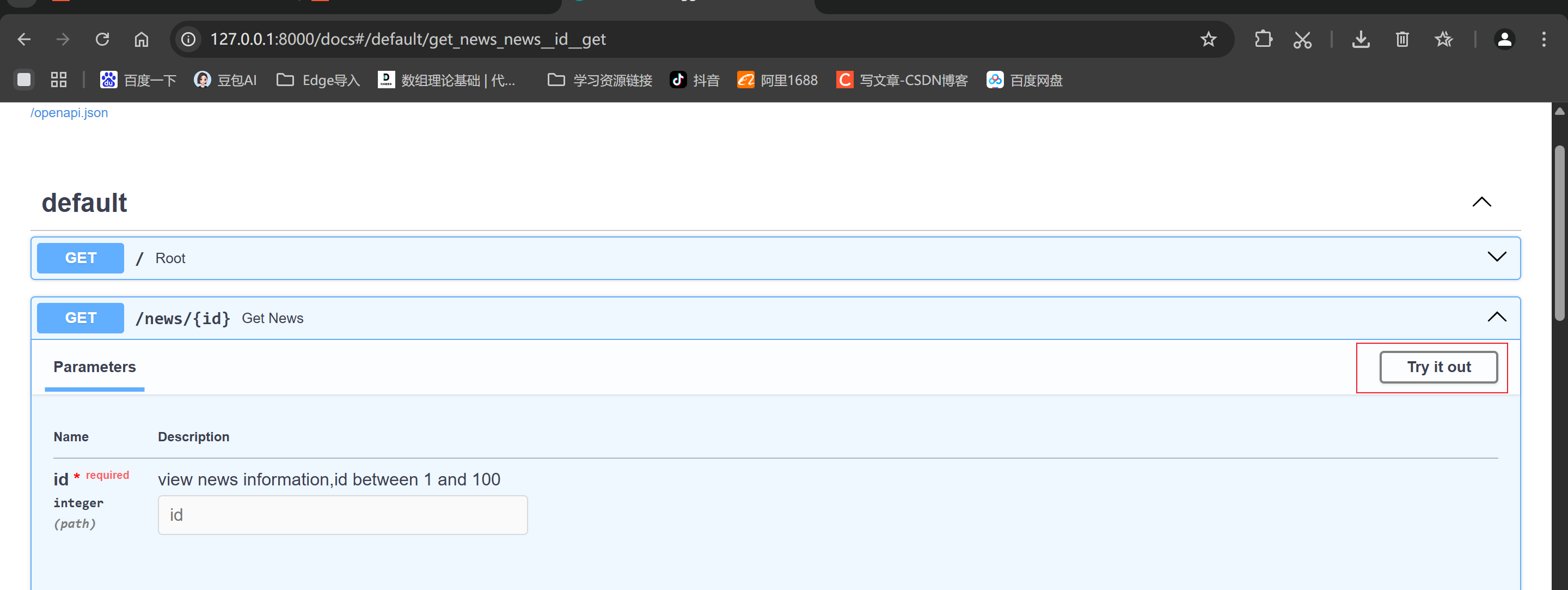
2.3.2 访问交互式文档
访问链接:http://127.0.0.1:8000/docs #端口一般固定,ip根据所在服务器变化
3、路由
3.1 什么是路由?
路由时URL与处理函数之间的映射关系
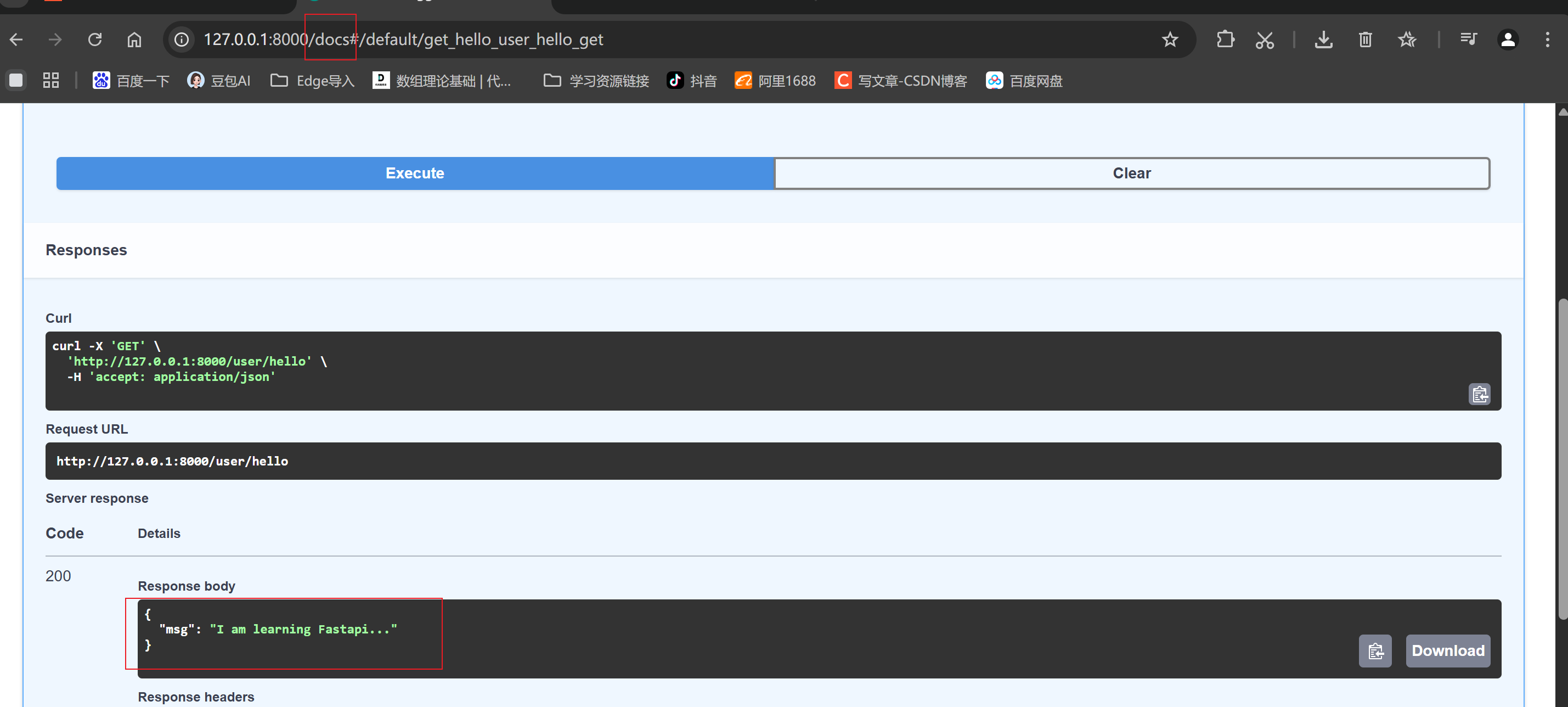
3.2 代码实现
在main.py 文件中添加
@app.get("/user/hello")
async def get_hello():
    return {"msg": "I am learning Fastapi..."}
3.3 关键代码含义
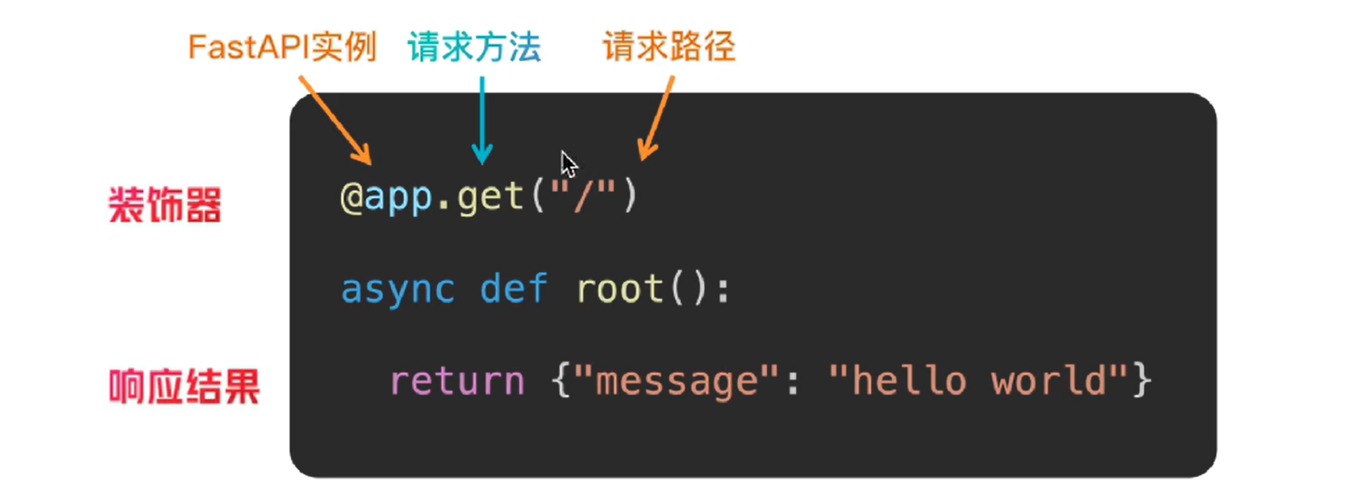
访问结果:在http://127.0.0.1:8000/docs中调试
4、参数
4.1 路径参数
4.1.1 出现位置:
URL 路径的一部分 /news/{id}
4.1.2 path注解:
作用:对参数添加限制(参数长度、大小等)
基本语法:变量名:字符类型(str\int) = Path(...,gt=1,lt=10)
对应参数如下
| 参数 | 作用 |
| ... | 默认首位参数,必须添加 |
| gt|ge | 大于|大于等于 |
| lt|le | 小于|小于等于 |
| min_length | 最小长度 |
| max_length | 最大长度 |
| description | 添加描述用 |
4.1.3 代码实现,在main.py 中添加:
from fastapi import FastAPI,Path, Query

@app.get("/news/{id}")
async def get_news(id: int = Path(..., gt=1, lt=101, description="view news information,id between 1 and 100")):
    return {"msg": f"the {id} news."}


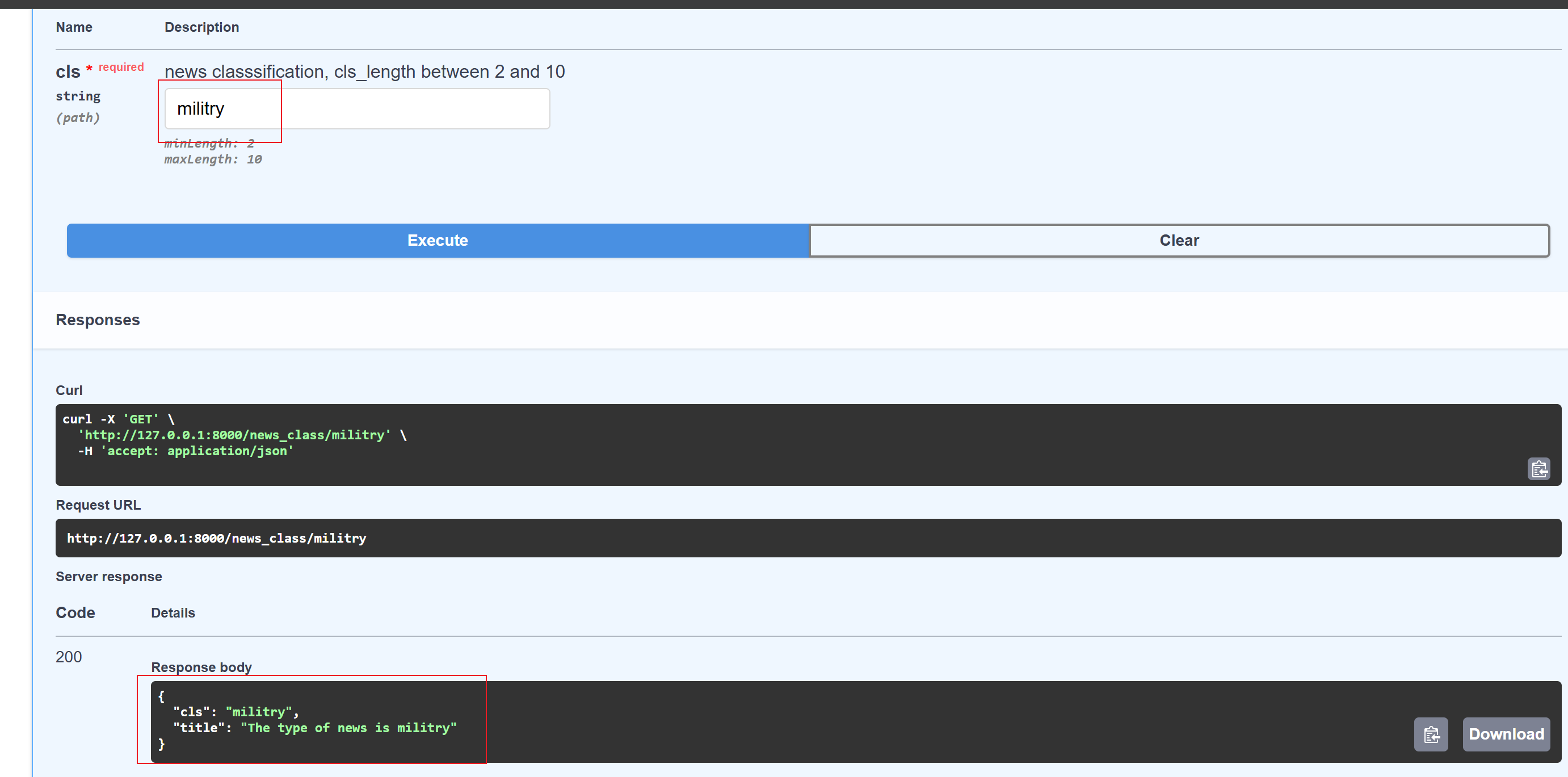
@app.get("/news_class/{cls}")
async def news_class(cls:str = Path(..., min_length=2, max_length=10, description="news classsification, cls_length between 2 and 10")):
    return {"cls":cls,"title":f"The type of news is {cls}"}
访问结果:
4.2 查询参数
注:声明的参数不是路径参数时,路径操作函数会把参数自动解释为查询参数
4.2.1 位置
URL ?之后,k1=v1&k2=v2
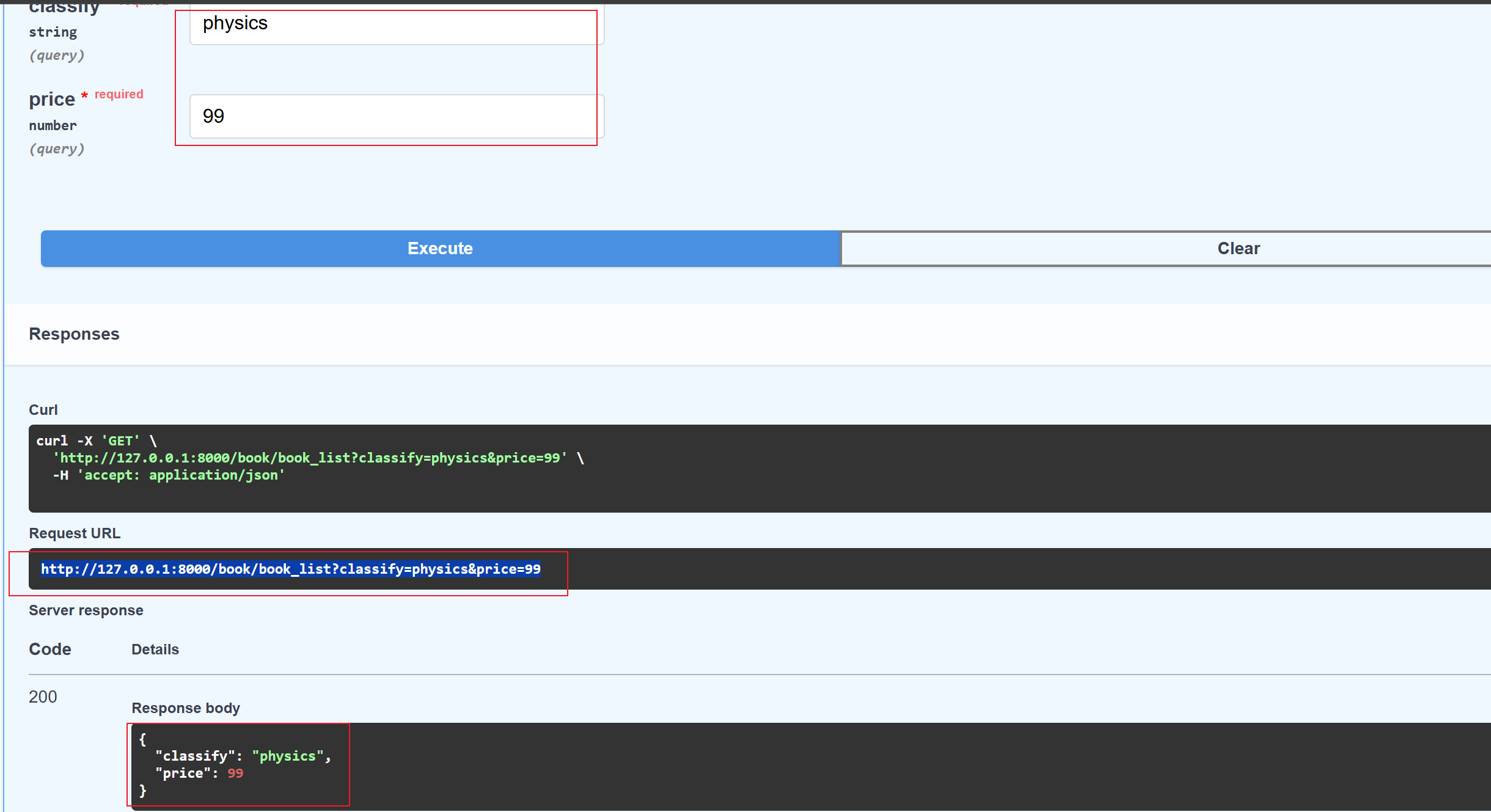
http://127.0.0.1:8000/book/book_list?classify=physics&price=994.2.2 作用
通过URL ?之后的内容输入条件,对资源进行过滤、排序、分页等
4.2.3 方法
请求体:
http://127.0.0.1:8000/book/book_list?classify=physics&price=99main.py文件
@app.get("/book/book_list")
async def get_book_list(classify: str, price: float):
    return {"classify": classify, "price": price}
请求结果返回:
4.2.4 为查询参数添加类型注解
基本语法:变量名:字符类型(str\int) = Query(...,gt=1,lt=10)
对应参数如下
| 参数 | 作用 |
| ... | 默认首位参数,必须添加,参数默认值 |
| gt|ge | 大于|大于等于 |
| lt|le | 小于|小于等于 |
| min_length | 最小长度 |
| max_length | 最大长度 |
| description | 添加描述用 |
from fastapi import FastAPI,Path, Query

@app.get("/book/book_list")
async def get_book_list(
        classify: str = Query(...,max_length=20,description="Book Classification"),
        price: float = Query(20,lt=500,gt=0,description="The book`s price")):
    return {"classify": classify, "price": price}
4.3 请求体参数
4.3.1 位置
http请求的body体中
4.3.2 作用
传输数据
4.3.3 http请求组成
a、请求行:方法、URL、协议版本
b、请求头:Content_Type,Authorization等
c、请求体:实际要发送的数据
curl -X 'POST' \
  'http://127.0.0.1:8000/book/register' \
  -H 'accept: application/json' \
  -H 'Content-Type: application/json' \
  -d '{
  "username": "Jerry",
  "password": "123456"
}'
4.3.4 定义与使用
发起请求:
curl -X 'POST' \
  'http://127.0.0.1:8000/book/register' \
  -H 'accept: application/json' \
  -H 'Content-Type: application/json' \
  -d '{
   "username": "root"
   "password": "123456"
}'
请求处理、返回
from fastapi import FastAPI,Path, Query
from pydantic import BaseModel

# 定义类型
class User(BaseModel):
    username: str
    password: str


# 类型注解
@app.post("/book/register")
async def book_register(user: User):
    return user
注:
BaseModel作用:强制数据验证与类型转换运行时验证:在实例化模型时,Pydantic 会自动检查输入数据是否符合定义的字段类型和约束。如果数据不合法(例如将字符串传给整数字段且无法转换),会抛出清晰的
ValidationError异常自动类型转换:它不仅能验证类型,还能尝试进行智能转换。例如,如果字段定义为
int,传入字符串"123",它会自动将其转换为整数123;如果传入"abc",则报错。复杂约束支持:结合
Field,可以定义更复杂的规则,如字符串长度限制、数值范围(大于/小于)、正则匹配等。
4.3.5 请求体参数类型注解——Filed
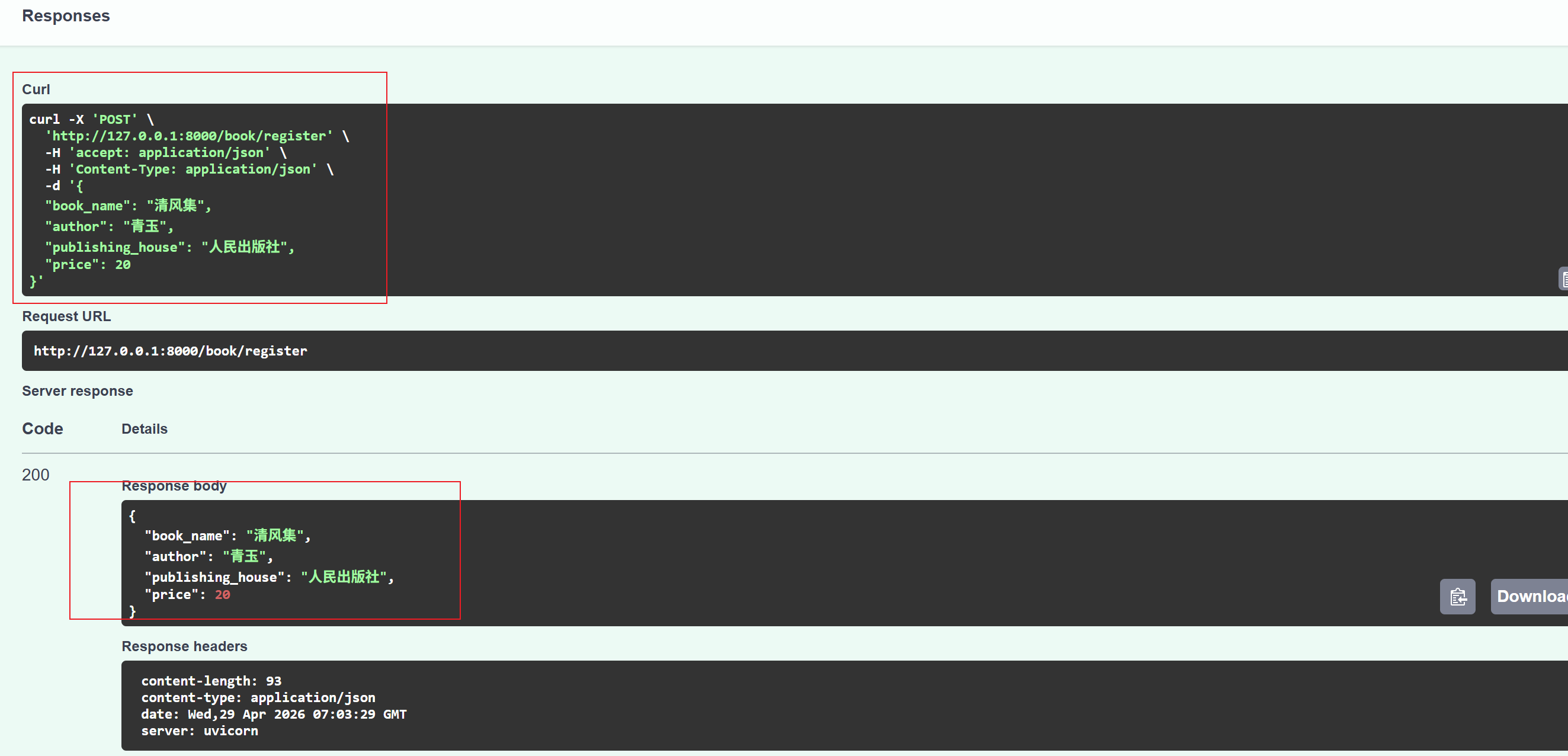
发起请求:
curl -X 'POST' \
  'http://127.0.0.1:8000/book/register' \
  -H 'accept: application/json' \
  -H 'Content-Type: application/json' \
  -d '{
  "book_name": "清风录",
  "author": "青玉",
  "publishing_house": "人民出版社",
  "price": 40
}'
请求处理、返回:
from fastapi import FastAPI,Path, Query
from pydantic import BaseModel,Field

class Book(BaseModel):
    book_name: str = Field(..., min_length=2, max_length=20)
    author: str = Field(..., min_length=2, max_length=10)
    publishing_house: str = Field(default="人民出版社", min_length=4, max_length=20)
    price: float = Field(..., gt=0)

@app.post("/book/register")
async def book_register(book: Book):
    return book
对应参数如下
| 参数 | 作用 |
| ... | 默认首位参数,必须添加,参数默认值 |
| gt|ge | 大于|大于等于 |
| lt|le | 小于|小于等于 |
| min_length | 最小长度 |
| max_length | 最大长度 |
| description | 添加描述用 |
| alias | 起别名,传入的 JSON 数据中使用的是另一种命名风格(如 userId 或 User-ID)时,可以使用此变量来起别名 |
请求及返回:
4.4 三个参数差异点对比
| 路径参数 | 查询参数 | 请求体参数 | |
|---|---|---|---|
| 参数的位置不同 | 在请求url的路径中 | 在URL ?之后 | 请求体body (-d) 中 |
| 添加参数类型注释的方式不同 | 变量名:字符类型(str\int) = Path(...,gt=1,lt=10) | 变量名:字符类型(str\int) = Query(...,gt=1,lt=10) | 变量名:字符类型(str\int) = Filed(...,gt=1,lt=10) |
| 添加参数类型注释的包 | from fastapi import Path, Query |
from fastapi import Path, Query | from pydantic import BaseModel, Field |
5.响应类型
默认情况,FastApi会自动将路径操作函数返回的python对象(字典、列表、pydantic模型等),经由jsonable_encoder转换为JSON兼容格式,并包装为JSONresponse返回,省去了手动操作。
如果返回非JSON格式的HTML、文件等,需要手动处理,fastapi提供了丰富的数据响应类型
| 响应类型 | 用途 | 示例 |
|---|---|---|
| JSONResponse | 默认响应,返回josn数据 | return {"msg":"hello"} |
| HTMLResponse | 返回HTML格式 | return HTMLResponse(html_content) |
| FileResponse | 返回文件类型 | return FileResponse(path(文件路径)) |
| PlainTextResponse | 返回纯文本 | return PlainTextResponse("txt") |
|
StreamingResponse |
流式响应 | 生成器函数返回数据 |
| RedirectResponse | 重定向 | return RedirectResponse(URL) |
5.1 响应类型设置方式:
5.1.1 装饰器中指定响应类
缺点:不够灵活,不能根据请求内容做出更改
@app.get("/html", response_class=HTMLResponse)
async def get_html():
    return "<h1>HELLO FASTAPI</h1>"
5.1.2 返回响应对象中设定
@app.get("/file/photo")
async def get_file():
    file_path = r"C:\Users\18089\Desktop\AIPY\图片\fasterapi\参数分类.png"
    return FileResponse(file_path)
5.2 json响应类型
默认为json格式返回,无需特殊处理
5.3 HTML响应类型
实现方式:在装饰器中定义
from fastapi import FastAPI,Path, Query
from fastapi.responses import FileResponse,HTMLResponse

@app.get("/html", response_class=HTMLResponse)
async def get_html():
    return "<h1>HELLO FASTAPI</h1>"
5.4 文件响应类型
实现方式:返回对象中设定
from fastapi import FastAPI,Path, Query
from fastapi.responses import FileResponse,HTMLResponse

@app.get("/file/photo")
async def get_file():
    file_path = r"C:\Users\18089\Desktop\AIPY\图片\fasterapi\参数分类.png"
    return FileResponse(file_path)
5.5 自定义响应格式
需在装饰器中添加response_model参数
from fastapi import FastAPI,Path, Query,HTTPException
from pydantic import BaseModel,Field

class News(BaseModel):
    id: int = Field(default=1, lt=50)
    title: str = Field(..., max_length=50)
    content: str = Field(..., min_length=1)


@app.get("/news/{id}", response_model=News)
async def get_news(id: int):
    return {
        "id": id,
        "title": f"The number of this news is {id}",
        "content": "excellent!"

    }
5.6 异常响应处理
from fastapi import FastAPI,Path, Query,HTTPException

@app.get("/book/{id}")
async def get_book(id :int):
    id_list = [1, 2, 3, 4, 5, 6]
    if id not in id_list:
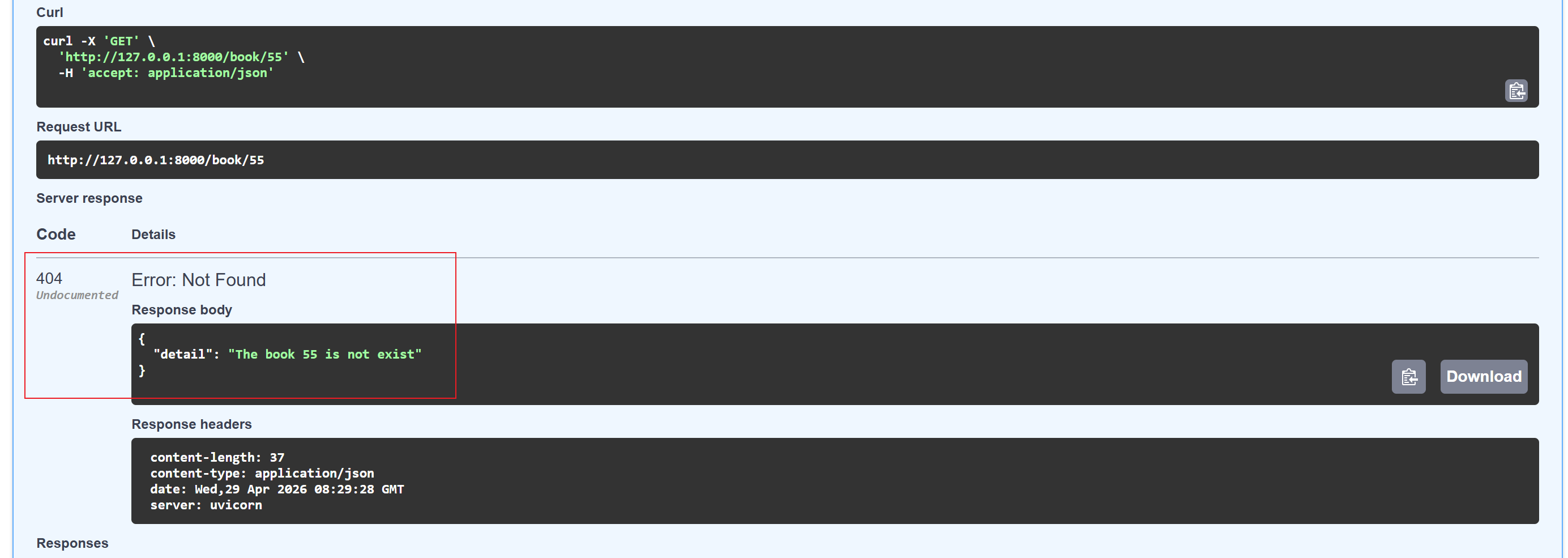
        raise HTTPException(status_code= 404, detail=f"The book {id} is not exist")
    return {f"The book`s id is {id}"}
请求异常时返回:

AtomGit 是由开放原子开源基金会联合 CSDN 等生态伙伴共同推出的新一代开源与人工智能协作平台。平台坚持“开放、中立、公益”的理念,把代码托管、模型共享、数据集托管、智能体开发体验和算力服务整合在一起,为开发者提供从开发、训练到部署的一站式体验。
更多推荐


 8
8 0
0- 0


 已为社区贡献7条内容

所有评论(0)