Windows环境安装Claude code并配置Deepseek v4
·
安装准备
获取 DeepSeek V4 API Key
- 打开:https://platform.deepseek.com/
- 注册 / 登录(手机号即可)
- 左侧「API 密钥」→「创建密钥」
- 复制
sk-xxxxxxxxxxxxxxxxxxxxxxxxxxxxxxxxxxxxxxxx(保存好,只显示一次)
账户先充值(V4 要余额)
说明:
- 如果是配置其它模型,都需要预先获取API Key。
安装过程
Powershell安装脚本
PowerShell脚本如下:
# ===================== 一键脚本开始 =====================
# 1. 修复PowerShell脚本禁止运行问题(必过)
Set-ExecutionPolicy RemoteSigned -Scope CurrentUser -Force -ErrorAction SilentlyContinue

# 2. 安装必备依赖:Node.js + Git
winget install OpenJS.NodeJS.LTS -e --accept-source-agreements --accept-package-agreements
winget install Git.Git -e --accept-source-agreements --accept-package-agreements

# 3. 刷新环境变量(不用重启电脑)
$env:Path = [System.Environment]::GetEnvironmentVariable("Path","Machine") + ";" + [System.Environment]::GetEnvironmentVariable("Path","User")

# 4. 切换npm国内镜像(解决安装慢/失败)
npm config set registry https://registry.npmmirror.com

# 5. 安装Claude Code
npm install -g @anthropic-ai/claude-code

# 6. 创建配置目录
mkdir "$env:USERPROFILE\.claude" -Force | Out-Null

# 7. 自动生成DeepSeek V4配置文件(请替换成你自己的API Key!)
$config = @"
{
  "`$schema": "https://json.schemastore.org/claude-code-settings.json",
  "env": {
    "ANTHROPIC_BASE_URL": "https://api.deepseek.com/anthropic",
    "ANTHROPIC_AUTH_TOKEN": "sk-此处替换成你的DeepSeek API Key",
    "ANTHROPIC_DEFAULT_OPUS_MODEL": "deepseek-v4-pro[1m]",
    "ANTHROPIC_DEFAULT_SONNET_MODEL": "deepseek-v4-pro[1m]",
    "ANTHROPIC_DEFAULT_HAIKU_MODEL": "deepseek-v4-flash[1m]"
  },
  "model": "opus"
}
"@
$config | Out-File "$env:USERPROFILE\.claude\settings.json" -Encoding UTF8

# 8. 验证安装结果
Write-Host "`n=====================================" -ForegroundColor Cyan
Write-Host "✅ 安装完成!请按提示替换API Key后使用" -ForegroundColor Green
Write-Host "📌 配置文件路径:$env:USERPROFILE\.claude\settings.json" -ForegroundColor Yellow
Write-Host "📌 测试命令:claude `"你好,请确认我配置的是DeepSeek V4`"" -ForegroundColor Yellow
Write-Host "=====================================`n" -ForegroundColor Cyan
# ===================== 一键脚本结束 =====================
使用说明:
脚本执行后只做一件事:按提示去修改.claude/settings.json。在你windows账户目录下。
- 打开配置文件:
notepad "$env:USERPROFILE\.claude\settings.json"
- 把" sk-此处替换成你的DeepSeek API Key" 换成你自己的密钥。
- 保存关闭
安装验证
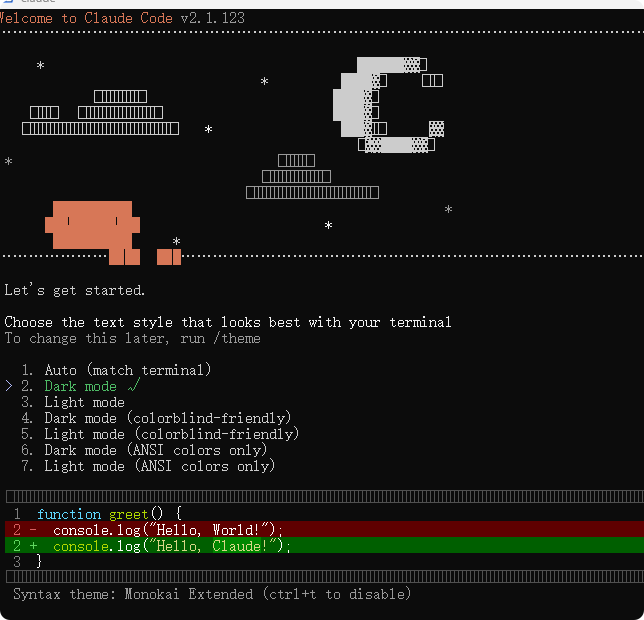
claude "你好,你是DeepSeek V4吗?"
结果如下图:
bat安装脚本
上述安装过程提取为ClaudeDeepSeek.bat文件,内容如下:
@echo off
chcp 65001
title 一键安装ClaudeCode+配置DeepSeekV4
echo 正在执行一键部署...
powershell -Command ^
"Set-ExecutionPolicy RemoteSigned -Scope CurrentUser -Force -ErrorAction SilentlyContinue; ^
winget install OpenJS.NodeJS.LTS -e --accept-source-agreements --accept-package-agreements; ^
winget install Git.Git -e --accept-source-agreements --accept-package-agreements; ^
$env:Path = [System.Environment]::GetEnvironmentVariable('Path','Machine') + ';' + [System.Environment]::GetEnvironmentVariable('Path','User'); ^
npm config set registry https://registry.npmmirror.com; ^
npm install -g @anthropic-ai/claude-code; ^
mkdir $env:USERPROFILE\.claude -Force | Out-Null; ^
$config = '{\"$schema\":\"https://json.schemastore.org/claude-code-settings.json\",\"env\":{\"ANTHROPIC_BASE_URL\":\"https://api.deepseek.com/anthropic\",\"ANTHROPIC_AUTH_TOKEN\":\"sk-替换成你的DeepSeekAPIKey\",\"ANTHROPIC_DEFAULT_OPUS_MODEL\":\"deepseek-v4-pro[1m]\",\"ANTHROPIC_DEFAULT_SONNET_MODEL\":\"deepseek-v4-pro[1m]\",\"ANTHROPIC_DEFAULT_HAIKU_MODEL\":\"deepseek-v4-flash[1m]\"},\"model\":\"opus\"}'; ^
$config | Out-File $env:USERPROFILE\.claude\settings.json -Encoding UTF8; ^
Write-Host '✅ 安装完成!请手动替换 DeepSeek API Key' -ForegroundColor Green; ^
Write-Host '📄 配置文件路径:'$env:USERPROFILE'\.claude\settings.json' -ForegroundColor Yellow"
pause
说明:
- 执行之后的操作如上Powershell操作。
本地多模型配置
如果你有本地配置其它模型,或多模型的需要,推荐如下操作。
不用 ccswitch:纯手动加多个模型
这种情况适用于偶尔用 1–2 个模型、很少切。
先写好多个 json,例如:
- settings-deepseek.json
- settings-glm.json
- settings-kimi.json
需要时复制成正式配置:
# 切到 deepseek
copy %USERPROFILE%\.claude\settings-deepseek.json %USERPROFILE%\.claude\settings.json

# 切到 glm
copy %USERPROFILE%\.claude\settings-glm.json %USERPROFILE%\.claude\settings.json
用 ccswitch一键管理所有模型
优点:
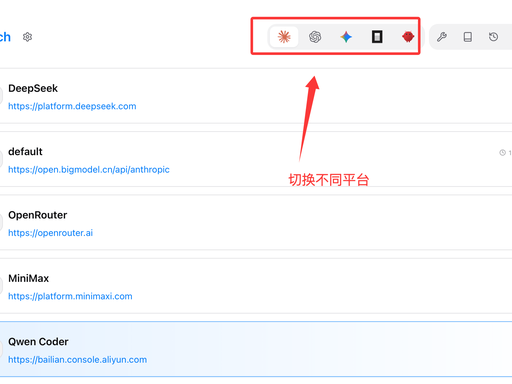
- 同时配:DeepSeek、GLM、Kimi、Claude 官方、OpenAI 等
- 点一下切换,自动改写 settings.json
- 内置主流模型预设,不用自己拼 URL 和字段
- 可测速、备份配置、管理 MCP 插件
Windows 快速安装
- 命令行安装(需已装 Node)
npm install -g @47code/cc-switch
- 或一键 BAT(管理员运行)
@echo off
chcp 65001
title 安装 ccswitch
powershell -Command "Set-ExecutionPolicy RemoteSigned -Scope CurrentUser -Force -ErrorAction SilentlyContinue; npm install -g @47code/cc-switch"
pause
- 启动
ccswitch
弹出窗口 → 右上角「+」→ 选模型(如 DeepSeek)→ 填 API Key → 保存 → 点「启用」→ 终端直接用 claude 即可。

AtomGit 是由开放原子开源基金会联合 CSDN 等生态伙伴共同推出的新一代开源与人工智能协作平台。平台坚持“开放、中立、公益”的理念,把代码托管、模型共享、数据集托管、智能体开发体验和算力服务整合在一起,为开发者提供从开发、训练到部署的一站式体验。
更多推荐


 8
8 0
0- 0


 已为社区贡献2条内容

所有评论(0)