模型调用、记忆机制到多模态:LangChain 与 Spring AI 深度对比
LangChain与Spring AI均为当下主流的AI应用开发框架,核心目标是简化大语言模型(LLM)与各类组件的集成,降低AI应用的开发门槛,但二者在设计理念、技术栈、生态适配等方面存在显著差异,适配不同的开发场景与需求。
在核心功能实现上,二者各有侧重。记忆机制方面,LangChain将Memory作为独立组件,提供多种记忆类型,支持多类数据库持久化,可与Chain、Agent灵活组合;Spring AI则采用记忆逻辑与存储解耦的Repository模式,通过ChatMemory接口与ChatMemoryRepository实现会话记忆的管理与持久化,适配企业级数据存储需求。模型调用上,LangChain通过Runnable接口统一组件,封装50+种LLM,支持多模型协同与灵活路由;Spring AI则通过ChatClient Fluent API简化调用,更换配置即可实现多模型切换,更贴合企业级组件替换需求。
工具调用、向量数据库、结构化输出等核心功能上,LangChain提供丰富的内置工具与向量数据库支持,原生支持RAG与多模态交互,结构化输出依赖Pydantic模型保证类型安全;Spring AI则通过注解简化工具定义,依托Spring自动配置实现向量数据库集成,结构化输出通过Java类型系统与JSON Schema保障,虽无内置业务工具,但可无缝调用任何Spring Bean,适配企业级业务集成。
1. 概念对比
| 对比项 | LangChain | Spring AI |
|---|---|---|
| 核心概念 | Chain(链)、Agent(智能体)、Tool(工具)、Memory(记忆) | ChatClient(对话客户端)、ChatModel(模型抽象)、VectorStore(向量库) |
| 设计理念 | 组件可组合,LCEL(LangChain 表达式语言)统一 Runnable 接口 |
Spring 风格抽象,依赖注入、声明式配置、可移植性优先 |
| 主要语言 | Python / TypeScript | Java / Kotlin |
| 生态集成 | Python 数据生态、Jupyter、LangSmith、LangGraph | Spring Boot、Spring Cloud、MCP、企业级中间件 |
| 学习曲线 | 中等偏高(概念较多,但灵活) | 较低(Spring 开发者几乎无痛上手) |
2. 记忆力 (Memory)
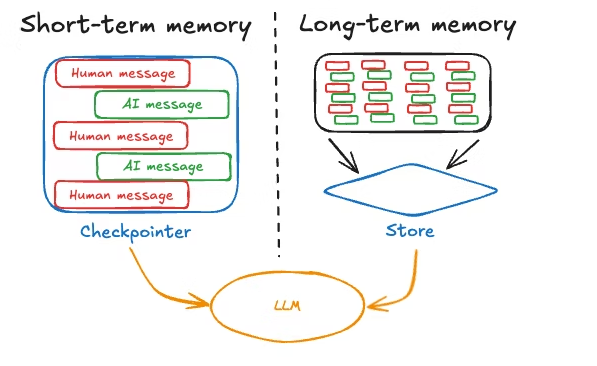
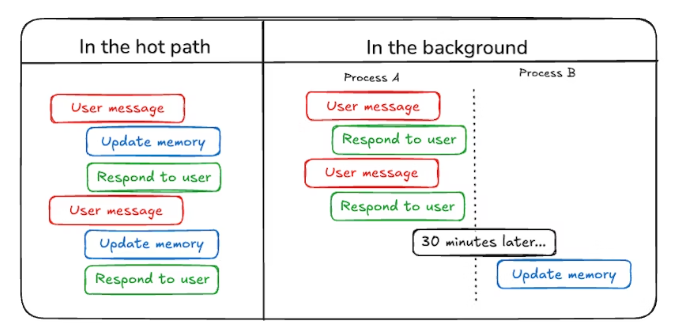
| 对比项 | LangChain | Spring AI |
|---|---|---|
| 核心抽象 | BaseChatMessageHistory + 多种 Memory 类(Buffer、Entity、Window 等) |
ChatMemory 接口(逻辑层) + ChatMemoryRepository(存储层) |
| 短期记忆 | LangGraph 检查点(checkpoint)保存会话状态,可持久化至数据库 | MessageWindowChatMemory 维护滑动窗口对话历史 |
| 长期记忆 | LangMem SDK 提取对话事实,优化 Agent 行为 | ChatMemoryRepository 持久化至数据库,实现跨会话记忆 |
| 支持存储后端 | MongoDB、Redis、SQLite、Neo4j、Couchbase、ScyllaDB 等 | JDBC(MySQL/PostgreSQL/SQL Server)、Cassandra、Redis、内存 Map |
| 架构特点 | Memory 作为独立组件,与 Chain/Agent 组合使用 | 记忆管理与存储解耦,遵循 Repository 模式 |
3. 模型调用
| 对比项 | LangChain | Spring AI |
|---|---|---|
| 统一接口 | 所有组件实现 Runnable,支持 invoke、stream、batch |
ChatClient Fluent API + ChatModel 抽象 |
| 多模型切换 | 封装 50+ 种 LLM,通过 ChatOpenAI、ChatAnthropic 等类切换 |
更换配置文件即可切换 OpenAI、Anthropic、Vertex AI、Ollama 等 |
| 流式输出 | .stream() 返回迭代器 |
.stream() 返回 Flux<String>(Reactor) |
| 调用示例 | model.invoke("Hello") |
chatClient.prompt("Hello").call().content() |
| 多模型协同 | RunnableParallel、ModelRouter 条件路由 |
创建多个 ChatClient Bean,手动编排 |
4. 提示词 (Prompt)
| 对比项 | LangChain | Spring AI |
|---|---|---|
| 模板类 | PromptTemplate、ChatPromptTemplate |
PromptTemplate、SystemPromptTemplate |
| 角色支持 | System / Human / AI / Tool | System / User / Assistant / Tool |
| 模板加载 | 支持从文件、字符串、YAML 加载 | 支持从 resources 目录加载,类似 Spring 视图解析 |
| 特性 | Few-shot 示例注入、部分变量填充、模板组合 | 变量替换、链式 API 与底层 Message 组装两种方式 |
| 角色决定语义 | 通过不同 Message 类区分角色 | 强调“角色决定语义”,不同角色消息处理逻辑不同 |
5. 工具 (Tool / Function Calling)
| 对比项 | LangChain | Spring AI |
|---|---|---|
| 定义方式 | @tool 装饰器 或 StructuredTool 类 |
@Tool 注解 + @ToolParam 注解 |
| 调用流程 | LLM 决定 → 解析参数 → 执行 → 结果返回 LLM(ReAct 循环) | LLM 请求 → ToolCallAdvisor 发送工具定义 → 执行 → 返回结果 |
| 支持类型 | 函数、API、Chain 作为工具 | java.util.Function、Supplier、Consumer |
| 多工具编排 | Agent 可在循环中调用多个工具 | 支持 MCP(模型上下文协议)集成 |
| 内置工具 | 35+ 内置工具和工具包(如 Search、Calculator) | 无内置业务工具,但无缝调用任何 Spring Bean |
6. 持久化
| 对比项 | LangChain | Spring AI |
|---|---|---|
| 记忆持久化 | ChatMessageHistory 接口 + 多种后端实现 |
ChatMemoryRepository 接口,内置 JdbcChatMemoryRepository |
| 状态持久化 | LangGraph 检查点(Checkpointer)保存整个图状态 | ChatMemory + ChatMemoryRepository 保存对话历史 |
| 支持数据库 | MongoDB、Redis、SQLite、PostgreSQL、ScyllaDB 等 | MySQL、PostgreSQL、SQL Server、Cassandra、Redis |
| 架构模式 | 检查点模式 + 内存组件 | Repository 模式(存储与逻辑分离) |
7. 向量数据库
| 对比项 | LangChain | Spring AI |
|---|---|---|
| 核心抽象 | VectorStore 接口(存储/检索嵌入) |
VectorStore 接口(统一 API) |
| 支持产品 | PGVector、Redis、MongoDB、FAISS、Chroma、Pinecone 等数十种 | Redis、Elasticsearch、Oracle Vector DB、Couchbase、SimpleVectorStore(内存) |
| RAG 支持 | 原生支持,可与 Agent 结合构建多模态 RAG | 提供 ETL 框架(数据摄取 → 分块 → 嵌入 → 存储) |
| 混合搜索 | 支持全文检索 + 向量相似度 | 支持相似度检索 + 元数据过滤 |
| 初始化方式 | 通过适配器显式创建 | Spring Boot 自动配置,注入 VectorStore Bean |
8. 结构化输出
| 对比项 | LangChain | Spring AI |
|---|---|---|
| 核心组件 | OutputParser 接口 |
StructuredOutputConverter 接口 |
| 输出类型 | JSON、XML、Pydantic 对象、自定义类 | Java 对象(Record/Class)、Map、List、JSON Schema |
| 实现机制 | 解析器自动构建格式指令 + 解析原始输出 | 调用前附加 JSON Schema,调用后映射到 Java 对象 |
| 主要解析器 | PydanticOutputParser、XMLOutputParser、CommaSeparatedListOutputParser |
BeanOutputConverter、MapOutputConverter、ListOutputConverter |
| 类型安全 | 通过 Pydantic 模型验证 | 通过 Java 类型系统和 JSON Schema 保证 |
9. 多模态
| 对比项 | LangChain | Spring AI |
|---|---|---|
| 支持方式 | 通过提示词模板嵌入图像、PDF、音频 URL 或 base64 | Message API 提供统一多模态抽象(Media 类型) |
| 支持内容 | 图像、PDF、音频(依赖多模态模型如 GPT-4V、Gemini 1.5) | 文本、图像、音频输入/输出(OpenAI 音频模式) |
| 多模态 RAG | 结合多模态嵌入模型(如 CLIP)构建视觉 RAG | ETL 框架支持多模态数据摄取 |
| 模型依赖 | 必须使用多模态模型 | 依赖模型提供商的能力,API 统一 |
| 典型场景 | 图像描述、文档问答、图表分析 | 图像问答、语音转录、多模态对话 |
10. 消息角色
两个框架均支持四种核心角色,细节如下:
| 角色 | LangChain | Spring AI |
|---|---|---|
| System | SystemMessage — 设置 AI 行为模式和角色 |
SystemMessage — 系统消息,配置 AI 行为 |
| User | HumanMessage — 用户输入(问题、指令) |
UserMessage — 用户消息 |
| Assistant | AIMessage — AI 模型生成的回复 |
AssistantMessage — AI 助手响应 |
| Tool | ToolMessage — 工具调用及结果 |
ToolMessage — 工具调用及结果 |
| 角色决定语义 | 消息格式统一,屏蔽不同提供商差异 | 强调“角色决定语义”,角色不同消息处理逻辑不同 |
11. 关键代码示例
LangChain (Python)
How components connect
Each component layer builds on the previous ones:
- Input processing – Transform raw data into structured documents
- Embedding & storage – Convert text into searchable vector representations
- Retrieval – Find relevant information based on user queries
- Generation – Use AI models to create responses, optionally with tools
- Orchestration – Coordinate everything through agents and memory systems

from langchain_openai import ChatOpenAI
from langchain.prompts import PromptTemplate
from langchain.memory import ConversationBufferMemory
from langchain.chains import ConversationChain
from langchain.tools import tool
from langchain.agents import create_agent
from langchain.output_parsers import PydanticOutputParser
from pydantic import BaseModel, Field
from langchain_community.vectorstores import FAISS
from langchain_openai import OpenAIEmbeddings

# 1. 模型调用
model = ChatOpenAI(model="gpt-4")

# 2. 提示词模板
template = PromptTemplate.from_template("翻译成{language}: {text}")

# 3. 记忆
memory = ConversationBufferMemory()
conversation = ConversationChain(llm=model, memory=memory)

# 4. 工具定义
@tool
def get_weather(location: str) -> str:
    """获取天气"""
    return f"{location} 天气晴朗"

# 5. Agent
agent = create_agent(model, tools=[get_weather])
response = agent.invoke({"messages": [("user", "北京天气?")]})

# 6. 结构化输出
class Person(BaseModel):
    name: str = Field(description="姓名")
    age: int = Field(description="年龄")

parser = PydanticOutputParser(pydantic_object=Person)

# 7. 向量数据库
embeddings = OpenAIEmbeddings()
vectorstore = FAISS.from_texts(["文本1", "文本2"], embeddings)

# 8. 多模态(需多模态模型)
multimodal_prompt = ChatPromptTemplate.from_messages([
    ("system", "描述这张图片"),
    ("user", [{"type": "image_url", "image_url": {"url": "https://example.com/cat.jpg"}}])
])
Spring AI (Java / Spring Boot)
Spring AI 提供了作为开发 AI 应用程序基础的抽象。这些抽象具有多种实现,支持通过最少的代码更改轻松地进行组件替换。

import org.springframework.ai.chat.client.ChatClient;
import org.springframework.ai.chat.memory.MessageWindowChatMemory;
import org.springframework.ai.chat.memory.ChatMemory;
import org.springframework.ai.chat.memory.jdbc.JdbcChatMemoryRepository;
import org.springframework.ai.tool.annotation.Tool;
import org.springframework.ai.tool.annotation.ToolParam;
import org.springframework.ai.vectorstore.VectorStore;
import org.springframework.ai.vectorstore.SimpleVectorStore;
import org.springframework.ai.converter.BeanOutputConverter;
import org.springframework.stereotype.Component;
import org.springframework.web.bind.annotation.*;

@RestController
public class AiController {

    private final ChatClient chatClient;

    public AiController(ChatClient.Builder builder) {
        this.chatClient = builder.build();
    }

    // 1. 模型调用 + 提示词
    @GetMapping("/chat")
    public String chat(@RequestParam String message) {
        return chatClient.prompt()
                .system("你是一个友好的助手")
                .user(message)
                .call()
                .content();
    }

    // 2. 记忆配置
    @Bean
    public ChatMemory chatMemory() {
        return MessageWindowChatMemory.builder()
                .withMaxMessages(10)
                .build();
    }

    // 3. 记忆持久化(JDBC)
    @Bean
    public JdbcChatMemoryRepository chatMemoryRepository(DataSource dataSource) {
        return new JdbcChatMemoryRepository(dataSource);
    }

    // 4. 工具定义
    @Component
    static class WeatherService {
        @Tool(description = "获取指定地点的天气")
        public String getWeather(@ToolParam(description = "地点名称") String location) {
            return location + " 天气晴朗";
        }
    }

    // 5. 结构化输出
    public record Person(String name, int age) {}

    @GetMapping("/extract")
    public Person extract() {
        BeanOutputConverter<Person> converter = new BeanOutputConverter<>(Person.class);
        return chatClient.prompt("提取姓名和年龄:张三,25岁")
                .call()
                .entity(converter);
    }

    // 6. 向量数据库(RAG)
    @Autowired
    private VectorStore vectorStore;  // 自动配置

    public void addDocument(String text) {
        vectorStore.add(List.of(new Document(text)));
    }

    // 7. 多模态(需模型支持)
    @GetMapping("/multimodal")
    public String describeImage() {
        return chatClient.prompt()
                .user(u -> u.text("描述这张图片").media(Media.IMAGE, "https://example.com/cat.jpg"))
                .call()
                .content();
    }
}
AtomGit 是由开放原子开源基金会联合 CSDN 等生态伙伴共同推出的新一代开源与人工智能协作平台。平台坚持“开放、中立、公益”的理念,把代码托管、模型共享、数据集托管、智能体开发体验和算力服务整合在一起,为开发者提供从开发、训练到部署的一站式体验。
更多推荐
 11
11 0
0- 0


 已为社区贡献5条内容

所有评论(0)