【Agent】Claude code架构和源码粗读分析
note
- claude code确实在工程层面做到很好(T-T 感觉我和模型越来越远了),比如子agent的设计、分为同步/异步任务等
- Agent = 主循环 + 工具体系 + 权限体系 + 状态管理 + 子任务编排 + UI/体验 + 工程优化
- Sub-Agent 编排 = Fork 继承上下文 + prompt cache 优化 + Resume 状态恢复 + 后台任务管理 + Agent 间通信 + 默认隔离。它把多个 Agent 组织成一个可控的并发运行时
- 五个子agent:GeneralPurpose 负责兜底执行,Explore 负责快速查,Plan 负责先规划,Guide 负责教你用,Verification 负责挑毛病。
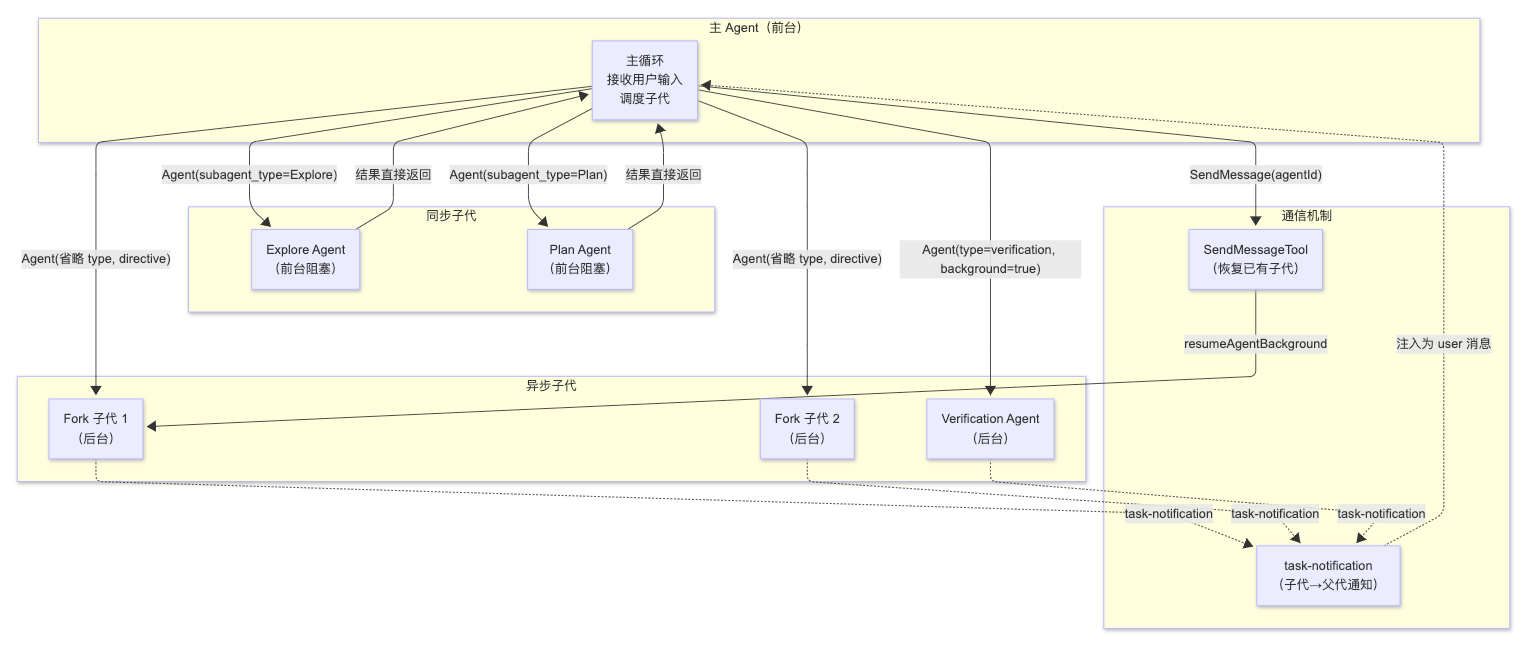
- 多Agent编排架构:主 Agent 负责判断任务怎么分配;短任务用同步子 Agent,结果直接返回;长任务用异步后台 Agent,后台执行并通过通知回传;Fork 让子 Agent 继承上下文;Resume 让已有子 Agent 能继续执行;SendMessage 负责补充指令;task-notification 负责完成通知。
- CC的检索设计:grep(no 向量召回rag)。原因:
- 两个核心原因:无需预建索引,每次直接用 Grep 搜磁盘上的实时文件,零启动延迟、零维护成本、不存在索引过期问题
- 代码搜索适合grep,因为大量关键词是类名/方法名/变量名,精确字符串匹配更快
- 多轮grep/read容易上下文膨胀:
- Prompt cache:复用相同前缀(如system prompt),成本优化&推理更快;
- Auto-compaction:快触达窗口上限时用 LLM 摘要压缩旧历史;
- 子 agent 隔离:大量中间搜索结果留在子 agent 上下文,主对话只拿结论。
- 上下文压缩:参考
cc-src_2026-03-31/services/compact/prompt.ts中的BASE_COMPACT_PROMPT提示词,主要是要求保留用户主要请求和意图、关键技术、文件代码、历史错误和修复、问题解决、所有用户信息、待处理任务、当前工作、下一步(可选)等
文章目录
一、整体架构
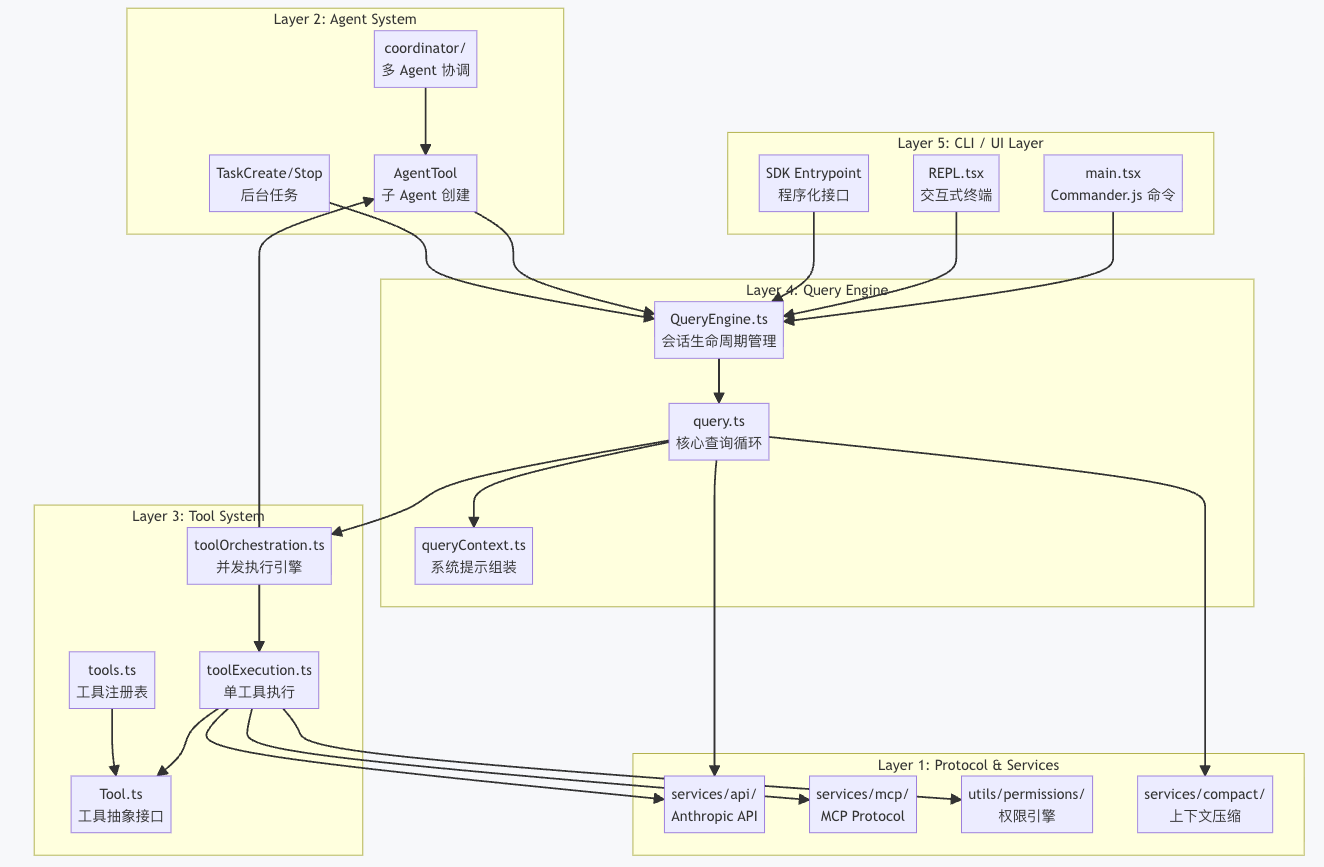
Layer 5 —— CLI / UI 层:负责命令行参数解析、终端渲染和用户交互。main.tsx 使用 Commander.js 定义了完整的 CLI 接口,REPL.tsx 提供交互式终端体验。SDK 入口则为程序化调用提供接口。
Layer 4 —— Query Engine 层:这是系统的大脑。QueryEngine 管理整个对话的生命周期状态,query() 函数实现核心的 API 调用 - 工具执行循环。
Layer 3 —— Tool System 层:定义了工具的抽象接口和执行引擎。toolOrchestration.ts 负责并发控制,将工具调用分为"并发安全"和"串行执行"两类:
// src/services/tools/toolOrchestration.ts
export async function* runTools(
  toolUseMessages: ToolUseBlock[],
  assistantMessages: AssistantMessage[],
  canUseTool: CanUseToolFn,
  toolUseContext: ToolUseContext,
): AsyncGenerator<MessageUpdate, void> {
  let currentContext = toolUseContext
  for (const { isConcurrencySafe, blocks } of partitionToolCalls(
    toolUseMessages,
    currentContext,
  )) {
    if (isConcurrencySafe) {
      // 并发安全的工具(如 Glob、Grep、FileRead)并行执行
      for await (const update of runToolsConcurrently(
        blocks, assistantMessages, canUseTool, currentContext,
      )) {
        yield { message: update.message, newContext: currentContext }
      }
    }
    // 非并发安全的工具串行执行
    // ...
  }
}
Layer 2 —— Agent System 层:支持 Agent 嵌套和任务管理。AgentTool 可以创建子 Agent,每个子 Agent 拥有独立的 QueryEngine 实例,实现递归式的任务分解。
Layer 1 —— Protocol & Services 层:与外部世界交互的基础设施。包括 Anthropic API 客户端、MCP 协议实现、权限引擎和上下文压缩服务。
二、主agent和子agent
1、Agent定义
一个 Agent 可以用 Markdown 文件定义,frontmatter 写元信息,正文写 system prompt。比如 name、description、tools、model、permissionMode、maxTurns、memory、mcpServers 等。
本质是:用配置描述一个 Agent 的身份、能力边界和运行方式。
2、5个子Agent
1、GeneralPurpose:万能工兵
默认通用子 Agent,适合复杂问题研究、代码搜索、多步骤任务执行。
特点是工具权限最广,基本可以用所有工具。
适合:任务不明确、需要综合处理时兜底。
2、Explore:快速侦察兵
专门做代码/项目探索,只读、不改文件,强调快。
会用搜索、读取、Bash 等工具快速摸清代码结构。
适合:先搞清楚“代码在哪、逻辑在哪、相关文件有哪些”。
3、Plan:架构规划师
专门负责制定实施方案,不直接改代码。
它会基于代码结构和需求,输出修改计划、关键文件、实现步骤。
适合:动手前先规划,避免 Agent 上来就乱改。
4、Claude Code Guide:使用指南助手
专门回答 Claude Code 自身怎么用。
它能结合当前配置、Skill、Agent、MCP 等信息,给出使用建议。
适合:问“某个功能怎么用、某个配置怎么写、MCP/Skill/Agent 怎么接”。
5、Verification:对抗性验证者
专门验证实现是否真的正确,只读、后台运行、不改文件。
它不是帮你“确认没问题”,而是主动找漏洞、跑检查、尝试证明实现有问题。
适合:代码改完后做独立验证,检查测试是否充分、逻辑是否有隐藏 bug。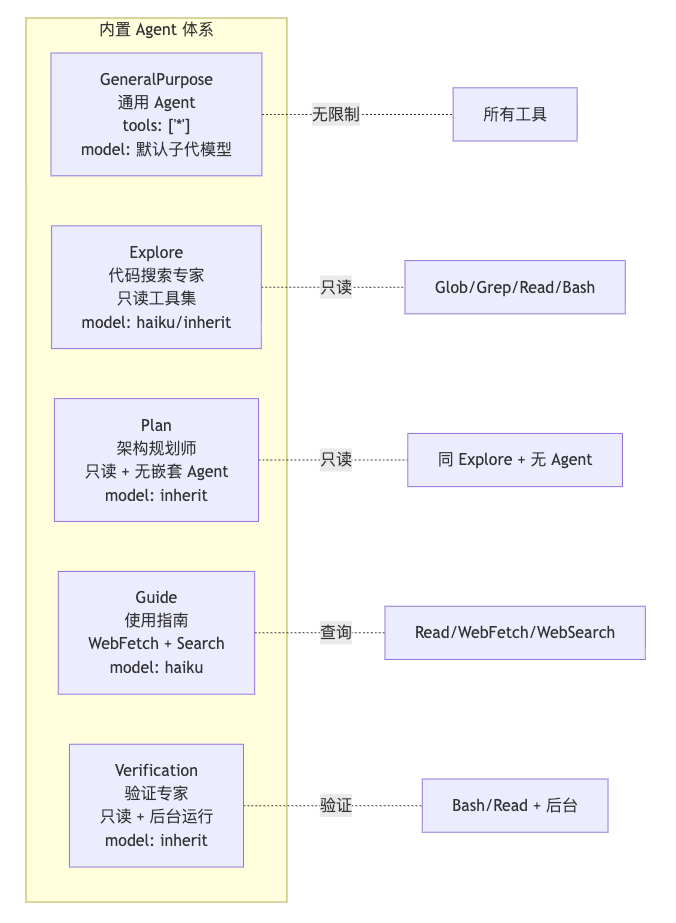
每个子Agent拥有的工具不同,是通过resolveAgentTools对全局工具集中逐步筛选:
所有工具(100个)
    ↓ 第一层:系统级过滤
    移除危险工具(如 TodoWrite)
    自定义 agent → 再多移除几个敏感内部工具
    异步 agent → 只剩白名单里的少数工具
    剩 60 个

    ↓ 第二层:agent 自己声明的配置
    disallowedTools: [Write, Edit]  → 再移除这几个
    tools: [Glob, Grep, Read]       → 只保留这几个
    剩 3 个

最终 agent 只能用这 3 个工具
安全隔离,防止越权,比如Explore Agent进行如下配置,Explore Agent 最终只有只读工具(Glob/Grep/Read/Bash),不能做任何写操作,也不能套娃调用其他 agent:
disallowedTools:
  - Agent    # 不能派生子 agent
  - Write    # 不能写文件
  - Edit     # 不能改文件
基础过滤层代码参考(根据agent类型和运行模式进行裁剪工具列表):
// src/tools/AgentTool/agentToolUtils.ts

export function filterToolsForAgent({
  tools, isBuiltIn, isAsync = false, permissionMode,
}: { tools: Tools; isBuiltIn: boolean; isAsync?: boolean;
     permissionMode?: PermissionMode }): Tools {
  return tools.filter(tool => {
    // MCP 工具始终放行
    if (tool.name.startsWith('mcp__')) return true

    // Plan 模式特殊放行 ExitPlanMode
    if (toolMatchesName(tool, EXIT_PLAN_MODE_V2_TOOL_NAME)
        && permissionMode === 'plan') return true

    // 全局禁止列表(如 TodoWrite、某些内部工具)
    if (ALL_AGENT_DISALLOWED_TOOLS.has(tool.name)) return false

    // 自定义 Agent 额外禁止列表
    if (!isBuiltIn && CUSTOM_AGENT_DISALLOWED_TOOLS.has(tool.name)) return false

    // 异步 Agent 只能使用白名单工具
    if (isAsync && !ASYNC_AGENT_ALLOWED_TOOLS.has(tool.name)) {
      // 特例:进程内队友可以使用 Agent 工具(spawn 同步子代)
      if (isAgentSwarmsEnabled() && isInProcessTeammate()) {
        if (toolMatchesName(tool, AGENT_TOOL_NAME)) return true
        if (IN_PROCESS_TEAMMATE_ALLOWED_TOOLS.has(tool.name)) return true
      }
      return false
    }
    return true
  })
}
3、多Agent编排架构
主 Agent 负责判断任务怎么分配:
- 短任务用同步子 Agent,结果直接返回;
- 长任务用异步后台 Agent,后台执行并通过通知回传;
Fork 让子 Agent 继承上下文;
Resume 让已有子 Agent 能继续执行(后面主 Agent 还可以把这个已有后台 Agent 重新唤醒,让它基于之前状态继续执行。);
SendMessage 负责补充指令;
task-notification 负责完成通知。
主 Agent 像调度中心;Explore/Plan 是即时助手;Fork/Verification 是后台工人;SendMessageTool 是通信管道;task-notification 是任务完成通知。
| 类型 | 图中代表 | 是否阻塞主 Agent | 结果怎么回来 | 作用 |
|---|---|---|---|---|
| 同步子 Agent | Explore、Plan | 阻塞 | 直接返回 | 快速探索、制定计划 |
| 异步子 Agent | Fork 子代、Verification | 不阻塞 | task-notification | 后台并行执行、验证 |
| 通信恢复机制 | SendMessageTool | 不一定 | resume + notification | 给已有后台 Agent 继续发消息 |
三、CC的检索设计:grep
Claude Code 不用 RAG,不用 embedding,不建索引。 核心搜索靠 LLM 驱动 Grep (Grep 是 Unix 下的文本搜索工具,给一个正则表达式,它就在文件里逐行找匹配)。
Claude Code 的创建者 Boris Cherny:“Early versions of Claude Code used RAG + a local vector db, but we found pretty quickly that agentic search generally works better. (早期版本的 Claude 代码使用了 RAG 加上本地向量数据库,但我们很快发现,智能体式的搜索通常效果更好)”
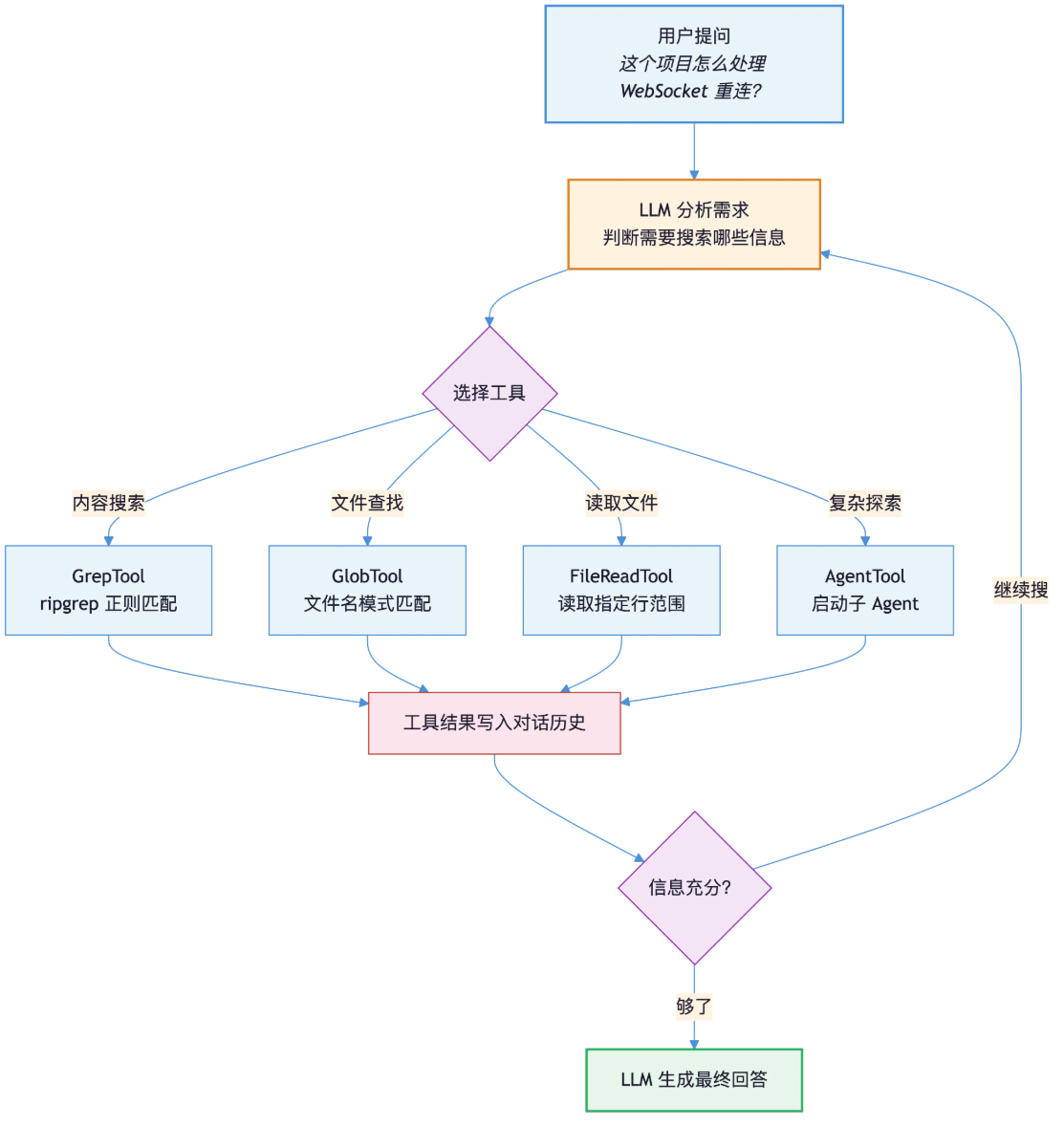
Claude Code 走的是按需路线:没有索引、没有预处理,LLM 在对话里实时决定用什么关键词 grep、读哪些文件,所有语义理解都由模型自己在循环中完成。
| 工具 | 底层实现 | 作用 |
|---|---|---|
| GrepTool | ripgrep (rg) | 正则搜索文件内容 |
| GlobTool | glob 模式匹配 | 按文件名/路径模式查找文件 |
| FileReadTool | Node.js fs | 读取指定文件的指定行范围 |
| AgentTool | 独立 LLM 对话 | 启动子 agent 做多步探索 |
Claude Code 的 GrepTool底层不是老 grep,而是 ripgrep (rg):
- 五层过滤:.gitignore剪枝 → path限制 → glob文件类型过滤 → 二进制检测 → 内容正则匹配,层层把文件数砍下来。
- 加速手段:多线程并行、SIMD 向量化匹配、Boyer-Moore 跳转、mmap 零拷贝、操作系统 Page Cache(常用代码常驻内存)。
四、上下文压缩
参考cc-src_2026-03-31/services/compact/prompt.ts中的BASE_COMPACT_PROMPT提示词,主要是要求保留用户主要请求和意图、关键技术、文件代码、历史错误和修复、问题解决、所有用户信息、待处理任务、当前工作、下一步(可选)等:
const BASE_COMPACT_PROMPT = `Your task is to create a detailed summary of the conversation so far, paying close attention to the user's explicit requests and your previous actions.
This summary should be thorough in capturing technical details, code patterns, and architectural decisions that would be essential for continuing development work without losing context.

${DETAILED_ANALYSIS_INSTRUCTION_BASE}

Your summary should include the following sections:

1. Primary Request and Intent: Capture all of the user's explicit requests and intents in detail
2. Key Technical Concepts: List all important technical concepts, technologies, and frameworks discussed.
3. Files and Code Sections: Enumerate specific files and code sections examined, modified, or created. Pay special attention to the most recent messages and include full code snippets where applicable and include a summary of why this file read or edit is important.
4. Errors and fixes: List all errors that you ran into, and how you fixed them. Pay special attention to specific user feedback that you received, especially if the user told you to do something differently.
5. Problem Solving: Document problems solved and any ongoing troubleshooting efforts.
6. All user messages: List ALL user messages that are not tool results. These are critical for understanding the users' feedback and changing intent.
7. Pending Tasks: Outline any pending tasks that you have explicitly been asked to work on.
8. Current Work: Describe in detail precisely what was being worked on immediately before this summary request, paying special attention to the most recent messages from both user and assistant. Include file names and code snippets where applicable.
9. Optional Next Step: List the next step that you will take that is related to the most recent work you were doing. IMPORTANT: ensure that this step is DIRECTLY in line with the user's most recent explicit requests, and the task you were working on immediately before this summary request. If your last task was concluded, then only list next steps if they are explicitly in line with the users request. Do not start on tangential requests or really old requests that were already completed without confirming with the user first.
                       If there is a next step, include direct quotes from the most recent conversation showing exactly what task you were working on and where you left off. This should be verbatim to ensure there's no drift in task interpretation.

Here's an example of how your output should be structured:

<example>
<analysis>
[Your thought process, ensuring all points are covered thoroughly and accurately]
</analysis>

<summary>
1. Primary Request and Intent:
   [Detailed description]

2. Key Technical Concepts:
   - [Concept 1]
   - [Concept 2]
   - [...]

3. Files and Code Sections:
   - [File Name 1]
      - [Summary of why this file is important]
      - [Summary of the changes made to this file, if any]
      - [Important Code Snippet]
   - [File Name 2]
      - [Important Code Snippet]
   - [...]

4. Errors and fixes:
    - [Detailed description of error 1]:
      - [How you fixed the error]
      - [User feedback on the error if any]
    - [...]

5. Problem Solving:
   [Description of solved problems and ongoing troubleshooting]

6. All user messages:
    - [Detailed non tool use user message]
    - [...]

7. Pending Tasks:
   - [Task 1]
   - [Task 2]
   - [...]

8. Current Work:
   [Precise description of current work]

9. Optional Next Step:
   [Optional Next step to take]

</summary>
</example>

Please provide your summary based on the conversation so far, following this structure and ensuring precision and thoroughness in your response.

There may be additional summarization instructions provided in the included context. If so, remember to follow these instructions when creating the above summary. Examples of instructions include:
<example>
## Compact Instructions
When summarizing the conversation focus on typescript code changes and also remember the mistakes you made and how you fixed them.
</example>

<example>
# Summary instructions
When you are using compact - please focus on test output and code changes. Include file reads verbatim.
</example>
`
翻译了一个中文版本供参考:
你的任务是创建一份详细的对话总结,迄今为止。请密切关注用户的明确请求和你之前的行动。
这份总结应该详尽地捕捉技术细节、代码模式和架构决策,这些对于继续开发工作而不失去上下文至关重要。

[分析指令详见下方]

你的总结应该包括以下几个部分:

1. 主要请求和意图:详细捕捉用户的所有明确请求和意图
2. 关键技术概念:列出讨论过的所有重要技术概念、技术和框架
3. 文件和代码部分:列举检查、修改或创建的特定文件和代码部分。特别注意最近的消息,包括完整的代码片段(如适用),并总结为什么这个文件的读取或编辑很重要
4. 错误和修复:列出你遇到的所有错误以及如何修复的。特别注意你收到的具体用户反馈,尤其是当用户告诉你做得不同的时候
5. 问题解决:记录已解决的问题以及任何正在进行的故障排除工作
6. 所有用户消息:列出所有不是工具结果的用户消息。这些对于理解用户的反馈和意图变化至关重要
7. 待处理任务:概述你被明确要求从事的任何待处理任务
8. 当前工作:详细描述在该总结请求之前立即进行的工作。特别注意用户和助手最近的消息。包括文件名和代码片段(如适用)
9. 可选的下一步:列出与你所进行的最近工作相关的下一步。重要提示:确保这一步直接与用户最近的明确请求以及你在总结请求前立即进行的任务一致。如果你的上一个任务已完成,则仅当下一步明确符合用户请求时才列出。不要在没有与用户确认的情况下开始处理切线请求或已完成的非常旧的请求。如果有下一步,请从最近的对话中包含直接引用,准确显示你正在处理的任务以及你停止的地方。这应该是逐字逐句的,以确保任务解释没有漂移。

输出结构示例:

<example>
<analysis>
[你的思考过程,确保所有观点都被彻底准确地覆盖]
</analysis>

<summary>
1. 主要请求和意图:
   [详细描述]

2. 关键技术概念:
   - [概念 1]
   - [概念 2]
   - [...]

3. 文件和代码部分:
   - [文件名 1]
      - [为什么这个文件很重要的总结]
      - [对这个文件所做更改的总结,如有的话]
      - [重要代码片段]
   - [文件名 2]
      - [重要代码片段]
   - [...]

4. 错误和修复:
    - [错误 1 的详细描述]:
      - [你如何修复该错误]
      - [用户对该错误的反馈,如有的话]
    - [...]

5. 问题解决:
   [已解决问题的描述和正在进行的故障排除]

6. 所有用户消息:
    - [详细的非工具使用用户消息]
    - [...]

7. 待处理任务:
   - [任务 1]
   - [任务 2]
   - [...]

8. 当前工作:
   [当前工作的精确描述]

9. 可选的下一步:
   [可选的下一步]

</summary>
</example>

请根据迄今为止的对话提供你的总结,遵循此结构并确保你的回应的精确性和彻底性。

可能会在包含的上下文中提供额外的总结指令。如果是这样,请记住在创建上述总结时遵循这些指令。指令示例包括:

<example>
## 压缩指令
总结对话时,要专注于 TypeScript 代码更改,并记住你犯的错误以及如何修复它们。
</example>

<example>
# 总结指令
当使用压缩时 - 请专注于测试输出和代码更改。逐字包含文件读取。
</example>
五、值得学习的设计点
1、AsyncGenerator:全链路流式管道
Claude Code 不是等模型和工具全部执行完再返回,而是边生成、边执行、边展示进度。
核心是 AsyncGenerator,它可以持续产出中间结果:模型 token、工具调用请求、工具执行进度、工具返回结果、最终回答。
通俗说:不是“做完再说”,而是“边做边给你看”。这对 CLI Agent 很重要,因为读文件、跑命令、改代码、执行测试都可能耗时,流式反馈能避免用户觉得系统卡死。
2、工具系统:不是简单 function call
Claude Code 的工具不是普通函数,而是完整工程模块。
一个工具通常包含:输入参数 schema、权限检查、执行逻辑、结果结构、错误处理、UI 展示、进度展示、是否允许并发、是否会修改环境。
比如读文件、搜索代码、执行 Bash、编辑文件,风险和行为都不同。系统需要判断:能不能并发、是否改环境、是否要确认、失败后怎么展示、结果怎么回填上下文。
所以它不是“模型随便调函数”,而是“模型调用可管理、可审计、可控风险的工具组件”。
3、权限系统:Agent 能力越强,安全越重要
Claude Code 能读文件、写文件、跑 Bash、调用外部工具,所以必须有权限系统。
基本流程是:模型提出动作,系统判断风险,再决定允许、询问用户、拒绝,或交给后续权限逻辑判断。
常见结果可以理解为:allow 直接允许,ask 询问用户,deny 拒绝执行,passthrough 继续走通用权限判断。
比如读取普通文件可能直接允许;修改代码可能需要确认;删除大量文件、执行高风险命令就应该拒绝或强确认。
关键点:LLM 负责提出计划,系统负责管控边界。可靠 Agent 不是给模型无限权限,而是在模型和真实环境之间加安全闸门。
4、Sub-Agent / Skill:复杂任务拆开做
Claude Code 不是让主 Agent 什么都自己干,而是支持把复杂任务拆成子任务,再交给子 Agent 或 Skill 完成。
简单任务可以直接做,比如读文件并总结。复杂任务通常要拆解,比如重构项目、补测试、分析报错,可能需要阅读结构、定位代码、修改实现、运行测试、修复错误、汇总变更。
核心思想:主 Agent 负责规划和调度,子 Agent / Skill 负责局部执行,最后由主 Agent 汇总结果。
Skill 更像可复用能力包,比如代码搜索、测试修复、文档总结、依赖分析、Git 操作等。
价值:不要把所有能力塞进一个巨大 prompt,而是把稳定能力沉淀成 Skill,把复杂任务拆成可控流程。
5、工程优化:CLI 要快、稳、可发布
Claude Code 不是 demo,而是工程产品,所以除了模型调用,还要考虑性能、体验、安全、状态和发布。
项目里能看到很多工程化设计:Bun 提升启动和执行性能,React + Ink 做终端 UI,Zod 做参数校验,MCP 接外部工具生态,Feature Flag 控制功能开关和发布范围。
同时还要处理会话保存、上下文恢复、上下文压缩、错误恢复、长任务进度展示等问题。
关键点:Agent 不是只有模型能力,还包括工具体系、权限系统、状态管理、UI 体验和工程发布。
Reference
[1] https://github.com/sawzhang/deep-dive-claude-code
[2] RAG已死?不,是Grep回归了!
[3] claude官方文档:https://platform.claude.com/docs/en/build-with-claude/prompt-caching?utm_source=chatgpt.com
[4] 工具内容管理:https://platform.claude.com/docs/en/agents-and-tools/tool-use/manage-tool-context
[5] 上下文管理:https://platform.claude.com/docs/en/build-with-claude/context-windows

AtomGit 是由开放原子开源基金会联合 CSDN 等生态伙伴共同推出的新一代开源与人工智能协作平台。平台坚持“开放、中立、公益”的理念,把代码托管、模型共享、数据集托管、智能体开发体验和算力服务整合在一起,为开发者提供从开发、训练到部署的一站式体验。
更多推荐

 15
15 0
0- 0


 已为社区贡献21条内容

所有评论(0)