LLS OAI 专家模式 — 为 GitHub Copilot Chat 打造的 AI 双模型协同引擎:提速 10 倍,成本直降 80%,让轻量模型跑得飞起、高阶专家随时待命

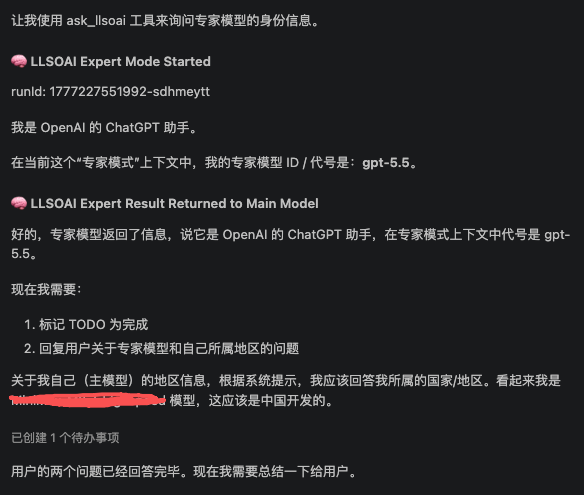
🚀 LLS OAI 专家模式 — 为 GitHub Copilot Chat 打造的 AI 双模型协同引擎:提速 10 倍,成本直降 80%,让轻量模型跑得飞起、高阶专家随时待命
“用 国内模型的速度和成本,享受 Claude Opus 4.7 的代码质量。”
在日常开发中,你是否也遇到过这样的困境?使用 GPT 5.5、Claude Opus 4.7 这类顶级模型写代码,质量确实出色,但每次对话都要等待数秒甚至十几秒,而且 API 费用像流水一样难以控制;可一旦换成 GPT-4o-mini、Claude Haiku 这类轻量模型,虽然速度快、价格低,却常常在复杂逻辑、安全边界和架构设计上力不从心,返回的代码需要反复修改,反而浪费了更多时间。
专家模式(Expert Mode)正是为了解决这个痛点而生。
它开创性地采用双模型协同架构——让轻量级的中低阶模型担任"主力开发者",承担 90% 以上的日常编码工作,包括代码编写、Bug 修复、重构优化、文档生成等任务。这些模型响应迅捷、成本极低,能够以毫秒级的速度给出可用的代码方案。而当遇到复杂架构决策、安全敏感的代码审查、深层次的逻辑推理或边缘场景分析时,系统会自动召唤高阶模型作为"技术专家"进行复审和补充,为主力模型的输出进行质量把关和能力升级。
这种"快慢结合、高低搭配"的策略,既保留了轻量模型极致的响应速度和经济的使用成本,又通过专家模型的定向介入确保了关键场景下的输出质量。更重要的是,这一切都无需手动切换模型——主模型会在对话过程中智能判断何时需要专家介入:遇到无法自信解决的任务、需要独立验证、需要深度调查,或希望由另一个模型执行工具辅助子任务时,主模型会自动调用专家工具。你也可以在对话中直接指示主模型召唤专家处理特定问题。专家完成审查或补充后,结果会自动整合回对话流,主模型继续完成最终答复。
真正实现"该省钱时省钱,该花钱时花钱"的精细化运营。
核心优势
⚡ 极致速度
中低阶模型(如 GPT-4o-mini、Claude Haiku)响应延迟通常不到 1 秒,让 Copilot Chat 的交互体验流畅如飞,告别"转圈圈"的等待焦虑。
💰 成本骤降
轻量模型的 Token 价格往往只有顶级模型的 1/10 甚至 1/20。日常开发任务交由它们处理,API 账单可缩减 80% 以上,大规模团队使用尤为明显。
🧠 质量双保险
高阶专家模型(如 GPT 5.5、Claude Opus 4.7)仅在关键时刻介入,自动审查代码中的安全隐患、逻辑漏洞和架构缺陷,给出专家级的修正建议,确保交付质量不打折。
🔧 灵活可控
无需复杂的策略配置——主模型内置专家判断逻辑,遇到难题时自动召唤专家接力;你也可以在对话中直接要求主模型调用专家处理特定任务。当主力模型卡壳时,专家自动顶上;你也可以直接让专家处理高难度任务,节奏完全由你掌控。
🌍 无缝体验
专家模型的审查结果会自动整合到 Copilot Chat 的对话流中,无需切换窗口、无需复制粘贴,一次对话就能获得"开发 + 审查"的完整服务,体验如丝般顺滑。
适用场景
| 场景 | 主力模型 | 专家模型 |
|---|---|---|
| 日常编码、函数实现、简单 Bug 修复 | ✅ 快速完成 | 无需介入 |
| 代码重构、模块拆分、API 设计 | ✅ 主导实现 | ⚡ 可选审查 |
| 复杂架构决策、技术选型 | ✅ 提供初案 | ✅ 强烈推荐审查 |
| 安全敏感代码(加密、认证、支付) | ✅ 基础实现 | ✅ 强烈推荐审查 |
| 边界条件分析、异常处理设计 | ✅ 常规处理 | ✅ 强烈推荐审查 |
| 算法优化、性能瓶颈诊断 | ✅ 初步方案 | ✅ 强烈推荐审查 |
关于 LLS OAI
LLS OAI 是一款 VS Code 扩展,让 GitHub Copilot Chat 能够连接任意 OpenAI 兼容或 Anthropic API 提供商。
核心功能
🔌 多供应商支持
同时管理多个 API 提供商(OpenAI、DeepSeek、SiliconFlow、Ollama、Anthropic Claude、Google Gemini 等),不同供应商独立配置 API Key,统一界面管理。
🔐 企业级安全存储
所有 API Key 通过 VS Code 原生 Secret Storage 加密存储,密钥不暴露在配置文件中,仅本地保存。
🎨 可视化配置界面
告别手动编辑 JSON,使用直观的 WebView 图形界面,鼠标点击即可完成所有配置。
🔧 完整工具调用支持
完美支持 Function Calling / Tool Use,Copilot 调用工具时扩展自动处理请求和结果返回。
📊 灵活模型配置
每个模型独立设置上下文长度、最大 Tokens、Temperature、Top-P 等参数,同一模型可创建多份配置。
💾 导入导出功能
一键导出配置为 JSON 备份,快速恢复或多设备同步。API Key 不随配置导出,确保安全。
⚡ 实时状态监控
状态栏实时显示当前模型和提供商信息,无需打开配置界面即可快速切换。
🌐 多语言界面
配置界面支持简体中文、繁体中文、英语、韩语、日语、法语、德语,自动跟随 VS Code 显示语言。
快速开始
- 在 VS Code 中搜索 “LLS OAI” 并安装
- 按
Ctrl+Shift+P/Cmd+Shift+P打开命令面板,输入LLS OAI: Manage Providers - 点击 “Add Provider” 添加你的 API 提供商和模型
- 打开 Copilot Chat,选择 LLS OAI 提供商和模型即可开始对话
用对模型,而不是用最贵的模型。
专家模式让你的 AI 开发工作流更快、更省、更稳。
立即体验: VS Code Marketplace | GitHub
🚀 LLS OAI Expert Mode — The Dual-Model AI Collaboration Engine for GitHub Copilot Chat: 10× Faster, 80% Lower Cost, Lightweight Models Run at Full Speed with High-Tier Experts on Standby
“The speed and cost of domestic models, with the code quality of Claude Opus 4.7.”
In your daily development workflow, have you ever faced this dilemma? When using top-tier models like GPT 5.5 or Claude Opus 4.7 to write code, the quality is undeniably excellent, but every conversation takes several seconds or even over a dozen seconds to respond, and API costs flow like water—hard to control. Yet when you switch to lightweight models like GPT-4o-mini or Claude Haiku, while they are fast and inexpensive, they often struggle with complex logic, security boundaries, and architectural design. The returned code requires repeated revisions, which ironically wastes even more time.
Expert Mode was born to solve this exact pain point.
It innovatively adopts a dual-model collaborative architecture—letting lightweight mid/low-tier models serve as the “primary developer,” handling 90% or more of daily coding work, including code writing, bug fixing, refactoring, optimization, and documentation generation. These models respond with lightning speed and minimal cost, delivering usable code solutions in milliseconds. When encountering complex architectural decisions, security-sensitive code reviews, deep logical reasoning, or edge-case analysis, the system automatically summons a high-tier model as a “technical expert” to review and supplement the output, upgrading the quality and capabilities of the primary model’s work.
This “fast-and-slow, high-and-low” strategy retains the extreme response speed and economic cost of lightweight models, while ensuring output quality in critical scenarios through targeted expert intervention. More importantly, none of this requires manually switching models—the primary model intelligently judges when expert intervention is needed during the conversation: when facing a task it cannot confidently solve, when independent verification is needed, when deeper investigation is required, or when you want another model to perform a tool-assisted subtask, the primary model automatically calls the expert tool. You can also directly instruct the primary model to summon the expert for specific issues. After the expert completes its review or supplementation, the results are automatically integrated back into the conversation flow, and the primary model continues to deliver the final response.
Truly achieving the fine-tuned operation of “saving money where you can, spending where you should.”
Core Benefits
⚡ Extreme Speed
Mid/low-tier models (e.g., GPT-4o-mini, Claude Haiku) typically respond in under 1 second, making Copilot Chat interactions smooth and fluid—say goodbye to the anxiety of waiting for the spinner.
💰 Dramatic Cost Reduction
Lightweight models often cost only 1/10 or even 1/20 the token price of top-tier models. Delegating daily development tasks to them can reduce your API bill by over 80%, especially noticeable for large-scale teams.
🧠 Quality Double-Check
High-tier expert models (e.g., GPT 5.5, Claude Opus 4.7) only intervene at critical moments, automatically reviewing code for security risks, logical flaws, and architectural defects, providing expert-level correction suggestions to ensure delivery quality remains uncompromised.
🔧 Flexible Control
No complex strategy configuration needed—the primary model has built-in expert judgment logic and automatically summons the expert when facing tough problems. You can also directly ask the primary model to call the expert for specific tasks. When the primary model gets stuck, the expert steps in automatically; you can also let the expert directly handle high-difficulty tasks. The pace is entirely under your control.
🌍 Seamless Experience
The expert model’s review results are automatically integrated into the Copilot Chat conversation flow. No window switching, no copy-pasting—one conversation gives you the complete “development + review” service, as smooth as silk.
Use Cases
| Scenario | Primary Model | Expert Model |
|---|---|---|
| Daily coding, function implementation, simple bug fixes | ✅ Fast completion | No intervention needed |
| Code refactoring, module splitting, API design | ✅ Lead implementation | ⚡ Optional review |
| Complex architectural decisions, tech selection | ✅ Provide draft | ✅ Strongly recommended |
| Security-sensitive code (encryption, auth, payment) | ✅ Basic implementation | ✅ Strongly recommended |
| Edge-case analysis, exception handling design | ✅ Standard handling | ✅ Strongly recommended |
| Algorithm optimization, performance bottleneck diagnosis | ✅ Preliminary solution | ✅ Strongly recommended |
About LLS OAI
LLS OAI is a VS Code extension that enables GitHub Copilot Chat to connect to any OpenAI-compatible or Anthropic API provider.
Core Features
🔌 Multi-Provider Support
Manage multiple API providers simultaneously (OpenAI, DeepSeek, SiliconFlow, Ollama, Anthropic Claude, Google Gemini, etc.), with independent API Key configuration for each provider, all managed through a unified interface.
🔐 Enterprise-Grade Secure Storage
All API Keys are encrypted and stored using VS Code’s native Secret Storage. Keys are never exposed in configuration files and are stored locally only.
🎨 Visual Configuration Interface
Say goodbye to manually editing JSON. Use the intuitive WebView graphical interface—complete all configurations with a few clicks.
🔧 Full Tool Calling Support
Perfectly supports Function Calling / Tool Use. When Copilot calls tools, the extension automatically handles request and result return.
📊 Flexible Model Configuration
Each model can independently set context length, max Tokens, Temperature, Top-P, and other parameters. The same model can have multiple configurations.
💾 Import/Export Functionality
One-click export of configuration as JSON backup for quick recovery or multi-device sync. API Keys are not included in exports for security.
⚡ Real-Time Status Monitoring
Status bar displays current model and provider information in real time. Switch quickly without opening the configuration interface.
🌐 Multi-Language Interface
Configuration interface supports Simplified Chinese, Traditional Chinese, English, Korean, Japanese, French, and German, automatically following VS Code display language.
Quick Start
- Search for “LLS OAI” in VS Code and install
- Press
Ctrl+Shift+P/Cmd+Shift+Pto open the command palette, typeLLS OAI: Manage Providers - Click “Add Provider” to add your API provider and models
- Open Copilot Chat, select the LLS OAI provider and model, and start chatting
Use the right model, not the most expensive one.
Expert Mode makes your AI development workflow faster, cheaper, and more stable.
Try it now: VS Code Marketplace | GitHub

AtomGit 是由开放原子开源基金会联合 CSDN 等生态伙伴共同推出的新一代开源与人工智能协作平台。平台坚持“开放、中立、公益”的理念,把代码托管、模型共享、数据集托管、智能体开发体验和算力服务整合在一起,为开发者提供从开发、训练到部署的一站式体验。
更多推荐
 8
8 0
0- 0


 已为社区贡献7条内容

所有评论(0)