蓝迪哥玩转Ai(7)---FPGA本地算力研究:LLM 推理基石与实践准备
蓝迪哥玩转Ai(7)—FPGA本地算力研究:LLM 推理基石与实践准备
1.1 什么是 LLM 推理?核心概念与应用场景
定义:
大型语言模型(Large Language Models, LLMs)推理(Inference)是指利用已经过大规模数据训练好的 LLM,针对给定的输入(通常称为 Prompt),生成符合预期或任务要求的输出的过程。简单来说,推理就是让训练好的模型"思考"并"回答"我们的问题或完成我们提出的任务。
与训练的对比:
特征 训练 (Training) 推理 (Inference)
目标 学习数据中的模式和规律,调整模型参数,使其能够完成特定任务。 利用已学习到的模型参数,根据输入生成输出。
数据 大规模的标注或无标注数据集。 单个或批量的输入 Prompt。
计算资源 通常需要大量的计算资源(GPU/TPU),耗时较长。 对计算资源的需求相对较低,通常更注重速度和效率。
参数更新 模型参数在训练过程中不断更新。 模型参数在推理过程中保持不变。
主要过程 前向传播计算损失、反向传播更新梯度、参数优化。 仅进行前向传播,根据输入计算输出。
企业级应用案例:
LLM 推理技术在企业级应用中展现出巨大的潜力,以下是一些典型的例子:
• 智能客服:利用 LLM 理解用户意图,提供即时、个性化的客户支持,自动回复常见问题,降低人工客服压力。
• 知识检索与管理:构建企业内部知识库,通过自然语言查询快速获取所需信息,提升员工效率。
• 自动化报告生成:基于结构化或非结构化数据,自动生成业务报告、市场分析等,减少人工撰写时间。
• 合同分析与审核:快速分析合同条款,识别潜在风险,提高合同审核效率和准确性。
• 行业分析与趋势预测:分析大量的行业报告、新闻资讯等,提取关键信息,预测市场趋势,为企业决策提供支持。
• 内容创作与营销文案生成:自动生成产品描述、营销邮件、社交媒体文案等,提高内容生产效率。
• 代码辅助与生成:帮助开发人员编写代码,提供代码建议和自动补全,提高开发效率和代码质量。
1.2 Transformer 模型架构回顾(推理关键组件)
Transformer 模型是现代 LLM 的基石。理解其在推理过程中的工作方式对于优化和应用 LLM 至关重要。
Decoder-only 模型(例如 GPT 系列、Qwen 系列):
Decoder-only 模型主要用于生成任务。其推理过程是自回归的,意味着模型一次生成一个 token,并将已生成的 token 作为下一步生成的输入,循环往复直到生成结束符或达到预设的最大长度。
在推理过程中,当输入一个 Prompt 时,首先会被转换为 token 序列。这些 token 会依次通过 Decoder 的各个层。每一层都包含自注意力机制和前馈神经网络。
数据流:
输入的 token 序列首先进入自注意力层。在自注意力层中,每个 token 会与其他所有 token(包括自身)进行交互,计算出一个加权平均的表示。这个过程涉及到计算每个 token 的 Query、Key 和 Value 向量,然后计算 Query 和 Key 之间的相似度(通常使用点积),得到注意力权重。这些权重用于加权 Value 向量,最终得到每个 token 的上下文表示。为了保证自回归特性,Decoder 中的自注意力会进行 Masking,防止模型在预测当前位置的 token 时"看到"未来的信息。
计算方式:
自注意力机制的核心计算可以概括为:
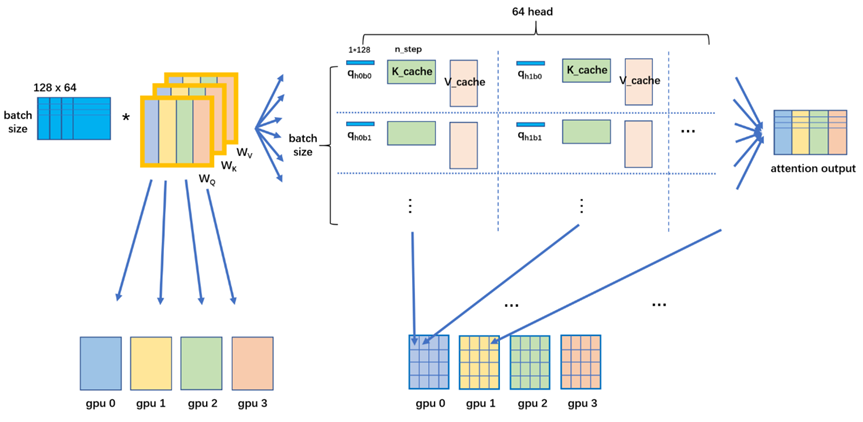
- 将输入 token 的嵌入 (Embedding) 分别乘以权重矩阵 WQ, WK, WV 得到 Query (Q)、Key (K)、Value (V) 向量。
- 计算注意力分数:Attention(Q, K, V) = softmax(QK^T/dk)V,其中 dk 是 Key 向量的维度。
- Masked Self-Attention 会在计算 softmax 之前对注意力分数进行 Masking,将未来位置的注意力权重设置为负无穷大。
Encoder-Decoder 模型(例如 T5):
Encoder-Decoder 模型通常用于序列到序列的任务。其推理过程分为两个阶段:
• Encoder 阶段:Encoder 处理输入的 Prompt,将其编码成一系列的上下文向量,这些向量蕴含了输入序列的语义信息。
• Decoder 阶段:Decoder 接收 Encoder 输出的上下文向量,并以自回归的方式生成目标序列。Decoder 的每一层包含 Masked Self-Attention、Encoder-Decoder Attention 和前馈神经网络。
自注意力机制在推理中的作用:
• 上下文理解:自注意力机制允许模型在生成每个 token 时,考虑到输入 Prompt 中所有相关的 token,以及已经生成的序列中的所有 token。
• 长距离依赖:传统的循环神经网络在处理长序列时容易出现信息衰减的问题。而自注意力机制可以直接计算序列中任意两个位置之间的依赖关系,无论它们相隔多远。
• 生成连贯性:通过在每一步都关注之前生成的内容,自注意力机制确保了生成文本的连贯性和逻辑性。
1.3 推理的基本流程与环境搭建
使用 LLM 进行推理的基本流程通常包括以下几个步骤:
- 输入(Prompt)的 Tokenization:将输入的文本 Prompt 转换为模型能够理解的数字表示(tokens)。
- 模型加载:将预训练好的 LLM 模型加载到内存中,通常会加载模型的权重参数。
- 前向传播:将 tokenized 的输入送入模型,模型根据 Prompt 和自身的参数进行计算,生成输出的 logits(未归一化的概率)。
- 解码(Decoding):根据模型输出的 logits,按照某种策略(例如贪婪解码、采样等)选择最终的输出 token。
- 输出的 Detokenization:将模型输出的 tokens 转换回人类可读的文本。
环境搭建:
要开始使用 vLLM 进行 LLM 推理,需要搭建以下环境: - Python 安装:确保您的系统中安装了 Python 3.8 或更高版本。
- 常用库安装:使用 pip 安装必要的库,包括 PyTorch、Hugging Face Transformers 和 vLLM。
- GPU 配置:vLLM 依赖于 NVIDIA GPU 进行加速。
代码示例 - 输入(Prompt)的 Tokenization:
from transformers import AutoTokenizer
model_name = “Qwen/Qwen2.5-7B”
tokenizer = AutoTokenizer.from_pretrained(model_name)
prompt = “What is the capital of France?”
inputs = tokenizer(prompt)
input_ids = inputs[“input_ids”]
print(f"Tokenized input IDs: {input_ids}")
代码示例 - 模型加载(vLLM):
from vllm import LLM
model_name = “Qwen/Qwen2.5-7B”
llm = LLM(model=model_name)
prompt = “What is the capital of France?”
outputs = llm.generate(prompt)
for output in outputs:
generated_text = output.outputs[0].text
print(f"Generated text: {generated_text}“)
代码示例 - 输出的 Detokenization:
output_ids = outputs[0].outputs[0].token_ids
output_text = tokenizer.decode(output_ids, skip_special_tokens=True)
print(f"Detokenized output: {output_text}”)
1.4 推理性能指标与初步评估
评估 LLM 推理性能对于优化模型部署至关重要。以下是一些关键的性能指标及其测量方法(使用 vLLM):
• 延迟(Latency):指从输入 Prompt 到模型生成第一个输出 token 或完整输出序列所需的时间。
• 吞吐量(Throughput):指单位时间内模型能够处理的输入样本数量或生成的 token 数量。
• 内存占用(Memory Usage):指模型在推理过程中占用的 GPU 内存大小。
代码示例 - 延迟测量:
import time
from vllm import LLM
model_name = “Qwen/Qwen2.5-7B”
llm = LLM(model=model_name)
prompt = “Write a short story about a cat.”
start_time = time.time()
outputs = llm.generate(prompt)
end_time = time.time()
latency = (end_time - start_time) * 1000 # 毫秒
for output in outputs:
generated_text = output.outputs[0].text
print(f"Generated text: {generated_text}“)
print(f"Latency: {latency:.2f} ms”)
代码示例 - 吞吐量测量:
import time
from vllm import LLM
model_name = “Qwen/Qwen2.5-7B”
llm = LLM(model=model_name)
prompts = [“Write a short poem.”, “Translate ‘Hello’ to Spanish.”] * 10
start_time = time.time()
outputs = llm.generate(prompts)
end_time = time.time()
total_time = end_time - start_time
throughput_requests_per_second = len(prompts) / total_time
total_generated_tokens = sum(len(output.outputs[0].token_ids) for output in outputs)
throughput_tokens_per_second = total_generated_tokens / total_time
print(f"Throughput (requests/s): {throughput_requests_per_second:.2f}“)
print(f"Throughput (tokens/s): {throughput_tokens_per_second:.2f}”)
代码示例 - 内存占用测量:
import torch
from vllm import LLM
model_name = “Qwen/Qwen2.5-7B”
llm = LLM(model=model_name)
if torch.cuda.is_available():
memory_allocated = torch.cuda.max_memory_allocated() / (1024 ** 3)
print(f"Max GPU memory allocated: {memory_allocated:.2f} GB")
else:
print(“CUDA is not available.”)
影响推理性能的关键因素:
• 模型大小:更大的模型通常需要更多的计算和内存资源。
• 输入/输出序列长度:更长的序列会增加计算量。
• 硬件设备:GPU 的性能直接影响推理速度。
• Batch Size:同时处理多个请求可以提高吞吐量。
推理评估的其他重要指标:
• 准确性(Accuracy):在某些任务中(例如问答),需要评估模型输出的正确性。
• 公平性(Fairness):模型在不同群体上的表现是否一致,是否存在偏见。
• 鲁棒性(Robustness):模型在面对输入扰动或变化时的性能稳定性。
1.5 整体运行python代码如下:
#!/usr/bin/env python3
“”"
VLLM 测试脚本 - Ubuntu 22.04 + RTX 4090 GPU
用于测试 vLLM 的完整推理流程
“”"
import time
from transformers import AutoTokenizer
from vllm import LLM, SamplingParams
def test_basic_tokenization():
“”“测试 1: 输入(Prompt)的 Tokenization”“”
print(“=” * 60)
print(“测试 1: Prompt Tokenization”)
print(“=” * 60)
model_name = "Qwen/Qwen2.5-7B"

# 加载 tokenizer
tokenizer = AutoTokenizer.from_pretrained(model_name)

# 测试不同类型的 prompt
prompts = [
    "What is the capital of France?",
    "请介绍一下深度学习。",
    "Explain quantum computing in simple terms."
]

for prompt in prompts:
    inputs = tokenizer(prompt)
    input_ids = inputs["input_ids"]
    print(f"\nPrompt: {prompt}")
    print(f"Tokenized input IDs: {input_ids}")
    print(f"Number of tokens: {len(input_ids)}")

print("\n" + "=" * 60 + "\n")
def test_model_loading():
“”“测试 2: 模型加载”“”
print(“=” * 60)
print(“测试 2: 模型加载 (vLLM)”)
print(“=” * 60)
model_name = “Qwen/Qwen2.5-7B”
print(f"正在加载模型: {model_name}“)
start_time = time.time()
# 使用 vLLM 加载模型
# tensor_parallel_size 用于多 GPU 分布式推理,单 GPU 设置为 1
llm = LLM(
model=model_name,
tensor_parallel_size=1,
gpu_memory_utilization=0.9, # GPU 内存使用率
max_model_len=8192, # 最大序列长度
)
load_time = time.time() - start_time
print(f"模型加载完成! 耗时: {load_time:.2f} 秒”)
print(“\n” + “=” * 60 + “\n”)
return llm
def test_simple_inference(llm):
“”“测试 3: 简单推理”“”
print(“=” * 60)
print(“测试 3: 简单推理”)
print(“=” * 60)
prompts = [
    "What is the capital of France?",
]

# 设置采样参数
sampling_params = SamplingParams(
    temperature=0.7,  # 温度参数,控制随机性
    top_p=0.95,      # nucleus sampling
    max_tokens=100,  # 最大生成 token 数
)

start_time = time.time()
outputs = llm.generate(prompts, sampling_params)
inference_time = time.time() - start_time

for output in outputs:
    generated_text = output.outputs[0].text
    print(f"\nPrompt: {output.prompt}")
    print(f"Generated text: {generated_text}")
    print(f"Output tokens: {output.outputs[0].token_ids}")
    print(f"推理耗时: {inference_time:.2f} 秒")

print("\n" + "=" * 60 + "\n")
def test_detokenization(llm, tokenizer):
“”“测试 4: 输出的 Detokenization”“”
print(“=” * 60)
print(“测试 4: 输出 Detokenization”)
print(“=” * 60)
prompts = [“What is the capital of France?”]
sampling_params = SamplingParams(
temperature=0.7,
top_p=0.95,
max_tokens=50,
)
outputs = llm.generate(prompts, sampling_params)
for output in outputs:
# 获取输出的 token IDs
output_ids = output.outputs[0].token_ids
# 使用 tokenizer 进行 detokenization
output_text = tokenizer.decode(output_ids, skip_special_tokens=True)
print(f"\nPrompt: {output.prompt}“)
print(f"Output token IDs: {output_ids}”)
print(f"Detokenized output: {output_text}“)
print(”\n" + “=” * 60 + “\n”)
def test_batch_inference(llm):
“”“测试 5: 批量推理”“”
print(“=” * 60)
print(“测试 5: 批量推理”)
print(“=” * 60)
prompts = [
“What is the capital of France?”,
“请介绍一下人工智能。”,
“Explain the theory of relativity in simple terms.”,
]
sampling_params = SamplingParams(
temperature=0.7,
top_p=0.95,
max_tokens=80,
)
start_time = time.time()
outputs = llm.generate(prompts, sampling_params)
batch_time = time.time() - start_time
print(f"\n批量处理 {len(prompts)} 个 prompts,总耗时: {batch_time:.2f} 秒")
print(f"平均每个 prompt: {batch_time/len(prompts):.2f} 秒\n")
for i, output in enumerate(outputs, 1):
print(f"— Prompt {i} —“)
print(f"Prompt: {output.prompt}”)
print(f"Generated: {output.outputs[0].text}\n")
print(“=” * 60 + “\n”)
def test_different_sampling_strategies(llm):
“”“测试 6: 不同采样策略”“”
print(“=” * 60)
print(“测试 6: 不同采样策略”)
print(“=” * 60)
prompt = "Once upon a time,"

# 贪婪解码 (temperature=0)
print("\n1. 贪婪解码 (Greedy Decoding, temperature=0):")
greedy_params = SamplingParams(
    temperature=0.0,
    max_tokens=50,
)
greedy_output = llm.generate([prompt], greedy_params)
print(f"Output: {greedy_output[0].outputs[0].text}")

# 温度采样
print("\n2. 温度采样 (Temperature Sampling, temperature=0.7):")
temp_params = SamplingParams(
    temperature=0.7,
    max_tokens=50,
)
temp_output = llm.generate([prompt], temp_params)
print(f"Output: {temp_output[0].outputs[0].text}")

# 高温度
print("\n3. 高温度采样 (High Temperature, temperature=1.2):")
high_temp_params = SamplingParams(
    temperature=1.2,
    max_tokens=50,
)
high_temp_output = llm.generate([prompt], high_temp_params)
print(f"Output: {high_temp_output[0].outputs[0].text}")

print("\n" + "=" * 60 + "\n")
def test_streaming_output(llm):
“”“测试 7: 流式输出”“”
print(“=” * 60)
print(“测试 7: 流式输出”)
print(“=” * 60)
prompt = "Write a short poem about programming."

sampling_params = SamplingParams(
    temperature=0.8,
    top_p=0.95,
    max_tokens=100,
)

print(f"\nPrompt: {prompt}")
print("\n流式输出:\n")

# 使用流式输出
from vllm import LLM as VLLM
from vllm.engine.arg_utils import AsyncEngineArgs
from vllm.engine.async_llm_engine import AsyncLLMEngine
from vllm.sampling_params import SamplingParams as AsyncSamplingParams
import asyncio

async def stream_generate():
    outputs = llm.generate([prompt], sampling_params)
    return outputs

# 对于同步版本的 vLLM,我们这里展示普通输出的分步骤打印
outputs = llm.generate([prompt], sampling_params)
full_text = outputs[0].outputs[0].text
print(full_text)

print("\n" + "=" * 60 + "\n")
def test_performance_metrics(llm):
“”“测试 8: 性能指标”“”
print(“=” * 60)
print(“测试 8: 性能指标”)
print(“=” * 60)
# 测试不同长度的 prompts
prompts = [
    "What is AI?",
    "Explain the history of artificial intelligence from its inception to modern day, including key milestones and breakthroughs.",
] * 3  # 重复 3 次以测试批处理

sampling_params = SamplingParams(
    temperature=0.7,
    max_tokens=100,
)

start_time = time.time()
outputs = llm.generate(prompts, sampling_params)
total_time = time.time() - start_time

# 计算性能指标
total_output_tokens = sum(len(output.outputs[0].token_ids) for output in outputs)
total_input_tokens = sum(len(output.prompt_token_ids) for output in outputs)

print(f"\n总 prompts 数量: {len(prompts)}")
print(f"总输入 tokens: {total_input_tokens}")
print(f"总输出 tokens: {total_output_tokens}")
print(f"总耗时: {total_time:.2f} 秒")
print(f"吞吐量: {total_output_tokens/total_time:.2f} tokens/秒")
print(f"平均每个 prompt: {total_time/len(prompts):.2f} 秒")

print("\n" + "=" * 60 + "\n")
def main():
“”“主函数”“”
print(“\n” + “=” * 60)
print(“VLLM 测试脚本 - Ubuntu 22.04 + RTX 4090”)
print(“=” * 60 + “\n”)
model_name = "Qwen/Qwen2.5-7B"

try:
    # 测试 1: Tokenization
    test_basic_tokenization()

    # 加载 tokenizer 供后续使用
    tokenizer = AutoTokenizer.from_pretrained(model_name)

    # 测试 2: 模型加载
    llm = test_model_loading()

    # 测试 3: 简单推理
    test_simple_inference(llm)

    # 测试 4: Detokenization
    test_detokenization(llm, tokenizer)

    # 测试 5: 批量推理
    test_batch_inference(llm)

    # 测试 6: 不同采样策略
    test_different_sampling_strategies(llm)

    # 测试 7: 流式输出
    test_streaming_output(llm)

    # 测试 8: 性能指标
    test_performance_metrics(llm)

    print("\n" + "=" * 60)
    print("所有测试完成!")
    print("=" * 60 + "\n")

except Exception as e:
    print(f"\n错误: {str(e)}")
    import traceback
    traceback.print_exc()
if name == “main”:
main()
1.6代码运行日志:
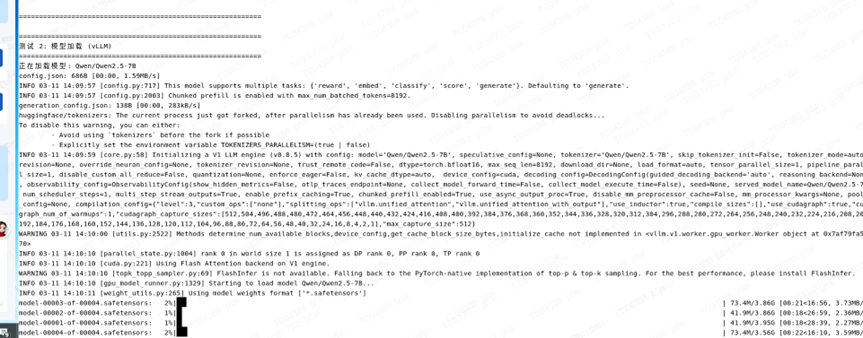
jzlai@TC04388:~/vllm_study$ python vllm_test.py
INFO 03-11 14:09:38 [init.py:239] Automatically detected platform cuda.
============================================================
VLLM 测试脚本 - Ubuntu 22.04 + RTX 4090
============================================================
测试 1: Prompt Tokenization
tokenizer_config.json: 7.23kB [00:00, 3.16MB/s]
vocab.json: 2.78MB [00:01, 2.44MB/s]
merges.txt: 1.67MB [00:00, 6.43MB/s]
tokenizer.json: 7.03MB [00:00, 14.4MB/s]
Prompt: What is the capital of France?
Tokenized input IDs: [3838, 374, 279, 6722, 315, 9625, 30]
Number of tokens: 7
Prompt: 请介绍一下深度学习。
Tokenized input IDs: [14880, 109432, 102217, 100134, 1773]
Number of tokens: 5
Prompt: Explain quantum computing in simple terms.
Tokenized input IDs: [840, 20772, 30128, 24231, 304, 4285, 3793, 13]
Number of tokens: 8
============================================================
============================================================
测试 2: 模型加载 (vLLM)
正在加载模型: Qwen/Qwen2.5-7B
config.json: 686B [00:00, 1.59MB/s]
INFO 03-11 14:09:57 [config.py:717] This model supports multiple tasks: {‘reward’, ‘embed’, ‘classify’, ‘score’, ‘generate’}. Defaulting to ‘generate’.
INFO 03-11 14:09:57 [config.py:2003] Chunked prefill is enabled with max_num_batched_tokens=8192.
generation_config.json: 138B [00:00, 283kB/s]
huggingface/tokenizers: The current process just got forked, after parallelism has already been used. Disabling parallelism to avoid deadlocks…
To disable this warning, you can either:
- Avoid using tokenizers before the fork if possible
- Explicitly set the environment variable TOKENIZERS_PARALLELISM=(true | false)
INFO 03-11 14:09:59 [core.py:58] Initializing a V1 LLM engine (v0.8.5) with config: model=‘Qwen/Qwen2.5-7B’, speculative_config=None, tokenizer=‘Qwen/Qwen2.5-7B’, skip_tokenizer_init=False, tokenizer_mode=auto, revision=None, override_neuron_config=None, tokenizer_revision=None, trust_remote_code=False, dtype=torch.bfloat16, max_seq_len=8192, download_dir=None, load_format=auto, tensor_parallel_size=1, pipeline_parallel_size=1, disable_custom_all_reduce=False, quantization=None, enforce_eager=False, kv_cache_dtype=auto, device_config=cuda, decoding_config=DecodingConfig(guided_decoding_backend=‘auto’, reasoning_backend=None), observability_config=ObservabilityConfig(show_hidden_metrics=False, otlp_traces_endpoint=None, collect_model_forward_time=False, collect_model_execute_time=False), seed=None, served_model_name=Qwen/Qwen2.5-7B, num_scheduler_steps=1, multi_step_stream_outputs=True, enable_prefix_caching=True, chunked_prefill_enabled=True, use_async_output_proc=True, disable_mm_preprocessor_cache=False, mm_processor_kwargs=None, pooler_config=None, compilation_config={“level”:3,“custom_ops”:[“none”],“splitting_ops”:[“vllm.unified_attention”,“vllm.unified_attention_with_output”],“use_inductor”:true,“compile_sizes”:[],“use_cudagraph”:true,“cudagraph_num_of_warmups”:1,“cudagraph_capture_sizes”:[512,504,496,488,480,472,464,456,448,440,432,424,416,408,400,392,384,376,368,360,352,344,336,328,320,312,304,296,288,280,272,264,256,248,240,232,224,216,208,200,192,184,176,168,160,152,144,136,128,120,112,104,96,88,80,72,64,56,48,40,32,24,16,8,4,2,1],“max_capture_size”:512}
WARNING 03-11 14:10:00 [utils.py:2522] Methods determine_num_available_blocks,device_config,get_cache_block_size_bytes,initialize_cache not implemented in <vllm.v1.worker.gpu_worker.Worker object at 0x7af79fa54f70>
INFO 03-11 14:10:10 [parallel_state.py:1004] rank 0 in world size 1 is assigned as DP rank 0, PP rank 0, TP rank 0
INFO 03-11 14:10:10 [cuda.py:221] Using Flash Attention backend on V1 engine.
WARNING 03-11 14:10:10 [topk_topp_sampler.py:69] FlashInfer is not available. Falling back to the PyTorch-native implementation of top-p & top-k sampling. For the best performance, please install FlashInfer.
INFO 03-11 14:10:10 [gpu_model_runner.py:1329] Starting to load model Qwen/Qwen2.5-7B…
INFO 03-11 14:10:11 [weight_utils.py:265] Using model weights format [‘*.safetensors’]
model-00004-of-00004.safetensors: 100%|███████████████████████████████████████████████████████████████████████████████████████████████████████████████████████████████████████| 3.56G/3.56G [15:54<00:00, 3.73MB/s]
model-00003-of-00004.safetensors: 100%|███████████████████████████████████████████████████████████████████████████████████████████████████████████████████████████████████████| 3.86G/3.86G [17:05<00:00, 3.77MB/s]
model-00002-of-00004.safetensors: 100%|███████████████████████████████████████████████████████████████████████████████████████████████████████████████████████████████████████| 3.86G/3.86G [24:33<00:00, 2.62MB/s]
model-00001-of-00004.safetensors: 100%|███████████████████████████████████████████████████████████████████████████████████████████████████████████████████████████████████████| 3.95G/3.95G [28:33<00:00, 2.30MB/s]
INFO 03-11 14:38:46 [weight_utils.py:281] Time spent downloading weights for Qwen/Qwen2.5-7B: 1714.967301 seconds███████████████████████████▏ | 2.96G/3.95G [24:32<03:21, 4.91MB/s]
model.safetensors.index.json: 27.8kB [00:00, 43.2MB/s]████████████████████████████████████████████████████████████████████████████████████████████████████████████████████████| 3.95G/3.95G [28:33<00:00, 3.13MB/s]
Loading safetensors checkpoint shards: 0% Completed | 0/4 [00:00<?, ?it/s]
Loading safetensors checkpoint shards: 25% Completed | 1/4 [00:01<00:03, 1.10s/it]
Loading safetensors checkpoint shards: 50% Completed | 2/4 [00:02<00:02, 1.13s/it]
Loading safetensors checkpoint shards: 75% Completed | 3/4 [00:03<00:01, 1.10s/it]
Loading safetensors checkpoint shards: 100% Completed | 4/4 [00:04<00:00, 1.13s/it]
Loading safetensors checkpoint shards: 100% Completed | 4/4 [00:04<00:00, 1.12s/it]
INFO 03-11 14:38:55 [loader.py:458] Loading weights took 4.57 seconds
INFO 03-11 14:38:55 [gpu_model_runner.py:1347] Model loading took 14.2717 GiB and 1724.940813 seconds
INFO 03-11 14:39:03 [backends.py:420] Using cache directory: /home/jzlai/.cache/vllm/torch_compile_cache/c2dfd53457/rank_0_0 for vLLM’s torch.compile
INFO 03-11 14:39:03 [backends.py:430] Dynamo bytecode transform time: 8.04 s
INFO 03-11 14:39:06 [backends.py:136] Cache the graph of shape None for later use
INFO 03-11 14:39:28 [backends.py:148] Compiling a graph for general shape takes 24.68 s
INFO 03-11 14:39:39 [monitor.py:33] torch.compile takes 32.72 s in total
INFO 03-11 14:39:40 [kv_cache_utils.py:634] GPU KV cache size: 472,576 tokens
INFO 03-11 14:39:40 [kv_cache_utils.py:637] Maximum concurrency for 8,192 tokens per request: 57.69x
INFO 03-11 14:40:07 [gpu_model_runner.py:1686] Graph capturing finished in 28 secs, took 0.49 GiB
INFO 03-11 14:40:07 [core.py:159] init engine (profile, create kv cache, warmup model) took 72.39 seconds
INFO 03-11 14:40:07 [core_client.py:439] Core engine process 0 ready.
模型加载完成! 耗时: 1820.24 秒
============================================================
============================================================
测试 3: 简单推理
Processed prompts: 100%|███████████████████████████████████████████████████████████████████████████████████████████████████████| 1/1 [00:00<00:00, 5.39it/s, est. speed input: 37.91 toks/s, output: 43.30 toks/s]
Prompt: What is the capital of France?
Generated text: The capital of France is Paris.
Output tokens: [576, 6722, 315, 9625, 374, 12095, 13, 151643]
推理耗时: 0.19 秒
============================================================
============================================================
测试 4: 输出 Detokenization
Processed prompts: 100%|███████████████████████████████████████████████████████████████████████████████████████████████████████| 1/1 [00:00<00:00, 7.40it/s, est. speed input: 52.15 toks/s, output: 59.57 toks/s]
Prompt: What is the capital of France?
Output token IDs: [576, 6722, 315, 9625, 374, 12095, 13, 151643]
Detokenized output: The capital of France is Paris.
============================================================
============================================================
测试 5: 批量推理
Processed prompts: 100%|██████████████████████████████████████████████████████████████████████████████████████████████████████| 3/3 [00:01<00:00, 2.11it/s, est. speed input: 15.46 toks/s, output: 118.09 toks/s]
批量处理 3 个 prompts,总耗时: 1.43 秒
平均每个 prompt: 0.48 秒
— Prompt 1 —
Prompt: What is the capital of France?
Generated: The capital of France is Paris.
— Prompt 2 —
Prompt: 请介绍一下人工智能。
Generated: 人工智能(Artificial Intelligence, AI)是指由人制造出来的机器所表现出来的智能。它能够模拟、扩展和增强人类的智能行为,包括学习、推理、问题解决、感知、语言理解等。人工智能的研究领域涵盖了机器学习、深度学习、自然语言处理、计算机视觉等多个方面。
人工智能的应用非常广泛,例如在医疗健康领域,AI可以帮助医生进行
— Prompt 3 —
Prompt: Explain the theory of relativity in simple terms.
Generated: The theory of relativity is a scientific theory developed by Albert Einstein that describes the behavior of objects in space and time. It consists of two parts: special relativity and general relativity.
Special relativity deals with objects that are moving at constant speeds. It states that the laws of physics are the same for all observers, regardless of their relative motion. It also predicts that the speed of light is
============================================================
============================================================
测试 6: 不同采样策略
-
贪婪解码 (Greedy Decoding, temperature=0):
Processed prompts: 100%|████████████████████████████████████████████████████████████████████████████████████████████████████████| 1/1 [00:00<00:00, 1.21it/s, est. speed input: 6.05 toks/s, output: 60.46 toks/s]
Output: there was a little girl named Lily. She lived in a small village surrounded by beautiful mountains and forests. Lily loved exploring the woods and playing with her friends. One day, while she was playing in the woods, she stumbled upon a hidden cave. -
温度采样 (Temperature Sampling, temperature=0.7):
Processed prompts: 100%|████████████████████████████████████████████████████████████████████████████████████████████████████████| 1/1 [00:00<00:00, 1.21it/s, est. speed input: 6.05 toks/s, output: 60.50 toks/s]
Output: there was a mathematician named Dr. B. He was known for his work on tamed manifolds, which are a special type of geometric shape that can be described using numbers and equations. One day, Dr. B decided to create a -
高温度采样 (High Temperature, temperature=1.2):
Processed prompts: 100%|████████████████████████████████████████████████████████████████████████████████████████████████████████| 1/1 [00:00<00:00, 1.21it/s, est. speed input: 6.06 toks/s, output: 60.56 toks/s]
Output: on my Unix terminal I had tp/ttyte cmnd ligs, which indicated by bi =t, because io u zvv 7.% tic hs doneue Bect valur–. How asl ought upon pobwebsocket datapodium commune toi
============================================================
============================================================
测试 7: 流式输出
Prompt: Write a short poem about programming.
流式输出:
Processed prompts: 100%|████████████████████████████████████████████████████████████████████████████████████████████████████████| 1/1 [00:01<00:00, 1.66s/it, est. speed input: 4.21 toks/s, output: 60.10 toks/s]
Oh, programming, you are my friend
A language that I have been with from the start
A way to tell my computer what to do
A way to solve my problems, in a way that is new
With just a few lines of code
I can create a world that’s all mine to behold
A world that’s custom-made just for me
A world that’s made from bits and bytes, and me.
Programming, you are my friend
A language that I have been
============================================================
============================================================
测试 8: 性能指标
Processed prompts: 100%|██████████████████████████████████████████████████████████████████████████████████████████████████████| 6/6 [00:01<00:00, 3.45it/s, est. speed input: 43.09 toks/s, output: 344.69 toks/s]
总 prompts 数量: 6
总输入 tokens: 75
总输出 tokens: 600
总耗时: 1.75 秒
吞吐量: 343.43 tokens/秒
平均每个 prompt: 0.29 秒
============================================================
============================================================
所有测试完成!
1.7 安装包要求:
torch>=2.0.0
transformers>=4.35.0
vllm>=0.2.0
numpy
tqdm
1.8 安装包说明:
VLLM 测试环境配置指南
环境要求
• 操作系统: Ubuntu 22.04 LTS
• GPU: NVIDIA RTX 4090 (24GB VRAM)
• CUDA: 11.8 或 12.x
• Python: 3.8 或更高版本
安装步骤
- 安装 NVIDIA 驱动和 CUDA
Bash
安装 NVIDIA 驱动
sudo apt update
sudo apt install nvidia-driver-535
安装 CUDA Toolkit (可选,如使用 conda 可跳过)
wget https://developer.download.nvidia.com/compute/cuda/repos/ubuntu2204/x86_64/cuda-ubuntu2204.pin
sudo mv cuda-ubuntu2204.pin /etc/apt/preferences.d/cuda-repository-pin-600
sudo apt-key adv --fetch-keys https://developer.download.nvidia.com/compute/cuda/repos/ubuntu2204/x86_64/3bf863cc.pub
sudo add-apt-repository “deb https://developer.download.nvidia.com/compute/cuda/repos/ubuntu2204/x86_64/ /”
sudo apt update
sudo apt install cuda-12-1
- 创建 Python 虚拟环境
Bash
使用 conda (推荐)
conda create -n vllm python=3.10
conda activate vllm
或使用 venv
python3 -m venv vllm_env
source vllm_env/bin/activate
- 安装 PyTorch (CUDA 版本)
Bash
CUDA 12.1 版本
pip install torch torchvision torchaudio --index-url https://download.pytorch.org/whl/cu121
验证 GPU 可用
python -c “import torch; print(f’CUDA available: {torch.cuda.is_available()}‘); print(f’GPU: {torch.cuda.get_device_name(0)}’)”
- 安装 vLLM 和依赖
Bash
安装 vLLM
pip install vllm
安装 Transformers
pip install transformers
安装其他依赖
pip install numpy tqdm
- 验证安装
Bash
python -c “import vllm; print(f’vLLM version: {vllm.version}')”
python -c “import transformers; print(f’Transformers version: {transformers.version}')”
运行测试
基本测试
Bash
运行完整测试
python vllm_test.py
使用不同的模型
编辑 vllm_test.py 中的 model_name 变量:
Python
更小的模型 (适合显存受限的情况)
model_name = “Qwen/Qwen2.5-3B”
或使用其他模型
model_name = “meta-llama/Llama-2-7b-hf”
model_name = “mistralai/Mistral-7B-v0.1”
推荐的模型配置
对于 RTX 4090 (24GB):
• Qwen/Qwen2.5-7B: 可正常运行
• Qwen/Qwen2.5-14B: 需要调整参数
Python
llm = LLM(
model=“Qwen/Qwen2.5-14B”,
tensor_parallel_size=1,
gpu_memory_utilization=0.85, # 降低 GPU 内存使用率
max_model_len=4096, # 减小最大序列长度
)
性能优化建议
- GPU 内存优化
Python
llm = LLM(
model=model_name,
tensor_parallel_size=1,
gpu_memory_utilization=0.9, # 根据显存情况调整
max_model_len=8192, # 根据需求调整
)
- 批处理优化
Python
增大批量大小以提高吞吐量
prompts = […] * 10 # 10 个 prompts
- 采样参数调优
Python
sampling_params = SamplingParams(
temperature=0.7, # 0-1, 越高越随机
top_p=0.95, # nucleus sampling
top_k=50, # top-k sampling
max_tokens=512, # 根据需求调整
presence_penalty=0.0, # 存在惩罚
frequency_penalty=0.0, # 频率惩罚
)
常见问题
- OOM (Out of Memory) 错误
解决方案:
• 降低 gpu_memory_utilization
• 减小 max_model_len
• 使用更小的模型
2. 模型下载慢
解决方案:
• 使用国内镜像
Bash
export HF_ENDPOINT=https://hf-mirror.com
- 多 GPU 使用
Python
使用 2 张 GPU
llm = LLM(
model=model_name,
tensor_parallel_size=2, # 分布式推理
)
高级用法
流式输出
Python
from vllm import SamplingParams
import asyncio
async def stream_generate():
outputs = llm.generate([prompt], sampling_params)
for output in outputs:
for token in output.outputs[0].token_ids:
print(tokenizer.decode([token], skip_special_tokens=True), end=‘’, flush=True)
自定义采样策略
Python
sampling_params = SamplingParams(
temperature=0.0, # 贪婪解码
max_tokens=256,
stop=[“\n\n”, “###”] # 停止词
)
性能基准测试
测试脚本
Bash
运行性能测试
python -c "
from vllm import LLM, SamplingParams
import time
llm = LLM(‘Qwen/Qwen2.5-7B’)
prompts = [‘Hello, how are you?’] * 100
params = SamplingParams(max_tokens=50)
start = time.time()
outputs = llm.generate(prompts, params)
elapsed = time.time() - start
print(f’Total time: {elapsed:.2f}s’)
print(f’Throughput: {len(prompts)/elapsed:.2f} prompts/sec’)
"
参考资料
• vLLM 官方文档
• vLLM GitHub
• Qwen 模型库

AtomGit 是由开放原子开源基金会联合 CSDN 等生态伙伴共同推出的新一代开源与人工智能协作平台。平台坚持“开放、中立、公益”的理念,把代码托管、模型共享、数据集托管、智能体开发体验和算力服务整合在一起,为开发者提供从开发、训练到部署的一站式体验。
更多推荐

 9
9 0
0- 0


 已为社区贡献5条内容

所有评论(0)