Spring AI 全链路实战:带你从零基础到手搓完整 Agent 项目---ChatMemory&RAG


前言
大家好,这里是程序员阿亮!
为什么这么久没有更新呢?
因为阿亮我最近在找实习和入职,所以一直没来的及更新,最近其实一直有idea去做一些个Agent项目,为了实现它,我打算找时间去完成它[狗头]!
那么话不多说,继续讲解!
前俩篇带大家讲解了SpringAI的Model、文档解析、向量数据库等模块,这一篇就带大家学习ChatMemory、RAG等模块,让大家快速熟悉API。
一、ChatMemory(对话记忆)
1.1 LLM 的无状态性 (Statelessness)
- 本质:LLM 是一个函数
f(prompt) -> response。它本身不记得上一次调用是什么。 - 挑战:用户说“它多少钱?”,模型不知道“它”指代什么。
- 解决方案:应用层必须维护状态,将历史对话拼接到当前 Prompt 中。
1.2 记忆的存储模式
- 窗口记忆 (Window Memory):只保留最近 N 轮对话。
- 优点:简单,Token 可控。
- 缺点:丢失早期关键信息(如用户名字)。
- 摘要记忆 (Summary Memory):用 LLM 将历史对话总结为一段话。
- 优点:节省 Token,保留核心语义。
- 缺点:丢失细节,增加延迟(每次都要总结)。
- 向量记忆 (Vector Memory):将历史对话向量化,按需检索相关历史。
- 优点:适合长周期记忆(“我上个月说过喜欢什么”)。
- 缺点:架构复杂,成本高。
- Spring AI 实现:
ChatMemory接口支持多种后端(JDBC, Redis),MessageChatMemoryAdvisor负责自动将记忆注入 Prompt。
1.3 上下文窗口管理 (Context Window Management)
- Token 预算:模型最大输入是固定的(如 8K)。记忆占用过多,留给用户问题和知识库的空间就少了。
- 淘汰策略:当记忆超出限制,是删除最早的对话(FIFO),还是删除最不重要的对话?Spring AI 的
TokenWindowChatMemory自动按 Token 数裁剪。 - 多租户隔离:
Conversation ID是关键。必须确保 User A 的记忆不会泄露给 User B。
1.4 SpringAI ChatMemory模块API详解
1.4.1 Maven配置
<dependencies>
    <!-- 核心 Chat Memory 依赖 -->
    <dependency>
        <groupId>org.springframework.ai</groupId>
        <artifactId>spring-ai-starter-chat-memory</artifactId>
    </dependency>

    <!-- 若使用 JDBC 存储 -->
    <dependency>
        <groupId>org.springframework.ai</groupId>
        <artifactId>spring-ai-starter-chat-memory-jdbc</artifactId>
    </dependency>

    <!-- 若使用 Redis 存储 -->
    <dependency>
        <groupId>org.springframework.ai</groupId>
        <artifactId>spring-ai-starter-chat-memory-redis</artifactId>
    </dependency>
</dependencies>
1.4.2 获取会话历史:get(String conversationId)
作用:根据会话 ID 检索该会话的所有历史消息列表。
返回值:List<Message>,包含 System、User、Assistant 等类型的消息。
@Service
public class ChatMemoryService {

    @Autowired
    private ChatMemory chatMemory;

    /**
     * 获取指定会话的完整历史消息
     * @param conversationId 会话唯一标识(通常为用户 ID 或会话 UUID)
     * @return 消息列表,按时间顺序排列
     */
    public List<Message> getHistory(String conversationId) {
        // 调用 get 方法获取历史
        // 如果该 ID 不存在,通常返回空列表,不会抛异常
        List<Message> history = chatMemory.get(conversationId);

        // 日志记录:查看获取了多少条消息
        System.out.println("会话 " + conversationId + " 共有 " + history.size() + " 条历史消息");

        return history;
    }
}
1.4.3 更新会话记忆:update(String conversationId, List<Message> messages)
作用:将新的消息列表保存到会话中。通常在每轮对话结束后调用,追加最新的一问一答。
注意:这是底层操作,通常由 ChatMemoryAdvisor 自动调用,手动调用用于迁移或批量导入。
@Service
public class ChatMemoryService {

    @Autowired
    private ChatMemory chatMemory;

    /**
     * 手动更新会话记忆
     * @param conversationId 会话 ID
     * @param newMessages 需要追加或更新的消息列表
     */
    public void saveHistory(String conversationId, List<Message> newMessages) {
        // 1. 获取现有历史(可选,取决于实现策略是追加还是覆盖)
        List<Message> existing = chatMemory.get(conversationId);

        // 2. 合并消息(此处示例为追加)
        existing.addAll(newMessages);

        // 3. 调用 update 持久化
        // 底层实现会负责序列化消息并存储到 DB/Redis
        chatMemory.update(conversationId, existing);

        System.out.println("会话 " + conversationId + " 记忆已更新,当前总数:" + existing.size());
    }
}
1.4.4 删除会话:delete(String conversationId)
作用:清除指定会话的所有记忆数据。用于用户退出登录、清除隐私数据或重置对话。
@Service
public class ChatMemoryService {

    @Autowired
    private ChatMemory chatMemory;

    /**
     * 删除指定会话
     * @param conversationId 会话 ID
     * @return 是否删除成功(取决于实现,通常 void)
     */
    public void clearSession(String conversationId) {
        // 调用 delete 方法
        // 底层会执行 SQL DELETE 或 Redis DEL 操作
        chatMemory.delete(conversationId);

        System.out.println("会话 " + conversationId + " 已彻底清除");
    }

    /**
     * 批量删除会话
     */
    public void clearSessions(List<String> conversationIds) {
        for (String id : conversationIds) {
            chatMemory.delete(id);
        }
    }
}
1.4.5 清除所有记忆:clear()
作用:清空系统中存储的所有会话记忆。高危操作,通常用于测试环境重置或数据合规清理。
@Service
public class ChatMemoryService {

    @Autowired
    private ChatMemory chatMemory;

    /**
     * 清除所有会话数据
     * 警告:生产环境慎用!
     */
    @Scheduled(cron = "0 0 3 * * ?") // 示例:每天凌晨 3 点清理
    public void clearAllMemories() {
        // 调用 clear 方法
        // 底层可能执行 TRUNCATE TABLE 或 Redis FLUSHDB (带 prefix)
        chatMemory.clear();

        System.out.println("所有会话记忆已清除");
    }
}
1.4.6 获取所有会话 ID:getConversationIds()
作用:获取当前系统中所有活跃会话的 ID 集合。用于监控、审计或批量管理。
@Service
public class ChatMemoryService {

    @Autowired
    private ChatMemory chatMemory;

    /**
     * 获取所有活跃会话 ID
     * @return 会话 ID 集合
     */
    public Set<String> getAllActiveSessions() {
        // 调用 getConversationIds 方法
        // 注意:大数据量下此操作可能性能较低
        Set<String> ids = chatMemory.getConversationIds();

        System.out.println("当前活跃会话数:" + ids.size());
        return ids;
    }

    /**
     * 清理超过 7 天未活动的会话
     */
    public void cleanupInactiveSessions() {
        Set<String> ids = chatMemory.getConversationIds();
        // 业务逻辑:结合最后更新时间判断是否删除
        // 此处简化演示
        for (String id : ids) {
            // if (isExpired(id)) { chatMemory.delete(id); }
        }
    }
}
1.5 SpringAI MessageChatMemoryAdvisor
这是开发者最常用的 API。它不是直接操作
ChatMemory,而是作为ChatClient的顾问(Advisor),自动在请求前后处理记忆逻辑。
1.5.1 配置 Advisor Bean
作用:将 ChatMemory 实例包装成 Advisor,以便注入到 ChatClient 链路中。
@Configuration
public class MemoryAdvisorConfig {

    @Autowired
    private ChatMemory chatMemory;

    /**
     * 创建记忆顾问 Bean
     * 此 Bean 可被注入到 ChatClient.Builder 中
     */
    @Bean
    public MessageChatMemoryAdvisor memoryAdvisor() {
        // 使用 builder 模式构建 Advisor
        return MessageChatMemoryAdvisor.builder(chatMemory)
            // 设置默认最大消息数(防止上下文爆炸)
            .maxMessages(20)
            // 设置存储键前缀(便于区分不同业务线)
            .name("customer-service")
            .build();
    }
}
1.5.2 在 ChatClient 中启用记忆
作用:将 Advisor 应用到客户端,使每次对话自动携带历史上下文。
@RestController
public class ChatController {

    @Autowired
    private ChatClient.Builder chatClientBuilder;

    @Autowired
    private MessageChatMemoryAdvisor memoryAdvisor;

    /**
     * 带记忆的对话接口
     */
    @PostMapping("/chat")
    public String chat(@RequestParam String message,
                       @RequestParam String sessionId) {

        // 1. 构建 ChatClient 并添加记忆 Advisor
        ChatClient client = chatClientBuilder
            .defaultAdvisors(memoryAdvisor) // 注入记忆顾问
            .build();

        // 2. 发送请求
        // 关键点:必须传入 CONVERSATION_ID 参数,否则记忆无法关联
        String response = client.prompt(message)
            .advisors(a -> a.param(
                MessageChatMemoryAdvisor.CONVERSATION_ID, // 固定参数名
                sessionId                                 // 动态会话 ID
            ))
            .call()
            .content();

        return response;
    }
}
1.5.3 Advisor 的高级配置 API
设置消息窗口:maxMessages(int)
作用:限制每次请求发送给 LLM 的历史消息数量,避免超出 Token 限制。
@Bean
public MessageChatMemoryAdvisor windowedAdvisor(ChatMemory chatMemory) {
    return MessageChatMemoryAdvisor.builder(chatMemory)
        // 只保留最近 10 轮对话(一问一答算 2 条)
        .maxMessages(10)
        .build();
}设置存储名称:name(String)
作用:为记忆存储添加命名空间,便于在同一数据库中隔离不同业务的记忆。
@Bean
public MessageChatMemoryAdvisor namedAdvisor(ChatMemory chatMemory) {
    return MessageChatMemoryAdvisor.builder(chatMemory)
        // 存储键将变为 "customer-service:user-123" 而非 "user-123"
        .name("customer-service")
        .build();
}自定义消息过滤器:historyFilter(Predicate<Message>)
作用:在将历史消息发送给 LLM 之前,过滤掉某些特定类型的消息(如系统指令、工具调用细节)。
@Bean
public MessageChatMemoryAdvisor filteredAdvisor(ChatMemory chatMemory) {
    return MessageChatMemoryAdvisor.builder(chatMemory)
        // 过滤掉所有 ToolResponseMessage,只保留用户和助手对话
        .historyFilter(msg -> !(msg instanceof ToolResponseMessage))
        .build();
}
1.6 ChatMemory存储实现
1.6.1 内存实现 InMemoryChatMemory
适用场景:开发测试、单机原型、无状态服务(重启即丢失)。
@Configuration
public class InMemoryConfig {

    @Bean
    public ChatMemory inMemoryChatMemory() {
        // 创建内存实现
        // 参数:最大保留会话数(可选,防止内存溢出)
        return new InMemoryChatMemory();
    }
}
1.6.2 数据库实现 JdbcChatMemory
适用场景:生产环境、需要持久化、关系型数据库基础设施。
@Configuration
public class JdbcMemoryConfig {

    @Autowired
    private DataSource dataSource;

    @Bean
    public ChatMemory jdbcChatMemory() {
        return JdbcChatMemory.builder()
            .dataSource(dataSource)       // 数据源
            .tablePrefix("ai_")           // 表名前缀,默认 ai_conversation
            .schemaName("public")         // Schema 名称
            .build();
    }
}
此时我们数据库会自动创建表:
Spring AI 启动时会自动创建以下表(若 initialize-schema=true):
-- 自动创建的表结构示意
CREATE TABLE ai_conversation (
    id VARCHAR(255) PRIMARY KEY,      -- 对应 conversationId
    messages TEXT NOT NULL,           -- 序列化的消息 JSON
    created_at TIMESTAMP DEFAULT NOW(),
    updated_at TIMESTAMP DEFAULT NOW()
);
spring:
ai:
chat:
memory:
jdbc:
# 是否自动初始化表结构
initialize-schema: true
# 表名前缀
table-prefix: "ai_"
1.6.3 Redis实现 RedisChatMemory
适用场景:高并发、分布式部署、需要 TTL 自动过期。
@Configuration
public class RedisMemoryConfig {

    @Autowired
    private RedisConnectionFactory redisConnectionFactory;

    @Bean
    public ChatMemory redisChatMemory() {
        return RedisChatMemory.builder()
            .redisConnectionFactory(redisConnectionFactory)
            .keyPrefix("chat:mem:")  // Redis Key 前缀
            .ttl(Duration.ofMinutes(30)) // 会话过期时间
            .build();
    }
}
spring:
ai:
chat:
memory:
redis:
# Redis Key 前缀
key-prefix: "chat:mem:"
# 过期时间
ttl: 30m
# 是否序列化消息为 JSON
serialize-messages: true
1.7 消息窗口详解 Windowing Strategies
实际上为了避免消息过多过长,导致消息大于我们的LLM的Token限制,我们就需要:需要限制记忆大小。
1.7.1 消息数量窗口:MessageWindowChatMemory
作用:基于消息条数限制记忆大小。
@Configuration
public class WindowConfig {

    @Bean
    public ChatMemory messageWindowMemory() {
        // 底层仓库
        ChatMemoryRepository repository = new InMemoryChatMemoryRepository();

        // 包装为消息窗口记忆
        // 参数 20:最多保留 20 条消息(约 10 轮对话)
        return new MessageWindowChatMemory(repository, 20);
    }
}
1.7.2 Token 数量窗口:TokenWindowChatMemory
作用:基于 Token 数量限制记忆大小,更精确控制成本和上下文限制。
@Configuration
public class WindowConfig {

    @Autowired
    private EmbeddingModel embeddingModel; // 需要 Tokenizer

    @Bean
    public ChatMemory tokenWindowMemory() {
        ChatMemoryRepository repository = new InMemoryChatMemoryRepository();

        // 包装为 Token 窗口记忆
        // 参数 4096:最多保留 4096 个 Token 的历史
        // 需要传入 Tokenizer 或 EmbeddingModel 来估算 Token 数
        return new TokenWindowChatMemory(repository, 4096, embeddingModel);
    }
}
实际上我们也可以去定时重写Memory,去做总结,但是这样也会丢失上下文的一些细节。
1.8 ChatMemory API速查表
API 速查表
|
API / 类 |
方法 / 配置 |
作用 |
常用场景 |
|---|---|---|---|
|
|
|
获取历史 |
查看会话、审计 |
|
|
|
保存历史 |
手动迁移、批量导入 |
|
|
|
删除会话 |
用户注销、隐私清除 |
|
|
|
清空所有 |
测试重置、合规清理 |
|
|
|
会话参数 |
ChatClient 调用必传 |
|
|
|
消息限制 |
控制 Token 成本 |
|
|
|
表名前缀 |
多业务隔离 |
|
|
|
过期时间 |
自动清理临时会话 |
|
|
|
Token 限制 |
精确控制上下文大小 |
二、RAG (检索增强生成)
实际上RAG的详细流程:
我在前面的博客中有讲解:
所以今天我就带大家研究一下SpringAI里面如何配置和使用RAG
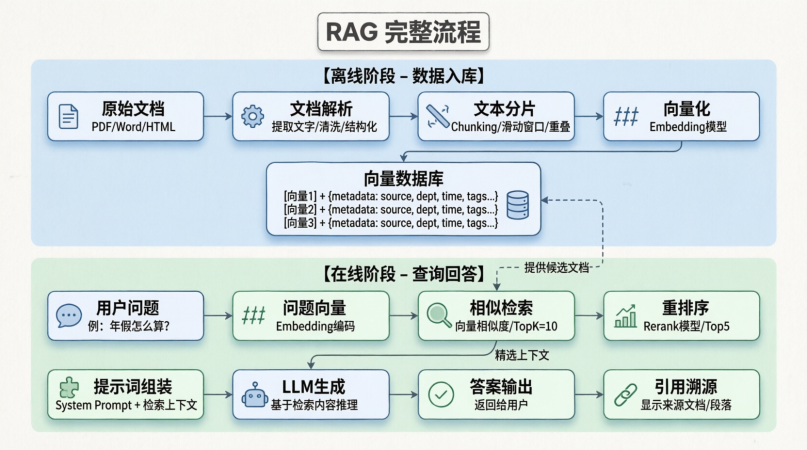
因为之前就有研究过RAG的详细内容,今天就简单介绍一下
2.1 RAG的背景信息
什么是 RAG (Retrieval-Augmented Generation)?
概念:在用户提问时,先从知识库检索相关文档,将文档内容作为“上下文”拼接到 Prompt 中,再交给 LLM 生成答案。 公式:Answer = LLM(Question + Retrieved_Context)
Spring AI 的 RAG 流程:
- Query Transformation:优化用户问题(如扩写、改写)。
- Retrieval:从 Vector Store 检索相关文档。
- Augmentation:将文档内容注入 Prompt。
- Generation:LLM 基于增强后的 Prompt 生成回答。
2.2 SpringAI关于RAG的配置
2.2.1 Maven 依赖
<dependencies>
    <!-- 核心 RAG 依赖(通常包含在 vector-store starter 中) -->
    <dependency>
        <groupId>org.springframework.ai</groupId>
        <artifactId>spring-ai-starter-vector-store</artifactId>
    </dependency>

    <!-- 模型依赖 -->
    <dependency>
        <groupId>org.springframework.ai</groupId>
        <artifactId>spring-ai-starter-model-openai</artifactId>
    </dependency>

    <!-- 文档处理依赖(用于入库) -->
    <dependency>
        <groupId>org.springframework.ai</groupId>
        <artifactId>spring-ai-pdf-document-reader</artifactId>
    </dependency>
</dependencies>
2.2.2 配置文件
spring:
  ai:
    vectorstore:
      pgvector:
        initialize-schema: true
        index-name: document_embeddings
    openai:
      api-key: ${OPENAI_API_KEY}
      chat:
        options:
          model: gpt-4o
2.3 核心 API 详解:RetrievalAugmentationAdvisor
这是 Spring AI 提供的声明式 RAG API。只需将其添加为 ChatClient 的 Advisor,即可自动实现检索增强。
2.3.1 构建 Advisor Bean
作用:配置 RAG 的核心参数(检索数量、相似度阈值、过滤条件)。
@Configuration
public class RagConfig {

    @Autowired
    private VectorStore vectorStore;

    /**
     * 创建 RAG 顾问 Bean
     * 这是最简单的 RAG 集成方式
     */
    @Bean
    public RetrievalAugmentationAdvisor ragAdvisor() {
        return RetrievalAugmentationAdvisor.builder()
            // 1. 指定向量存储
            .vectorStore(vectorStore)

            // 2. 检索文档数量 (Top K)
            // 建议 3-5 篇,过多会干扰模型,过少可能信息不足
            .topK(3)

            // 3. 相似度阈值 (0.0 - 1.0)
            // 低于此阈值的文档将被过滤,避免无关信息干扰
            .similarityThreshold(0.7)

            // 4. 检索请求转换器 (可选)
            // 用于动态修改检索条件,如添加元数据过滤
            .retrievalRequestTransformer(request ->
                request
            )

            // 5. 生成器 (可选)
            // 自定义如何将检索结果拼接到 Prompt 中
            .generator(new DefaultPromptGenerator())

            .build();
    }
}
2.3.2 在 ChatClient 中启用 RAG
作用:将 Advisor 注入调用链,实现自动检索。
@RestController
public class RagController {

    @Autowired
    private ChatClient.Builder chatClientBuilder;

    @Autowired
    private RetrievalAugmentationAdvisor ragAdvisor;

    /**
     * 基础 RAG 问答接口
     */
    @PostMapping("/rag/chat")
    public String ragChat(@RequestParam String question) {
        // 1. 构建客户端并添加 RAG Advisor
        ChatClient client = chatClientBuilder
            .defaultSystem("""
                你是一个知识库助手。
                请严格基于提供的上下文回答问题。
                如果上下文中没有答案,请说“知识库中未找到相关信息”。
                """)
            .defaultAdvisors(ragAdvisor) // ← 关键:启用 RAG
            .build();

        // 2. 发送问题
        // 底层流程:用户问题 → 向量检索 → 拼接上下文 → LLM 生成
        String answer = client.prompt(question)
            .call()
            .content();

        return answer;
    }
}
2.3.3 动态元数据过滤 API
作用:根据用户权限或业务场景,动态过滤检索范围(如只检索某部门的文档)。
@PostMapping("/rag/chat-filtered")
public String ragChatFiltered(@RequestParam String question,
                              @RequestParam String department) {

    // 1. 构建动态过滤表达式
    FilterExpressionBuilder builder = new FilterExpressionBuilder();
    Filter.Expression filter = builder.eq("department", department).build();

    // 2. 创建临时 Advisor(覆盖默认配置)
    RetrievalAugmentationAdvisor dynamicAdvisor =
        RetrievalAugmentationAdvisor.builder()
            .vectorStore(vectorStore)
            .topK(3)
            // 应用动态过滤
            .filterExpression(filter)
            .build();

    // 3. 调用
    return chatClientBuilder
        .defaultAdvisors(dynamicAdvisor)
        .build()
        .prompt(question)
        .call()
        .content();
}
2.3.4 获取检索上下文 (Debug/展示来源)
作用:默认 Advisor 不返回检索到的文档。若需前端展示“引用来源”,需使用 ChatClientAdvisor 的上下文捕获或手动实现。
// 自定义 Advisor 捕获检索结果
public class ContextCapturingAdvisor implements Advisor {

    private List<Document> capturedDocs = new ArrayList<>();

    @Override
    public Advice getAdvice() {
        return new MethodInterceptor() {
            @Override
            public Object invoke(MethodInvocation invocation) throws Throwable {
                // 拦截检索过程,捕获文档(具体实现依赖内部 API 钩子)
                // 注意:Spring AI 1.0 中建议通过 RetrievalAugmentationAdvisor 的扩展点实现
                return invocation.proceed();
            }
        };
    }

    public List<Document> getCapturedDocs() {
        return capturedDocs;
    }
}
2.4 高级 RAG 组件 API (底层构建块)
若 RetrievalAugmentationAdvisor 无法满足需求,可手动组装 RAG 管道。
2.4.1 Retriever (检索器)
作用:定义如何从存储中获取文档
@Service
public class CustomRetrieverService {

    @Autowired
    private VectorStore vectorStore;

    /**
     * 创建自定义检索器
     */
    public Retriever createRetriever() {
        // VectorStoreRetriever 是默认实现
        return new VectorStoreRetriever(vectorStore) {
            @Override
            public List<Document> retrieve(String query) {
                // 1. 构建搜索请求
                SearchRequest request = SearchRequest.builder()
                    .query(query)
                    .topK(5) // 自定义 TopK
                    .similarityThreshold(0.6)
                    .build();

                // 2. 执行检索
                List<Document> docs = vectorStore.similaritySearch(request);

                // 3. 后处理(例如:去重、截断)
                return docs.stream()
                    .distinct()
                    .limit(3)
                    .collect(Collectors.toList());
            }
        };
    }
}
2.4.2 Query Transformer (查询转换器)
作用:在检索前优化用户查询。例如:将“它多少钱?”改写为"iPhone 15 多少钱?”。
@Service
public class QueryTransformerService {

    @Autowired
    private ChatClient.Builder chatClientBuilder;

    /**
     * 创建基于 LLM 的查询改写器
     */
    public QueryTransformer createRewriter() {
        return query -> {
            // 简单示例:直接返回原查询
            // 生产环境可调用 LLM 进行改写
            /*
            String rewritten = chatClientBuilder.build()
                .prompt("将以下问题改写为独立完整的句子:" + query)
                .call()
                .content();
            return rewritten;
            */
            return query;
        };
    }
}
2.4.3 Prompt Generator (提示生成器)
作用:定义如何将检索到的文档拼接进 Prompt。
@Service
public class PromptGeneratorService {

    /**
     * 创建自定义提示生成器
     */
    public PromptGenerator createGenerator() {
        return (query, documents) -> {
            // 1. 构建上下文字符串
            String context = documents.stream()
                .map(doc -> "---\n来源:" + doc.getMetadata().get("source") +
                            "\n内容:" + doc.getContent() + "\n---")
                .collect(Collectors.joining("\n"));

            // 2. 构建最终 Prompt
            String prompt = """
                基于以下资料回答问题:

                %s

                问题:%s

                回答:
                """.formatted(context, query);

            // 3. 返回 Prompt 对象
            return new Prompt(new UserMessage(prompt));
        };
    }
}
2.4.3 手动组装 RAG 流程 (完全控制)
作用:当 Advisor 无法满足复杂逻辑(如多路检索、重排序)时使用。
@Service
public class ManualRagService {

    @Autowired
    private VectorStore vectorStore;

    @Autowired
    private ChatClient.Builder chatClientBuilder;

    /**
     * 手动执行 RAG 流程
     */
    public RagResponse executeRag(String question) {
        // 步骤 1: 检索
        List<Document> docs = vectorStore.similaritySearch(
            SearchRequest.builder()
                .query(question)
                .topK(5)
                .build()
        );

        // 步骤 2: 构建上下文
        String context = docs.stream()
            .map(Document::getContent)
            .collect(Collectors.joining("\n\n"));

        // 步骤 3: 构建 Prompt
        String promptText = """
            资料:%s
            问题:%s
            请基于资料回答,并注明来源。
            """.formatted(context, question);

        // 步骤 4: 生成
        String answer = chatClientBuilder.build()
            .prompt(promptText)
            .call()
            .content();

        // 步骤 5: 返回结果及来源
        return new RagResponse(answer, docs);
    }

    @Data
    @AllArgsConstructor
    public static class RagResponse {
        private String answer;
        private List<Document> sources;
    }
}
2.5 Agentic RAG
概念:将检索能力封装为 Tool,让 LLM 自主决定何时检索、检索什么。适合复杂多轮对话。
2.5.1 定义检索工具
@Component
public class KnowledgeBaseTool {

    @Autowired
    private VectorStore vectorStore;

    /**
     * 定义检索工具
     * @Tool 描述决定了 LLM 何时调用此函数
     */
    @Tool(description = "当用户询问公司内部政策、产品文档或技术细节时调用此工具查询知识库")
    public String searchKnowledgeBase(String query) {
        // 1. 执行检索
        List<Document> docs = vectorStore.similaritySearch(
            SearchRequest.builder()
                .query(query)
                .topK(3)
                .similarityThreshold(0.7)
                .build()
        );

        // 2. 格式化结果
        if (docs.isEmpty()) {
            return "未找到相关文档。";
        }

        return docs.stream()
            .map(doc -> "【来源:" + doc.getMetadata().get("source") + "】\n" + doc.getContent())
            .collect(Collectors.joining("\n\n"));
    }
}
2.5.2 在 ChatClient 中启用工具
@RestController
public class AgentRagController {

    @Autowired
    private ChatClient.Builder chatClientBuilder;

    @Autowired
    private KnowledgeBaseTool kbTool;

    @PostMapping("/agent/rag")
    public String agentRag(@RequestParam String question) {
        // 1. 构建客户端并注册工具
        ChatClient client = chatClientBuilder
            .defaultSystem("你是智能助手。如果不知道答案,请调用 searchKnowledgeBase 工具查询。")
            .defaultTools(kbTool) // ← 注册工具
            .build();

        // 2. 调用
        // LLM 会自主判断:是否需要检索?检索词是什么?
        return client.prompt(question)
            .call()
            .content();
    }
}优势:
- 按需检索:闲聊时不检索,节省成本。
- 多步检索:LLM 可多次调用工具(如先查产品 A,再查产品 B)。
- 参数提取:LLM 自动从对话中提取最佳检索词。
2.6 RAG评估
作用:自动化评估 RAG 系统的质量(准确性、幻觉、相关性)。
2.6.1 内置评估器
@Service
public class RagEvaluationService {

    @Autowired
    private ChatModel chatModel;

    /**
     * 幻觉评估 (Hallucination Evaluation)
     * 检查回答是否基于检索到的上下文
     */
    public boolean evaluateHallucination(String question, String answer, List<Document> context) {
        // 1. 构建评估 Prompt
        String evalPrompt = """
            请判断以下回答是否完全基于提供的上下文。
            上下文:%s
            问题:%s
            回答:%s

            如果回答包含上下文中没有的信息,请返回 false,否则返回 true。
            只返回 true 或 false。
            """.formatted(
                context.stream().map(Document::getContent).collect(Collectors.joining("\n")),
                question,
                answer
            );

        // 2. 调用模型评估
        String result = chatModel.call(new Prompt(evalPrompt))
            .getResult()
            .getOutput()
            .getText()
            .trim()
            .toLowerCase();

        return "true".equals(result);
    }

    /**
     * 答案相关性评估 (Answer Relevancy)
     * 检查回答是否直接解决了用户问题
     */
    public double evaluateRelevancy(String question, String answer) {
        // 类似上述逻辑,让模型打分 0-1
        // 此处简化省略
        return 0.85;
    }
}
2.6.2 使用 Evaluator 接口 (Spring AI 1.0+)
// 定义评估器接口实现
public class FaithfulnessEvaluator implements Evaluator {

    private final ChatModel model;

    public FaithfulnessEvaluator(ChatModel model) {
        this.model = model;
    }

    @Override
    public EvaluationResult evaluate(EvaluationRequest request) {
        // 实现评估逻辑
        // 返回 pass/fail 及原因
        return new EvaluationResult(true, "回答忠实于上下文");
    }
}
2.7 RAG实战:知识库问答
场景:构建支持权限控制、来源引用、多轮对话的完整 RAG 系统。
2.7.1 项目架构
src/main/java
├── config/ # RAG 配置
├── controller/ # API 接口
├── service/ # 业务逻辑 (RAG, Ingestion)
├── model/ # 实体类
└── tool/ # 检索工具
2.7.2 配置类 (Config)
@Configuration
public class RagSystemConfig {

    @Autowired
    private VectorStore vectorStore;

    /**
     * 配置基础 RAG Advisor
     */
    @Bean
    public RetrievalAugmentationAdvisor ragAdvisor() {
        return RetrievalAugmentationAdvisor.builder()
            .vectorStore(vectorStore)
            .topK(3)
            .similarityThreshold(0.6)
            .build();
    }

    /**
     * 配置记忆 (RAG 通常需配合记忆使用)
     */
    @Bean
    public ChatMemory chatMemory() {
        return new InMemoryChatMemory(20);
    }
}
2.7.3 服务层 (Service)
@Service
public class KnowledgeBaseService {

    @Autowired
    private VectorStore vectorStore;

    @Autowired
    private ChatClient.Builder chatClientBuilder;

    @Autowired
    private ChatMemory chatMemory;

    /**
     * 核心问答方法 (手动 RAG 以便返回来源)
     */
    public QaResponse answerQuestion(String question, String sessionId, String userDept) {
        // 1. 构建过滤条件 (权限控制)
        FilterExpressionBuilder fb = new FilterExpressionBuilder();
        Filter.Expression filter = fb.eq("department", userDept).build();

        // 2. 检索文档
        List<Document> docs = vectorStore.similaritySearch(
            SearchRequest.builder()
                .query(question)
                .topK(3)
                .filterExpression(filter) // 只查本部门文档
                .build()
        );

        // 3. 构建上下文
        String context = docs.stream()
            .map(doc -> "【来源:" + doc.getMetadata().get("title") + "】\n" + doc.getContent())
            .collect(Collectors.joining("\n\n"));

        // 4. 构建 Prompt
        String systemPrompt = """
            你是企业知识库助手。
            1. 基于以下上下文回答。
            2. 如果上下文不足,请说明。
            3. 回答末尾请注明参考资料来源。

            上下文:
            %s
            """.formatted(context);

        // 5. 调用 LLM (带记忆)
        ChatClient client = chatClientBuilder
            .defaultSystem(systemPrompt)
            .defaultAdvisors(MessageChatMemoryAdvisor.builder(chatMemory).build())
            .build();

        String answer = client.prompt(question)
            .advisors(a -> a.param(MessageChatMemoryAdvisor.CONVERSATION_ID, sessionId))
            .call()
            .content();

        // 6. 构建响应 (包含来源元数据)
        return QaResponse.builder()
            .answer(answer)
            .sources(docs.stream().map(d -> (String)d.getMetadata().get("title")).collect(Collectors.toList()))
            .build();
    }

    @Data
    @Builder
    public static class QaResponse {
        private String answer;
        private List<String> sources;
    }
}
2.7.4 控制器 (Controller)
@RestController
@RequestMapping("/api/kb")
public class KnowledgeBaseController {

    @Autowired
    private KnowledgeBaseService kbService;

    /**
     * 问答接口
     */
    @PostMapping("/query")
    public ResponseEntity<?> query(@RequestBody QueryRequest request) {
        try {
            // 1. 调用服务
            KnowledgeBaseService.QaResponse response = kbService.answerQuestion(
                request.getQuestion(),
                request.getSessionId(),
                request.getUserDept() // 传递部门用于权限过滤
            );

            // 2. 返回结果
            return ResponseEntity.ok(response);

        } catch (Exception e) {
            return ResponseEntity.internalServerError()
                .body(Map.of("error", e.getMessage()));
        }
    }

    @Data
    public static class QueryRequest {
        private String question;
        private String sessionId;
        private String userDept;
    }
}
2.7.5 文档入库接口 (Ingestion)
@PostMapping("/ingest")
public String ingest(@RequestParam("file") MultipartFile file,
                     @RequestParam("department") String dept) {
    // 1. 读取文件 (略,参考文档处理章节)
    List<Document> docs = readDocument(file);

    // 2. 添加元数据 (部门权限)
    for (Document doc : docs) {
        doc.getMetadata().put("department", dept);
        doc.getMetadata().put("title", file.getOriginalFilename());
    }

    // 3. 存入向量库
    vectorStore.add(docs);

    return "入库成功,共 " + docs.size() + " 篇文档";
}
三、总结
实际上这篇博客也是磕磕绊绊写了很长一段时间,是一个很简单的内容其实,由于这段时间找实习加适应,花了很多时间,之后写博客的时间可能少很多,但是也不会停下来的,我打算继续研究Py+LangChain、LangGraph等,然后做一个有业务背景的有需求的Agent项目。
目录
1.3 上下文窗口管理 (Context Window Management)
1.4 SpringAI ChatMemory模块API详解
1.4.2 获取会话历史:get(String conversationId)
1.4.3 更新会话记忆:update(String conversationId, List messages)
1.4.4 删除会话:delete(String conversationId)
1.4.6 获取所有会话 ID:getConversationIds()
1.5 SpringAI MessageChatMemoryAdvisor
自定义消息过滤器:historyFilter(Predicate )
1.7 消息窗口详解 Windowing Strategies
1.7.1 消息数量窗口:MessageWindowChatMemory
1.7.2 Token 数量窗口:TokenWindowChatMemory
什么是 RAG (Retrieval-Augmented Generation)?
2.3 核心 API 详解:RetrievalAugmentationAdvisor
2.4.2 Query Transformer (查询转换器)
2.4.3 Prompt Generator (提示生成器)
2.6.2 使用 Evaluator 接口 (Spring AI 1.0+)


AtomGit 是由开放原子开源基金会联合 CSDN 等生态伙伴共同推出的新一代开源与人工智能协作平台。平台坚持“开放、中立、公益”的理念,把代码托管、模型共享、数据集托管、智能体开发体验和算力服务整合在一起,为开发者提供从开发、训练到部署的一站式体验。
更多推荐

 20
20 0
0- 0


 已为社区贡献18条内容

所有评论(0)