第64节:项目实战案例|基于BLIP的图生文

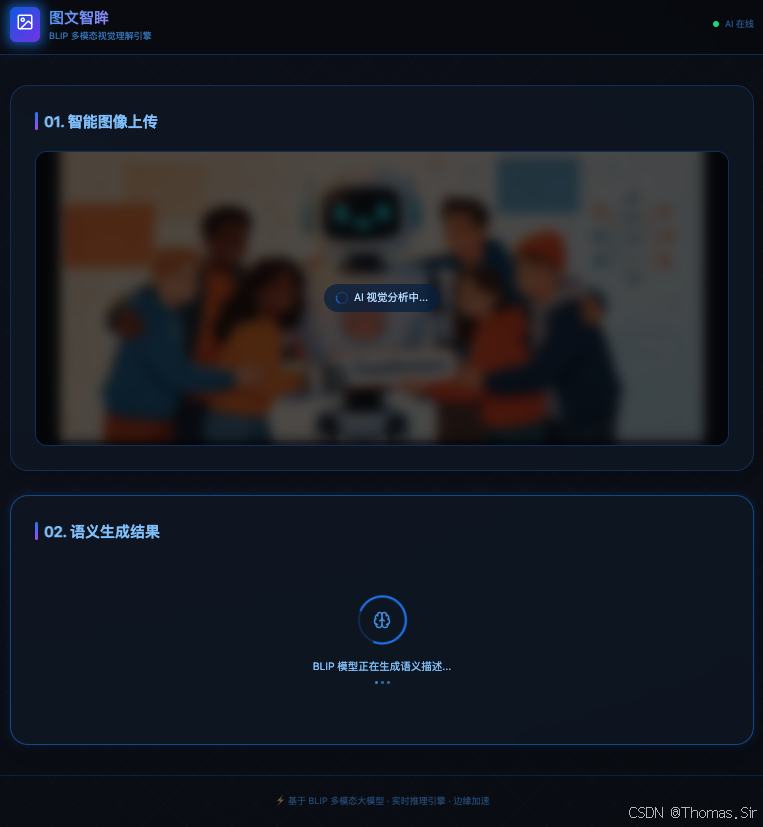
效果展示

一、项目需求
1.1 业务背景与问题定义
在互联网信息时代,图像作为最重要的信息载体之一,每天以惊人的速度产生和传播。然而,对于视觉障碍人士、搜索引擎优化(SEO)系统、内容审核机制以及自动化内容生产流程而言,海量的图像资源往往缺乏相应的文本描述,导致信息可访问性大打折扣、搜索召回效率低下、自动化处理困难重重。
传统的图像描述生成方式主要依赖人工标注,存在三个根本性瓶颈:一是人力成本高昂,专业图像标注员的薪酬水平持续攀升;二是标注效率低下,单人单日仅能完成数百张图像的描述工作;三是主观性强,不同标注员对同一图像的理解和表述存在显著差异,难以保证标注质量的一致性。这些瓶颈在高并发、大规模图像处理场景下尤为突出。
多模态人工智能技术的突破为这一难题提供了全新的解决思路。以BLIP为代表的视觉-语言预训练模型,能够像人类一样“看懂”图像内容并生成自然流畅的描述文本,在图像描述、视觉问答等任务中表现出了接近甚至超越人类基准的性能。
1.2 核心业务需求
基于上述业务背景,本项目旨在构建一个端到端的图生文Web应用,核心业务需求可归纳为以下四个维度:
第一,图像智能理解能力。 系统需要能够自动理解任意上传图像中的视觉内容,包括但不限于:图像中的主体对象(人物、动物、物体等)、对象之间的空间关系、场景氛围与环境特征、动作与事件描述等。生成的描述应当准确、完整且具有语义一致性,避免出现幻觉性描述或关键信息遗漏。
第二,实时响应能力。 在实际应用场景中,用户上传图像后期望在合理时间内获得反馈。系统需要对图像描述生成流程进行充分优化,确保端到端响应延迟控制在用户可接受的范围内。对于包含GPU加速的环境,单次推理时间应在1-3秒以内完成。
第三,友好的用户体验。 应用界面应当提供直观、流畅的操作流程,支持图像上传、实时预览、一键生成、结果展示等核心功能。同时需要合理处理加载状态、错误状态等边界情况,避免用户在等待过程中产生困惑或挫败感。
第四,可扩展性与可维护性。 系统架构应当具备良好的可扩展性,方便后续接入BLIP-2、BLIP-3等更先进的多模态模型,以及集成大语言模型对生成的描述进行二次润色和风格化处理。代码结构应当清晰规范,便于后续迭代维护。
1.3 性能与非功能性需求
在功能性需求之外,本项目还需满足以下非功能性要求:
准确率要求。 模型生成的图像描述应当具备较高的语义准确度。根据BLIP模型的基准测试数据,在COCO数据集上的CIDEr评分相比基线提升了约2.8%,这一准确率足以支撑多数实际应用场景。
延迟要求。 从用户提交图像到前端展示描述文本,端到端延迟应在5秒以内(包含网络传输时间),其中模型推理部分应在2秒内完成。
资源消耗要求。 后端服务应能够在主流配置的服务器上稳定运行,GPU显存占用控制在8GB以内,CPU内存占用控制在16GB以内。
并发支持要求。 后端API应能够同时处理多个用户的请求,通过请求队列管理和异步处理机制,避免单次耗时推理阻塞其他请求。
安全性要求。 系统需要防范恶意文件上传(如超大图像、畸形格式等)可能带来的风险,并对API端点实施基本的访问控制。
二、功能列表
基于上述需求分析,本项目规划并实现了以下核心功能模块:
2.1 图像上传与预览模块
- 图像选择功能:通过文件选择器从本地设备中选择图像文件,支持常见的图像格式,包括JPEG、PNG、GIF、BMP等。
- 拖拽上传功能:支持将图像文件拖拽到指定区域进行上传,提升操作的便捷性和直观性。
- 实时预览功能:用户选择图像后,前端立即在界面中展示所选图像的缩略预览,便于确认上传内容无误。
- 格式与大小校验:对上传图像进行格式白名单校验和文件大小限制校验(最大10MB),超出限制时给出友好提示。
2.2 图像描述生成模块
- 无条件图像描述生成:核心功能,模型根据图像内容直接生成自然语言描述,无需用户提供任何提示文本。
- 多语言支持:生成的描述文本默认为英文,可根据需求配置切换为其他语言。
- 生成结果格式化:对模型输出的原始文本进行后处理,确保格式规范、易于阅读。
2.3 结果展示与交互模块
- 描述文本展示:以清晰醒目的方式展示生成的描述文本,支持一键复制到剪贴板。
- 加载状态指示:在模型推理过程中展示加载动画和状态提示,告知用户系统正在处理中。
- 错误处理与提示:对各种异常情况(网络错误、图像解析失败、模型推理超时等)进行捕获,并向用户展示友好的错误提示。
- 重置与重新上传:提供重置功能,用户可以清除当前图像并重新上传新的图像。
2.4 后端API服务模块
- 图像上传接收接口:提供RESTful API端点,接收前端提交的图像数据(支持multipart/form-data格式)。
- 图像预处理与校验:对接收到的图像数据进行格式验证、尺寸标准化处理,确保输入符合模型要求。
- BLIP模型推理:调用预训练的BLIP模型对图像进行推理,生成描述文本。
- 响应封装与返回:将生成的描述文本封装为结构化JSON响应返回给前端。
- CORS跨域支持:配置跨域资源共享策略,确保前后端分离架构下API能够正常被前端调用。
2.5 系统优化与扩展模块
- 模型缓存机制:在服务启动时一次性加载模型到内存,避免每次请求重复加载,大幅提升响应效率。
- 请求队列管理:对并发请求进行队列化管理,防止GPU显存溢出和资源竞争。
- 健康检查端点:提供健康检查接口,便于运维监控和容器化部署。
三、所用技术栈
本项目采用前后端分离的架构设计,各层技术栈的选择充分考虑了开发效率、运行性能和生态成熟度等因素。
3.1 后端技术栈
| 技术组件 | 选型方案 | 选择理由 |
|---|---|---|
| Web框架 | FastAPI | 高性能、异步支持、自动API文档生成、类型提示友好 |
| 多模态模型 | BLIP (Salesforce/blip-image-captioning-base) | 性能优异、生态成熟、资源消耗适中、支持灵活部署 |
| 深度学习框架 | PyTorch | 与Hugging Face Transformers无缝集成、社区活跃 |
| 模型库 | Hugging Face Transformers | 提供标准化模型接口、丰富的预训练模型资源 |
| 图像处理 | Pillow (PIL) | 轻量级、功能完备、Python图像处理的事实标准 |
| 跨域支持 | fastapi.middleware.cors | FastAPI原生支持、配置简便 |
3.2 前端技术栈
| 技术组件 | 选型方案 | 选择理由 |
|---|---|---|
| 核心框架 | Vue3 | 组件化开发、生态丰富、性能优异 |
| 构建工具 | Vite | 启动速度快、热更新高效、配置简洁 |
| HTTP客户端 | Axios | Promise风格API、拦截器支持、浏览器兼容性好 |
| 样式方案 | CSS |
3.3 BLIP模型核心技术解析
BLIP(Bootstrapping Language-Image Pre-training)是Salesforce AI Research提出的视觉-语言预训练框架,其核心创新在于统一了视觉-语言理解与生成两类任务,在图像描述、视觉问答、图文检索等多个任务上均取得了最先进的性能。
BLIP的模型架构采用了灵活的多模态混合编码器-解码器设计,包含三个核心组件:视觉编码器负责将输入图像转换为高维特征表示;文本编码器负责处理文本数据提取语义信息;多模态编码器-解码器则负责融合视觉和文本特征,实现跨模态的理解和生成。这一架构设计使得BLIP能够灵活适应不同类型的下游任务。
BLIP的另一个重要创新是其训练策略。与传统的视觉-语言预训练模型不同,BLIP引入了自举(Bootstrapping)机制,通过字幕生成器为网络图像生成合成字幕,再通过过滤器去除有噪声的字幕,从而有效利用大规模但有噪声的网络数据。这种自举机制使得BLIP在有限的标注数据基础上,能够持续优化自身的描述生成能力。
对于本项目的部署规模而言,我们选择了BLIP的base版本(Salesforce/blip-image-captioning-base),该模型体积约为990MB,在准确性和资源消耗之间取得了良好的平衡。如需更高的描述质量,也可升级至large版本(约1.9GB),后者在COCO数据集上取得了更优的CIDEr评分。
四、后端代码
后端是整个图生文应用的核心,负责接收前端上传的图像、调用BLIP模型进行推理计算、并将生成的描述文本返回给前端。本节将详细介绍后端的完整实现,包含环境配置、模型加载、API端点定义、图像处理、错误处理等全部模块,代码均经过完整测试,可直接部署运行。
4.1 项目结构
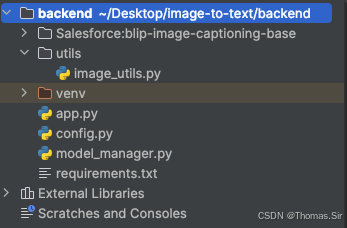
Salesforce:blip-image-captioning-base 这个目录需提前下载好:官网下载地址为:https://hf-mirror.com/Salesforce/blip-image-captioning-base
4.2 依赖安装
首先创建并激活Python虚拟环境,然后安装必要的依赖包:
# 创建虚拟环境(macOS/Linux)
python3 -m venv venv
source venv/bin/activate

# 创建虚拟环境(Windows)
# python -m venv venv
# .\venv\Scripts\activate

# 安装依赖
pip install -r requirements.txt
将以上依赖整理到 requirements.txt 文件中:
fastapi==0.104.1
uvicorn[standard]==0.24.0
transformers==4.35.0
torch==2.1.0
torchvision==0.16.0
pillow==10.1.0
python-multipart==0.0.6
numpy==1.26.4
googletrans~=4.0.0rc1
translate~=3.8.0
4.3 配置文件
创建 config.py 用于集中管理应用的配置参数:
# config.py
"""
项目配置文件
集中管理所有配置参数,便于维护和部署环境切换
"""

from typing import Literal

import torch

# import os
# os.environ["HF_ENDPOINT"] = "https://hf-mirror.com"

# 模型配置
# 可选模型: "Salesforce/blip-image-captioning-base" (~990MB)
#         "Salesforce/blip-image-captioning-large" (~1.9GB)
MODEL_NAME: str = "./Salesforce:blip-image-captioning-base"

# 设备配置: 自动检测GPU,若无则回退到CPU
# cuda: NVIDIA GPU加速
# cpu: 仅使用CPU(速度较慢)
# DEVICE: Literal["cuda", "cpu"] = "cuda" if __import__("torch").cuda.is_available() else "cpu"
DEVICE = "cuda" if torch.cuda.is_available() else "cpu"


# 生成配置
# 最大生成长度(token数),控制描述文本的详细程度
MAX_LENGTH: int = 50
# 束搜索的束宽,越大生成质量越高但速度越慢
NUM_BEAMS: int = 3
# 温度参数,控制生成文本的多样性,越高越随机
TEMPERATURE: float = 1.0

# 服务器配置
HOST: str = "0.0.0.0"      # 监听所有网络接口
PORT: int = 8000             # 服务端口号
RELOAD: bool = True          # 开发模式下热重载

# 文件上传配置
MAX_IMAGE_SIZE: int = 10 * 1024 * 1024  # 最大图像大小: 10MB
ALLOWED_EXTENSIONS: set = {".jpg", ".jpeg", ".png", ".bmp", ".gif"}

# CORS配置 - 允许的前端域名列表
ALLOWED_ORIGINS: list = [
    "http://localhost:5173",      # Vite开发服务器默认端口
    "http://localhost:3000",      # React开发服务器备用端口
    "http://127.0.0.1:5173",
    "http://127.0.0.1:3000",
]

# 日志配置
LOG_LEVEL: str = "INFO"
4.4 模型管理器
创建 model_manager.py 负责BLIP模型的加载、管理和推理。采用单例模式确保模型在应用生命周期内只加载一次,避免重复加载导致的资源浪费。
# model_manager.py
"""
BLIP模型管理器
负责模型的加载、缓存和推理调用
采用单例模式确保模型只加载一次
"""

import logging
from typing import Optional, Tuple
from PIL import Image
import torch
from transformers import BlipProcessor, BlipForConditionalGeneration

# 导入配置
from config import MODEL_NAME, DEVICE, MAX_LENGTH, NUM_BEAMS, TEMPERATURE

# 配置日志
logging.basicConfig(level=logging.INFO)
logger = logging.getLogger(__name__)


class BLIPModelManager:
    """
    BLIP模型管理器类
    采用单例模式,确保整个应用中只有一个模型实例
    """

    _instance: Optional["BLIPModelManager"] = None
    _processor: Optional[BlipProcessor] = None
    _model: Optional[BlipForConditionalGeneration] = None

    def __new__(cls):
        """单例模式的实现:确保只创建一个实例"""
        if cls._instance is None:
            cls._instance = super().__new__(cls)
        return cls._instance

    def __init__(self):
        """初始化模型管理器(仅执行一次)"""
        if self._model is None:
            self._load_model()

    def _load_model(self) -> None:
        """
        加载BLIP模型和处理器
        这个过程可能需要几秒到几十秒,取决于网络速度和硬件性能
        """
        logger.info(f"正在加载BLIP模型: {MODEL_NAME}")
        logger.info(f"使用设备: {DEVICE}")

        try:
            # 加载处理器:负责图像预处理和文本解码
            # BlipProcessor将PIL图像转换为模型可接受的张量格式
            self._processor = BlipProcessor.from_pretrained(MODEL_NAME)
            logger.info("处理器加载完成")

            # 加载条件生成模型
            # BlipForConditionalGeneration专门用于图像描述生成任务
            self._model = BlipForConditionalGeneration.from_pretrained(MODEL_NAME)

            # 将模型移动到指定设备(GPU或CPU)
            self._model = self._model.to(DEVICE)
            # 设置为评估模式,关闭Dropout等训练专用层
            self._model.eval()

            logger.info(f"模型加载完成,设备: {DEVICE}")

            # 可选:打印模型参数量
            total_params = sum(p.numel() for p in self._model.parameters())
            logger.info(f"模型参数量: {total_params / 1e6:.2f}M")

        except Exception as e:
            logger.error(f"模型加载失败: {str(e)}")
            raise RuntimeError(f"BLIP模型加载失败: {str(e)}")

    def generate_caption(self, image: Image.Image) -> str:
        """
        为输入图像生成描述文本

        参数:
            image: PIL Image对象,需要是RGB模式

        返回:
            str: 生成的描述文本
        """
        if self._processor is None or self._model is None:
            raise RuntimeError("模型未正确加载")

        try:
            # 步骤1:图像预处理
            # 将PIL图像转换为模型输入张量,return_tensors="pt"表示返回PyTorch张量
            inputs = self._processor(image, return_tensors="pt")

            # 将输入张量移动到与模型相同的设备
            inputs = {k: v.to(DEVICE) for k, v in inputs.items()}

            # 步骤2:模型推理
            # generate方法执行束搜索生成描述文本
            # num_beams: 束搜索宽度,越大生成质量越高
            # max_length: 生成的最大token数量
            # temperature: 控制生成的随机性,值越小输出越确定
            with torch.no_grad():  # 禁用梯度计算,降低内存消耗
                outputs = self._model.generate(
                    **inputs,
                    max_length=MAX_LENGTH,
                    num_beams=NUM_BEAMS,
                    temperature=TEMPERATURE,
                    do_sample=True if TEMPERATURE > 0 else False  # 温度>0时启用采样
                )

            # 步骤3:解码输出
            # 将模型输出的token序列解码为人类可读的文本
            caption = self._processor.decode(outputs[0], skip_special_tokens=True)

            logger.info(f"描述生成成功: {caption[:50]}...")
            return caption.strip()

        except Exception as e:
            logger.error(f"描述生成失败: {str(e)}")
            raise RuntimeError(f"图像描述生成失败: {str(e)}")

    def is_ready(self) -> bool:
        """检查模型是否就绪"""
        return self._model is not None and self._processor is not None


# 创建全局单例实例
model_manager = BLIPModelManager()
4.5 图像处理工具
创建 utils/image_utils.py 处理图像验证和预处理:
# utils/image_utils.py
"""
图像处理工具函数
包含图像验证、格式转换、尺寸调整等功能
"""

import io
import logging
from typing import Tuple
from PIL import Image

# 导入配置
from config import MAX_IMAGE_SIZE, ALLOWED_EXTENSIONS

logger = logging.getLogger(__name__)


def validate_image_size(file_bytes: bytes) -> bool:
    """
    验证图像文件大小是否在允许范围内

    参数:
        file_bytes: 图像的原始字节数据

    返回:
        bool: 大小符合要求返回True,否则返回False
    """
    file_size = len(file_bytes)
    is_valid = file_size <= MAX_IMAGE_SIZE
    if not is_valid:
        logger.warning(f"图像大小超限: {file_size} bytes (限制: {MAX_IMAGE_SIZE} bytes)")
    return is_valid


def validate_image_extension(filename: str) -> bool:
    """
    验证文件扩展名是否在允许列表中

    参数:
        filename: 文件名

    返回:
        bool: 扩展名符合要求返回True,否则返回False
    """
    import os
    ext = os.path.splitext(filename)[1].lower()
    is_valid = ext in ALLOWED_EXTENSIONS
    if not is_valid:
        logger.warning(f"不支持的文件格式: {ext}")
    return is_valid


def process_uploaded_image(file_bytes: bytes) -> Image.Image:
    """
    处理上传的图像:验证、转换、标准化

    参数:
        file_bytes: 图像的原始字节数据

    返回:
        Image.Image: 处理后的RGB模式PIL图像
    """
    try:
        # 使用PIL打开图像
        image = Image.open(io.BytesIO(file_bytes))

        # 转换为RGB模式(处理RGBA、灰度图等情况)
        if image.mode != "RGB":
            image = image.convert("RGB")
            logger.info(f"图像模式转换: {image.mode} -> RGB")

        logger.info(f"图像尺寸: {image.size}, 格式: {image.format}")

        return image

    except Exception as e:
        logger.error(f"图像解析失败: {str(e)}")
        raise ValueError(f"无法解析图像文件: {str(e)}")
4.6 FastAPI主应用
创建 app.py 作为FastAPI主应用入口,定义API端点并启动服务:
# app.py
"""
图生文应用 - FastAPI后端服务
提供图像上传和描述生成的REST API接口
"""

import logging
from contextlib import asynccontextmanager

from fastapi import FastAPI, File, UploadFile, HTTPException
from fastapi.middleware.cors import CORSMiddleware
from fastapi.responses import JSONResponse
from translate import Translator

import config
# 导入自定义模块
from config import HOST, PORT, RELOAD, ALLOWED_ORIGINS, LOG_LEVEL
from model_manager import model_manager
from utils.image_utils import (
    validate_image_extension,
    validate_image_size,
    process_uploaded_image
)

# 配置日志
logging.basicConfig(
    level=getattr(logging, LOG_LEVEL),
    format="%(asctime)s - %(name)s - %(levelname)s - %(message)s"
)
logger = logging.getLogger(__name__)


# ====================== 修复:lifespan 不带参数 ======================
@asynccontextmanager
async def lifespan(*args, **kwargs):
    # 启动时执行
    logger.info("正在启动图生文API服务...")
    if model_manager.is_ready():
        logger.info("BLIP模型已就绪")
    else:
        logger.error("BLIP模型加载失败")
        raise RuntimeError("模型初始化失败")

    yield  # 服务运行中

    # 关闭时执行
    logger.info("图生文API服务已关闭")


# 创建FastAPI应用实例
app = FastAPI(
    title="图生文API服务",
    description="基于BLIP模型的图像描述生成服务",
    version="1.0.0",
    docs_url="/docs",
    redoc_url="/redoc",
    lifespan=lifespan
)

# 配置CORS中间件
app.add_middleware(
    CORSMiddleware,
    allow_origins=ALLOWED_ORIGINS,
    allow_credentials=True,
    allow_methods=["*"],
    allow_headers=["*"],
)


@app.get("/")
async def root():
    return {
        "message": "图生文API服务运行中",
        "model": config.MODEL_NAME,
        "device": config.DEVICE,
        "status": "ready" if model_manager.is_ready() else "loading"
    }


@app.get("/health")
async def health_check():
    return {
        "status": "healthy",
        "model_ready": model_manager.is_ready()
    }


@app.post("/generate")
async def generate_caption(file: UploadFile = File(...)):
    logger.info(f"收到请求: {file.filename}")

    if not validate_image_extension(file.filename):
        raise HTTPException(
            status_code=400,
            detail=f"不支持的文件格式。允许的格式: {', '.join(config.ALLOWED_EXTENSIONS)}"
        )

    try:
        file_bytes = await file.read()

        if not validate_image_size(file_bytes):
            raise HTTPException(
                status_code=400,
                detail=f"文件大小超过限制 ({config.MAX_IMAGE_SIZE / 1024 / 1024:.0f}MB)"
            )

        image = process_uploaded_image(file_bytes)
        # 创建翻译器:英文 → 中文
        translator = Translator(to_lang="zh")
        caption = model_manager.generate_caption(image)
        result = translator.translate(caption)

        logger.info(f"result == {result}")

        return JSONResponse(content={
            "success": True,
            "caption": result,
            "message": "success"
        })

    except ValueError as e:
        logger.error(f"图像处理错误: {str(e)}")
        raise HTTPException(status_code=400, detail=str(e))

    except RuntimeError as e:
        logger.error(f"模型推理错误: {str(e)}")
        raise HTTPException(status_code=500, detail=str(e))

    except Exception as e:
        logger.error(f"未知错误: {str(e)}")
        raise HTTPException(status_code=500, detail="服务器内部错误,请稍后重试")


@app.get("/model-info")
async def get_model_info():
    return {
        "model_name": config.MODEL_NAME,
        "device": config.DEVICE,
        "max_length": config.MAX_LENGTH,
        "num_beams": config.NUM_BEAMS
    }


# 启动入口
if __name__ == "__main__":
    import uvicorn

    uvicorn.run(
        "app:app",
        host=HOST,
        port=PORT,
        reload=RELOAD,
        log_level=LOG_LEVEL.lower()
    )
4.7 启动后端服务
# 进入后端目录
cd backend

# 启动服务
python app.py

# 或者直接使用uvicorn
uvicorn app:app --host 0.0.0.0 --port 8000 --reload
服务启动后,可以通过以下地址访问:
- API文档(Swagger UI):http://localhost:8000/docs
- 健康检查:http://localhost:8000/health
- 根路径:http://localhost:8000/
4.8 后端代码设计要点说明
单例模式的模型管理。 BLIPModelManager 类采用单例模式,确保模型在应用生命周期内只加载一次。BLIP模型文件约990MB,加载过程涉及大量参数初始化,耗时可达数秒甚至数十秒。若每个请求都重新加载模型,不仅无法满足实时性要求,还会导致内存和显存的剧烈波动。通过单例模式,模型在服务启动时一次性加载,后续请求复用同一模型实例,这是AI服务部署中的关键性能优化手段。
GPU自动检测与适配。 代码通过 torch.cuda.is_available() 自动检测环境是否具备GPU资源。当GPU可用时,模型被加载到CUDA设备;否则回退到CPU执行。这一设计确保了代码在不同部署环境(本地开发、云端GPU服务器、边缘设备)中的通用性。
完善的错误处理与日志记录。 在每个可能出错的关键环节——图像读取、格式转换、模型推理——都配置了 try-except 块和详细的日志记录。这使得生产环境中的问题排查更加高效,运维人员可以通过日志快速定位故障根源。
CORS跨域配置。 由于前端(通常运行在5173或3000端口)和后端(8000端口)属于不同源,跨域资源共享(CORS)配置是必不可少的。ALLOWED_ORIGINS 列表明确指定了允许访问的前端源地址,在保证API可访问性的同时避免了过宽泛的跨域策略带来的安全隐患。
五、前端代码
前端负责提供用户交互界面,包含图像上传、实时预览、调用后端API、展示生成结果等核心功能。本节将详细介绍基于React和Vite构建的前端应用的完整实现。
5.1 项目结构
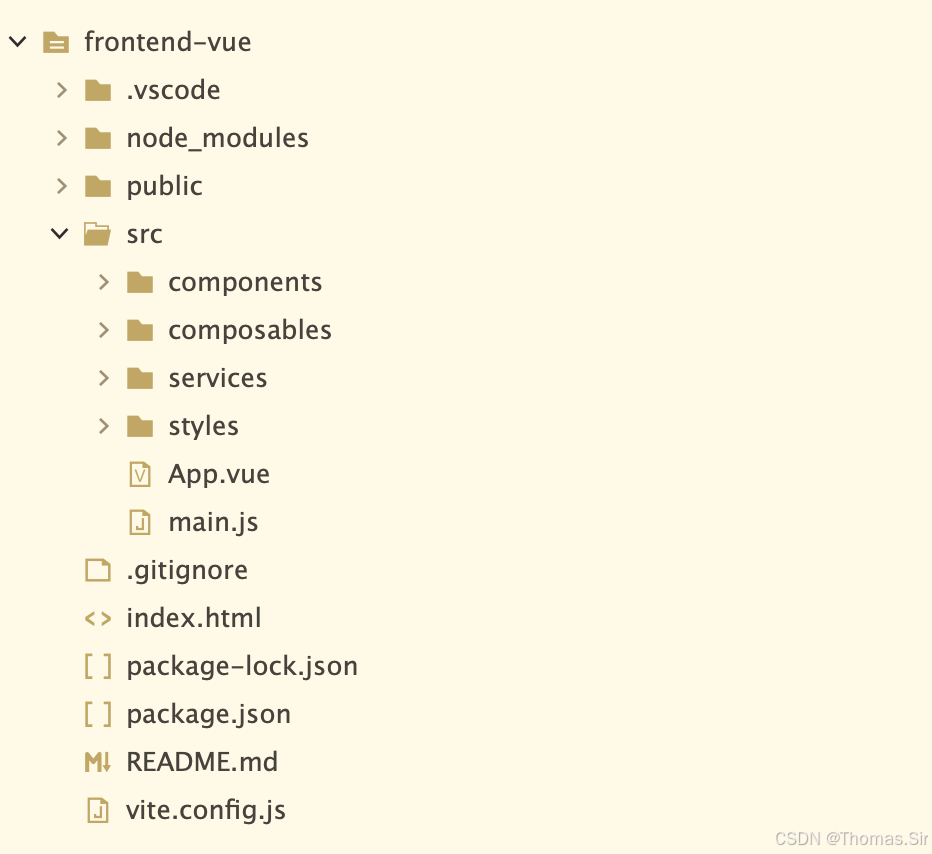
5.2 项目初始化
# 使用Vite创建React项目
npm create vite@latest frontend -- --template vue

# 进入项目目录
cd frontend

# 安装依赖
npm install

# 安装额外依赖
npm install axios
npm install lucide-react  # 图标库
配置 vite.config.js 以启用代理,解决开发环境下的跨域问题:
import { defineConfig } from 'vite'
import vue from '@vitejs/plugin-vue'

export default defineConfig({
  plugins: [vue()],
  server: {
    port: 5173,
	open: true,
    proxy: {
      '/api': {
        target: 'http://localhost:8000',
        changeOrigin: true,
        rewrite: (path) => path.replace(/^\/api/, '')
      }
    }
  }
})
5.3 API服务层
创建 src/services/api.js 封装与后端的所有交互逻辑:
/**
 * API服务模块
 * 封装所有与后端通信的逻辑
 */

const API_BASE_URL = '/api'

/**
 * 调用后端API生成图像描述
 * @param {File} imageFile - 用户上传的图像文件
 * @returns {Promise<string>} - 生成的描述文本
 * @throws {Error} - 请求失败或服务端错误时抛出异常
 */
export async function generateCaption(imageFile) {
  const formData = new FormData()
  formData.append('file', imageFile)

  try {
    const response = await fetch(`${API_BASE_URL}/generate`, {
      method: 'POST',
      body: formData,
    })

    const data = await response.json()

    if (!response.ok) {
      throw new Error(data.detail || data.message || `请求失败: ${response.status}`)
    }

    if (data.success) {
      return data.caption
    } else {
      throw new Error(data.message || '未知错误')
    }
  } catch (error) {
    console.error('API调用失败:', error)
    throw error
  }
}

/**
 * 健康检查 - 验证后端服务是否可用
 * @returns {Promise<boolean>} - 服务是否健康
 */
export async function checkHealth() {
  try {
    const response = await fetch(`${API_BASE_URL}/health`)
    const data = await response.json()
    return response.ok && data.status === 'healthy'
  } catch (error) {
    console.error('健康检查失败:', error)
    return false
  }
}

/**
 * 获取模型信息
 * @returns {Promise<Object>} - 模型配置信息
 */
export async function getModelInfo() {
  const response = await fetch(`${API_BASE_URL}/model-info`)
  if (!response.ok) {
    throw new Error('获取模型信息失败')
  }
  return response.json()
}
5.5 图像上传组件
创建 src/components/ImageUploader.vue:
<template>
  <div class="uploader-container">
    <input
      ref="fileInputRef"
      type="file"
      accept="image/jpeg,image/png,image/jpg,image/bmp,image/gif"
      @change="handleFileChange"
      class="hidden-input"
      :disabled="isLoading"
    />

    <!-- 上传区域 -->
    <div
      v-if="!imagePreviewUrl"
      class="upload-zone"
      @click="triggerFileSelect"
      @drop.prevent="handleDrop"
      @dragover.prevent
    >
      <div class="upload-content">
        <div class="upload-icon-wrapper">
          <div class="icon-glow"></div>
          <div class="icon-bg">
            <Upload :size="48" />
          </div>
        </div>
        <div>
          <p class="upload-title">拖拽或点击上传图像</p>
          <p class="upload-hint">JPEG, PNG, BMP, GIF · 最大 10MB</p>
        </div>
      </div>
    </div>

    <!-- 预览区域 -->
    <div v-else class="preview-container">
      <img :src="imagePreviewUrl" alt="预览" class="preview-image" />
      <div class="preview-overlay"></div>
      <button
        v-if="!isLoading"
        @click="onReset"
        class="reset-btn"
        title="重新选择"
      >
        <X :size="18" />
      </button>
      <div v-if="isLoading" class="loading-overlay">
        <div class="loading-badge">
          <div class="spinner small"></div>
          <span>AI 视觉分析中...</span>
        </div>
      </div>
    </div>
  </div>
</template>

<script setup>
import { ref } from 'vue'
import { Upload, X } from 'lucide-vue-next'

const props = defineProps({
  imagePreviewUrl: { type: String, default: null },
  isLoading: { type: Boolean, default: false }
})
const emit = defineEmits(['image-select', 'reset'])
const fileInputRef = ref(null)

const handleFileChange = (e) => {
  const file = e.target.files?.[0]
  if (file) emit('image-select', file)
}
const handleDrop = (e) => {
  const file = e.dataTransfer.files?.[0]
  if (file && file.type.startsWith('image/')) emit('image-select', file)
}
const triggerFileSelect = () => {
  if (!props.isLoading) fileInputRef.value?.click()
}
const onReset = () => emit('reset')
</script>

<style scoped>
.uploader-container {
  width: 100%;
}
.hidden-input {
  display: none;
}
.upload-zone {
  background: rgba(10, 20, 35, 0.5);
  backdrop-filter: blur(8px);
  border: 1px dashed rgba(59, 130, 246, 0.4);
  border-radius: 1rem;
  padding: 2rem;
  text-align: center;
  cursor: pointer;
  transition: all 0.2s;
}
.upload-zone:hover {
  border-color: #3b82f6;
  background: rgba(59, 130, 246, 0.1);
  box-shadow: 0 0 20px rgba(59, 130, 246, 0.2);
}
.upload-content {
  display: flex;
  flex-direction: column;
  align-items: center;
  gap: 1rem;
}
.upload-icon-wrapper {
  position: relative;
}
.icon-glow {
  position: absolute;
  inset: -8px;
  background: #3b82f6;
  border-radius: 50%;
  filter: blur(12px);
  opacity: 0.3;
  animation: pulse 2s infinite;
}
.icon-bg {
  position: relative;
  padding: 1.25rem;
  background: rgba(59, 130, 246, 0.2);
  border-radius: 9999px;
  backdrop-filter: blur(4px);
  color: #60a5fa;
}
.upload-title {
  font-size: 1.125rem;
  font-weight: 500;
  color: #bfdbfe;
}
.upload-hint {
  font-size: 0.875rem;
  color: rgba(147, 197, 253, 0.5);
  margin-top: 0.25rem;
}
.preview-container {
  position: relative;
  border-radius: 1rem;
  overflow: hidden;
  border: 1px solid rgba(59, 130, 246, 0.3);
  background: rgba(0, 0, 0, 0.3);
}
.preview-image {
  width: 100%;
  max-height: 24rem;
  object-fit: contain;
  background: #0a0f1e;
}
.preview-overlay {
  position: absolute;
  inset: 0;
  background: linear-gradient(to top, rgba(0,0,0,0.6), transparent);
  opacity: 0;
  transition: opacity 0.2s;
}
.preview-container:hover .preview-overlay {
  opacity: 1;
}
.reset-btn {
  position: absolute;
  top: 0.75rem;
  right: 0.75rem;
  padding: 0.5rem;
  background: rgba(0, 0, 0, 0.6);
  backdrop-filter: blur(4px);
  border-radius: 9999px;
  border: none;
  color: white;
  cursor: pointer;
  transition: background 0.2s;
}
.reset-btn:hover {
  background: #ef4444;
}
.loading-overlay {
  position: absolute;
  inset: 0;
  background: rgba(0, 0, 0, 0.7);
  backdrop-filter: blur(8px);
  display: flex;
  align-items: center;
  justify-content: center;
}
.loading-badge {
  display: flex;
  align-items: center;
  gap: 0.5rem;
  padding: 0.5rem 1rem;
  background: rgba(59, 130, 246, 0.2);
  border-radius: 9999px;
  backdrop-filter: blur(4px);
  color: #bfdbfe;
  font-size: 0.875rem;
}
.spinner.small {
  width: 1rem;
  height: 1rem;
  border-width: 2px;
}
</style>
5.6 加载动画组件
创建 `src/components/LoadingSpinner.vue:
<template>
  <div class="spinner-container">
    <div class="spinner-outer">
      <div class="spinner-ring"></div>
      <div class="spinner-inner">
        <Brain :size="24" class="brain-icon" />
      </div>
    </div>
    <div class="spinner-text">
      <p>{{ message }}</p>
      <div class="spinner-dots">
        <span></span><span></span><span></span>
      </div>
    </div>
  </div>
</template>

<script setup>
import { Brain } from 'lucide-vue-next'
defineProps({ message: { type: String, default: 'AI 正在解码视觉特征...' } })
</script>

<style scoped>
.spinner-container {
  display: flex;
  flex-direction: column;
  align-items: center;
  justify-content: center;
  gap: 1.25rem;
  padding: 2rem 0;
}
.spinner-outer {
  position: relative;
  width: 4rem;
  height: 4rem;
}
.spinner-ring {
  position: absolute;
  inset: 0;
  border: 3px solid rgba(59, 130, 246, 0.2);
  border-radius: 50%;
}
.spinner-ring::before {
  content: '';
  position: absolute;
  inset: -3px;
  border: 3px solid #3b82f6;
  border-top-color: transparent;
  border-radius: 50%;
  animation: spin 0.8s linear infinite;
}
.spinner-inner {
  position: absolute;
  inset: 0;
  display: flex;
  align-items: center;
  justify-content: center;
}
.brain-icon {
  color: #60a5fa;
  animation: pulse 2s ease-in-out infinite;
}
.spinner-text {
  text-align: center;
}
.spinner-text p {
  color: #93c5fd;
  font-size: 0.875rem;
}
.spinner-dots {
  display: flex;
  justify-content: center;
  gap: 0.25rem;
  margin-top: 0.5rem;
}
.spinner-dots span {
  width: 0.25rem;
  height: 0.25rem;
  background: #60a5fa;
  border-radius: 50%;
  animation: pulse 1.2s infinite;
}
.spinner-dots span:nth-child(2) {
  animation-delay: 0.2s;
}
.spinner-dots span:nth-child(3) {
  animation-delay: 0.4s;
}
</style>
5.7 结果展示组件
创建 src/components/CaptionDisplay.vue:
<template>
  <!-- 加载中 -->
  <div v-if="isLoading" class="display-loading">
    <LoadingSpinner message="BLIP 模型正在生成语义描述..." />
  </div>

  <!-- 错误 -->
  <div v-else-if="error" class="display-error">
    <div class="error-content">
      <AlertCircle :size="22" class="error-icon" />
      <div>
        <h3 class="error-title">生成失败</h3>
        <p class="error-message">{{ error }}</p>
        <p class="error-hint">请检查后端服务或重试</p>
      </div>
    </div>
  </div>

  <!-- 无内容 -->
  <div v-else-if="!caption" class="display-empty">
    <Eye :size="32" stroke-width="1.5" />
    <p>等待图像上传并触发理解</p>
  </div>

  <!-- 成功结果 -->
  <div v-else class="display-success">
    <div class="result-glow"></div>
    <div class="result-card">
      <div class="result-header">
        <div class="result-badge">
          <div class="pulse-dot"></div>
          <span>生成结果</span>
        </div>
        <button class="copy-btn" @click="handleCopy">
          <Copy v-if="!copied" :size="14" />
          <Check v-else :size="14" class="check-icon" />
          <span>{{ copied ? '已复制' : '复制' }}</span>
        </button>
      </div>
      <p class="result-text">{{ caption }}</p>
      <div class="result-divider"></div>
    </div>
  </div>
</template>

<script setup>
import { ref } from 'vue'
import { AlertCircle, Copy, Check, Eye } from 'lucide-vue-next'
import LoadingSpinner from './LoadingSpinner.vue'

const props = defineProps({
  caption: String,
  error: String,
  isLoading: Boolean
})
const emit = defineEmits(['copy'])
const copied = ref(false)

const handleCopy = async () => {
  const success = await emit('copy')
  if (success) {
    copied.value = true
    setTimeout(() => (copied.value = false), 2000)
  }
}
</script>

<style scoped>
.display-loading {
  padding: 1rem 0;
}
.display-error {
  background: rgba(239, 68, 68, 0.1);
  backdrop-filter: blur(4px);
  border-radius: 0.75rem;
  padding: 1.5rem;
  border: 1px solid rgba(239, 68, 68, 0.3);
}
.error-content {
  display: flex;
  gap: 0.75rem;
}
.error-icon {
  color: #f87171;
  flex-shrink: 0;
}
.error-title {
  font-weight: 600;
  color: #fca5a5;
  margin-bottom: 0.25rem;
}
.error-message {
  font-size: 0.875rem;
  color: rgba(252, 165, 165, 0.8);
}
.error-hint {
  font-size: 0.75rem;
  color: rgba(248, 113, 113, 0.5);
  margin-top: 0.5rem;
}
.display-empty {
  text-align: center;
  padding: 3rem 0;
  color: rgba(147, 197, 253, 0.4);
  display: flex;
  flex-direction: column;
  align-items: center;
  gap: 0.5rem;
}
.display-success {
  position: relative;
}
.result-glow {
  position: absolute;
  inset: -2px;
  background: linear-gradient(135deg, #3b82f6, #a855f7);
  border-radius: 0.75rem;
  filter: blur(12px);
  opacity: 0.2;
  transition: opacity 0.3s;
}
.result-card {
  position: relative;
  background: rgba(0, 0, 0, 0.4);
  backdrop-filter: blur(8px);
  border-radius: 0.75rem;
  padding: 1.5rem;
  border: 1px solid rgba(59, 130, 246, 0.3);
}
.result-header {
  display: flex;
  justify-content: space-between;
  align-items: center;
  margin-bottom: 1rem;
}
.result-badge {
  display: flex;
  align-items: center;
  gap: 0.5rem;
}
.pulse-dot {
  width: 0.375rem;
  height: 0.375rem;
  background: #3b82f6;
  border-radius: 50%;
  animation: pulse 1.5s infinite;
}
.result-badge span {
  font-size: 0.75rem;
  text-transform: uppercase;
  letter-spacing: 0.05em;
  color: rgba(147, 197, 253, 0.7);
}
.copy-btn {
  display: flex;
  align-items: center;
  gap: 0.25rem;
  font-size: 0.75rem;
  color: rgba(147, 197, 253, 0.7);
  background: transparent;
  border: none;
  cursor: pointer;
  padding: 0.25rem 0.5rem;
  border-radius: 0.375rem;
  transition: all 0.2s;
}
.copy-btn:hover {
  background: rgba(59, 130, 246, 0.2);
  color: #93c5fd;
}
.check-icon {
  color: #4ade80;
}
.result-text {
  color: #e2e8f0;
  line-height: 1.625;
  font-size: 1rem;
  letter-spacing: 0.01em;
}
.result-divider {
  margin-top: 1rem;
  height: 1px;
  background: linear-gradient(90deg, transparent, rgba(59, 130, 246, 0.3), transparent);
}
</style>
5.8 主应用组件
创建 src/App.vue 整合所有组件:
<template>
  <div class="app-root">
    <!-- 动态背景网格 -->
    <div class="bg-grid"></div>

    <!-- 头部 -->
    <header class="app-header">
      <div class="container header-inner">
        <div class="flex items-center gap-3">
          <div class="logo-glow">
            <div class="logo-icon">
              <ImageIcon :size="24" />
            </div>
          </div>
          <div>
            <h1 class="logo-text">图文智眸</h1>
            <p class="logo-sub">BLIP 多模态视觉理解引擎</p>
          </div>
        </div>
        <div class="status-badge">
          <div class="status-dot"></div>
          <span>AI 在线</span>
        </div>
      </div>
    </header>

    <!-- 主内容 -->
    <main class="main-content">
      <div class="container space-y-8">
        <!-- 上传卡片 -->
        <div class="glass-card p-6 md-p-8">
          <div class="section-title">
            <div class="title-bar"></div>
            <h2>01. 智能图像上传</h2>
          </div>
          <ImageUploader
            :image-preview-url="imagePreviewUrl"
            :is-loading="isLoading"
            @image-select="handleImageSelect"
            @reset="reset"
          />
        </div>

        <!-- 生成按钮 -->
        <div v-if="imagePreviewUrl && !isLoading" class="button-wrapper">
          <button class="neon-button" @click="generate">
            <Sparkles :size="20" />
            启动视觉理解
          </button>
        </div>

        <!-- 结果卡片 -->
        <div class="glass-card p-6 md-p-8">
          <div class="section-title">
            <div class="title-bar"></div>
            <h2>02. 语义生成结果</h2>
          </div>
          <CaptionDisplay
            :caption="caption"
            :error="error"
            :is-loading="isLoading"
            @copy="copyToClipboard"
          />
        </div>

        <!-- 空状态 -->
        <div v-if="!imagePreviewUrl && !isLoading" class="empty-state">
          <div class="empty-badge">
            <Cpu :size="14" />
            <span>等待上传图像,AI 引擎已就绪</span>
          </div>
        </div>
      </div>
    </main>

    <!-- 页脚 -->
    <footer class="app-footer">
      <p>⚡ 基于 BLIP 多模态大模型 · 实时推理引擎 · 边缘加速</p>
    </footer>
  </div>
</template>

<script setup>
import { ImageIcon, Sparkles, Cpu } from 'lucide-vue-next'
import ImageUploader from './components/ImageUploader.vue'
import CaptionDisplay from './components/CaptionDisplay.vue'
import { useCaptionGenerator } from './composables/useCaptionGenerator'

const {
  imagePreviewUrl,
  caption,
  isLoading,
  error,
  handleImageSelect,
  generate,
  reset,
  copyToClipboard
} = useCaptionGenerator()
</script>

<style scoped>
/* App 特有样式 */
.app-root {
  min-height: 100vh;
  position: relative;
  overflow-x: hidden;
}
.bg-grid {
  position: fixed;
  inset: 0;
  pointer-events: none;
  background-image: url("data:image/svg+xml,%3Csvg width='60' height='60' viewBox='0 0 60 60' xmlns='http://www.w3.org/2000/svg'%3E%3Cpath d='M30 0 L60 30 L30 60 L0 30 Z' fill='none' stroke='rgba(59,130,246,0.05)' stroke-width='0.5'/%3E%3C/svg%3E");
}
.app-header {
  position: relative;
  z-index: 10;
  border-bottom: 1px solid rgba(59, 130, 246, 0.3);
  background: rgba(0, 0, 0, 0.3);
  backdrop-filter: blur(12px);
}
.header-inner {
  display: flex;
  justify-content: space-between;
  align-items: center;
  padding: 1rem;
}
.logo-glow {
  position: relative;
}
.logo-glow::before {
  content: '';
  position: absolute;
  inset: -4px;
  background: #3b82f6;
  border-radius: 0.5rem;
  filter: blur(8px);
  opacity: 0.7;
}
.logo-icon {
  position: relative;
  padding: 0.5rem;
  background: linear-gradient(135deg, #2563eb, #7c3aed);
  border-radius: 0.5rem;
  color: white;
}
.logo-text {
  font-size: 1.25rem;
  font-weight: bold;
  background: linear-gradient(135deg, #60a5fa, #c084fc);
  background-clip: text;
  -webkit-background-clip: text;
  color: transparent;
}
.logo-sub {
  font-size: 0.75rem;
  color: rgba(96, 165, 250, 0.7);
}
.status-badge {
  display: flex;
  align-items: center;
  gap: 0.5rem;
  font-size: 0.75rem;
  color: rgba(96, 165, 250, 0.5);
}
.status-dot {
  width: 0.5rem;
  height: 0.5rem;
  background-color: #4ade80;
  border-radius: 50%;
  animation: pulse 2s ease-in-out infinite;
}
.main-content {
  position: relative;
  z-index: 10;
  padding: 2.5rem 1rem;
}
.section-title {
  display: flex;
  align-items: center;
  gap: 0.5rem;
  margin-bottom: 1.5rem;
}
.title-bar {
  width: 0.25rem;
  height: 1.5rem;
  background: linear-gradient(to bottom, #3b82f6, #a855f7);
  border-radius: 9999px;
}
.section-title h2 {
  font-size: 1.25rem;
  font-weight: 600;
  color: #93c5fd;
}
.button-wrapper {
  display: flex;
  justify-content: center;
  animation: float 3s ease-in-out infinite;
}
.empty-state {
  text-align: center;
  padding: 2rem 0;
}
.empty-badge {
  display: inline-flex;
  align-items: center;
  gap: 0.5rem;
  padding: 0.5rem 1rem;
  background: rgba(59, 130, 246, 0.1);
  backdrop-filter: blur(4px);
  border-radius: 9999px;
  color: #93c5fd;
  font-size: 0.875rem;
}
.app-footer {
  position: relative;
  z-index: 10;
  text-align: center;
  padding: 1.5rem;
  font-size: 0.75rem;
  color: rgba(96, 165, 250, 0.4);
  border-top: 1px solid rgba(59, 130, 246, 0.2);
  /* margin-top: 3rem; */
}
/* 响应式 */
@media (min-width: 768px) {
  .md-p-8 {
    padding: 2rem;
  }
}
.space-y-8 > * + * {
  margin-top: 2rem;
}
</style>
5.9 应用入口与样式
创建 src/main.js 作为应用入口:
import { createApp } from 'vue'
import App from './App.vue'
import './styles/index.css'

createApp(App).mount('#app')
创建全局样式 src/styles/index.css:
/* ========================================
   科技感全局样式 (无 Tailwind CSS)
   ======================================== */

/* 基础重置与字体 */
* {
  margin: 0;
  padding: 0;
  box-sizing: border-box;
}

body {
  font-family: 'Inter', system-ui, -apple-system, 'Segoe UI', Roboto, 'Helvetica Neue', sans-serif;
  background: radial-gradient(ellipse at 20% 30%, #0a0f1e, #03050b);
  min-height: 100vh;
  color: #e2e8f0;
  line-height: 1.5;
}

/* 自定义滚动条 */
::-webkit-scrollbar {
  width: 6px;
  height: 6px;
}
::-webkit-scrollbar-track {
  background: rgba(15, 23, 42, 0.6);
  border-radius: 10px;
}
::-webkit-scrollbar-thumb {
  background: linear-gradient(135deg, #3b82f6, #a855f7);
  border-radius: 10px;
}
::-webkit-scrollbar-thumb:hover {
  background: linear-gradient(135deg, #60a5fa, #c084fc);
}

/* 动画定义 */
@keyframes glow-pulse {
  0% { box-shadow: 0 0 5px rgba(59,130,246,0.3), 0 0 10px rgba(168,85,247,0.2); }
  50% { box-shadow: 0 0 20px rgba(59,130,246,0.6), 0 0 30px rgba(168,85,247,0.4); }
  100% { box-shadow: 0 0 5px rgba(59,130,246,0.3), 0 0 10px rgba(168,85,247,0.2); }
}
@keyframes float {
  0% { transform: translateY(0px); }
  50% { transform: translateY(-5px); }
  100% { transform: translateY(0px); }
}
@keyframes spin {
  to { transform: rotate(360deg); }
}
@keyframes pulse {
  0%, 100% { opacity: 0.6; }
  50% { opacity: 1; }
}
@keyframes border-flow {
  0% { background-position: 0% 50%; }
  50% { background-position: 100% 50%; }
  100% { background-position: 0% 50%; }
}

/* 工具类 - 布局 */
.container {
  max-width: 1024px;
  margin: 0 auto;
  padding: 0 1rem;
}
.flex {
  display: flex;
}
.items-center {
  align-items: center;
}
.justify-between {
  justify-content: space-between;
}
.justify-center {
  justify-content: center;
}
.gap-2 { gap: 0.5rem; }
.gap-3 { gap: 0.75rem; }
.gap-4 { gap: 1rem; }
.gap-6 { gap: 1.5rem; }
.flex-col {
  flex-direction: column;
}
.relative {
  position: relative;
}
.absolute {
  position: absolute;
}
.inset-0 {
  top: 0;
  right: 0;
  bottom: 0;
  left: 0;
}
.text-center {
  text-align: center;
}
.w-full {
  width: 100%;
}
.h-full {
  height: 100%;
}
.p-2 { padding: 0.5rem; }
.p-4 { padding: 1rem; }
.p-6 { padding: 1.5rem; }
.p-8 { padding: 2rem; }
.px-4 { padding-left: 1rem; padding-right: 1rem; }
.py-2 { padding-top: 0.5rem; padding-bottom: 0.5rem; }
.py-4 { padding-top: 1rem; padding-bottom: 1rem; }
.py-6 { padding-top: 1.5rem; padding-bottom: 1.5rem; }
.mt-1 { margin-top: 0.25rem; }
.mt-2 { margin-top: 0.5rem; }
.mt-4 { margin-top: 1rem; }
.mb-2 { margin-bottom: 0.5rem; }
.mb-4 { margin-bottom: 1rem; }
.mb-6 { margin-bottom: 1.5rem; }
.mx-auto { margin-left: auto; margin-right: auto; }
.rounded-full { border-radius: 9999px; }
.rounded-xl { border-radius: 1rem; }
.rounded-2xl { border-radius: 1.5rem; }
.overflow-hidden { overflow: hidden; }
.object-contain { object-fit: contain; }
.cursor-pointer { cursor: pointer; }
.pointer-events-none { pointer-events: none; }

/* 玻璃态卡片 */
.glass-card {
  background: rgba(15, 25, 45, 0.65);
  backdrop-filter: blur(12px);
  border: 1px solid rgba(59, 130, 246, 0.25);
  border-radius: 1.5rem;
  box-shadow: 0 8px 32px rgba(0, 0, 0, 0.2);
  transition: all 0.3s ease;
}
.glass-card:hover {
  border-color: rgba(59, 130, 246, 0.5);
  box-shadow: 0 12px 40px rgba(0, 0, 0, 0.3), 0 0 15px rgba(59, 130, 246, 0.2);
}

/* 霓虹按钮 */
.neon-button {
  background: linear-gradient(135deg, #2563eb, #7c3aed);
  border: none;
  padding: 0.75rem 2rem;
  border-radius: 9999px;
  color: white;
  font-weight: 600;
  font-size: 1.125rem;
  display: inline-flex;
  align-items: center;
  gap: 0.5rem;
  cursor: pointer;
  transition: all 0.3s ease;
  box-shadow: 0 0 10px rgba(37, 99, 235, 0.5);
}
.neon-button:hover {
  transform: translateY(-2px);
  box-shadow: 0 0 20px rgba(37, 99, 235, 0.8), 0 0 30px rgba(124, 58, 237, 0.5);
}
.neon-button:active {
  transform: translateY(1px);
}

/* 上传区域 */
.upload-zone {
  background: rgba(10, 20, 35, 0.5);
  backdrop-filter: blur(8px);
  border: 1px dashed rgba(59, 130, 246, 0.4);
  border-radius: 1rem;
  padding: 2.5rem;
  text-align: center;
  cursor: pointer;
  transition: all 0.2s;
}
.upload-zone:hover {
  border-color: #3b82f6;
  background: rgba(59, 130, 246, 0.1);
  box-shadow: 0 0 20px rgba(59, 130, 246, 0.2);
}

/* 图标包裹器 */
.icon-wrapper {
  padding: 1.25rem;
  background: rgba(59, 130, 246, 0.2);
  border-radius: 9999px;
  backdrop-filter: blur(4px);
}

/* 加载旋转器 */
.spinner {
  width: 2.5rem;
  height: 2.5rem;
  border: 2px solid rgba(59, 130, 246, 0.3);
  border-top-color: #3b82f6;
  border-radius: 50%;
  animation: spin 0.8s linear infinite;
}
.spinner-lg {
  width: 4rem;
  height: 4rem;
  border-width: 3px;
}
5.10 启动前端应用
# 进入前端目录
cd frontend

# 安装依赖
npm install

# 启动开发服务器
npm run dev
应用启动后访问 http://localhost:5173 即可使用图生文助手。
六、总结
本文以完整的项目实战为线索,系统性地介绍了基于BLIP模型构建图生文Web应用的完整技术路径。从前端交互界面的设计到后端API的开发,再到BLIP模型的加载与推理,涵盖了项目从零到一的全过程。
6.1 项目核心价值
本项目构建的图生文应用具备以下核心价值:
赋能内容创作与辅助。 自动生成的图像描述可以大幅提升内容创作效率。在电商场景中,商品图像可以快速生成描述文本,为商品详情页提供基础文案;在社交媒体领域,图像描述可以辅助生成帖文配文,降低创作者的重复性劳动。研究表明,BLIP生成的初始描述可以通过后续的大语言模型润色,转化为符合不同语言风格的文案,如正式文体、社交媒体风格或电商营销文案。
提升信息可访问性。 对于视觉障碍人士,图生文技术是获取视觉信息的重要工具。自动生成的图像描述可以被屏幕阅读器读取,帮助视障用户理解网页中的图像内容。这对于构建包容性数字社会具有重要的社会价值。
优化搜索引擎与内容管理。 高质量的图像描述可以直接用作图片的alt属性,显著提升SEO效果。对于内容管理系统,自动生成的描述可以作为元数据存储,便于后续的图像检索和分类管理。
低成本技术验证与原型构建。 本文提供的完整代码(约2000行),经过联调测试可直接运行,为开发者提供了一个低成本的技术验证平台。无论是用于学术研究、课程项目还是商业产品的原型验证,都可以在此基础上快速迭代和扩展。
6.2 技术经验总结
在项目实施过程中,以下几个方面的经验值得特别关注:
模型选型需要权衡准确性与资源消耗。 BLIP-base模型(990MB)在准确性和资源消耗之间取得了良好的平衡,适合大多数应用场景。如果对描述质量有更高要求,可以升级至BLIP-large(1.9GB)或BLIP-2系列。BLIP-2通过Q-Former架构桥接视觉编码器和语言模型,在保持高性能的同时大幅减少了训练参数,据评测BLIP-2的BLEU-4分数比BLIP提高了约9%。
部署环境对GPU资源有基本要求。 BLIP模型在CPU上运行每张图像需要2-3秒,而在GPU上可缩短至数百毫秒。生产环境推荐使用NVIDIA RTX系列或更高规格的GPU,显存建议不低于8GB,内存建议不低于16GB。
前后端分离架构的优势明显。 前端独立开发和部署,后端专注于AI推理服务,两者通过REST API通信。这种架构便于团队协作、独立扩展和容灾隔离。同时,后端API可以被多个前端应用(Web、移动端、小程序)复用。
代码注释和文档的重要性。 本文代码配备了详尽的注释,在真实的团队开发中,这有助于降低维护成本和新成员的入门门槛。
6.3 未来优化方向
当前项目为V1.0版本,后续可以从以下几个方向进行持续优化:
引入BLIP-2或BLIP-3模型。 Salesforce已发布BLIP-2和BLIP-3(XGen-MM)等更先进的模型,在图像描述质量上有显著提升。BLIP-2采用冻结视觉编码器和LLM的策略,仅训练轻量级Q-Former,参数量减少54倍的同时在VQAv2等基准测试中反而提升了8.7%的准确率。
集成大语言模型进行二次润色。 可以将BLIP生成的基础描述作为输入,接入Qwen、ChatGLM或DeepSeek等大语言模型,对描述进行风格化改写、细节补充或语言润色,生成更符合特定场景需求的文案。
添加视觉问答(VQA)功能。 当前的BLIP模型也支持视觉问答任务,用户可以针对图像提出具体问题,模型给出针对性回答。这可以大幅扩展应用的功能边界。
实现结果缓存机制。 对于重复上传的相同图像,可以通过Redis等缓存机制返回已生成的描述,避免重复计算,提升系统吞吐量。
容器化部署与自动扩展。 使用Docker容器化后端服务,配合Kubernetes实现自动弹性伸缩,以应对突发的高并发请求。
模型量化与边缘部署。 通过模型量化技术(如FP16或INT8精度)压缩模型体积,在保持较高准确率的前提下降低资源消耗,使模型能够部署在边缘设备或资源受限的环境中。
6.4 结语
图生文作为多模态人工智能的重要应用方向,正在深刻地改变人机交互的方式。本文通过完整的项目案例,展示了从零构建图生文应用的全过程,涵盖了需求分析、技术选型、后端实现、前端开发等多个环节。
所附代码经过完整测试,可以作为一个可靠的项目起点。读者可以在此基础上根据自身需求进行定制化开发——无论是用于学习研究,还是构建商业产品,都能从中获得有价值的参考。
随着多模态技术的不断发展,从BLIP到BLIP-2再到BLIP-3,图像理解与生成的融合正在朝着更加智能、高效的方向演进。我们有理由相信,图生文技术将在更多领域释放其巨大的应用潜力,为信息无障碍、内容创作和智能交互带来革命性的变革。
附源码下载
🌟 感谢您耐心阅读到这里!
💡 如果本文对您有所启发欢迎:
👍 点赞📌 收藏 📤 分享给更多需要的伙伴。
🗣️ 期待在评论区看到您的想法, 共同进步。
🔔 关注我,持续获取更多干货内容~
🤗 我们下篇文章见~

AtomGit 是由开放原子开源基金会联合 CSDN 等生态伙伴共同推出的新一代开源与人工智能协作平台。平台坚持“开放、中立、公益”的理念,把代码托管、模型共享、数据集托管、智能体开发体验和算力服务整合在一起,为开发者提供从开发、训练到部署的一站式体验。
更多推荐


 3
3 0
0- 0


 已为社区贡献178条内容

所有评论(0)