一个摄像头体感玩转所有动作游戏(含完整可执行代码,自定义键位和动作教程)燕云原神
文章目录
背景及原理
长时间坐在电脑前用键鼠打游戏,眼也花了、手也酸了、腿也麻了、人也胖了。因此,我想到用usb摄像头设别人体姿态,将不同的动作转化成键鼠映射,控制游戏角色游玩。理论上只要改变不同动作对应的键鼠操作,就能适配任何动作游戏。
我将我写的多线程摄像头体感游玩程序分享给大家,望大家玩游戏勿忘赛博健身。
燕云和原神演示案例
燕云摄像头体感演示视频:
https://www.bilibili.com/video/BV1TZcTzDEgr/
https://www.bilibili.com/video/BV1YdfyBfE74/
基于MeidiaPipe通过摄像头检测人体姿势控制燕云十六声
基于MediaPipe通过摄像头检测人体姿势游玩燕云十六声
原神摄像头体感演示视频:
https://www.bilibili.com/video/BV1QPA6zXEVH/
https://www.bilibili.com/video/BV1QAA6zWEgB/
基于MediaPipe通过摄像头检测人体姿势游玩原神
环境配置
本人在windows11系统下进行测试,8G显存,16G内存,姿态检测选用可在CPU运行的MediPipe模型,同时运行游戏和此程序无压力。
摄像头只需要最普通的usb摄像头,当然有广角最好,没广角就把摄像头放远一些、高一些,确保从头到脚、两臂展开时的双手全部在图幅内。
(1)安装python
windows系统需要安装独立的python,在官网下载即可。官网地址:https://www.python.org/downloads/windows/ ,python版本3.0以上,直接默认安装,需要添加系统环境变量的在安装最后勾选上。
(2)构建Anaconda虚拟环境
安装anaconda,官网地址:https://www.jetbrains.com/pycharm/download/?section=windows。利用anaconda创建一个对应python版本的虚拟环境
参考博文:https://blog.csdn.net/2303_78957394/article/details/146009614
https://blog.csdn.net/weixin_46856917/article/details/143529062
(3)安装pycharm编译器
在官网下载教育版:https://www.jetbrains.com/pycharm/download/?section=windows
选择python编译环境,创建python工程。
进入工程后创建.py文件,编译器选择conda创建的虚拟环境。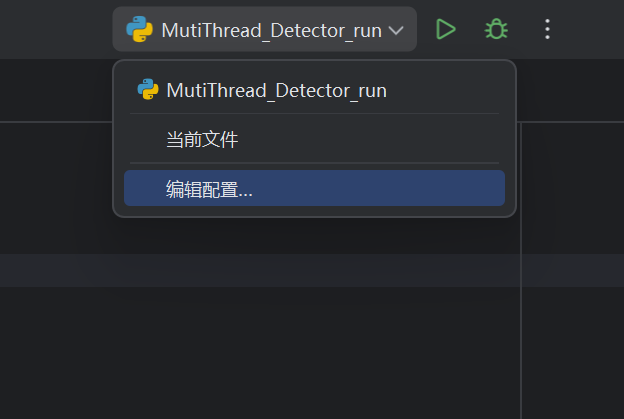
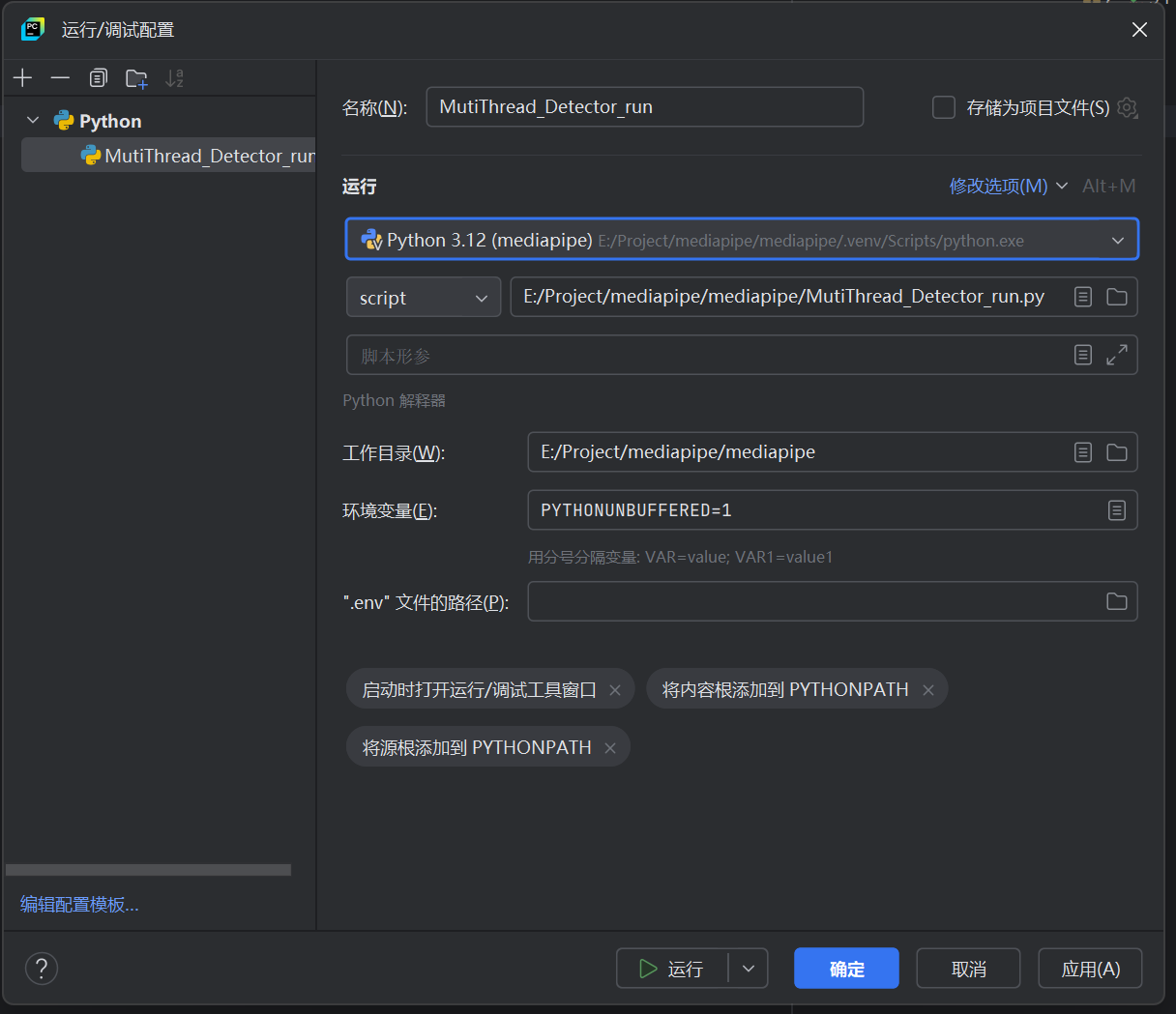
(4)安装依赖项
需要的依赖项有cv2、threading、collections、time、mediapipe、pydirectinput、numpy。
这里有两种安装方式:
一种是利用conda install 安装,参考博文:https://blog.csdn.net/weixin_74959048/article/details/138728736 。
另一种是在pycharm工程窗口中选择“终端窗口”,在命令行使用pip install 安装依赖项。新版本Anaconda 已默认包含 pip工具库。安装速度慢的可在后面加上“-i https://pypi.tuna.tsinghua.edu.cn/simple”。
pip install cv2 threading collections time mediapipe pydirectinput numpy -i https://pypi.tuna.tsinghua.edu.cn/simple
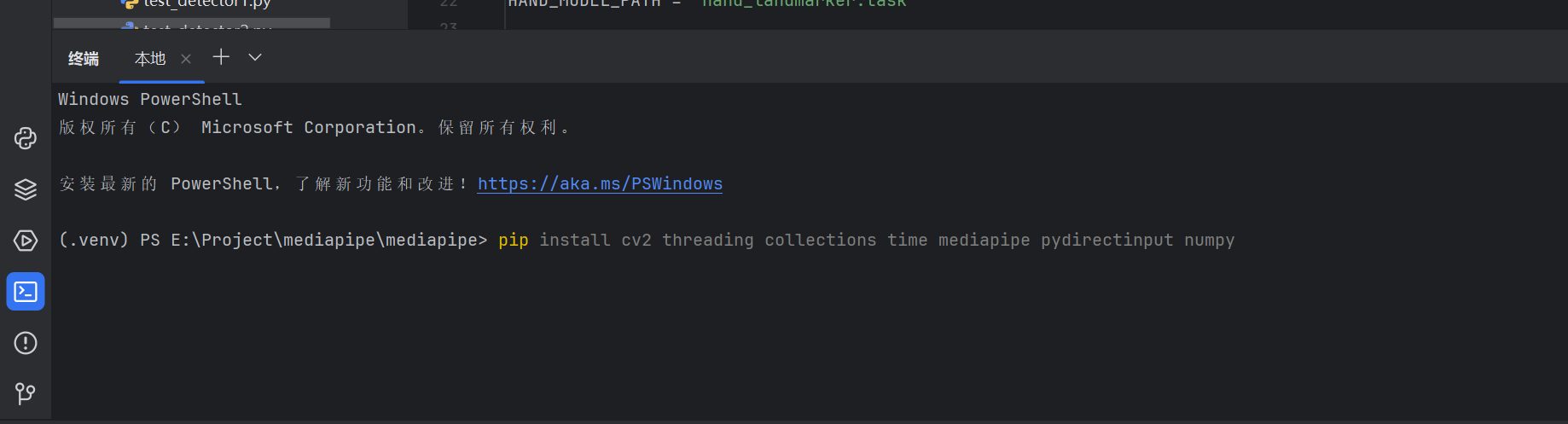
由于MediaPipe模型可在cpu上高速运行,因此我们无需安装cuda和cudnn。
(5)下载MediaPipe模型权重文件
MediaPipe模型权重有完整版和轻量版两种,经我测试完整版运行速度也可达到游戏控制要求。计算机资源不够的可选择轻量版模型。
由于我用到了手部精确的姿态,所以这里要下载姿态和手势两种模型权重。
模型权重放在pycharm工程文件中,并将下述完整代码中的模型路径替换成你自己的模型权重路径。
MODEL_PATH = 'pose_landmarker_full.task' # 替换成你自己的姿态检测模型权重名称
HAND_MODEL_PATH = 'hand_landmarker.task' # 替换成你自己的手势检测模型权重名称
姿态检测模型权重下载地址:
https://storage.googleapis.com/mediapipe-models/pose_landmarker/pose_landmarker_lite/float16/1/pose_landmarker_lite.task
https://storage.googleapis.com/mediapipe-models/pose_landmarker/pose_landmarker_full/float16/1/pose_landmarker_full.task
手势检测模型权重下载地址:
https://storage.googleapis.com/mediapipe-models/hand_landmarker/hand_landmarker/float16/1/hand_landmarker.task
完整的可执行代码
下面是完整的可执行代码,复制后粘贴到你的pycharm工程文件中的.py文件中,将两个模型权重名称和路径替换成你自己电脑上的名称和路径(如果你按上面说的把模型权重文件放到pycharm工程文件中就不用替换)。
另外,如果你的电脑上只插了一个usb摄像头,那么该摄像头默认ID号为0,不需要修改程序。如果有多个摄像头,需要试一下你需要用的usb摄像头是哪一个ID号,并在程序以下位置修改:
camera_thread = CameraReader(camera_id=0) # 使用默认摄像头,有其他摄像头,0可修改成1或2或...
完整的适配燕云可执行代码如下:
"""
5个线程,视角调整靠手臂,流畅跑步,平滑视角调整,手势触发奇术
燕云十六声启动!
"""
import cv2
import threading
from collections import deque
import time
from mediapipe.tasks import python
from mediapipe.tasks.python import vision
import mediapipe as mp
import pydirectinput as pyd
import pyautogui as pag
import numpy as np
Width = 1920
Height = 1080
Confidence = 0.5
MODEL_PATH = 'pose_landmarker_full.task'
HAND_MODEL_PATH = 'hand_landmarker.task'
# 线程1:读取摄像头数据
class CameraReader(threading.Thread):
def __init__(self, camera_id=0, buffer_size=1):
super().__init__()
self.camera_id = camera_id
self.frame_buffer = deque(maxlen=buffer_size)
self.latest_frame = None
self.running = True
self.lock = threading.Lock()
self.frame_ready = threading.Event()
def run(self):
cap = cv2.VideoCapture(self.camera_id)
cap.set(cv2.CAP_PROP_FRAME_WIDTH, Width)
cap.set(cv2.CAP_PROP_FRAME_HEIGHT, Height)
if not cap.isOpened():
print(f"无法打开摄像头 {self.camera_id}")
return
print(f"摄像头 {self.camera_id} 已启动")
while self.running:
ret, frame = cap.read()
if not ret:
print("读取摄像头失败")
break
with self.lock:
self.latest_frame = frame.copy()
self.frame_buffer.append(frame.copy())
self.frame_ready.set() # 通知有新帧可用
cap.release()
print("摄像头线程结束")
#获取最新视频帧
def get_latest_frame(self):
with self.lock:
#self.frame_ready.clear()
if self.latest_frame is not None:
return self.latest_frame.copy()
return None
def stop(self):
self.running = False
# 线程2:姿态检测,一个数据一把锁
class PoseDetector(threading.Thread):
def __init__(self, camera_thread, buffer_size=1): # buffer_size = 1 ,只处理最新的一帧
super().__init__()
self.camera_thread = camera_thread
self.result_buffer = deque(maxlen=buffer_size)
self.landmarks_buffer = deque(maxlen=buffer_size)
self.latest_landmarks = None
self.latest_result = None
self.running = True
self.lock_landmarks = threading.Lock()
self.lock_result = threading.Lock()
self.landmarks_ready = threading.Event()
self.result_ready = threading.Event()
# 夹角计算,端点-夹角顶点-屁股纵向,返回角度0-180度
def calculate_angle(self, center, top, hip):
# 垂直向量
vertical = np.array([hip[0] - top[0], hip[1] - top[1]])
# 斜向量(从肩膀到手腕)
xie = np.array([center[0] - top[0], center[1] - top[1]])
# 计算垂直方向的角度
if np.linalg.norm(vertical) == 0 or np.linalg.norm(xie) == 0:
return 90.0
# 计算余弦值
cos_angle = np.dot(xie, vertical) / (np.linalg.norm(xie) * np.linalg.norm(vertical))
cos_angle = np.clip(cos_angle, -1.0, 1.0)
# 转换为角度,手臂向量和身体之间的夹角
angle = np.degrees(np.arccos(cos_angle))
return angle
def run(self):
print("姿态检测线程启动")
# 创建姿态检测器选项
base_options = python.BaseOptions(
model_asset_path=MODEL_PATH,
delegate=python.BaseOptions.Delegate.CPU
)
options = vision.PoseLandmarkerOptions(
base_options=base_options,
min_pose_detection_confidence=Confidence,
min_tracking_confidence=Confidence,
num_poses=1, # 最多检测1个人
output_segmentation_masks=False
)
detector = vision.PoseLandmarker.create_from_options(options)
while self.running:
# 等待最新帧状态可用
if self.camera_thread.frame_ready.wait(timeout=0.1):
frame = self.camera_thread.get_latest_frame()
if frame is not None:
# 姿态检测
image_rgb = cv2.cvtColor(frame, cv2.COLOR_BGR2RGB)
mp_image = mp.Image(image_format=mp.ImageFormat.SRGB, data=image_rgb)
detect_result = detector.detect(mp_image)
# 姿态检测结果
if detect_result.pose_landmarks:
landmarks = detect_result.pose_landmarks[0]
# 姿态状态结果
result = self.analysis_pose(landmarks)
with self.lock_landmarks:
self.latest_landmarks = landmarks.copy()
self.landmarks_buffer.append(landmarks.copy())
self.landmarks_ready.set() # 通知有新的姿态检测结果
with self.lock_result:
self.latest_result = result.copy()
self.result_buffer.append(result.copy())
self.result_ready.set() # 通知有新的姿态检测结果
else:
with self.lock_landmarks:
self.latest_landmarks = None
with self.lock_result:
self.latest_result = None
self.camera_thread.frame_ready.clear()
print("姿态检测线程结束")
# 状态解译
def analysis_pose(self, landmarks):
angle_lshoulder = -10.0
angle_lelbow = -10.0
angle_lwrist = -10.0
angle_rshoulder = -10.0
angle_relbow = -10.0
angle_rwrist = -10.0
angle_lhip = -10.0
angle_lknee = -10.0
angle_lankle = -10.0
angle_rhip = -10.0
angle_rknee = -10.0
angle_rankle = -10.0
if landmarks[11].visibility > Confidence and landmarks[13].visibility > Confidence and landmarks[15].visibility > Confidence:
angle_lshoulder = self.calculate_angle([landmarks[13].x, landmarks[13].y], [landmarks[11].x, landmarks[11].y],
[landmarks[11].x, landmarks[11].y+100])
angle_lelbow = self.calculate_angle([landmarks[11].x, landmarks[11].y], [landmarks[13].x, landmarks[13].y],
[landmarks[15].x, landmarks[15].y])
angle_lwrist = self.calculate_angle([landmarks[11].x, landmarks[11].y], [landmarks[15].x, landmarks[15].y],
[landmarks[15].x, landmarks[15].y+100])
if landmarks[12].visibility > Confidence and landmarks[14].visibility > Confidence and landmarks[16].visibility > Confidence:
angle_rshoulder = self.calculate_angle([landmarks[14].x, landmarks[14].y], [landmarks[12].x, landmarks[12].y],
[landmarks[12].x, landmarks[12].y+100])
angle_relbow = self.calculate_angle([landmarks[12].x, landmarks[12].y], [landmarks[14].x, landmarks[14].y],
[landmarks[16].x, landmarks[16].y])
angle_rwrist = self.calculate_angle([landmarks[12].x, landmarks[12].y], [landmarks[16].x, landmarks[16].y],
[landmarks[16].x, landmarks[16].y+100])
if landmarks[25].visibility > Confidence and landmarks[27].visibility > Confidence and landmarks[23].visibility > Confidence:
angle_lhip = self.calculate_angle([landmarks[25].x, landmarks[25].y], [landmarks[23].x, landmarks[23].y],
[landmarks[23].x, landmarks[23].y+100])
angle_lknee = self.calculate_angle([landmarks[23].x, landmarks[23].y], [landmarks[25].x, landmarks[25].y],
[landmarks[27].x, landmarks[27].y])
angle_lankle = self.calculate_angle([landmarks[23].x, landmarks[23].y], [landmarks[27].x, landmarks[27].y],
[landmarks[27].x-100, landmarks[27].y])
if landmarks[26].visibility > Confidence and landmarks[28].visibility > Confidence and landmarks[24].visibility > Confidence:
angle_rhip = self.calculate_angle([landmarks[26].x, landmarks[26].y], [landmarks[24].x, landmarks[24].y],
[landmarks[24].x, landmarks[24].y+100])
angle_rknee = self.calculate_angle([landmarks[24].x, landmarks[24].y], [landmarks[26].x, landmarks[26].y],
[landmarks[28].x, landmarks[28].y])
angle_rankle = self.calculate_angle([landmarks[24].x, landmarks[24].y], [landmarks[28].x, landmarks[28].y],
[landmarks[28].x+100, landmarks[28].y])
#print(f"左膝盖Z值: {landmarks[25].z:.1f}---右膝盖Z值:{landmarks[26].z:.1f}---左脚Z值:{landmarks[27].z:.1f}---右脚Z值:{landmarks[28].z:.1f}\n")
result = [[angle_lshoulder, angle_lelbow, angle_lwrist, angle_rshoulder, angle_relbow, angle_rwrist,
angle_lhip, angle_lknee, angle_lankle, angle_rhip, angle_rknee, angle_rankle]]
return result
# 获取最新图像结果
def get_latest_landmarks(self, timeout=0.1):
if self.landmarks_ready.wait(timeout=timeout):
with self.lock_landmarks:
#self.landmarks_ready.clear()
if self.latest_landmarks is not None:
return self.latest_landmarks.copy()
return None
# 获取最新检测结果
def get_latest_result(self, timeout=0.1):
if self.result_ready.wait(timeout=timeout):
with self.lock_result:
#self.result_ready.clear()
if self.latest_result is not None:
return self.latest_result.copy()
return None
def stop(self):
self.running = False
# 线程3:手势检测
class HandDetector(threading.Thread):
def __init__(self, camera_thread, buffer_size=1): # buffer_size = 1 ,只处理最新的一帧
super().__init__()
self.camera_thread = camera_thread
self.result_buffer = deque(maxlen=buffer_size)
self.landmarks_buffer = deque(maxlen=buffer_size)
self.running = True
# 夹角计算,端点-夹角顶点-屁股纵向,返回角度0-180度
def calculate_angle(self, center, top, hip):
# 垂直向量
vertical = np.array([hip[0] - top[0], hip[1] - top[1]])
# 斜向量(从肩膀到手腕)
xie = np.array([center[0] - top[0], center[1] - top[1]])
# 计算垂直方向的角度
if np.linalg.norm(vertical) == 0 or np.linalg.norm(xie) == 0:
return 90.0
# 计算余弦值
cos_angle = np.dot(xie, vertical) / (np.linalg.norm(xie) * np.linalg.norm(vertical))
cos_angle = np.clip(cos_angle, -1.0, 1.0)
# 转换为角度,手臂向量和身体之间的夹角
angle = np.degrees(np.arccos(cos_angle))
return angle
def run(self):
print("手部检测线程启动")
base_options = python.BaseOptions(model_asset_path=HAND_MODEL_PATH)
options = vision.HandLandmarkerOptions(
base_options=base_options,
num_hands=1,
min_hand_detection_confidence=Confidence,
min_hand_presence_confidence=Confidence,
min_tracking_confidence=Confidence
)
# 创建手部检测器
detector = vision.HandLandmarker.create_from_options(options)
count1 = 0
count2 = 0
count3 = 0
count4 = 0
count5 = 0
do_line = 5
while self.running:
# 等待最新帧状态可用
if self.camera_thread.frame_ready.wait(timeout=0.1):
frame = self.camera_thread.get_latest_frame()
if frame is not None:
# 手部检测
image_rgb = cv2.cvtColor(frame, cv2.COLOR_BGR2RGB)
mp_image = mp.Image(image_format=mp.ImageFormat.SRGB, data=image_rgb)
detect_result = detector.detect(mp_image)
# 姿态检测结果
if detect_result.hand_landmarks:
landmarks = detect_result.hand_landmarks[0]
# 拇指
result1 = self.calculate_angle([landmarks[2].x, landmarks[2].y],
[landmarks[3].x, landmarks[3].y],
[landmarks[4].x, landmarks[4].y])
# 食指
result2 = self.calculate_angle([landmarks[5].x, landmarks[5].y],
[landmarks[6].x, landmarks[6].y],
[landmarks[7].x, landmarks[7].y])
# 中指
result3 = self.calculate_angle([landmarks[9].x, landmarks[9].y],
[landmarks[10].x, landmarks[10].y],
[landmarks[11].x, landmarks[11].y])
# 无名指
result4 = self.calculate_angle([landmarks[13].x, landmarks[13].y],
[landmarks[14].x, landmarks[14].y],
[landmarks[15].x, landmarks[15].y])
# 小指
result5 = self.calculate_angle([landmarks[17].x, landmarks[17].y],
[landmarks[18].x, landmarks[18].y],
[landmarks[19].x, landmarks[19].y])
count1 = (count1 + 1) if ( result1 > 150) else 0 # 拇指伸直
count2 = (count2 + 1) if (result2 > 150) else 0 # 食指伸直
count3 = (count3 + 1) if (result3 > 150) else 0 # 中指伸直
count4 = (count4 + 1) if (result4 > 150) else 0 #无名指伸直
count5 = (count5 + 1) if (result5 > 150) else 0 # 小指伸直
if count2 > do_line and count1 == 0 and count3 == 0 and count4 == 0 and count5 == 0: # 只有食指伸直
pyd.press('1')
print('奇术1!')
if count2 > do_line and count3 > do_line and count1 == 0 and count4 == 0 and count5 == 0: # 只有食指和中指伸直
pyd.press('2')
print('奇术2!')
if count2 > do_line and count1 > do_line and count3 > do_line and count4 == 0 and count5 == 0: # 只有食指、中指和拇指伸直
pyd.press('3')
print('奇术3!')
if count2 > do_line and count1 == 0 and count3 > do_line and count4 > do_line and count5 > do_line : # 只有食指、中指、无名指、小指伸直
pyd.press('4')
print('奇术4!')
self.camera_thread.frame_ready.clear()
print("手部检测线程结束")
def stop(self):
self.running = False
# 线程4:显示姿态检测结果
class DisplayThread(threading.Thread):
def __init__(self, camera_thread, pose_thread, hand_thread):
super().__init__()
self.camera_thread = camera_thread
self.pose_thread = pose_thread
self.hand_thread = hand_thread
self.running = True
self.window_name = "POSE DETECTION"
def run(self):
print("显示线程启动")
cv2.namedWindow(self.window_name, cv2.WINDOW_NORMAL)
while self.running:
# 获取原始帧和边缘检测帧
original_frame = self.camera_thread.get_latest_frame()
landmarks = self.pose_thread.get_latest_landmarks(timeout=0.1)
if original_frame is not None:
if landmarks is not None:
# 定义连接线
connections = [
(11, 13), (13, 15), # 左肩-左肘-左手腕
(12, 14), (14, 16), # 右肩-右肘-右手腕
(11, 23), (12, 24), # 左肩-左屁股,右肩-右屁股
(23, 25), (25, 27), # 左屁股-左膝盖-左脚踝
(24, 26), (26, 28), # 右屁股-右膝盖-右脚踝
]
# 绘制连接线
for start_idx, end_idx in connections:
if (len(landmarks) > max(start_idx, end_idx) and
landmarks[start_idx].visibility > Confidence and
landmarks[end_idx].visibility > Confidence):
start_pt = (int(landmarks[start_idx].x * Width),
int(landmarks[start_idx].y * Height))
end_pt = (int(landmarks[end_idx].x * Width),
int(landmarks[end_idx].y * Height))
cv2.line(original_frame, start_pt, end_pt, (0, 255, 0), 4) # 绿色线
# 绘制关键点
for idx, landmark in enumerate(landmarks):
if landmark.visibility > Confidence:
center = (int(landmark.x * Width), int(landmark.y * Height))
cv2.circle(original_frame, center, 6, (255, 0, 0), -1) # 蓝色点
original_frame = cv2.resize(original_frame, (1280, 720))
self.pose_thread.landmarks_ready.clear()
# 显示图像
cv2.imshow(self.window_name, original_frame)
# 按键交互
key = cv2.waitKey(1) & 0xFF
if key == ord('q') or key == 27: # 'q' 或 ESC 键
print("收到退出信号")
self.stop_all_threads()
break
cv2.destroyAllWindows()
print("显示线程结束")
# 通过显示界面正常停止所有进程
def stop_all_threads(self):
self.running = False
self.camera_thread.stop()
self.pose_thread.stop()
self.hand_thread.stop()
def stop(self):
self.running = False
# 线程5:逻辑判断及命令下发
class Order(threading.Thread):
def __init__(self, pose_thread):
super().__init__()
self.pose_thread = pose_thread
self.running = True
def run(self):
print("映射键鼠线程启动")
"""
0 angle_lshoulder = -10.0
1 angle_lelbow = -10.0
2 angle_lwrist = -10.0
3 angle_rshoulder = -10.0
4 angle_relbow = -10.0
5 angle_rwrist = -10.0
6 angle_lhip = -10.0
7 angle_lknee = -10.0
8 angle_lankle = -10.0
9 angle_rhip = -10.0
10 angle_rknee = -10.0
11 angle_rankle = -10.0
"""
do_line = 1 # 计数超过5次就开始下发对应命令
count_ls = 0
count_lsu = 0
count_lsd = 0
count_lsp = 0
count_rs = 0
count_rsu = 0
count_rsd = 0
count_rsp = 0
count_le = 0
count_led = 0
count_re = 0
count_red = 0
count_lw = 0
count_lwu = 0
count_lwd = 0
count_rw = 0
count_rwu = 0
count_rwd = 0
count_lh = 0
count_lhw = 0
count_rh = 0
count_rhw = 0
count_lk = 0
count_lkd = 0
count_rk = 0
count_rkd = 0
count_la = 0
count_law = 0
count_ra = 0
count_raw = 0
left_do = 0
right_do = 0
move_step = 300
move_time = 0.5
while self.running:
# 获取姿态状态结果,list类型
result = self.pose_thread.get_latest_result(timeout=0.1)
if result is not None:
count_lwu = (count_lwu + 1) if (0 < result[0][2] < 70) else 0 # 小臂上举
count_rwu = (count_rwu + 1) if (0 < result[0][5] < 70) else 0 # 小臂上举
count_lwd = (count_lwd + 1) if (120 < result[0][2] < 160) else 0 # 小臂下举
count_rwd = (count_rwd + 1) if (120 < result[0][5] < 160) else 0 # 小臂下举
count_lw = (count_lw + 1) if (80 < result[0][2] < 120) else 0 # 小臂平举
count_rw = (count_rw + 1) if (80 < result[0][5] < 120) else 0 # 小臂平举
count_lsd = (count_lsd + 1) if (20 < result[0][0] < 60) else 0 # 大臂下举
count_rsd = (count_rsd + 1) if (20 < result[0][3] < 60) else 0 # 大臂下举
count_lsu = (count_lsu + 1) if (result[0][0] > 110) else 0 # 大臂上举
count_rsu = (count_rsu + 1) if (result[0][3] > 110) else 0 # 大臂上举
count_lsp = (count_lsp + 1) if (60 < result[0][0] < 110) else 0 # 大臂平举
count_rsp = (count_rsp + 1) if (60 < result[0][3] < 110) else 0 # 大臂平举
count_led = (count_led + 1) if (0 < result[0][1] < 150) else 0 # 胳膊肘弯曲
count_red = (count_red + 1) if (0 < result[0][4] < 150) else 0 # 胳膊肘弯曲
count_le = (count_le + 1) if (result[0][1] > 160) else 0 # 胳膊肘伸直
count_re = (count_re + 1) if (result[0][4] > 160) else 0 # 胳膊肘伸直
count_ls = (count_ls + 1) if (result[0][0] < 15) else 0 # 垂放状态
count_rs = (count_rs + 1) if (result[0][3] < 15) else 0 # 垂放状态
count_lkd = (count_lkd + 1) if (0 < result[0][7] < 170) else 0 # 膝盖弯曲
count_rkd = (count_rkd + 1) if (0 < result[0][10] < 170) else 0 # 膝盖弯曲
count_lk = (count_lk + 1) if (result[0][7] > 170) else 0 # 膝盖平直
count_rk = (count_rk + 1) if (result[0][10] > 170) else 0 # 膝盖平直
count_law = (count_law + 1) if (0 < result[0][8] < 80) else 0 # 小腿侧伸
count_raw = (count_raw + 1) if (0 < result[0][11] < 80) else 0 # 小腿侧伸
count_la = (count_la + 1) if (result[0][8] > 80) else 0 # 小腿竖直
count_ra = (count_ra + 1) if (result[0][11] > 80) else 0 # 小腿竖直
count_lhw = (count_lhw + 1) if (result[0][6] > 10) else 0 # 大腿侧伸
count_rhw = (count_rhw + 1) if (result[0][9] > 10) else 0 # 大腿侧伸
count_lh = (count_lh + 1) if (0<result[0][6] < 10) else 0 # 大腿自然
count_rh = (count_rh + 1) if (0<result[0][9] < 10) else 0 # 大腿自然
if count_lsd > do_line and count_le > do_line+2 and count_rs > do_line: # 左臂伸直下举且右臂下垂,卸势
pyd.press('e')
print('卸势!')
continue
if count_rsd > do_line and count_re > do_line+2 and count_ls > do_line: # 右臂伸直下举且左臂下垂,防御
pyd.press('shift')
print('防御!')
continue
if count_lhw > do_line and count_lk > do_line and count_law > do_line and count_rkd > do_line: # 左腿向外伸直落地且右腿弯曲,向左闪避
pyd.keyDown('a')
pyd.mouseDown(button='right')
print('向左闪避!')
time.sleep(0.2)
pyd.keyUp('a')
pyd.mouseUp(button='right')
continue
if count_rhw > do_line and count_rk > do_line and count_raw > do_line and count_lkd > do_line: # 右腿向外伸直落地且左腿弯曲,向右闪避
pyd.keyDown('d')
pyd.mouseDown(button='right')
print('向右闪避!')
time.sleep(0.2)
pyd.keyUp('d')
pyd.mouseUp(button='right')
continue
if count_led > do_line and count_lwu > do_line and count_lsp > do_line and count_rs > do_line: # 左臂向上弯曲且右臂下垂,轻击
pyd.click(button='left')
print('轻击!')
time.sleep(0.2)
continue
if count_red > do_line and count_rwu > do_line and count_rsp > do_line: # 右臂向上弯曲且左臂下垂,重击
pyd.press('g')
print('重击!')
continue
if count_led > do_line and count_lwd > do_line and count_lsp > do_line: # 左臂向下弯曲且右臂下垂,连续轻击
pyd.mouseDown(button='left')
print('连续轻击!')
time.sleep(1)
pyd.mouseUp(button='left')
continue
if count_red > do_line and count_rwd > do_line and count_rsp > do_line: # 右臂向下弯曲且左臂下垂,终结
pyd.press('f')
print('处决/交互!')
# 不跳出循环,可能边走路边捡东西
if count_lkd > do_line and count_rkd > do_line and count_la > do_line and count_ra > do_line: # 双腿下蹲,下坠或武学技
pyd.press('q')
print('武学技/千斤坠')
continue
if (count_lhw > do_line and count_lk > do_line and count_law > do_line and
count_rhw > do_line and count_rk > do_line and count_raw > do_line): # 双腿同时向外伸直落地,特殊技
pyd.press('r')
print('特殊技!')
continue
if count_law > do_line and count_lk > do_line and count_ra > do_line: # 左腿伸直抬起且右腿垂直,跳跃
pyd.press('space')
print('跳跃!')
continue
#print(f"count_raw: {count_raw:.1f}---count_rk:{count_rk:.1f}---count_lk:{count_lk:.1f}\n")
if count_raw > do_line+2 and count_rk > do_line+2 and count_la > do_line+2: # 右腿伸直抬起且左腿垂直,轻功
pyd.keyDown('space')
print('轻功!')
time.sleep(2)
pyd.keyUp('space')
continue
if count_lsu > do_line+2 and count_rs > do_line+2: # 左臂上举且右臂下垂,切换弓箭
pag.scroll(10)
print('切换弓箭,进入止水状态!')
time.sleep(0.1)
pyd.press('1') # 进入止水
time.sleep(1)
continue
if count_rsu > do_line+1 and count_ls > do_line+1: # 右臂上举且左臂下垂,切换武器
pag.scroll(-10)
print('切换武器!')
time.sleep(1)
continue
if ((count_lkd > do_line and count_la > do_line) or
(count_rkd > do_line and count_ra > do_line)): # 左腿或右腿原地抬起,向前移动
pyd.keyDown('w')
print("向前移动!")
if count_lsd > do_line-1 and count_le > do_line-1 and count_rsd > do_line-1 and count_re-1 > do_line: # 向前移动时双臂向下举直,飞檐走壁
pyd.mouseDown(button='right')
print('飞檐走壁!')
else:
#print('飞檐走壁结束!')
pyd.mouseUp(button='right')
if count_lk > do_line+6 and count_lh > do_line+6 and count_rk > do_line+6 and count_rh > do_line+6:
#print('向前移动结束!')
pyd.keyUp('w')
right_do = (right_do + 1) if (count_lsp > do_line and count_le > do_line and count_lw > do_line) else 0
left_do = (left_do + 1) if (count_rsp > do_line and count_re > do_line and count_rw > do_line) else 0
#print(f"right_do: {right_do:.1f}---left_do:{left_do:.1f}\n")
if right_do > left_do: # 向右移动视角优先
print('视角向右移动!')
pyd.moveRel(move_step, 0,duration=move_time, relative=True)
elif left_do > right_do: # 不能=,否则两者为0 时也会进入
print('视角向左移动!')
pyd.moveRel(-move_step, 0, duration=move_time,relative=True)
self.pose_thread.result_ready.clear()
print("映射键鼠线程结束")
def stop(self):
self.running = False
def main():
print("启动多线程视频处理系统...")
print("按 'q' 或 ESC 键退出")
# 创建线程实例
camera_thread = CameraReader(camera_id=0) # 使用默认摄像头
pose_thread = PoseDetector(camera_thread)
hand_thread = HandDetector(camera_thread)
display_thread = DisplayThread(camera_thread, pose_thread, hand_thread)
order_thread = Order(pose_thread)
# 设置线程为守护线程,确保主程序退出时线程也会结束
camera_thread.daemon = True
pose_thread.daemon = True
hand_thread.daemon = True
display_thread.daemon = True
order_thread.daemon = True
# 启动线程
camera_thread.start()
time.sleep(1) # 给摄像头一点时间初始化
pose_thread.start()
hand_thread.start()
display_thread.start()
time.sleep(3)
order_thread.start()
# 等待显示线程结束
display_thread.join()
# 确保所有线程都结束
camera_thread.stop()
pose_thread.stop()
hand_thread.stop()
order_thread.stop()
time.sleep(0.2) # 给线程一点时间清理
print("所有线程已停止")
if __name__ == "__main__":
main()
完整的适配原神可执行代码如下:
"""
5个线程,视角调整靠手臂,流畅跑步,平滑视角调整,手势触发换人
原神启动!
"""
import cv2
import threading
from collections import deque
import time
from mediapipe.tasks import python
from mediapipe.tasks.python import vision
import mediapipe as mp
import pydirectinput as pyd
import numpy as np
#import pyautogui as pag
Width = 1920
Height = 1080
Confidence = 0.5
MODEL_PATH = 'pose_landmarker_full.task' # 替换成你自己的姿态检测模型权重名称
HAND_MODEL_PATH = 'hand_landmarker.task' # 替换成你自己的手势检测模型权重名称
# 线程1:读取摄像头数据
class CameraReader(threading.Thread):
def __init__(self, camera_id=0, buffer_size=1):
super().__init__()
self.camera_id = camera_id
self.frame_buffer = deque(maxlen=buffer_size)
self.latest_frame = None
self.running = True
self.lock = threading.Lock()
self.frame_ready = threading.Event()
def run(self):
cap = cv2.VideoCapture(self.camera_id)
cap.set(cv2.CAP_PROP_FRAME_WIDTH, Width)
cap.set(cv2.CAP_PROP_FRAME_HEIGHT, Height)
if not cap.isOpened():
print(f"无法打开摄像头 {self.camera_id}")
return
print(f"摄像头 {self.camera_id} 已启动")
while self.running:
ret, frame = cap.read()
if not ret:
print("读取摄像头失败")
break
with self.lock:
self.latest_frame = frame.copy()
self.frame_buffer.append(frame.copy())
self.frame_ready.set() # 通知有新帧可用
cap.release()
print("摄像头线程结束")
#获取最新视频帧
def get_latest_frame(self):
with self.lock:
#self.frame_ready.clear()
if self.latest_frame is not None:
return self.latest_frame.copy()
return None
def stop(self):
self.running = False
# 线程2:姿态检测,一个数据一把锁
class PoseDetector(threading.Thread):
def __init__(self, camera_thread, buffer_size=1): # buffer_size = 1 ,只处理最新的一帧
super().__init__()
self.camera_thread = camera_thread
self.result_buffer = deque(maxlen=buffer_size)
self.landmarks_buffer = deque(maxlen=buffer_size)
self.latest_landmarks = None
self.latest_result = None
self.running = True
self.lock_landmarks = threading.Lock()
self.lock_result = threading.Lock()
self.landmarks_ready = threading.Event()
self.result_ready = threading.Event()
# 夹角计算,端点-夹角顶点-屁股纵向,返回角度0-180度
def calculate_angle(self, center, top, hip):
# 垂直向量
vertical = np.array([hip[0] - top[0], hip[1] - top[1]])
# 斜向量(从肩膀到手腕)
xie = np.array([center[0] - top[0], center[1] - top[1]])
# 计算垂直方向的角度
if np.linalg.norm(vertical) == 0 or np.linalg.norm(xie) == 0:
return 90.0
# 计算余弦值
cos_angle = np.dot(xie, vertical) / (np.linalg.norm(xie) * np.linalg.norm(vertical))
cos_angle = np.clip(cos_angle, -1.0, 1.0)
# 转换为角度,手臂向量和身体之间的夹角
angle = np.degrees(np.arccos(cos_angle))
return angle
def run(self):
print("姿态检测线程启动")
# 创建姿态检测器选项
base_options = python.BaseOptions(
model_asset_path=MODEL_PATH,
delegate=python.BaseOptions.Delegate.CPU
)
options = vision.PoseLandmarkerOptions(
base_options=base_options,
min_pose_detection_confidence=Confidence,
min_tracking_confidence=Confidence,
num_poses=1, # 最多检测1个人
output_segmentation_masks=False
)
detector = vision.PoseLandmarker.create_from_options(options)
while self.running:
# 等待最新帧状态可用
if self.camera_thread.frame_ready.wait(timeout=0.1):
frame = self.camera_thread.get_latest_frame()
if frame is not None:
# 姿态检测
image_rgb = cv2.cvtColor(frame, cv2.COLOR_BGR2RGB)
mp_image = mp.Image(image_format=mp.ImageFormat.SRGB, data=image_rgb)
detect_result = detector.detect(mp_image)
# 姿态检测结果
if detect_result.pose_landmarks:
landmarks = detect_result.pose_landmarks[0]
# 姿态状态结果
result = self.analysis_pose(landmarks)
with self.lock_landmarks:
self.latest_landmarks = landmarks.copy()
self.landmarks_buffer.append(landmarks.copy())
self.landmarks_ready.set() # 通知有新的姿态检测结果
with self.lock_result:
self.latest_result = result.copy()
self.result_buffer.append(result.copy())
self.result_ready.set() # 通知有新的姿态检测结果
else:
with self.lock_landmarks:
self.latest_landmarks = None
with self.lock_result:
self.latest_result = None
self.camera_thread.frame_ready.clear()
print("姿态检测线程结束")
# 状态解译
def analysis_pose(self, landmarks):
angle_lshoulder = -10.0
angle_lelbow = -10.0
angle_lwrist = -10.0
angle_rshoulder = -10.0
angle_relbow = -10.0
angle_rwrist = -10.0
angle_lhip = -10.0
angle_lknee = -10.0
angle_lankle = -10.0
angle_rhip = -10.0
angle_rknee = -10.0
angle_rankle = -10.0
if landmarks[11].visibility > Confidence and landmarks[13].visibility > Confidence and landmarks[15].visibility > Confidence:
angle_lshoulder = self.calculate_angle([landmarks[13].x, landmarks[13].y], [landmarks[11].x, landmarks[11].y],
[landmarks[11].x, landmarks[11].y+100])
angle_lelbow = self.calculate_angle([landmarks[11].x, landmarks[11].y], [landmarks[13].x, landmarks[13].y],
[landmarks[15].x, landmarks[15].y])
angle_lwrist = self.calculate_angle([landmarks[11].x, landmarks[11].y], [landmarks[15].x, landmarks[15].y],
[landmarks[15].x, landmarks[15].y+100])
if landmarks[12].visibility > Confidence and landmarks[14].visibility > Confidence and landmarks[16].visibility > Confidence:
angle_rshoulder = self.calculate_angle([landmarks[14].x, landmarks[14].y], [landmarks[12].x, landmarks[12].y],
[landmarks[12].x, landmarks[12].y+100])
angle_relbow = self.calculate_angle([landmarks[12].x, landmarks[12].y], [landmarks[14].x, landmarks[14].y],
[landmarks[16].x, landmarks[16].y])
angle_rwrist = self.calculate_angle([landmarks[12].x, landmarks[12].y], [landmarks[16].x, landmarks[16].y],
[landmarks[16].x, landmarks[16].y+100])
if landmarks[25].visibility > Confidence and landmarks[27].visibility > Confidence and landmarks[23].visibility > Confidence:
angle_lhip = self.calculate_angle([landmarks[25].x, landmarks[25].y], [landmarks[23].x, landmarks[23].y],
[landmarks[23].x, landmarks[23].y+100])
angle_lknee = self.calculate_angle([landmarks[23].x, landmarks[23].y], [landmarks[25].x, landmarks[25].y],
[landmarks[27].x, landmarks[27].y])
angle_lankle = self.calculate_angle([landmarks[23].x, landmarks[23].y], [landmarks[27].x, landmarks[27].y],
[landmarks[27].x-100, landmarks[27].y])
if landmarks[26].visibility > Confidence and landmarks[28].visibility > Confidence and landmarks[24].visibility > Confidence:
angle_rhip = self.calculate_angle([landmarks[26].x, landmarks[26].y], [landmarks[24].x, landmarks[24].y],
[landmarks[24].x, landmarks[24].y+100])
angle_rknee = self.calculate_angle([landmarks[24].x, landmarks[24].y], [landmarks[26].x, landmarks[26].y],
[landmarks[28].x, landmarks[28].y])
angle_rankle = self.calculate_angle([landmarks[24].x, landmarks[24].y], [landmarks[28].x, landmarks[28].y],
[landmarks[28].x+100, landmarks[28].y])
#print(f"左膝盖Z值: {landmarks[25].z:.1f}---右膝盖Z值:{landmarks[26].z:.1f}---左脚Z值:{landmarks[27].z:.1f}---右脚Z值:{landmarks[28].z:.1f}\n")
result = [[angle_lshoulder, angle_lelbow, angle_lwrist, angle_rshoulder, angle_relbow, angle_rwrist,
angle_lhip, angle_lknee, angle_lankle, angle_rhip, angle_rknee, angle_rankle]]
return result
# 获取最新图像结果
def get_latest_landmarks(self, timeout=0.1):
if self.landmarks_ready.wait(timeout=timeout):
with self.lock_landmarks:
#self.landmarks_ready.clear()
if self.latest_landmarks is not None:
return self.latest_landmarks.copy()
return None
# 获取最新检测结果
def get_latest_result(self, timeout=0.1):
if self.result_ready.wait(timeout=timeout):
with self.lock_result:
#self.result_ready.clear()
if self.latest_result is not None:
return self.latest_result.copy()
return None
def stop(self):
self.running = False
# 线程3:手势检测
class HandDetector(threading.Thread):
def __init__(self, camera_thread, buffer_size=1): # buffer_size = 1 ,只处理最新的一帧
super().__init__()
self.camera_thread = camera_thread
self.result_buffer = deque(maxlen=buffer_size)
self.landmarks_buffer = deque(maxlen=buffer_size)
self.running = True
# 夹角计算,端点-夹角顶点-屁股纵向,返回角度0-180度
def calculate_angle(self, center, top, hip):
# 垂直向量
vertical = np.array([hip[0] - top[0], hip[1] - top[1]])
# 斜向量(从肩膀到手腕)
xie = np.array([center[0] - top[0], center[1] - top[1]])
# 计算垂直方向的角度
if np.linalg.norm(vertical) == 0 or np.linalg.norm(xie) == 0:
return 90.0
# 计算余弦值
cos_angle = np.dot(xie, vertical) / (np.linalg.norm(xie) * np.linalg.norm(vertical))
cos_angle = np.clip(cos_angle, -1.0, 1.0)
# 转换为角度,手臂向量和身体之间的夹角
angle = np.degrees(np.arccos(cos_angle))
return angle
def run(self):
print("手部检测线程启动")
base_options = python.BaseOptions(model_asset_path=HAND_MODEL_PATH)
options = vision.HandLandmarkerOptions(
base_options=base_options,
num_hands=1,
min_hand_detection_confidence=Confidence,
min_hand_presence_confidence=Confidence,
min_tracking_confidence=Confidence
)
# 创建手部检测器
detector = vision.HandLandmarker.create_from_options(options)
count1 = 0
count2 = 0
count3 = 0
count4 = 0
count5 = 0
do_line = 5
while self.running:
# 等待最新帧状态可用
if self.camera_thread.frame_ready.wait(timeout=0.1):
frame = self.camera_thread.get_latest_frame()
if frame is not None:
# 手部检测
image_rgb = cv2.cvtColor(frame, cv2.COLOR_BGR2RGB)
mp_image = mp.Image(image_format=mp.ImageFormat.SRGB, data=image_rgb)
detect_result = detector.detect(mp_image)
# 姿态检测结果
if detect_result.hand_landmarks:
landmarks = detect_result.hand_landmarks[0]
# 拇指
result1 = self.calculate_angle([landmarks[2].x, landmarks[2].y],
[landmarks[3].x, landmarks[3].y],
[landmarks[4].x, landmarks[4].y])
# 食指
result2 = self.calculate_angle([landmarks[5].x, landmarks[5].y],
[landmarks[6].x, landmarks[6].y],
[landmarks[7].x, landmarks[7].y])
# 中指
result3 = self.calculate_angle([landmarks[9].x, landmarks[9].y],
[landmarks[10].x, landmarks[10].y],
[landmarks[11].x, landmarks[11].y])
# 无名指
result4 = self.calculate_angle([landmarks[13].x, landmarks[13].y],
[landmarks[14].x, landmarks[14].y],
[landmarks[15].x, landmarks[15].y])
# 小指
result5 = self.calculate_angle([landmarks[17].x, landmarks[17].y],
[landmarks[18].x, landmarks[18].y],
[landmarks[19].x, landmarks[19].y])
count1 = (count1 + 1) if ( result1 > 150) else 0 # 拇指伸直
count2 = (count2 + 1) if (result2 > 150) else 0 # 食指伸直
count3 = (count3 + 1) if (result3 > 150) else 0 # 中指伸直
count4 = (count4 + 1) if (result4 > 150) else 0 #无名指伸直
count5 = (count5 + 1) if (result5 > 150) else 0 # 小指伸直
if count2 > do_line and count1 == 0 and count3 == 0 and count4 == 0 and count5 == 0: # 只有食指伸直
pyd.press('1')
print('换人1号位!')
if count2 > do_line and count3 > do_line and count1 == 0 and count4 == 0 and count5 == 0: # 只有食指和中指伸直
pyd.press('2')
print('换人2号位!')
if count2 > do_line and count1 > do_line and count3 > do_line and count4 == 0 and count5 == 0: # 只有食指、中指和拇指伸直
pyd.press('3')
print('换人3号位!')
if count2 > do_line and count1 == 0 and count3 > do_line and count4 > do_line and count5 > do_line : # 只有食指、中指、无名指、小指伸直
pyd.press('4')
print('换人4号位!')
self.camera_thread.frame_ready.clear()
print("手部检测线程结束")
def stop(self):
self.running = False
# 线程4:显示姿态检测结果
class DisplayThread(threading.Thread):
def __init__(self, camera_thread, pose_thread, hand_thread):
super().__init__()
self.camera_thread = camera_thread
self.pose_thread = pose_thread
self.hand_thread = hand_thread
self.running = True
self.window_name = "POSE DETECTION"
def run(self):
print("显示线程启动")
cv2.namedWindow(self.window_name, cv2.WINDOW_NORMAL)
while self.running:
# 获取原始帧和边缘检测帧
original_frame = self.camera_thread.get_latest_frame()
landmarks = self.pose_thread.get_latest_landmarks(timeout=0.1)
if original_frame is not None:
if landmarks is not None:
# 定义连接线
connections = [
(11, 13), (13, 15), # 左肩-左肘-左手腕
(12, 14), (14, 16), # 右肩-右肘-右手腕
(11, 23), (12, 24), # 左肩-左屁股,右肩-右屁股
(23, 25), (25, 27), # 左屁股-左膝盖-左脚踝
(24, 26), (26, 28), # 右屁股-右膝盖-右脚踝
]
# 绘制连接线
for start_idx, end_idx in connections:
if (len(landmarks) > max(start_idx, end_idx) and
landmarks[start_idx].visibility > Confidence and
landmarks[end_idx].visibility > Confidence):
start_pt = (int(landmarks[start_idx].x * Width),
int(landmarks[start_idx].y * Height))
end_pt = (int(landmarks[end_idx].x * Width),
int(landmarks[end_idx].y * Height))
cv2.line(original_frame, start_pt, end_pt, (0, 255, 0), 4) # 绿色线
# 绘制关键点
for idx, landmark in enumerate(landmarks):
if landmark.visibility > Confidence:
center = (int(landmark.x * Width), int(landmark.y * Height))
cv2.circle(original_frame, center, 6, (255, 0, 0), -1) # 蓝色点
original_frame = cv2.resize(original_frame, (1280, 720))
self.pose_thread.landmarks_ready.clear()
# 显示图像
cv2.imshow(self.window_name, original_frame)
# 按键交互
key = cv2.waitKey(1) & 0xFF
if key == ord('q') or key == 27: # 'q' 或 ESC 键
print("收到退出信号")
self.stop_all_threads()
break
cv2.destroyAllWindows()
print("显示线程结束")
# 通过显示界面正常停止所有进程
def stop_all_threads(self):
self.running = False
self.camera_thread.stop()
self.pose_thread.stop()
self.hand_thread.stop()
def stop(self):
self.running = False
# 线程5:逻辑判断及命令下发
class Order(threading.Thread):
def __init__(self, pose_thread):
super().__init__()
self.pose_thread = pose_thread
self.running = True
def run(self):
print("映射键鼠线程启动")
"""
0 angle_lshoulder = -10.0
1 angle_lelbow = -10.0
2 angle_lwrist = -10.0
3 angle_rshoulder = -10.0
4 angle_relbow = -10.0
5 angle_rwrist = -10.0
6 angle_lhip = -10.0
7 angle_lknee = -10.0
8 angle_lankle = -10.0
9 angle_rhip = -10.0
10 angle_rknee = -10.0
11 angle_rankle = -10.0
"""
do_line = 1 # 计数超过5次就开始下发对应命令
count_ls = 0
count_lsu = 0
count_lsd = 0
count_lsp = 0
count_rs = 0
count_rsu = 0
count_rsd = 0
count_rsp = 0
count_le = 0
count_led = 0
count_re = 0
count_red = 0
count_lw = 0
count_lwu = 0
count_lwd = 0
count_rw = 0
count_rwu = 0
count_rwd = 0
count_lh = 0
count_lhw = 0
count_rh = 0
count_rhw = 0
count_lk = 0
count_lkd = 0
count_rk = 0
count_rkd = 0
count_la = 0
count_law = 0
count_ra = 0
count_raw = 0
left_do = 0
right_do = 0
move_step = 300
move_time = 0.5
while self.running:
# 获取姿态状态结果,list类型
result = self.pose_thread.get_latest_result(timeout=0.1)
if result is not None:
count_lwu = (count_lwu + 1) if (0 < result[0][2] < 70) else 0 # 小臂上举
count_rwu = (count_rwu + 1) if (0 < result[0][5] < 70) else 0 # 小臂上举
count_lwd = (count_lwd + 1) if (120 < result[0][2] < 160) else 0 # 小臂下举
count_rwd = (count_rwd + 1) if (120 < result[0][5] < 160) else 0 # 小臂下举
count_lw = (count_lw + 1) if (80 < result[0][2] < 120) else 0 # 小臂平举
count_rw = (count_rw + 1) if (80 < result[0][5] < 120) else 0 # 小臂平举
count_lsd = (count_lsd + 1) if (20 < result[0][0] < 60) else 0 # 大臂下举
count_rsd = (count_rsd + 1) if (20 < result[0][3] < 60) else 0 # 大臂下举
count_lsu = (count_lsu + 1) if (result[0][0] > 110) else 0 # 大臂上举
count_rsu = (count_rsu + 1) if (result[0][3] > 110) else 0 # 大臂上举
count_lsp = (count_lsp + 1) if (60 < result[0][0] < 110) else 0 # 大臂平举
count_rsp = (count_rsp + 1) if (60 < result[0][3] < 110) else 0 # 大臂平举
count_led = (count_led + 1) if (0 < result[0][1] < 150) else 0 # 胳膊肘弯曲
count_red = (count_red + 1) if (0 < result[0][4] < 150) else 0 # 胳膊肘弯曲
count_le = (count_le + 1) if (result[0][1] > 160) else 0 # 胳膊肘伸直
count_re = (count_re + 1) if (result[0][4] > 160) else 0 # 胳膊肘伸直
count_ls = (count_ls + 1) if (result[0][0] < 15) else 0 # 垂放状态
count_rs = (count_rs + 1) if (result[0][3] < 15) else 0 # 垂放状态
count_lkd = (count_lkd + 1) if (0 < result[0][7] < 170) else 0 # 膝盖弯曲
count_rkd = (count_rkd + 1) if (0 < result[0][10] < 170) else 0 # 膝盖弯曲
count_lk = (count_lk + 1) if (result[0][7] > 170) else 0 # 膝盖平直
count_rk = (count_rk + 1) if (result[0][10] > 170) else 0 # 膝盖平直
count_law = (count_law + 1) if (0 < result[0][8] < 80) else 0 # 小腿侧伸
count_raw = (count_raw + 1) if (0 < result[0][11] < 80) else 0 # 小腿侧伸
count_la = (count_la + 1) if (result[0][8] > 80) else 0 # 小腿竖直
count_ra = (count_ra + 1) if (result[0][11] > 80) else 0 # 小腿竖直
count_lhw = (count_lhw + 1) if (result[0][6] > 10) else 0 # 大腿侧伸
count_rhw = (count_rhw + 1) if (result[0][9] > 10) else 0 # 大腿侧伸
count_lh = (count_lh + 1) if (0<result[0][6] < 10) else 0 # 大腿自然
count_rh = (count_rh + 1) if (0<result[0][9] < 10) else 0 # 大腿自然
if count_lsd > do_line+5 and count_le > do_line+5 and count_rs > do_line+5: # 左臂伸直下举且右臂下
pyd.press('esc')
print('菜单栏!')
continue
if count_rsd > do_line+5 and count_re > do_line+5 and count_ls > do_line+5: # 右臂伸直下举且左臂下垂
pyd.press('m')
print('地图!')
continue
if count_lhw > do_line and count_lk > do_line and count_law > do_line and count_rkd > do_line: # 左腿向外伸直落地且右腿弯曲,向左闪避
pyd.keyDown('a')
pyd.mouseDown(button='right')
print('向左闪避!')
time.sleep(0.2)
pyd.keyUp('a')
pyd.mouseUp(button='right')
continue
if count_rhw > do_line and count_rk > do_line and count_raw > do_line and count_lkd > do_line: # 右腿向外伸直落地且左腿弯曲,向右闪避
pyd.keyDown('d')
pyd.mouseDown(button='right')
print('向右闪避!')
time.sleep(0.2)
pyd.keyUp('d')
pyd.mouseUp(button='right')
continue
if count_led > do_line and count_lwu > do_line and count_lsp > do_line and count_rs > do_line: # 左臂向上弯曲且右臂下垂
pyd.mouseDown(button='left')
print('连续普攻!')
if count_led > do_line and count_lwd > do_line and count_lsp > do_line: # 左臂向下弯曲且右臂下垂
pyd.keyDown('e')
print('连续元素战技!')
if count_red > do_line and count_rwu > do_line and count_rsp > do_line: # 右臂向上弯曲且左臂下垂
pyd.keyDown('e')
print('元素战技!')
time.sleep(0.1)
pyd.keyUp('e')
continue
if count_red > do_line and count_rwd > do_line and count_rsp > do_line: # 右臂向下弯曲且左臂下垂
pyd.press('q')
print('元素爆发!')
# 不跳出循环,可能边走路边捡东西
if count_law > do_line and count_lk > do_line and count_ra > do_line: # 左腿伸直抬起且右腿垂直,跳跃
pyd.press('space')
print('跳跃!')
continue
#print(f"count_raw: {count_raw:.1f}---count_rk:{count_rk:.1f}---count_lk:{count_lk:.1f}\n")
if count_raw > do_line and count_rk > do_line and count_la > do_line: # 右腿伸直抬起且左腿垂直,
pyd.keyUp('e')
pyd.mouseUp(button='left')
continue
if ((count_lkd > do_line and count_la > do_line) or
(count_rkd > do_line and count_ra > do_line)): # 左腿或右腿原地抬起,向前移动
pyd.keyDown('w')
print("向前移动!")
if count_lsd > do_line-1 and count_le > do_line-1 and count_rsd > do_line-1 and count_re-1 > do_line: # 向前移动时双臂向下举直,飞檐走壁
pyd.mouseDown(button='right')
print('快跑!')
else:
#print('飞檐走壁结束!')
pyd.mouseUp(button='right')
if count_lk > do_line+6 and count_lh > do_line+6 and count_rk > do_line+6 and count_rh > do_line+6:
#print('向前移动结束!')
pyd.keyUp('w')
right_do = (right_do + 1) if (count_lsp > do_line and count_le > do_line and count_lw > do_line) else 0
left_do = (left_do + 1) if (count_rsp > do_line and count_re > do_line and count_rw > do_line) else 0
#print(f"right_do: {right_do:.1f}---left_do:{left_do:.1f}\n")
if right_do > left_do: # 向右移动视角优先
print('视角向右移动!')
pyd.moveRel(move_step, 0,duration=move_time, relative=True)
elif left_do > right_do: # 不能=,否则两者为0 时也会进入
print('视角向左移动!')
pyd.moveRel(-move_step, 0, duration=move_time,relative=True)
self.pose_thread.result_ready.clear()
print("映射键鼠线程结束")
def stop(self):
self.running = False
def main():
print("启动多线程视频处理系统...")
print("按 'q' 或 ESC 键退出")
# 创建线程实例
camera_thread = CameraReader(camera_id=0) # 使用默认摄像头
pose_thread = PoseDetector(camera_thread)
hand_thread = HandDetector(camera_thread)
display_thread = DisplayThread(camera_thread, pose_thread, hand_thread)
order_thread = Order(pose_thread)
# 设置线程为守护线程,确保主程序退出时线程也会结束
camera_thread.daemon = True
pose_thread.daemon = True
hand_thread.daemon = True
display_thread.daemon = True
order_thread.daemon = True
# 启动线程
camera_thread.start()
time.sleep(1) # 给摄像头一点时间初始化
pose_thread.start()
hand_thread.start()
display_thread.start()
time.sleep(3)
order_thread.start()
# 等待显示线程结束
display_thread.join()
# 确保所有线程都结束
camera_thread.stop()
pose_thread.stop()
hand_thread.stop()
order_thread.stop()
time.sleep(0.2) # 给线程一点时间清理
print("所有线程已停止")
if __name__ == "__main__":
main()
程序逻辑简介
(1)多线程
一共5个线程:摄像头读取线程、姿态检测线程、手势检测线程、显示姿态检测结果线程(不需要的可关闭显示,注释掉cv2.imshow()语句,或者直接去掉此线程)、逻辑判断和命令下发线程。
(2)姿态的判断
MediaPipe模型的检测结果,无论是姿态还是手势,都包含了每个关节的x、y、z坐标:
x坐标以图像左上角为原点,向右增加。
y坐标以图像左上角为原点,向下增加。
z坐标理论上为进深,但是我觉得不准,单目摄像头测距纯靠蒙,所以程序中没用,有兴趣的可以用上。
landmarks中具体序号对应节点关系下文详述。
总体来说,就是先对检测结果进行有效性判断,提取有效监测出的个关节部位x和y坐标,再根据其附近关节的坐标,计算该关节点与其他相邻两个关节点的角度(180度以内)。再根据不同关节点的角度综合判断形成不同的姿势或手势结果。
比如胳膊肘、肩膀和臀在肩膀处形成一个角度,这个角度为90度时说明大臂平举,这个角度小于10度时说明大臂下垂。依此类推。
关于动作组合的自定义功能后续详述。
(3)程序运行
不需要显示姿态检测结果小窗口的可以直接干掉线程4(相应的main函数和线程1中的变量传输也要修改),或者简单点,注释掉线程4中的cv2.imshow()语句。
程序运行可在pycharm工程界面点击右上角的绿色三角“运行”按钮。程序运行后右5秒的等待时间,此时切换成游戏画面在最顶层窗口(只要点开游戏画面就行)。
(4)延时和计数器
为了尽可能减少误检测的影响,几乎每个动作判断都加上了计数器,只有执行超过固定次数do_line(可修此变量提高或降低延迟),才能进行判定。
为了减少键鼠行为频率过高,几乎每个键鼠动作后都加上了time.sleep(x),以免被封。
如何适配其他动作类游戏
找到逻辑判断及命令下发线程(线程5 Order)中的run()函数,在以下代码中修改不同动作对应的键鼠行为。任何按键、组合键的单机、长按,鼠标滚轮上下滑动、按下,鼠标左右键单次点击和长按,都可以实现。具体实现可参考我的代码。
比如燕云中,我左臂伸直下举且右臂下垂是卸势对应按键“e”,你可以改成你自己的按键“shift”。
                if count_lsd > do_line and count_le > do_line+2 and count_rs > do_line: # 左臂伸直下举且右臂下垂,卸势
                    pyd.press('e') # 可修改为你的游戏中的按键,以下类推
                    print('卸势!')
                    continue

                if count_rsd > do_line and count_re > do_line+2 and count_ls > do_line: # 右臂伸直下举且左臂下垂,防御
                    pyd.press('shift')
                    print('防御!')
                    continue

                if count_lhw > do_line and count_lk > do_line and count_law > do_line and count_rkd > do_line: # 左腿向外伸直落地且右腿弯曲,向左闪避
                    pyd.keyDown('a')
                    pyd.mouseDown(button='right')
                    print('向左闪避!')
                    time.sleep(0.2)
                    pyd.keyUp('a')
                    pyd.mouseUp(button='right')
                    continue

                if count_rhw > do_line and count_rk > do_line and count_raw > do_line and count_lkd > do_line: # 右腿向外伸直落地且左腿弯曲,向右闪避
                    pyd.keyDown('d')
                    pyd.mouseDown(button='right')
                    print('向右闪避!')
                    time.sleep(0.2)
                    pyd.keyUp('d')
                    pyd.mouseUp(button='right')
                    continue

                if count_led > do_line and count_lwu > do_line and count_lsp > do_line and count_rs > do_line: # 左臂向上弯曲且右臂下垂,轻击
                    pyd.click(button='left')
                    print('轻击!')
                    time.sleep(0.2)
                    continue


                if count_red > do_line and count_rwu > do_line and count_rsp > do_line: # 右臂向上弯曲且左臂下垂,重击
                    pyd.press('g')
                    print('重击!')
                    continue

                if count_led > do_line and count_lwd > do_line and count_lsp > do_line: # 左臂向下弯曲且右臂下垂,连续轻击
                    pyd.mouseDown(button='left')
                    print('连续轻击!')
                    time.sleep(1)
                    pyd.mouseUp(button='left')
                    continue

                if count_red > do_line and count_rwd > do_line and count_rsp > do_line: # 右臂向下弯曲且左臂下垂,终结
                    pyd.press('f')
                    print('处决/交互!')
                    # 不跳出循环,可能边走路边捡东西

                if count_lkd > do_line and count_rkd > do_line and count_la > do_line and count_ra > do_line: # 双腿下蹲,下坠或武学技
                    pyd.press('q')
                    print('武学技/千斤坠')
                    continue

                if (count_lhw > do_line and count_lk > do_line and count_law > do_line and
                        count_rhw > do_line and count_rk > do_line and count_raw > do_line): # 双腿同时向外伸直落地,特殊技
                    pyd.press('r')
                    print('特殊技!')
                    continue


                if count_law > do_line and count_lk > do_line and count_ra > do_line: # 左腿伸直抬起且右腿垂直,跳跃
                    pyd.press('space')
                    print('跳跃!')
                    continue
                #print(f"count_raw: {count_raw:.1f}---count_rk:{count_rk:.1f}---count_lk:{count_lk:.1f}\n")

                if count_raw > do_line+2 and count_rk > do_line+2 and count_la > do_line+2: # 右腿伸直抬起且左腿垂直,轻功
                    pyd.keyDown('space')
                    print('轻功!')
                    time.sleep(2)
                    pyd.keyUp('space')
                    continue

                if count_lsu > do_line+2 and count_rs > do_line+2: # 左臂上举且右臂下垂,切换弓箭
                    pag.scroll(10)
                    print('切换弓箭,进入止水状态!')
                    time.sleep(0.1)
                    pyd.press('1') # 进入止水
                    time.sleep(1)
                    continue

                if count_rsu > do_line+1 and count_ls > do_line+1: # 右臂上举且左臂下垂,切换武器
                    pag.scroll(-10)
                    print('切换武器!')
                    time.sleep(1)
                    continue

                if ((count_lkd > do_line and count_la > do_line) or
                        (count_rkd > do_line and count_ra > do_line)): # 左腿或右腿原地抬起,向前移动
                    pyd.keyDown('w')
                    print("向前移动!")
                    if count_lsd > do_line-1 and count_le > do_line-1 and count_rsd > do_line-1 and count_re-1 > do_line: # 向前移动时双臂向下举直,飞檐走壁
                        pyd.mouseDown(button='right')
                        print('飞檐走壁!')
                    else:
                        #print('飞檐走壁结束!')
                        pyd.mouseUp(button='right')

                if count_lk > do_line+6 and count_lh > do_line+6 and count_rk > do_line+6 and count_rh > do_line+6:
                    #print('向前移动结束!')
                    pyd.keyUp('w')

                right_do = (right_do + 1) if (count_lsp > do_line and count_le > do_line and count_lw > do_line) else 0
                left_do = (left_do + 1) if (count_rsp > do_line and count_re > do_line and count_rw > do_line) else 0
                #print(f"right_do: {right_do:.1f}---left_do:{left_do:.1f}\n")
                if right_do > left_do: # 向右移动视角优先
                    print('视角向右移动!')
                    pyd.moveRel(move_step, 0,duration=move_time, relative=True)

                elif left_do > right_do: # 不能=,否则两者为0 时也会进入
                     print('视角向左移动!')
                     pyd.moveRel(-move_step, 0, duration=move_time,relative=True)
如何自定义动作组合
找到逻辑判断及命令下发线程(线程5 Order)中的run()函数,其中,以下代码包含了所有身体部位关节的角度计算,不用修改。
                count_lwu = (count_lwu + 1) if (0 < result[0][2] < 70) else 0  # 小臂上举
                count_rwu = (count_rwu + 1) if (0 < result[0][5] < 70) else 0  # 小臂上举
                count_lwd = (count_lwd + 1) if (120 < result[0][2] < 160) else 0  # 小臂下举
                count_rwd = (count_rwd + 1) if (120 < result[0][5] < 160) else 0  # 小臂下举
                count_lw = (count_lw + 1) if (80 < result[0][2] < 120) else 0  # 小臂平举
                count_rw = (count_rw + 1) if (80 < result[0][5] < 120) else 0  # 小臂平举
                count_lsd = (count_lsd + 1) if (20 < result[0][0] < 60) else 0  # 大臂下举
                count_rsd = (count_rsd + 1) if (20 < result[0][3] < 60) else 0  # 大臂下举
                count_lsu = (count_lsu + 1) if (result[0][0] > 110) else 0  # 大臂上举
                count_rsu = (count_rsu + 1) if (result[0][3] > 110) else 0  # 大臂上举
                count_lsp = (count_lsp + 1) if (60 < result[0][0] < 110) else 0  # 大臂平举
                count_rsp = (count_rsp + 1) if (60 < result[0][3] < 110) else 0  # 大臂平举
                count_led = (count_led + 1) if (0 < result[0][1] < 150) else 0  # 胳膊肘弯曲
                count_red = (count_red + 1) if (0 < result[0][4] < 150) else 0  # 胳膊肘弯曲
                count_le = (count_le + 1) if (result[0][1] > 160) else 0  # 胳膊肘伸直
                count_re = (count_re + 1) if (result[0][4] > 160) else 0  # 胳膊肘伸直
                count_ls = (count_ls + 1) if (result[0][0] < 15) else 0  # 垂放状态
                count_rs = (count_rs + 1) if (result[0][3] < 15) else 0  # 垂放状态
                count_lkd = (count_lkd + 1) if (0 < result[0][7] < 170) else 0  # 膝盖弯曲
                count_rkd = (count_rkd + 1) if (0 < result[0][10] < 170) else 0  # 膝盖弯曲
                count_lk = (count_lk + 1) if (result[0][7] > 170) else 0  # 膝盖平直
                count_rk = (count_rk + 1) if (result[0][10] > 170) else 0  # 膝盖平直
                count_law = (count_law + 1) if (0 < result[0][8] < 80) else 0  # 小腿侧伸
                count_raw = (count_raw + 1) if (0 < result[0][11] < 80) else 0  # 小腿侧伸
                count_la = (count_la + 1) if (result[0][8] > 80) else 0  # 小腿竖直
                count_ra = (count_ra + 1) if (result[0][11] > 80) else 0  # 小腿竖直
                count_lhw = (count_lhw + 1) if (result[0][6] > 10) else 0  # 大腿侧伸
                count_rhw = (count_rhw + 1) if (result[0][9] > 10) else 0  # 大腿侧伸
                count_lh = (count_lh + 1) if (0<result[0][6] < 10) else 0 # 大腿自然
                count_rh = (count_rh + 1) if (0<result[0][9] < 10) else 0 # 大腿自然
需要修改的是接下来的if判断(不同关节角度组成不同动作),根据上述代码后面的注释,不同变量对应的不同关节状态,通过if语句组合判断来自定义你想要的动作。比如:
                if count_lsd > do_line and count_le > do_line+2 and count_rs > do_line: # 左臂伸直下举且右臂下垂,卸势。可以修改成其他动作组合
                    pyd.press('e')
                    print('卸势!')
                    continue
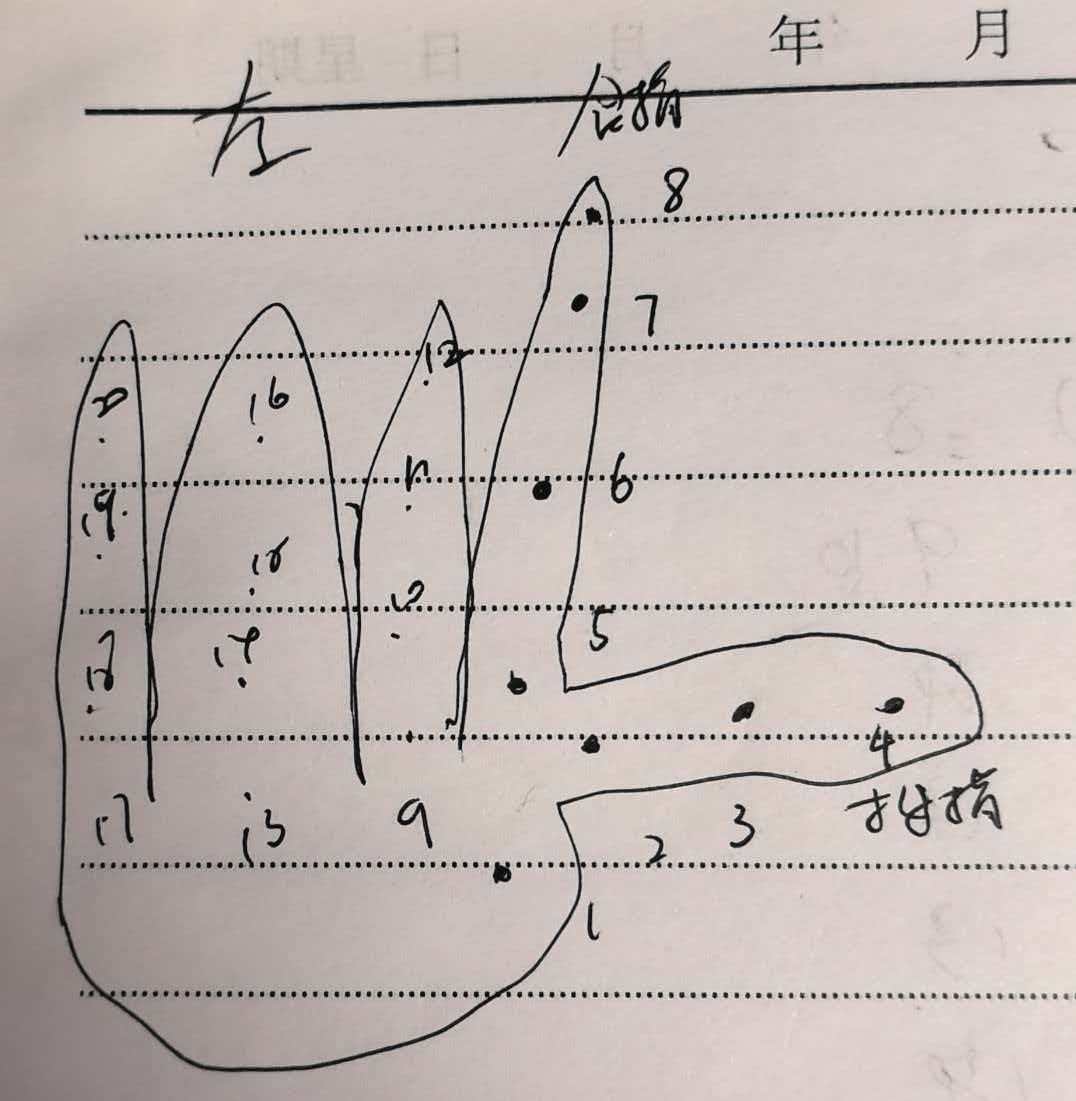
人体和手部关节点在MediaPipe检测结果中的对应序号
最后,附上我画的人体和手部关节点在MediaPipe检测结果中的对应序号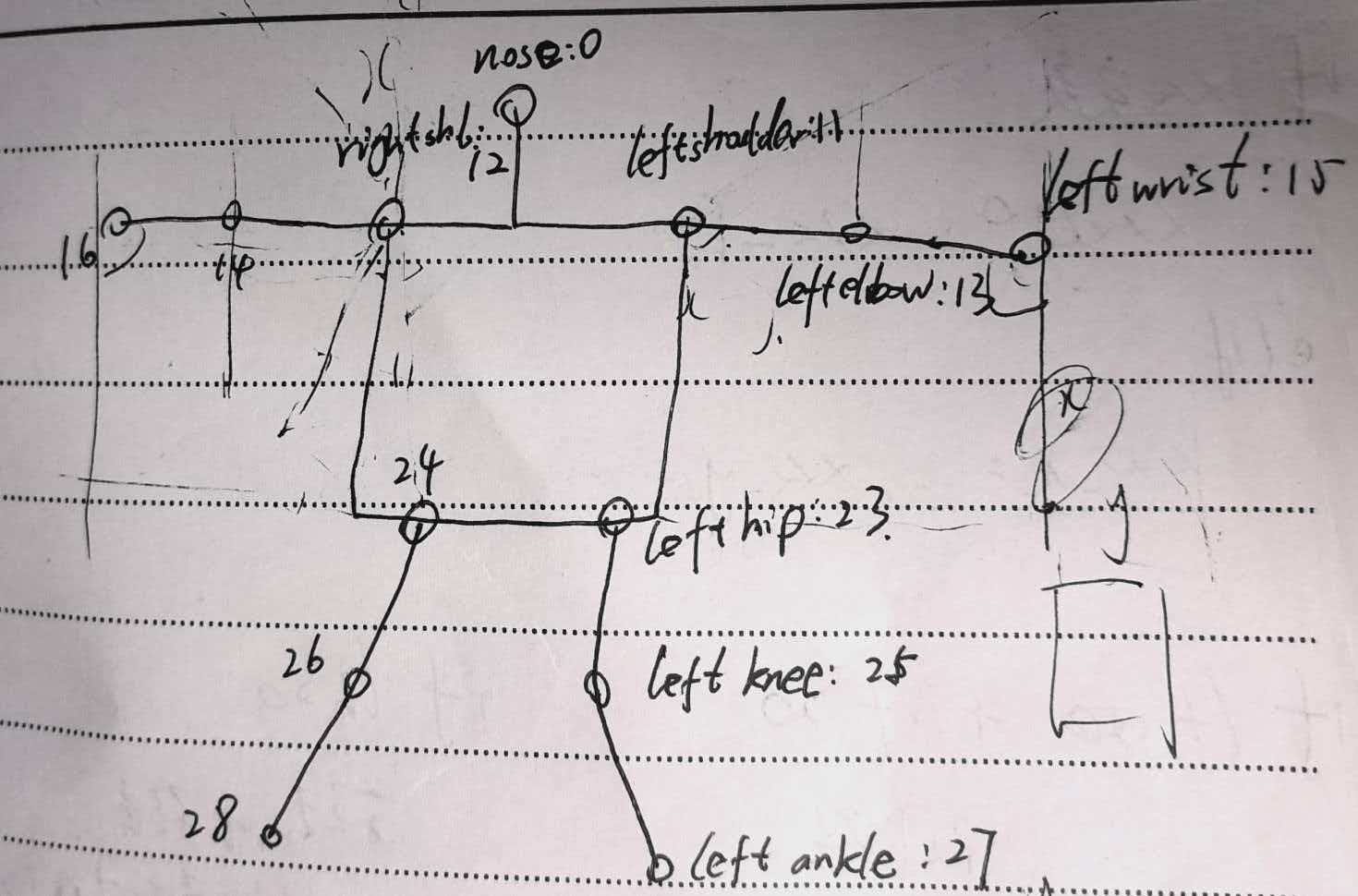

AtomGit 是由开放原子开源基金会联合 CSDN 等生态伙伴共同推出的新一代开源与人工智能协作平台。平台坚持“开放、中立、公益”的理念,把代码托管、模型共享、数据集托管、智能体开发体验和算力服务整合在一起,为开发者提供从开发、训练到部署的一站式体验。
更多推荐



 9
9 0
0- 0


 已为社区贡献2条内容

所有评论(0)