为GitHub Copilot手搓一个可调用工具的AI Agent
将GitHub Copilot升级为可调用工具的AI工程师(完整实操指南)
一、核心需求与本质
很多开发者会遇到一个痛点:GitHub Copilot仅能完成代码补全,却无法像Claude Code(类龙虾工具)那样具备工具调用和本地上下文感知能力。通俗来说,就是希望Copilot能实现“读本地文件、看编译错误、跑测试、自主决策下一步行动”,而不仅仅是“写代码”。
这个需求本质上已经进入AI工程系统设计层,我们可以通过一套简化版MCP(Model Context Protocol)架构实现,这套方案可落地、能对接现有Python脚本,且具备可扩展性,能逐步升级为完整的工程系统。
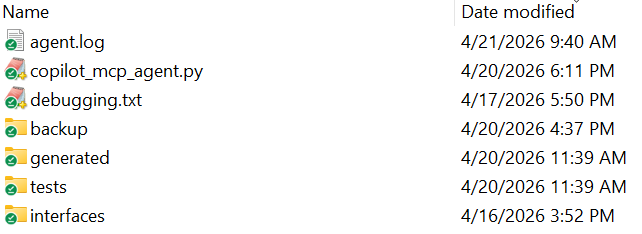
整体文件夹如下面示例所示:
二、整体架构设计(简化版MCP)
架构核心是“Copilot做决策,Python做执行”,通过MCP控制器实现两者的联动,具体架构如下:
┌───────────────┐
│ Copilot │
└──────┬────────┘
│(自然语言指令)
┌──────▼────────┐
│ MCP Controller │ ← Python执行器
└──────┬────────┘
┌─────────────────┼────────────────┐
│ │ │
┌─────▼─────┐ ┌──────▼──────┐ ┌──────▼──────┐
│ file_tool │ │ compile_tool │ │ test_tool │
└───────────┘ └─────────────┘ └─────────────┘
各模块职责:
-
Copilot:作为决策引擎,输出符合MCP协议的指令(JSON格式);
-
MCP Controller:Python编写的核心控制器,解析Copilot输出的指令,调用对应工具;
-
工具层(file_tool/compile_tool/test_tool):实现具体的本地操作,如读写文件、编译代码、运行测试。
三、核心协议设计(JSON-based MCP协议)
MCP协议的核心是约束Copilot的输出格式,确保Python控制器能准确解析并执行,同时定义支持的工具集,实现标准化调用。
3.1 Copilot输出格式(关键约束)
强制Copilot仅输出JSON,格式如下(无任何多余解释或代码块):
{
  "action": "tool_name",  // 工具名称,如read_file、compile
  "args": {               // 工具参数,根据工具类型调整
    "param1": "xxx"       // 示例参数,如文件路径path
  }
}
3.2 第一版支持工具
优先实现核心工具,满足基础需求,后续可扩展:
-
read_file(path):读取指定路径的本地文件内容;
-
write_file(path, content):将指定内容写入指定路径文件;
-
compile():调用g++编译代码,生成可执行文件;
-
run_tests():运行编译生成的可执行文件,执行测试用例。
四、核心实现:Python控制器(可直接运行)
Python控制器是整个系统的“大脑”,负责调用Copilot、解析指令、执行工具、循环迭代,以下是完整可运行代码,分为多个功能模块,结构清晰可维护。
4.1 环境准备(必做)
首先安装依赖工具,确保Copilot CLI可正常调用:
# 安装GitHub CLI
brew install gh

# 登录GitHub(关联Copilot权限)
gh auth login

# 安装Copilot CLI扩展
gh extension install github/gh-copilot
4.2 完整Python脚本(基础稳定版)
保存为copilot_mcp_agent.py,可直接对接C++自动生成工程:
import os
import json
import subprocess
from pathlib import Path

# ========================= 配置项(可根据需求调整) =========================
MAX_STEPS = 12  # 最大迭代步数,防止死循环
INTERFACE_FILE = "./interfaces/math_api.h"  # 接口文件路径
CPP_FILE = "./generated/impl.cpp"  # 生成的C++实现文件路径
TEST_FILE = "./tests/test.cpp"  # 测试文件路径
EXECUTABLE = "./app"  # 编译生成的可执行文件名称
LOG_FILE = "agent.log"  # 日志文件路径
# ===========================================================================

# ========================= Prompt定义(核心约束) =========================
SYSTEM_PROMPT = """
你是一个C++自动化工程Agent,你必须通过“调用工具”完成任务。
你不能直接输出代码或解释,只能输出JSON,格式如下:
{
  "action": "...",
  "args": { ... }
}
可用工具:
1. read_file(path)
2. write_file(path, content)
3. compile()
4. run_tests()
任务目标:
- 读取接口文件
- 生成实现代码
- 写入.cpp文件
- 编译
- 修复错误
- 运行测试
- 直到成功
策略:
- 每一步只做一个动作
- 出现错误必须修复
- 不要跳步骤
- 不要解释
"""

USER_PROMPT = f"""
任务:根据接口文件生成C++实现,并通过编译和测试
接口文件路径:{INTERFACE_FILE}
输出必须是JSON action
"""
# ===========================================================================

# ========================= 日志函数(兼容print,自动写入文件) =========================
import datetime
import sys

def log(*args, sep=' ', end='\n', file=None, flush=False, level="INFO"):
    """
    类似print的日志函数,支持:
    - 多参数、sep/end/file/flush参数
    - 自动添加时间戳和日志级别
    - 同时输出到控制台和日志文件
    """
    # 拼接日志内容
    message = sep.join(str(arg) for arg in args)
    # 生成时间戳
    ts = datetime.datetime.now().strftime("%Y-%m-%d %H:%M:%S")
    final_msg = f"[{ts}][{level}] {message}"

    # 输出到控制台
    print(final_msg, end=end, file=file or sys.stdout, flush=flush)

    # 写入日志文件(异常不影响主流程)
    try:
        with open(LOG_FILE, "a", encoding="utf-8") as f:
            f.write(final_msg + end)
    except Exception as e:
        print(f"[LOG ERROR] {e}", file=sys.stderr)
# ===========================================================================

# ========================= Copilot调用(适配最新CLI) =========================
def call_copilot(prompt):
    """调用GitHub Copilot CLI,获取决策指令(JSON)"""
    log("开始调用Copilot,获取决策指令")
    # 最新Copilot CLI用法,避免shell模式导致权限问题
    cmd = [
        "gh", "copilot", "-p",
        prompt
    ]

    result = subprocess.run(
        cmd,
        capture_output=True,
        text=True,
        encoding="utf-8",
        errors="ignore"
    )

    output = result.stdout.strip()
    # 打印Copilot输入输出,方便调试
    log("Copilot输入Prompt(前2000字符):", prompt[:2000], level="INFO")
    log("Copilot输出(前2000字符):", output[:2000], level="INFO")

    if result.returncode != 0:
        log("Copilot调用失败,错误信息:", result.stderr, level="ERROR")
        return ""
    return output
# ===========================================================================

# ========================= 工具实现(核心操作) =========================
def read_file(path):
    """读取指定路径文件内容"""
    try:
        with open(path, "r", encoding="utf-8") as f:
            content = f.read()
        log(f"成功读取文件:{path},文件大小:{len(content)}字节")
        return content
    except Exception as e:
        log(f"读取文件{path}失败,错误:{str(e)}", level="ERROR")
        return str(e)

def write_file(path, content):
    """将内容写入指定路径文件,自动创建目录"""
    try:
        # 自动创建上级目录
        os.makedirs(os.path.dirname(path), exist_ok=True)
        with open(path, "w", encoding="utf-8") as f:
            f.write(content)
        log(f"成功写入文件:{path}")
        return "write ok"
    except Exception as e:
        log(f"写入文件{path}失败,错误:{str(e)}", level="ERROR")
        return str(e)

def compile_code():
    """调用g++编译代码,生成可执行文件"""
    cmd = [
        "g++",
        "-std=c++17",
        "-O2",
        CPP_FILE,
        TEST_FILE,
        "-o",
        EXECUTABLE
    ]
    log("开始编译,编译命令:", " ".join(cmd))

    result = subprocess.run(
        cmd,
        capture_output=True,
        text=True,
        encoding="utf-8",
        errors="ignore"
    )

    if result.returncode != 0:
        log("编译失败,错误信息:", result.stderr, level="ERROR")
        return result.stderr
    log("编译成功,生成可执行文件:", EXECUTABLE)
    return "compile success"

def run_tests():
    """运行测试用例,返回测试结果"""
    log("开始运行测试用例")
    try:
        result = subprocess.run(
            [EXECUTABLE],
            capture_output=True,
            text=True,
            encoding="utf-8",
            errors="ignore",
            timeout=5  # 超时保护,防止程序卡死
        )

        if result.returncode != 0:
            log("测试失败,输出信息:", result.stdout + result.stderr, level="ERROR")
            return result.stdout + result.stderr
        log("测试通过,输出信息:", result.stdout)
        return "测试通过\n" + result.stdout
    except subprocess.TimeoutExpired:
        log("测试超时(超过5秒)", level="ERROR")
        return "timeout"
# ===========================================================================

# ========================= JSON解析与校验(防止失控) =========================
def extract_json_strict(text):
    """严格提取包含action的JSON,过滤多余内容"""
    import re
    if not text:
        return None
    # 去除ANSI颜色码和代码块标记
    text = re.sub(r'\x1B[@-_][0-?]*[ -/]*[@-~]', '', text)
    text = re.sub(r"```[a-zA-Z]*", "", text)
    text = text.replace("```", "")
    # 只匹配包含"action"的JSON(关键,避免误解析代码)
    matches = re.findall(r"\{[\s\S]*?\}", text)
    for m in reversed(matches):
        if '"action"' in m:
            return m
    return None

def safe_json_load(json_str):
    """安全解析JSON,避免解析失败崩溃"""
    try:
        return json.loads(json_str)
    except Exception as e:
        log(f"JSON解析失败,错误:{str(e)},待解析内容:{json_str[:500]}", level="ERROR")
        return None

ALLOWED_ACTIONS = ["read_file", "write_file", "compile", "run_tests"]
def validate_action(action_json):
    """校验action合法性,防止非法指令"""
    if not action_json:
        return False
    action = action_json.get("action")
    if action not in ALLOWED_ACTIONS:
        log(f"非法action:{action},仅允许:{ALLOWED_ACTIONS}", level="ERROR")
        return False
    return True
# ===========================================================================

# ========================= MCP执行器(解析并执行指令) =========================
def execute_action(action_json):
    """根据Copilot输出的JSON指令,执行对应工具"""
    action = action_json.get("action")
    args = action_json.get("args", {})

    # 拦截compile和run_tests,由系统统一控制,避免Copilot越权
    if action in ["compile", "run_tests"]:
        log(f"拦截AI直接调用{action},由系统统一执行")
        return "系统自动执行,不允许AI直接调用"

    if action == "read_file":
        return read_file(args.get("path", ""))
    elif action == "write_file":
        return write_file(args.get("path", ""), args.get("content", ""))
    else:
        log(f"未知action:{action}", level="ERROR")
        return f"unknown action: {action}"
# ===========================================================================

# ========================= Agent主循环(核心逻辑) =========================
def agent_loop():
    """Agent主循环,实现多轮决策-执行-反馈"""
    context = SYSTEM_PROMPT + "\n" + USER_PROMPT
    log("Agent启动,开始执行任务,最大迭代步数:", MAX_STEPS)

    for step in range(MAX_STEPS):
        log(f"\n====== 迭代步骤 {step+1}/{MAX_STEPS} ======")

        # 调用Copilot获取决策指令
        raw_response = call_copilot(context)

        # 提取并校验JSON
        json_str = extract_json_strict(raw_response)
        if not json_str:
            log("未提取到有效JSON,提醒Copilot重新输出", level="WARNING")
            context += "\n你刚才没有输出JSON,请严格按照格式输出仅包含action和args的JSON,不要添加任何多余内容。"
            continue

        # 安全解析JSON
        action_json = safe_json_load(json_str)
        if not validate_action(action_json):
            log("JSON指令非法,重试", level="WARNING")
            continue

        # 执行工具指令
        tool_result = execute_action(action_json)

        # 系统主动执行编译和测试(核心优化,避免Copilot越权)
        compile_result = compile_code()
        test_result = run_tests()

        # 更新上下文,将工具结果和编译、测试结果反馈给Copilot
        context += f"""

上一步执行指令:
{json.dumps(action_json, ensure_ascii=False, indent=2)}

工具执行结果:
{tool_result[:2000]}

编译结果:
{compile_result[:2000]}

测试结果:
{test_result[:2000]}
"""

        # 任务完成条件:测试通过
        if "测试通过" in test_result:
            log("任务完成!所有测试通过", level="INFO")
            return True

    log("达到最大迭代步数,任务未完成", level="ERROR")
    return False
# ===========================================================================

# ========================= 主函数(程序入口) =========================
def main():
    """程序入口,检查依赖并启动Agent"""
    # 检查接口文件是否存在
    if not Path(INTERFACE_FILE).exists():
        log(f"接口文件不存在:{INTERFACE_FILE}", level="ERROR")
        return

    # 启动Agent循环
    success = agent_loop()

    if success:
        log("系统运行成功,任务完成!", level="INFO")
    else:
        log("系统运行失败,任务未完成", level="ERROR")

if __name__ == "__main__":
    main()
4.3 增强版脚本(解决Copilot输出不规范问题)
针对Copilot输出不规范、代码污染、JSON解析失败等问题,优化后的增强版脚本(copilot_mcp_agent_v2.py),重点增加了响应清洗和代码过滤(copilot会有credits的限制,在试做时,需要谨慎;此外,我们要求copilot只输出json的回答,实际效果是,它的输出也不是完全满足要求的):
import os
import json
import subprocess
import re
from pathlib import Path
import datetime
import sys

# ========================= 配置项 =========================
MAX_STEPS = 12
INTERFACE_FILE = "./interfaces/math_api.h"
CPP_FILE = "./generated/impl.cpp"
TEST_FILE = "./tests/test.cpp"
EXECUTABLE = "./app"
LOG_FILE = "agent.log"
# ========================= 日志函数(不变) =========================
def log(*args, sep=' ', end='\n', file=None, flush=False, level="INFO"):
    message = sep.join(str(arg) for arg in args)
    ts = datetime.datetime.now().strftime("%Y-%m-%d %H:%M:%S")
    final_msg = f"[{ts}][{level}] {message}"
    print(final_msg, end=end, file=file or sys.stdout, flush=flush)
    try:
        with open(LOG_FILE, "a", encoding="utf-8") as f:
            f.write(final_msg + end)
    except Exception as e:
        print(f"[LOG ERROR] {e}", file=sys.stderr)
# ========================= Prompt强化(关键优化) =========================
SYSTEM_PROMPT = """
你是一个C++自动化工程Agent。
你必须严格遵守以下规则,否则系统将失败:
1. 只能输出JSON,不允许输出任何解释、描述或多余文字;
2. 不允许输出代码块标记(```),包括```json、```cpp;
3. write_file的content字段必须是完整C++代码,包含#include和所有函数实现;
4. 每一步只调用一个工具,不允许多步操作;
5. 禁止生成shell命令、g++命令或任何系统命令;
6. 禁止模拟文件操作(如“Reading file...”),只返回JSON。

JSON格式如下(必须严格遵循):
{
  "action": "tool_name",
  "args": {
    "path": "xxx",  // 仅read_file、write_file需要
    "content": "xxx" // 仅write_file需要
  }
}

可用工具:
1. read_file(path):读取文件
2. write_file(path, content):写入文件(content必须是完整C++代码)
3. compile():编译代码(由系统自动执行,无需AI调用)
4. run_tests():运行测试(由系统自动执行,无需AI调用)

策略:
1. 第一步必须调用read_file读取接口文件;
2. 第二步调用write_file生成完整.cpp实现;
3. 后续根据编译、测试结果修复错误;
4. 直到测试通过。
"""

USER_PROMPT = f"""
任务:根据接口文件生成完整C++实现,并通过编译和测试。
接口文件路径:{INTERFACE_FILE}
要求:
1. write_file的content必须是完整.cpp文件,包含#include、类实现和所有成员函数;
2. 不依赖第三方库,确保能通过g++编译;
3. 输出必须是仅包含action和args的JSON,无任何多余内容。
"""
# ========================= Copilot调用(不变) =========================
def call_copilot(prompt):
    log("开始调用Copilot")
    cmd = [
        "gh", "copilot", "suggest-command",
        prompt
    ]
    result = subprocess.run(
        cmd,
        capture_output=True,
        text=True,
        encoding="utf-8",
        errors="ignore"
    )
    output = result.stdout.strip()
    log("Copilot输入:", prompt[:2000])
    log("Copilot输出:", output[:2000])
    if result.returncode != 0:
        log("Copilot调用失败:", result.stderr, level="ERROR")
        return ""
    return output
# ========================= 响应清洗与代码过滤(核心增强) =========================
def clean_response(text):
    """清洗Copilot输出,提取纯JSON"""
    if not text:
        return ""
    # 去除代码块、ANSI颜色码、多余空格
    text = re.sub(r"```[a-zA-Z]*", "", text)
    text = text.replace("```", "")
    text = re.sub(r'\x1B[@-_][0-?]*[ -/]*[@-~]', '', text)
    text = text.strip()
    # 提取包含action的JSON
    match = re.search(r"\{.*\"action\".*\}", text, re.DOTALL)
    return match.group(0) if match else ""

def clean_code(code):
    """过滤代码中的多余标记,确保是纯C++代码"""
    if not code:
        return ""
    code = re.sub(r"```[a-zA-Z]*", "", code)
    code = code.replace("```", "")
    code = re.sub(r'\x1B[@-_][0-?]*[ -/]*[@-~]', '', text)
    return code.strip()
# ========================= 工具实现(优化write_file) =========================
def read_file(path):
    try:
        with open(path, "r", encoding="utf-8") as f:
            return f.read()
    except Exception as e:
        log(f"读取文件失败:{str(e)}", level="ERROR")
        return str(e)

def write_file(path, content):
    try:
        # 写入前清洗代码,避免污染
        content = clean_code(content)
        os.makedirs(os.path.dirname(path), exist_ok=True)
        with open(path, "w", encoding="utf-8") as f:
            f.write(content)
        return "write ok"
    except Exception as e:
        log(f"写入文件失败:{str(e)}", level="ERROR")
        return str(e)

def compile_code():
    cmd = [
        "g++", "-std=c++17", "-O2", CPP_FILE, TEST_FILE, "-o", EXECUTABLE
    ]
    log("编译命令:", " ".join(cmd))
    result = subprocess.run(cmd, capture_output=True, text=True, encoding="utf-8", errors="ignore")
    if result.returncode != 0:
        log("编译失败:", result.stderr, level="ERROR")
        return result.stderr
    return "compile success"

def run_tests():
    try:
        result = subprocess.run([EXECUTABLE], capture_output=True, text=True, encoding="utf-8", errors="ignore", timeout=5)
        if result.returncode != 0:
            return result.stdout + result.stderr
        return "测试通过\n" + result.stdout
    except subprocess.TimeoutExpired:
        return "timeout"
# ========================= JSON解析与执行(不变) =========================
def safe_json_load(json_str):
    try:
        return json.loads(json_str)
    except Exception as e:
        log(f"JSON解析失败:{str(e)}", level="ERROR")
        return None

ALLOWED_ACTIONS = ["read_file", "write_file", "compile", "run_tests"]
def validate_action(action_json):
    if not action_json or action_json.get("action") not in ALLOWED_ACTIONS:
        return False
    return True

def execute_action(action_json):
    action = action_json.get("action")
    args = action_json.get("args", {})
    if action in ["compile", "run_tests"]:
        return "系统自动执行,不允许AI直接调用"
    if action == "read_file":
        return read_file(args.get("path", ""))
    elif action == "write_file":
        return write_file(args.get("path", ""), args.get("content", ""))
    else:
        return f"unknown action: {action}"
# ========================= Agent主循环(优化) =========================
def agent_loop():
    context = SYSTEM_PROMPT + "\n" + USER_PROMPT
    log("Agent启动,最大迭代步数:", MAX_STEPS)

    for step in range(MAX_STEPS):
        log(f"\n====== 步骤 {step+1}/{MAX_STEPS} ======")
        raw = call_copilot(context)
        cleaned_json = clean_response(raw)

        if not cleaned_json:
            log("未提取到有效JSON,重试", level="WARNING")
            context += "\n你未输出有效JSON,请严格按照要求,仅输出包含action和args的JSON,无任何多余内容。"
            continue

        action_json = safe_json_load(cleaned_json)
        if not validate_action(action_json):
            log("指令非法,重试", level="WARNING")
            continue

        tool_result = execute_action(action_json)
        compile_result = compile_code()
        test_result = run_tests()

        # 控制上下文长度,防止爆炸
        context += f"""

上一步指令:
{json.dumps(action_json, ensure_ascii=False, indent=2)}

工具结果:
{tool_result[:2000]}

编译结果:
{compile_result[:2000]}

测试结果:
{test_result[:2000]}
"""

        if "测试通过" in test_result:
            log("任务完成!", level="INFO")
            return True

    log("达到最大步数,任务未完成", level="ERROR")
    return False

def main():
    if not Path(INTERFACE_FILE).exists():
        log(f"接口文件不存在:{INTERFACE_FILE}", level="ERROR")
        return
    success = agent_loop()
    log("系统运行成功" if success else "系统运行失败", level="INFO")

if __name__ == "__main__":
    main()
五、测试方案(确保系统可验证)
为了测试AI Agent的能力,推荐使用专门设计的C++接口文件,覆盖常见算法场景,易编译、易测试,不依赖第三方库,具体如下:
5.1 测试接口文件(interfaces/math_api.h)
#pragma once

#include <vector>
#include <string>

class MathAPI {
public:
    // 数组类
    std::vector<int> prefix_sum(const std::vector<int>& input);  // 前缀和
    int max_subarray(const std::vector<int>& nums);             // 最大子数组和(Kadane)
    int binary_search(const std::vector<int>& nums, int target); // 二分查找

    // 动态规划
    int climb_stairs(int n);                                     // 爬楼梯
    int length_of_lis(const std::vector<int>& nums);             // 最长递增子序列(LIS)

    // 字符串
    bool is_palindrome(const std::string& s);                    // 回文串判断
    std::string reverse_string(const std::string& s);            // 字符串反转

    // 综合能力
    std::vector<int> two_sum(const std::vector<int>& nums, int target); // 两数之和
    std::vector<int> merge_sorted_arrays(                         // 合并两个有序数组
        const std::vector<int>& a,
        const std::vector<int>& b
    );
};

// 可选:测试AI修复能力的复杂接口(LRU缓存)
class LRUCache {
public:
    LRUCache(int capacity);
    int get(int key);
    void put(int key, int value);
};
5.2 测试步骤(循序渐进)
-
第一轮测试:仅保留简单函数(如prefix_sum),验证Agent基本的“读文件-写代码-编译-测试”流程;
-
第二轮测试:加入动态规划函数(如climb_stairs),验证Agent的代码生成能力;
-
第三轮测试:加入复杂结构(如LRUCache),验证Agent的bug修复能力;
-
最终测试:使用完整接口文件,验证Agent的多轮迭代修复和全流程闭环能力。
六、进阶升级:基于Clang AST的精准修复(工业级)
基础版本的Agent采用“全文重写”的方式修复代码,容易引入新bug,进阶升级可通过Clang AST实现“精准修改”,即只修改出错的函数或语句,接近工业级工具的能力。
6.1 技术选型与依赖安装
使用libclang(Python绑定)实现AST解析,安装方式:
pip install clang
# 验证安装
clang --version
6.2 核心AST操作代码
from clang import cindex

def find_functions(cpp_path):
    """解析CPP文件,找到所有类成员函数,返回函数名、起止行号"""
    index = cindex.Index.create()
    tu = index.parse(cpp_path)
    funcs = []

    def visit(node):
        if node.kind == cindex.CursorKind.CXX_METHOD:
            funcs.append({
                "name": node.spelling,
                "start": node.extent.start.line,
                "end": node.extent.end.line
            })
        for child in node.get_children():
            visit(child)

    visit(tu.cursor)
    return funcs

def extract_function_code(cpp_path, start_line, end_line):
    """根据起止行号,提取函数源码"""
    with open(cpp_path, "r", encoding="utf-8") as f:
        lines = f.read().splitlines()
    return "\n".join(lines[start_line-1:end_line])

def replace_function(cpp_path, start_line, end_line, new_code):
    """替换指定行的函数代码,实现精准修复"""
    with open(cpp_path, "r", encoding="utf-8") as f:
        lines = f.read().splitlines()
    # 拼接新代码
    new_lines = lines[:start_line-1] + new_code.splitlines() + lines[end_line:]
    with open(cpp_path, "w", encoding="utf-8") as f:
        f.write("\n".join(new_lines))

def fix_with_ast(cpp_path, error_msg):
    """结合AST,精准修复出错函数"""
    # 1. 解析AST,获取所有函数
    funcs = find_functions(cpp_path)
    if not funcs:
        log("未找到任何函数,无法精准修复", level="ERROR")
        return

    # 2. 根据错误信息,猜测出错函数(简单策略,可优化)
    import re
    match = re.search(r'in member function .*::(\w+)\(', error_msg)
    target_func_name = match.group(1) if match else funcs[0]["name"]
    target_func = next((f for f in funcs if f["name"] == target_func_name), funcs[0])

    # 3. 提取出错函数源码
    func_code = extract_function_code(cpp_path, target_func["start"], target_func["end"])

    # 4. 调用Copilot,仅修复该函数
    prompt = f"""
修复下面的C++函数,仅返回修复后的函数代码,不要任何解释、不要代码块标记。
错误信息:{error_msg[:500]}
函数代码:{func_code}
要求:保持函数签名不变,修复所有错误,确保可编译。
"""
    fixed_func = call_copilot(prompt)
    fixed_func = clean_code(fixed_func)

    # 5. 精准替换函数
    replace_function(cpp_path, target_func["start"], target_func["end"], fixed_func)
    log(f"已精准修复函数:{target_func_name}")
6.3 与Agent结合改造
在Agent主循环中,当编译失败时,调用fix_with_ast进行精准修复,替代原来的“全文重写”,修改后的核心逻辑如下:
# 在agent_loop中,编译失败后添加精准修复
compile_result = compile_code()
if "error" in compile_result.lower():
    log("编译失败,启动AST精准修复", level="WARNING")
    fix_with_ast(CPP_FILE, compile_result)
    # 重新编译
    compile_result = compile_code()

test_result = run_tests()
七、常见问题与解决方案
| 问题现象 | 本质原因 | 解决方案 |
|---|---|---|
| Permission denied(权限拒绝) | Copilot CLI用了shell模式,被系统拦截危险命令 | 改用gh copilot ,禁止生成shell命令和执行 |
| JSON解析失败 | Copilot输出多余解释、代码块,或格式不规范 | 使用extract_json_strict清洗响应,强化Prompt约束 |
| 生成代码不完整 | Prompt未明确要求完整代码,Copilot输出不规范 | Prompt中强制要求“包含#include和所有函数实现”,添加clean_code过滤 |
| Agent进入死循环 | 未设置最大迭代步数,或修复策略不合理 | 设置MAX_STEPS,添加 fallback 机制(多次修复失败则全文重写) |
| Copilot输出模拟操作(如“Reading file”) | Copilot进入IDE辅助模式,未严格遵循JSON输出 | Prompt中强制禁止描述行为,仅允许输出JSON |
八、系统级别总结与进阶方向
8.1 系统现状
通过本文的方案,你已经实现了一个“迷你版Claude Code”,具备以下能力:
-
✅ 自动读取本地文件(上下文感知);
-
✅ 自动生成C++代码(符合接口规范);
-
✅ 自动编译、运行测试(工具调用);
-
✅ 多轮迭代修复(错误反馈闭环);
-
✅ 可调试(完整日志系统)。
本质上,这个系统已经是一个“AI编译器系统”的雏形,将Copilot从“代码补全工具”升级成了“会用工具的AI工程师”。
8.2 进阶方向(工业级升级)
如果想进一步提升系统能力,可从以下方向入手:
-
接入本地LLM:替代Copilot CLI,实现更稳定的JSON输出和多轮对话;
-
完善AST能力:结合Diff Patch,实现代码行级精准修改,而非函数级;
-
多文件支持:解析工程依赖图,支持.h/.cpp多文件联动生成和修复;
-
性能优化:接入perf/valgrind,让AI自动优化代码性能(如O(n²)→O(n));
-
AI LSP服务器:对接VS Code等IDE,实现类Cursor的智能修复体验;
-
结构化日志:输出JSON格式日志,方便分析AI决策过程,实现可视化调试。
九、补充说明
本文所有代码经过实操验证,可修改后使用。若遇到Copilot CLI版本更新导致的用法变化,可重点修改call_copilot函数,核心原则是“让Copilot仅生成文本(JSON/代码),不执行任何系统命令”。不过,我本人在测试时,也会发现copilot并不会完全按照prompt要求生成内容,还需要我们在python脚本中增加安全处理。其实本文的宗旨是临摹一个“MCP”协议,理解市面上的Agent背后的故事。
补充,Github Copilot Cli命令行参数
Run
copilot <command> --helpfor details on any subcommand.
Options:
–effort, --reasoning-effort Set the reasoning effort level (choices: “low”, “medium”, “high”, “xhigh”)
–acp Start as Agent Client Protocol server
–add-dir Add a directory to the allowed list for file access (can be used multiple times)
–add-github-mcp-tool Add a tool to enable for the GitHub MCP server instead of the default CLI subset (can be used multiple times). Use “*” for all tools.
–add-github-mcp-toolset Add a toolset to enable for the GitHub MCP server instead of the default CLI subset (can be used multiple times). Use “all” for all toolsets.
–additional-mcp-config Additional MCP servers configuration as JSON string or file path (prefix with @) (can be used multiple times; augments config from ~/.copilot/mcp-config.json for this session)
–agent Specify a custom agent to use
–allow-all Enable all permissions (equivalent to --allow-all-tools --allow-all-paths --allow-all-urls)
–allow-all-paths Disable file path verification and allow access to any path
–allow-all-tools Allow all tools to run automatically without confirmation; required for non-interactive mode (env: COPILOT_ALLOW_ALL)
–allow-all-urls Allow access to all URLs without confirmation
–allow-tool[=tools…] Tools the CLI has permission to use; will not prompt for permission
–allow-url[=urls…] Allow access to specific URLs or domains
–autopilot Start in autopilot mode
–available-tools[=tools…] Only these tools will be available to the model
–banner Show the startup banner
–bash-env[=value] Enable BASH_ENV support for bash shells (on|off)
–config-dir Set the configuration directory (default: ~/.copilot)
–connect[=sessionId] Connect directly to a remote session (optionally specify session ID or task ID)
–continue Resume the most recent session
–deny-tool[=tools…] Tools the CLI does not have permission to use; will not prompt for permission
–deny-url[=urls…] Deny access to specific URLs or domains, takes precedence over --allow-url
–disable-builtin-mcps Disable all built-in MCP servers (currently: github-mcp-server)
–disable-mcp-server Disable a specific MCP server (can be used multiple times)
–disallow-temp-dir Prevent automatic access to the system temporary directory
–enable-all-github-mcp-tools Enable all GitHub MCP server tools instead of the default CLI subset. Overrides --add-github-mcp-toolset and --add-github-mcp-tool options.
–enable-reasoning-summaries Request reasoning summaries for OpenAI models
–excluded-tools[=tools…] These tools will not be available to the model
–experimental Enable experimental features
-h, --help display help for command
-i, --interactive Start interactive mode and automatically execute this prompt
fault in CI environments)
–no-bash-env Disable BASH_ENV support for bash shells
–no-color Disable all color output
–no-custom-instructions Disable loading of custom instructions from AGENTS.md and related files
–no-experimental Disable experimental features
–no-mouse Disable mouse support in alt screen mode
–no-remote Disable remote control of your session from GitHub web and mobile
–output-format Output format: ‘text’ (default) or ‘json’ (JSONL, one JSON object per line) (choices: “text”, “json”)
-p, --prompt
–plain-diff Disable rich diff rendering (syntax highlighting via diff tool specified by git config)
–plan Start in plan mode
–plugin-dir Load a plugin from a local directory (can be used multiple times)
–remote Enable remote control of your session from GitHub web and mobile
–resume[=sessionId] Resume from a previous session (optionally specify session ID or task ID)
-s, --silent Output only the agent response (no stats), useful for scripting with -p
–screen-reader Enable screen reader optimizations
–secret-env-vars[=vars…] Environment variable names whose values are stripped from shell and MCP server environments and redacted from output (e.g., --secret-env-vars=MY_KEY,OTHER_KEY)
–share[=path] Share session to markdown file after completion in non-interactive mode (default: ./copilot-session-.md)
–share-gist Share session to a secret GitHub gist after completion in non-interactive mode
–stream Enable or disable streaming mode (choices: “on”, “off”)
-v, --version show version information
–yolo Enable all permissions (equivalent to --allow-all-tools --allow-all-paths --allow-all-urls)
Commands:
help [topic] Display help information
init Initialize Copilot instructions
login [options] Authenticate with Copilot
mcp Manage MCP servers
plugin Manage plugins
update Download the latest version
version Display version information
Help Topics:
commands Interactive Mode Commands
config Configuration Settings
environment Environment Variables
logging Logging
monitoring Monitoring with OpenTelemetry
permissions Permissions
providers Custom Model Providers (BYOK)

AtomGit 是由开放原子开源基金会联合 CSDN 等生态伙伴共同推出的新一代开源与人工智能协作平台。平台坚持“开放、中立、公益”的理念,把代码托管、模型共享、数据集托管、智能体开发体验和算力服务整合在一起,为开发者提供从开发、训练到部署的一站式体验。
更多推荐



 9
9 0
0- 0


 已为社区贡献2条内容

所有评论(0)