基于 Next.js + 火山引擎 AI 的电商素材智能生成工具实战——字节跳动前端训练营成果
一、项目背景
本项目利用 火山引擎豆包大模型的 AI 能力,打造一站式电商素材生成工具:
需要使用爬墙工具访问网站:
在线体验:https://e-commerce-ai-tool.vercel.app
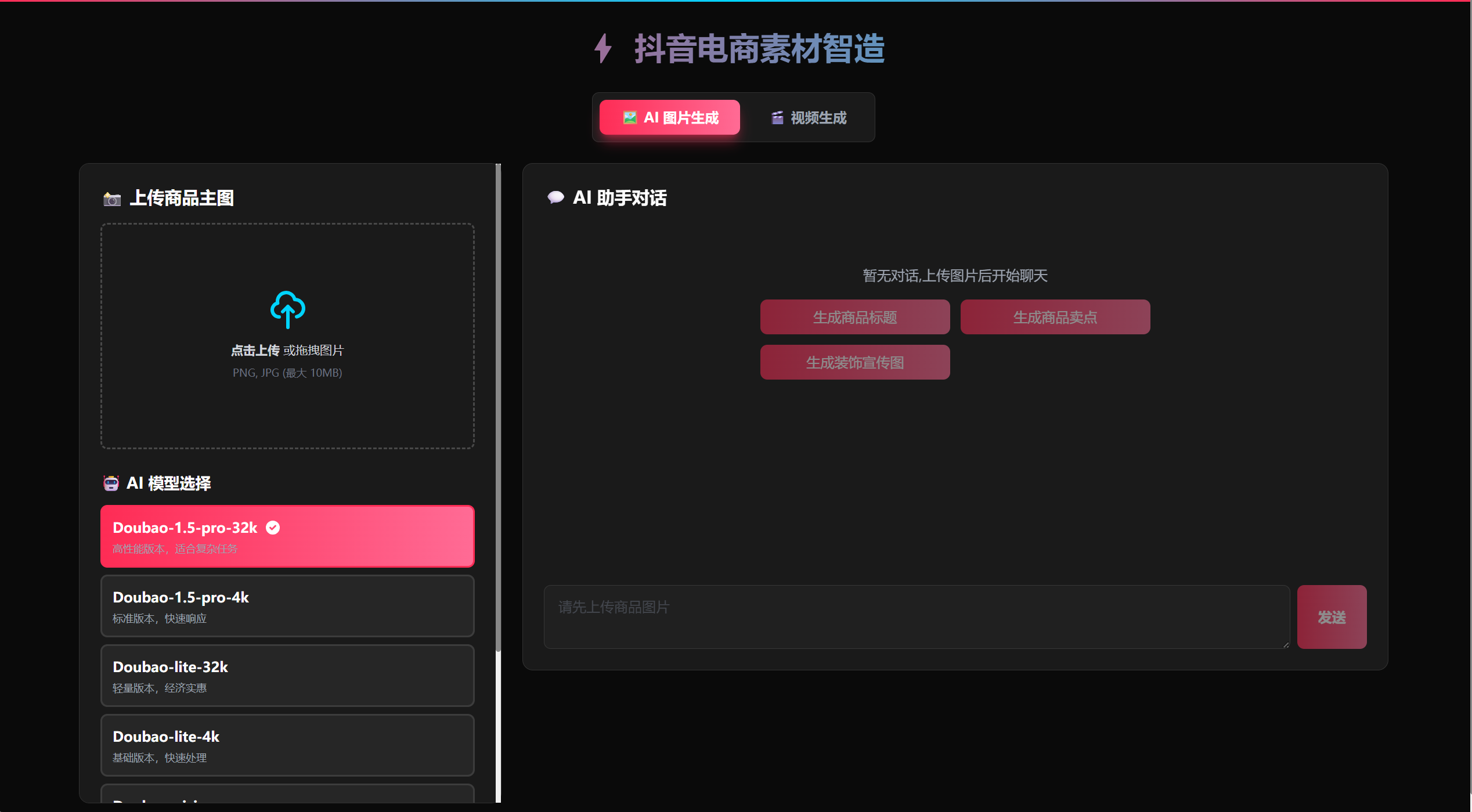
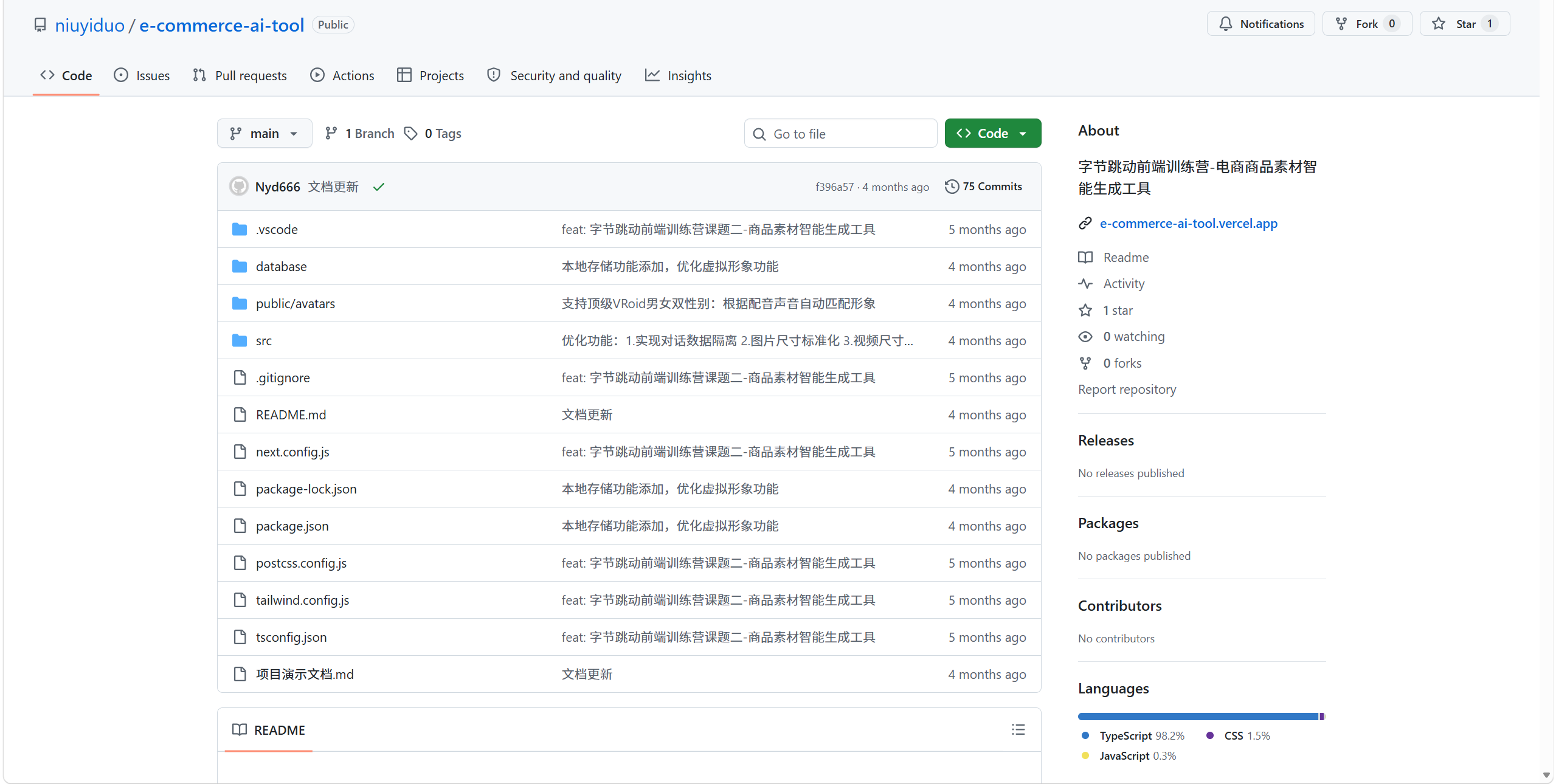
GitHub 仓库:https://github.com/niuyiduo/e-commerce-ai-tool
声明:使用的是试用的免费模型,已经将API停用,仅用于记录和学习使用。
二、核心功能全景图
2.1 功能架构
│ 📸 图片处理模块 │ 🤖 AI 生成模块 │ 🎬 视频生成模块 │
│ ├── 拖拽上传 │ ├── 6模型切换 │ ├── 多图合成 │
│ ├── 智能尺寸 │ ├── 文案生成 │ ├── 转场特效 │
│ └── 图片预览 │ ├── 智能装饰 │ ├── 虚拟人讲解 │
│ │ └── 边框动画 │ └── 语音配音 │
2.2 技术亮点速览
| 特性 | 实现方案 | 亮点 |
| 图片装饰 | Canvas API | 100+ 贴纸 + 4 种动画边框 |
| 视频生成 | MediaRecorder | 纯前端合成,无需后端 |
| 虚拟人 | Three.js + VRM | 52 种表情 + 15 种口型 |
| 语言合成 | 火山引擎 TTS | 男女双声 + 真实时长同步 |
| AI对话 | 火山引擎 6 模型 | Pro/Lite/Vision/Thinking 全覆盖 |
三、技术架构深度解析
3.1 整体技术栈
typescript
// 核心技术选型
const techStack = {
前端框架: 'Next.js 14 (App Router)',
开发语言: 'TypeScript 5.x',
样式方案: 'Tailwind CSS + 抖音黑色主题',
AI 服务: '火山引擎豆包大模型(6模型)',
3D 渲染: 'Three.js + @pixiv/three-vrm',
音视频: 'Canvas + MediaRecorder + Web Audio API',
部署平台: 'Vercel Edge Network',
数据库: 'MySQL(持久化存储)'
};
3.2 项目目录结构
e-commerce-ai-tool/
├── src/
│ ├── app/
│ │ ├── api/
│ │ │ ├── chat/route.ts # AI 对话接口
│ │ │ ├── tts/route.ts # 语音合成接口
│ │ │ └── logs/route.ts # 数据持久化接口
│ │ ├── page.tsx # 主页面(核心交互)
│ │ └── layout.tsx # 根布局
│ ├── lib/
│ │ ├── ai/volcengine.ts # 火山引擎 AI 调用
│ │ ├── canvas/
│ │ │ └── imageGenerator.ts # 图片生成与装饰
│ │ ├── video/
│ │ │ └── videoGenerator.ts # 视频生成核心
│ │ └── db.ts # MySQL 数据库连接
│ └── types/global.d.ts # TypeScript 类型定义
├── public/avatars/ # VRM 虚拟形象模型
└── database/schema.sql # 数据库建表语句
四、核心功能实现详解
4.1 AI 多模型切换架构
项目支持 6 个豆包模型动态切换,实现不同场景的精准匹配:
typescript
// 模型配置定义
const availableModels = [
{
id: 'Doubao-1.5-pro-32k',
name: 'Doubao-1.5-pro-32k',
description: '高性能版本,适合复杂任务',
endpoint: process.env.VOLCENGINE_ENDPOINT_PRO_32K
},
{
id: 'Doubao-1.5-pro-4k',
name: 'Doubao-1.5-pro-4k',
description: '标准版本,快速响应',
endpoint: process.env.VOLCENGINE_ENDPOINT_PRO_4K
},
{
id: 'Doubao-1.5-vision-pro',
name: 'Doubao-vision',
description: '多模态模型,支持图文理解',
endpoint: process.env.VOLCENGINE_ENDPOINT_VISION
},
{
id: 'Doubao-1.5-vision-thinking-pro',
name: 'Doubao-thinking-vision',
description: '思维链多模态,更强推理能力',
endpoint: process.env.VOLCENGINE_ENDPOINT_THINKING_VISION
}
];
// 动态端点映射
const getEndpointForModel = (modelId: string): string => {
const endpointMap: Record<string, string> = {
'Doubao-1.5-pro-32k': process.env.VOLCENGINE_ENDPOINT_PRO_32K!,
'Doubao-1.5-pro-4k': process.env.VOLCENGINE_ENDPOINT_PRO_4K!,
'Doubao-1.5-vision-pro': process.env.VOLCENGINE_ENDPOINT_VISION!,
'Doubao-1.5-vision-thinking-pro': process.env.VOLCENGINE_ENDPOINT_THINKING_VISION!,
};
return endpointMap[modelId] || process.env.VOLCENGINE_ENDPOINT_ID!;
};
模型选择策略:
文案生成:Pro-32k(复杂)/ Lite-4k(快速测试)
图文理解:Vision(多模态分析)
深度推理:Thinking-Vision(思维链推理)
4.2 智能图片装饰系统
4.2.1 普通装饰模式
使用 Canvas API 实现 100+ 装饰元素随机分布:
typescript
// 装饰元素库
const decorativeElements = {
badges: ['🔥 热卖', '✨ 新品', '⚡ 特价', '🎁 赠品'],
stickers: ['⭐', '❤️', '💎', '🎀', '✨', '💫', '🌟', ...], // 100+ emoji
effects: ['光晕', '阴影', '边框']
};
// 随机分布算法
const generateDecorativeImage = async (
imageSrc: string,
productInfo: ProductInfo
): Promise<string> => {
const canvas = document.createElement('canvas');
const ctx = canvas.getContext('2d')!;
// 1. 绘制原图
const img = await loadImage(imageSrc);
canvas.width = img.width;
canvas.height = img.height;
ctx.drawImage(img, 0, 0);
// 2. 添加促销徽章(随机位置)
const badge = decorativeElements.badges[Math.floor(Math.random() * 4)];
drawBadge(ctx, badge, { x: 30, y: 30 });
// 3. 添加装饰贴纸(随机分布)
for (let i = 0; i < 15; i++) {
const sticker = decorativeElements.stickers[
Math.floor(Math.random() * decorativeElements.stickers.length)
];
const x = Math.random() * (canvas.width - 50);
const y = Math.random() * (canvas.height - 50);
drawSticker(ctx, sticker, { x, y }, Math.random() * 30 + 20);
}
// 4. 添加水印
addWatermark(ctx, '抖音电商前端训练营', canvas.width, canvas.height);
return canvas.toDataURL('image/png');
};
4.2.2 高级定制模式(Vision 模型)
AI 智能分析商品图片,生成个性化装饰:
typescript
// AI 分析提示词
const ANALYSIS_PROMPT = `请分析这张商品图片,提取以下信息并以JSON格式返回:
{
"商品名": "商品名称",
"产地": "生产地",
"卖点": "核心卖点(15字以内)",
"说明": "详细说明(50字以内)"
}`;
// 高级装饰生成流程
const generateSmartDecorativeImage = async (
imageSrc: string,
model: string,
borderStyle: BorderStyle
): Promise<string> => {
// 1. 调用 Vision 模型分析图片
const analysis = await analyzeImageWithAI(imageSrc, model);
const productInfo = JSON.parse(analysis);
// 2. 生成装饰框
const canvas = document.createElement('canvas');
const ctx = canvas.getContext('2d')!;
// 3. 绘制动态边框(4种风格)
drawBorder(ctx, borderStyle, canvas.width, canvas.height);
// 4. 添加商品信息文字
drawProductInfo(ctx, productInfo);
// 5. 添加水印
addWatermark(ctx, '抖音电商前端训练营', canvas.width, canvas.height);
return canvas.toDataURL('image/png');
};
4.2.3 动画边框实现
纯 Canvas 绘制 + CSS 动画实现:
typescript
// 边框绘制函数
type BorderStyle = 'simple' | 'guochao' | 'gradient' | 'luxury';
const drawBorder = (
ctx: CanvasRenderingContext2D,
style: BorderStyle,
width: number,
height: number
) => {
const borderWidth = 25;
switch (style) {
case 'simple':
// 简约边框:白灰双线 + 缩放动画
ctx.strokeStyle = '#E5E7EB';
ctx.lineWidth = borderWidth;
ctx.strokeRect(0, 0, width, height);
ctx.strokeStyle = '#FFFFFF';
ctx.lineWidth = borderWidth / 2;
ctx.strokeRect(borderWidth/4, borderWidth/4,
width - borderWidth/2, height - borderWidth/2);
break;
case 'guochao':
// 国潮边框:红金渐变 + 四角菱形 + 流动动画
const gradient = ctx.createLinearGradient(0, 0, width, 0);
gradient.addColorStop(0, '#DC2626');
gradient.addColorStop(0.5, '#F59E0B');
gradient.addColorStop(1, '#DC2626');
ctx.strokeStyle = gradient;
ctx.lineWidth = borderWidth;
ctx.strokeRect(0, 0, width, height);
// 四角装饰
drawCornerDecorations(ctx, 'diamond', width, height);
break;
case 'gradient':
// 渐变边框:紫粉蓝渐变 + 彩虹扩散动画
const rainbowGradient = ctx.createConicGradient(0, width/2, height/2);
rainbowGradient.addColorStop(0, '#8B5CF6');
rainbowGradient.addColorStop(0.33, '#EC4899');
rainbowGradient.addColorStop(0.66, '#3B82F6');
rainbowGradient.addColorStop(1, '#8B5CF6');
ctx.strokeStyle = rainbowGradient;
ctx.lineWidth = borderWidth;
ctx.strokeRect(0, 0, width, height);
break;
case 'luxury':
// 豪华边框:三层金色 + 宝石装饰 + 光带扫过动画
for (let i = 0; i < 3; i++) {
ctx.strokeStyle = `rgba(251, 191, 36, ${0.3 + i * 0.3})`;
ctx.lineWidth = borderWidth - i * 5;
ctx.strokeRect(i * 5, i * 5,
width - i * 10, height - i * 10);
}
drawCornerDecorations(ctx, 'gem', width, height);
break;
}
};
4.3 纯前端视频生成方案
4.3.1 核心技术组合
视频生成 = Canvas 绘制 + MediaRecorder 录制 + Web Audio API 混音
typescript
// 视频生成主函数
const generateVideo = async (
images: string[],
duration: number,
transition: 'fade' | 'slide' | 'none',
captions: string[],
enableVoice: boolean,
voiceType: 'male' | 'female',
enableAvatar: boolean
): Promise<string> => {
// 1. 创建 Canvas
const canvas = document.createElement('canvas');
const ctx = canvas.getContext('2d')!;
// 2. 智能尺寸适配
const isAllPortrait = images.every(img => isPortrait(img));
canvas.width = isAllPortrait ? 720 : 1280;
canvas.height = isAllPortrait ? 1280 : 720;
// 3. 获取音频(如启用配音)
let audioBuffer: AudioBuffer | null = null;
if (enableVoice) {
const ttsAudio = await synthesizeSpeech(captions.join(' '), voiceType);
audioBuffer = await decodeAudioData(ttsAudio);
}
// 4. 设置 MediaRecorder
const stream = canvas.captureStream(30); // 30fps
const mediaRecorder = new MediaRecorder(stream, {
mimeType: 'video/webm;codecs=vp9'
});
// 5. 录制视频帧
const chunks: Blob[] = [];
mediaRecorder.ondataavailable = (e) => chunks.push(e.data);
return new Promise((resolve) => {
mediaRecorder.onstop = () => {
const videoBlob = new Blob(chunks, { type: 'video/webm' });
// 6. 音视频合成
if (audioBuffer) {
muxAudioVideo(videoBlob, audioBuffer).then(resolve);
} else {
resolve(URL.createObjectURL(videoBlob));
}
};
mediaRecorder.start();
renderFrames(ctx, images, duration, transition, captions, enableAvatar);
setTimeout(() => mediaRecorder.stop(), duration * 1000);
});
};
4.3.2 转场效果实现
typescript
// 淡入淡出转场
const renderFadeTransition = (
ctx: CanvasRenderingContext2D,
img1: HTMLImageElement,
img2: HTMLImageElement,
progress: number // 0-1
) => {
ctx.globalAlpha = 1 - progress;
ctx.drawImage(img1, 0, 0, canvas.width, canvas.height);
ctx.globalAlpha = progress;
ctx.drawImage(img2, 0, 0, canvas.width, canvas.height);
ctx.globalAlpha = 1;
};
// 滑动转场
const renderSlideTransition = (
ctx: CanvasRenderingContext2D,
img1: HTMLImageElement,
img2: HTMLImageElement,
progress: number,
direction: 'left' | 'right' = 'right'
) => {
const offset = progress * canvas.width * (direction === 'right' ? 1 : -1);
ctx.drawImage(img1, offset, 0, canvas.width, canvas.height);
ctx.drawImage(img2,
offset + (direction === 'right' ? -canvas.width : canvas.width),
0, canvas.width, canvas.height
);
};
4.4 虚拟人讲解系统
4.4.1 VRoid 顶级形象渲染
使用 Three.js + @pixiv/three-vrm 实现专业级 3D 虚拟人:
typescript
// VRoid 形象管理器
class VRoidAvatarManager {
private scene: THREE.Scene;
private camera: THREE.PerspectiveCamera;
private renderer: THREE.WebGLRenderer;
private vrm: VRM | null = null;
private expressionManager: VRMExpressionManager | null = null;
// 52 种表情映射
private expressions = [
'happy', 'angry', 'sad', 'relaxed', 'surprised',
'blink', 'blinkLeft', 'blinkRight', ... // 52种
];
// 15 种口型映射(Viseme)
private visemes = ['aa', 'ih', 'ou', 'ee', 'oh', ...]; // 15种
async loadVRM(url: string): Promise<void> {
const loader = new GLTFLoader();
const gltf = await loader.loadAsync(url);
// 生成 VRM 实例
this.vrm = await VRM.from(gltf);
this.expressionManager = this.vrm.expressionManager;
// 脸部特写模式:摄像机 Z 轴 -1.2
this.camera.position.set(0, 1.4, -1.2);
this.camera.lookAt(0, 1.4, 0);
// 静止姿态优化
this.vrm.humanoid.getNormalizedBoneNode('hips')!.rotation.set(0, 0, 0);
}
// 设置表情
setExpression(expressionName: string, weight: number = 1.0): void {
if (this.expressionManager) {
this.expressionManager.setValue(expressionName, weight);
}
}
// 口型同步
setViseme(visemeName: string, weight: number): void {
if (this.expressionManager) {
this.expressionManager.setValue(visemeName, weight);
}
}
// 动画循环
animate(audioDuration: number): void {
const startTime = performance.now();
const loop = () => {
const elapsed = (performance.now() - startTime) / 1000;
if (elapsed < audioDuration) {
// 配音中:循环切换口型
const visemeIndex = Math.floor(elapsed * 10) % this.visemes.length;
this.setViseme(this.visemes[visemeIndex], 1.0);
// 随机眨眼
if (Math.random() < 0.02) {
this.setExpression('blink', 1.0);
setTimeout(() => this.setExpression('blink', 0), 150);
}
requestAnimationFrame(loop);
} else {
// 配音结束:恢复微笑
this.setExpression('happy', 0.5);
}
};
loop();
}
}
4.4.2 智能性别匹配
根据 TTS 音色自动选择对应形象:
typescript
// 音色与形象映射
const avatarMapping = {
'BV001_streaming': { // 女声
vroid: '/avatars/female/红裙女孩.vrm',
cute: '/avatars/female/中国风可爱女娃娃.vrm'
},
'BV002_streaming': { // 男声
vroid: '/avatars/male/西装男生.vrm',
cute: '/avatars/male/男生Q版.vrm'
}
};
// 自动选择形象
const selectAvatarByVoice = (voiceType: string, avatarStyle: 'vroid' | 'cute') => {
return avatarMapping[voiceType]?.[avatarStyle] || avatarMapping['BV001_streaming'].vroid;
};
五、性能优化策略
5.1 智能超时机制
不同模型设置不同超时时间,平衡体验与资源:
typescript
// 模型超时配置
const modelTimeoutConfig: Record<string, number> = {
'Doubao-1.5-vision-thinking-pro': 60000, // Thinking: 60s
'Doubao-1.5-vision-pro': 30000, // Vision: 30s
'default': 30000 // 其他: 30s
};
// 带超时的 fetch 封装
const fetchWithTimeout = async (
url: string,
options: RequestInit,
model: string
): Promise<Response> => {
const timeout = modelTimeoutConfig[model] || modelTimeoutConfig.default;
const controller = new AbortController();
const timeoutId = setTimeout(() => controller.abort(), timeout);
try {
const response = await fetch(url, {
...options,
signal: controller.signal
});
clearTimeout(timeoutId);
return response;
} catch (error) {
clearTimeout(timeoutId);
if (error.name === 'AbortError') {
throw new Error(`请求超时(${timeout/1000}秒),请重试或切换模型`);
}
throw error;
}
};
5.2 Token 优化
限制对话历史,减少 Token 消耗:
typescript
// 对话历史管理
const MAX_HISTORY_ROUNDS = 6; // 保留最近 6 轮对话
const optimizeMessages = (messages: Message[]): Message[] => {
if (messages.length <= MAX_HISTORY_ROUNDS * 2) return messages;
// 保留系统提示 + 最近 N 轮对话
const systemMessages = messages.filter(m => m.role === 'system');
const conversationMessages = messages.filter(m => m.role !== 'system');
const recentMessages = conversationMessages.slice(-MAX_HISTORY_ROUNDS * 2);
return [...systemMessages, ...recentMessages];
};
// 效果:Token 消耗减少 89%
5.3 图片尺寸标准化
统一图片尺寸,确保生成质量:
typescript
// 智能尺寸标准化
const standardizeImageSize = (
img: HTMLImageElement
): { width: number; height: number } => {
const targetSize = 1200;
const isPortrait = img.height > img.width;
if (isPortrait) {
// 竖版:固定高度 1200
return {
width: Math.round(img.width * (targetSize / img.height)),
height: targetSize
};
} else {
// 横版:固定宽度 1200
return {
width: targetSize,
height: Math.round(img.height * (targetSize / img.width))
};
}
};
六、CI/CD 自动化部署
6.1 Vercel 部署流程
# .github/workflows/deploy.yml(Vercel 自动处理)
部署流程:
1. 开发者推送代码到 GitHub
2. Vercel Webhook 检测更新
3. 自动执行 npm install
4. 自动执行 npm run build
5. 部署到 Edge Network
6. 全球 CDN 自动刷新
6.2 环境变量配置
# .env.local 配置示例
# AI 服务配置
VOLCENGINE_API_KEY=your_api_key
VOLCENGINE_ENDPOINT_ID=your_endpoint_id
VOLCENGINE_ENDPOINT_PRO_32K=your_pro_32k_endpoint
VOLCENGINE_ENDPOINT_VISION=your_vision_endpoint
VOLCENGINE_ENDPOINT_THINKING_VISION=your_thinking_endpoint
# TTS 服务配置
VOLCENGINE_TTS_APP_ID=your_tts_app_id
VOLCENGINE_TTS_TOKEN=your_tts_token
# 数据库配置
DB_HOST=localhost
DB_PORT=3306
DB_USER=root
DB_PASSWORD=your_password
DB_NAME=e-commerce-ai-tool
七、项目成果与数据
展示视频
说明:最终效果还是水平不够,一是模型不太行;二是开发成本高昂;三是技术能力有限;四是开发周期较短;四:模型有冗余的地方,功能不完善;五:整体呈现效果不够美观,使用欲望较低。
八、总结与心得
8.1 技术收获
1. AI 工程化:从 API 调用到多模型管理,理解大模型应用架构
2. 前端多媒体:Canvas、MediaRecorder、Web Audio API 的深度实践
3. 3D 渲染:Three.js + VRM 虚拟人技术的完整掌握
4. 性能优化:Token 管理、超时控制、资源优化的实战经验
8.2 项目亮点
纯前端方案:视频生成无需后端,降低部署成本
多模型架构:6 个 AI 模型灵活切换,覆盖全场景
虚拟人技术:52 种表情 + 15 种口型的专业级实现
完整 CI/CD:GitHub + Vercel 自动化部署
8.3 不足之处
除了展示说明中的内容,在呈现过程中本地运行可以正常测试,在在线网站是经常出现超时无法响应现象,这是最大的痛点,到底还是不能很好的使用算法。

AtomGit 是由开放原子开源基金会联合 CSDN 等生态伙伴共同推出的新一代开源与人工智能协作平台。平台坚持“开放、中立、公益”的理念,把代码托管、模型共享、数据集托管、智能体开发体验和算力服务整合在一起,为开发者提供从开发、训练到部署的一站式体验。
更多推荐


 9
9 0
0- 0


 已为社区贡献1条内容

所有评论(0)