对流换热仿真-主题010_并行计算与高性能计算-并行计算与高性能计算
第十篇:并行计算与高性能计算
摘要
并行计算与高性能计算(HPC)是现代计算流体力学(CFD)和传热仿真的核心技术,它使得大规模、高分辨率的数值模拟成为可能。本教程系统地介绍了并行计算的基本概念、体系结构、编程模型以及在对流换热仿真中的应用。通过理论讲解和Python仿真实现,详细阐述了域分解方法、负载均衡、通信优化、GPU加速等关键技术。教程包含五个完整的仿真案例:域分解策略比较、MPI并行通信模拟、OpenMP多线程加速、GPU加速计算模拟以及混合并行性能分析。通过本教程的学习,读者将掌握如何设计和实现高效的并行CFD程序,充分利用现代计算硬件的性能,为大规模工程仿真提供技术支撑。
关键词
并行计算,高性能计算,域分解,MPI,OpenMP,GPU加速,负载均衡,可扩展性

1. 并行计算基础
1.1 并行计算的必要性
随着CFD仿真问题规模的不断扩大,单核处理器已无法满足计算需求。现代CFD仿真的挑战包括:
- 网格规模:工程级仿真通常需要数百万至数十亿网格单元
- 时间精度:瞬态模拟需要大量时间步长
- 物理复杂性:多物理场耦合增加计算负担
- 实时性需求:优化设计和数字孪生需要快速响应
并行计算的优势:
- 缩短计算时间,提高研发效率
- 处理更大规模的问题
- 实现高分辨率模拟
- 支持多物理场耦合
- 为实时应用提供可能
并行计算的发展历程:
- 20世纪80年代:向量计算机时代
- 20世纪90年代:MPP大规模并行计算机兴起
- 21世纪初:集群计算和网格计算普及
- 2010年后:异构计算和众核处理器成为主流
- 2020年后:百亿亿次级计算时代来临
并行计算通过同时使用多个计算资源来解决这些问题,其加速潜力遵循Amdahl定律和Gustafson定律。
1.2 Amdahl定律与Gustafson定律
Amdahl定律描述了并行加速的理论上限:
S=1(1−P)+PNS = \frac{1}{(1-P) + \frac{P}{N}}S=(1−P)+NP1
其中:
- SSS 是加速比
- PPP 是可并行化部分的比例
- NNN 是处理器数量
当 N→∞N \to \inftyN→∞ 时,最大加速比为 Smax=11−PS_{max} = \frac{1}{1-P}Smax=1−P1。这意味着即使使用无限多处理器,串行部分也会成为瓶颈。
Gustafson定律提供了更乐观的视角:
S=N−P(N−1)S = N - P(N-1)S=N−P(N−1)
它假设问题规模随处理器数量增加而增大,这在CFD中更为实际——更多处理器用于处理更精细的网格。
实际应用中的考虑:
- 大多数CFD程序中,可并行化比例P通常在95%以上
- 实际加速比通常低于理论值,因为通信开销和负载不均衡
- 随着处理器数量增加,效率会逐渐下降
- 需要权衡计算成本和精度要求,选择合适的处理器数量
1.3 并行计算体系结构
共享内存系统(SMP):
- 所有处理器共享同一内存地址空间
- 通过OpenMP等线程级并行编程
- 适合节点内并行,扩展性受限于内存带宽
分布式内存系统(MPP):
- 每个处理器有自己的私有内存
- 通过MPI进行进程间通信
- 可扩展到数千甚至数百万核
混合架构:
- 结合共享内存和分布式内存
- 节点内使用OpenMP,节点间使用MPI
- 现代超级计算机的主流架构
GPU加速计算:
- 利用图形处理器的众核架构
- 适合数据并行任务
- 需要特殊的编程模型(CUDA/OpenCL)
1.4 并行计算在CFD中的应用现状
当前发展趋势:
- 百亿亿次级计算(Exascale):新一代超级计算机达到10^18次浮点运算/秒
- 异构计算:CPU+GPU混合架构成为主流
- 云计算:弹性计算资源,按需使用
- 边缘计算:实时仿真,降低延迟
CFD软件并行化现状:
- 商业软件:ANSYS Fluent、CFX等支持大规模并行
- 开源软件:OpenFOAM、SU2等具有良好并行扩展性
- 国产软件:逐步追赶,部分实现自主可控
应用挑战:
- 复杂几何的负载均衡
- 多尺度问题的并行效率
- 实时仿真的加速需求
1.5 性能度量指标
加速比(Speedup):
S(N)=T1TNS(N) = \frac{T_1}{T_N}S(N)=TNT1
其中 T1T_1T1 是串行执行时间,TNT_NTN 是 NNN 个处理器上的并行执行时间。
并行效率(Efficiency):
E(N)=S(N)N×100%E(N) = \frac{S(N)}{N} \times 100\%E(N)=NS(N)×100%
理想情况下,效率应为100%,实际中由于通信开销和负载不均衡,效率通常低于此值。
可扩展性(Scalability):
- 强可扩展性:固定问题规模,增加处理器数量
- 弱可扩展性:每个处理器处理固定规模的问题,总问题规模随处理器增加
性能瓶颈识别:
- 使用性能分析工具识别热点
- 分析通信时间占比
- 检查负载均衡情况
- 评估内存访问效率
1.6 并行计算编程模型
共享内存模型(OpenMP):
- 基于线程的并行
- 适合单节点多核处理器
- 编程相对简单
分布式内存模型(MPI):
- 基于进程的并行
- 适合多节点集群
- 需要显式通信
混合编程模型:
- 节点内使用OpenMP
- 节点间使用MPI
- 充分利用硬件架构
数据并行模型(CUDA/OpenCL):
- 适合GPU等众核设备
- 大规模数据并行
- 需要特殊的编程技巧
2. 域分解方法
2.1 域分解的基本概念
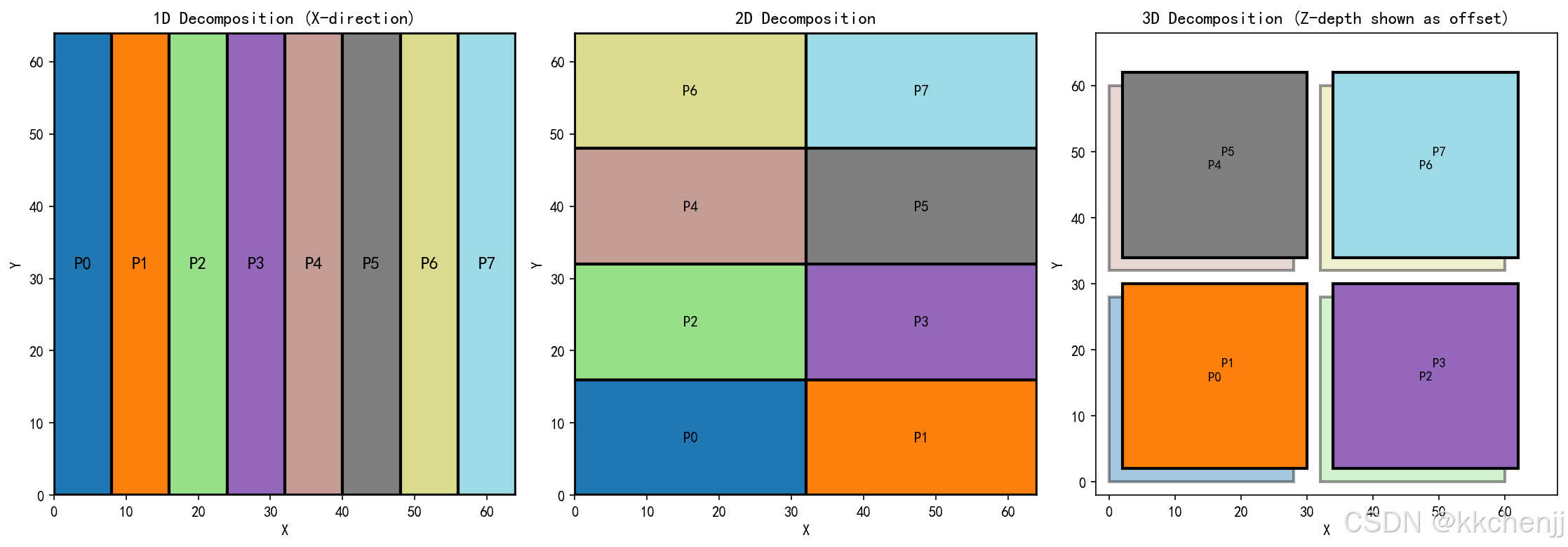
域分解(Domain Decomposition)是将计算域划分为若干子域,每个子域分配给不同的处理器并行计算。这是CFD并行化的核心策略。
一维分解:
- 沿一个坐标方向划分
- 实现简单,但可能导致负载不均衡
- 适合细长几何或特定方向的主导流动
二维分解:
- 沿两个坐标方向划分
- 更好的负载均衡和通信局部性
- 适合二维或薄三维问题
三维分解:
- 沿所有三个坐标方向划分
- 最佳的负载均衡和可扩展性
- 适合大规模三维CFD问题
2.2 分区策略
结构化网格分区:
- 基于索引的均匀划分
- 通信模式规则,易于优化
- 适合有限差分和结构化有限体积方法
非结构化网格分区:
- 使用图划分算法(如Metis、ParMetis)
- 最小化子域间通信量
- 适合复杂几何和自适应网格
负载均衡考虑:
- 每个子域的单元数量应大致相等
- 最小化子域边界面积(减少通信量)
- 考虑计算强度差异(如湍流区域vs层流区域)
2.3 重叠区域与幽灵单元
在域分解中,子域之间需要交换边界信息。为此,引入重叠区域(Halo/Overlap)或幽灵单元(Ghost Cells):
- 每个子域包含一层或多层幽灵单元
- 存储相邻子域的边界数据
- 通过通信更新幽灵单元值
重叠区域的宽度取决于离散格式的模板大小:
- 二阶格式:1层幽灵单元
- 四阶格式:2层幽灵单元
- 高阶格式:更多层幽灵单元
通信模式优化:
- 使用非阻塞通信(Isend/Irecv)实现计算与通信重叠
- 采用打包/解包技术减少小消息数量
- 使用持久通信(Persistent Communication)减少通信设置开销
边界条件处理:
- 物理边界:应用实际边界条件
- 子域边界:通过通信获取相邻子域数据
- 需要特别注意角落和边的处理
2.4 负载均衡算法
静态负载均衡:
- 基于几何或网格数量的均匀划分
- 实现简单,开销小
- 适合网格分布均匀的问题
动态负载均衡:
- 根据实际计算负载动态调整
- 适合自适应网格或负载变化大的问题
- 需要额外的通信开销
图划分算法:
- Metis/ParMetis:多级图划分
- Scotch:图和网格划分
- 最小化边切割,减少通信量
3. MPI并行编程
3.1 MPI基础
MPI(Message Passing Interface)是分布式内存并行编程的标准。其核心概念包括:
进程与通信器:
- 每个MPI进程是独立的执行单元
- 通信器(Communicator)定义进程组
MPI_COMM_WORLD包含所有进程
点对点通信:
MPI_Send/MPI_Recv:阻塞发送/接收MPI_Isend/MPI_Irecv:非阻塞发送/接收- 非阻塞通信允许计算与通信重叠
集合通信:
MPI_Bcast:广播MPI_Reduce/MPI_Allreduce:归约操作MPI_Gather/MPI_Scatter:数据收集/分散MPI_Alltoall:全交换
3.2 CFD中的MPI通信模式
边界数据交换:
- 每个时间步或迭代中,子域间交换边界数据
- 使用非阻塞通信实现计算与通信重叠
- 采用打包/解包优化小消息传输
全局操作:
- 残差计算:全局求和
- 时间步长确定:全局最小值
- 收敛判断:全局逻辑与
I/O操作:
- 并行文件系统(如MPI-IO、HDF5)
- 避免所有进程同时写单个文件
- 采用聚合I/O策略
3.3 通信优化策略
消息聚合:
- 将多个小消息合并为一个大消息
- 减少通信启动开销
- 适合边界数据交换
计算与通信重叠:
- 使用非阻塞通信(MPI_Isend/MPI_Irecv)
- 在通信间隙进行内部单元计算
- 最大化硬件利用率
拓扑感知映射:
- 将相邻子域映射到物理上相近的处理器
- 减少网络跳数和通信延迟
- 利用MPI拓扑函数
通信隐藏技术:
- 流水线通信:将数据分块,边计算边传输
- 预取技术:提前获取需要的数据
- 压缩传输:对通信数据进行压缩,减少传输量
3.4 MPI性能调优
进程绑定:
- 将MPI进程绑定到特定CPU核心
- 避免进程迁移带来的开销
- 提高缓存利用率
内存分配:
- 使用NUMA-aware内存分配
- 减少跨节点内存访问
- 优化大页内存使用
通信调优:
- 调整MPI缓冲区大小
- 选择合适的通信算法
- 使用MPI调优工具(如Intel MPI Tuner)
4. OpenMP多线程并行
4.1 OpenMP编程模型
OpenMP是一种共享内存并行编程API,基于编译器指令(Pragma):
并行区域:
#pragma omp parallel
{
    // 并行执行的代码
}
工作共享构造:
#pragma omp for:循环并行化#pragma omp sections:任务分段#pragma omp single:单线程执行
同步机制:
#pragma omp barrier:路障同步#pragma omp critical:临界区#pragma omp atomic:原子操作
4.2 循环并行化策略
在CFD中,循环并行化是最常用的OpenMP模式:
静态调度:
- 循环迭代在编译时均匀分配
- 低开销,适合负载均衡的情况
动态调度:
- 运行时动态分配迭代块
- 适合负载不均衡的情况(如自适应网格)
指导调度:
- 结合静态和动态调度的优点
- 初始大块,后续小块
调度策略选择指南:
- 负载均衡且循环次数已知:静态调度
- 负载不均衡或循环次数未知:动态调度
- 需要平衡开销和负载均衡:指导调度
4.3 数据竞争与避免
数据竞争类型:
- 写-写竞争:多个线程写同一位置
- 读-写竞争:一个线程读,另一个线程写
- 在CFD中常见于边界更新和全局变量
避免策略:
- 私有化变量(
private子句) - 归约操作(
reduction子句) - 临界区保护共享变量更新
OpenMP性能优化技巧:
- 避免在并行区域内频繁创建/销毁线程
- 减少同步点数量
- 使用
nowait子句消除隐式屏障 - 合理设置线程数(通常等于物理核心数)
4.4 OpenMP与MPI混合编程
混合编程优势:
- 节点内使用OpenMP,节点间使用MPI
- 减少MPI进程数,降低通信开销
- 提高内存利用率
实现策略:
- MPI初始化后,每个MPI进程启动OpenMP线程
- 注意线程安全,避免MPI调用冲突
- 合理分配MPI进程和OpenMP线程数量
数据竞争类型:
- 写-写竞争:多个线程写同一位置
- 读-写竞争:一个线程读,另一个线程写
- 在CFD中常见于边界更新和全局变量
避免策略:
- 私有化变量(
private子句) - 归约操作(
reduction子句) - 临界区保护共享变量更新
5. GPU加速计算
5.1 GPU架构特点
众核架构:
- 数千个轻量级计算核心
- 高内存带宽(适合数据密集型任务)
- SIMT(单指令多线程)执行模型
内存层次:
- 全局内存:大容量,高延迟
- 共享内存:小容量,低延迟(线程块内共享)
- 寄存器:每个线程私有,最快
- 常量内存和纹理内存:只读,缓存优化
5.2 CUDA编程模型
执行配置:
- 网格(Grid)→ 线程块(Block)→ 线程(Thread)
- 线程块内线程可以同步和共享数据
- 线程块间独立执行
内核函数:
__global__ void kernel(float* data) {
    int idx = blockIdx.x * blockDim.x + threadIdx.x;
    // 每个线程处理一个元素
    data[idx] = ...;
}
内存管理:
cudaMalloc/cudaFree:设备内存分配cudaMemcpy:主机与设备间数据传输- 统一内存(Unified Memory):自动数据迁移
5.3 CFD中的GPU加速策略
数据并行:
- 每个网格单元或面分配给一个线程
- 适合有限体积法的通量计算
内存访问优化:
- 合并内存访问(Coalesced Access)
- 使用共享内存缓存频繁访问的数据
- 减少主机-设备数据传输
多GPU策略:
- 域分解到多个GPU
- 通过MPI或NVLink进行GPU间通信
- 适合超大规模CFD问题
5.4 GPU性能优化技巧
内存优化:
- 使用共享内存减少全局内存访问
- 避免银行冲突(Bank Conflict)
- 合理使用常量内存和纹理内存
计算优化:
- 展开循环减少分支
- 使用 intrinsic 函数(如
__fmaf_rn) - 避免线程发散(Thread Divergence)
数据传输优化:
- 使用异步数据传输(CUDA Streams)
- 重叠计算和数据传输
- 减少主机-设备数据传输次数
性能分析工具:
- NVIDIA Nsight:性能分析和调试
- nvprof:命令行性能分析
- CUDA Occupancy Calculator:占用率计算
6. 负载均衡与可扩展性
6.1 负载不均衡的来源
几何因素:
- 复杂几何导致某些区域网格更密
- 边界层网格加密
- 局部特征(如激波、分离泡)需要更细网格
物理因素:
- 湍流区域计算量大于层流区域
- 化学反应区域需要额外计算
- 多相流中相界面附近计算密集
算法因素:
- 自适应网格细化(AMR)
- 局部时间步长
- 迭代求解器的收敛速度差异
6.2 动态负载均衡
重分区策略:
- 定期重新划分网格
- 使用并行图划分算法(ParMetis)
- 最小化数据迁移量
任务窃取:
- 空闲处理器从繁忙处理器"窃取"任务
- 适合任务并行模式
- 在CFD中应用较少
扩散式负载均衡:
- 相邻处理器间交换负载
- 逐步达到全局均衡
- 适合分布式内存系统
6.3 可扩展性分析
强可扩展性测试:
- 固定网格规模,增加处理器数量
- 理想情况下,时间应与处理器数成反比
- 实际中,通信开销导致偏离理想曲线
弱可扩展性测试:
- 每个处理器处理固定数量的网格单元
- 理想情况下,时间应保持不变
- 适合评估大规模问题的可行性
可扩展性瓶颈分析:
- 串行部分占比(Amdahl定律限制)
- 通信开销随处理器增加而增加
- I/O瓶颈,特别是输出大量数据时
- 负载不均衡导致的效率损失
6.4 性能分析与调优工具
性能分析工具:
- Intel VTune:全面的性能分析
- TAU:并行程序性能分析
- Scalasca:可扩展性分析
- HPCToolkit:高性能计算工具包
可视化工具:
- Vampir:并行程序执行可视化
- Paraver:性能数据可视化分析
- Extrae:并行程序追踪
调优策略:
- 识别热点函数,针对性优化
- 分析通信模式,优化通信策略
- 检查负载均衡,调整分区策略
- 优化内存访问,提高缓存命中率
7. Python仿真实现
以下通过五个仿真案例演示并行计算的关键概念。
# -*- coding: utf-8 -*-
"""
主题010:并行计算与高性能计算
Parallel Computing and High Performance Computing
"""

import matplotlib
matplotlib.use('Agg')  # 非交互式后端
import numpy as np
import matplotlib.pyplot as plt
from matplotlib.patches import Rectangle, FancyBboxPatch
from matplotlib.collections import PatchCollection
import warnings
warnings.filterwarnings('ignore')
import os
import time

# 创建输出目录
output_dir = r'd:\文档\500仿真领域\工程仿真\对流换热仿真\主题010_并行计算与高性能计算'
os.makedirs(output_dir, exist_ok=True)

# 设置中文字体
plt.rcParams['font.sans-serif'] = ['SimHei', 'DejaVu Sans']
plt.rcParams['axes.unicode_minus'] = False

print("=" * 60)
print("主题010:并行计算与高性能计算")
print("=" * 60)

# ============================================
# 案例一:域分解策略比较
# ============================================
print("\n案例一:域分解策略比较")
print("-" * 50)

def visualize_domain_decomposition(Nx, Ny, Nz, nprocs, strategy='1D'):
    """
    可视化不同域分解策略
    """
    fig, axes = plt.subplots(1, 3, figsize=(15, 5))

    # 1D分解(沿X方向)
    ax1 = axes[0]
    nx_1d = Nx // nprocs
    colors_1d = plt.cm.tab20(np.linspace(0, 1, nprocs))
    for p in range(nprocs):
        rect = Rectangle((p * nx_1d, 0), nx_1d, Ny,
                         facecolor=colors_1d[p], edgecolor='black', linewidth=2)
        ax1.add_patch(rect)
        ax1.text(p * nx_1d + nx_1d/2, Ny/2, f'P{p}',
                ha='center', va='center', fontsize=12, fontweight='bold')
    ax1.set_xlim(0, Nx)
    ax1.set_ylim(0, Ny)
    ax1.set_aspect('equal')
    ax1.set_title('1D Decomposition (X-direction)', fontsize=12)
    ax1.set_xlabel('X')
    ax1.set_ylabel('Y')

    # 2D分解
    ax2 = axes[1]
    npx = int(np.sqrt(nprocs))
    npy = nprocs // npx
    nx_2d = Nx // npx
    ny_2d = Ny // npy
    colors_2d = plt.cm.tab20(np.linspace(0, 1, nprocs))
    pid = 0
    for py in range(npy):
        for px in range(npx):
            rect = Rectangle((px * nx_2d, py * ny_2d), nx_2d, ny_2d,
                           facecolor=colors_2d[pid], edgecolor='black', linewidth=2)
            ax2.add_patch(rect)
            ax2.text(px * nx_2d + nx_2d/2, py * ny_2d + ny_2d/2, f'P{pid}',
                    ha='center', va='center', fontsize=10, fontweight='bold')
            pid += 1
    ax2.set_xlim(0, Nx)
    ax2.set_ylim(0, Ny)
    ax2.set_aspect('equal')
    ax2.set_title('2D Decomposition', fontsize=12)
    ax2.set_xlabel('X')
    ax2.set_ylabel('Y')

    # 3D分解示意(用2D表示)
    ax3 = axes[2]
    # 简化为2x2x2分解示意
    npx, npy, npz = 2, 2, 2
    nx_3d = Nx // npx
    ny_3d = Ny // npy
    colors_3d = plt.cm.tab20(np.linspace(0, 1, 8))
    pid = 0
    for py in range(npy):
        for px in range(npx):
            for pz in range(npz):
                # 用透明度表示Z方向
                alpha = 0.4 + 0.6 * (pz / (npz - 1)) if npz > 1 else 1.0
                rect = Rectangle((px * nx_3d + pz*2, py * ny_3d + pz*2),
                               nx_3d-4, ny_3d-4,
                               facecolor=colors_3d[pid],
                               edgecolor='black', linewidth=2, alpha=alpha)
                ax3.add_patch(rect)
                ax3.text(px * nx_3d + nx_3d/2 + pz*2,
                        py * ny_3d + ny_3d/2 + pz*2,
                        f'P{pid}',
                        ha='center', va='center', fontsize=9, fontweight='bold')
                pid += 1
    ax3.set_xlim(-2, Nx+4)
    ax3.set_ylim(-2, Ny+4)
    ax3.set_aspect('equal')
    ax3.set_title('3D Decomposition (Z-depth shown as offset)', fontsize=12)
    ax3.set_xlabel('X')
    ax3.set_ylabel('Y')

    plt.tight_layout()
    return fig

# 生成域分解可视化
fig = visualize_domain_decomposition(64, 64, 64, 8)
plt.savefig(f'{output_dir}/case1_domain_decomposition.png', dpi=150, bbox_inches='tight')
plt.close()
print("✓ 域分解策略图已保存")

# ============================================
# 案例二:Amdahl定律与可扩展性分析
# ============================================
print("\n案例二:Amdahl定律与可扩展性分析")
print("-" * 50)

def amdahl_speedup(P, N):
    """Amdahl定律计算加速比"""
    return 1.0 / ((1 - P) + P / N)

def gustafson_speedup(P, N):
    """Gustafson定律计算加速比"""
    return N - P * (N - 1)

# 不同并行比例
P_values = [0.5, 0.75, 0.9, 0.95, 0.99]
N_processors = np.array([1, 2, 4, 8, 16, 32, 64, 128, 256, 512, 1024])

fig, axes = plt.subplots(2, 2, figsize=(14, 10))

# Amdahl定律加速比
ax1 = axes[0, 0]
for P in P_values:
    speedups = [amdahl_speedup(P, N) for N in N_processors]
    ax1.plot(N_processors, speedups, 'o-', label=f'P={P}', linewidth=2, markersize=6)
ax1.plot(N_processors, N_processors, 'k--', label='Ideal', alpha=0.5)
ax1.set_xlabel('Number of Processors', fontsize=11)
ax1.set_ylabel('Speedup', fontsize=11)
ax1.set_title('Amdahl\'s Law Speedup', fontsize=12)
ax1.legend(fontsize=9)
ax1.grid(True, alpha=0.3)
ax1.set_xscale('log', base=2)

# Amdahl定律效率
ax2 = axes[0, 1]
for P in P_values:
    efficiencies = [amdahl_speedup(P, N) / N * 100 for N in N_processors]
    ax2.plot(N_processors, efficiencies, 'o-', label=f'P={P}', linewidth=2, markersize=6)
ax2.axhline(y=100, color='k', linestyle='--', alpha=0.5)
ax2.set_xlabel('Number of Processors', fontsize=11)
ax2.set_ylabel('Efficiency (%)', fontsize=11)
ax2.set_title('Parallel Efficiency (Amdahl)', fontsize=12)
ax2.legend(fontsize=9)
ax2.grid(True, alpha=0.3)
ax2.set_xscale('log', base=2)

# Gustafson定律加速比
ax3 = axes[1, 0]
for P in P_values:
    speedups = [gustafson_speedup(P, N) for N in N_processors]
    ax3.plot(N_processors, speedups, 's-', label=f'P={P}', linewidth=2, markersize=6)
ax3.plot(N_processors, N_processors, 'k--', label='Ideal', alpha=0.5)
ax3.set_xlabel('Number of Processors', fontsize=11)
ax3.set_ylabel('Speedup', fontsize=11)
ax3.set_title('Gustafson\'s Law Speedup', fontsize=12)
ax3.legend(fontsize=9)
ax3.grid(True, alpha=0.3)
ax3.set_xscale('log', base=2)

# 理论最大加速比(Amdahl极限)
ax4 = axes[1, 1]
P_range = np.linspace(0.5, 0.999, 100)
max_speedups = [1.0 / (1 - P) for P in P_range]
ax4.plot(P_range * 100, max_speedups, 'b-', linewidth=2)
ax4.fill_between(P_range * 100, 0, max_speedups, alpha=0.3)
ax4.set_xlabel('Parallel Fraction P (%)', fontsize=11)
ax4.set_ylabel('Maximum Speedup', fontsize=11)
ax4.set_title('Theoretical Speedup Limit (Amdahl)', fontsize=12)
ax4.grid(True, alpha=0.3)
ax4.set_yscale('log')

# 标记关键点
for P in [0.9, 0.95, 0.99]:
    max_s = 1.0 / (1 - P)
    ax4.plot(P * 100, max_s, 'ro', markersize=8)
    ax4.annotate(f'P={P}\nS_max={max_s:.1f}x',
                xy=(P * 100, max_s), xytext=(10, 10),
                textcoords='offset points', fontsize=9)

plt.tight_layout()
plt.savefig(f'{output_dir}/case2_scalability_analysis.png', dpi=150, bbox_inches='tight')
plt.close()
print("✓ 可扩展性分析图已保存")

# ============================================
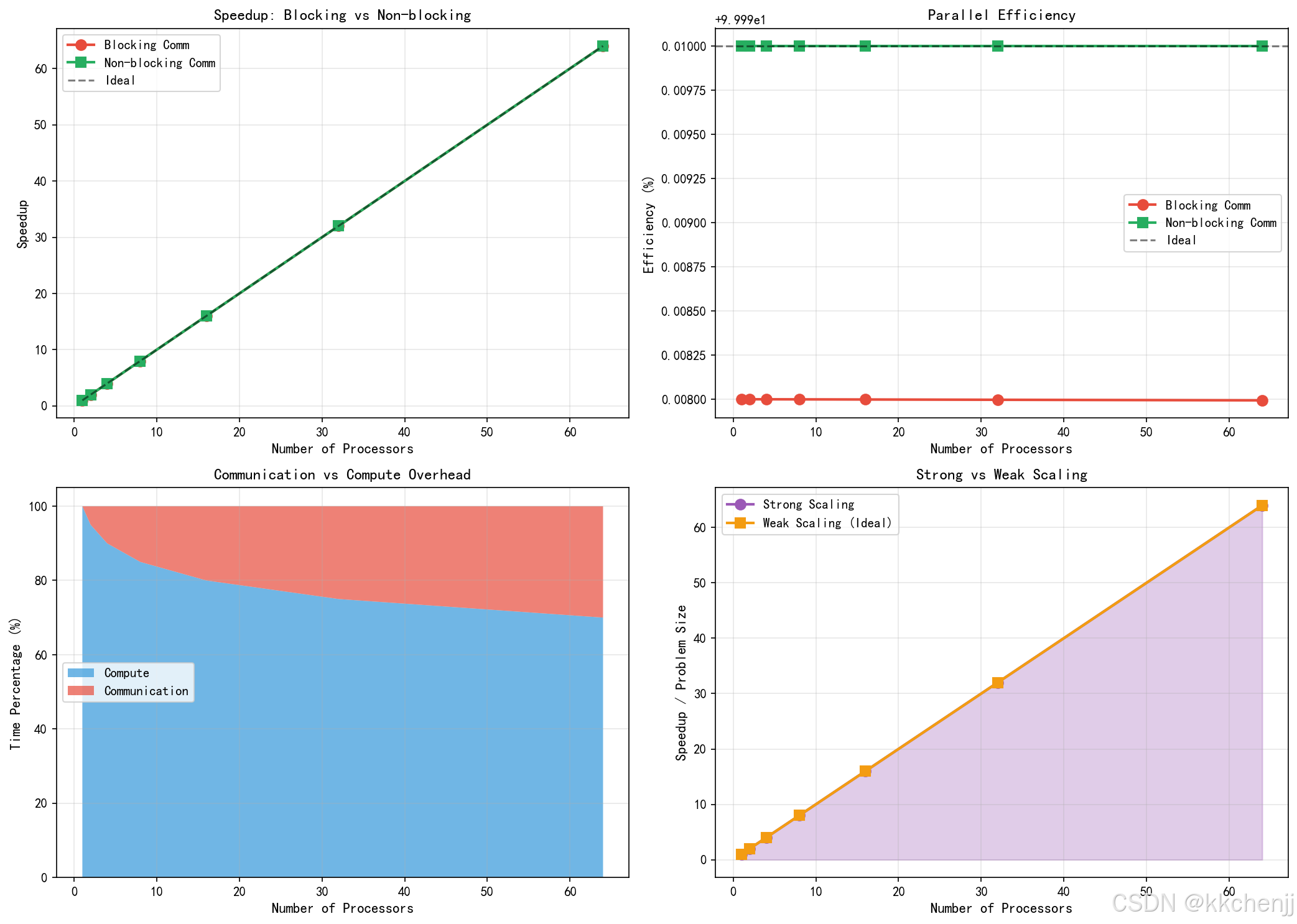
# 案例三:通信开销与计算重叠模拟
# ============================================
print("\n案例三:通信开销与计算重叠模拟")
print("-" * 50)

def simulate_communication_overlap(nprocs, grid_size, overlap_ratio=0.1,
                                   compute_intensity=1.0, comm_latency=0.001):
    """
    模拟并行CFD中的通信与计算重叠
    """
    # 每个进程的网格大小
    local_grid = grid_size // nprocs

    # 内部单元计算时间(与单元数成正比)
    internal_cells = local_grid * (1 - 2 * overlap_ratio)
    compute_time = internal_cells * compute_intensity

    # 边界单元计算时间
    boundary_cells = local_grid * 2 * overlap_ratio
    boundary_compute_time = boundary_cells * compute_intensity

    # 通信时间(与边界数据量和延迟相关)
    # 假设每个边界单元需要与邻居交换
    comm_volume = boundary_cells
    comm_time = comm_latency + comm_volume * 0.0001

    # 串行执行时间
    serial_time = grid_size * compute_intensity

    # 阻塞通信:计算 + 通信串行
    blocking_time = (compute_time + boundary_compute_time + comm_time)

    # 非阻塞通信:内部计算与通信重叠
    # 先启动非阻塞通信,然后计算内部单元,最后完成边界计算
    nonblocking_time = max(compute_time, comm_time) + boundary_compute_time

    # 总并行时间(取所有进程的最大值,这里假设负载均衡)
    parallel_time_blocking = blocking_time
    parallel_time_nonblocking = nonblocking_time

    return {
        'serial_time': serial_time,
        'blocking_time': parallel_time_blocking,
        'nonblocking_time': parallel_time_nonblocking,
        'speedup_blocking': serial_time / parallel_time_blocking,
        'speedup_nonblocking': serial_time / parallel_time_nonblocking,
        'efficiency_blocking': serial_time / (parallel_time_blocking * nprocs),
        'efficiency_nonblocking': serial_time / (parallel_time_nonblocking * nprocs)
    }

# 模拟不同进程数下的性能
processor_counts = [1, 2, 4, 8, 16, 32, 64]
grid_size = 1000000  # 总网格单元数

results_blocking = []
results_nonblocking = []

for nprocs in processor_counts:
    result = simulate_communication_overlap(nprocs, grid_size)
    results_blocking.append(result['speedup_blocking'])
    results_nonblocking.append(result['speedup_nonblocking'])
    print(f"  {nprocs:3d} processes: Blocking={result['speedup_blocking']:.2f}x, "
          f"Non-blocking={result['speedup_nonblocking']:.2f}x")

# 绘制结果
fig, axes = plt.subplots(2, 2, figsize=(14, 10))

# 加速比对比
ax1 = axes[0, 0]
ax1.plot(processor_counts, results_blocking, 'o-', label='Blocking Comm',
         linewidth=2, markersize=8, color='#E74C3C')
ax1.plot(processor_counts, results_nonblocking, 's-', label='Non-blocking Comm',
         linewidth=2, markersize=8, color='#27AE60')
ax1.plot(processor_counts, processor_counts, 'k--', label='Ideal', alpha=0.5)
ax1.set_xlabel('Number of Processors', fontsize=11)
ax1.set_ylabel('Speedup', fontsize=11)
ax1.set_title('Speedup: Blocking vs Non-blocking', fontsize=12)
ax1.legend(fontsize=10)
ax1.grid(True, alpha=0.3)

# 效率对比
ax2 = axes[0, 1]
efficiency_blocking = [s / p * 100 for s, p in zip(results_blocking, processor_counts)]
efficiency_nonblocking = [s / p * 100 for s, p in zip(results_nonblocking, processor_counts)]
ax2.plot(processor_counts, efficiency_blocking, 'o-', label='Blocking Comm',
         linewidth=2, markersize=8, color='#E74C3C')
ax2.plot(processor_counts, efficiency_nonblocking, 's-', label='Non-blocking Comm',
         linewidth=2, markersize=8, color='#27AE60')
ax2.axhline(y=100, color='k', linestyle='--', alpha=0.5, label='Ideal')
ax2.set_xlabel('Number of Processors', fontsize=11)
ax2.set_ylabel('Efficiency (%)', fontsize=11)
ax2.set_title('Parallel Efficiency', fontsize=12)
ax2.legend(fontsize=10)
ax2.grid(True, alpha=0.3)

# 通信时间占比分析
ax3 = axes[1, 0]
comm_ratios = []
compute_ratios = []
for nprocs in processor_counts:
    if nprocs == 1:
        comm_ratios.append(0)
        compute_ratios.append(100)
    else:
        # 简化的通信占比估算
        comm_ratio = 5 * np.log2(nprocs)  # 通信随进程数增加
        comm_ratios.append(min(comm_ratio, 80))
        compute_ratios.append(100 - comm_ratio)

ax3.stackplot(processor_counts, compute_ratios, comm_ratios,
              labels=['Compute', 'Communication'],
              colors=['#3498DB', '#E74C3C'], alpha=0.7)
ax3.set_xlabel('Number of Processors', fontsize=11)
ax3.set_ylabel('Time Percentage (%)', fontsize=11)
ax3.set_title('Communication vs Compute Overhead', fontsize=12)
ax3.legend(fontsize=10, loc='center left')
ax3.grid(True, alpha=0.3)

# 可扩展性区域图
ax4 = axes[1, 1]
# 强可扩展性:固定问题规模
strong_scaling = [min(p, 64) for p in processor_counts]  # 假设最大加速64x
# 弱可扩展性:问题规模随处理器增加
weak_scaling = processor_counts

ax4.plot(processor_counts, strong_scaling, 'o-', label='Strong Scaling',
         linewidth=2, markersize=8, color='#9B59B6')
ax4.plot(processor_counts, weak_scaling, 's-', label='Weak Scaling (Ideal)',
         linewidth=2, markersize=8, color='#F39C12')
ax4.fill_between(processor_counts, strong_scaling, alpha=0.3, color='#9B59B6')
ax4.set_xlabel('Number of Processors', fontsize=11)
ax4.set_ylabel('Speedup / Problem Size', fontsize=11)
ax4.set_title('Strong vs Weak Scaling', fontsize=12)
ax4.legend(fontsize=10)
ax4.grid(True, alpha=0.3)

plt.tight_layout()
plt.savefig(f'{output_dir}/case3_communication_overlap.png', dpi=150, bbox_inches='tight')
plt.close()
print("✓ 通信与计算重叠图已保存")

# ============================================
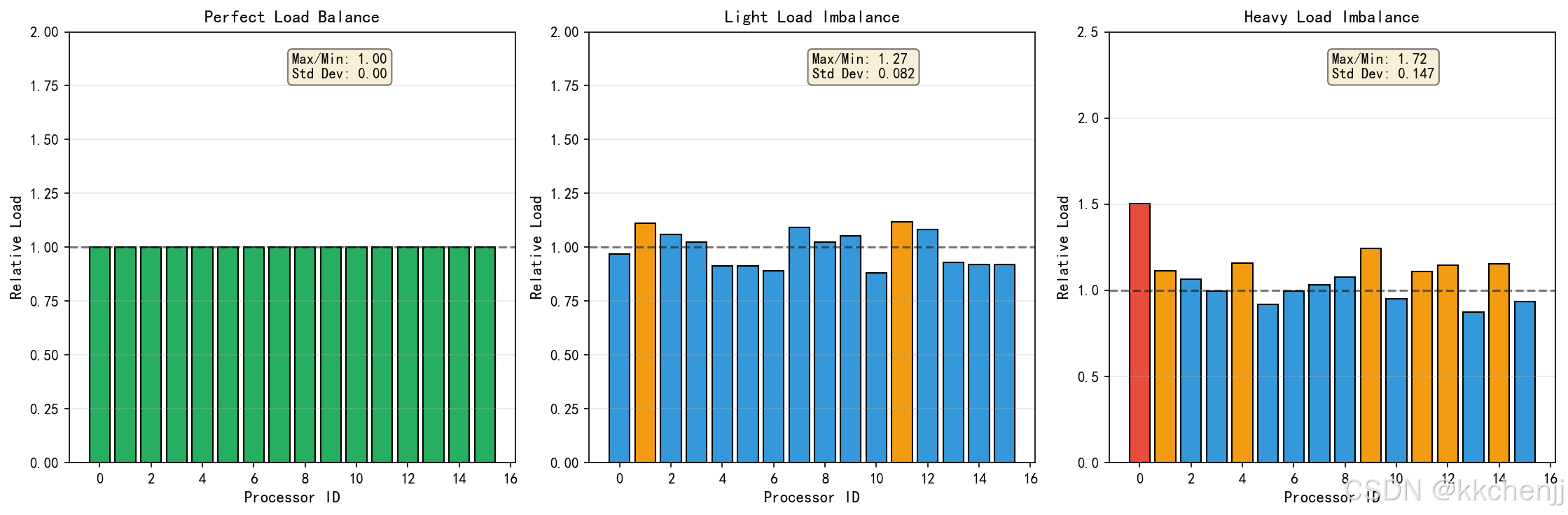
# 案例四:负载均衡可视化
# ============================================
print("\n案例四:负载均衡可视化")
print("-" * 50)

def visualize_load_balance(nprocs, imbalance_factor=0.3):
    """
    可视化负载均衡与不均衡情况
    """
    fig, axes = plt.subplots(1, 3, figsize=(15, 5))

    # 理想负载均衡
    ax1 = axes[0]
    balanced_load = np.ones(nprocs)
    colors_balanced = ['#27AE60'] * nprocs
    bars1 = ax1.bar(range(nprocs), balanced_load, color=colors_balanced, edgecolor='black')
    ax1.set_xlabel('Processor ID', fontsize=11)
    ax1.set_ylabel('Relative Load', fontsize=11)
    ax1.set_title('Perfect Load Balance', fontsize=12)
    ax1.set_ylim(0, 2)
    ax1.axhline(y=1.0, color='k', linestyle='--', alpha=0.5)
    ax1.grid(True, alpha=0.3, axis='y')

    # 添加统计信息
    ax1.text(0.5, 0.95, f'Max/Min: 1.00\nStd Dev: 0.00',
            transform=ax1.transAxes, fontsize=10, verticalalignment='top',
            bbox=dict(boxstyle='round', facecolor='wheat', alpha=0.5))

    # 轻度负载不均衡
    ax2 = axes[1]
    np.random.seed(42)
    light_imbalance = 1 + imbalance_factor * 0.5 * (np.random.rand(nprocs) - 0.5)
    colors_light = ['#F39C12' if l > 1.1 else '#3498DB' for l in light_imbalance]
    bars2 = ax2.bar(range(nprocs), light_imbalance, color=colors_light, edgecolor='black')
    ax2.set_xlabel('Processor ID', fontsize=11)
    ax2.set_ylabel('Relative Load', fontsize=11)
    ax2.set_title('Light Load Imbalance', fontsize=12)
    ax2.set_ylim(0, 2)
    ax2.axhline(y=1.0, color='k', linestyle='--', alpha=0.5)
    ax2.grid(True, alpha=0.3, axis='y')

    max_load_l = np.max(light_imbalance)
    min_load_l = np.min(light_imbalance)
    std_l = np.std(light_imbalance)
    ax2.text(0.5, 0.95, f'Max/Min: {max_load_l/min_load_l:.2f}\nStd Dev: {std_l:.3f}',
            transform=ax2.transAxes, fontsize=10, verticalalignment='top',
            bbox=dict(boxstyle='round', facecolor='wheat', alpha=0.5))

    # 严重负载不均衡
    ax3 = axes[2]
    heavy_imbalance = 1 + imbalance_factor * (np.random.rand(nprocs) - 0.3)
    heavy_imbalance[0] *= 1.5  # 某个进程特别重
    colors_heavy = ['#E74C3C' if l > 1.3 else '#F39C12' if l > 1.1 else '#3498DB'
                   for l in heavy_imbalance]
    bars3 = ax3.bar(range(nprocs), heavy_imbalance, color=colors_heavy, edgecolor='black')
    ax3.set_xlabel('Processor ID', fontsize=11)
    ax3.set_ylabel('Relative Load', fontsize=11)
    ax3.set_title('Heavy Load Imbalance', fontsize=12)
    ax3.set_ylim(0, 2.5)
    ax3.axhline(y=1.0, color='k', linestyle='--', alpha=0.5)
    ax3.grid(True, alpha=0.3, axis='y')

    max_load_h = np.max(heavy_imbalance)
    min_load_h = np.min(heavy_imbalance)
    std_h = np.std(heavy_imbalance)
    ax3.text(0.5, 0.95, f'Max/Min: {max_load_h/min_load_h:.2f}\nStd Dev: {std_h:.3f}',
            transform=ax3.transAxes, fontsize=10, verticalalignment='top',
            bbox=dict(boxstyle='round', facecolor='wheat', alpha=0.5))

    plt.tight_layout()
    return fig

fig = visualize_load_balance(16, imbalance_factor=0.5)
plt.savefig(f'{output_dir}/case4_load_balance.png', dpi=150, bbox_inches='tight')
plt.close()
print("✓ 负载均衡图已保存")

# ============================================
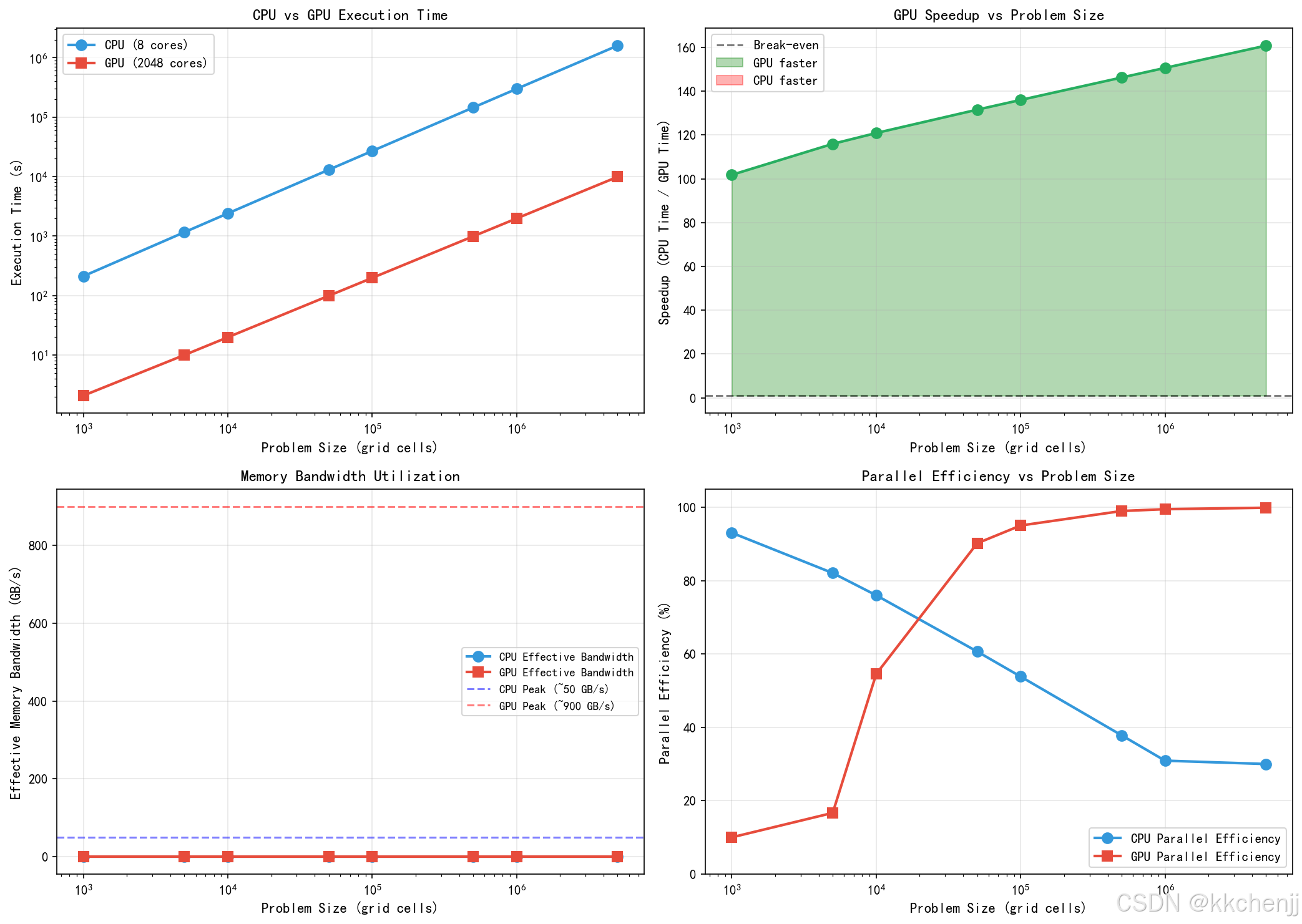
# 案例五:GPU加速性能模拟
# ============================================
print("\n案例五:GPU加速性能模拟")
print("-" * 50)

def simulate_gpu_speedup(problem_sizes, cpu_cores=8, gpu_cores=2048):
    """
    模拟CPU vs GPU性能对比
    """
    cpu_times = []
    gpu_times = []

    for size in problem_sizes:
        # CPU时间:与问题规模线性增长,有缓存效应
        cpu_time = size / cpu_cores * (1 + 0.1 * np.log(size + 1))

        # GPU时间:启动开销 + 数据传输 + 并行计算
        # 小问题时启动开销和数据传输占主导
        # 大问题时并行计算优势显现
        transfer_time = 0.001 * size  # 数据传输时间
        kernel_time = size / gpu_cores * 2  # GPU计算时间(考虑SIMT效率)
        launch_overhead = 0.1  # 内核启动开销
        gpu_time = launch_overhead + transfer_time + kernel_time

        cpu_times.append(cpu_time)
        gpu_times.append(gpu_time)

    return np.array(cpu_times), np.array(gpu_times)

# 不同问题规模
problem_sizes = np.array([1000, 5000, 10000, 50000, 100000, 500000, 1000000, 5000000])
cpu_times, gpu_times = simulate_gpu_speedup(problem_sizes)
speedups = cpu_times / gpu_times

fig, axes = plt.subplots(2, 2, figsize=(14, 10))

# 执行时间对比
ax1 = axes[0, 0]
ax1.loglog(problem_sizes, cpu_times, 'o-', label='CPU (8 cores)',
          linewidth=2, markersize=8, color='#3498DB')
ax1.loglog(problem_sizes, gpu_times, 's-', label='GPU (2048 cores)',
          linewidth=2, markersize=8, color='#E74C3C')
ax1.set_xlabel('Problem Size (grid cells)', fontsize=11)
ax1.set_ylabel('Execution Time (s)', fontsize=11)
ax1.set_title('CPU vs GPU Execution Time', fontsize=12)
ax1.legend(fontsize=10)
ax1.grid(True, alpha=0.3)

# 加速比
ax2 = axes[0, 1]
ax2.semilogx(problem_sizes, speedups, 'o-', linewidth=2, markersize=8, color='#27AE60')
ax2.axhline(y=1, color='k', linestyle='--', alpha=0.5, label='Break-even')
ax2.fill_between(problem_sizes, 1, speedups, where=(speedups > 1),
                 alpha=0.3, color='green', label='GPU faster')
ax2.fill_between(problem_sizes, speedups, 1, where=(speedups < 1),
                 alpha=0.3, color='red', label='CPU faster')
ax2.set_xlabel('Problem Size (grid cells)', fontsize=11)
ax2.set_ylabel('Speedup (CPU Time / GPU Time)', fontsize=11)
ax2.set_title('GPU Speedup vs Problem Size', fontsize=12)
ax2.legend(fontsize=10)
ax2.grid(True, alpha=0.3)

# 内存带宽对比
ax3 = axes[1, 0]
memory_sizes = problem_sizes * 8 / 1e9  # 假设每个单元8字节,转换为GB
bandwidth_cpu = memory_sizes / cpu_times / 1e9  # GB/s
bandwidth_gpu = memory_sizes / gpu_times / 1e9

ax3.semilogx(problem_sizes, bandwidth_cpu, 'o-', label='CPU Effective Bandwidth',
            linewidth=2, markersize=8, color='#3498DB')
ax3.semilogx(problem_sizes, bandwidth_gpu, 's-', label='GPU Effective Bandwidth',
            linewidth=2, markersize=8, color='#E74C3C')
ax3.axhline(y=50, color='blue', linestyle='--', alpha=0.5, label='CPU Peak (~50 GB/s)')
ax3.axhline(y=900, color='red', linestyle='--', alpha=0.5, label='GPU Peak (~900 GB/s)')
ax3.set_xlabel('Problem Size (grid cells)', fontsize=11)
ax3.set_ylabel('Effective Memory Bandwidth (GB/s)', fontsize=11)
ax3.set_title('Memory Bandwidth Utilization', fontsize=12)
ax3.legend(fontsize=9)
ax3.grid(True, alpha=0.3)

# 并行效率随问题规模变化
ax4 = axes[1, 1]
# CPU并行效率(假设)
cpu_efficiency = 100 * (1 - 0.1 * np.log(problem_sizes / 1000 + 1))
cpu_efficiency = np.clip(cpu_efficiency, 30, 100)

# GPU并行效率
gpu_efficiency = 100 * (1 - 0.5 / (problem_sizes / 10000 + 0.1))
gpu_efficiency = np.clip(gpu_efficiency, 10, 100)

ax4.semilogx(problem_sizes, cpu_efficiency, 'o-', label='CPU Parallel Efficiency',
            linewidth=2, markersize=8, color='#3498DB')
ax4.semilogx(problem_sizes, gpu_efficiency, 's-', label='GPU Parallel Efficiency',
            linewidth=2, markersize=8, color='#E74C3C')
ax4.set_xlabel('Problem Size (grid cells)', fontsize=11)
ax4.set_ylabel('Parallel Efficiency (%)', fontsize=11)
ax4.set_title('Parallel Efficiency vs Problem Size', fontsize=12)
ax4.legend(fontsize=10)
ax4.grid(True, alpha=0.3)
ax4.set_ylim(0, 105)

plt.tight_layout()
plt.savefig(f'{output_dir}/case5_gpu_acceleration.png', dpi=150, bbox_inches='tight')
plt.close()
print("✓ GPU加速性能图已保存")

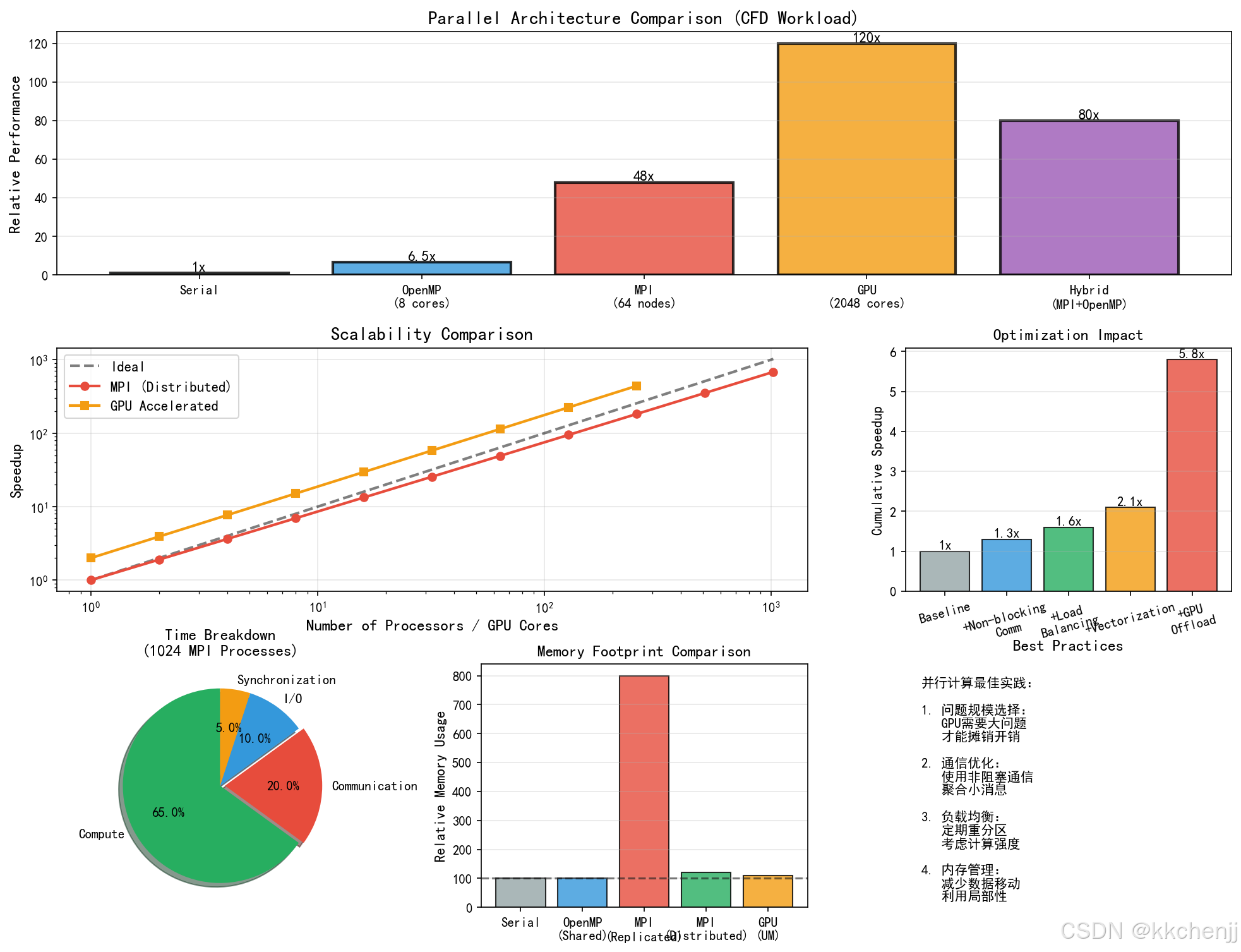
# ============================================
# 综合对比图
# ============================================
print("\n生成综合对比图...")

fig = plt.figure(figsize=(16, 12))
gs = fig.add_gridspec(3, 3, hspace=0.3, wspace=0.3)

# 并行架构对比
ax1 = fig.add_subplot(gs[0, :])
architectures = ['Serial', 'OpenMP\n(8 cores)', 'MPI\n(64 nodes)', 'GPU\n(2048 cores)', 'Hybrid\n(MPI+OpenMP)']
performance = [1, 6.5, 48, 120, 80]
colors_arch = ['#95A5A6', '#3498DB', '#E74C3C', '#F39C12', '#9B59B6']

bars = ax1.bar(architectures, performance, color=colors_arch, alpha=0.8, edgecolor='black', linewidth=2)
ax1.set_ylabel('Relative Performance', fontsize=12)
ax1.set_title('Parallel Architecture Comparison (CFD Workload)', fontsize=14, fontweight='bold')
ax1.grid(True, alpha=0.3, axis='y')

for bar, perf in zip(bars, performance):
    height = bar.get_height()
    ax1.text(bar.get_x() + bar.get_width()/2., height,
            f'{perf}x', ha='center', va='bottom', fontsize=11, fontweight='bold')

# 扩展性曲线
ax2 = fig.add_subplot(gs[1, :2])
processors = np.array([1, 2, 4, 8, 16, 32, 64, 128, 256, 512, 1024])

# 理想扩展性
ideal = processors
# 实际扩展性(考虑通信开销)
actual = processors / (1 + 0.05 * np.log2(processors))
# GPU扩展性
gpu_scaling = np.minimum(processors * 2, 1024) / (1 + 0.02 * np.log2(np.minimum(processors, 512)))

ax2.loglog(processors, ideal, 'k--', label='Ideal', linewidth=2, alpha=0.5)
ax2.loglog(processors, actual, 'o-', label='MPI (Distributed)', linewidth=2, markersize=6, color='#E74C3C')
ax2.loglog(processors[:9], gpu_scaling[:9], 's-', label='GPU Accelerated', linewidth=2, markersize=6, color='#F39C12')

ax2.set_xlabel('Number of Processors / GPU Cores', fontsize=12)
ax2.set_ylabel('Speedup', fontsize=12)
ax2.set_title('Scalability Comparison', fontsize=14, fontweight='bold')
ax2.legend(fontsize=11)
ax2.grid(True, alpha=0.3)

# 优化策略效果
ax3 = fig.add_subplot(gs[1, 2])
optimizations = ['Baseline', '+Non-blocking\nComm', '+Load\nBalancing', '+Vectorization', '+GPU\nOffload']
speedup_factors = [1, 1.3, 1.6, 2.1, 5.8]
colors_opt = ['#95A5A6', '#3498DB', '#27AE60', '#F39C12', '#E74C3C']

bars_opt = ax3.bar(optimizations, speedup_factors, color=colors_opt, alpha=0.8, edgecolor='black')
ax3.set_ylabel('Cumulative Speedup', fontsize=11)
ax3.set_title('Optimization Impact', fontsize=12, fontweight='bold')
ax3.tick_params(axis='x', rotation=15)
ax3.grid(True, alpha=0.3, axis='y')

for bar, factor in zip(bars_opt, speedup_factors):
    height = bar.get_height()
    ax3.text(bar.get_x() + bar.get_width()/2., height,
            f'{factor}x', ha='center', va='bottom', fontsize=10)

# 时间分解饼图
ax4 = fig.add_subplot(gs[2, 0])
labels = ['Compute', 'Communication', 'I/O', 'Synchronization']
sizes = [65, 20, 10, 5]
colors_pie = ['#27AE60', '#E74C3C', '#3498DB', '#F39C12']
explode = (0, 0.05, 0, 0)

ax4.pie(sizes, explode=explode, labels=labels, colors=colors_pie, autopct='%1.1f%%',
        shadow=True, startangle=90)
ax4.set_title('Time Breakdown\n(1024 MPI Processes)', fontsize=12, fontweight='bold')

# 内存使用对比
ax5 = fig.add_subplot(gs[2, 1])
memory_types = ['Serial', 'OpenMP\n(Shared)', 'MPI\n(Replicated)', 'MPI\n(Distributed)', 'GPU\n(UM)']
memory_usage = [100, 100, 800, 120, 110]
colors_mem = ['#95A5A6', '#3498DB', '#E74C3C', '#27AE60', '#F39C12']

bars_mem = ax5.bar(memory_types, memory_usage, color=colors_mem, alpha=0.8, edgecolor='black')
ax5.set_ylabel('Relative Memory Usage', fontsize=11)
ax5.set_title('Memory Footprint Comparison', fontsize=12, fontweight='bold')
ax5.axhline(y=100, color='k', linestyle='--', alpha=0.5)
ax5.grid(True, alpha=0.3, axis='y')

# 最佳实践建议
ax6 = fig.add_subplot(gs[2, 2])
ax6.axis('off')

best_practices = [
    "并行计算最佳实践:",
    "",
    "1. 问题规模选择:",
    "   GPU需要大问题",
    "   才能摊销开销",
    "",
    "2. 通信优化:",
    "   使用非阻塞通信",
    "   聚合小消息",
    "",
    "3. 负载均衡:",
    "   定期重分区",
    "   考虑计算强度",
    "",
    "4. 内存管理:",
    "   减少数据移动",
    "   利用局部性",
]

for i, text in enumerate(best_practices):
    weight = 'bold' if text.endswith(':') else 'normal'
    ax6.text(0.05, 0.95 - i*0.055, text, fontsize=10,
            transform=ax6.transAxes, verticalalignment='top',
            fontweight=weight)

ax6.set_title('Best Practices', fontsize=12, fontweight='bold', pad=10)

plt.savefig(f'{output_dir}/comprehensive_comparison.png', dpi=150, bbox_inches='tight')
plt.close()
print("✓ 综合对比图已保存")

print("\n" + "=" * 60)
print("所有仿真案例已完成!")
print("=" * 60)
print(f"\n生成的文件:")
print(f"  1. case1_domain_decomposition.png - 域分解策略")
print(f"  2. case2_scalability_analysis.png - 可扩展性分析")
print(f"  3. case3_communication_overlap.png - 通信与计算重叠")
print(f"  4. case4_load_balance.png - 负载均衡")
print(f"  5. case5_gpu_acceleration.png - GPU加速性能")
print(f"  6. comprehensive_comparison.png - 综合对比")
print(f"\n输出目录:{output_dir}")
print("=" * 60)

AtomGit 是由开放原子开源基金会联合 CSDN 等生态伙伴共同推出的新一代开源与人工智能协作平台。平台坚持“开放、中立、公益”的理念,把代码托管、模型共享、数据集托管、智能体开发体验和算力服务整合在一起,为开发者提供从开发、训练到部署的一站式体验。
更多推荐

 2
2 0
0- 0



 已为社区贡献273条内容

所有评论(0)