【AI应用】日记分析之本地部署和调用LLM
Motivation
近期想利用AI分析一下自己写了七年的journals(日记),看看记录的事件、心情、愿望、成果等等。由于处理的数据涉及个人隐私,不希望发送到远程,所以和AI讨论后打算在本地部署一个开源的轻量的模型来分析。
实现步骤
安装ollama
ollama类似一个为模型建设的、带界面的“包管理器”,相当于javascript的npm、python的pip、java的maven等等。用它可以方便地下载和使用各种模型。
ollama下载地址。下载完成后打开ollama应用,可以看到这样一个非常常见的与LLM对话的界面,右下角可以选择可用的模型。但是其实我们后面很少用到这个界面,因为要批量处理很多数据,所以通过API调用模型更加方便灵活。
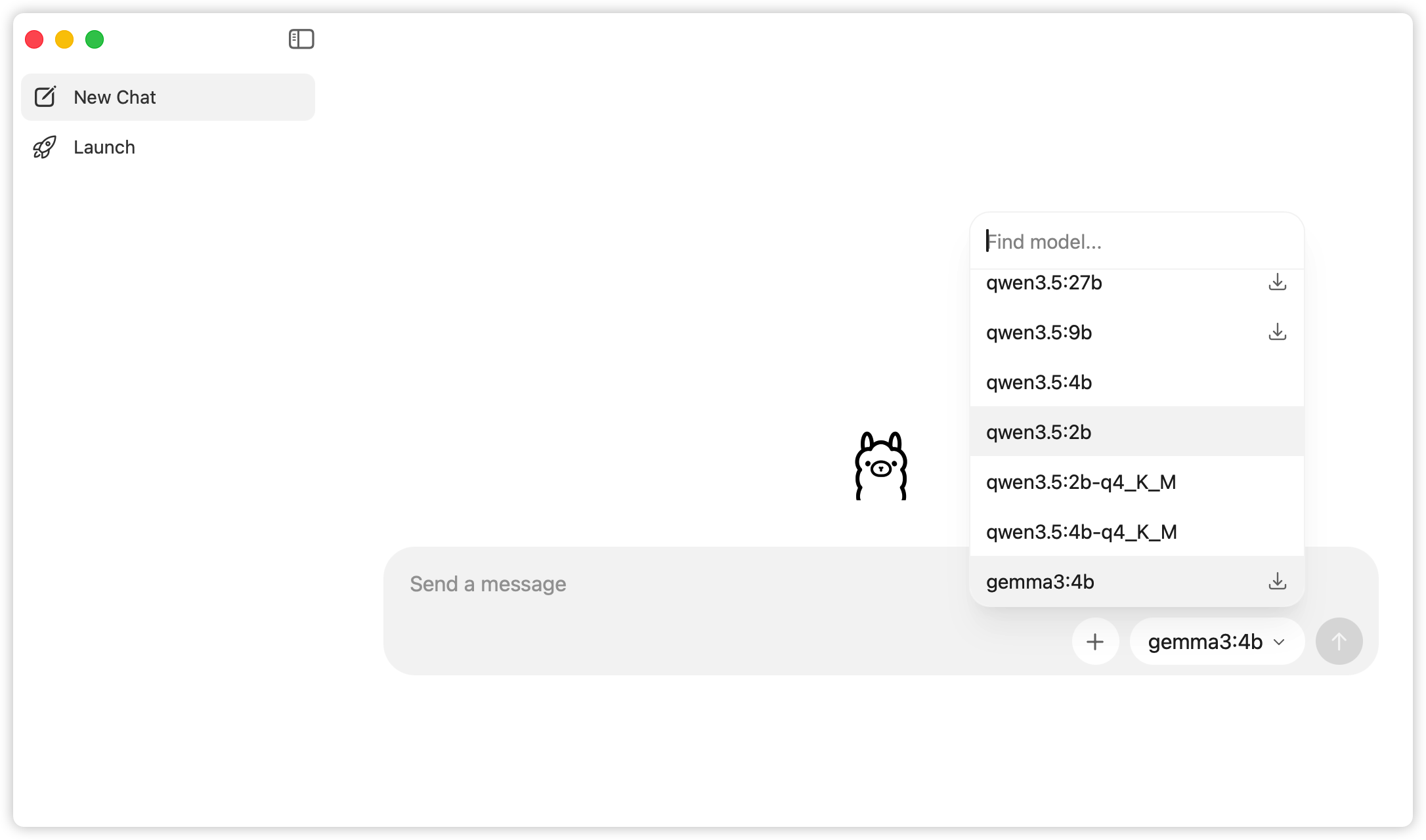
选择模型
在ollama的模型搜索页可以看到所有可以下载的模型。
模型的选择包括厂商、型号和规模,有点类似我们选购电子产品时候的选择。厂商基本上等于我们常听到的有名的大模型背后的公司名,比如OpenAI、Anthropic、Google、Alibaba等;型号可以理解为模型的名字,比如GPT、Claude、Gemini、Qwen等;而规模就是模型参数的大小。
厂商和模型型号的选择基本上按照个人使用经验和喜好即可。由于我分析的文本主要是中文的,而国内公司的模型对中文的支持相对更好一些,所以我选了国内公司的模型。这一阵用千问APP比较多,觉得它产出的内容我比较满意,所以我就选择了它背后的模型qwen3.5。
模型规模的选择需要同时考虑成本和性能表现。规模大小体现在它的参数数量上,比如我们会在模型的下载页上看到不同参数规模的选项。这里的 b = billion(十亿),4b就等于40亿。由于大语言模型背后是由神经网络构建的,所以可以把参数理解为神经网络各个节点的权重,参数规模约等于节点数量。以下是我找到的当前主流的参数规模分类:
轻量级模型(0.5B-10B):如 Qwen2-0.5B(5 亿)、DeepSeek-R1-7B(70 亿),适合移动端、边缘计算,响应快、部署成本低。
中大型模型(10B-100B):如 Qwen2-72B(720 亿)、Llama3-70B(700 亿),在企业级推理、代码生成、金融风控等任务中表现优异。
超大规模模型(100B+):如 GPT-4(约 1.8 万亿)、DeepSeek-V3(6710 亿)、华为盘古 Ultra MoE(7180 亿),在复杂推理、多模态生成、科学计算等领域具备顶尖性能。
参考 https://bbs.huaweicloud.com/blogs/455694
在ollama的模型详情页可以看到当前模型提供了哪些参数规模的选项。
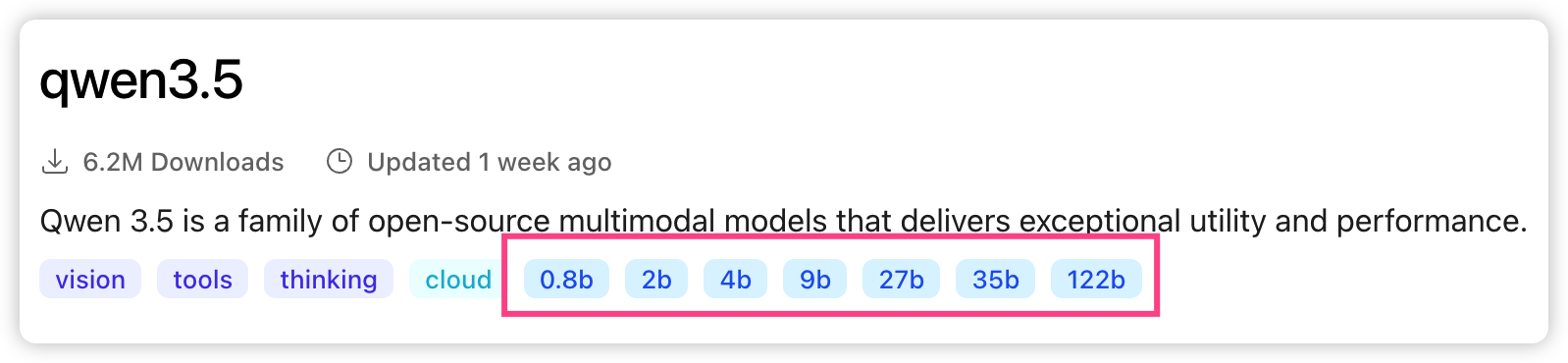
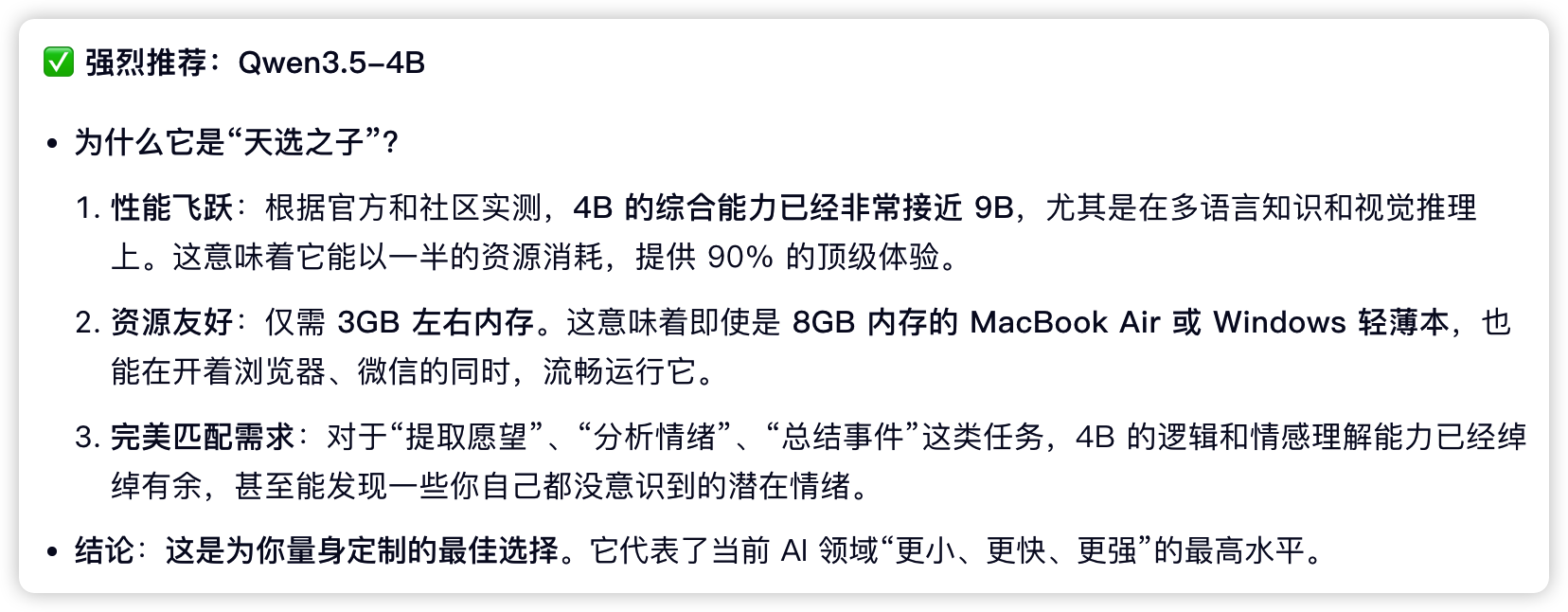
本地机器的性能有限,规模大的模型性能表现(即生成内容的满意度)固然好,但是本地机器可能跑不起来;而规模小的模型本地能流畅运行但是很可能性能表现不佳。所以我们需要在performance和cost之间做一个trade-off。这里我通过这篇博客找到了一个查看各个模型和自己机器的适配度的工具 llmfit。这是个纯命令行的工具,交互类似vim,使用起来不是很方便。它确实能够做一个粗略的筛选,不过我发现把自己的机型配置告诉AI让它帮你选也许更省事(哈哈,用AI解决AI的带来问题)。我是mac mini 最低配CPU + 16G内存版,千问给我的最佳选择是 Qwen3.5-4B。我后来实际运行的效果也和它描述得差不多。
数据预处理
数据预处理这部分主要是把一篇一篇的日记文件处理成按日期分隔的对象,日记是markdown格式的,python代码如下:
import os
import re
import frontmatter
from pathlib import Path
from ignore_content import ignore_content # 由于日记是有模板的,所以有一些每篇都有的重复内容,它们不在分析的范围内所以要去掉

# 从文件中提取日记条目,一天写的内容作为一个条目
def extract_entries_from_file(file_path: str):
    entries = []

    # 打开文件
    with open(file_path, 'r', encoding='utf-8') as file:
        content = file.read()

    # 用markdown解析器解析
    post = frontmatter.loads(content)
    body = post.content

    # 文件的特点:有的是一个文件一天,有的是一个文件多天。一个文件多天的用四级标题注明了日期
    # 先获取文件名的日期,肯定是这个文件里第一篇日记的日期。
    filename = Path(file_path).stem
    date_macth = re.search(r'(\d{4}\d{2}\d{2})', filename)
    file_date_str = date_macth.group(1) if date_macth else None
    print(f'正在处理文件: {file_path}, 提取到的日期: {file_date_str}')

    if '####' in body:
        # 四级标题表示日期的场景,按日期分隔,写入条目数组
        sections = re.split(r'####\s*(\d{1,2}\.\d{1,2})', body)
        for i in range(1, len(sections), 2):
            # 第一个条目也是以日期开头,所以分隔后的数组第一个元素是空的
            header = sections[i].replace('####', '').strip()
            content_section = sections[i + 1].strip() if i + 1 < len(sections) else ''
            filtered_content = filter_content(content_section).strip()
            entries.append({
                'date': f'{file_date_str[:4]}-{header.replace(".", "-")}',
                'content': filtered_content,
            })
    else:
        # 一整个文件是一个条目的场景,直接写入
        entries.append({
            'date': f'{file_date_str[:4]}-{file_date_str[4:6]}-{file_date_str[6:]}',
            'content': filter_content(body).strip()
        })

    return entries

# 过滤掉 ignore_content 中的内容
def filter_content(content: str):
    filtered_content = content
    for ignore in ignore_content:
        filtered_content = filtered_content.replace(ignore, '')
    return filtered_content

# 主程序
all_entries = []
diary_dir = '../data/origin'

# 遍历日志文件目录,提取所有条目
for root, dirs, files in os.walk(diary_dir):
    for file in files:
        if file.endswith('.md'):
            file_path = os.path.join(root, file)
            entries = extract_entries_from_file(file_path)
            all_entries.extend(entries)

import json
with open('../data/output/parsed_diaries.jsonl', 'w', encoding='utf-8') as output_file:
    for entry in all_entries:
        output_file.write(json.dumps(entry, ensure_ascii=False) + '\n')
print(f'成功解析{len(all_entries)}个日记条目,并保存到parsed_diaries.jsonl文件中。')
调用本地模型
每篇日记调用一次API去分析,最终生成的数据写入JSONL文件中。这里没有使用ollama或者OpenAI的SDK,而是直接用request进行http调用,比较方便直观。文档参考 https://docs.ollama.com/capabilities/structured-outputs。这里使用的url是 http://localhost:11434/api/chat(本地打开ollama后会在这个端口自动启动服务),模型是qwen3.5:4b-q4_K_M(量化版本,资源消耗更少一些)。
模型调用一开始我不太清楚该按照哪个格式写,混用了千问给出的写法和ollama官方的写法,最终输出了很多thinking的内容,而且像是截断了一样,没有看到我要求它输出的内容就结束了。所幸 Github Copilot 帮我找到了问题所在并自动生成了正确的代码(感叹AI还是很有用的)。
# 分析数据
import json
from pathlib import Path
from urllib import error, request

# 常量
MODEL = 'qwen3.5:4b-q4_K_M'
OLLAMA_CHAT_URL = 'http://localhost:11434/api/chat' # 本地ollama
THINK = False
TEMPERATURE = 0
NUM_PREDICT = 512

# 规定的输出格式
REQUIRED_KEYS = {'emotion', 'wishes', 'events', 'summary'}
DIARY_ANALYSIS_SCHEMA = {
    'type': 'object',
    'properties': {
        'emotion': {'type': 'array', 'items': {'type': 'string'}},
        'wishes': {'type': 'array', 'items': {'type': 'string'}},
        'events': {'type': 'array', 'items': {'type': 'string'}},
        'summary': {'type': 'string'},
    },
    'required': sorted(REQUIRED_KEYS),
}

BASE_DIR = Path(__file__).resolve().parent
INPUT_PATH = BASE_DIR / '../data/output/formatted_diaries.jsonl'
OUTPUT_PATH = BASE_DIR / f'../data/output/finetune_data-{MODEL}.jsonl'

# 以下函数的提取、交互、错误处理都是Github Copilot生成的,比我之前都写在一两个函数里要清晰很多。
# prompt构建
def build_prompt(diary_content: str) -> str:
    return f"""
任务:分析一篇日记,并返回严格符合 schema 的 JSON。

要求:
1. 提取事实性的事件,写入 events。
2. 提取情绪,写入 emotion。
3. 提取愿望,写入 wishes。
4. 用一句话总结核心内容,写入 summary。

输出约束:
1. 只能输出一个 JSON 对象。
2. 不要输出解释、前后缀、Markdown 代码块。
3. 只允许出现 emotion、wishes、events、summary 这四个键。
4. emotion、wishes、events 必须是字符串数组。
5. summary 必须是字符串。

日记内容:
{diary_content}
""".strip()

# 格式校验(这部分好像有框架可以处理,不过暂时不引入太多accidental complexity,所以手写)
def validate_analysis(data: dict) -> bool:
    if set(data.keys()) != REQUIRED_KEYS:
        return False
    if not isinstance(data['summary'], str):
        return False
    for key in ('emotion', 'wishes', 'events'):
        if not isinstance(data[key], list):
            return False
        if not all(isinstance(item, str) for item in data[key]):
            return False
    return True

# 调用API
def chat_with_ollama(messages: list[dict]) -> dict:
    payload = {
        'model': MODEL,
        'stream': False,
        'think': THINK,
        'format': DIARY_ANALYSIS_SCHEMA,
        'options': {
            'temperature': TEMPERATURE,
            'num_predict': NUM_PREDICT,
        },
        'messages': messages,
    }

    req = request.Request(
        OLLAMA_CHAT_URL,
        data=json.dumps(payload).encode('utf-8'),
        headers={'Content-Type': 'application/json'},
        method='POST',
    )

    with request.urlopen(req, timeout=180) as response:
        return json.loads(response.read().decode('utf-8'))

# 主流程
def generate_analysis_data(diary_entry: dict):
    messages = [
        {'role': 'system', 'content': '你是一个专业的日记分析助手。'},
        {'role': 'user', 'content': build_prompt(diary_entry['content'])},
    ]

    try:
        response = chat_with_ollama(messages)
    except error.HTTPError as exc:
        details = exc.read().decode('utf-8', errors='replace')
        print(f"处理 {diary_entry['date']} 时 HTTP 出错: {exc.code} {details}")
        return None
    except Exception as exc:
        print(f"处理 {diary_entry['date']} 时出错: {exc}")
        return None

    message = response.get('message', {})
    content = (message.get('content') or '').strip()
    thinking = (message.get('thinking') or '').strip()
    done_reason = response.get('done_reason')

    if not content:
        print(
            f"处理 {diary_entry['date']} 时没有拿到最终内容,"
            f"done_reason={done_reason!r},thinking_preview={thinking[:120]!r}"
        )
        return None

    try:
        analysis = json.loads(content)
    except json.JSONDecodeError as exc:
        print(f"处理 {diary_entry['date']} 时 JSON 解析失败: {exc}; 原始内容: {content[:200]!r}")
        return None

    if not validate_analysis(analysis):
        print(f"处理 {diary_entry['date']} 时输出字段不符合要求: {analysis}")
        return None

    return analysis

# 脚本执行内容
finetune_data = []
with INPUT_PATH.open('r', encoding='utf-8') as file:
    for line in file:
        entry = json.loads(line)
        print(f"正在处理日期: {entry['date']}")
        sample = generate_finetune_data(entry)
        if sample:
            print(sample)
            finetune_data.append({
                'date': entry['date'],
                'analysis': sample,
            })

with OUTPUT_PATH.open('w', encoding='utf-8') as output_file:
    for item in finetune_data:
        output_file.write(json.dumps(item, ensure_ascii=False) + '\n')

print(f'已生成 {len(finetune_data)} 条微调数据,输出到 {OUTPUT_PATH.name}')
目前已处理完500+条日记数据,为每条数据分析总结了wishes, events, emotion和summary。后续打算利用Elastic Stack对这些数据做一些初步的分析,下期更新。

AtomGit 是由开放原子开源基金会联合 CSDN 等生态伙伴共同推出的新一代开源与人工智能协作平台。平台坚持“开放、中立、公益”的理念,把代码托管、模型共享、数据集托管、智能体开发体验和算力服务整合在一起,为开发者提供从开发、训练到部署的一站式体验。
更多推荐



 8
8 0
0- 0


 已为社区贡献2条内容

所有评论(0)