Android开发:实现CEC设备联动关机流程详解
一、前言
当用户按下电源键时,系统如何通过CEC控制其他设备(比如电视、机顶盒、音响)的关机,以及系统自身的关机处理?
想要实现以上功能,需要详细说明从按键触发到发送CEC关机指令,再到其他设备响应的完整过程,涉及Framework层、HAL层、内核驱动的协作,以及电源状态管理、逻辑地址、关机相关CEC消息(如Standby、Image View On等)。
二、流程图
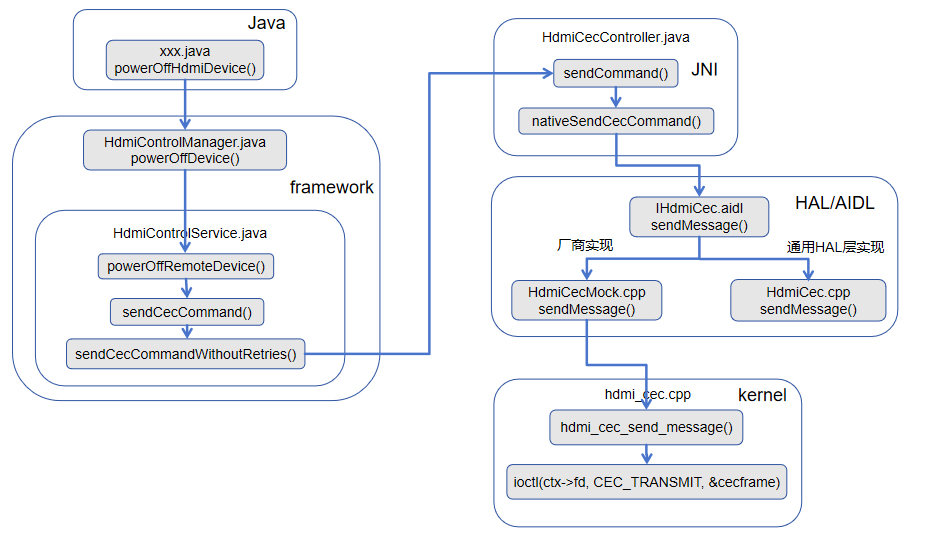
三、流程详解
Android系统中有两种主要方式触发CEC关机:
-
物理按键:用户按下遥控器上的电源键。
在Android TV中,电源键由PhoneWindowManager拦截,通过InputDispatcher分发给InputManagerService,最终转换为KEYCODE_POWER事件。 -
系统调用:应用或系统服务主动调用
PowerManager.goToSleep()或HdmiControlManager.setSystemAudioMute()等方法。
无论哪种触发方式,最终都会汇聚到 HdmiControlService 处理关机逻辑。以监听KEYCODE_POWER 事件为例说明关机流程。
以下具体分析代码流程:
1、应用层CEC事件监听
private void powerOffHdmiDevice() {
        // power off DVD device
        HdmiControlManager hdmiControlManager = (HdmiControlManager)mContext.getSystemService(Context.HDMI_CONTROL_SERVICE);
        if (hdmiControlManager == null) return;
        HdmiTvClient hdmiTvClient = hdmiControlManager.getTvClient();
        if (hdmiTvClient == null) return;
        List<HdmiDeviceInfo> hdmiDeviceInfoList = hdmiTvClient.getDeviceList();
        for (HdmiDeviceInfo info : hdmiDeviceInfoList) {
            Log.v(TAG, "=====LogicalAddress: " + info.toString());
            hdmiControlManager.powerOffDevice(info);
        }
    }
上述代码可以看出,按下关机键时,会powerOffHdmiDevice()关闭当前连接的所有设备,获取当前所有hdmiDeviceInfoList,传递相关的信息调用关机接口hdmiControlManager.powerOffDevice(info)。
2、framework层接口调用
(1)、HdmiControlManager.java
代码路径:frameworks/base/core/java/android/hardware/hdmi/HdmiControlManager.java
/******省略代码*****/

/**
     * Power off the target device by sending CEC commands. Note that this device can't be the
     * current device itself.
     *
     * <p>The target device info can be obtained by calling {@link #getConnectedDevicesList()}.
     *
     * @param deviceInfo {@link HdmiDeviceInfo} of the device to be powered off.
     */
    public void powerOffDevice(@NonNull HdmiDeviceInfo deviceInfo) {
        Objects.requireNonNull(deviceInfo);
        try {
            mService.powerOffRemoteDevice(
                    deviceInfo.getLogicalAddress(), deviceInfo.getDevicePowerStatus());
        } catch (RemoteException e) {
            throw e.rethrowFromSystemServer();
        }
    }


/******省略代码*****/
(2)、HdmiControlService.java
代码路径:frameworks/base/services/core/java/com/android/server/hdmi/HdmiControlService.java
=============省略代码=============


        @Override
        public void powerOffRemoteDevice(int logicalAddress, int powerStatus) {
            initBinderCall();
            runOnServiceThread(new Runnable() {
                @Override
                public void run() {
                    Slog.w(TAG, "Device "
                            + logicalAddress + " power status is " + powerStatus
                            + " before standby command sent out");
                    sendCecCommand(HdmiCecMessageBuilder.buildStandby(
                            getRemoteControlSourceAddress(), logicalAddress));
                }
            });
        }

        @Override
        public void powerOnRemoteDevice(int logicalAddress, int powerStatus) {
            initBinderCall();
            runOnServiceThread(new Runnable() {
                @Override
                public void run() {
                    Slog.i(TAG, "Device "
                            + logicalAddress + " power status is " + powerStatus
                            + " before power on command sent out");
                    if (getSwitchDevice() != null) {
                        getSwitchDevice().sendUserControlPressedAndReleased(
                                logicalAddress, HdmiCecKeycode.CEC_KEYCODE_POWER_ON_FUNCTION);
                    } else {
                        Slog.e(TAG, "Can't get the correct local device to handle routing.");
                    }
                }
            });
        }

=============省略代码=============
=========================================================================
getRemoteControlSourceAddress()解读
    // Get the source address to send out commands to devices connected to the current device
    // when other services interact with HdmiControlService.
    private int getRemoteControlSourceAddress() {
        if (isAudioSystemDevice()) {
            return audioSystem().getDeviceInfo().getLogicalAddress();
        } else if (isPlaybackDevice()) {
            return playback().getDeviceInfo().getLogicalAddress();
        }
        return ADDR_UNREGISTERED;
    }
该方法用于获取当前设备作为 CEC 命令发送源时的逻辑地址。逻辑很清晰:
先判断当前设备是不是音频系统设备(比如 soundbar、AVR),如果是,就返回音频系统的逻辑地址
否则判断是不是播放设备(比如机顶盒、播放器),如果是,就返回播放设备的逻辑地址
都不是的话,返回 ADDR_UNREGISTERED(0xF,即未注册地址)
这个方法的使用场景是:当 Android 系统中的其他服务(比如音量控制、电源管理)需要通过 HdmiControlService 向 HDMI-CEC 总线上的其他设备发送命令时,需要知道"我是谁"——也就是源地址。CEC 协议要求每条消息都带上发送方的逻辑地址,这个方法就是解决这个问题的。
值得注意的是,这里有个优先级:音频系统优先于播放设备。这意味着如果一个设备同时具备两种角色,它会优先以音频系统的身份发送命令。
========================================================================
sendCecCommand()解读
用于发送消息给对应设备。这段代码是 Android HDMI-CEC 服务(HdmiControlService)中发送 CEC 命令的核心方法,它根据命令类型决定发送策略(是否需要重试),并在特定情况下主动取消 TV 端的“请求活跃源”动作,以避免逻辑冲突。
    @ServiceThreadOnly
    void sendCecCommand(HdmiCecMessage command) {
        sendCecCommand(command, null);
    }

    @ServiceThreadOnly
    void sendCecCommand(HdmiCecMessage command, @Nullable SendMessageCallback callback) {
        switch (command.getOpcode()) {
            /***对于特定的几个opcode(ACTIVE_SOURCE, IMAGE_VIEW_ON, INACTIVE_SOURCE, ROUTING_CHANGE, SET_STREAM_PATH, TEXT_VIEW_ON),先检查如果是TV设备启用,则从TV设备中移除RequestActiveSourceAction类型的action。然后调用sendCecCommandWithRetries。
其他opcode则调用sendCecCommandWithoutRetries。***/
            case Constants.MESSAGE_ACTIVE_SOURCE:
            case Constants.MESSAGE_IMAGE_VIEW_ON:
            case Constants.MESSAGE_INACTIVE_SOURCE:
            case Constants.MESSAGE_ROUTING_CHANGE:
            case Constants.MESSAGE_SET_STREAM_PATH:
            case Constants.MESSAGE_TEXT_VIEW_ON:
                // RequestActiveSourceAction is started after the TV finished logical address
                // allocation. This action is used by the TV to get the active source from the CEC
                // network. If the TV sent a source changing CEC message, this action does not have
                // to continue anymore.
                if (isTvDeviceEnabled()) {
                    tv().removeAction(RequestActiveSourceAction.class);
                }
                sendCecCommandWithRetries(command, callback);
                break;
            default:
                sendCecCommandWithoutRetries(command, callback);
        }
    }
需要重试的关键命令(switch 中的 6 种) case Constants.MESSAGE_ACTIVE_SOURCE: // 0x82 主动源 case Constants.MESSAGE_IMAGE_VIEW_ON: // 0x04 唤醒屏幕 case Constants.MESSAGE_INACTIVE_SOURCE: // 0x9D 退出主动源 case Constants.MESSAGE_ROUTING_CHANGE: // 0x80 路由变化 case Constants.MESSAGE_SET_STREAM_PATH: // 0x86 设置流路径 case Constants.MESSAGE_TEXT_VIEW_ON: // 0x0D 文本显示唤醒
这些命令都与 源切换、路由变化、屏幕唤醒 直接相关,是 CEC 协议中影响用户体验的核心命令。例如:
-
当用户选择 HDMI 输入源时,TV 会发送
ACTIVE_SOURCE或SET_STREAM_PATH。 -
当播放设备唤醒电视时,会发送
IMAGE_VIEW_ON。 -
当设备释放主动源状态时,发送
INACTIVE_SOURCE。
为何需要重试?
CEC 总线可能因其他设备正在通信而暂时繁忙,或者目标设备未及时响应。这些命令如果发送失败,会导致用户操作无响应(例如电视不切换输入源),因此系统采用带重试的发送机制(如重试 3 次,间隔 100ms),提高可靠性。
不需要重试的普通命令(default)
其他所有命令(如按键指令 USER_CONTROL_PRESSED、系统音频控制 SET_SYSTEM_AUDIO_MODE 等)调用 sendCecCommandWithoutRetries,只发送一次。这些命令丢失的影响较小(例如用户多按一次遥控器即可),或者协议本身不允许重复(如某些查询命令)。
特殊处理:取消 RequestActiveSourceAction
在发送上述关键命令之前,代码先检查:
if (isTvDeviceEnabled()) {
    tv().removeAction(RequestActiveSourceAction.class);
}
RequestActiveSourceAction 是什么?
-
这是一个在 TV 设备(逻辑地址 0)上运行的延时动作。
-
它的作用是:当 TV 完成逻辑地址分配后,主动向 CEC 网络中的其他设备询问“谁是当前的活跃源?”(发送
REQUEST_ACTIVE_SOURCE消息)。 -
如果其他设备响应了活跃源,TV 就会自动切换到那个输入源。
为什么要移除它?
-
TV 即将主动发送 源改变类命令(如
ACTIVE_SOURCE、SET_STREAM_PATH等),这意味着 TV 自己 将成为活跃源或强制改变路由。 -
此时如果还保留
RequestActiveSourceAction,它会在一段时间后向网络询问活跃源,可能导致以下问题:-
逻辑冲突:TV 刚把自己设为活跃源,又去问“谁是活跃源”,可能得到旧的响应或造成环路。
-
资源浪费:无意义的轮询会占用总线带宽。
-
状态错误:如果旧设备响应,TV 可能错误地再次切换源,引起界面闪烁。
-
因此,在 TV 主动发出源控制命令前,提前取消这个询问动作,是保证源切换逻辑清晰、无干扰的必要步骤。
=======================================================================
sendCecCommandWithRetries()解读
    /**
     * Create a {@link ResendCecCommandAction} that will retry sending the CEC message if it fails.
     * @param command  command to be sent on the CEC bus.
     * @param callback callback for handling the result of sending the command.
     */
    @ServiceThreadOnly
    private void sendCecCommandWithRetries(HdmiCecMessage command,
            @Nullable SendMessageCallback callback) {
        assertRunOnServiceThread();
        List<HdmiCecLocalDevice> devices = getAllCecLocalDevices();
        if (devices.isEmpty()) {
            return;
        }
        HdmiCecLocalDevice localDevice = devices.get(0);
        if (localDevice != null) {
            sendCecCommandWithoutRetries(command, new SendMessageCallback() {
                @Override
                public void onSendCompleted(int result) {
                    if (result != SendMessageResult.SUCCESS) {
                        localDevice.addAndStartAction(new
                                ResendCecCommandAction(localDevice, command, callback));
                    } else if (callback != null) {
                        callback.onSendCompleted(result);
                    }
                }
            });
        }
    }
这段代码是 Android HDMI-CEC 服务(HdmiControlService 或 HdmiCecController)中的私有方法 sendCecCommandWithRetries。它的核心功能是:当发送一条关键 CEC 命令失败时,自动创建一个重试动作(ResendCecCommandAction),在后台尝试重新发送,直到成功或达到重试上限。
下面逐段解读。
A、方法签名与注解
-
@ServiceThreadOnly:表示该方法必须在HdmiControlService的专用服务线程上调用,避免多线程并发问题。这个线程通常是HdmiControlService初始化时创建的HdmiControlThread。 -
参数:
-
command:要发送的 CEC 消息。 -
callback:发送结果回调(可选),在最终成功或失败(重试耗尽)时被调用。
-
B、核心逻辑分解
1. 确保在服务线程执行
assertRunOnServiceThread();
运行时断言,确保当前线程是服务线程,否则抛出异常。
2. 获取本地 CEC 设备列表
List<HdmiCecLocalDevice> devices = getAllCecLocalDevices();
if (devices.isEmpty()) {
    return;
}
HdmiCecLocalDevice localDevice = devices.get(0);-
getAllCecLocalDevices()返回当前系统注册的所有本地 CEC 设备(例如 TV 设备、播放设备、音频设备等)。 -
正常情况下列表不应为空,但若为空则直接返回,无法发送。
-
代码只取列表中的第一个设备(
devices.get(0))。隐含假设:在绝大多数 Android TV 系统中,只会有一个活跃的本地 CEC 设备(通常是 TV 设备)。如果存在多个设备(例如同时启用 TV 和 Playback 角色),这里可能会有问题,但在实际产品中很少见。
3. 先尝试发送一次(无重试)
sendCecCommandWithoutRetries(command, new SendMessageCallback() {
    @Override
    public void onSendCompleted(int result) {
        if (result != SendMessageResult.SUCCESS) {
            localDevice.addAndStartAction(new
                    ResendCecCommandAction(localDevice, command, callback));
        } else if (callback != null) {
            callback.onSendCompleted(result);
        }
    }
});-
首先调用
sendCecCommandWithoutRetries尝试一次发送。这个函数不会自动重试,只发送一次并通过回调告知结果。 -
回调处理:
-
如果发送失败(
result != SUCCESS),则创建一个ResendCecCommandAction对象,并添加到本地设备的动作队列中。这个 Action 会在后台定时重试发送相同的命令,直到成功或达到最大重试次数。 -
如果发送成功,且调用者提供了
callback,则直接回调成功结果。 -
如果发送失败,但
ResendCecCommandAction内部的最终结果也需要通过callback反馈,所以这里将callback传给了ResendCecCommandAction,由它在最终完成时调用。
-
C、为什么需要这种“先试一次,失败再重试”的模式?
这是一种优化策略,目的是在大多数情况下快速响应,同时兼顾可靠性:
-
大多数情况一次成功:CEC 总线通常空闲,第一次发送就能成功。此时直接回调成功,无需创建额外的 Action 对象,节省内存和调度开销。
-
仅在失败时才启动重试机制:如果总线繁忙或目标设备暂时无响应,第一次发送失败,再投入重试资源。这避免了每次发送都创建重试 Action 带来的不必要的性能损耗。
ResendCecCommandAction 的具体实现(未在代码片段中给出)通常包含:
-
重试次数上限(例如 3 次)。
-
重试间隔(例如 100ms 或根据协议规范递增)。
-
最终成功或超时后回调
callback。
D、与普通发送方法的对比
| 方法 | 适用场景 | 行为 |
|---|---|---|
sendCecCommandWithoutRetries |
普通命令(如按键、状态查询) | 只发送一次,不回滚、不重试。 |
sendCecCommandWithRetries |
关键命令(源切换、唤醒等) | 先发一次;若失败则创建 ResendCecCommandAction 自动重试。 |
E、潜在问题与注意事项
-
多本地设备支持不足:
devices.get(0)假设只有一个本地设备。在极少数支持多角色的系统(例如同时作为 TV 和 Playback)中,可能选错设备。但根据 CEC 标准,一个物理设备只能拥有一个逻辑地址(虽然可以拥有多个类型,但实际实现中通常只用一个主设备对象)。 -
线程安全:方法标记
@ServiceThreadOnly保证了调用线程正确,但ResendCecCommandAction内部的调度也需要确保在同一个线程上执行,否则可能出现竞态。 -
内存泄漏风险:如果
callback持有外部对象引用,且重试过程较长(例如几秒钟),需要确保 callback 不会导致内存泄漏。通常 callback 是匿名内部类,会隐式持有外部类引用,需要留意。
F、总结
sendCecCommandWithRetries 是一种懒加载的重试策略:
-
先尝试一次无重试发送。
-
如果失败,才启动一个
ResendCecCommandAction进行后台重试。 -
这样既保证了关键命令的可靠性,又避免了不必要的资源开销。
它是 Android CEC 服务实现“源切换”、“唤醒”等高可靠性操作的关键辅助函数。理解它有助于掌握 CEC 协议在 Android 中的容错机制。
========================================================================
sendCecCommandWithoutRetries()解读
    /**
     * Transmit a CEC command to CEC bus.
     *
     * @param command CEC command to send out
     * @param callback interface used to the result of send command
     */
    @ServiceThreadOnly
    void sendCecCommandWithoutRetries(HdmiCecMessage command,
            @Nullable SendMessageCallback callback) {
        assertRunOnServiceThread();
        if (command.getValidationResult() == HdmiCecMessageValidator.OK
                && verifyPhysicalAddresses(command)) {
            mCecController.sendCommand(command, callback);
        } else {
            HdmiLogger.error("Invalid message type:" + command);
            if (callback != null) {
                callback.onSendCompleted(SendMessageResult.FAIL);
            }
        }
    }
这段代码是 Android HDMI-CEC 服务(HdmiControlService 或 HdmiCecController 内部)中的 sendCecCommandWithoutRetries 方法。它的核心职责是:在发送 CEC 命令前进行合法性校验和物理地址验证,通过后调用底层控制器发送命令,且不进行重试。
两个条件必须同时满足,命令才能被发送:
a. 协议格式验证:getValidationResult() == OK
-
HdmiCecMessageValidator是一个 CEC 消息校验器,它会检查:-
操作码(opcode)是否合法。
-
参数数量、类型是否符合协议规范。
-
源地址和目标地址是否在有效范围内(0~15,其中 15 表示未注册)。
-
-
如果校验失败(如操作码未知、参数长度错误),则直接进入错误分支。
b. 物理地址验证:verifyPhysicalAddresses(command)
-
这个方法(未在片段中给出)通常检查消息中的源物理地址和目标物理地址是否与当前已知的物理地址拓扑一致。
-
例如:
-
对于
ACTIVE_SOURCE消息,源物理地址必须等于当前设备自身所连的 HDMI 端口物理地址。 -
对于
ROUTING_CHANGE消息,新旧路径地址必须是有效的物理地址。
-
-
如果验证失败,说明消息可能指向不存在的设备或路由,不应发送。
c. 发送命令
mCecController.sendCommand(command, callback);
-
mCecController是底层硬件控制器(通常通过 JNI 调用 HAL 层)。 -
sendCommand方法会真正将消息写入 CEC 总线,并异步通过callback返回发送结果(成功、失败或超时)。
d. 错误处理
HdmiLogger.error("Invalid message type:" + command);
if (callback != null) {
    callback.onSendCompleted(SendMessageResult.FAIL);
}
-
记录错误日志,包含无效的命令内容。
-
如果调用者提供了回调,立即回调失败结果(
FAIL),无需等待硬件响应。
f. 与 sendCecCommandWithRetries 的关系
| 方法 | 验证 | 重试 | 用途 |
|---|---|---|---|
sendCecCommandWithoutRetries |
✅ 完整验证 | ❌ 无 | 普通命令(如按键、查询),或作为重试机制的第一次尝试 |
sendCecCommandWithRetries |
调用此方法完成第一次尝试,失败后创建 ResendCecCommandAction 重试 |
✅ 有 | 关键命令(源切换、唤醒等),需保证可靠性 |
sendCecCommandWithoutRetries 是实际发送的基础执行单元,任何发送路径最终都会调用它(或直接调用 mCecController.sendCommand)。重试机制通过多次调用它来实现。
1. 为什么不在每次发送前都验证?
-
验证成本低,但能有效拦截不合法的 CEC 消息,避免向总线发送垃圾数据,也防止某些协议攻击。
-
getValidationResult()的结果可能在HdmiCecMessage构造时就已计算并缓存,因此开销很小。
2. 物理地址验证的重要性
-
CEC 消息中的物理地址用于路由。如果发送方填错了物理地址(例如在多端口电视上选错了端口),可能导致消息被错误设备接收或完全忽略。
-
verifyPhysicalAddresses是 Android 对 CEC 协议的安全增强,原生 CEC 协议并没有强制要求这一步,但 Android 通过它来防止逻辑混乱。
3. 错误处理中的 FAIL 与硬件超时
-
SendMessageResult.FAIL是一个立即返回的同步错误,表示消息未通过验证,根本没有尝试发送。 -
与之相对的是硬件发送过程中的
SendMessageResult.TIMEOUT或SendMessageResult.BUSY,这些异步结果会通过callback在稍后返回。
4. 线程安全
-
@ServiceThreadOnly保证了所有调用都串行化,避免在验证过程中mCecController或物理地址状态被其他线程修改。 -
如果从非服务线程调用,断言失败会导致 crash,这有助于及早发现编程错误。
e、总结
sendCecCommandWithoutRetries 是 Android CEC 协议栈中的安全闸门和基础发送入口:
-
安全闸门:在真正发送前进行双重验证(协议格式 + 物理地址合理性),拦截无效消息。
-
基础入口:所有 CEC 发送最终都汇聚于此,由它调用 HAL 层完成物理发送。
-
无重试:仅发送一次,失败或成功都通过回调通知。重试逻辑由上层包装(如
sendCecCommandWithRetries)实现。
这种设计既保证了协议合规性,又提供了清晰的错误反馈,是 Android 系统服务中典型的“防御性编程”实践。
=========================================================================
(3)、HdmiCecController.java
代码路径:frameworks/base/services/core/java/com/android/server/hdmi/HdmiCecController.java
    @ServiceThreadOnly
    void sendCommand(final HdmiCecMessage cecMessage,
            final HdmiControlService.SendMessageCallback callback) {
        assertRunOnServiceThread();
        List<String> sendResults = new ArrayList<>();
        runOnIoThread(new Runnable() {
            @Override
            public void run() {
                HdmiLogger.debug("[S]:" + cecMessage);
                byte[] body = buildBody(cecMessage.getOpcode(), cecMessage.getParams());
                int retransmissionCount = 0;
                int errorCode = SendMessageResult.SUCCESS;
                do {
                    errorCode = mNativeWrapperImpl.nativeSendCecCommand(
                        cecMessage.getSource(), cecMessage.getDestination(), body);
                    switch (errorCode) {
                        case SendMessageResult.SUCCESS: sendResults.add("ACK"); break;
                        case SendMessageResult.FAIL: sendResults.add("FAIL"); break;
                        case SendMessageResult.NACK: sendResults.add("NACK"); break;
                        case SendMessageResult.BUSY: sendResults.add("BUSY"); break;
                    }
                    if (errorCode == SendMessageResult.SUCCESS) {
                        break;
                    }
                } while (retransmissionCount++ < HdmiConfig.RETRANSMISSION_COUNT);

                final int finalError = errorCode;
                if (finalError != SendMessageResult.SUCCESS) {
                    Slog.w(TAG, "Failed to send " + cecMessage + " with errorCode=" + finalError);
                }
                runOnServiceThread(new Runnable() {
                    @Override
                    public void run() {
                        mHdmiCecAtomWriter.messageReported(
                                cecMessage,
                                FrameworkStatsLog.HDMI_CEC_MESSAGE_REPORTED__DIRECTION__OUTGOING,
                                getCallingUid(),
                                finalError
                        );
                        if (callback != null) {
                            callback.onSendCompleted(finalError);
                        }
                    }
                });
            }
        });

        addCecMessageToHistory(false /* isReceived */, cecMessage, sendResults);
    }
sendCommand()解读
sendCommand 方法,负责实际通过 JNI 调用硬件驱动发送 CEC 消息,并包含底层的重试机制。需要注意的是,这段代码存在一个明显的时序问题:历史记录会在异步发送完成前就被添加,导致记录的发送结果不完整。
(一)、方法签名与线程要求
@ServiceThreadOnly
void sendCommand(final HdmiCecMessage cecMessage,
final HdmiControlService.SendMessageCallback callback)@ServiceThreadOnly:要求该方法必须在 HdmiControlService 的服务线程上调用,保证内部状态访问的线程安全。
参数:
cecMessage:待发送的 CEC 消息。
callback:发送结果回调(成功/失败/超时等),由调用者提供。
(二)、核心逻辑分解
a. 准备历史记录容器
List<String> sendResults = new ArrayList<>();-
sendResults用于记录每次重试尝试的结果(如"ACK","NACK","BUSY","FAIL")。 -
该列表最终会通过
addCecMessageToHistory保存到历史记录中,用于调试和问题分析。
b. 切换到 IO 线程执行发送
runOnIoThread(new Runnable() { ... });-
原因:实际的 JNI 调用
nativeSendCecCommand可能涉及硬件操作或短暂阻塞(例如等待总线释放),不应占用服务线程。 -
设计:服务线程负责调度,IO 线程负责阻塞操作,避免影响其他 CEC 消息的处理。
c. IO 线程中的发送与重试逻辑
byte[] body = buildBody(cecMessage.getOpcode(), cecMessage.getParams());
int retransmissionCount = 0;
int errorCode = SendMessageResult.SUCCESS;
do {
    errorCode = mNativeWrapperImpl.nativeSendCecCommand(
            cecMessage.getSource(), cecMessage.getDestination(), body);
    switch (errorCode) {
        case SendMessageResult.SUCCESS: sendResults.add("ACK"); break;
        case SendMessageResult.FAIL: sendResults.add("FAIL"); break;
        case SendMessageResult.NACK: sendResults.add("NACK"); break;
        case SendMessageResult.BUSY: sendResults.add("BUSY"); break;
    }
    if (errorCode == SendMessageResult.SUCCESS) {
        break;
    }
} while (retransmissionCount++ < HdmiConfig.RETRANSMISSION_COUNT);-
构建消息体:
buildBody将操作码和参数打包成字节数组,符合 CEC 协议帧格式。 -
重试循环:
-
每次调用
nativeSendCecCommand尝试发送一次。 -
根据返回码记录结果到
sendResults。 -
如果成功,立即跳出循环。
-
如果失败(
FAIL/NACK/BUSY),则继续重试,直到达到最大重试次数(HdmiConfig.RETRANSMISSION_COUNT)。
-
-
重试策略:代码中没有延时,会连续快速重试。这可能导致总线仍处于繁忙状态时立即重试,效果有限。通常硬件驱动内部会处理总线退避,但此处缺少软件层的退避延时。
d. 切回服务线程处理结果
final int finalError = errorCode;
if (finalError != SendMessageResult.SUCCESS) {
    Slog.w(TAG, "Failed to send " + cecMessage + " with errorCode=" + finalError);
}
runOnServiceThread(new Runnable() {
    @Override
    public void run() {
        mHdmiCecAtomWriter.messageReported(
                cecMessage,
                FrameworkStatsLog.HDMI_CEC_MESSAGE_REPORTED__DIRECTION__OUTGOING,
                getCallingUid(),
                finalError
        );
        if (callback != null) {
            callback.onSendCompleted(finalError);
        }
    }
});-
记录失败日志:如果最终发送失败,打印警告。
-
异步回调:通过
runOnServiceThread切回服务线程,调用callback通知结果。同时通过mHdmiCecAtomWriter记录遥测数据(用于统计和调试)。 -
为什么需要切线程:
callback可能会调用服务线程中的其他方法(例如操作设备列表),必须回到服务线程执行以保证线程安全。
addCecMessageToHistory(false /* isReceived */, cecMessage, sendResults);-
该方法将 CEC 消息和发送结果列表保存到循环缓冲区中,供
dumpsys hdmi_control等调试命令查看。 -
🚨 严重问题:
addCecMessageToHistory是在服务线程中同步执行的,而sendResults列表的填充是在runOnIoThread的异步任务中完成的。由于runOnIoThread是非阻塞的,addCecMessageToHistory被调用时,sendResults还是空列表(刚刚创建)。最终历史记录中该条消息的结果列表始终为空,完全失去了调试价值。
=========================================================================
nativeSendCecCommand()解读
        @Override
        public int nativeSendCecCommand(int srcAddress, int dstAddress, byte[] body) {
            CecMessage message = new CecMessage();
            message.initiator = (byte) (srcAddress & 0xF);
            message.destination = (byte) (dstAddress & 0xF);
            message.body = body;
            try {
                return mHdmiCec.sendMessage(message);
            } catch (RemoteException e) {
                HdmiLogger.error("Failed to send CEC message : ", e);
                return SendMessageResult.FAIL;
            }
        }
nativeSendCecCommand 方法的 Java 层实现(通常位于 HdmiCecController 的 NativeWrapperImpl 内部类中)。它负责将 Framework 层的 CEC 消息参数转换为 HAL 层 AIDL 接口所需的 CecMessage 对象,并通过 AIDL 跨进程调用实际发送消息。
下面逐段详细解读。
(一)、方法签名
@Override
public int nativeSendCecCommand(int srcAddress, int dstAddress, byte[] body)-
作用:实现
INativeWrapper接口(或类似)中的 native 方法声明,供 JNI 或上层直接调用。 -
参数:
-
srcAddress:源逻辑地址(0~15,其中 15 表示未注册)。 -
dstAddress:目标逻辑地址(0~15)。 -
body:CEC 消息体,包含操作码和可选参数(字节数组)。
-
-
返回值:整数状态码,对应
SendMessageResult中的常量(SUCCESS、FAIL、NACK、BUSY等)。
(二)、核心逻辑分解
1. 构造 HAL 层的 CecMessage 对象
CecMessage message = new CecMessage();
message.initiator = (byte) (srcAddress & 0xF);
message.destination = (byte) (dstAddress & 0xF);
message.body = body;-
CecMessage是 AIDL 定义的数据结构(位于android.hardware.tv.cec包中),用于在 Framework 与 HAL 之间传递 CEC 消息。 -
掩码
& 0xF:确保地址值只有低 4 位有效,因为 CEC 逻辑地址范围是 0~15。 -
直接赋值 body:
body字节数组包含了完整的操作码和参数,HAL 层会将其封装为 CEC 帧(添加起始位、校验和等)。
2. 调用 HAL 层的 AIDL 接口
return mHdmiCec.sendMessage(message);-
mHdmiCec是IHdmiCec类型的 AIDL 接口对象,通过服务管理器获取,代表与 HAL 层的跨进程通信通道。 -
sendMessage是 AIDL 中定义的方法,其返回值通常是一个整数,含义与SendMessageResult一致:-
0:成功(ACK) -
1:失败(FAIL) -
2:无应答(NACK) -
3:总线忙(BUSY)
-
-
跨进程调用:
sendMessage是阻塞的,会等待 HAL 层处理完成后返回结果。由于 HAL 层可能涉及硬件操作,该方法可能耗时数毫秒。
3. 异常处理
catch (RemoteException e) {
    HdmiLogger.error("Failed to send CEC message : ", e);
    return SendMessageResult.FAIL;
}-
RemoteException表示 AIDL 调用过程中发生进程间通信错误(例如 HAL 服务崩溃、Binder 缓冲区溢出等)。 -
此时无法确认消息是否发送,为了安全返回
FAIL,并记录错误日志。
c、代码在整体流程中的位置
回顾之前的 sendCommand 方法:
errorCode = mNativeWrapperImpl.nativeSendCecCommand(
        cecMessage.getSource(), cecMessage.getDestination(), body);
这里的 mNativeWrapperImpl 就是实现了上述方法的对象。因此,nativeSendCecCommand 是 JNI/Java 层到 HAL 层 AIDL 接口的直接桥接,是 CEC 消息发送路径上的最后一道 Java 层关卡。
完整调用链:
上层 (HdmiControlService)
  → HdmiCecController.sendCommand
    → runOnIoThread
      → nativeSendCecCommand (本方法)
        → IHdmiCec.sendMessage (AIDL)
          → HAL 服务 (C++ 实现)
            → 内核驱动
              → 硬件发送
d、设计要点与注意事项
1. 地址掩码的必要性
-
调用者可能传入超出 0~15 范围的地址(如
Constants.ADDR_UNREGISTERED = 15是合法的,但若传入 0xFF 则会被截断为 0x0F)。掩码确保了 HAL 层收到的地址始终在有效范围内。
2. 同步阻塞与线程模型
-
sendMessage是同步调用,会阻塞当前线程直到 HAL 返回结果。这就是为什么上层sendCommand要将实际发送放到 IO 线程 中执行,避免阻塞服务线程。 -
如果 HAL 实现有重试或超时机制,这个阻塞时间可能达到几十毫秒。
3. 异常处理的局限性
-
RemoteException捕获后返回FAIL,但调用者无法区分是 HAL 崩溃还是消息发送失败。上层重试机制(ResendCecCommandAction)可能会因此无意义地重试。实际 HAL 崩溃时应尽快恢复连接,而不是盲目重试。
4. AIDL 接口版本
-
Android 11 及之后版本使用 AIDL HAL(
android.hardware.tv.cec.IHdmiCec),之前版本可能使用 HIDL。本代码片段针对 AIDL 实现。
e、总结
nativeSendCecCommand 方法是一个薄封装层,职责单一:
-
参数转换:将 Java 层的
(src, dst, body)转换为 HAL 层的CecMessage对象。 -
跨进程调用:通过 AIDL 调用 HAL 服务发送消息。
-
错误映射:将
RemoteException转换为FAIL结果。
它使得上层 CEC 服务无需关心 AIDL 细节,专注于协议逻辑。同时,通过同步调用和线程隔离,保证了服务线程的响应性。理解这段代码有助于掌握 Android CEC 从 Framework 到 HAL 的完整数据通路。
=========================================================================
3、HAL层接口调用
(1)、IHdmiCec.aidl
代码路径:/hardware/interfaces/tv/hdmi/cec/aidl/android/hardware/tv/hdmi/cec/IHdmiCec.aidl

/*
 * Copyright (C) 2022 The Android Open Source Project
 *
 * Licensed under the Apache License, Version 2.0 (the "License");
 * you may not use this file except in compliance with the License.
 * You may obtain a copy of the License at
 *
 *      http://www.apache.org/licenses/LICENSE-2.0
 *
 * Unless required by applicable law or agreed to in writing, software
 * distributed under the License is distributed on an "AS IS" BASIS,
 * WITHOUT WARRANTIES OR CONDITIONS OF ANY KIND, either express or implied.
 * See the License for the specific language governing permissions and
 * limitations under the License.
 */

package android.hardware.tv.hdmi.cec;

import android.hardware.tv.hdmi.cec.CecLogicalAddress;
import android.hardware.tv.hdmi.cec.CecMessage;
import android.hardware.tv.hdmi.cec.IHdmiCecCallback;
import android.hardware.tv.hdmi.cec.Result;
import android.hardware.tv.hdmi.cec.SendMessageResult;

/**
 * HDMI-CEC HAL interface definition.
 */
@VintfStability
interface IHdmiCec {
    /**
     * Passes the logical address that must be used in this system.
     *
     * HAL must use it to configure the hardware so that the CEC commands
     * addressed the given logical address can be filtered in. This method must
     * be able to be called as many times as necessary in order to support
     * multiple logical devices.
     *
     * @param addr Logical address that must be used in this system. It must be
     *        in the range of valid logical addresses for the call to succeed.
     * @return Result status of the operation. SUCCESS if successful,
     *         FAILURE_INVALID_ARGS if the given logical address is invalid,
     *         FAILURE_BUSY if device or resource is busy
     */
    Result addLogicalAddress(in CecLogicalAddress addr);

    /**
     * Clears all the logical addresses.
     *
     * It is used when the system doesn't need to process CEC command any more,
     * hence to tell HAL to stop receiving commands from the CEC bus, and change
     * the state back to the beginning.
     */
    void clearLogicalAddress();

    /**
     * Configures ARC circuit in the hardware logic to start or stop the
     * feature.
     *
     * @param portId Port id to be configured.
     * @param enable Flag must be either true to start the feature or false to
     *        stop it.
     */
    void enableAudioReturnChannel(in int portId, in boolean enable);

    /**
     * Returns the CEC version supported by underlying hardware.
     *
     * @return the CEC version supported by underlying hardware.
     */
    int getCecVersion();

    /**
     * Gets the CEC physical address.
     *
     * The physical address depends on the topology of the network formed by
     * connected HDMI devices. It is therefore likely to change if the cable is
     * plugged off and on again. It is advised to call getPhysicalAddress to get
     * the updated address when hot plug event takes place.
     *
     * @return Physical address of this device.
     */
    int getPhysicalAddress();

    /**
     * Gets the identifier of the vendor.
     *
     * @return Identifier of the vendor that is the 24-bit unique
     *         company ID obtained from the IEEE Registration Authority
     *         Committee (RAC). The upper 8 bits must be 0.
     */
    int getVendorId();

    /**
     * Transmits HDMI-CEC message to other HDMI device.
     *
     * The method must be designed to return in a certain amount of time and not
     * hanging forever which may happen if CEC signal line is pulled low for
     * some reason.
     *
     * It must try retransmission at least once as specified in the section '7.1
     * Frame Re-transmissions' of the CEC Spec 1.4b.
     *
     * @param message CEC message to be sent to other HDMI device.
     * @return Result status of the operation. SUCCESS if successful,
     *         NACK if the sent message is not acknowledged,
     *         BUSY if the CEC bus is busy,
     *         FAIL if the message could not be sent.
     */
    SendMessageResult sendMessage(in CecMessage message);

    /**
     * Sets a callback that HDMI-CEC HAL must later use for incoming CEC
     * messages.
     *
     * @param callback Callback object to pass hdmi events to the system. The
     *        previously registered callback must be replaced with this one.
     *        setCallback(null) should deregister the callback.
     */
    void setCallback(in @nullable IHdmiCecCallback callback);

    /**
     * Passes the updated language information of Android system. Contains
     * three-letter code as defined in ISO/FDIS 639-2. Must be used for HAL to
     * respond to <Get Menu Language> while in standby mode.
     *
     * @param language Three-letter code defined in ISO/FDIS 639-2. Must be
     *        lowercase letters. (e.g., eng for English)
     */
    void setLanguage(in String language);

    /**
     * Determines whether a TV panel device in standby mode should wake up when
     * it receives an OTP (One Touch Play) from a source device.
     *
     * @param value If true, the TV device will wake up when OTP is received
     *              and if false, the TV device will not wake up for an OTP.
     */
    void enableWakeupByOtp(in boolean value);

    /**
     * Switch to enable or disable CEC on the device.
     *
     * @param value If true, the device will have all CEC functionalities
     *              and if false, the device will not perform any CEC functions.
     */
    void enableCec(in boolean value);

    /**
     * Determines which module processes CEC messages - the Android framework or
     * the HAL.
     *
     * @param value If true, the Android framework will actively process CEC
     *        messages and if false, only the HAL will process the CEC messages.
     */
    void enableSystemCecControl(in boolean value);
}
(2)、hdmi_cec.h
代码路径:hardware\libhardware\include\hardware\hdmi_cec.h
/*
 * Copyright (C) 2014 The Android Open Source Project
 *
 * Licensed under the Apache License, Version 2.0 (the "License");
 * you may not use this file except in compliance with the License.
 * You may obtain a copy of the License at
 *
 *      http://www.apache.org/licenses/LICENSE-2.0
 *
 * Unless required by applicable law or agreed to in writing, software
 * distributed under the License is distributed on an "AS IS" BASIS,
 * WITHOUT WARRANTIES OR CONDITIONS OF ANY KIND, either express or implied.
 * See the License for the specific language governing permissions and
 * limitations under the License.
 */

#ifndef ANDROID_INCLUDE_HARDWARE_HDMI_CEC_H
#define ANDROID_INCLUDE_HARDWARE_HDMI_CEC_H

#include <stdint.h>
#include <sys/cdefs.h>

#include <hardware/hardware.h>

__BEGIN_DECLS

#define HDMI_CEC_MODULE_API_VERSION_1_0 HARDWARE_MODULE_API_VERSION(1, 0)
#define HDMI_CEC_MODULE_API_VERSION_CURRENT HDMI_MODULE_API_VERSION_1_0

#define HDMI_CEC_DEVICE_API_VERSION_1_0 HARDWARE_DEVICE_API_VERSION(1, 0)
#define HDMI_CEC_DEVICE_API_VERSION_CURRENT HDMI_DEVICE_API_VERSION_1_0

#define HDMI_CEC_HARDWARE_MODULE_ID "hdmi_cec"
#define HDMI_CEC_HARDWARE_INTERFACE "hdmi_cec_hw_if"

typedef enum cec_device_type {
    CEC_DEVICE_INACTIVE = -1,
    CEC_DEVICE_TV = 0,
    CEC_DEVICE_RECORDER = 1,
    CEC_DEVICE_RESERVED = 2,
    CEC_DEVICE_TUNER = 3,
    CEC_DEVICE_PLAYBACK = 4,
    CEC_DEVICE_AUDIO_SYSTEM = 5,
    CEC_DEVICE_MAX = CEC_DEVICE_AUDIO_SYSTEM
} cec_device_type_t;

typedef enum cec_logical_address {
    CEC_ADDR_TV = 0,
    CEC_ADDR_RECORDER_1 = 1,
    CEC_ADDR_RECORDER_2 = 2,
    CEC_ADDR_TUNER_1 = 3,
    CEC_ADDR_PLAYBACK_1 = 4,
    CEC_ADDR_AUDIO_SYSTEM = 5,
    CEC_ADDR_TUNER_2 = 6,
    CEC_ADDR_TUNER_3 = 7,
    CEC_ADDR_PLAYBACK_2 = 8,
    CEC_ADDR_RECORDER_3 = 9,
    CEC_ADDR_TUNER_4 = 10,
    CEC_ADDR_PLAYBACK_3 = 11,
    CEC_ADDR_RESERVED_1 = 12,
    CEC_ADDR_RESERVED_2 = 13,
    CEC_ADDR_FREE_USE = 14,
    CEC_ADDR_UNREGISTERED = 15,
    CEC_ADDR_BROADCAST = 15
} cec_logical_address_t;

/*
 * HDMI CEC messages
 */
enum cec_message_type {
    CEC_MESSAGE_FEATURE_ABORT = 0x00,
    CEC_MESSAGE_IMAGE_VIEW_ON = 0x04,
    CEC_MESSAGE_TUNER_STEP_INCREMENT = 0x05,
    CEC_MESSAGE_TUNER_STEP_DECREMENT = 0x06,
    CEC_MESSAGE_TUNER_DEVICE_STATUS = 0x07,
    CEC_MESSAGE_GIVE_TUNER_DEVICE_STATUS = 0x08,
    CEC_MESSAGE_RECORD_ON = 0x09,
    CEC_MESSAGE_RECORD_STATUS = 0x0A,
    CEC_MESSAGE_RECORD_OFF = 0x0B,
    CEC_MESSAGE_TEXT_VIEW_ON = 0x0D,
    CEC_MESSAGE_RECORD_TV_SCREEN = 0x0F,
    CEC_MESSAGE_GIVE_DECK_STATUS = 0x1A,
    CEC_MESSAGE_DECK_STATUS = 0x1B,
    CEC_MESSAGE_SET_MENU_LANGUAGE = 0x32,
    CEC_MESSAGE_CLEAR_ANALOG_TIMER = 0x33,
    CEC_MESSAGE_SET_ANALOG_TIMER = 0x34,
    CEC_MESSAGE_TIMER_STATUS = 0x35,
    CEC_MESSAGE_STANDBY = 0x36,
    CEC_MESSAGE_PLAY = 0x41,
    CEC_MESSAGE_DECK_CONTROL = 0x42,
    CEC_MESSAGE_TIMER_CLEARED_STATUS = 0x043,
    CEC_MESSAGE_USER_CONTROL_PRESSED = 0x44,
    CEC_MESSAGE_USER_CONTROL_RELEASED = 0x45,
    CEC_MESSAGE_GIVE_OSD_NAME = 0x46,
    CEC_MESSAGE_SET_OSD_NAME = 0x47,
    CEC_MESSAGE_SET_OSD_STRING = 0x64,
    CEC_MESSAGE_SET_TIMER_PROGRAM_TITLE = 0x67,
    CEC_MESSAGE_SYSTEM_AUDIO_MODE_REQUEST = 0x70,
    CEC_MESSAGE_GIVE_AUDIO_STATUS = 0x71,
    CEC_MESSAGE_SET_SYSTEM_AUDIO_MODE = 0x72,
    CEC_MESSAGE_REPORT_AUDIO_STATUS = 0x7A,
    CEC_MESSAGE_GIVE_SYSTEM_AUDIO_MODE_STATUS = 0x7D,
    CEC_MESSAGE_SYSTEM_AUDIO_MODE_STATUS = 0x7E,
    CEC_MESSAGE_ROUTING_CHANGE = 0x80,
    CEC_MESSAGE_ROUTING_INFORMATION = 0x81,
    CEC_MESSAGE_ACTIVE_SOURCE = 0x82,
    CEC_MESSAGE_GIVE_PHYSICAL_ADDRESS = 0x83,
    CEC_MESSAGE_REPORT_PHYSICAL_ADDRESS = 0x84,
    CEC_MESSAGE_REQUEST_ACTIVE_SOURCE = 0x85,
    CEC_MESSAGE_SET_STREAM_PATH = 0x86,
    CEC_MESSAGE_DEVICE_VENDOR_ID = 0x87,
    CEC_MESSAGE_VENDOR_COMMAND = 0x89,
    CEC_MESSAGE_VENDOR_REMOTE_BUTTON_DOWN = 0x8A,
    CEC_MESSAGE_VENDOR_REMOTE_BUTTON_UP = 0x8B,
    CEC_MESSAGE_GIVE_DEVICE_VENDOR_ID = 0x8C,
    CEC_MESSAGE_MENU_REQUEST = 0x8D,
    CEC_MESSAGE_MENU_STATUS = 0x8E,
    CEC_MESSAGE_GIVE_DEVICE_POWER_STATUS = 0x8F,
    CEC_MESSAGE_REPORT_POWER_STATUS = 0x90,
    CEC_MESSAGE_GET_MENU_LANGUAGE = 0x91,
    CEC_MESSAGE_SELECT_ANALOG_SERVICE = 0x92,
    CEC_MESSAGE_SELECT_DIGITAL_SERVICE = 0x93,
    CEC_MESSAGE_SET_DIGITAL_TIMER = 0x97,
    CEC_MESSAGE_CLEAR_DIGITAL_TIMER = 0x99,
    CEC_MESSAGE_SET_AUDIO_RATE = 0x9A,
    CEC_MESSAGE_INACTIVE_SOURCE = 0x9D,
    CEC_MESSAGE_CEC_VERSION = 0x9E,
    CEC_MESSAGE_GET_CEC_VERSION = 0x9F,
    CEC_MESSAGE_VENDOR_COMMAND_WITH_ID = 0xA0,
    CEC_MESSAGE_CLEAR_EXTERNAL_TIMER = 0xA1,
    CEC_MESSAGE_SET_EXTERNAL_TIMER = 0xA2,
    CEC_MESSAGE_INITIATE_ARC = 0xC0,
    CEC_MESSAGE_REPORT_ARC_INITIATED = 0xC1,
    CEC_MESSAGE_REPORT_ARC_TERMINATED = 0xC2,
    CEC_MESSAGE_REQUEST_ARC_INITIATION = 0xC3,
    CEC_MESSAGE_REQUEST_ARC_TERMINATION = 0xC4,
    CEC_MESSAGE_TERMINATE_ARC = 0xC5,
    CEC_MESSAGE_ABORT = 0xFF
};

/*
 * Operand description [Abort Reason]
 */
enum abort_reason {
    ABORT_UNRECOGNIZED_MODE = 0,
    ABORT_NOT_IN_CORRECT_MODE = 1,
    ABORT_CANNOT_PROVIDE_SOURCE = 2,
    ABORT_INVALID_OPERAND = 3,
    ABORT_REFUSED = 4,
    ABORT_UNABLE_TO_DETERMINE = 5
};

/*
 * HDMI event type. used for hdmi_event_t.
 */
enum {
    HDMI_EVENT_CEC_MESSAGE = 1,
    HDMI_EVENT_HOT_PLUG = 2,
};

/*
 * HDMI hotplug event type. Used when the event
 * type is HDMI_EVENT_HOT_PLUG.
 */
enum {
    HDMI_NOT_CONNECTED = 0,
    HDMI_CONNECTED = 1
};

/*
 * error code used for send_message.
 */
enum {
    HDMI_RESULT_SUCCESS = 0,
    HDMI_RESULT_NACK = 1,        /* not acknowledged */
    HDMI_RESULT_BUSY = 2,        /* bus is busy */
    HDMI_RESULT_FAIL = 3,
};

/*
 * HDMI port type.
 */
typedef enum hdmi_port_type {
    HDMI_INPUT = 0,
    HDMI_OUTPUT = 1
} hdmi_port_type_t;

/*
 * Flags used for set_option()
 */
enum {
    /* When set to false, HAL does not wake up the system upon receiving
     * <Image View On> or <Text View On>. Used when user changes the TV
     * settings to disable the auto TV on functionality.
     * True by default.
     */
    HDMI_OPTION_WAKEUP = 1,

    /* When set to false, all the CEC commands are discarded. Used when
     * user changes the TV settings to disable CEC functionality.
     * True by default.
     */
    HDMI_OPTION_ENABLE_CEC = 2,

    /* Setting this flag to false means Android system will stop handling
     * CEC service and yield the control over to the microprocessor that is
     * powered on through the standby mode. When set to true, the system
     * will gain the control over, hence telling the microprocessor to stop
     * handling the cec commands. This is called when system goes
     * in and out of standby mode to notify the microprocessor that it should
     * start/stop handling CEC commands on behalf of the system.
     * False by default.
     */
    HDMI_OPTION_SYSTEM_CEC_CONTROL = 3,

    /* Option 4 not used */

    /* Passes the updated language information of Android system.
     * Contains 3-byte ASCII code as defined in ISO/FDIS 639-2. Can be
     * used for HAL to respond to <Get Menu Language> while in standby mode.
     * English(eng), for example, is converted to 0x656e67.
     */
    HDMI_OPTION_SET_LANG = 5,
};

/*
 * Maximum length in bytes of cec message body (exclude header block),
 * should not exceed 16 (spec CEC 6 Frame Description)
 */
#define CEC_MESSAGE_BODY_MAX_LENGTH 16

typedef struct cec_message {
    /* logical address of sender */
    cec_logical_address_t initiator;

    /* logical address of receiver */
    cec_logical_address_t destination;

    /* Length in bytes of body, range [0, CEC_MESSAGE_BODY_MAX_LENGTH] */
    size_t length;
    unsigned char body[CEC_MESSAGE_BODY_MAX_LENGTH];
} cec_message_t;

typedef struct hotplug_event {
    /*
     * true if the cable is connected; otherwise false.
     */
    int connected;
    int port_id;
} hotplug_event_t;

typedef struct tx_status_event {
    int status;
    int opcode;  /* CEC opcode */
} tx_status_event_t;

/*
 * HDMI event generated from HAL.
 */
typedef struct hdmi_event {
    int type;
    struct hdmi_cec_device* dev;
    union {
        cec_message_t cec;
        hotplug_event_t hotplug;
    };
} hdmi_event_t;

/*
 * HDMI port descriptor
 */
typedef struct hdmi_port_info {
    hdmi_port_type_t type;
    // Port ID should start from 1 which corresponds to HDMI "port 1".
    int port_id;
    int cec_supported;
    int arc_supported;
    uint16_t physical_address;
} hdmi_port_info_t;

/*
 * Callback function type that will be called by HAL implementation.
 * Services can not close/open the device in the callback.
 */
typedef void (*event_callback_t)(const hdmi_event_t* event, void* arg);

typedef struct hdmi_cec_module {
    /**
     * Common methods of the HDMI CEC module.  This *must* be the first member of
     * hdmi_cec_module as users of this structure will cast a hw_module_t to hdmi_cec_module
     * pointer in contexts where it's known the hw_module_t references a hdmi_cec_module.
     */
    struct hw_module_t common;
} hdmi_module_t;

/*
 * HDMI-CEC HAL interface definition.
 */
typedef struct hdmi_cec_device {
    /**
     * Common methods of the HDMI CEC device.  This *must* be the first member of
     * hdmi_cec_device as users of this structure will cast a hw_device_t to hdmi_cec_device
     * pointer in contexts where it's known the hw_device_t references a hdmi_cec_device.
     */
    struct hw_device_t common;

    /*
     * (*add_logical_address)() passes the logical address that will be used
     * in this system.
     *
     * HAL may use it to configure the hardware so that the CEC commands addressed
     * the given logical address can be filtered in. This method can be called
     * as many times as necessary in order to support multiple logical devices.
     * addr should be in the range of valid logical addresses for the call
     * to succeed.
     *
     * Returns 0 on success or -errno on error.
     */
    int (*add_logical_address)(const struct hdmi_cec_device* dev, cec_logical_address_t addr);

    /*
     * (*clear_logical_address)() tells HAL to reset all the logical addresses.
     *
     * It is used when the system doesn't need to process CEC command any more,
     * hence to tell HAL to stop receiving commands from the CEC bus, and change
     * the state back to the beginning.
     */
    void (*clear_logical_address)(const struct hdmi_cec_device* dev);

    /*
     * (*get_physical_address)() returns the CEC physical address. The
     * address is written to addr.
     *
     * The physical address depends on the topology of the network formed
     * by connected HDMI devices. It is therefore likely to change if the cable
     * is plugged off and on again. It is advised to call get_physical_address
     * to get the updated address when hot plug event takes place.
     *
     * Returns 0 on success or -errno on error.
     */
    int (*get_physical_address)(const struct hdmi_cec_device* dev, uint16_t* addr);

    /*
     * (*send_message)() transmits HDMI-CEC message to other HDMI device.
     *
     * The method should be designed to return in a certain amount of time not
     * hanging forever, which can happen if CEC signal line is pulled low for
     * some reason. HAL implementation should take the situation into account
     * so as not to wait forever for the message to get sent out.
     *
     * It should try retransmission at least once as specified in the standard.
     *
     * Returns error code. See HDMI_RESULT_SUCCESS, HDMI_RESULT_NACK, and
     * HDMI_RESULT_BUSY.
     */
    int (*send_message)(const struct hdmi_cec_device* dev, const cec_message_t*);

    /*
     * (*register_event_callback)() registers a callback that HDMI-CEC HAL
     * can later use for incoming CEC messages or internal HDMI events.
     * When calling from C++, use the argument arg to pass the calling object.
     * It will be passed back when the callback is invoked so that the context
     * can be retrieved.
     */
    void (*register_event_callback)(const struct hdmi_cec_device* dev,
            event_callback_t callback, void* arg);

    /*
     * (*get_version)() returns the CEC version supported by underlying hardware.
     */
    void (*get_version)(const struct hdmi_cec_device* dev, int* version);

    /*
     * (*get_vendor_id)() returns the identifier of the vendor. It is
     * the 24-bit unique company ID obtained from the IEEE Registration
     * Authority Committee (RAC).
     */
    void (*get_vendor_id)(const struct hdmi_cec_device* dev, uint32_t* vendor_id);

    /*
     * (*get_port_info)() returns the hdmi port information of underlying hardware.
     * info is the list of HDMI port information, and 'total' is the number of
     * HDMI ports in the system.
     */
    void (*get_port_info)(const struct hdmi_cec_device* dev,
            struct hdmi_port_info* list[], int* total);

    /*
     * (*set_option)() passes flags controlling the way HDMI-CEC service works down
     * to HAL implementation. Those flags will be used in case the feature needs
     * update in HAL itself, firmware or microcontroller.
     */
    void (*set_option)(const struct hdmi_cec_device* dev, int flag, int value);

    /*
     * (*set_audio_return_channel)() configures ARC circuit in the hardware logic
     * to start or stop the feature. Flag can be either 1 to start the feature
     * or 0 to stop it.
     *
     * Returns 0 on success or -errno on error.
     */
    void (*set_audio_return_channel)(const struct hdmi_cec_device* dev, int port_id, int flag);

    /*
     * (*is_connected)() returns the connection status of the specified port.
     * Returns HDMI_CONNECTED if a device is connected, otherwise HDMI_NOT_CONNECTED.
     * The HAL should watch for +5V power signal to determine the status.
     */
    int (*is_connected)(const struct hdmi_cec_device* dev, int port_id);

    /* Reserved for future use to maximum 16 functions. Must be NULL. */
    void* reserved[16 - 11];
} hdmi_cec_device_t;

/** convenience API for opening and closing a device */

static inline int hdmi_cec_open(const struct hw_module_t* module,
        struct hdmi_cec_device** device) {
    return module->methods->open(module,
            HDMI_CEC_HARDWARE_INTERFACE, TO_HW_DEVICE_T_OPEN(device));
}

static inline int hdmi_cec_close(struct hdmi_cec_device* device) {
    return device->common.close(&device->common);
}

__END_DECLS

#endif /* ANDROID_INCLUDE_HARDWARE_HDMI_CEC_H */
hdmi_cec_device_t 结构体解析
该结构体是 HAL 层与上层服务通信的核心,它的设计遵循 Android HAL 的标准模式:其第一个成员必须是 hw_device_t 类型,这使得它可以被安全地向上转型为通用的硬件设备结构。除了这个通用头部,其核心是一系列函数指针,分别对应 CEC 功能的关键操作。
以下是其核心成员的详细说明:
| 成员 | 类型 | 描述 |
|---|---|---|
common |
struct hw_device_t |
通用硬件设备成员。这是 Android HAL 的标准要求,必须作为结构体的第一个成员,包含了模块ID、版本号、关闭函数等通用信息,用于设备的管理和关闭。 |
add_logical_address |
int (*)(const struct hdmi_cec_device* dev, cec_logical_address_t addr) |
添加逻辑地址。上层服务通过此接口通知 HAL 层为设备设置一个逻辑地址(如 TV、Playback 等),以便在 CEC 总线中唯一标识自己。HAL 层应据此配置硬件,只接收发往该地址的命令。 |
clear_logical_address |
void (*)(const struct hdmi_cec_device* dev) |
清除逻辑地址。当系统不再需要处理 CEC 命令时,通过此接口通知 HAL 层清除所有已设置的逻辑地址,停止接收 CEC 总线上的命令。 |
get_physical_address |
int (*)(const struct hdmi_cec_device* dev, uint16_t* addr) |
获取物理地址。物理地址由 HDMI 设备的连接拓扑决定。上层服务通过此接口从 HAL 层获取设备的物理地址(例如 1.0.0.0),用于确定其在网络中的位置。 |
send_message |
int (*)(const struct hdmi_cec_device* dev, const cec_message_t*) |
发送CEC消息。这是最核心的功能之一。上层服务通过此接口将封装好的 CEC 消息传递给 HAL 层,由 HAL 负责将消息通过硬件发送到 CEC 总线上。函数需在限定时间内返回,且需实现协议规定的重传机制。 |
register_event_callback |
void (*)(const struct hdmi_cec_device* dev, event_callback_t callback, void* arg) |
注册事件回调。HAL 层通过此接口接收上层提供的回调函数。当有传入的CEC消息或HDMI热插拔事件发生时,HAL 层应调用此回调函数,将事件上报给上层服务处理。 |
关联结构体与枚举
该头文件还定义了其他关键类型,供上述函数使用:
-
cec_message_t:send_message使用的结构体,用于封装要发送的CEC消息,包含initiator(发起方地址)、destination(目标地址)、length(消息长度)和body(消息体)等字段。 -
cec_logical_address_t: 逻辑地址枚举,定义了标准的 CEC 设备类型地址,如CEC_ADDR_TV、CEC_ADDR_PLAYBACK_1等。 -
cec_device_type_t: 设备类型枚举,用于描述设备的角色,如CEC_DEVICE_TV、CEC_DEVICE_PLAYBACK等。
(3)、HdmiCec.cpp(通用 HAL 层实现)
代码路径:/hardware/interfaces/tv/cec/1.0/default/HdmiCec.cpp
HdmiCec::HdmiCec(hdmi_cec_device_t* device) : mDevice(device) {}

// Methods from ::android::hardware::tv::cec::V1_0::IHdmiCec follow.
Return<Result> HdmiCec::addLogicalAddress(CecLogicalAddress addr) {
    int ret = mDevice->add_logical_address(mDevice, static_cast<cec_logical_address_t>(addr));
    switch (ret) {
        case 0:
            return Result::SUCCESS;
        case -EINVAL:
            return Result::FAILURE_INVALID_ARGS;
        case -ENOTSUP:
            return Result::FAILURE_NOT_SUPPORTED;
        case -EBUSY:
            return Result::FAILURE_BUSY;
        default:
            return Result::FAILURE_UNKNOWN;
    }
}

Return<void> HdmiCec::clearLogicalAddress() {
    mDevice->clear_logical_address(mDevice);
    return Void();
}

Return<void> HdmiCec::getPhysicalAddress(getPhysicalAddress_cb _hidl_cb) {
    uint16_t addr;
    int ret = mDevice->get_physical_address(mDevice, &addr);
    switch (ret) {
        case 0:
            _hidl_cb(Result::SUCCESS, addr);
            break;
        case -EBADF:
            _hidl_cb(Result::FAILURE_INVALID_STATE, addr);
            break;
        default:
            _hidl_cb(Result::FAILURE_UNKNOWN, addr);
            break;
    }
    return Void();
}

Return<SendMessageResult> HdmiCec::sendMessage(const CecMessage& message) {
    if (message.body.size() > CEC_MESSAGE_BODY_MAX_LENGTH) {
        return SendMessageResult::FAIL;
    }
    cec_message_t legacyMessage {
        .initiator = static_cast<cec_logical_address_t>(message.initiator),
        .destination = static_cast<cec_logical_address_t>(message.destination),
        .length = message.body.size(),
    };
    for (size_t i = 0; i < message.body.size(); ++i) {
        legacyMessage.body[i] = static_cast<unsigned char>(message.body[i]);
    }
    return static_cast<SendMessageResult>(mDevice->send_message(mDevice, &legacyMessage));
}

Return<void> HdmiCec::setCallback(const sp<IHdmiCecCallback>& callback) {
    if (mCallback != nullptr) {
        mCallback->unlinkToDeath(this);
        mCallback = nullptr;
    }

    if (callback != nullptr) {
        mCallback = callback;
        mCallback->linkToDeath(this, 0 /*cookie*/);
        mDevice->register_event_callback(mDevice, eventCallback, nullptr);
    }
    return Void();
}

Return<int32_t> HdmiCec::getCecVersion() {
    int version;
    mDevice->get_version(mDevice, &version);
    return static_cast<int32_t>(version);
}

Return<uint32_t> HdmiCec::getVendorId() {
    uint32_t vendor_id;
    mDevice->get_vendor_id(mDevice, &vendor_id);
    return vendor_id;
}

Return<void> HdmiCec::getPortInfo(getPortInfo_cb _hidl_cb) {
    struct hdmi_port_info* legacyPorts;
    int numPorts;
    hidl_vec<HdmiPortInfo> portInfos;
    mDevice->get_port_info(mDevice, &legacyPorts, &numPorts);
    portInfos.resize(numPorts);
    for (int i = 0; i < numPorts; ++i) {
        portInfos[i] = {
            .type = static_cast<HdmiPortType>(legacyPorts[i].type),
            .portId = static_cast<uint32_t>(legacyPorts[i].port_id),
            .cecSupported = legacyPorts[i].cec_supported != 0,
            .arcSupported = legacyPorts[i].arc_supported != 0,
            .physicalAddress = legacyPorts[i].physical_address
        };
    }
    _hidl_cb(portInfos);
    return Void();
}

Return<void> HdmiCec::setOption(OptionKey key, bool value) {
    mDevice->set_option(mDevice, static_cast<int>(key), value ? 1 : 0);
    return Void();
}

Return<void> HdmiCec::setLanguage(const hidl_string& language) {
    if (language.size() != 3) {
        LOG(ERROR) << "Wrong language code: expected 3 letters, but it was " << language.size()
                << ".";
        return Void();
    }
    const char *languageStr = language.c_str();
    int convertedLanguage = ((languageStr[0] & 0xFF) << 16)
            | ((languageStr[1] & 0xFF) << 8)
            | (languageStr[2] & 0xFF);
    mDevice->set_option(mDevice, HDMI_OPTION_SET_LANG, convertedLanguage);
    return Void();
}

Return<void> HdmiCec::enableAudioReturnChannel(int32_t portId, bool enable) {
    mDevice->set_audio_return_channel(mDevice, portId, enable ? 1 : 0);
    return Void();
}

Return<bool> HdmiCec::isConnected(int32_t portId) {
    return mDevice->is_connected(mDevice, portId) > 0;
}

IHdmiCec* getHdmiCecDefault() {
    HdmiCecDefault* hdmiCecDefault = new HdmiCecDefault();
    Result result = hdmiCecDefault->init();
    if (result == Result::SUCCESS) {
        return hdmiCecDefault;
    }
    LOG(ERROR) << "Failed to load default HAL.";
    return nullptr;
}

IHdmiCec* HIDL_FETCH_IHdmiCec(const char* hal) {
    hdmi_cec_device_t* hdmi_cec_device;
    int ret = 0;
    const hw_module_t* hw_module = nullptr;

    ret = hw_get_module (HDMI_CEC_HARDWARE_MODULE_ID, &hw_module);
    if (ret == 0) {
        ret = hdmi_cec_open (hw_module, &hdmi_cec_device);
        if (ret != 0) {
            LOG(ERROR) << "hdmi_cec_open " << hal << " failed: " << ret;
        }
    } else {
        LOG(ERROR) << "hw_get_module " << hal << " failed: " << ret;
    }

    if (ret == 0) {
        return new HdmiCec(hdmi_cec_device);
    } else {
        LOG(ERROR) << "Passthrough failed to load legacy HAL.";
        return getHdmiCecDefault();
    }
}

}  // namespace implementation
}  // namespace V1_0
}  // namespace cec
}  // namespace tv
}  // namespace hardware
}  // namespace android
sendMessage()详解
HdmiCec::sendMessage 方法的实现,位于 Android 系统的 HDMI-CEC HAL 层(可能是 HIDL 或早期 AIDL 版本)。它负责将上层传递的 CecMessage 对象转换为底层驱动需要的 cec_message_t 结构体,并通过回调函数调用厂商实现的硬件发送接口。
下面逐段详细解读。
一、方法签名与返回值
Return<SendMessageResult> HdmiCec::sendMessage(const CecMessage& message)-
Return<SendMessageResult>:HIDL 接口的返回类型,表示方法执行后返回一个SendMessageResult枚举值(如SUCCESS、FAIL、NACK、BUSY)。 -
参数:
const CecMessage& message,包含 CEC 消息的源地址、目标地址和消息体(字节数组)。
二、消息体长度校验
if (message.body.size() > CEC_MESSAGE_BODY_MAX_LENGTH) {
    return SendMessageResult::FAIL;
}-
CEC_MESSAGE_BODY_MAX_LENGTH是 CEC 协议规定的单条消息最大有效负载长度(通常为 16 字节,包括操作码和参数)。 -
如果超出限制,直接返回
FAIL,避免向驱动传递非法数据。
三、构造底层驱动需要的结构体
cec_message_t legacyMessage {
    .initiator = static_cast<cec_logical_address_t>(message.initiator),
    .destination = static_cast<cec_logical_address_t>(message.destination),
    .length = message.body.size(),
};-
cec_message_t是厂商 HAL 实现中定义的结构体,用于与内核驱动交互(通常定义在hardware/.../cec.h中)。 -
将
CecMessage中的initiator和destination(均为int8_t或byte)强制转换为cec_logical_address_t(通常是int枚举),然后填入结构体。 -
length记录消息体长度。
for (size_t i = 0; i < message.body.size(); ++i) {
    legacyMessage.body[i] = static_cast<unsigned char>(message.body[i]);
}-
message.body是std::vector<int8_t>或类似容器,存储操作码和参数。 -
循环将每个字节复制到
legacyMessage.body数组中(该数组大小固定为CEC_MESSAGE_BODY_MAX_LENGTH,之前已校验)。
四、调用厂商驱动的发送函数
return static_cast<SendMessageResult>(mDevice->send_message(mDevice, &legacyMessage));-
mDevice:指向厂商实现的设备结构体(例如cec_device_t*),通过 HAL 模块的open方法初始化。 -
send_message:厂商提供的函数指针,原型通常为:int (*send_message)(struct cec_device_t* dev, const cec_message_t* message);该函数会:
-
通过 ioctl 或直接写寄存器,将消息发送到 CEC 总线。
-
返回一个整数值,对应
SendMessageResult枚举(0=成功,1=失败,2=NACK,3=BUSY 等)。
-
-
返回值:将厂商返回的整数强制转换为
SendMessageResult枚举,并包装在Return<>中返回给上层。
五、代码在整体架构中的位置
上层 (HdmiControlService)
  → HdmiCecController.sendCommand (Java)
    → nativeSendCecCommand (JNI)
      → IHdmiCec.sendMessage (AIDL/HIDL)
        → HdmiCec::sendMessage (HAL 实现,即本函数)
          → mDevice->send_message (厂商驱动适配层)
            → 内核驱动 (cec.ko)
              → 硬件寄存器操作
-
本函数是 HAL 层对上层接口的具体实现,起到协议适配和参数转换的作用。
-
它将通用的
CecMessage转换为厂商特定的cec_message_t,并调用厂商提供的底层发送函数。
六、潜在问题与注意事项
1. 缺少对消息格式的深层校验
-
只检查了长度,没有检查操作码是否合法、参数数量是否正确。这依赖于上层(
HdmiControlService)事先调用HdmiCecMessageValidator进行校验。
2. 同步阻塞风险
-
mDevice->send_message可能是阻塞的(等待发送完成或超时)。如果硬件响应慢,会阻塞 HAL 服务的线程,进而影响上层调用(通常上层已切换到 IO 线程,影响可控)。
3. 错误码映射
-
假设厂商返回值与
SendMessageResult枚举值完全一致。如果厂商使用不同错误码,会导致上层收到错误的结果。
4. 缺少重试机制
-
本函数只调用一次底层发送,不处理重试。重试逻辑由上层(
HdmiCecController.sendCommand中的底层重试循环)负责。
七、总结
HdmiCec::sendMessage 是 Android CEC HAL 层的核心发送函数,职责包括:
-
参数验证:检查消息体长度是否超限。
-
结构体转换:将 AIDL/HIDL 的
CecMessage转换为厂商驱动的cec_message_t。 -
硬件调用:通过厂商提供的
send_message函数指针实际发送消息。 -
结果返回:将驱动返回的整数结果转换为
SendMessageResult枚举并向上传递。
该函数是连接 Android CEC 框架与硬件驱动的桥梁,其实现简洁高效,体现了 HAL 层“薄封装”的设计原则。理解这段代码有助于定位 CEC 发送失败时是上层参数问题还是底层驱动问题。
(4)、HdmiCecMock.cpp (RK厂商实现)
此文件在RK方案上存在不同路径下,代码实现也存在差异。
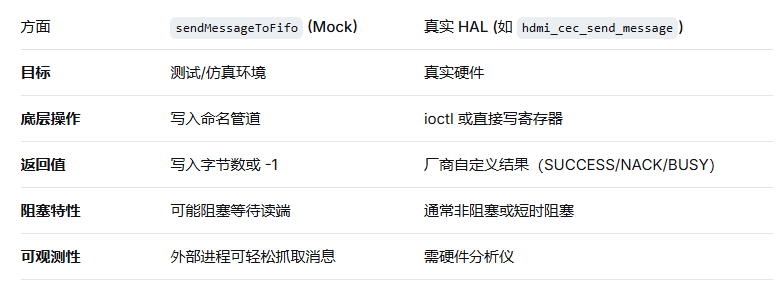
1、代码路径:hardware\interfaces\tv\cec\1.0\default\HdmiCecMock.cpp
这个路径下的代码怀疑是测试或仿真用的。
Return<SendMessageResult> HdmiCecMock::sendMessage(const CecMessage& message) {
    if (message.body.size() == 0) {
        return SendMessageResult::NACK;
    }
    sendMessageToFifo(message);
    return SendMessageResult::SUCCESS;
}
int HdmiCecMock::sendMessageToFifo(const CecMessage& message) {
unsigned char msgBuf[CEC_MESSAGE_BODY_MAX_LENGTH];
int ret = -1;
memset(msgBuf, 0, sizeof(msgBuf));
msgBuf[0] = ((static_cast<uint8_t>(message.initiator) & 0xf) << 4) |
(static_cast<uint8_t>(message.destination) & 0xf);
size_t length = std::min(static_cast<size_t>(message.body.size()),
static_cast<size_t>(MaxLength::MESSAGE_BODY));
for (size_t i = 0; i < length; ++i) {
msgBuf[i + 1] = static_cast<unsigned char>(message.body[i]);
}
// open the output pipe for writing outgoing cec message
mOutputFile = open(CEC_MSG_OUT_FIFO, O_WRONLY);
if (mOutputFile < 0) {
ALOGD("[halimp] file open failed for writing");
return -1;
}
// write message into the output pipe
ret = write(mOutputFile, msgBuf, length + 1);
close(mOutputFile);
if (ret < 0) {
ALOGE("[halimp] write :%s failed, ret:%d\n", CEC_MSG_OUT_FIFO, ret);
return -1;
}
return ret;
}2、代码路径:hardware\interfaces\tv\hdmi\cec\aidl\default\HdmiCecMock.cpp
此文件应该是真实使用的代码,sendMessage()方法跟HdmiCec.cpp文件类似,只是最终调用的方法不一样,此处调用的是hdmi_cec_send_message()。
ScopedAStatus HdmiCecMock::sendMessage(const CecMessage& message, SendMessageResult* _aidl_return) {
    if (message.body.size() > CEC_MESSAGE_BODY_MAX_LENGTH) {
        ALOGW("message body is too long(%zu > %d)", message.body.size(), CEC_MESSAGE_BODY_MAX_LENGTH);
        *_aidl_return = SendMessageResult::FAIL;
    }
    else {
        //ALOGD("%s %s", __FUNCTION__, message.toString().c_str());
        cec_message_t legacyMessage{
          .initiator = static_cast<cec_logical_address_t>(message.initiator),
          .destination = static_cast<cec_logical_address_t>(message.destination),
          .length = message.body.size(),
        };
        if (message.body.size() > 0)
        {
            for (size_t i = 0; i < message.body.size(); ++i) {
                legacyMessage.body[i] = static_cast<unsigned char>(message.body[i]);
            }
        }
        *_aidl_return = static_cast<SendMessageResult>(hdmi_cec_send_message(&rkdev, &legacyMessage));
    }

    return ScopedAStatus::ok();
}
(5)、hdmi_cec.cpp (RK厂商实现)
代码路径:hardware\rockchip\hdmicec\hdmi_cec.cpp
int hdmi_cec_send_message(struct hdmi_cec_context_t* ctx, const cec_message_t* message)
{
	struct cec_msg cecframe;
	int i = 0;
	int ret = 0;

	if (!ctx->enable) {
		ALOGE("%s cec disabled\n", __func__);
		return -EPERM;
	}

	if (ctx->fd < 0) {
		ALOGE("%s open error", __func__);
		return -ENOENT;
	}

#ifdef KER_CONFIG_HDMI_CEC
	if (!ctx->hotplug)
	{
		return -EPERM;
	}
#endif

	memset(&cecframe, 0, sizeof(struct cec_msg));
	if (message->initiator == message->destination) {
		struct cec_log_addrs log_addr;

		ret = ioctl(ctx->fd, CEC_ADAP_G_LOG_ADDRS, &log_addr);
		if (ret) {
			ALOGE("%s get logic address err ret:%d\n", __func__, ret);
			return -EINVAL;
		}

		ALOGD("kernel logic addr:%02x, preferred logic addr:%02x",
		      log_addr.log_addr[0], message->initiator);
		if (log_addr.log_addr[0] != CEC_LOG_ADDR_INVALID && log_addr.log_addr[0]) {
			ALOGV("kernel logaddr is existing\n");
			if (log_addr.log_addr[0] == message->initiator) {
				ALOGV("kernel logaddr is preferred logaddr\n");
				return HDMI_RESULT_NACK;
			} else {
				ALOGV("preferred log addr is not kernel log addr\n");
				return HDMI_RESULT_SUCCESS;
			}
		} else {
			ALOGV("kernel logaddr is not existing\n");
			if(!set_kernel_logical_address(ctx, message->initiator)) {
				for (i = 0; i < 5; i++) {
					if (!ctx->phy_addr || ctx->phy_addr == 0xffff) {
						ALOGE("phy addr not ready\n");
						usleep(200000);
					} else {
						break;
					}
				}
			}
			if (i == 5) {
				ALOGE("can't make kernel addr done\n");
				return HDMI_RESULT_FAIL;
			} else {

				return HDMI_RESULT_NACK;
			}
		}
	}

	cecframe.msg[0] = (message->initiator << 4) | message->destination;
	cecframe.len = message->length + 1;
	cecframe.msg[1] = message->body[0];
	ALOGV("send msg LEN:%d,opcode:%02x,addr:%02x\n",
	      cecframe.len ,cecframe.msg[1],cecframe.msg[0]);
	if (cecframe.len > 16)
		cecframe.len = 0;
	for (ret = 0; ret < cecframe.len; ret++)
		cecframe.msg[ret + 2] = message->body[ret + 1];

	i = 10;
retry:
	ret = ioctl(ctx->fd, CEC_TRANSMIT, &cecframe);

 	if (ret < 0) {
		ALOGE("ioctl err:%d %s\n", ret, strerror(errno));
		return HDMI_RESULT_FAIL;
	}

	if (cecframe.tx_status & CEC_TX_STATUS_NACK) {
		ALOGW("HDMI_RESULT_NACK\n");
		return HDMI_RESULT_NACK;
	}
	else if (cecframe.tx_status & CEC_TX_STATUS_OK) {
		ALOGD("HDMI_RESULT_SUCCESS\n");
#ifndef KER_CONFIG_HDMI_CEC
		ctx->hotplug = true;
#endif
		return HDMI_RESULT_SUCCESS;
	}
	else if (cecframe.tx_status & CEC_TX_STATUS_ERROR) {
		ALOGW("HDMI_RESULT_BUSY\n");
		if (i) {
			i--;
			usleep(10000);
			goto retry;
		}
		return HDMI_RESULT_BUSY;
	}
	return HDMI_RESULT_FAIL;
}
hdmi_cec_send_message()详解
hdmi_cec_send_message 函数的实现,它是一个典型的厂商定制的 CEC 消息发送函数(常见于 Amlogic、Rockchip 等平台的 HAL 层)。该函数通过 Linux 内核的 CEC 框架(/dev/cecX)发送一条 CEC 消息,并处理了自轮询消息(Polling Message)的特殊逻辑以及发送失败的重试机制。
下面从功能、流程、关键细节和潜在问题几个方面进行详细解析。
一、函数签名与目的
int hdmi_cec_send_message(struct hdmi_cec_context_t* ctx, const cec_message_t* message)-
功能:发送一条 CEC 消息。
ctx是上下文结构体,包含设备文件描述符fd、CEC 使能标志enable、热插拔状态hotplug等;message包含源地址、目标地址、消息体。 -
返回值:厂商自定义的结果(
HDMI_RESULT_SUCCESS、HDMI_RESULT_NACK、HDMI_RESULT_BUSY、HDMI_RESULT_FAIL)或负的错误码(-EPERM、-ENOENT等)。
二、前置检查
if (!ctx->enable) return -EPERM;
if (ctx->fd < 0) return -ENOENT;
#ifdef KER_CONFIG_HDMI_CEC
if (!ctx->hotplug) return -EPERM;
#endif-
enable:CEC 功能开关,未使能则拒绝发送。 -
fd:打开的/dev/cecX设备文件描述符,无效则返回“无此设备”。 -
hotplug(仅当定义了KER_CONFIG_HDMI_CEC时检查):HDMI 是否已插入。未插入时返回“操作不允许”,避免无效发送。
这些检查确保了底层资源可用。
三、特殊处理:源地址等于目标地址(Polling Message)
CEC 协议中,源地址 = 目标地址的消息用于逻辑地址分配(轮询测试地址是否被占用)。标准做法是将该消息真正发送到总线上,但此函数并未实际发送,而是通过查询内核已分配的地址来模拟结果,从而避免总线交互。
if (message->initiator == message->destination) {
    struct cec_log_addrs log_addr;
    ret = ioctl(ctx->fd, CEC_ADAP_G_LOG_ADDRS, &log_addr);
    // ... 判断逻辑
}-
获取内核当前已分配的逻辑地址(通常第一个有效地址
log_addr.log_addr[0])。 -
判断逻辑:
-
如果内核已有有效地址(不是
CEC_LOG_ADDR_INVALID):-
若该地址 等于 消息中的
initiator:说明该地址已经被自己占用,轮询时应返回 NACK(因为自己不应答自己的轮询)。函数返回HDMI_RESULT_NACK。 -
若该地址 不等于 消息中的地址:说明该地址未被占用,返回
HDMI_RESULT_SUCCESS。
-
-
如果内核没有有效地址:
-
调用
set_kernel_logical_address(ctx, message->initiator)尝试向内核注册该地址。 -
如果注册成功,则返回
HDMI_RESULT_NACK(表示地址刚被自己占用,模拟轮询时收到 NACK)。 -
如果物理地址未就绪(
phy_addr为 0 或 0xffff),最多等待 1 秒(5 次 × 200ms),超时则返回HDMI_RESULT_FAIL。
-
-
注意:这种模拟方式不符合标准 CEC 协议(协议要求必须真正发送轮询消息),但可以避免在地址分配阶段占用总线,同时简化驱动实现。前提是内核地址管理必须与用户态协商一致。
四、构建内核 CEC 帧 struct cec_msg
对于非轮询消息,函数继续构建标准内核帧:
cecframe.msg[0] = (message->initiator << 4) | message->destination;
cecframe.len = message->length + 1;          // 总长度 = 头部1字节 + 消息体长度
cecframe.msg[1] = message->body[0];          // 操作码
if (cecframe.len > 16) cecframe.len = 0;    // 异常保护
for (ret = 0; ret < cecframe.len; ret++)
cecframe.msg[ret + 2] = message->body[ret + 1];-
struct cec_msg是 Linux 内核 UAPI 定义的结构(include/uapi/linux/cec.h),用于 ioctl 传输。 -
msg[0]:头部字节,高4位源地址,低4位目标地址。 -
len:整个 CEC 帧的字节数(最大16)。若超过16则置0,但这种情况应提前被上层过滤。 -
消息体:
body[0]是操作码,后续字节是参数。循环复制到msg[2]及之后。
五、发送与重试机制
i = 10;   // 最大重试次数
retry:
ret = ioctl(ctx->fd, CEC_TRANSMIT, &cecframe);
if (ret < 0) {
    return HDMI_RESULT_FAIL;
}-
CEC_TRANSMIT:内核 CEC 驱动的发送命令。 -
如果 ioctl 调用本身失败(如设备异常),直接返回
FAIL。
检查发送状态(cecframe.tx_status)
| 状态标志 | 含义 | 函数返回值 | 备注 |
|---|---|---|---|
CEC_TX_STATUS_NACK |
目标设备无应答 | HDMI_RESULT_NACK |
常见于目标地址不存在或设备未开机 |
CEC_TX_STATUS_OK |
发送成功,收到 ACK | HDMI_RESULT_SUCCESS |
并设置 ctx->hotplug = true(当未定义 KER_CONFIG_HDMI_CEC 时) |
CEC_TX_STATUS_ERROR |
发送错误(仲裁丢失、总线冲突等) | 重试最多10次,每次等待10ms;若仍失败则返回 HDMI_RESULT_BUSY |
重试间隔固定10ms,简单有效 |
| 其他 | 未定义状态 | HDMI_RESULT_FAIL |
防御性返回 |
关于 hotplug 的特殊赋值:
#ifndef KER_CONFIG_HDMI_CEC
ctx->hotplug = true;
#endif
当未使用内核 CEC 配置(可能表示用户态模拟 CEC)时,发送成功则认为 HDMI 已插入。这是为了在没有内核热插拔事件的情况下维持状态一致性。
六、返回值汇总
| 返回值 | 含义 | 触发条件 |
|---|---|---|
HDMI_RESULT_SUCCESS |
发送成功(收到 ACK) | tx_status & CEC_TX_STATUS_OK |
HDMI_RESULT_NACK |
目标无应答 | tx_status & CEC_TX_STATUS_NACK,或轮询消息模拟时地址已被占用 |
HDMI_RESULT_BUSY |
总线忙,重试后仍失败 | tx_status & CEC_TX_STATUS_ERROR 且重试次数用尽 |
HDMI_RESULT_FAIL |
其他错误 | ioctl 调用失败、消息长度超限(但已提前置0)、轮询时地址分配超时 |
-EPERM |
CEC 未使能或 HDMI 未插入 | !ctx->enable 或 !ctx->hotplug |
-ENOENT |
设备文件未打开 | ctx->fd < 0 |
-EINVAL |
获取逻辑地址失败 | ioctl CEC_ADAP_G_LOG_ADDRS 出错 |
七、设计特点与潜在问题
优点
-
减少总线占用:轮询消息不实际发送,降低冲突概率。
-
简单重试:对
ERROR状态进行有限次重试,提高可靠性。 -
状态检查全面:前置检查
enable、fd、hotplug。
潜在问题
-
轮询模拟与标准协议不一致:某些 CEC 设备可能依赖真实的轮询消息来检测地址冲突,模拟方式可能导致地址分配错误。
-
重试间隔固定:10ms 对于某些总线错误可能过短或过长,没有指数退避。
-
未处理仲裁丢失细分状态:
CEC_TX_STATUS_ARB_LOST被归类为ERROR,可能与BUSY混为一谈。 -
cecframe.len异常处理粗暴:if (len>16) len=0会发送空帧,应改为返回错误。 -
hotplug赋值条件复杂:依赖于宏KER_CONFIG_HDMI_CEC,可能导致行为不一致。
八、总结
hdmi_cec_send_message 是一个厂商深度定制的 CEC 发送函数,它:
-
封装了对 Linux 内核 CEC 驱动(
/dev/cecX)的 ioctl 调用; -
实现了轮询消息的本地模拟,避免总线交互;
-
提供了有限重试机制,增强抗干扰能力;
-
通过返回值向上层(如
HdmiCecMock::sendMessage)报告发送结果。
理解该函数有助于排查 CEC 通信问题,例如:
-
返回
NACK→ 检查目标设备是否开机、地址是否正确; -
返回
BUSY→ 检查 HDMI 线缆连接、总线是否有大量冲突; -
返回
-EPERM→ 确认 CEC 是否使能、HDMI 是否插入。
对于系统集成开发者,若需适配新平台,通常需要根据 SoC 的内核驱动接口实现类似的 hdmi_cec_send_message 函数,并确保与上层 HdmiCec 服务的返回值映射一致。

AtomGit 是由开放原子开源基金会联合 CSDN 等生态伙伴共同推出的新一代开源与人工智能协作平台。平台坚持“开放、中立、公益”的理念,把代码托管、模型共享、数据集托管、智能体开发体验和算力服务整合在一起,为开发者提供从开发、训练到部署的一站式体验。
更多推荐

 8
8 0
0- 0


 已为社区贡献2条内容

所有评论(0)