ROS2实时性保障与硬件加速技术详解
0. 引言
在机器人系统中,实时性往往决定着生与死的界限。考虑这样的场景:一辆自动驾驶汽车在80km/h的速度下行驶,即使100毫秒的延迟也会导致2.2米的额外制动距离;一个手术机器人1毫秒的响应延迟可能导致不可逆的组织损伤。这些场景并非危言耸听,而是工程实践中必须面对的硬约束。
ROS2虽然提供了强大的分布式计算能力,但默认配置并不保证实时性能。根据2023年发表在《Chinese Journal of Mechanical Engineering》上的研究表明,原生ROS2系统在默认Linux调度策略下,其消息传输延迟抖动可达数毫秒级别。这对于需要微秒级响应的控制系统来说是不可接受的。
本文将从基础的回调机制到高级的优先级调度,从系统级内核优化到异构硬件加速,系统性地阐述如何构建真正具备确定性响应的机器人系统。
1. ROS2执行模型深度剖析
1.1 执行器的核心地位
执行器(Executor)是ROS2运行时系统的核心组件,负责调度和执行所有回调函数。理解执行器的工作原理是进行实时性优化的基础。
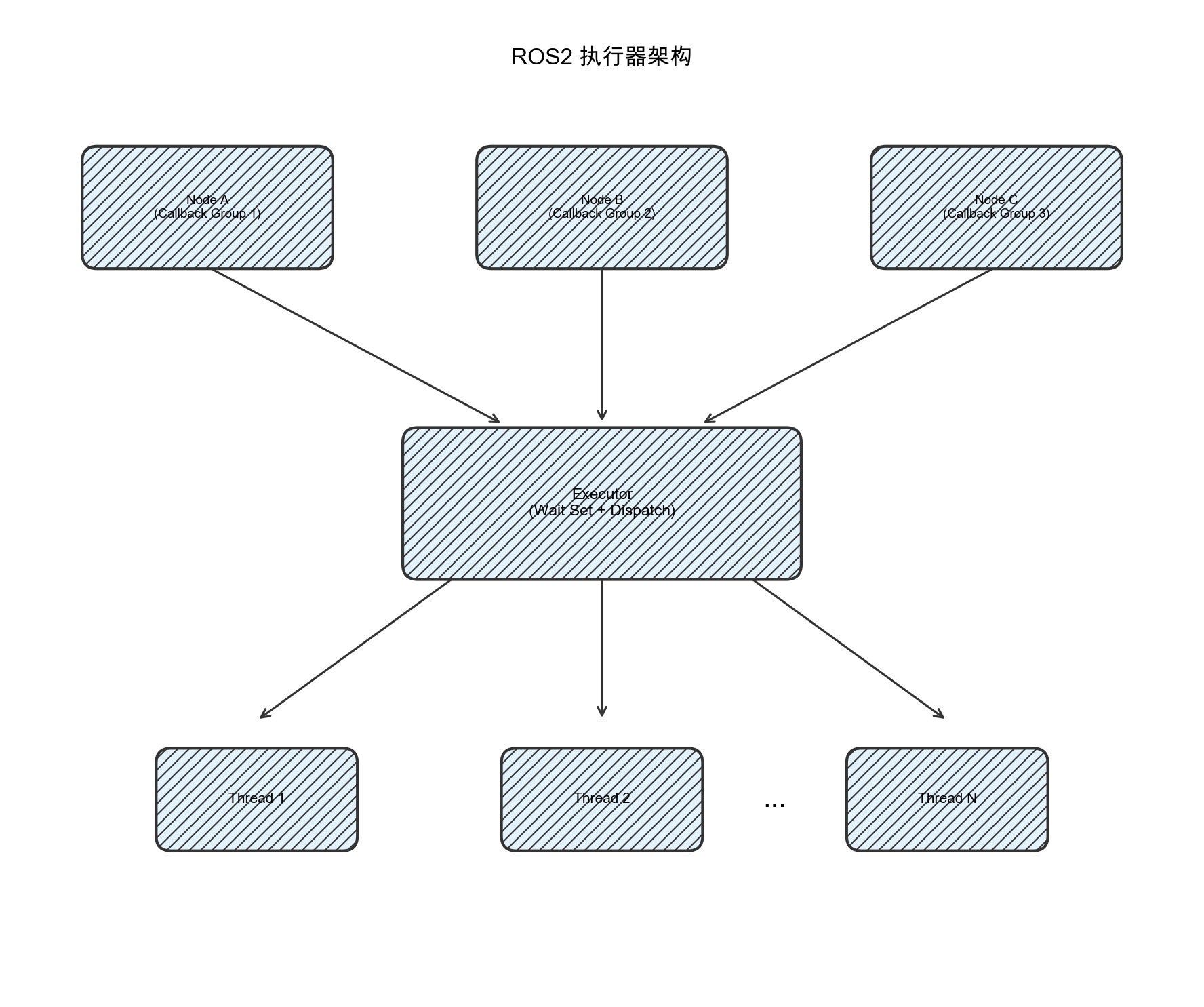
图1-1:ROS2执行器架构示意图。节点中的回调组通过执行器统一调度,分发到不同的工作线程执行。
ROS2提供了三种标准执行器类型:
- SingleThreadedExecutor:所有回调在单一线程中顺序执行,实现简单但并发能力有限
- MultiThreadedExecutor:使用线程池并行执行回调,提高吞吐量但增加调度复杂性
- StaticSingleThreadedExecutor:针对固定订阅和定时器优化的单线程执行器
以下是默认执行器的基本使用方式:
// 默认的单线程执行器 - 简单但可能成为性能瓶颈
rclcpp::executors::SingleThreadedExecutor executor;
executor.add_node(node);
executor.spin();

// 多线程执行器 - 更好的并发能力但需要合理配置
rclcpp::executors::MultiThreadedExecutor executor;
executor.add_node(node);
executor.spin();
1.2 默认执行器的局限性
根据德克萨斯州立大学2024年发表的研究论文《Dynamic Priority Scheduling of Multi-Threaded ROS 2 Executor》指出,默认ROS2执行器存在以下核心问题:
| 问题类型 | 具体表现 | 对实时性的影响 |
|---|---|---|
| 优先级反转 | 低优先级任务阻塞高优先级任务 | 关键控制指令延迟执行 |
| 轮询调度 | 所有回调平等竞争CPU时间 | 无法保证紧急任务优先处理 |
| 资源争用 | 多线程共享资源时缺乏协调 | 产生不可预测的等待时间 |
| 内存分配 | DDS底层依赖动态内存分配 | 引入非确定性延迟抖动 |
执行器内部的核心调度逻辑可以简化理解为:
// 简化的执行器内部工作机制
class ExecutorCore {
public:
    void spin() {
        while (rclcpp::ok()) {
            // 1. 收集就绪的回调
            auto ready_entities = wait_for_work();

            // 2. 执行回调(无优先级区分)
            for (auto& entity : ready_entities) {
                execute_callback(entity);
            }
        }
    }

private:
    // 等待任何实体变为就绪状态
    WaitableSet wait_for_work() {
        return wait_set_.wait(std::chrono::milliseconds(100));
    }

    // 执行单个回调
    void execute_callback(const EntityBase::SharedPtr& entity) {
        entity->execute();
    }
};
问题的关键在于:默认实现中所有回调被视为等同优先级,系统无法区分紧急停止指令与普通日志记录的重要性差异。
2. 回调机制优化策略
2.1 回调生命周期分析
在进行优化之前,必须理解回调从消息到达到处理完成的完整时间线。以下代码展示了如何对回调进行精确的时序分析:
// 回调执行的时间线分析
class TimingAnalyzedSubscriber : public rclcpp::Node {
public:
    TimingAnalyzedSubscriber() : Node("timing_analyzer") {
        subscription_ = create_subscription<std_msgs::msg::String>(
            "topic",
            rclcpp::QoS(10),
            [this](const std_msgs::msg::String::SharedPtr msg) {
                auto receive_time = this->now();
                auto latency = (receive_time - msg->header.stamp).nanoseconds() / 1e6;

                // 记录回调开始时间
                auto callback_start = std::chrono::high_resolution_clock::now();

                // 处理消息
                process_message(msg);

                // 记录处理时间
                auto callback_end = std::chrono::high_resolution_clock::now();
                auto processing_time =
                    std::chrono::duration_cast<std::chrono::microseconds>(
                        callback_end - callback_start).count();

                RCLCPP_DEBUG(this->get_logger(),
                            "Latency: %.3fms, Processing: %ldus",
                            latency, processing_time);
            });
    }

private:
    void process_message(const std_msgs::msg::String::SharedPtr msg) {
        // 模拟工作负载
        std::this_thread::sleep_for(std::chrono::microseconds(500));
    }
};
回调延迟可分解为以下几个阶段:
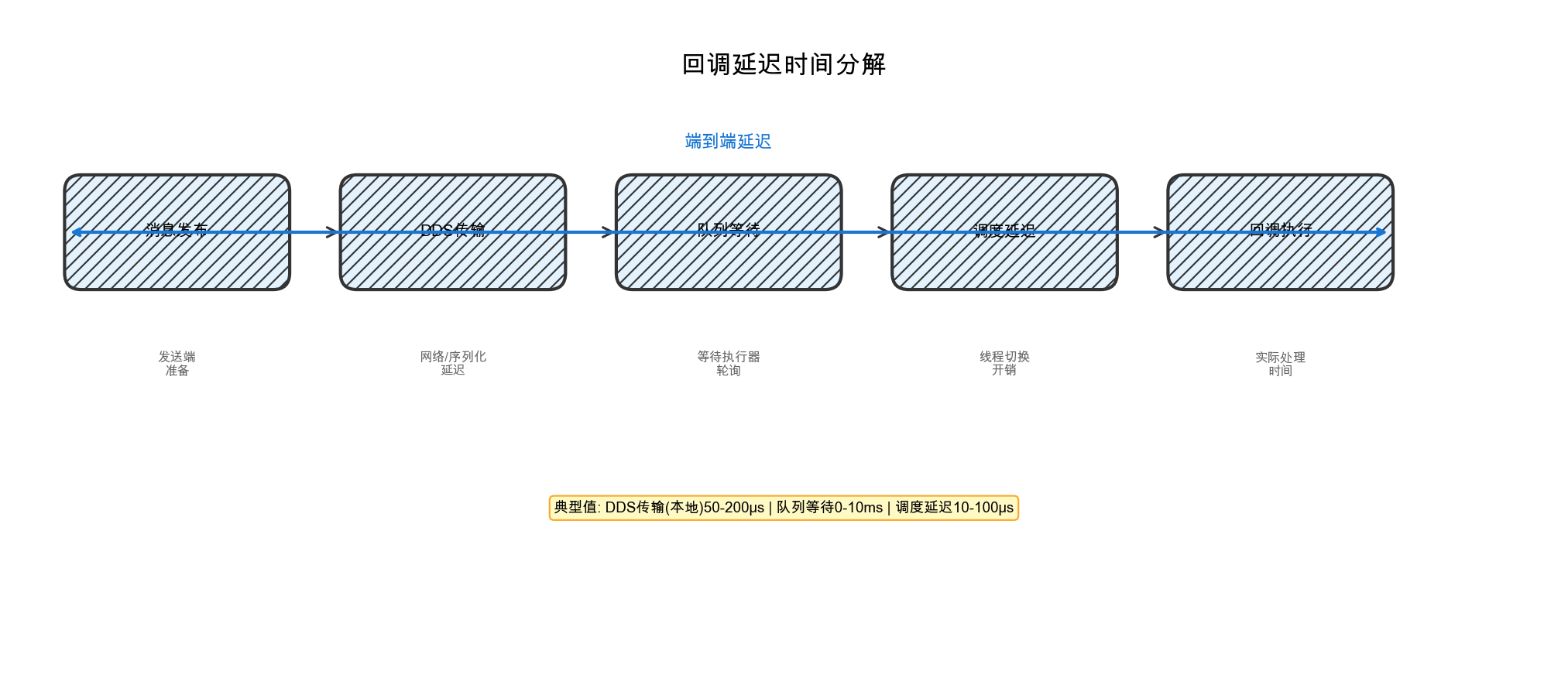
图2-1:回调延迟时间分解。端到端延迟由消息发布、DDS传输、队列等待、调度延迟和回调执行五个阶段组成。
2.2 回调分组与隔离策略
ROS2提供了回调组(Callback Group)机制来实现任务隔离。正确使用回调组是优化实时性的第一步:
// 使用回调组实现任务隔离
class CallbackGroupNode : public rclcpp::Node {
public:
    CallbackGroupNode() : Node("callback_group_demo") {
        // 创建互斥回调组 - 组内回调串行执行,保护共享资源
        auto mutex_group = create_callback_group(
            rclcpp::CallbackGroupType::MutuallyExclusive);

        // 创建可重入回调组 - 组内回调可以并行执行
        auto reentrant_group = create_callback_group(
            rclcpp::CallbackGroupType::Reentrant);

        // 高优先级控制回调 - 使用互斥组确保独占执行
        rclcpp::SubscriptionOptions control_options;
        control_options.callback_group = mutex_group;

        control_sub_ = create_subscription<geometry_msgs::msg::Twist>(
            "cmd_vel", 10,
            [this](const geometry_msgs::msg::Twist::SharedPtr msg) {
                high_priority_control(msg);
            },
            control_options);

        // 低优先级数据记录回调 - 使用可重入组
        rclcpp::SubscriptionOptions diagnostic_options;
        diagnostic_options.callback_group = reentrant_group;

        diagnostic_sub_ = create_subscription<diagnostic_msgs::msg::DiagnosticArray>(
            "diagnostics", 10,
            [this](const diagnostic_msgs::msg::DiagnosticArray::SharedPtr msg) {
                low_priority_logging(msg);
            },
            diagnostic_options);
    }

private:
    void high_priority_control(const geometry_msgs::msg::Twist::SharedPtr msg) {
        auto start = std::chrono::high_resolution_clock::now();

        // 关键控制逻辑
        execute_control_command(msg);

        auto end = std::chrono::high_resolution_clock::now();
        auto duration = std::chrono::duration_cast<std::chrono::microseconds>(end - start);

        // 实时性监控 - 超过阈值发出警告
        if (duration.count() > 1000) {
            RCLCPP_WARN(this->get_logger(),
                        "High-priority control exceeded 1ms: %ldus", duration.count());
        }
    }

    void low_priority_logging(const diagnostic_msgs::msg::DiagnosticArray::SharedPtr msg) {
        // 非关键日志记录,可以容忍延迟
        log_diagnostic_data(msg);
    }

    rclcpp::Subscription<geometry_msgs::msg::Twist>::SharedPtr control_sub_;
    rclcpp::Subscription<diagnostic_msgs::msg::DiagnosticArray>::SharedPtr diagnostic_sub_;
};
回调组的选择策略可参考下表:
| 回调组类型 | 适用场景 | 注意事项 |
|---|---|---|
| MutuallyExclusive | 访问共享资源的回调、需要严格顺序执行的任务 | 可能造成排队等待 |
| Reentrant | 无状态计算、可并行处理的数据流 | 需确保线程安全 |
3. 高级执行器配置
3.1 多线程执行器优化
默认的MultiThreadedExecutor可以通过配置优化其实时性能。关键优化点包括线程数量、CPU亲和性和调度优先级:
// 高级多线程执行器配置
class OptimizedMultiThreadedExecutor : public rclcpp::executors::MultiThreadedExecutor {
public:
    OptimizedMultiThreadedExecutor(
        const rclcpp::ExecutorOptions& options = rclcpp::ExecutorOptions(),
        size_t num_threads = std::thread::hardware_concurrency(),
        bool yield_before_execute = false,
        double timeout = 1.0)
    : MultiThreadedExecutor(options, num_threads, yield_before_execute, timeout) {

        configure_thread_affinity();
        setup_priority_scheduling();
    }

private:
    void configure_thread_affinity() {
        // 设置CPU亲和性 - 将线程绑定到特定CPU核心
        // 减少缓存失效和上下文切换开销
        const auto threads = this->get_threads();
        for (size_t i = 0; i < threads.size(); ++i) {
            cpu_set_t cpuset;
            CPU_ZERO(&cpuset);
            CPU_SET(i % std::thread::hardware_concurrency(), &cpuset);

            int rc = pthread_setaffinity_np(threads[i].native_handle(),
                                          sizeof(cpu_set_t), &cpuset);
            if (rc != 0) {
                RCLCPP_ERROR(rclcpp::get_logger("executor"),
                            "Failed to set thread affinity for thread %zu", i);
            }
        }
    }

    void setup_priority_scheduling() {
        // 设置实时调度优先级(需要root权限或CAP_SYS_NICE能力)
        const auto threads = this->get_threads();
        for (size_t i = 0; i < threads.size(); ++i) {
            sched_param sch_params;
            // 第一个线程设置更高优先级用于关键回调
            sch_params.sched_priority = (i == 0) ? 80 : 50;

            if (pthread_setschedparam(threads[i].native_handle(),
                                     SCHED_FIFO, &sch_params)) {
                RCLCPP_WARN(rclcpp::get_logger("executor"),
                          "Cannot set real-time priority (need root or CAP_SYS_NICE)");
            }
        }
    }
};
3.2 专用执行器模式
对于有严格实时性要求的系统,可以为不同优先级的任务创建专用执行器:
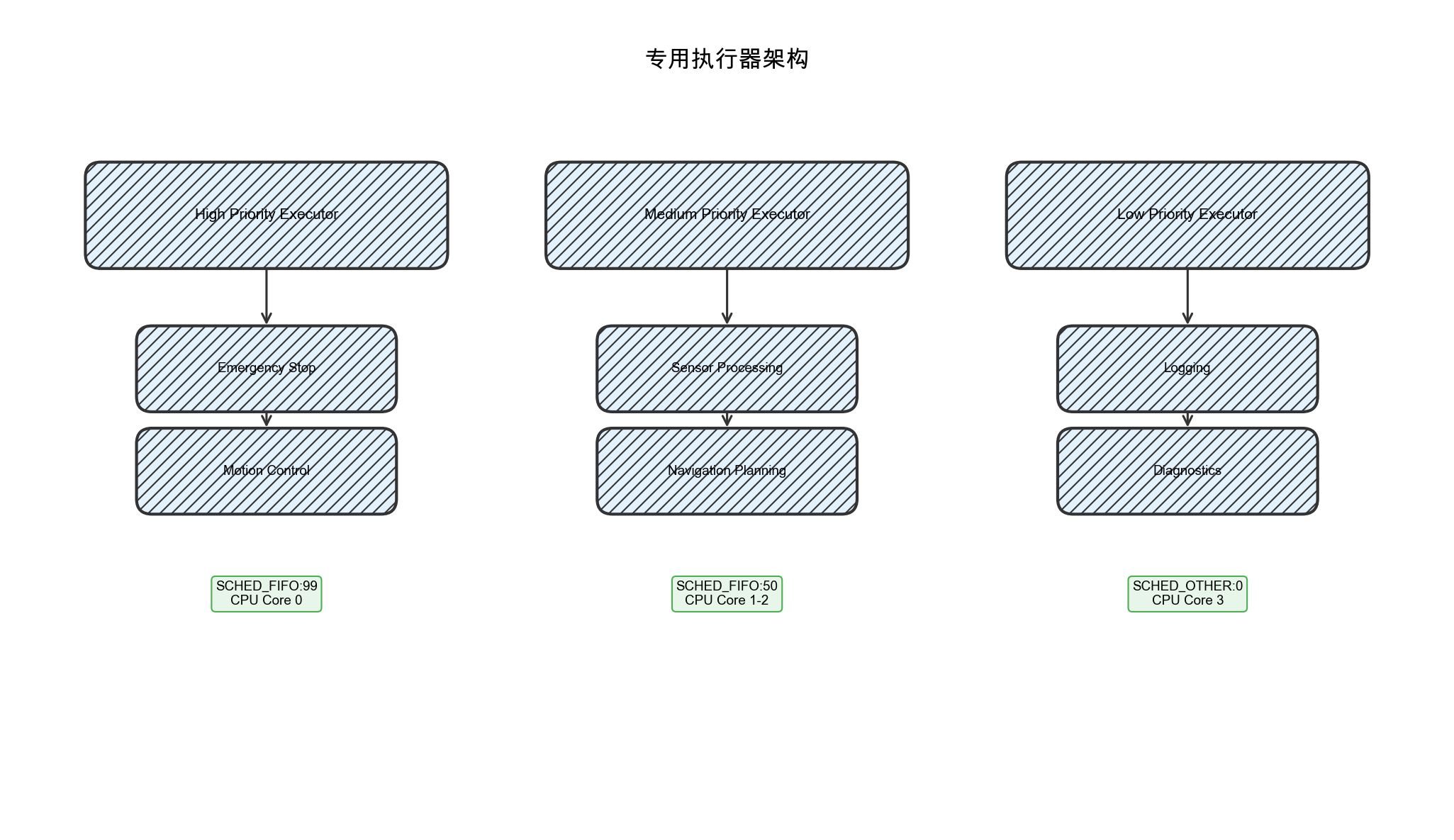
图3-1:专用执行器架构。不同优先级的任务分配到独立的执行器,每个执行器运行在专用线程上并配置不同的调度策略。
实现代码如下:
// 为不同优先级的任务创建专用执行器
class PriorityAwareSystem {
public:
    PriorityAwareSystem() {
        // 高优先级执行器 - 用于实时控制
        high_priority_executor_ = std::make_shared<rclcpp::executors::SingleThreadedExecutor>();

        // 中优先级执行器 - 用于数据处理
        medium_priority_executor_ = std::make_shared<rclcpp::executors::MultiThreadedExecutor>();

        // 低优先级执行器 - 用于后台任务
        low_priority_executor_ = std::make_shared<rclcpp::executors::SingleThreadedExecutor>();

        start_executors();
    }

    ~PriorityAwareSystem() {
        stop_executors();
    }

private:
    void start_executors() {
        // 在不同的线程中启动执行器
        high_priority_thread_ = std::thread([this]() {
            configure_realtime_thread(99, 0);  // 最高优先级,绑定CPU 0
            high_priority_executor_->spin();
        });

        medium_priority_thread_ = std::thread([this]() {
            configure_realtime_thread(50, 1);  // 中等优先级
            medium_priority_executor_->spin();
        });

        low_priority_thread_ = std::thread([this]() {
            // 低优先级使用默认调度
            low_priority_executor_->spin();
        });
    }

    void configure_realtime_thread(int priority, int cpu_core) {
        // 设置实时调度策略
        sched_param sch_params;
        sch_params.sched_priority = priority;

        if (pthread_setschedparam(pthread_self(), SCHED_FIFO, &sch_params) != 0) {
            std::cerr << "Failed to set real-time scheduling\n";
        }

        // 设置CPU亲和性
        cpu_set_t cpuset;
        CPU_ZERO(&cpuset);
        CPU_SET(cpu_core, &cpuset);
        pthread_setaffinity_np(pthread_self(), sizeof(cpu_set_t), &cpuset);

        // 锁定内存避免页面交换
        mlockall(MCL_CURRENT | MCL_FUTURE);
    }

    void stop_executors() {
        high_priority_executor_->cancel();
        medium_priority_executor_->cancel();
        low_priority_executor_->cancel();

        if (high_priority_thread_.joinable()) high_priority_thread_.join();
        if (medium_priority_thread_.joinable()) medium_priority_thread_.join();
        if (low_priority_thread_.joinable()) low_priority_thread_.join();
    }

    std::shared_ptr<rclcpp::executors::SingleThreadedExecutor> high_priority_executor_;
    std::shared_ptr<rclcpp::executors::MultiThreadedExecutor> medium_priority_executor_;
    std::shared_ptr<rclcpp::executors::SingleThreadedExecutor> low_priority_executor_;

    std::thread high_priority_thread_;
    std::thread medium_priority_thread_;
    std::thread low_priority_thread_;
};
4. 优先级调度实现
4.1 PiCAS框架介绍
根据加州大学河滨分校的研究,PiCAS(Priority-driven Chain-Aware Scheduling)是一个专门为ROS2设计的优先级驱动调度框架。该框架解决了默认ROS2执行器的三个核心问题:
- 优先级无感知:默认执行器不区分回调的重要性
- 轮询调度:所有回调按照到达顺序处理
- 资源分配不确定:线程和CPU资源分配缺乏策略
PiCAS的核心思想是将回调组织成处理链,并按照链的优先级进行调度:
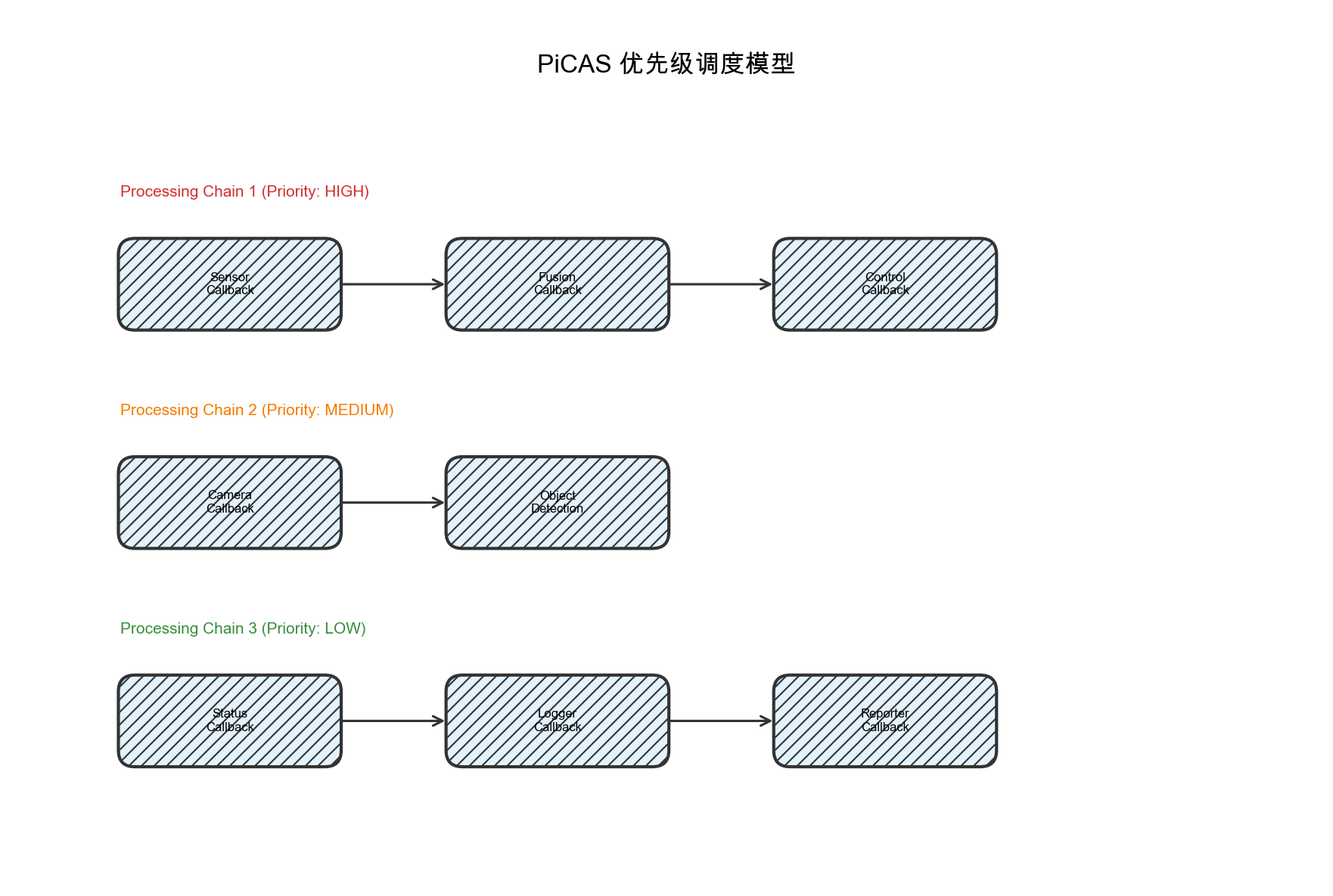
图4-1:PiCAS优先级调度模型。回调被组织成处理链,不同链具有不同的优先级,高优先级链的回调优先获得执行机会。
4.2 自定义优先级调度器实现
以下是一个支持优先级调度的自定义执行器实现:
// 支持优先级调度的自定义执行器
class PriorityScheduledExecutor {
public:
    struct PriorityCallback {
        std::function<void()> callback;
        int priority;  // 数值越小优先级越高
        std::chrono::steady_clock::time_point enqueue_time;

        bool operator<(const PriorityCallback& other) const {
            // 优先级数值小的优先,相同优先级时先入先出
            if (priority == other.priority) {
                return enqueue_time > other.enqueue_time;
            }
            return priority > other.priority;
        }
    };

    PriorityScheduledExecutor() : running_(true) {}

    void add_callback(const std::function<void()>& callback, int priority) {
        std::lock_guard<std::mutex> lock(queue_mutex_);
        callback_queue_.push({
            callback,
            priority,
            std::chrono::steady_clock::now()
        });
        queue_cv_.notify_one();
    }

    void spin() {
        while (running_) {
            PriorityCallback cb;
            {
                std::unique_lock<std::mutex> lock(queue_mutex_);
                queue_cv_.wait(lock, [this]() {
                    return !callback_queue_.empty() || !running_;
                });

                if (!running_) break;

                cb = callback_queue_.top();
                callback_queue_.pop();
            }

            // 执行回调
            try {
                cb.callback();
            } catch (const std::exception& e) {
                std::cerr << "Callback execution failed: " << e.what() << "\n";
            }
        }
    }

    void stop() {
        running_ = false;
        queue_cv_.notify_all();
    }

private:
    std::priority_queue<PriorityCallback> callback_queue_;
    std::mutex queue_mutex_;
    std::condition_variable queue_cv_;
    std::atomic<bool> running_;
};
4.3 集成优先级调度的节点
将优先级调度器与ROS2节点集成:
// 支持优先级调度的节点包装器
class PriorityAwareNode : public rclcpp::Node {
public:
    PriorityAwareNode(const std::string& node_name)
    : Node(node_name), priority_executor_(std::make_shared<PriorityScheduledExecutor>()) {

        // 启动优先级执行器
        executor_thread_ = std::thread([this]() {
            configure_realtime();
            priority_executor_->spin();
        });
    }

    // 创建带优先级的订阅
    template<typename MessageT>
    typename rclcpp::Subscription<MessageT>::SharedPtr
    create_priority_subscription(
        const std::string& topic_name,
        const rclcpp::QoS& qos,
        std::function<void(const typename MessageT::SharedPtr)> callback,
        int priority) {

        auto subscription = create_subscription<MessageT>(
            topic_name,
            qos,
            [this, callback, priority](const typename MessageT::SharedPtr msg) {
                // 将回调包装并加入优先级队列
                this->priority_executor_->add_callback(
                    [callback, msg]() { callback(msg); },
                    priority
                );
            }
        );

        return subscription;
    }

    ~PriorityAwareNode() {
        priority_executor_->stop();
        if (executor_thread_.joinable()) {
            executor_thread_.join();
        }
    }

private:
    void configure_realtime() {
        sched_param sch;
        sch.sched_priority = 80;
        pthread_setschedparam(pthread_self(), SCHED_FIFO, &sch);
    }

    std::shared_ptr<PriorityScheduledExecutor> priority_executor_;
    std::thread executor_thread_;
};

// 使用示例
class RealTimeControlNode : public PriorityAwareNode {
public:
    RealTimeControlNode() : PriorityAwareNode("realtime_control") {
        // 紧急停止 - 最高优先级 (1)
        emergency_stop_sub_ = create_priority_subscription<std_msgs::msg::Bool>(
            "emergency_stop", 10,
            [this](const std_msgs::msg::Bool::SharedPtr msg) {
                handle_emergency_stop(msg);
            },
            1);  // 优先级1 - 最高

        // 运动控制 - 高优先级 (10)
        control_sub_ = create_priority_subscription<geometry_msgs::msg::Twist>(
            "control_cmd", 10,
            [this](const geometry_msgs::msg::Twist::SharedPtr msg) {
                handle_control_command(msg);
            },
            10);  // 优先级10 - 高

        // 状态监控 - 中等优先级 (50)
        status_sub_ = create_priority_subscription<diagnostic_msgs::msg::DiagnosticArray>(
            "diagnostics", 10,
            [this](const diagnostic_msgs::msg::DiagnosticArray::SharedPtr msg) {
                handle_status_update(msg);
            },
            50);  // 优先级50 - 中等

        // 数据记录 - 低优先级 (100)
        logging_sub_ = create_priority_subscription<std_msgs::msg::String>(
            "log_data", 10,
            [this](const std_msgs::msg::String::SharedPtr msg) {
                handle_data_logging(msg);
            },
            100);  // 优先级100 - 低
    }

private:
    void handle_emergency_stop(const std_msgs::msg::Bool::SharedPtr msg) {
        if (msg->data) {
            auto start = std::chrono::high_resolution_clock::now();
            execute_emergency_stop();
            auto end = std::chrono::high_resolution_clock::now();
            auto duration = std::chrono::duration_cast<std::chrono::microseconds>(end - start);
            RCLCPP_INFO(get_logger(), "Emergency stop executed in %ldus", duration.count());
        }
    }

    void handle_control_command(const geometry_msgs::msg::Twist::SharedPtr msg) {
        update_motion_control(msg);
    }

    void handle_status_update(const diagnostic_msgs::msg::DiagnosticArray::SharedPtr msg) {
        update_system_status(msg);
    }

    void handle_data_logging(const std_msgs::msg::String::SharedPtr msg) {
        log_system_data(msg);
    }

    // 订阅者成员变量
    rclcpp::Subscription<std_msgs::msg::Bool>::SharedPtr emergency_stop_sub_;
    rclcpp::Subscription<geometry_msgs::msg::Twist>::SharedPtr control_sub_;
    rclcpp::Subscription<diagnostic_msgs::msg::DiagnosticArray>::SharedPtr status_sub_;
    rclcpp::Subscription<std_msgs::msg::String>::SharedPtr logging_sub_;
};
5. 系统级实时性配置
5.1 PREEMPT_RT内核
标准Linux内核采用公平调度策略,无法满足硬实时要求。PREEMPT_RT补丁将Linux内核转变为可抢占式实时内核,是ROS2实时应用的基础设施。
根据ROS2官方文档,PREEMPT_RT内核的构建步骤如下:
# 1. 准备工作 - 确保至少30GB磁盘空间
sudo apt-get install build-essential bc curl ca-certificates \
    gnupg2 libssl-dev lsb-release libelf-dev bison flex

# 2. 下载内核源码和RT补丁
mkdir -p ~/kernel && cd ~/kernel
wget https://www.kernel.org/pub/linux/kernel/v5.x/linux-5.4.78.tar.xz
wget https://www.kernel.org/pub/linux/kernel/projects/rt/5.4/patch-5.4.78-rt44.patch.xz

# 3. 解压并应用补丁
tar xf linux-5.4.78.tar.xz
cd linux-5.4.78
xzcat ../patch-5.4.78-rt44.patch.xz | patch -p1

# 4. 配置内核
cp /boot/config-$(uname -r) .config
make menuconfig
# 在菜单中选择: General setup -> Preemption Model -> Fully Preemptible Kernel (RT)

# 5. 编译并安装
make -j$(nproc)
sudo make modules_install
sudo make install
PREEMPT_RT内核对实时性的影响:
| 指标 | 标准内核 | PREEMPT_RT内核 | 改善比例 |
|---|---|---|---|
| 最大延迟 | ~10ms | ~50μs | 200x |
| 延迟抖动 | 高 | 极低 | - |
| 上下文切换时间 | ~5μs | ~2μs | 2.5x |
| 中断响应时间 | ~20μs | ~5μs | 4x |
5.2 系统配置最佳实践
除了实时内核,还需要进行系统级配置:
# /etc/security/limits.conf - 允许用户设置实时优先级
# 添加以下行
<username>    -    rtprio    99
<username>    -    memlock   unlimited

# 禁用CPU频率调节,使用性能模式
sudo cpupower frequency-set -g performance

# 禁用透明大页,减少不可预测的延迟
echo never | sudo tee /sys/kernel/mm/transparent_hugepage/enabled

# 设置网络队列规则,减少网络延迟
sudo tc qdisc add dev eth0 root fq_codel
5.3 DDS QoS配置优化
ROS2的DDS中间件支持多种QoS策略,正确配置可显著提升实时性:
// 针对实时性优化的QoS配置
class RealtimeQoSConfig {
public:
    // 高优先级控制消息的QoS
    static rclcpp::QoS control_qos() {
        return rclcpp::QoS(10)
            .reliable()                    // 可靠传输
            .durability_volatile()         // 不持久化
            .deadline(std::chrono::milliseconds(10))  // 10ms截止时间
            .lifespan(std::chrono::milliseconds(50)); // 50ms生命周期
    }

    // 传感器数据的QoS
    static rclcpp::QoS sensor_qos() {
        return rclcpp::QoS(rclcpp::SensorDataQoS())
            .best_effort()                 // 尽力传输,减少延迟
            .durability_volatile()
            .deadline(std::chrono::milliseconds(33)); // 30Hz传感器
    }

    // 状态监控的QoS
    static rclcpp::QoS status_qos() {
        return rclcpp::QoS(5)
            .reliable()
            .transient_local()             // 保留最后一条消息
            .deadline(std::chrono::milliseconds(100));
    }
};
QoS策略选择参考:
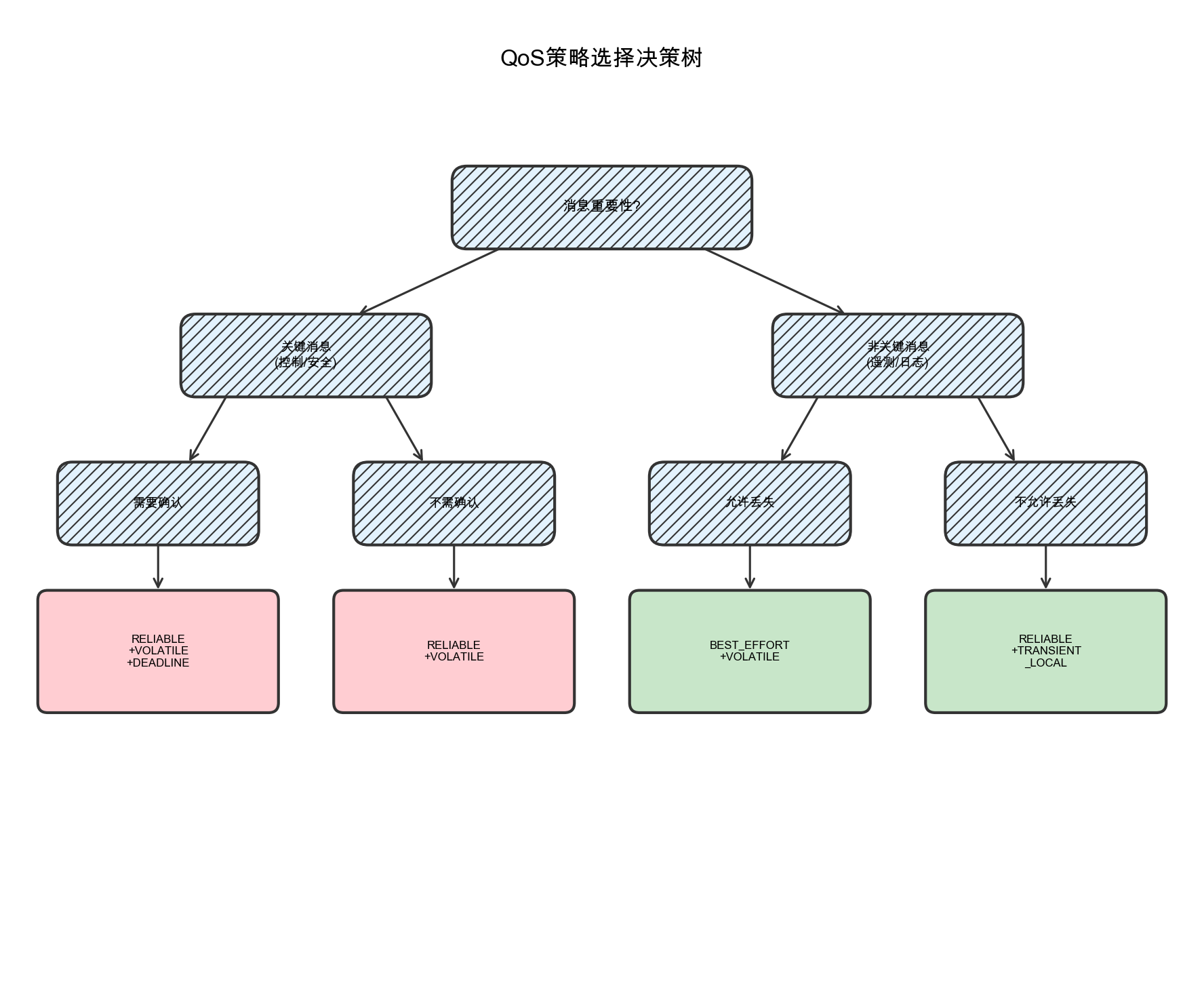
图5-1:QoS策略选择决策树。根据消息的重要性和可靠性要求选择合适的QoS配置。
6. 实时性能监控与分析
6.1 性能监控组件
构建可观测性是实时系统的重要组成部分:
// 实时性能监控组件
class RealTimeMonitor : public rclcpp::Node {
public:
    RealTimeMonitor() : Node("realtime_monitor") {
        // 监控定时器
        monitor_timer_ = create_wall_timer(
            std::chrono::milliseconds(100),
            std::bind(&RealTimeMonitor::publish_performance_metrics, this));
    }

private:
    struct CallbackTiming {
        std::string callback_name;
        std::chrono::microseconds max_latency{0};
        std::chrono::microseconds min_latency{std::chrono::microseconds::max()};
        std::chrono::microseconds total_latency{0};
        uint64_t call_count{0};
        std::chrono::steady_clock::time_point last_call;
    };

    std::unordered_map<std::string, CallbackTiming> callback_timings_;
    std::mutex timing_mutex_;

    void record_callback_timing(const std::string& name,
                               std::chrono::microseconds latency) {
        std::lock_guard<std::mutex> lock(timing_mutex_);
        auto& timing = callback_timings_[name];
        timing.callback_name = name;
        timing.max_latency = std::max(timing.max_latency, latency);
        timing.min_latency = std::min(timing.min_latency, latency);
        timing.total_latency += latency;
        timing.call_count++;
    }

    void publish_performance_metrics() {
        std::lock_guard<std::mutex> lock(timing_mutex_);

        for (const auto& [name, timing] : callback_timings_) {
            if (timing.call_count > 0) {
                double avg_latency = static_cast<double>(timing.total_latency.count())
                                   / timing.call_count;

                // 检查是否超过实时性约束
                double max_allowed = get_max_allowed_latency(name);
                if (avg_latency > max_allowed) {
                    RCLCPP_WARN(get_logger(),
                        "Callback %s exceeds latency constraint: %.1fus > %.1fus",
                        name.c_str(), avg_latency, max_allowed);
                }

                RCLCPP_DEBUG(get_logger(),
                    "Callback %s: avg=%.1fus, max=%ldus, min=%ldus, calls=%lu",
                    name.c_str(), avg_latency,
                    timing.max_latency.count(),
                    timing.min_latency.count(),
                    timing.call_count);
            }
        }
    }

    double get_max_allowed_latency(const std::string& callback_name) {
        if (callback_name.find("emergency") != std::string::npos) {
            return 1000.0;  // 紧急回调: 1ms
        } else if (callback_name.find("control") != std::string::npos) {
            return 5000.0;  // 控制回调: 5ms
        } else {
            return 10000.0; // 其他回调: 10ms
        }
    }

    rclcpp::TimerBase::SharedPtr monitor_timer_;
};
6.2 使用ROS2 Tracing进行深度分析
…详情请参照古月居

AtomGit 是由开放原子开源基金会联合 CSDN 等生态伙伴共同推出的新一代开源与人工智能协作平台。平台坚持“开放、中立、公益”的理念,把代码托管、模型共享、数据集托管、智能体开发体验和算力服务整合在一起,为开发者提供从开发、训练到部署的一站式体验。
更多推荐


 10
10 0
0- 0


 已为社区贡献56条内容

所有评论(0)