Nanobot源码学习
OpenClaw 是 2025 年底出现的开源自主 AI Agent。它运行在用户本地,通过 Telegram、Discord、WhatsApp 等聊天 App 接收指令,驱动 LLM 完成文件操作、命令执行、网络搜索、定时任务等真实工作。但 OpenClaw 本身是一个庞大的 TypeScript 工程,直接读源码门槛不低。香港大学数据科学实验室(HKUDS)发布了一个叫 nanobot 的 Python 极简复刻——约 4000 行代码实现了 OpenClaw 的核心机制,并且 Skills 格式直接兼容 OpenClaw 生态。本文通过 nanobot 的源码,拆解 OpenClaw 这类自主 Agent 的设计骨架。用 4000 行代码看清 24 万行背后的核心思想。
一、核心模块
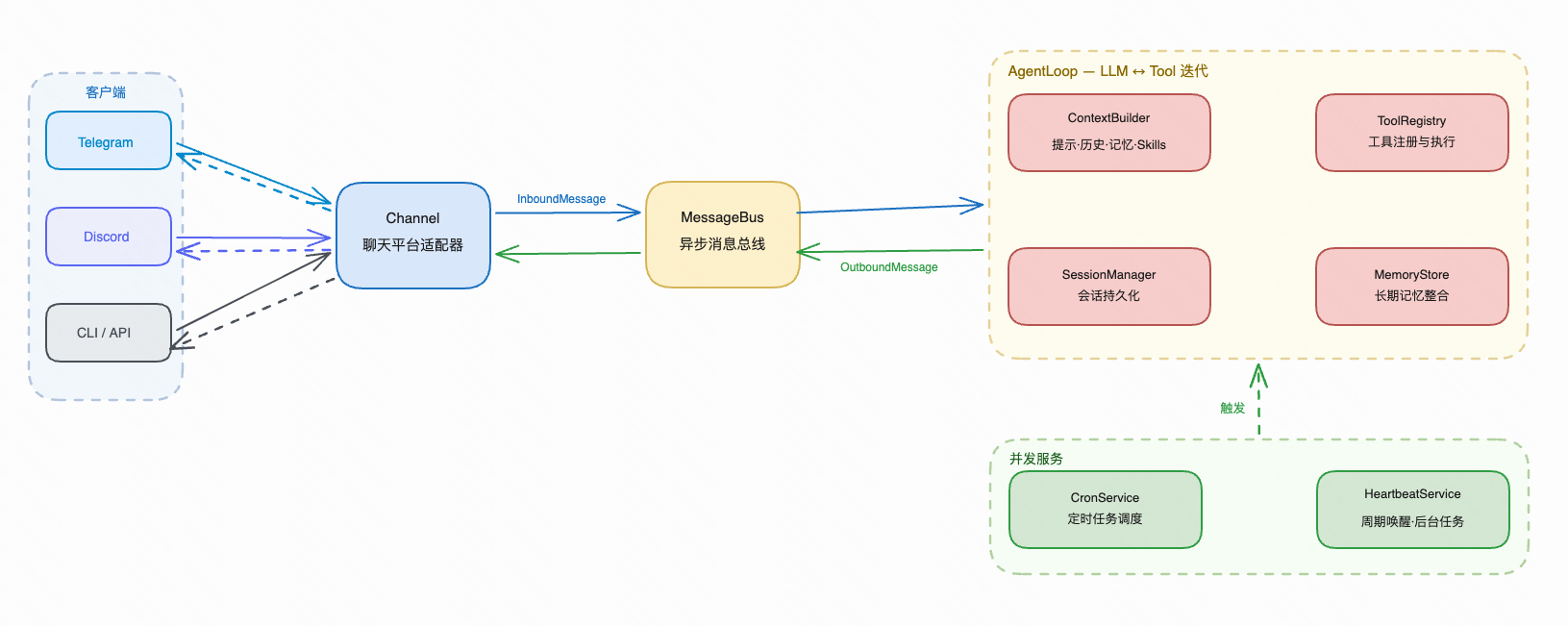
1.1 Channel
透明式连接
nanobot 支持 Telegram、Discord、Slack、WhatsApp、飞书……这些平台 API 差异极大,但对 Agent 来说完全透明。做到这一点靠的是 BaseChannel 抽象:
# nanobot/channels/base.py

class BaseChannel(ABC):
    """
    Abstract base class for chat channel implementations.

    Each channel (Telegram, Discord, etc.) should implement this interface
    to integrate with the nanobot message bus.
    """
    @abstractmethod
    async def start(self) -> None:
        """
        Start the channel and begin listening for messages.

        This should be a long-running async task that:
        1. Connects to the chat platform
        2. Listens for incoming messages
        3. Forwards messages to the bus via _handle_message()
        """
        pass

    @abstractmethod
    async def stop(self) -> None:
        """Stop the channel and clean up resources."""
        pass

    @abstractmethod
    async def send(self, msg: OutboundMessage) -> None:
        """
        Send a message through this channel.

        Args:
            msg: The message to send.

        Implementations should raise on delivery failure so the channel manager
        can apply any retry policy in one place.
        """
        pass
不同通信机制的差异对上层完全透明——不管底层是轮询还是推送,Channel 的 start() 都只做一件事:建立连接,把收到的消息转成 InboundMessage 扔进 MessageBus。
双轨道插件式注册
Channel 的发现和注册没有硬编码。nanobot 用 pkgutil 扫描 nanobot.channels 包下的所有模块,配合 Python 的 entry_points 机制,第三方也可以打包成独立 Python 包,安装后自动注册:
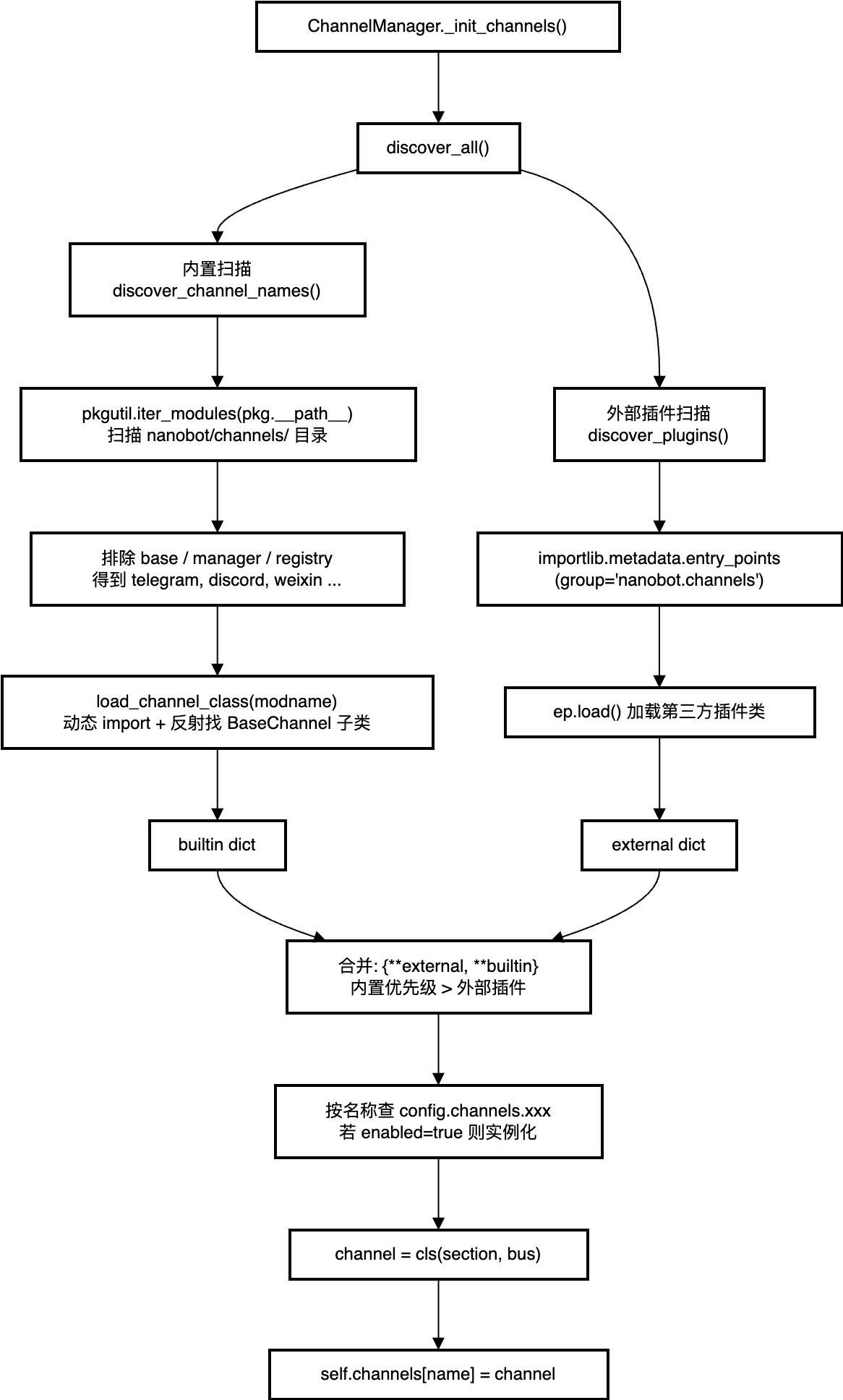
这意味着,接入企业微信或钉钉不需要改 nanobot 的任何代码——写一个实现了BaseChannel 的包,pip install 之后就自动出现在可用 Channel 列表里。
Channel 还内置了两个通用能力,每个平台实现都能继承:
-
权限校验:allow_from 白名单,空列表默认拒绝所有人,* 则放开。这不是 Agent 逻辑的一部分,是在消息进入 MessageBus 之前就过滤掉的。
# nanobot/channels/base.py

def is_allowed(self, sender_id: str) -> bool:
  """Check if *sender_id* is permitted.  Empty list → deny all; ``"*"`` → allow all."""
  allow_list = getattr(self.config, "allow_from", [])
  if not allow_list:
    logger.warning("{}: allow_from is empty — all access denied", self.name)
    return False
  if "*" in allow_list:
    return True
return str(sender_id) in allow_list-
语音转写:收到语音消息时,Channel 基类自动调用 Whisper 转成文字再往下传,Agent 侧完全感知不到语音和文字的区别。
# nanobot/channels/base.py

async def transcribe_audio(self, file_path: str | Path) -> str:
  """Transcribe an audio file via Whisper (OpenAI or Groq). Returns empty string on failure."""
  if not self.transcription_api_key:
    return ""
  try:
    if self.transcription_provider == "openai":
      from nanobot.providers.transcription import OpenAITranscriptionProvider
      provider = OpenAITranscriptionProvider(api_key=self.transcription_api_key)
    else:
      from nanobot.providers.transcription import GroqTranscriptionProvider
      provider = GroqTranscriptionProvider(api_key=self.transcription_api_key)
      return await provider.transcribe(file_path)
  except Exception as e:
    logger.warning("{}: audio transcription failed: {}", self.name, e)
    return ""
1.2 消息总线
两个queue实现一切:
# nanobot/bus/queue.py

class MessageBus:
    """
    Async message bus that decouples chat channels from the agent core.

    Channels push messages to the inbound queue, and the agent processes
    them and pushes responses to the outbound queue.
    """

    def __init__(self):
        self.inbound: asyncio.Queue[InboundMessage] = asyncio.Queue()
        self.outbound: asyncio.Queue[OutboundMessage] = asyncio.Queue()

    async def publish_inbound(self, msg: InboundMessage) -> None:
        """Publish a message from a channel to the agent."""
        await self.inbound.put(msg)

    async def consume_inbound(self) -> InboundMessage:
        """Consume the next inbound message (blocks until available)."""
        return await self.inbound.get()

    async def publish_outbound(self, msg: OutboundMessage) -> None:
        """Publish a response from the agent to channels."""
        await self.outbound.put(msg)

    async def consume_outbound(self) -> OutboundMessage:
        """Consume the next outbound message (blocks until available)."""
        return await self.outbound.get()
极简的消息数据结构:
# nanobot/bus/events.py

@dataclass
class OutboundMessage:
    """Message to send to a chat channel."""

    channel: str
    chat_id: str
    content: str
    reply_to: str | None = None
    media: list[str] = field(default_factory=list)
    metadata: dict[str, Any] = field(default_factory=dict)
极致优雅的设计,完全解耦:Channel 是消息的来源,MessageBus 是消息的搬运者,AgentLoop 是消息的消费者——三者互不依赖,任何一层都可以独立替换。
1.3 Agent 主循环
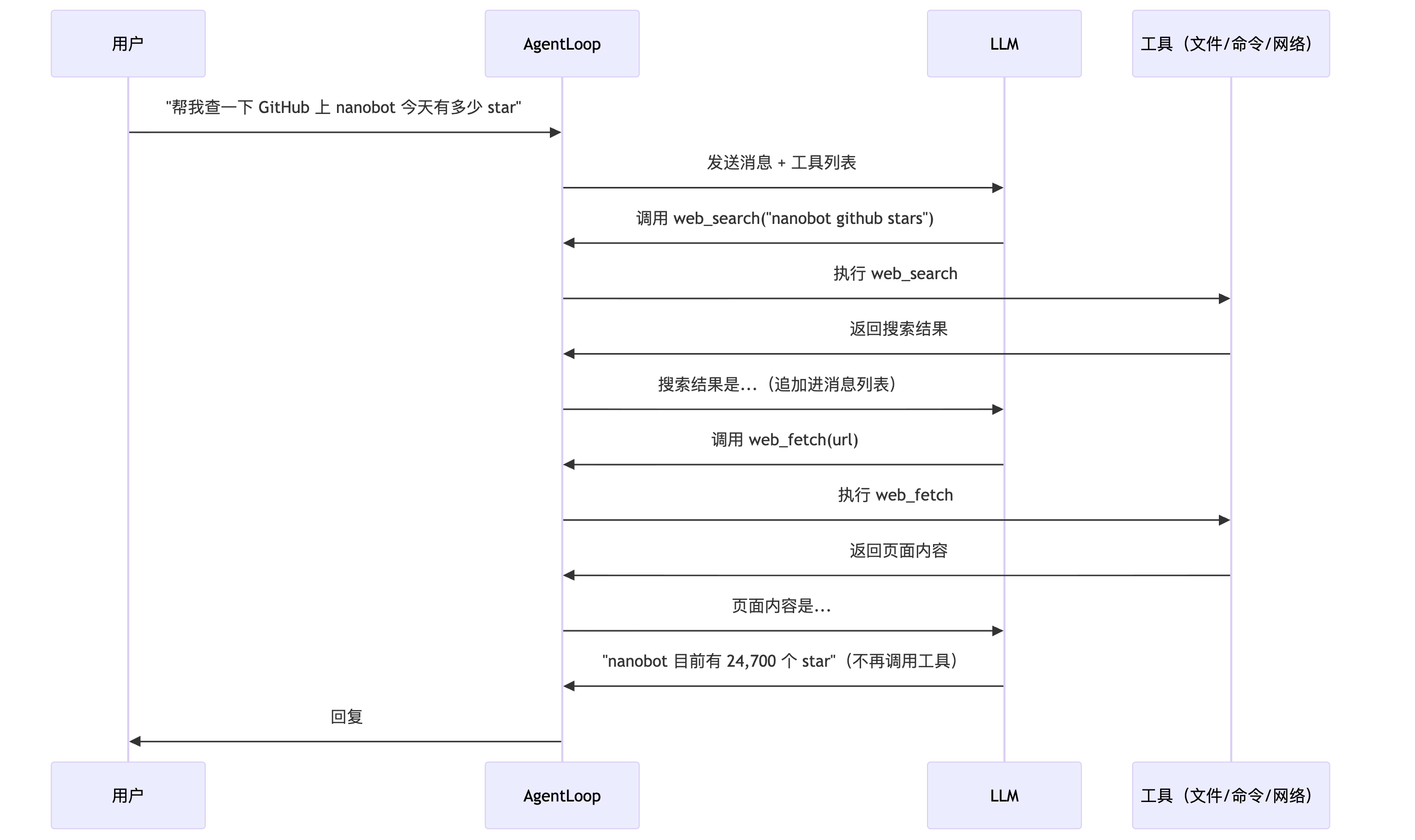
这是智能体之所以“智能”最核心的原因。LLM 本身只能生成文字——它怎么"做事"?答案是工具调用循环。
方法调用逻辑:
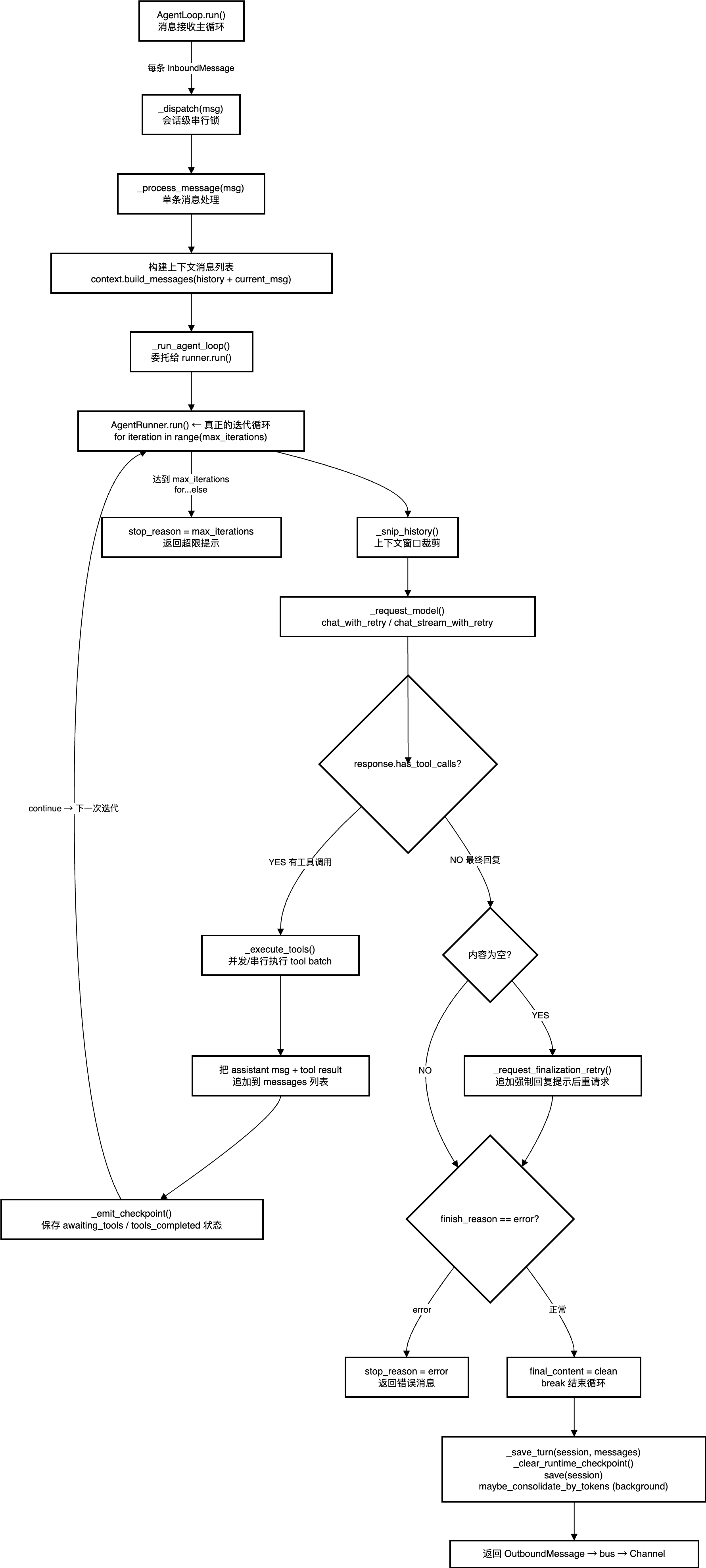
消息接受主循环:
while self._running:
    msg = await asyncio.wait_for(self.bus.consume_inbound(), timeout=1.0)
    # 优先级命令(/stop 等)直接处理
    if self.commands.is_priority(raw): ...
    # 普通消息:为每条消息创建独立 asyncio.Task
    task = asyncio.create_task(self._dispatch(msg))
会话串行调度:
lock = self._session_locks.setdefault(msg.session_key, asyncio.Lock())
async with lock, gate:
Tool-Use迭代循环:
for iteration in range(spec.max_iterations):
    messages = self._snip_history(...)         # 裁剪上下文窗口
    response = await self._request_model(...)  # 调用 LLM

    if response.has_tool_calls:
        # 执行工具,结果追加到 messages,continue → 下一轮
        results = await self._execute_tools(...)
        messages.append(tool_message)
        continue                               # ← 继续循环,让模型看到工具结果

    # 无工具调用 = 最终回复,break
    final_content = clean
    break
else:
    stop_reason = "max_iterations"             # for...else:超出最大迭代
Checkpoint 机制:每次工具执行前后都调用 _emit_checkpoint,保存到 Session,断电/崩溃后可从 _restore_runtime_checkpoint 恢复,不重头执行。
这就是所有"自主 Agent"的基础范式:LLM 输出 → 工具执行 → 结果追加进上下文 → 再次调用 LLM,直到 LLM 认为任务完成或达到最大迭代次数。
工程细节:
1. <think> 块过滤:DeepSeek-R1 等模型在 content 中嵌入 <think>...</think> 推理过程,在存入 session 前必须清除:
@staticmethod
def _strip_think(text: str | None) -> str | None:
  """Remove <think>…</think> blocks that some models embed in content."""
  if not text:
    return None
  from nanobot.utils.helpers import strip_think
  return strip_think(text) or None
2. 错误不入库:LLM 返回错误时直接 break,不把错误 message 写入会话历史。这防止了"session poisoning"——一条坏消息污染上下文,导致后续请求持续 400。
3. /stop 真的能停:每条消息的处理都是独立的 asyncio Task,/stop 到达时逐一 cancel:
4. 工具结果截断:session 中保存的工具结果限制在 16,000 字符,在防止上下文窗口撑爆和保留足够工具输出之间取得平衡。
二、系统提示的分层组装
LLM 每次被调用时,收到的系统提示不是一段固定文字,而是实时拼装的五层结构:

# nanobot/bus/context.py

def build_system_prompt(self, skill_names: list[str] | None = None) -> str:

    # 第 1 层:身份 — 角色定义 + OS/Python 运行时 + workspace 路径 + 行为准则
    parts = [self._get_identity()]

    # 第 2 层:引导文件 — 依次读 AGENTS.md / SOUL.md / USER.md / TOOLS.md,不存在则跳过
    bootstrap = self._load_bootstrap_files()
    if bootstrap:
        parts.append(bootstrap)

    # 第 3 层:长期记忆 — 读 memory/MEMORY.md,由记忆整合系统自动维护的跨会话事实
    memory = self.memory.get_memory_context()
    if memory:
        parts.append(f"# Memory\n\n{memory}")

    # 第 4 层:常驻 Skills — always:true 的 skill,每次请求注入 SKILL.md 全文
    always_skills = self.skills.get_always_skills()
    if always_skills:
        always_content = self.skills.load_skills_for_context(always_skills)
        if always_content:
            parts.append(f"# Active Skills\n\n{always_content}")

    # 第 5 层:Skills 目录 — 所有 skill 的 XML 摘要(名称+描述+路径),LLM 按需 read_file
    skills_summary = self.skills.build_skills_summary()
    if skills_summary:
        parts.append(f"# Skills\n\n...{skills_summary}")

    return "\n\n---\n\n".join(parts)
第 3-4 层是固定成本(每次请求都付),换来的是 LLM 永远知道"用户是谁、我能干什么"。第 5 层是按需成本——LLM 看到 skill 摘要后,自己决定要不要用 read_file 读取完整内容。
关于时间戳的缓存优化:
@staticmethod
def _build_runtime_context(
  channel: str | None, chat_id: str | None, timezone: str | None = None,
) -> str:
  """Build untrusted runtime metadata block for injection before the user message."""
  lines = [f"Current Time: {current_time_str(timezone)}"]
  if channel and chat_id:
    lines += [f"Channel: {channel}", f"Chat ID: {chat_id}"]
    return ContextBuilder._RUNTIME_CONTEXT_TAG + "\n" + "\n".join(lines)
当前时间注入到 user 消息的前缀,而不是 system prompt。因为 system prompt 有 Prompt Cache 优化——如果内容稳定,API 端可以缓存,节省大量 token 计费。把每分钟都在变的时间戳放进去,cache 就失效了。
三、Skills 系统
Skills 是 OpenClaw 生态最有特色的设计。一个 Skill 就是一个文件夹 + 一个 SKILL.md:
workspace/skills/
├── github/
│   └── SKILL.md     # 怎么操作 GitHub API
├── tmux/
│   ├── SKILL.md     # 怎么管理 tmux 会话
│   └── scripts/
│       └── find-sessions.sh
└── weather/
    └── SKILL.md     # 怎么查天气
SKILL.md 的 YAML frontmatter 控制两个关键行为:
---
name: memory
description: Two-layer memory system with grep-based recall.
always: true           # 始终注入全文到系统提示
metadata: |
  {"nanobot": {"requires": {"bins": ["git"], "env": ["GITHUB_TOKEN"]}}}
---

# Memory

## Structure
- `memory/MEMORY.md` — Long-term facts...
- `memory/HISTORY.md` — Append-only event log...
3.1 三种加载模式
Skills 根据配置和依赖状态分为三种加载方式:
-
always:true — 每次请求注入 SKILL.md 全文(如 memory skill)
-
普通 skill — 只注入 XML 摘要(名称+描述+路径),LLM 按需 read_file
-
unavailable — 依赖未满足,标记 available="false",LLM 可见但无法使用
def build_skills_summary(self) -> str:
        """
        Build a summary of all skills (name, description, path, availability).

        This is used for progressive loading - the agent can read the full
        skill content using read_file when needed.

        Returns:
            XML-formatted skills summary.
        """
        all_skills = self.list_skills(filter_unavailable=False)
        if not all_skills:
            return ""

        lines: list[str] = ["<skills>"]
        for entry in all_skills:
            skill_name = entry["name"]
            meta = self._get_skill_meta(skill_name)
            available = self._check_requirements(meta)
            lines.extend(
                [
                    f'  <skill available="{str(available).lower()}">',
                    f"    <name>{_escape_xml(skill_name)}</name>",
                    f"    <description>{_escape_xml(self._get_skill_description(skill_name))}</description>",
                    f"    <location>{entry['path']}</location>",
                ]
            )
            if not available:
                missing = self._get_missing_requirements(meta)
                if missing:
                    lines.append(f"    <requires>{_escape_xml(missing)}</requires>")
            lines.append("  </skill>")
        lines.append("</skills>")
return "\n".join(lines)-
LLM 收到的是一个 XML 目录。它看到自己需要的 skill(比如 tmux),会自己决定用read_file 去读完整内容。这把"何时加载文档"的决策权完全交给了 LLM。
-
依赖检查用 shutil.which() 查命令行工具,os.environ.get() 查环境变量。缺失时不是报错,而是标记 available="false" 并提示缺什么——AI 甚至可以尝试自己安装。
-
生态兼容:_parse_nanobot_metadata() 同时认识 "nanobot" 和 "openclaw" 两个metadata key——先找 "nanobot",找不到就 fallback 到 "openclaw"。这让 OpenClaw 社区已有的 Skill(metadata 用的是 "openclaw" key)可以不加修改直接在 nanobot 中使用。
3.2 加载全流程
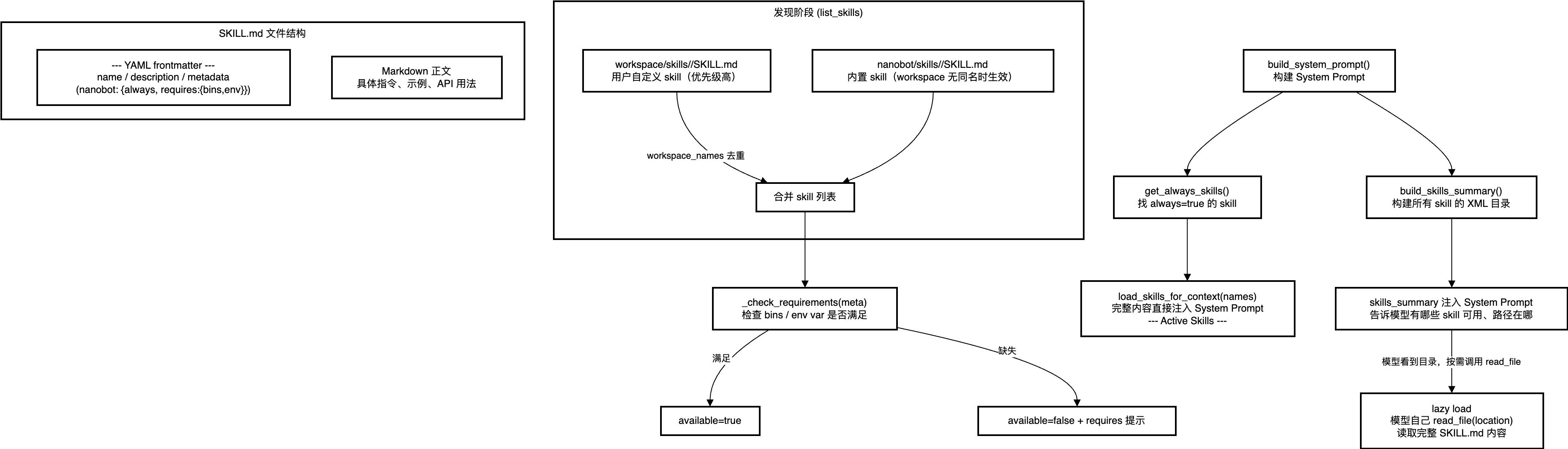
阶段一:发现
def list_skills(self, filter_unavailable: bool = True) -> list[dict[str, str]]:
  """
        List all available skills.

        Args:
            filter_unavailable: If True, filter out skills with unmet requirements.

        Returns:
            List of skill info dicts with 'name', 'path', 'source'.
        """
  skills = self._skill_entries_from_dir(self.workspace_skills, "workspace")
  workspace_names = {entry["name"] for entry in skills}
  if self.builtin_skills and self.builtin_skills.exists():
    skills.extend(
      self._skill_entries_from_dir(self.builtin_skills, "builtin", skip_names=workspace_names)
    )

    if filter_unavailable:
      return [skill for skill in skills if self._check_requirements(self._get_skill_meta(skill["name"]))]
    return skills
阶段二:可用性过滤
def _check_requirements(self, skill_meta: dict) -> bool:
        """Check if skill requirements are met (bins, env vars)."""
        requires = skill_meta.get("requires", {})
        required_bins = requires.get("bins", [])
        required_env_vars = requires.get("env", [])
        return all(shutil.which(cmd) for cmd in required_bins) and all(
            os.environ.get(var) for var in required_env_vars
        )
阶段三:注入System Prompt
def build_system_prompt(self, skill_names: list[str] | None = None) -> str:
        """Build the system prompt from identity, bootstrap files, memory, and skills."""
        parts = [self._get_identity()]

        bootstrap = self._load_bootstrap_files()
        if bootstrap:
            parts.append(bootstrap)

        memory = self.memory.get_memory_context()
        if memory:
            parts.append(f"# Memory\n\n{memory}")

        always_skills = self.skills.get_always_skills()
        if always_skills:
            always_content = self.skills.load_skills_for_context(always_skills)
            if always_content:
                parts.append(f"# Active Skills\n\n{always_content}")

        skills_summary = self.skills.build_skills_summary()
        if skills_summary:
            parts.append(render_template("agent/skills_section.md", skills_summary=skills_summary))

        return "\n\n---\n\n".join(parts)
四、记忆系统
4.1 两层结构
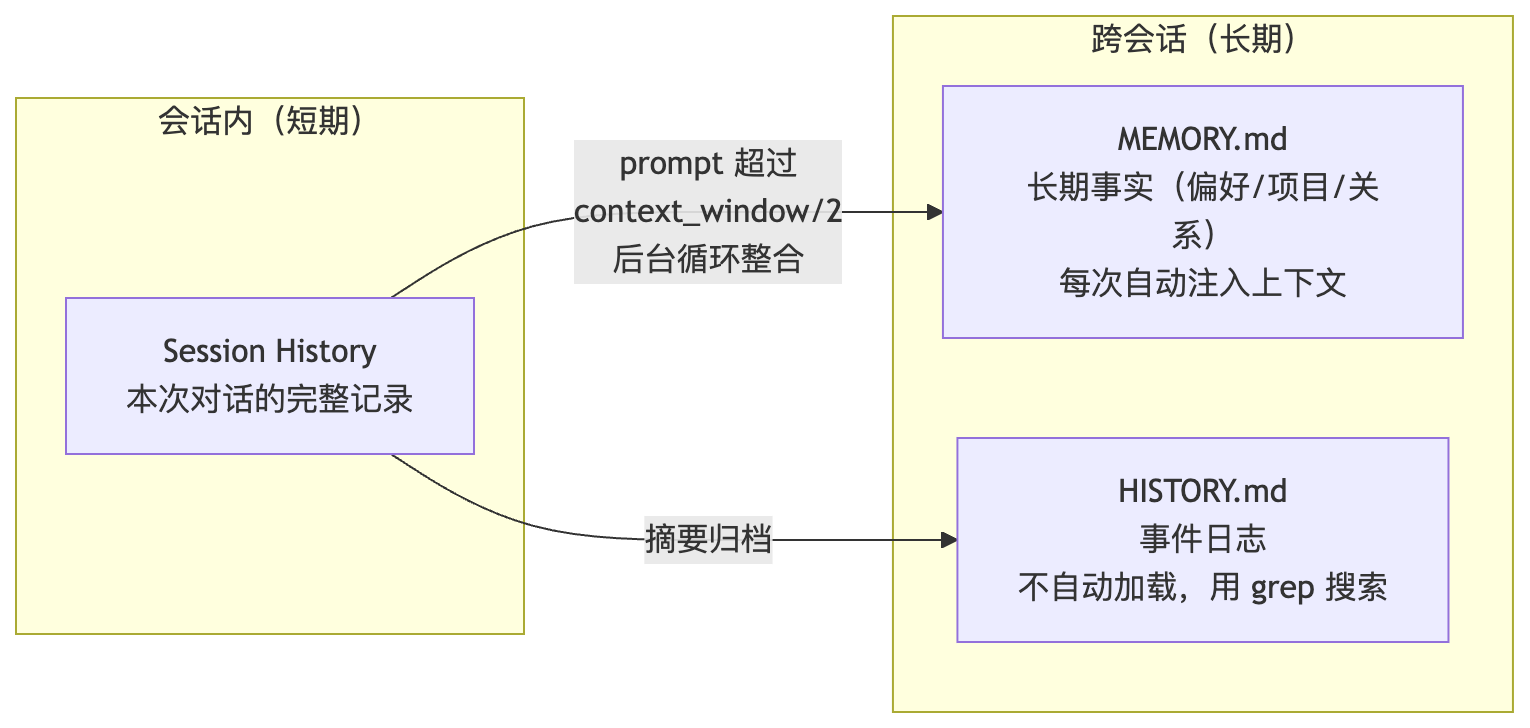
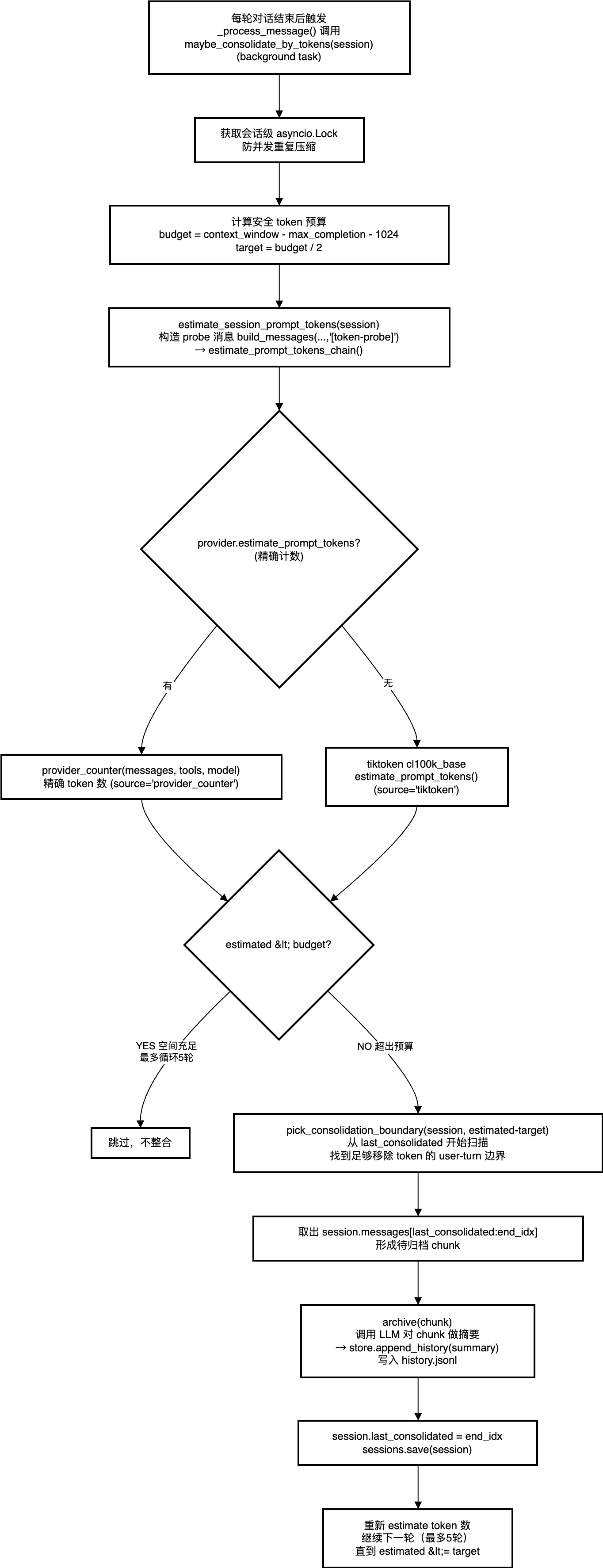
MemoryStore 的核心是用虚拟工具调用替代自由文本解析来做整合:
# nanobot/agent/memory.py

_SAVE_MEMORY_TOOL = [{
    "type": "function",
    "function": {
        "name": "save_memory",
        "description": "Save the memory consolidation result to persistent storage.",
        "parameters": {
            "type": "object",
            "properties": {
                "history_entry": {
                    "type": "string",
                    "description": "A paragraph summarizing key events. "
                    "Start with [YYYY-MM-DD HH:MM].",
                },
                "memory_update": {
                    "type": "string",
                    "description": "Full updated long-term memory as markdown. "
                    "Include all existing facts plus new ones.",
                },
            },
            "required": ["history_entry", "memory_update"],
        },
    },
}]
工具调用走的是 JSON schema 约束,几乎所有支持 function calling 的模型都能可靠地填参数,但如果让不同模型稳定输出特定格式的自由文本,在工程上是个噩梦。
4.2 基于token估算的整合触发
整合不是按消息条数触发的,而是基于token 估算。MemoryConsolidator 会在每次对话结束后检查当前 prompt 大小,超过 context_window 的一半就开始归档:
# nanobot/agent/memory.py — Consolidator

class Consolidator:
    _MAX_CONSOLIDATION_ROUNDS = 5

    async def maybe_consolidate_by_tokens(self, session: Session) -> None:
        """循环归档旧消息,直到 prompt 大小 < context_window / 2"""
        for _ in range(self._MAX_CONSOLIDATION_ROUNDS):
            prompt_tokens, _ = self.estimate_session_prompt_tokens(session)
            budget = self.context_window_tokens // 2

            if prompt_tokens <= budget:
                return  # 够用了,不需要整合

            tokens_to_remove = prompt_tokens - budget
            boundary = self.pick_consolidation_boundary(session, tokens_to_remove)
            if boundary is None:
                return

            start, end = boundary
            chunk = session.messages[start:end]
            ok = await self.consolidate_messages(chunk)
            if ok:
                session.last_consolidated = end
self.sessions.save(session)-
核心逻辑:每轮估算当前 prompt 的 token 数,如果超过 context_window 的一半,就找到最早的一批用户轮次归档。循环最多跑 5 轮,确保 prompt 大小回到安全范围。
-
pick_consolidation_boundary() 会在 user 轮次的边界处切割,避免把一次完整的工具调用链拦腰截断。
4.3 整合
async def archive(self, messages: list[dict]) -> bool:
        """Summarize messages via LLM and append to history.jsonl.

        Returns True on success (or degraded success), False if nothing to do.
        """
        if not messages:
            return False
        try:
            formatted = MemoryStore._format_messages(messages)
            response = await self.provider.chat_with_retry(
                model=self.model,
                messages=[
                    {
                        "role": "system",
                        "content": render_template(
                            "agent/consolidator_archive.md",
                            strip=True,
                        ),
                    },
                    {"role": "user", "content": formatted},
                ],
                tools=None,
                tool_choice=None,
            )
            summary = response.content or "[no summary]"
            self.store.append_history(summary)
            return True
        except Exception:
            logger.warning("Consolidation LLM call failed, raw-dumping to history")
            self.store.raw_archive(messages)
            return True
这里用了 tool_choice 强制 LLM 必须调用 save_memory——如果提供商不支持tool_choice,会自动降级为不带约束的调用。连续失败 3 次后,会触发 _raw_archive() 直接把原始消息 dump 进 HISTORY.md,确保消息不会丢失。会话结束后,记忆系统还提供了一个手动重置的入口:/new 指令调用 archive_messages() 把当前会话全部归档进 HISTORY.md,然后清空 session。记忆完整保留,上下文窗口重新归零——相当于开启一段新对话,但过去的所有经历都还在。
五、Cron 与 Heartbeat
openclaw之所以最让我们兴奋震惊的,莫过于其主动性,核心就在于cron调度和heartbeat自检。
Cron:精准定时
支持三种调度模式:
# 一次性
CronSchedule(kind="at", at_ms=1711234567000)

# 固定间隔
CronSchedule(kind="every", every_ms=1_200_000)   # 每 20 分钟

# 标准 cron 表达式,支持 IANA 时区
CronSchedule(kind="cron", expr="0 9 * * 1-5", tz="Asia/Shanghai")
调度策略是动态定时器,不是轮询:
# nanobot/cron/service.py

def _get_next_wake_ms(self) -> int | None:
        """Get the earliest next run time across all jobs."""
        if not self._store:
            return None
        times = [j.state.next_run_at_ms for j in self._store.jobs
                 if j.enabled and j.state.next_run_at_ms]
        return min(times) if times else None

def _arm_timer(self) -> None:
        """Schedule the next timer tick."""
        if self._timer_task:
            self._timer_task.cancel()

        next_wake = self._get_next_wake_ms()
        if not next_wake or not self._running:
            return

        delay_ms = max(0, next_wake - _now_ms())
        delay_s = delay_ms / 1000

        async def tick():
            await asyncio.sleep(delay_s)
            if self._running:
                await self._on_timer()

        self._timer_task = asyncio.create_task(tick())
计算所有 job 中最近的下一次触发时间,asyncio.sleep() 精确等到那一刻,执行后重新计算。CPU 占用接近零。jobs 存储在 workspace/cron/jobs.json 并监听 mtime——外部手动改文件后,下次定时器触发时自动 reload。
Heartbeat:两阶段自检
每 30 分钟唤醒 Agent 看一眼 HEARTBEAT.md(用户维护的后台任务清单)。
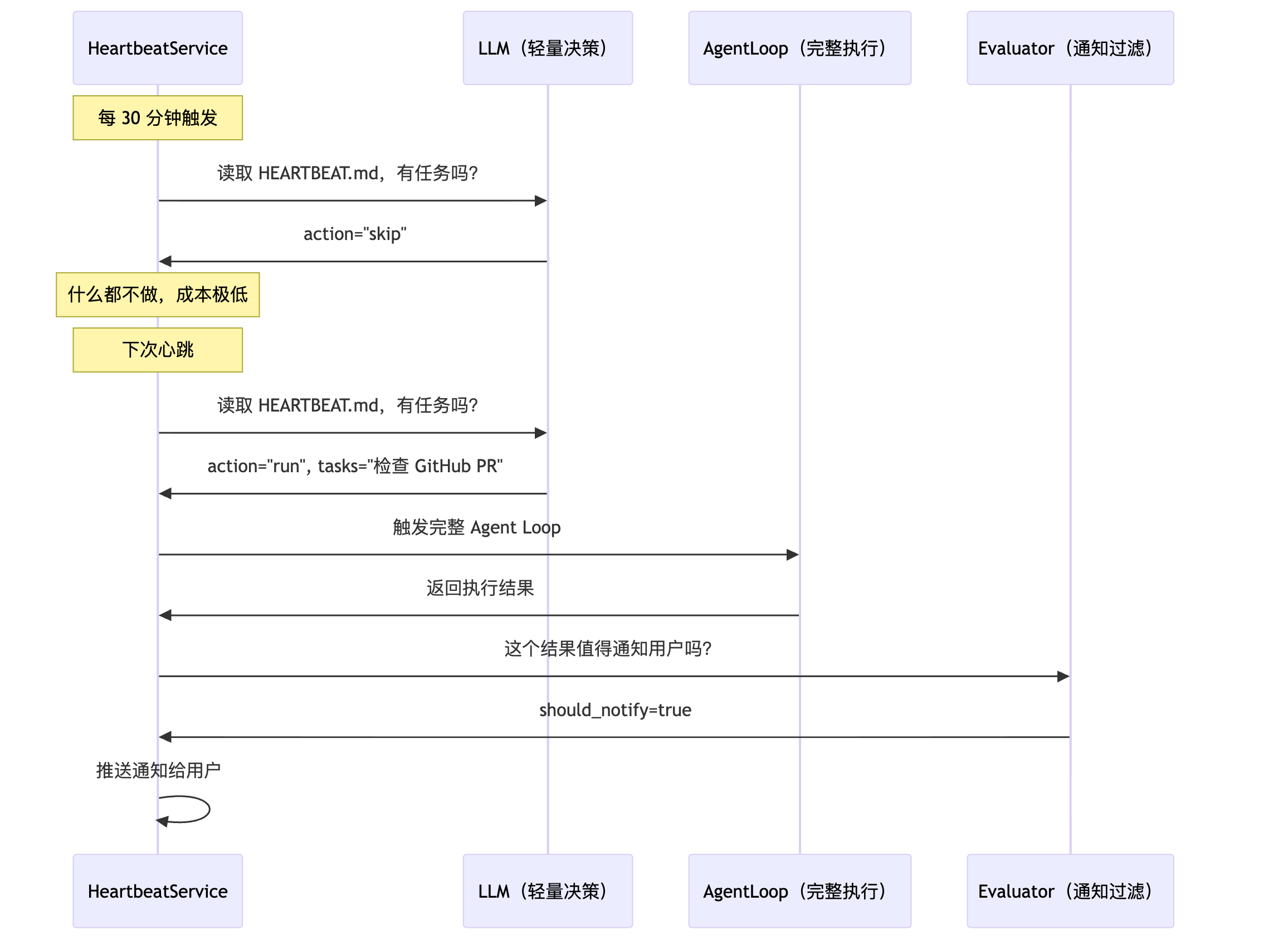
Phase 1 同样用虚拟工具调用做决策,Phase 2 执行完后还多了一步——通知评估:
# nanobot/heartbeat/service.py

async def _tick(self) -> None:
        """Execute a single heartbeat tick."""
        from nanobot.utils.evaluator import evaluate_response

        content = self._read_heartbeat_file()
        if not content:
            logger.debug("Heartbeat: HEARTBEAT.md missing or empty")
            return

        logger.info("Heartbeat: checking for tasks...")

        try:
            action, tasks = await self._decide(content)

            if action != "run":
                logger.info("Heartbeat: OK (nothing to report)")
                return

            logger.info("Heartbeat: tasks found, executing...")
            if self.on_execute:
                response = await self.on_execute(tasks)

                if response:
                    should_notify = await evaluate_response(
                        response, tasks, self.provider, self.model,
                    )
                    if should_notify and self.on_notify:
                        logger.info("Heartbeat: completed, delivering response")
                        await self.on_notify(response)
                    else:
                        logger.info("Heartbeat: silenced by post-run evaluation")
        except Exception:
            logger.exception("Heartbeat execution failed")
Phase 3 是 evaluator 模块,又一个虚拟工具调用——决定执行结果是否值得打扰用户:
# nanobot/utils/evaluator.py

_EVALUATE_TOOL = [
    {
        "type": "function",
        "function": {
            "name": "evaluate_notification",
            "description": "Decide whether the user should be notified about this background task result.",
            "parameters": {
                "type": "object",
                "properties": {
                    "should_notify": {
                        "type": "boolean",
                        "description": "true = result contains actionable/important info the user should see; false = routine or empty, safe to suppress",
                    },
                    "reason": {
                        "type": "string",
                        "description": "One-sentence reason for the decision",
                    },
                },
                "required": ["should_notify"],
            },
        },
    }
]
这意味着,Agent 每 30 分钟检查一次后台任务,只有在执行结果确实有价值时才发通知。"服务器状态正常,没有新 PR"这种结果会被静默吞掉,不会在凌晨 3 点弹一条无用消息吵醒你。失败时默认通知(return True),确保重要消息不会被误吞。
六、Subagent
有些任务太耗时,或者需要并行。主 Agent 可以 spawn 子 Agent 在后台跑:
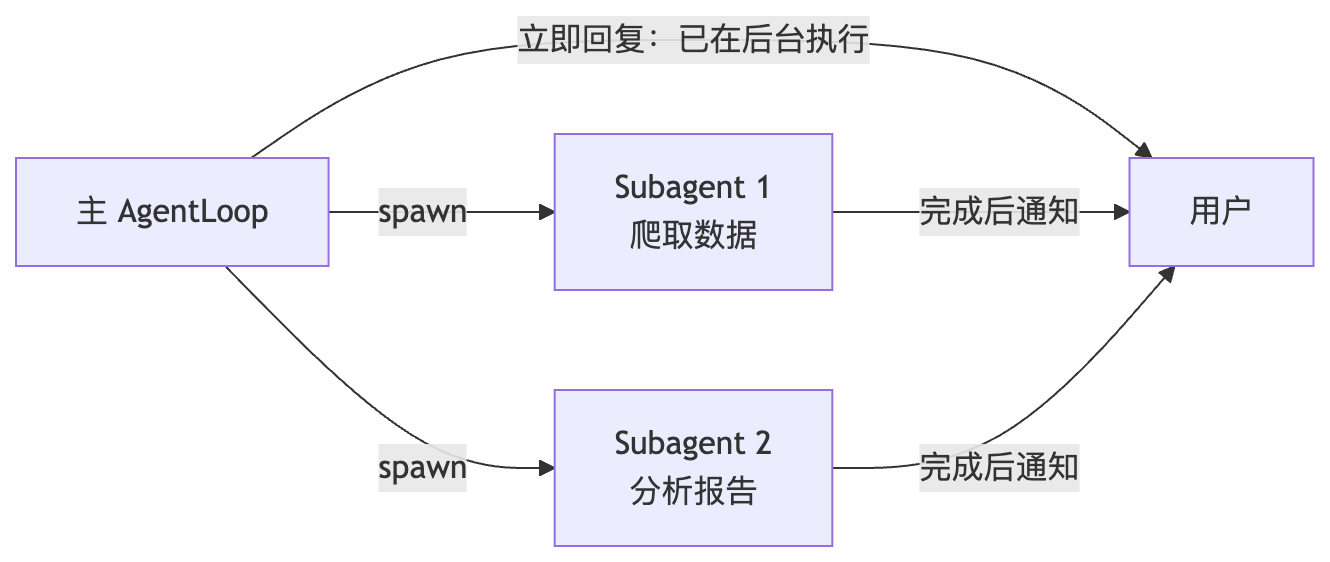
# nanobot/agent/subagent.py

async def spawn(
        self,
        task: str,
        label: str | None = None,
        origin_channel: str = "cli",
        origin_chat_id: str = "direct",
        session_key: str | None = None,
    ) -> str:
        """Spawn a subagent to execute a task in the background."""
        task_id = str(uuid.uuid4())[:8]
        display_label = label or task[:30] + ("..." if len(task) > 30 else "")
        origin = {"channel": origin_channel, "chat_id": origin_chat_id}

        bg_task = asyncio.create_task(
            self._run_subagent(task_id, task, display_label, origin)
        )
        self._running_tasks[task_id] = bg_task
        if session_key:
            self._session_tasks.setdefault(session_key, set()).add(task_id)
子 Agent 有自己的 ToolRegistry,但有两个工具被故意移除:
# _run_subagent() 中注册的工具
tools = ToolRegistry()
tools.register(ReadFileTool(...))
tools.register(WriteFileTool(...))
tools.register(EditFileTool(...))
tools.register(ListDirTool(...))
tools.register(ExecTool(...))
tools.register(WebSearchTool(...))
tools.register(WebFetchTool(...))
# 注意:没有 MessageTool(防止绕过主 Agent 直接发消息)
# 注意:没有 SpawnTool(防止子 Agent 再生子 Agent,无限递归)
完成后结果通过消息总线推回原始 channel。/stop 会通过 session → task_id 映射级联 cancel 所有子 Agent。
七、Provider 抽象
# nanobot/providers/base.py

@dataclass
class LLMResponse:
    content: str | None
    tool_calls: list[ToolCallRequest] = field(default_factory=list)
    finish_reason: str = "stop"
    usage: dict[str, int] = field(default_factory=dict)
    reasoning_content: str | None = None      # Kimi / DeepSeek-R1
    thinking_blocks: list[dict] | None = None # Anthropic extended thinking

class LLMProvider(ABC):
    @abstractmethod
    async def chat(self, messages, tools=None, model=None, ...) -> LLMResponse:
        pass
LLMResponse 把各厂商的差异(思维链字段、工具调用格式、扩展思考块)标准化成统一接口。任何新 Provider 只需实现 chat() 方法,返回一个 LLMResponse,Agent 层完全无感。

AtomGit 是由开放原子开源基金会联合 CSDN 等生态伙伴共同推出的新一代开源与人工智能协作平台。平台坚持“开放、中立、公益”的理念,把代码托管、模型共享、数据集托管、智能体开发体验和算力服务整合在一起,为开发者提供从开发、训练到部署的一站式体验。
更多推荐
 10
10 0
0- 0


 已为社区贡献7条内容

所有评论(0)