MediaPipe Hands 高版本手部检测实战:从21关键点到骨骼可视化
·
MediaPipe Hands 高版本手部检测实战:从21关键点到骨骼可视化
之前博客介绍了 dlib 68点人脸关键点检测,本篇将视角从人脸转向手部——介绍 Google MediaPipe 的 Hands 模块。相比 dlib 仅支持人脸,MediaPipe Hands 能精准输出 21个三维手部关键点,是手势识别、AR交互、疲劳检测(握拳=疲劳)等场景的核心底层能力。
一、检测流程总览
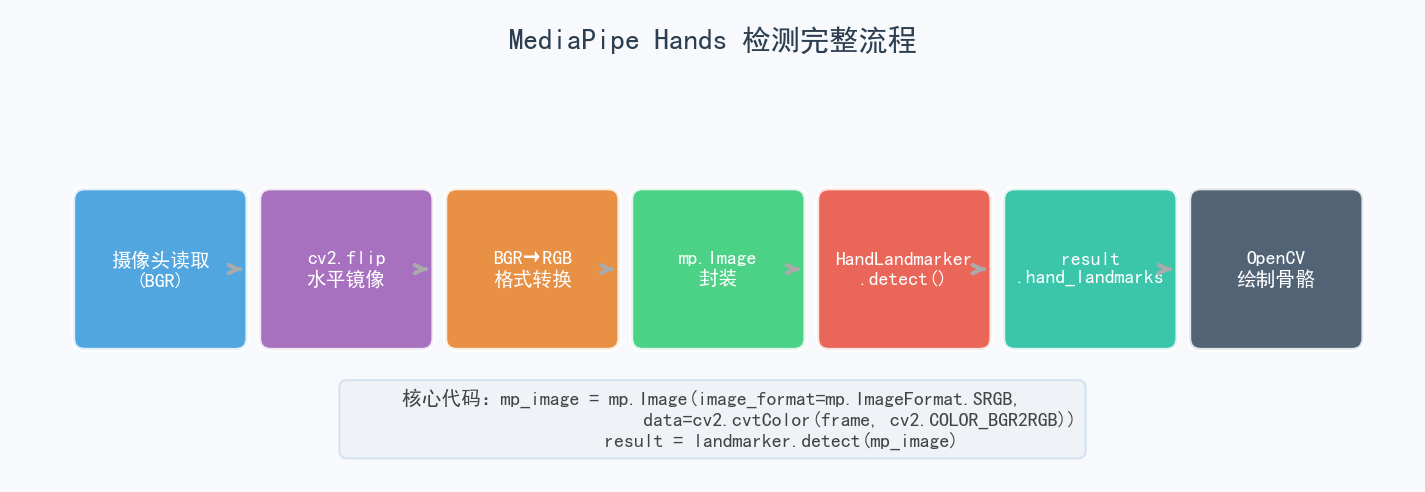
核心流程只有7步,关键在于 BGR→RGB 格式转换 和 新版 tasks.vision API 的使用:
import cv2
import mediapipe as mp

# 新版完全移除了 solutions,所有功能迁移到 tasks.vision
BaseOptions = mp.tasks.BaseOptions
HandLandmarker = mp.tasks.vision.HandLandmarker
HandLandmarkerOptions = mp.tasks.vision.HandLandmarkerOptions
VisionRunningMode = mp.tasks.vision.RunningMode

# 创建检测器(参数完全对应旧版 Hands())
options = HandLandmarkerOptions(
    base_options=BaseOptions(model_asset_path='hand_landmarker.task'),
    running_mode=VisionRunningMode.IMAGE,  # 图像模式
    num_hands=2,                           # 检测最多2只手
    min_hand_detection_confidence=0.75,    # 检测置信度
    min_hand_presence_confidence=0.75,     # 手存在置信度
    min_tracking_confidence=0.75           # 跟踪置信度
)

with HandLandmarker.create_from_options(options) as landmarker:
    cap = cv2.VideoCapture(0)
    while cap.isOpened():
        ret, frame = cap.read()
        if not ret: break

        frame = cv2.flip(frame, 1)         # 镜像翻转
        h, w = frame.shape[:2]

        # 关键:BGR转RGB,再封装为 mp.Image
        mp_image = mp.Image(
            image_format=mp.ImageFormat.SRGB,
            data=cv2.cvtColor(frame, cv2.COLOR_BGR2RGB)
        )

        # 执行检测
        result = landmarker.detect(mp_image)
二、21个关键点分布详解
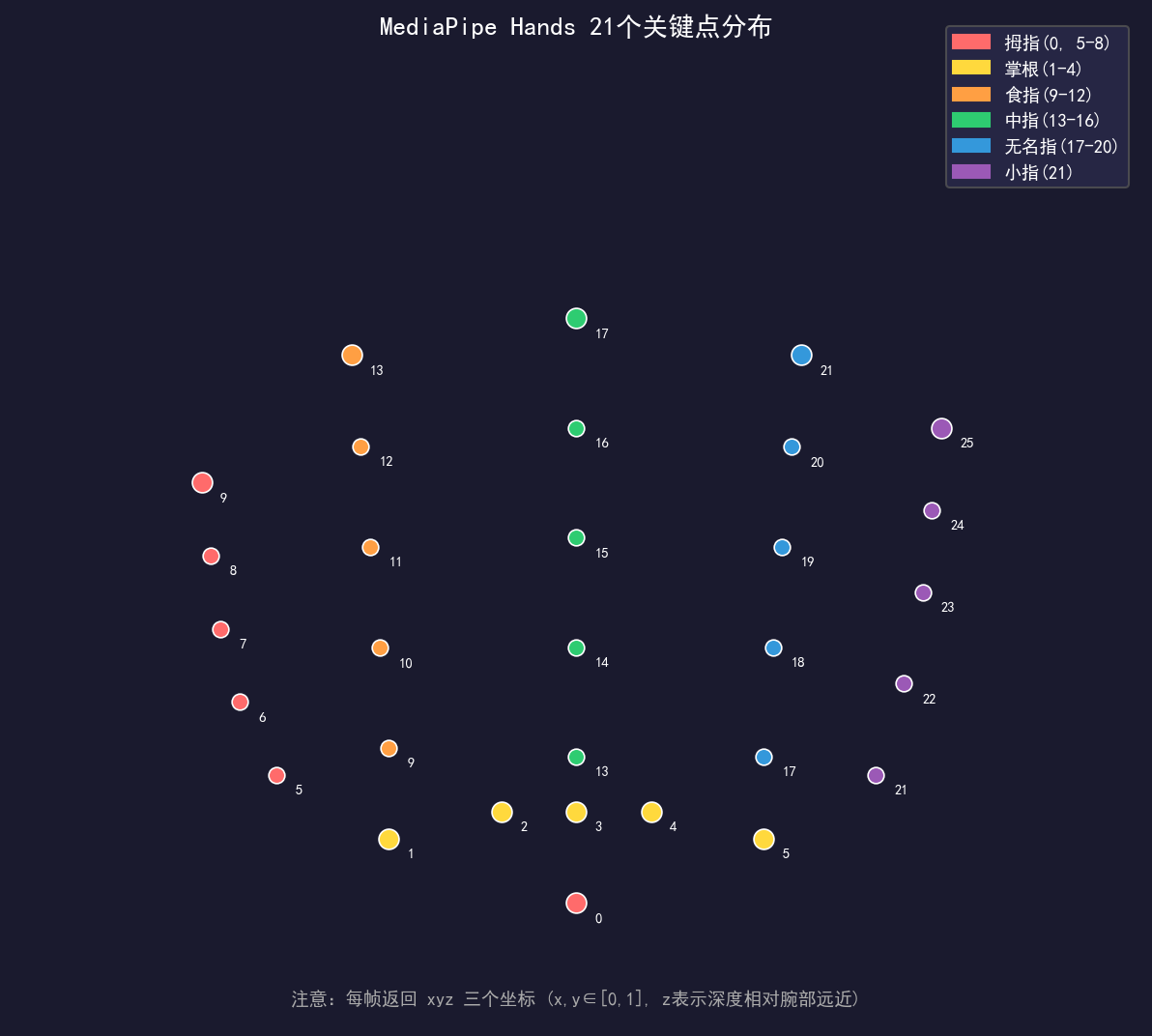
MediaPipe Hands 输出 21个三维关键点,每帧返回 (x, y, z) 三个归一化坐标:
点0   :手腕根部(手掌中心)
点1-4 :拇指(腕→指尖)
点5-8 :食指(腕→指尖)
点9-12:中指(腕→指尖)
点13-16:无名指(腕→指尖)
点17-20:小指(腕→指尖)
点5,9,13,17:四个掌根关节(连接手腕与各指)
注意:x, y ∈ [0, 1](归一化到图像宽高),z 为相对深度(正值表示朝前伸出,负值表示缩回),原点为手腕点0。
三、骨骼连接与绘制
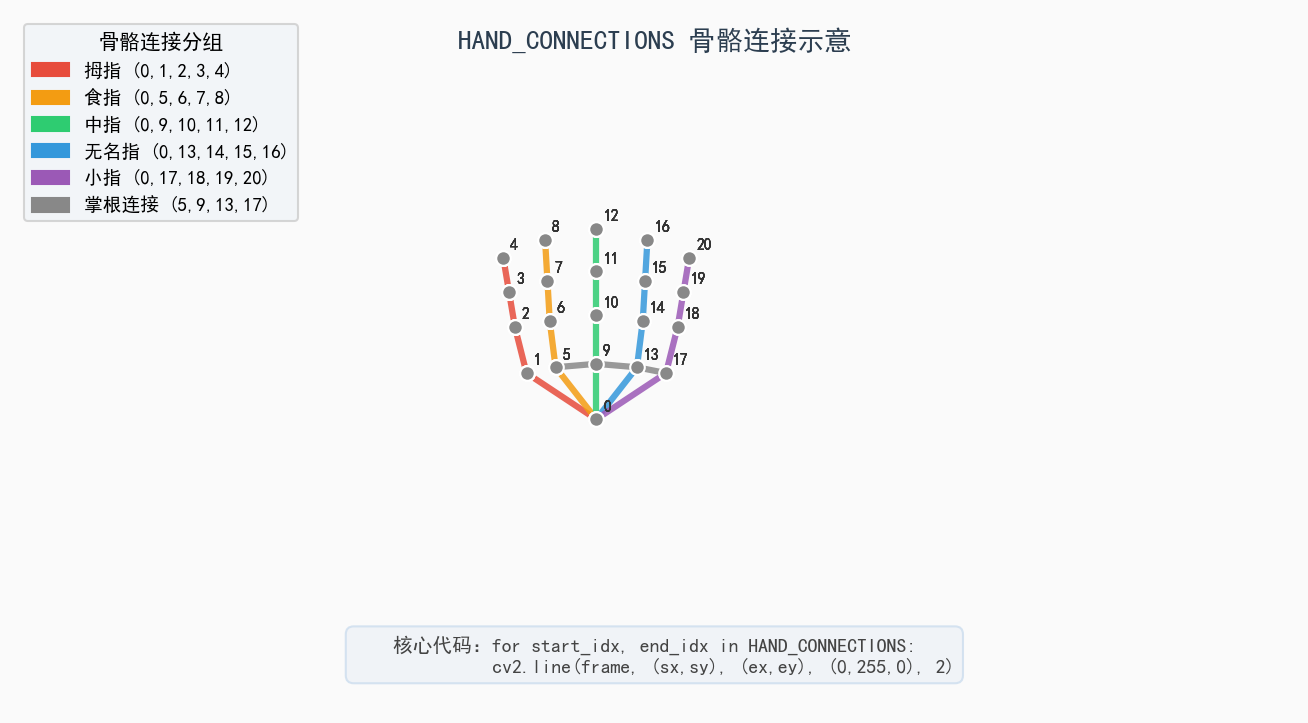
# 手部骨骼连接定义(6组共21条)
HAND_CONNECTIONS = [
    (0, 1), (1, 2), (2, 3), (3, 4),    # 拇指
    (0, 5), (5, 6), (6, 7), (7, 8),    # 食指
    (0, 9), (9, 10), (10, 11), (11, 12),  # 中指
    (0, 13), (13, 14), (14, 15), (15, 16), # 无名指
    (0, 17), (17, 18), (18, 19), (19, 20), # 小指
    (5, 9), (9, 13), (13, 17)          # 掌根连接
]

if result.hand_landmarks:
    for hand_landmarks in result.hand_landmarks:
        # 1. 绘制关键点
        for idx, landmark in enumerate(hand_landmarks):
            x = int(landmark.x * w)
            y = int(landmark.y * h)
            cv2.putText(frame, str(idx), (x, y),
                        cv2.FONT_HERSHEY_SIMPLEX, 0.8, (0, 255, 0), 2)
            cv2.circle(frame, (x, y), 5, (0, 255, 0), -1)

        # 2. 绘制骨骼连接
        for start_idx, end_idx in HAND_CONNECTIONS:
            start = hand_landmarks[start_idx]
            end = hand_landmarks[end_idx]
            sx = int(start.x * w); sy = int(start.y * h)
            ex = int(end.x * w);   ey = int(end.y * h)
            cv2.line(frame, (sx, sy), (ex, ey), (0, 255, 0), 2)
四、核心参数详解与 dlib 对比
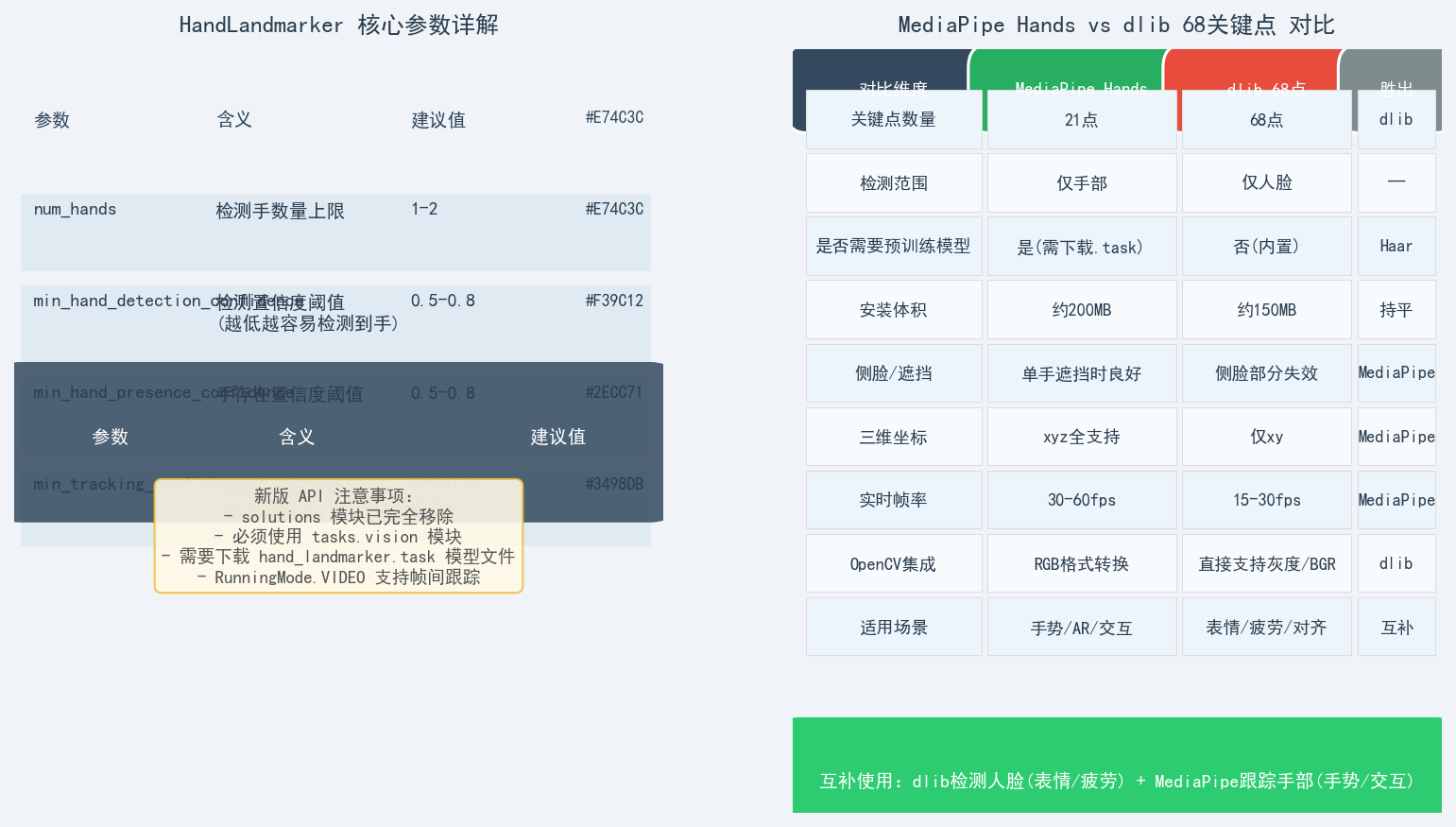
4.1 三大置信度参数
| 参数 | 作用 | 调低效果 | 调高效果 |
|---|---|---|---|
min_hand_detection_confidence |
决定是否报告检测到手 | 漏检↓,误检↑ | 漏检↑,误检↓ |
min_hand_presence_confidence |
判断手是否存在(非跟踪) | 更多手被报告 | 更少手被报告 |
min_tracking_confidence |
帧间关键点跟踪稳定性 | 快速响应但抖动 | 稳定但跟丢恢复慢 |
tracking_confidence仅在RunningMode.VIDEO下生效;在RunningMode.IMAGE下每帧重新检测。
4.2 MediaPipe Hands vs dlib 68点
| 对比维度 | MediaPipe Hands | dlib 68点 |
|---|---|---|
| 关键点数量 | 21点 | 68点 |
| 检测范围 | 仅手部 | 仅人脸 |
| 预训练模型 | 需要下载.task | 内置,无需下载 |
| 三维坐标 | xyz 全支持 | 仅 xy |
| 实时帧率 | 30-60fps | 15-30fps |
| 侧脸/遮挡 | 单手遮挡时良好 | 侧脸部分失效 |
| OpenCV 集成 | 需 RGB 转换 | 直接支持 BGR |
| 适用场景 | 手势识别/AR交互/疲劳 | 表情分析/人脸对齐/疲劳检测 |
4.3 选型建议
手势识别/AR/交互  → MediaPipe Hands(速度快、三维、21点够用)
表情/疲劳/人脸对齐  → dlib 68点(点更密、LBF跟踪稳定)

互补组合最优:dlib 做人脸检测(表情/疲劳)+ MediaPipe 跟踪手部(手势)
五、应用扩展方向
| 扩展方向 | 实现思路 | 关键点索引 |
|---|---|---|
| 手势识别 | 计算指尖与掌心(0)距离,阈值判断 | 点0 + 点4/8/12/16/20 |
| 捏合手势 | 两指间距 < 阈值 | 点4/8 |
| 疲劳驾驶 | 握拳持续时间统计 | 点4/8/12/16/20 距点0均近 |
| 虚拟鼠标 | 食指(8)作为指针 | 点8 |
| 双手交互 | 两手关键点相对位置 | 双 hand_landmarks |
与之前博客的人脸疲劳检测(EAR/MAR几何比值)类似,手部疲劳可以用握拳持续帧数来判定——思路完全一致,只是从人脸切换到手部。
六、完整代码
import cv2
import mediapipe as mp

BaseOptions = mp.tasks.BaseOptions
HandLandmarker = mp.tasks.vision.HandLandmarker
HandLandmarkerOptions = mp.tasks.vision.HandLandmarkerOptions
VisionRunningMode = mp.tasks.vision.RunningMode

options = HandLandmarkerOptions(
    base_options=BaseOptions(model_asset_path='hand_landmarker.task'),
    running_mode=VisionRunningMode.IMAGE,
    num_hands=2,
    min_hand_detection_confidence=0.75,
    min_hand_presence_confidence=0.75,
    min_tracking_confidence=0.75
)

HAND_CONNECTIONS = [
    (0, 1), (1, 2), (2, 3), (3, 4),
    (0, 5), (5, 6), (6, 7), (7, 8),
    (0, 9), (9, 10), (10, 11), (11, 12),
    (0, 13), (13, 14), (14, 15), (15, 16),
    (0, 17), (17, 18), (18, 19), (19, 20),
    (5, 9), (9, 13), (13, 17)
]

with HandLandmarker.create_from_options(options) as landmarker:
    cap = cv2.VideoCapture(0)
    while cap.isOpened():
        ret, frame = cap.read()
        if not ret: break

        frame = cv2.flip(frame, 1)
        h, w = frame.shape[:2]
        mp_image = mp.Image(
            image_format=mp.ImageFormat.SRGB,
            data=cv2.cvtColor(frame, cv2.COLOR_BGR2RGB)
        )

        result = landmarker.detect(mp_image)

        if result.hand_landmarks:
            for hand_landmarks in result.hand_landmarks:
                for idx, landmark in enumerate(hand_landmarks):
                    x, y = int(landmark.x * w), int(landmark.y * h)
                    cv2.putText(frame, str(idx), (x, y),
                                cv2.FONT_HERSHEY_SIMPLEX, 0.8, (0, 255, 0), 2)
                    cv2.circle(frame, (x, y), 5, (0, 255, 0), -1)

                for s_idx, e_idx in HAND_CONNECTIONS:
                    s = hand_landmarks[s_idx]; e = hand_landmarks[e_idx]
                    cv2.line(frame,
                             (int(s.x*w), int(s.y*h)),
                             (int(e.x*w), int(e.y*h)),
                             (0, 255, 0), 2)

        cv2.imshow('MediaPipe Hands', frame)
        if cv2.waitKey(1) & 0xFF == 27:
            break

    cap.release()
    cv2.destroyAllWindows()
七、总结
MediaPipe Hands = 高帧率(30-60fps) + 三维关键点(21点) + 实时骨骼绘制
核心变化:solutions 模块完全移除,新版必须用 tasks.vision API
上手重点:
  1. BGR→RGB 格式转换(易错点)
  2. 下载 hand_landmarker.task 模型文件
  3. 理解三个置信度参数的 trade-off
互补使用:dlib做人脸 + MediaPipe做手部 = 完整人体感知系统
配图脚本:
gen_mediapipe_hand_images.py
骼绘制
核心变化:solutions 模块完全移除,新版必须用 tasks.vision API
上手重点:
- BGR→RGB 格式转换(易错点)
- 下载 hand_landmarker.task 模型文件
- 理解三个置信度参数的 trade-off
互补使用:dlib做人脸 + MediaPipe做手部 = 完整人体感知系统
> 配图脚本:`gen_mediapipe_hand_images.py`

AtomGit 是由开放原子开源基金会联合 CSDN 等生态伙伴共同推出的新一代开源与人工智能协作平台。平台坚持“开放、中立、公益”的理念,把代码托管、模型共享、数据集托管、智能体开发体验和算力服务整合在一起,为开发者提供从开发、训练到部署的一站式体验。
更多推荐

 8
8 0
0- 0


 已为社区贡献21条内容

所有评论(0)