Win11 WSL2 Ubuntu 安装 OpenClaw
一、相关链接及安装要点
github
https://github.com/openclaw/openclaw
OpenClaw官方文档
https://docs.openclaw.ai/zh-CN
入门指南
https://docs.openclaw.ai/zh-CN/start/getting-started
Showcase
https://docs.openclaw.ai/zh-CN/start/showcase
安装
https://docs.openclaw.ai/zh-CN/install
clawhub 下载技能
https://clawhub.ai/
Win11 开启 WSL2 功能,安装 Ubuntu 24.04 LTS,
执行官方一键脚本即可完成安装:
curl -fsSL https://openclaw.ai/install.sh | bash
版本:v2026.4.11
二、前置准备工作
2.1 准备一个大模型的API Key(需要)
如:
阿里云百炼API Key
https://bailian.console.aliyun.com/
验证:curl https://dashscope.aliyuncs.com/compatible-mode/v1/models \
-H "Authorization: Bearer sk-***"
或者Deepseek的API key等
2.2 准备一个联网搜索的API Key(可选)
国内:(选这个就行)
KIMI开放平台
https://platform.moonshot.cn/
API Key:sk-***
国外:
tavily
https://www.tavily.com/
API Keys:tvly-***
三、安装记录
3.1 安装Ubuntu
uadmin@PC26:~$ wsl --install -d Ubuntu-24.04 --name openclaw --location E:\wsl2\openclaw
3.2 安装OpenClaw
1 开始安装
uadmin@PC26:~$ cd /opt
uadmin@PC26:/opt$ curl -fsSL https://openclaw.ai/install.sh | bash
🦞 OpenClaw Installer
Less clicking, more shipping, fewer "where did that file go" moments.
✓ Detected: linux
Install plan
OS: linux
Install method: npm
Requested version: latest
[1/3] Preparing environment
· Node.js not found, installing it now
· Installing Node.js via NodeSource
· Administrator privileges required; enter your password
[sudo] password for uadmin:
· Installing Linux build tools (make/g++/cmake/python3)
✓ Build tools installed
✓ Node.js v22 installed
· Active Node.js: v22.22.2 (/usr/bin/node)
· Active npm: 10.9.7 (/usr/bin/npm)
[2/3] Installing OpenClaw
✓ Git already installed
· Configuring npm for user-local installs
✓ npm configured for user installs
· Installing OpenClaw v2026.4.10
✓ OpenClaw npm package installed
✓ OpenClaw installed
[3/3] Finalizing setup
! PATH missing npm global bin dir: /home/uadmin/.npm-global/bin
This can make openclaw show as "command not found" in new terminals.
Fix (zsh: ~/.zshrc, bash: ~/.bashrc):
export PATH="/home/uadmin/.npm-global/bin:$PATH"
🦞 OpenClaw installed successfully (OpenClaw 2026.4.10 (44e5b62))!
Settled in. Time to automate your life whether you're ready or not.
· Starting setup
🦞 OpenClaw 2026.4.10 (44e5b62) — I'm the reason your shell history looks like a hacker-movie montage.
▄▄▄▄▄▄▄▄▄▄▄▄▄▄▄▄▄▄▄▄▄▄▄▄▄▄▄▄▄▄▄▄▄▄▄▄▄▄▄▄▄▄▄▄▄▄▄▄▄▄▄▄
██░▄▄▄░██░▄▄░██░▄▄▄██░▀██░██░▄▄▀██░████░▄▄▀██░███░██
██░███░██░▀▀░██░▄▄▄██░█░█░██░█████░████░▀▀░██░█░█░██
██░▀▀▀░██░█████░▀▀▀██░██▄░██░▀▀▄██░▀▀░█░██░██▄▀▄▀▄██
▀▀▀▀▀▀▀▀▀▀▀▀▀▀▀▀▀▀▀▀▀▀▀▀▀▀▀▀▀▀▀▀▀▀▀▀▀▀▀▀▀▀▀▀▀▀▀▀▀▀▀▀
🦞 OPENCLAW 🦞
┌ OpenClaw setup
│
◇ Security ─────────────────────────────────────────────────────────────────────────────────╮
│ │
│ Security warning — please read. │
│ │
│ OpenClaw is a hobby project and still in beta. Expect sharp edges. │
│ By default, OpenClaw is a personal agent: one trusted operator boundary. │
│ This bot can read files and run actions if tools are enabled. │
│ A bad prompt can trick it into doing unsafe things. │
│ │
│ OpenClaw is not a hostile multi-tenant boundary by default. │
│ If multiple users can message one tool-enabled agent, they share that delegated tool │
│ authority. │
│ │
│ If you’re not comfortable with security hardening and access control, don’t run │
│ OpenClaw. │
│ Ask someone experienced to help before enabling tools or exposing it to the internet. │
│ │
│ Recommended baseline: │
│ - Pairing/allowlists + mention gating. │
│ - Multi-user/shared inbox: split trust boundaries (separate gateway/credentials, ideally │
│ separate OS users/hosts). │
│ - Sandbox + least-privilege tools. │
│ - Shared inboxes: isolate DM sessions (`session.dmScope: per-channel-peer`) and keep │
│ tool access minimal. │
│ - Keep secrets out of the agent’s reachable filesystem. │
│ - Use the strongest available model for any bot with tools or untrusted inboxes. │
│ │
│ Run regularly: │
│ openclaw security audit --deep │
│ openclaw security audit --fix │
│ │
│ Must read: https://docs.openclaw.ai/gateway/security │
│ │
├────────────────────────────────────────────────────────────────────────────────────────────╯
│
◆ I understand this is personal-by-default and shared/multi-user use requires lock-down. Continue?
│ ○ Yes / ● No
└ 键盘左右键
2 隐私与多用户使用风险确认
本人知晓程序默认仅适配个人使用场景,共享 / 多用户使用需额外做安全锁定配置,是否继续安装?
◇ I understand this is personal-by-default and shared/multi-user use requires lock-down. Continue?
│ Yes
│
◆ Setup mode
│ ● QuickStart (Configure details later via openclaw configure.)
│ ○ Manual
└ 键盘上下键
3 安装模式选择
后续可通过 openclaw configure 命令配置详细参数
◇ Setup mode
│ QuickStart
│
◇ QuickStart ─────────────────────────╮
│ │
│ Gateway port: 18789 │
│ Gateway bind: Loopback (127.0.0.1) │
│ Gateway auth: Token (default) │
│ Tailscale exposure: Off │
│ Direct to chat channels. │
│ │
├──────────────────────────────────────╯
│
◆ Model/auth provider
│ ● Anthropic (Claude CLI + API key)
│ ○ Arcee AI (Direct API or OpenRouter)
│ ○ BytePlus (API key)
│ ○ Chutes (OAuth + API key)
│ ○ Cloudflare AI Gateway (Account ID + Gateway ID + API key)
│ ○ Copilot Proxy
│ ○ Custom Provider (Any OpenAI or Anthropic compatible endpoint)
│ ○ DeepSeek (API key)
│ ○ Fireworks (API key)
│ ○ Gemini CLI OAuth
│ ○ GitHub Copilot
│ ○ Google (Gemini API key + OAuth)
│ ○ Hugging Face (Inference API (HF token))
│ ○ Kilo Gateway (API key (OpenRouter-compatible))
│ ○ LiteLLM (Unified LLM gateway (100+ providers))
│ ○ Microsoft Foundry (Entra ID + API key)
│ ○ MiniMax (M2.7 (recommended))
│ ○ Mistral AI (API key)
│ ○ Moonshot AI (Kimi K2.5) (Kimi K2.5 + Kimi)
│ ○ Ollama (Cloud and local open models)
│ ○ OpenAI (Codex OAuth + API key)
│ ○ OpenAI Codex
│ ○ OpenCode (Shared API key for Zen + Go catalogs)
│ ○ OpenRouter (API key)
│ ○ Qianfan (API key)
│ ○ Qwen Cloud (Standard / Coding Plan (CN / Global) + multimodal roadmap)
│ ○ SGLang (Fast self-hosted server)
│ ○ StepFun (Standard / Step Plan (China / Global))
│ ○ Synthetic (Anthropic-compatible (multi-model))
│ ○ Together AI (API key)
│ ○ Venice AI (Privacy-focused (uncensored models))
│ ○ Vercel AI Gateway (API key)
│ ○ vLLM (Local/self-hosted OpenAI-compatible)
│ ○ Volcano Engine (API key)
│ ○ xAI (Grok) (API key)
│ ○ Xiaomi (API key)
│ ○ Z.AI (GLM Coding Plan / Global / CN)
│ ○ Skip for now
└
4 模型 / 身份认证服务商选择
◇ Model/auth provider
│ Qwen Cloud
│
◆ Qwen Cloud auth method
│ ● Coding Plan API Key for China (subscription) (Endpoint: coding.dashscope.aliyuncs.com)
│ ○ Coding Plan API Key for Global/Intl (subscription) (Endpoint: coding-intl.dashscope.aliyuncs.com)
│ ○ Standard API Key for China (pay-as-you-go) (Endpoint: dashscope.aliyuncs.com)
│ ○ Standard API Key for Global/Intl (pay-as-you-go) (Endpoint: dashscope-intl.aliyuncs.com)
│ ○ Back
└
5 通义千问云服务认证方式选择
◇ Qwen Cloud auth method
│ Standard API Key for China (pay-as-you-go)
│
◇ Qwen Cloud Standard (China) ────────────────────────────────╮
│ │
│ Manage API keys: https://home.qwencloud.com/api-keys │
│ Docs: https://docs.qwencloud.com/ │
│ Endpoint: dashscope.aliyuncs.com/compatible-mode/v1 │
│ Models: qwen3.6-plus, qwen3.5-plus, qwen3-coder-plus, etc. │
│ │
├──────────────────────────────────────────────────────────────╯
│
◆ Enter Qwen Cloud API key (China standard endpoint)
│ _
└
6 输入通义千问云服务 API key
◇ Enter Qwen Cloud API key (China standard endpoint)
│ sk-***
│
◇ Model configured ───────────────────────╮
│ │
│ Default model set to qwen/qwen3.5-plus │
│ │
├──────────────────────────────────────────╯
│
◆ Default model
│ ● Keep current (qwen/qwen3.5-plus)
│ ○ Enter model manually
│ ○ amazon-bedrock/anthropic.claude-3-haiku-20240307-v1:0
│ ○ amazon-bedrock/anthropic.claude-3-5-haiku-20241022-v1:0
│ ○ amazon-bedrock/anthropic.claude-haiku-4-5-20251001-v1:0
│ ○ amazon-bedrock/eu.anthropic.claude-haiku-4-5-20251001-v1:0
│ ○ amazon-bedrock/global.anthropic.claude-haiku-4-5-20251001-v1:0
│ ○ amazon-bedrock/us.anthropic.claude-haiku-4-5-20251001-v1:0
│ ○ amazon-bedrock/anthropic.claude-opus-4-20250514-v1:0
│ ○ amazon-bedrock/us.anthropic.claude-opus-4-20250514-v1:0
│ ○ amazon-bedrock/anthropic.claude-opus-4-1-20250805-v1:0
│ ○ amazon-bedrock/us.anthropic.claude-opus-4-1-20250805-v1:0
│ ○ amazon-bedrock/anthropic.claude-opus-4-5-20251101-v1:0
│ ○ amazon-bedrock/eu.anthropic.claude-opus-4-5-20251101-v1:0
│ ○ amazon-bedrock/global.anthropic.claude-opus-4-5-20251101-v1:0
│ ○ amazon-bedrock/us.anthropic.claude-opus-4-5-20251101-v1:0
│ ○ amazon-bedrock/anthropic.claude-opus-4-6-v1
│ ○ amazon-bedrock/eu.anthropic.claude-opus-4-6-v1
│ ○ amazon-bedrock/global.anthropic.claude-opus-4-6-v1
│ ○ amazon-bedrock/us.anthropic.claude-opus-4-6-v1
│ ○ amazon-bedrock/anthropic.claude-3-5-sonnet-20240620-v1:0
│ ○ amazon-bedrock/anthropic.claude-3-5-sonnet-20241022-v2:0
│ ○ amazon-bedrock/anthropic.claude-3-7-sonnet-20250219-v1:0
│ ○ amazon-bedrock/anthropic.claude-sonnet-4-20250514-v1:0
│ ○ amazon-bedrock/eu.anthropic.claude-sonnet-4-20250514-v1:0
│ ○ amazon-bedrock/global.anthropic.claude-sonnet-4-20250514-v1:0
│ ○ amazon-bedrock/us.anthropic.claude-sonnet-4-20250514-v1:0
│ ○ amazon-bedrock/anthropic.claude-sonnet-4-5-20250929-v1:0
│ ○ amazon-bedrock/eu.anthropic.claude-sonnet-4-5-20250929-v1:0
│ ○ amazon-bedrock/global.anthropic.claude-sonnet-4-5-20250929-v1:0
│ ○ amazon-bedrock/us.anthropic.claude-sonnet-4-5-20250929-v1:0
│ ○ amazon-bedrock/anthropic.claude-sonnet-4-6
│ ○ amazon-bedrock/eu.anthropic.claude-sonnet-4-6
│ ○ amazon-bedrock/global.anthropic.claude-sonnet-4-6
│ ○ amazon-bedrock/us.anthropic.claude-sonnet-4-6
│ ○ amazon-bedrock/deepseek.r1-v1:0
│ ○ amazon-bedrock/deepseek.v3-v1:0
│ ○ amazon-bedrock/deepseek.v3.2
│ ○ amazon-bedrock/mistral.devstral-2-123b
│ ○ amazon-bedrock/google.gemma-3-4b-it
│ ○ amazon-bedrock/zai.glm-4.7
│ ○ amazon-bedrock/zai.glm-4.7-flash
│ ○ amazon-bedrock/zai.glm-5
│ ○ amazon-bedrock/google.gemma-3-27b-it
│ ○ amazon-bedrock/openai.gpt-oss-safeguard-120b
│ ...
└
7 默认模型设置
选择默认,之后他提示Model not found,没关系,实际上安成功了。
之后可能通过:openclaw models 命令查看
◇ Model configured ───────────────────────╮
│ │
│ Default model set to qwen/qwen3.5-plus │
│ │
├──────────────────────────────────────────╯
│
◇ Default model
│ Keep current (qwen/qwen3.5-plus)
│
◇ Model check ───────────────────────────────────────────────────────────────────────────╮
│ │
│ Model not found: qwen/qwen3.5-plus. Update agents.defaults.model or run /models list. │
│ │
├─────────────────────────────────────────────────────────────────────────────────────────╯
│
◇ Channel status ──────────────────────────────────────╮
│ │
│ LINE: needs token + secret │
│ Accounts: 0 │
│ Discord: needs token │
│ iMessage: needs setup │
│ imsg: missing (imsg) │
│ Signal: needs setup │
│ signal-cli: missing (signal-cli) │
│ Slack: needs tokens │
│ Telegram: needs token │
│ WhatsApp: not linked │
│ QQ Bot: needs AppID + AppSecret │
│ Google Chat: needs service account │
│ MS Teams: needs app credentials │
│ Mattermost: needs token + url │
│ Nextcloud Talk: needs setup │
│ Feishu: needs app credentials │
│ Matrix: needs homeserver + access token or password │
│ BlueBubbles: needs setup │
│ IRC: needs host + nick │
│ Zalo: needs token │
│ Zalo Personal: needs QR login │
│ Synology Chat: needs token + incoming webhook │
│ Accounts: 0 │
│ Tlon: needs setup │
│ Nostr: needs private key │
│ Relays: 2 │
│ Twitch: not configured │
│ Twitch: installed │
│ │
├───────────────────────────────────────────────────────╯
│
◇ How channels work ───────────────────────────────────────────────────────────────────────╮
│ │
│ DM security: default is pairing; unknown DMs get a pairing code. │
│ Approve with: openclaw pairing approve <channel> <code> │
│ Public DMs require dmPolicy="open" + allowFrom=["*"]. │
│ Multi-user DMs: run: openclaw config set session.dmScope "per-channel-peer" (or │
│ "per-account-channel-peer" for multi-account channels) to isolate sessions. │
│ Docs: channels/pairing │
│ │
│ Feishu: 飞书/Lark enterprise messaging with doc/wiki/drive tools. │
│ Google Chat: Google Workspace Chat app with HTTP webhook. │
│ Nostr: Decentralized protocol; encrypted DMs via NIP-04. │
│ Microsoft Teams: Teams SDK; enterprise support. │
│ Mattermost: self-hosted Slack-style chat; install the plugin to enable. │
│ Nextcloud Talk: Self-hosted chat via Nextcloud Talk webhook bots. │
│ Matrix: open protocol; install the plugin to enable. │
│ BlueBubbles: iMessage via the BlueBubbles mac app + REST API. │
│ LINE: LINE Messaging API webhook bot. │
│ Zalo: Vietnam-focused messaging platform with Bot API. │
│ Zalo Personal: Zalo personal account via QR code login. │
│ Synology Chat: Connect your Synology NAS Chat to OpenClaw with full agent capabilities. │
│ Tlon: decentralized messaging on Urbit; install the plugin to enable. │
│ Discord: very well supported right now. │
│ iMessage: this is still a work in progress. │
│ IRC: classic IRC networks with DM/channel routing and pairing controls. │
│ QQ Bot: connect to QQ via official QQ Bot API with group chat and direct message │
│ support. │
│ Signal: signal-cli linked device; more setup (David Reagans: "Hop on Discord."). │
│ Slack: supported (Socket Mode). │
│ Telegram: simplest way to get started — register a bot with @BotFather and get going. │
│ Twitch: Twitch chat integration │
│ WhatsApp: works with your own number; recommend a separate phone + eSIM. │
│ │
├───────────────────────────────────────────────────────────────────────────────────────────╯
│
◆ Select channel (QuickStart)
│ ○ Feishu/Lark (飞书) (needs app creds)
│ ○ Google Chat (Chat API)
│ ○ Nostr
│ ○ Microsoft Teams (Bot Framework)
│ ○ Mattermost (plugin)
│ ○ Nextcloud Talk (self-hosted)
│ ○ Matrix (plugin)
│ ○ BlueBubbles (macOS app)
│ ○ LINE (Messaging API)
│ ○ Zalo (Bot API)
│ ● Zalo (Personal Account) (recommended · QR login)
│ ○ Synology Chat (Webhook)
│ ○ Tlon (Urbit)
│ ○ Discord (Bot API)
│ ○ iMessage (imsg)
│ ○ IRC (Server + Nick)
│ ○ QQ Bot (needs AppID + AppSecret)
│ ○ Signal (signal-cli)
│ ○ Slack
│ ○ Telegram (Bot API)
│ ○ Twitch (Chat)
│ ○ WhatsApp (QR link)
│ ○ Skip for now
└
8 消息接入渠道选择(快速启动模式)
◇ Select channel (QuickStart)
│ Skip for now
Updated ~/.openclaw/openclaw.json
Workspace OK: ~/.openclaw/workspace
Sessions OK: ~/.openclaw/agents/main/sessions
│
◇ Web search ─────────────────────────────────────────────────────────────────╮
│ │
│ Web search lets your agent look things up online. │
│ Choose a provider. Some providers need an API key, and some work key-free. │
│ Docs: https://docs.openclaw.ai/tools/web │
│ │
├──────────────────────────────────────────────────────────────────────────────╯
│
◆ Search provider
│ ○ Brave Search
│ ○ Exa Search
│ ○ Firecrawl Search
│ ○ Gemini (Google Search)
│ ○ Grok (xAI)
│ ○ Kimi (Moonshot) (Requires Moonshot / Kimi API key · Moonshot web search)
│ ● Ollama Web Search (Local Ollama host · requires ollama signin · key-free)
│ ○ Perplexity Search
│ ○ SearXNG Search
│ ○ Tavily Search (Structured results with domain filters and AI answer summaries)
│ ○ Skip for now
└
9 联网搜索服务商选择
◇ Search provider
│ Kimi (Moonshot)
│
◆ Moonshot / Kimi API key
│ sk-...
└
10 输入月之暗面 / Kimi API key
◇ Moonshot / Kimi API key
│ sk-***
│
◆ Kimi API region
│ ● Moonshot API key (.ai) (api.moonshot.ai)
│ ○ Moonshot API key (.cn)
└
11 Kimi API 接入区域选择
◇ Kimi API region
│ Moonshot API key (.cn)
│
◆ Kimi web search model
│ ● Use default (moonshot/kimi-k2.5)
│ ○ Enter model manually
│ ○ moonshot/kimi-k2.5
└
12 Kimi 联网搜索模型设置
◇ Kimi web search model
│ Use default (moonshot/kimi-k2.5)
│
◇ Skills status ─────────────╮
│ │
│ Eligible: 7 │
│ Missing requirements: 38 │
│ Unsupported on this OS: 7 │
│ Blocked by allowlist: 0 │
│ │
├─────────────────────────────╯
│
◆ Configure skills now? (recommended)
│ ● Yes / ○ No
└
13 立即配置技能吗?
◇ Configure skills now? (recommended)
│ Yes
│
◆ Install missing skill dependencies
│ ◻ Skip for now (Continue without installing dependencies)
│ ◻ 🔐 1password
│ ◻ 📰 blogwatcher
│ ◻ 🫐 blucli
│ ◻ 📸 camsnap
│ ◻ 🧩 clawhub
│ ◻ 🛌 eightctl
│ ◻ ✨ gemini
│ ◻ 🧩 gh-issues
│ ◻ 🧲 gifgrep
│ ◻ 🐙 github
│ ◻ 🎮 gog
│ ◻ 📍 goplaces
│ ◻ 📧 himalaya
│ ◻ 📦 mcporter
│ ◻ 📄 nano-pdf
│ ◻ 💎 obsidian
│ ◻ 🎤 openai-whisper
│ ◻ 💡 openhue
│ ◻ 🧿 oracle
│ ◻ 🛵 ordercli
│ ◻ 🔊 sag
│ ◻ 📜 session-logs
│ ◻ 🌊 songsee
│ ◻ 🔊 sonoscli
│ ◻ 🧾 summarize
│ ◻ 📋 trello
│ ◻ 🎬 video-frames
│ ◻ 📱 wacli
│ ◻ 🐦 xurl
└
└ Please select at least one option.
Press space to select, enter to submit
14 安装缺失的技能依赖项
优先选了这两个
│ ◼ 📜 session-logs (Search and analyze your own session logs (older/parent conversations) using jq. — Install…)
│ ◼ 🧾 summarize (Summarize or extract text/transcripts from URLs, podcasts, and local files (great fallbac…)
可选这两个
│ ◼ 📰 blogwatcher (Monitor blogs and RSS/Atom feeds for updates using the blogwatcher CLI. — Install blogwat…)
│ ◼ 📄 nano-pdf (Edit PDFs with natural-language instructions using the nano-pdf CLI. — Install nano-pdf (…)
---------------------------------------------------------------------------------------
◇ Install missing skill dependencies
│ 📰 blogwatcher, 📄 nano-pdf, 📜 session-logs, 🧾 summarize
│
◇ Homebrew recommended ──────────────────────────────────────────────────────────╮
│ │
│ Many skill dependencies are shipped via Homebrew. │
│ Without brew, you'll need to build from source or download releases manually. │
│ │
├─────────────────────────────────────────────────────────────────────────────────╯
│
◆ Show Homebrew install command?
│ ● Yes / ○ No
└
15 显示 Homebrew 安装命令吗?
Homebrew(brew)是给 macOS 用的,可能应该选No吧
◇ Show Homebrew install command?
│ Yes
│
◇ Homebrew install ─────────────────────────────────────────────────────╮
│ │
│ Run: │
│ /bin/bash -c "$(curl -fsSL │
│ https://raw.githubusercontent.com/Homebrew/install/HEAD/install.sh)" │
│ │
├────────────────────────────────────────────────────────────────────────╯
│
◇ Install failed: session-logs — brew not installed — Homebrew is not installed. Install it from https://brew.sh or install "jq" manually using your system package manager …
Tip: run `openclaw doctor` to review skills + requirements.
Docs: https://docs.openclaw.ai/skills
│
◇ Install failed: summarize — brew not installed — Homebrew is not installed. Install it from https://brew.sh or install "steipete/tap/summarize" manually using your sys…
Tip: run `openclaw doctor` to review skills + requirements.
Docs: https://docs.openclaw.ai/skills
│
◇ Install failed: nano-pdf — uv not installed — install manually: https://docs.astral.sh/uv/getting-started/installation/
Tip: run `openclaw doctor` to review skills + requirements.
Docs: https://docs.openclaw.ai/skills
│
◇ Install failed: blogwatcher (exit 1) — go not installed — apt-get is available but sudo is not usable (missing or requires a password). Install manually: https://go.dev/doc/insta…
sudo: a password is required
Tip: run `openclaw doctor` to review skills + requirements.
Docs: https://docs.openclaw.ai/skills
│
◆ Set GOOGLE_PLACES_API_KEY for goplaces?
│ ○ Yes / ● No
└
选的4个技能都安装失败了,没关系,之后再手动单独安装。
OpenClaw 安装自带捆绑技能,summarize,session-logs
也可以考虑先不选。之后再安。
16 设置其他各种API key?
是否为 goplaces 地点服务插件设置 GOOGLE_PLACES_API_KEY?
◇ Set GOOGLE_PLACES_API_KEY for goplaces?
│ No
│
是否为 Notion 笔记插件设置 NOTION_API_KEY?
◆ Set NOTION_API_KEY for notion?
│ ○ Yes / ● No
└
◇ Set NOTION_API_KEY for notion?
│ No
│
是否为 OpenAI Whisper 语音转写 API 插件设置 OPENAI_API_KEY?
◇ Set OPENAI_API_KEY for openai-whisper-api?
│ No
│
是否为 sag 语音合成插件设置 ELEVENLABS_API_KEY?
◇ Set ELEVENLABS_API_KEY for sag?
│ No
│
◇ Hooks ──────────────────────────────────────────────────────────────────╮
│ │
│ Hooks let you automate actions when agent commands are issued. │
│ Example: Save session context to memory when you issue /new or /reset. │
│ │
│ Learn more: https://docs.openclaw.ai/automation/hooks │
│ │
├──────────────────────────────────────────────────────────────────────────╯
│
◆ Enable hooks?
│ ◻ Skip for now
│ ◻ 🚀 boot-md (Run BOOT.md on gateway startup)
│ ◻ 📎 bootstrap-extra-files (Inject additional workspace bootstrap files via glob/path patterns)
│ ◻ 📝 command-logger (Log all command events to a centralized audit file)
│ ◻ 💾 session-memory (Save session context to memory when /new or /reset command is issued)
└
17 是否启用钩子?
选择是否启用机器人的钩子(生命周期触发)功能
以后可选
command-logger
session-memory
(后来我发现选了Skip for now,也都启用了。)
查看钩子列表

openclaw hooks list

# 启用命令日志钩子
openclaw hooks enable command-logger

# 启用会话记忆钩子
openclaw hooks enable session-memory
◇ Enable hooks?
│ Skip for now
Config overwrite: /home/uadmin/.openclaw/openclaw.json (sha256 e972b9d15299bb8c3bfc27312103e9ff7f0d5c6917f62fa297ea66981db6f8f1 -> 224f1b34eaf461ca3237043525a8b7f0ca20bea10e65919c8d5c009c79893164, backup=/home/uadmin/.openclaw/openclaw.json.bak)
│
◇ Systemd ────────────────────────────────────────────────────────────────────────────────╮
│ │
│ Linux installs use a systemd user service by default. Without lingering, systemd stops │
│ the user session on logout/idle and kills the Gateway. │
│ Enabling lingering now (may require sudo; writes /var/lib/systemd/linger). │
│ │
├──────────────────────────────────────────────────────────────────────────────────────────╯
│
◇ Systemd ───────────────────────────────╮
│ │
│ Enabled systemd lingering for uadmin. │
│ │
├─────────────────────────────────────────╯
│
◇ Gateway service runtime ────────────────────────────────────────────╮
│ │
│ QuickStart uses Node for the Gateway service (stable + supported). │
│ │
├──────────────────────────────────────────────────────────────────────╯
│
◓ Installing Gateway service…
Installed systemd service: /home/uadmin/.config/systemd/user/openclaw-gateway.service
◇ Gateway service installed.
│
◇
Agents: main (default)
Heartbeat interval: 30m (main)
Session store (main): /home/uadmin/.openclaw/agents/main/sessions/sessions.json (0 entries)
│
◇ Optional apps ────────────────────────╮
│ │
│ Add nodes for extra features: │
│ - macOS app (system + notifications) │
│ - iOS app (camera/canvas) │
│ - Android app (camera/canvas) │
│ │
├────────────────────────────────────────╯
│
◇ Control UI ─────────────────────────────────────────────────────────────────────╮
│ │
│ Web UI: http://127.0.0.1:18789/ │
│ Web UI (with token): │
│ http://127.0.0.1:18789/#token=edba6358def91aa58e9006c65d80ed0e87cd091f3d3ebfa8│
│ Gateway WS: ws://127.0.0.1:18789 │
│ Gateway: reachable │
│ Docs: https://docs.openclaw.ai/web/control-ui │
│ │
├──────────────────────────────────────────────────────────────────────────────────╯
│
◇ Start TUI (best option!) ─────────────────────────────────╮
│ │
│ This is the defining action that makes your agent you. │
│ Please take your time. │
│ The more you tell it, the better the experience will be. │
│ We will send: "Wake up, my friend!" │
│ │
├────────────────────────────────────────────────────────────╯
│
◇ Token ────────────────────────────────────────────────────────────────────────────────────╮
│ │
│ Gateway token: shared auth for the Gateway + Control UI. │
│ Stored in: $OPENCLAW_CONFIG_PATH (default: ~/.openclaw/openclaw.json) under │
│ gateway.auth.token, or in OPENCLAW_GATEWAY_TOKEN. │
│ View token: openclaw config get gateway.auth.token │
│ Generate token: openclaw doctor --generate-gateway-token │
│ Web UI keeps dashboard URL tokens in memory for the current tab and strips them from the │
│ URL after load. │
│ Open the dashboard anytime: openclaw dashboard --no-open │
│ If prompted: paste the token into Control UI settings (or use the tokenized dashboard │
│ URL). │
│ │
├────────────────────────────────────────────────────────────────────────────────────────────╯
│
◆ How do you want to hatch your bot?
│ ● Hatch in TUI (recommended)
│ ○ Open the Web UI
│ ○ Do this later
└
18 机器人启动方式选择
◇ How do you want to hatch your bot?
│ Open the Web UI
│
◇ Dashboard ready ────────────────────────────────────────────────────────────────╮
│ │
│ Dashboard link (with token): │
│ http://127.0.0.1:18789/#token=edba6358def91aa58e9006c65d80ed0e87cd091f3d3ebfa8│
│ Copy/paste this URL in a browser on this machine to control OpenClaw. │
│ No GUI detected. Open from your computer: │
│ ssh -N -L 18789:127.0.0.1:18789 uadmin@<host> │
│ Then open: │
│ http://localhost:18789/ │
│ http://localhost:18789/#token=edba6358def91aa58e9006c65d80ed0e87cd091f3d3ebfa8│
│ Docs: │
│ https://docs.openclaw.ai/gateway/remote │
│ https://docs.openclaw.ai/web/control-ui │
│ │
├──────────────────────────────────────────────────────────────────────────────────╯
│
◇ Workspace backup ────────────────────────────────────────╮
│ │
│ Back up your agent workspace. │
│ Docs: https://docs.openclaw.ai/concepts/agent-workspace │
│ │
├───────────────────────────────────────────────────────────╯
│
◇ Security ──────────────────────────────────────────────────────╮
│ │
│ Running agents on your computer is risky — harden your setup: │
│ https://docs.openclaw.ai/security │
│ │
├─────────────────────────────────────────────────────────────────╯
│
◇ Shell completion ────────────────────────────────────────────────────────────────╮
│ │
│ Failed to generate completion cache. Run `openclaw completion --install` later. │
│ │
├───────────────────────────────────────────────────────────────────────────────────╯
│
◇ Web search ──────────────────────────────────────────────────────────────────╮
│ │
│ Web search is enabled, so your agent can look things up online when needed. │
│ │
│ Provider: Kimi (Moonshot) │
│ API key: stored in config. │
│ Docs: https://docs.openclaw.ai/tools/web │
│ │
├───────────────────────────────────────────────────────────────────────────────╯
│
◇ What now ─────────────────────────────────────────────────────────────╮
│ │
│ What now: https://openclaw.ai/showcase ("What People Are Building"). │
│ │
├────────────────────────────────────────────────────────────────────────╯
│
└ Onboarding complete. Use the dashboard link above to control OpenClaw.
安装完成
四、 安装验证
4.1 查看版本
uadmin@PC26:~$ openclaw --version
OpenClaw 2026.4.10 (44e5b62)
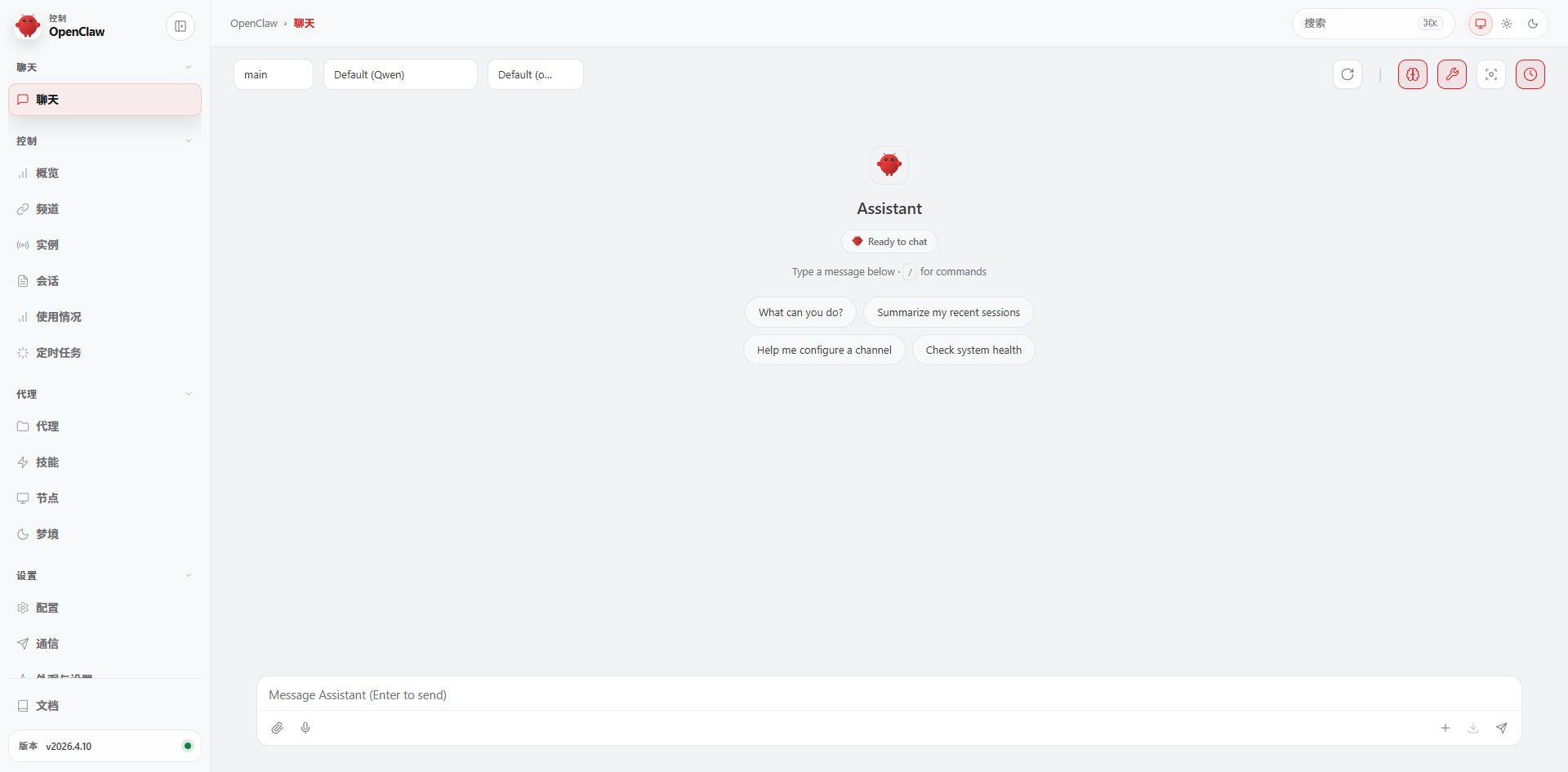
4.2 浏览器访问
http://127.0.0.1:18789/#token=edba6358def91aa58e9006c65d80ed0e87cd091f3d3ebfa8
uadmin@PC26:~$ openclaw dashboard
🦞 OpenClaw 2026.4.10 (44e5b62) — Your second brain, except this one actually remembers where you left things.
Dashboard URL: http://127.0.0.1:18789/#token=edba6358def91aa58e9006c65d80ed0e87cd091f3d3ebfa8
Copied to clipboard.
No GUI detected. Open from your computer:
ssh -N -L 18789:127.0.0.1:18789 uadmin@<host>
Then open:
http://localhost:18789/
http://localhost:18789/#token=edba6358def91aa58e9006c65d80ed0e87cd091f3d3ebfa8
Docs:
https://docs.openclaw.ai/gateway/remote
https://docs.openclaw.ai/web/control-ui
4.3 控制台
4.4 健康检查
openclaw doctor
看看有什么问题需要修复下。
4.5 配置文件
~\.openclaw\openclaw.json
五、相关命令
5.1 openclaw --help
🦞 OpenClaw 2026.4.10 (44e5b62) — I can run local, remote, or purely on vibes—results may vary with DNS.

Usage: openclaw [options] [command]

Options:
  --container <name>   Run the CLI inside a running Podman/Docker container
                       named <name> (default: env OPENCLAW_CONTAINER)
  --dev                Dev profile: isolate state under ~/.openclaw-dev, default
                       gateway port 19001, and shift derived ports
                       (browser/canvas)
  -h, --help           Display help for command
  --log-level <level>  Global log level override for file + console
                       (silent|fatal|error|warn|info|debug|trace)
  --no-color           Disable ANSI colors
  --profile <name>     Use a named profile (isolates
                       OPENCLAW_STATE_DIR/OPENCLAW_CONFIG_PATH under
                       ~/.openclaw-<name>)
  -V, --version        output the version number

Commands:
  Hint: commands suffixed with * have subcommands. Run <command> --help for details.
  acp *                Agent Control Protocol tools
  agent                Run one agent turn via the Gateway
  agents *             Manage isolated agents (workspaces, auth, routing)
  approvals *          Manage exec approvals (gateway or node host)
  backup *             Create and verify local backup archives for OpenClaw
                       state
  capability *         Run provider-backed inference commands (fallback alias:
                       infer)
  channels *           Manage connected chat channels (Telegram, Discord, etc.)
  clawbot *            Legacy clawbot command aliases
  completion           Generate shell completion script
  config *             Non-interactive config helpers
                       (get/set/unset/file/validate). Default: starts guided
                       setup.
  configure            Interactive configuration for credentials, channels,
                       gateway, and agent defaults
  cron *               Manage cron jobs via the Gateway scheduler
  daemon *             Gateway service (legacy alias)
  dashboard            Open the Control UI with your current token
  devices *            Device pairing + token management
  directory *          Lookup contact and group IDs (self, peers, groups) for
                       supported chat channels
  dns *                DNS helpers for wide-area discovery (Tailscale + CoreDNS)
  docs                 Search the live OpenClaw docs
  doctor               Health checks + quick fixes for the gateway and channels
  exec-policy *        Show or synchronize requested exec policy with host
                       approvals
  gateway *            Run, inspect, and query the WebSocket Gateway
  health               Fetch health from the running gateway
  help                 Display help for command
  hooks *              Manage internal agent hooks
  infer *              Run provider-backed inference commands
  logs                 Tail gateway file logs via RPC
  mcp *                Manage OpenClaw MCP config and channel bridge
  memory               Search, inspect, and reindex memory files
  message *            Send, read, and manage messages
  models *             Discover, scan, and configure models
  node *               Run and manage the headless node host service
  nodes *              Manage gateway-owned node pairing and node commands
  onboard              Interactive onboarding for gateway, workspace, and skills
  pairing *            Secure DM pairing (approve inbound requests)
  plugins *            Manage OpenClaw plugins and extensions
  qa *                 Run QA scenarios and launch the private QA debugger UI
  qr                   Generate mobile pairing QR/setup code
  reset                Reset local config/state (keeps the CLI installed)
  sandbox *            Manage sandbox containers for agent isolation
  secrets *            Secrets runtime reload controls
  security *           Security tools and local config audits
  sessions *           List stored conversation sessions
  setup                Initialize local config and agent workspace
  skills *             List and inspect available skills
  status               Show channel health and recent session recipients
  system *             System events, heartbeat, and presence
  tasks *              Inspect durable background task state
  tui                  Open a terminal UI connected to the Gateway
  uninstall            Uninstall the gateway service + local data (CLI remains)
  update *             Update OpenClaw and inspect update channel status
  webhooks *           Webhook helpers and integrations

Examples:
  openclaw models --help
    Show detailed help for the models command.
  openclaw channels login --verbose
    Link personal WhatsApp Web and show QR + connection logs.
  openclaw message send --target +15555550123 --message "Hi" --json
    Send via your web session and print JSON result.
  openclaw gateway --port 18789
    Run the WebSocket Gateway locally.
  openclaw --dev gateway
    Run a dev Gateway (isolated state/config) on ws://127.0.0.1:19001.
  openclaw gateway --force
    Kill anything bound to the default gateway port, then start it.
  openclaw gateway ...
    Gateway control via WebSocket.
  openclaw agent --to +15555550123 --message "Run summary" --deliver
    Talk directly to the agent using the Gateway; optionally send the WhatsApp reply.
  openclaw message send --channel telegram --target @mychat --message "Hi"
    Send via your Telegram bot.

Docs: https://docs.openclaw.ai/cli
5.2 openclaw skills --help
🦞 OpenClaw 2026.4.10 (44e5b62) — The lobster in your shell. 🦞

Usage: openclaw skills [options] [command]

List and inspect available skills

Options:
  -h, --help  Display help for command

Commands:
  check       Check which skills are ready vs missing requirements
  info        Show detailed information about a skill
  install     Install a skill from ClawHub into the active workspace
  list        List all available skills
  search      Search ClawHub skills
  update      Update ClawHub-installed skills in the active workspace

Docs: docs.openclaw.ai/cli/skills
5.3 openclaw dashboard
使用您当前的令牌打开控制用户界面
uadmin@PC26:~$ openclaw dashboard

🦞 OpenClaw 2026.4.10 (44e5b62) — Your second brain, except this one actually remembers where you left things.

Dashboard URL: http://127.0.0.1:18789/#token=edba6358def91aa58e9006c65d80ed0e87cd091f3d3ebfa8
Copied to clipboard.
No GUI detected. Open from your computer:
ssh -N -L 18789:127.0.0.1:18789 uadmin@<host>
Then open:
http://localhost:18789/
http://localhost:18789/#token=edba6358def91aa58e9006c65d80ed0e87cd091f3d3ebfa8
Docs:
https://docs.openclaw.ai/gateway/remote
https://docs.openclaw.ai/web/control-ui
5.4 openclaw models
发现、扫描和配置模型
uadmin@PC26:~$ openclaw models

🦞 OpenClaw 2026.4.10 (44e5b62) — I speak fluent bash, mild sarcasm, and aggressive tab-completion energy.

Config        : ~/.openclaw/openclaw.json
Agent dir     : ~/.openclaw/agents/main/agent
Default       : qwen/qwen3.5-plus
Fallbacks (0) : -
Image model   : -
Image fallbacks (0): -
Aliases (1)   : Qwen -> qwen/qwen3.5-plus
Configured models (18): qwen/qwen3.5-plus, modelstudio/qwen3.5-plus, qwen/qwen3.6-plus, modelstudio/qwen3.6-plus, qwen/qwen3-max-2026-01-23, modelstudio/qwen3-max-2026-01-23, qwen/qwen3-coder-next, modelstudio/qwen3-coder-next, qwen/qwen3-coder-plus, modelstudio/qwen3-coder-plus, qwen/MiniMax-M2.5, modelstudio/MiniMax-M2.5, qwen/glm-5, modelstudio/glm-5, qwen/glm-4.7, modelstudio/glm-4.7, qwen/kimi-k2.5, modelstudio/kimi-k2.5

Auth overview
Auth store    : ~/.openclaw/agents/main/agent/auth-profiles.json
Shell env     : off
Providers w/ OAuth/tokens (0): -
- qwen effective=profiles:~/.openclaw/agents/main/agent/auth-profiles.json | profiles=1 (oauth=0, token=0, api_key=1) | qwen:default=sk-59b09...5b59fea4

OAuth/token status
- none
5.5 健康检查openclaw doctor
uadmin@PC26:/opt$ openclaw doctor

🦞 OpenClaw 2026.4.10 (44e5b62) — I autocomplete your thoughts—just slower and with more API calls.

▄▄▄▄▄▄▄▄▄▄▄▄▄▄▄▄▄▄▄▄▄▄▄▄▄▄▄▄▄▄▄▄▄▄▄▄▄▄▄▄▄▄▄▄▄▄▄▄▄▄▄▄
██░▄▄▄░██░▄▄░██░▄▄▄██░▀██░██░▄▄▀██░████░▄▄▀██░███░██
██░███░██░▀▀░██░▄▄▄██░█░█░██░█████░████░▀▀░██░█░█░██
██░▀▀▀░██░█████░▀▀▀██░██▄░██░▀▀▄██░▀▀░█░██░██▄▀▄▀▄██
▀▀▀▀▀▀▀▀▀▀▀▀▀▀▀▀▀▀▀▀▀▀▀▀▀▀▀▀▀▀▀▀▀▀▀▀▀▀▀▀▀▀▀▀▀▀▀▀▀▀▀▀
                  🦞 OPENCLAW 🦞

┌  OpenClaw doctor
│
◇  Update ──────────────────────────────────────────────────────────────────────────────────╮
│                                                                                           │
│  This install is not a git checkout.                                                      │
│  Run `openclaw update` to update via your package manager (npm/pnpm), then rerun doctor.  │
│                                                                                           │
├───────────────────────────────────────────────────────────────────────────────────────────╯
│
◇  State integrity ───────────────────────────────────────────────────────────────╮
│                                                                                 │
│  - OAuth dir not present (~/.openclaw/credentials). Skipping create because no  │
│    WhatsApp/pairing channel config is active.                                   │
│                                                                                 │
├─────────────────────────────────────────────────────────────────────────────────╯
│
◇  Security ─────────────────────────────────╮
│                                            │
│  - No channel security warnings detected.  │
│  - Run: openclaw security audit --deep     │
│                                            │
├────────────────────────────────────────────╯
│
◇  Skills status ────────────╮
│                            │
│  Eligible: 7               │
│  Missing requirements: 45  │
│  Blocked by allowlist: 0   │
│                            │
├────────────────────────────╯
│
◇  Plugins ──────╮
│                │
│  Loaded: 54    │
│  Imported: 54  │
│  Disabled: 45  │
│  Errors: 0     │
│                │
├────────────────╯
│
◇  Enable bash shell completion for openclaw?
│  Yes
│
◇  Shell completion ───────────────────────────────────────────────────────────────────────╮
│                                                                                          │
│  Failed to generate completion cache. Run `openclaw completion --write-state` manually.  │
│                                                                                          │
├──────────────────────────────────────────────────────────────────────────────────────────╯
│
◇
Agents: main (default)
Heartbeat interval: 30m (main)
Session store (main): /home/uadmin/.openclaw/agents/main/sessions/sessions.json (0 entries)
│
◇  Memory search ────────────────────────────────────────────────────────────────────────────╮
│                                                                                            │
│  Memory search is enabled, but no embedding provider is ready.                             │
│  Semantic recall needs at least one embedding provider.                                    │
│  Gateway memory probe for default agent is not ready: No API key found for provider        │
│  "openai". Auth store: /home/uadmin/.openclaw/agents/main/agent/auth-profiles.json         │
│  (agentDir: /home/uadmin/.openclaw/agents/main/agent). Configure auth for this agent       │
│  (openclaw agents add <id>) or copy auth-profiles.json from the main agentDir.             │
│                                                                                            │
│  No API key found for provider "google". Auth store:                                       │
│  /home/uadmin/.openclaw/agents/main/agent/auth-profiles.json (agentDir:                    │
│  /home/uadmin/.openclaw/agents/main/agent). Configure auth for this agent (openclaw        │
│  agents add <id>) or copy auth-profiles.json from the main agentDir.                       │
│                                                                                            │
│  No API key found for provider "voyage". Auth store:                                       │
│  /home/uadmin/.openclaw/agents/main/agent/auth-profiles.json (agentDir:                    │
│  /home/uadmin/.openclaw/agents/main/agent). Configure auth for this agent (openclaw        │
│  agents add <id>) or copy auth-profiles.json from the main agentDir.                       │
│                                                                                            │
│  No API key found for provider "mistral". Auth store:                                      │
│  /home/uadmin/.openclaw/agents/main/agent/auth-profiles.json (agentDir:                    │
│  /home/uadmin/.openclaw/agents/main/agent). Configure auth for this agent (openclaw        │
│  agents add <id>) or copy auth-profiles.json from the main agentDir.                       │
│                                                                                            │
│  Fix (pick one):                                                                           │
│  - Set OPENAI_API_KEY, GEMINI_API_KEY, GOOGLE_API_KEY, VOYAGE_API_KEY, MISTRAL_API_KEY in  │
│    your environment                                                                        │
│  - Configure credentials: openclaw configure --section model                               │
│  - For local embeddings: configure agents.defaults.memorySearch.provider and local model   │
│    path                                                                                    │
│  - To disable: openclaw config set agents.defaults.memorySearch.enabled false              │
│                                                                                            │
│  Verify: openclaw memory status --deep                                                     │
│                                                                                            │
├────────────────────────────────────────────────────────────────────────────────────────────╯
Run "openclaw doctor --fix" to apply changes.
│
└  Doctor complete.
问题1:命令自动不全,Shell completion,
执行:openclaw completion --write-state
如果报错,可以重装openclaw
重装,之前的配置的不用重新配置,还在~/.openclaw下保留。(也可以考虑先备份)
# 卸载旧版
npm uninstall -g openclaw

# 清理缓存
npm cache clean -f

# 重新安装
npm install -g openclaw
如果安装慢,搜索:npm install -g openclaw安装慢
问题2:记忆搜索Memory search的问题
可以先禁用记忆搜索,以后再开
openclaw config set agents.defaults.memorySearch.enabled false
再次执行健康检查,openclaw doctor
5.6 重启
openclaw gateway restart
openclaw gateway start
openclaw gateway stop
5.7 初始化配置向导
openclaw onboard
5.8 openclaw hooks list
查看钩子列表
uadmin@PC26:~$ openclaw hooks list

🦞 OpenClaw 2026.4.11 (769908e) — I run on caffeine, JSON5, and the audacity of "it worked on my machine."

Hooks (5/5 ready)
┌──────────┬──────────────────────────────────────────────────────────────┬───────────────────────────────────────────────────────────────────────────────────────────┬─────────────────────────────────────────┐
│ Status   │ Hook                                                         │ Description                                                                               │ Source                                  │
├──────────┼──────────────────────────────────────────────────────────────┼───────────────────────────────────────────────────────────────────────────────────────────┼─────────────────────────────────────────┤
│ ✓ ready  │ 🚀 boot-md                                                   │ Run BOOT.md on gateway startup                                                            │ openclaw-bundled                        │
│ ✓ ready  │ 📎 bootstrap-extra-files                                     │ Inject additional workspace bootstrap files via glob/path patterns                        │ openclaw-bundled                        │
│ ✓ ready  │ 📝 command-logger                                            │ Log all command events to a centralized audit file                                        │ openclaw-bundled                        │
│ ✓ ready  │ 💾 session-memory                                            │ Save session context to memory when /new or /reset command is issued                      │ openclaw-bundled                        │
│ ✓ ready  │ 🔗 memory-core-short-term-dreaming-cron                      │                                                                                           │ plugin:memory-core                      │
└──────────┴──────────────────────────────────────────────────────────────┴───────────────────────────────────────────────────────────────────────────────────────────┴─────────────────────────────────────────┘
六、更新
6.1、官方推荐:一键脚本更新(最简便)
这是官方优先推荐的更新方式,会自动检测现有安装并原地升级,还会按需运行健康检查。
# 基础更新命令
curl -fsSL https://openclaw.ai/install.sh | bash

# 跳过新手引导(可选)
curl -fsSL https://openclaw.ai/install.sh | bash -s -- --no-onboard

# 更新后验证
openclaw --version  # 查看版本号
openclaw doctor     # 运行健康检查,修复潜在问题
6.2、npm/pnpm 全局安装版更新
如果当初用 npm 或 pnpm 全局安装,执行对应命令即可:
表格
| 包管理器 | 更新命令 |
|---|---|
| npm | npm update -g openclaw@latest |
| pnpm | pnpm update -g openclaw@latest |

AtomGit 是由开放原子开源基金会联合 CSDN 等生态伙伴共同推出的新一代开源与人工智能协作平台。平台坚持“开放、中立、公益”的理念,把代码托管、模型共享、数据集托管、智能体开发体验和算力服务整合在一起,为开发者提供从开发、训练到部署的一站式体验。
更多推荐

 12
12 0
0- 0


 已为社区贡献6条内容

所有评论(0)