人脸属性分析三剑客:表情识别、疲劳检测与年龄性别预测实战
人脸属性分析三剑客:表情识别、疲劳检测与年龄性别预测实战
摘要:本文基于 dlib 68关键点几何计算与 OpenCV DNN 深度学习推理,实现表情识别(MAR/MJR)、驾驶员疲劳检测(EAR)、年龄性别预测(Caffe多模型)三大人脸属性分析应用,附完整代码与原理详解。
一、技术总览
三个应用共用同一套人脸分析基础链路,但核心算法路线有所不同:
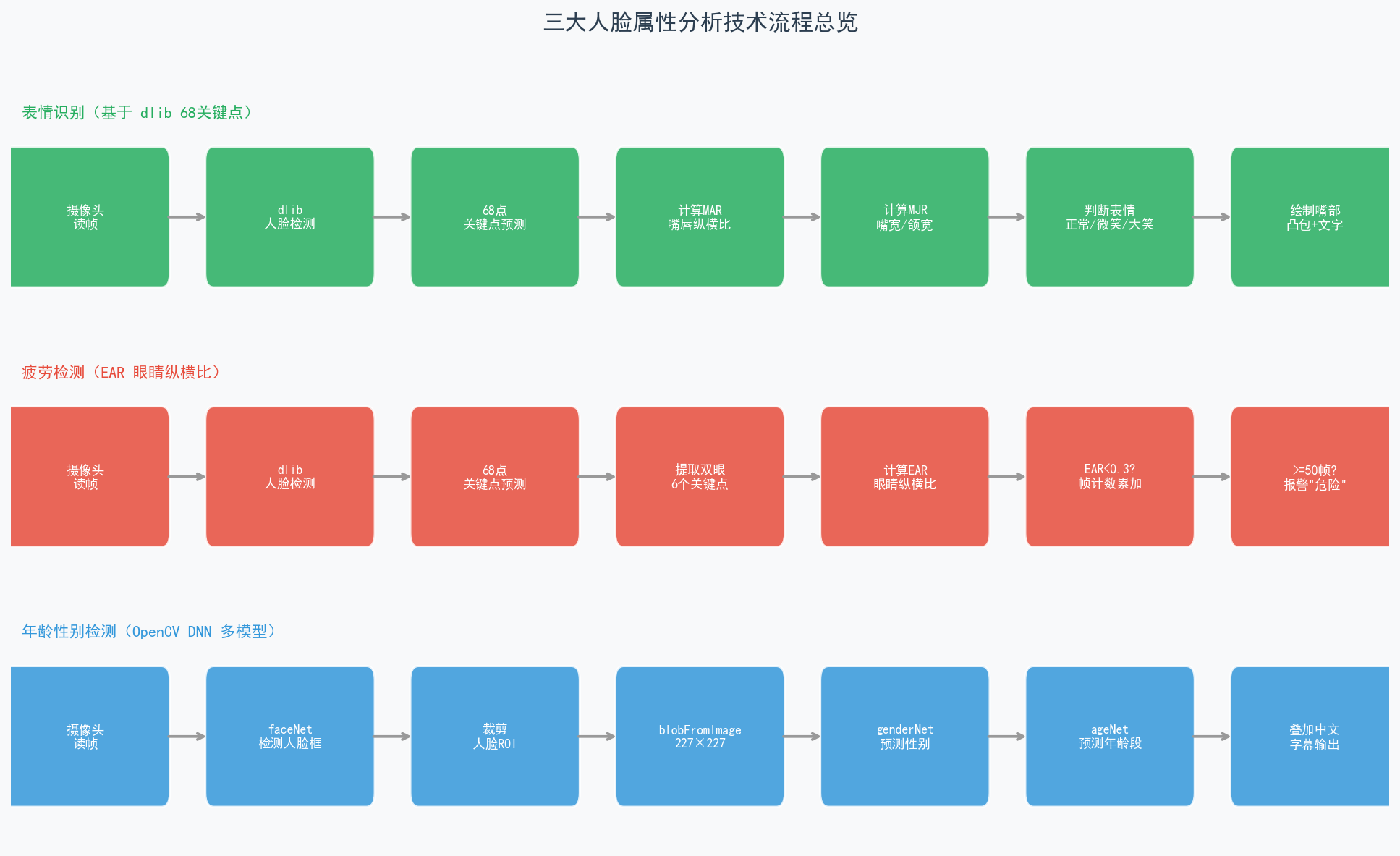
| 应用 | 核心方法 | 依赖 | 特点 |
|---|---|---|---|
| 表情识别 | MAR + MJR 几何比 | dlib 68关键点 | 实时、无需训练 |
| 疲劳检测 | EAR 眼睛纵横比 | dlib 68关键点 | 持续帧计数判断 |
| 年龄性别 | DNN 三模型推理 | OpenCV DNN | 精度依赖预训练模型 |
二、表情识别:MAR + MJR 双指标
2.1 核心思路
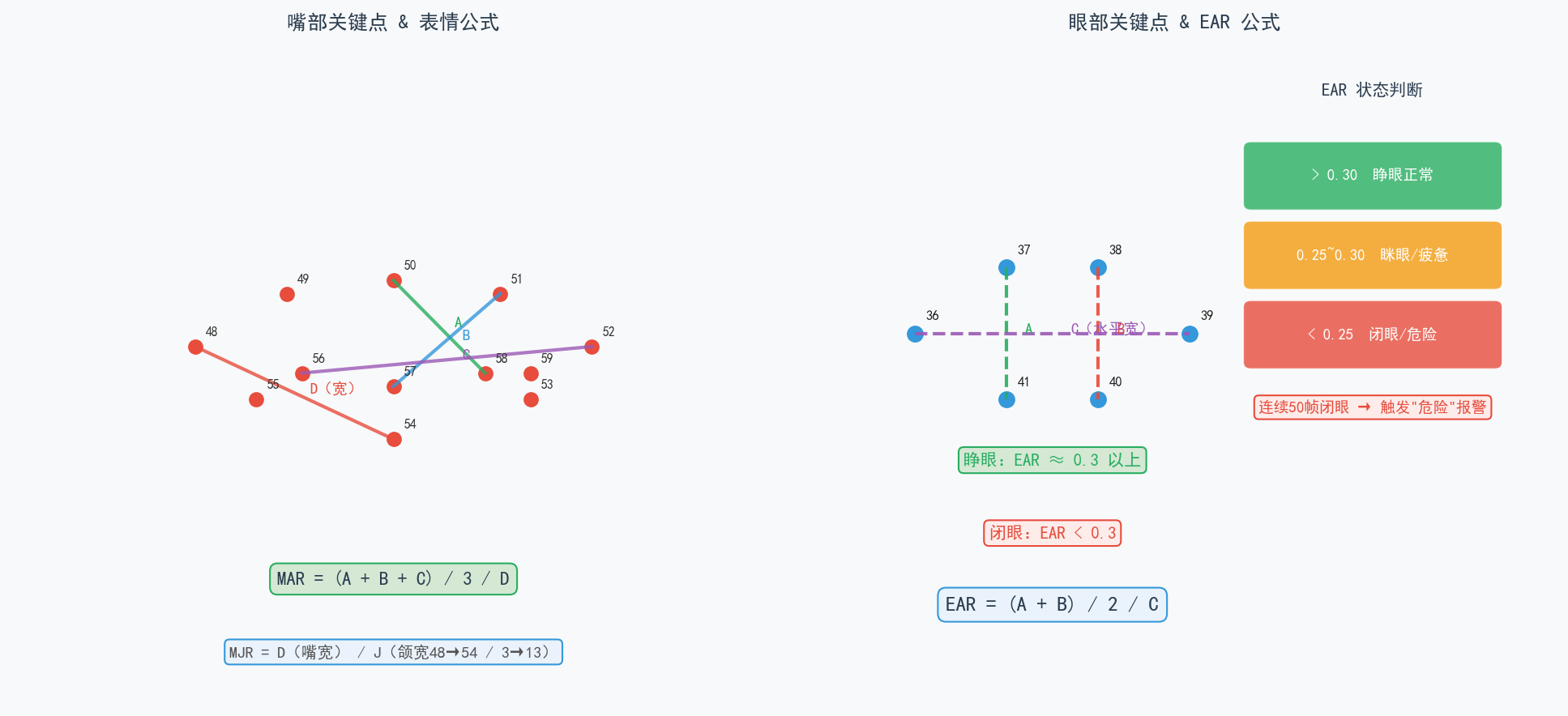
不训练分类器,直接用 嘴唇关键点的几何比值 区分三种表情:
- MAR(Mouth Aspect Ratio,嘴唇纵横比):反映嘴巴纵向张开程度
- MJR(Mouth-Jaw Ratio,嘴宽颌宽比):反映嘴巴横向展开幅度
2.2 公式定义
MAR 计算(使用关键点 48~59):
A = dist(50, 58)   # 嘴唇上下纵向距离1
B = dist(51, 57)   # 嘴唇上下纵向距离2
C = dist(52, 56)   # 嘴唇上下纵向距离3
D = dist(48, 54)   # 嘴唇左右横向宽度

MAR = (A + B + C) / 3 / D
MJR 计算:
M = dist(48, 54)   # 嘴唇宽度
J = dist(3,  13)   # 下颌宽度

MJR = M / J
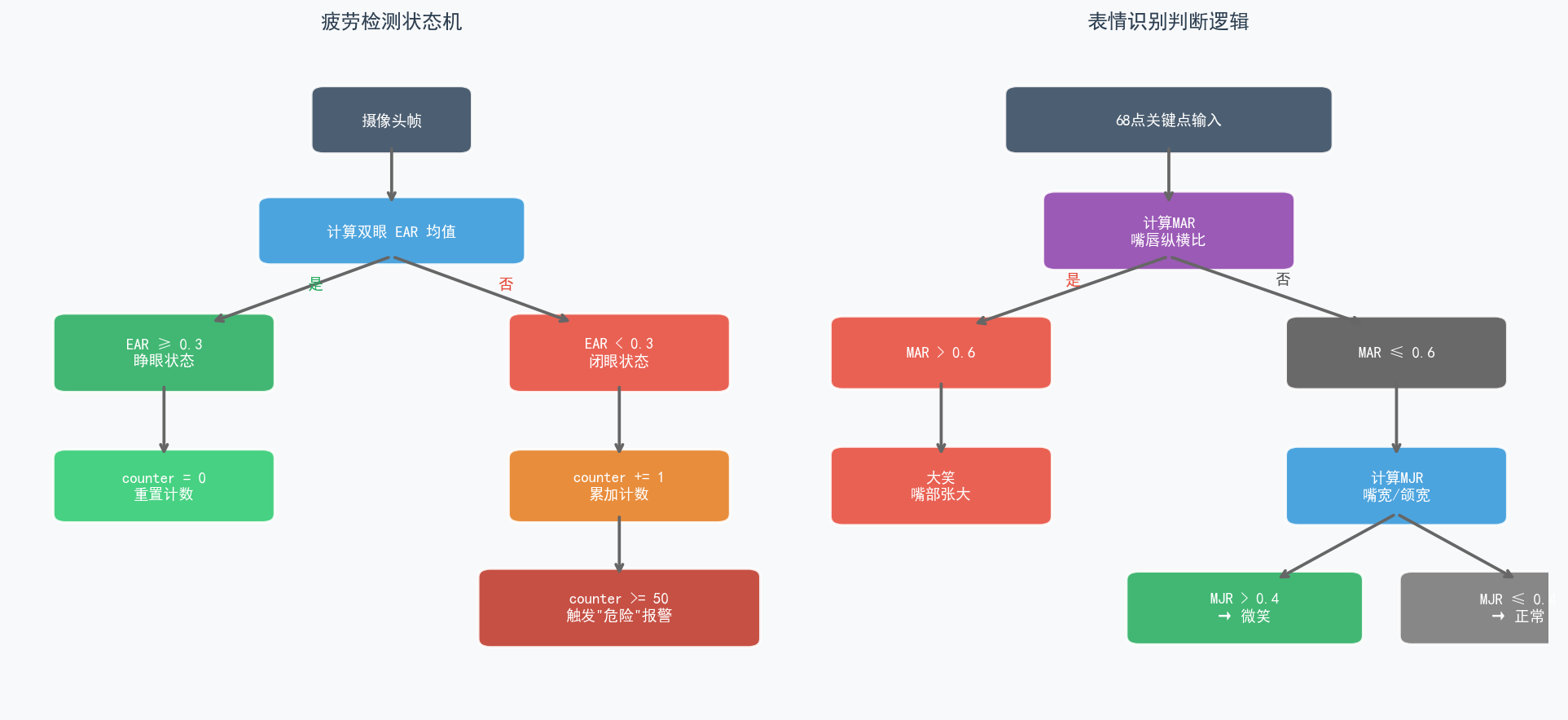
2.3 判断逻辑
if mar > 0.6:
    result = "大笑"       # 嘴纵向大幅张开
elif mjr > 0.4:
    result = "微笑"       # 嘴横向展开但未大张
else:
    result = "正常"
2.4 核心代码片段
MAR 函数实现:
from sklearn.metrics.pairwise import euclidean_distances

def MAR(shape):
    A = euclidean_distances(shape[50].reshape(1,2), shape[58].reshape(1,2))
    B = euclidean_distances(shape[51].reshape(1,2), shape[57].reshape(1,2))
    C = euclidean_distances(shape[52].reshape(1,2), shape[56].reshape(1,2))
    D = euclidean_distances(shape[48].reshape(1,2), shape[54].reshape(1,2))
    return ((A + B + C) / 3) / D

def MJR(shape):
    M = euclidean_distances(shape[48].reshape(1,2), shape[54].reshape(1,2))
    J = euclidean_distances(shape[3].reshape(1,2),  shape[13].reshape(1,2))
    return M / J
主循环检测与绘制:
detector = dlib.get_frontal_face_detector()
predictor = dlib.shape_predictor("shape_predictor_68_face_landmarks.dat")
cap = cv2.VideoCapture(0)

while True:
    ret, frame = cap.read()
    faces = detector(frame, 0)
    for face in faces:
        shape = predictor(frame, face)
        shape = np.array([[p.x, p.y] for p in shape.parts()])

        mar = MAR(shape)
        mjr = MJR(shape)

        result = "正常"
        if mar > 0.6:
            result = "大笑"
        elif mjr > 0.4:
            result = "微笑"

        # 嘴部凸包轮廓
        mothHull = cv2.convexHull(shape[48:60])
        frame = cv2ADDChineseText(frame, result, mothHull[0, 0])
        cv2.drawContours(frame, [mothHull], -1, (0, 255, 0), 2)
注意:
cv2ADDChineseText借助 Pillow 的ImageDraw实现中文叠加,因为 OpenCV 原生putText不支持中文字体。
三、疲劳检测:EAR 眼睛纵横比
3.1 核心原理
EAR(Eye Aspect Ratio) 是衡量眼睛睁开程度的几何指标。睁眼时 EAR 稳定在 0.3 以上;闭眼时双眼垂直距离趋近于零,EAR 急剧下降。
A = dist(37, 41)   # 眼睛上下纵向1
B = dist(38, 40)   # 眼睛上下纵向2
C = dist(36, 39)   # 眼睛水平宽度

EAR = (A + B) / 2 / C
疲劳判断逻辑:单次闭眼不报警,持续 50 帧以上(约 1.7 秒)才触发报警,避免眨眼误报。
3.2 核心代码片段
EAR 计算函数:
def eye_aspect_ratio(eye):
    A = euclidean_distances(eye[1].reshape(1,2), eye[5].reshape(1,2))
    B = euclidean_distances(eye[2].reshape(1,2), eye[4].reshape(1,2))
    C = euclidean_distances(eye[0].reshape(1,2), eye[3].reshape(1,2))
    return ((A + B) / 2.0) / C
双眼均值 + 帧计数报警:
counter = 0

while True:
    ret, frame = cap.read()
    faces = detector(frame, 0)
    for face in faces:
        shape = predictor(frame, face)
        shape = np.array([[p.x, p.y] for p in shape.parts()])

        rightEye = shape[36:42]   # 右眼6个关键点
        leftEye  = shape[42:48]   # 左眼6个关键点

        ear = (eye_aspect_ratio(rightEye) + eye_aspect_ratio(leftEye)) / 2.0

        if ear < 0.3:
            counter += 1
            if counter >= 50:                        # 持续50帧 ≈ 1.7秒
                frame = cv2ADDChineseText(frame, '危险', (250, 250))
        else:
            counter = 0                              # 睁眼则重置计数

        drawEye(leftEye)    # 绘制眼部凸包
        drawEye(rightEye)
        info = "EAR:{:.2f}".format(ear[0][0])
        frame = cv2ADDChineseText(frame, info, (0, 30))
阈值说明:
| EAR 范围 | 状态 | 处理 |
|---|---|---|
| > 0.30 | 睁眼正常 | counter 重置为 0 |
| 0.25 ~ 0.30 | 眯眼/疲惫 | counter 缓慢累加 |
| < 0.25 | 闭眼 | counter 快速累加 |
| 连续 50 帧 < 0.3 | 危险 | 触发报警提示 |
四、年龄性别检测:OpenCV DNN 多模型推理
4.1 核心思路
与前两种方法不同,年龄性别预测使用 预训练深度神经网络,无需关键点,直接对人脸 ROI 进行分类推理。
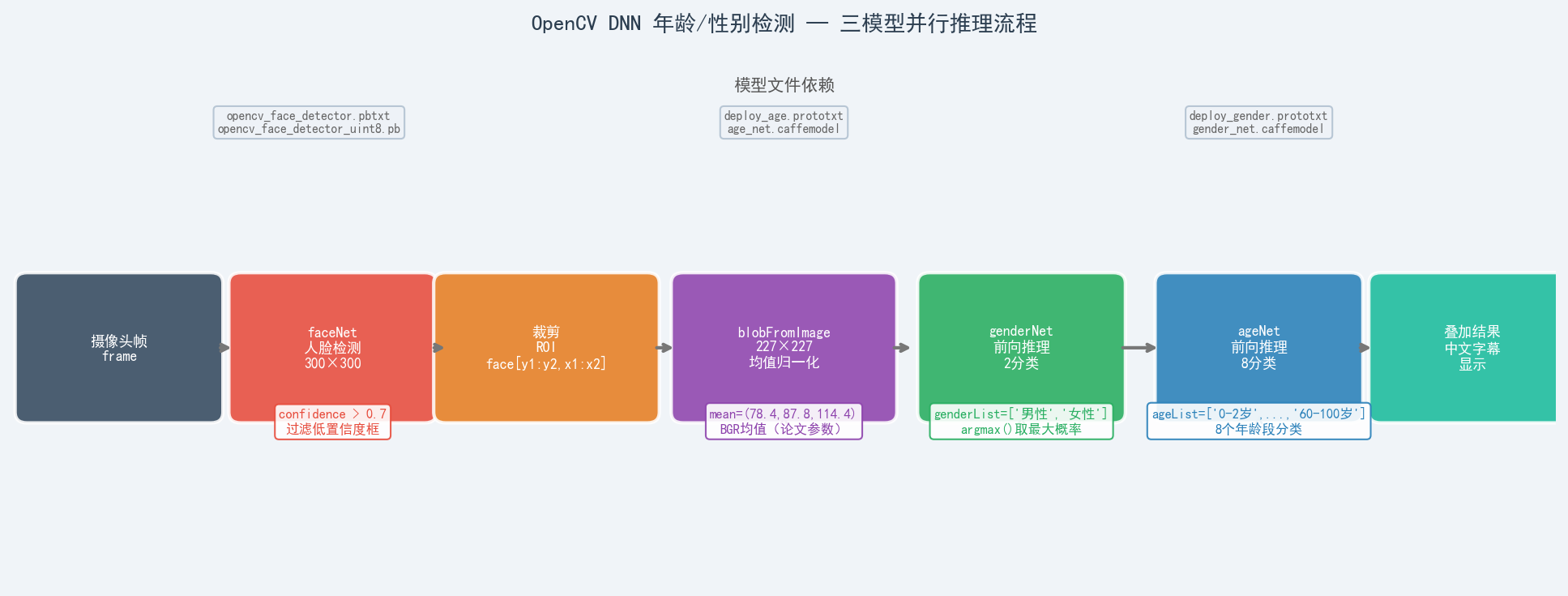
三个模型各司其职:
| 模型 | 文件 | 任务 | 输出 |
|---|---|---|---|
| faceNet | opencv_face_detector_uint8.pb | 人脸检测 | 置信度 + 坐标框 |
| genderNet | gender_net.caffemodel | 性别分类 | 2类(男/女) |
| ageNet | age_net.caffemodel | 年龄估计 | 8段(0-2岁 ~ 60-100岁) |
4.2 人脸检测函数
faceProto  = "model/opencv_face_detector.pbtxt"
faceModel  = "model/opencv_face_detector_uint8.pb"
ageProto   = "model/deploy_age.prototxt"
ageModel   = "model/age_net.caffemodel"
genderProto= "model/deploy_gender.prototxt"
genderModel= "model/gender_net.caffemodel"

faceNet   = cv2.dnn.readNet(faceModel,   faceProto)
ageNet    = cv2.dnn.readNet(ageModel,    ageProto)
genderNet = cv2.dnn.readNet(genderModel, genderProto)

ageList    = ['0-2岁','3-6岁','7-12岁','13-16岁','17-20岁','20-25岁','25-59岁','60-100岁']
genderList = ['男性', '女性']

def getBoxes(net, frame):
    frameH, frameW = frame.shape[:2]
    blob = cv2.dnn.blobFromImage(frame, 1.0, (300, 300), [104, 117, 123], True, False)
    net.setInput(blob)
    detections = net.forward()   # shape: [1, 1, N, 7]

    faceBoxes = []
    for i in range(detections.shape[2]):
        confidence = detections[0, 0, i, 2]
        if confidence > 0.7:     # 置信度阈值过滤
            x1 = int(detections[0, 0, i, 3] * frameW)
            y1 = int(detections[0, 0, i, 4] * frameH)
            x2 = int(detections[0, 0, i, 5] * frameW)
            y2 = int(detections[0, 0, i, 6] * frameH)
            faceBoxes.append([x1, y1, x2, y2])
            cv2.rectangle(frame, (x1, y1), (x2, y2), (255, 0, 0),
                          int(round(frameH / 150)), 2)
    return frame, faceBoxes
关键点:
blobFromImage的swapRB=True将 OpenCV 的 BGR 转为模型期望的 RGB;均值[104, 117, 123]来自 ImageNet 统计值。
4.3 年龄性别推理
mean = (78.4263377603, 87.7689143744, 114.3895847746)  # BGR 均值

while True:
    _, frame = cap.read()
    frame = cv2.flip(frame, 1)                        # 水平镜像
    frame, faceBoxes = getBoxes(faceNet, frame)

    if not faceBoxes:
        print("当前镜头中没有人")
        continue

    for faceBox in faceBoxes:
        x1, y1, x2, y2 = faceBox
        face = frame[y1:y2, x1:x2]                   # 裁剪人脸 ROI

        # 统一预处理为 227×227(论文输入尺寸)
        blob = cv2.dnn.blobFromImage(face, 1.0, (227, 227), mean)

        genderNet.setInput(blob)
        gender = genderList[genderNet.forward()[0].argmax()]

        ageNet.setInput(blob)
        age = ageList[ageNet.forward()[0].argmax()]

        result = "{}, {}".format(gender, age)
        frame = cv2ADDChineseText(frame, result, (x1, y1 - 30))

    if cv2.waitKey(1) == 27:
        break
说明:年龄模型输入为 227×227(对应论文 GoogLeNet 输入),与人脸检测的 300×300 不同,需分别调用
blobFromImage。
五、三技术深度对比
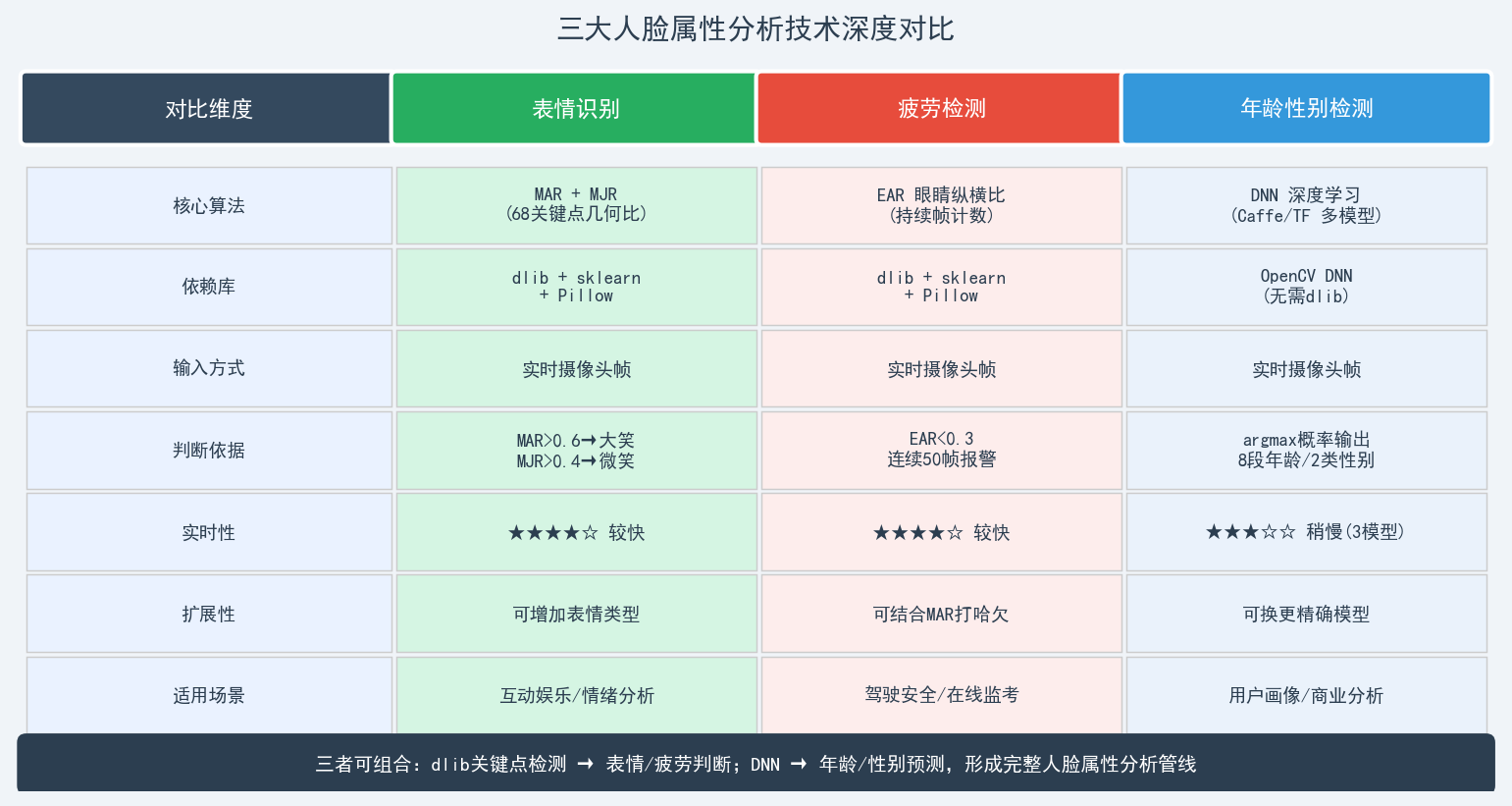
5.1 判断逻辑可视化
5.2 技术路线对比
| 维度 | 表情识别 | 疲劳检测 | 年龄性别 |
|---|---|---|---|
| 算法类型 | 几何比值计算 | 几何比值+时序 | 深度神经网络 |
| 是否需要训练 | 否(纯计算) | 否(纯计算) | 否(加载预训练) |
| 光照敏感度 | 中(dlib HOG较鲁棒) | 中 | 低(DNN特征鲁棒) |
| 误报机制 | 阈值调整 | 连续帧计数 | 置信度过滤 |
| 计算开销 | 低 | 低 | 中(三次前向推理) |
六、常见问题与优化
6.1 中文显示问题
OpenCV putText 不支持中文,统一用 Pillow 绕过:
from PIL import Image, ImageDraw, ImageFont

def cv2ADDChineseText(img, text, position, textColor=(0,255,0), textSize=30):
    img = Image.fromarray(cv2.cvtColor(img, cv2.COLOR_BGR2RGB))
    draw = ImageDraw.Draw(img)
    font = ImageFont.truetype("simsun.ttc", textSize, encoding="utf-8")
    draw.text(position, text, textColor, font=font)
    return cv2.cvtColor(np.asarray(img), cv2.COLOR_RGB2BGR)
6.2 阈值调整建议
表情识别
  MAR 阈值 0.6 → 大笑(可根据人脸尺寸微调 ±0.05)
  MJR 阈值 0.4 → 微笑(可根据摄像头角度微调)

疲劳检测
  EAR 阈值 0.3 → 经验值,近视/眯眼人群可适当降低到 0.25
  帧数阈值 50  → 约 1.7秒@30fps,可根据场景调整
6.3 年龄性别模型说明
| 参数 | 说明 |
|---|---|
| 人脸检测输入 | 300×300,均值 [104, 117, 123],swapRB=True |
| 年龄/性别输入 | 227×227,均值 (78.4, 87.8, 114.4),swapRB=False |
| 置信度阈值 | 0.7(可根据场景降低以提升召回率) |
| detections 维度 | [1, 1, N, 7],第7维含 [_, _, conf, x1, y1, x2, y2] |
七、扩展方向
| 方向 | 说明 |
|---|---|
| 打哈欠检测 | 在疲劳检测基础上加入 MAR 持续帧判断 |
| 情绪多分类 | 接入 FER2013 训练的 CNN 模型替代几何规则 |
| 驾驶安全系统 | EAR(闭眼)+ MAR(打哈欠)+ 头部姿态联合判断 |
| MediaPipe 替代 | 用 MediaPipe FaceMesh(468点)替代 dlib(68点),精度更高 |
| 多人场景 | 当前代码已支持多人(faceBoxes 遍历),可加 ID 跟踪 |
八、总结
三大人脸属性分析思路:

表情识别:  detector + predictor → shape[48:60] → MAR/MJR → 规则判断
疲劳检测:  detector + predictor → shape[36:48] → EAR → 连续帧计数
年龄性别:  faceNet → 裁剪ROI → blobFromImage → genderNet/ageNet → argmax
三者都可以组合使用,构建完整的人脸属性分析管线:
- 驾驶安全:疲劳检测(EAR)+ 表情识别(打哈欠 MAR)
- 用户画像:年龄性别 + 表情情绪
- 在线监考:疲劳状态 + 人脸身份(LBPH/FisherFace)
完整代码见文中各节代码块,建议搭配
shape_predictor_68_face_landmarks.dat和model/目录下的四个模型文件一起运行。

AtomGit 是由开放原子开源基金会联合 CSDN 等生态伙伴共同推出的新一代开源与人工智能协作平台。平台坚持“开放、中立、公益”的理念,把代码托管、模型共享、数据集托管、智能体开发体验和算力服务整合在一起,为开发者提供从开发、训练到部署的一站式体验。
更多推荐
 10
10 0
0- 0


 已为社区贡献21条内容

所有评论(0)