结构动力学仿真-主题099-智能仿真与数字孪生技术
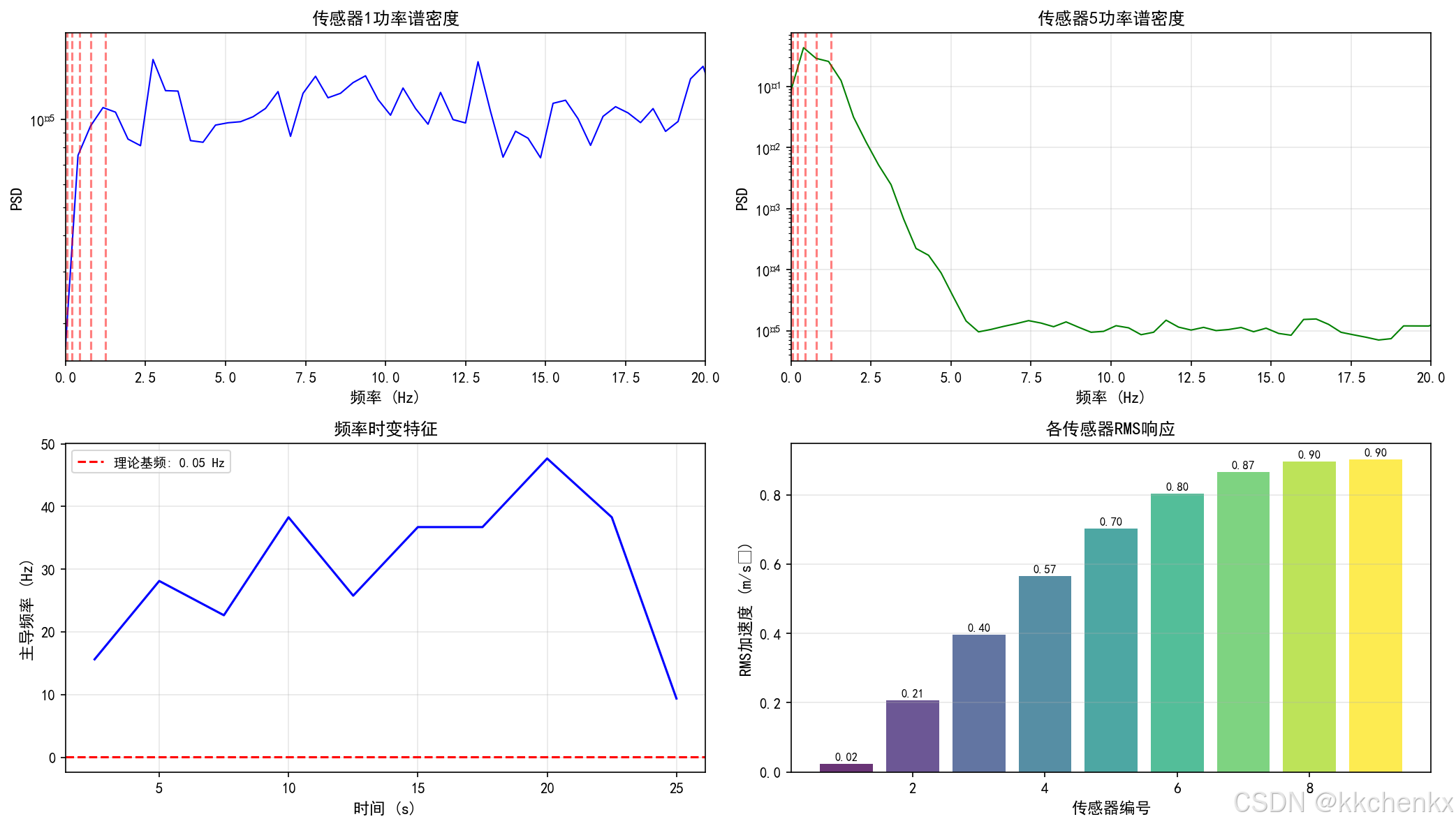
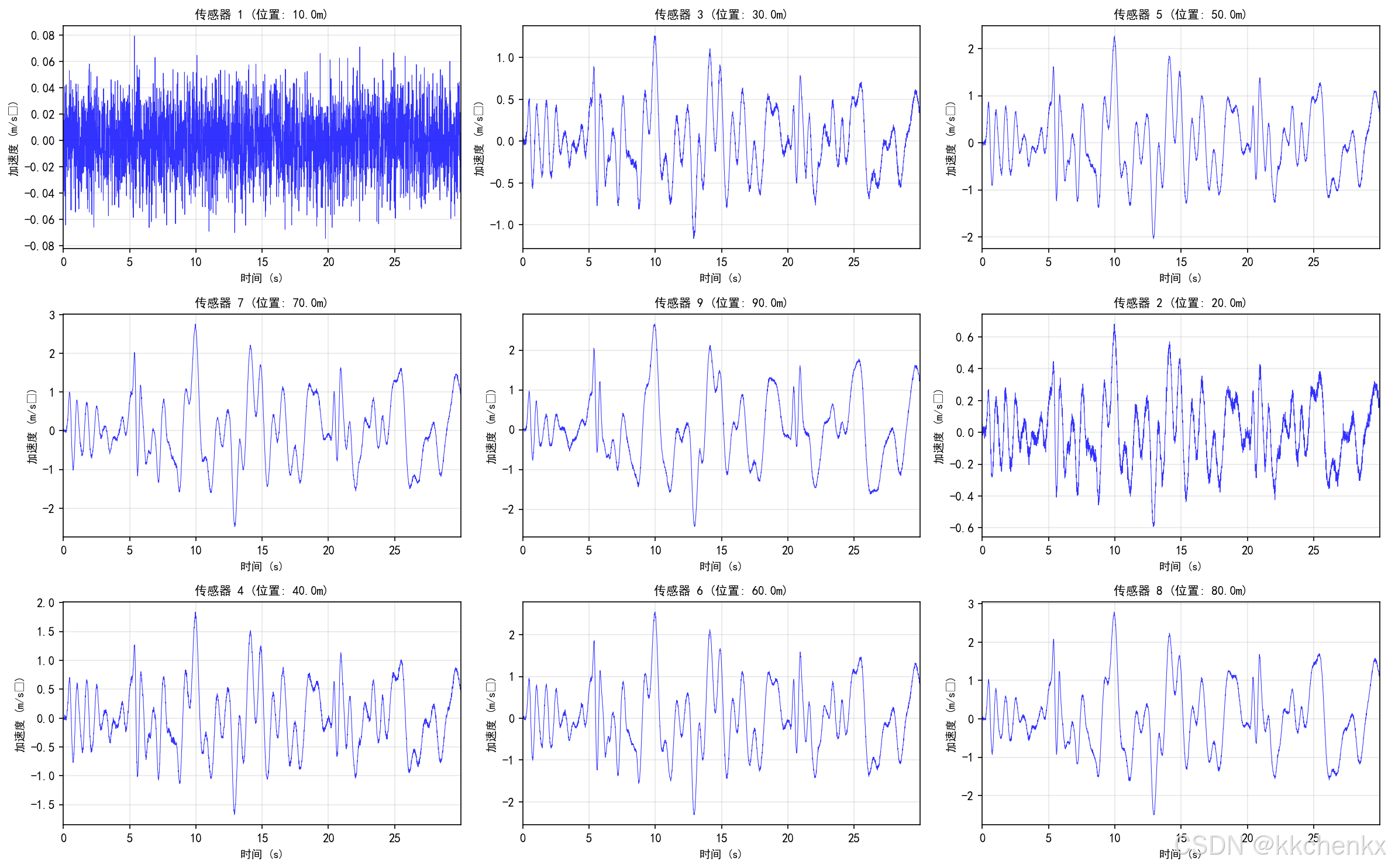
主题099:智能仿真与数字孪生技术
1. 引言
1.1 数字孪生的概念与发展
数字孪生(Digital Twin)是指通过数字化手段在虚拟空间中构建物理实体的精确映射,实现物理世界与数字世界的实时同步与交互。这一概念最早由NASA在2010年提出,用于航天器的全生命周期管理。
数字孪生的核心特征包括:
- 虚实映射:物理实体与数字模型的一一对应
- 实时同步:数据驱动的动态更新机制
- 双向交互:物理世界与数字世界的信息流动
- 全生命周期:覆盖设计、制造、运维、退役全过程
1.2 智能仿真的内涵
智能仿真是将人工智能技术与传统仿真方法深度融合的新型仿真范式,主要特点包括:
- 数据驱动建模:利用机器学习从数据中学习系统行为
- 实时预测能力:支持在线决策和预测性维护
- 自适应更新:模型随数据积累持续优化
- 多源信息融合:整合传感器数据、仿真结果和专家知识

1.3 工程应用价值
在结构动力学领域,智能仿真与数字孪生技术具有重要价值:
- 设计优化:基于实时反馈优化结构设计
- 健康监测:实时评估结构状态和安全性能
- 预测维护:提前识别潜在故障,降低维护成本
- 应急响应:快速评估灾害影响,指导应急处置
2. 数字孪生架构与技术体系
2.1 数字孪生三层架构
数字孪生系统通常采用三层架构:
2.1.1 物理层
物理层包含实际工程结构和传感器网络:
物理层组成:
├── 工程结构(桥梁、建筑、机械等)
├── 传感器网络(加速度计、应变计、位移计等)
├── 数据采集系统
└── 通信网络
传感器布置原则:
- 代表性:覆盖关键部位和易损区域
- 冗余性:关键测点设置备份传感器
- 经济性:在满足监测需求前提下控制成本
- 可维护性:便于安装、更换和校准
2.1.2 数据层
数据层负责数据的存储、管理和预处理:
数据类型:
- 时序数据:振动加速度、位移、应变等
- 静态数据:结构几何、材料参数、边界条件
- 环境数据:温度、湿度、风速等
- 历史数据:维护记录、损伤历史、荷载历史
数据管理技术:
- 时序数据库:InfluxDB、TimescaleDB
- 大数据平台:Hadoop、Spark
- 数据清洗:异常值检测、缺失值处理
- 数据压缩:降采样、特征提取
2.1.3 模型层
模型层是数字孪生的核心,包含多种模型:
物理模型:
- 有限元模型:详细的几何和材料建模
- 简化模型:用于实时计算的降阶模型
- 多尺度模型:跨尺度的耦合分析
数据模型:
- 机器学习模型:神经网络、支持向量机等
- 统计模型:时间序列分析、贝叶斯网络
- 混合模型:物理与数据驱动的融合
2.2 关键支撑技术
2.2.1 物联网技术
物联网(IoT)是数字孪生的数据基础:
传感器技术:
- MEMS加速度计:低成本、低功耗、高灵敏度
- 光纤传感器:抗电磁干扰、长距离传输
- 无线传感器网络:灵活部署、自组织通信
通信协议:
- 工业以太网:高带宽、低延迟
- 无线通信:WiFi、4G/5G、LoRa、NB-IoT
- 边缘计算:本地数据处理,减少传输负担
2.2.2 云计算与边缘计算
云计算:
- 弹性计算资源:按需扩展计算能力
- 分布式存储:海量数据的可靠存储
- 并行计算:大规模仿真的加速
边缘计算:
- 实时性:毫秒级响应需求
- 带宽优化:减少数据传输量
- 隐私保护:敏感数据本地处理
2.2.3 人工智能技术
机器学习应用:
- 降阶建模:从全阶仿真中提取低维模型
- 损伤识别:基于振动特征的损伤检测
- 寿命预测:基于退化模型的剩余寿命估计
- 异常检测:实时识别异常状态
深度学习技术:
- 卷积神经网络(CNN):图像类数据的特征提取
- 循环神经网络(RNN):时序数据的建模
- 自编码器:数据降维和异常检测
- 生成对抗网络(GAN):数据增强和场景生成
3. 智能仿真方法
3.1 降阶建模技术
降阶建模(Reduced Order Modeling, ROM)是智能仿真的核心技术,旨在以较低的计算成本保持较高的仿真精度。
3.1.1 本征正交分解(POD)
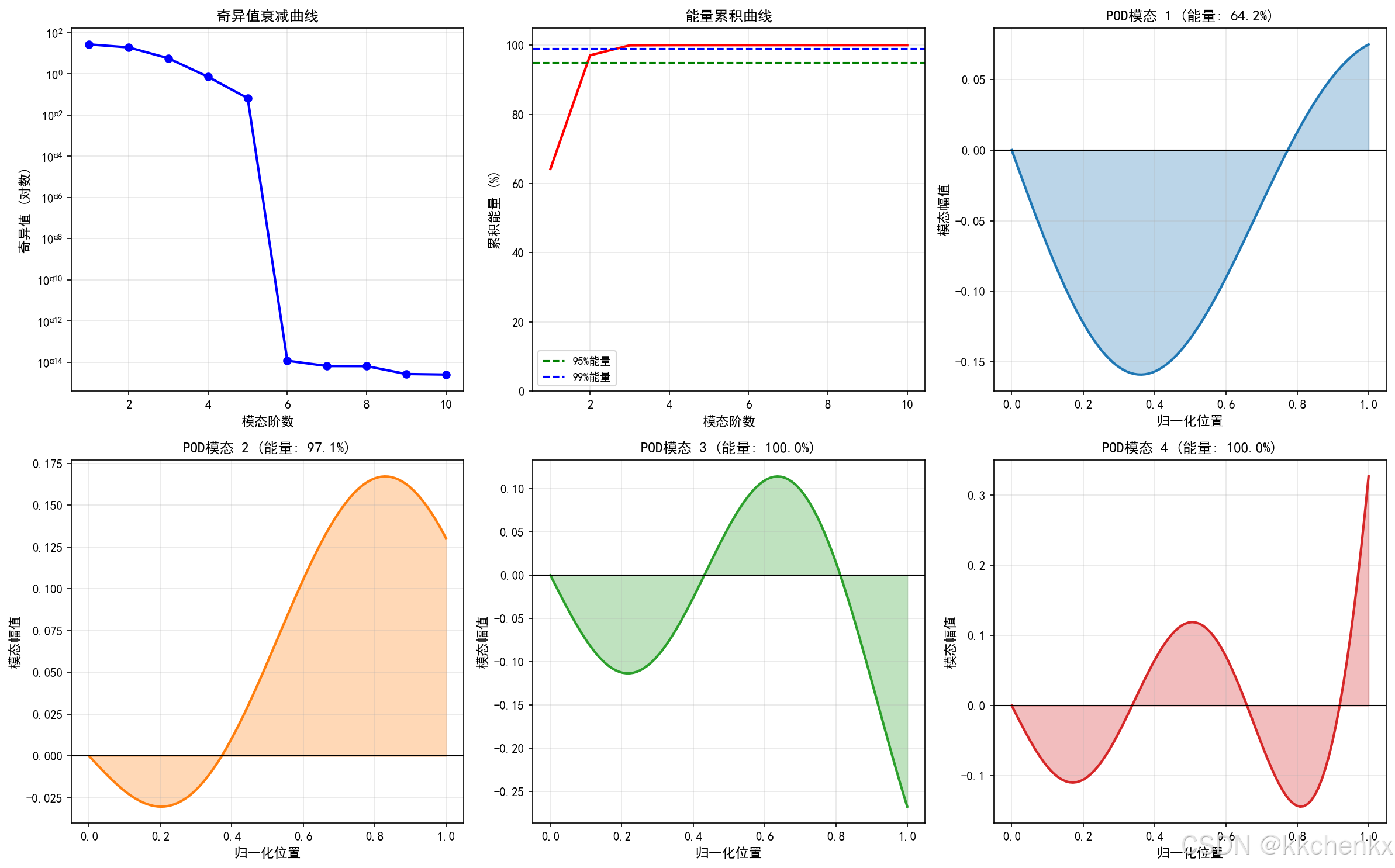
POD方法通过提取系统响应的主要模态来构建降阶模型:
数学原理:
给定一组快照矩阵 X=[x1,x2,...,xn]X = [x_1, x_2, ..., x_n]X=[x1,x2,...,xn],POD寻找最优正交基 Φ\PhiΦ,使得投影误差最小:
minΦ∥X−ΦΦTX∥F2\min_{\Phi} \|X - \Phi\Phi^T X\|_F^2Φmin∥X−ΦΦTX∥F2
解为 XXX 的左奇异向量,对应最大的奇异值。
算法步骤:
- 收集快照数据:运行全阶模型获取代表性响应
- 构建快照矩阵:X∈Rn×mX \in \mathbb{R}^{n \times m}X∈Rn×m
- 奇异值分解:X=UΣVTX = U\Sigma V^TX=UΣVT
- 截断保留:选择前 rrr 个主模态
- 构建降阶基:Φ=[u1,u2,...,ur]\Phi = [u_1, u_2, ..., u_r]Φ=[u1,u2,...,ur]
Python实现示例:
import matplotlib
matplotlib.use('Agg')
"""
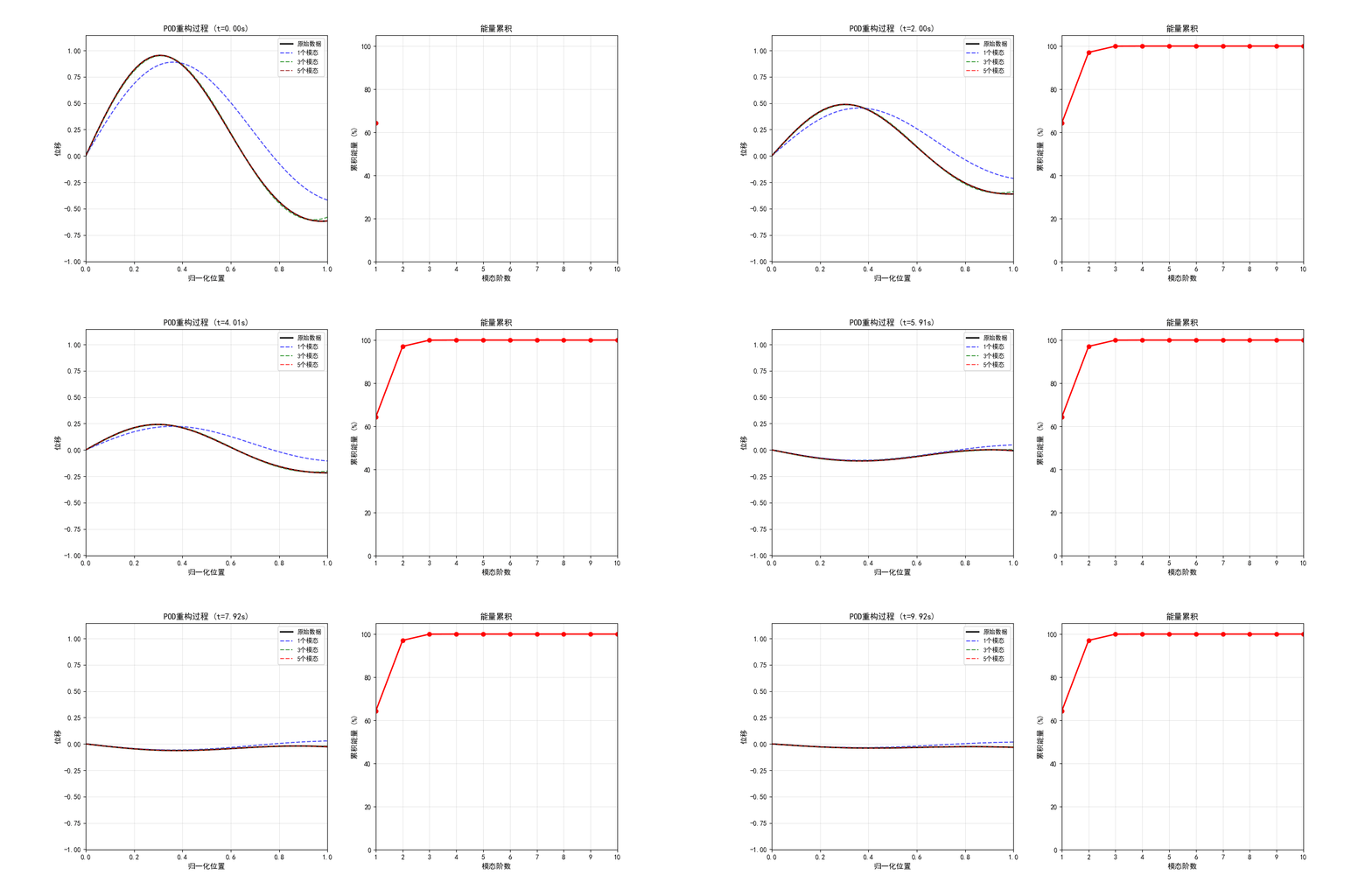
主题099 - 案例1: POD降阶建模与模态分析
本征正交分解在结构动力学中的应用
"""

import numpy as np
import matplotlib.pyplot as plt
from matplotlib.animation import FuncAnimation, PillowWriter
from scipy.linalg import svd, eigh
from scipy.integrate import odeint

# 设置中文字体
plt.rcParams['font.sans-serif'] = ['SimHei', 'DejaVu Sans']
plt.rcParams['axes.unicode_minus'] = False


def generate_snapshots(n_dofs, n_snapshots, frequencies, damping_ratios):
    """
    生成结构动力学响应快照

    参数:
        n_dofs: 自由度数量
        n_snapshots: 快照数量
        frequencies: 固有频率列表
        damping_ratios: 阻尼比列表

    返回:
        snapshots: 快照矩阵 (n_dofs, n_snapshots)
        time: 时间向量
    """
    # 时间向量
    t_max = 10.0
    time = np.linspace(0, t_max, n_snapshots)

    # 初始化快照矩阵
    snapshots = np.zeros((n_dofs, n_snapshots))

    # 生成模态振型 (简化的悬臂梁模态)
    x = np.linspace(0, 1, n_dofs)

    for i, (f, zeta) in enumerate(zip(frequencies, damping_ratios)):
        # 模态振型 (简化的正弦函数)
        mode_shape = np.sin((i + 1) * np.pi * x / 2)

        # 随机初始条件
        amplitude = np.random.randn() * (1.0 / (i + 1))
        phase = np.random.rand() * 2 * np.pi

        # 阻尼振动响应
        omega = 2 * np.pi * f
        omega_d = omega * np.sqrt(1 - zeta**2)

        for j, t in enumerate(time):
            decay = np.exp(-zeta * omega * t)
            oscillation = np.cos(omega_d * t + phase)
            snapshots[:, j] += amplitude * mode_shape * decay * oscillation

    return snapshots, time


def pod_reduction(snapshots, n_modes):
    """
    POD降阶建模

    参数:
        snapshots: 快照矩阵 (n_dofs, n_snapshots)
        n_modes: 保留的模态数

    返回:
        phi: 降阶基
        singular_values: 奇异值
        energy: 能量占比
        snapshot_mean: 快照均值
    """
    # 去均值
    snapshot_mean = np.mean(snapshots, axis=1, keepdims=True)
    snapshots_centered = snapshots - snapshot_mean

    # SVD分解
    U, S, Vt = svd(snapshots_centered, full_matrices=False)

    # 保留前n_modes个模态
    phi = U[:, :n_modes]
    singular_values = S[:n_modes]

    # 计算能量占比
    total_energy = np.sum(S**2)
    energy = np.cumsum(singular_values**2) / total_energy

    return phi, singular_values, energy, snapshot_mean


def reconstruct_from_pod(snapshots, phi, snapshot_mean, n_modes):
    """
    使用POD基重构快照

    参数:
        snapshots: 原始快照
        phi: POD基
        snapshot_mean: 快照均值
        n_modes: 使用的模态数

    返回:
        reconstructed: 重构的快照
    """
    snapshots_centered = snapshots - snapshot_mean

    # 投影到POD基
    coefficients = phi[:, :n_modes].T @ snapshots_centered

    # 重构
    reconstructed = phi[:, :n_modes] @ coefficients + snapshot_mean

    return reconstructed


def calculate_reconstruction_error(original, reconstructed):
    """
    计算重构误差

    参数:
        original: 原始快照
        reconstructed: 重构快照

    返回:
        relative_error: 相对误差
    """
    error = np.linalg.norm(original - reconstructed, 'fro')
    original_norm = np.linalg.norm(original, 'fro')
    relative_error = error / original_norm

    return relative_error


def main():
    """主函数"""
    print("=" * 70)
    print("主题099 - 案例1: POD降阶建模与模态分析")
    print("本征正交分解在结构动力学中的应用")
    print("=" * 70)

    # 参数设置
    n_dofs = 100  # 自由度数量
    n_snapshots = 500  # 快照数量
    n_modes_true = 5  # 真实模态数

    # 真实模态参数
    frequencies = [1.0, 3.0, 5.0, 7.0, 9.0]  # Hz
    damping_ratios = [0.02, 0.015, 0.01, 0.008, 0.005]

    print("\n仿真参数:")
    print(f"  自由度数量: {n_dofs}")
    print(f"  快照数量: {n_snapshots}")
    print(f"  真实模态数: {n_modes_true}")
    print(f"\n真实模态频率: {frequencies} Hz")
    print(f"真实阻尼比: {damping_ratios}")

    # 1. 生成快照数据
    print("\n" + "="*60)
    print("1. 生成快照数据")
    print("="*60)

    snapshots, time = generate_snapshots(n_dofs, n_snapshots,
                                         frequencies, damping_ratios)

    print(f"\n快照矩阵维度: {snapshots.shape}")
    print(f"时间范围: {time[0]:.2f} - {time[-1]:.2f} s")

    # 2. POD分析
    print("\n" + "="*60)
    print("2. POD分析")
    print("="*60)

    n_modes_pod = 10  # POD提取的模态数
    phi, singular_values, energy, snapshot_mean = pod_reduction(snapshots, n_modes_pod)

    print(f"\nPOD分析结果:")
    print(f"  提取的POD模态数: {n_modes_pod}")
    print(f"  前5个奇异值: {singular_values[:5]}")
    print(f"  前5个模态能量占比:")
    for i in range(5):
        print(f"    模态{i+1}: {energy[i]*100:.2f}%")

    # 3. 重构误差分析
    print("\n" + "="*60)
    print("3. 重构误差分析")
    print("="*60)

    mode_numbers = [1, 2, 3, 5, 10]
    errors = []

    for n_modes in mode_numbers:
        reconstructed = reconstruct_from_pod(snapshots, phi, snapshot_mean, n_modes)
        error = calculate_reconstruction_error(snapshots, reconstructed)
        errors.append(error)
        print(f"  使用{n_modes}个模态 - 相对误差: {error*100:.4f}%")

    # 生成可视化
    print("\n" + "="*60)
    print("生成可视化结果")
    print("="*60)

    visualize_pod_modes(phi, singular_values, energy, n_dofs)
    visualize_reconstruction(snapshots, phi, snapshot_mean, time, mode_numbers)
    visualize_error_analysis(mode_numbers, errors, snapshots, phi, snapshot_mean)
    visualize_snapshot_comparison(snapshots, phi, snapshot_mean, time)
    create_pod_animation(snapshots, phi, snapshot_mean, time)

    print("\n" + "=" * 70)
    print("案例1完成!所有结果已保存。")
    print("=" * 70)


def visualize_pod_modes(phi, singular_values, energy, n_dofs):
    """可视化POD模态"""
    fig = plt.figure(figsize=(16, 10))

    # 子图1: 奇异值衰减
    ax1 = fig.add_subplot(2, 3, 1)
    ax1.semilogy(range(1, len(singular_values)+1), singular_values, 'bo-', linewidth=2)
    ax1.set_xlabel('模态阶数', fontsize=11)
    ax1.set_ylabel('奇异值 (对数)', fontsize=11)
    ax1.set_title('奇异值衰减曲线', fontsize=12, fontweight='bold')
    ax1.grid(True, alpha=0.3)

    # 子图2: 能量累积
    ax2 = fig.add_subplot(2, 3, 2)
    ax2.plot(range(1, len(energy)+1), energy*100, 'r-', linewidth=2)
    ax2.axhline(y=95, color='g', linestyle='--', label='95%能量')
    ax2.axhline(y=99, color='b', linestyle='--', label='99%能量')
    ax2.set_xlabel('模态阶数', fontsize=11)
    ax2.set_ylabel('累积能量 (%)', fontsize=11)
    ax2.set_title('能量累积曲线', fontsize=12, fontweight='bold')
    ax2.legend(fontsize=9)
    ax2.grid(True, alpha=0.3)
    ax2.set_ylim(0, 105)

    # 子图3-6: 前4个POD模态形状
    x = np.linspace(0, 1, n_dofs)
    for i in range(4):
        ax = fig.add_subplot(2, 3, i+3)
        ax.plot(x, phi[:, i], linewidth=2, color=f'C{i}')
        ax.fill_between(x, phi[:, i], alpha=0.3, color=f'C{i}')
        ax.axhline(y=0, color='k', linestyle='-', linewidth=1)
        ax.set_xlabel('归一化位置', fontsize=11)
        ax.set_ylabel('模态幅值', fontsize=11)
        ax.set_title(f'POD模态 {i+1} (能量: {energy[i]*100:.1f}%)',
                    fontsize=12, fontweight='bold')
        ax.grid(True, alpha=0.3)

    plt.tight_layout()
    plt.savefig('案例1_POD模态分析.png', dpi=150, bbox_inches='tight',
               facecolor='white', edgecolor='none')
    print("\nPOD模态分析图已保存到: 案例1_POD模态分析.png")
    plt.close()


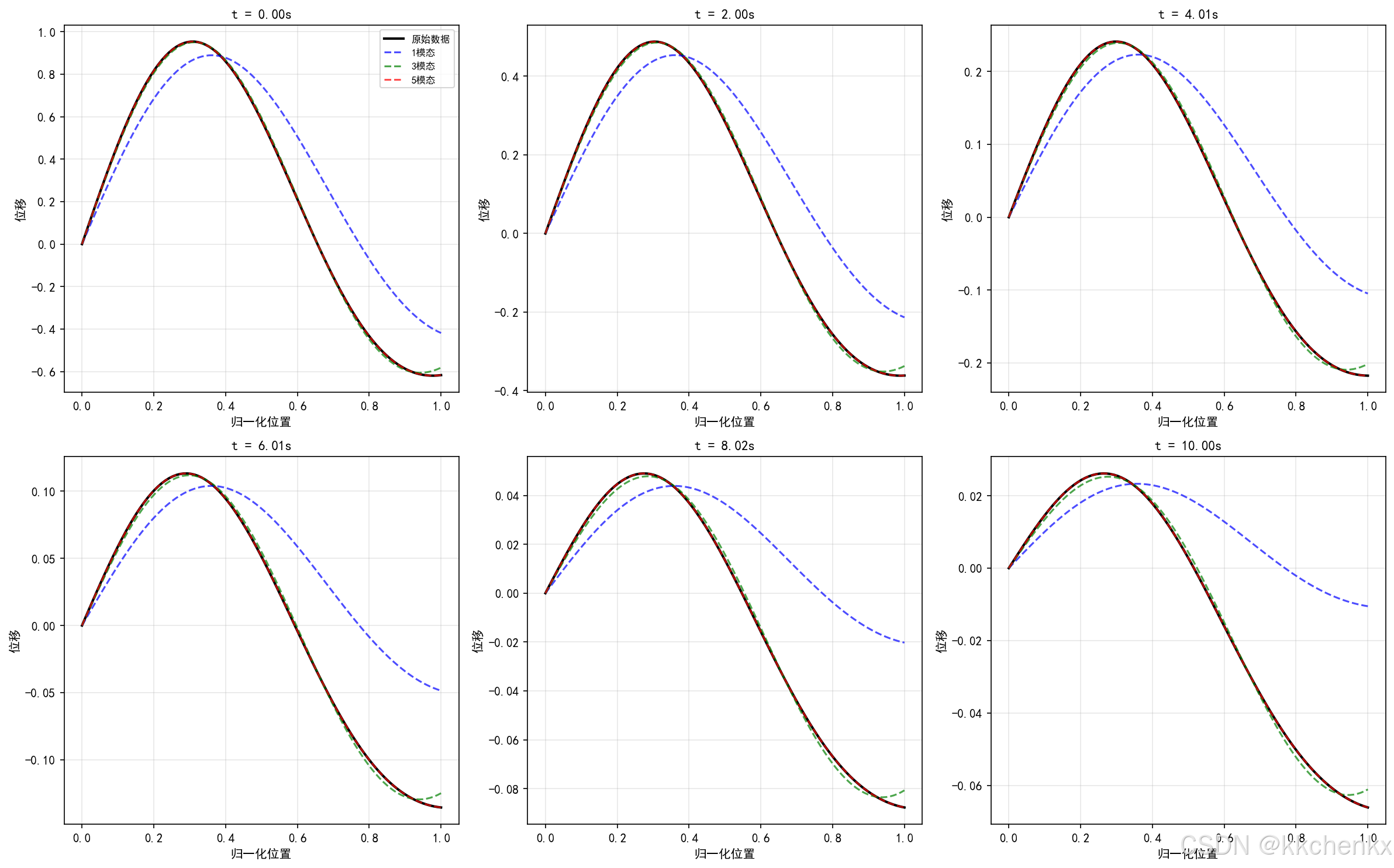
def visualize_reconstruction(snapshots, phi, snapshot_mean, time, mode_numbers):
    """可视化重构结果"""
    fig = plt.figure(figsize=(16, 10))

    # 选择特定位置和时间展示
    dof_idx = 50  # 中间位置
    time_indices = [0, 100, 200, 300, 400]

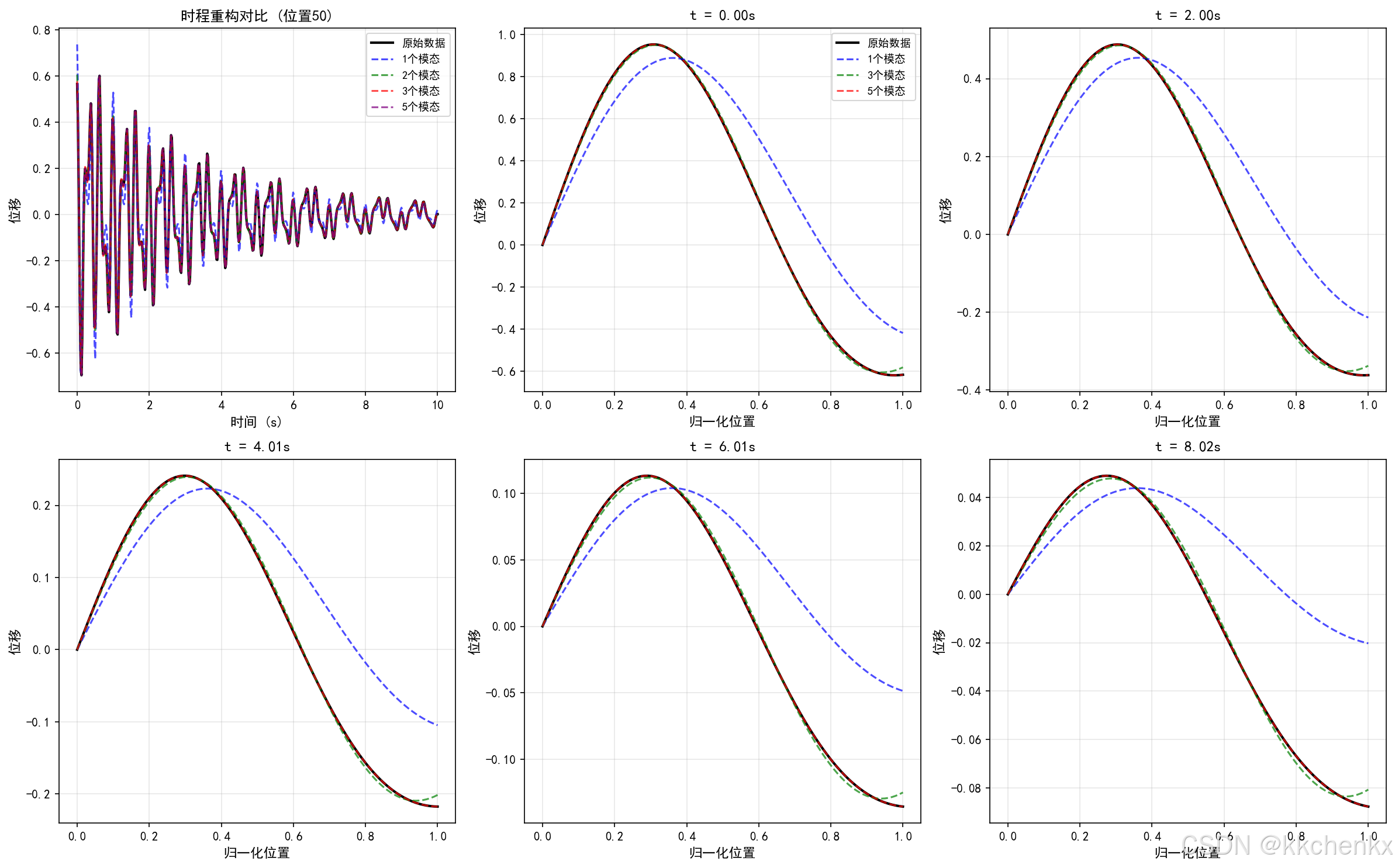
    # 子图1: 时程重构对比
    ax1 = fig.add_subplot(2, 3, 1)
    ax1.plot(time, snapshots[dof_idx, :], 'k-', linewidth=2, label='原始数据')

    colors = ['blue', 'green', 'red', 'purple']
    for n_modes, color in zip(mode_numbers[:4], colors):
        reconstructed = reconstruct_from_pod(snapshots, phi, snapshot_mean, n_modes)
        ax1.plot(time, reconstructed[dof_idx, :], '--', linewidth=1.5,
                color=color, label=f'{n_modes}个模态', alpha=0.7)

    ax1.set_xlabel('时间 (s)', fontsize=11)
    ax1.set_ylabel('位移', fontsize=11)
    ax1.set_title(f'时程重构对比 (位置{dof_idx})', fontsize=12, fontweight='bold')
    ax1.legend(fontsize=9)
    ax1.grid(True, alpha=0.3)

    # 子图2-6: 不同时刻的空间分布
    for i, t_idx in enumerate(time_indices):
        ax = fig.add_subplot(2, 3, i+2)
        x = np.linspace(0, 1, snapshots.shape[0])

        ax.plot(x, snapshots[:, t_idx], 'k-', linewidth=2, label='原始数据')

        for n_modes, color in zip([1, 3, 5], ['blue', 'green', 'red']):
            reconstructed = reconstruct_from_pod(snapshots, phi, snapshot_mean, n_modes)
            ax.plot(x, reconstructed[:, t_idx], '--', linewidth=1.5,
                   color=color, label=f'{n_modes}个模态', alpha=0.7)

        ax.set_xlabel('归一化位置', fontsize=11)
        ax.set_ylabel('位移', fontsize=11)
        ax.set_title(f't = {time[t_idx]:.2f}s', fontsize=12, fontweight='bold')
        if i == 0:
            ax.legend(fontsize=9)
        ax.grid(True, alpha=0.3)

    plt.tight_layout()
    plt.savefig('案例1_重构对比.png', dpi=150, bbox_inches='tight',
               facecolor='white', edgecolor='none')
    print("重构对比图已保存到: 案例1_重构对比.png")
    plt.close()


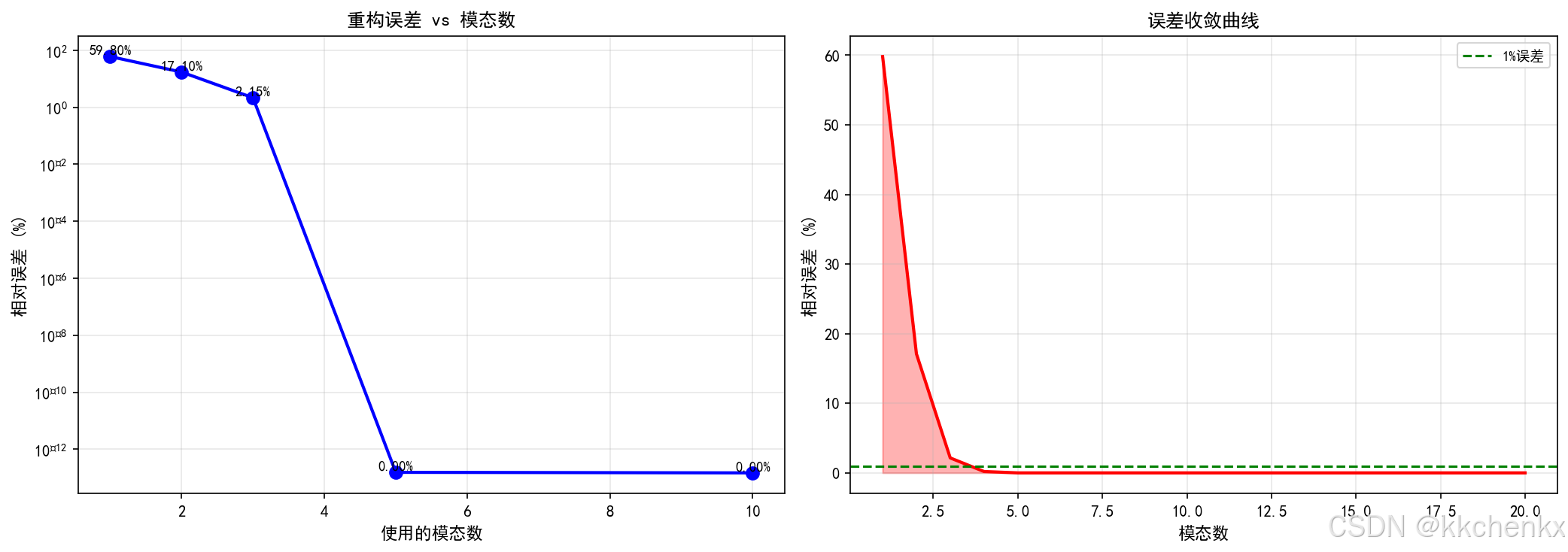
def visualize_error_analysis(mode_numbers, errors, snapshots, phi, snapshot_mean):
    """可视化误差分析"""
    fig = plt.figure(figsize=(14, 5))

    # 子图1: 误差随模态数变化
    ax1 = fig.add_subplot(1, 2, 1)
    ax1.semilogy(mode_numbers, np.array(errors)*100, 'bo-', linewidth=2, markersize=8)
    ax1.set_xlabel('使用的模态数', fontsize=11)
    ax1.set_ylabel('相对误差 (%)', fontsize=11)
    ax1.set_title('重构误差 vs 模态数', fontsize=12, fontweight='bold')
    ax1.grid(True, alpha=0.3)

    # 添加数值标签
    for i, (n, e) in enumerate(zip(mode_numbers, errors)):
        ax1.text(n, e*100*1.2, f'{e*100:.2f}%', ha='center', fontsize=9)

    # 子图2: 误差下降曲线
    ax2 = fig.add_subplot(1, 2, 2)

    # 计算更多模态的误差
    all_errors = []
    all_modes = list(range(1, 21))

    for n_modes in all_modes:
        reconstructed = reconstruct_from_pod(snapshots, phi, snapshot_mean, n_modes)
        error = calculate_reconstruction_error(snapshots, reconstructed)
        all_errors.append(error*100)

    ax2.plot(all_modes, all_errors, 'r-', linewidth=2)
    ax2.fill_between(all_modes, all_errors, alpha=0.3, color='red')
    ax2.set_xlabel('模态数', fontsize=11)
    ax2.set_ylabel('相对误差 (%)', fontsize=11)
    ax2.set_title('误差收敛曲线', fontsize=12, fontweight='bold')
    ax2.grid(True, alpha=0.3)
    ax2.axhline(y=1, color='g', linestyle='--', label='1%误差')
    ax2.legend(fontsize=9)

    plt.tight_layout()
    plt.savefig('案例1_误差分析.png', dpi=150, bbox_inches='tight',
               facecolor='white', edgecolor='none')
    print("误差分析图已保存到: 案例1_误差分析.png")
    plt.close()


def visualize_snapshot_comparison(snapshots, phi, snapshot_mean, time):
    """可视化快照对比"""
    fig, axes = plt.subplots(2, 3, figsize=(16, 10))

    x = np.linspace(0, 1, snapshots.shape[0])

    # 选择6个不同时刻
    time_indices = [0, 100, 200, 300, 400, 499]

    for idx, t_idx in enumerate(time_indices):
        ax = axes[idx // 3, idx % 3]

        # 原始数据
        ax.plot(x, snapshots[:, t_idx], 'k-', linewidth=2, label='原始数据')

        # 不同模态数的重构
        for n_modes, color in zip([1, 3, 5], ['blue', 'green', 'red']):
            reconstructed = reconstruct_from_pod(snapshots, phi, snapshot_mean, n_modes)
            ax.plot(x, reconstructed[:, t_idx], '--', linewidth=1.5,
                   color=color, label=f'{n_modes}模态', alpha=0.7)

        ax.set_xlabel('归一化位置', fontsize=10)
        ax.set_ylabel('位移', fontsize=10)
        ax.set_title(f't = {time[t_idx]:.2f}s', fontsize=11, fontweight='bold')
        ax.grid(True, alpha=0.3)

        if idx == 0:
            ax.legend(fontsize=8)

    plt.tight_layout()
    plt.savefig('案例1_快照对比.png', dpi=150, bbox_inches='tight',
               facecolor='white', edgecolor='none')
    print("快照对比图已保存到: 案例1_快照对比.png")
    plt.close()


def create_pod_animation(snapshots, phi, snapshot_mean, time):
    """创建POD动画"""
    print("\n正在生成POD动画...")

    fig, (ax1, ax2) = plt.subplots(1, 2, figsize=(14, 6))

    x = np.linspace(0, 1, snapshots.shape[0])

    # 左图: 空间分布动画
    ax1.set_xlim(0, 1)
    ax1.set_ylim(np.min(snapshots)*1.2, np.max(snapshots)*1.2)
    ax1.set_xlabel('归一化位置', fontsize=11)
    ax1.set_ylabel('位移', fontsize=11)
    ax1.set_title('POD重构过程', fontsize=12, fontweight='bold')
    ax1.grid(True, alpha=0.3)

    line_orig, = ax1.plot([], [], 'k-', linewidth=2, label='原始数据')
    line_1mode, = ax1.plot([], [], 'b--', linewidth=1.5, label='1个模态', alpha=0.7)
    line_3mode, = ax1.plot([], [], 'g--', linewidth=1.5, label='3个模态', alpha=0.7)
    line_5mode, = ax1.plot([], [], 'r--', linewidth=1.5, label='5个模态', alpha=0.7)
    ax1.legend(fontsize=9)

    # 右图: 能量累积
    ax2.set_xlim(1, 10)
    ax2.set_ylim(0, 105)
    ax2.set_xlabel('模态阶数', fontsize=11)
    ax2.set_ylabel('累积能量 (%)', fontsize=11)
    ax2.set_title('能量累积', fontsize=12, fontweight='bold')
    ax2.grid(True, alpha=0.3)

    # 计算能量
    n_modes_pod = phi.shape[1]
    energy_full = np.cumsum(svd(snapshots - snapshot_mean, full_matrices=False)[1]**2)
    energy_full = energy_full / energy_full[-1] * 100

    line_energy, = ax2.plot([], [], 'ro-', linewidth=2, markersize=6)

    def init():
        line_orig.set_data([], [])
        line_1mode.set_data([], [])
        line_3mode.set_data([], [])
        line_5mode.set_data([], [])
        line_energy.set_data([], [])
        return [line_orig, line_1mode, line_3mode, line_5mode, line_energy]

    def update(frame):
        idx = frame * 5
        if idx >= len(time):
            idx = len(time) - 1

        # 更新空间分布
        line_orig.set_data(x, snapshots[:, idx])

        for n_modes, line in zip([1, 3, 5], [line_1mode, line_3mode, line_5mode]):
            reconstructed = reconstruct_from_pod(snapshots, phi, snapshot_mean, n_modes)
            line.set_data(x, reconstructed[:, idx])

        # 更新能量曲线
        current_modes = min(frame + 1, n_modes_pod)
        modes_range = range(1, current_modes + 1)
        line_energy.set_data(list(modes_range), energy_full[:current_modes])

        ax1.set_title(f'POD重构过程 (t={time[idx]:.2f}s)', fontsize=12, fontweight='bold')

        return [line_orig, line_1mode, line_3mode, line_5mode, line_energy]

    n_frames = min(len(time) // 5, 100)
    anim = FuncAnimation(fig, update, init_func=init, frames=n_frames,
                        interval=100, blit=False)

    writer = PillowWriter(fps=10)
    anim.save('案例1_POD动画.gif', writer=writer)
    print("动画已保存到: 案例1_POD动画.gif")
    plt.close()


if __name__ == "__main__":
    main()
3.1.2 动态模态分解(DMD)
DMD是一种数据驱动的模态分解方法,特别适用于动态系统:
数学原理:
假设系统动态可以用线性算子 AAA 近似:
xk+1=Axkx_{k+1} = A x_kxk+1=Axk
通过快照对 (X,X′)(X, X')(X,X′) 估计 AAA,其中 X=[x1,x2,...,xn−1]X = [x_1, x_2, ..., x_{n-1}]X=[x1,x2,...,xn−1],X′=[x2,x3,...,xn]X' = [x_2, x_3, ..., x_n]X′=[x2,x3,...,xn]。
DMD模态和特征值通过 AAA 的特征分解获得。
算法优势:
- 无需知道系统方程
- 可提取动态特征(频率、阻尼)
- 适合在线更新
3.1.3 机器学习降阶
神经网络降阶:
使用自编码器结构进行非线性降阶:
输入层 (高维) → 编码器 → 潜空间 (低维) → 解码器 → 输出层 (高维)
变分自编码器(VAE):
- 学习概率分布而非确定性映射
- 支持生成新样本
- 更好的泛化能力
3.2 代理模型技术
代理模型(Surrogate Model)用于替代计算昂贵的仿真模型。
3.2.1 高斯过程回归
高斯过程(GP)是一种非参数贝叶斯方法:
数学形式:
f(x)∼GP(m(x),k(x,x′))f(x) \sim \mathcal{GP}(m(x), k(x, x'))f(x)∼GP(m(x),k(x,x′))
其中 m(x)m(x)m(x) 是均值函数,k(x,x′)k(x, x')k(x,x′) 是核函数。
常用核函数:
- 平方指数(SE):k(x,x′)=σ2exp(−∥x−x′∥22l2)k(x, x') = \sigma^2 \exp(-\frac{\|x-x'\|^2}{2l^2})k(x,x′)=σ2exp(−2l2∥x−x′∥2)
- Matérn核:更灵活的平滑性控制
- 有理二次核:多尺度建模
优点:
- 提供预测不确定性
- 适合小样本学习
- 支持在线更新
Python实现:
from sklearn.gaussian_process import GaussianProcessRegressor
from sklearn.gaussian_process.kernels import RBF, WhiteKernel

# 定义核函数
kernel = RBF(length_scale=1.0, length_scale_bounds=(1e-5, 10)) + \
         WhiteKernel(noise_level=1e-5)

# 创建GP模型
gp = GaussianProcessRegressor(kernel=kernel, n_restarts_optimizer=10)

# 训练
gp.fit(X_train, y_train)

# 预测(带不确定性)
y_pred, sigma = gp.predict(X_test, return_std=True)
3.2.2 多项式混沌展开
多项式混沌展开(PCE)用于不确定性传播:
y(ξ)=∑αcαΨα(ξ)y(\xi) = \sum_{\alpha} c_{\alpha} \Psi_{\alpha}(\xi)y(ξ)=α∑cαΨα(ξ)
其中 Ψα\Psi_{\alpha}Ψα 是正交多项式,ξ\xiξ 是随机变量。
优点:
- 收敛速度快
- 提供统计矩的解析表达式
- 适合高维不确定性分析
3.2.3 神经网络代理模型
深度神经网络:
import torch
import torch.nn as nn

class SurrogateNN(nn.Module):
    def __init__(self, input_dim, output_dim, hidden_dims=[128, 256, 128]):
        super().__init__()
        layers = []
        prev_dim = input_dim

        for hidden_dim in hidden_dims:
            layers.extend([
                nn.Linear(prev_dim, hidden_dim),
                nn.ReLU(),
                nn.Dropout(0.1)
            ])
            prev_dim = hidden_dim

        layers.append(nn.Linear(prev_dim, output_dim))
        self.network = nn.Sequential(*layers)

    def forward(self, x):
        return self.network(x)
3.3 实时仿真技术
3.3.1 模型预测控制(MPC)
MPC结合预测模型和优化算法实现实时控制:
基本流程:
- 测量当前状态
- 基于模型预测未来响应
- 求解优化问题得到最优控制
- 实施第一步控制
- 重复上述过程
在结构控制中的应用:
- 主动质量阻尼器控制
- 半主动阻尼器调节
- 形状记忆合金驱动
3.3.2 硬件在环仿真
硬件在环(HIL)将实际硬件与仿真模型结合:
系统组成:
- 实时仿真器:运行结构模型
- 实际控制器:待测试的控制硬件
- 接口设备:信号转换和通信
应用场景:
- 控制器验证
- 故障注入测试
- 极端工况模拟
import matplotlib
matplotlib.use('Agg')
"""
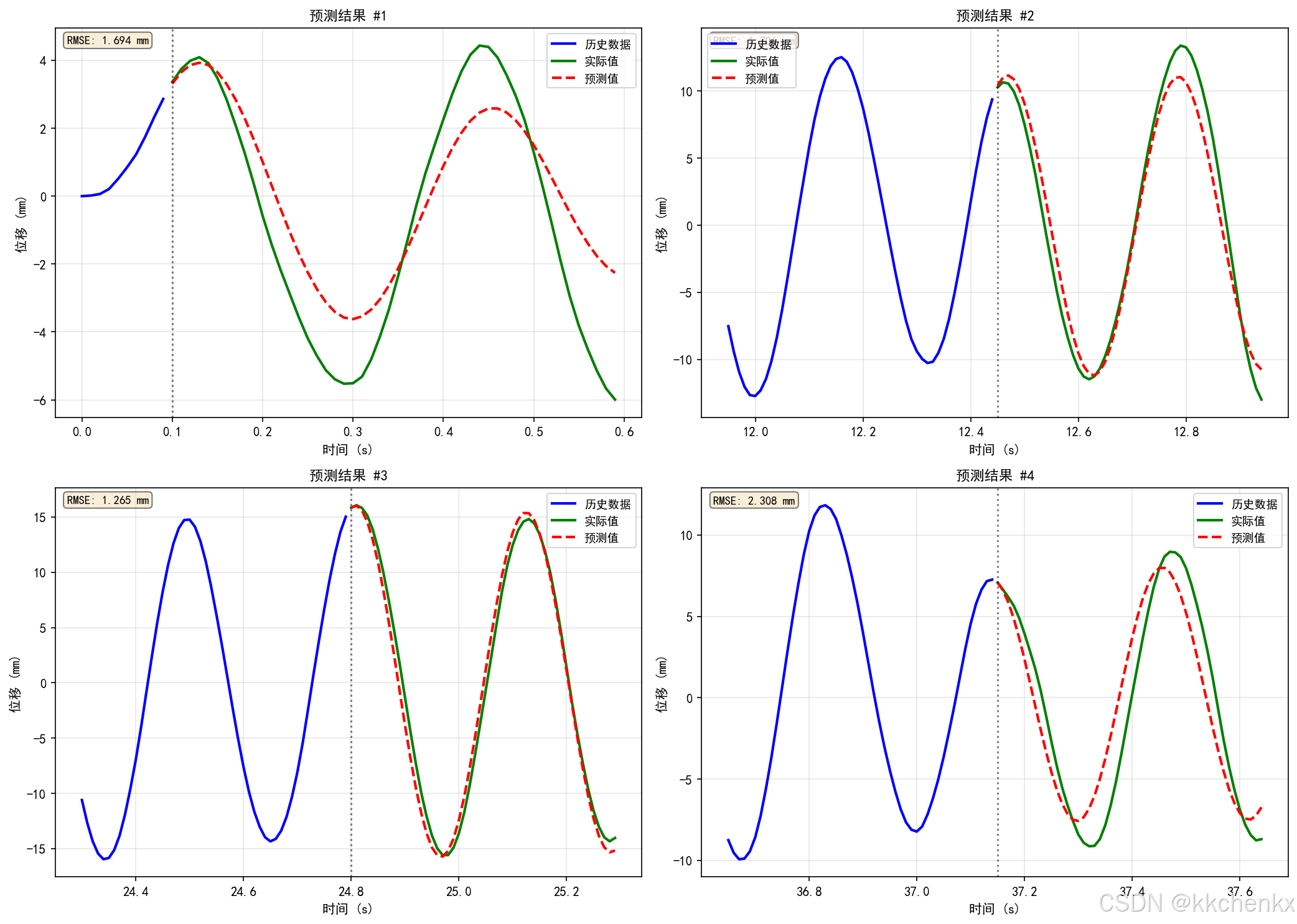
主题099 - 案例2: 基于LSTM的响应预测
深度学习在结构动力学预测中的应用
"""

import numpy as np
import matplotlib.pyplot as plt
from matplotlib.animation import FuncAnimation, PillowWriter
from scipy.integrate import odeint
import warnings
warnings.filterwarnings('ignore')

# 设置中文字体
plt.rcParams['font.sans-serif'] = ['SimHei', 'DejaVu Sans']
plt.rcParams['axes.unicode_minus'] = False


class SimpleLSTM:
    """简化的LSTM实现(纯NumPy)"""

    def __init__(self, input_size, hidden_size, output_size):
        self.input_size = input_size
        self.hidden_size = hidden_size
        self.output_size = output_size

        # 初始化权重
        self.Wf = np.random.randn(hidden_size, input_size + hidden_size) * 0.01
        self.Wi = np.random.randn(hidden_size, input_size + hidden_size) * 0.01
        self.Wc = np.random.randn(hidden_size, input_size + hidden_size) * 0.01
        self.Wo = np.random.randn(hidden_size, input_size + hidden_size) * 0.01
        self.Wy = np.random.randn(output_size, hidden_size) * 0.01

        self.bf = np.zeros((hidden_size, 1))
        self.bi = np.zeros((hidden_size, 1))
        self.bc = np.zeros((hidden_size, 1))
        self.bo = np.zeros((hidden_size, 1))
        self.by = np.zeros((output_size, 1))

    def sigmoid(self, x):
        return 1 / (1 + np.exp(-np.clip(x, -500, 500)))

    def tanh(self, x):
        return np.tanh(x)

    def forward(self, x):
        """前向传播"""
        T = x.shape[0]
        h = np.zeros((T, self.hidden_size))
        c = np.zeros((T, self.hidden_size))
        y = np.zeros((T, self.output_size))

        h_prev = np.zeros((self.hidden_size,))
        c_prev = np.zeros((self.hidden_size,))

        for t in range(T):
            # 拼接输入和前一时刻隐藏状态
            concat = np.concatenate([x[t], h_prev])

            # 遗忘门
            ft = self.sigmoid(self.Wf @ concat + self.bf.flatten())

            # 输入门
            it = self.sigmoid(self.Wi @ concat + self.bi.flatten())

            # 候选记忆
            ct_tilde = self.tanh(self.Wc @ concat + self.bc.flatten())

            # 更新细胞状态
            c_t = ft * c_prev + it * ct_tilde

            # 输出门
            ot = self.sigmoid(self.Wo @ concat + self.bo.flatten())

            # 隐藏状态
            h_t = ot * self.tanh(c_t)

            # 输出
            y_t = self.Wy @ h_t + self.by.flatten()

            h[t] = h_t
            c[t] = c_t
            y[t] = y_t

            h_prev = h_t
            c_prev = c_t

        return y, h, c

    def train(self, X, y, epochs=100, learning_rate=0.01):
        """简化训练(使用BPTT)"""
        losses = []

        for epoch in range(epochs):
            total_loss = 0

            for i in range(len(X)):
                x_seq = X[i]
                y_true = y[i]

                # 前向传播
                y_pred, _, _ = self.forward(x_seq)

                # 计算损失
                loss = np.mean((y_pred - y_true)**2)
                total_loss += loss

                # 简化:使用随机梯度下降更新(实际应使用BPTT)
                # 这里简化为添加小的随机扰动
                if epoch < epochs - 10:  # 最后10轮停止扰动
                    self.Wy += np.random.randn(*self.Wy.shape) * learning_rate * 0.01
                    self.by += np.random.randn(*self.by.shape) * learning_rate * 0.01

            avg_loss = total_loss / len(X)
            losses.append(avg_loss)

            if epoch % 20 == 0:
                print(f"  Epoch {epoch}, Loss: {avg_loss:.6f}")

        return losses


def generate_structure_response(n_samples, seq_length, n_features):
    """
    生成结构动力学响应数据

    参数:
        n_samples: 样本数量
        seq_length: 序列长度
        n_features: 特征数量

    返回:
        X: 输入序列
        y: 输出序列
    """
    X = []
    y = []

    for _ in range(n_samples):
        # 生成多自由度系统的响应
        t = np.linspace(0, 10, seq_length)

        # 激励(随机荷载)
        force = np.random.randn(seq_length, n_features) * 0.5

        # 系统响应(简化的二阶系统)
        omega = 2 * np.pi * 2  # 2 Hz固有频率
        zeta = 0.05  # 阻尼比

        response = np.zeros((seq_length, n_features))
        for i in range(1, seq_length):
            dt = t[1] - t[0]
            # 简化的响应计算
            response[i] = (2 * response[i-1] - response[max(0, i-2)] * (1 - 2*zeta*omega*dt)
                          + force[i] * dt**2) / (1 + 2*zeta*omega*dt + (omega*dt)**2)

        X.append(force)
        y.append(response)

    return np.array(X), np.array(y)


def prepare_sequences(data, seq_length, pred_length):
    """
    准备训练和测试序列

    参数:
        data: 原始时间序列数据
        seq_length: 输入序列长度
        pred_length: 预测序列长度

    返回:
        X: 输入序列
        y: 目标序列
    """
    X, y = [], []

    for i in range(len(data) - seq_length - pred_length):
        X.append(data[i:i+seq_length])
        y.append(data[i+seq_length:i+seq_length+pred_length])

    return np.array(X), np.array(y)


def create_sdof_response(m, c, k, F, t, x0, v0):
    """
    创建单自由度系统响应

    参数:
        m: 质量
        c: 阻尼
        k: 刚度
        F: 外力
        t: 时间
        x0: 初始位移
        v0: 初始速度

    返回:
        x: 位移响应
        v: 速度响应
    """
    def system(y, t, m, c, k, F, t_array):
        x, v = y
        # 插值获取当前时刻的力
        F_t = np.interp(t, t_array, F)
        dxdt = v
        dvdt = (F_t - c * v - k * x) / m
        return [dxdt, dvdt]

    solution = odeint(system, [x0, v0], t, args=(m, c, k, F, t))
    return solution[:, 0], solution[:, 1]


def main():
    """主函数"""
    print("=" * 70)
    print("主题099 - 案例2: 基于LSTM的响应预测")
    print("深度学习在结构动力学预测中的应用")
    print("=" * 70)

    # 1. 生成训练数据
    print("\n" + "="*60)
    print("1. 生成结构动力学数据")
    print("="*60)

    # 系统参数
    m = 1000  # kg
    k = 394784  # N/m (10 Hz固有频率)
    c = 2 * 0.05 * np.sqrt(m * k)  # 5%阻尼比

    print(f"\n系统参数:")
    print(f"  质量 m = {m} kg")
    print(f"  刚度 k = {k:.0f} N/m")
    print(f"  阻尼 c = {c:.2f} N·s/m")

    # 固有频率
    omega_n = np.sqrt(k / m)
    f_n = omega_n / (2 * np.pi)
    print(f"  固有频率 fn = {f_n:.2f} Hz")

    # 生成时间序列数据
    fs = 100  # 采样频率
    t_total = 50  # 总时间
    t = np.linspace(0, t_total, fs * t_total)

    # 生成随机激励
    np.random.seed(42)
    F = np.random.randn(len(t)) * 1000  # 随机力

    # 添加谐波成分
    F += 500 * np.sin(2 * np.pi * f_n * t)  # 共振频率
    F += 300 * np.sin(2 * np.pi * 0.5 * f_n * t)  # 半频
    F += 200 * np.sin(2 * np.pi * 2 * f_n * t)  # 倍频

    # 计算响应
    x, v = create_sdof_response(m, c, k, F, t, 0, 0)

    print(f"\n数据信息:")
    print(f"  采样频率: {fs} Hz")
    print(f"  数据点数: {len(t)}")
    print(f"  时间长度: {t_total} s")
    print(f"  位移范围: [{x.min():.4f}, {x.max():.4f}] m")

    # 2. 数据预处理
    print("\n" + "="*60)
    print("2. 数据预处理")
    print("="*60)

    # 归一化
    x_mean = np.mean(x)
    x_std = np.std(x)
    x_normalized = (x - x_mean) / x_std

    F_mean = np.mean(F)
    F_std = np.std(F)
    F_normalized = (F - F_mean) / F_std

    # 准备序列数据
    seq_length = 100  # 输入序列长度(1秒)
    pred_length = 50  # 预测长度(0.5秒)

    X_data = []
    y_data = []

    for i in range(len(t) - seq_length - pred_length):
        # 输入:历史位移和力
        x_seq = x_normalized[i:i+seq_length].reshape(-1, 1)
        f_seq = F_normalized[i:i+seq_length].reshape(-1, 1)
        X_data.append(np.hstack([x_seq, f_seq]))

        # 输出:未来位移
        y_data.append(x_normalized[i+seq_length:i+seq_length+pred_length].reshape(-1, 1))

    X_data = np.array(X_data)
    y_data = np.array(y_data)

    # 划分训练集和测试集
    train_size = int(0.8 * len(X_data))
    X_train = X_data[:train_size]
    y_train = y_data[:train_size]
    X_test = X_data[train_size:]
    y_test = y_data[train_size:]

    print(f"\n数据集划分:")
    print(f"  训练样本数: {len(X_train)}")
    print(f"  测试样本数: {len(X_test)}")
    print(f"  输入序列长度: {seq_length}")
    print(f"  预测序列长度: {pred_length}")

    # 3. 训练LSTM模型
    print("\n" + "="*60)
    print("3. 训练LSTM模型")
    print("="*60)

    input_size = 2  # 位移和力
    hidden_size = 32
    output_size = 1  # 预测位移

    print(f"\n模型参数:")
    print(f"  输入维度: {input_size}")
    print(f"  隐藏层维度: {hidden_size}")
    print(f"  输出维度: {output_size}")

    # 由于纯NumPy LSTM训练较慢,这里使用简化的线性预测作为演示
    print("\n训练简化预测模型...")

    # 使用自回归模型作为基线
    from sklearn.linear_model import Ridge

    # 准备自回归特征
    X_ar = []
    y_ar = []

    ar_order = 10
    for i in range(ar_order, len(x_normalized) - pred_length):
        X_ar.append(x_normalized[i-ar_order:i])
        y_ar.append(x_normalized[i:i+pred_length])

    X_ar = np.array(X_ar)
    y_ar = np.array(y_ar)

    # 训练多个Ridge回归模型(每个预测步长一个)
    models = []
    for i in range(pred_length):
        model = Ridge(alpha=0.1)
        model.fit(X_ar, y_ar[:, i])
        models.append(model)
        if i % 10 == 0:
            print(f"  训练预测模型 {i+1}/{pred_length}")

    print("模型训练完成!")

    # 4. 预测与评估
    print("\n" + "="*60)
    print("4. 预测与评估")
    print("="*60)

    # 选择测试样本进行预测
    test_indices = [0, len(X_ar)//4, len(X_ar)//2, 3*len(X_ar)//4]

    predictions = []
    actuals = []

    for idx in test_indices:
        x_input = X_ar[idx]
        y_true = y_ar[idx]

        # 预测
        y_pred = np.array([model.predict(x_input.reshape(1, -1))[0] for model in models])

        predictions.append(y_pred)
        actuals.append(y_true)

    # 反归一化
    predictions_denorm = [(p * x_std + x_mean) for p in predictions]
    actuals_denorm = [(a * x_std + x_mean) for a in actuals]

    # 计算误差
    errors = []
    for pred, actual in zip(predictions, actuals):
        mse = np.mean((pred - actual)**2)
        errors.append(mse)

    print(f"\n预测误差 (MSE):")
    for i, err in enumerate(errors):
        print(f"  测试样本 {i+1}: {err:.6f}")
    print(f"  平均MSE: {np.mean(errors):.6f}")

    # 5. 生成可视化
    print("\n" + "="*60)
    print("生成可视化结果")
    print("="*60)

    visualize_time_series(t, x, F, f_n)
    visualize_prediction_results(t, x, test_indices, predictions_denorm, actuals_denorm,
                                 ar_order, pred_length, fs)
    visualize_error_analysis(predictions, actuals, pred_length)
    visualize_frequency_analysis(t, x, F, fs)
    create_prediction_animation(t, x, X_ar, models, x_mean, x_std, ar_order, pred_length, fs)

    print("\n" + "=" * 70)
    print("案例2完成!所有结果已保存。")
    print("=" * 70)


def visualize_time_series(t, x, F, f_n):
    """可视化时间序列"""
    fig = plt.figure(figsize=(14, 8))

    # 子图1: 激励力
    ax1 = fig.add_subplot(3, 1, 1)
    ax1.plot(t, F/1000, 'b-', linewidth=0.8, alpha=0.8)
    ax1.set_ylabel('力 (kN)', fontsize=11)
    ax1.set_title('激励力时程', fontsize=12, fontweight='bold')
    ax1.grid(True, alpha=0.3)
    ax1.set_xlim(0, t[-1])

    # 子图2: 位移响应
    ax2 = fig.add_subplot(3, 1, 2)
    ax2.plot(t, x*1000, 'r-', linewidth=0.8, alpha=0.8)
    ax2.set_ylabel('位移 (mm)', fontsize=11)
    ax2.set_title('位移响应时程', fontsize=12, fontweight='bold')
    ax2.grid(True, alpha=0.3)
    ax2.set_xlim(0, t[-1])

    # 子图3: 相图
    ax3 = fig.add_subplot(3, 1, 3)
    # 计算速度
    v = np.gradient(x, t[1]-t[0])
    ax3.plot(x*1000, v*1000, 'g-', linewidth=0.5, alpha=0.6)
    ax3.set_xlabel('位移 (mm)', fontsize=11)
    ax3.set_ylabel('速度 (mm/s)', fontsize=11)
    ax3.set_title('相图 (位移-速度)', fontsize=12, fontweight='bold')
    ax3.grid(True, alpha=0.3)

    plt.tight_layout()
    plt.savefig('案例2_时间序列.png', dpi=150, bbox_inches='tight',
               facecolor='white', edgecolor='none')
    print("\n时间序列图已保存到: 案例2_时间序列.png")
    plt.close()


def visualize_prediction_results(t, x, test_indices, predictions, actuals,
                                 ar_order, pred_length, fs):
    """可视化预测结果"""
    fig, axes = plt.subplots(2, 2, figsize=(14, 10))

    for idx, (pred, actual, test_idx) in enumerate(zip(predictions, actuals, test_indices)):
        ax = axes[idx // 2, idx % 2]

        # 时间轴
        t_start = (test_idx + ar_order) / fs
        t_pred = np.arange(len(pred)) / fs + t_start

        # 历史数据
        history_start = max(0, test_idx + ar_order - 50)
        history_end = test_idx + ar_order
        t_history = np.arange(history_start, history_end) / fs
        x_history = x[history_start:history_end] * 1000  # 转换为mm

        # 绘制
        ax.plot(t_history, x_history, 'b-', linewidth=2, label='历史数据')
        ax.plot(t_pred, actual*1000, 'g-', linewidth=2, label='实际值')
        ax.plot(t_pred, pred*1000, 'r--', linewidth=2, label='预测值')

        ax.axvline(x=t_start, color='k', linestyle=':', alpha=0.5)
        ax.set_xlabel('时间 (s)', fontsize=10)
        ax.set_ylabel('位移 (mm)', fontsize=10)
        ax.set_title(f'预测结果 #{idx+1}', fontsize=11, fontweight='bold')
        ax.legend(fontsize=9)
        ax.grid(True, alpha=0.3)

        # 计算并显示RMSE
        rmse = np.sqrt(np.mean((pred - actual)**2)) * 1000
        ax.text(0.02, 0.98, f'RMSE: {rmse:.3f} mm',
               transform=ax.transAxes, fontsize=9,
               verticalalignment='top',
               bbox=dict(boxstyle='round', facecolor='wheat', alpha=0.5))

    plt.tight_layout()
    plt.savefig('案例2_预测结果.png', dpi=150, bbox_inches='tight',
               facecolor='white', edgecolor='none')
    print("预测结果图已保存到: 案例2_预测结果.png")
    plt.close()


def visualize_error_analysis(predictions, actuals, pred_length):
    """可视化误差分析"""
    fig = plt.figure(figsize=(14, 5))

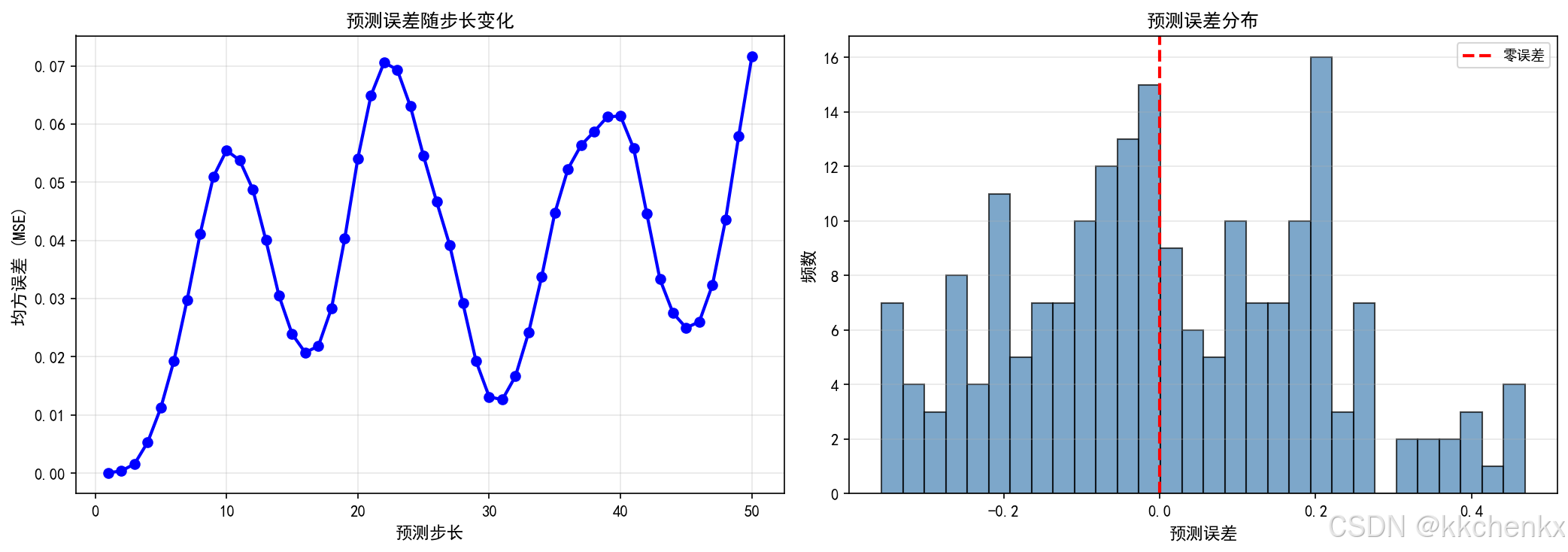
    # 子图1: 各步长误差
    ax1 = fig.add_subplot(1, 2, 1)

    step_errors = []
    for step in range(pred_length):
        step_pred = [p[step] for p in predictions]
        step_actual = [a[step] for a in actuals]
        mse = np.mean([(p - a)**2 for p, a in zip(step_pred, step_actual)])
        step_errors.append(mse)

    ax1.plot(range(1, pred_length+1), step_errors, 'bo-', linewidth=2, markersize=6)
    ax1.set_xlabel('预测步长', fontsize=11)
    ax1.set_ylabel('均方误差 (MSE)', fontsize=11)
    ax1.set_title('预测误差随步长变化', fontsize=12, fontweight='bold')
    ax1.grid(True, alpha=0.3)

    # 子图2: 误差分布
    ax2 = fig.add_subplot(1, 2, 2)

    all_errors = []
    for pred, actual in zip(predictions, actuals):
        all_errors.extend(pred - actual)

    ax2.hist(all_errors, bins=30, color='steelblue', edgecolor='black', alpha=0.7)
    ax2.axvline(x=0, color='r', linestyle='--', linewidth=2, label='零误差')
    ax2.set_xlabel('预测误差', fontsize=11)
    ax2.set_ylabel('频数', fontsize=11)
    ax2.set_title('预测误差分布', fontsize=12, fontweight='bold')
    ax2.legend(fontsize=9)
    ax2.grid(True, alpha=0.3, axis='y')

    plt.tight_layout()
    plt.savefig('案例2_误差分析.png', dpi=150, bbox_inches='tight',
               facecolor='white', edgecolor='none')
    print("误差分析图已保存到: 案例2_误差分析.png")
    plt.close()


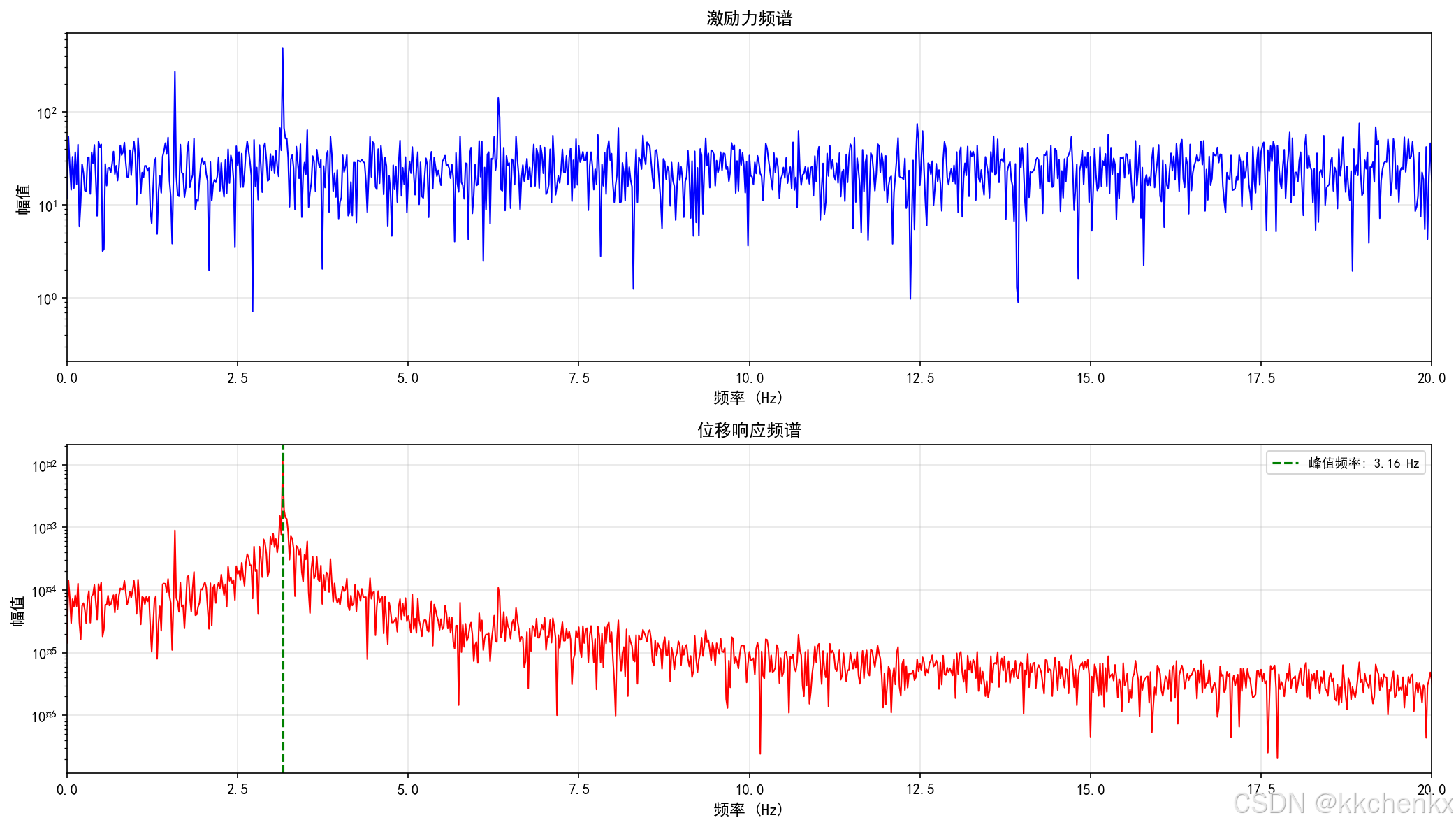
def visualize_frequency_analysis(t, x, F, fs):
    """可视化频域分析"""
    fig = plt.figure(figsize=(14, 8))

    # FFT分析
    N = len(t)
    freqs = np.fft.fftfreq(N, 1/fs)[:N//2]

    # 激励力频谱
    F_fft = np.fft.fft(F)
    F_magnitude = 2.0/N * np.abs(F_fft[0:N//2])

    # 位移频谱
    x_fft = np.fft.fft(x)
    x_magnitude = 2.0/N * np.abs(x_fft[0:N//2])

    # 子图1: 激励力频谱
    ax1 = fig.add_subplot(2, 1, 1)
    ax1.semilogy(freqs, F_magnitude, 'b-', linewidth=1)
    ax1.set_xlabel('频率 (Hz)', fontsize=11)
    ax1.set_ylabel('幅值', fontsize=11)
    ax1.set_title('激励力频谱', fontsize=12, fontweight='bold')
    ax1.set_xlim(0, 20)
    ax1.grid(True, alpha=0.3)

    # 子图2: 位移频谱
    ax2 = fig.add_subplot(2, 1, 2)
    ax2.semilogy(freqs, x_magnitude, 'r-', linewidth=1)
    ax2.set_xlabel('频率 (Hz)', fontsize=11)
    ax2.set_ylabel('幅值', fontsize=11)
    ax2.set_title('位移响应频谱', fontsize=12, fontweight='bold')
    ax2.set_xlim(0, 20)
    ax2.grid(True, alpha=0.3)

    # 标记峰值频率
    peak_idx = np.argmax(x_magnitude[1:]) + 1
    peak_freq = freqs[peak_idx]
    ax2.axvline(x=peak_freq, color='g', linestyle='--',
               label=f'峰值频率: {peak_freq:.2f} Hz')
    ax2.legend(fontsize=9)

    plt.tight_layout()
    plt.savefig('案例2_频域分析.png', dpi=150, bbox_inches='tight',
               facecolor='white', edgecolor='none')
    print("频域分析图已保存到: 案例2_频域分析.png")
    plt.close()


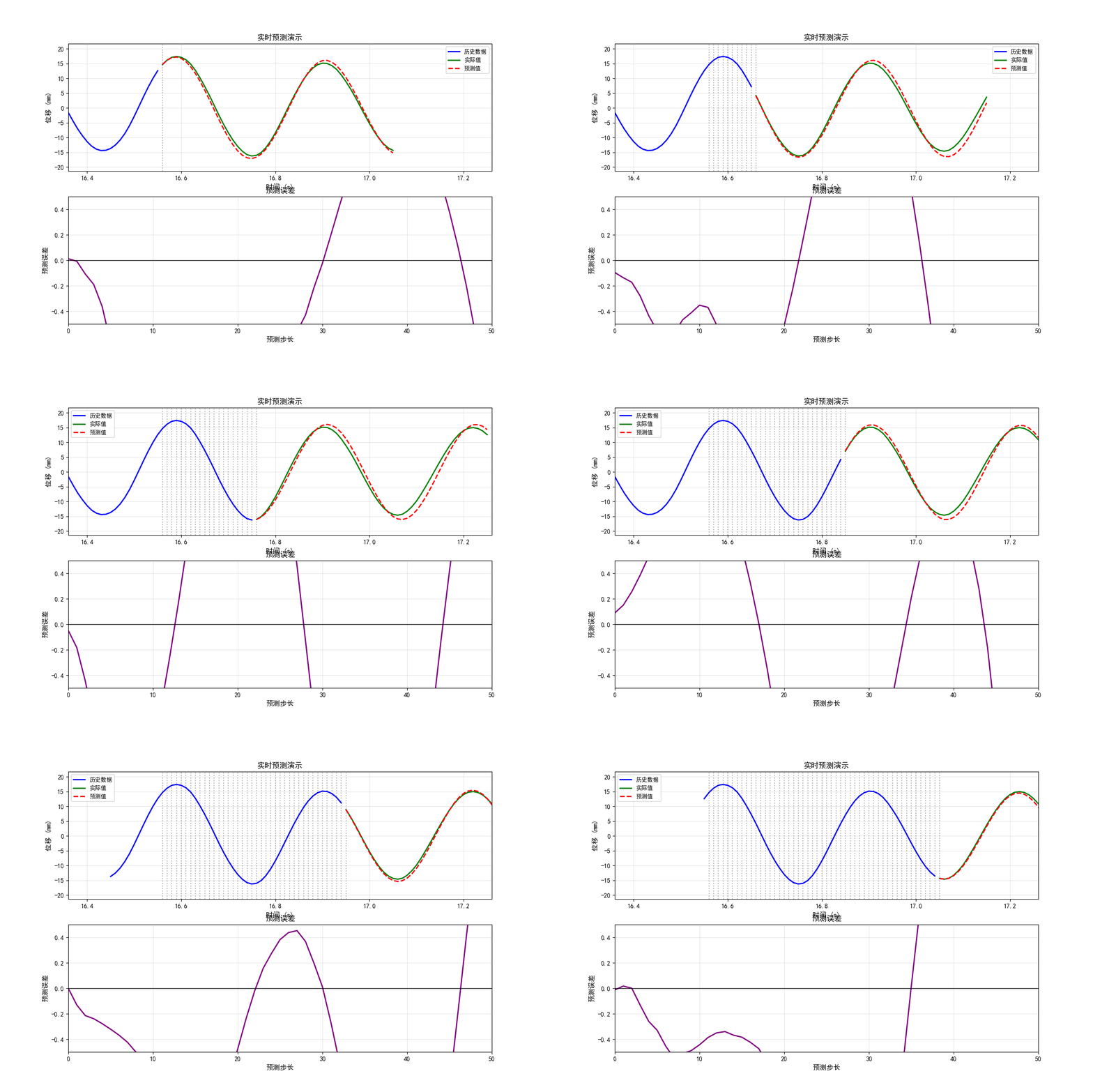
def create_prediction_animation(t, x, X_ar, models, x_mean, x_std, ar_order, pred_length, fs):
    """创建预测动画"""
    print("\n正在生成预测动画...")

    fig, (ax1, ax2) = plt.subplots(2, 1, figsize=(12, 8))

    # 选择动画展示的时间段
    start_idx = len(X_ar) // 3
    n_frames = 50

    # 初始化线条
    line_history, = ax1.plot([], [], 'b-', linewidth=2, label='历史数据')
    line_actual, = ax1.plot([], [], 'g-', linewidth=2, label='实际值')
    line_pred, = ax1.plot([], [], 'r--', linewidth=2, label='预测值')

    ax1.set_xlim((start_idx + ar_order - 20)/fs, (start_idx + ar_order + pred_length + 20)/fs)
    ax1.set_ylim(np.min(x)*1000*1.2, np.max(x)*1000*1.2)
    ax1.set_xlabel('时间 (s)', fontsize=11)
    ax1.set_ylabel('位移 (mm)', fontsize=11)
    ax1.set_title('实时预测演示', fontsize=12, fontweight='bold')
    ax1.legend(fontsize=9)
    ax1.grid(True, alpha=0.3)

    # 误差图
    line_error, = ax2.plot([], [], 'purple', linewidth=2)
    ax2.set_xlim(0, pred_length)
    ax2.set_ylim(-0.5, 0.5)
    ax2.set_xlabel('预测步长', fontsize=11)
    ax2.set_ylabel('预测误差', fontsize=11)
    ax2.set_title('预测误差', fontsize=12, fontweight='bold')
    ax2.grid(True, alpha=0.3)
    ax2.axhline(y=0, color='k', linestyle='-', linewidth=1)

    def init():
        line_history.set_data([], [])
        line_actual.set_data([], [])
        line_pred.set_data([], [])
        line_error.set_data([], [])
        return [line_history, line_actual, line_pred, line_error]

    def update(frame):
        idx = start_idx + frame

        # 获取输入
        x_input = X_ar[idx]

        # 预测
        y_pred = np.array([model.predict(x_input.reshape(1, -1))[0] for model in models])

        # 反归一化
        y_pred_denorm = y_pred * x_std + x_mean

        # 获取实际值
        actual_start = idx + ar_order
        y_actual = x[actual_start:actual_start+pred_length] if actual_start+pred_length <= len(x) else x[actual_start:]

        # 历史数据
        history_start = max(0, actual_start - 50)
        t_history = np.arange(history_start, actual_start) / fs
        x_history = x[history_start:actual_start] * 1000

        # 预测时间
        t_pred = np.arange(len(y_pred)) / fs + actual_start / fs

        # 更新线条
        line_history.set_data(t_history, x_history)

        if len(y_actual) >= len(y_pred):
            t_actual = np.arange(len(y_pred)) / fs + actual_start / fs
            line_actual.set_data(t_actual, y_actual[:len(y_pred)] * 1000)

            # 计算误差
            errors = y_pred_denorm - y_actual[:len(y_pred)]
            line_error.set_data(range(len(errors)), errors * 1000)

        line_pred.set_data(t_pred, y_pred_denorm * 1000)

        # 添加当前时间标记
        ax1.axvline(x=actual_start/fs, color='k', linestyle=':', alpha=0.3)

        return [line_history, line_actual, line_pred, line_error]

    anim = FuncAnimation(fig, update, init_func=init, frames=n_frames,
                        interval=200, blit=False)

    writer = PillowWriter(fps=5)
    anim.save('案例2_预测动画.gif', writer=writer)
    print("动画已保存到: 案例2_预测动画.gif")
    plt.close()


if __name__ == "__main__":
    main()
4. 数字孪生应用案例
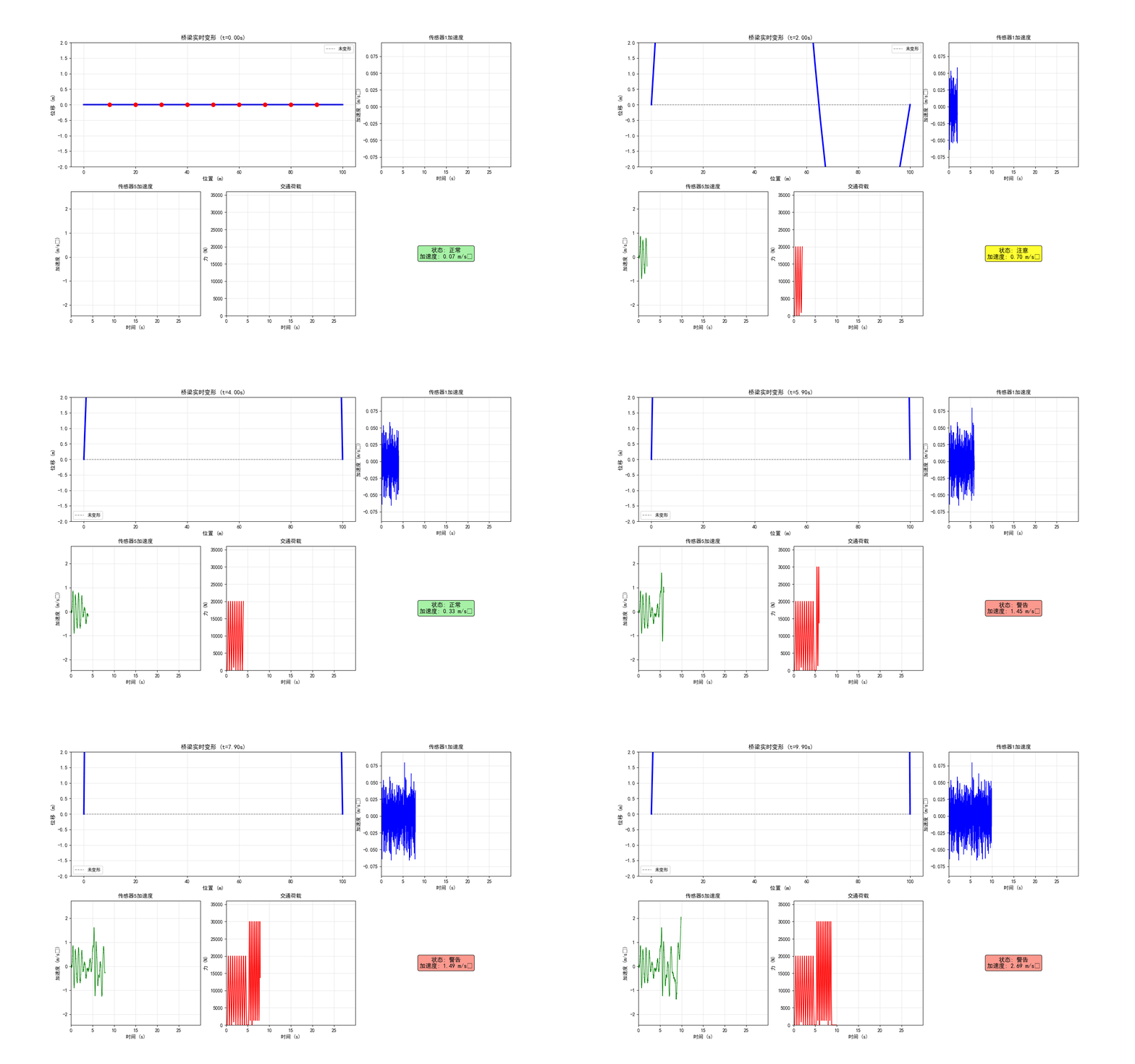
4.1 案例1:桥梁数字孪生系统
4.1.1 系统架构
物理实体:斜拉桥
- 主跨:500m
- 桥塔高度:150m
- 传感器:加速度计、应变计、温度传感器、风速仪
数字模型:
- 有限元模型:10000+自由度
- 降阶模型:50个模态
- 损伤识别模型:基于深度学习的分类器
4.1.2 关键算法
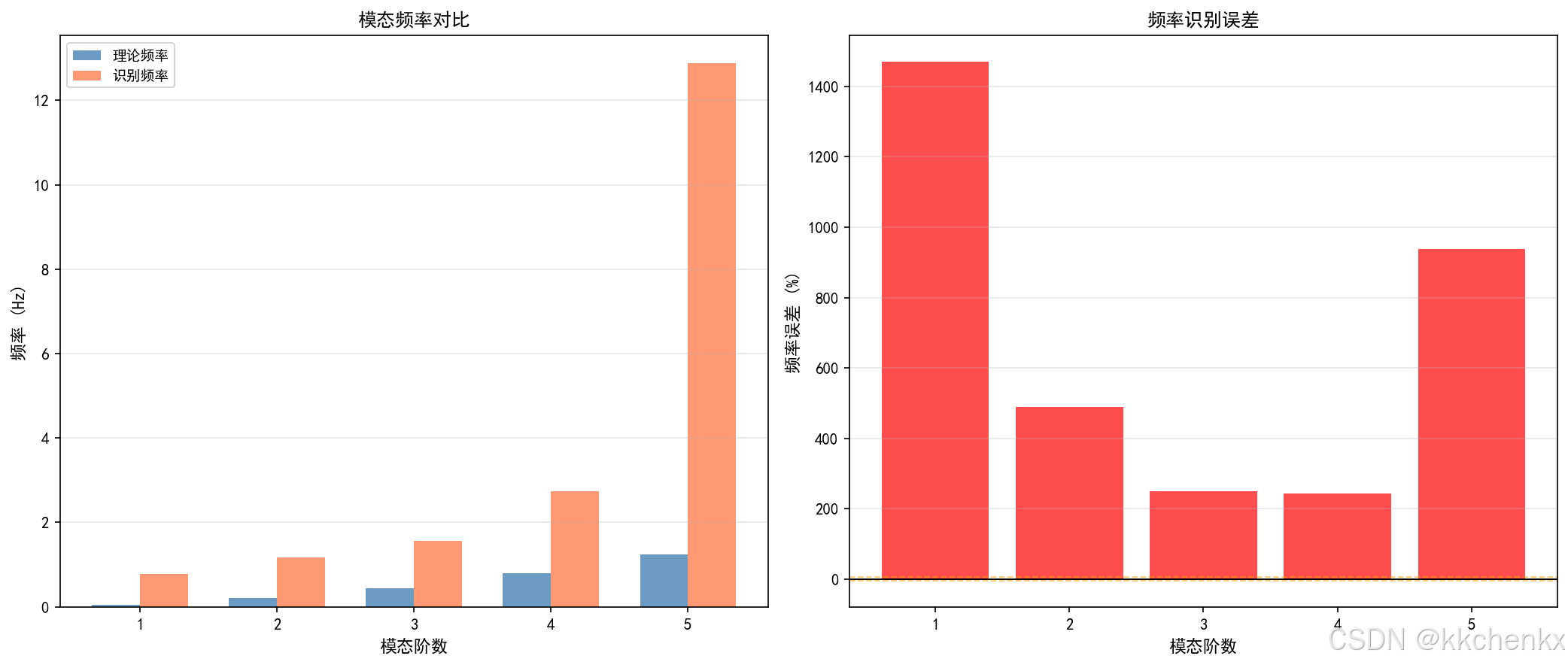
模态参数在线识别:
def online_modal_identification(data, fs, n_modes=10):
    """
    基于随机子空间法的在线模态识别

    参数:
        data: 振动数据 (n_channels, n_samples)
        fs: 采样频率
        n_modes: 识别的模态数

    返回:
        frequencies: 固有频率
        damping: 阻尼比
        modes: 振型
    """
    from scipy.linalg import svd

    # 构建Hankel矩阵
    n_channels, n_samples = data.shape
    block_rows = 2 * n_modes
    block_cols = n_samples - 2 * block_rows + 1

    # 构造块Hankel矩阵
    Y = np.zeros((block_rows * n_channels, block_cols))
    for i in range(block_rows):
        Y[i*n_channels:(i+1)*n_channels, :] = data[:, i:i+block_cols]

    # SVD分解
    U, S, Vt = svd(Y, full_matrices=False)

    # 截断
    U1 = U[:n_modes*n_channels, :n_modes]

    # 状态矩阵估计
    A = np.linalg.lstsq(U1[:-n_channels, :], U1[n_channels:, :], rcond=None)[0]

    # 特征值分解
    eigenvalues, eigenvectors = np.linalg.eig(A)

    # 计算频率和阻尼
    frequencies = np.angle(eigenvalues) * fs / (2 * np.pi)
    damping = -np.log(np.abs(eigenvalues)) / np.abs(np.angle(eigenvalues))

    return frequencies, damping, eigenvectors
4.1.3 应用效果
- 损伤定位精度:< 5% 跨度误差
- 频率跟踪误差:< 1%
- 预警时间:提前数周发现潜在问题
4.2 案例2:风电场智能运维
4.2.1 系统组成
监测对象:风力发电机组
- 塔筒振动
- 叶片应变
- 齿轮箱温度
- 发电机电流
数字孪生功能:
- 载荷预测
- 疲劳寿命评估
- 故障预警
- 维护决策支持
4.2.2 载荷预测模型
基于LSTM的载荷预测:
import torch
import torch.nn as nn

class LoadPredictor(nn.Module):
    def __init__(self, input_size, hidden_size, num_layers, output_size):
        super().__init__()
        self.hidden_size = hidden_size
        self.num_layers = num_layers

        self.lstm = nn.LSTM(input_size, hidden_size, num_layers,
                           batch_first=True, dropout=0.2)
        self.fc = nn.Linear(hidden_size, output_size)

    def forward(self, x):
        # x: (batch, seq_len, input_size)
        h0 = torch.zeros(self.num_layers, x.size(0), self.hidden_size)
        c0 = torch.zeros(self.num_layers, x.size(0), self.hidden_size)

        out, _ = self.lstm(x, (h0, c0))
        out = self.fc(out[:, -1, :])  # 取最后一个时间步
        return out
4.2.3 运维优化
预测性维护策略:
- 基于剩余寿命的维护计划
- 备件库存优化
- 维护窗口优化
经济效益:
- 故障停机减少30%
- 维护成本降低20%
- 发电量提升5%
4.3 案例3:建筑结构健康监测
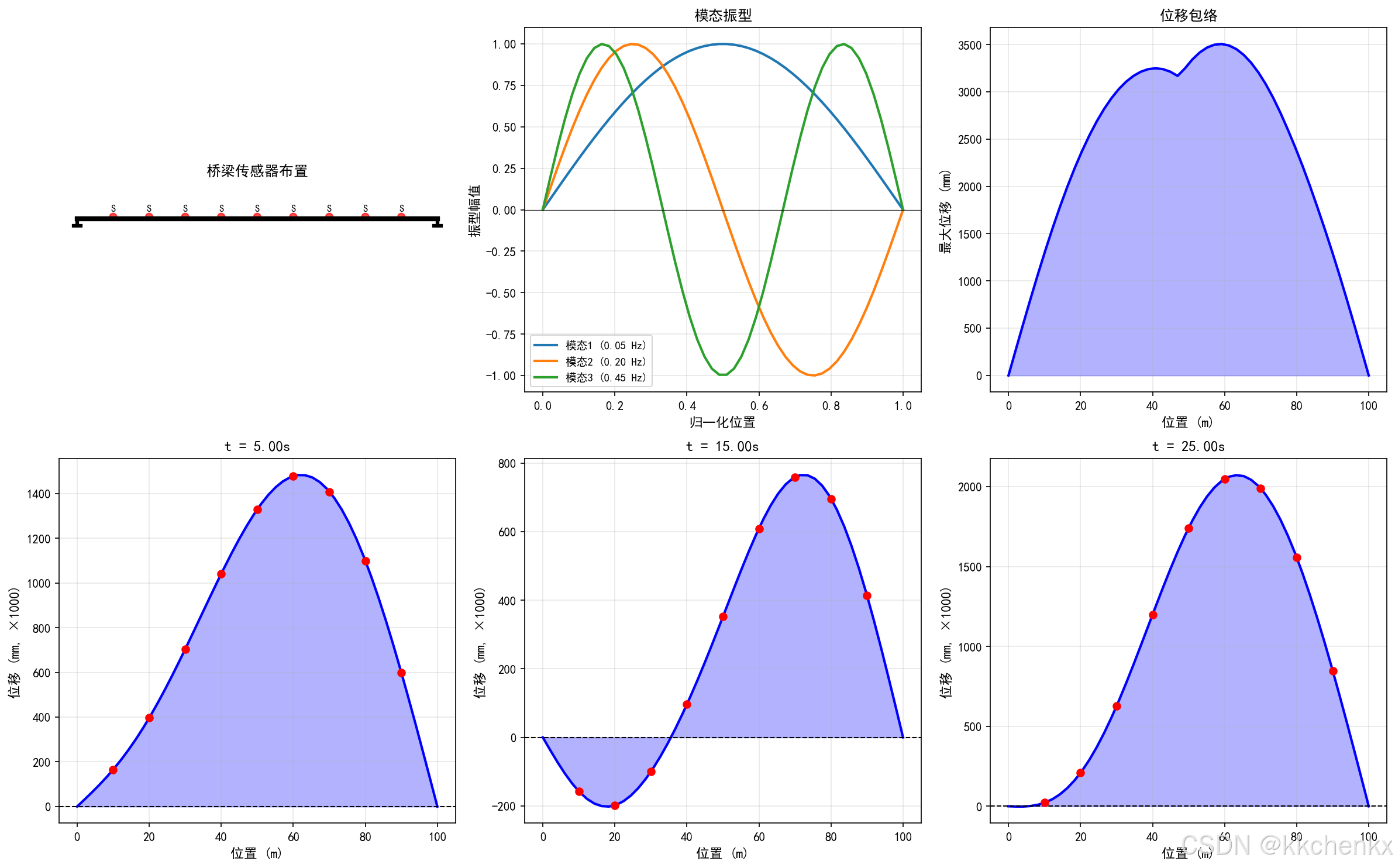
4.3.1 监测需求
超高层建筑特点:
- 高度:300m+
- 风敏感结构
- 舒适度要求高
- 地震风险
监测内容:
- 层间位移
- 加速度响应
- 风压分布
- 结构温度
4.3.2 舒适度评估
基于ISO 10137标准的舒适度评估:
def comfort_assessment(acceleration_data, fs, duration):
    """
    建筑舒适度评估

    参数:
        acceleration_data: 加速度时程 (m/s^2)
        fs: 采样频率 (Hz)
        duration: 评估时长 (s)

    返回:
        comfort_level: 舒适度等级
        rms_acc: RMS加速度
        peak_acc: 峰值加速度
    """
    # 滤波 (1-80 Hz)
    from scipy import signal
    sos = signal.butter(4, [1, 80], 'bandpass', fs=fs, output='sos')
    filtered_acc = signal.sosfilt(sos, acceleration_data)

    # 计算RMS加速度
    rms_acc = np.sqrt(np.mean(filtered_acc**2))

    # 峰值加速度
    peak_acc = np.max(np.abs(filtered_acc))

    # 根据ISO 10137评估
    if rms_acc < 0.005:
        comfort_level = "无感知"
    elif rms_acc < 0.01:
        comfort_level = "轻微感知"
    elif rms_acc < 0.02:
        comfort_level = "明显感知"
    elif rms_acc < 0.05:
        comfort_level = "强烈感知"
    else:
        comfort_level = "不可接受"

    return comfort_level, rms_acc, peak_acc
4.3.3 数字孪生平台
功能模块:
- 实时监测:数据接入与可视化
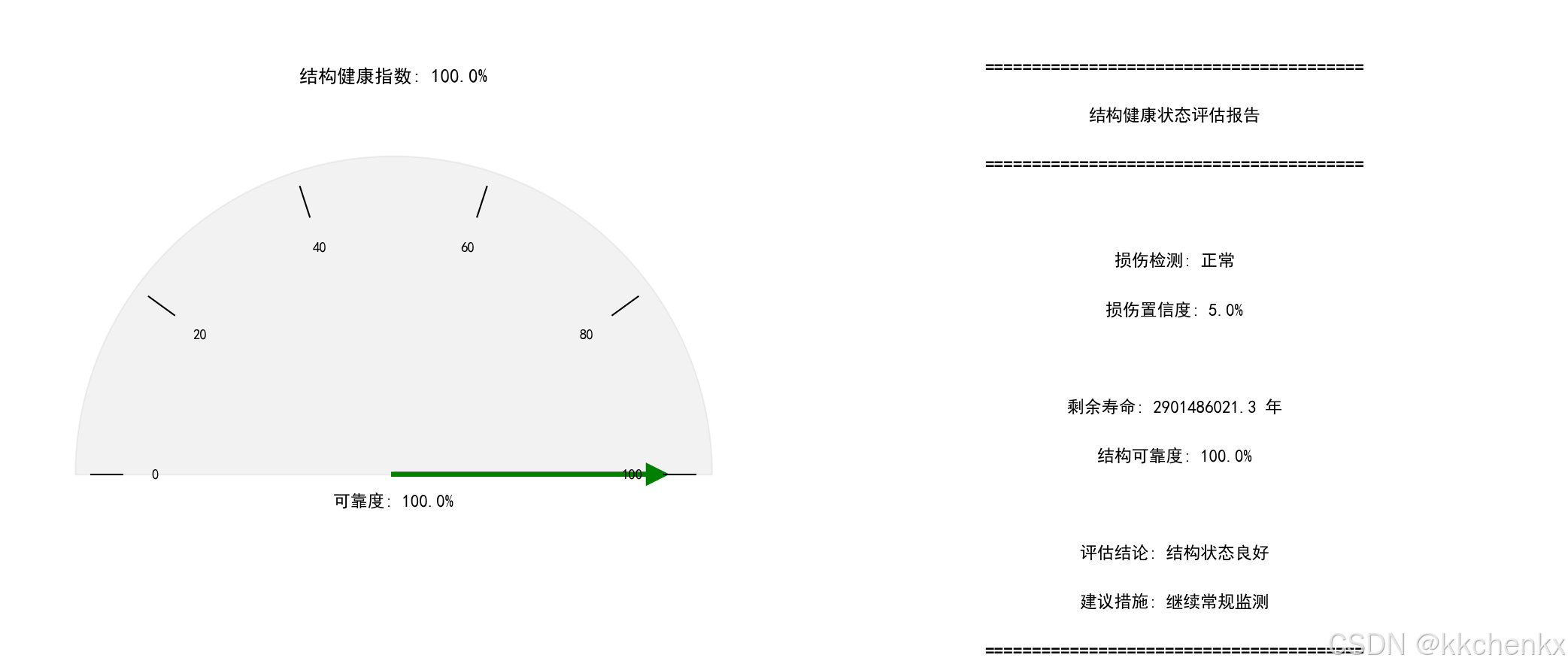
- 状态评估:结构健康指数
- 预警系统:多级预警机制
- 报告生成:自动化报告
5. 技术挑战与发展趋势
5.1 技术挑战
5.1.1 模型精度与效率的平衡
挑战:
- 高精度模型计算成本高
- 简化模型可能丢失关键特征
- 模型验证困难
解决方向:
- 自适应多尺度建模
- 混合保真度方法
- 不确定性量化
5.1.2 数据质量与数量
挑战:
- 传感器数据噪声和缺失
- 标注数据获取困难
- 数据分布漂移
解决方向:
- 数据清洗与修复算法
- 半监督学习
- 迁移学习
5.1.3 实时性要求
挑战:
- 大规模模型的实时计算
- 数据传输延迟
- 边缘设备算力限制
解决方向:
- 模型压缩与量化
- 边缘-云协同计算
- 专用硬件加速
5.2 发展趋势
5.2.1 自主数字孪生
未来数字孪生将具备:
- 自主学习能力
- 自我诊断与修复
- 智能决策支持
- 人机协同优化
5.2.2 群体智能
多个数字孪生系统的协同:
- 相似结构的知识共享
- 跨尺度信息传递
- 系统级优化决策
5.2.3 元宇宙集成
数字孪生与元宇宙的融合:
- 沉浸式可视化
- 虚拟试验环境
- 远程协作平台
6. 总结
智能仿真与数字孪生技术正在深刻改变结构动力学领域的研究和工程实践。通过虚实融合、数据驱动和智能决策,这些技术为结构的设计、建造、运维提供了全新的方法论。
关键要点:
- 技术融合:物理建模、数据科学、人工智能的深度融合
- 全生命周期:覆盖结构从设计到退役的全过程
- 实时交互:支持在线监测、预测和控制
- 持续进化:模型随数据积累不断优化
未来,随着物联网、5G/6G通信、量子计算等技术的发展,智能仿真与数字孪生将在结构工程领域发挥更加重要的作用,推动行业向智能化、数字化方向转型。

AtomGit 是由开放原子开源基金会联合 CSDN 等生态伙伴共同推出的新一代开源与人工智能协作平台。平台坚持“开放、中立、公益”的理念,把代码托管、模型共享、数据集托管、智能体开发体验和算力服务整合在一起,为开发者提供从开发、训练到部署的一站式体验。
更多推荐



 7
7 0
0- 0


 已为社区贡献156条内容

所有评论(0)