【开源】RK3576/RK3588 Yolo11 目标检测 Demo
前言
以前的大作业,根据rknn_model_zoo和easy eai示例代码修改(缝合),仅供参考
后来我试着模块化一些,方便看,但因为核心代码都是直接用的示例代码,所以有些模块还是耦合(compositor和display),有些模块干脆没有发挥实际作用(decode)
有以下功能:
- 支持 UVC、MIPI、RTSP、MP4 四种输入
- UVC 采用 jpeg_turbo 解码,RTSP 使用 gstreamer、mpp 硬解
- RGA 预处理
- 模型权重复用
- 每路可自定义多线程处理
- NPU推理,自动绑定NPU核心
- RGA 拼接多路显示墙
但性能很烂,也完全没有考虑零拷贝,6路1080p的RTSP流在RK3588上只有10帧
此项目地址:rk3588_yolo11_detection
设备
开发板:rk3576/rk3588
RTSP模拟器:EasyRTSPServer
网络摄像头:海康威视
效果
四路1920x1080输入,左边两路为UVC输入,右边两路为RTSP输入,yolov11s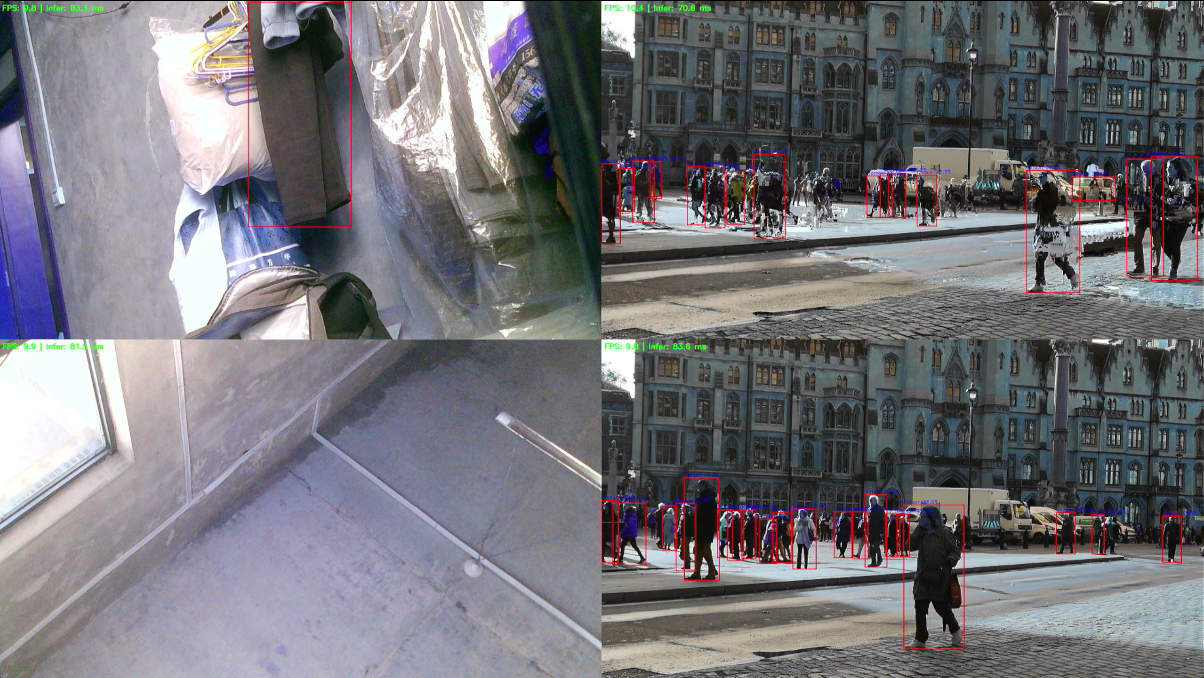
Todo
- rk3576下RGA调用可能有越界写,目前需要开辟更大的缓冲区防止报错?
- 非零拷贝
- qt5重写显示UI
- 单路单线程优化
介绍
整体代码分为app、core、modules三部分。
app:整体控制逻辑
core:串联模块的核心组件
modules:主要模块
app
src/app/app_controller.cc是整体控制逻辑,利用nlohmann库解析config.json配置文件,为每一路配置运行环境,启动对应线程
- src/app/app_controller.cc
std::string build_source_window_name(const std::string &window_title, const SourceConfig &source_cfg):配置单路运行环境,主要是为多线程推理的线程池bool run_single_source(SourceRuntime *runtime):单路运行逻辑
bool run_single_source(SourceRuntime *runtime)
接受单路配置信息,运行此路。
SourceBase::Read -> DecodeNode -> FramePipeline(多线程 infer workers:src/core/pool/infer_worker.cc) -> DisplayNode
        // 每一路的帧处理流
        // SourceBase::Read -> DecodeNode -> FramePipeline(多线程 infer workers:src/core/pool/infer_worker.cc) -> DisplayNode
        while (source_ok && !stop_requested())
        {
            if (runtime->cfg.fps > 0.0)
            {
                const auto now = std::chrono::steady_clock::now();
                if (now < next_frame_time)
                {
                    // 如果没到的时间就sleep,不获取最新帧,用于限制最大帧率
                    std::this_thread::sleep_until(next_frame_time);
                }
                next_frame_time = std::chrono::steady_clock::now() + frame_interval;
            }

            // SourceBase::Read
            core::types::SourceFrame input_frame;
            if (!runtime->source->Read(&input_frame))
            {
                ++capture_fail_streak;

                // RTSP 失败概率高
                const int read_fail_threshold =
                    (runtime->cfg.type == INPUT_RTSP) ? kRtspReadFailThreshold : 1;
                if (capture_fail_streak < read_fail_threshold)
                {
                    LOGW("source read failed (%d/%d before reconnect): %s\n",
                         capture_fail_streak,
                         read_fail_threshold,
                         runtime->cfg.input.c_str());
                    continue;
                }
                capture_fail_streak = 0;
                LOGE("source frame capture failed: %s\n", runtime->cfg.input.c_str());
                if (!reconnect_source(runtime, runtime->cfg.input, "capture failed"))
                {
                    source_ok = false;
                    keep_error_window = true;
                    std::string msg = "Source reconnect failed\n";
                    msg += runtime->cfg.input;
                    show_source_error(runtime, msg);
                    break;
                }
                next_frame_time = std::chrono::steady_clock::now() + frame_interval;
                continue;
            }
            capture_fail_streak = 0;

            // DecodeNode
            cv::Mat decoded;
            if (!decode_node.Decode(input_frame, &decoded) || decoded.empty())
            {
                LOGE("decode failed: %s\n", runtime->cfg.input.c_str());
                if (!reconnect_source(runtime, runtime->cfg.input, "decode failed"))
                {
                    source_ok = false;
                    keep_error_window = true;
                    std::string msg = "Source decode/reconnect failed\n";
                    msg += runtime->cfg.input;
                    show_source_error(runtime, msg);
                    break;
                }
                continue;
            }

            got_frame = true; // 得到至少一个有效帧,用于验证此路是否初始化成功
            const cv::Mat *use_frame = &decoded;

            // 更新帧的实际尺寸
            if (metrics.input_width == 0 && metrics.input_height == 0)
            {
                metrics.input_width = use_frame->cols;
                metrics.input_height = use_frame->rows;
            }

            // 多线程功能,生产者-多消费者,多生产者-单消费者
            // 每一路的主线程不断将帧放入生产队列,workerpool中worker从队列中取出一帧进行处理,随后将处理后的帧放到就绪队列
            // worker内部逻辑见src/core/pool/infer_worker.cc
            // 入队前先做容量控制,限制队列深度以控制时延和内存。
            pipeline.WaitForCapacity();
            pipeline.EnqueueFrame(*use_frame, input_frame.capture_tp);

            // DisplayNode
            FrameResult ready;
            if (pipeline.PopReady(&ready)) // 弹出就绪帧
            {
                if (handle_ready_frame(runtime, &ready, &fps_tracker, &metrics)) // 显示
                    break;
            }
        }
每一帧在Decode时均在此路的主线程,通过 FramePipeline 队列分发给多个infer worker,每个worker 执行预处理、推理、后处理,随后将帧翻入Result队列
core
串联模块的核心组件,帧队列、线程池和模块间共享数据结构定义,还有一些日志工具
- src/core/log :利用spdlog库实现的日志功能
- src/core/pipeline:多线消费者使用的帧队列
- src/core/pool:线程池和worker内部逻辑,自动绑定NPU核心
- src/core/pool/infer_worker.cc 每一个worker内部逻辑
        if (task.do_infer)
        {
            // 标准流程:预处理 -> NPU 推理 -> 后处理(框解码与叠加绘制)。
            modules::preprocess::PreprocessOutput preprocess_out;
            if (preprocess_node.Run(res.frame, worker->ctx, &preprocess_out))
            {
                core::types::InferOutput infer_out;
                if (infer_node.Run(&worker->ctx, preprocess_out.input_image,
                                   &infer_out))
                {
                    modules::postprocess::PostprocessOutput post_out;
                    if (postprocess_node.Run(&worker->ctx, &infer_out,
                                             preprocess_out.letterbox,
                                             worker->conf_threshold,
                                             &res.frame, &post_out))
                    {
                        res.infer_ms = infer_out.infer_ms;
                        res.detections = post_out.detection_count;
                    }
                }
            }
        }

        {
            // 把处理完成的帧写回结果队列,后续由 ResultQueue 做有序合并。
            std::lock_guard<std::mutex> lk(results->mtx);
            results->items.push_back(std::move(res));
        }
        results->cv.notify_one();
- src/core/queue :队列
- src/core/types:共享数据结构
- src/core/utils:工具
modules
每个模块:
- source:输入源,接口src/modules/source/source_base.h,阻塞
- usb_cam_source.cc,v4l2,支持YUYV和MJPEG
- mipi_source.cc,与USB类似,支持YUYV和NV12
- rtsp_source.cc,RTSP,h264,easy eai示例代码
- file_source.cc,MP4视频文件
namespace modules
{
    namespace source
    {

        using SourceFrame = core::types::SourceFrame;
        using SourceFrameFormat = core::types::SourceFrameFormat;

        class SourceBase
        {
        public:
            virtual ~SourceBase() = default;

            virtual bool Open() = 0;
            virtual void Close() = 0;
            virtual bool Read(SourceFrame *out) = 0;
        };

    } // namespace source
} // namespace modules
    mGstChn.vDec = gst_element_factory_make("mppvideodec", "vDec");
    mGstChn.vScale = gst_element_factory_make("videoscale", "vScale");
    mGstChn.vCapsfilter = gst_element_factory_make("capsfilter", "vCapsfilter");
    mGstChn.vSink = gst_element_factory_make("appsink", "vSink");
- decode:解码,但目前更多承担颜色格式转换功能,RTSP的解码还是在source下,UVC的解码在此处
- MJPEG
bool DecodeMjpeg(const core::types::SourceFrame& input, cv::Mat* out)
                {
                    if (input.data.empty())
                        return false;
                    if (!tj_handle_)
                    {
                        tj_handle_ = tjInitDecompress();
                        if (!tj_handle_)
                        {
                            LOGE("tjInitDecompress failed\n");
                            return false;
                        }
                    }

                    int width = 0;
                    int height = 0;
                    int subsamp = 0;
                    int colorspace = 0;
                    if (tjDecompressHeader3(tj_handle_,
                                            input.data.data(),
                                            static_cast<unsigned long>(input.data.size()),
                                            &width,
                                            &height,
                                            &subsamp,
                                            &colorspace) != 0)
                    {
                        LOGE("turbojpeg header decode failed: %s\n", tjGetErrorStr2(tj_handle_));
                        return false;
                    }
                    if (width <= 0 || height <= 0)
                        return false;

                    out->create(height, width, CV_8UC3);
                    const int pitch = width * 3;
                    if (tjDecompress2(tj_handle_,
                                      input.data.data(),
                                      static_cast<unsigned long>(input.data.size()),
                                      out->data,
                                      width,
                                      pitch,
                                      height,
                                      TJPF_BGR,
                                      0) != 0)
                    {
                        LOGE("turbojpeg decode failed: %s\n", tjGetErrorStr2(tj_handle_));
                        out->release();
                        return false;
                    }
                    return true;
                }
- preprocess:预处理,rk示例代码,使用RGA的imfill、improcess
ret_rga = improcess(rga_buf_src, rga_buf_dst, pat, srect, drect, prect, usage);
- inference:推理,其中src/modules/inference/infer_context.cc用于共享权重,rk示例代码
int init_infer_context(const char* model_path, rknn_app_context_t* app_ctx)
{
    if (!model_path || !app_ctx) return -1;

    app_ctx->shared_handle = nullptr;
    app_ctx->rknn_ctx = 0;
    app_ctx->input_attrs = nullptr;
    app_ctx->output_attrs = nullptr;
    app_ctx->is_quant = false;

    {
        std::lock_guard<std::mutex> lk(g_shared_model_mtx);
        if (g_shared_model.share_enabled &&
            ensure_shared_model(model_path, &g_shared_model) == 0) {
            rknn_context ctx = 0;
            const int ret = rknn_dup_context(&g_shared_model.base_ctx, &ctx);
            if (ret == RKNN_SUCC) {
                app_ctx->rknn_ctx = ctx;
                fill_app_ctx_from_info(app_ctx, g_shared_model.info);
                app_ctx->shared_handle = &g_shared_model;
                g_shared_model.ref_count++;
                LOGI("reuse model weights: %s (shared contexts=%d)\n",
                     model_path, g_shared_model.ref_count);
                return 0;
            }

            LOGW("rknn_dup_context failed (ret=%d), fallback to per-context init\n", ret);
            g_shared_model.share_enabled = false;
            if (g_shared_model.ref_count == 0) {
                reset_shared_model(&g_shared_model);
            }
        }
    }

    return init_context_standalone(model_path, app_ctx);
}
            int run_forward(rknn_app_context_t *app_ctx,
                            image_buffer_t *preprocessed_img,
                            std::vector<rknn_output> *outputs)
            {
                if (!app_ctx || !preprocessed_img || !outputs)
                {
                    return -1;
                }

                rknn_input inputs[app_ctx->io_num.n_input];
                memset(inputs, 0, sizeof(inputs));

                inputs[0].index = 0;
                inputs[0].type = RKNN_TENSOR_UINT8;
                inputs[0].fmt = RKNN_TENSOR_NHWC;
                inputs[0].size =
                    app_ctx->model_width * app_ctx->model_height * app_ctx->model_channel;
                inputs[0].buf = preprocessed_img->virt_addr;

                int ret = rknn_inputs_set(app_ctx->rknn_ctx, app_ctx->io_num.n_input, inputs);
                if (ret < 0)
                {
                    LOGE("rknn_input_set fail! ret=%d\n", ret);
                    return -1;
                }

                ret = rknn_run(app_ctx->rknn_ctx, nullptr);
                if (ret < 0)
                {
                    LOGE("rknn_run fail! ret=%d\n", ret);
                    return -1;
                }

                outputs->assign(app_ctx->io_num.n_output, rknn_output{});
                for (int i = 0; i < app_ctx->io_num.n_output; i++)
                {
                    (*outputs)[i].index = i;
                    (*outputs)[i].want_float = (!app_ctx->is_quant);
                }

                ret = rknn_outputs_get(app_ctx->rknn_ctx,
                                       app_ctx->io_num.n_output,
                                       outputs->data(),
                                       NULL);
                if (ret < 0)
                {
                    LOGE("rknn_outputs_get fail! ret=%d\n", ret);
                    outputs->clear();
                    return -1;
                }
                return 0;
            }
        } // namespace
- postprocess:后处理,使用CPU,rk示例代码
- compositor:多路显示墙,RGA拼接图像,easy eai示例代码
static void commitImgtoDispBufMap(int chnId, void *pSrcData, RgaSURF_FORMAT srcFmt,
                                  int srcWidth, int srcHeight,
                                  int srcHStride, int srcVStride)
{
    if (gChnNums <= 0)
    {
        return;
    }

    int chnNums = gChnNums;
    int winWidth = gWinWidth;
    int winHeight = gWinHeight;
    if (gMutexInited)
    {
        pthread_mutex_lock(&gmutex);
        chnNums = gChnNums;
        winWidth = gWinWidth;
        winHeight = gWinHeight;
        pthread_mutex_unlock(&gmutex);
    }

    if (chnNums <= 0 || winWidth <= 0 || winHeight <= 0)
    {
        return;
    }

    int units = 0;
    while (1)
    {
        units++;
        if (chnNums <= (units * units))
        {
            break;
        }
    }

    Image srcImage;
    Image dstImage;
    memset(&srcImage, 0, sizeof(srcImage));
    memset(&dstImage, 0, sizeof(dstImage));

    srcImage.fmt = srcFmt;
    srcImage.width = srcWidth;
    srcImage.height = srcHeight;
    srcImage.hor_stride = srcHStride;
    srcImage.ver_stride = srcVStride;
    srcImage.rotation = HAL_TRANSFORM_ROT_0;
    srcImage.pBuf = pSrcData;

    PTRINT dstBufPtr = (PTRINT)*gppDispMap + calcBufMapOffset(chnId, units, winWidth, winHeight);
    dstImage.fmt = RK_FORMAT_RGB_888;
    dstImage.width = winWidth / units;
    dstImage.height = winHeight / units;
    dstImage.hor_stride = winWidth;
    dstImage.ver_stride = winHeight / units;
    dstImage.rotation = HAL_TRANSFORM_ROT_0;
    dstImage.pBuf = (void *)dstBufPtr;

    srcImg_ConvertTo_dstImg(&dstImage, &srcImage);
}
- display:显示,GTK,easy eai示例代码
            GridCompositorImgDesc_t img_desc = {};
            img_desc.chnId = channel_id;
            img_desc.width = src.cols;
            img_desc.height = src.rows;
            img_desc.horStride = static_cast<int>(src.step / src.elemSize());
            img_desc.verStride = src.rows;
            img_desc.dataSize = static_cast<int>(src.total() * src.elemSize());
            strncpy(img_desc.fmt, "BGR", sizeof(img_desc.fmt) - 1);
            grid_compositor_submit_frame(reinterpret_cast<char *>(src.data), img_desc);

            {
                GtkWallState &state = WallState();
                std::lock_guard<std::mutex> lk(state.mutex);
                if (displayIsRunning())
                {
                    state.display_seen_running = true;
                }
                if (state.display_seen_running && !displayIsRunning())
                {
                    return true;
                }
            }

AtomGit 是由开放原子开源基金会联合 CSDN 等生态伙伴共同推出的新一代开源与人工智能协作平台。平台坚持“开放、中立、公益”的理念,把代码托管、模型共享、数据集托管、智能体开发体验和算力服务整合在一起,为开发者提供从开发、训练到部署的一站式体验。
更多推荐



 27
27 0
0- 0


 已为社区贡献3条内容

所有评论(0)