开源鸿蒙跨平台Flutter开发:班级通知公告系统应用
·
欢迎加入开源鸿蒙跨平台社区:
https://openharmonycrossplatform.csdn.net
一、项目概述
运行效果图
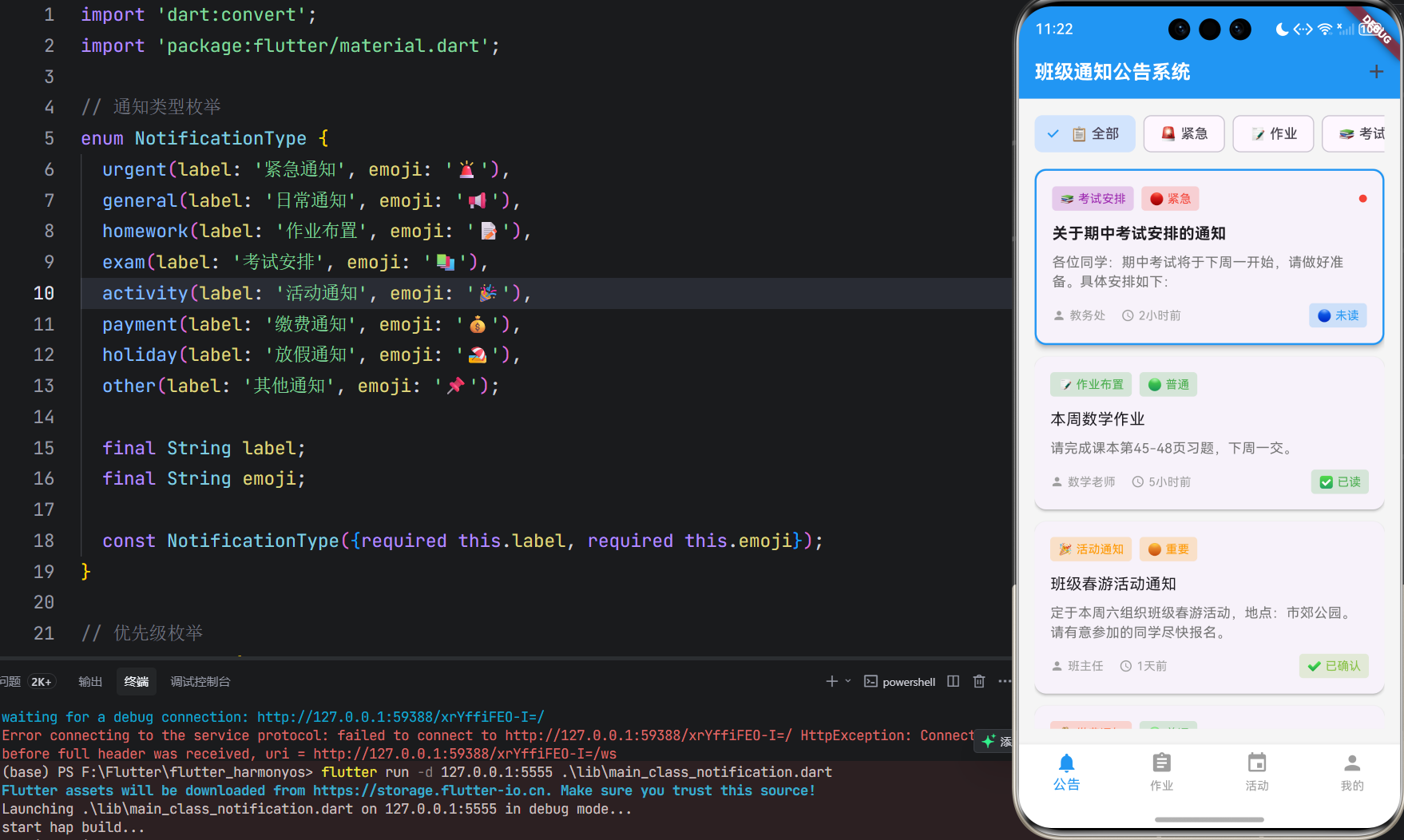
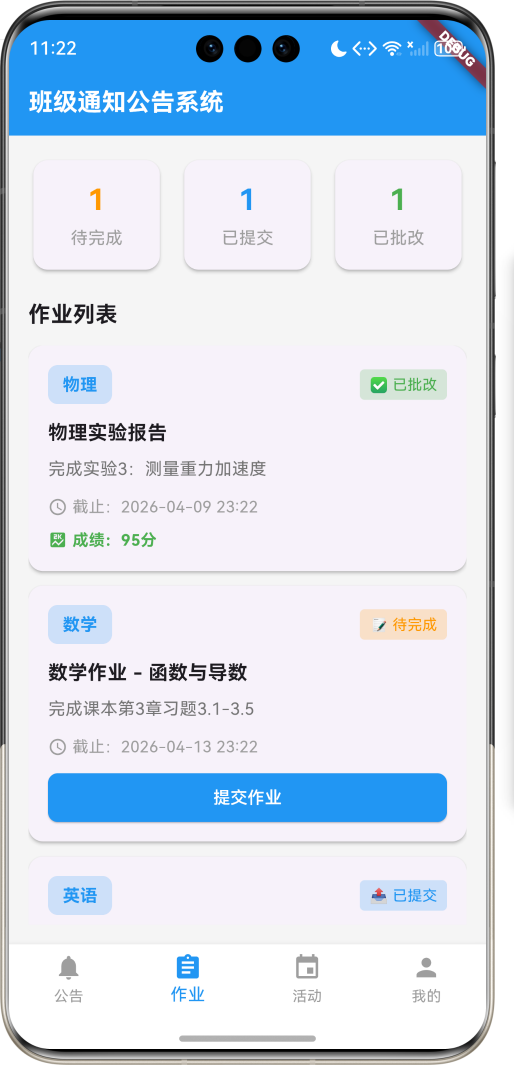
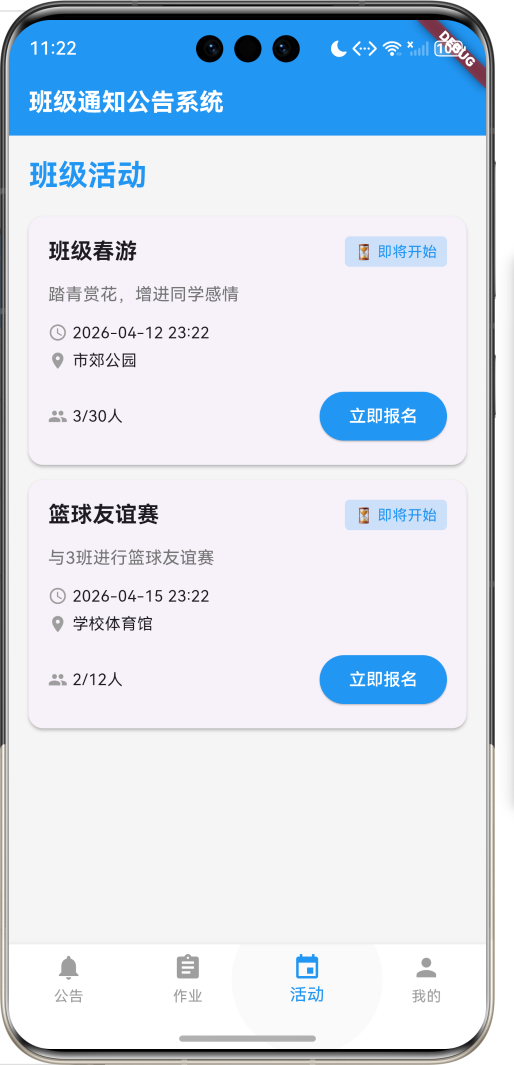
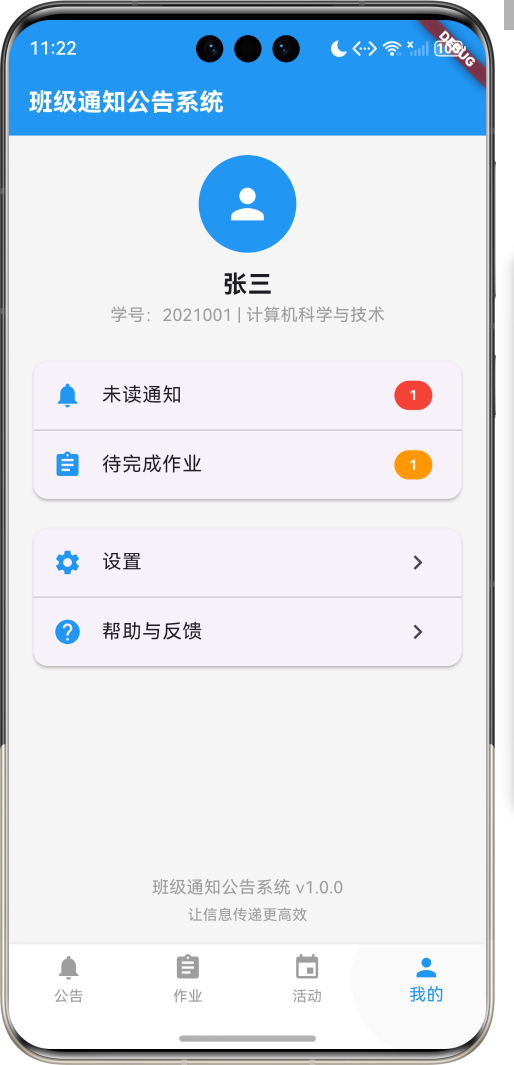
1.1 应用简介
班级通知公告系统是一款专为班级管理设计的通知发布与查看应用,支持老师发布通知、学生查看公告、作业提醒、活动通知等功能。应用内置消息分类、已读未读状态、定时提醒,让班级信息传递更高效。
应用以清新的蓝色为主色调,象征专业与可靠。涵盖通知公告、作业管理、班级活动、个人中心四大模块。老师可以发布各类通知、布置作业、组织活动,学生可以及时查看、确认收到、参与互动。
1.2 核心功能
| 功能模块 | 功能描述 | 实现方式 |
|---|---|---|
| 通知公告 | 发布班级通知 | 列表展示 |
| 作业管理 | 布置与提交作业 | 任务系统 |
| 班级活动 | 组织班级活动 | 活动管理 |
| 消息提醒 | 重要通知提醒 | 推送通知 |
| 已读确认 | 查看阅读状态 | 状态追踪 |
1.3 通知类型定义
| 序号 | 类型名称 | Emoji | 描述 |
|---|---|---|---|
| 1 | 紧急通知 | 🚨 | 重要紧急事项 |
| 2 | 日常通知 | 📢 | 一般性通知 |
| 3 | 作业布置 | 📝 | 作业相关信息 |
| 4 | 考试安排 | 📚 | 考试相关信息 |
| 5 | 活动通知 | 🎉 | 班级活动信息 |
| 6 | 缴费通知 | 💰 | 费用缴纳信息 |
| 7 | 放假通知 | 🏖️ | 假期安排信息 |
| 8 | 其他通知 | 📌 | 其他类型通知 |
1.4 通知优先级定义
| 序号 | 优先级 | Emoji | 描述 |
|---|---|---|---|
| 1 | 紧急 | 🔴 | 需立即处理 |
| 2 | 重要 | 🟠 | 需尽快查看 |
| 3 | 普通 | 🟢 | 一般性通知 |
| 4 | 低优先级 | ⚪ | 可稍后查看 |
1.5 阅读状态定义
| 序号 | 状态名称 | Emoji | 描述 |
|---|---|---|---|
| 1 | 未读 | 🔵 | 未查看 |
| 2 | 已读 | ✅ | 已查看 |
| 3 | 已确认 | ✔️ | 已确认收到 |
1.6 技术栈
| 技术领域 | 技术选型 | 版本要求 |
|---|---|---|
| 开发框架 | Flutter | >= 3.0.0 |
| 编程语言 | Dart | >= 2.17.0 |
| 设计规范 | Material Design 3 | - |
| 本地存储 | shared_preferences | - |
| 目标平台 | 鸿蒙OS / Web | API 21+ |
1.7 项目结构
lib/
└── main_class_notification.dart
    ├── ClassNotificationApp         # 应用入口
    ├── Notification                 # 通知模型
    ├── Homework                     # 作业模型
    ├── Activity                     # 活动模型
    ├── NotificationType             # 通知类型枚举
    ├── Priority                     # 优先级枚举
    ├── ReadStatus                   # 阅读状态枚举
    ├── NotificationService          # 通知服务
    ├── NotificationController       # 通知控制器
    ├── ClassNotificationHomePage    # 主页面
    ├── _buildNoticePage             # 通知公告页面
    ├── _buildHomeworkPage           # 作业管理页面
    ├── _buildActivityPage           # 班级活动页面
    └── _buildProfilePage            # 个人中心页面
二、系统架构
2.1 整体架构图
2.2 类图设计
2.3 页面导航流程
2.4 通知发布流程
三、核心模块设计
3.1 数据模型设计
3.1.1 通知模型 (Notification)
class Notification {
  final String id;
  final String title;
  final String content;
  final NotificationType type;
  final Priority priority;
  final String author;
  final DateTime createdAt;
  final DateTime? expireDate;
  final bool requireConfirm;
  final Map<String, ReadStatus> readStatus;
  final List<String> attachments;

  Notification({
    required this.id,
    required this.title,
    required this.content,
    required this.type,
    required this.priority,
    required this.author,
    required this.createdAt,
    this.expireDate,
    required this.requireConfirm,
    required this.readStatus,
    required this.attachments,
  });
}
3.1.2 作业模型 (Homework)
class Homework {
  final String id;
  final String title;
  final String subject;
  final String content;
  final DateTime deadline;
  final bool isSubmitted;
  final DateTime? submitTime;
  final String? attachment;
  final String? feedback;
  final int? score;

  Homework({
    required this.id,
    required this.title,
    required this.subject,
    required this.content,
    required this.deadline,
    required this.isSubmitted,
    this.submitTime,
    this.attachment,
    this.feedback,
    this.score,
  });
}
3.1.3 活动模型 (Activity)
class Activity {
  final String id;
  final String title;
  final String description;
  final DateTime startTime;
  final DateTime endTime;
  final String location;
  final int maxParticipants;
  final List<String> participants;
  final String organizer;
  final ActivityStatus status;

  Activity({
    required this.id,
    required this.title,
    required this.description,
    required this.startTime,
    required this.endTime,
    required this.location,
    required this.maxParticipants,
    required this.participants,
    required this.organizer,
    required this.status,
  });
}
3.1.4 通知类型枚举 (NotificationType)
enum NotificationType {
  urgent(label: '紧急通知', emoji: '🚨'),
  general(label: '日常通知', emoji: '📢'),
  homework(label: '作业布置', emoji: '📝'),
  exam(label: '考试安排', emoji: '📚'),
  activity(label: '活动通知', emoji: '🎉'),
  payment(label: '缴费通知', emoji: '💰'),
  holiday(label: '放假通知', emoji: '🏖️'),
  other(label: '其他通知', emoji: '📌');

  final String label;
  final String emoji;

  const NotificationType({required this.label, required this.emoji});
}
3.1.5 优先级枚举 (Priority)
enum Priority {
  urgent(label: '紧急', emoji: '🔴'),
  high(label: '重要', emoji: '🟠'),
  normal(label: '普通', emoji: '🟢'),
  low(label: '低优先级', emoji: '⚪');

  final String label;
  final String emoji;

  const Priority({required this.label, required this.emoji});
}
3.1.6 阅读状态枚举 (ReadStatus)
enum ReadStatus {
  unread(label: '未读', emoji: '🔵'),
  read(label: '已读', emoji: '✅'),
  confirmed(label: '已确认', emoji: '✔️');

  final String label;
  final String emoji;

  const ReadStatus({required this.label, required this.emoji});
}
3.2 页面结构设计
3.2.1 主页面布局
3.2.2 通知公告页面结构
3.2.3 作业管理页面结构
3.2.4 班级活动页面结构
3.3 通知发布逻辑
3.4 阅读确认逻辑
四、UI设计规范
4.1 配色方案
应用以清新的蓝色为主色调,象征专业与可靠:
| 颜色类型 | 色值 | 用途 |
|---|---|---|
| 主色 | #2196F3 (Blue) | 导航、主题元素 |
| 辅助色 | #64B5F6 | 按钮、强调 |
| 第三色 | #90CAF9 | 背景、卡片 |
| 背景色 | #F5F5F5 | 页面背景 |
| 卡片背景 | #FFFFFF | 信息卡片 |
4.2 优先级色彩映射
| 优先级 | 色值 | 视觉效果 |
|---|---|---|
| 紧急 | #F44336 | 红色 |
| 重要 | #FF9800 | 橙色 |
| 普通 | #4CAF50 | 绿色 |
| 低优先级 | #9E9E9E | 灰色 |
4.3 通知类型色彩映射
| 类型 | 色值 | 视觉效果 |
|---|---|---|
| 紧急通知 | #F44336 | 红色 |
| 日常通知 | #2196F3 | 蓝色 |
| 作业布置 | #4CAF50 | 绿色 |
| 考试安排 | #9C27B0 | 紫色 |
| 活动通知 | #FF9800 | 橙色 |
| 缴费通知 | #FF5722 | 深橙色 |
| 放假通知 | #00BCD4 | 青色 |
| 其他通知 | #607D8B | 蓝灰色 |
4.4 字体规范
| 元素 | 字号 | 字重 | 颜色 |
|---|---|---|---|
| 页面标题 | 24px | Bold | 主色 |
| 通知标题 | 16px | Medium | #333333 |
| 通知内容 | 14px | Regular | #666666 |
| 时间信息 | 12px | Regular | #999999 |
| 状态标签 | 12px | Regular | 对应状态色 |
4.5 组件规范
4.5.1 通知卡片
┌─────────────────────────────────────┐
│  🚨 紧急通知                         │
│  ─────────────────────────────────  │
│  关于期中考试安排的通知              │
│                                     │
│  各位同学:期中考试将于下周...       │
│                                     │
│  发布:张老师    2小时前            │
│  🔵 未读        [确认收到]          │
└─────────────────────────────────────┘
4.5.2 作业卡片
┌─────────────────────────────────────┐
│  数学作业                            │
│  ─────────────────────────────────  │
│  内容:完成习题3.1-3.5              │
│                                     │
│  截止:2024-01-15 23:59             │
│  状态:待完成 ⚠️                    │
│                                     │
│  [提交作业]                         │
└─────────────────────────────────────┘
4.5.3 活动卡片
┌─────────────────────────────────────┐
│  班级春游活动                        │
│  ─────────────────────────────────  │
│  时间:2024-03-15 08:00             │
│  地点:市郊公园                      │
│  人数:25/30人                       │
│                                     │
│  [立即报名]                         │
└─────────────────────────────────────┘
五、核心功能实现
5.1 通知服务实现
class NotificationService {
  final List<Notification> _notifications = [];

  List<Notification> getAllNotifications() {
    return _notifications..sort((a, b) => b.createdAt.compareTo(a.createdAt));
  }

  List<Notification> getNotificationsByType(NotificationType type) {
    return _notifications
        .where((n) => n.type == type)
        .toList()
      ..sort((a, b) => b.createdAt.compareTo(a.createdAt));
  }

  List<Notification> getUnreadNotifications() {
    return _notifications
        .where((n) => n.readStatus['current_user'] == ReadStatus.unread)
        .toList();
  }

  void markAsRead(String id) {
    final notification = _notifications.firstWhere((n) => n.id == id);
    notification.readStatus['current_user'] = ReadStatus.read;
  }

  void confirmReceipt(String id) {
    final notification = _notifications.firstWhere((n) => n.id == id);
    notification.readStatus['current_user'] = ReadStatus.confirmed;
  }

  void publishNotification(Notification notification) {
    _notifications.insert(0, notification);
  }

  void deleteNotification(String id) {
    _notifications.removeWhere((n) => n.id == id);
  }
}
5.2 通知控制器实现
class NotificationController {
  final NotificationService _notificationService;
  final DataManager _dataManager;
  List<Notification> notifications = [];
  List<Homework> homeworks = [];
  List<Activity> activities = [];

  NotificationController(this._notificationService, this._dataManager);

  Future<void> initialize() async {
    await loadNotifications();
    await loadHomeworks();
    await loadActivities();
  }

  Future<void> loadNotifications() async {
    notifications = _notificationService.getAllNotifications();
  }

  Future<void> loadHomeworks() async {
    homeworks = await _dataManager.loadHomeworks();
  }

  Future<void> loadActivities() async {
    activities = await _dataManager.loadActivities();
  }

  void markAsRead(String id) {
    _notificationService.markAsRead(id);
    final index = notifications.indexWhere((n) => n.id == id);
    if (index != -1) {
      notifications[index].readStatus['current_user'] = ReadStatus.read;
    }
  }

  void confirmReceipt(String id) {
    _notificationService.confirmReceipt(id);
    final index = notifications.indexWhere((n) => n.id == id);
    if (index != -1) {
      notifications[index].readStatus['current_user'] = ReadStatus.confirmed;
    }
  }

  void publishNotification(Notification notification) {
    _notificationService.publishNotification(notification);
    notifications.insert(0, notification);
    _dataManager.saveNotifications(notifications);
  }

  int getUnreadCount() {
    return notifications
        .where((n) => n.readStatus['current_user'] == ReadStatus.unread)
        .length;
  }
}
5.3 数据管理实现
class DataManager {
  static const String _notificationsKey = 'notifications';
  static const String _homeworksKey = 'homeworks';
  static const String _activitiesKey = 'activities';

  static Map<String, String> _storage = {};

  Future<List<Notification>> loadNotifications() async {
    final jsonString = _storage[_notificationsKey];
    if (jsonString == null) return [];

    final jsonList = json.decode(jsonString) as List;
    return jsonList.map((data) => Notification.fromJson(data)).toList();
  }

  Future<void> saveNotifications(List<Notification> notifications) async {
    final jsonList = notifications.map((n) => n.toJson()).toList();
    _storage[_notificationsKey] = json.encode(jsonList);
  }

  Future<List<Homework>> loadHomeworks() async {
    final jsonString = _storage[_homeworksKey];
    if (jsonString == null) return [];

    final jsonList = json.decode(jsonString) as List;
    return jsonList.map((data) => Homework.fromJson(data)).toList();
  }

  Future<void> saveHomeworks(List<Homework> homeworks) async {
    final jsonList = homeworks.map((h) => h.toJson()).toList();
    _storage[_homeworksKey] = json.encode(jsonList);
  }

  Future<List<Activity>> loadActivities() async {
    final jsonString = _storage[_activitiesKey];
    if (jsonString == null) return [];

    final jsonList = json.decode(jsonString) as List;
    return jsonList.map((data) => Activity.fromJson(data)).toList();
  }

  Future<void> saveActivities(List<Activity> activities) async {
    final jsonList = activities.map((a) => a.toJson()).toList();
    _storage[_activitiesKey] = json.encode(jsonList);
  }
}
六、交互设计
6.1 通知浏览交互流程
6.2 通知发布交互流程
6.3 作业提交流互流程
七、扩展功能规划
7.1 后续版本规划
7.2 功能扩展建议
7.2.1 文件附件
附件功能:
- 上传文件附件
- 下载查看附件
- 图片预览功能
- 文档在线查看
7.2.2 成绩查询
成绩功能:
- 成绩录入
- 成绩查询
- 成绩统计
- 成绩分析
7.2.3 家长端
家长功能:
- 查看孩子通知
- 作业完成情况
- 成绩查看
- 与老师沟通
八、注意事项
8.1 开发注意事项
-
消息推送:重要通知需要及时推送给用户
-
数据同步:多设备间的数据同步需要处理好
-
权限控制:老师和学生的操作权限需要区分
-
用户体验:通知查看和确认流程需要简洁
-
数据安全:学生信息需要安全存储
8.2 常见问题
| 问题 | 原因 | 解决方案 |
|---|---|---|
| 通知收不到 | 推送服务异常 | 检查推送配置 |
| 已读状态不同步 | 数据未刷新 | 手动刷新数据 |
| 作业提交失败 | 文件过大 | 压缩文件 |
| 活动报名失败 | 人数已满 | 提示名额已满 |
| 应用崩溃 | 空指针异常 | 增加空值检查 |
8.3 使用技巧
📢 班级通知公告系统使用技巧 📢
通知查看
- 及时查看新通知
- 重要通知及时确认
- 设置消息提醒
- 分类筛选通知
作业管理
- 关注截止时间
- 提前完成作业
- 及时提交作业
- 查看作业反馈
活动参与
- 关注班级活动
- 及时报名参与
- 准时参加活动
- 活动后分享感受
个人设置
- 完善个人信息
- 设置消息提醒
- 绑定联系方式
- 定期修改密码
九、运行说明
9.1 环境要求
| 环境 | 版本要求 |
|---|---|
| Flutter SDK | >= 3.0.0 |
| Dart SDK | >= 2.17.0 |
| 鸿蒙OS | API 21+ |
| Web浏览器 | Chrome 90+ |
9.2 运行命令
# 查看可用设备
flutter devices

# 运行到Web服务器
flutter run -d web-server -t lib/main_class_notification.dart --web-port 8161

# 运行到鸿蒙设备
flutter run -d 127.0.0.1:5555 lib/main_class_notification.dart

# 代码分析
flutter analyze lib/main_class_notification.dart
十、总结
班级通知公告系统应用通过通知公告、作业管理、班级活动、个人中心四大模块,为班级提供了一个高效的信息传递平台。老师可以发布各类通知、布置作业、组织活动,学生可以及时查看、确认收到、参与互动。
核心功能包括通知发布、阅读确认、作业提交、活动报名等。应用采用清新的蓝色为主色调,象征专业与可靠,界面简洁美观,交互流畅自然。
通过本应用,希望能够帮助班级更高效地进行信息传递,提升班级管理效率,促进师生互动。
班级通知公告系统——让信息传递更高效

AtomGit 是由开放原子开源基金会联合 CSDN 等生态伙伴共同推出的新一代开源与人工智能协作平台。平台坚持“开放、中立、公益”的理念,把代码托管、模型共享、数据集托管、智能体开发体验和算力服务整合在一起,为开发者提供从开发、训练到部署的一站式体验。
更多推荐

 10
10 0
0- 0


 已为社区贡献18条内容

所有评论(0)