开源鸿蒙跨平台Flutter开发:时间管理番茄钟应用
欢迎加入开源鸿蒙跨平台社区:
https://openharmonycrossplatform.csdn.net
一、项目概述
运行效果图
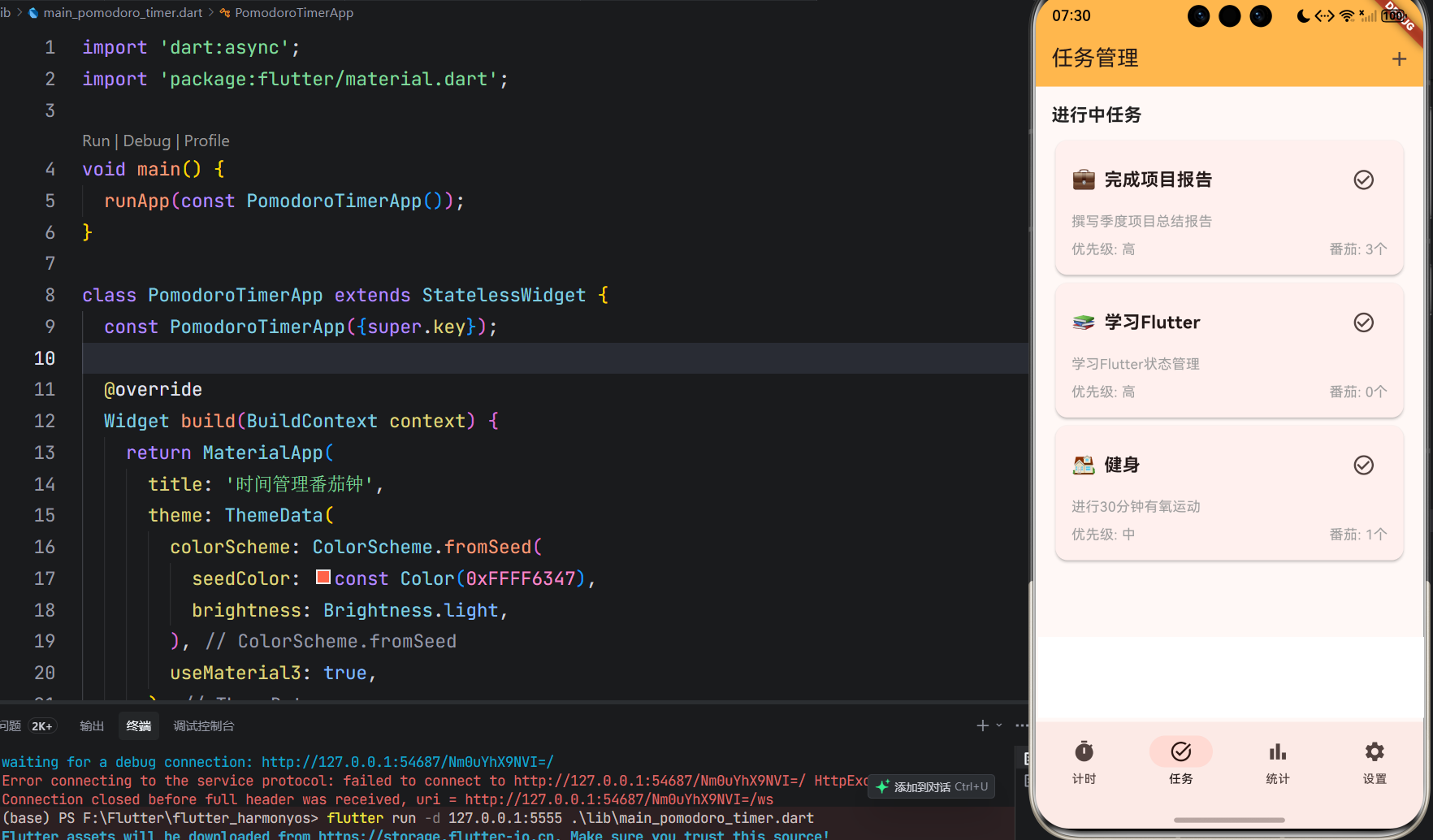
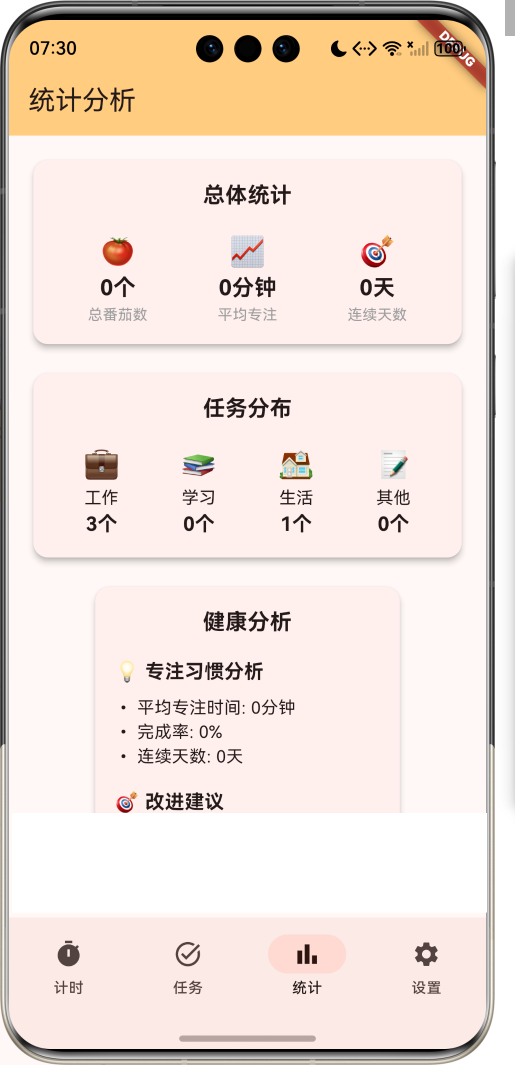
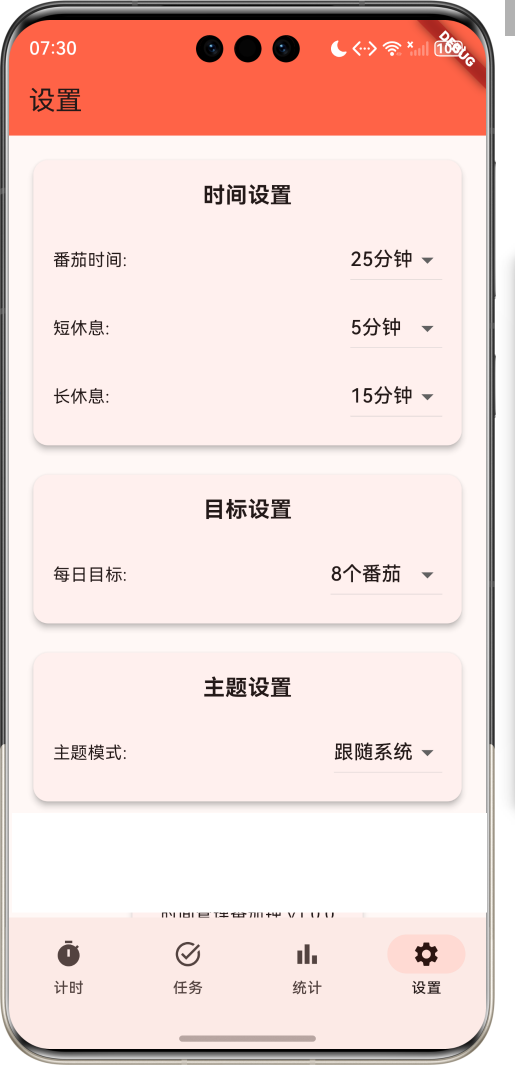
1.1 应用简介
时间管理番茄钟是一款基于番茄工作法的时间管理应用,帮助用户提高工作和学习效率。应用支持25分钟专注工作、5分钟短暂休息的循环模式,每完成4个番茄周期后提供15-30分钟的长休息时间。用户可以创建任务、设置番茄时间、记录完成情况,通过数据统计分析自己的工作效率,培养良好的时间管理习惯。
应用以专注的红色为主色调,象征番茄的颜色和专注的精神。涵盖番茄计时、任务管理、数据统计、设置管理四大模块。用户可以通过简洁的界面快速开始番茄计时,记录任务完成情况,查看工作效率分析,从而提高时间管理能力。
1.2 核心功能
| 功能模块 | 功能描述 | 实现方式 |
|---|---|---|
| 番茄计时 | 25分钟专注+5分钟休息循环 | 倒计时器 |
| 任务管理 | 创建、编辑、删除任务 | 任务列表 |
| 数据统计 | 每日/每周/每月番茄统计 | 数据可视化 |
| 目标设置 | 每日番茄目标设置 | 目标追踪 |
| 提醒功能 | 番茄完成、休息提醒 | 通知系统 |
| 主题切换 | 浅色/深色主题 | 主题设置 |
| 声音设置 | 提醒声音选择 | 声音管理 |
| 数据导出 | 导出番茄记录数据 | 数据导出 |
1.3 番茄状态定义
| 序号 | 状态名称 | Emoji | 描述 | 时长 |
|---|---|---|---|---|
| 1 | 专注中 | 🍅 | 工作/学习时间 | 25分钟 |
| 2 | 短休息 | ☕ | 短暂休息时间 | 5分钟 |
| 3 | 长休息 | 🎯 | 长时间休息 | 15-30分钟 |
| 4 | 暂停 | ⏸️ | 暂时停止 | - |
| 5 | 完成 | ✅ | 番茄完成 | - |
| 6 | 取消 | ❌ | 番茄取消 | - |
1.4 任务类型定义
| 序号 | 类型名称 | Emoji | 描述 | 优先级 |
|---|---|---|---|---|
| 1 | 工作 | 💼 | 工作相关任务 | 高 |
| 2 | 学习 | 📚 | 学习相关任务 | 高 |
| 3 | 生活 | 🏠 | 生活相关任务 | 中 |
| 4 | 其他 | 📝 | 其他任务 | 低 |
1.5 主题模式定义
| 序号 | 主题名称 | 描述 | 适用场景 |
|---|---|---|---|
| 1 | 浅色主题 | 明亮清爽 | 白天使用 |
| 2 | 深色主题 | 护眼舒适 | 夜晚使用 |
| 3 | 番茄主题 | 番茄红色调 | 标准模式 |
| 4 | 自定义 | 个性化设置 | 个人偏好 |
1.6 健康目标定义
| 序号 | 目标名称 | Emoji | 描述 | 达成条件 |
|---|---|---|---|---|
| 1 | 初学者 | 🥉 | 开始使用番茄钟 | 完成10个番茄 |
| 2 | 熟练者 | 🥈 | 养成番茄习惯 | 完成50个番茄 |
| 3 | 专家 | 🥇 | 高效时间管理 | 完成100个番茄 |
| 4 | 大师 | 🏆 | 时间管理大师 | 完成300个番茄 |
1.7 技术栈
| 技术领域 | 技术选型 | 版本要求 |
|---|---|---|
| 开发框架 | Flutter | >= 3.0.0 |
| 编程语言 | Dart | >= 2.17.0 |
| 设计规范 | Material Design 3 | - |
| 状态管理 | Provider | >= 6.0.0 |
| 数据存储 | SharedPreferences | >= 2.0.0 |
| 图表库 | FL Chart | >= 0.55.0 |
| 通知 | Flutter Local Notifications | >= 14.0.0 |
| 目标平台 | 鸿蒙OS / Web | API 21+ |
1.8 项目结构
lib/
└── main_pomodoro_timer.dart
    ├── PomodoroTimerApp               # 应用入口
    ├── PomodoroStatus                # 番茄状态枚举
    ├── TaskType                      # 任务类型枚举
    ├── ThemeMode                     # 主题模式枚举
    ├── PomodoroSession               # 番茄会话模型
    ├── Task                          # 任务模型
    ├── PomodoroStats                 # 统计数据模型
    ├── PomodoroTimerHomePage         # 主页面(底部导航)
    ├── _buildTimerPage               # 番茄计时页面
    ├── _buildTasksPage               # 任务管理页面
    ├── _buildStatsPage               # 统计分析页面
    ├── _buildSettingsPage            # 设置页面
    ├── PomodoroTimer                 # 番茄计时器
    └── StatsChartPainter             # 统计图表绘制器
二、系统架构
2.1 整体架构图
2.2 类图设计
2.3 页面导航流程
2.4 番茄工作流程
三、核心模块设计
3.1 数据模型设计
3.1.1 番茄状态枚举 (PomodoroStatus)
enum PomodoroStatus {
  focus(label: '专注中', emoji: '🍅', description: '工作/学习时间', duration: 25 * 60),
  shortBreak(label: '短休息', emoji: '☕', description: '短暂休息时间', duration: 5 * 60),
  longBreak(label: '长休息', emoji: '🎯', description: '长时间休息', duration: 15 * 60),
  paused(label: '暂停', emoji: '⏸️', description: '暂时停止', duration: 0),
  completed(label: '完成', emoji: '✅', description: '番茄完成', duration: 0),
  cancelled(label: '取消', emoji: '❌', description: '番茄取消', duration: 0);

  final String label;
  final String emoji;
  final String description;
  final int duration;
  const PomodoroStatus({
    required this.label,
    required this.emoji,
    required this.description,
    required this.duration,
  });
}
3.1.2 任务类型枚举 (TaskType)
enum TaskType {
  work(label: '工作', emoji: '💼', description: '工作相关任务', priority: 3),
  study(label: '学习', emoji: '📚', description: '学习相关任务', priority: 3),
  life(label: '生活', emoji: '🏠', description: '生活相关任务', priority: 2),
  other(label: '其他', emoji: '📝', description: '其他任务', priority: 1);

  final String label;
  final String emoji;
  final String description;
  final int priority;
  const TaskType({
    required this.label,
    required this.emoji,
    required this.description,
    required this.priority,
  });
}
3.1.3 番茄会话模型 (PomodoroSession)
class PomodoroSession {
  final String id;
  final PomodoroStatus status;
  final int duration;
  final int remainingTime;
  final String taskId;
  final DateTime startTime;
  final DateTime? endTime;
  final bool isCompleted;

  const PomodoroSession({
    required this.id,
    required this.status,
    required this.duration,
    required this.remainingTime,
    required this.taskId,
    required this.startTime,
    this.endTime,
    required this.isCompleted,
  });

  PomodoroSession copyWith({
    PomodoroStatus? status,
    int? remainingTime,
    DateTime? endTime,
    bool? isCompleted,
  }) {
    return PomodoroSession(
      id: id,
      status: status ?? this.status,
      duration: duration,
      remainingTime: remainingTime ?? this.remainingTime,
      taskId: taskId,
      startTime: startTime,
      endTime: endTime ?? this.endTime,
      isCompleted: isCompleted ?? this.isCompleted,
    );
  }
}
3.1.4 任务模型 (Task)
class Task {
  final String id;
  final String title;
  final String description;
  final TaskType type;
  final int priority;
  final int pomodoroCount;
  final bool isCompleted;
  final DateTime createdAt;
  final DateTime? completedAt;

  const Task({
    required this.id,
    required this.title,
    required this.description,
    required this.type,
    required this.priority,
    required this.pomodoroCount,
    required this.isCompleted,
    required this.createdAt,
    this.completedAt,
  });

  Task copyWith({
    String? title,
    String? description,
    TaskType? type,
    int? priority,
    int? pomodoroCount,
    bool? isCompleted,
    DateTime? completedAt,
  }) {
    return Task(
      id: id,
      title: title ?? this.title,
      description: description ?? this.description,
      type: type ?? this.type,
      priority: priority ?? this.priority,
      pomodoroCount: pomodoroCount ?? this.pomodoroCount,
      isCompleted: isCompleted ?? this.isCompleted,
      createdAt: createdAt,
      completedAt: completedAt ?? this.completedAt,
    );
  }
}
3.1.5 番茄使用分布
3.2 页面结构设计
3.2.1 主页面布局
3.2.2 番茄计时页结构
3.2.3 任务管理页结构
3.2.4 统计分析页结构
3.3 番茄计时逻辑
3.4 统计分析逻辑
四、UI设计规范
4.1 配色方案
应用以专注的红色为主色调,象征番茄的颜色和专注的精神:
| 颜色类型 | 色值 | 用途 |
|---|---|---|
| 主色 | #FF6347 (Tomato) | 导航、主题元素 |
| 辅助色 | #FF8A65 | 计时页面 |
| 第三色 | #FFB74D | 任务页面 |
| 强调色 | #FFCC80 | 统计页面 |
| 背景色 | #FAFAFA | 页面背景 |
| 卡片背景 | #FFFFFF | 信息卡片 |
| 成功色 | #4CAF50 | 完成状态 |
| 警告色 | #FF9800 | 提醒通知 |
4.2 番茄状态配色
| 状态 | 色值 | 视觉效果 |
|---|---|---|
| 专注中 | #FF6347 | 番茄红 |
| 短休息 | #4CAF50 | 绿色 |
| 长休息 | #2196F3 | 蓝色 |
| 暂停 | #FF9800 | 橙色 |
| 完成 | #4CAF50 | 绿色 |
| 取消 | #F44336 | 红色 |
4.3 字体规范
| 元素 | 字号 | 字重 | 颜色 |
|---|---|---|---|
| 页面标题 | 24px | Bold | 主色 |
| 倒计时显示 | 72px | Bold | #000000 |
| 番茄状态 | 20px | Bold | 状态色 |
| 任务标题 | 18px | Bold | #000000 |
| 统计数据 | 16px | Regular | #333333 |
| 提示文字 | 12px | Regular | #666666 |
4.4 组件规范
4.4.1 番茄计时器卡片
┌─────────────────────────────────────┐
│  番茄计时器                            │
│                                     │
│  ┌─────────────────────────────┐   │
│  │  🍅 专注中                  │   │
│  │  25:00                      │   │
│  │  ━━━━━━━━━━━━━━━━━━━━━━     │   │
│  │  进行中...                  │   │
│  └─────────────────────────────┘   │
│                                     │
│  [暂停] [重置] [跳过]                  │
└─────────────────────────────────────┘
4.4.2 任务卡片
┌─────────────────────────────────────┐
│  任务管理                            │
│                                     │
│  ┌─────────────────────────────┐   │
│  │  💼 完成项目报告            │   │
│  │  优先级: 高                  │   │
│  │  番茄: 3/4                  │   │
│  │  进行中                    │   │
│  └─────────────────────────────┘   │
│                                     │
│  ┌─────────────────────────────┐   │
│  │  📚 学习Flutter            │   │
│  │  优先级: 高                  │   │
│  │  番茄: 0/2                  │   │
│  │  未开始                    │   │
│  └─────────────────────────────┘   │
└─────────────────────────────────────┘
4.4.3 统计卡片
┌─────────────────────────────────────┐
│  统计分析                            │
│                                     │
│  今日番茄: 8个                        │
│  完成率: 100%                          │
│  总专注时间: 200分钟                    │
│                                     │
│  任务分布:                            │
│  ┌────────┐ ┌────────┐ ┌────────┐   │
│  │  💼 4  │ │  📚 3  │ │  🏠 1  │   │
│  └────────┘ └────────┘ └────────┘   │
└─────────────────────────────────────┘
4.4.4 设置卡片
┌─────────────────────────────────────┐
│  设置                                 │
│                                     │
│  番茄时间: [25分钟 ▼]                 │
│  短休息: [5分钟 ▼]                    │
│  长休息: [15分钟 ▼]                   │
│                                     │
│  主题: [番茄主题 ▼]                  │
│  声音: [默认 ▼]                       │
│  每日目标: [8个 ▼]                    │
└─────────────────────────────────────┘
4.4.5 健康报告卡片
┌─────────────────────────────────────┐
│  健康报告                            │
│                                     │
│  💡 专注习惯分析                      │
│                                     │
│  • 平均专注时间: 24分钟                │
│  • 完成率: 95%                        │
│  • 连续天数: 7天                       │
│  • 最佳时段: 上午10点                  │
│                                     │
│  🎯 改进建议                          │
│  • 增加长休息频率                      │
│  • 避免连续超过4个番茄                  │
└─────────────────────────────────────┘
五、核心功能实现
5.1 番茄计时器实现
class PomodoroTimer {
  PomodoroStatus currentStatus = PomodoroStatus.focus;
  int remainingTime = PomodoroStatus.focus.duration;
  bool isRunning = false;
  int pomodoroCount = 0;
  late Timer _timer;

  void start() {
    if (!isRunning) {
      isRunning = true;
      _timer = Timer.periodic(const Duration(seconds: 1), (timer) {
        if (remainingTime > 0) {
          remainingTime--;
        } else {
          _completeCurrentSession();
        }
      });
    }
  }

  void pause() {
    isRunning = false;
    _timer.cancel();
  }

  void reset() {
    isRunning = false;
    _timer.cancel();
    currentStatus = PomodoroStatus.focus;
    remainingTime = PomodoroStatus.focus.duration;
  }

  void skip() {
    _completeCurrentSession();
  }

  void _completeCurrentSession() {
    isRunning = false;
    _timer.cancel();

    if (currentStatus == PomodoroStatus.focus) {
      pomodoroCount++;
      currentStatus = pomodoroCount % 4 == 0 ? PomodoroStatus.longBreak : PomodoroStatus.shortBreak;
    } else {
      currentStatus = PomodoroStatus.focus;
    }

    remainingTime = currentStatus.duration;
  }

  String get formattedTime {
    final minutes = remainingTime ~/ 60;
    final seconds = remainingTime % 60;
    return '${minutes.toString().padLeft(2, '0')}:${seconds.toString().padLeft(2, '0')}';
  }

  double get progress {
    return 1.0 - (remainingTime / currentStatus.duration);
  }
}
5.2 任务管理器实现
class TaskManager {
  List<Task> tasks = [];

  void addTask(Task task) {
    tasks.add(task);
  }

  void updateTask(Task task) {
    final index = tasks.indexWhere((t) => t.id == task.id);
    if (index != -1) {
      tasks[index] = task;
    }
  }

  void deleteTask(String taskId) {
    tasks.removeWhere((t) => t.id == taskId);
  }

  void completeTask(String taskId) {
    final task = tasks.firstWhere((t) => t.id == taskId);
    updateTask(task.copyWith(
      isCompleted: true,
      completedAt: DateTime.now(),
    ));
  }

  void incrementPomodoro(String taskId) {
    final task = tasks.firstWhere((t) => t.id == taskId);
    updateTask(task.copyWith(
      pomodoroCount: task.pomodoroCount + 1,
    ));
  }

  List<Task> get pendingTasks => tasks.where((t) => !t.isCompleted).toList();
  List<Task> get completedTasks => tasks.where((t) => t.isCompleted).toList();
  List<Task> get highPriorityTasks => tasks.where((t) => t.priority == 3).toList();
}
5.3 统计分析器实现
class StatsAnalyzer {
  Map<String, PomodoroStats> analyzeDailyStats(List<PomodoroSession> sessions) {
    Map<String, PomodoroStats> dailyStats = {};

    for (var session in sessions) {
      if (!session.isCompleted) continue;

      final date = '${session.startTime.year}-${session.startTime.month}-${session.startTime.day}';

      if (!dailyStats.containsKey(date)) {
        dailyStats[date] = PomodoroStats(
          id: date,
          date: session.startTime,
          totalPomodoros: 0,
          completedPomodoros: 0,
          totalMinutes: 0,
          taskPomodoros: {},
        );
      }

      final stats = dailyStats[date]!;
      dailyStats[date] = stats.copyWith(
        totalPomodoros: stats.totalPomodoros + 1,
        completedPomodoros: stats.completedPomodoros + 1,
        totalMinutes: stats.totalMinutes + 25,
        taskPomodoros: {
          ...stats.taskPomodoros,
          session.taskId: (stats.taskPomodoros[session.taskId] ?? 0) + 1,
        },
      );
    }

    return dailyStats;
  }

  Map<String, PomodoroStats> analyzeWeeklyStats(List<PomodoroSession> sessions) {
    Map<String, PomodoroStats> weeklyStats = {};

    for (var session in sessions) {
      if (!session.isCompleted) continue;

      final weekStart = session.startTime.subtract(Duration(days: session.startTime.weekday - 1));
      final weekKey = '${weekStart.year}-${weekStart.month}-${weekStart.day}';

      if (!weeklyStats.containsKey(weekKey)) {
        weeklyStats[weekKey] = PomodoroStats(
          id: weekKey,
          date: weekStart,
          totalPomodoros: 0,
          completedPomodoros: 0,
          totalMinutes: 0,
          taskPomodoros: {},
        );
      }

      final stats = weeklyStats[weekKey]!;
      weeklyStats[weekKey] = stats.copyWith(
        totalPomodoros: stats.totalPomodoros + 1,
        completedPomodoros: stats.completedPomodoros + 1,
        totalMinutes: stats.totalMinutes + 25,
      );
    }

    return weeklyStats;
  }
}
5.4 番茄完成处理实现
void _completePomodoro() {
  if (_currentTask != null) {
    _taskManager.incrementPomodoro(_currentTask!.id);
  }

  final session = PomodoroSession(
    id: 'session_${DateTime.now().millisecondsSinceEpoch}',
    status: PomodoroStatus.completed,
    duration: 25 * 60,
    remainingTime: 0,
    taskId: _currentTask?.id ?? 'no_task',
    startTime: _sessionStartTime!,
    endTime: DateTime.now(),
    isCompleted: true,
  );

  _sessions.add(session);
  _todayPomodoros++;

  if (_todayPomodoros >= _dailyGoal) {
    _showGoalAchievement();
  }

  _switchToBreak();
}

void _showGoalAchievement() {
  ScaffoldMessenger.of(context).showSnackBar(
    SnackBar(
      content: Column(
        crossAxisAlignment: CrossAxisAlignment.start,
        children: [
          const Text('🎉 恭喜!'),
          Text('今日番茄目标达成!'),
        ],
      ),
      backgroundColor: Colors.green,
    ),
  );
}
5.5 数据统计实现
void _analyzeStats() {
  final dailyStats = _statsAnalyzer.analyzeDailyStats(_sessions);
  final weeklyStats = _statsAnalyzer.analyzeWeeklyStats(_sessions);

  setState(() {
    _dailyStats = dailyStats;
    _weeklyStats = weeklyStats;
    _updateStatsDisplay();
  });
}

void _updateStatsDisplay() {
  final today = '${DateTime.now().year}-${DateTime.now().month}-${DateTime.now().day}';
  final todayStats = _dailyStats[today];

  if (todayStats != null) {
    _todayPomodoros = todayStats.completedPomodoros;
    _totalMinutes = todayStats.totalMinutes;
  }

  _totalPomodoros = _sessions.where((s) => s.isCompleted).length;
  _streakDays = _calculateStreakDays();
}

int _calculateStreakDays() {
  int streak = 0;
  var currentDate = DateTime.now();

  while (true) {
    final dateKey = '${currentDate.year}-${currentDate.month}-${currentDate.day}';
    final stats = _dailyStats[dateKey];

    if (stats == null || stats.completedPomodoros == 0) {
      break;
    }

    streak++;
    currentDate = currentDate.subtract(const Duration(days: 1));
  }

  return streak;
}
六、交互设计
6.1 番茄工作流程
6.2 任务管理流程
6.3 统计分析流程
七、扩展功能规划
7.1 后续版本规划
7.2 功能扩展建议
7.2.1 智能学习系统
学习功能:
- 分析用户专注模式
- 智能调整番茄时间
- 个性化提醒策略
- 最佳专注时段推荐
7.2.2 社交分享功能
社交功能:
- 邀请好友一起专注
- 番茄打卡分享
- 专注挑战
- 排行榜竞争
7.2.3 云同步功能
同步功能:
- 多设备数据同步
- 数据备份恢复
- 云端存储
- 跨设备提醒
八、注意事项
8.1 开发注意事项
-
计时器精度:确保计时器准确运行
-
后台运行:确保应用在后台时计时器继续运行
-
通知权限:引导用户开启通知权限
-
电池优化:考虑电池消耗问题
-
数据持久化:保证番茄记录数据不丢失
8.2 常见问题
| 问题 | 原因 | 解决方案 |
|---|---|---|
| 计时器不准 | 系统时间变化 | 使用系统时间同步 |
| 通知不触发 | 权限未开启 | 引导用户开启权限 |
| 数据丢失 | 未及时保存 | 增加自动保存机制 |
| 后台停止 | 系统限制 | 申请后台运行权限 |
| 界面卡顿 | 动画效果多 | 优化动画性能 |
8.3 使用技巧
🍅 番茄工作法技巧 🍅
最佳实践
- 选择一个明确的任务
- 专注25分钟,避免中断
- 短暂休息5分钟
- 每4个番茄后长休息15-30分钟
- 记录完成的番茄数量
专注技巧
- 关闭通知和干扰
- 创造安静的环境
- 使用番茄钟应用保持专注
- 定期休息避免疲劳
- 奖励自己完成的番茄
效率提升
- 分解大任务为小任务
- 优先级排序
- 记录完成情况
- 分析效率数据
- 持续改进方法
九、运行说明
9.1 环境要求
| 环境 | 版本要求 |
|---|---|
| Flutter SDK | >= 3.0.0 |
| Dart SDK | >= 2.17.0 |
| 鸿蒙OS | API 21+ |
| Web浏览器 | Chrome 90+ |
9.2 运行命令
# 查看可用设备
flutter devices

# 运行到Web服务器
flutter run -d web-server -t lib/main_pomodoro_timer.dart --web-port 8149

# 运行到鸿蒙设备
flutter run -d 127.0.0.1:5555 lib/main_pomodoro_timer.dart

# 代码分析
flutter analyze lib/main_pomodoro_timer.dart
十、总结
时间管理番茄钟应用通过番茄工作法帮助用户提高工作和学习效率。应用支持25分钟专注、5分钟休息的循环模式,每完成4个番茄周期后提供长休息时间。用户可以创建任务、设置番茄时间、记录完成情况,通过数据统计分析自己的工作效率。
核心功能涵盖番茄计时、任务管理、数据统计、设置管理四大模块。番茄计时支持专注和休息的自动切换;任务管理支持任务的创建、编辑和完成;数据统计提供详细的番茄使用分析;设置管理支持时间、主题和声音的个性化设置。
应用采用 Material Design 3 设计规范,以专注的红色为主色调,象征番茄的颜色和专注的精神。通过本应用,希望能够帮助用户培养良好的时间管理习惯,提高工作和学习效率,实现更好的生活平衡。
时间管理番茄钟——专注每一刻,成就每一天

AtomGit 是由开放原子开源基金会联合 CSDN 等生态伙伴共同推出的新一代开源与人工智能协作平台。平台坚持“开放、中立、公益”的理念,把代码托管、模型共享、数据集托管、智能体开发体验和算力服务整合在一起,为开发者提供从开发、训练到部署的一站式体验。
更多推荐
 10
10 0
0- 0


 已为社区贡献19条内容

所有评论(0)