一张照片 + 一段音频,免费Sonic生成真人级数字人视频
项目介绍
Sonic是一个专注于全局音频感知的人像动画生成系统,发表于CVPR 2025。该项目能够将静态人像图片与音频结合,生成自然、流畅的对口型动画视频。支持多种风格的人像,包括真实照片和动漫风格。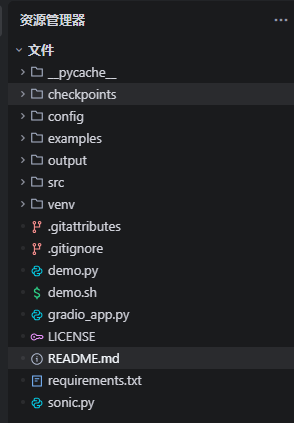
安装FFmpeg
1 选择下载源(推荐国内源,速度更快)
| 下载源 | 链接 | 说明 |
|---|---|---|
| 官方稳定版 | https://ffmpeg.org/download.html#build-windows | 官方原版,适合追求稳定 |
| BtbN 编译版(推荐) | https://github.com/BtbN/FFmpeg-Builds/releases | 持续更新,支持最新编码器 |
| 国内镜像(快) | https://www.gyan.dev/ffmpeg/builds/ | 国内可直连,一键下载 |
2 选择正确的版本
- 架构:Windows 64位(绝大多数电脑选择
ffmpeg-master-latest-win64-gpl.zip) - 版本类型:full 版本(包含所有编码器,避免后续功能缺失)
- 格式:选择 zip 压缩包(无需安装,解压即用)
3 解压到指定目录
解压后目录结构E:\ai\ffmpeg-master-latest-win64-gpl-shared\bin\ffmpeg.exe
验证:进入 E:\ai\ffmpeg-master-latest-win64-gpl-shared\bin 目录,确认 ffmpeg.exe 存在
4 添加 bin 目录到系统环境变量 PATH
- 右键「此电脑」→ 「属性」→ 「高级系统设置」→ 「环境变量」
- 在「系统变量」区域,找到并选中
Path变量 → 点击「编辑」 - 点击「新建」,输入 FFmpeg 的 bin 目录路径:
E:\ai\ffmpeg-master-latest-win64-gpl-shared\bin - 依次点击「确定」保存所有设置(必须全部确认,否则不生效)
5 验证安装成功
ffmpeg -version
正常输出:FFmpeg 版本号、编译信息、支持的编码器列表 → 安装成功
Sonic环境搭建
系统环境
- Windows 11
- Python 3.1
- NVIDIA GeForce MX150 (2GB显存)
安装步骤
-
克隆项目
git clone https://github.com/jixiaozhong/Sonic.git 或者 https://codeload.github.com/jixiaozhong/Sonic/zip/refs/heads/main cd Sonic -
创建虚拟环境
python -m venv venv .\venv\Scripts\activate -
安装依赖
现在项目根目录下创建文件夹checkpoints# 使用国内镜像源加速下载 pip install -r requirements.txt -i https://pypi.tuna.tsinghua.edu.cn/simple python3 -m pip install "huggingface_hub[cli]" huggingface-cli download LeonJoe13/Sonic --local-dir checkpoints huggingface-cli download stabilityai/stable-video-diffusion-img2vid-xt --local-dir checkpoints/stable-video-diffusion-img2vid-xt huggingface-cli download openai/whisper-tiny --local-dir checkpoints/whisper-tiny -
安装额外依赖
# 安装OpenCV
pip install opencv-python -i https://pypi.tuna.tsinghua.edu.cn/simple
遇到的问题及解决方法
问题1:依赖安装超时
症状 :安装torch时出现HTTPS连接超时错误。
解决方案 :
- 使用国内镜像源加速下载
- 增加超时时间
pip install -r requirements.txt --default-timeout=1000 -i https://pypi.tuna.
tsinghua.edu.cn/simple
问题2:Hugging Face模型下载失败
症状 :使用huggingface-cli下载模型时出现连接超时错误。
解决方案 :
- 使用国内镜像站
$env:HF_ENDPOINT="https://hf-mirror.com" huggingface-cli download LeonJoe13/Sonic --local-dir checkpoints - 手动下载模型到指定目录
问题3:缺少cv2模块
症状 :运行demo.py时出现 ModuleNotFoundError: No module named ‘cv2’ 错误。
解决方案 :
- 安装OpenCV
pip install opencv-python -i https://pypi.tuna.tsinghua.edu.cn/simple
问题4:NumPy版本兼容性问题
症状 :安装OpenCV后出现NumPy版本冲突错误。
解决方案 :
- 降级NumPy并安装兼容的版本
pip uninstall -y numpy opencv-python
pip install numpy~=1.26.4 opencv-python~=4.8.0 -i https://pypi.tuna.tsinghua.
edu.cn/simple
问题5:PyTorch CUDA支持问题
症状 :运行时出现 AssertionError: Torch not compiled with CUDA enabled 错误。
解决方案 :
- 卸载CPU版本的PyTorch
- 安装支持CUDA的PyTorch版本
pip install torch==2.2.1+cu118 torchaudio==2.2.1+cu118 torchvision==0.17.1
+cu118 -f https://download.pytorch.org/whl/torch_stable.html
问题6:CUDA内存不足
症状 :运行时出现torch.cuda.OutOfMemoryError: CUDA out of memory. Tried to allocate 1.46 GiB. GPU 0 has a total capacity of 2.00 GiB of which 0 bytes is free. Of the allocated memory 6.84 GiB is allocated by PyTorch, and 1.40 GiB is reserved by PyTorch but unallocated. If reserved but unallocated memory is large try setting PYTORCH_CUDA_ALLOC_CONF=expandable_segments:True to avoid fragmentation. See documentation for Memory Management (https://pytorch.org/docs/stable/notes/cuda.html#environment-variables)错误。
解决方案 :
- 尝试降低分辨率和推理步数
python demo.py .\examples\image\anime1.png . \examples\wav\talk_female_english_10s.MP3 .\output\result.mp4 --min_resolution 128 --inference_steps 10 - 禁用帧插值
- 使用CPU模式运行
# 修改demo.py
pipe = Sonic(-1, enable_interpolate_frame=False)
问题7:参数太小,找不到人脸
症状 :运行时出现ython demo.py .\examples\image\leonnado.png .\examples\wav\talk_female_english_10s.MP3 .\output\result.mp4 --min_resolution 16 --inference_steps 1
E:\ai\aicode\traeHome\workHome\Sonic-main\venv\Lib\site-packages\diffusers\models\transformers\transformer_2d.py:34: FutureWarning: Transformer2DModelOutput is deprecated and will be removed in version 1.0.0. Importing Transformer2DModelOutput from diffusers.models.transformer_2d is deprecated and this will be removed in a future version. Please use from diffusers.models.modeling_outputs import Transformer2DModelOutput, instead.
deprecate(“Transformer2DModelOutput”, “1.0.0”, deprecation_message)
init done
[ WARN:0@485.015] global loadsave.cpp:248 cv::findDecoder imread_(‘.\examples\image\leonnado.png’): can’t open/read file: check file path/integrity
Traceback (most recent call last):
File “E:\ai\aicode\traeHome\workHome\Sonic-main\demo.py”, line 20, in
face_info = pipe.preprocess(args.image_path, expand_ratio=0.5)
^^^^^^^^^^^^^^^^^^^^^^^^^^^^^^^^^^^^^^^^^^^^^^^^^^
File “E:\ai\aicode\traeHome\workHome\Sonic-main\sonic.py”, line 234, in preprocess
h, w = face_image.shape[:2]
^^^^^^^^^^^^^^^^
AttributeError: ‘NoneType’ object has no attribute ‘shape’
(venv) PS E:\ai\aicode\traeHome\workHome\Sonic-main> python demo.py .\examples\image\leonnado.png .\examples\wav\talk_female_english_10s.MP3 .\output\result.mp4 --min_resolution 32 --inference_steps 5
E:\ai\aicode\traeHome\workHome\Sonic-main\venv\Lib\site-packages\diffusers\models\transformers\transformer_2d.py:34: FutureWarning: Transformer2DModelOutput is deprecated and will be removed in version 1.0.0. Importing Transformer2DModelOutput from diffusers.models.transformer_2d is deprecated and this will be removed in a future version. Please use from diffusers.models.modeling_outputs import Transformer2DModelOutput, instead.
deprecate(“Transformer2DModelOutput”, “1.0.0”, deprecation_message)
init done
[ WARN:0@429.380] global loadsave.cpp:248 cv::findDecoder imread_(‘.\examples\image\leonnado.png’): can’t open/read file: check file path/integrity
Traceback (most recent call last):
File “E:\ai\aicode\traeHome\workHome\Sonic-main\demo.py”, line 20, in
face_info = pipe.preprocess(args.image_path, expand_ratio=0.5)
^^^^^^^^^^^^^^^^^^^^^^^^^^^^^^^^^^^^^^^^^^^^^^^^^^
File “E:\ai\aicode\traeHome\workHome\Sonic-main\sonic.py”, line 234, in preprocess
h, w = face_image.shape[:2]
^^^^^^^^^^^^^^^^
AttributeError: ‘NoneType’ object has no attribute 'shape’错误。
解决方案 :
- 尝试增大分辨率和推理步数
--min_resolution 16 --inference_steps 1
问题8:CUDA内存不足
症状 :运行时出现Cannot initialize model with low cpu memory usage because accelerate was not found in the environment. Defaulting to low_cpu_mem_usage=False. It is strongly recommended to install accelerate for faster and less memory-intense model loading. You can do so with:
pip install accelerate错误。

解决方案 :

pip install accelerate
最终解决方案
由于GPU显存不足(仅2GB),最终采用低参数GPU模式运行:
- 修改demo.py文件
import os
import argparse
from sonic import Sonic
pipe = Sonic(0)


parser = argparse.ArgumentParser()
parser.add_argument('image_path')
parser.add_argument('audio_path')
parser.add_argument('output_path')
parser.add_argument('--dynamic_scale', type=float, default=1.0)
parser.add_argument('--crop', action='store_true')
parser.add_argument('--seed', type=int, default=None)
parser.add_argument('--min_resolution', type=int, default=128)
parser.add_argument('--inference_steps', type=int, default=10)

args = parser.parse_args()


face_info = pipe.preprocess(args.image_path, expand_ratio=0.5)
print(face_info)
if face_info['face_num'] >= 0:
    if args.crop:
        crop_image_path = args.image_path + '.crop.png'
        pipe.crop_image(args.image_path, crop_image_path, face_info['crop_bbox'])
        args.image_path = crop_image_path
    os.makedirs(os.path.dirname(args.output_path), exist_ok=True)
    pipe.process(args.image_path, args.audio_path, args.output_path, min_resolution=64, inference_steps=5, dynamic_scale=args.dynamic_scale)
-
运行命令
python demo.py .\examples\image\anime1.png .
\examples\wav\talk_female_english_10s.MP3 .\output\result.mp4 --min_resolution
64 --inference_steps 5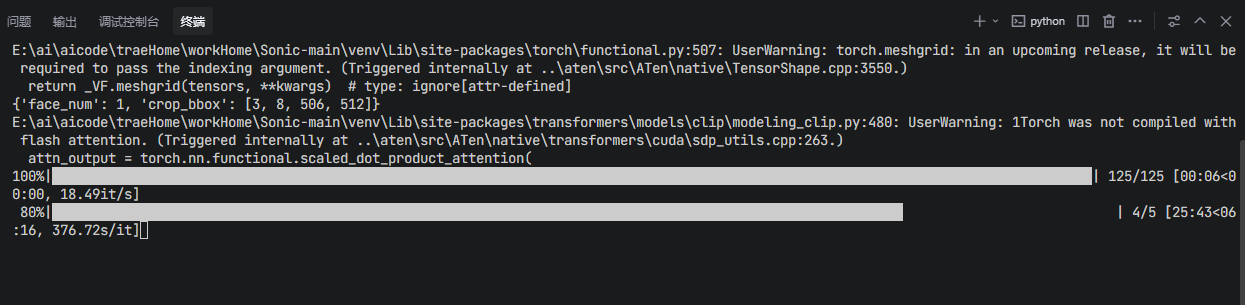
所有成功日志信息:
PS E:\ai\aicode\traeHome\workHome\Sonic-main> .\venv\Scripts\activate
(venv) PS E:\ai\aicode\traeHome\workHome\Sonic-main> python demo.py .\examples\image\anime1.png .\examples\wav\talk_female_english_10s.MP3 .\output\result.mp4 --min_resolution 64 --inference_steps 5
E:\ai\aicode\traeHome\workHome\Sonic-main\venv\Lib\site-packages\diffusers\models\transformers\transformer_2d.py:34: FutureWarning: `Transformer2DModelOutput` is deprecated and will be removed in version 1.0.0. Importing `Transformer2DModelOutput` from `diffusers.models.transformer_2d` is deprecated and this will be removed in a future version. Please use `from diffusers.models.modeling_outputs import Transformer2DModelOutput`, instead.
  deprecate("Transformer2DModelOutput", "1.0.0", deprecation_message)
E:\ai\aicode\traeHome\workHome\Sonic-main\venv\Lib\site-packages\torch\functional.py:507: UserWarning: torch.meshgrid: in an upcoming release, it will be required to pass the indexing argument. (Triggered internally at ..\aten\src\ATen\native\TensorShape.cpp:3550.)
  return _VF.meshgrid(tensors, **kwargs)  # type: ignore[attr-defined]
{'face_num': 1, 'crop_bbox': [3, 8, 506, 512]}
E:\ai\aicode\traeHome\workHome\Sonic-main\venv\Lib\site-packages\transformers\models\clip\modeling_clip.py:480: UserWarning: 1Torch was not compiled with flash attention. (Triggered internally at ..\aten\src\ATen\native\transformers\cuda\sdp_utils.cpp:263.)
  attn_output = torch.nn.functional.scaled_dot_product_attention(
100%|██████████████████████████████████████████████████████████████████████████████████████████████████████████████████████████████████| 125/125 [00:06<00:00, 18.49it/s]
 80%|██████████████████████████████████████████████████████████████████████████████████████████████████████████▍                          | 4/5 [25:43<06100%|█████████████████████████████████████████████████████████████████████████████████████████████████████████████████████████████████████| 5/5 [31:52<00100%|█████████████████████████████████████████████████████████████████████████████████████████████████████████████████████████████████████| 5/5 [31:52<00:00, 382.45s/it]
100% 124/124 [00:15<00:00,  7.90it/s]
ffmpeg version N-117438-gec9985b54f-20241009 Copyright (c) 2000-2024 the FFmpeg developers
  built with gcc 14.2.0 (crosstool-NG 1.26.0.106_ed12fa6)
  configuration: --prefix=/ffbuild/prefix --pkg-config-flags=--static --pkg-config=pkg-config --cross-prefix=x86_64-w64-mingw32- --arch=x86_64 --target-os=mingw32 --enable-gpl --enable-version3 --disable-debug --disable-w32threads --enable-pthreads --enable-iconv --enable-zlib --enable-libfreetype --enable-libfribidi --enable-gmp --enable-libxml2 --enable-lzma --enable-fontconfig --enable-libharfbuzz --enable-libvorbis --enable-opencl --disable-libpulse --enable-libvmaf --disable-libxcb --disable-xlib --enable-amf --enable-libaom --enable-libaribb24 --enable-avisynth --enable-chromaprint --enable-libdav1d --enable-libdavs2 --enable-libdvdread --enable-libdvdnav --disable-libfdk-aac --enable-ffnvcodec --enable-cuda-llvm --enable-frei0r --enable-libgme --enable-libkvazaar --enable-libaribcaption --enable-libass --enable-libbluray --enable-libjxl --enable-libmp3lame --enable-libopus --enable-librist --enable-libssh --enable-libtheora --enable-libvpx --enable-libwebp --enable-libzmq --enable-lv2 --enable-libvpl --enable-openal --enable-libopencore-amrnb --enable-libopencore-amrwb --enable-libopenh264 --enable-libopenjpeg --enable-libopenmpt --enable-librav1e --enable-librubberband --enable-schannel --enable-sdl2 --enable-libsoxr --enable-libsrt --enable-libsvtav1 --enable-libtwolame --enable-libuavs3d --disable-libdrm --enable-vaapi --enable-libvidstab --enable-vulkan --enable-libshaderc --enable-libplacebo --enable-libvvenc --enable-libx264 --enable-libx265 --enable-libxavs2 --enable-libxvid --enable-libzimg --enable-libzvbi --extra-cflags=-DLIBTWOLAME_STATIC --extra-cxxflags= --extra-libs=-lgomp --extra-ldflags=-pthread --extra-ldexeflags= --cc=x86_64-w64-mingw32-gcc --cxx=x86_64-w64-mingw32-g++ --ar=x86_64-w64-mingw32-gcc-ar --ranlib=x86_64-w64-mingw32-gcc-ranlib --nm=x86_64-w64-mingw32-gcc-nm --extra-version=20241009
  libavutil      59. 42.100 / 59. 42.100
  libavcodec     61. 21.100 / 61. 21.100
  libavformat    61.  9.100 / 61.  9.100
  libavdevice    61.  4.100 / 61.  4.100
  libavfilter    10.  6.100 / 10.  6.100
  libswscale      8.  5.100 /  8.  5.100
  libswresample   5.  4.100 /  5.  4.100
  libpostproc    58.  4.100 / 58.  4.100
Input #0, mov,mp4,m4a,3gp,3g2,mj2, from '.\output\result_noaudio.mp4':
  Metadata:
    major_brand     : isom
    minor_version   : 512
    compatible_brands: isomiso2avc1mp41
    encoder         : Lavf58.29.100
  Duration: 00:00:09.96, start: 0.000000, bitrate: 58 kb/s
  Stream #0:0[0x1](und): Video: h264 (High) (avc1 / 0x31637661), yuv420p(progressive), 64x64, 55 kb/s, 25 fps, 25 tbr, 12800 tbn (default)
    Metadata:
      handler_name    : VideoHandler
      vendor_id       : [0][0][0][0]
Input #1, mp3, from '.\examples\wav\talk_female_english_10s.MP3':
  Metadata:
    encoder         : Lavf58.29.100
  Duration: 00:00:10.03, start: 0.025057, bitrate: 128 kb/s
  Stream #1:0: Audio: mp3 (mp3float), 44100 Hz, stereo, fltp, 128 kb/s
    Metadata:
      encoder         : Lavc58.54
Stream mapping:
  Stream #0:0 -> #0:0 (h264 (native) -> h264 (libx264))
  Stream #1:0 -> #0:1 (mp3 (mp3float) -> aac (native))
Press [q] to stop, [?] for help
[libx264 @ 0000017407a52b80] using cpu capabilities: MMX2 SSE2Fast SSSE3 SSE4.2 AVX FMA3 BMI2 AVX2
[libx264 @ 0000017407a52b80] profile High, level 1.0, 4:2:0, 8-bit
[libx264 @ 0000017407a52b80] 264 - core 164 - H.264/MPEG-4 AVC codec - Copyleft 2003-2024 - http://www.videolan.org/x264.html - options: cabac=1 ref=3 deblock=1:0:0 analyse=0x3:0x113 me=hex subme=7 psy=1 psy_rd=1.00:0.00 mixed_ref=1 me_range=16 chroma_me=1 trellis=1 8x8dct=1 cqm=0 deadzone=21,11 fast_pskip=1 chroma_qp_offset=-2 threads=2 lookahead_threads=1 sliced_threads=0 nr=0 decimate=1 interlaced=0 bluray_compat=0 constrained_intra=0 bframes=3 b_pyramid=2 b_adapt=1 b_bias=0 direct=1 weightb=1 open_gop=0 weightp=2 keyint=250 keyint_min=25 scenecut=40 intra_refresh=0 rc_lookahead=40 rc=crf mbtree=1 crf=18.0 qcomp=0.60 qpmin=0 qpmax=69 qpstep=4 ip_ratio=1.40 aq=1:1.00
Output #0, mp4, to '.\output\result.mp4':
  Metadata:
    major_brand     : isom
    minor_version   : 512
    compatible_brands: isomiso2avc1mp41
    encoder         : Lavf61.9.100
  Stream #0:0(und): Video: h264 (avc1 / 0x31637661), yuv420p(tv, progressive), 64x64, q=2-31, 25 fps, 12800 tbn (default)
    Metadata:
      encoder         : Lavc61.21.100 libx264
      handler_name    : VideoHandler
      vendor_id       : [0][0][0][0]
    Side data:
[libx264 @ 0000017407a52b80] frame I:4     Avg QP:21.00  size:   826
[libx264 @ 0000017407a52b80] frame I:4     Avg QP:21.00  size:   826
[libx264 @ 0000017407a52b80] frame P:133   Avg QP:23.85  size:   524
[libx264 @ 0000017407a52b80] frame B:112   Avg QP:27.47  size:   163
[libx264 @ 0000017407a52b80] consecutive B-frames: 28.5% 28.9% 16.9% 25.7%
[libx264 @ 0000017407a52b80] mb I  I16..4:  0.0% 59.4% 40.6%
[libx264 @ 0000017407a52b80] mb P  I16..4:  0.0%  5.3%  3.7%  P16..4: 26.3% 39.1% 25.5%  0.0%  0.0%    skip: 0.1%
[libx264 @ 0000017407a52b80] mb B  I16..4:  0.0%  0.7%  0.7%  B16..8: 30.7% 20.5%  6.8%  direct: 9.1%  skip:31.5%  L0:30.6% L1:33.0% BI:36.3%
[libx264 @ 0000017407a52b80] 8x8 transform intra:58.4% inter:63.3%
[libx264 @ 0000017407a52b80] coded y,uvDC,uvAC intra: 96.3% 100.0% 98.9% inter: 62.3% 75.3% 45.2%
[libx264 @ 0000017407a52b80] i8 v,h,dc,ddl,ddr,vr,hd,vl,hu: 12% 15% 13%  4% 16% 12% 13%  5%  9%
[libx264 @ 0000017407a52b80] i4 v,h,dc,ddl,ddr,vr,hd,vl,hu: 12% 10% 16%  5% 18% 12% 12%  7%  7%
[libx264 @ 0000017407a52b80] i8c dc,h,v,p: 58% 11% 19% 12%
[libx264 @ 0000017407a52b80] Weighted P-Frames: Y:71.4% UV:55.6%
[libx264 @ 0000017407a52b80] ref P L0: 56.1% 24.4% 16.4%  2.2%  0.9%
[libx264 @ 0000017407a52b80] ref B L0: 95.6%  3.1%  1.3%
[libx264 @ 0000017407a52b80] ref B L1: 100.0%  0.0%
[libx264 @ 0000017407a52b80] kb/s:73.22
[aac @ 0000017409d75fc0] Qavg: 671.003
总结与建议
成功要点
- 环境配置 :正确安装PyTorch和相关依赖是成功运行的基础
- 模型下载 :使用国内镜像源加速模型下载
- 参数调整 :根据硬件条件调整分辨率和推理步数
- 模式选择 :在显存不足时,CPU模式是可行的替代方案
性能优化建议
- 硬件要求 :推荐使用至少8GB显存的GPU,最好16GB以上
- 内存管理 :关闭其他占用GPU内存的应用
- 输入选择 :使用较短的音频和较小的图片可以减少内存使用
- 耐心等待 :CPU模式运行速度较慢,需要耐心等待完成
应用场景
Sonic项目可以应用于:
- 视频创作:为静态图片添加动画效果
- 虚拟主播:创建基于音频的虚拟形象
- 教育培训:制作生动的教学视频
- 娱乐内容:生成有趣的音频驱动动画
结语
虽然在安装和运行过程中遇到了一些挑战,但通过逐步排查和解决问题,最终成功运行了Sonic项目。这个项目展示了音频驱动人像动画的最新技术,为相关领域的研究和应用提供了有价值的参考。

AtomGit 是由开放原子开源基金会联合 CSDN 等生态伙伴共同推出的新一代开源与人工智能协作平台。平台坚持“开放、中立、公益”的理念,把代码托管、模型共享、数据集托管、智能体开发体验和算力服务整合在一起,为开发者提供从开发、训练到部署的一站式体验。
更多推荐
 8
8 0
0- 0


 已为社区贡献5条内容

所有评论(0)