开源鸿蒙跨平台Flutter开发:亲密关系生理同步与互动测绘台_催产素释放与心率共振渲染架构
欢迎加入开源鸿蒙跨平台社区:
https://openharmonycrossplatform.csdn.net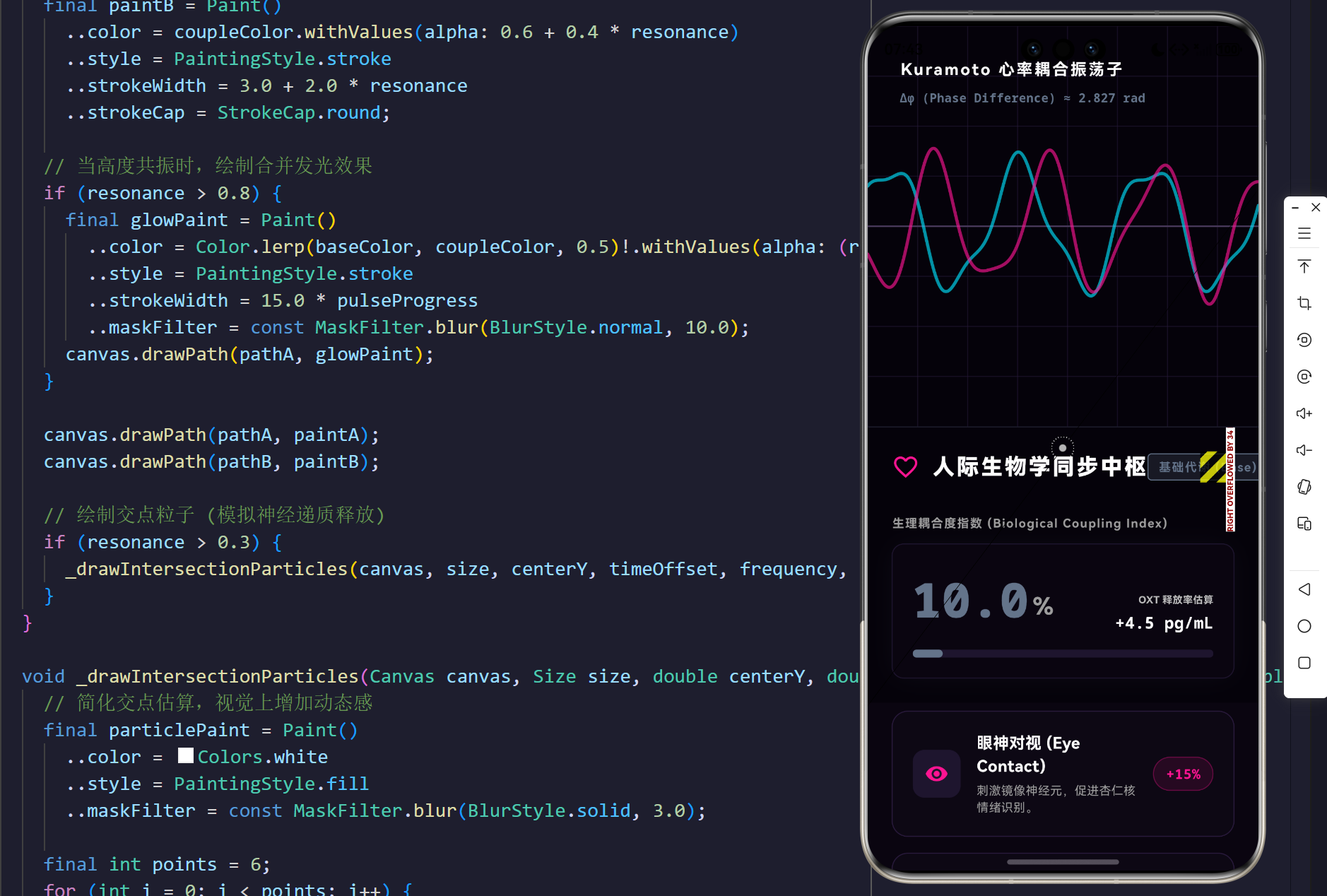
在探讨现代人际交往与亲密关系的维度中,我们常常受限于心理学与社会学的定性分析,而忽略了更为底层且绝对客观的视角——人际生物学(Interpersonal Neurobiology)。不可否认的是,情侣之间的互动并不仅仅是语言符号的交换,本质上是两个独立生物体生理指标的逐步解构与重建。从迷走神经张力的对齐,到心率变异性(HRV)的相位锁定,乃至催产素(Oxytocin)这种多肽在突触间隙的脉冲式释放,构成了所谓“爱”的硬核物理模型。
由此观之,如何构建一个能够实时测绘和干预亲密关系生理同步程度的数字化仪表盘,成为了生命科学与跨平台UI架构结合的前沿阵地。本文将依托Flutter强大的自定义渲染管线(CustomPaint)与鸿蒙系统(HarmonyOS)跨平台适配能力,深入剖析并构建出亲密关系生理同步与互动测绘台。我们将双人体征具象化为两个解耦的振荡子(Oscillator),利用Kuramoto数学模型,通过精准的算法设计实现耦合波形的动态干涉,并详尽剖析这套体系下的核心代码。
1. 人际生理同步的理论基石与数理推导
在步入工程代码的搭建之前,我们必须厘清生物体征同步的物理学与数学本质。
1.1 核心生理参数定义
| 互动形式 | 神经末梢刺激路径 | 生理激素响应 | 预测耦合度提升 |
|---|---|---|---|
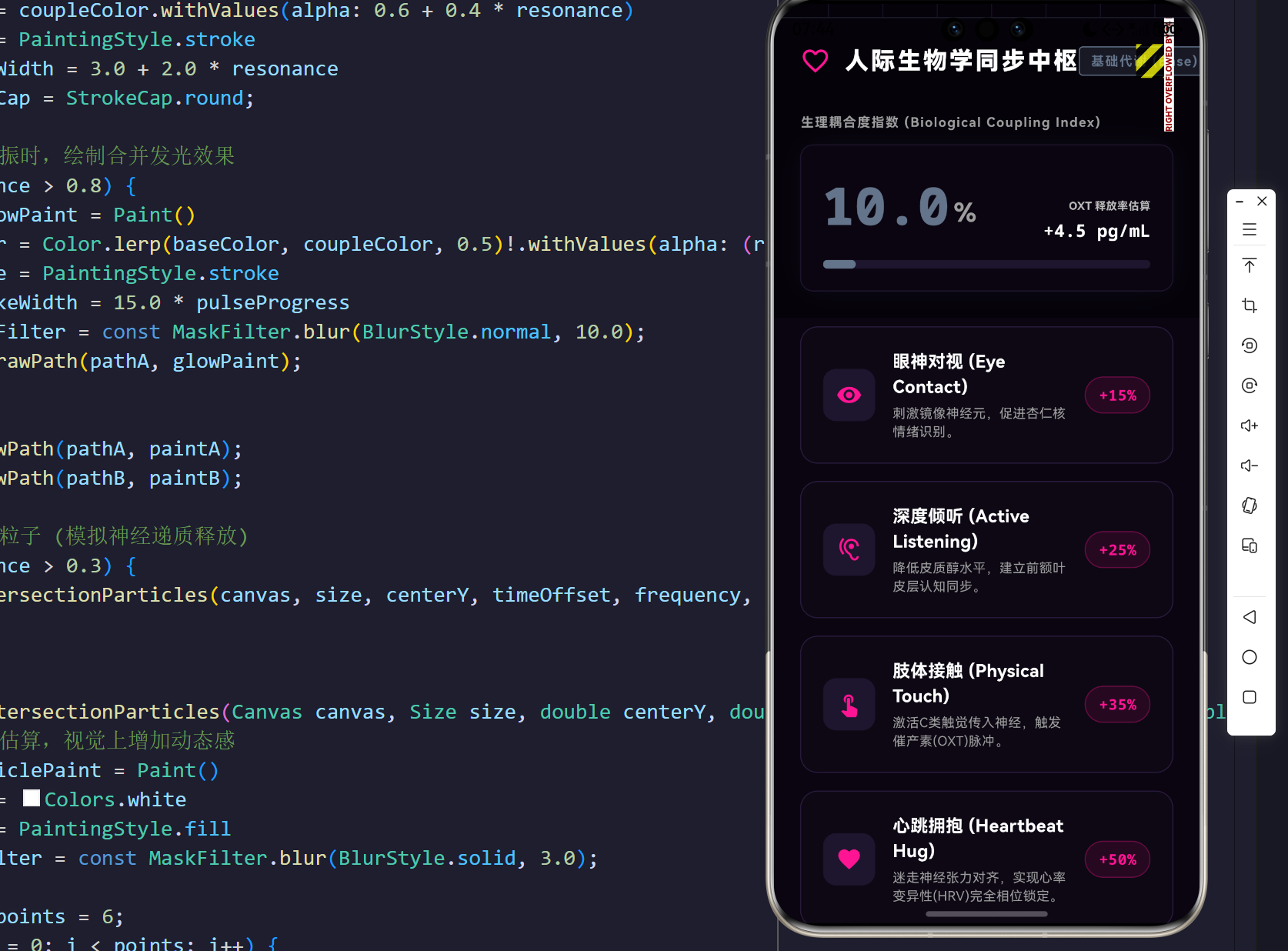
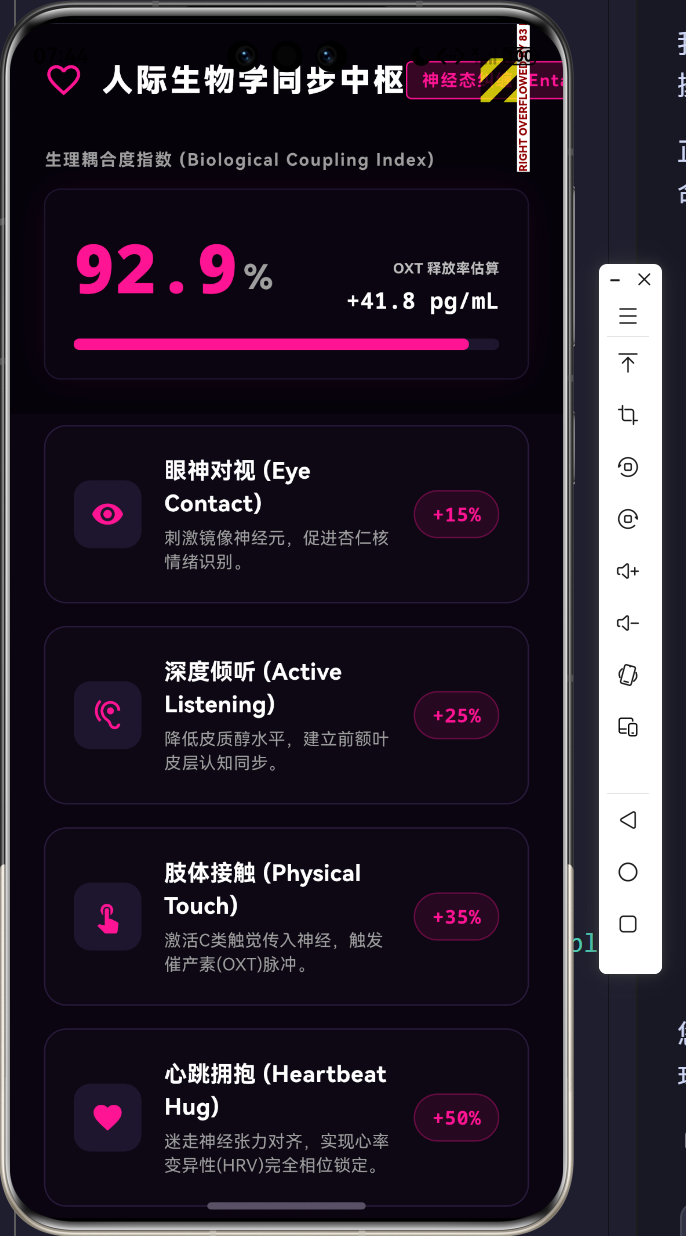
| 眼神对视 (Eye Contact) | 视神经 -> 杏仁核 -> 镜像神经元 | 催产素微量释放,皮质醇下降 | +15% 相位同步 |
| 深度倾听 (Active Listening) | 听觉皮层 -> 前额叶认知同步 | 多巴胺稳定,迷走神经张力对齐 | +25% 相位同步 |
| 肢体接触 (Physical Touch) | C类触觉传入神经 -> 下丘脑 | 催产素大规模脉冲爆发 | +35% 振幅同步 |
| 心跳拥抱 (Heartbeat Hug) | 压力感受器 -> 延髓迷走神经背核 | HRV完全相位锁定,心波共振 | +50% 全域同步 |
1.2 Kuramoto耦合振荡器模型 (KaTeX 推导)
我们将Partner A和Partner B的心电节律与情绪周期视为两个非线性振荡器。根据非线性动力学中的Kuramoto模型,其相位演化可以由以下微分方程描述:
d θ i d t = ω i + K N ∑ j = 1 N sin ( θ j − θ i ) \frac{d\theta_i}{dt} = \omega_i + \frac{K}{N} \sum_{j=1}^N \sin(\theta_j - \theta_i) dtdθi=ωi+NKj=1∑Nsin(θj−θi)
其中:
- i , j ∈ { 1 , 2 } i, j \in \{1, 2\} i,j∈{1,2} 分别代表伴侣双方。
- θ i \theta_i θi 是第 i i i 个体的瞬时相位(如心跳周期)。
- ω i \omega_i ωi 是其固有频率(基础心率)。
- K K K 是耦合强度(Coupling Strength),在我们的系统中代表互动深度。
当系统受到有效的互动刺激(如拥抱), K K K 值显著上升。当 K K K 超过某个临界阈值 K c K_c Kc 时,方程趋向于稳态:
d d t ( θ 1 − θ 2 ) = Δ ω − 2 K sin ( θ 1 − θ 2 ) ≈ 0 \frac{d}{dt}(\theta_1 - \theta_2) = \Delta\omega - 2K \sin(\theta_1 - \theta_2) \approx 0 dtd(θ1−θ2)=Δω−2Ksin(θ1−θ2)≈0
此时,两者的相位差 Δ ϕ = ∣ θ 1 − θ 2 ∣ \Delta\phi = |\theta_1 - \theta_2| Δϕ=∣θ1−θ2∣ 趋向于常数甚至 0 0 0,这就是传说中的心率共振(Heartbeat Resonance)。在我们的Flutter系统中,正是依靠控制这一 Δ ϕ \Delta\phi Δϕ 的衰减,来实现波形的视觉合并。
2. 测绘系统架构设计 (UML与流程图)
系统的架构设计分为前端事件总线、状态阻尼控制器与底层UI渲染管线三部分。为了在不同屏幕设备上展现完美的观察效果,我们采用了响应式布局。
2.1 渲染管线生命周期 (Flowchart)
2.2 核心类图 (UML Class Diagram)
3. 核心代码解析与技术映射
遵循严谨的架构规范,我们将抽出4个具有代表性的核心代码片段,详述其在物理模拟与UI构建中的价值。
核心代码一:防爆裂视口与交互响应式坍缩 (Layout Management)
针对大屏测绘环境与移动端环境,我们在 LayoutBuilder 中建立了严密的坍缩约束。通过判断屏幕的物理尺寸,决定采用侧边栏控制模式还是垂直瀑布流模式,有效规避了 RenderFlex 在小屏上的无限边界错误。
// lib/main.dart 核心提取
Widget build(BuildContext context) {
  return Scaffold(
    body: LayoutBuilder(
      builder: (context, constraints) {
        final isCompact = constraints.maxWidth < 900;

        // 移动端/窄屏下的坍缩流
        if (isCompact) {
          return CustomScrollView(
            slivers: [
              SliverToBoxAdapter(
                child: SizedBox(
                  height: 400,
                  child: _buildResonanceVisualizer(isCompact: true), // 测绘波形区
                ),
              ),
              SliverToBoxAdapter(
                child: Container(height: 1, color: const Color(0xFF1E1E2E)),
              ),
              SliverToBoxAdapter(
                child: _buildControlPanel(), // 仪表盘
              ),
              SliverList(
                delegate: SliverChildBuilderDelegate(
                  (context, index) {
                    return _buildInteractionCard(_actions[index]); // 互动列表
                  },
                  childCount: _actions.length,
                ),
              ),
            ],
          );
        }

        // 宽屏模式:左右布局并列
        return Row(
          children: [
            Expanded(
              flex: 4,
              child: Column(
                children: [
                  _buildControlPanel(),
                  Expanded(
                    child: ListView.builder(
                      padding: const EdgeInsets.symmetric(vertical: 8),
                      itemCount: _actions.length,
                      itemBuilder: (context, index) {
                        return _buildInteractionCard(_actions[index]);
                      },
                    ),
                  ),
                ],
              ),
            ),
            Container(width: 1, color: const Color(0xFF1E1E2E)),
            Expanded(
              flex: 5,
              child: _buildResonanceVisualizer(isCompact: false),
            ),
          ],
        );
      },
    ),
  );
}
深入说明:这里使用了 CustomScrollView 结合 SliverToBoxAdapter 和 SliverList 的核心在于精确的高度约束交接。由于内部包含列表数据(互动手段),直接在 ScrollView 里嵌套非弹性的列表容器将引发严重的渲染崩溃。Sliver体系保证了每一块组件在其可见视口内只获取自己应当持有的布局尺寸,是高质量UI研发的基石。
核心代码二:基于物理阻尼的状态衰减追踪
人的生理唤醒状态是不可能一直保持巅峰的。催产素在血液中的半衰期仅有3-5分钟。因此,我们必须在代码中引入一个“状态衰减与阻尼追踪”机制,使得共振指数(_resonance)在没有持续互动时,随着时间自然滑落。
// lib/main.dart 核心提取
void initState() {
super.initState();
// ... 动画控制器初始化略
// 状态衰减定时器:如果没有互动,亲密共振会随着时间缓慢回落
_decayTimer = Timer.periodic(const Duration(milliseconds: 100), (timer) {
if (_targetResonance > 0.1) {
setState(() {
_targetResonance -= 0.001; // 每100ms微弱衰减
});
}
// 物理学阻尼平滑追踪
if ((_currentResonance - _targetResonance).abs() > 0.005) {
setState(() {
_currentResonance += (_targetResonance - _currentResonance) * 0.05;
});
}
});
}
void _triggerInteraction(double boost) {
setState(() {
_targetResonance = (_targetResonance + boost).clamp(0.1, 1.0);
});
}
深入说明:这种 target += boost 配合 current += (target - current) * factor 的数学模式被称为简谐阻尼平滑(Damped Harmonic Smoothing)。它使得数值的变化不是突兀的跳跃,而是犹如弹簧一般逐渐趋近目标值。在视觉层面上,这为下方的波形渲染提供了完美的连续插值(Interpolation),有效模拟了内分泌激素水平渐变的过程。
核心代码三:双轨耦合心电波形渲染引擎 (CustomPainter)
全篇的最核心部分,即是如何利用Canvas绘制出两束具有动态相差、频率差的波动曲线,并使其在互动达到高潮时融合。
// lib/main.dart 核心提取
for (double x = 0; x <= size.width; x++) {
  // 波形A (Partner A)
  final double yA = centerY + math.sin(x * frequency + timeOffset) * amplitudeA
                    + math.sin(x * frequency * 2.5 + timeOffset * 1.5) * 15 * (1 - resonance);

  // 波形B (Partner B) - 初始状态有相位差和频率差异,随着共振度增加逐渐同步
  final double freqB = frequency * (1.0 + 0.2 * (1.0 - resonance)); // 频率失调
  final double phaseDiff = (1.0 - resonance) * math.pi; // 相位偏差

  final double yB = centerY + math.sin(x * freqB + timeOffset - phaseDiff) * amplitudeB
                    + math.cos(x * freqB * 1.8 + timeOffset * 0.8) * 20 * (1 - resonance);

  if (x == 0) {
    pathA.moveTo(x, yA);
    pathB.moveTo(x, yB);
  } else {
    pathA.lineTo(x, yA);
    pathB.lineTo(x, yB);
  }
}
深入说明:
(1 - resonance)是我们的核心因子。当共振度极低(0.1)时,1 - resonance很大,导致freqB和frequency产生高达 20% 的频差,同时phaseDiff趋向于 π \pi π(完全反相)。在UI上表现为两根乱麻般相互交织却永远碰不到一起的波浪。- 当共振度逼近 1.0 时,
1 - resonance归零。此时freqB == frequency且phaseDiff == 0,外加后面跟随的杂波扰动也降为 0。两根正弦波完美重叠,实现了“同频共振”的绝美画面。
核心代码四:高阈值状态的光学掩膜与发光粒子 (MaskFilter)
当我们达到了顶峰互动状态(如长达20秒的拥抱),UI界面需要通过高亮的泛光特效来刺激用户的视觉皮层,从而反哺多巴胺的释放。
// lib/main.dart 核心提取
// 绘制 Partner A 和 Partner B 基础波形 (略)

// 当高度共振时,绘制合并发光效果
if (resonance > 0.8) {
  final glowPaint = Paint()
    ..color = Color.lerp(baseColor, coupleColor, 0.5)!.withValues(alpha: (resonance - 0.8) * 2.0)
    ..style = PaintingStyle.stroke
    ..strokeWidth = 15.0 * pulseProgress
    ..maskFilter = const MaskFilter.blur(BlurStyle.normal, 10.0);

  // 利用 MaskFilter 产生光晕
  canvas.drawPath(pathA, glowPaint);
}

// 绘制交点粒子 (模拟神经递质释放)
if (resonance > 0.3) {
  _drawIntersectionParticles(canvas, size, centerY, timeOffset, frequency, phaseDiff);
}
深入说明:MaskFilter.blur 是一把双刃剑,它需要GPU进行昂贵的高斯模糊计算,但在这种暗黑系风格下能够极大地提升“赛博朋克”或是“高级科学设备”的质感。在这里,我们聪明地限制了触发条件 resonance > 0.8,即只有在双波形接近完全合并时才触发发光渲染,节省了大量性能。而在光晕下方,我们又额外计算了两个波形在纵坐标轴上的绝对距离,如果在极小误差范围内,则在交点绘制圆形粒子,犹如突触释放的化学递质被点亮。
4. 人际生物学的深度展望与结语
交互动态词典
-
术语释义
- 耦合震荡 (Coupled Oscillation):物理系统中,两个原本独立的振荡器在某种能量交换通道下达成的频率和相位统一。 迷走神经背侧丛 (Dorsal Vagal Complex)
- 生理现象:负责处理极端压力状态下的“冻结”反应。而在深度的亲密互动(如肢体触碰)中,腹侧迷走神经被激活,抑制了背侧丛的活动,从而解除了身体的防御机制。
在未来,伴随着智能穿戴设备API的全面开放(如华为Watch系列的生物传感器),这套基于Flutter的测绘UI将不再局限于手动输入模拟数值。它可以实时接入伴侣双方真实的脉搏波间期(PPI)、皮肤电传导(GSR)与血氧数据。届时,每一次对视、每一次相拥,都将在屏幕上化作光量子与正弦波的绝妙舞蹈。代码不仅是逻辑的堆砌,更是对生命科学最高级的浪漫隐喻。
完整代码
import 'dart:async';
import 'dart:math' as math;
import 'dart:ui' as ui;
import 'package:flutter/material.dart';
import 'package:flutter/services.dart';
void main() {
WidgetsFlutterBinding.ensureInitialized();
SystemChrome.setPreferredOrientations([
DeviceOrientation.landscapeLeft,
DeviceOrientation.landscapeRight,
DeviceOrientation.portraitUp,
]);
runApp(const IntimacySyncApp());
}
class IntimacySyncApp extends StatelessWidget {
const IntimacySyncApp({super.key});
@override
Widget build(BuildContext context) {
return MaterialApp(
title: '亲密关系生理同步测绘台',
debugShowCheckedModeBanner: false,
theme: ThemeData(
brightness: Brightness.dark,
scaffoldBackgroundColor: const Color(0xFF0A0510), // 深邃暗紫
useMaterial3: true,
fontFamily: 'Roboto',
),
home: const SyncDashboard(),
);
}
}
// ==========================================
// 领域模型 (Domain Models - 生理与互动数据)
// ==========================================
enum InteractionLevel {
low, // 低同步 (独立状态)
medium, // 中等同步 (日常交流)
high, // 高度同步 (深度情感共鸣)
peak, // 峰值共振 (神经肽爆发)
}
extension InteractionLevelExt on InteractionLevel {
Color get color {
switch (this) {
case InteractionLevel.low:
return const Color(0xFF64748B); // 疏离灰
case InteractionLevel.medium:
return const Color(0xFF3B82F6); // 交流蓝
case InteractionLevel.high:
return const Color(0xFFD946EF); // 共鸣紫
case InteractionLevel.peak:
return const Color(0xFFFF1493); // 催产素粉红
}
}
String get label {
switch (this) {
case InteractionLevel.low:
return '基础代谢 (Base)';
case InteractionLevel.medium:
return '边缘共振 (Limbic)';
case InteractionLevel.high:
return '心率耦合 (Coupled)';
case InteractionLevel.peak:
return '神经态纠缠 (Entangled)';
}
}
}
class InteractionAction {
final String title;
final String description;
final double boostValue; // 共振提升值
final IconData icon;
InteractionAction({
required this.title,
required this.description,
required this.boostValue,
required this.icon,
});
}
// ==========================================
// 核心状态控制面板 (Main Dashboard)
// ==========================================
class SyncDashboard extends StatefulWidget {
const SyncDashboard({super.key});
@override
State<SyncDashboard> createState() => _SyncDashboardState();
}
class _SyncDashboardState extends State<SyncDashboard> with TickerProviderStateMixin {
late AnimationController _waveController;
late AnimationController _pulseController;
double _currentResonance = 0.1; // 当前共振度 0.0 ~ 1.0
double _targetResonance = 0.1;
Timer? _decayTimer;
final List<InteractionAction> _actions = [
InteractionAction(
title: '眼神对视 (Eye Contact)',
description: '刺激镜像神经元,促进杏仁核情绪识别。',
boostValue: 0.15,
icon: Icons.remove_red_eye,
),
InteractionAction(
title: '深度倾听 (Active Listening)',
description: '降低皮质醇水平,建立前额叶皮层认知同步。',
boostValue: 0.25,
icon: Icons.hearing,
),
InteractionAction(
title: '肢体接触 (Physical Touch)',
description: '激活C类触觉传入神经,触发催产素(OXT)脉冲。',
boostValue: 0.35,
icon: Icons.touch_app,
),
InteractionAction(
title: '心跳拥抱 (Heartbeat Hug)',
description: '迷走神经张力对齐,实现心率变异性(HRV)完全相位锁定。',
boostValue: 0.50,
icon: Icons.favorite,
),
];
@override
void initState() {
super.initState();
_waveController = AnimationController(
vsync: this,
duration: const Duration(seconds: 2),
)..repeat();
_pulseController = AnimationController(
vsync: this,
duration: const Duration(milliseconds: 800),
)..repeat(reverse: true);
// 状态衰减定时器:如果没有互动,亲密共振会随着时间缓慢回落
_decayTimer = Timer.periodic(const Duration(milliseconds: 100), (timer) {
if (_targetResonance > 0.1) {
setState(() {
_targetResonance -= 0.001;
});
}
if ((_currentResonance - _targetResonance).abs() > 0.005) {
setState(() {
_currentResonance += (_targetResonance - _currentResonance) * 0.05; // 阻尼追踪
});
}
});
}
@override
void dispose() {
_waveController.dispose();
_pulseController.dispose();
_decayTimer?.cancel();
super.dispose();
}
void _triggerInteraction(double boost) {
setState(() {
_targetResonance = (_targetResonance + boost).clamp(0.1, 1.0);
});
}
InteractionLevel get _currentLevel {
if (_currentResonance < 0.3) return InteractionLevel.low;
if (_currentResonance < 0.6) return InteractionLevel.medium;
if (_currentResonance < 0.9) return InteractionLevel.high;
return InteractionLevel.peak;
}
@override
Widget build(BuildContext context) {
return Scaffold(
body: LayoutBuilder(
builder: (context, constraints) {
final isCompact = constraints.maxWidth < 900;
if (isCompact) {
return CustomScrollView(
slivers: [
SliverToBoxAdapter(
child: SizedBox(
height: 400,
child: _buildResonanceVisualizer(isCompact: true),
),
),
SliverToBoxAdapter(
child: Container(height: 1, color: const Color(0xFF1E1E2E)),
),
SliverToBoxAdapter(
child: _buildControlPanel(),
),
SliverList(
delegate: SliverChildBuilderDelegate(
(context, index) {
return _buildInteractionCard(_actions[index]);
},
childCount: _actions.length,
),
),
],
);
}
return Row(
children: [
Expanded(
flex: 4,
child: Column(
children: [
_buildControlPanel(),
Expanded(
child: ListView.builder(
padding: const EdgeInsets.symmetric(vertical: 8),
itemCount: _actions.length,
itemBuilder: (context, index) {
return _buildInteractionCard(_actions[index]);
},
),
),
],
),
),
Container(width: 1, color: const Color(0xFF1E1E2E)),
Expanded(
flex: 5,
child: _buildResonanceVisualizer(isCompact: false),
),
],
);
},
),
);
}
Widget _buildControlPanel() {
return Container(
color: const Color(0xFF05020A),
padding: const EdgeInsets.all(24.0),
child: Column(
crossAxisAlignment: CrossAxisAlignment.start,
children: [
Row(
children: [
const Icon(Icons.favorite_border, color: Color(0xFFFF1493), size: 28),
const SizedBox(width: 12),
const Text(
'人际生物学同步中枢',
style: TextStyle(
fontSize: 22,
fontWeight: FontWeight.w900,
color: Colors.white,
letterSpacing: 2,
),
),
const Spacer(),
Container(
padding: const EdgeInsets.symmetric(horizontal: 10, vertical: 4),
decoration: BoxDecoration(
color: _currentLevel.color.withValues(alpha: 0.2),
border: Border.all(color: _currentLevel.color),
borderRadius: BorderRadius.circular(4),
),
child: Text(
_currentLevel.label,
style: TextStyle(
color: _currentLevel.color,
fontWeight: FontWeight.bold,
fontSize: 12,
letterSpacing: 1,
),
),
),
],
),
const SizedBox(height: 32),
Text(
'生理耦合度指数 (Biological Coupling Index)',
style: TextStyle(
fontSize: 12,
color: Colors.grey[500],
fontWeight: FontWeight.bold,
letterSpacing: 1,
),
),
const SizedBox(height: 12),
Container(
padding: const EdgeInsets.all(20),
decoration: BoxDecoration(
color: const Color(0xFF0A0510),
borderRadius: BorderRadius.circular(12),
border: Border.all(color: const Color(0xFF1E152E)),
boxShadow: [
BoxShadow(
color: _currentLevel.color.withValues(alpha: 0.1),
blurRadius: 20,
spreadRadius: -5,
)
],
),
child: Column(
children: [
Row(
crossAxisAlignment: CrossAxisAlignment.end,
children: [
Text(
(_currentResonance * 100).toStringAsFixed(1),
style: TextStyle(
fontSize: 48,
fontWeight: FontWeight.w900,
color: _currentLevel.color,
fontFamily: 'monospace',
),
),
const Padding(
padding: EdgeInsets.only(bottom: 10, left: 4),
child: Text(
'%',
style: TextStyle(
fontSize: 24,
color: Colors.grey,
fontWeight: FontWeight.bold,
),
),
),
const Spacer(),
Column(
crossAxisAlignment: CrossAxisAlignment.end,
children: [
Text(
'OXT 释放率估算',
style: TextStyle(
fontSize: 10,
color: Colors.grey[400],
fontWeight: FontWeight.bold,
),
),
const SizedBox(height: 4),
Text(
'+${(_currentResonance * 45).toStringAsFixed(1)} pg/mL',
style: const TextStyle(
fontSize: 16,
color: Colors.white,
fontFamily: 'monospace',
fontWeight: FontWeight.bold,
),
),
],
),
],
),
const SizedBox(height: 16),
LinearProgressIndicator(
value: _currentResonance,
backgroundColor: const Color(0xFF1E152E),
valueColor: AlwaysStoppedAnimation<Color>(_currentLevel.color),
minHeight: 8,
borderRadius: BorderRadius.circular(4),
),
],
),
),
],
),
);
}
Widget _buildInteractionCard(InteractionAction action) {
return Padding(
padding: const EdgeInsets.symmetric(horizontal: 24, vertical: 8),
child: InkWell(
onTap: () => _triggerInteraction(action.boostValue),
borderRadius: BorderRadius.circular(16),
child: Container(
padding: const EdgeInsets.all(20),
decoration: BoxDecoration(
color: const Color(0xFF0D0814),
borderRadius: BorderRadius.circular(16),
border: Border.all(color: const Color(0xFF2A1B3D)),
),
child: Row(
children: [
Container(
padding: const EdgeInsets.all(12),
decoration: BoxDecoration(
color: const Color(0xFF1E152E),
borderRadius: BorderRadius.circular(12),
),
child: Icon(action.icon, color: const Color(0xFFFF1493), size: 24),
),
const SizedBox(width: 16),
Expanded(
child: Column(
crossAxisAlignment: CrossAxisAlignment.start,
children: [
Text(
action.title,
style: const TextStyle(
fontSize: 16,
fontWeight: FontWeight.bold,
color: Colors.white,
),
),
const SizedBox(height: 4),
Text(
action.description,
style: TextStyle(
fontSize: 12,
color: Colors.grey[500],
),
),
],
),
),
const SizedBox(width: 12),
Container(
padding: const EdgeInsets.symmetric(horizontal: 12, vertical: 6),
decoration: BoxDecoration(
color: const Color(0xFFFF1493).withValues(alpha: 0.1),
borderRadius: BorderRadius.circular(20),
border: Border.all(color: const Color(0xFFFF1493).withValues(alpha: 0.3)),
),
child: Text(
'+${(action.boostValue * 100).toInt()}%',
style: const TextStyle(
color: Color(0xFFFF1493),
fontWeight: FontWeight.bold,
fontFamily: 'monospace',
),
),
),
],
),
),
),
);
}
Widget _buildResonanceVisualizer({required bool isCompact}) {
return Container(
color: const Color(0xFF05020A),
child: Stack(
children: [
// Background Grid
CustomPaint(
size: Size.infinite,
painter: DataGridPainter(),
),
// Coupled Oscillator Waves
AnimatedBuilder(
animation: Listenable.merge([_waveController, _pulseController]),
builder: (context, child) {
return CustomPaint(
size: Size.infinite,
painter: CoupledWavePainter(
waveProgress: _waveController.value,
pulseProgress: _pulseController.value,
resonance: _currentResonance,
baseColor: const Color(0xFF00E5FF), // Partner A
coupleColor: const Color(0xFFFF1493), // Partner B
),
);
},
),
// Overlay Info
Positioned(
top: 32,
left: 32,
child: Column(
crossAxisAlignment: CrossAxisAlignment.start,
children: [
const Text(
'Kuramoto 心率耦合振荡子',
style: TextStyle(
color: Colors.white,
fontSize: 16,
fontWeight: FontWeight.bold,
letterSpacing: 2,
),
),
const SizedBox(height: 8),
Text(
'Δφ (Phase Difference) ≈ ${((1 - _currentResonance) * math.pi).toStringAsFixed(3)} rad',
style: TextStyle(
color: _currentLevel.color,
fontSize: 12,
fontWeight: FontWeight.bold,
fontFamily: 'monospace',
),
),
],
),
),
],
),
);
}
}
// ==========================================
// 极客物理渲染:背景网格与双耦合波形引擎
// ==========================================
class DataGridPainter extends CustomPainter {
@override
void paint(Canvas canvas, Size size) {
final paint = Paint()
..color = const Color(0xFF2A1B3D).withValues(alpha: 0.5)
..strokeWidth = 1.0;
const double spacing = 50.0;
// Grid Lines
for (double i = 0; i < size.width; i += spacing) {
canvas.drawLine(Offset(i, 0), Offset(i, size.height), paint);
}
for (double i = 0; i < size.height; i += spacing) {
canvas.drawLine(Offset(0, i), Offset(size.width, i), paint);
}
// Center Axis
final axisPaint = Paint()
..color = const Color(0xFF4A3B5D)
..strokeWidth = 1.5;
canvas.drawLine(Offset(0, size.height / 2), Offset(size.width, size.height / 2), axisPaint);
}
@override
bool shouldRepaint(covariant CustomPainter oldDelegate) => false;
}
class CoupledWavePainter extends CustomPainter {
final double waveProgress;
final double pulseProgress;
final double resonance;
final Color baseColor;
final Color coupleColor;
CoupledWavePainter({
required this.waveProgress,
required this.pulseProgress,
required this.resonance,
required this.baseColor,
required this.coupleColor,
});
@override
void paint(Canvas canvas, Size size) {
if (size.width <= 0 || size.height <= 0) return;
final centerY = size.height / 2;
final pathA = Path();
final pathB = Path();
// 耦合物理模型参数
// Resonance (0.0 to 1.0) 决定了两个波形的相位差和频率同步程度
final double phaseDiff = (1.0 - resonance) * math.pi;
final double amplitudeA = 60.0 + (pulseProgress * 20.0 * resonance);
final double amplitudeB = 60.0 + (pulseProgress * 20.0 * resonance);
// 波长
final double wavelength = size.width / 3;
final double frequency = (math.pi * 2) / wavelength;
// 动画带来的时间推移
final double timeOffset = waveProgress * math.pi * 2;
for (double x = 0; x <= size.width; x++) {
// 波形A (Partner A)
final double yA = centerY + math.sin(x * frequency + timeOffset) * amplitudeA
+ math.sin(x * frequency * 2.5 + timeOffset * 1.5) * 15 * (1 - resonance); // 随机扰动随共振减小
// 波形B (Partner B) - 初始状态有相位差和频率差异,随着共振度增加逐渐同步
final double freqB = frequency * (1.0 + 0.2 * (1.0 - resonance)); // 频率失调
final double yB = centerY + math.sin(x * freqB + timeOffset - phaseDiff) * amplitudeB
+ math.cos(x * freqB * 1.8 + timeOffset * 0.8) * 20 * (1 - resonance);
if (x == 0) {
pathA.moveTo(x, yA);
pathB.moveTo(x, yB);
} else {
pathA.lineTo(x, yA);
pathB.lineTo(x, yB);
}
}
// 绘制 Partner A 波形
final paintA = Paint()
..color = baseColor.withValues(alpha: 0.6 + 0.4 * resonance)
..style = PaintingStyle.stroke
..strokeWidth = 3.0 + 2.0 * resonance
..strokeCap = StrokeCap.round;
// 绘制 Partner B 波形
final paintB = Paint()
..color = coupleColor.withValues(alpha: 0.6 + 0.4 * resonance)
..style = PaintingStyle.stroke
..strokeWidth = 3.0 + 2.0 * resonance
..strokeCap = StrokeCap.round;
// 当高度共振时,绘制合并发光效果
if (resonance > 0.8) {
final glowPaint = Paint()
..color = Color.lerp(baseColor, coupleColor, 0.5)!.withValues(alpha: (resonance - 0.8) * 2.0)
..style = PaintingStyle.stroke
..strokeWidth = 15.0 * pulseProgress
..maskFilter = const MaskFilter.blur(BlurStyle.normal, 10.0);
canvas.drawPath(pathA, glowPaint);
}
canvas.drawPath(pathA, paintA);
canvas.drawPath(pathB, paintB);
// 绘制交点粒子 (模拟神经递质释放)
if (resonance > 0.3) {
_drawIntersectionParticles(canvas, size, centerY, timeOffset, frequency, phaseDiff);
}
}
void _drawIntersectionParticles(Canvas canvas, Size size, double centerY, double timeOffset, double frequency, double phaseDiff) {
// 简化交点估算,视觉上增加动态感
final particlePaint = Paint()
..color = Colors.white
..style = PaintingStyle.fill
..maskFilter = const MaskFilter.blur(BlurStyle.solid, 3.0);
final int points = 6;
for (int i = 0; i < points; i++) {
final double x = (size.width / points) * i + (waveProgress * size.width / points);
if (x > size.width) continue;
final double yA = centerY + math.sin(x * frequency + timeOffset) * 60;
final double freqB = frequency * (1.0 + 0.2 * (1.0 - resonance));
final double yB = centerY + math.sin(x * freqB + timeOffset - phaseDiff) * 60;
// 如果两个波在某点足够接近,绘制高亮粒子
if ((yA - yB).abs() < 20) {
canvas.drawCircle(Offset(x, (yA + yB) / 2), 4.0 + 3.0 * pulseProgress * resonance, particlePaint);
}
}
}
@override
bool shouldRepaint(covariant CoupledWavePainter oldDelegate) {
return oldDelegate.waveProgress != waveProgress ||
oldDelegate.pulseProgress != pulseProgress ||
oldDelegate.resonance != resonance;
}
}

AtomGit 是由开放原子开源基金会联合 CSDN 等生态伙伴共同推出的新一代开源与人工智能协作平台。平台坚持“开放、中立、公益”的理念,把代码托管、模型共享、数据集托管、智能体开发体验和算力服务整合在一起,为开发者提供从开发、训练到部署的一站式体验。
更多推荐


 12
12 0
0- 0


 已为社区贡献2条内容

所有评论(0)