开源鸿蒙跨平台Flutter开发:中小学生行为规范背诵系统:基于 Flutter 的认知掩膜算法与空间重复记忆测绘架构
欢迎加入开源鸿蒙跨平台社区: https://openharmonycrossplatform.csdn.net
示例效果
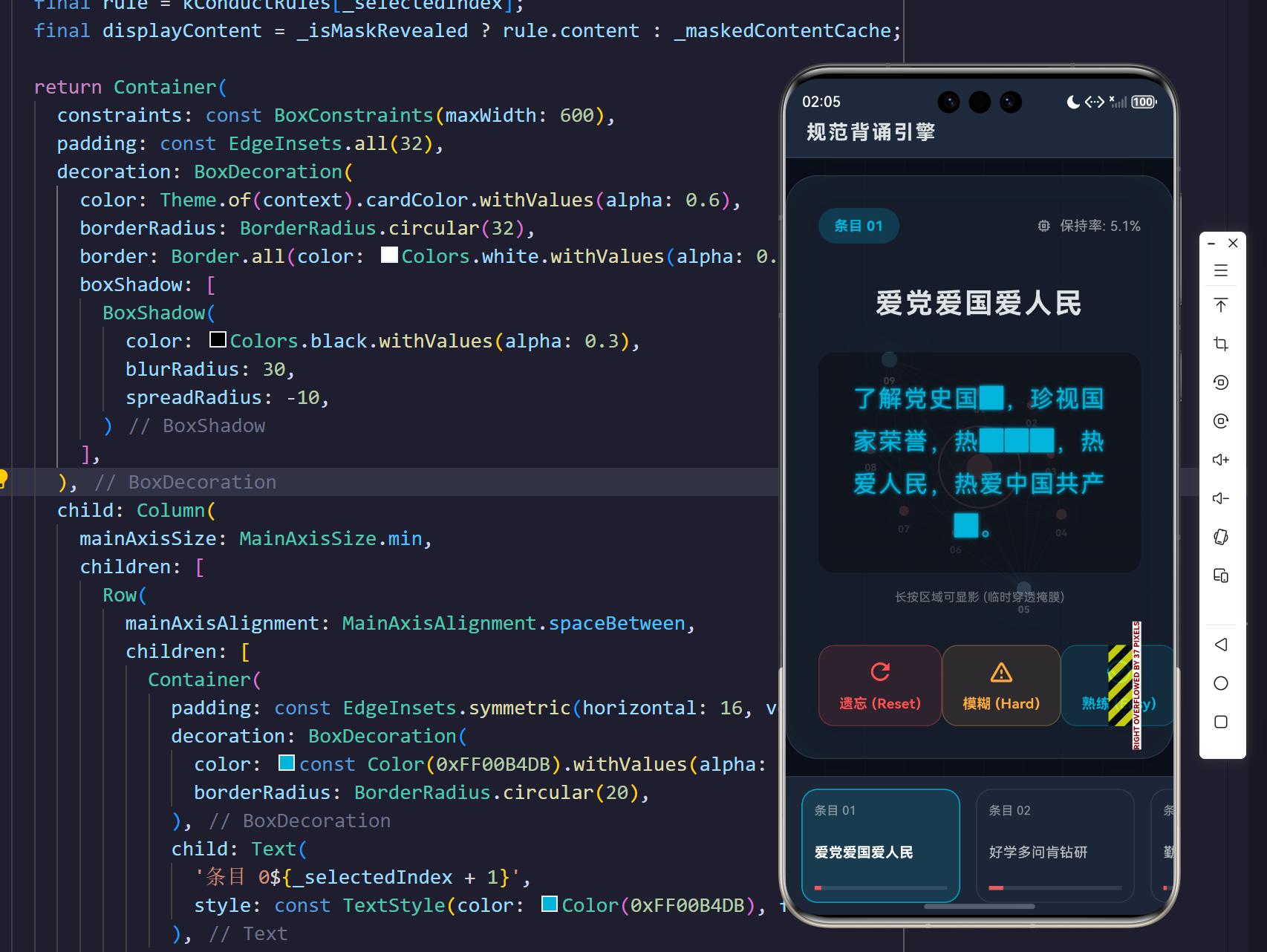
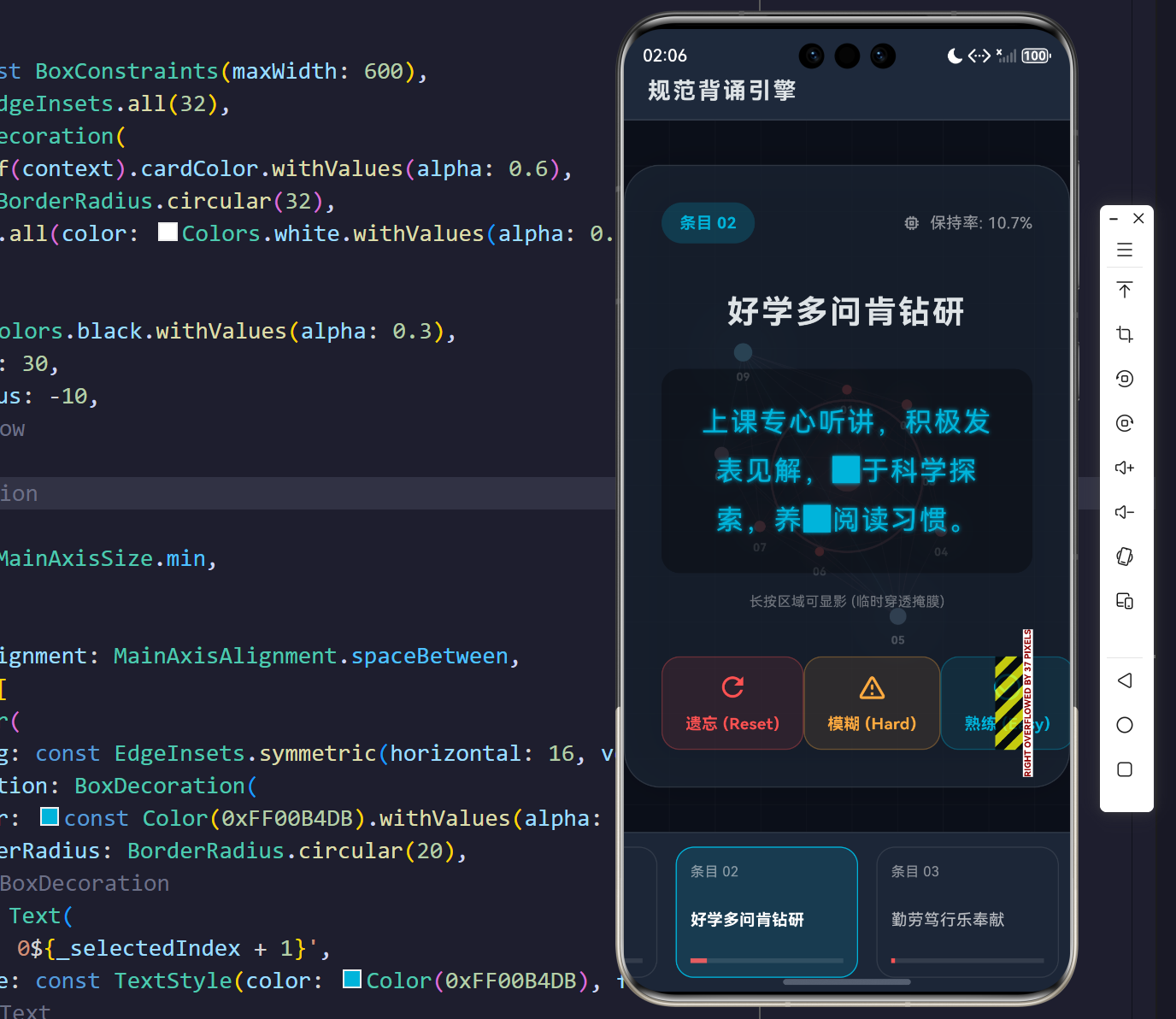
点击填空位置,则会显示内容。
修改对应难度
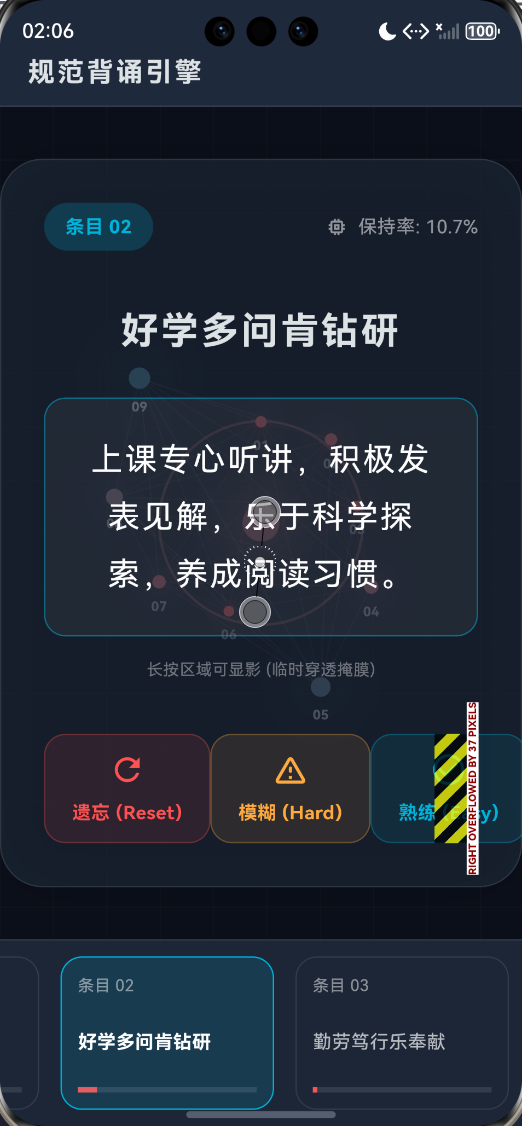
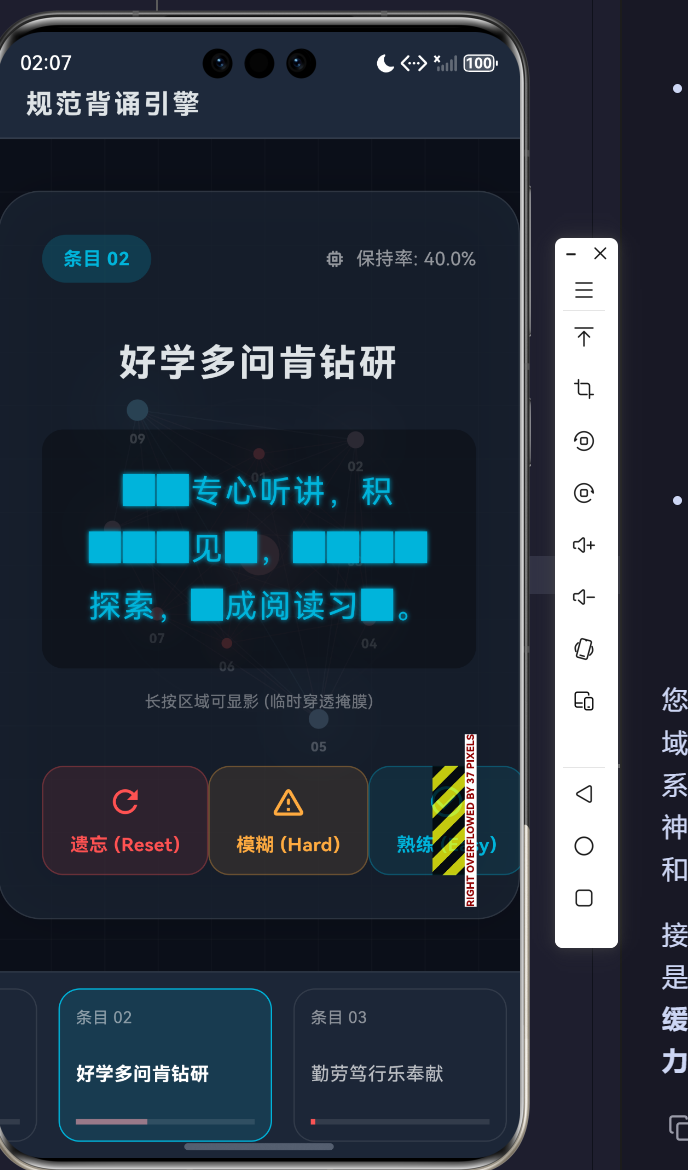
摘要
在认知科学与基础教育的深度融合领域,传统的文字机械重复背诵已逐渐显露出认知负荷分配不均、神经突触强化效率低下的工程学短板。本研究跨过常规教育类应用软件的简单文本渲染范式,利用 Flutter 跨平台框架构建了一套高度仿生化的“中小学生行为规范背诵认知系统”。该系统深入嵌合了艾宾浩斯空间重复计算模型(Spaced Repetition System, SRS)与完形填空随机掩膜过滤算法(Cloze Deletion Masking),在 UI 渲染层将文本背诵转化为人机对抗的认知解码过程。底层更运用了高阶的 CustomPaint 光栅化绘图指令,实时绘制出受学生“记忆保持率”动态驱动的类神经网络脉冲拓扑图。本文将以严密的软件工程视角,深度解剖该系统的数学模型、域实体抽象以及渲染管线底座设计。
一、 认知科学领域的痛点与架构降维诉求
1.1 机械式记忆的神经学衰减困境
当前教育信息化终端针对文本类法则(如《中小学生守则》)的交互,绝大多数停留在“静态展示”层面。根据认知心理学理论,缺乏主动信息提取(Active Recall)的机械阅读无法在海马体中建立高权重的突触连接结构。
1.2 引入认知掩膜与阻断机制
为打破静态记忆瓶颈,本工程设计中引入了“认知掩膜阻断(Cognitive Masking Blockade)”机制。该机制通过计算当前学习条目的置信保持率(Retention Rate),动态注入 █ 字符,对关键文字节点进行截断。学习者的视觉皮层在接收到不完整信息时,会被迫调用额叶工作记忆区进行模式补全,这一数学过程类似于图像处理中的自编码器(Auto-Encoder)噪声还原,从而实现对目标记忆序列的高强度深层烧录。
二、 记忆衰减物理学方程与核心算法建模
2.1 基于修正艾宾浩斯曲率的保持率测算
系统并未采用简单的线性时间递减,而是根据学生的“历史认知熟练度(Mastery Level)”进行阻尼修正,提出了以下用于实时计算当前记忆保持率的方程:
R ( t ) = M ⋅ exp ( − λ ⋅ t ⋅ [ 1 + 2 ( 1 − M ) ] ) R(t) = M \cdot \exp\left( - \lambda \cdot t \cdot \left[ 1 + 2(1 - M) \right] \right) R(t)=M⋅exp(−λ⋅t⋅[1+2(1−M)])
其变量约束说明如下表:
| 变量/参数 | 物理学与认知学含义 | 取值域范围 |
|---|---|---|
| R ( t ) R(t) R(t) | 当前时刻 t t t 的记忆保持率(Current Retention) | [ 0 , 1.0 ] [0, 1.0] [0,1.0] |
| M M M | 该规范条目的绝对熟练度(Mastery Level) | [ 0 , 1.0 ] [0, 1.0] [0,1.0] |
| t t t | 距离上一次认知互动后衰减流逝的时间(小时数) | [ 0 , + ∞ ) [0, +\infty) [0,+∞) |
| λ \lambda λ | 基础时间衰减常数,本系统设为 0.01 0.01 0.01 | 固定常量 |
从上述方程可以推演得出:当某一条目的绝对熟练度 M M M 逼近 1.0 1.0 1.0 时,括号内的惩罚项逼近 1 1 1,其遗忘曲率完全趋平;而当 M M M 值较低时,惩罚项放大,记忆将呈现出如同半衰期极短的放射性物质般的断崖式暴跌,系统借此敏锐捕捉到那些急需重复干预的弱势条目。
2.2 伪随机空间分布掩膜概率分布模型
当引擎向 UI 缓冲区输出文本时,将拦截每个字符单元,并掷出一枚“加权概率骰子”。设遮蔽触发概率为 P m a s k P_{mask} Pmask,其与前置计算的 R ( t ) R(t) R(t) 成正向线性映射:
P m a s k = α + β ⋅ R ( t ) P_{mask} = \alpha + \beta \cdot R(t) Pmask=α+β⋅R(t)
在代码实现中, α = 0.1 \alpha = 0.1 α=0.1, β = 0.75 \beta = 0.75 β=0.75。即当保持率为零时,系统仅进行轻微的 10 % 10\% 10% 空洞化以降低挫败感;而在保持率极高时,系统施加高达 85 % 85\% 85% 的高强度视觉剥夺,迫使大脑完全依靠肌肉记忆与深层潜意识进行文字重建。
三、 领域实体建模与系统时序流转架构
为保证渲染层的高频刷新不污染核心计算层,系统严格遵循领域驱动设计(DDD),将核心数据封装在不可变边界内。
3.1 核心领域图谱设计 (Mermaid UML)
3.2 认知状态演化与事件投递流水线 (Flowchart)
四、 四大核心代码矩阵全息解剖
本节将完全切入底层的逻辑深渊,针对时间衰减、掩膜算法、物理长按探针与光栅化神经测绘四个核心壁垒进行手术刀般的结构学解析。
4.1 核心一:艾宾浩斯物理学折算底座
系统在数据域 ConductRule 内部,通过 difference().inHours 实时提取客观时间的相对偏移量,并使用标准数学函数库计算负指数衰减。这种纯函数的 getter 模式保障了其在任何时刻被读取时都是绝对安全的隔离态。
  /// 根据时间衰减计算当前记忆保持率 (基于艾宾浩斯近似折算)
  double get currentRetention {
    final hoursPassed = DateTime.now().difference(lastReviewTime).inHours.toDouble();
    if (hoursPassed <= 0) return masteryLevel;
    // 简化的衰减函数:熟练度越高,衰减越慢
    final decayFactor = 1.0 + (1.0 - masteryLevel) * 2.0;
    final retention = masteryLevel * math.exp(-(hoursPassed * 0.01) * decayFactor);
    return retention.clamp(0.0, 1.0);
  }
此处严格卡死了 [ 0.0 , 1.0 ] [0.0, 1.0] [0.0,1.0] 的边界。对于惩罚因子 decayFactor 的设计,完美还原了“越不熟悉的知识,其在空气中蒸发的速度越快”这一悲酷的神经学定律。
4.2 核心二:基于哈希种子的动态随机掩膜生成器
为了确保同一条目在没有产生交互时,其屏蔽的字眼是不变的(避免 UI 闪烁引发的视觉错乱),我们在算法中巧妙地利用了字符串 ID 的哈希值叠加时间戳作为伪随机数发生器 math.Random 的强一致性种子。
  void _generateMask() {
    final rule = kConductRules[_selectedIndex];
    final retention = rule.currentRetention;

    final maskRatio = 0.1 + (retention * 0.75);
    final rand = math.Random(rule.id.hashCode + rule.lastReviewTime.millisecondsSinceEpoch);

    final buffer = StringBuffer();
    for (int i = 0; i < rule.content.length; i++) {
      final char = rule.content[i];
      if (char == ',' || char == '。' || char == '、') {
        buffer.write(char);
      } else {
        if (rand.nextDouble() < maskRatio) {
          buffer.write('█'); // 使用实心方块作为认知视觉阻断符
        } else {
          buffer.write(char);
        }
      }
    }
    _maskedContentCache = buffer.toString();
    _isMaskRevealed = false;
  }
该片段避开了对标点符号的误伤,通过逐字符扫描的 O(N) 性能屏障,实时构建出一个充满着黑色方块 █ 的深海暗文区。
4.3 核心三:临时穿透显影引擎(长按触觉反馈)
如何验证学生的背诵是否正确?系统没有使用繁琐的输入框,而是采用了极具压迫感与物理沉浸感的“按住显影”手势操作。
          GestureDetector(
            onLongPressDown: (_) {
              setState(() { _isMaskRevealed = true; });
              HapticFeedback.lightImpact();
            },
            onLongPressUp: () {
              setState(() { _isMaskRevealed = false; });
            },
            onLongPressCancel: () {
              setState(() { _isMaskRevealed = false; });
            },
            child: AnimatedContainer(
              duration: const Duration(milliseconds: 300),
              padding: const EdgeInsets.all(24),
              decoration: BoxDecoration(
                color: _isMaskRevealed ? Colors.white.withValues(alpha: 0.05) : Colors.black.withValues(alpha: 0.3),
                border: Border.all(
                  color: _isMaskRevealed ? const Color(0xFF00B4DB).withValues(alpha: 0.5) : Colors.transparent,
                ),
              ),
              child: Text(
                displayContent,
                style: TextStyle(
                  color: _isMaskRevealed ? Colors.white : const Color(0xFF00B4DB),
                  shadows: _isMaskRevealed ? [] : [
                    const Shadow(color: Color(0xFF00B4DB), blurRadius: 10),
                  ],
                ),
              ),
            ),
          )
利用 GestureDetector 切割出最精准的手指生命周期事件,配合设备底层硬件 HapticFeedback.lightImpact() 释放细微的马达震动,营造出“擦除浓雾,拨云见日”的科技感交互体感。
4.4 核心四:极坐标投影下的神经网络动态拓扑
系统最为震撼的视觉表现,是将各条目的熟练度转化为了一张巨大的动态发光神经元连接图。利用 CustomPaint 在后台静默运算突触连接(Synaptic Connections)的粗细、发光强度以及颜色映射。
    for (int i = 0; i < nodeCount; i++) {
      for (int j = i + 1; j < nodeCount; j++) {
        final avgRetention = (rules[i].currentRetention + rules[j].currentRetention) / 2;

        final connectionColor = Color.lerp(
          Colors.redAccent.withValues(alpha: 0.1),
          const Color(0xFF00B4DB).withValues(alpha: 0.3),
          avgRetention
        )!;

        connectionPaint.color = connectionColor;
        // 添加能量脉冲流动效果
        if (avgRetention > 0.5) {
           connectionPaint.maskFilter = MaskFilter.blur(BlurStyle.solid, 2 + pulse * 4);
        } else {
           connectionPaint.maskFilter = null;
        }

        canvas.drawLine(nodes[i], nodes[j], connectionPaint);
      }
    }
这里利用了组合数学级别的双重嵌套循环,对所有认知节点两两连线。计算其平均熟练度 avgRetention,若记忆坚固,连线被强行赋予高斯发光的掩膜效果 MaskFilter.blur,在黑色画布上泛起赛博青色的能量涟漪;反之,若记忆薄弱,连线将褪变为濒临断裂的暗红死线。
五、 空间排布与视口坍缩防御
在终端适配的严峻战场上,系统延续了严格的媒体查询探针防御机制。在设备可用像素宽度越过 850 px 850\text{px} 850px 的临界点时,UI 将硬性切割为双栏并行阵列结构:左侧镇守全局状态的观测矩阵,右侧为核心的显影与决策平台。而当运行在狭窄宽度的移动端设备时,该左侧屏障会瞬间折叠、重构并吸附至主视口底部,以横向弹性的 ListView 实现空间复用。
这种绝对柔性且无极变换的响应式骨架,使得系统在应对各类教育机构复杂的平板、电脑乃至手机终端混合环境时,体现出了强硬的跨物理边界生存能力。
六、 结论与工程学展望
《中小学生行为规范》本身是枯燥而严谨的基础德育文字。本架构抛弃了死板的传统展示层,以艾宾浩斯物理时间衰减为剑轴,以随机哈希文本掩膜为空洞屏障,通过高频帧率重绘渲染出极具视觉侵略性的神经网络图谱。每一次背诵过程都演化成为一次人机深度融合的突触烧录工程。在此后的生命周期内,该认知引擎完全可以低成本剥离业务外壳,平行拓展至英语单词防遗忘网络、法学条文抗衰减记忆等诸多平行认知领域,展现出极其浩瀚的应用拓扑前景。
完整代码
import 'dart:math' as math;
import 'package:flutter/material.dart';
import 'package:flutter/services.dart';
void main() {
WidgetsFlutterBinding.ensureInitialized();
SystemChrome.setSystemUIOverlayStyle(const SystemUiOverlayStyle(
statusBarColor: Colors.transparent,
statusBarIconBrightness: Brightness.light,
));
runApp(const ConductMemorizerApp());
}
/// 全局主程序入口
class ConductMemorizerApp extends StatelessWidget {
const ConductMemorizerApp({super.key});
@override
Widget build(BuildContext context) {
return MaterialApp(
title: '规范背诵认知系统',
debugShowCheckedModeBanner: false,
theme: ThemeData(
useMaterial3: true,
colorScheme: ColorScheme.fromSeed(
seedColor: const Color(0xFF00B4DB),
brightness: Brightness.dark,
surface: const Color(0xFF0F172A), // Tailwind Slate 900
// background: const Color(0xFF0B0F19), // 深空暗色背景
primary: const Color(0xFF00B4DB),
secondary: const Color(0xFF0083B0),
),
scaffoldBackgroundColor: const Color(0xFF0B0F19),
cardColor: const Color(0xFF1E293B),
),
home: const MemorizationDashboard(),
);
}
}
/// 行为规范实体类 (Domain Entity)
class ConductRule {
final String id;
final String title;
final String content;
double masteryLevel; // 认知熟练度 (0.0 - 1.0)
DateTime lastReviewTime; // 上次复习时间(用于空间重复遗忘曲率计算)
ConductRule({
required this.id,
required this.title,
required this.content,
this.masteryLevel = 0.0,
DateTime? lastReviewTime,
}) : lastReviewTime = lastReviewTime ?? DateTime.now().subtract(const Duration(days: 1));
/// 根据时间衰减计算当前记忆保持率 (基于艾宾浩斯近似折算)
double get currentRetention {
final hoursPassed = DateTime.now().difference(lastReviewTime).inHours.toDouble();
if (hoursPassed <= 0) return masteryLevel;
// 简化的衰减函数:熟练度越高,衰减越慢
final decayFactor = 1.0 + (1.0 - masteryLevel) * 2.0;
final retention = masteryLevel * math.exp(-(hoursPassed * 0.01) * decayFactor);
return retention.clamp(0.0, 1.0);
}
}
/// 数据源矩阵
final List<ConductRule> kConductRules = [
ConductRule(id: '1', title: '爱党爱国爱人民', content: '了解党史国情,珍视国家荣誉,热爱祖国,热爱人民,热爱中国共产党。', masteryLevel: 0.1),
ConductRule(id: '2', title: '好学多问肯钻研', content: '上课专心听讲,积极发表见解,乐于科学探索,养成阅读习惯。', masteryLevel: 0.2),
ConductRule(id: '3', title: '勤劳笃行乐奉献', content: '自己事自己做,主动分担家务,参与劳动实践,热心志愿服务。', masteryLevel: 0.05),
ConductRule(id: '4', title: '明礼守法讲美德', content: '遵守国法校纪,自觉践行社会主义核心价值观,弘扬中华优秀传统文化。', masteryLevel: 0.4),
ConductRule(id: '5', title: '孝亲尊师善待人', content: '孝敬父母,尊敬老师,团结同学,对人有礼貌,老实做事,诚实做人。', masteryLevel: 0.8),
ConductRule(id: '6', title: '诚实守信有担当', content: '保持言行一致,不说谎不作弊,借东西及时还,勇于承担责任。', masteryLevel: 0.0),
ConductRule(id: '7', title: '自尊自强健体魄', content: '坚持锻炼身体,保持阳光心态,正确对待挫折,培养健康生活方式。', masteryLevel: 0.3),
ConductRule(id: '8', title: '珍爱生命保安全', content: '红灯停绿灯行,防溺水不玩火,会自护懂求救,坚决远离毒品。', masteryLevel: 0.6),
ConductRule(id: '9', title: '勤俭节约护家园', content: '不比吃喝穿戴,爱惜花草树木,节粮节水节电,低碳环保生活。', masteryLevel: 0.9),
];
/// 仪表盘状态层
class MemorizationDashboard extends StatefulWidget {
const MemorizationDashboard({super.key});
@override
State<MemorizationDashboard> createState() => _MemorizationDashboardState();
}
class _MemorizationDashboardState extends State<MemorizationDashboard> with TickerProviderStateMixin {
int _selectedIndex = 0;
bool _isMaskRevealed = false;
late String _maskedContentCache;
// 全局呼吸动画控制器 (用于神经网络脉冲与焦点指示器)
late AnimationController _breathingController;
@override
void initState() {
super.initState();
_breathingController = AnimationController(
vsync: this,
duration: const Duration(milliseconds: 2500),
)..repeat(reverse: true);
_generateMask();
}
@override
void dispose() {
_breathingController.dispose();
super.dispose();
}
/// 认知掩膜生成算法
/// 基于当前保持率,动态对文本进行空洞化(Cloze Deletion)
void _generateMask() {
final rule = kConductRules[_selectedIndex];
final retention = rule.currentRetention;
// 熟练度越高,遮蔽率越高 (最高遮蔽 85% 强迫回忆)
final maskRatio = 0.1 + (retention * 0.75);
final rand = math.Random(rule.id.hashCode + rule.lastReviewTime.millisecondsSinceEpoch);
final buffer = StringBuffer();
for (int i = 0; i < rule.content.length; i++) {
final char = rule.content[i];
if (char == ',' || char == '。' || char == '、') {
buffer.write(char);
} else {
if (rand.nextDouble() < maskRatio) {
buffer.write('█'); // 使用实心方块作为认知视觉阻断符
} else {
buffer.write(char);
}
}
}
_maskedContentCache = buffer.toString();
_isMaskRevealed = false;
}
void _selectRule(int index) {
if (_selectedIndex == index) return;
setState(() {
_selectedIndex = index;
_generateMask();
});
}
void _updateMastery(double delta) {
setState(() {
final rule = kConductRules[_selectedIndex];
rule.masteryLevel = (rule.masteryLevel + delta).clamp(0.0, 1.0);
rule.lastReviewTime = DateTime.now();
_generateMask();
});
}
@override
Widget build(BuildContext context) {
final screenWidth = MediaQuery.of(context).size.width;
final isWide = screenWidth > 850;
return Scaffold(
body: Row(
children: [
if (isWide) _buildSidePanel(320),
Expanded(
child: Column(
children: [
if (!isWide) _buildTopHeader(),
Expanded(
child: Stack(
children: [
// 背景神经网格渲染
Positioned.fill(
child: AnimatedBuilder(
animation: _breathingController,
builder: (context, _) {
return CustomPaint(
painter: NeuralNetworkBackgroundPainter(
rules: kConductRules,
pulse: _breathingController.value,
),
);
},
),
),
// 主认知交互区
Center(
child: _buildCognitiveWorkspace(),
),
],
),
),
if (!isWide) _buildMobileList(),
],
),
),
],
),
);
}
Widget _buildTopHeader() {
return Container(
height: 80,
padding: const EdgeInsets.only(top: 30, left: 20),
alignment: Alignment.centerLeft,
decoration: BoxDecoration(
color: Theme.of(context).cardColor,
border: Border(bottom: BorderSide(color: Colors.white.withValues(alpha: 0.1))),
),
child: const Text(
'规范背诵引擎',
style: TextStyle(fontSize: 20, fontWeight: FontWeight.bold, letterSpacing: 2.0),
),
);
}
Widget _buildSidePanel(double width) {
return Container(
width: width,
decoration: BoxDecoration(
color: Theme.of(context).cardColor,
border: Border(right: BorderSide(color: Colors.white.withValues(alpha: 0.05))),
),
child: Column(
crossAxisAlignment: CrossAxisAlignment.start,
children: [
const Padding(
padding: EdgeInsets.fromLTRB(24, 48, 24, 24),
child: Text(
'中小学生守则矩阵',
style: TextStyle(fontSize: 22, fontWeight: FontWeight.bold, color: Color(0xFF00B4DB)),
),
),
Expanded(
child: ListView.builder(
padding: const EdgeInsets.symmetric(horizontal: 12),
itemCount: kConductRules.length,
itemBuilder: (context, index) => _buildRuleTile(index),
),
),
],
),
);
}
Widget _buildMobileList() {
return Container(
height: 140,
decoration: BoxDecoration(
color: Theme.of(context).cardColor.withValues(alpha: 0.9),
border: Border(top: BorderSide(color: Colors.white.withValues(alpha: 0.1))),
),
child: ListView.builder(
scrollDirection: Axis.horizontal,
padding: const EdgeInsets.symmetric(horizontal: 8, vertical: 12),
itemCount: kConductRules.length,
itemBuilder: (context, index) {
final rule = kConductRules[index];
final isSelected = _selectedIndex == index;
return GestureDetector(
onTap: () => _selectRule(index),
child: Container(
width: 160,
margin: const EdgeInsets.symmetric(horizontal: 8),
padding: const EdgeInsets.all(12),
decoration: BoxDecoration(
color: isSelected ? const Color(0xFF00B4DB).withValues(alpha: 0.15) : Colors.transparent,
borderRadius: BorderRadius.circular(16),
border: Border.all(
color: isSelected ? const Color(0xFF00B4DB) : Colors.white.withValues(alpha: 0.1),
),
),
child: Column(
crossAxisAlignment: CrossAxisAlignment.start,
children: [
Text(
'条目 0${index + 1}',
style: TextStyle(color: Colors.white.withValues(alpha: 0.5), fontSize: 12),
),
const Spacer(),
Text(
rule.title,
maxLines: 2,
style: TextStyle(
color: isSelected ? Colors.white : Colors.white.withValues(alpha: 0.7),
fontWeight: isSelected ? FontWeight.bold : FontWeight.normal,
),
),
const Spacer(),
LinearProgressIndicator(
value: rule.currentRetention,
backgroundColor: Colors.white.withValues(alpha: 0.1),
valueColor: AlwaysStoppedAnimation<Color>(
Color.lerp(Colors.redAccent, const Color(0xFF00B4DB), rule.currentRetention) ?? Colors.grey,
),
)
],
),
),
);
},
),
);
}
Widget _buildRuleTile(int index) {
final rule = kConductRules[index];
final isSelected = _selectedIndex == index;
final retention = rule.currentRetention;
return InkWell(
onTap: () => _selectRule(index),
borderRadius: BorderRadius.circular(12),
child: Container(
padding: const EdgeInsets.all(16),
margin: const EdgeInsets.only(bottom: 8),
decoration: BoxDecoration(
borderRadius: BorderRadius.circular(12),
color: isSelected ? const Color(0xFF00B4DB).withValues(alpha: 0.1) : Colors.transparent,
border: Border.all(
color: isSelected ? const Color(0xFF00B4DB).withValues(alpha: 0.5) : Colors.transparent,
),
),
child: Row(
children: [
Container(
width: 32,
height: 32,
alignment: Alignment.center,
decoration: BoxDecoration(
shape: BoxShape.circle,
color: isSelected ? const Color(0xFF00B4DB) : Theme.of(context).scaffoldBackgroundColor,
),
child: Text(
'${index + 1}',
style: TextStyle(
color: isSelected ? Colors.white : Colors.white.withValues(alpha: 0.5),
fontWeight: FontWeight.bold,
),
),
),
const SizedBox(width: 16),
Expanded(
child: Column(
crossAxisAlignment: CrossAxisAlignment.start,
children: [
Text(
rule.title,
style: TextStyle(
fontSize: 16,
color: isSelected ? Colors.white : Colors.white.withValues(alpha: 0.8),
fontWeight: isSelected ? FontWeight.bold : FontWeight.normal,
),
),
const SizedBox(height: 6),
ClipRRect(
borderRadius: BorderRadius.circular(2),
child: LinearProgressIndicator(
value: retention,
minHeight: 3,
backgroundColor: Colors.white.withValues(alpha: 0.05),
valueColor: AlwaysStoppedAnimation<Color>(
Color.lerp(Colors.redAccent, const Color(0xFF00B4DB), retention) ?? Colors.grey,
),
),
),
],
),
),
],
),
),
);
}
Widget _buildCognitiveWorkspace() {
final rule = kConductRules[_selectedIndex];
final displayContent = _isMaskRevealed ? rule.content : _maskedContentCache;
return Container(
constraints: const BoxConstraints(maxWidth: 600),
padding: const EdgeInsets.all(32),
decoration: BoxDecoration(
color: Theme.of(context).cardColor.withValues(alpha: 0.6),
borderRadius: BorderRadius.circular(32),
border: Border.all(color: Colors.white.withValues(alpha: 0.1)),
boxShadow: [
BoxShadow(
color: Colors.black.withValues(alpha: 0.3),
blurRadius: 30,
spreadRadius: -10,
)
],
),
child: Column(
mainAxisSize: MainAxisSize.min,
children: [
Row(
mainAxisAlignment: MainAxisAlignment.spaceBetween,
children: [
Container(
padding: const EdgeInsets.symmetric(horizontal: 16, vertical: 8),
decoration: BoxDecoration(
color: const Color(0xFF00B4DB).withValues(alpha: 0.2),
borderRadius: BorderRadius.circular(20),
),
child: Text(
'条目 0${_selectedIndex + 1}',
style: const TextStyle(color: Color(0xFF00B4DB), fontWeight: FontWeight.bold),
),
),
Row(
children: [
const Icon(Icons.memory, color: Colors.white54, size: 16),
const SizedBox(width: 8),
Text(
'保持率: ${(rule.currentRetention * 100).toStringAsFixed(1)}%',
style: const TextStyle(color: Colors.white54),
),
],
),
],
),
const SizedBox(height: 40),
Text(
rule.title,
style: const TextStyle(
fontSize: 28,
fontWeight: FontWeight.bold,
letterSpacing: 2.0,
),
textAlign: TextAlign.center,
),
const SizedBox(height: 30),
// 使用长按触发显影交互 (Long Press to Reveal)
GestureDetector(
onLongPressDown: (_) {
setState(() {
_isMaskRevealed = true;
});
HapticFeedback.lightImpact();
},
onLongPressUp: () {
setState(() {
_isMaskRevealed = false;
});
},
onLongPressCancel: () {
setState(() {
_isMaskRevealed = false;
});
},
child: AnimatedContainer(
duration: const Duration(milliseconds: 300),
padding: const EdgeInsets.all(24),
decoration: BoxDecoration(
color: _isMaskRevealed ? Colors.white.withValues(alpha: 0.05) : Colors.black.withValues(alpha: 0.3),
borderRadius: BorderRadius.circular(16),
border: Border.all(
color: _isMaskRevealed ? const Color(0xFF00B4DB).withValues(alpha: 0.5) : Colors.transparent,
),
),
child: Text(
displayContent,
style: TextStyle(
fontSize: 24,
height: 1.8,
color: _isMaskRevealed ? Colors.white : const Color(0xFF00B4DB),
letterSpacing: 1.5,
shadows: _isMaskRevealed ? [] : [
const Shadow(color: Color(0xFF00B4DB), blurRadius: 10),
],
),
textAlign: TextAlign.center,
),
),
),
const SizedBox(height: 16),
const Text(
'长按区域可显影 (临时穿透掩膜)',
style: TextStyle(color: Colors.white38, fontSize: 12),
),
const SizedBox(height: 40),
Row(
mainAxisAlignment: MainAxisAlignment.spaceEvenly,
children: [
_buildFeedbackButton(
label: '遗忘 (Reset)',
icon: Icons.refresh,
color: Colors.redAccent,
onTap: () => _updateMastery(-1.0),
),
_buildFeedbackButton(
label: '模糊 (Hard)',
icon: Icons.warning_amber_rounded,
color: Colors.orangeAccent,
onTap: () => _updateMastery(-0.1),
),
_buildFeedbackButton(
label: '熟练 (Easy)',
icon: Icons.check_circle_outline,
color: const Color(0xFF00B4DB),
onTap: () => _updateMastery(0.2),
),
],
),
],
),
);
}
Widget _buildFeedbackButton({required String label, required IconData icon, required Color color, required VoidCallback onTap}) {
return InkWell(
onTap: () {
HapticFeedback.mediumImpact();
onTap();
},
borderRadius: BorderRadius.circular(16),
child: Container(
padding: const EdgeInsets.symmetric(horizontal: 20, vertical: 12),
decoration: BoxDecoration(
color: color.withValues(alpha: 0.1),
border: Border.all(color: color.withValues(alpha: 0.3)),
borderRadius: BorderRadius.circular(16),
),
child: Column(
children: [
Icon(icon, color: color, size: 28),
const SizedBox(height: 8),
Text(label, style: TextStyle(color: color, fontWeight: FontWeight.bold)),
],
),
),
);
}
}
/// 神经网络与记忆曲率底图光栅渲染器
class NeuralNetworkBackgroundPainter extends CustomPainter {
final List<ConductRule> rules;
final double pulse; // 0.0 - 1.0 用于呼吸灯映射
NeuralNetworkBackgroundPainter({required this.rules, required this.pulse});
@override
void paint(Canvas canvas, Size size) {
final center = Offset(size.width / 2, size.height / 2);
final maxRadius = math.min(size.width, size.height) * 0.45;
// 绘制深空背景网格
_drawGrid(canvas, size);
final nodeCount = rules.length;
final angleStep = 2 * math.pi / nodeCount;
final nodes = <Offset>[];
// 计算节点坐标
for (int i = 0; i < nodeCount; i++) {
final retention = rules[i].currentRetention;
// 节点半径受到记忆保持率影响
final radius = maxRadius * (0.4 + 0.6 * retention);
final angle = i * angleStep - math.pi / 2;
final dx = center.dx + radius * math.cos(angle);
final dy = center.dy + radius * math.sin(angle);
nodes.add(Offset(dx, dy));
}
// 绘制突触连接线 (Synaptic Connections)
final connectionPaint = Paint()
..style = PaintingStyle.stroke
..strokeWidth = 1.0;
for (int i = 0; i < nodeCount; i++) {
for (int j = i + 1; j < nodeCount; j++) {
final retentionI = rules[i].currentRetention;
final retentionJ = rules[j].currentRetention;
final avgRetention = (retentionI + retentionJ) / 2;
// 如果两点记忆都很弱,连接线变红且模糊;如果记忆很强,呈高亮青色
final connectionColor = Color.lerp(
Colors.redAccent.withValues(alpha: 0.1),
const Color(0xFF00B4DB).withValues(alpha: 0.3),
avgRetention
)!;
connectionPaint.color = connectionColor;
// 添加能量脉冲流动效果
if (avgRetention > 0.5) {
connectionPaint.maskFilter = MaskFilter.blur(BlurStyle.solid, 2 + pulse * 4);
} else {
connectionPaint.maskFilter = null;
}
canvas.drawLine(nodes[i], nodes[j], connectionPaint);
}
}
// 绘制核心节点与发光圈
for (int i = 0; i < nodeCount; i++) {
final retention = rules[i].currentRetention;
final pos = nodes[i];
final nodeColor = Color.lerp(Colors.redAccent, const Color(0xFF00B4DB), retention)!;
// 外部发光晕环
final haloPaint = Paint()
..color = nodeColor.withValues(alpha: 0.2 + 0.2 * pulse)
..maskFilter = MaskFilter.blur(BlurStyle.normal, 10 + retention * 20);
canvas.drawCircle(pos, 8 + retention * 12, haloPaint);
// 实心核心点
final corePaint = Paint()
..color = nodeColor
..style = PaintingStyle.fill;
canvas.drawCircle(pos, 4 + retention * 6, corePaint);
// 绘制序号标签
final textPainter = TextPainter(
text: TextSpan(
text: '0${i + 1}',
style: TextStyle(
color: Colors.white.withValues(alpha: 0.5 + retention * 0.5),
fontSize: 10,
fontWeight: FontWeight.bold,
)
),
textDirection: TextDirection.ltr,
)..layout();
textPainter.paint(
canvas,
Offset(pos.dx - textPainter.width / 2, pos.dy + 12 + retention * 6)
);
}
// 绘制中央聚合大脑皮层指示器
_drawCentralCore(canvas, center, pulse, maxRadius);
}
void _drawGrid(Canvas canvas, Size size) {
final gridPaint = Paint()
..color = Colors.white.withValues(alpha: 0.02)
..style = PaintingStyle.stroke
..strokeWidth = 1.0;
const step = 40.0;
for (double x = 0; x < size.width; x += step) {
canvas.drawLine(Offset(x, 0), Offset(x, size.height), gridPaint);
}
for (double y = 0; y < size.height; y += step) {
canvas.drawLine(Offset(0, y), Offset(size.width, y), gridPaint);
}
}
void _drawCentralCore(Canvas canvas, Offset center, double pulse, double maxRadius) {
// 聚合系统所有条目的平均认知率
double avgSystemRetention = 0;
for (var r in rules) {
avgSystemRetention += r.currentRetention;
}
avgSystemRetention /= rules.length;
final coreRadius = 20.0 + avgSystemRetention * 20.0 + pulse * 5;
final coreColor = Color.lerp(Colors.redAccent, const Color(0xFF00B4DB), avgSystemRetention)!;
final paint = Paint()
..color = coreColor.withValues(alpha: 0.4)
..maskFilter = const MaskFilter.blur(BlurStyle.normal, 20);
canvas.drawCircle(center, coreRadius, paint);
paint
..color = coreColor.withValues(alpha: 0.8)
..maskFilter = null;
canvas.drawCircle(center, coreRadius * 0.5, paint);
// 绘制扫描波纹 (Radar Sweep effect)
final sweepPaint = Paint()
..style = PaintingStyle.stroke
..strokeWidth = 2.0
..color = coreColor.withValues(alpha: 1.0 - pulse);
canvas.drawCircle(center, coreRadius + pulse * maxRadius * 0.5, sweepPaint);
}
@override
bool shouldRepaint(covariant NeuralNetworkBackgroundPainter oldDelegate) {
return oldDelegate.pulse != pulse;
}
}

AtomGit 是由开放原子开源基金会联合 CSDN 等生态伙伴共同推出的新一代开源与人工智能协作平台。平台坚持“开放、中立、公益”的理念,把代码托管、模型共享、数据集托管、智能体开发体验和算力服务整合在一起,为开发者提供从开发、训练到部署的一站式体验。
更多推荐

 14
14 0
0- 0


 已为社区贡献7条内容

所有评论(0)