vulkanscenegraph显示倾斜模型(5.7)-vsg::GraphicsPipeline
前言
上一章深入剖析了vsg::RenderGraph对Vulkan渲染流程的封装,重点探讨了vsg::FrameBuffer、vsg::RenderPass和vsg::ImageView三个Vulkan渲染过程中的核心组件。本章将在该基础上,进一步探讨Vulkan渲染过程中的另一核心组件——VkPipeline,以及vsg中针对图形渲染管线的封装GraphicsPipeline。
目录
- 1 GraphicsPipeline的创建
- 2 GraphicsPipeline的绑定
1 GraphicsPipeline的创建
回到第4章(vulkanscenegraph显示倾斜模型(4)-数据读取-CSDN博客)未深入的知识点之一的osg::Geometry转vsg::Command的具体细节,具体代码见osg2vsg项目(https://github.com/vsg-dev/osg2vsg,版本为v0.1.0)ConvertToVsg.cpp文件,代码第197-269行。其中GraphicsPipeline创建的代码如下(对应213-241行)ConvertToVsg.cpp文件:
    auto stategroup = vsg::StateGroup::create();

    auto bindGraphicsPipeline = getOrCreateBindGraphicsPipeline(shaderModeMask, geometryMask);
    if (bindGraphicsPipeline)
    {
        if (!inheritedStateGroup || !inheritedStateGroup->contains(bindGraphicsPipeline))
        {
            stategroup->add(bindGraphicsPipeline);
        }
    }

    if (!statestack.empty())
    {
        auto stateset = getStatePair().second;
        //std::cout<<"   We have stateset "<<stateset<<", descriptorSetLayouts.size() = "<<descriptorSetLayouts.size()<<", "<<shaderModeMask<<std::endl;
        if (stateset)
        {
            auto bindDescriptorSet = getOrCreateBindDescriptorSet(shaderModeMask, geometryMask, stateset);
            if (bindDescriptorSet)
            {
                if (!inheritedStateGroup || !inheritedStateGroup->contains(bindDescriptorSet))
                {
                    stategroup->add(bindDescriptorSet);
                }
            }
        }
    }

    stategroup->addChild(vsg_geometry);
上述代码包含了vsg::StateGoup、vsg::BindGraphicsPipeline、vsg::BindDescriptorSet的创建,其关系如下:
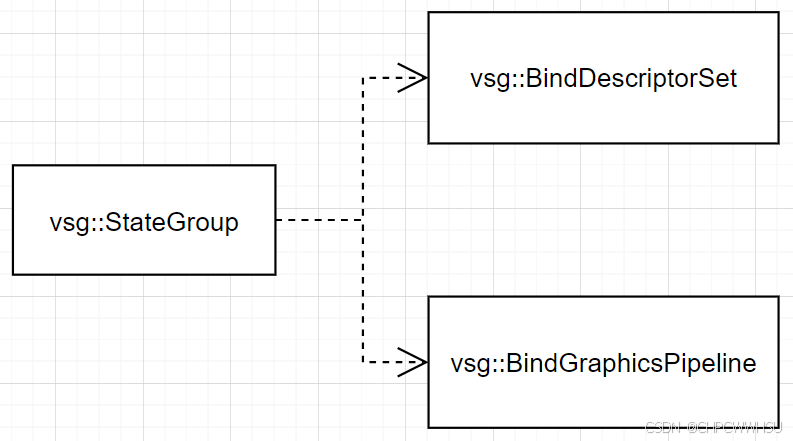
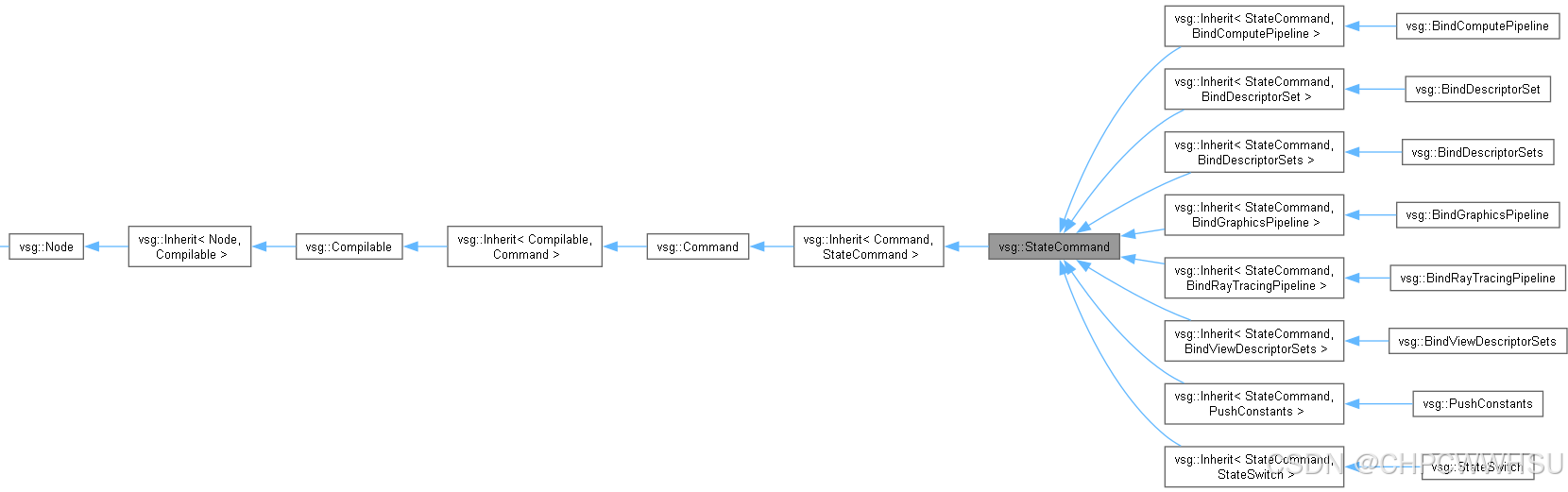
vsg::StateGoup中添加了两个vsg::StateCommand,分别为vsg::BindGraphicsPipeline与vsg::BindDescriptorSet。
2 GraphicsPipeline的绑定
本章在上章(vulkanscenegraph显示倾斜模型(5.5)-CommandGraph的创建-CSDN博客)场景图构建基础上,将场景图进一步细化,如下图所示(忽略vsg::Group节点),本章关注vsg::StateGroup节点。

StateGroup是一个Group节点,用于管理在RecordTraversal期间用于将状态应用于子图的StateCommands列表。
当RecordTraversal遇到StateGroup时,其StateGroup::stateCommands会被推送到相应的vsg::State堆栈中,同时遍历完/StateGroup的子图后,StateGroup::stateCommands命令将从vsg::State堆栈中弹出。具体代码如下:
void RecordTraversal::apply(const StateGroup& stateGroup)
{
    GPU_INSTRUMENTATION_L2_NCO(instrumentation, *getCommandBuffer(), "StateGroup", COLOR_RECORD_L2, &stateGroup);

    //debug("Visiting StateGroup");

    for (auto& command : stateGroup.stateCommands)
    {
        _state->stateStacks[command->slot].push(command);
    }
    _state->dirty = true;

    stateGroup.traverse(*this);

    for (const auto& command : stateGroup.stateCommands)
    {
        _state->stateStacks[command->slot].pop();
    }
    _state->dirty = true;
}
在遍历vsg::StateGroup的子图过程中,当在RecordTraversal过程中遇到vsg::Command时,将应用vsg::State堆栈的当前头部。
void RecordTraversal::apply(const Commands& commands)
{
    GPU_INSTRUMENTATION_L3_NCO(instrumentation, *getCommandBuffer(), "Commands", COLOR_GPU, &commands);

    _state->record();
    for (auto& command : commands.children)
    {
        command->record(*(_state->_commandBuffer));
    }
}
其中_state->record()的具体实现如下(State.h文件代码286-300行):
        inline void record()
        {
            if (dirty)
            {
                for (auto& stateStack : stateStacks)
                {
                    stateStack.record(*_commandBuffer);
                }

                projectionMatrixStack.record(*_commandBuffer);
                modelviewMatrixStack.record(*_commandBuffer);

                dirty = false;
            }
        }
按上节介绍遍历stateStacks,包含vsg::BindGraphicsPipeline、vsg::BindDescriptorSet,其中vsg::BindGraphicsPipeline 的record函数实现如下:
void BindGraphicsPipeline::record(CommandBuffer& commandBuffer) const
{
    vkCmdBindPipeline(commandBuffer, VK_PIPELINE_BIND_POINT_GRAPHICS, pipeline->vk(commandBuffer.viewID));
    commandBuffer.setCurrentPipelineLayout(pipeline->layout);
}
通过vkCmdBindPipeline实现了图形渲染管线的绑定。
文末:本章在上一篇文章的基础上,继续深入vsg场景图遍历过程中另一关键的节点vsg::StateGroup,StateGroup是一个Group节点,用于管理在RecordTraversal期间用于将状态应用于子图的StateCommands列表。同时进一步介绍了vsg中针对图形渲染管线的封装GraphicsPipeline,以及在vsg::StateGroup遍历过程中图形渲染管线绑定的具体实现。下章将介绍视景器准备系列的最后一章---Viewer编译。

AtomGit 是由开放原子开源基金会联合 CSDN 等生态伙伴共同推出的新一代开源与人工智能协作平台。平台坚持“开放、中立、公益”的理念,把代码托管、模型共享、数据集托管、智能体开发体验和算力服务整合在一起,为开发者提供从开发、训练到部署的一站式体验。
更多推荐

 9
9 0
0- 0


 已为社区贡献5条内容

所有评论(0)