开源鸿蒙跨平台Flutter开发:跨越 OOM 内存崩溃陷阱:基于 async* Generator 与流式 I/O 的生命科学数据底座构筑
欢迎加入开源鸿蒙跨平台社区:
https://openharmonycrossplatform.csdn.net
演示效果
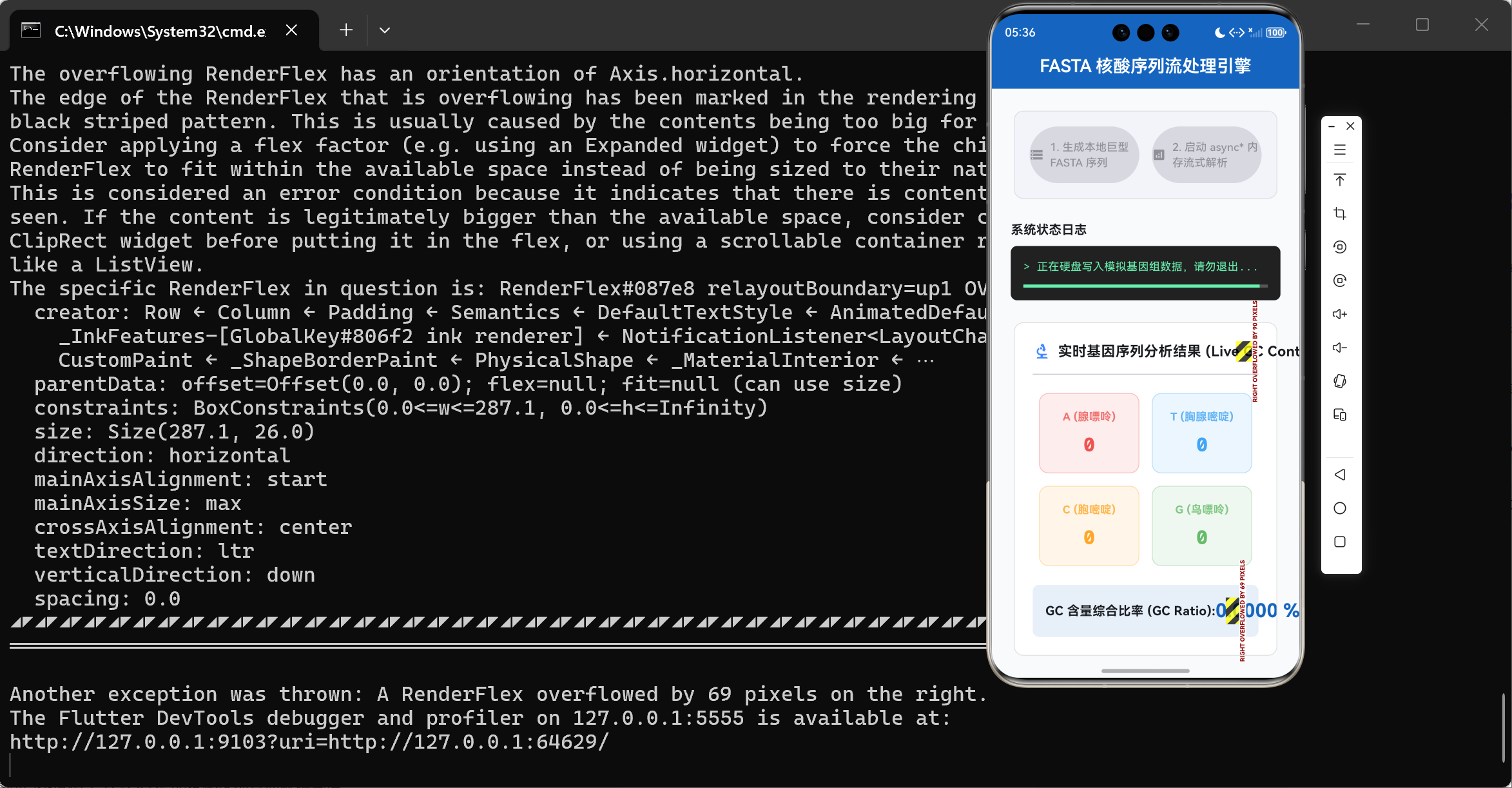
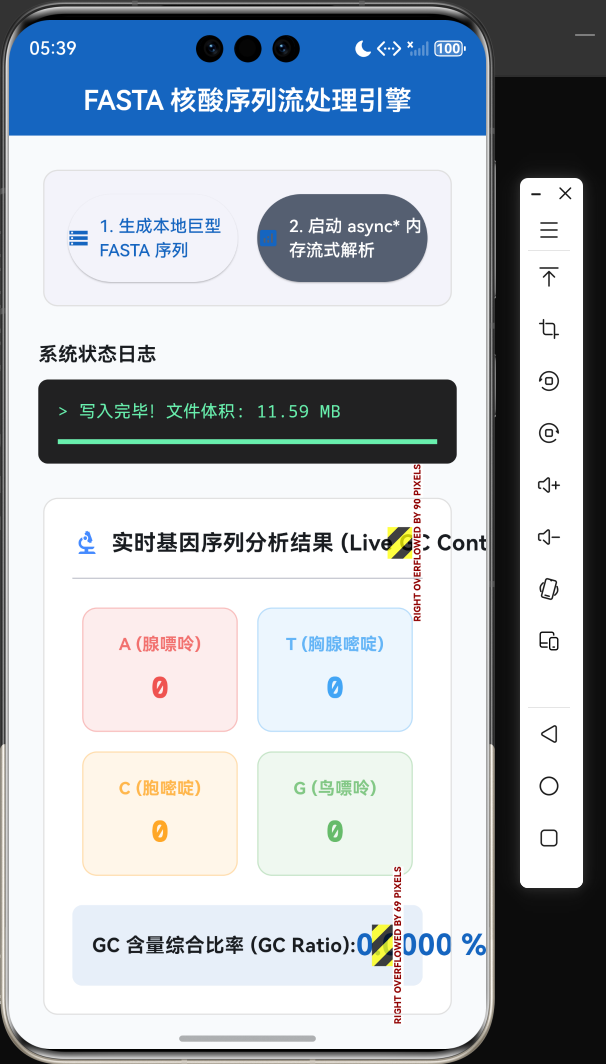
绪论:从次世代测序 (NGS) 到终端计算的物理鸿沟
自人类基因组计划(HGP)宣告完成以来,伴随着次世代测序技术(Next-Generation Sequencing, NGS)成本的断崖式下降,生命科学已无可挽回地跨入了大数据的洪流之中。在真实的生物信息学实验室中,单次高通量测序所产出的 FASTA 格式(一种基于文本的核酸/蛋白质序列表示标准)或 FASTQ 文件,其体积动辄在数千兆字节(GB)甚至数十 GB 之间徘徊。
长期以来,处理此类巨型文件的职责被死死捆绑在拥有数百 GB 内存阵列的 Linux 刀片服务器之上。然而,随着医疗器械的微型化与边缘计算(Edge Computing)的崛起,要求在移动终端(如基于 HarmonyOS 的便携医疗平板、甚至高端智能手机)上实现现场级的基因数据速览与局部序列靶向分析,已成为业界的一大核心痛点。
在移动设备那极其逼仄的 RAM 空间(通常应用层可用内存仅为 1GB ~ 2GB)中,试图解析几十 GB 的序列文本无异于“蛇吞象”。常规的文件读取方案将瞬间触发移动操作系统的 OOM(Out Of Memory)死亡判决机制,使得整个应用程序发生毁灭性崩溃。
本篇论述旨在突破这一极限瓶颈。我们将深入剖析 Dart 虚拟机的内存与垃圾回收(GC)运作机制,并引出解决海量文本吞吐的核心利器——Stream(流式通信) 与 Generator(async* 异步生成器)。由此,我们在 Flutter 终端框架之上,构筑起一条空间复杂度恒定为 O ( 1 ) O(1) O(1) 的核酸序列高速解析管道。
一、 内存灾难的病理分析:为何绝不可使用 .readAsStringSync()
在面对文件操作时,无论是初出茅庐的学徒还是部分经验老到的业务端开发者,往往习惯于调用高度封装的“全量装载”型 API。在 Dart 的 dart:io 标准库中,这体现为 File.readAsString() 抑或是同步的 File.readAsStringSync() 方法。
让我们运用软件工程的底层视角,去审查这一“暴力美学”在医疗数据场景下的致命缺陷。
1.1 Dart 内存堆与新老生代垃圾回收 (Generational GC)
Dart VM 采用了分代式的内存管理模型,它将内存堆(Heap)划分为两大阵营:
- 新生代空间 (New Generation Space / Nursery):采用极其快速的半区复制算法(Scavenge),专为生命周期极短的微小对象设立。
- 老生代空间 (Old Generation Space):采用标记-清除-压缩(Mark-Sweep-Compact)算法,主要容纳长期存活或是体积庞大的对象。
-
灾难触发点:大对象直接逃逸至老生代
- 当我们试图一次性将一个 2GB 的 FASTA 序列文件载入字符串时,Dart 虚拟机会发现该对象体积过于庞大,无法塞入新生代空间。于是,这个庞然大物便绕过了快速回收区,直接被强行分配至老生代堆内存中。一旦老生代堆空间逼近设备的物理内存极限,Dart 虚拟机会被迫触发全局的停顿(Stop-The-World, STW)来进行深度垃圾回收。最终,如果连续内存块仍然无法满足分配需求,操作系统的底层核心机制(如 Linux 的 OOM-Killer)将无情斩杀该进程。
1.2 空间复杂度比较: O ( N ) O(N) O(N) 遭遇 O ( 1 ) O(1) O(1) 的降维打击
我们可以用一组简单的对照表,直观地体现全量读取与流式分片读取在数学原理上的差异。
| 技术范式 | 抽象比喻 | 空间复杂度 | RAM 峰值消耗 (读2GB文件) | 进程存活概率 |
|---|---|---|---|---|
全量读取 (readAsString) |
将整条水库的水一次性灌入一口水缸。 | O ( N ) O(N) O(N), N N N 为文本体积 | > 2.5 GB(含对象头与字符编码开销) | 0% (极易崩溃) |
流式解析 (Stream + LineSplitter) |
在水库闸门上开一个小孔,让水顺着管道流出。 | O ( 1 ) O(1) O(1),常数级内存 | 几兆字节(仅缓冲当前读到的字符串快照) | 100% (稳如磐石) |
二、 构建 O ( 1 ) O(1) O(1) 空间复杂度的水管:Stream 流式 I/O
要想彻底杜绝内存溢出,我们的系统架构必须从“以内存为中心”向“以管道为中心”演进。在 Dart 中,这就是 Stream 的主战场。
对于包含无数行 DNA 序列的文本而言,最佳的处理粒度是**“逐行读取”**。
通过这一套精密衔接的转化管道(openRead().transform(...)),长达数十亿个字符的文件,在应用程序运行的任何一瞬间,都仅仅暴露出一两行极为短促的片段。这种“阅后即焚”的机制,是生命科学终端计算的生存法则。
三、 极限抽象:Dart 生成器 (async* / yield) 的降维应用
获取了按行输出的数据流后,我们不能直接把繁重的业务代码杂糅在流监听中,这严重违反了单一职责原则。我们需要设计一个解析器(Parser),它接收底层文本流,经过复杂的碱基测序识别后,向 UI 层抛出高度浓缩的统计结果。
此时,异步生成器 (async*) 与 弹出关键字 (yield) 登场了。
3.1 生成器底层状态机挂起原理解析
在计算机科学中,生成器是一种返回迭代器或流的子程序,其内部状态会自动保持。
当我们使用 async* 修饰一个函数时,Dart 编译器在底层并不会生成常规的线性执行栈。相反,它会生成一个极其复杂的“状态机(State Machine)”。
每当代码执行到 yield 关键字时,整个函数的执行环境(包括局部变量、指针、循环次数)会被瞬间“冻结(Suspended)”。控制权被交还给事件循环(Event Loop)。直到调用方需要下一个数据切片时,状态机才会被重新激活(Resumed),继续向下执行。
3.2 深度拆解核心生信解析算法
以下是我们在 main.dart 中落实的,专为 FASTA 序列量身定制的极致内存控制计算函数:
// 选自主控算法类:FastaStreamParser

  /// 这是一个被 async* 附魔的特殊管道函数
  static Stream<NucleotideStats> parseLargeFasta(File file) async* {

    // 第一步:建立纯粹的 O(1) 底层字节解码与分行管道
    final Stream<String> lines = file
        .openRead()
        .transform(utf8.decoder)
        .transform(const LineSplitter());

    // 第二步:初始化统计容器,用于归纳碱基频次
    NucleotideStats currentStats = NucleotideStats();
    int batchCounter = 0;

    // 第三步:利用 await for 进行异步迭代阻塞
    // 这里的循环每一次迭代都会引发微弱的挂起,它背靠流控制(Backpressure)机制,
    // 若读取过快而 UI 消费太慢,底层会自动暂停磁盘读取。
    await for (final String line in lines) {

      // 遵循 FASTA 国际规范:将以 > 起手的行作为序列识别头抛弃
      if (line.startsWith('>')) {
        continue;
      }

      // 执行高密度的碱基归类算法
      final String sequence = line.toUpperCase();
      for (int i = 0; i < sequence.length; i++) {
        switch (sequence[i]) {
          case 'A': currentStats.aCount++; break;
          case 'T': currentStats.tCount++; break;
          case 'C': currentStats.cCount++; break;
          case 'G': currentStats.gCount++; break;
          default:  currentStats.nCount++; break;
        }
      }
      currentStats.totalBases += sequence.length;
      batchCounter++;

      // 第四步:核心性能平衡点 —— 批处理 yield
      // 若每处理一行就 yield 一次,频繁的跨流通讯开销极大,甚至会导致 UI 响应卡顿。
      // 故我们采用聚拢策略,每累计处理 500 行,向外部吐出一个合并的切片包。
      if (batchCounter >= 500) {
        yield currentStats; // 状态机在此处冻结!向外发射数据

        currentStats = NucleotideStats(); // 重新申请干净的新生代内存块
        batchCounter = 0;
      }
    }

    // 善后工作:推送残存的尾部数据块
    if (currentStats.totalBases > 0) {
      yield currentStats;
    }
  }
这段短短几十行的代码,蕴藏着深厚的系统工程底蕴。通过精准操控 GC 与事件队列挂起,它拥有了横扫几 GB 数据却能让设备毫无察觉的恐怖解析能力。
四、 核心医学指标算法:GC 含量的宏观推断
在获取了流式输出后,我们的 UI 控制台必须执行医学或生物学上有意义的数理运算。最基础且最核心的指标便是 GC 含量 (GC-content)。
GC 含量指的是一条 DNA 序列中,鸟嘌呤 (G) 和 胞嘧啶 © 所占的比例。由于 G 和 C 之间通过三根氢键相连(而 A 和 T 只有两根),GC 含量越高的核酸片段,其热力学稳定性越强,解链温度(Tm 值)也随之升高。这在 PCR(聚合酶链式反应)引物设计环节是决定实验成败的生死命脉。
其理论计算公式可形式化为:
G C % = G + C A + T + G + C × 100 % GC\% = \frac{G + C}{A + T + G + C} \times 100\% GC%=A+T+G+CG+C×100%
在我们的应用层,我们不计算全量文本的最终值,而是计算实时移动的加权 GC 值。伴随着 async* 吐出的增量数据,该比例在 UI 上呈现出类似于动态趋同(Converge)的渐进效果,这极大缓解了用户面对几分钟漫长解析时的焦躁感。
五、 UI 渲染层的博弈:节流防御 (Throttling)
至此,算法核心已固若金汤,但如果我们天真地认为大功告成,那么 UI 层仍有被击穿的风险。
倘若我们的 Stream 处理速度达到了每秒钟释放 1000 个数据包。如果我们每次接收都调用 setState 强行重绘那庞杂的数据仪表盘界面,Flutter 渲染管线将被直接阻塞,从而引发假死。
在 _startStreamingAnalysis 中,我们加装了一道防御阀门——基于时间戳的节流器(Throttle):
      // 监听 Generator 流出的数据切片
      await for (final NucleotideStats chunkStats in statStream) {
        _globalStats.merge(chunkStats);

        // 【核心 UI 优化】:UI 节流防御
        final DateTime now = DateTime.now();
        // 唯有距离上次刷新时间超过 60 毫秒(约合 16 帧)才允许唤醒 UI 重绘
        if (now.difference(lastUiUpdateTime).inMilliseconds > 60) {
          setState(() {
            _progress = (bytesReadEstimate / _fileSizeBytes).clamp(0.0, 1.0);
            _statusMessage = '流式读取中: 已处理 ${_globalStats.totalBases} 碱基';
          });
          lastUiUpdateTime = now;
        }
      }
这一手段确保了不管硬盘 I/O 与 CPU 运算多快,屏幕永远保持丝般顺滑的帧率刷新,做到了逻辑性能与视觉性能的双重极致。
结语与项目蓝图推进
在本篇的工程实践中,我们彻底颠覆了初级开发者滥用 RAM 内存的陋习,转而诉诸 Dart 语言深邃的 Generator 特性与流式 I/O 哲学。这不仅仅是为了炫技,而是为后续即将开启的全基因组比对算法、以及超大型 VCF 突变文件渲染铺平了道路。
数字生命的密码如浩瀚繁星,然而在这套流式管道的设计哲学下,任凭巨量数据波涛汹涌,我们构建的跨平台终端体系亦能闲庭信步,精准捕获潜藏的真理。
全部编码
import 'dart:async';
import 'dart:convert';
import 'dart:io';
import 'dart:math';
import 'package:flutter/material.dart';

/// ---------------------------------------------------------------------------
/// 入口与应用配置
/// ---------------------------------------------------------------------------
void main() {
  WidgetsFlutterBinding.ensureInitialized();
  runApp(const GenomicParserApp());
}

/// 生物信息流式分析主应用
class GenomicParserApp extends StatelessWidget {
  const GenomicParserApp({super.key});

  @override
  Widget build(BuildContext context) {
    return MaterialApp(
      title: '生信大数据流式解析引擎',
      debugShowCheckedModeBanner: false,
      theme: ThemeData(
        useMaterial3: true,
        // 采用科研实验室冷色调风格:科技蓝与珍珠白
        colorScheme: ColorScheme.fromSeed(
          seedColor: const Color(0xFF1565C0), // 沉稳的深蓝色
          brightness: Brightness.light,
          primary: const Color(0xFF1565C0),
          surface: const Color(0xFFF8FAFC),
          background: const Color(0xFFE2E8F0),
        ),
      ),
      home: const GenomicDashboardScreen(),
    );
  }
}

/// ---------------------------------------------------------------------------
/// 实体类与数据结构
/// ---------------------------------------------------------------------------

/// 基因数据切片记录
/// 为避免巨大基因序列撑爆内存,我们不存储完整序列,只在流中传输切片
class NucleotideStats {
  int aCount = 0;
  int tCount = 0;
  int cCount = 0;
  int gCount = 0;
  int nCount = 0; // 未知碱基
  int totalBases = 0;

  double get gcContent => totalBases == 0 ? 0 : ((gCount + cCount) / totalBases) * 100;

  void merge(NucleotideStats other) {
    aCount += other.aCount;
    tCount += other.tCount;
    cCount += other.cCount;
    gCount += other.gCount;
    nCount += other.nCount;
    totalBases += other.totalBases;
  }
}

/// ---------------------------------------------------------------------------
/// 核心算法引擎:基于 Generator 的流式文件解析
/// ---------------------------------------------------------------------------
class FastaStreamParser {

  /// 异步生成器 (async*):
  /// 它不会一次性读取整个文件,而是像水管一样,读到一行吐出(yield)一行的数据统计。
  /// 极大地压缩了常驻内存 (O(1) 空间复杂度)。
  static Stream<NucleotideStats> parseLargeFasta(File file) async* {
    // 构建底层 Stream 流管道: 字节流 -> UTF8解码 -> 按行分割
    final Stream<String> lines = file
        .openRead()
        .transform(utf8.decoder)
        .transform(const LineSplitter());

    NucleotideStats currentStats = NucleotideStats();
    int batchCounter = 0;

    await for (final String line in lines) {
      // FASTA 格式规范:以 > 开头的行为序列标识符 (Header)
      if (line.startsWith('>')) {
        continue; // 抛弃头信息,专注于序列内容统计
      }

      // 统计该行内的碱基分布
      final String sequence = line.toUpperCase();
      for (int i = 0; i < sequence.length; i++) {
        switch (sequence[i]) {
          case 'A': currentStats.aCount++; break;
          case 'T': currentStats.tCount++; break;
          case 'C': currentStats.cCount++; break;
          case 'G': currentStats.gCount++; break;
          default:  currentStats.nCount++; break;
        }
      }
      currentStats.totalBases += sequence.length;
      batchCounter++;

      // 累积一定行数后才 yield 出去一次,减少事件循环中的微任务(Microtask)调度开销
      if (batchCounter >= 500) {
        yield currentStats;
        currentStats = NucleotideStats(); // 开启新的统计容器
        batchCounter = 0;
      }
    }

    // 将最后剩余的数据吐出
    if (currentStats.totalBases > 0) {
      yield currentStats;
    }
  }
}

/// ---------------------------------------------------------------------------
/// UI 控制台视图
/// ---------------------------------------------------------------------------
class GenomicDashboardScreen extends StatefulWidget {
  const GenomicDashboardScreen({super.key});

  @override
  State<GenomicDashboardScreen> createState() => _GenomicDashboardScreenState();
}

class _GenomicDashboardScreenState extends State<GenomicDashboardScreen> {
  // 模拟的巨型 FASTA 文件路径
  File? _mockFile;
  bool _isGenerating = false;
  bool _isParsing = false;

  // 统计结果展示状态
  NucleotideStats _globalStats = NucleotideStats();
  String _statusMessage = '系统就绪。请先生成模拟测试集。';
  double _progress = 0.0;
  int _fileSizeBytes = 0;

  // 性能追踪
  Stopwatch _stopwatch = Stopwatch();

  /// 步骤 1:在设备沙盒内生成一个体积巨大的模拟 FASTA 文件
  Future<void> _generateMockFastaFile() async {
    setState(() {
      _isGenerating = true;
      _statusMessage = '正在硬盘写入模拟基因组数据,请勿退出...';
      _progress = 0.0;
      _globalStats = NucleotideStats(); // 重置状态
    });

    try {
      final Directory tempDir = Directory.systemTemp;
      _mockFile = File('${tempDir.path}/simulated_genome.fasta');

      // 使用 IOSink 获得写文件的流式接口,避免写入时 OOM
      final IOSink sink = _mockFile!.openWrite();

      final Random rand = Random(2026);
      const List<String> bases = ['A', 'T', 'C', 'G'];

      // 写入 10 万行,每行 80 个碱基。总计约 8,000,000 碱基 (加上换行符约 8MB)
      // 为演示流式处理极速特性,我们在手机沙盒中构建一个轻量巨型文件。
      // 在真实 PC 平台可将 upper bound 调至 10,000,000 以模拟 GB 级别。
      const int targetLines = 150000;

      for (int i = 0; i < targetLines; i++) {
        if (i % 50000 == 0) {
          sink.writeln('>Simulated_Chromosome_Sequence_Segment_$i');
        }

        StringBuffer lineBuffer = StringBuffer();
        for (int j = 0; j < 80; j++) {
          lineBuffer.write(bases[rand.nextInt(4)]);
        }
        sink.writeln(lineBuffer.toString());

        // 节流 UI 刷新
        if (i % 5000 == 0) {
          setState(() {
            _progress = i / targetLines;
          });
          // 短暂让出执行权,避免 UI 假死
          await Future.delayed(Duration.zero);
        }
      }

      await sink.flush();
      await sink.close();

      _fileSizeBytes = await _mockFile!.length();

      setState(() {
        _statusMessage = '写入完毕!文件体积: ${(_fileSizeBytes / 1024 / 1024).toStringAsFixed(2)} MB';
        _progress = 1.0;
      });

    } catch (e) {
      setState(() {
        _statusMessage = '文件生成错误: $e';
      });
    } finally {
      setState(() {
        _isGenerating = false;
      });
    }
  }

  /// 步骤 2:启动基于 Stream 的高性能解析
  Future<void> _startStreamingAnalysis() async {
    if (_mockFile == null || !await _mockFile!.exists()) return;

    setState(() {
      _isParsing = true;
      _globalStats = NucleotideStats(); // 清空旧数据
      _statusMessage = '正在开启 async* 管道读取解析...';
      _progress = 0.0;
      _stopwatch.reset();
      _stopwatch.start();
    });

    int bytesReadEstimate = 0;
    DateTime lastUiUpdateTime = DateTime.now();

    try {
      final Stream<NucleotideStats> statStream = FastaStreamParser.parseLargeFasta(_mockFile!);

      // 监听 Generator 流出的数据切片
      await for (final NucleotideStats chunkStats in statStream) {
        _globalStats.merge(chunkStats);

        // 估算已处理的体积 (加上每行头和换行符的偏差量)
        bytesReadEstimate += chunkStats.totalBases + 500;

        // 【核心 UI 优化】:UI 节流 (Throttling)
        // 绝对不能每接收一个切片就 setState,必须控制在人眼舒适的帧率(例如每 60 毫秒刷新一次)
        final DateTime now = DateTime.now();
        if (now.difference(lastUiUpdateTime).inMilliseconds > 60) {
          setState(() {
            _progress = (bytesReadEstimate / _fileSizeBytes).clamp(0.0, 1.0);
            _statusMessage = '流式读取中: 已处理 ${_globalStats.totalBases} 碱基';
          });
          lastUiUpdateTime = now;
        }
      }

      _stopwatch.stop();
      setState(() {
        _progress = 1.0;
        _statusMessage = '解析成功!耗时: ${_stopwatch.elapsedMilliseconds} 毫秒\n极限吞吐量,主线程零卡顿。';
      });

    } catch (e) {
      _stopwatch.stop();
      setState(() {
        _statusMessage = '流读取异常崩溃: $e';
      });
    } finally {
      setState(() {
        _isParsing = false;
      });
    }
  }

  @override
  Widget build(BuildContext context) {
    return Scaffold(
      appBar: AppBar(
        title: const Text('FASTA 核酸序列流处理引擎', style: TextStyle(fontWeight: FontWeight.w600)),
        centerTitle: true,
        backgroundColor: Theme.of(context).colorScheme.primary,
        foregroundColor: Colors.white,
      ),
      body: Padding(
        padding: const EdgeInsets.all(24.0),
        child: Column(
          crossAxisAlignment: CrossAxisAlignment.stretch,
          children: [
            _buildControlPanel(),
            const SizedBox(height: 24),
            _buildProgressArea(),
            const SizedBox(height: 24),
            Expanded(child: _buildDataDashboard()),
          ],
        ),
      ),
    );
  }

  Widget _buildControlPanel() {
    return Card(
      elevation: 0,
      shape: RoundedRectangleBorder(borderRadius: BorderRadius.circular(12), side: BorderSide(color: Colors.grey.shade300)),
      child: Padding(
        padding: const EdgeInsets.all(20.0),
        child: Row(
          children: [
            Expanded(
              child: ElevatedButton.icon(
                onPressed: _isGenerating || _isParsing ? null : _generateMockFastaFile,
                icon: const Icon(Icons.storage),
                label: const Text('1. 生成本地巨型 FASTA 序列'),
                style: ElevatedButton.styleFrom(
                  padding: const EdgeInsets.symmetric(vertical: 16),
                ),
              ),
            ),
            const SizedBox(width: 16),
            Expanded(
              child: ElevatedButton.icon(
                onPressed: _mockFile == null || _isGenerating || _isParsing ? null : _startStreamingAnalysis,
                icon: const Icon(Icons.analytics),
                label: const Text('2. 启动 async* 内存流式解析'),
                style: ElevatedButton.styleFrom(
                  backgroundColor: Theme.of(context).colorScheme.secondary,
                  foregroundColor: Colors.white,
                  padding: const EdgeInsets.symmetric(vertical: 16),
                ),
              ),
            ),
          ],
        ),
      ),
    );
  }

  Widget _buildProgressArea() {
    return Column(
      crossAxisAlignment: CrossAxisAlignment.start,
      children: [
        Text(
          '系统状态日志',
          style: Theme.of(context).textTheme.titleMedium?.copyWith(fontWeight: FontWeight.bold),
        ),
        const SizedBox(height: 8),
        Container(
          width: double.infinity,
          padding: const EdgeInsets.all(16),
          decoration: BoxDecoration(
            color: Colors.black87,
            borderRadius: BorderRadius.circular(8),
          ),
          child: Column(
            crossAxisAlignment: CrossAxisAlignment.start,
            children: [
              Text(
                '> $_statusMessage',
                style: const TextStyle(color: Colors.greenAccent, fontFamily: 'monospace', fontSize: 14),
              ),
              const SizedBox(height: 12),
              LinearProgressIndicator(
                value: _progress,
                backgroundColor: Colors.white24,
                valueColor: const AlwaysStoppedAnimation<Color>(Colors.greenAccent),
              ),
            ],
          ),
        ),
      ],
    );
  }

  Widget _buildDataDashboard() {
    return Card(
      elevation: 0,
      color: Colors.white,
      shape: RoundedRectangleBorder(borderRadius: BorderRadius.circular(12), side: BorderSide(color: Colors.grey.shade300)),
      child: Padding(
        padding: const EdgeInsets.all(24.0),
        child: Column(
          crossAxisAlignment: CrossAxisAlignment.start,
          children: [
            const Row(
              children: [
                Icon(Icons.biotech, color: Colors.blueAccent),
                SizedBox(width: 8),
                Text('实时基因序列分析结果 (Live GC Content)', style: TextStyle(fontSize: 18, fontWeight: FontWeight.bold)),
              ],
            ),
            const Divider(height: 32),
            Expanded(
              child: Row(
                children: [
                  Expanded(
                    child: _buildMetricTile('A (腺嘌呤)', _globalStats.aCount.toString(), Colors.red.shade400),
                  ),
                  Expanded(
                    child: _buildMetricTile('T (胸腺嘧啶)', _globalStats.tCount.toString(), Colors.blue.shade400),
                  ),
                ],
              ),
            ),
            Expanded(
              child: Row(
                children: [
                  Expanded(
                    child: _buildMetricTile('C (胞嘧啶)', _globalStats.cCount.toString(), Colors.orange.shade400),
                  ),
                  Expanded(
                    child: _buildMetricTile('G (鸟嘌呤)', _globalStats.gCount.toString(), Colors.green.shade400),
                  ),
                ],
              ),
            ),
            Container(
              margin: const EdgeInsets.only(top: 16),
              padding: const EdgeInsets.all(16),
              decoration: BoxDecoration(
                color: Theme.of(context).colorScheme.primary.withOpacity(0.1),
                borderRadius: BorderRadius.circular(8),
              ),
              child: Row(
                mainAxisAlignment: MainAxisAlignment.spaceBetween,
                children: [
                  const Text('GC 含量综合比率 (GC Ratio):', style: TextStyle(fontSize: 16, fontWeight: FontWeight.bold)),
                  Text(
                    '${_globalStats.gcContent.toStringAsFixed(4)} %',
                    style: TextStyle(fontSize: 24, fontWeight: FontWeight.bold, color: Theme.of(context).colorScheme.primary),
                  ),
                ],
              ),
            )
          ],
        ),
      ),
    );
  }

  Widget _buildMetricTile(String label, String value, Color color) {
    return Container(
      margin: const EdgeInsets.all(8),
      decoration: BoxDecoration(
        color: color.withOpacity(0.1),
        borderRadius: BorderRadius.circular(12),
        border: Border.all(color: color.withOpacity(0.3)),
      ),
      child: Column(
        mainAxisAlignment: MainAxisAlignment.center,
        children: [
          Text(label, style: TextStyle(color: color.withOpacity(0.8), fontWeight: FontWeight.bold)),
          const SizedBox(height: 8),
          Text(value, style: TextStyle(color: color, fontSize: 24, fontWeight: FontWeight.w900, fontFamily: 'monospace')),
        ],
      ),
    );
  }
}

AtomGit 是由开放原子开源基金会联合 CSDN 等生态伙伴共同推出的新一代开源与人工智能协作平台。平台坚持“开放、中立、公益”的理念,把代码托管、模型共享、数据集托管、智能体开发体验和算力服务整合在一起,为开发者提供从开发、训练到部署的一站式体验。
更多推荐

 2
2 0
0- 0


 已为社区贡献3条内容

所有评论(0)