Flutter 框架跨平台鸿蒙开发 - 神奇的DIY教程应用
欢迎加入开源鸿蒙跨平台社区:
https://openharmonycrossplatform.csdn.net
一、项目概述
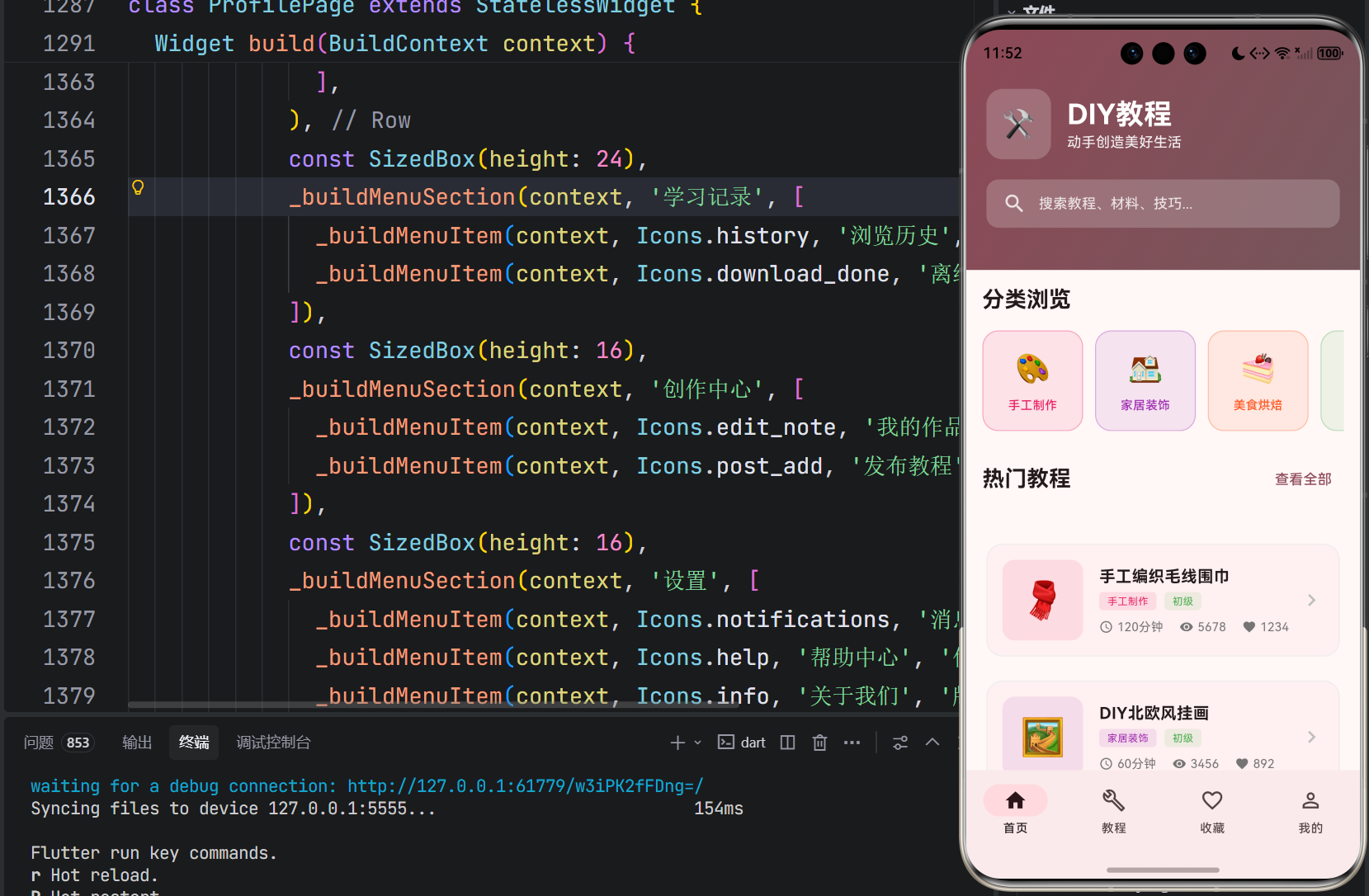
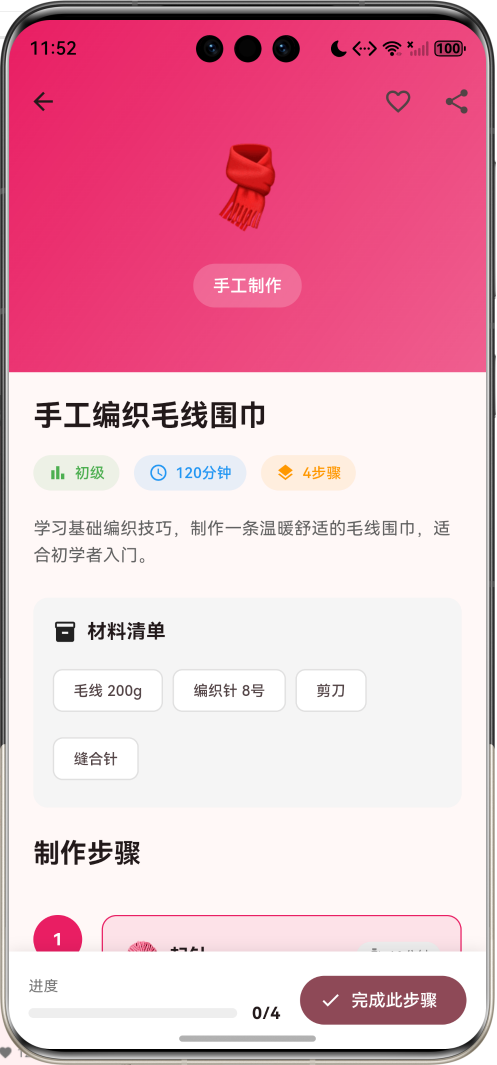
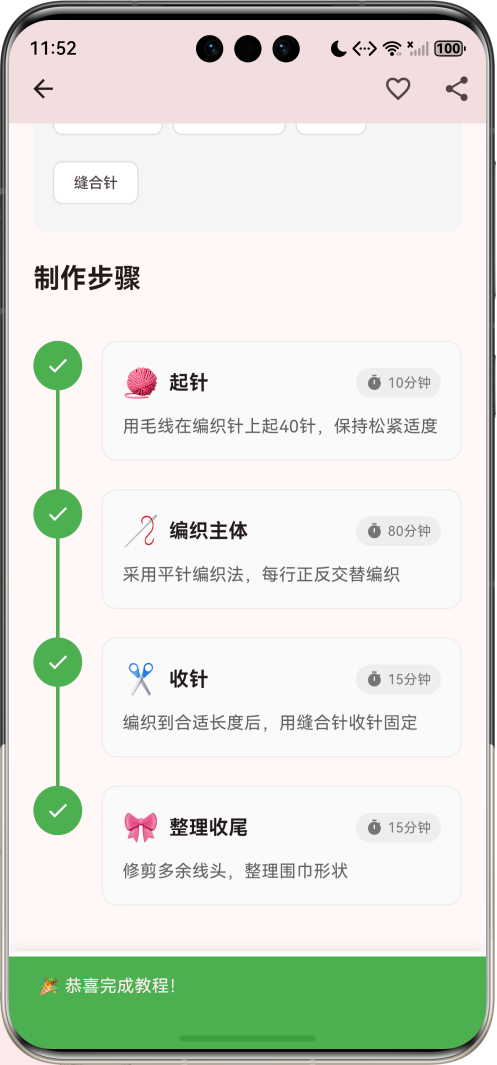
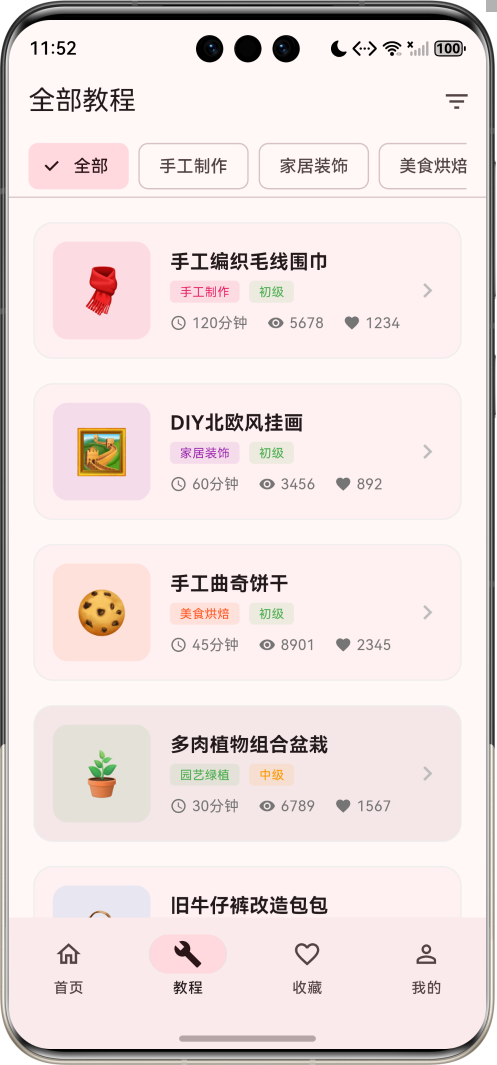
运行效果图
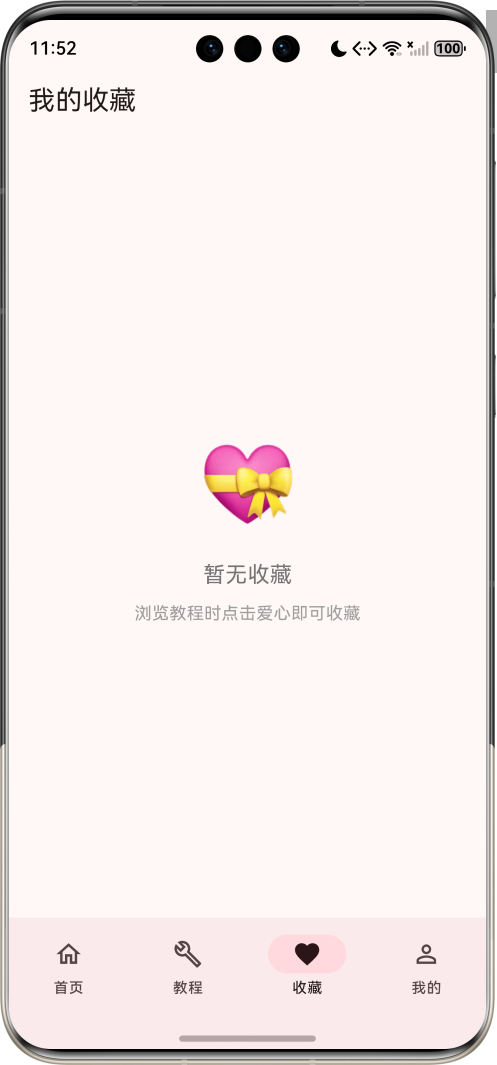
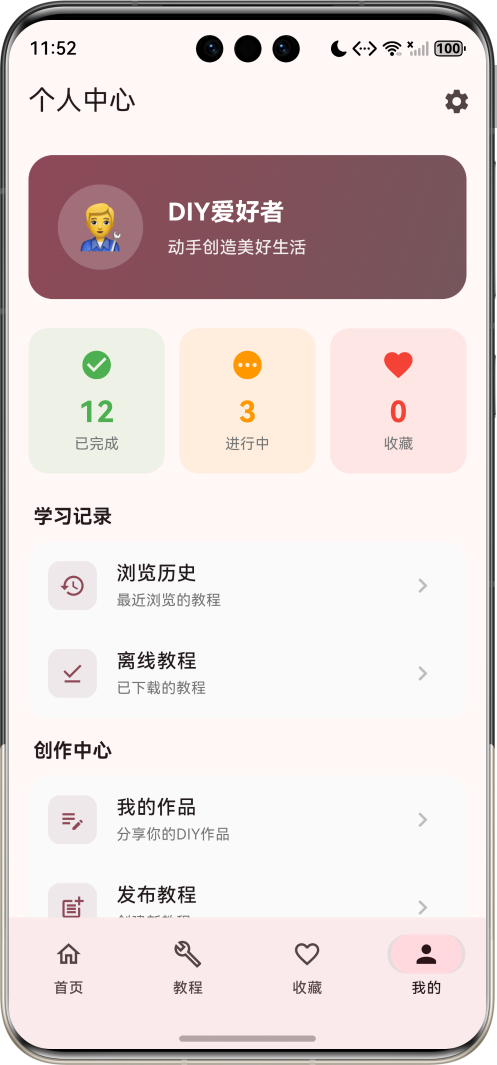
1.1 应用简介
DIY教程应用是一款专注于手工制作教学的移动应用,旨在为用户提供丰富多样的DIY教程内容,涵盖手工制作、家居装饰、美食烘焙、园艺绿植、服饰改造、电子制作等多个领域。应用以粉色为主色调,传递温暖、创意的品牌形象。
应用构建了六大核心分类体系,收录了毛线围巾编织、北欧风挂画、手工曲奇、多肉盆栽、旧衣改造、LED小夜灯等精品教程。通过清晰的步骤指导、详尽的材料清单、直观的进度追踪,帮助用户轻松掌握各种手工技能,体验动手创造的乐趣。
1.2 核心功能
| 功能模块 | 功能描述 | 实现方式 |
|---|---|---|
| 分类浏览 | 六大手工分类展示 | 横向滚动卡片 |
| 教程列表 | 全部教程展示筛选 | 列表+筛选 |
| 教程详情 | 步骤指导材料清单 | 滚动页面 |
| 进度追踪 | 学习进度实时追踪 | 步骤勾选 |
| 收藏管理 | 收藏喜欢的教程 | 收藏列表 |
1.3 教程分类
| 序号 | 分类名称 | 特点描述 | 代表教程 |
|---|---|---|---|
| 1 | 手工制作 | 编织刺绣折纸 | 毛线围巾编织 |
| 2 | 家居装饰 | 挂画摆件收纳 | 北欧风挂画 |
| 3 | 美食烘焙 | 曲奇蛋糕面包 | 手工曲奇饼干 |
| 4 | 园艺绿植 | 多肉盆栽花艺 | 多肉组合盆栽 |
| 5 | 服饰改造 | 旧衣改造配饰 | 牛仔裤改包包 |
| 6 | 电子制作 | LED智能家居 | 简易LED小夜灯 |
1.4 技术栈
| 技术领域 | 技术选型 | 版本要求 |
|---|---|---|
| 开发框架 | Flutter | >= 3.0.0 |
| 编程语言 | Dart | >= 2.17.0 |
| 设计规范 | Material Design 3 | - |
| 状态管理 | setState | - |
| 目标平台 | 鸿蒙OS / Web | API 21+ |
1.5 项目结构
lib/
└── main_diy_tutorial.dart
    ├── DIYTutorialApp          # 应用入口
    ├── Tutorial                # 教程数据模型
    ├── TutorialStep            # 步骤数据模型
    ├── DIYCategory             # 分类数据模型
    ├── MainHomePage            # 主页面(底部导航)
    ├── HomePage                # 首页
    ├── TutorialsPage           # 教程列表页面
    ├── TutorialDetailPage      # 教程详情页面
    ├── FavoritesPage           # 收藏页面
    └── ProfilePage             # 个人中心页面
二、系统架构
2.1 整体架构图
2.2 类图设计
2.3 页面导航流程
2.4 数据流向图
三、核心模块设计
3.1 数据模型设计
3.1.1 教程模型 (Tutorial)
class Tutorial {
  final String id;              // 唯一标识
  final String title;           // 教程标题
  final String category;        // 所属分类
  final String difficulty;      // 难度等级
  final int duration;           // 预计时长(分钟)
  final String coverEmoji;      // 封面表情
  final List<String> materials; // 材料清单
  final List<TutorialStep> steps; // 制作步骤
  final String description;     // 教程简介
  final int likes;              // 点赞数
  final int views;              // 浏览量
  bool isFavorite;              // 是否收藏
}
3.1.2 步骤模型 (TutorialStep)
class TutorialStep {
  final int stepNumber;     // 步骤序号
  final String title;       // 步骤标题
  final String description; // 步骤描述
  final String emoji;       // 步骤图标
  final int duration;       // 预计时长
}
3.1.3 分类模型 (DIYCategory)
class DIYCategory {
  final String name;      // 分类名称
  final IconData icon;    // 图标
  final Color color;      // 主题色
  final String emoji;     // 表情标识
}
3.1.4 教程分布
3.2 页面结构设计
3.2.1 主页面布局
3.2.2 首页结构
3.2.3 教程详情页结构
3.3 筛选功能设计
四、UI设计规范
4.1 配色方案
应用采用粉色为主色调,传递温暖、创意的品牌形象:
| 颜色类型 | 色值 | 用途 |
|---|---|---|
| 主色 | #E91E63 (Pink) | 导航、强调元素 |
| 渐变起始 | #E91E63 | 头部渐变 |
| 渐变结束 | #9C27B0 | 头部渐变 |
| 分类手工 | #E91E63 | 手工制作 |
| 分类家居 | #9C27B0 | 家居装饰 |
| 分类美食 | #FF5722 | 美食烘焙 |
| 分类园艺 | #4CAF50 | 园艺绿植 |
| 分类服饰 | #2196F3 | 服饰改造 |
| 分类电子 | #607D8B | 电子制作 |
4.2 字体规范
| 元素 | 字号 | 字重 | 颜色 |
|---|---|---|---|
| 页面标题 | 20px | Medium | #000000 |
| 教程名称 | 16px | Bold | #000000 |
| 分类名称 | 14px | Medium | 分类色 |
| 步骤标题 | 16px | Bold | #000000 |
| 步骤描述 | 14px | Regular | #757575 |
4.3 组件规范
4.3.1 分类卡片
┌─────────────────────┐
│                     │
│    🎨              │
│                     │
│   手工制作          │
│   编织·刺绣·折纸    │
│                     │
└─────────────────────┘
4.3.2 教程卡片
┌─────────────────────────────────────────┐
│ ┌────┐  手工编织毛线围巾            >   │
│ │ 🧣 │  [手工制作] [初级]                │
│ │    │  ⏱ 120分钟  👁 5678  ❤ 1234      │
│ └────┘                                   │
└─────────────────────────────────────────┘
4.3.3 步骤卡片
┌─────────────────────────────────────────┐
│  ① ──── 起针 ──────────────── 10分钟   │
│  │                                      │
│  │   用毛线在编织针上起40针,           │
│  │   保持松紧适度...                    │
│  │                                      │
│  ↓                                      │
│  ② ──── 编织主体 ───────────── 80分钟  │
│  │                                      │
│  │   采用平针编织法,每行正反           │
│  │   交替编织...                        │
│                                          │
└─────────────────────────────────────────┘
五、核心功能实现
5.1 分类展示实现
Widget _buildCategoryCard(DIYCategory category) {
  return Container(
    width: 100,
    margin: const EdgeInsets.only(right: 12),
    child: InkWell(
      onTap: () {},
      borderRadius: BorderRadius.circular(16),
      child: Container(
        padding: const EdgeInsets.all(12),
        decoration: BoxDecoration(
          color: category.color.withValues(alpha: 0.1),
          borderRadius: BorderRadius.circular(16),
          border: Border.all(color: category.color.withValues(alpha: 0.3)),
        ),
        child: Column(
          mainAxisAlignment: MainAxisAlignment.center,
          children: [
            Text(category.emoji, style: const TextStyle(fontSize: 28)),
            const SizedBox(height: 8),
            Text(
              category.name,
              style: TextStyle(
                fontSize: 12,
                fontWeight: FontWeight.w500,
                color: category.color,
              ),
              textAlign: TextAlign.center,
            ),
          ],
        ),
      ),
    ),
  );
}
5.2 筛选功能实现
Widget _buildFilterBar() {
  return Container(
    height: 50,
    padding: const EdgeInsets.symmetric(horizontal: 16),
    child: ListView(
      scrollDirection: Axis.horizontal,
      children: [
        FilterChip(
          label: const Text('全部'),
          selected: selectedCategory == null,
          onSelected: (selected) {
            setState(() {
              selectedCategory = null;
            });
          },
        ),
        const SizedBox(width: 8),
        ...categories.map((category) => Padding(
          padding: const EdgeInsets.only(right: 8),
          child: FilterChip(
            label: Text(category.name),
            selected: selectedCategory == category.name,
            onSelected: (selected) {
              setState(() {
                selectedCategory = selected ? category.name : null;
              });
            },
          ),
        )),
      ],
    ),
  );
}
5.3 教程详情页实现
Widget _buildStepItem(TutorialStep step, int index) {
  final isCompleted = index < _currentStep;
  final isCurrent = index == _currentStep;

  return Row(
    crossAxisAlignment: CrossAxisAlignment.start,
    children: [
      Column(
        children: [
          GestureDetector(
            onTap: () {
              setState(() {
                if (isCurrent) {
                  _currentStep++;
                } else if (isCompleted) {
                  _currentStep = index;
                }
              });
            },
            child: Container(
              width: 40,
              height: 40,
              decoration: BoxDecoration(
                color: isCompleted
                    ? Colors.green
                    : isCurrent
                        ? category.color
                        : Colors.grey.shade300,
                shape: BoxShape.circle,
              ),
              child: Center(
                child: isCompleted
                    ? const Icon(Icons.check, color: Colors.white, size: 20)
                    : Text(
                        '${step.stepNumber}',
                        style: TextStyle(
                          color: isCurrent ? Colors.white : Colors.grey.shade600,
                          fontWeight: FontWeight.bold,
                        ),
                      ),
              ),
            ),
          ),
          if (index < _tutorial.steps.length - 1)
            Container(
              width: 3,
              height: 80,
              color: isCompleted ? Colors.green : Colors.grey.shade300,
            ),
        ],
      ),
      const SizedBox(width: 16),
      Expanded(
        child: Container(
          margin: const EdgeInsets.only(bottom: 16),
          padding: const EdgeInsets.all(16),
          decoration: BoxDecoration(
            color: isCurrent ? category.color.withValues(alpha: 0.1) : Colors.grey.shade50,
            borderRadius: BorderRadius.circular(12),
          ),
          child: Column(
            crossAxisAlignment: CrossAxisAlignment.start,
            children: [
              Row(
                children: [
                  Text(step.emoji, style: const TextStyle(fontSize: 24)),
                  const SizedBox(width: 8),
                  Expanded(
                    child: Text(
                      step.title,
                      style: const TextStyle(fontWeight: FontWeight.bold, fontSize: 16),
                    ),
                  ),
                  Text('${step.duration}分钟', style: TextStyle(fontSize: 12, color: Colors.grey.shade600)),
                ],
              ),
              const SizedBox(height: 8),
              Text(step.description, style: TextStyle(color: Colors.grey.shade700, height: 1.5)),
            ],
          ),
        ),
      ),
    ],
  );
}
5.4 进度追踪实现
Widget _buildProgressBar() {
  return Container(
    padding: const EdgeInsets.all(16),
    decoration: BoxDecoration(
      color: Colors.white,
      boxShadow: [
        BoxShadow(color: Colors.black.withValues(alpha: 0.1), blurRadius: 10),
      ],
    ),
    child: SafeArea(
      child: Row(
        children: [
          Expanded(
            child: Column(
              mainAxisSize: MainAxisSize.min,
              crossAxisAlignment: CrossAxisAlignment.start,
              children: [
                Text('进度', style: TextStyle(fontSize: 12, color: Colors.grey.shade600)),
                const SizedBox(height: 4),
                Row(
                  children: [
                    Expanded(
                      child: ClipRRect(
                        borderRadius: BorderRadius.circular(4),
                        child: LinearProgressIndicator(
                          value: _currentStep / _tutorial.steps.length,
                          backgroundColor: Colors.grey.shade200,
                          valueColor: AlwaysStoppedAnimation<Color>(category.color),
                          minHeight: 8,
                        ),
                      ),
                    ),
                    const SizedBox(width: 12),
                    Text(
                      '$_currentStep/${_tutorial.steps.length}',
                      style: const TextStyle(fontWeight: FontWeight.bold),
                    ),
                  ],
                ),
              ],
            ),
          ),
          const SizedBox(width: 16),
          if (_currentStep < _tutorial.steps.length)
            FilledButton.icon(
              onPressed: () {
                setState(() {
                  _currentStep++;
                });
              },
              icon: const Icon(Icons.check),
              label: const Text('完成此步骤'),
            )
          else
            FilledButton.icon(
              onPressed: () {
                ScaffoldMessenger.of(context).showSnackBar(
                  const SnackBar(content: Text('🎉 恭喜完成教程!'), backgroundColor: Colors.green),
                );
              },
              icon: const Icon(Icons.celebration),
              label: const Text('完成教程'),
            ),
        ],
      ),
    ),
  );
}
5.5 收藏功能实现
IconButton(
  icon: Icon(_tutorial.isFavorite ? Icons.favorite : Icons.favorite_border),
  onPressed: () {
    setState(() {
      _tutorial.isFavorite = !_tutorial.isFavorite;
    });
    ScaffoldMessenger.of(context).showSnackBar(
      SnackBar(
        content: Text(_tutorial.isFavorite ? '已添加到收藏' : '已取消收藏'),
        duration: const Duration(seconds: 1),
      ),
    );
  },
)
六、交互设计
6.1 筛选交互流程
6.2 详情页导航
6.3 步骤进度状态
七、扩展功能规划
7.1 后续版本规划
7.2 功能扩展建议
7.2.1 视频教程支持
增强教学体验:
- 集成视频播放器
- 支持倍速播放
- 添加字幕说明
7.2.2 社区互动功能
用户交流平台:
- 作品分享展示
- 评论点赞互动
- 关注好友动态
7.2.3 材料购买功能
电商整合:
- 一键购买材料包
- 材料价格对比
- 优惠券领取
八、注意事项
8.1 开发注意事项
-
数据模型:Tutorial模型包含完整教程信息和步骤列表
-
筛选逻辑:使用where方法过滤教程列表
-
导航传参:详情页通过构造函数接收Tutorial对象
-
进度管理:使用_currentStep变量追踪当前步骤
8.2 常见问题
| 问题 | 原因 | 解决方案 |
|---|---|---|
| 筛选不生效 | 状态未更新 | 调用setState刷新 |
| 详情页空白 | 数据未传递 | 检查构造函数参数 |
| 进度不更新 | 变量未修改 | 检查_currentStep赋值 |
| 颜色显示异常 | Color类型错误 | 使用withValues方法 |
8.3 使用提示
🛠️ DIY教程使用小贴士 🛠️
准备材料:开始前确保所有材料准备齐全。
阅读步骤:先通读所有步骤再开始操作。
注意安全:使用工具时注意安全防护。
享受过程:慢慢来,享受动手的乐趣。
九、运行说明
9.1 环境要求
| 环境 | 版本要求 |
|---|---|
| Flutter SDK | >= 3.0.0 |
| Dart SDK | >= 2.17.0 |
| 鸿蒙OS | API 21+ |
9.2 运行命令
# 查看可用设备
flutter devices

# 运行到Web服务器
flutter run -d web-server -t lib/main_diy_tutorial.dart --web-port 8097

# 运行到鸿蒙设备
flutter run -d 127.0.0.1:5555 lib/main_diy_tutorial.dart

# 运行到Windows
flutter run -d windows -t lib/main_diy_tutorial.dart

# 代码分析
flutter analyze lib/main_diy_tutorial.dart
十、总结
DIY教程应用通过系统化的手工教程展示,为手工爱好者提供了一个便捷的学习平台。应用构建了六大核心分类体系,收录了毛线围巾编织、北欧风挂画、手工曲奇、多肉盆栽、旧衣改造、LED小夜灯等精品教程,帮助用户全面掌握手工技能。
核心功能涵盖分类展示、教程列表、教程详情、进度追踪、收藏管理五大模块。分类展示以横向滚动卡片形式呈现六大手工领域;教程列表支持按分类筛选,列表展示教程基本信息;教程详情页完整呈现材料清单和步骤指导,支持实时进度追踪;收藏管理帮助用户快速访问喜欢的教程。
应用采用Material Design 3设计规范,以粉色为主色调,界面温暖亲切。通过本应用,希望能够帮助用户体验动手创造的乐趣,感受工匠精神的魅力。
动手创造美好生活

AtomGit 是由开放原子开源基金会联合 CSDN 等生态伙伴共同推出的新一代开源与人工智能协作平台。平台坚持“开放、中立、公益”的理念,把代码托管、模型共享、数据集托管、智能体开发体验和算力服务整合在一起,为开发者提供从开发、训练到部署的一站式体验。
更多推荐
 1
1 0
0- 0


 已为社区贡献5条内容

所有评论(0)