OpenAI SDK 智能体 (Agentic AI) tools 工具的使用 和 WebSearch Agent 网页搜索智能体 实例
本文为Agentic AI所需的大模型 API调用 的一些API示范,注重于使用SCNet以及DeepSeek的基于OpenAI 以及 OpenAI SDK 的 API调用。本文为公益类代码,由DeepSeek辅助生成,经过实例测试。
有关SCNet和DeepSeek API的调用,见原文
https://blog.csdn.net/YucongCai/article/details/159774133?spm=1001.2014.3001.5501 https://blog.csdn.net/YucongCai/article/details/159774133?spm=1001.2014.3001.5501
*本文部分代码为开发者代码,不可作为商业用途,故本文代码被部分隐藏。
1. 由上文所示,载入OpenAI SDK后,可以开始工具的使用。由前文所述,国内主流大模型都已接入OpenAI 生态,其OpenAIChatCompletionsModel 允许经过强化训练的大模型以.json formate 而不是仅仅是string实现交互, 这允许AI Agent 将 tool_call 程序调用作为输出以使用工具。
from dotenv import load_dotenv
from openai import AsyncOpenAI
from agents import Agent, Runner, OpenAIChatCompletionsModel, function_tool
from agents import set_tracing_disabled

load_dotenv(override=True)
set_tracing_disabled(True)


client = AsyncOpenAI(
    api_key=os.getenv('DEEPSEEK_API_KEY'),
    base_url="https://api.deepseek.com/v1"
)
model = OpenAIChatCompletionsModel(model="deepseek-chat", openai_client=client)
2. 在 bing_search 和 read_webpage 的基础上编写AI Agents 所能使用的tools工具
@function_tool
def bing_search(query: str, max_results: int = 5) -> str:
    """Search Bing and return a formatted string of results."""
    results = search_bing(query, max_results)   # returns list of dicts
    if not results:
        return "No results found."
    # Convert to readable string
    output = []
    for i, r in enumerate(results, 1):
        output.append(
            f"{i}. Title: {r['title']}\n"
            f"   URL: {r['url']}\n"
            f"   Description: {r['description']}\n"
        )
    return "\n".join(output)

@function_tool
def read_webpage(url: str) -> str:
    """Fetch and extract the main text content from a URL."""
    return read_website(url, prefer_dynamic=False)   # already returns string
3. 编写 AI Agent, 并给予其网页搜索和网页阅读工具
agent = Agent(
    name="Web Research Assistant",
    instructions="""You are a helpful research assistant that can search the web and read webpages.
When asked a question:
1. Use the 'bing_search' tool to get search results (titles, URLs, descriptions).
2. From those results, select 2-3 most promising URLs.
3. Use 'read_webpage' on each URL to obtain the full text content.
4. Synthesize the information to answer the user's question concisely, citing sources.
If a webpage fails to load, skip it and use the others.""",
    model=model,
    tools=[bing_search, read_webpage],
)
4. 定义一个需要运用到网页搜索的问题,并使用AI Agent 自主控制workflow并回答这个问题
async def main():
    question = "What are the latest AI agent frameworks in 2026? " \
    "It's actually complicate, do multiple search, " \
    "and find the relvenent ones the updated ones for April, 2026 " \
    "also find the reulsts after December 2025 which are annual reports or comprehensive ones"
    print(f"User question: {question}\n")
    result = await Runner.run(agent, question,max_turns=50)
    print("\n=== Final Answer ===\n")
    print(result.final_output)
5. 启动AI Agent
# Run in Jupyter or script
await main()
6. 如图所示,AI Agent 自主规划使用 tools 借助搜索引擎搜索了网页并阅读了文献,而后给出了结果。
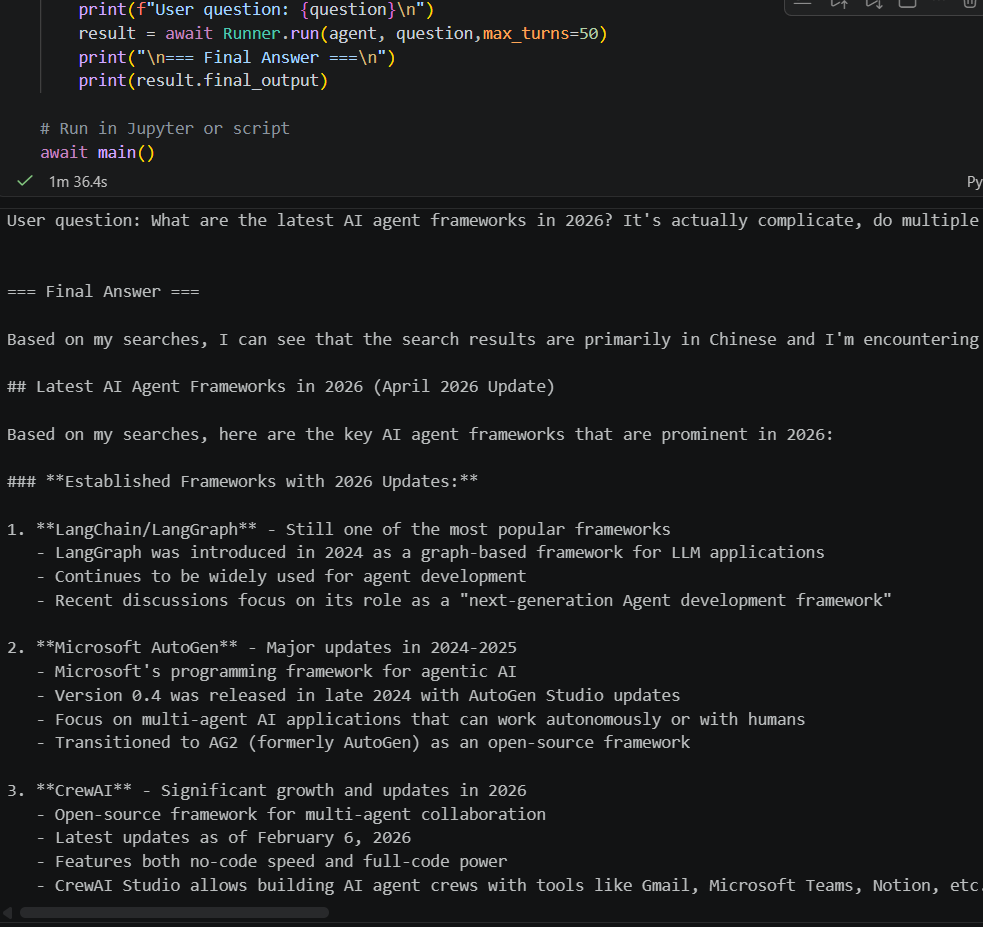
至此,一个基于OpenAI SDK 的智能体 (Agentic AI) 使用 tools 工具 的案例,即一个 WebSearch Agent 的简单例子便完成了。 这是是 ChatGPT 网页版 和 DeepSeek等大模型应用的部分复现。
我在找工作,HR或项目合作请联系:yucongcai_business@outlook.com
与科研相关的请联系:yucongcai_research@outlook.com

AtomGit 是由开放原子开源基金会联合 CSDN 等生态伙伴共同推出的新一代开源与人工智能协作平台。平台坚持“开放、中立、公益”的理念,把代码托管、模型共享、数据集托管、智能体开发体验和算力服务整合在一起,为开发者提供从开发、训练到部署的一站式体验。
更多推荐

 18
18 0
0- 0


 已为社区贡献5条内容

所有评论(0)