Hugging Face本地部署模型库中的模型(0到1 保姆级教程)本项目为本地部署大模型智能对话系统,基于 Qwen1.5-1.8B 轻量大语言模型实现私有 AI 聊天机器人搭配的前端交互界面。
Hugging Face简介:
Hugging Face 是一个提供先进自然语言处理(NLP)工具的平台,支持 Transformer 模型的开发和应 用。它拥有庞大的模型库和社区资源,能够满足从研究到工业应用的各种需求。
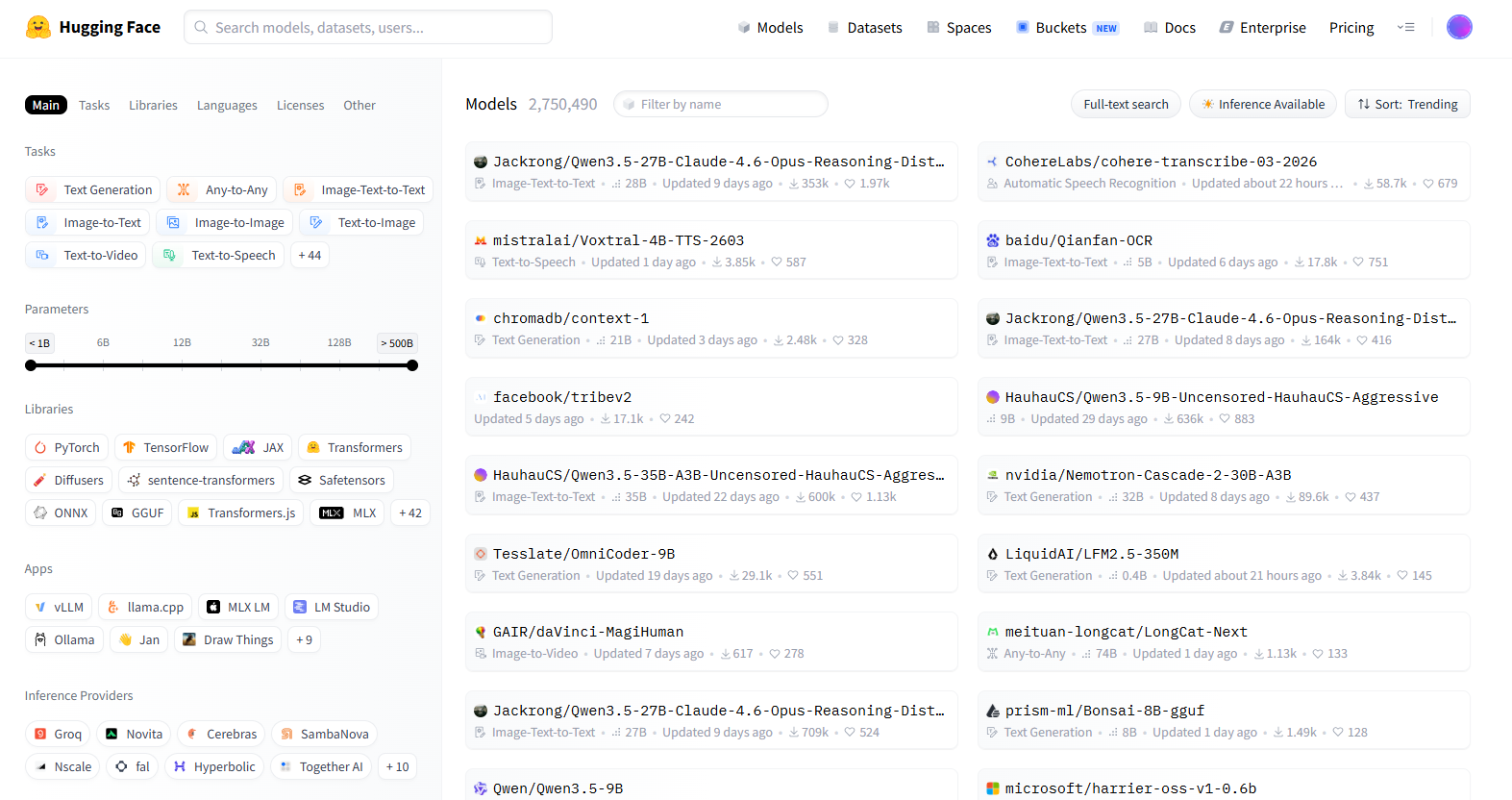
Hugging Face注册和安装:
注册 Hugging Face 账户 1. 访问 Hugging Face 官方网站,点击右上角的“Sign Up”按钮。 2. 输入你的邮箱、用户名和密码,完成注册流程。 3. 注册成功后,你可以访问模型库、数据集和文档,也可以管理你的个人模型和项目。
安装 Hugging Face 库:
Hugging Face 提供了 transformers 库,用于加载和使用模型。你可以使用以下命令来安装它:(电脑须安装基础环境:Anaconda,CUDA,cuDNN,pytorch)
pip install transformers如果你还需要安装其他依赖库,如 datasets 和 tokenizers ,可以使用以下命令:
pip install transformers datasets tokenizers模型探索与下载:
Hugging Face 提供了一个庞大的模型库,你可以通过以下步骤来查找所需的模型:
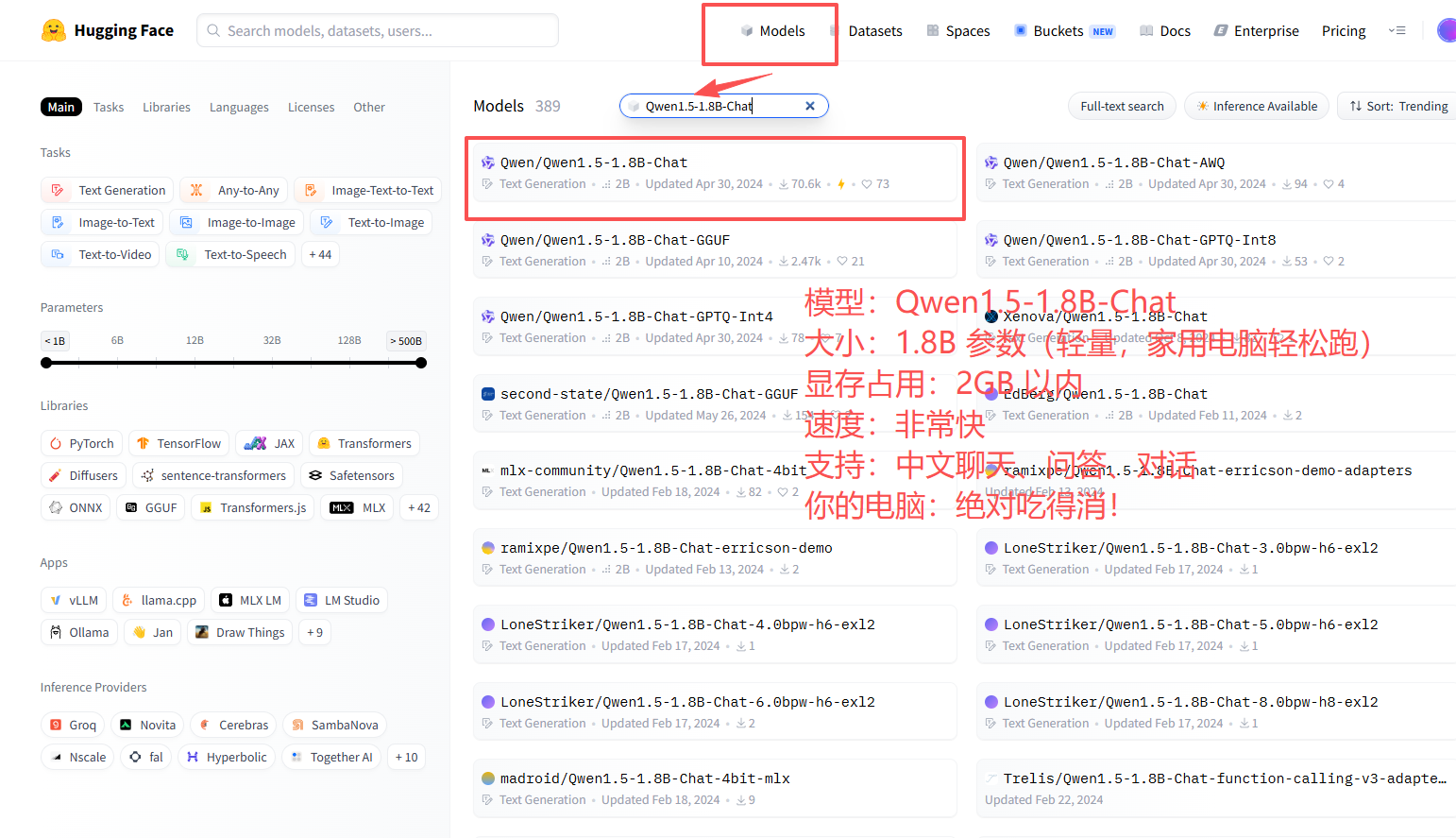
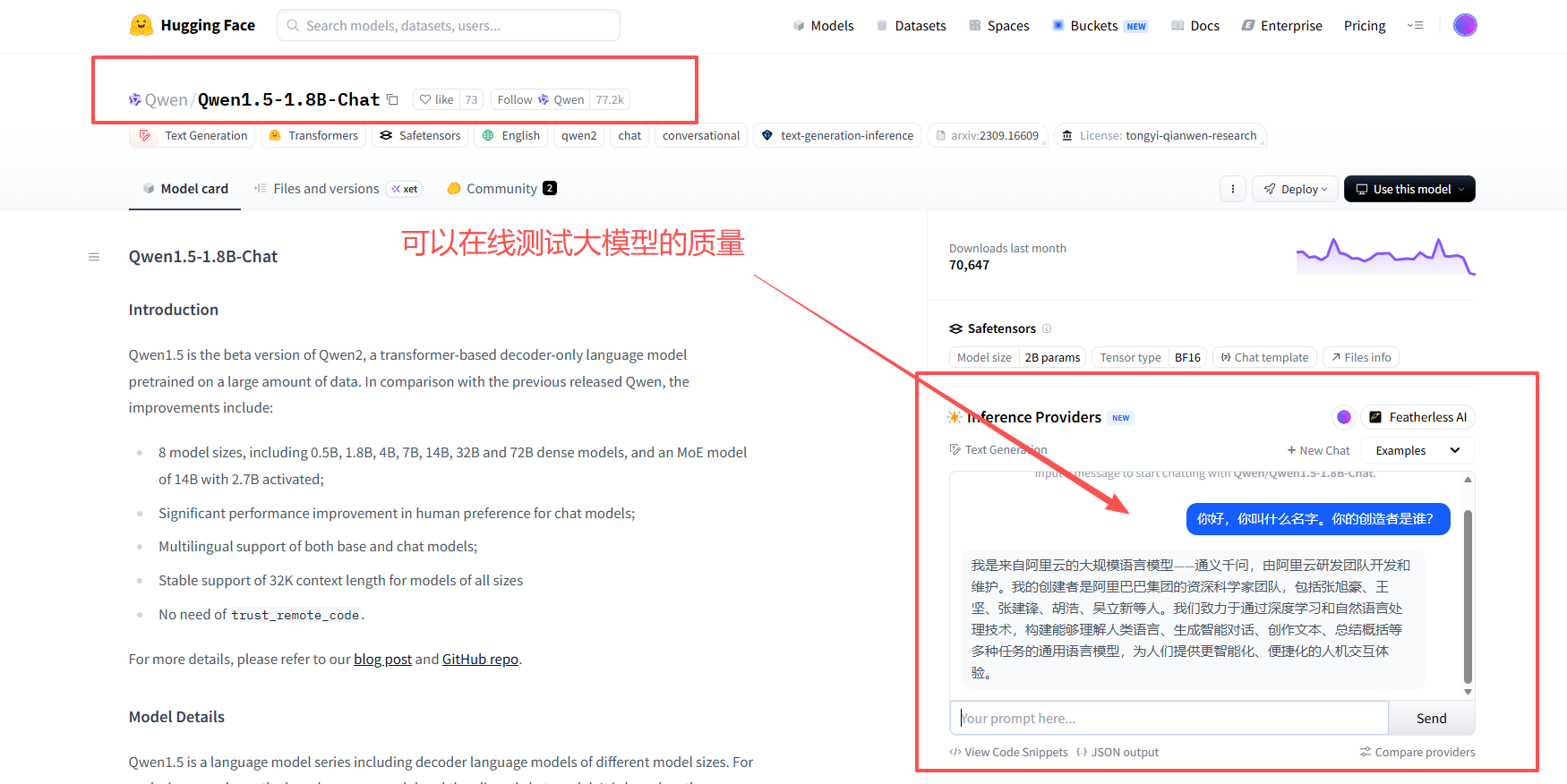
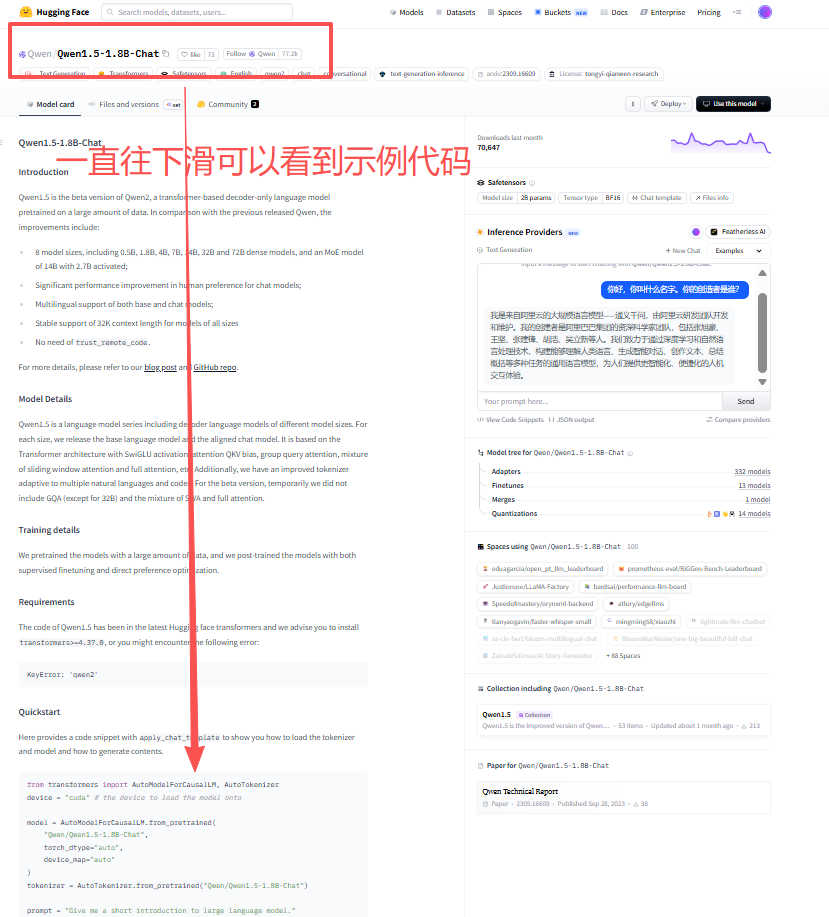
1. 访问 模型库页面这里我叫个大家的是搭建可以在我们 电脑上正常运行的千问轻量化AI模型:Qwen/Qwen1.5-1.8B-聊天 ·拥抱脸。【注意:这是你电脑 100% 能跑、效果强、不卡顿、能做网站 / 软件 / 小程序的模型】
2. 在搜索栏中输入关键字,如 "Qwen1.5-1.8B-Chat" 或 "BERT",然后点击搜索。
3. 你可以使用左侧的过滤器按任务、框架、语言等条件筛选模型。
下面我将一步一步、逐行讲解、手把手教你部署 Qwen1.5-1.8B-Chat!!!!!
第一步:去models库中搜索:Qwen1.5-1.8B-Chat:
准备环境:
打开 Anaconda Prompt,进入你的环境:(我的python版本是3.11具体根据你实际情况)
conda activate py3.11安装 / 升级依赖(必须执行):
pip install --upgrade transformers torch huggingface_hub -i https://pypi.tuna.tsinghua.edu.cn/simple你将会看到(耐心等待就可以):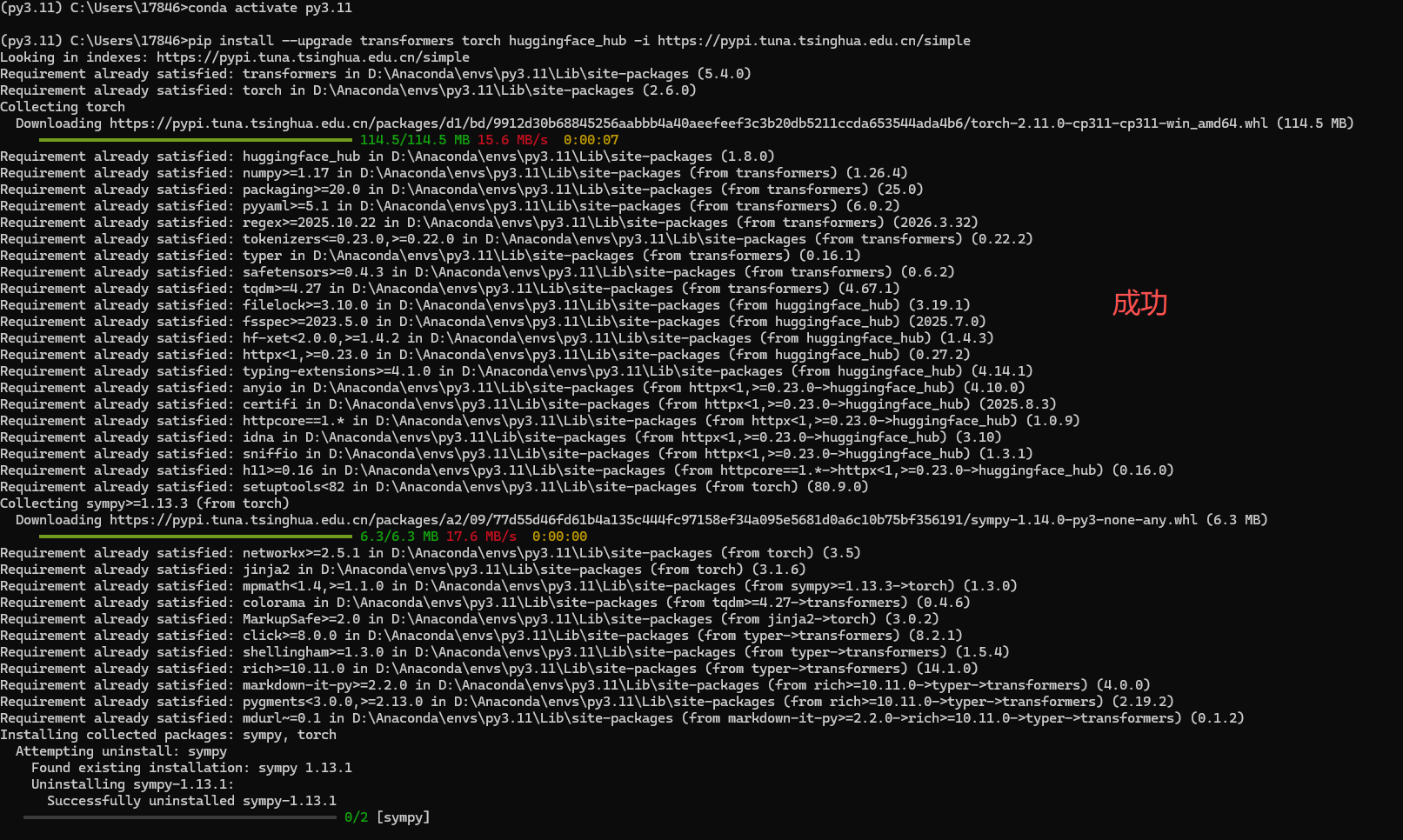
我们回到Hugging Face中:
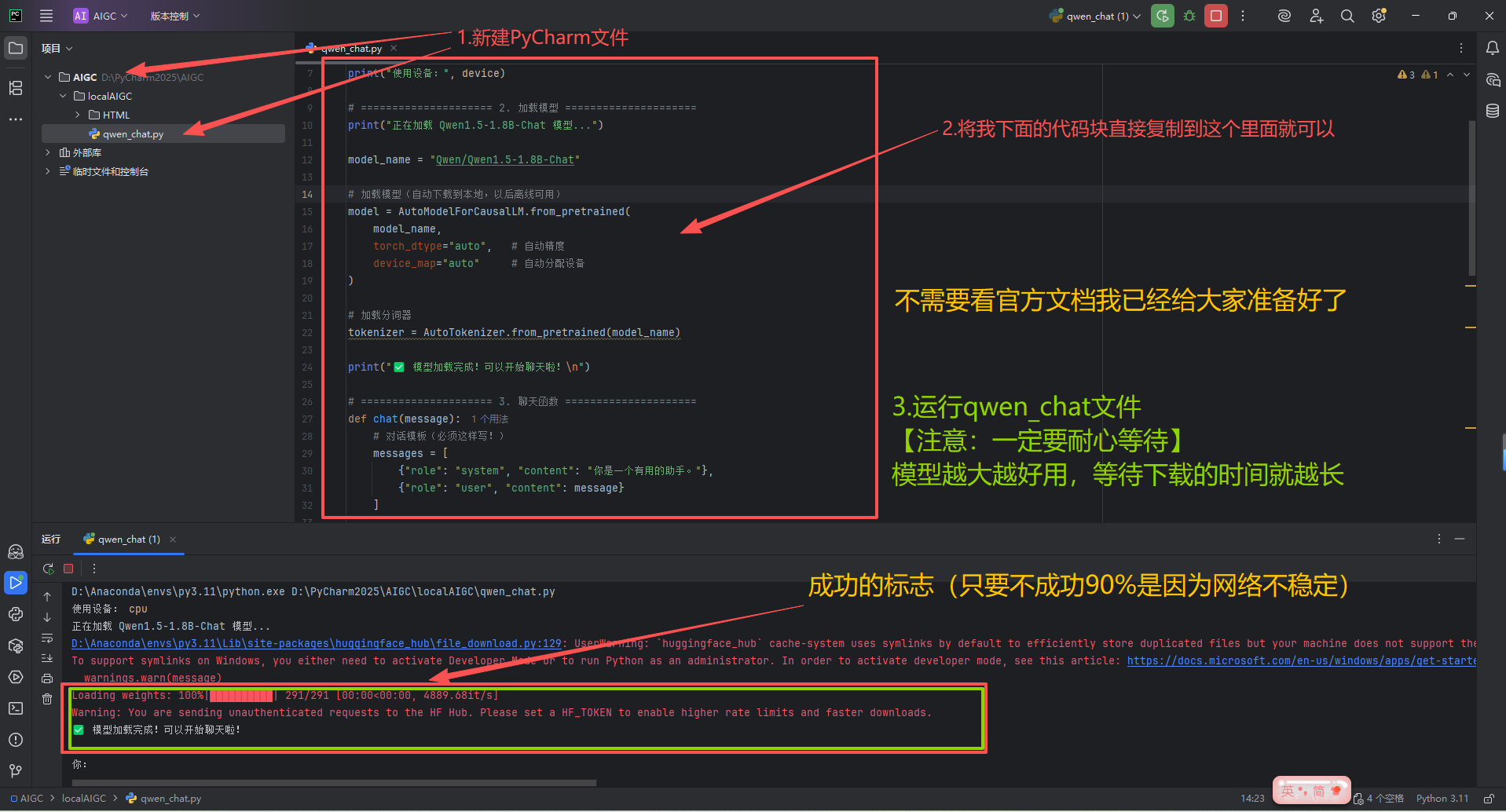
qwen_chat.py代码块:
from transformers import AutoModelForCausalLM, AutoTokenizer
import torch

# ===================== 1. 基础配置 =====================
# 自动选择 GPU(如果有),否则用 CPU
device = "cuda" if torch.cuda.is_available() else "cpu"
print("使用设备:", device)

# ===================== 2. 加载模型 =====================
print("正在加载 Qwen1.5-1.8B-Chat 模型...")

model_name = "Qwen/Qwen1.5-1.8B-Chat"

# 加载模型(自动下载到本地,以后离线可用)
model = AutoModelForCausalLM.from_pretrained(
    model_name,
    torch_dtype="auto",   # 自动精度
    device_map="auto"     # 自动分配设备
)

# 加载分词器
tokenizer = AutoTokenizer.from_pretrained(model_name)

print("✅ 模型加载完成!可以开始聊天啦!\n")

# ===================== 3. 聊天函数 =====================
def chat(message):
    # 对话模板(必须这样写!)
    messages = [
        {"role": "system", "content": "你是一个有用的助手。"},
        {"role": "user", "content": message}
    ]

    # 应用模板
    text = tokenizer.apply_chat_template(
        messages,
        tokenize=False,
        add_generation_prompt=True
    )

    # 转模型输入
    model_inputs = tokenizer([text], return_tensors="pt").to(device)

    # 生成回答
    generated_ids = model.generate(
        **model_inputs,
        max_new_tokens=768,    # 生成长度
        do_sample=True,
        temperature=0.7,
        top_p=0.8
    )

    # 截取输出
    generated_ids = [
        output_ids[len(input_ids):] for input_ids, output_ids in zip(model_inputs.input_ids, generated_ids)
    ]

    # 解码结果
    response = tokenizer.batch_decode(generated_ids, skip_special_tokens=True)[0]
    return response

# ===================== 4. 测试对话 =====================
if __name__ == "__main__":
    while True:
        user_input = input("你:")
        if user_input in ["exit", "quit", "退出"]:
            break
        res = chat(user_input)
        print("AI:" + res + "\n")
创建前端交互页面(非必须可以不看):
把这个模型 做成网页 + API 服务:
qwen_api.py:
from flask import Flask, request, jsonify
from flask_cors import CORS
from transformers import AutoModelForCausalLM, AutoTokenizer
import torch

app = Flask(__name__)
CORS(app)

device = "cuda" if torch.cuda.is_available() else "cpu"
model_name = "Qwen/Qwen1.5-1.8B-Chat"

model = AutoModelForCausalLM.from_pretrained(model_name, torch_dtype="auto", device_map="auto")
tokenizer = AutoTokenizer.from_pretrained(model_name)

@app.route('/api/chat', methods=['POST'])
def chat_api():
    data = request.get_json()
    msg = data.get("message", "")

    messages = [{"role": "system", "content": "你是一个有用的助手。"}, {"role": "user", "content": msg}]
    text = tokenizer.apply_chat_template(messages, tokenize=False, add_generation_prompt=True)
    inputs = tokenizer([text], return_tensors="pt").to(device)

    outputs = model.generate(**inputs, max_new_tokens=768, do_sample=True, temperature=0.7)
    outputs = [o[len(i):] for o,i in zip(inputs.input_ids, outputs)]
    res = tokenizer.batch_decode(outputs, skip_special_tokens=True)[0]

    return jsonify({"reply": res})

if __name__ == '__main__':
    app.run(host="0.0.0.0", port=5002, threaded=True)
创建一个HTML文件并复制下面代码块:
<!DOCTYPE html>
<html lang="zh-CN">
<head>
  <meta charset="UTF-8" />
  <meta name="viewport" content="width=device-width, initial-scale=1.0"/>
  <title>BEIYANG AI</title>
  <style>
    * {
      margin: 0;
      padding: 0;
      box-sizing: border-box;
    }

    body {
      font-family: -apple-system, BlinkMacSystemFont, "Segoe UI", Roboto, sans-serif;
      min-height: 100vh;
      display: flex;
      align-items: center;
      justify-content: center;
      padding: 30px 20px;
      color: #1f2937;
      position: relative;
      overflow: hidden;
    }

    /* 动态渐变背景 */
    body::before {
      content: '';
      position: fixed;
      top: 0; left: 0; right: 0; bottom: 0;
      background: linear-gradient(45deg, #d1e3ff, #f0f7ff, #e0efff, #c7e2ff);
      background-size: 400% 400%;
      animation: bgShift 12s ease infinite;
      z-index: -2;
    }
    @keyframes bgShift {
      0%   { background-position: 0% 50%; }
      50%  { background-position: 100% 50%; }
      100% { background-position: 0% 50%; }
    }

    /* 浮动光点 */
    body::after {
      content: '';
      position: fixed;
      top: -50%;
      left: -50%;
      width: 200%;
      height: 200%;
      background: radial-gradient(circle at 50% 50%, rgba(59, 130, 246, 0.05), transparent 70%);
      animation: float 20s linear infinite;
      z-index: -1;
    }
    @keyframes float {
      0% { transform: translate(0, 0) scale(1); }
      50% { transform: translate(50px, 50px) scale(1.1); }
      100% { transform: translate(0, 0) scale(1); }
    }

    .chat-wrapper {
      width: 100%;
      max-width: 820px;
      height: 90vh;
      background: rgba(255, 255, 255, 0.85);
      backdrop-filter: blur(12px);
      border-radius: 32px;
      box-shadow: 0 8px 40px rgba(59, 130, 246, 0.15), 0 2px 10px rgba(59, 130, 246, 0.1);
      display: flex;
      flex-direction: column;
      overflow: hidden;
      border: 1px solid rgba(255, 255, 255, 0.6);
      position: relative;
      z-index: 1;
    }

    /* 顶部导航 */
    .chat-header {
      background: linear-gradient(90deg, #3b82f6, #1d4ed8);
      padding: 22px 26px;
      display: flex;
      align-items: center;
      gap: 16px;
      color: white;
      flex-shrink: 0;
    }

    .avatar-wrap {
      position: relative;
    }

    /* 男性科技风头像 */
    .avatar {
      width: 46px;
      height: 46px;
      border-radius: 50%;
      background: linear-gradient(135deg, #ffffff, #e0e7ff);
      color: #1d4ed8;
      font-size: 18px;
      font-weight: bold;
      display: flex;
      align-items: center;
      justify-content: center;
      box-shadow: 0 0 0 3px rgba(255,255,255,0.4), 0 4px 10px rgba(0,0,0,0.1);
      position: relative;
    }
    .avatar::after {
      content: "B";
      font-weight: 700;
    }

    .online-dot {
      position: absolute;
      bottom: 2px;
      right: 2px;
      width: 12px;
      height: 12px;
      background: #10b981;
      border-radius: 50%;
      border: 2px solid white;
    }

    .header-text h1 {
      font-size: 20px;
      font-weight: 700;
      margin-bottom: 2px;
    }

    .header-text p {
      font-size: 13px;
      opacity: 0.9;
      font-weight: 400;
    }

    /* 消息区 */
    .chat-messages {
      flex: 1;
      padding: 32px 28px;
      overflow-y: auto;
      display: flex;
      flex-direction: column;
      gap: 24px;
      background: transparent;
    }

    .chat-messages::-webkit-scrollbar {
      width: 8px;
    }
    .chat-messages::-webkit-scrollbar-track {
      background: rgba(255,255,255,0.3);
      border-radius: 10px;
    }
    .chat-messages::-webkit-scrollbar-thumb {
      background: #93c5fd;
      border-radius: 10px;
    }

    /* 消息布局 */
    .message {
      display: flex;
      gap: 14px;
      max-width: 78%;
      animation: msgPop 0.45s cubic-bezier(0.25, 0.8, 0.25, 1) forwards;
      opacity: 0;
      transform: translateY(10px);
    }

    @keyframes msgPop {
      to { opacity:1; transform: translateY(0); }
    }

    .msg-avatar {
      width: 40px;
      height: 40px;
      border-radius: 50%;
      flex-shrink: 0;
      display: flex;
      align-items: center;
      justify-content: center;
      font-weight: bold;
      font-size: 16px;
      box-shadow: 0 2px 8px rgba(0,0,0,0.06);
    }

    /* BEIYANG AI 男性头像风格 */
    .ai-avatar {
      background: linear-gradient(135deg, #3b82f6, #1d4ed8);
      color: white;
    }
    .ai-avatar::after {
      content: "B";
    }

    .user-avatar {
      background: linear-gradient(135deg, #4ade80, #16a34a);
      color: white;
    }
    .user-avatar::after {
      content: "我";
    }

    .bubble {
      padding: 16px 20px;
      border-radius: 22px;
      font-size: 15px;
      line-height: 1.6;
      position: relative;
      word-break: break-word;
      box-shadow: 0 2px 8px rgba(0,0,0,0.04);
    }

    /* AI 气泡 */
    .message.ai {
      align-self: flex-start;
    }
    .ai .bubble {
      background: rgba(255, 255, 255, 0.9);
      border: 1px solid rgba(219, 234, 254, 0.8);
      color: #1e293b;
      border-bottom-left-radius: 10px;
    }

    /* 用户气泡 */
    .message.user {
      align-self: flex-end;
      flex-direction: row-reverse;
    }
    .user .bubble {
      background: linear-gradient(135deg, #3b82f6, #1d4ed8);
      color: white;
      border-bottom-right-radius: 10px;
    }

    /* 加载动画 */
    .loading .bubble {
      background: rgba(239, 246, 255, 0.8);
      color: #64748b;
      font-style: normal;
    }
    .dots {
      display: inline-flex;
      gap: 4px;
      margin-left: 4px;
    }
    .dots span {
      width: 6px;
      height: 6px;
      border-radius: 50%;
      background: #94a3b8;
      animation: bounce 1.4s infinite ease-in-out;
    }
    .dots span:nth-child(2) { animation-delay: 0.2s; }
    .dots span:nth-child(3) { animation-delay: 0.4s; }
    @keyframes bounce {
      0%,80%,100% { transform: scale(0.8); opacity:0.6; }
      40% { transform: scale(1); opacity:1; }
    }

    /* 输入区 */
    .chat-input-area {
      padding: 22px 26px;
      background: rgba(255,255,255,0.9);
      border-top: 1px solid rgba(224, 231, 255, 0.6);
      display: flex;
      gap: 14px;
      align-items: flex-end;
    }

    #userInput {
      flex: 1;
      padding: 18px 22px;
      border-radius: 28px;
      border: 1px solid rgba(203, 213, 225, 0.7);
      outline: none;
      font-size: 15px;
      background: rgba(250, 250, 250, 0.8);
      transition: all 0.25s ease;
    }

    #userInput:focus {
      border-color: #3b82f6;
      background: white;
      box-shadow: 0 0 0 4px rgba(59, 130, 246, 0.12);
    }

    #sendBtn {
      width: 56px;
      height: 56px;
      border-radius: 50%;
      border: none;
      background: linear-gradient(135deg, #3b82f6, #1d4ed8);
      color: white;
      font-size: 20px;
      cursor: pointer;
      transition: all 0.25s ease;
      display: flex;
      align-items: center;
      justify-content: center;
      box-shadow: 0 4px 12px rgba(59, 130, 246, 0.25);
    }

    #sendBtn:hover {
      transform: translateY(-3px) scale(1.03);
      box-shadow: 0 6px 20px rgba(59, 130, 246, 0.25);
    }

    #sendBtn:active {
      transform: translateY(0);
    }
  </style>
</head>

<body>
  <div class="chat-wrapper">
    <!-- 顶部 -->
    <div class="chat-header">
      <div class="avatar-wrap">
        <div class="avatar"></div>
        <div class="online-dot"></div>
      </div>
      <div class="header-text">
        <h1>BEIYANG AI</h1>
        <p>本地智能助手 · 安全隐私 · 实时响应</p>
      </div>
    </div>

    <!-- 消息区 -->
    <div class="chat-messages" id="messages"></div>

    <!-- 输入区 -->
    <div class="chat-input-area">
      <input type="text" id="userInput" placeholder="输入你的问题..." autocomplete="off" />
      <button id="sendBtn">➤</button>
    </div>
  </div>

  <script>
    const messagesEl = document.getElementById("messages");
    const userInput = document.getElementById("userInput");
    const sendBtn = document.getElementById("sendBtn");

    async function sendMessage() {
      const text = userInput.value.trim();
      if (!text) return;

      addMessage(text, "user");
      userInput.value = "";

      const loading = addMessage(`思考中 <div class="dots"><span></span><span></span><span></span></div>`, "ai loading");

      try {
        const res = await fetch("http://127.0.0.1:5002/api/chat", {
          method: "POST",
          headers: { "Content-Type": "application/json" },
          body: JSON.stringify({ message: text })
        });
        const data = await res.json();
        messagesEl.removeChild(loading);
        addMessage(data.reply, "ai");
      } catch (e) {
        messagesEl.removeChild(loading);
        addMessage("⚠️ 连接失败,请检查后端服务是否启动", "ai");
      }
    }

    function addMessage(text, type) {
      const isUser = type.includes("user");
      const msg = document.createElement("div");
      msg.className = `message ${isUser ? "user" : "ai"}`;

      msg.innerHTML = `
        <div class="msg-avatar ${isUser ? "user-avatar" : "ai-avatar"}"></div>
        <div class="bubble">${text}</div>
      `;

      messagesEl.appendChild(msg);
      messagesEl.scrollTop = messagesEl.scrollHeight;
      return msg;
    }

    sendBtn.onclick = sendMessage;
    userInput.addEventListener("keypress", (e) => {
      if (e.key === "Enter") sendMessage();
    });
  </script>
</body>
</html>
到此我们本地部署 BEIYANG AI 智能对话系统就完成了。
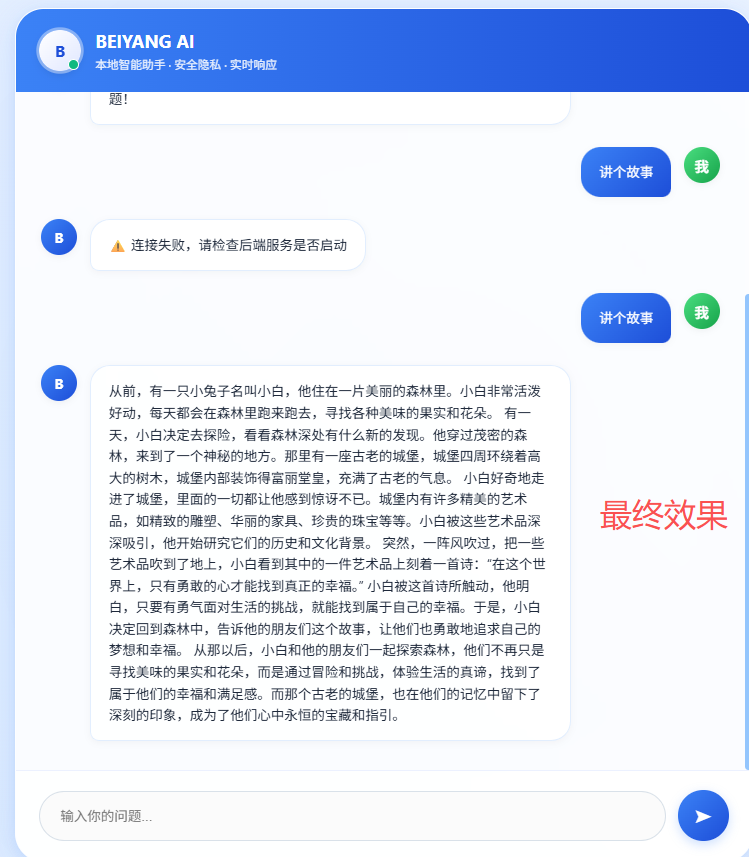
在自己电脑上搭建了一个完全离线、可自由对话的私有大语言模型聊天机器人,并做了美观炫酷的网页版聊天界面。
我们用到的技术有:
1. 后端 AI 服务(核心大脑)
- 跑 Qwen1.5-1.8B-Chat 轻量大语言模型
- 提供 API 接口,供前端调用
- 接收问题 → 模型推理 → 返回回答
2. 前端聊天界面(用户看到的界面)
- 炫酷明亮的动态网页 UI
- 头像、名称、消息气泡、加载动画、动态背景
- 输入消息、发送、展示对话
用到了哪些技术?(按模块分,非常清晰)
1. 大模型与 AI 推理技术
- Qwen1.5-1.8B-Chat(阿里通义千问开源轻量大模型)
- Transformers(HuggingFace 模型加载库)
- PyTorch(深度学习框架,运行模型)
- 自然语言对话、文本生成、多轮对话
2. 后端服务技术
- Python
- Flask(搭建 API 接口服务)
- CORS 跨域(让前端能正常调用后端)
- API 接口设计(POST /api/chat)
3. 前端界面技术
- HTML(页面结构)
- CSS(样式、布局、美化)
- 渐变背景
- 动态动画(@keyframes)
- 毛玻璃效果
- 滚动条美化
- 悬浮、点击动效
- JavaScript(交互逻辑)
- 发送消息
- 异步请求(fetch)
- 聊天消息渲染
- 回车发送
4. 工程与部署
- 本地模型下载与加载
- 前后端分离架构
- 本地服务部署(127.0.0.1:5002)
- 模型推理优化(CPU/GPU 自动适配)

AtomGit 是由开放原子开源基金会联合 CSDN 等生态伙伴共同推出的新一代开源与人工智能协作平台。平台坚持“开放、中立、公益”的理念,把代码托管、模型共享、数据集托管、智能体开发体验和算力服务整合在一起,为开发者提供从开发、训练到部署的一站式体验。
更多推荐


 10
10 0
0- 0


 已为社区贡献1条内容

所有评论(0)