LangChain框架(一)---- 模型调用
·
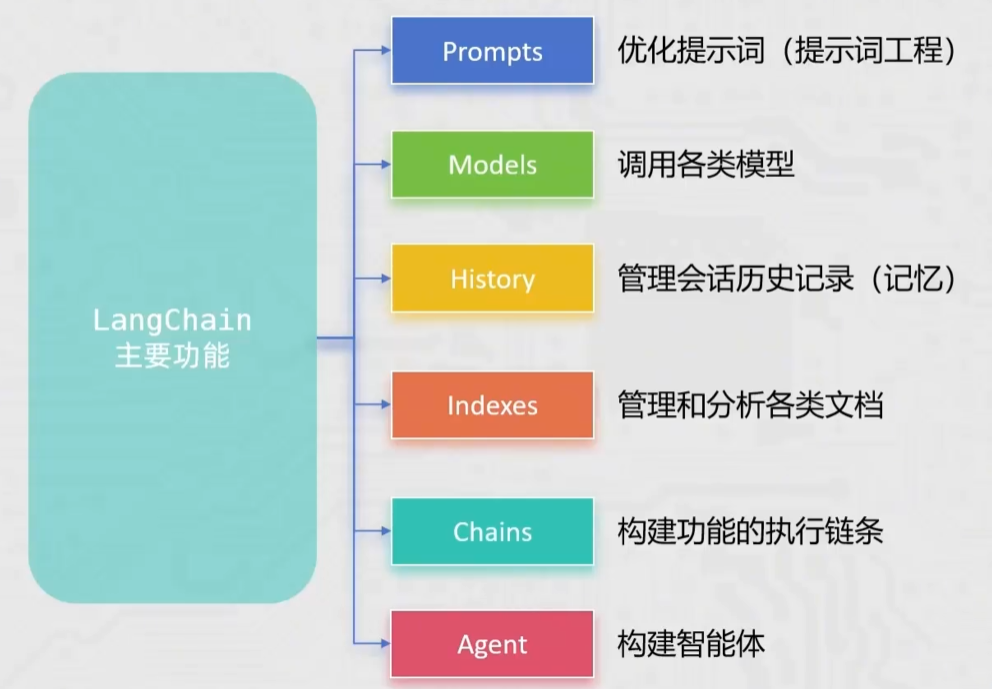
LangChain 创建于 2022 年 10 月,它是围绕 LLMs(大模型)建立的一个框架
LangChain 自身并不开发 LLMs,它的核心理念是为各种 LLMs 实现通用的接口,把 LLMs 相关的组件“链接”在一起,简化 LLMs 应用的开发难度,方便开发者快速地开发复杂的 LLM 是应用
LangChain 环境部署
使用 pip 工具即可完成 LangChain 各种工具的安装,安装列表如下:
- langchain:核心包
- langchain-community:社区支持包,提供了更多的第三方模型调用
- langchain-ollama:ollama 支持包,支持调用 Ollama 托管部署的本地模型
- dashscope:阿里通义千问的 Python SDK
- chromadb:轻量向量数据库
C:\Users\Thalvin>pip install langchain langchain-community langchain-ollama dashscope chromadb
Looking in indexes: https://pypi.tuna.tsinghua.edu.cn/simple, https://mirrors.aliyun.com/pypi/simple/, https://pypi.doubanio.com/simple/, https://pypi.mirrors.ustc.edu.cn/simple/, https://pypi.org/simple/
Collecting langchain
  Downloading langchain-1.2.13-py3-none-any.whl.metadata (5.8 kB)
Collecting langchain-community
  Downloading langchain_community-0.4.1-py3-none-any.whl.metadata (3.0 kB)
Collecting langchain-ollama
  Downloading langchain_ollam
  ......


[notice] A new release of pip is available: 25.3 -> 26.0.1
[notice] To update, run: python.exe -m pip install --upgrade pip

C:\Users\Thalvin>
LangChain 的简单使用
LangChain 支持三种类型的模型:LLMs(大语言模型)、聊天模型、文本嵌入模型
- LLMs:是技术范畴的统称,指基于大参数量,海量文本训练的transfommer架构模型,核心能力是理解和生成自然语言,主要服务于文本生成场景
- 聊天模型:是应用范畴的细分,是专为对活场景优化的ll"s,核心能力是模拟人类对活的轮次交互,主要服务于聊天场景
- 文本嵌入模型:文本嵌入模型接收文本作为输入,得到文本的向量
LangChain 调用 LLMs
代码实例
from langchain_community.llms.tongyi import Tongyi

# qwen-max 是大语言模型
model = Tongyi(model="qwen-max")
#invoke方法可以想模型提问
res = model.invoke(input="你是什么模型?")
print(res)
程序运行结果
D:\Programs\Python\Python314\python.exe E:\Python\LLM实例\LangChain简单使用\langchain调用大模型.py
D:\Programs\Python\Python314\Lib\site-packages\langchain_core\_api\deprecation.py:25: UserWarning: Core Pydantic V1 functionality isn't compatible with Python 3.14 or greater.
  from pydantic.v1.fields import FieldInfo as FieldInfoV1
我是Qwen,这是我的英文名,我的中文名叫通义千问。我是阿里云自主研发的超大规模语言模型,能够回答问题、创作文字,还能表达观点、撰写代码。如果您有任何问题或需要帮助,请随时告诉我,我会尽力提供支持。

进程已结束,退出代码为 0
LangChain 调用 Ollama 本地模型
代码实例
from langchain_ollama import OllamaLLM
model = OllamaLLM(model="deepseek-r1:8b")

res = model.invoke(input="你是什么模型?")
print(res)
程序运行结果,程序执行后,本地的 cpu 和 gpu 占用率出现高峰,证明确实调用了本地资源
D:\Programs\Python\Python314\python.exe E:\Python\LLM实例\LangChain简单使用\langchain调用ollama本地模型.py
D:\Programs\Python\Python314\Lib\site-packages\langchain_core\_api\deprecation.py:25: UserWarning: Core Pydantic V1 functionality isn't compatible with Python 3.14 or greater.
  from pydantic.v1.fields import FieldInfo as FieldInfoV1
我是 **DeepSeek-R1** 模型,由中国的深度求索(DeepSeek)公司开发。😊

我的专长是理解和生成自然语言,可以帮助你完成各种任务,比如:

- 回答问题、查找资料
- 写作、改写和润色文本
- 编程辅助、代码解释
- 总结文件内容、翻译语言
- 提供学习建议、科普知识讲解
- 甚至聊天解闷!

如果你对我的能力或者背后的技术感兴趣,也可以继续问我,我很乐意详细介绍一下~

进程已结束,退出代码为 0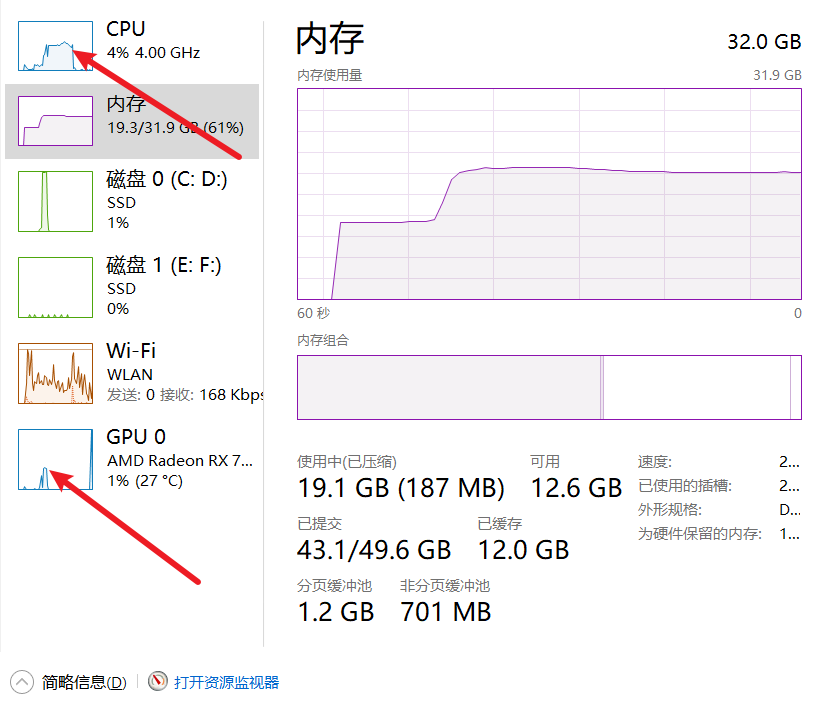
模型的流式输出
上述与大模型交互的方式,是在函数调用后等待模型生成结果,之后全部生成
如果需要流式输出,即模型产生结果就直接反馈给用户,只需要将 invoke 方法替换为 stream 即可
实例
from langchain_community.llms.tongyi import Tongyi

model = Tongyi(model="qwen-max")

res = model.stream(input = "你是什么模型?能作什么?")

#流式输出需要使用迭代器
for chunk in res:
    print(chunk, end=" ", flush=True)
程序运行结果
D:\Programs\Python\Python314\python.exe E:\Python\LLM实例\模型的流式输出\Langchain的流式输出.py
D:\Programs\Python\Python314\Lib\site-packages\langchain_core\_api\deprecation.py:25: UserWarning: Core Pydantic V1 functionality isn't compatible with Python 3.14 or greater.
  from pydantic.v1.fields import FieldInfo as FieldInfoV1
我是Qwen,是阿里云自主研发的超大规模语言模型。我能够生成各种类型的文本,如文章、故事、诗歌、故事等,并能够根据不同的场景和需求进行变换和扩展。此外,我还能够理解和回答问题,提供信息查询、知识科普、技术支持等服务。在对话中,我可以扮演不同的角色,以满足用户的需求。总的来说,我的目标是帮助用户提高创造力和生产力,使人们的生活更加便捷。如果您有任何问题或需要帮助,随时欢迎向我提问!
进程已结束,退出代码为 0
LangChain 调用语言模型
聊天消息包含以下几种类型,使用时需要按照约定传入合适的值:
- AIMessage:就是 AI 输出的消息,可以是针对问题的回答(OpenAI 库中的 assistant 角色)
- HumanMessage:人类消息就是用户消息,由人给出的信息发送给 LLMs 的提示信息,比如“实现一个快速排序方法”.(OpenAI 库的 user 角色)
- SystemMessage:可以用于指定模型具体所处的环境和背景,如角色扮演等。你可以在这里给出具体的指示,比如“作为代码专家”,或者“返回 json 格式”.(OpenAI 库中的 system 角色)
实例
from langchain_community.chat_models.tongyi import ChatTongyi
#调用本地模型
#from langchain_ollama import ChatOllama
from langchain_core.messages import SystemMessage, AIMessage, HumanMessage

# 创建模型对象, qwen3-max就是聊天模型
model = ChatTongyi(model="qwen3-max")
# 调用本地模型
#model = ChatOllama(model="deepseek-r1:8b")

# 消息列表
message = [
    # SystemMessage(content="你是一个聊天助手,你擅长唱儿歌"),
    # HumanMessage(content="给我写一个儿歌"),
    # AIMessage(content="两只老虎,两只老虎,跑得快..."),
    # HumanMessage(content="给我按照这个风格再写一个儿歌")
    ("system","你是一个聊天助手,你擅长唱儿歌"),
    ("human","给我写一个儿歌"),
    ("ai","两只老虎,两只老虎,跑得快..."),
    ("human","给我按照这个风格再写一个儿歌")
]

# 调用stream 流式执行
res = model.stream(input=message)

# for循环迭代打印输出
for chunk in res:
    print(chunk.content, end="", flush=True)

# 如果不加.content,模型的输出结果会类似以下内容
#content='《' additional_kwargs={} response_metadata={}
# id='lc_run--019d497f-e9e9-7c93-86a1-4302b3386c23'
# tool_calls=[] invalid_tool_calls=[]
# tool_call_chunks=[]content='秋夜思' additional_kwargs={}
# response_metadata={} id='lc_run--019d497f-e9e9-7c93-86a1-4302b3386c23'
# tool_calls=[] invalid_tool_calls=[] tool_call_chunks=[]content='》\n
# 霜天月落' additional_kwargs={} response_metadata={}
# id='lc_run--019d497f-e9e9-7c93-86a1-4302b3386c23'
# tool_calls=[] invalid_tool_calls=[] tool_call_chunks=[]content=
# '雁声残,\n独' additional_kwargs={} response_metadata={}
实例运行结果
D:\Programs\Python\Python314\python.exe E:\Python\LLM实例\LangChain简单使用\langchain调用聊天模型.py
D:\Programs\Python\Python314\Lib\site-packages\langchain_core\_api\deprecation.py:25: UserWarning: Core Pydantic V1 functionality isn't compatible with Python 3.14 or greater.
  from pydantic.v1.fields import FieldInfo as FieldInfoV1
好的!我来编一首同样简单、重复又可爱的儿歌,主题是**小鸭子学游泳**,适合拍手或做动作哦:

---

**《小鸭游游》**
小鸭小鸭,小鸭小鸭,
摇呀摇呀,摇呀摇呀!
扁嘴巴,扁嘴巴,
扑通跳进小河啦!

小鸭小鸭,小鸭小鸭,
划呀划呀,划呀划呀!
白脚掌,白脚掌,
水花溅到小脸上!

---

### 小提示:
1. **动作建议**:唱到“摇呀摇”时左右摆手,“扑通”蹲下,“划呀划”做划水动作~
2. **互动玩法**:家长可以问孩子:“小鸭怎么叫呀?”(答:嘎嘎嘎!),增加趣味性。
3. **押韵规律**:和《两只老虎》一样,每段重复句+动作词+身体部位+拟声/结果,朗朗上口!

需要其他主题(比如小兔子、星星、水果)的儿歌也可以告诉我呀!(๑•̀ㅂ•́)و✧
进程已结束,退出代码为 0
LangChain 调用嵌入模型
Embeddings Models 嵌入模型的特点:将字符串输入转化为浮点数的列表(向量)
在 NLP 中,Embedding 的作用就是将数据进行文本向量化
实例
from langchain_community.embeddings import DashScopeEmbeddings
#from langchain_ollama.embeddings import OllamaEmbeddings

# 创建模型对象 不传递参数默认使用text-embeddings-v1
model = DashScopeEmbeddings()
#model = OllamaEmbeddings(model="qwen3-embedding:4b")

# 不用invoke stream
# embed_query、 embed_documents
print(model.embed_query("Hello World"))
print(model.embed_documents(["Hello World", "你好,世界", "世界和平"]))
程序运行结果
[9.239912e-05, -0.02710431, 0.010090222, 0.042726427, 0.0005745844, 0.044445585, 0.10102775, -0.0057493076, 0.023143038, -0.0045076245, 0.02545455, -0.020507108, 0.0005984555, -0.023506148, 0.017332666, -0.0021615254, 0.023638096, -0.054403525, 0.018739264, -0.006335344, -0.0117699, 0.026880212, 0.033583708, -0.026835624, 0.010003512, 0.011443721, -0.029463999, -0.08437418, 0.05318761, 0.017631935, -0.009499025, -0.04314293, 0.050016493, -0.009456979, 0.0018111398, -0.0076504755, -0.0041694804, -0.015116956, -0.0040894663, 0.006561645, 0.026694115, -0.04649849, 0.004013926, -0.003934924, 0.0058701565, -0.011592263, 0.00057643314, 0.012631047, -0.015703868, -0.019150788, 0.007842538, 0.011279751, 0.05179064, -0.024524137, -0.029430598, 0.0028917554, -0.0025920728, 0.0028862995, -0.024147425, -0.037214976, -0.0013429233, 0.0203......如果想使用 Ollama 下载本地嵌入模型,可以在 cmd 执行以下命令即可
ollama pull qwen3-embedding:4b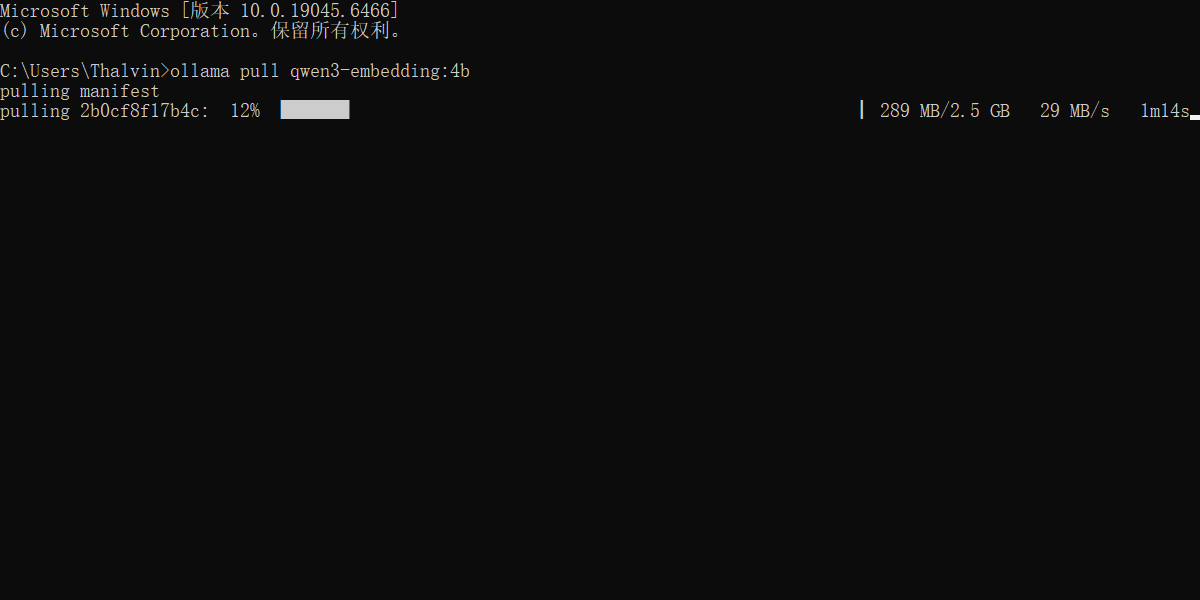

AtomGit 是由开放原子开源基金会联合 CSDN 等生态伙伴共同推出的新一代开源与人工智能协作平台。平台坚持“开放、中立、公益”的理念,把代码托管、模型共享、数据集托管、智能体开发体验和算力服务整合在一起,为开发者提供从开发、训练到部署的一站式体验。
更多推荐


 6
6 0
0- 0


 已为社区贡献1条内容

所有评论(0)