【完整代码】Markdown 样式重置:基于 markdown-it 的渲染配置与样式美化方案
前言:智能体对话类需求越来越多,这类接口/模型返回内容大多为 Markdown格式,但直接渲染 Markdown 转换后的 HTML,样式往往不理想,因此写下这篇文章,记录一套在基于 Node 14 + Vue2项目的“Markdown 渲染 + 样式重置 + 示例用例”的方案,方便后人快速复用、少踩坑。
注:本文以 Node 14 为示例环境,若使用 Node 16,整体用法基本一致,仅需注意插件版本兼容性及引用方式等细微差别,具体以各插件官方文档为准(官网文档已在文中附上)。
一、覆盖范围
- 标题:# ~ ######(对应 h1 ~ h6)
- 段落 / 普通文本块:段落间距(对应 p)
- 链接:[text](url) / 自动链接(对应 a)
- 行内强调:**加粗**、*斜体*、~~删除线~~、==高亮==(需额外安装插件)(对应 strong / em / del / mark)
- 引用块:> 引用内容(对应 blockquote)
- 列表:
-
- 无序列表:- item(对应 ul / li)
- 有序列表:1. item(对应 ol / li)
- 嵌套列表:li 内嵌 ul/ol(含“避免嵌套 margin 叠加”的处理)
- 任务列表(GFM):- [x] / - [ ](对应 .task-list-item、.task-list-item-checkbox)
- 分割线:---(对应 hr)
- 图片:(对应 img)
- 代码:
-
- 行内代码:`code`(对应 code)
- 代码块: (对应 pre > code)
- 表格(GFM)(需额外安装插件):| a | b |(对应 table / thead / tbody / th / td)
- 脚注(需额外安装插件):[^x](对应 .footnotes / .footnote-ref / .footnote-backref)
- 定义列表(需额外安装插件):术语 + : 解释(对应 dl / dt / dd,样式覆盖了 dt/dd)
- 折叠块(HTML/扩展):<details><summary>...(对应 details / summary)
二、效果展示
处理前后对比,左侧处理前,右侧处理后
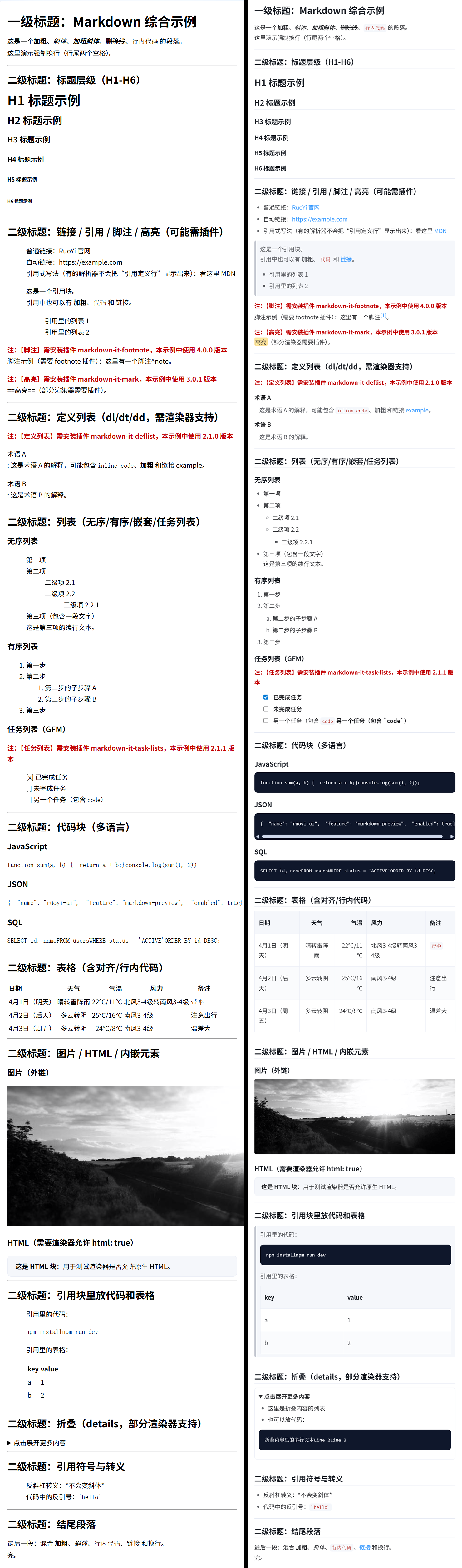
三、所需插件
本文以 Node 14 项目为示例,使用 markdown-it 作为核心渲染器,并按需启用一些扩展插件。
注意: node16 项目使用的插件版本和使用方法略有差异
1. 必装插件(核心)
markdown-it:Markdown → HTML 的核心渲染器
用途:把 md 文本转换成 HTML,供 v-html 渲染
2. 可选插件(按业务需求安装)
- markdown-it-task-lists:支持 GFM 任务列表(- [x] / - [ ])
- markdown-it-footnote:支持脚注([^x])
- markdown-it-mark:支持高亮(==text== → <mark>)
- markdown-it-deflist:支持定义列表(术语+解释语法 → <dl><dt><dd>
3. package.json
"markdown-it": "^13.0.2",

"markdown-it-deflist": "^2.1.0",
"markdown-it-footnote": "^4.0.0",
"markdown-it-mark": "^3.0.1",
"markdown-it-task-lists": "^2.1.1",
四、使用方式
1.安装插件
npm i markdown-it@13.0.2

# 以下插件按需安装
npm i markdown-it-deflist@2.1.0
npm i markdown-it-footnote@4.0.0
npm i markdown-it-mark@3.0.1
npm i markdown-it-task-lists@2.1.1
2.创建Markdown 工具函数
此处按需引用
import MarkdownIt from 'markdown-it/index.js'
import markdownItDeflist from 'markdown-it-deflist'
import markdownItFootnote from 'markdown-it-footnote'
import markdownItMark from 'markdown-it-mark'
import markdownItTaskLists from 'markdown-it-task-lists'

// 创建实例,配置选项
const md = new MarkdownIt({
  html: true,        // 允许 HTML 标签
  linkify: true,     // 自动转换 URL 为链接
  typographer: true, // 启用排版美化(引号、破折号等)
  breaks: true       // 转换换行符为 <br>
})

// ==高亮== -> <mark>
md.use(markdownItMark)

// - [x] 任务列表 -> checkbox
md.use(markdownItTaskLists, { enabled: true, label: true, labelAfter: true })

// 定义列表(deflist):术语 + 冒号解释 -> <dl><dt><dd>
md.use(markdownItDeflist)

// 脚注 [^x]
md.use(markdownItFootnote)

export default md
3.创建 markdown 样式文件
本文中以.scss 文件作为示例,同时提供同样功能的.css 文件,可根据项目需求按需使用。
3.1 .scss 文件
.md-reset {
  color: #303133;
  font-size: 14px;
  line-height: 1.75;
  word-break: break-word;
  overflow-wrap: anywhere;
  overflow-x: auto;

  ::v-deep {
    /* 容器内:首尾元素间距处理(避免上下多余空隙) */
    > *:first-child {
      margin-top: 0 !important;
    }
    > *:last-child {
      margin-bottom: 0 !important;
    }

    /* Markdown 块级元素:统一块间距 */
    p,
    blockquote,
    ul,
    ol,
    dl,
    table,
    pre,
    details {
      margin: 0 0 12px;
    }

    /* 标题:h1-h6 */
    h1,
    h2,
    h3,
    h4,
    h5,
    h6 {
      margin: 18px 0 10px;
      font-weight: 600;
      line-height: 1.35;
      color: #1f2329;
    }
    h1 {
      font-size: 22px;
      padding-bottom: 4px;
      border-bottom: 1px solid #ebeef5;
    }
    h2 {
      font-size: 18px;
      padding-bottom: 4px;
      border-bottom: 1px solid #ebeef5;
    }
    h3 {
      font-size: 16px;
    }
    h4 {
      font-size: 15px;
    }
    h5,
    h6 {
      font-size: 14px;
    }

    /* 链接:a */
    a {
      color: #409eff;
      text-decoration: none;
      &:hover {
        text-decoration: underline;
      }
    }

    /* 行内语义:strong/em/del/mark */
    strong {
      font-weight: 600;
    }
    em {
      font-style: italic;
    }
    del {
      text-decoration: line-through;
    }
    mark {
      padding: 0 2px;
      border-radius: 3px;
      background: rgba(255, 214, 102, 0.65);
      color: inherit;
    }

    /* 引用块:blockquote */
    blockquote {
      padding: 8px 10px;
      color: #606266;
      background: #f5f7fa;
      border-left: 4px solid #c0c4cc;
      border-radius: 4px;

      > :last-child {
        margin-bottom: 0;
      }
    }

    /* 列表:ul/ol/li(含嵌套与任务列表) */
    ul,
    ol {
      padding: 0 0 0 22px !important;
    }
    ul {
      list-style: disc;
    }
    ol {
      list-style: decimal;
    }
    li {
      margin: 4px 0;

      &::marker {
        color: #606266;
      }

      > p {
        margin: 6px 0;
      }

      /* 嵌套列表:避免底部 margin 叠加,仅保留层级间隔 */
      > ul,
      > ol {
        margin-top: 6px;
      }

      &.task-list-item {
        list-style: none;
      }
    }

    /* 顶层列表:负责与后续块元素的间隔 */
    > ul,
    > ol {
      margin-bottom: 12px;
    }

    /* 嵌套列表:不再额外增加 bottom margin */
    ul ul,
    ul ol,
    ol ul,
    ol ol {
      margin-bottom: 0;
    }
    ul ul {
      list-style: circle;
    }
    ul ul ul {
      list-style: square;
    }
    ol ol {
      list-style: lower-alpha;
    }

    input[type="checkbox"].task-list-item-checkbox {
      margin: 0 8px 0 0;
      transform: translateY(1px);
      pointer-events: none;
    }

    /* 分割线:hr */
    hr {
      height: 1px;
      border: 0;
      background: #ebeef5;
      margin: 16px 0;
    }

    /* 图片:img */
    img {
      max-width: 100%;
      height: auto;
      display: inline-block;
      border-radius: 4px;
    }

    /* 行内代码:code(pre 内部会被覆盖) */
    code {
      font-family: ui-monospace, SFMono-Regular, Menlo, Monaco, Consolas, "Liberation Mono", "Courier New", monospace;
      font-size: 12px;
      padding: 0.15em 0.35em;
      border-radius: 4px;
      background: #f5f7fa;
      color: #b42318;
    }

    /* 代码块:pre > code */
    pre {
      padding: 12px 14px;
      background: #0f172a;
      color: #e5e7eb;
      border-radius: 8px;
      overflow: auto;
      border: 1px solid rgba(0, 0, 0, 0.08);
      margin: 0 0 14px;
      max-width: 100%;
      -webkit-overflow-scrolling: touch;

      code {
        background: transparent;
        color: inherit;
        padding: 0;
        font-size: 12px;
        line-height: 1.6;
        white-space: pre;
        word-break: normal;
      }
    }

    /* 表格:table/thead/tbody/th/td */
    table {
      width: 100%;
      border-collapse: collapse;
      border-spacing: 0;
      border: 1px solid #ebeef5;
      border-radius: 6px;
      background: #fff;
      table-layout: auto;

      thead {
        background: #f5f7fa;
      }

      tbody {
        tr:nth-child(2n) {
          background: #fafbfc;
        }
        tr:hover {
          background: #f2f6fc;
        }
      }

      th,
      td {
        padding: 15px 10px;
        border-bottom: 1px solid #ebeef5;
        border-right: 1px solid #ebeef5;
        text-align: left;
        vertical-align: top;
        white-space: normal;
        word-break: break-word;
        overflow-wrap: anywhere;
      }

      th {
        font-weight: 600;
        color: #1f2329;
        white-space: nowrap;
      }

      tr:last-child td {
        border-bottom: 0;
      }

      th:last-child,
      td:last-child {
        border-right: 0;
      }

      th code,
      td code {
        white-space: normal;
      }
    }

    /* 脚注:markdown-it-footnote(.footnotes / .footnote-ref / .footnote-backref) */
    .footnotes {
      margin: 0 0 8px;
      padding: 8px 10px;
      border: 1px solid #ebeef5;
      border-radius: 6px;
      background: #fff;
      color: #606266;
      font-size: 12px;

      hr {
        display: none;
      }

      ol {
        margin: 0;
        padding-left: 18px;
      }
    }

    .footnote-ref,
    .footnote-backref {
      font-size: 12px;
      text-decoration: none;
    }

    /* 定义列表:dl/dt/dd */
    dt {
      font-weight: 600;
      margin: 0 0 6px;
    }
    dd {
      margin: 0 0 10px 0;
      padding-left: 12px;
      color: #606266;
    }

    /* 折叠:details/summary */
    details {
      padding: 8px 10px;
      border: 1px solid #ebeef5;
      border-radius: 6px;
      background: #fff;
    }
    summary {
      cursor: pointer;
      font-weight: 600;
      color: #303133;
    }
  }
}
3.2 .css 文件
@charset "UTF-8";
.md-reset {
  color: #303133;
  font-size: 14px;
  line-height: 1.75;
  word-break: break-word;
  overflow-wrap: anywhere;
  overflow-x: auto;
}

.md-reset ::v-deep {
  /* 容器内:首尾元素间距处理(避免上下多余空隙) */
  /* Markdown 块级元素:统一块间距 */
  /* 标题:h1-h6 */
  /* 链接:a */
  /* 行内语义:strong/em/del/mark */
  /* 引用块:blockquote */
  /* 列表:ul/ol/li(含嵌套与任务列表) */
  /* 顶层列表:负责与后续块元素的间隔 */
  /* 嵌套列表:不再额外增加 bottom margin */
  /* 分割线:hr */
  /* 图片:img */
  /* 行内代码:code(pre 内部会被覆盖) */
  /* 代码块:pre > code */
  /* 表格:table/thead/tbody/th/td */
  /* 脚注:markdown-it-footnote(.footnotes / .footnote-ref / .footnote-backref) */
  /* 定义列表:dl/dt/dd */
  /* 折叠:details/summary */
}

.md-reset ::v-deep > *:first-child {
  margin-top: 0 !important;
}

.md-reset ::v-deep > *:last-child {
  margin-bottom: 0 !important;
}

.md-reset ::v-deep p,
.md-reset ::v-deep blockquote,
.md-reset ::v-deep ul,
.md-reset ::v-deep ol,
.md-reset ::v-deep dl,
.md-reset ::v-deep table,
.md-reset ::v-deep pre,
.md-reset ::v-deep details {
  margin: 0 0 12px;
}

.md-reset ::v-deep h1,
.md-reset ::v-deep h2,
.md-reset ::v-deep h3,
.md-reset ::v-deep h4,
.md-reset ::v-deep h5,
.md-reset ::v-deep h6 {
  margin: 18px 0 10px;
  font-weight: 600;
  line-height: 1.35;
  color: #1f2329;
}

.md-reset ::v-deep h1 {
  font-size: 22px;
  padding-bottom: 4px;
  border-bottom: 1px solid #ebeef5;
}

.md-reset ::v-deep h2 {
  font-size: 18px;
  padding-bottom: 4px;
  border-bottom: 1px solid #ebeef5;
}

.md-reset ::v-deep h3 {
  font-size: 16px;
}

.md-reset ::v-deep h4 {
  font-size: 15px;
}

.md-reset ::v-deep h5,
.md-reset ::v-deep h6 {
  font-size: 14px;
}

.md-reset ::v-deep a {
  color: #409eff;
  text-decoration: none;
}

.md-reset ::v-deep a:hover {
  text-decoration: underline;
}

.md-reset ::v-deep strong {
  font-weight: 600;
}

.md-reset ::v-deep em {
  font-style: italic;
}

.md-reset ::v-deep del {
  text-decoration: line-through;
}

.md-reset ::v-deep mark {
  padding: 0 2px;
  border-radius: 3px;
  background: rgba(255, 214, 102, 0.65);
  color: inherit;
}

.md-reset ::v-deep blockquote {
  padding: 8px 10px;
  color: #606266;
  background: #f5f7fa;
  border-left: 4px solid #c0c4cc;
  border-radius: 4px;
}

.md-reset ::v-deep blockquote > :last-child {
  margin-bottom: 0;
}

.md-reset ::v-deep ul,
.md-reset ::v-deep ol {
  padding: 0 0 0 22px !important;
}

.md-reset ::v-deep ul {
  list-style: disc;
}

.md-reset ::v-deep ol {
  list-style: decimal;
}

.md-reset ::v-deep li {
  margin: 4px 0;
  /* 嵌套列表:避免底部 margin 叠加,仅保留层级间隔 */
}

.md-reset ::v-deep li::marker {
  color: #606266;
}

.md-reset ::v-deep li > p {
  margin: 6px 0;
}

.md-reset ::v-deep li > ul,
.md-reset ::v-deep li > ol {
  margin-top: 6px;
}

.md-reset ::v-deep li.task-list-item {
  list-style: none;
}

.md-reset ::v-deep > ul,
.md-reset ::v-deep > ol {
  margin-bottom: 12px;
}

.md-reset ::v-deep ul ul,
.md-reset ::v-deep ul ol,
.md-reset ::v-deep ol ul,
.md-reset ::v-deep ol ol {
  margin-bottom: 0;
}

.md-reset ::v-deep ul ul {
  list-style: circle;
}

.md-reset ::v-deep ul ul ul {
  list-style: square;
}

.md-reset ::v-deep ol ol {
  list-style: lower-alpha;
}

.md-reset ::v-deep input[type="checkbox"].task-list-item-checkbox {
  margin: 0 8px 0 0;
  transform: translateY(1px);
  pointer-events: none;
}

.md-reset ::v-deep hr {
  height: 1px;
  border: 0;
  background: #ebeef5;
  margin: 16px 0;
}

.md-reset ::v-deep img {
  max-width: 100%;
  height: auto;
  display: inline-block;
  border-radius: 4px;
}

.md-reset ::v-deep code {
  font-family: ui-monospace, SFMono-Regular, Menlo, Monaco, Consolas, "Liberation Mono", "Courier New", monospace;
  font-size: 12px;
  padding: 0.15em 0.35em;
  border-radius: 4px;
  background: #f5f7fa;
  color: #b42318;
}

.md-reset ::v-deep pre {
  padding: 12px 14px;
  background: #0f172a;
  color: #e5e7eb;
  border-radius: 8px;
  overflow: auto;
  border: 1px solid rgba(0, 0, 0, 0.08);
  margin: 0 0 14px;
  max-width: 100%;
  -webkit-overflow-scrolling: touch;
}

.md-reset ::v-deep pre code {
  background: transparent;
  color: inherit;
  padding: 0;
  font-size: 12px;
  line-height: 1.6;
  white-space: pre;
  word-break: normal;
}

.md-reset ::v-deep table {
  width: 100%;
  border-collapse: collapse;
  border-spacing: 0;
  border: 1px solid #ebeef5;
  border-radius: 6px;
  background: #fff;
  table-layout: auto;
}

.md-reset ::v-deep table thead {
  background: #f5f7fa;
}

.md-reset ::v-deep table tbody tr:nth-child(2n) {
  background: #fafbfc;
}

.md-reset ::v-deep table tbody tr:hover {
  background: #f2f6fc;
}

.md-reset ::v-deep table th,
.md-reset ::v-deep table td {
  padding: 15px 10px;
  border-bottom: 1px solid #ebeef5;
  border-right: 1px solid #ebeef5;
  text-align: left;
  vertical-align: top;
  white-space: normal;
  word-break: break-word;
  overflow-wrap: anywhere;
}

.md-reset ::v-deep table th {
  font-weight: 600;
  color: #1f2329;
  white-space: nowrap;
}

.md-reset ::v-deep table tr:last-child td {
  border-bottom: 0;
}

.md-reset ::v-deep table th:last-child,
.md-reset ::v-deep table td:last-child {
  border-right: 0;
}

.md-reset ::v-deep table th code,
.md-reset ::v-deep table td code {
  white-space: normal;
}

.md-reset ::v-deep .footnotes {
  margin: 0 0 8px;
  padding: 8px 10px;
  border: 1px solid #ebeef5;
  border-radius: 6px;
  background: #fff;
  color: #606266;
  font-size: 12px;
}

.md-reset ::v-deep .footnotes hr {
  display: none;
}

.md-reset ::v-deep .footnotes ol {
  margin: 0;
  padding-left: 18px;
}

.md-reset ::v-deep .footnote-ref,
.md-reset ::v-deep .footnote-backref {
  font-size: 12px;
  text-decoration: none;
}

.md-reset ::v-deep dt {
  font-weight: 600;
  margin: 0 0 6px;
}

.md-reset ::v-deep dd {
  margin: 0 0 10px 0;
  padding-left: 12px;
  color: #606266;
}

.md-reset ::v-deep details {
  padding: 8px 10px;
  border: 1px solid #ebeef5;
  border-radius: 6px;
  background: #fff;
}

.md-reset ::v-deep summary {
  cursor: pointer;
  font-weight: 600;
  color: #303133;
}
4.示例数据
示例 markdown 格式数据,可用于开发时测试。
export const mdSample = `# 一级标题:Markdown 综合示例
这是一个**加粗**、*斜体*、***加粗斜体***、~~删除线~~、\`行内代码\` 的段落。
这里演示强制换行(行尾两个空格)。
---
## 二级标题:标题层级(H1-H6)
# H1 标题示例
## H2 标题示例
### H3 标题示例
#### H4 标题示例
##### H5 标题示例
###### H6 标题示例
---
## 二级标题:链接 / 引用 / 脚注 / 高亮(可能需插件)
- 普通链接:[RuoYi 官网](https://ruoyi.vip)
- 自动链接:https://example.com
- 引用式写法(有的解析器不会把“引用定义行”显示出来):看这里 [MDN](https://developer.mozilla.org/zh-CN/)
> 这是一个引用块。
> 引用中也可以有 **加粗**、\`代码\` 和 [链接](https://developer.mozilla.org)。
>
> - 引用里的列表 1
> - 引用里的列表 2
<b><span style="color:#c30000">注:【脚注】需安装插件 markdown-it-footnote,本示例中使用 4.0.0 版本</span></b>
脚注示例(需要 footnote 插件):这里有一个脚注[^note]。
<b><span style="color:#c30000">注:【高亮】需安装插件 markdown-it-mark,本示例中使用 3.0.1 版本</span></b>
==高亮==(部分渲染器需要插件)。
[^note]: 这是脚注内容。
---
## 二级标题:定义列表(dl/dt/dd,需渲染器支持)
<b><span style="color:#c30000">注:【定义列表】需安装插件 markdown-it-deflist,本示例中使用 2.1.0 版本</span></b>
术语 A
: 这是术语 A 的解释,可能包含 \`inline code\`、**加粗** 和链接 [example](https://example.com)。
术语 B
: 这是术语 B 的解释。
---
## 二级标题:列表(无序/有序/嵌套/任务列表)
### 无序列表
- 第一项
- 第二项
- 二级项 2.1
- 二级项 2.2
- 三级项 2.2.1
- 第三项(包含一段文字)
这是第三项的续行文本。
### 有序列表
1. 第一步
2. 第二步
1. 第二步的子步骤 A
2. 第二步的子步骤 B
3. 第三步
### 任务列表(GFM)
<b><span style="color:#c30000">注:【任务列表】需安装插件 markdown-it-task-lists,本示例中使用 2.1.1 版本</span></b>
- [x] 已完成任务
- [ ] 未完成任务
- [ ] 另一个任务(包含 \`code\`)
---
## 二级标题:代码块(多语言)
### JavaScript
\`\`\`js
function sum(a, b) {
return a + b;
}
console.log(sum(1, 2));
\`\`\`
### JSON
\`\`\`json
{
"name": "ruoyi-ui",
"feature": "markdown-preview",
"enabled": true
}
\`\`\`
### SQL
\`\`\`sql
SELECT id, name
FROM users
WHERE status = 'ACTIVE'
ORDER BY id DESC;
\`\`\`
---
## 二级标题:表格(含对齐/行内代码)
| 日期 | 天气 | 气温 | 风力 | 备注 |
|:---|:---:|---:|---|---|
| 4月1日(明天) | 晴转雷阵雨 | 22℃/11℃ | 北风3-4级转南风3-4级 | \`带伞\` |
| 4月2日(后天) | 多云转阴 | 25℃/16℃ | 南风3-4级 | 注意出行 |
| 4月3日(周五) | 多云转阴 | 24℃/8℃ | 南风3-4级 | 温差大 |
---
## 二级标题:图片 / HTML / 内嵌元素
### 图片(外链)

### HTML(需要渲染器允许 html: true)
<div style="padding:10px;border:1px solid #ebeef5;border-radius:8px;background:#f5f7fa;">
<b>这是 HTML 块</b>:用于测试渲染器是否允许原生 HTML。
</div>
---
## 二级标题:引用块里放代码和表格
> 引用里的代码:
>
> \`\`\`bash
> npm install
> npm run dev
> \`\`\`
>
> 引用里的表格:
>
> | key | value |
> |---|---|
> | a | 1 |
> | b | 2 |
---
## 二级标题:折叠(details,部分渲染器支持)
<details>
<summary>点击展开更多内容</summary>
- 这里是折叠内容的列表
- 也可以放代码:
\`\`\`txt
折叠内容里的多行文本
Line 2
Line 3
\`\`\`
</details>
---
## 二级标题:引用符号与转义
- 反斜杠转义:\\*不会变斜体\\*
- 代码中的反引号:\`\` \`hello\` \`\`
---
## 二级标题:结尾段落
最后一段:混合 **加粗**、*斜体*、\`行内代码\`、[链接](https://example.com) 和换行。
完。
`;5.在页面中使用
- 引入md工具函数;
- 引入示例md数据;
- renderedContent函数, 注意要将转换后的html内容去掉所有回车和换行,否则渲染出来的页面会有很多莫名其妙的间距 ;
- 引入markdown-reset.scss;
- 在dom中使用, 注意添加md-reset的class ;
<template>
  <div>
    <!-- 5. 在dom中使用,注意添加md-reset的class -->
    <div class="md-reset" v-html="renderedContent(mdSample)"></div>
  </div>
</template>

<script>
// 1. 引入md工具函数
import md from '@/utils/markdown.js'
// 2. 引入示例md数据
import { mdSample } from './mdSample';
export default {
  data() {
    return {};
  },
  methods: {
    // 3. md -> html 渲染函数
    // 注意要将转换后的html内容去掉所有回车和换行,否则渲染出来的页面会有很多莫名其妙的间距
    renderedContent(content) {
      const html = md.render(content)
       //把多行 HTML 压缩成单行,去掉所有回车和换行
      const oneLineHtml = html.replace(/[\r\n]+/g, '')
      return oneLineHtml
    },
  },
}
</script>

<style lang="scss" scoped>
/* 4. 引入markdown-reset.scss样式重置 */
@import "@/assets/styles/reset/markdown-reset.scss";
</style>
五、插件官方文档
附上文章中提及的插件的官方文档地址:
| 插件 | 官方文档/仓库 |
| markdown-it(核心) | |
| markdown-it-task-lists | |
| markdown-it-footnote | |
| markdown-it-mark | |
| markdown-it-deflist |
六、写在最后
Markdown 生态与插件众多,不同渲染器/业务场景的差异也很大,本文覆盖范围不一定完整,文中的实现方式也未必十全十美。
如果各位开发朋友在实践中遇到更好的写法或更全面的样式治理方案,欢迎各位大佬在评论区/私信提出建议。
完。

AtomGit 是由开放原子开源基金会联合 CSDN 等生态伙伴共同推出的新一代开源与人工智能协作平台。平台坚持“开放、中立、公益”的理念,把代码托管、模型共享、数据集托管、智能体开发体验和算力服务整合在一起,为开发者提供从开发、训练到部署的一站式体验。
更多推荐



 13
13 0
0- 0


 已为社区贡献1条内容

所有评论(0)