使用 LangChain + Ollama 打造实时天气预报 AI 助手
·
前言
学习笔记。本文将介绍如何使用 LangChain、Ollama 和 和风天气 API,打造一个能够查询实时天气的 AI 助手。
技术栈
- LangChain: 强大的 LLM 应用开发框架
- Ollama: 本地运行的大语言模型(使用 Qwen3-VL-4B)
- 和风天气 API: 提供准确的天气数据
- Gradio: 快速构建 Web 界面
环境准备
1. 安装依赖
pip install langchain langchain-openai langchain-core gradio requests
2. 安装 Ollama
访问 Ollama 官网 下载并安装 Ollama,然后拉取 Qwen 模型:
ollama pull qwen3-vl:4b
3. 获取和风天气 API Key
- 访问 和风天气开发平台
- 注册账号并创建项目
- 获取 API Key
代码实现
完整代码
from langchain_openai import ChatOpenAI
from langchain.agents import create_agent
from langchain_core.tools import tool
import gradio as gr
import requests

# 配置本地 Ollama 模型
Qwen_llm = ChatOpenAI(
    model="qwen3-vl:4b",  # 多模态模型
    base_url="http://localhost:11434/v1",
    api_key="ollama",
    temperature=0.9,
    max_tokens=512,
)

@tool
def get_weather(city: str) -> str:
    """获取城市的天气信息"""
    key = "你的和风天气 API Key"

    # 第一步:查询城市 ID
    url = f"https://md6yw26g6j.re.qweatherapi.com/geo/v2/city/lookup?location={city}"
    headers = {"X-QW-Api-Key": key}

    response = requests.get(url, headers=headers)
    data = response.json()

    if not data.get('location'):
        return f"城市 {city} 未找到天气信息"

    location_id = data['location'][0]['id']

    # 第二步:查询天气数据
    weather_url = f"https://md6yw26g6j.re.qweatherapi.com/v7/weather/now?location={location_id}"
    response = requests.get(weather_url, headers=headers)
    data = response.json()

    weather_info = {
        "城市": city,
        "天气": data['now']['text'],
        "温度": data['now']['temp'],
        "湿度": data['now']['humidity'],
        "风向": data['now']['wind360'],
        "时间": data['now']['obsTime'],
    }

    return weather_info

# 创建智能体
agent = create_agent(
    model=Qwen_llm,
    system_prompt="你是一个实时天气预报专家,擅长提供准确的天气信息。",
    tools=[get_weather],
)

# 创建 Gradio 界面
def gradio_ui():
    with gr.Blocks() as demo:
        gr.Markdown("# 实时天气预报助手")
        msg = gr.Textbox(label="请输入您的问题")
        btn = gr.Button("发送")
        gr.Markdown("#### 例子:\n北京的天气和长沙的天气怎么样")
        output = gr.Textbox(label="助手回复")

        def process_message(message):
            try:
                response = agent.invoke({
                    "messages": [{"role": "user", "content": message}]
                })
                if response and 'messages' in response:
                    last_message = response['messages'][-1]
                    if hasattr(last_message, 'content'):
                        return last_message.content
                    return str(last_message)
                return str(response)
            except Exception as e:
                return f"错误:{str(e)}"

        btn.click(fn=process_message, inputs=[msg], outputs=[output])
        demo.launch()

if __name__ == "__main__":
    gradio_ui()
代码解析
1. 配置本地 LLM
Qwen_llm = ChatOpenAI(
    model="qwen3-vl:4b",
    base_url="http://localhost:11434/v1",  # Ollama 的 OpenAI 兼容端点
    api_key="ollama",  # Ollama 不需要真实 key
    temperature=0.9,
    max_tokens=512,
)
这里使用 ChatOpenAI 类连接到本地 Ollama 服务,因为 Ollama 提供了 OpenAI 兼容的 API 接口。
2. 定义天气查询工具
@tool
def get_weather(city: str) -> str:
    """获取城市的天气信息"""
    # 实现逻辑...
使用 @tool 装饰器将函数注册为 Agent 可调用的工具。Agent 会自动理解这个工具的用途并在需要时调用它。
3. 创建智能体
agent = create_agent(
    model=Qwen_llm,
    system_prompt="你是一个实时天气预报专家,擅长提供准确的天气信息。",
    tools=[get_weather],
)
create_agent 是 LangChain 提供的便捷函数,用于创建能够调用工具的智能体。
4. 构建 Gradio 界面
def process_message(message):
    response = agent.invoke({
        "messages": [{"role": "user", "content": message}]
    })
    # 处理响应...
Gradio 提供了简单易用的 Web 界面构建能力,只需几行代码就能创建交互式界面。
运行效果
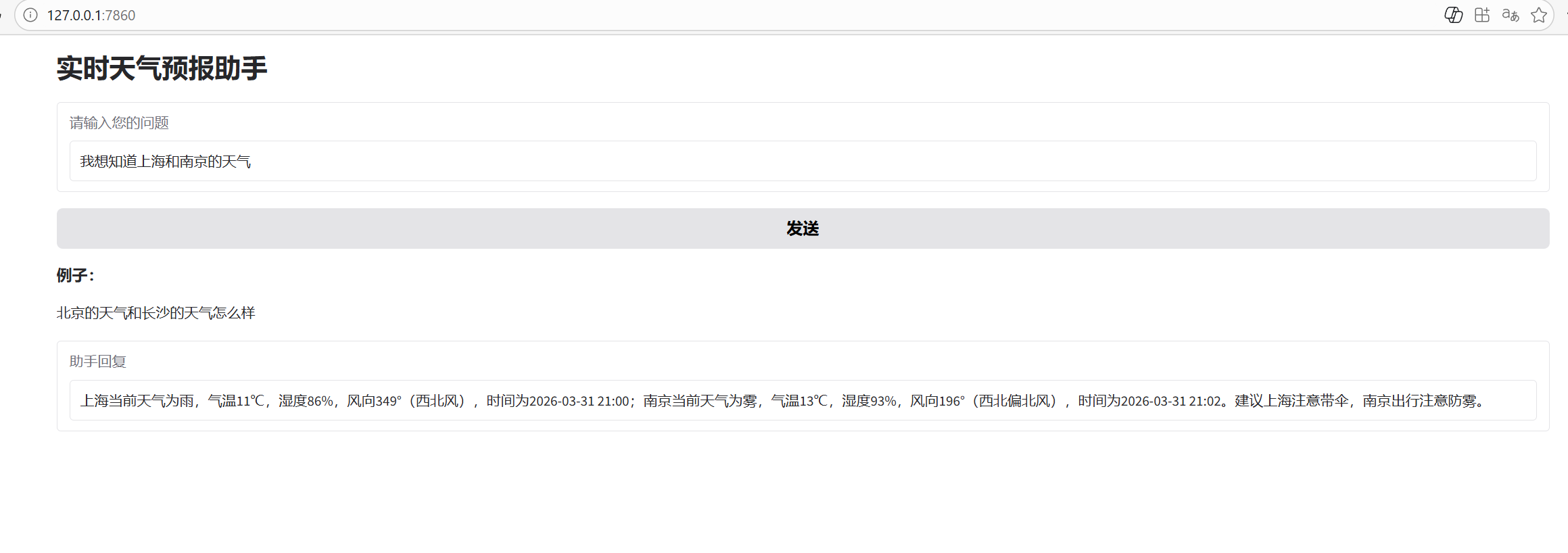
启动程序后,访问 Gradio 提供的本地 URL(通常是 http://localhost:7860),即可看到 Web 界面。
示例对话:
核心优势
- 本地部署: 使用 Ollama 运行本地模型,数据隐私有保障
- 工具调用: Agent 自动决定何时调用天气 API
- 自然语言理解: 支持复杂查询,如"北京和上海的天气对比"
- 快速部署: Gradio 让 Web 界面搭建变得简单
扩展方向
- 添加更多天气查询功能(未来 7 天预报、空气质量等)
- 集成其他 API(新闻查询、股票查询等)
- 添加向量数据库实现对话记忆
- 部署到服务器供多人使用
常见问题
Q: 为什么使用 Ollama 而不是云端 API?
A: Ollama 可以本地运行开源模型,无需担心数据隐私问题,且完全免费。
Q: 如何更换模型?
A: 修改 model 参数即可,如改为 "llama3.1:8b" 或 "mistral:7b"。
Q: 天气 API 返回错误怎么办?
A: 检查 API Key 是否有效,城市名称是否正确,以及网络连接是否正常。
总结
通过本文,我们成功构建了一个基于 LangChain 和 Ollama 的实时天气预报助手。这个框架可以轻松扩展到其他领域,如新闻查询、股票分析等。希望这篇文章能为你开发 LLM 应用提供启发!
参考资源

AtomGit 是由开放原子开源基金会联合 CSDN 等生态伙伴共同推出的新一代开源与人工智能协作平台。平台坚持“开放、中立、公益”的理念,把代码托管、模型共享、数据集托管、智能体开发体验和算力服务整合在一起,为开发者提供从开发、训练到部署的一站式体验。
更多推荐

 4
4 0
0- 0


 已为社区贡献1条内容

所有评论(0)