OpenClaw 接入微信详细教程
OpenClaw 接入微信:从安装到对话,一篇搞定
OpenClaw(原 Clawdbot)是一个开源、本地优先的 AI 代理网关,能让大模型在你的电脑/服务器上 7×24 小时运行,支持直接操作电脑、浏览网页、执行命令,还能无缝接入飞书、Telegram、Discord 等聊天平台。
本文将带你一步步完成 OpenClaw 接入个人微信,实现与 AI 的即时对话。
一、安装 OpenClaw
如果你还没安装 OpenClaw,先执行以下任一命令全局安装:
# npm
npm install -g openclaw@latest --registry=https://registry.npmmirror.com

# pnpm
pnpm add -g openclaw@latest
更多安装细节可参考 OpenClaw (Clawdbot) 教程。
二、前置条件
| 条件 | 要求 |
|---|---|
| 微信版本 | iOS 8.0.70 及以上 |
| OpenClaw | 已部署并运行(本地 / 服务器均可) |
三、快速接入(推荐)
第 1 步:打开微信插件入口
微信 → 我 → 设置 → 插件
找到 「ClawBot」 卡片,点击进入,可以看到安装命令提示。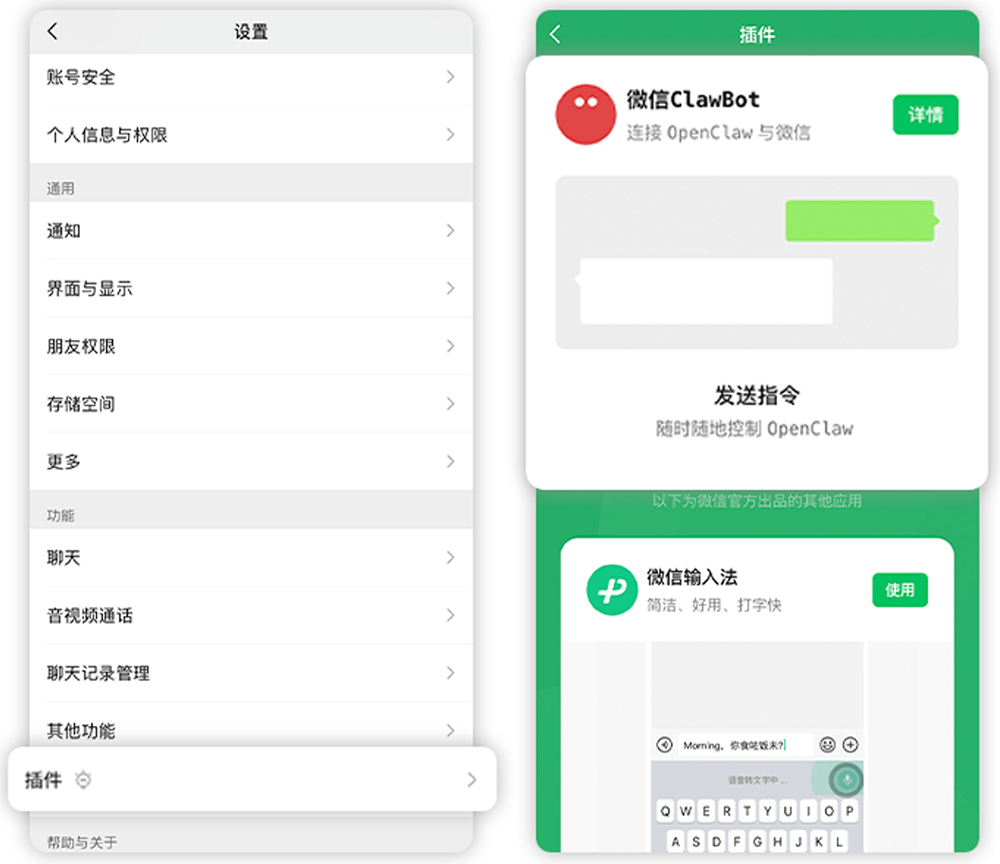
第 2 步:执行安装命令
复制终端中显示的安装命令,在 OpenClaw 所在设备的终端中执行:
npx -y @tencent-weixin/openclaw-weixin-cli@latest install
第 3 步:扫码绑定
命令执行后会生成一个二维码,用微信扫码绑定。
第 4 步:确认连接成功
扫码成功后终端会显示 「连接成功」 并自动重启。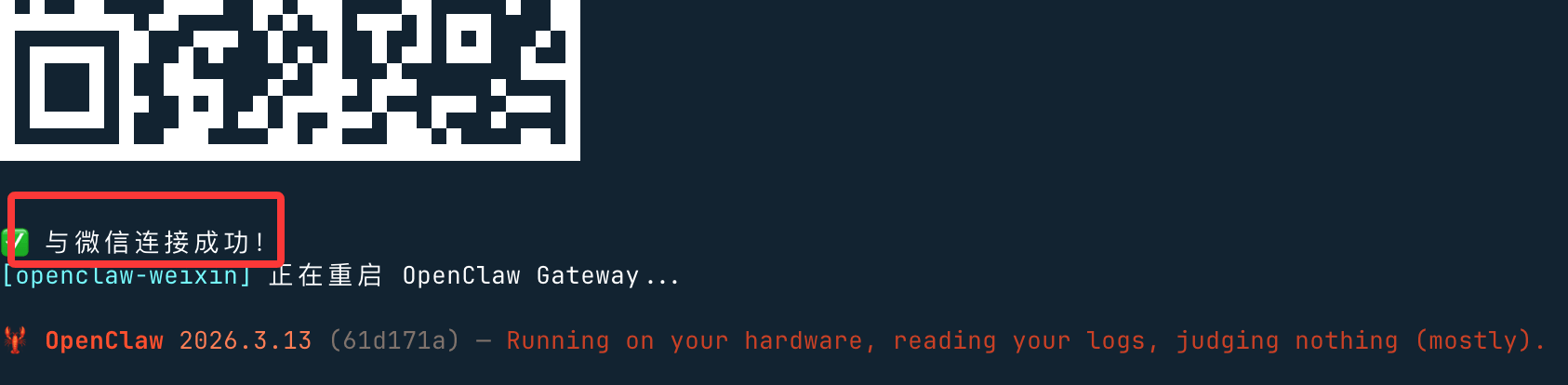
第 5 步:验证
- 访问 OpenClaw 后台,查看频道列表,确认微信已就绪。
- 打开微信聊天窗口,直接与 OpenClaw 对话即可。
四、Windows 用户的特别说明
Windows 环境下使用 npx 可能会报错:
未找到 openclaw
原因:npx 内部使用 Linux 的 which 命令来检测 openclaw,而 Windows 没有该命令,导致检测失败。
解决方案 A:使用 openclaw 插件命令(推荐)
逐条执行以下三条命令:
# 1. 安装插件
openclaw plugins install "@tencent-weixin/openclaw-weixin"

# 2. 启用插件
openclaw config set plugins.entries.openclaw-weixin.enabled true

# 3. 二维码登录
openclaw channels login --channel openclaw-weixin
终端会出现二维码,用手机微信扫码并确认授权即可。
解决方案 B:使用脚本安装
如果上述命令仍然安装不成功,可以使用社区网友 @百里凌涵 提供的脚本方案。
在本地创建一个目录,放入以下三个文件:
文件 1:cli.mjs
#!/usr/bin/env node

import { execSync, spawnSync } from "node:child_process";

const PLUGIN_SPEC = "@tencent-weixin/openclaw-weixin";
const CHANNEL_ID = "openclaw-weixin";

// ── helpers ──────────────────────────────────────────────────────────────────

function log(msg) {
  console.log(`\x1b[36m[openclaw-weixin]\x1b[0m ${msg}`);
}

function error(msg) {
  console.error(`\x1b[31m[openclaw-weixin]\x1b[0m ${msg}`);
}

function run(cmd, { silent = true } = {}) {
  const stdio = silent ? ["pipe", "pipe", "pipe"] : "inherit";
  const result = spawnSync(cmd, { shell: true, stdio });
  if (result.status !== 0) {
    const err = new Error(`Command failed with exit code ${result.status}: ${cmd}`);
    err.stderr = silent ? (result.stderr || "").toString() : "";
    throw err;
  }
  return silent ? (result.stdout || "").toString().trim() : "";
}

function which(bin) {
  try {
    return execSync(`which ${bin}`, { encoding: "utf-8", stdio: ["pipe", "pipe", "pipe"] }).trim();
  } catch {
    return null;
  }
}

// ── commands ─────────────────────────────────────────────────────────────────

function install() {
  log("已找到本地安装的 openclaw");

  // 2. Install plugin via openclaw
  log("正在安装插件...");
  try {
    const installOut = run(`openclaw plugins install "${PLUGIN_SPEC}"`);
    if (installOut) log(installOut);
  } catch (installErr) {
    if (installErr.stderr && installErr.stderr.includes("already exists")) {
      log("检测到本地已安装,正在更新...");
      try {
        const updateOut = run(`openclaw plugins update "${CHANNEL_ID}"`);
        if (updateOut) log(updateOut);
      } catch (updateErr) {
        error("插件更新失败,请手动执行:");
        if (updateErr.stderr) console.error(updateErr.stderr);
        console.log(`  openclaw plugins update "${CHANNEL_ID}"`);
        process.exit(1);
      }
    } else {
      error("插件安装失败,请手动执行:");
      if (installErr.stderr) console.error(installErr.stderr);
      console.log(`  openclaw plugins install "${PLUGIN_SPEC}"`);
      process.exit(1);
    }
  }

  // 3. Login (interactive QR scan)
  log("插件就绪,开始首次连接...");
  try {
    run(`openclaw channels login --channel ${CHANNEL_ID}`, { silent: false });
  } catch {
    console.log();
    error("首次连接未完成,可稍后手动重试:");
    console.log(`  openclaw channels login --channel ${CHANNEL_ID}`);
  }

  // 4. Restart gateway so it picks up the new account
  log("正在重启 OpenClaw Gateway...");
  try {
    run(`openclaw gateway restart`, { silent: false });
  } catch {
    error("重启失败,可手动执行:");
    console.log(`  openclaw gateway restart`);
  }
}

function help() {
  console.log(`
  用法: npx -y @tencent-weixin/openclaw-weixin-cli <命令>

  命令:
    install   安装微信插件并扫码连接
    help      显示帮助信息
`);
}

// ── main ─────────────────────────────────────────────────────────────────────

const command = process.argv[2];

switch (command) {
  case "install":
    install();
    break;
  case "help":
  case "--help":
  case "-h":
    help();
    break;
  default:
    if (command) {
      error(`未知命令: ${command}`);
    }
    help();
    process.exit(command ? 1 : 0);
}
文件 2:package.json
{
  "name": "@tencent-weixin/openclaw-weixin-cli",
  "version": "1.0.2",
  "description": "Lightweight installer for the OpenClaw Weixin channel plugin",
  "license": "MIT",
  "author": "Tencent",
  "type": "module",
  "bin": {
    "weixin-installer": "./cli.mjs"
  },
  "files": [
    "cli.mjs"
  ],
  "engines": {
    "node": ">=22"
  }
}
文件 3:LICENSE
MIT License

Copyright (c) 2026 Tencent Inc.

Permission is hereby granted, free of charge, to any person obtaining a copy
of this software and associated documentation files (the "Software"), to deal
in the Software without restriction, including without limitation the rights
to use, copy, modify, merge, publish, distribute, sublicense, and/or sell
copies of the Software, and to permit persons to whom the Software is
furnished to do so, subject to the following conditions:

The above copyright notice and this permission notice shall be included in all
copies or substantial portions of the Software.

THE SOFTWARE IS PROVIDED "AS IS", WITHOUT WARRANTY OF ANY KIND, EXPRESS OR
IMPLIED, INCLUDING BUT NOT LIMITED TO THE WARRANTIES OF MERCHANTABILITY,
FITNESS FOR A PARTICULAR PURPOSE AND NONINFRINGEMENT. IN NO EVENT SHALL THE
AUTHORS OR COPYRIGHT HOLDERS BE LIABLE FOR ANY CLAIM, DAMAGES OR OTHER
LIABILITY, WHETHER IN AN ACTION OF CONTRACT, TORT OR OTHERWISE, ARISING FROM,
OUT OF OR IN CONNECTION WITH THE SOFTWARE OR THE USE OR OTHER DEALINGS IN THE
SOFTWARE.
然后在同一目录下执行:
node ./cli.mjs install
脚本会自动完成插件安装、扫码连接和网关重启。
五、常见问题
Q:扫码后没有反应?
确保 OpenClaw 网关正在运行,可以尝试手动重启:
openclaw gateway restart
Q:插件安装失败?
- 确认 Node.js 版本 ≥ 22。
- 尝试切换 npm 镜像源后重试。
- 使用上文「脚本安装」方案。
Q:支持 Android 吗?
目前个人微信接入仅支持 iOS 8.0.70+,Android 暂未开放。
总结
| 平台 | 接入方式 |
|---|---|
| macOS / Linux | 直接使用 npx 命令一键安装 |
| Windows | 使用 openclaw plugins 命令或脚本安装 |
整个接入过程只需 几分钟,绑定成功后即可在微信中与你的 AI 代理自由对话。快试试吧!
安装的时候可能会报错,需要将下面的代码添加到 ~/.openclaw/openclaw.json:
“plugins”: {
“allow”: [
“openclaw-weixin”
]
}
本文基于 OpenClaw 官方文档整理,如有更新请以官方文档为准。
详细教程或遇到问题可以关注我咨询


AtomGit 是由开放原子开源基金会联合 CSDN 等生态伙伴共同推出的新一代开源与人工智能协作平台。平台坚持“开放、中立、公益”的理念,把代码托管、模型共享、数据集托管、智能体开发体验和算力服务整合在一起,为开发者提供从开发、训练到部署的一站式体验。
更多推荐

 9
9 0
0- 0


 已为社区贡献17条内容

所有评论(0)