centos7.9上部署openstack(train版)——8. Block Storage--cinder
·
概述
-
OpenStack块存储服务(Cinder)为虚拟机添加了持久存储。块存储提供了一个管理卷的基础设施,并与OpenStack Compute交互,为实例提供卷。该服务还支持卷快照和卷类型的管理。
- 块存储服务由以下组件组成:
- cinder-api:接受API请求,并将其路由到cinder-volume以执行操作。
- cinder-volume:直接与块存储服务交互,并处理如创建、删除、读取和写入等过程。它还通过消息队列与这些过程进行交互。该服务响应发送到块存储服务的读取和写入请求以维护状态。它可以通过驱动程序架构与各种存储提供商进行交互。
- cinder-scheduler守护进程:选择最佳的存储提供商节点来创建卷。类似于nova-scheduler组件。
- cinder-backup守护进程:该服务将任何类型的卷备份到备份存储提供商。与cinder-volume服务一样,它可以通过驱动程序架构与各种存储提供商进行交互。
消息队列:在块存储过程之间路由信息。
- 块存储服务由以下组件组成:
-
本节介绍了如何为块存储服务安装和配置存储节点。为简单起见,此配置引用了一个带有空本地块存储设备的存储节点。这些说明使用 /dev/sda5 ,但您可以为特定节点替换不同的值。
该服务使用LVM驱动程序在此设备上提供逻辑卷,并通过iSCSI传输将它们提供给实例。您可以按照这些说明进行微小修改,以通过添加其他存储节点来水平扩展您的环境。
Controller安装和配置
- 环境
- 创建数据库
- 使用数据库访问客户端连接到数据库 服务器作为用户:root
$ mysql -u root -p000000 - 创建数据库:cinder
MariaDB [(none)]> CREATE DATABASE cinder; - 授予对数据库的适当访问权限:cinder
MariaDB [(none)]> GRANT ALL PRIVILEGES ON cinder.* TO 'cinder'@'localhost' IDENTIFIED BY '000000'; MariaDB [(none)]> GRANT ALL PRIVILEGES ON cinder.* TO 'cinder'@'%' IDENTIFIED BY '000000'; - 退出数据库访问客户端
- 使用数据库访问客户端连接到数据库 服务器作为用户:root
- 获取凭据以获取仅限管理员的访问权限 命令行命令:admin
$ . ~/admin-openrc.sh - 创建服务凭据
- 创建用户:cinder
$ openstack user create --domain default --password-prompt cinder User Password:000000 Repeat User Password:000000 +---------------------+----------------------------------+ | Field | Value | +---------------------+----------------------------------+ | domain_id | default | | enabled | True | | id | 5bc87c9730af407182c336ac3be03e34 | | name | cinder | | options | {} | | password_expires_at | None | +---------------------+----------------------------------+ - 将 cinder 用户授予 admin 角色并添加到 service 项目
$ openstack role add --project service --user cinder admin - 创建和服务实体:cinderv2 cinderv3
$ openstack service create --name cinderv2 --description "OpenStack Block Storage" volumev2

+-------------+----------------------------------+
| Field       | Value                            |
+-------------+----------------------------------+
| description | OpenStack Block Storage          |
| enabled     | True                             |
| id          | ac011b4c9ff34faca11181beec49a714 |
| name        | cinderv2                         |
| type        | volumev2                         |
+-------------+----------------------------------+
 $ openstack service create --name cinderv3 --description "OpenStack Block Storage" volumev3

+-------------+----------------------------------+
| Field       | Value                            |
+-------------+----------------------------------+
| description | OpenStack Block Storage          |
| enabled     | True                             |
| id          | ef373a6fe9904454890b8213a2e06a1a |
| name        | cinderv3                         |
| type        | volumev3                         |
+-------------+----------------------------------+
注意:块存储服务需要两个服务实体
- 创建块存储服务 API 端点:
$ openstack endpoint create --region RegionOne volumev2 public http://controller:8776/v2/%\(project_id\)s

+--------------+------------------------------------------+
| Field        | Value                                    |
+--------------+------------------------------------------+
| enabled      | True                                     |
| id           | 0844555589e24d2cb1e15ec6b1fab200         |
| interface    | public                                   |
| region       | RegionOne                                |
| region_id    | RegionOne                                |
| service_id   | ac011b4c9ff34faca11181beec49a714         |
| service_name | cinderv2                                 |
| service_type | volumev2                                 |
| url          | http://controller:8776/v2/%(project_id)s |
+--------------+------------------------------------------+

$ openstack endpoint create --region RegionOne volumev2 internal http://controller:8776/v2/%\(project_id\)s

+--------------+------------------------------------------+
| Field        | Value                                    |
+--------------+------------------------------------------+
| enabled      | True                                     |
| id           | 34109a3114eb4d49a3c2ab57f9a48627         |
| interface    | internal                                 |
| region       | RegionOne                                |
| region_id    | RegionOne                                |
| service_id   | ac011b4c9ff34faca11181beec49a714         |
| service_name | cinderv2                                 |
| service_type | volumev2                                 |
| url          | http://controller:8776/v2/%(project_id)s |
+--------------+------------------------------------------+

$ openstack endpoint create --region RegionOne volumev2 admin http://controller:8776/v2/%\(project_id\)s

+--------------+------------------------------------------+
| Field        | Value                                    |
+--------------+------------------------------------------+
| enabled      | True                                     |
| id           | d3a21f116c524858b9eae21229e5bb0e         |
| interface    | admin                                    |
| region       | RegionOne                                |
| region_id    | RegionOne                                |
| service_id   | ac011b4c9ff34faca11181beec49a714         |
| service_name | cinderv2                                 |
| service_type | volumev2                                 |
| url          | http://controller:8776/v2/%(project_id)s |
+--------------+------------------------------------------+
$ openstack endpoint create --region RegionOne volumev3 public http://controller:8776/v3/%\(project_id\)s

+--------------+------------------------------------------+
| Field        | Value                                    |
+--------------+------------------------------------------+
| enabled      | True                                     |
| id           | 03fa899b57d046d2b8b281842dbb145f         |
| interface    | public                                   |
| region       | RegionOne                                |
| region_id    | RegionOne                                |
| service_id   | ef373a6fe9904454890b8213a2e06a1a         |
| service_name | cinderv3                                 |
| service_type | volumev3                                 |
| url          | http://controller:8776/v3/%(project_id)s |
+--------------+------------------------------------------+

$ openstack endpoint create --region RegionOne volumev3 internal http://controller:8776/v3/%\(project_id\)s

+--------------+------------------------------------------+
| Field        | Value                                    |
+--------------+------------------------------------------+
| enabled      | True                                     |
| id           | cc2edb3be08e4ce6b64369446403c781         |
| interface    | internal                                 |
| region       | RegionOne                                |
| region_id    | RegionOne                                |
| service_id   | ef373a6fe9904454890b8213a2e06a1a         |
| service_name | cinderv3                                 |
| service_type | volumev3                                 |
| url          | http://controller:8776/v3/%(project_id)s |
+--------------+------------------------------------------+

$ openstack endpoint create --region RegionOne volumev3 admin http://controller:8776/v3/%\(project_id\)s

+--------------+------------------------------------------+
| Field        | Value                                    |
+--------------+------------------------------------------+
| enabled      | True                                     |
| id           | 4359773e9932419cb616287d107f2fc1         |
| interface    | admin                                    |
| region       | RegionOne                                |
| region_id    | RegionOne                                |
| service_id   | ef373a6fe9904454890b8213a2e06a1a         |
| service_name | cinderv3                                 |
| service_type | volumev3                                 |
| url          | http://controller:8776/v3/%(project_id)s |
+--------------+------------------------------------------+
注意:块存储服务需要每个服务的端点 实体。
- 创建用户:cinder
- 创建数据库
- 安装和配置组件
- 安装软件包
# yum install -y openstack-cinder - 编辑
/etc/cinder/cinder.conf[database] # ... connection = mysql+pymysql://cinder:000000@controller/cinder [DEFAULT] transport_url = rabbit://openstack:000000@controller auth_strategy = keystone my_ip = 192.168.200.150 [keystone_authtoken] # ... www_authenticate_uri = http://controller:5000 auth_url = http://controller:5000 memcached_servers = controller:11211 auth_type = password project_domain_name = default user_domain_name = default project_name = service username = cinder password = 000000 [oslo_concurrency] # ... lock_path = /var/lib/cinder/tmp - 填充块存储数据库(无视Deprecated: Option ,可查看自行查看数据库是否填充)
# su -s /bin/sh -c "cinder-manage db sync" cinder
- 安装软件包
- 将计算配置为使用块存储
- 编辑
/etc/nova/nova.conf[cinder] os_region_name = RegionOne
- 编辑
- 完成安装
- 重新启动nova API 服务
# systemctl restart openstack-nova-api.service - 启用并自启
# systemctl enable openstack-cinder-api.service openstack-cinder-scheduler.service
# systemctl restart openstack-cinder-api.service openstack-cinder-scheduler.service
- 重新启动nova API 服务
Compute或储存节点的安装和配置
- 环境
- 安装并启用支持实用程序包
# yum install lvm2 device-mapper-persistent-data # systemctl enable lvm2-lvmetad.service # systemctl restart lvm2-lvmetad.service - 创建LVM:/dev/sda5
# pvcreate /dev/sda5 Physical volume "/dev/sda5" successfully created. # vgcreate cinder-volumes /dev/sda5 Volume group "cinder-volumes" successfully created- 设置只有实例可以访问块存储卷
/etc/lvm/lvm.conf,要将所有硬盘加进去,这边不写这一行了devices { ... filter = [ "a/sda5/", "r/.*/"]
- 设置只有实例可以访问块存储卷
- 安装并启用支持实用程序包
- 安装和配置组件
- 安装软件包:
# yum install -y openstack-cinder targetcli python-keystone - 编辑
/etc/cinder/cinder.conf[database] # ... connection = mysql+pymysql://cinder:000000@controller/cinder [DEFAULT] # ... transport_url = rabbit://openstack:000000@controller auth_strategy = keystone my_ip = 192.168.200.151 enabled_backends = lvm glance_api_servers = http://controller:9292 [keystone_authtoken] # ... www_authenticate_uri = http://controller:5000 auth_url = http://controller:5000 memcached_servers = controller:11211 auth_type = password project_domain_name = default user_domain_name = default project_name = service username = cinder password = 000000 [lvm] volume_driver = cinder.volume.drivers.lvm.LVMVolumeDriver volume_group = cinder-volumes target_protocol = iscsi target_helper = lioadm [oslo_concurrency] # ... lock_path = /var/lib/cinder/tmp
- 安装软件包:
- 完成安装
- 启动并自启
# systemctl enable openstack-cinder-volume.service target.service
# systemctl restart openstack-cinder-volume.service target.service
- 启动并自启
Compute或储存节点安装和配置备份服务(可选,与swift配合使用)
- 安装软件包
# yum install openstack-cinder - 获取SWIFT_URL
# openstack catalog show object-store - 编辑
/etc/cinder/cinder.conf[DEFAULT] # ... backup_driver = cinder.backup.drivers.swift.SwiftBackupDriver backup_swift_url = 替换获取到的SWIFT_URL - 完成安装
# systemctl enable openstack-cinder-backup.service
# systemctl start openstack-cinder-backup.service
验证
- 获取凭据以获取访问权限 仅限管理员的 CLI 命令:admin
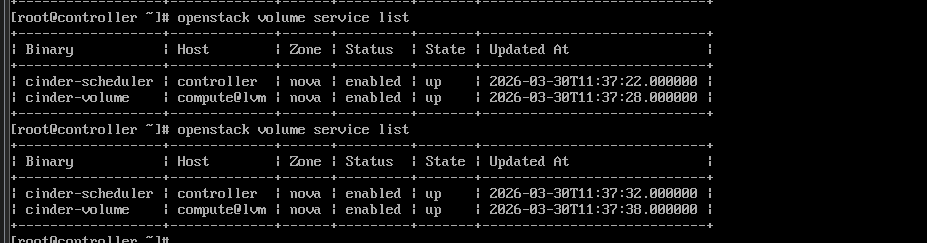
$ . ~/admin-openrc.sh - 列出服务组件以验证每个进程的成功启动
$ openstack volume service list

+------------------+-----------------------+------+---------+-------+----------------------------+
| Binary           | Host                  | Zone | Status  | State | Updated At                 |
+------------------+-----------------------+------+---------+-------+----------------------------+
| cinder-scheduler | localhost.localdomain | nova | enabled | up    | 2023-04-02T03:40:12.000000 |
| cinder-volume    | compute@lvm           | nova | enabled | up    | 2023-04-02T03:40:06.000000 |
+------------------+-----------------------+------+---------+-------+----------------------------+

AtomGit 是由开放原子开源基金会联合 CSDN 等生态伙伴共同推出的新一代开源与人工智能协作平台。平台坚持“开放、中立、公益”的理念,把代码托管、模型共享、数据集托管、智能体开发体验和算力服务整合在一起,为开发者提供从开发、训练到部署的一站式体验。
更多推荐



 14
14 0
0- 0


 已为社区贡献7条内容

所有评论(0)