YOLOv11【第一章:零基础入门篇·第5节】模型验证与性能评估指标详解!
🏆 本文收录于专栏 《YOLOv11实战:从入门到深度优化》。
本专栏围绕 YOLOv11 的改进、训练、部署与工程优化 展开,系统梳理并复现当前主流的 YOLOv11 实战案例与优化方案,内容目前已覆盖 分类、检测、分割、追踪、关键点、OBB 检测 等多个方向。与常见“只给代码、不讲原理”的教程不同,这个专栏更关注 模型为什么这样改、训练为什么这样配、部署为什么这样做,以及出问题后应该如何定位与修正。
如果你希望自己不仅能把项目跑起来,还能进一步具备 调参、优化、迁移和工程落地 的能力,那么这套内容会更适合作为系统学习 YOLOv11 的参考。专栏整体坚持 持续更新 + 深度解析 + 工程导向 的写作思路,不仅关注模型结构本身,也关注训练策略、损失函数设计、推理加速、部署适配以及真实项目中的问题排查。
✨ 当前专栏限时优惠中:一次订阅,终身有效,后续更新内容均可免费解锁 👉 点此查看专栏详情
🎯 本文定位:计算机视觉 × YOLOv11 零基础入门实战
📅 预计阅读时间:60~90分钟
⭐ 难度等级:⭐⭐☆☆☆(基础级)
🔧 技术栈:Ultralytics YOLO11 | Python v3.9+ | PyTorch v2.0+ | torchvision v0.9+ | Ultralytics v8.x | CUDA v11.8+
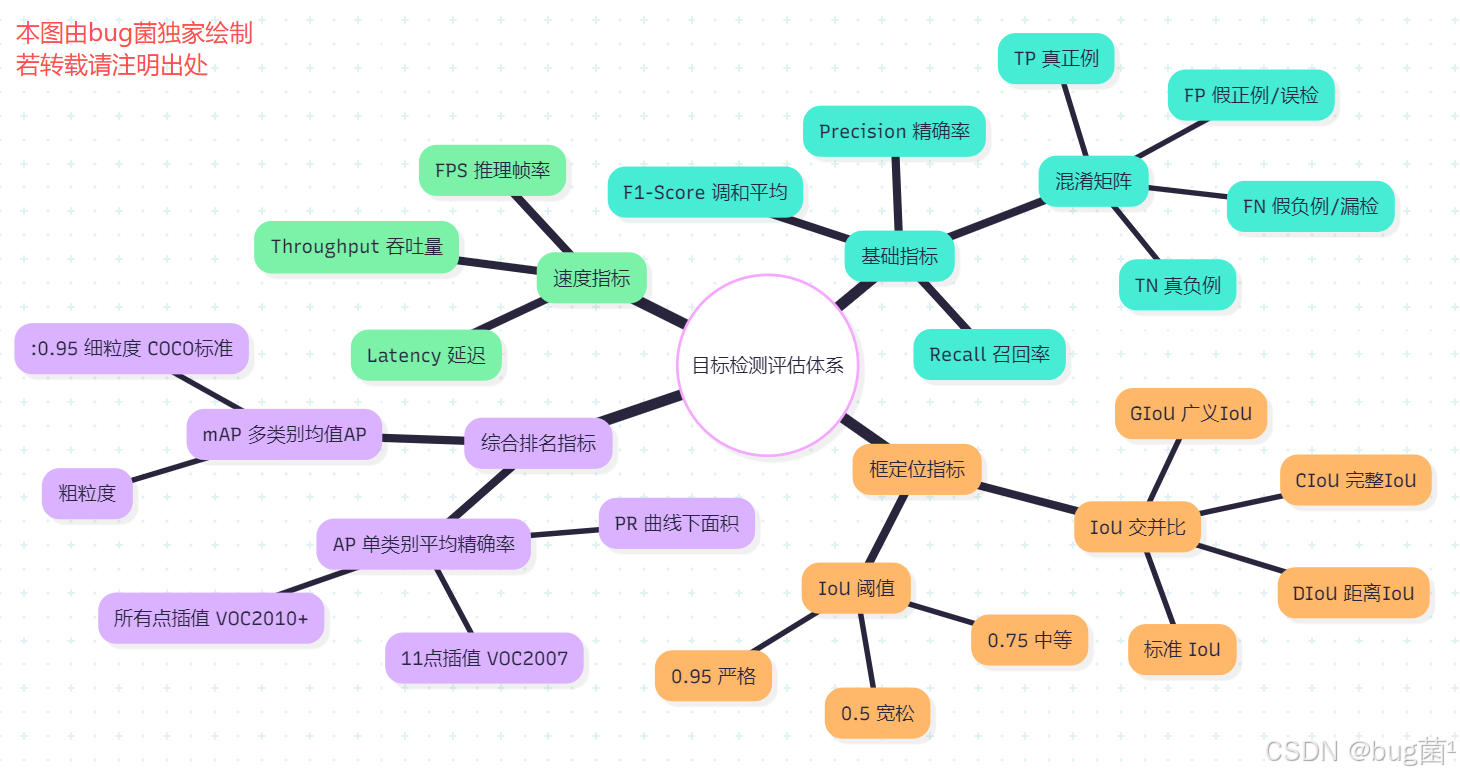
全文目录:
📖 上期回顾|模型推理与性能测试全流程
在上一节《YOLOv11【第一章:零基础入门篇·第4节】一文搞懂,模型推理与性能测试全流程!》内容中,我们深入探讨了 YOLOv11 模型推理与性能测试的完整流程。主要涵盖以下核心内容:
- 推理环境配置:讲解了如何在 CPU / GPU 环境下配置推理运行时,包括 CUDA 版本匹配、PyTorch 推理模式(
torch.no_grad())的使用技巧。 - 图像预处理流程:详细介绍了图像归一化、Letterbox 缩放填充策略、颜色通道转换(BGR→RGB)及 Tensor 维度变换等标准化预处理步骤。
- 推理接口调用:从 Python API 调用、CLI 命令行批量推理、视频流实时推理三个维度系统演示了 YOLOv11 的多种调用方式。
- 后处理解析:深入剖析了 NMS(非极大值抑制)的原理与参数调优,以及检测框坐标解码(xywh → xyxy)的完整逻辑。
- 性能基准测试:使用
time、torch.cuda.Event等工具对推理速度进行精准计时,并通过 FPS 指标对比不同硬件、不同模型规格(n/s/m/l/x)的性能差异。
💡 核心收获:读者掌握了从原始图像输入到最终检测结果输出的完整推理管线,并能独立完成推理性能基准测试。这为本节的模型验证与量化评估奠定了工程基础。
一、为什么需要模型验证与评估?
在深度学习项目中,训练一个模型只是起点,如何客观、全面地衡量模型的好坏才是决定项目成败的关键环节。很多初学者在训练完模型后,仅凭肉眼观察推理结果就下结论,这种主观判断往往存在严重的偏差。
想象一个场景:你训练了一个行人检测模型,在几张测试图像上看起来效果不错,但实际部署后误检率极高。这就是因为缺乏系统的量化评估——没有数字就没有方向。
1.1 评估的三大核心价值
① 量化模型能力边界
通过 mAP、Precision、Recall 等指标,我们能精确知道模型在哪些类别上表现好、哪些类别存在瓶颈,而不是凭直觉判断。
② 指导模型迭代优化
评估结果是模型改进的"罗盘":如果 Recall 低,说明模型漏检严重,需要降低置信度阈值或增加正样本数量;如果 Precision 低,说明误检多,需要提高阈值或加强负样本训练。
③ 横向对比与选型
在多个候选模型(如 YOLOv11n vs YOLOv11s vs YOLOv11m)之间进行公平比较,必须有统一的评估标准和测试集,才能做出客观的模型选型决策。
1.2 验证集 vs 测试集
这是一个常见的概念混淆点,必须厘清:
训练集 (Train Set)     → 用于反向传播、更新模型参数
验证集 (Val Set)       → 训练过程中监控泛化性能、调整超参数(有数据泄露风险)
测试集 (Test Set)      → 训练完成后最终评估,模拟真实部署场景(完全隔离)
在 YOLOv11 的标准工作流中,val 命令默认使用验证集进行评估,但最终发论文或汇报时应使用独立测试集。
二、目标检测评估指标体系全解
目标检测的评估比图像分类复杂得多,因为它同时涉及定位精度和分类精度两个维度。下面我们从最基础的概念逐步构建完整的评估体系。
2.1 混淆矩阵与基础指标
混淆矩阵(Confusion Matrix)是所有分类与检测任务评估的基石。对于二分类问题(以"是否检测到目标"为例),混淆矩阵定义如下:
                        预测为正 (Positive)    预测为负 (Negative)
真实为正 (Positive)         TP(真正例)           FN(假负例/漏检)
真实为负 (Negative)         FP(假正例/误检)        TN(真负例)
在目标检测中,判定一个预测框是 TP 还是 FP,不仅要看类别是否正确,还要看定位是否准确(通过 IoU 阈值判定)。
基础指标定义:
| 指标 | 公式 | 含义 |
|---|---|---|
| Precision(精确率) | TP / (TP + FP) | 预测为正的样本中真正为正的比例(衡量误检) |
| Recall(召回率) | TP / (TP + FN) | 真实为正的样本中被检测到的比例(衡量漏检) |
| F1-Score | 2×P×R / (P+R) | Precision 与 Recall 的调和平均 |
| Accuracy(准确率) | (TP+TN) / All | 整体正确率(目标检测中几乎不用) |
⚠️ 注意:在目标检测领域,Accuracy 几乎没有参考价值,因为背景区域(负样本)数量远多于目标区域(正样本),会导致 Accuracy 虚高。
2.2 IoU:检测框质量的核心度量
IoU(Intersection over Union,交并比) 是目标检测中衡量预测框与真实框重叠程度的核心指标,也是判定 TP/FP 的基准。
IoU = 预测框 ∩ 真实框的面积 预测框 ∪ 真实框的面积 \text{IoU} = \frac{\text{预测框} \cap \text{真实框的面积}}{\text{预测框} \cup \text{真实框的面积}} IoU=预测框∪真实框的面积预测框∩真实框的面积
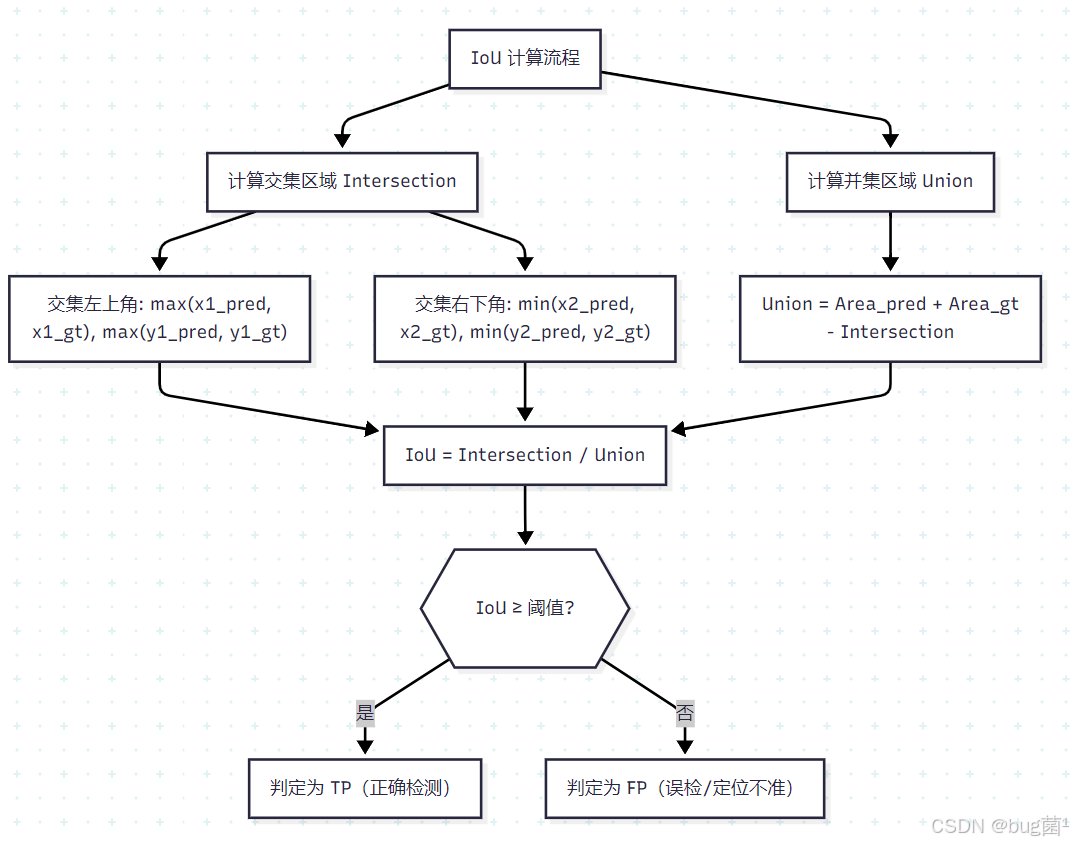
IoU 阈值的直觉理解:
IoU = 1.0:预测框与真实框完全重合(理想情况)IoU = 0.5:两框重叠面积占并集面积的 50%(PASCAL VOC 标准阈值)IoU = 0.75:更严格的定位要求(COCO 标准之一)IoU = 0.0:两框完全不重叠
IoU 的变体(进阶了解):
| 变体 | 特点 | 适用场景 |
|---|---|---|
| GIoU | 引入最小外接矩形,解决不重叠时梯度消失 | 训练损失函数 |
| DIoU | 加入中心点距离惩罚 | 训练损失函数 |
| CIoU | 同时考虑重叠、中心距离、长宽比 | YOLOv5/v8/v11 默认损失 |
| SIoU | 引入角度信息 | 部分改进版 YOLO |
2.3 Precision、Recall 与 F1-Score 深度解析
理解 Precision 和 Recall 的关键在于理解它们的trade-off(权衡关系)。
直觉理解:
- Precision(精确率):我说检测到的,有多少是真的?——关注误报
- Recall(召回率):真正存在的目标,我找到了多少?——关注漏报
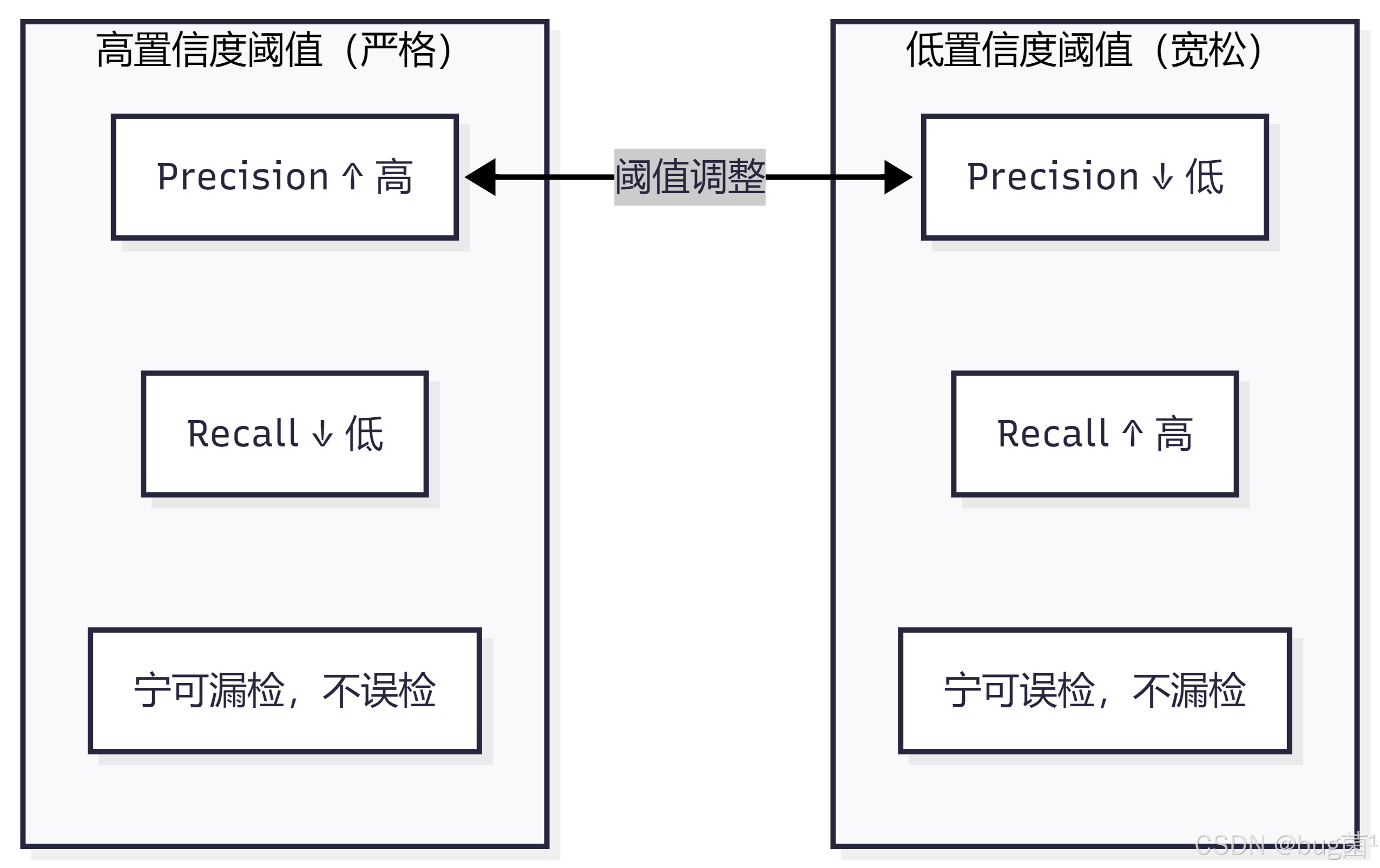
实际场景中的取舍:
- 🏥 医疗影像检测(漏检代价极大):更关注 Recall,宁可多检也不漏检
- 🚗 自动驾驶行人检测(两者都重要):需要平衡 Precision 和 Recall
- 📦 工业质检(误检代价大):更关注 Precision,减少误报
F1-Score 是 Precision 和 Recall 的调和平均,用于综合评估:
F 1 = 2 × P r e c i s i o n × R e c a l l P r e c i s i o n + R e c a l l F1 = \frac{2 \times Precision \times Recall}{Precision + Recall} F1=Precision+Recall2×Precision×Recall
当 Precision = Recall 时,F1 = Precision = Recall,这是最"均衡"的状态。
2.4 PR 曲线与 AP 详解
PR 曲线(Precision-Recall Curve) 是通过改变置信度阈值,描绘 Precision 与 Recall 之间变化关系的曲线。
PR 曲线的生成过程:
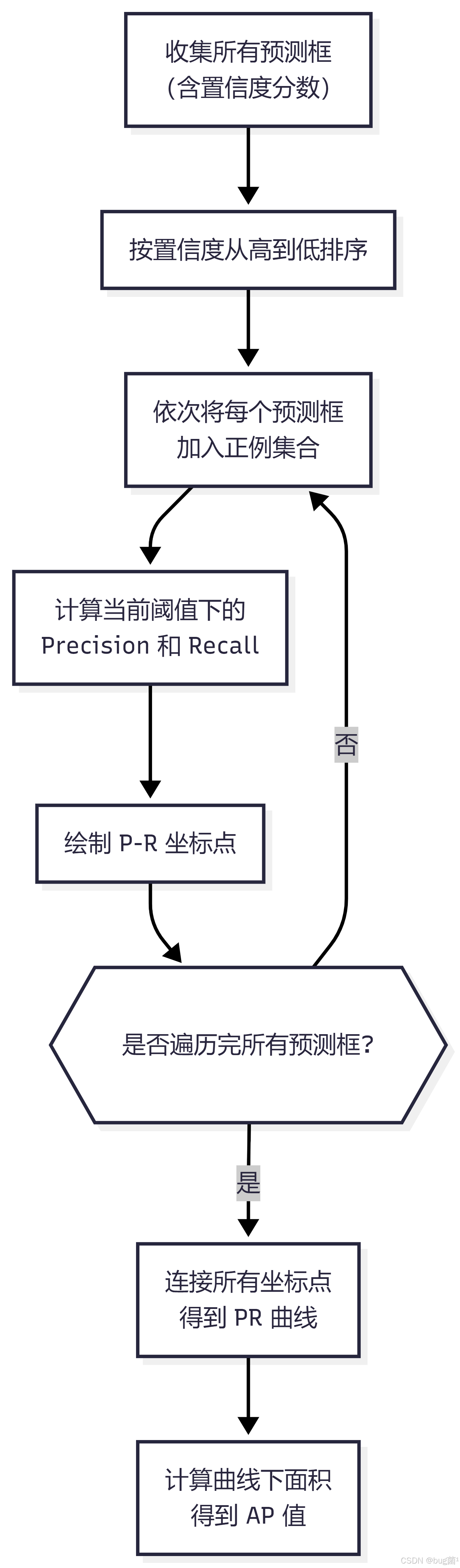
AP(Average Precision,平均精确率) 是 PR 曲线下方的面积,数学上表示为:
A P = ∫ 0 1 P ( r ) , d r AP = \int_0^1 P(r) , dr AP=∫01P(r),dr
在实际计算中,通常采用11点插值(PASCAL VOC 2007)或所有点插值(PASCAL VOC 2010+,COCO)。
PR 曲线的解读:
- 曲线越靠近右上角(1,1),模型性能越好
- 曲线下面积(AP)越大越好,最大值为 1.0
- 曲线出现"锯齿"是正常的,因为排序中存在 FP
2.5 mAP:目标检测的黄金指标
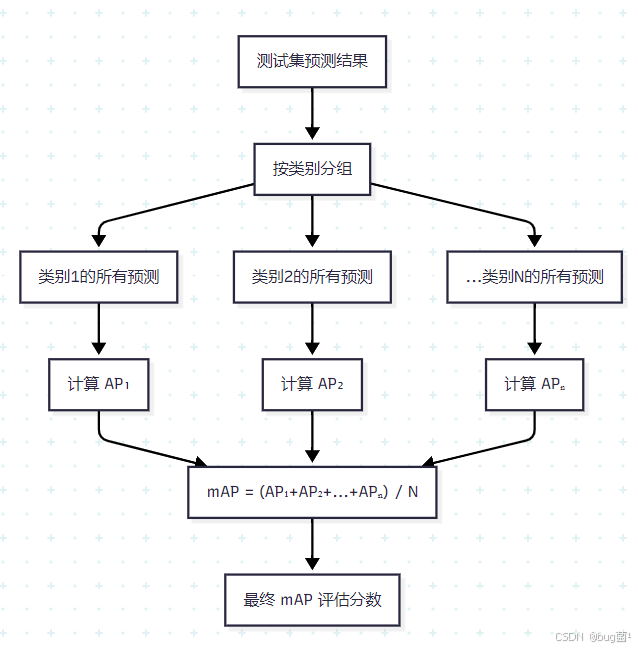
mAP(mean Average Precision,均值平均精确率) 是目标检测领域最重要的综合评估指标,它对所有类别的 AP 取平均值:
m A P = 1 N ∑ i = 1 N A P i mAP = \frac{1}{N} \sum_{i=1}^{N} AP_i mAP=N1i=1∑NAPi
其中 N N N 是类别总数, A P i AP_i APi 是第 i i i 个类别的 AP 值。
mAP 的计算流程图:
2.6 mAP@0.5 vs mAP@0.5:0.95 深度对比
这是 YOLOv11 训练日志中最常见的两个指标,很多初学者对它们的区别一知半解。
| 指标 | 全称 | IoU 阈值 | 计算方式 | 侧重点 |
|---|---|---|---|---|
| mAP@0.5 | mAP at IoU=0.50 | 0.5 | 单个 IoU 阈值下的 mAP | 检测是否正确(粗粒度) |
| mAP@0.5:0.95 | mAP at IoU=0.50:0.05:0.95 | 0.5, 0.55, …, 0.95(共10个) | 10个阈值下 mAP 的平均值 | 定位精度(细粒度) |
mAP@0.5:0.95 的计算:
m A P @ 0.5 : 0.95 = 1 10 ∑ t ∈ 0.5 , 0.55 , 0.6 , . . . , 0.95 m A P @ t mAP@0.5:0.95 = \frac{1}{10} \sum_{t \in {0.5, 0.55, 0.6, ..., 0.95}} mAP@t mAP@0.5:0.95=101t∈0.5,0.55,0.6,...,0.95∑mAP@t
💡 选择哪个指标?
- 学术论文、COCO 竞赛:使用 mAP@0.5:0.95(更严格、更全面)
- 工业快速验证:使用 mAP@0.5(直观、计算快)
- 两者都报告是最佳实践
三、YOLOv11 验证流程实战
3.1 val 命令与参数详解
YOLOv11 提供了完善的验证接口,支持 Python API 和 CLI 两种方式。
Python API 验证(推荐):
# ============================================================
# YOLOv11 模型验证完整示例
# 功能:加载训练好的模型,在验证集上评估性能
# 依赖:ultralytics >= 8.0
# ============================================================

from ultralytics import YOLO
import torch

def run_validation(
    model_path: str,
    data_yaml: str,
    img_size: int = 640,
    batch_size: int = 16,
    conf_threshold: float = 0.001,
    iou_threshold: float = 0.6,
    device: str = None
):
    """
    执行 YOLOv11 模型验证

    Args:
        model_path: 训练好的模型权重路径(.pt 文件)
        data_yaml:  数据集配置文件路径(包含 val 路径、类别名称等)
        img_size:   验证时的输入图像尺寸
        batch_size: 验证批次大小(建议 16-32)
        conf_threshold: 置信度阈值(验证时建议设低,如 0.001,让更多框参与计算)
        iou_threshold:  NMS IoU 阈值
        device:     指定设备(None=自动选择,'cpu', '0', '0,1' 等)

    Returns:
        results: 包含各项评估指标的结果对象
    """

    # 自动检测并选择最优设备
    if device is None:
        device = '0' if torch.cuda.is_available() else 'cpu'
    print(f"🚀 使用设备: {device}")

    # 加载模型权重
    # 支持:官方预训练模型名称(如 'yolo11n.pt')或自定义训练路径
    model = YOLO(model_path)
    print(f"✅ 模型加载成功: {model_path}")
    print(f"   模型类型: {model.info()}")

    # 执行验证
    # val() 方法会自动读取 data_yaml 中的 val 路径进行评估
    results = model.val(
        data=data_yaml,          # 数据集配置文件
        imgsz=img_size,          # 输入图像分辨率
        batch=batch_size,        # 批处理大小
        conf=conf_threshold,     # 置信度过滤阈值(验证时设低以获得完整PR曲线)
        iou=iou_threshold,       # NMS IoU 阈值
        device=device,           # 运行设备
        verbose=True,            # 打印详细日志
        save_json=True,          # 保存 COCO 格式 JSON 结果(用于官方评估工具)
        save_hybrid=False,       # 是否保存混合标注(一般不需要)
        plots=True,              # 生成评估可视化图表(PR曲线、混淆矩阵等)
        rect=False,              # 是否使用矩形推理(可加速但影响精度)
        split='val',             # 使用验证集(可选 'test')
    )

    return results


def print_evaluation_report(results):
    """
    格式化打印评估报告

    Args:
        results: model.val() 返回的结果对象
    """
    print("\n" + "="*60)
    print("           📊 YOLOv11 模型评估报告")
    print("="*60)

    # 整体指标
    # results.box 包含所有检测框相关的评估指标
    box_metrics = results.box

    print("\n📌 整体性能指标:")
    print(f"   mAP@0.5        : {box_metrics.map50:.4f}   ({box_metrics.map50*100:.2f}%)")
    print(f"   mAP@0.5:0.95   : {box_metrics.map:.4f}   ({box_metrics.map*100:.2f}%)")
    print(f"   Precision      : {box_metrics.mp:.4f}   ({box_metrics.mp*100:.2f}%)")
    print(f"   Recall         : {box_metrics.mr:.4f}   ({box_metrics.mr*100:.2f}%)")

    # 逐类别指标
    print("\n📌 逐类别性能指标:")
    print(f"{'类别':<20} {'Precision':>12} {'Recall':>10} {'AP@0.5':>10} {'AP@.5:.95':>12}")
    print("-" * 66)

    # 获取类别名称列表
    names = results.names  # dict: {0: 'person', 1: 'car', ...}

    # 遍历每个类别的指标
    # results.box.ap_class_index 包含有效类别的索引
    for i, cls_idx in enumerate(results.box.ap_class_index):
        cls_name = names[cls_idx] if cls_idx in names else f"class_{cls_idx}"
        # ap50: AP at IoU=0.5
        # ap: AP at IoU=0.5:0.95
        ap50 = results.box.ap50[i] if hasattr(results.box, 'ap50') else 0.0
        ap = results.box.ap[i] if hasattr(results.box, 'ap') else 0.0
        # p, r: per-class precision and recall
        p = results.box.p[i] if hasattr(results.box, 'p') else 0.0
        r = results.box.r[i] if hasattr(results.box, 'r') else 0.0
        print(f"  {cls_name:<18} {p:>12.4f} {r:>10.4f} {ap50:>10.4f} {ap:>12.4f}")

    print("-" * 66)
    print(f"  {'ALL (mean)':<18} {box_metrics.mp:>12.4f} "
          f"{box_metrics.mr:>10.4f} {box_metrics.map50:>10.4f} {box_metrics.map:>12.4f}")

    print("\n" + "="*60)
    print("✅ 评估完成!结果已保存至 runs/val/ 目录")
    print("="*60)


# ---- 主程序入口 ----
if __name__ == "__main__":
    # 示例:验证 COCO 数据集上的 yolo11n 模型
    results = run_validation(
        model_path="yolo11n.pt",          # 模型路径(会自动下载官方预训练模型)
        data_yaml="coco128.yaml",          # 数据集配置(ultralytics 内置示例数据集)
        img_size=640,
        batch_size=16,
        conf_threshold=0.001,             # 验证时置信度尽量低
        iou_threshold=0.6
    )

    # 打印格式化报告
    print_evaluation_report(results)
代码解析:
上述代码有几个关键设计值得注意:
-
conf=0.001:验证时置信度阈值要设得很低,这样更多的预测框会参与 PR 曲线的计算,得到的 AP 值更准确。如果阈值设太高(如默认的 0.25),会导致很多低置信度的 TP 被过滤掉,Recall 虚低。 -
save_json=True:保存 COCO 格式的预测结果,可以用官方pycocotools进行标准化评估,与其他论文结果对比时更可信。 -
plots=True:自动生成混淆矩阵、PR 曲线、F1 曲线等可视化图表,保存在runs/val/目录下,这是调试的重要工具。
CLI 命令行方式:
# 基础验证命令
yolo val model=yolo11n.pt data=coco128.yaml imgsz=640

# 完整参数验证命令
yolo val \
    model=runs/train/exp/weights/best.pt \
    data=custom_dataset.yaml \
    imgsz=640 \
    batch=16 \
    conf=0.001 \
    iou=0.6 \
    device=0 \
    plots=True \
    save_json=True \
    verbose=True

# 在测试集上评估(注意 split 参数)
yolo val model=best.pt data=custom.yaml split=test
3.2 验证结果解读
运行验证后,YOLOv11 会在终端输出类似以下的结果表格:
                 Class     Images  Instances      P          R      mAP50   mAP50-95
                   all        128        929      0.732      0.665    0.731     0.521
                person        128        254      0.812      0.723    0.805     0.543
                   car        128        116      0.891      0.810    0.873     0.638
               bicycle        128         35      0.654      0.571    0.623     0.412
                ...
字段解析:
| 字段 | 含义 |
|---|---|
Class |
类别名称,all 表示所有类别的平均 |
Images |
参与验证的图像数量 |
Instances |
验证集中该类别的真实目标总数 |
P |
Precision(在最优 F1 对应阈值下的精确率) |
R |
Recall(在最优 F1 对应阈值下的召回率) |
mAP50 |
mAP at IoU=0.5 |
mAP50-95 |
mAP at IoU=0.5:0.05:0.95 |
💡 重要提示:表格中报告的 P 和 R 是在最优置信度阈值(即 F1 最大时对应的阈值)下计算的,并非固定阈值(如 0.5)下的值。这是 YOLOv11/Ultralytics 的计算惯例。
3.3 验证输出文件解读
runs/val/exp/
├── confusion_matrix.png          # 混淆矩阵(归一化)
├── confusion_matrix_normalized.png  # 归一化混淆矩阵
├── PR_curve.png                  # 整体 PR 曲线
├── P_curve.png                   # Precision-Confidence 曲线
├── R_curve.png                   # Recall-Confidence 曲线
├── F1_curve.png                  # F1-Confidence 曲线(找最优阈值的关键!)
└── predictions.json              # COCO 格式预测结果(save_json=True 时生成)
F1 曲线的重要性:F1_curve.png 横轴是置信度阈值,纵轴是 F1 值。曲线峰值对应的横坐标就是最优置信度阈值,这是模型部署时选择阈值的重要依据。
四、自定义评估指标代码实现
理解评估指标的最好方式是亲手实现它们。下面我们从头手写完整的评估代码,不依赖任何第三方评估库。
4.1 手写 IoU 计算器
# ============================================================
# 文件名:iou_calculator.py
# 功能:实现多种 IoU 变体的计算,包含完整的中文注释
# 支持:标准IoU、GIoU、DIoU、CIoU
# ============================================================

import numpy as np
import torch
import matplotlib.pyplot as plt
import matplotlib.patches as patches


def calculate_iou_numpy(box1: np.ndarray, box2: np.ndarray) -> float:
    """
    计算两个边界框的 IoU(使用 NumPy,适合单对框计算)

    Args:
        box1: 格式为 [x1, y1, x2, y2] 的数组(左上角+右下角坐标)
        box2: 格式为 [x1, y1, x2, y2] 的数组

    Returns:
        iou: IoU 值,范围 [0, 1]

    示例:
        box1 = [100, 100, 300, 300]  # 预测框
        box2 = [150, 150, 350, 350]  # 真实框
        iou = calculate_iou_numpy(box1, box2)  # 约 0.25
    """
    # ---- 第一步:计算交集区域的坐标 ----
    # 交集左上角 = 两框左上角的最大值(取更靠右下的那个)
    inter_x1 = max(box1[0], box2[0])
    inter_y1 = max(box1[1], box2[1])
    # 交集右下角 = 两框右下角的最小值(取更靠左上的那个)
    inter_x2 = min(box1[2], box2[2])
    inter_y2 = min(box1[3], box2[3])

    # ---- 第二步:计算交集面积 ----
    # 如果 inter_x2 <= inter_x1 或 inter_y2 <= inter_y1,说明两框不相交
    inter_w = max(0, inter_x2 - inter_x1)  # 交集宽度,不能为负
    inter_h = max(0, inter_y2 - inter_y1)  # 交集高度,不能为负
    inter_area = inter_w * inter_h

    # ---- 第三步:计算各自面积 ----
    area1 = (box1[2] - box1[0]) * (box1[3] - box1[1])  # 预测框面积
    area2 = (box2[2] - box2[0]) * (box2[3] - box2[1])  # 真实框面积

    # ---- 第四步:计算并集面积(避免重复计算交集)----
    union_area = area1 + area2 - inter_area

    # ---- 第五步:计算 IoU,添加极小值避免除零 ----
    iou = inter_area / (union_area + 1e-7)

    return iou


def calculate_iou_batch(boxes1: torch.Tensor, boxes2: torch.Tensor) -> torch.Tensor:
    """
    批量计算两组边界框之间的 IoU 矩阵(使用 PyTorch,GPU加速)

    Args:
        boxes1: shape [N, 4],格式 [x1, y1, x2, y2]
        boxes2: shape [M, 4],格式 [x1, y1, x2, y2]

    Returns:
        iou_matrix: shape [N, M],boxes1[i] 与 boxes2[j] 的 IoU 值

    注意:
        使用广播机制实现向量化计算,避免 Python 循环,效率极高
    """
    # 扩维以支持广播:[N,4] -> [N,1,4],[M,4] -> [1,M,4]
    boxes1 = boxes1.unsqueeze(1)  # [N, 1, 4]
    boxes2 = boxes2.unsqueeze(0)  # [1, M, 4]

    # 计算交集坐标(广播后自动对所有 N×M 对进行计算)
    inter_x1 = torch.max(boxes1[..., 0], boxes2[..., 0])  # [N, M]
    inter_y1 = torch.max(boxes1[..., 1], boxes2[..., 1])
    inter_x2 = torch.min(boxes1[..., 2], boxes2[..., 2])
    inter_y2 = torch.min(boxes1[..., 3], boxes2[..., 3])

    # 计算交集面积(clamp 保证非负)
    inter_w = (inter_x2 - inter_x1).clamp(min=0)
    inter_h = (inter_y2 - inter_y1).clamp(min=0)
    inter_area = inter_w * inter_h  # [N, M]

    # 计算各自面积
    area1 = ((boxes1[..., 2] - boxes1[..., 0]) *
             (boxes1[..., 3] - boxes1[..., 1]))  # [N, 1]
    area2 = ((boxes2[..., 2] - boxes2[..., 0]) *
             (boxes2[..., 3] - boxes2[..., 1]))  # [1, M]

    # 并集面积
    union_area = area1 + area2 - inter_area  # [N, M]

    # IoU 矩阵
    iou_matrix = inter_area / (union_area + 1e-7)

    return iou_matrix


def visualize_iou(box1, box2, iou_value):
    """
    可视化两个边界框及其 IoU

    Args:
        box1: [x1, y1, x2, y2] 预测框坐标
        box2: [x1, y1, x2, y2] 真实框坐标
        iou_value: 已计算的 IoU 值
    """
    fig, ax = plt.subplots(1, 1, figsize=(7, 6))
    ax.set_xlim(0, 500)
    ax.set_ylim(0, 500)
    ax.invert_yaxis()  # 图像坐标系 y 轴向下

    # 绘制预测框(蓝色)
    pred_rect = patches.Rectangle(
        (box1[0], box1[1]),
        box1[2] - box1[0], box1[3] - box1[1],
        linewidth=2, edgecolor='blue', facecolor='blue', alpha=0.2,
        label=f'Predicted Box'
    )
    ax.add_patch(pred_rect)

    # 绘制真实框(绿色)
    gt_rect = patches.Rectangle(
        (box2[0], box2[1]),
        box2[2] - box2[0], box2[3] - box2[1],
        linewidth=2, edgecolor='green', facecolor='green', alpha=0.2,
        label=f'Ground Truth Box'
    )
    ax.add_patch(gt_rect)

    # 绘制交集框(红色)
    inter_x1 = max(box1[0], box2[0])
    inter_y1 = max(box1[1], box2[1])
    inter_x2 = min(box1[2], box2[2])
    inter_y2 = min(box1[3], box2[3])

    if inter_x2 > inter_x1 and inter_y2 > inter_y1:
        inter_rect = patches.Rectangle(
            (inter_x1, inter_y1),
            inter_x2 - inter_x1, inter_y2 - inter_y1,
            linewidth=2, edgecolor='red', facecolor='red', alpha=0.4,
            label='Intersection'
        )
        ax.add_patch(inter_rect)

    ax.set_title(f'IoU Visualization\nIoU = {iou_value:.4f}', fontsize=14, fontweight='bold')
    ax.legend(fontsize=11)
    ax.set_xlabel('X Coordinate')
    ax.set_ylabel('Y Coordinate')
    ax.grid(True, alpha=0.3)
    plt.tight_layout()
    plt.savefig('iou_visualization.png', dpi=150, bbox_inches='tight')
    plt.show()
    print("✅ IoU 可视化图已保存:iou_visualization.png")


# ---- 单元测试 ----
if __name__ == "__main__":
    print("=" * 50)
    print("   IoU 计算器测试")
    print("=" * 50)

    # 测试用例1:部分重叠
    box_pred = np.array([100, 100, 300, 300])  # 预测框
    box_gt   = np.array([150, 150, 350, 350])  # 真实框
    iou = calculate_iou_numpy(box_pred, box_gt)
    print(f"\n测试1 - 部分重叠:")
    print(f"  预测框: {box_pred}")
    print(f"  真实框: {box_gt}")
    print(f"  IoU = {iou:.4f}(约 0.25,交集面积150²=22500,并集=60000-22500+60000=90000)")

    # 测试用例2:完全包含
    box_pred2 = np.array([50, 50, 400, 400])
    box_gt2   = np.array([100, 100, 300, 300])
    iou2 = calculate_iou_numpy(box_pred2, box_gt2)
    print(f"\n测试2 - 预测框包含真实框:")
    print(f"  IoU = {iou2:.4f}")

    # 测试用例3:完全不重叠
    box_pred3 = np.array([0, 0, 100, 100])
    box_gt3   = np.array([200, 200, 300, 300])
    iou3 = calculate_iou_numpy(box_pred3, box_gt3)
    print(f"\n测试3 - 完全不重叠:")
    print(f"  IoU = {iou3:.4f}(期望: 0.0000)")

    # 测试用例4:批量 IoU 矩阵
    print("\n测试4 - 批量 IoU 矩阵(2个预测框 vs 3个真实框):")
    preds = torch.tensor([[100,100,300,300], [200,200,400,400]], dtype=torch.float32)
    gts   = torch.tensor([[150,150,350,350], [50,50,250,250], [250,250,450,450]], dtype=torch.float32)
    iou_matrix = calculate_iou_batch(preds, gts)
    print(f"  IoU 矩阵 (shape: {iou_matrix.shape}):\n{iou_matrix}")

    # 可视化
    visualize_iou(box_pred.tolist(), box_gt.tolist(), iou)
代码解析:
calculate_iou_numpy使用纯 NumPy 逐步计算,逻辑清晰,适合教学和理解原理。calculate_iou_batch使用 PyTorch 广播机制,一次性计算 N×M 个 IoU 值,这是 YOLOv11 内部 NMS 和 mAP 计算的核心技术。理解广播机制是掌握深度学习矩阵运算的关键。clamp(min=0)用于处理不相交情况(交集宽高为负数的边界情况)。
4.2 手写 PR 曲线与 AP 计算
# ============================================================
# 文件名:pr_curve_calculator.py
# 功能:从预测结果手动计算 PR 曲线和 AP 值
# 方法:所有点插值(VOC 2010+,与 COCO 标准一致)
# ============================================================

import numpy as np
import matplotlib.pyplot as plt
from typing import List, Tuple


def compute_ap_from_pr(recalls: np.ndarray, precisions: np.ndarray) -> float:
    """
    从 PR 曲线计算 AP(使用所有点插值法,VOC 2010+)

    核心思想:对 PR 曲线进行单调递减处理后,计算曲线下面积

    Args:
        recalls:    召回率数组(从小到大排列)
        precisions: 精确率数组(对应每个召回率值)

    Returns:
        ap: Average Precision 值,范围 [0, 1]

    算法步骤:
        1. 在两端补 0(使曲线从原点出发,延伸到 recall=1.0)
        2. 对 precision 做单调递减处理(取右侧最大值,消除锯齿)
        3. 找到 recall 变化的位置,用矩形面积近似计算曲线下面积
    """
    # 步骤1:在首尾补充边界点,确保 PR 曲线起点和终点正确
    # np.concatenate 拼接数组
    recalls_ext    = np.concatenate([[0.0], recalls, [1.0]])
    precisions_ext = np.concatenate([[1.0], precisions, [0.0]])

    # 步骤2:单调递减处理(从右往左取最大值)
    # np.maximum.accumulate 是累积最大值操作
    # [::-1] 表示数组翻转(从右到左)
    precisions_ext = np.maximum.accumulate(precisions_ext[::-1])[::-1]

    # 步骤3:找 recall 发生变化的位置
    # np.diff 计算相邻元素之差
    # np.where 返回满足条件的索引
    change_points = np.where(np.diff(recalls_ext) != 0)[0]

    # 步骤4:用矩形面积近似 PR 曲线下面积
    # 每个矩形的宽 = recall 的变化量(delta_r)
    # 每个矩形的高 = 该位置的 precision 值
    ap = np.sum(
        (recalls_ext[change_points + 1] - recalls_ext[change_points]) *
        precisions_ext[change_points + 1]
    )

    return float(ap)


def compute_pr_curve(
    pred_scores: np.ndarray,      # 每个预测框的置信度分数
    pred_labels: np.ndarray,      # 每个预测框的预测类别
    pred_boxes:  np.ndarray,      # 每个预测框的坐标 [N, 4]
    gt_labels:   List[np.ndarray],# 每张图的真实类别列表
    gt_boxes:    List[np.ndarray],# 每张图的真实框坐标列表
    target_class: int,            # 要计算 AP 的目标类别 ID
    iou_threshold: float = 0.5    # IoU 阈值
) -> Tuple[np.ndarray, np.ndarray, float]:
    """
    计算指定类别的 PR 曲线和 AP 值

    Args:
        pred_scores:   预测置信度数组,shape [N]
        pred_labels:   预测类别数组,shape [N]
        pred_boxes:    预测框坐标数组,shape [N, 4],格式 [x1,y1,x2,y2]
        gt_labels:     真实类别列表,每个元素对应一张图片的标注
        gt_boxes:      真实框坐标列表,每个元素对应一张图片的标注
        target_class:  目标类别 ID
        iou_threshold: 判断 TP 的 IoU 阈值

    Returns:
        recalls:    召回率数组
        precisions: 精确率数组
        ap:         AP 值
    """

    # ---- 第一步:统计该类别的真实目标总数 ----
    total_gt = sum(
        np.sum(labels == target_class)
        for labels in gt_labels
    )

    if total_gt == 0:
        print(f"⚠️ 类别 {target_class} 没有真实目标,AP=0")
        return np.array([0.0]), np.array([0.0]), 0.0

    # ---- 第二步:筛选该类别的预测框 ----
    # 找到预测类别等于目标类别的预测框
    class_mask = (pred_labels == target_class)
    cls_scores = pred_scores[class_mask]   # 筛选后的置信度
    cls_boxes  = pred_boxes[class_mask]    # 筛选后的预测框坐标

    if len(cls_scores) == 0:
        # 没有任何预测框,召回率为0
        return np.array([0.0]), np.array([0.0]), 0.0

    # ---- 第三步:按置信度从高到低排序 ----
    sorted_indices = np.argsort(-cls_scores)  # 降序排列
    cls_scores = cls_scores[sorted_indices]
    cls_boxes  = cls_boxes[sorted_indices]

    # ---- 第四步:逐一判断每个预测框是 TP 还是 FP ----
    tp_list = []  # 存储每个预测框是否为 TP(1)或 FP(0)

    # 记录每张图片中已被匹配的真实框(防止一个 GT 被多次匹配)
    # gt_matched[img_idx][gt_idx] = True 表示该 GT 已被匹配
    gt_matched = [
        np.zeros(np.sum(labels == target_class), dtype=bool)
        for labels in gt_labels
    ]

    # 注意:这里简化处理,假设所有预测都来自同一张图
    # 实际使用时需要每个预测框关联到其所属图片 ID
    # 为演示目的,此处对全部预测框与全部 GT 框做匹配
    all_gt_boxes = np.concatenate(
        [boxes[labels == target_class] for boxes, labels in zip(gt_boxes, gt_labels)]
        if any(np.sum(labels == target_class) > 0 for labels in gt_labels)
        else [np.empty((0, 4))]
    )
    all_gt_matched = np.zeros(len(all_gt_boxes), dtype=bool)

    for pred_box in cls_boxes:
        if len(all_gt_boxes) == 0:
            # 没有真实框,全部预测为 FP
            tp_list.append(0)
            continue

        # 计算该预测框与所有真实框的 IoU
        ious = np.array([
            calculate_iou_numpy(pred_box, gt_box)
            for gt_box in all_gt_boxes
        ])

        # 找最大 IoU 对应的真实框
        max_iou_idx = np.argmax(ious)
        max_iou     = ious[max_iou_idx]

        if max_iou >= iou_threshold and not all_gt_matched[max_iou_idx]:
            # 满足条件且该 GT 尚未被匹配 → TP
            tp_list.append(1)
            all_gt_matched[max_iou_idx] = True
        else:
            # IoU 不足或 GT 已被匹配 → FP
            tp_list.append(0)

    # ---- 第五步:计算累积 TP 和 FP ----
    tp_array = np.array(tp_list)
    cumulative_tp = np.cumsum(tp_array)          # 累积 TP 数量
    cumulative_fp = np.cumsum(1 - tp_array)      # 累积 FP 数量

    # ---- 第六步:计算 Precision 和 Recall ----
    recalls    = cumulative_tp / (total_gt + 1e-7)
    precisions = cumulative_tp / (cumulative_tp + cumulative_fp + 1e-7)

    # ---- 第七步:计算 AP ----
    ap = compute_ap_from_pr(recalls, precisions)

    return recalls, precisions, ap


def plot_pr_curve(recalls, precisions, ap, class_name="Object", save_path=None):
    """
    绘制 PR 曲线

    Args:
        recalls:    召回率数组
        precisions: 精确率数组
        ap:         AP 值(用于标注在图表上)
        class_name: 类别名称
        save_path:  保存路径(为 None 则直接显示)
    """
    plt.figure(figsize=(8, 6))

    # 绘制 PR 曲线
    plt.step(recalls, precisions, color='royalblue', alpha=0.8,
             where='post', linewidth=2, label=f'PR Curve (AP={ap:.4f})')

    # 填充曲线下面积
    plt.fill_between(recalls, precisions, alpha=0.15, color='royalblue', step='post')

    # 标注 AP 值
    plt.annotate(
        f'AP = {ap:.4f}',
        xy=(0.6, 0.8), fontsize=13, color='darkblue',
        bbox=dict(boxstyle='round,pad=0.3', facecolor='lightyellow', edgecolor='gray')
    )

    plt.xlabel('Recall', fontsize=13)
    plt.ylabel('Precision', fontsize=13)
    plt.title(f'Precision-Recall Curve - Class: {class_name}', fontsize=14, fontweight='bold')
    plt.xlim([0.0, 1.05])
    plt.ylim([0.0, 1.05])
    plt.legend(fontsize=12)
    plt.grid(True, alpha=0.3)
    plt.tight_layout()

    if save_path:
        plt.savefig(save_path, dpi=150, bbox_inches='tight')
        print(f"✅ PR 曲线已保存:{save_path}")
    plt.show()


# ---- 辅助函数(复用上一节的计算) ----
def calculate_iou_numpy(box1, box2):
    """简化版 IoU 计算(复用函数)"""
    ix1, iy1 = max(box1[0], box2[0]), max(box1[1], box2[1])
    ix2, iy2 = min(box1[2], box2[2]), min(box1[3], box2[3])
    inter = max(0, ix2-ix1) * max(0, iy2-iy1)
    a1 = (box1[2]-box1[0]) * (box1[3]-box1[1])
    a2 = (box2[2]-box2[0]) * (box2[3]-box2[1])
    return inter / (a1 + a2 - inter + 1e-7)


# ---- 模拟测试 ----
if __name__ == "__main__":
    np.random.seed(42)  # 固定随机种子,确保可复现

    print("=" * 55)
    print("   PR 曲线与 AP 计算演示(类别0 = 'person')")
    print("=" * 55)

    # 模拟生成预测框:10个预测,包含不同置信度和不同类别
    n_preds = 10
    pred_scores = np.array([0.95, 0.88, 0.82, 0.75, 0.68, 0.60, 0.55, 0.48, 0.35, 0.20])
    pred_labels = np.array([0, 0, 1, 0, 0, 1, 0, 0, 1, 0])  # 0=person,1=car
    pred_boxes  = np.array([
        [100, 100, 300, 350],  # 置信度 0.95,与 GT0 重叠高 → TP
        [200, 150, 380, 400],  # 置信度 0.88,与 GT1 重叠高 → TP
        [50,  50,  200, 200],  # 置信度 0.82,car 类
        [100, 100, 310, 360],  # 置信度 0.75,与 GT0 重叠但 GT0 已匹配 → FP(重复)
        [400, 400, 500, 500],  # 置信度 0.68,无对应 GT → FP(误检)
        [150, 150, 320, 380],  # 置信度 0.60,car 类
        [210, 160, 375, 395],  # 置信度 0.55,与 GT1 重叠,但 GT1 已匹配 → FP
        [10,  10,  120, 150],  # 置信度 0.48,无对应 GT → FP(误检)
        [300, 300, 450, 480],  # 置信度 0.35,car 类
        [190, 140, 370, 390],  # 置信度 0.20,与 GT1 重叠,但已匹配 → FP
    ], dtype=float)

    # 模拟真实标注(假设只有一张图片,两个 person 目标)
    gt_labels = [np.array([0, 0])]  # 两个 person
    gt_boxes  = [np.array([
        [105, 105, 298, 345],  # GT0:person
        [205, 155, 375, 398],  # GT1:person
    ], dtype=float)]

    # 计算 person 类(class_id=0)的 PR 曲线和 AP
    recalls, precisions, ap = compute_pr_curve(
        pred_scores, pred_labels, pred_boxes,
        gt_labels, gt_boxes,
        target_class=0,
        iou_threshold=0.5
    )

    print(f"\n📊 PR 曲线数据点(前10个):")
    print(f"  {'Recall':>10}  {'Precision':>12}")
    print("  " + "-"*25)
    for r, p in zip(recalls[:10], precisions[:10]):
        print(f"  {r:>10.4f}  {p:>12.4f}")

    print(f"\n🎯 AP@0.5 = {ap:.4f}  ({ap*100:.2f}%)")

    # 绘制 PR 曲线
    plot_pr_curve(recalls, precisions, ap, class_name='person',
                  save_path='pr_curve_person.png')
代码解析:
-
compute_ap_from_pr的核心技巧:单调递减处理(np.maximum.accumulate)是消除 PR 曲线锯齿的关键步骤。在实际排序过程中,遇到 FP 时 Precision 会下降,但标准 AP 计算规定:某个 Recall 值处的 Precision 应取该 Recall 值之后所有点中 Precision 的最大值。 -
GT 匹配防止重复:
all_gt_matched数组记录已被匹配的真实框,确保一个 GT 只能匹配一个预测框(取置信度最高的)。这是目标检测评估与图像分类评估的重要区别。 -
np.cumsum:累积求和是高效计算累积 TP/FP 的关键操作,避免了低效的循环计算。
4.3 手写完整 mAP 计算器
# ============================================================
# 文件名:map_calculator.py
# 功能:完整的 mAP 计算器,支持 mAP@0.5 和 mAP@0.5:0.95
# 适用:PASCAL VOC / COCO 风格的目标检测评估
# ============================================================

import numpy as np
import matplotlib.pyplot as plt
from collections import defaultdict
from typing import Dict, List, Tuple


class DetectionEvaluator:
    """
    目标检测完整评估器
    支持多类别、多图片、多 IoU 阈值的 mAP 计算

    使用示例:
        evaluator = DetectionEvaluator(num_classes=3,
                                        class_names=['cat','dog','bird'])
        # 逐张图片添加预测和真实标注
        evaluator.add_predictions(image_id=0, pred_boxes=..., pred_scores=..., pred_classes=...)
        evaluator.add_ground_truths(image_id=0, gt_boxes=..., gt_classes=...)
        # 计算 mAP
        results = evaluator.compute_map()
    """

    def __init__(self, num_classes: int, class_names: List[str] = None):
        """
        初始化评估器

        Args:
            num_classes: 类别总数
            class_names: 类别名称列表(可选,用于打印报告)
        """
        self.num_classes = num_classes
        self.class_names = class_names or [f'class_{i}' for i in range(num_classes)]

        # 存储所有图片的预测结果
        # 格式:{image_id: {'boxes': [...], 'scores': [...], 'classes': [...]}}
        self.predictions: Dict = defaultdict(lambda: {'boxes': [], 'scores': [], 'classes': []})

        # 存储所有图片的真实标注
        # 格式:{image_id: {'boxes': [...], 'classes': [...]}}
        self.ground_truths: Dict = defaultdict(lambda: {'boxes': [], 'classes': []})

        self.image_ids = set()  # 已添加数据的图片 ID 集合

    def add_predictions(
        self,
        image_id: int,
        pred_boxes: np.ndarray,   # shape [N, 4],格式 [x1,y1,x2,y2]
        pred_scores: np.ndarray,  # shape [N],置信度
        pred_classes: np.ndarray  # shape [N],预测类别 ID
    ):
        """添加一张图片的预测结果"""
        self.predictions[image_id]['boxes']   = np.array(pred_boxes,   dtype=float)
        self.predictions[image_id]['scores']  = np.array(pred_scores,  dtype=float)
        self.predictions[image_id]['classes'] = np.array(pred_classes, dtype=int)
        self.image_ids.add(image_id)

    def add_ground_truths(
        self,
        image_id: int,
        gt_boxes: np.ndarray,    # shape [M, 4],格式 [x1,y1,x2,y2]
        gt_classes: np.ndarray   # shape [M],真实类别 ID
    ):
        """添加一张图片的真实标注"""
        self.ground_truths[image_id]['boxes']   = np.array(gt_boxes,   dtype=float)
        self.ground_truths[image_id]['classes'] = np.array(gt_classes, dtype=int)
        self.image_ids.add(image_id)

    def _compute_iou(self, box1: np.ndarray, box2: np.ndarray) -> float:
        """计算两个框的 IoU(内部方法)"""
        ix1, iy1 = max(box1[0], box2[0]), max(box1[1], box2[1])
        ix2, iy2 = min(box1[2], box2[2]), min(box1[3], box2[3])
        inter = max(0.0, ix2-ix1) * max(0.0, iy2-iy1)
        a1 = (box1[2]-box1[0]) * (box1[3]-box1[1])
        a2 = (box2[2]-box2[0]) * (box2[3]-box2[1])
        return inter / (a1 + a2 - inter + 1e-9)

    def _compute_ap_for_class(
        self,
        class_id: int,
        iou_threshold: float
    ) -> Tuple[np.ndarray, np.ndarray, float]:
        """
        计算单个类别在指定 IoU 阈值下的 AP

        核心流程:
        1. 收集该类别在所有图片中的预测框,按置信度排序
        2. 逐一与对应图片的 GT 框匹配(使用 IoU 阈值判定 TP/FP)
        3. 计算累积 PR,调用 AP 计算函数
        """

        # ---- 收集所有图片中该类别的预测框 ----
        all_preds = []  # 每个元素:(image_id, score, box)

        for img_id in self.image_ids:
            pred = self.predictions[img_id]
            if len(pred['classes']) == 0:
                continue

            # 筛选当前类别的预测
            cls_mask = (pred['classes'] == class_id)
            cls_scores = pred['scores'][cls_mask]
            cls_boxes  = pred['boxes'][cls_mask] if len(pred['boxes']) > 0 else np.empty((0, 4))

            for score, box in zip(cls_scores, cls_boxes):
                all_preds.append((img_id, float(score), box))

        # ---- 统计该类别的真实框总数 ----
        total_gt = 0
        for img_id in self.image_ids:
            gt = self.ground_truths[img_id]
            if len(gt['classes']) > 0:
                total_gt += int(np.sum(gt['classes'] == class_id))

        if total_gt == 0:
            return np.array([0.0]), np.array([1.0]), 0.0

        if len(all_preds) == 0:
            return np.array([0.0]), np.array([0.0]), 0.0

        # ---- 按置信度从高到低排序 ----
        all_preds.sort(key=lambda x: -x[1])

        # ---- 记录每张图片 GT 的匹配状态 ----
        # gt_matched_status[img_id] 是长度等于该图片该类别 GT 数量的布尔数组
        gt_matched_status = {}
        for img_id in self.image_ids:
            gt = self.ground_truths[img_id]
            if len(gt['classes']) > 0:
                n_cls_gt = int(np.sum(gt['classes'] == class_id))
                gt_matched_status[img_id] = np.zeros(n_cls_gt, dtype=bool)

        # ---- 逐一判断 TP / FP ----
        tp_arr = np.zeros(len(all_preds))
        fp_arr = np.zeros(len(all_preds))

        for pred_idx, (img_id, score, pred_box) in enumerate(all_preds):
            gt = self.ground_truths[img_id]

            if len(gt['classes']) == 0:
                fp_arr[pred_idx] = 1  # 该图片无 GT → FP
                continue

            # 获取该图片中该类别的所有 GT 框
            cls_gt_mask  = (gt['classes'] == class_id)
            cls_gt_boxes = gt['boxes'][cls_gt_mask] if len(gt['boxes']) > 0 else np.empty((0, 4))

            if len(cls_gt_boxes) == 0:
                fp_arr[pred_idx] = 1  # 该图片无该类别 GT → FP
                continue

            # 计算与所有 GT 的 IoU,找最大匹配
            ious = np.array([self._compute_iou(pred_box, gt_box) for gt_box in cls_gt_boxes])
            best_match_idx = int(np.argmax(ious))
            best_iou       = ious[best_match_idx]

            matched_status = gt_matched_status.get(img_id, np.array([]))

            if (best_iou >= iou_threshold and
                len(matched_status) > best_match_idx and
                not matched_status[best_match_idx]):
                # 匹配成功,标记为 TP,并将该 GT 置为已匹配
                tp_arr[pred_idx] = 1
                gt_matched_status[img_id][best_match_idx] = True
            else:
                # IoU 不足或 GT 已匹配 → FP
                fp_arr[pred_idx] = 1

        # ---- 计算累积 TP/FP 和 PR 曲线 ----
        cum_tp = np.cumsum(tp_arr)
        cum_fp = np.cumsum(fp_arr)

        recalls    = cum_tp / (total_gt + 1e-9)
        precisions = cum_tp / (cum_tp + cum_fp + 1e-9)

        # ---- 计算 AP ----
        # 在首尾补充边界点
        r_full = np.concatenate([[0.0], recalls,    [1.0]])
        p_full = np.concatenate([[1.0], precisions, [0.0]])

        # 单调递减处理
        p_full = np.maximum.accumulate(p_full[::-1])[::-1]

        # 计算面积
        change_pts = np.where(np.diff(r_full) != 0)[0]
        ap = float(np.sum((r_full[change_pts+1] - r_full[change_pts]) * p_full[change_pts+1]))

        return recalls, precisions, ap

    def compute_map(
        self,
        iou_thresholds: List[float] = None
    ) -> Dict:
        """
        计算完整的 mAP 报告

        Args:
            iou_thresholds: IoU 阈值列表
                           默认:[0.5](mAP@0.5)
                           COCO:[0.5, 0.55, 0.6, ..., 0.95](mAP@0.5:0.95)

        Returns:
            results: 包含 per-class AP、mAP@0.5、mAP@0.5:0.95 等指标的字典
        """
        if iou_thresholds is None:
            # 默认使用 COCO 标准(10个 IoU 阈值)
            iou_thresholds = np.arange(0.5, 1.0, 0.05).tolist()  # [0.5, 0.55, ..., 0.95]

        results = {
            'per_class_ap50':      {},   # 每个类别的 AP@0.5
            'per_class_ap50_95':   {},   # 每个类别的 AP@0.5:0.95
            'per_class_pr_curves': {},   # 每个类别的 PR 曲线数据
            'map50':    0.0,             # 整体 mAP@0.5
            'map50_95': 0.0,             # 整体 mAP@0.5:0.95
        }

        all_ap50     = []
        all_ap50_95  = []

        for class_id in range(self.num_classes):
            class_name = self.class_names[class_id]

            # 计算 AP@0.5
            recalls, precisions, ap50 = self._compute_ap_for_class(class_id, iou_threshold=0.5)
            results['per_class_ap50'][class_name]      = ap50
            results['per_class_pr_curves'][class_name] = (recalls, precisions)
            all_ap50.append(ap50)

            # 计算 AP@0.5:0.95(对多个 IoU 阈值取平均)
            ap_per_threshold = []
            for iou_t in iou_thresholds:
                _, _, ap_t = self._compute_ap_for_class(class_id, iou_threshold=iou_t)
                ap_per_threshold.append(ap_t)
            ap50_95 = float(np.mean(ap_per_threshold))
            results['per_class_ap50_95'][class_name] = ap50_95
            all_ap50_95.append(ap50_95)

        # 计算整体 mAP(对所有类别取平均)
        results['map50']    = float(np.mean(all_ap50))
        results['map50_95'] = float(np.mean(all_ap50_95))

        return results

    def print_report(self, results: Dict):
        """打印格式化评估报告"""
        print("\n" + "="*68)
        print("              🎯 目标检测 mAP 评估报告")
        print("="*68)
        print(f"\n{'类别名称':<20} {'AP@0.5':>12} {'AP@0.5:0.95':>14}")
        print("-" * 48)

        for class_name in self.class_names:
            ap50    = results['per_class_ap50'].get(class_name, 0.0)
            ap50_95 = results['per_class_ap50_95'].get(class_name, 0.0)
            print(f"  {class_name:<18} {ap50:>12.4f} {ap50_95:>14.4f}")

        print("-" * 48)
        print(f"  {'ALL (mAP)':<18} {results['map50']:>12.4f} {results['map50_95']:>14.4f}")
        print("\n" + "="*68)
        print(f"  ✅ mAP@0.5        = {results['map50']:.4f} ({results['map50']*100:.2f}%)")
        print(f"  ✅ mAP@0.5:0.95   = {results['map50_95']:.4f} ({results['map50_95']*100:.2f}%)")
        print("="*68)

    def plot_all_pr_curves(self, results: Dict, save_path: str = None):
        """绘制所有类别的 PR 曲线(多子图)"""
        n_cls = self.num_classes
        cols  = min(3, n_cls)
        rows  = (n_cls + cols - 1) // cols

        fig, axes = plt.subplots(rows, cols, figsize=(5*cols, 4*rows))
        axes = axes.flatten() if n_cls > 1 else [axes]

        colors = plt.cm.Set2(np.linspace(0, 1, n_cls))

        for i, class_name in enumerate(self.class_names):
            ax = axes[i]
            recalls, precisions = results['per_class_pr_curves'][class_name]
            ap50 = results['per_class_ap50'][class_name]

            ax.step(recalls, precisions, color=colors[i], alpha=0.9,
                    where='post', linewidth=2)
            ax.fill_between(recalls, precisions, alpha=0.15,
                            color=colors[i], step='post')
            ax.set_title(f'{class_name}\nAP@0.5={ap50:.3f}', fontsize=11, fontweight='bold')
            ax.set_xlabel('Recall', fontsize=10)
            ax.set_ylabel('Precision', fontsize=10)
            ax.set_xlim([0.0, 1.05])
            ax.set_ylim([0.0, 1.05])
            ax.grid(True, alpha=0.3)

        # 隐藏多余的子图
        for j in range(n_cls, len(axes)):
            axes[j].set_visible(False)

        # 添加总标题
        fig.suptitle(
            f'PR Curves for All Classes\n'
            f'mAP@0.5={results["map50"]:.4f}  |  mAP@0.5:0.95={results["map50_95"]:.4f}',
            fontsize=13, fontweight='bold', y=1.02
        )

        plt.tight_layout()
        if save_path:
            plt.savefig(save_path, dpi=150, bbox_inches='tight')
            print(f"✅ 所有类别 PR 曲线已保存:{save_path}")
        plt.show()


# ===================== 主程序测试 =====================
if __name__ == "__main__":
    np.random.seed(2024)

    print("=" * 60)
    print("   完整 mAP 计算器演示(3类别 × 5张图片)")
    print("=" * 60)

    # 初始化评估器
    evaluator = DetectionEvaluator(
        num_classes=3,
        class_names=['cat', 'dog', 'bird']
    )

    # ---- 模拟 5 张图片的标注和预测 ----
    # 图片0:包含1只猫、1只狗
    evaluator.add_ground_truths(
        image_id=0,
        gt_boxes=np.array([[50,50,200,200],[250,100,400,300]], dtype=float),
        gt_classes=np.array([0, 1])  # cat, dog
    )
    evaluator.add_predictions(
        image_id=0,
        pred_boxes=np.array([[55,55,198,195],[255,105,398,295],[300,300,450,450]], dtype=float),
        pred_scores=np.array([0.92, 0.87, 0.45]),
        pred_classes=np.array([0, 1, 0])  # 前两个正确,第三个误检
    )

    # 图片1:包含2只鸟
    evaluator.add_ground_truths(
        image_id=1,
        gt_boxes=np.array([[30,30,150,180],[200,50,320,200]], dtype=float),
        gt_classes=np.array([2, 2])  # bird, bird
    )
    evaluator.add_predictions(
        image_id=1,
        pred_boxes=np.array([[35,35,148,175],[205,55,318,198]], dtype=float),
        pred_scores=np.array([0.85, 0.78]),
        pred_classes=np.array([2, 2])  # 两个都正确
    )

    # 图片2:包含1只猫(模型漏检)
    evaluator.add_ground_truths(
        image_id=2,
        gt_boxes=np.array([[100,100,300,300]], dtype=float),
        gt_classes=np.array([0])  # cat
    )
    evaluator.add_predictions(
        image_id=2,
        pred_boxes=np.array([[80,80,260,260]], dtype=float),
        pred_scores=np.array([0.31]),  # 低置信度
        pred_classes=np.array([0])
    )

    # 图片3:包含1只狗(预测框定位偏差大)
    evaluator.add_ground_truths(
        image_id=3,
        gt_boxes=np.array([[200,200,400,400]], dtype=float),
        gt_classes=np.array([1])  # dog
    )
    evaluator.add_predictions(
        image_id=3,
        pred_boxes=np.array([[300,300,500,500]], dtype=float),  # IoU 低
        pred_scores=np.array([0.76]),
        pred_classes=np.array([1])
    )

    # 图片4:无目标(模型有误检)
    evaluator.add_ground_truths(
        image_id=4,
        gt_boxes=np.empty((0, 4), dtype=float),
        gt_classes=np.array([])
    )
    evaluator.add_predictions(
        image_id=4,
        pred_boxes=np.array([[50,50,150,150]], dtype=float),
        pred_scores=np.array([0.62]),
        pred_classes=np.array([1])  # 误检的 dog
    )

    # ---- 计算 mAP ----
    # COCO 标准:10个 IoU 阈值 [0.5, 0.55, ..., 0.95]
    iou_thresholds = np.arange(0.5, 1.0, 0.05).tolist()
    results = evaluator.compute_map(iou_thresholds=iou_thresholds)

    # 打印报告
    evaluator.print_report(results)

    # 绘制所有类别 PR 曲线
    evaluator.plot_all_pr_curves(results, save_path='all_pr_curves.png')
代码解析:
-
DetectionEvaluator类的设计思路:采用面向对象设计,将数据存储、匹配逻辑、AP 计算、可视化分离到不同方法中,符合单一职责原则,便于扩展和维护。 -
defaultdict的使用:避免了手动初始化字典的繁琐操作,defaultdict(lambda: {...})在首次访问不存在的键时自动创建默认值。 -
GT 匹配的跨图片独立性:每张图片的 GT 匹配状态相互独立,
gt_matched_status[img_id]是按图片隔离的,确保不同图片的预测框不会争抢同一个 GT。 -
mAP@0.5:0.95 的计算:通过循环调用
_compute_ap_for_class10次(对应10个 IoU 阈值),取平均值。这是 COCO 评估标准的精髓——同时考察粗粒度(IoU=0.5)和细粒度(IoU=0.95)的定位精度。
五、多模型对比评估实战
在实际项目中,我们常常需要在多个模型规格之间进行横向比较,以找到性能与速度的最优平衡点。
# ============================================================
# 文件名:model_comparison.py
# 功能:对比多个 YOLOv11 变体的评估结果
# 可视化:柱状图对比 mAP50、mAP50-95、FPS
# ============================================================

import matplotlib.pyplot as plt
import matplotlib.gridspec as gridspec
import numpy as np


def compare_yolo_variants():
    """
    对比 YOLOv11 五种规格的性能指标
    数据来源:Ultralytics 官方公布的 COCO val2017 基准测试结果
    (数值为参考值,实际以官方最新文档为准)
    """

    # ---- 基准测试数据(基于 COCO val2017 数据集)----
    # 注:速度测试环境为 NVIDIA A100 GPU,TensorRT FP16
    models = ['YOLOv11n', 'YOLOv11s', 'YOLOv11m', 'YOLOv11l', 'YOLOv11x']

    # 各模型关键指标
    metrics = {
        'mAP50':    [55.8, 61.5, 64.2, 66.1, 67.0],  # mAP@0.5(%)
        'mAP50_95': [39.5, 47.0, 51.5, 53.4, 54.7],  # mAP@0.5:0.95(%)
        'params_M': [2.6,  9.4,  20.1, 25.3, 56.9],  # 参数量(百万)
        'flops_G':  [6.5,  21.5, 68.0, 86.9, 194.9], # 计算量(GFLOPs)
        'fps':      [242,  161,  94,   57,   31],     # 推理速度(FPS,A100 TRT FP16)
        'model_mb': [5.4,  18.4, 39.5, 49.0, 109.3], # 模型文件大小(MB)
    }

    colors = ['#2196F3', '#4CAF50', '#FF9800', '#9C27B0', '#F44336']

    # ---- 创建多子图布局 ----
    fig = plt.figure(figsize=(18, 12))
    gs  = gridspec.GridSpec(2, 3, figure=fig, hspace=0.4, wspace=0.35)

    # 子图1:mAP@0.5 对比
    ax1 = fig.add_subplot(gs[0, 0])
    bars1 = ax1.bar(models, metrics['mAP50'], color=colors, alpha=0.85, edgecolor='white', linewidth=1.2)
    ax1.set_title('mAP@0.5 Comparison', fontsize=12, fontweight='bold')
    ax1.set_ylabel('mAP@0.5 (%)', fontsize=10)
    ax1.set_ylim(50, 72)
    ax1.tick_params(axis='x', rotation=25)
    for bar, val in zip(bars1, metrics['mAP50']):
        ax1.text(bar.get_x() + bar.get_width()/2, bar.get_height() + 0.2,
                 f'{val}%', ha='center', va='bottom', fontsize=9, fontweight='bold')
    ax1.grid(axis='y', alpha=0.3)

    # 子图2:mAP@0.5:0.95 对比
    ax2 = fig.add_subplot(gs[0, 1])
    bars2 = ax2.bar(models, metrics['mAP50_95'], color=colors, alpha=0.85, edgecolor='white', linewidth=1.2)
    ax2.set_title('mAP@0.5:0.95 Comparison', fontsize=12, fontweight='bold')
    ax2.set_ylabel('mAP@0.5:0.95 (%)', fontsize=10)
    ax2.set_ylim(30, 60)
    ax2.tick_params(axis='x', rotation=25)
    for bar, val in zip(bars2, metrics['mAP50_95']):
        ax2.text(bar.get_x() + bar.get_width()/2, bar.get_height() + 0.2,
                 f'{val}%', ha='center', va='bottom', fontsize=9, fontweight='bold')
    ax2.grid(axis='y', alpha=0.3)

    # 子图3:推理速度(FPS)对比
    ax3 = fig.add_subplot(gs[0, 2])
    bars3 = ax3.bar(models, metrics['fps'], color=colors, alpha=0.85, edgecolor='white', linewidth=1.2)
    ax3.set_title('Inference Speed (FPS)', fontsize=12, fontweight='bold')
    ax3.set_ylabel('FPS (A100, TRT FP16)', fontsize=10)
    ax3.tick_params(axis='x', rotation=25)
    for bar, val in zip(bars3, metrics['fps']):
        ax3.text(bar.get_x() + bar.get_width()/2, bar.get_height() + 2,
                 f'{val}', ha='center', va='bottom', fontsize=9, fontweight='bold')
    ax3.grid(axis='y', alpha=0.3)

    # 子图4:参数量对比
    ax4 = fig.add_subplot(gs[1, 0])
    bars4 = ax4.bar(models, metrics['params_M'], color=colors, alpha=0.85, edgecolor='white', linewidth=1.2)
    ax4.set_title('Model Parameters (M)', fontsize=12, fontweight='bold')
    ax4.set_ylabel('Parameters (Million)', fontsize=10)
    ax4.tick_params(axis='x', rotation=25)
    for bar, val in zip(bars4, metrics['params_M']):
        ax4.text(bar.get_x() + bar.get_width()/2, bar.get_height() + 0.5,
                 f'{val}M', ha='center', va='bottom', fontsize=9, fontweight='bold')
    ax4.grid(axis='y', alpha=0.3)

    # 子图5:性能-速度 散点图(帕累托前沿)
    ax5 = fig.add_subplot(gs[1, 1])
    for i, (model, fps, map_val) in enumerate(zip(models, metrics['fps'], metrics['mAP50_95'])):
        ax5.scatter(fps, map_val, s=200, color=colors[i], zorder=5, edgecolors='white', linewidth=1.5)
        ax5.annotate(model, (fps, map_val),
                     textcoords='offset points', xytext=(8, 4),
                     fontsize=9, fontweight='bold', color=colors[i])
    # 帕累托前沿连线
    sorted_pts = sorted(zip(metrics['fps'], metrics['mAP50_95']))
    fps_s, map_s = zip(*sorted_pts)
    ax5.plot(fps_s, map_s, '--', color='gray', alpha=0.5, linewidth=1.5, label='Pareto Frontier')
    ax5.set_title('Speed-Accuracy Trade-off', fontsize=12, fontweight='bold')
    ax5.set_xlabel('Inference Speed (FPS)', fontsize=10)
    ax5.set_ylabel('mAP@0.5:0.95 (%)', fontsize=10)
    ax5.legend(fontsize=9)
    ax5.grid(True, alpha=0.3)

    # 子图6:综合雷达图(归一化评分)
    ax6 = fig.add_subplot(gs[1, 2], polar=True)

    # 选取前3个模型做雷达对比(避免图形过于拥挤)
    radar_models = ['YOLOv11n', 'YOLOv11m', 'YOLOv11x']
    radar_indices = [0, 2, 4]
    categories = ['mAP50', 'mAP50_95', 'Speed', 'Compact', 'FLOPs_Eff']
    N = len(categories)

    # 归一化各指标(0-1)
    def normalize(arr):
        mn, mx = min(arr), max(arr)
        return [(x - mn) / (mx - mn + 1e-9) for x in arr]

    norm_map50    = normalize(metrics['mAP50'])
    norm_map95    = normalize(metrics['mAP50_95'])
    norm_fps      = normalize(metrics['fps'])
    norm_compact  = normalize([1/p for p in metrics['params_M']])   # 参数量越少越好
    norm_flops    = normalize([1/f for f in metrics['flops_G']])    # 计算量越少越好

    angles = np.linspace(0, 2*np.pi, N, endpoint=False).tolist()
    angles += angles[:1]  # 闭合雷达图

    for idx, (m_idx, m_name) in enumerate(zip(radar_indices, radar_models)):
        values = [
            norm_map50[m_idx], norm_map95[m_idx],
            norm_fps[m_idx],   norm_compact[m_idx], norm_flops[m_idx]
        ]
        values += values[:1]  # 闭合
        ax6.plot(angles, values, 'o-', linewidth=2,
                 color=colors[m_idx], label=m_name, alpha=0.9)
        ax6.fill(angles, values, alpha=0.12, color=colors[m_idx])

    ax6.set_xticks(angles[:-1])
    ax6.set_xticklabels(categories, fontsize=9)
    ax6.set_ylim(0, 1)
    ax6.set_title('Normalized Radar Chart\n(n / m / x)', fontsize=11,
                  fontweight='bold', pad=15)
    ax6.legend(loc='lower right', bbox_to_anchor=(1.35, -0.1), fontsize=9)
    ax6.grid(True, alpha=0.4)

    # 总标题
    fig.suptitle('YOLOv11 Model Variants Comparison\n(COCO val2017 Benchmark)',
                 fontsize=15, fontweight='bold', y=1.01)

    plt.savefig('yolov11_comparison.png', dpi=150, bbox_inches='tight')
    plt.show()
    print("✅ 模型对比图已保存:yolov11_comparison.png")

    # 打印对比表格
    print("\n" + "="*80)
    print(f"{'模型':<12} {'mAP50':>8} {'mAP50-95':>10} {'FPS':>8} {'参数量':>10} {'模型大小':>10}")
    print("-" * 80)
    for i, model in enumerate(models):
        print(f"  {model:<10} {metrics['mAP50'][i]:>7.1f}% {metrics['mAP50_95'][i]:>9.1f}%"
              f" {metrics['fps'][i]:>7}  {metrics['params_M'][i]:>7.1f}M {metrics['model_mb'][i]:>8.1f}MB")
    print("="*80)


if __name__ == "__main__":
    compare_yolo_variants()
代码解析:
这段代码的核心亮点是**帕累托前沿(Pareto Frontier)**的概念。在速度-精度散点图中,帕累托前沿是一条"不能同时提升速度又提升精度"的边界线。位于帕累托前沿上的模型都是"最优的"——在相同速度下精度最高,或在相同精度下速度最快。工程实践中,模型选型就是在帕累托前沿上根据业务需求找到最合适的点。
雷达图归一化技巧:由于不同指标量纲不同(FPS 几百,mAP 小数),必须先归一化到 [0,1] 区间才能在雷达图上有意义地对比。注意对于"越小越好"的指标(如参数量),取倒数再归一化。
六、评估结果可视化进阶
6.1 混淆矩阵可视化
混淆矩阵不仅能看出整体分类准确率,更能揭示类别间的混淆关系——哪些类别容易被误判成哪些类别。
# ============================================================
# 文件名:confusion_matrix_viz.py
# 功能:目标检测混淆矩阵计算与可视化
# ============================================================

import numpy as np
import matplotlib.pyplot as plt
import seaborn as sns
from typing import List


def compute_detection_confusion_matrix(
    pred_classes:  np.ndarray,      # 所有预测框的类别
    pred_scores:   np.ndarray,      # 所有预测框的置信度
    pred_boxes:    np.ndarray,      # 所有预测框坐标 [N, 4]
    gt_classes_list:  List[np.ndarray],  # 每张图片的真实类别
    gt_boxes_list:    List[np.ndarray],  # 每张图片的真实框坐标
    num_classes:   int,
    iou_threshold: float = 0.5,
    conf_threshold: float = 0.25
) -> np.ndarray:
    """
    计算目标检测的混淆矩阵

    注意:检测任务的混淆矩阵与分类任务不同
    - 行:真实类别(+ "Background" 行表示漏检)
    - 列:预测类别(+ "Background" 列表示误检)
    - matrix[i][j]: 真实类别 i 被预测为类别 j 的次数
    - matrix[i][BG]: 真实类别 i 未被检测到(漏检)
    - matrix[BG][j]: 类别 j 被误检的次数

    Args:
        num_classes:   目标类别数(不含背景)
        iou_threshold: 判定匹配的 IoU 阈值
        conf_threshold: 置信度过滤阈值

    Returns:
        cm: shape [num_classes+1, num_classes+1] 的混淆矩阵
            最后一行/列为背景(Background)
    """
    # 背景类 ID = num_classes(最后一个索引)
    bg_idx = num_classes
    # 矩阵大小:num_classes + 1(含背景)
    cm = np.zeros((num_classes + 1, num_classes + 1), dtype=int)

    # 按置信度阈值过滤低置信度预测
    conf_mask = pred_scores >= conf_threshold
    pred_classes_f = pred_classes[conf_mask]
    pred_scores_f  = pred_scores[conf_mask]
    pred_boxes_f   = pred_boxes[conf_mask]

    # 遍历每张图片
    for img_idx, (gt_cls, gt_box) in enumerate(zip(gt_classes_list, gt_boxes_list)):
        # 简化:假设 pred 和 gt 的 img 对应关系由外部保证
        # 实际使用时需要按 image_id 筛选预测框
        pass

    # ---- 简化演示:假设只有一张图片 ----
    # 将所有 GT 和 pred 视为来自同一场景
    all_gt_cls = np.concatenate(gt_classes_list) if gt_classes_list else np.array([])
    all_gt_box = np.concatenate(gt_boxes_list)   if gt_boxes_list   else np.empty((0,4))

    gt_matched = np.zeros(len(all_gt_cls), dtype=bool)

    # 遍历每个预测框(按置信度从高到低)
    sorted_idx = np.argsort(-pred_scores_f)
    for idx in sorted_idx:
        pred_cls = int(pred_classes_f[idx])
        pred_box = pred_boxes_f[idx]

        if len(all_gt_box) == 0:
            # 无 GT → 误检(背景误检为 pred_cls)
            cm[bg_idx][pred_cls] += 1
            continue

        # 计算与所有 GT 的 IoU
        ious = np.array([_iou(pred_box, gt_b) for gt_b in all_gt_box])
        best_idx = int(np.argmax(ious))
        best_iou = ious[best_idx]

        if best_iou >= iou_threshold:
            true_cls = int(all_gt_cls[best_idx])
            if not gt_matched[best_idx]:
                # 成功匹配:记录真实类别 → 预测类别
                cm[true_cls][pred_cls] += 1
                gt_matched[best_idx] = True
            else:
                # 重复匹配(GT 已被匹配)→ 误检
                cm[bg_idx][pred_cls] += 1
        else:
            # IoU 不足 → 误检
            cm[bg_idx][pred_cls] += 1

    # 未被匹配的 GT → 漏检(真实类别 → 背景)
    for gt_idx, matched in enumerate(gt_matched):
        if not matched:
            true_cls = int(all_gt_cls[gt_idx])
            cm[true_cls][bg_idx] += 1

    return cm


def _iou(box1, box2):
    """内部 IoU 辅助函数"""
    ix1, iy1 = max(box1[0], box2[0]), max(box1[1], box2[1])
    ix2, iy2 = min(box1[2], box2[2]), min(box1[3], box2[3])
    inter = max(0, ix2-ix1) * max(0, iy2-iy1)
    a1 = (box1[2]-box1[0]) * (box1[3]-box1[1])
    a2 = (box2[2]-box2[0]) * (box2[3]-box2[1])
    return inter / (a1 + a2 - inter + 1e-9)


def plot_confusion_matrix(
    cm: np.ndarray,
    class_names: List[str],
    normalize: bool = True,
    save_path: str = None
):
    """
    绘制美观的混淆矩阵热力图

    Args:
        cm:           混淆矩阵(含背景行/列)
        class_names:  类别名称列表(不含背景)
        normalize:    是否归一化(按行归一化,转化为比例)
        save_path:    保存路径
    """
    all_names = class_names + ['Background']
    n = len(all_names)

    if normalize:
        # 按行归一化:每行除以该行的总和(防止零除)
        row_sum = cm.sum(axis=1, keepdims=True)
        cm_plot = np.where(row_sum > 0, cm / row_sum, 0)
        fmt_str = '.2%'
        title_suffix = ' (Normalized by GT)'
    else:
        cm_plot = cm
        fmt_str = 'd'
        title_suffix = ' (Raw Counts)'

    fig, ax = plt.subplots(figsize=(max(8, n*1.2), max(6, n*1.0)))

    # 使用 seaborn 绘制热力图
    sns.heatmap(
        cm_plot, annot=True, fmt=fmt_str,
        cmap='Blues', ax=ax,
        xticklabels=all_names,
        yticklabels=all_names,
        linewidths=0.5, linecolor='white',
        cbar_kws={'shrink': 0.8},
        annot_kws={'size': 10}
    )

    # 高亮对角线(正确预测)
    for i in range(n):
        ax.add_patch(plt.Rectangle((i, i), 1, 1, fill=False,
                                    edgecolor='darkgreen', lw=2.5))

    ax.set_title(f'Detection Confusion Matrix{title_suffix}',
                 fontsize=13, fontweight='bold', pad=12)
    ax.set_xlabel('Predicted Class', fontsize=11)
    ax.set_ylabel('True Class', fontsize=11)
    ax.tick_params(axis='x', rotation=35)
    ax.tick_params(axis='y', rotation=0)

    plt.tight_layout()
    if save_path:
        plt.savefig(save_path, dpi=150, bbox_inches='tight')
        print(f"✅ 混淆矩阵已保存:{save_path}")
    plt.show()


if __name__ == "__main__":
    # 模拟混淆矩阵数据(3类 + 背景)
    # 手动构造一个有代表性的混淆矩阵进行演示
    # 行/列顺序:[cat(0), dog(1), bird(2), Background]
    cm_demo = np.array([
        [45,  3,  0,  7],   # cat: 45 正确, 3误判为dog, 7漏检
        [ 2, 38,  1,  4],   # dog: 38 正确, 2误判为cat, 1误判为bird, 4漏检
        [ 0,  1, 28,  6],   # bird: 28 正确, 6漏检
        [ 4,  6,  2,  0],   # Background: 4误检为cat, 6误检为dog, 2误检为bird
    ])

    class_names = ['cat', 'dog', 'bird']

    print("混淆矩阵(原始计数):")
    print(cm_demo)

    # 绘制归一化混淆矩阵
    plot_confusion_matrix(cm_demo, class_names, normalize=True,
                          save_path='confusion_matrix_norm.png')

    # 绘制原始计数混淆矩阵
    plot_confusion_matrix(cm_demo, class_names, normalize=False,
                          save_path='confusion_matrix_raw.png')
代码解析:
混淆矩阵的核心在于按行归一化的理解:归一化后,矩阵的每一行代表"真实类别 i 被预测为各类别的概率分布",对角线元素就是该类别的召回率(Recall)。如果你发现 cat 行中 dog 列的值很大,说明模型经常把猫误判成狗,需要增加猫/狗的差异性训练数据。
七、常见评估误区与避坑指南
这一节非常重要,很多初学者甚至中级研究者都会踩的坑,我们逐一梳理。
7.1 ❌ 误区一:训练集上评估 = 真实性能
问题:用训练集数据进行 val 验证,得到极高的 mAP(如 98%),误以为模型很强。
真相:这是严重的数据泄露问题。模型已经"见过"训练集数据,高 mAP 只代表过拟合,不代表泛化能力。
正确做法:始终使用独立的验证集/测试集评估,确保与训练集无交集。
7.2 ❌ 误区二:忽视置信度阈值对 P/R 的影响
问题:调整了 conf 阈值,发现 Precision 和 Recall 剧烈变化,搞不清哪个才是"真实性能"。
真相:Precision 和 Recall 都是阈值的函数,没有"真实值"之说。mAP 是对所有阈值积分,才是与阈值无关的稳定指标。
正确做法:报告 mAP(与阈值无关);如果需要报告 P 和 R,必须同时说明所用的置信度阈值。
7.3 ❌ 误区三:mAP@0.5 高 ≠ 实际部署效果好
问题:mAP@0.5 = 0.92,但部署后检测框经常偏移,用户抱怨。
真相:mAP@0.5 只要求预测框与 GT 的 IoU 超过 0.5,这对于很多应用场景(如精确定位、测量类应用)来说标准太低。
正确做法:根据实际应用对定位精度的要求,同时报告 mAP@0.5:0.95;对于高精度场景,可额外报告 mAP@0.75。
7.4 ❌ 误区四:用小批量测试结论代替全集评估
问题:取100张测试图计算出 mAP,得出结论"模型在该场景效果很好"。
真相:小样本评估方差极大,100张图得出的 mAP 置信区间可能覆盖 ±15% 的范围。
正确做法:使用足够规模的测试集(建议 ≥ 500 张,对于类别不均衡数据每类至少 50 张),并进行多次实验取平均。
7.5 ❌ 误区五:忽视类别不均衡对 mAP 的影响
问题:3个类别,A类1000个样本,B类100个,C类10个。报告的 mAP 很高,但 C 类实际几乎全漏检。
真相:mAP 是各类别 AP 的简单平均,C 类的低 AP 被 A、B 类的高 AP "淹没"了。
正确做法:始终报告逐类别 AP,不仅报告整体 mAP。特别关注样本量少的类别,它们往往是性能瓶颈。
7.6 ❌ 误区六:测试数据分布与训练数据差异大
问题:训练数据以正面角度的目标为主,测试数据包含大量侧面、遮挡、远距离目标,mAP 大幅下降。
真相:这是**分布偏移(Distribution Shift)**问题,不是模型 bug,而是数据收集策略问题。
正确做法:建立与真实部署场景高度一致的测试集;使用数据增强(翻转、旋转、遮挡模拟)提升模型鲁棒性。
八、总结与最佳实践
通过本节的系统学习,我们从零开始构建了完整的目标检测评估知识体系。以下是最重要的知识点梳理:
8.1 评估指标全景图
8.2 评估最佳实践清单
完成一次规范的模型评估,应该按照以下清单逐项检查:
数据准备:
- 测试集与训练集/验证集完全隔离,无数据泄露
- 测试集规模足够(每类 ≥ 50 个实例)
- 测试集分布与真实部署场景一致
- 标注质量经过审核(IoU 标注误差 < 0.05)
评估配置:
- 验证时
conf阈值设置为 0.001(获得完整 PR 曲线) - NMS IoU 阈值与训练时保持一致(通常 0.6-0.7)
- 使用正确的
split='val'或split='test' - 图像尺寸与训练时一致(或使用多尺度测试)
结果报告:
- 同时报告 mAP@0.5 和 mAP@0.5:0.95
- 报告逐类别 AP,不只报告整体 mAP
- 报告推理速度(FPS 或延迟),说明硬件环境
- 报告模型参数量和计算量(FLOPs)
可视化:
- 混淆矩阵(识别类别间混淆关系)
- PR 曲线(每个类别分别绘制)
- F1 曲线(确定最优置信度阈值)
- 失败案例分析(FP 和 FN 的典型样本)
8.3 各场景推荐指标
| 应用场景 | 首选指标 | 次选指标 | 原因 |
|---|---|---|---|
| 学术论文 | mAP@0.5:0.95 | mAP@0.5 | 与 COCO 标准对齐,便于横向比较 |
| 工业质检 | Precision | Recall | 误检代价远大于漏检 |
| 医疗辅助诊断 | Recall | F1-Score | 漏检代价远大于误检 |
| 自动驾驶 | mAP@0.5:0.95 + FPS | mAP@0.75 | 既要精准又要实时 |
| 边缘设备部署 | FPS (on device) | mAP@0.5 | 速度是硬约束 |
| 开放世界检测 | AR(平均召回率) | mAP | 关注覆盖率而非精度 |
🔮 下期预告|YOLOv11 可视化工具深度应用
经过本节对评估指标的深度掌握,你已经能够用数字量化模型的能力边界。但数字有时候是"冷冰冰的"——真正的洞察来自于看见模型在做什么。下一节,我们将深入 YOLOv11 的可视化工具体系,带你"看见"模型的内部世界!
下期核心内容预览:
① 特征图可视化(Feature Map Visualization)
深入 YOLOv11 的 Backbone、Neck(FPN/PAN)各层,可视化中间特征图,直观理解模型在"看"什么、"关注"哪里。
② 梯度加权类激活映射(Grad-CAM)
生成热力图,可视化模型做出预测时关注的图像区域,用于调试误检、理解模型决策依据,是模型可解释性的利器。
③ 注意力权重可视化
YOLOv11 的 C2PSA 模块引入了自注意力机制,我们将可视化注意力权重矩阵,看看 Transformer 头在关注哪些空间位置。
④ 锚框与预测框分布可视化
统计训练集中目标的尺寸分布、长宽比分布,理解 Anchor-Free 检测头的预测原理,为自定义数据集优化提供依据。
⑤ 训练过程动态可视化
整合 TensorBoard 和 Weights & Biases(WandB),实时监控 Loss 曲线、mAP 变化趋势,以及梯度流动情况,快速识别训练异常。
⑥ 错误案例挖掘工具
自动化筛选 FP(误检)和 FN(漏检)的典型案例,结合可视化分析错误模式,指导数据增强策略的制定。
💬 学习心得:评估指标看似枯燥,实则是深度学习中最"诚实"的部分——数字不会说谎。掌握了本节内容,你就有了评判任何目标检测模型好坏的"标准语言"。遇到问题欢迎评论区讨论,我们下节再见!
最后,希望本文围绕 YOLOv11 的实战讲解,能在以下几个方面对你有所帮助:
- 🎯 模型精度提升:通过结构改进、损失函数优化、数据增强策略等方案,尽可能提升检测效果与任务表现;
- 🚀 推理速度优化:结合量化、裁剪、蒸馏、部署加速等手段,帮助模型在实际业务场景中跑得更快、更稳;
- 🧩 工程级落地实践:从训练、验证、调参到部署优化,提供可直接复用或稍作修改即可迁移的完整思路与方案。
PS:如果你按文中步骤对 YOLOv11 进行优化后,仍然遇到问题,请不必焦虑或灰心。
YOLOv11 作为新一代目标检测模型,最终效果往往会受到 硬件环境、数据集质量、任务定义、训练配置、部署平台 等多重因素共同影响,因此不同任务之间的最优方案也并不完全相同。
如果你在实践过程中遇到:
- 新的报错 / Bug
- 精度难以提升
- 推理速度不达预期
欢迎把 报错信息 + 关键配置截图 / 代码片段 粘贴到评论区,我们可以一起分析原因、定位瓶颈,并讨论更可行的优化方向。
同时,如果你有更优的调参经验、结构改进思路,或者在实际项目中验证过更有效的方案,也非常欢迎分享出来,大家互相启发、共同完善 YOLOv11 的实战打法 🙌- 当然,部分章节还会结合国内外前沿论文与 AIGC 大模型技术,对主流改进方案进行重构与再设计,内容更贴近真实工程场景,适合有落地需求的开发者深入学习与对标优化。
🧧🧧 文末福利,等你来拿!🧧🧧
文中涉及的多数技术问题,来源于我在 YOLOv11 项目中的一线实践,部分案例也来自网络与读者反馈;如有版权相关问题,欢迎第一时间联系,我会尽快处理(修改或下线)。
部分思路与排查路径参考了全网技术社区与人工智能问答平台,在此也一并致谢。如果这些内容尚未完全解决你的问题,还请多一点理解——YOLOv11 的优化本身就是一个高度依赖场景与数据的工程问题,不存在“一招通杀”的方案。
如果你已经在自己的任务中摸索出更高效、更稳定的优化路径,非常鼓励你:
- 在评论区简要分享你的关键思路;
- 或者整理成教程 / 系列文章。
你的经验,可能正好就是其他开发者卡关许久所缺的那一环 💡
OK,本期关于 YOLOv11 优化与实战应用 的内容就先聊到这里。如果你还想进一步深入:
- 了解更多结构改进与训练技巧;
- 对比不同场景下的部署与加速策略;
- 系统构建一套属于自己的 YOLOv11 调优方法论;
欢迎继续查看专栏:《YOLOv11实战:从入门到深度优化》。
也期待这些内容,能在你的项目中真正落地见效,帮你少踩坑、多提效,下期再见 👋
码字不易,如果这篇文章对你有所启发或帮助,欢迎给我来个 一键三连(关注 + 点赞 + 收藏),这是我持续输出高质量内容的核心动力 💪
同时也推荐关注我的公众号 「猿圈奇妙屋」:
- 第一时间获取 YOLOv11 / 目标检测 / 多任务学习 等方向的进阶内容;
- 不定期分享与视觉算法、深度学习相关的最新优化方案与工程实战经验;
- 以及 BAT 等大厂面试题、技术书籍 PDF、工程模板与工具清单等实用资源。
期待在更多维度上和你一起进步,共同提升算法与工程能力 🔧🧠
🫵 Who am I?
我是专注于 计算机视觉 / 图像识别 / 深度学习工程落地 的讲师 & 技术博主,笔名 bug菌:
- 活跃于 CSDN | 掘金 | InfoQ | 51CTO | 华为云 | 阿里云 | 腾讯云 等技术社区;
- CSDN 博客之星 Top30、华为云多年度十佳博主、掘金多年度人气作者 Top40;
- 掘金、InfoQ、51CTO 等平台签约及优质创作者,51CTO 年度博主 Top12;
- 全网粉丝累计 30w+。
更多系统化的学习路径与实战资料可以从这里进入 👉 点击获取更多精彩内容
硬核技术公众号 「猿圈奇妙屋」 欢迎你的加入,BAT 面经、4000G+ PDF 电子书、简历模版等通通可白嫖,你要做的只是——愿意来拿。

— End —

AtomGit 是由开放原子开源基金会联合 CSDN 等生态伙伴共同推出的新一代开源与人工智能协作平台。平台坚持“开放、中立、公益”的理念,把代码托管、模型共享、数据集托管、智能体开发体验和算力服务整合在一起,为开发者提供从开发、训练到部署的一站式体验。
更多推荐

 18
18 0
0- 0


 已为社区贡献62条内容

所有评论(0)