【JavaEE】【SpringAI】Spring AI Alibaba
目录

一、概述
官方文档:https://sca.aliyun.com/en/docs/ai/overview/
Spring AI Alibaba 开源项⽬基于SpringAI构建,是阿⾥云通义系列模型及服务在JavaAI应⽤开发领域的最佳实践,提供⾼层次的AIAPI抽象与云原⽣基础设施集成⽅案,帮助开发者快速构建AI应⽤。
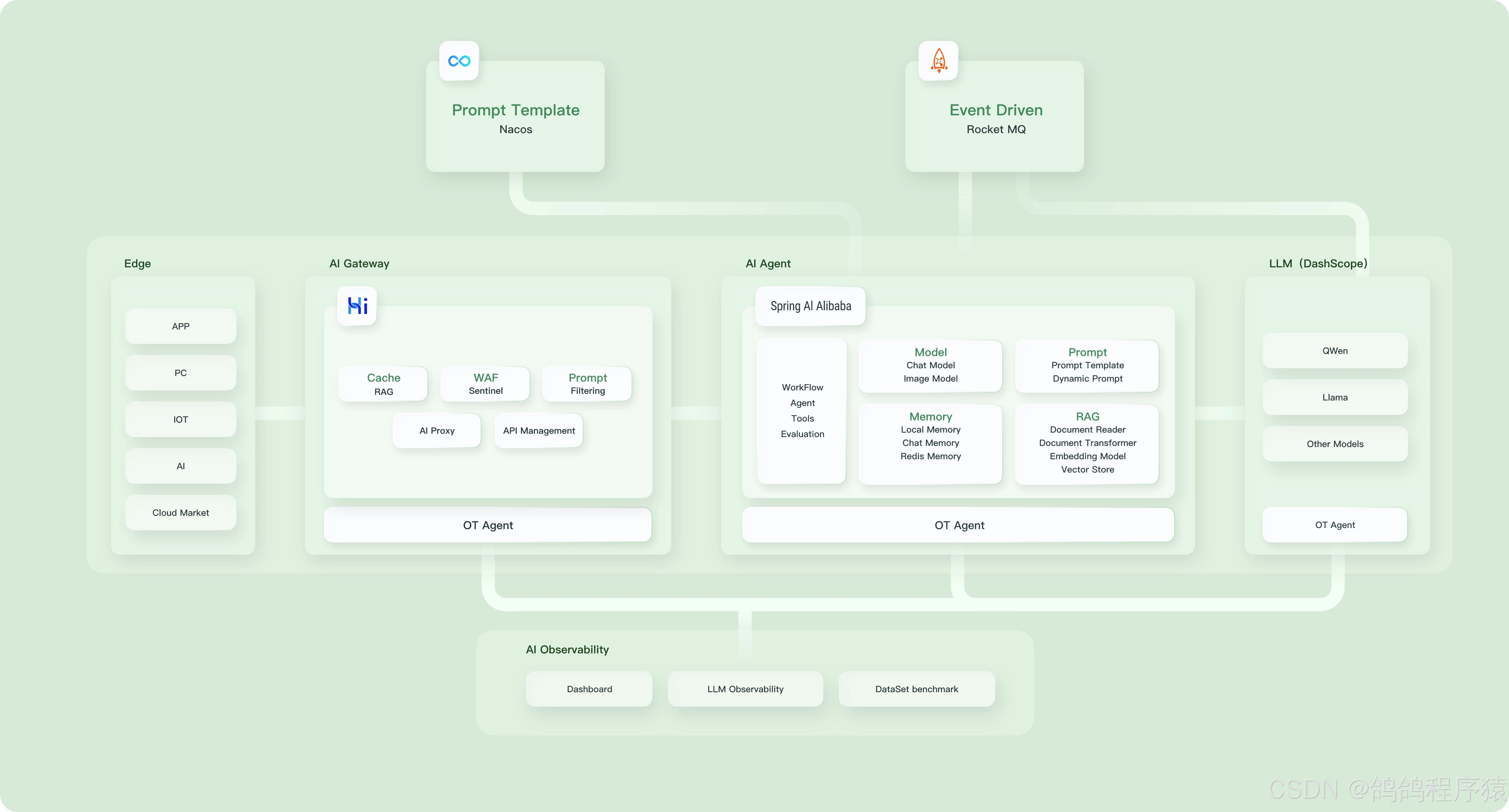
Spring AI Alibaba 作为开发 AI 应用程序的基础框架,定义了以下抽象概念与 API,并提供了 API 与通义系列模型的适配。
- 开发复杂 AI 应用的高阶抽象 Fluent API — ChatClient
- 提供多种大模型服务对接能力,包括主流开源与阿里云通义大模型服务(百炼)等
- 支持的模型类型包括聊天、文生图、音频转录、文生语音等
- 支持同步和流式 API,在保持应用层 API 不变的情况下支持灵活切换底层模型服务,支持特定模型的定制化能力(参数传递)
- 支持 Structured Output,即将 AI 模型输出映射到 POJOs
- 支持矢量数据库存储与检索
- 支持函数调用 Function Calling
- 支持构建 AI Agent 所需要的工具调用和对话内存记忆能力
- 支持 RAG 开发模式,包括离线文档处理如 DocumentReader、Splitter、Embedding、VectorStore 等,支持 Retrieve 检索
二、快速上手
Spring AI Alibaba 实现了与阿⾥云通义模型的完整适配,下面实现基于通义模型服务进⾏智能聊天.
因为SpringAIAlibaba基于SpringBoot3.x开发,因此本地JDK版本要求为17及以上
2.1 申请阿⾥云百炼平台API-KEY
阿⾥云的⼤模型服务平台百炼是⼀站式的⼤模型开发及应⽤构建平台.我们可以借助百炼平台,调⽤⼤模型,与⼤模型对话,实现内容创作,摘要⽣成等.
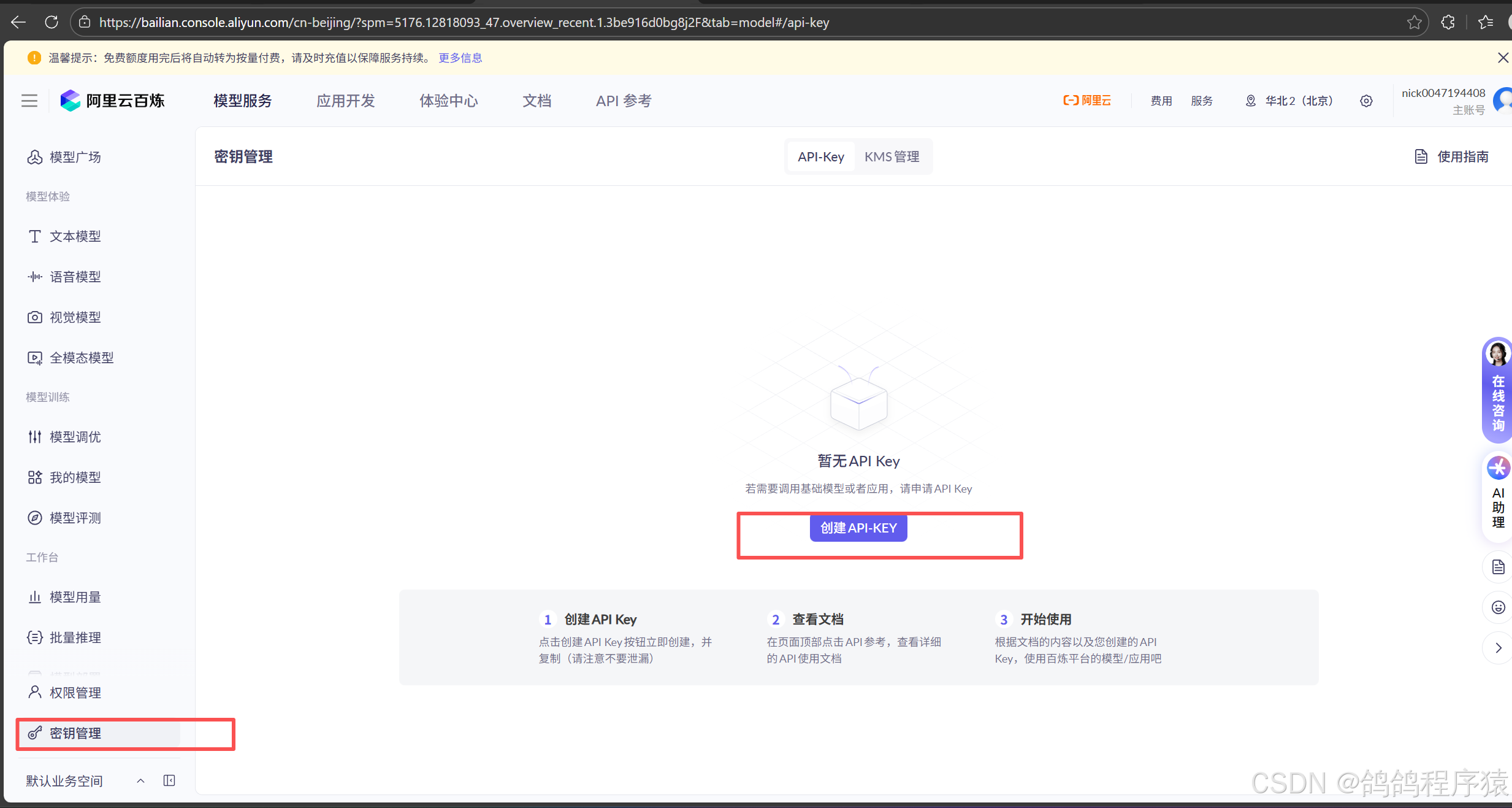
当我们需要通过API或SDK⽅式调⽤⼤模型及应⽤时,需要获取⼀个合法的API-KEY并设AI_DASHSCOPE_API_KEY 环境变量
访问阿⾥云百炼平台https://bailian.console.aliyun.com/登录后,开通模型服务
前往API-Key⻚⾯,在我的⻚签下单击创建我的API-KEY
2.2 项目创建与初始化
型创建一个子项目,初始化依赖配置和启动类:
pom:
    <dependencies>
        <dependency>
            <groupId>org.springframework.boot</groupId>
            <artifactId>spring-boot-starter-web</artifactId>
        </dependency>
        <dependency>
            <groupId>org.springframework.boot</groupId>
            <artifactId>spring-boot-starter-test</artifactId>
        </dependency>
    </dependencies>
    <build>
        <plugins>
            <plugin>
                <groupId>org.springframework.boot</groupId>
                <artifactId>spring-boot-maven-plugin</artifactId>
            </plugin>
        </plugins>
    </build>
启动类:
package com.spring.alibaba;

import org.springframework.boot.SpringApplication;
import org.springframework.boot.autoconfigure.SpringBootApplication;

@SpringBootApplication
public class AlibabaApplication {
    public static void main(String[] args) {
        SpringApplication.run(AlibabaApplication.class, args);
    }
}
2.3 添加依赖与配置
需要在项⽬中添加spring-ai-alibaba-starter依赖,它将通过SpringBoot⾃动装配机制初始化与阿⾥云通义⼤模型通信的ChatClient、ChatModel相关实例
<dependency>
	<groupId>com.alibaba.cloud.ai</groupId>
	<artifactId>spring-ai-alibaba-starter</artifactId>
	<version>1.0.0-M6.1</version>
</dependency>
或者
<dependency>
	<groupId>com.alibaba.cloud.ai</groupId>
	<artifactId>spring-ai-alibaba-starter-dashscope</artifactId>
	<version>1.0.0.2</version>
</dependency>
配置文件:
在配置⽂件中添加阿⾥百炼平台申请的API Key
server:
  port: 8082
spring:
  application:
    name: spring-alibaba-demo
  ai:
    dashscope:
      api-key: sk-XXXXXX
logging:
  pattern:
    console: "%d{HH:mm:ss.SSS} [%thread] %-5level %logger{36} - %msg%n"
    file: "%d{HH:mm:ss.SSS} [%thread] %-5level %logger{36} - %msg%n"
2.4 简单聊天
简单实现接口:
package com.spring.alibaba.controller;

import org.springframework.ai.chat.model.ChatModel;
import org.springframework.web.bind.annotation.RequestMapping;
import org.springframework.web.bind.annotation.RestController;

@RequestMapping("/ali")
@RestController
public class AliController {
    private final ChatModel chatModel;
    public AliController(ChatModel chatModel) {
        this.chatModel = chatModel;
    }
    @RequestMapping("/chat")
    public String chat(String message) {
        return chatModel.call(message);
    }
}
http://127.0.0.1:8082/ali/chat?message=你是谁

三、ChatClient
Spring AI Alibaba 是基于SpringAI进⾏构建的.所以SpringAIChatClient具备的功能,SpringAI Alibaba ⼤多也具备,⽐如流式响应,返回实体类等。
官方文档:https://java2ai.com/docs/dev/tutorials/chat-client/
3.1 普通对话
ChatClient 实例化后,直接调用call方法:
package com.spring.alibaba.controller;

import org.springframework.ai.chat.client.ChatClient;
import org.springframework.web.bind.annotation.RequestMapping;
import org.springframework.web.bind.annotation.RestController;
import reactor.core.publisher.Flux;

@RequestMapping("/chat")
@RestController
public class ChatController {
    private final ChatClient client;
     public ChatController(ChatClient.Builder builder) {
        this.client = builder.build();
    }

     @RequestMapping("/call")
    public String call(String message) {
        return client
                .prompt()
                .user(message)
                .call()
                .content();
    }

}
http://127.0.0.1:8082/chat/call?message=你是谁
3.2 流式响应
调用stream方法即可
    @RequestMapping("/stream")
    public Flux<String> stream(String message) {
        return client
                .prompt()
                .user(message)
                .stream()
                .content();
    }
http://127.0.0.1:8082/chat/stream?message=你是谁
3.3 返回实体类
entity()方法中设置需要返回的实体类。
    record ActorFilms(String actor, List<String> movies) {
    }
    @RequestMapping("/entity")
    public String entity(String actor) {
         ActorFilms actorFilms = client
                .prompt()
                .user(String.format("我想知道%s演员的所有电影",actor))
                .call()
                .entity(ActorFilms.class);
        return actorFilms.toString();
     }
http://127.0.0.1:8082/chat/entity?actor=刘亦菲
3.4 设置默认的SystemMessage
package com.spring.alibaba.config;

import org.springframework.ai.chat.client.ChatClient;
import org.springframework.context.annotation.Bean;
import org.springframework.context.annotation.Configuration;

@Configuration
public class ChatClientConfiguration {
    @Bean
    public ChatClient chatClient(ChatClient.Builder builder) {
        return builder
                .defaultSystem("你是一个IKUN,名字叫做鸽鸽damn")
                .build();
    }
}
http://127.0.0.1:8082/chat/call?message=你是谁
上⾯
builder.defaultSystem() 创建ChatClient的时,还可以选择使⽤模板,有机会在每次调⽤前修改请求参数.
@Configuration
public class ChatClientConfiguration {
    @Bean
    public ChatClient chatClient(ChatClient.Builder builder) {
        return builder
                .defaultSystem("你是一个IKUN,名字叫做{word}")
                .build();
    }
}
     @RequestMapping("word")
    public String word(String message,String word) {
        return client
                .prompt()
                .system(sp->sp.param("word",word))
                .user(message)
                .call()
                .content();
    }
http://127.0.0.1:8082/chat/word?message=你是谁&word=鸽鸽d
3.5 其他默认设置
除了defaultSystem之外,还可以在ChatClient.Builder上指定其他默认提⽰.
- defaultOptions(ChatOptions chatOptions):传⼊ChatOptions类中定义的可移植选项或特定于模型实现的如DashScopeChatOptions选项.
- defaultFunction(String name, String description, java.util.function.Function<I, O> function):name⽤于在⽤⼾⽂本中引⽤该函数,description解释该函数的⽤途并帮助AI模型选择正确的函数以获得准确的响应,参数function是模型将在必要时执⾏的Java函数实例.
- defaultFunctions(String… functionNames):应⽤程序上下⽂中定义的java.util.Function的bean名称.
- defaultUser(String text)、defaultUser(Resource text)、defaultUser(Consumer userSpecConsumer) 这些⽅法允许您定义⽤⼾消息输⼊,Consumer允许您使⽤ lambda指定⽤⼾消息输⼊和任何默认参数.
- defaultAdvisors(RequestResponseAdvisor… advisor):Advisors 允许修改⽤于创建Prompt的数
据,QuestionAnswerAdvisor 实现通过在Prompt中附加与⽤⼾⽂本相关的上下⽂信息来实现 Retrieval Augmented Generation 模式. - defaultAdvisors(Consumer advisorSpecConsumer):此⽅法允许您定义⼀个 Consumer并使⽤AdvisorSpec配置多个Advisor,Advisor可以修改⽤于创建Prompt的最终数据,Consumer允许您指定lambda来添加Advisor例如QuestionAnswerAdvisor
可以在运⾏时使⽤ ChatClient 提供的不带default 前缀的相应⽅法覆盖这些默认值.
- options(ChatOptions chatOptions)
- function(String name, String description, java.util.function.Function<I, O> function)
- functions(String… functionNames)
- user(String text) 、user(Resource text) 、user(Consumer userSpecConsumer)
- advisors(RequestResponseAdvisor… advisor)
- advisors(Consumer advisorSpecConsumer)
四、多模态
官方链接:https://springdoc.cn/spring-ai/api/multimodality.html#google_vignette
4.1 概念
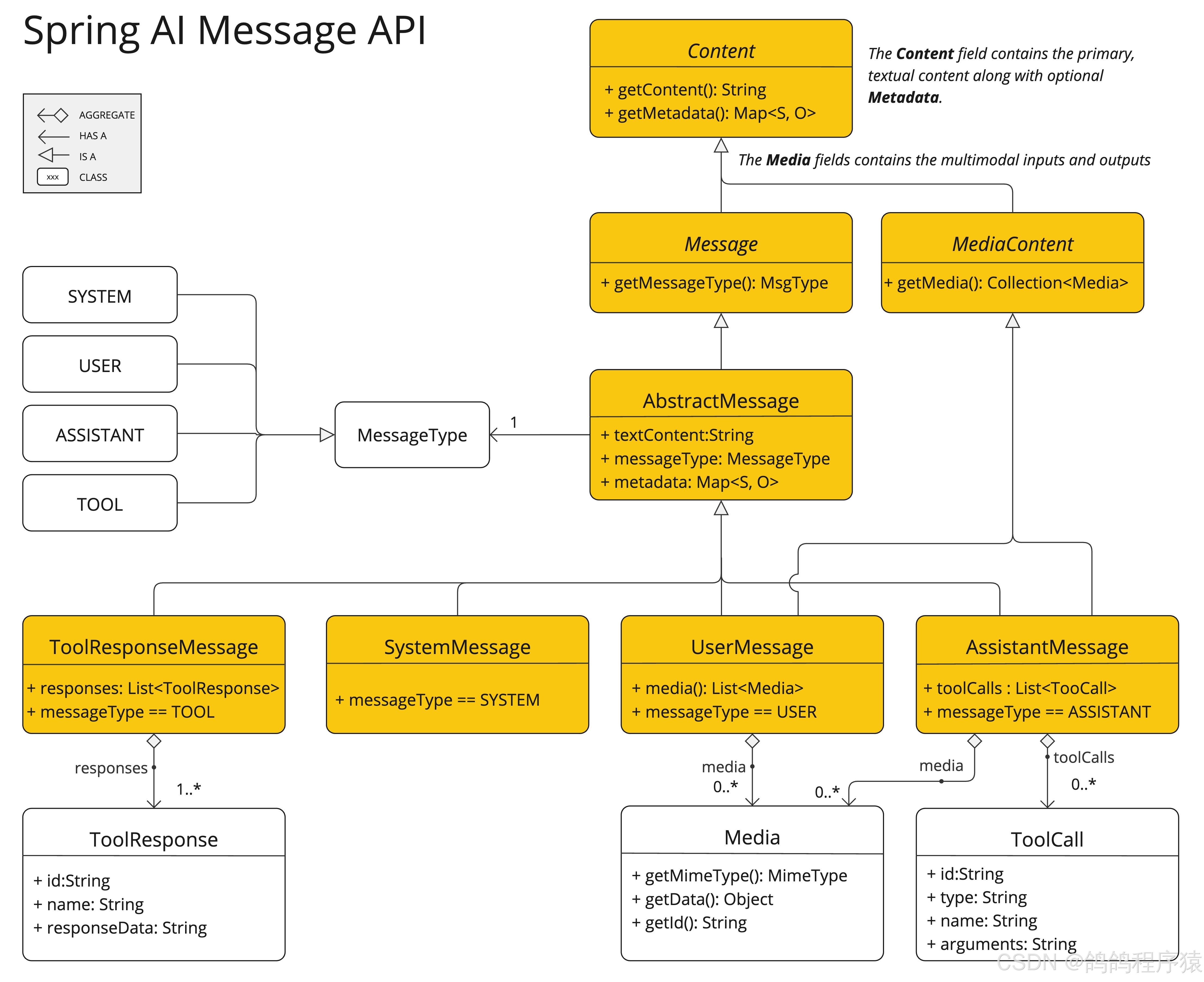
多模态性指模型同时理解和处理⽂本、图像、⾳频及其他数据格式等多源信息的能⼒.
⼈类通过多模态数据输⼊并⾏处理知识.我们的学习⽅式和体验都是多模态的—不只有视觉、听觉或⽂本的单⼀感知.
机器学习往往专注于处理单⼀模态的专⽤模型.例如,我们开发⾳频模型⽤于⽂本转语⾳或语⾳转⽂本任务,开发计算机视觉模型⽤于⽬标检测和分类等任务.
然⽽,新⼀代多模态⼤语⾔模型正在兴起.例如OpenAI的GPT-4o、Google的VertexAIGemini1.5、Anthropic 的Claude3,以及开源模型Llama3.2、LLaVA和BakLLaVA,都能接受⽂本、图像、⾳频和视频等多种输⼊,并通过整合这些输⼊⽣成⽂本响应.
4.2 实现
引入依赖:
<dependency>
	<groupId>com.alibaba.cloud.ai</groupId>
	<artifactId>spring-ai-alibaba-starter-dashscope</artifactId>
	<version>1.0.0.2</version>
</dependency>
配置文件:
spring:
	ai:
		dashscope:
			api-key: sk-XXX
			chat:
				options:
					model: qwen-vl-max-latest #模型名称
					multi-model: true #是否启⽤多模型

读取该图片内容:
package com.spring.alibaba.controller;

import org.springframework.ai.chat.client.ChatClient;
import org.springframework.ai.chat.messages.UserMessage;
import org.springframework.ai.chat.model.ChatResponse;
import org.springframework.ai.chat.prompt.Prompt;
import org.springframework.ai.content.Media;
import org.springframework.util.MimeTypeUtils;
import org.springframework.web.bind.annotation.RequestMapping;
import org.springframework.web.bind.annotation.RestController;

import java.net.URI;
import java.util.List;

@RequestMapping("/multi")
@RestController
public class MultiController {
    private final ChatClient client;
    public MultiController(ChatClient.Builder builder) {
        this.client = builder.build();
    }

    @RequestMapping("/image")
    public String image(String prompt) throws Exception {
        String url =  "https://dashscope.oss-cn-beijing.aliyuncs.com/images/dog_and_girl.jpeg";

        List<Media> mediaList = List.of(new Media(MimeTypeUtils.IMAGE_PNG, new URI(url).toURL().toURI()));
        UserMessage message = UserMessage.builder().text(prompt).media(mediaList).build();

        ChatResponse response = client
                .prompt(new Prompt(message))
                .call()
                .chatResponse();

        return response.getResult().getOutput().getText();

    }
}
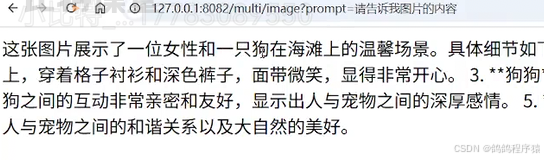
http://127.0.0.1:8082/multi/image?prompt=图片内容是什么
五、图像生成
5.1 上手案例
直接使⽤DashScopeImageModel ⽣成图
package com.spring.alibaba;

import com.alibaba.cloud.ai.dashscope.image.DashScopeImageModel;
import org.junit.jupiter.api.Test;
import org.springframework.ai.image.ImagePrompt;
import org.springframework.ai.image.ImageResponse;
import org.springframework.beans.factory.annotation.Autowired;
import org.springframework.boot.test.context.SpringBootTest;


@SpringBootTest
public class ImageModelTest {
    @Autowired
    private DashScopeImageModel dashScopeImageModel;
    @Test
    void testImageModel() {
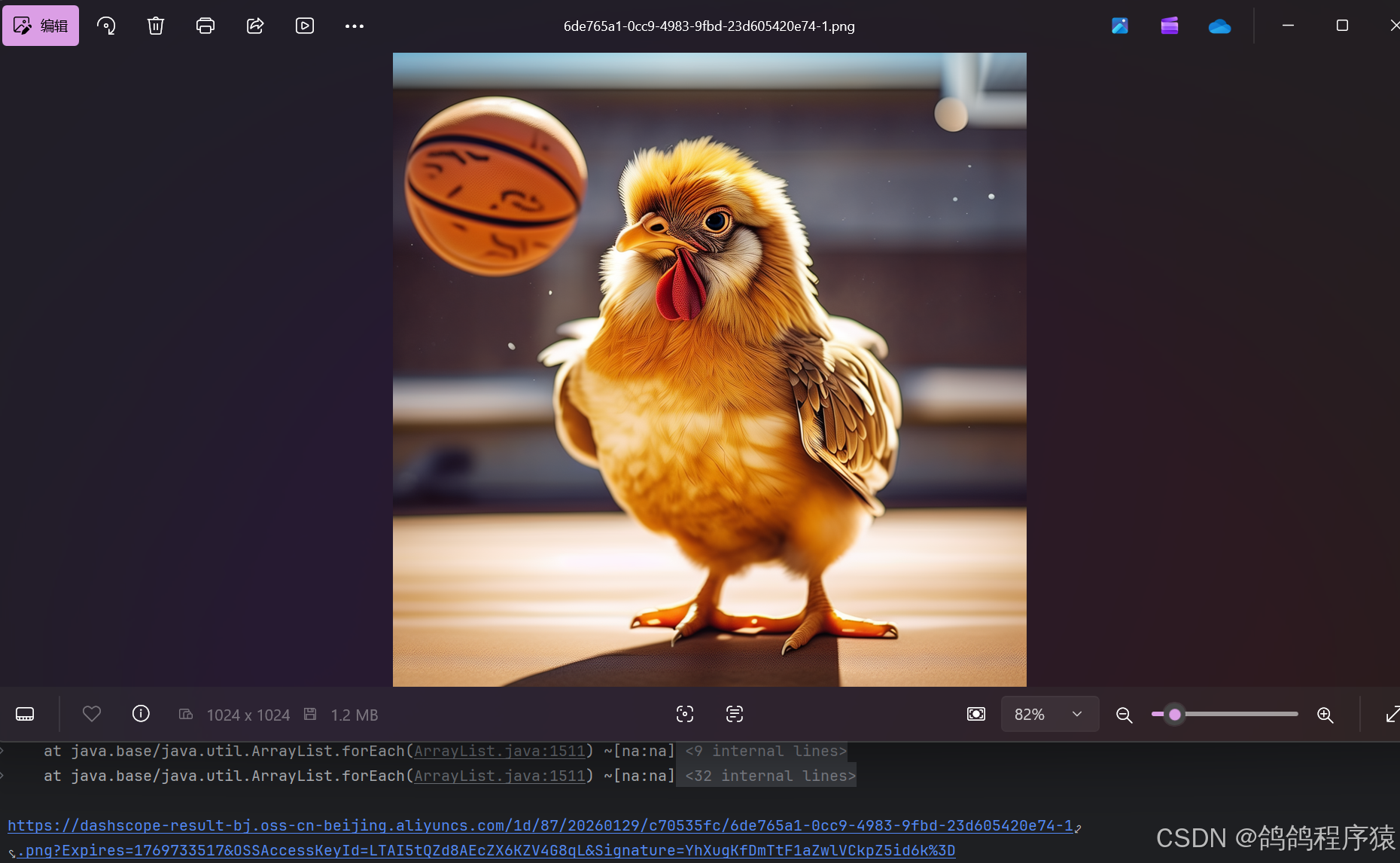
        ImageResponse imageResponse = dashScopeImageModel.call(new ImagePrompt("一只鸡在打篮球"));
        String imageUrl = imageResponse.getResult().getOutput().getUrl();
        System.out.println(imageUrl);
    }
}
5.2 分析
DashScopeImageModel 也是实现了ImageModel接⼝,图像模型的配置在 DashScopeImageAutoConfiguration 定义
//
// Source code recreated from a .class file by IntelliJ IDEA
// (powered by FernFlower decompiler)
//

package com.alibaba.cloud.ai.autoconfigure.dashscope;

import com.alibaba.cloud.ai.dashscope.api.DashScopeApi;
import com.alibaba.cloud.ai.dashscope.api.DashScopeImageApi;
import com.alibaba.cloud.ai.dashscope.image.DashScopeImageModel;
import io.micrometer.observation.ObservationRegistry;
import java.util.Objects;
import org.springframework.ai.image.observation.ImageModelObservationConvention;
import org.springframework.ai.retry.autoconfigure.SpringAiRetryAutoConfiguration;
import org.springframework.beans.factory.ObjectProvider;
import org.springframework.boot.autoconfigure.AutoConfiguration;
import org.springframework.boot.autoconfigure.ImportAutoConfiguration;
import org.springframework.boot.autoconfigure.condition.ConditionalOnClass;
import org.springframework.boot.autoconfigure.condition.ConditionalOnMissingBean;
import org.springframework.boot.autoconfigure.condition.ConditionalOnProperty;
import org.springframework.boot.autoconfigure.web.client.RestClientAutoConfiguration;
import org.springframework.boot.autoconfigure.web.reactive.function.client.WebClientAutoConfiguration;
import org.springframework.boot.context.properties.EnableConfigurationProperties;
import org.springframework.context.annotation.Bean;
import org.springframework.retry.support.RetryTemplate;
import org.springframework.web.client.ResponseErrorHandler;
import org.springframework.web.client.RestClient;
import org.springframework.web.reactive.function.client.WebClient;

@AutoConfiguration(
    after = {RestClientAutoConfiguration.class, WebClientAutoConfiguration.class, SpringAiRetryAutoConfiguration.class}
)
@ConditionalOnClass({DashScopeApi.class})
@ConditionalOnProperty(
    name = {"spring.ai.model.audio.speech"},
    havingValue = "openai",
    matchIfMissing = true
)
@EnableConfigurationProperties({DashScopeConnectionProperties.class, DashScopeImageProperties.class})
@ImportAutoConfiguration(
    classes = {SpringAiRetryAutoConfiguration.class, RestClientAutoConfiguration.class, WebClientAutoConfiguration.class}
)
public class DashScopeImageAutoConfiguration {
    public DashScopeImageAutoConfiguration() {
    }

    @Bean
    @ConditionalOnMissingBean
    public DashScopeImageModel dashScopeImageModel(DashScopeConnectionProperties commonProperties, DashScopeImageProperties imageProperties, RestClient.Builder restClientBuilder, WebClient.Builder webClientBuilder, RetryTemplate retryTemplate, ResponseErrorHandler responseErrorHandler, ObjectProvider<ObservationRegistry> observationRegistry, ObjectProvider<ImageModelObservationConvention> observationConvention) {
        ResolvedConnectionProperties resolved = DashScopeConnectionUtils.resolveConnectionProperties(commonProperties, imageProperties, "image");
        DashScopeImageApi dashScopeImageApi = new DashScopeImageApi(resolved.baseUrl(), resolved.apiKey(), resolved.workspaceId(), restClientBuilder, webClientBuilder, responseErrorHandler);
        DashScopeImageModel dashScopeImageModel = new DashScopeImageModel(dashScopeImageApi, imageProperties.getOptions(), retryTemplate, (ObservationRegistry)observationRegistry.getIfUnique(() -> {
            return ObservationRegistry.NOOP;
        }));
        Objects.requireNonNull(dashScopeImageModel);
        observationConvention.ifAvailable(dashScopeImageModel::setObservationConvention);
        return dashScopeImageModel;
    }
}
从上述代码中可以看到,DashScope图⽚相关属性配置在: DashScopeImageProperties
- 默认模型为: wanx-v1
- 配置项: spring.ai.dashscope.image
- 相关参数配置: DashScopeImageOptions
//
// Source code recreated from a .class file by IntelliJ IDEA
// (powered by FernFlower decompiler)
//

package com.alibaba.cloud.ai.autoconfigure.dashscope;

import com.alibaba.cloud.ai.dashscope.image.DashScopeImageOptions;
import org.springframework.boot.context.properties.ConfigurationProperties;
import org.springframework.boot.context.properties.NestedConfigurationProperty;

@ConfigurationProperties("spring.ai.dashscope.image")
public class DashScopeImageProperties extends DashScopeParentProperties {
    public static final String CONFIG_PREFIX = "spring.ai.dashscope.image";
    public static final String DEFAULT_IMAGES_MODEL_NAME = "wanx-v1";
    private boolean enabled = true;
    @NestedConfigurationProperty
    private DashScopeImageOptions options = DashScopeImageOptions.builder().withModel("wanx-v1").withN(1).build();

    public DashScopeImageProperties() {
    }

    public DashScopeImageOptions getOptions() {
        return this.options;
    }

    public void setOptions(DashScopeImageOptions options) {
        this.options = options;
    }

    public boolean isEnabled() {
        return this.enabled;
    }

    public void setEnabled(boolean enabled) {
        this.enabled = enabled;
    }
}
这样我们就可以在配置文件中通过配置来修改参数:
spring:
  ai:
    dashscope:
      api-key:  ${DASHSCOPE_API_KEY}
      image:
        options:
          model:  wan2.2-t2i-flash
          n : 1
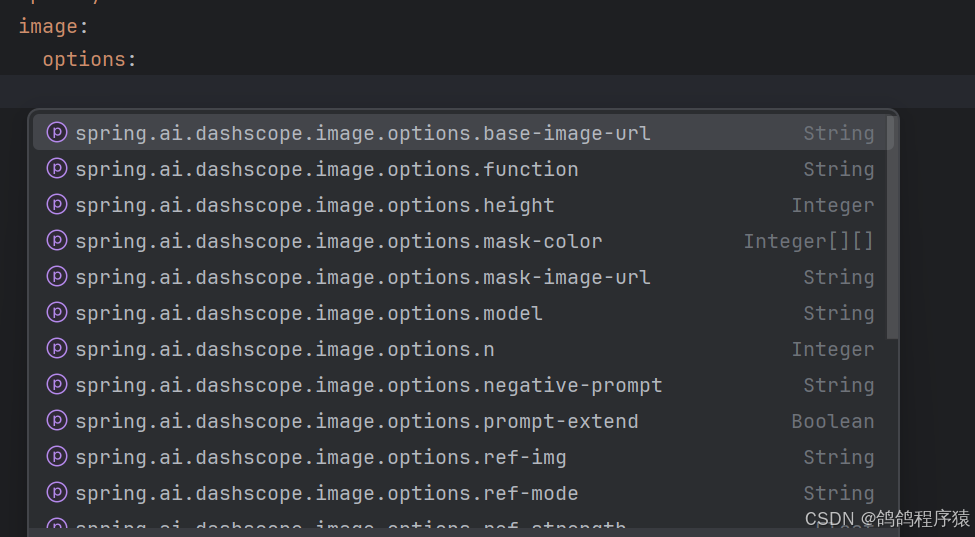
5.3 参数配置
Spring AI Alibaba 实现了ImageOptions接⼝,⽤于定义传递给AI模型的选项。DashScopeImageOptions 接⼝定义如下:
//
// Source code recreated from a .class file by IntelliJ IDEA
// (powered by FernFlower decompiler)
//

package com.alibaba.cloud.ai.dashscope.image;

import com.fasterxml.jackson.annotation.JsonInclude;
import com.fasterxml.jackson.annotation.JsonProperty;
import com.fasterxml.jackson.annotation.JsonInclude.Include;
import java.util.Arrays;
import org.springframework.ai.image.ImageOptions;

@JsonInclude(Include.NON_NULL)
public class DashScopeImageOptions implements ImageOptions {
    @JsonProperty("model")
    private String model;
    @JsonProperty("n")
    private Integer n;
    @JsonProperty("width")
    private Integer width;
    @JsonProperty("height")
    private Integer height;
    @JsonProperty("size")
    private String size;
    @JsonProperty("style")
    private String style;
    @JsonProperty("seed")
    private Integer seed;
    @JsonProperty("ref_img")
    private String refImg;
    @JsonProperty("ref_strength")
    private Float refStrength;
    @JsonProperty("response_format")
    private String responseFormat;
    @JsonProperty("ref_mode")
    private String refMode;
    @JsonProperty("negative_prompt")
    private String negativePrompt;
    @JsonProperty("prompt_extend")
    private Boolean promptExtend;
    @JsonProperty("watermark")
    private Boolean watermark;
    @JsonProperty("function")
    private String function;
    @JsonProperty("base_image_url")
    private String baseImageUrl;
    @JsonProperty("mask_image_url")
    private String maskImageUrl;
    @JsonProperty("sketch_image_url")
    private String sketchImageUrl;
    @JsonProperty("sketch_weight")
    private Integer sketchWeight;
    @JsonProperty("sketch_extraction")
    private Boolean sketchExtraction;
    @JsonProperty("sketch_color")
    private Integer[][] sketchColor;
    @JsonProperty("mask_color")
    private Integer[][] maskColor;

    public DashScopeImageOptions() {
    }

    public Boolean getPromptExtend() {
        return this.promptExtend;
    }

    public void setPromptExtend(Boolean promptExtend) {
        this.promptExtend = promptExtend;
    }

    public Boolean getWatermark() {
        return this.watermark;
    }

    public void setWatermark(Boolean watermark) {
        this.watermark = watermark;
    }

    public String getFunction() {
        return this.function;
    }

    public void setFunction(String function) {
        this.function = function;
    }

    public String getBaseImageUrl() {
        return this.baseImageUrl;
    }

    public void setBaseImageUrl(String baseImageUrl) {
        this.baseImageUrl = baseImageUrl;
    }

    public String getMaskImageUrl() {
        return this.maskImageUrl;
    }

    public void setMaskImageUrl(String maskImageUrl) {
        this.maskImageUrl = maskImageUrl;
    }

    public String getSketchImageUrl() {
        return this.sketchImageUrl;
    }

    public void setSketchImageUrl(String sketchImageUrl) {
        this.sketchImageUrl = sketchImageUrl;
    }

    public Integer getSketchWeight() {
        return this.sketchWeight;
    }

    public void setSketchWeight(Integer sketchWeight) {
        this.sketchWeight = sketchWeight;
    }

    public Boolean getSketchExtraction() {
        return this.sketchExtraction;
    }

    public void setSketchExtraction(Boolean sketchExtraction) {
        this.sketchExtraction = sketchExtraction;
    }

    public Integer[][] getSketchColor() {
        return this.sketchColor;
    }

    public void setSketchColor(Integer[][] sketchColor) {
        this.sketchColor = sketchColor;
    }

    public Integer[][] getMaskColor() {
        return this.maskColor;
    }

    public void setMaskColor(Integer[][] maskColor) {
        this.maskColor = maskColor;
    }

    public static Builder builder() {
        return new Builder();
    }

    public Integer getN() {
        return this.n;
    }

    public void setN(Integer n) {
        this.n = n;
    }

    public String getModel() {
        return this.model;
    }

    public void setModel(String model) {
        this.model = model;
    }

    public Integer getWidth() {
        return this.width;
    }

    public void setWidth(Integer width) {
        this.width = width;
        this.size = this.width + "*" + this.height;
    }

    public Integer getHeight() {
        return this.height;
    }

    public void setHeight(Integer height) {
        this.height = height;
        this.size = this.width + "*" + this.height;
    }

    public String getResponseFormat() {
        return this.responseFormat;
    }

    public String getStyle() {
        return this.style;
    }

    public void setStyle(String style) {
        this.style = style;
    }

    public String getSize() {
        if (this.size != null) {
            return this.size;
        } else {
            return this.width != null && this.height != null ? this.width + "*" + this.height : null;
        }
    }

    /** @deprecated */
    @Deprecated
    public void setSize(String size) {
        this.size = size;
    }

    public Integer getSeed() {
        return this.seed;
    }

    public void setSeed(Integer seed) {
        this.seed = seed;
    }

    public String getRefImg() {
        return this.refImg;
    }

    public void setRefImg(String refImg) {
        this.refImg = refImg;
    }

    public Float getRefStrength() {
        return this.refStrength;
    }

    public void setRefStrength(Float refStrength) {
        this.refStrength = refStrength;
    }

    public String getRefMode() {
        return this.refMode;
    }

    public void setRefMode(String refMode) {
        this.refMode = refMode;
    }

    public String getNegativePrompt() {
        return this.negativePrompt;
    }

    public void setNegativePrompt(String negativePrompt) {
        this.negativePrompt = negativePrompt;
    }

    public String toString() {
        String var10000 = this.model;
        return "DashScopeImageOptions{model='" + var10000 + "', n=" + this.n + ", width=" + this.width + ", height=" + this.height + ", size='" + this.size + "', style='" + this.style + "', seed=" + this.seed + ", refImg='" + this.refImg + "', refStrength=" + this.refStrength + ", refMode='" + this.refMode + "', negativePrompt='" + this.negativePrompt + "', promptExtend=" + this.promptExtend + ", watermark=" + this.watermark + ", function='" + this.function + "', baseImageUrl='" + this.baseImageUrl + "', maskImageUrl='" + this.maskImageUrl + "', sketchImageUrl='" + this.sketchImageUrl + "', sketchWeight=" + this.sketchWeight + ", sketchExtraction=" + this.sketchExtraction + ", sketchColor=" + Arrays.toString(this.sketchColor) + ", maskColor=" + Arrays.toString(this.maskColor) + "}";
    }

    public static class Builder {
        private final DashScopeImageOptions options = new DashScopeImageOptions();

        private Builder() {
        }

        public Builder withN(Integer n) {
            this.options.setN(n);
            return this;
        }

        public Builder withModel(String model) {
            this.options.setModel(model);
            return this;
        }

        public Builder withWidth(Integer width) {
            this.options.setWidth(width);
            return this;
        }

        public Builder withHeight(Integer height) {
            this.options.setHeight(height);
            return this;
        }

        public Builder withStyle(String style) {
            this.options.setStyle(style);
            return this;
        }

        public Builder withSeed(Integer seed) {
            this.options.setSeed(seed);
            return this;
        }

        public Builder withRefImg(String refImg) {
            this.options.setRefImg(refImg);
            return this;
        }

        public Builder withRefStrength(Float refStrength) {
            this.options.setRefStrength(refStrength);
            return this;
        }

        public Builder withRefMode(String refMode) {
            this.options.setRefMode(refMode);
            return this;
        }

        /** @deprecated */
        @Deprecated
        public Builder withSize(String size) {
            this.options.setSize(size);
            return this;
        }

        public Builder withNegativePrompt(String negativePrompt) {
            this.options.setNegativePrompt(negativePrompt);
            return this;
        }

        public Builder withPromptExtend(Boolean promptExtend) {
            this.options.promptExtend = promptExtend;
            return this;
        }

        public Builder withWatermark(Boolean watermark) {
            this.options.watermark = watermark;
            return this;
        }

        public Builder withFunction(String function) {
            this.options.function = function;
            return this;
        }

        public Builder withBaseImageUrl(String baseImageUrl) {
            this.options.baseImageUrl = baseImageUrl;
            return this;
        }

        public Builder withMaskImageUrl(String maskImageUrl) {
            this.options.maskImageUrl = maskImageUrl;
            return this;
        }

        public Builder withSketchImageUrl(String sketchImageUrl) {
            this.options.sketchImageUrl = sketchImageUrl;
            return this;
        }

        public Builder withSketchWeight(Integer sketchWeight) {
            this.options.sketchWeight = sketchWeight;
            return this;
        }

        public Builder withSketchExtraction(Boolean sketchExtraction) {
            this.options.sketchExtraction = sketchExtraction;
            return this;
        }

        public Builder withSketchColor(Integer[][] sketchColor) {
            this.options.sketchColor = sketchColor;
            return this;
        }

        public Builder withMaskColor(Integer[][] maskColor) {
            this.options.maskColor = maskColor;
            return this;
        }

        public Builder withResponseFormat(String responseFormat) {
            this.options.responseFormat = responseFormat;
            return this;
        }

        public DashScopeImageOptions build() {
            return this.options;
        }
    }
}
参数取值与模型有关,下⾯介绍⼏种通⽤的
通义千问:通义千问Qwen-Image⽂⽣图API调⽤⽅法
通义万相V2版:通义万相2.1⽂⽣图V2版API参考
通义万相V1版:[通义万相⽂本⽣成图像API参考](https://help.aliyun.com/zh/model-studio/text-to-image-api-
六、语音合成
6.1 上手案例
将要转的文字作为参数生成 SpeechSynthesisPrompt,将其 作为参数传给模型,直接使⽤DashScopeSpeechSynthesisModel⽣成语音
package com.spring.alibaba;

import com.alibaba.cloud.ai.dashscope.audio.DashScopeSpeechSynthesisModel;
import com.alibaba.cloud.ai.dashscope.audio.synthesis.SpeechSynthesisPrompt;
import com.alibaba.cloud.ai.dashscope.audio.synthesis.SpeechSynthesisResponse;
import org.junit.jupiter.api.Test;
import org.springframework.beans.factory.annotation.Autowired;
import org.springframework.boot.test.context.SpringBootTest;

import java.io.File;
import java.io.FileOutputStream;
import java.io.IOException;
import java.nio.ByteBuffer;

@SpringBootTest
public class AudioModelTest {
    @Autowired
    private DashScopeSpeechSynthesisModel model;
    private final String VOICE= "全名制作人";
    @Test
    public void tts() throws IOException {
        SpeechSynthesisPrompt prompt = new SpeechSynthesisPrompt(VOICE);
        SpeechSynthesisResponse response = model.call(prompt);

        File file = new File( System.getProperty("user.dir") + "/output.mp3");
        try (FileOutputStream fos = new FileOutputStream(file)) {
            ByteBuffer byteBuffer = response.getResult().getOutput().getAudio();
            fos.write(byteBuffer.array());
        }
        catch (IOException e) {
            throw new IOException(e.getMessage());
        }
    }
}
6.2 分析
DashScopeSpeechSynthesisModel是SpringAIAlibaba框架中⽤于表⽰和管理⽂本转语⾳模型的核⼼组件之⼀,它实现了SpeechSynthesisModel.
//
// Source code recreated from a .class file by IntelliJ IDEA
// (powered by FernFlower decompiler)
//

package com.alibaba.cloud.ai.dashscope.audio;

import com.alibaba.cloud.ai.dashscope.api.DashScopeSpeechSynthesisApi;
import com.alibaba.cloud.ai.dashscope.audio.synthesis.SpeechSynthesisMessage;
import com.alibaba.cloud.ai.dashscope.audio.synthesis.SpeechSynthesisModel;
import com.alibaba.cloud.ai.dashscope.audio.synthesis.SpeechSynthesisOptions;
import com.alibaba.cloud.ai.dashscope.audio.synthesis.SpeechSynthesisOutput;
import com.alibaba.cloud.ai.dashscope.audio.synthesis.SpeechSynthesisPrompt;
import com.alibaba.cloud.ai.dashscope.audio.synthesis.SpeechSynthesisResponse;
import com.alibaba.cloud.ai.dashscope.audio.synthesis.SpeechSynthesisResult;
import java.nio.ByteBuffer;
import java.util.UUID;
import org.slf4j.Logger;
import org.slf4j.LoggerFactory;
import org.springframework.ai.model.ModelOptionsUtils;
import org.springframework.ai.retry.RetryUtils;
import org.springframework.retry.support.RetryTemplate;
import reactor.core.publisher.Flux;

public class DashScopeSpeechSynthesisModel implements SpeechSynthesisModel {
    private static final Logger logger = LoggerFactory.getLogger(DashScopeSpeechSynthesisModel.class);
    private final DashScopeSpeechSynthesisApi api;
    private final DashScopeSpeechSynthesisOptions options;
    private final RetryTemplate retryTemplate;

    public DashScopeSpeechSynthesisModel(DashScopeSpeechSynthesisApi api) {
        this(api, DashScopeSpeechSynthesisOptions.builder().model("").build());
    }

    public DashScopeSpeechSynthesisModel(DashScopeSpeechSynthesisApi api, DashScopeSpeechSynthesisOptions options) {
        this(api, options, RetryUtils.DEFAULT_RETRY_TEMPLATE);
    }

    public DashScopeSpeechSynthesisModel(DashScopeSpeechSynthesisApi api, DashScopeSpeechSynthesisOptions options, RetryTemplate retryTemplate) {
        this.api = api;
        this.options = options;
        this.retryTemplate = retryTemplate;
    }

    public SpeechSynthesisResponse call(SpeechSynthesisPrompt prompt) {
        Flux<SpeechSynthesisResponse> flux = this.stream(prompt);
        return (SpeechSynthesisResponse)flux.reduce((resp1, resp2) -> {
            ByteBuffer combinedBuffer = ByteBuffer.allocate(resp1.getResult().getOutput().getAudio().remaining() + resp2.getResult().getOutput().getAudio().remaining());
            combinedBuffer.put(resp1.getResult().getOutput().getAudio());
            combinedBuffer.put(resp2.getResult().getOutput().getAudio());
            combinedBuffer.flip();
            return new SpeechSynthesisResponse(new SpeechSynthesisResult(new SpeechSynthesisOutput(combinedBuffer)));
        }).block();
    }

    public Flux<SpeechSynthesisResponse> stream(SpeechSynthesisPrompt prompt) {
        return (Flux)this.retryTemplate.execute((ctx) -> {
            return this.api.streamOut(this.createRequest(prompt)).map(SpeechSynthesisOutput::new).map(SpeechSynthesisResult::new).map(SpeechSynthesisResponse::new);
        });
    }

    public DashScopeSpeechSynthesisApi.Request createRequest(SpeechSynthesisPrompt prompt) {
        DashScopeSpeechSynthesisOptions options = DashScopeSpeechSynthesisOptions.builder().build();
        if (prompt.getOptions() != null) {
            DashScopeSpeechSynthesisOptions runtimeOptions = (DashScopeSpeechSynthesisOptions)ModelOptionsUtils.copyToTarget(prompt.getOptions(), SpeechSynthesisOptions.class, DashScopeSpeechSynthesisOptions.class);
            options = (DashScopeSpeechSynthesisOptions)ModelOptionsUtils.merge(runtimeOptions, options, DashScopeSpeechSynthesisOptions.class);
        }

        options = (DashScopeSpeechSynthesisOptions)ModelOptionsUtils.merge(options, this.options, DashScopeSpeechSynthesisOptions.class);
        return new DashScopeSpeechSynthesisApi.Request(new DashScopeSpeechSynthesisApi.Request.RequestHeader("run-task", UUID.randomUUID().toString(), "out"), new DashScopeSpeechSynthesisApi.Request.RequestPayload(options.getModel(), "audio", "tts", "SpeechSynthesizer", new DashScopeSpeechSynthesisApi.Request.RequestPayload.RequestPayloadInput(((SpeechSynthesisMessage)prompt.getInstructions().get(0)).getText()), new DashScopeSpeechSynthesisApi.Request.RequestPayload.RequestPayloadParameters(options.getVolume(), options.getRequestTextType().getValue(), options.getVoice(), options.getSampleRate(), options.getSpeed(), options.getResponseFormat().getValue(), options.getPitch(), options.getEnablePhonemeTimestamp(), options.getEnableWordTimestamp())));
    }

    private SpeechSynthesisResponse toResponse(DashScopeSpeechSynthesisApi.Response apiResponse) {
        SpeechSynthesisOutput output = new SpeechSynthesisOutput(apiResponse.getAudio());
        SpeechSynthesisResult result = new SpeechSynthesisResult(output);
        return new SpeechSynthesisResponse(result);
    }

    public static enum DashScopeSpeechModel {
        SAMBERT_ZHICHU_V1("sambert-zhichu-v1"),
        COSYVOICE_V1("cosyvoice-v1");

        private final String model;

        private DashScopeSpeechModel(String model) {
            this.model = model;
        }

        public String getModel() {
            return this.model;
        }
    }
}
语⾳模型相关配置在 DashScopeAudioSpeechAutoConfiguration
//
// Source code recreated from a .class file by IntelliJ IDEA
// (powered by FernFlower decompiler)
//

package com.alibaba.cloud.ai.autoconfigure.dashscope;

import com.alibaba.cloud.ai.dashscope.api.DashScopeApi;
import com.alibaba.cloud.ai.dashscope.api.DashScopeSpeechSynthesisApi;
import com.alibaba.cloud.ai.dashscope.audio.DashScopeSpeechSynthesisModel;
import org.springframework.ai.retry.autoconfigure.SpringAiRetryAutoConfiguration;
import org.springframework.boot.autoconfigure.AutoConfiguration;
import org.springframework.boot.autoconfigure.ImportAutoConfiguration;
import org.springframework.boot.autoconfigure.condition.ConditionalOnClass;
import org.springframework.boot.autoconfigure.condition.ConditionalOnMissingBean;
import org.springframework.boot.autoconfigure.condition.ConditionalOnProperty;
import org.springframework.boot.autoconfigure.web.client.RestClientAutoConfiguration;
import org.springframework.boot.autoconfigure.web.reactive.function.client.WebClientAutoConfiguration;
import org.springframework.boot.context.properties.EnableConfigurationProperties;
import org.springframework.context.annotation.Bean;
import org.springframework.retry.support.RetryTemplate;

@AutoConfiguration(
    after = {RestClientAutoConfiguration.class, WebClientAutoConfiguration.class, SpringAiRetryAutoConfiguration.class}
)
@ConditionalOnClass({DashScopeApi.class})
@ConditionalOnProperty(
    name = {"spring.ai.model.audio.speech"},
    havingValue = "openai",
    matchIfMissing = true
)
@EnableConfigurationProperties({DashScopeConnectionProperties.class, DashScopeAudioSpeechSynthesisProperties.class})
@ImportAutoConfiguration(
    classes = {SpringAiRetryAutoConfiguration.class, RestClientAutoConfiguration.class, WebClientAutoConfiguration.class}
)
public class DashScopeAudioSpeechAutoConfiguration {
    public DashScopeAudioSpeechAutoConfiguration() {
    }

    @Bean
    @ConditionalOnMissingBean
    public DashScopeSpeechSynthesisModel dashScopeSpeechSynthesisModel(RetryTemplate retryTemplate, DashScopeConnectionProperties commonProperties, DashScopeAudioSpeechSynthesisProperties speechProperties) {
        DashScopeSpeechSynthesisApi dashScopeSpeechSynthesisApi = this.dashScopeSpeechSynthesisApi(commonProperties, speechProperties);
        return new DashScopeSpeechSynthesisModel(dashScopeSpeechSynthesisApi, speechProperties.getOptions(), retryTemplate);
    }

    private DashScopeSpeechSynthesisApi dashScopeSpeechSynthesisApi(DashScopeConnectionProperties commonProperties, DashScopeAudioSpeechSynthesisProperties speechSynthesisProperties) {
        ResolvedConnectionProperties resolved = DashScopeConnectionUtils.resolveConnectionProperties(commonProperties, speechSynthesisProperties, "audio.synthesis");
        return new DashScopeSpeechSynthesisApi(resolved.apiKey(), resolved.workspaceId());
    }
}
DashScope⾳频相关属性配置在: DashScopeAudioSpeechSynthesisProperties
//
// Source code recreated from a .class file by IntelliJ IDEA
// (powered by FernFlower decompiler)
//

package com.alibaba.cloud.ai.autoconfigure.dashscope;

import com.alibaba.cloud.ai.dashscope.api.DashScopeSpeechSynthesisApi;
import com.alibaba.cloud.ai.dashscope.api.DashScopeSpeechSynthesisApi.ResponseFormat;
import com.alibaba.cloud.ai.dashscope.audio.DashScopeSpeechSynthesisOptions;
import com.alibaba.cloud.ai.dashscope.audio.DashScopeSpeechSynthesisModel.DashScopeSpeechModel;
import org.springframework.boot.context.properties.ConfigurationProperties;
import org.springframework.boot.context.properties.NestedConfigurationProperty;

@ConfigurationProperties("spring.ai.dashscope.audio.synthesis")
public class DashScopeAudioSpeechSynthesisProperties extends DashScopeParentProperties {
    public static final String CONFIG_PREFIX = "spring.ai.dashscope.audio.synthesis";
    private final String DEFAULT_MODEL;
    private static final Float SPEED = 1.0F;
    private static final String DEFAULT_VOICE = "longhua";
    private final DashScopeSpeechSynthesisApi.ResponseFormat DEFAULT_RESPONSE_FORMAT;
    @NestedConfigurationProperty
    private DashScopeSpeechSynthesisOptions options;

    public DashScopeSpeechSynthesisOptions getOptions() {
        return this.options;
    }

    public void setOptions(DashScopeSpeechSynthesisOptions options) {
        this.options = options;
    }

    public DashScopeAudioSpeechSynthesisProperties() {
        this.DEFAULT_MODEL = DashScopeSpeechModel.SAMBERT_ZHICHU_V1.getModel();
        this.DEFAULT_RESPONSE_FORMAT = ResponseFormat.MP3;
        this.options = DashScopeSpeechSynthesisOptions.builder().model(this.DEFAULT_MODEL).voice("longhua").speed(SPEED).responseFormat(this.DEFAULT_RESPONSE_FORMAT).build();
        super.setBaseUrl("https://dashscope.aliyuncs.com");
    }
}
6.3 参数配置
//
// Source code recreated from a .class file by IntelliJ IDEA
// (powered by FernFlower decompiler)
//

package com.alibaba.cloud.ai.dashscope.audio;

import com.alibaba.cloud.ai.dashscope.api.DashScopeSpeechSynthesisApi;
import com.alibaba.cloud.ai.dashscope.api.DashScopeSpeechSynthesisApi.RequestTextType;
import com.alibaba.cloud.ai.dashscope.api.DashScopeSpeechSynthesisApi.ResponseFormat;
import com.alibaba.cloud.ai.dashscope.audio.synthesis.SpeechSynthesisOptions;
import com.fasterxml.jackson.annotation.JsonInclude;
import com.fasterxml.jackson.annotation.JsonProperty;
import com.fasterxml.jackson.annotation.JsonInclude.Include;

@JsonInclude(Include.NON_NULL)
public class DashScopeSpeechSynthesisOptions implements SpeechSynthesisOptions {
    @JsonProperty("model")
    private String model;
    @JsonProperty("text")
    private String text;
    @JsonProperty("voice")
    private String voice = null;
    @JsonProperty("request_text_type")
    private DashScopeSpeechSynthesisApi.RequestTextType requestTextType;
    @JsonProperty("sample_rate")
    private Integer sampleRate;
    @JsonProperty("volume")
    private Integer volume;
    @JsonProperty("speed")
    private Float speed;
    @JsonProperty("pitch")
    private Double pitch;
    @JsonProperty("enable_word_timestamp")
    private Boolean enableWordTimestamp;
    @JsonProperty("enable_phoneme_timestamp")
    private Boolean enablePhonemeTimestamp;
    @JsonProperty("response_format")
    private DashScopeSpeechSynthesisApi.ResponseFormat responseFormat;

    public DashScopeSpeechSynthesisOptions() {
        this.requestTextType = RequestTextType.PLAIN_TEXT;
        this.sampleRate = 48000;
        this.volume = 50;
        this.speed = 1.0F;
        this.pitch = 1.0;
        this.enableWordTimestamp = false;
        this.enablePhonemeTimestamp = false;
        this.responseFormat = ResponseFormat.MP3;
    }

    public static Builder builder() {
        return new Builder();
    }

    public String getModel() {
        return this.model;
    }

    public void setModel(String model) {
        this.model = model;
    }

    public String getText() {
        return this.text;
    }

    public void setText(String text) {
        this.text = text;
    }

    public Integer getSampleRate() {
        return this.sampleRate;
    }

    public void setSampleRate(Integer sampleRate) {
        this.sampleRate = sampleRate;
    }

    public Integer getVolume() {
        return this.volume;
    }

    public void setVolume(Integer volume) {
        this.volume = volume;
    }

    public Float getSpeed() {
        return this.speed;
    }

    public void setSpeed(Float speed) {
        this.speed = speed;
    }

    public Double getPitch() {
        return this.pitch;
    }

    public void setPitch(Double pitch) {
        this.pitch = pitch;
    }

    public Boolean getEnableWordTimestamp() {
        return this.enableWordTimestamp;
    }

    public Boolean isEnableWordTimestamp() {
        return this.enableWordTimestamp != null && this.enableWordTimestamp;
    }

    public void setEnableWordTimestamp(Boolean enableWordTimestamp) {
        this.enableWordTimestamp = enableWordTimestamp;
    }

    Boolean getEnablePhonemeTimestamp() {
        return this.enablePhonemeTimestamp;
    }

    public Boolean isEnablePhonemeTimestamp() {
        return this.enablePhonemeTimestamp != null && this.enablePhonemeTimestamp;
    }

    public void setEnablePhonemeTimestamp(Boolean enablePhonemeTimestamp) {
        this.enablePhonemeTimestamp = enablePhonemeTimestamp;
    }

    public DashScopeSpeechSynthesisApi.ResponseFormat getResponseFormat() {
        return this.responseFormat;
    }

    public void setResponseFormat(DashScopeSpeechSynthesisApi.ResponseFormat responseFormat) {
        this.responseFormat = responseFormat;
    }

    public DashScopeSpeechSynthesisApi.RequestTextType getRequestTextType() {
        return this.requestTextType;
    }

    public String getVoice() {
        return this.voice;
    }

    public void setVoice(String voice) {
        this.voice = voice;
    }

    public static class Builder {
        private final DashScopeSpeechSynthesisOptions options = new DashScopeSpeechSynthesisOptions();

        public Builder() {
        }

        public Builder model(String model) {
            this.options.model = model;
            return this;
        }

        public Builder test(String text) {
            this.options.text = text;
            return this;
        }

        public Builder voice(String voice) {
            this.options.voice = voice;
            return this;
        }

        public Builder requestText(DashScopeSpeechSynthesisApi.RequestTextType requestTextType) {
            this.options.requestTextType = requestTextType;
            return this;
        }

        public Builder sampleRate(Integer sampleRate) {
            this.options.sampleRate = sampleRate;
            return this;
        }

        public Builder volume(Integer volume) {
            this.options.volume = volume;
            return this;
        }

        public Builder speed(Float speed) {
            this.options.speed = speed;
            return this;
        }

        public Builder responseFormat(DashScopeSpeechSynthesisApi.ResponseFormat format) {
            this.options.responseFormat = format;
            return this;
        }

        public Builder pitch(Double pitch) {
            this.options.pitch = pitch;
            return this;
        }

        public Builder enableWordTimestamp(Boolean enableWordTimestamp) {
            this.options.enableWordTimestamp = enableWordTimestamp;
            return this;
        }

        public Builder enablePhonemeTimestamp(Boolean enablePhonemeTimestamp) {
            this.options.enablePhonemeTimestamp = enablePhonemeTimestamp;
            return this;
        }

        public DashScopeSpeechSynthesisOptions build() {
            return this.options;
        }
    }
}
参数取值与模型有关,下⾯介绍⼏种通⽤的
参考⽂档:语⾳合成(CosyVoice)|语⾳合成(Sambert)
配置文件修改:
spring:
  ai:
    dashscope:
      api-key: sk
      audio:
        synthesis:
          options:
            model:  cosyvoice-v2"
            voice: "longsanshu"
代码修改:
        DashScopeSpeechSynthesisOptions options =
                DashScopeSpeechSynthesisOptions.builder()
                        .model("cosyvoice-v2")
                        .voice("longsanshu")
                        .build();
        SpeechSynthesisPrompt prompt = new SpeechSynthesisPrompt(VOICE,options);
七、语音识别
7.1 上手案例
现在使用spring alibaba有一点问题:https://github.com/alibaba/spring-ai-alibaba/issues/2695,所以这里使⽤DashScopeSDK调⽤模型:https://help.aliyun.com/zh/model-studio/paraformer-recorded-speech-recognition-java-sdk#d93357f8b43vq
package com.spring.alibaba;

import com.alibaba.dashscope.audio.asr.transcription.*;
import com.alibaba.dashscope.common.TaskStatus;
import com.google.gson.*;
import org.junit.jupiter.api.Test;
import org.springframework.boot.test.context.SpringBootTest;

import java.util.Arrays;

@SpringBootTest
public class AudioTranscriptionTest {
    @Test
    void sttDashscope() {
        TranscriptionParam param = TranscriptionParam.builder()
        //若没有将 API Key 配置到环境变量中, 需将 apiKey 替换为⾃⼰的 API Key
                //.apiKey("apikey")
                .model("paraformer-v2")
        // "language_hints"只⽀持 paraformer-v2 模型

                .parameter("language_hints", new String[]{"zh", "en"})
                .fileUrls(
                        Arrays.asList(
                                "https://dashscope.oss-cn beijing.aliyuncs.com/samples/audio/paraformer/hello_world_female2.wav",
                                "https://dashscope.oss-cn beijing.aliyuncs.com/samples/audio/paraformer/hello_world_male2.wav"))
                                        .build();
        try {
            Transcription transcription = new Transcription();
            //提交转写请求

            TranscriptionResult result = transcription.asyncCall(param);
            System.out.println("RequestId: " + result.getRequestId());
            //阻塞等待任务完成并获取结果

                    result = transcription.wait(
                    TranscriptionQueryParam.FromTranscriptionParam(param,
                            result.getTaskId()));
            //打印结果
            System.out.println(new GsonBuilder().setPrettyPrinting().create().toJson(result.getOutput()));
        } catch (Exception e) {
            System.out.println("error: " + e);
        }
    }
}
7.2 分析
八、视频生成
8.1 上手案例
package com.spring.alibaba;

import com.alibaba.dashscope.aigc.videosynthesis.VideoSynthesis;
import com.alibaba.dashscope.aigc.videosynthesis.VideoSynthesisParam;
import com.alibaba.dashscope.aigc.videosynthesis.VideoSynthesisResult;
import com.alibaba.dashscope.exception.ApiException;
import com.alibaba.dashscope.exception.InputRequiredException;
import com.alibaba.dashscope.exception.NoApiKeyException;
import com.alibaba.dashscope.utils.Constants;
import com.alibaba.dashscope.utils.JsonUtils;
import org.junit.jupiter.api.Test;
import org.springframework.boot.test.context.SpringBootTest;

import java.util.HashMap;
import java.util.Map;

@SpringBootTest
public class VideoModelTest {
    static {
        // 以下为北京地域url,若使用新加坡地域的模型,需将url替换为:https://dashscope-intl.aliyuncs.com/api/v1
        Constants.baseHttpApiUrl = "https://dashscope.aliyuncs.com/api/v1";
    }

    // 若没有配置环境变量,请用百炼API Key将下行替换为:api_key="sk-xxx"
    // 新加坡和北京地域的API Key不同。获取API Key:https://www.alibabacloud.com/help/zh/model-studio/get-api-key
    public static String api_key="sk-xx";

    /**
     * Create a video compositing task and wait for the task to complete.
     */
    @Test
    public  void text2Video() throws ApiException, NoApiKeyException, InputRequiredException {
        VideoSynthesis vs = new VideoSynthesis();
        Map<String, Object> parameters = new HashMap<>();
        parameters.put("prompt_extend", true);
        parameters.put("watermark", false);
        parameters.put("seed", 12345);

        VideoSynthesisParam param =
                VideoSynthesisParam.builder()
                        .apiKey(api_key)
                        .model("wan2.6-t2v")
                        .prompt("一幅史诗级可爱的场景。一只小巧可爱的卡通小猫将军,身穿细节精致的金色盔甲,头戴一个稍大的头盔,勇敢地站在悬崖上。他骑着一匹虽小但英勇的战马,说:”青海长云暗雪山,孤城遥望玉门关。黄沙百战穿金甲,不破楼兰终不还。“。悬崖下方,一支由老鼠组成的、数量庞大、无穷无尽的军队正带着临时制作的武器向前冲锋。这是一个戏剧性的、大规模的战斗场景,灵感来自中国古代的战争史诗。远处的雪山上空,天空乌云密布。整体氛围是“可爱”与“霸气”的搞笑和史诗般的融合。")
                        .audioUrl("https://help-static-aliyun-doc.aliyuncs.com/file-manage-files/zh-CN/20250923/hbiayh/%E4%BB%8E%E5%86%9B%E8%A1%8C.mp3")
                        .negativePrompt("")
                        .size("1280*720")
                        .duration(10)
                        .parameters(parameters)
                        .build();
        System.out.println("please wait...");
        VideoSynthesisResult result = vs.call(param);
        System.out.println(JsonUtils.toJson(result));
    }
}
8.2 分析

AtomGit 是由开放原子开源基金会联合 CSDN 等生态伙伴共同推出的新一代开源与人工智能协作平台。平台坚持“开放、中立、公益”的理念,把代码托管、模型共享、数据集托管、智能体开发体验和算力服务整合在一起,为开发者提供从开发、训练到部署的一站式体验。
更多推荐

 7
7 0
0- 0


 已为社区贡献6条内容

所有评论(0)